
The Box connector lets your AI agent act in each user's Box account. Each user signs in to Box once, and Scalekit stores and refreshes their tokens, so your agent never handles credentials. It comes with 102 tools.
- Tools
- 102
- What they doRead · write · destructive
- 49 · 35 · 1849 read35 write18 destructive
- Users sign in with
- OAuth
- OAuth app
- Scalekit's or your own
What you can do
- Manage files and folders: upload, copy, move, rename, trash, and restore files and folders
- Search content: find files, folders, and web links, and list recent items and folder contents
- Share and collaborate: grant user or group access, create shared links, and add comments on files
- Ask Box AI: ask questions about files and extract structured data using metadata templates or prompts
- Send for signature: create, track, and cancel Box Sign requests for one or more files
- Assign tasks and apply metadata: create file tasks, assign them to users, and apply metadata to files
Setup
Install the SDK
Terminal window npm install @scalekit-sdk/node dotenvTerminal window pip install scalekit-sdk-python python-dotenvSet your credentials
Add your Scalekit credentials to your
.envfile. Find values in app.scalekit.com > Developers > API Credentials..env SCALEKIT_ENVIRONMENT_URL=<your-environment-url>SCALEKIT_CLIENT_ID=<your-client-id>SCALEKIT_CLIENT_SECRET=<your-client-secret>Create the Box connection
In AgentKit > Connections, create a Box connection. The name you give it is the
connection_nameyour code passes. See Configure connections.Scalekit credentials are available for Box, so you don't need to register an OAuth app. To show your own app on the consent screen, use your own credentials instead.
Use your own OAuth app
Connect Box to Scalekit so your agent can manage files, folders, users, tasks, and more on behalf of your users. Box uses OAuth 2.0 — users authorize access through Box’s login flow, and Scalekit handles token storage and refresh automatically.
You will need:
- A Box developer account (free at developer.box.com)
- Your Box OAuth app’s Client ID and Client Secret
- The redirect URI from Scalekit to paste into Box
-
Create a Box OAuth app
-
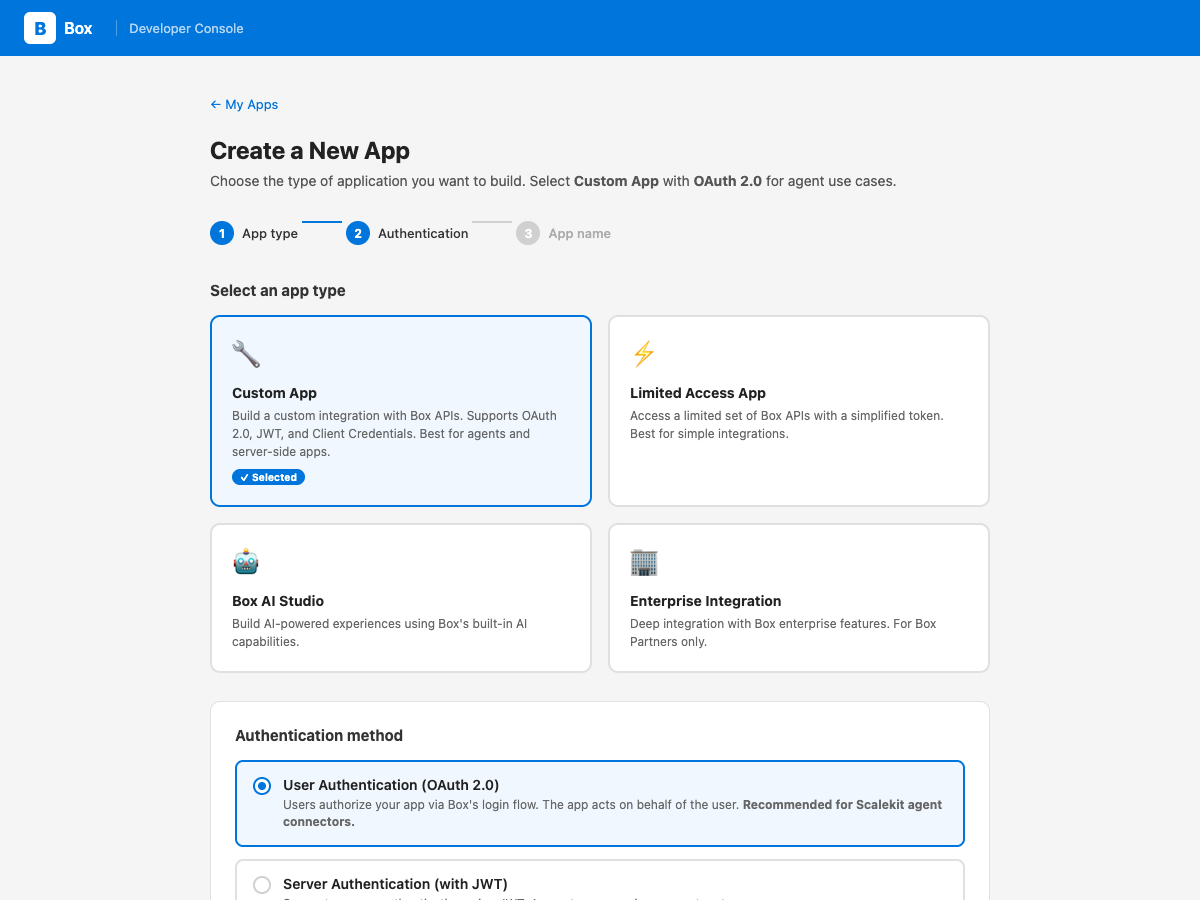
Go to the Box Developer Console and click Create New App.
-
Select Custom App as the app type.
-
Under authentication method, choose User Authentication (OAuth 2.0). This lets your agent act on behalf of each user who authorizes access.
-
Enter an app name (e.g. “My Agent App”) and click Create App.
-
-
Copy the redirect URI from Scalekit
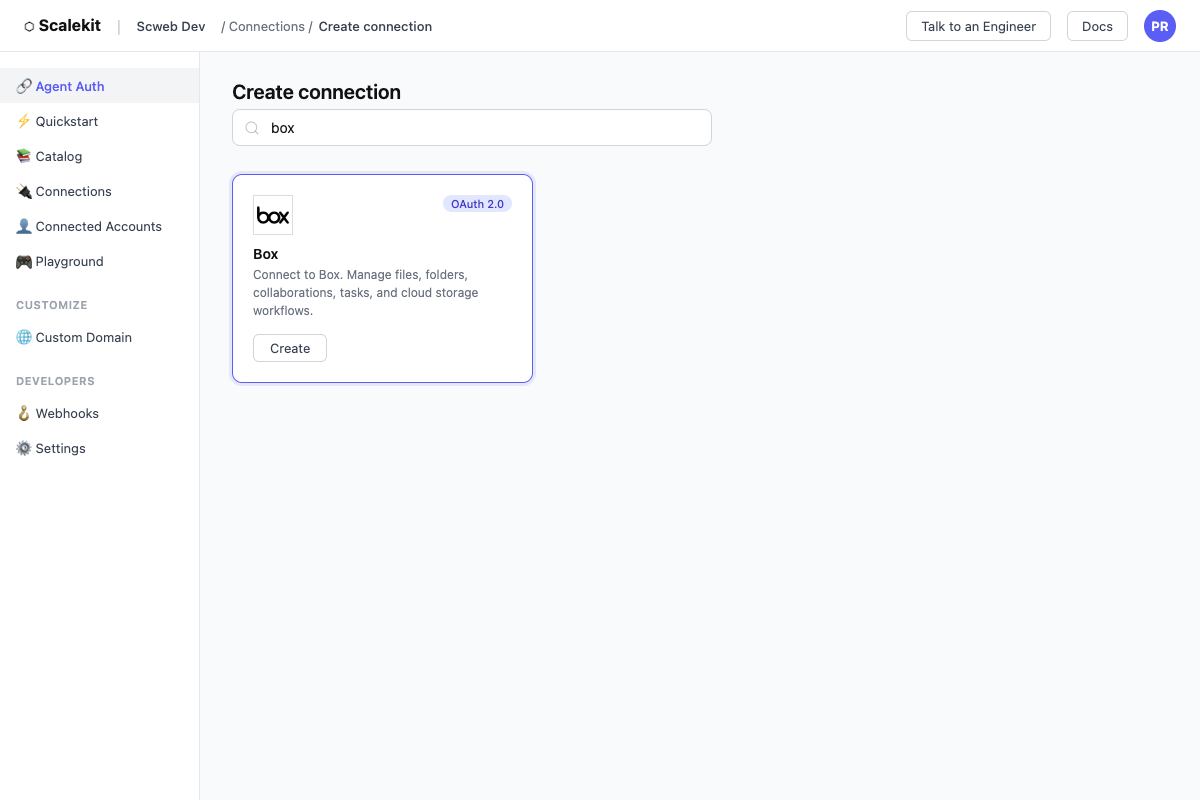
- In Scalekit dashboard, go to AgentKit > Connections > Create Connection.
- Find Box and click Create.
- Click Use your own credentials and copy the redirect URI. It looks like:
https://<env>.scalekit.cloud/sso/v1/oauth/<conn_id>/callback
-
Add the redirect URI to Box
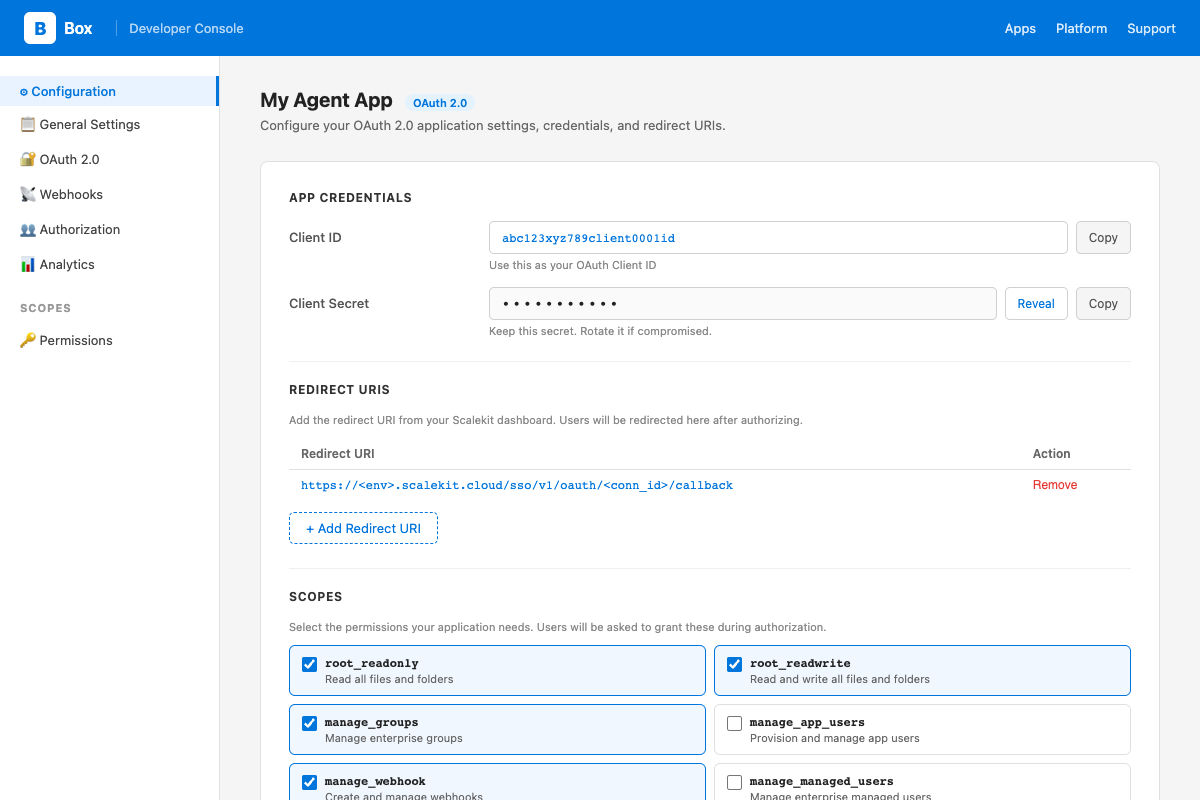
- In the Box Developer Console, open your app and go to the Configuration tab.
- Under OAuth 2.0 Redirect URI, paste the redirect URI from Scalekit and click Save Changes.
-
Select scopes for your app
Still on the Configuration tab in Box, scroll down to Application Scopes and enable the permissions your agent needs:
Scope Required for root_readonlyReading files and folders root_readwriteCreating, updating, and deleting files/folders manage_groupsCreating and managing groups manage_webhookCreating and managing webhooks manage_managed_usersCreating and managing enterprise users manage_enterprise_propertiesAccessing enterprise events Click Save Changes after selecting scopes.
-
Add credentials in Scalekit
- In the Box Developer Console, open your app → Configuration tab.
- Copy your Client ID and Client Secret.
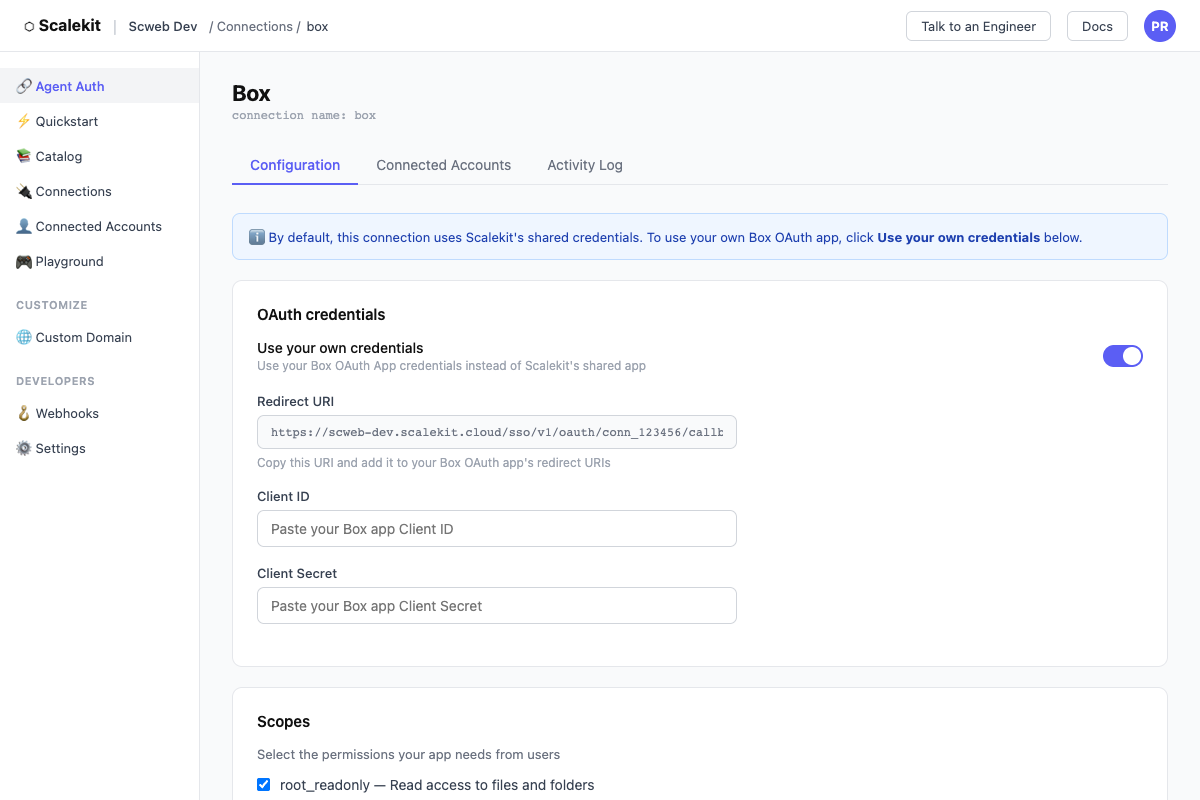
- In Scalekit dashboard, go to AgentKit > Connections, open the Box connection you created, and enter:
- Client ID — from Box
- Client Secret — from Box
- Scopes — select the same scopes you enabled in Box (e.g.
root_readonly,root_readwrite)
- Click Save.
-
Add a connected account for each user
Each user who authorizes Box access becomes a connected account. During authorization, Box will show your app name and request the scopes you configured.
Via dashboard (for testing)
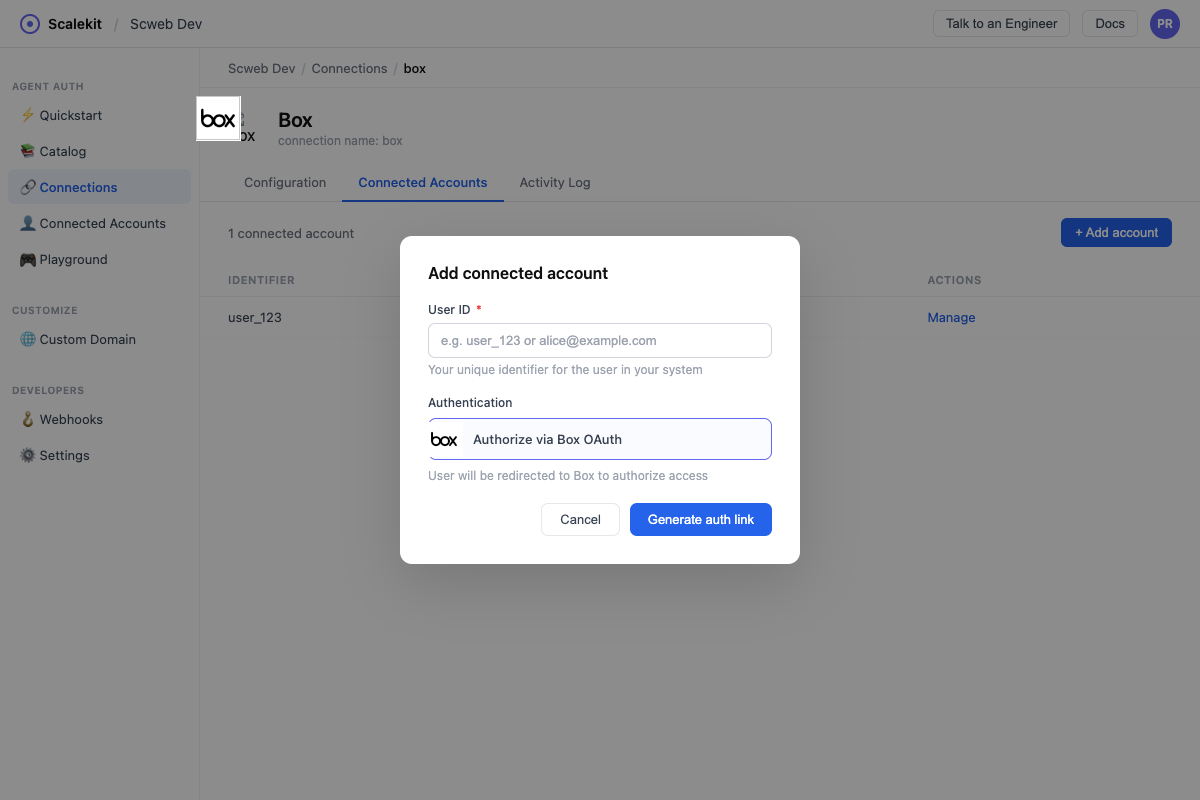
- In Scalekit dashboard, go to your Box connection → Connected Accounts → Add Account.
- Enter a User ID (your internal identifier for this user, e.g.
user_123). - Click Add — you will be redirected to Box’s OAuth consent screen to authorize.
Via API (for production)
In production, generate an authorization link and redirect your user to it:
const { link } = await scalekit.actions.getAuthorizationLink({connectionName: 'box',identifier: 'user_123',});// Redirect your user to `link`link_response = scalekit_client.actions.get_authorization_link(connection_name="box",identifier="user_123",)# Redirect your user to link_response.linkAfter the user authorizes, Scalekit stores their tokens. Your agent can then call Box tools on their behalf without any further redirects.
Authorize a user and make your first call
quickstart.mts import { ScalekitClient } from '@scalekit-sdk/node'import 'dotenv/config'import { createInterface } from 'node:readline/promises'const scalekit = new ScalekitClient(process.env.SCALEKIT_ENVIRONMENT_URL,process.env.SCALEKIT_CLIENT_ID,process.env.SCALEKIT_CLIENT_SECRET,)const actions = scalekit.actionsconst connector = 'box'const identifier = 'user_123'// Generate an authorization link for the userconst { link } = await actions.getAuthorizationLink({ connectionName: connector, identifier })console.log('Authorize Box:', link)const rl = createInterface({ input: process.stdin, output: process.stdout })await rl.question('Press Enter after authorizing...')rl.close()// Make your first callconst result = await actions.executeTool({connector,identifier,toolName: 'box_collections_list',toolInput: {},})console.log(result)Terminal window npx tsx quickstart.mtsquickstart.py import osfrom scalekit import ScalekitClientfrom dotenv import load_dotenvload_dotenv()scalekit_client = ScalekitClient(env_url=os.getenv("SCALEKIT_ENVIRONMENT_URL"),client_id=os.getenv("SCALEKIT_CLIENT_ID"),client_secret=os.getenv("SCALEKIT_CLIENT_SECRET"),)actions = scalekit_client.actionsconnection_name = "box"identifier = "user_123"# Generate an authorization link for the userlink_response = actions.get_authorization_link(connection_name=connection_name,identifier=identifier,)print("Authorize Box:", link_response.link)input("Press Enter after authorizing...")# Make your first callresult = actions.execute_tool(tool_input={},tool_name="box_collections_list",connection_name=connection_name,identifier=identifier,)print(result)Terminal window python quickstart.pyEach user signs in once. See Authorize a user for the full flow and statuses.
Tools
Pass the exact name toexecute_toolbox_ai_askSends a natural-language question plus up to 25 Box files as context to a supported LLM and returns an answer, optionally with citations and prior dialogue history for follow-up questions.Read-onlyAI Ask
Sends a natural-language question plus up to 25 Box files as context to a supported LLM and returns an answer, optionally with citations and prior dialogue history for follow-up questions.
Inputs
itemsstringrequired- JSON array of 1-25 Box files to use as context, each with a unique file ID. Example: [{"id": "12345", "type": "file"}]
modestringrequired- Whether the question is about a single item or multiple items. If 'single_item_qa', the items list must contain exactly one item.one of
multiple_item_qasingle_item_qa promptstringrequired- The question to ask about the given items. Max 10000 characters.
dialogue_historystring- JSON array of previous question/answer turns, to give the LLM conversational context for a follow-up question.
include_citationsboolean- Whether to include citations (the specific file passages the answer is based on) in the response.
box_ai_extractSends a freeform extraction prompt plus Box files to an LLM and returns extracted data as key-value pairs, without needing a predefined metadata template.Read-onlyAI Extract
Sends a freeform extraction prompt plus Box files to an LLM and returns extracted data as key-value pairs, without needing a predefined metadata template. Use AI Extract Structured instead when you have a metadata template or a fixed field schema.
Inputs
itemsstringrequired- JSON array of 1-25 Box files to extract data from, each with a unique file ID. Example: [{"id": "12345", "type": "file"}]
promptstringrequired- Instructions telling the LLM what data to extract, e.g. a list of fields to pull out. Can be plain text or an XML/JSON schema. Max 10000 characters.
box_ai_extract_structuredExtracts structured metadata from Box files using a metadata template or an explicit typed field list, returning key-value pairs matching that schema.Read-onlyAI Extract Structured
Extracts structured metadata from Box files using a metadata template or an explicit typed field list, returning key-value pairs matching that schema. Provide either metadata_template_key (with metadata_template_scope) or fields, but not both.
Inputs
itemsstringrequired- JSON array of 1-25 Box files to extract data from, each with a unique file ID. Example: [{"id": "12345", "type": "file"}]
fieldsstring- JSON array of field definitions to extract, used instead of a metadata template. Each field needs a unique 'key' and a 'type' (string, float, date, enum, or multiSelect). Mutually exclusive with metadata_template_key.
include_confidence_scoreboolean- Whether to include a confidence score for each extracted field in the response.
metadata_template_keystring- The key of an existing Box metadata template to extract fields for. Provide metadata_template_scope alongside this. Mutually exclusive with 'fields'.
metadata_template_scopestring- The scope of the metadata template: 'global' or an enterprise scope like 'enterprise_12345'. Required when metadata_template_key is set.
box_collaboration_getRetrieves details of a specific collaboration.Read-onlyGet Collaboration
Retrieves details of a specific collaboration.
Inputs
collaboration_idstringrequired- ID of the collaboration.
fieldsstring- Comma-separated list of fields to return.
box_collection_items_listRetrieves the items in a collection (e.g.Read-onlyList Collection Items
Retrieves the items in a collection (e.g. Favorites).
Inputs
collection_idstringrequired- ID of the collection.
fieldsstring- Comma-separated list of fields to return.
limitinteger- Max results.
offsetinteger- Pagination offset.
box_collections_listRetrieves all collections (e.g.Read-onlyList Collections
Retrieves all collections (e.g. Favorites) for the user.
Inputs
fieldsstring- Comma-separated list of fields to return.
limitinteger- Max results.
offsetinteger- Pagination offset.
box_comment_getRetrieves a comment.Read-onlyGet Comment
Retrieves a comment.
Inputs
comment_idstringrequired- ID of the comment.
fieldsstring- Comma-separated list of fields to return.
box_events_listRetrieves events from the event stream.Read-onlyList Events
Retrieves events from the event stream.
Inputs
created_afterstring- Return events after this date (ISO 8601).
created_beforestring- Return events before this date (ISO 8601).
event_typestring- Comma-separated list of event types to filter.
limitinteger- Max events to return.
stream_positionstring- Pagination position from a previous response.
stream_typestring- Event stream type: all, changes, sync, or admin_logs.
box_file_collaborations_listRetrieves all collaborations on a file.Read-onlyList File Collaborations
Retrieves all collaborations on a file.
Inputs
file_idstringrequired- ID of the file.
fieldsstring- Comma-separated list of fields to return.
box_file_comments_listRetrieves all comments on a file.Read-onlyList File Comments
Retrieves all comments on a file.
Inputs
file_idstringrequired- ID of the file.
fieldsstring- Comma-separated list of fields to return.
box_file_getRetrieves detailed information about a file.Read-onlyGet File
Retrieves detailed information about a file.
Inputs
file_idstringrequired- ID of the file.
fieldsstring- Comma-separated list of fields to return.
box_file_metadata_getRetrieves a specific metadata instance on a file.Read-onlyGet File Metadata Instance
Retrieves a specific metadata instance on a file.
Inputs
file_idstringrequired- ID of the file.
scopestringrequired- Scope: global or enterprise.
template_keystringrequired- Metadata template key.
box_file_metadata_listRetrieves all metadata instances attached to a file.Read-onlyList File Metadata
Retrieves all metadata instances attached to a file.
Inputs
file_idstringrequired- ID of the file.
box_file_representations_getRetrieves available representations for a file, such as thumbnails, PDFs, or extracted text.Read-onlyGet File Representations
Retrieves available representations for a file, such as thumbnails, PDFs, or extracted text. Use the x_rep_hints parameter to request specific formats.
Inputs
file_idstringrequired- ID of the file.
x_rep_hintsstringrequired- Hints for which representations to generate, e.g. [pdf][extracted_text][jpg?dimensions=320x320].
box_file_tasks_listRetrieves all tasks associated with a file.Read-onlyList File Tasks
Retrieves all tasks associated with a file.
Inputs
file_idstringrequired- ID of the file.
box_file_thumbnail_getRetrieves a thumbnail image for a file.Read-onlyGet File Thumbnail
Retrieves a thumbnail image for a file.
Inputs
extensionstringrequired- Thumbnail format: jpg or png.
file_idstringrequired- ID of the file.
min_heightinteger- Minimum height of the thumbnail in pixels.
min_widthinteger- Minimum width of the thumbnail in pixels.
box_file_version_retention_getRetrieve a single file version retention record by ID, showing the file version it locks, the policy that created it, and when its retention period ends.Read-onlyGet File Version Retention
Retrieve a single file version retention record by ID, showing the file version it locks, the policy that created it, and when its retention period ends.
Inputs
file_version_retention_idstringrequired- ID of the file version retention record to retrieve.
box_file_version_retentions_listList the file version retention records showing which specific file versions are currently locked under a retention policy, and when their retention period will end.Read-onlyList File Version Retentions
List the file version retention records showing which specific file versions are currently locked under a retention policy, and when their retention period will end.
Inputs
disposition_actionstring- Filter by what happens when retention ends: permanently_delete or remove_retention.one of
permanently_deleteremove_retention disposition_afterstring- Filter to retentions whose disposition date is after this timestamp (ISO 8601).
disposition_beforestring- Filter to retentions whose disposition date is before this timestamp (ISO 8601).
file_idstring- Filter to retentions on this file ID.
file_version_idstring- Filter to the retention on this specific file version ID.
policy_idstring- Filter to retentions created by this retention policy ID.
box_file_versions_listRetrieves all previous versions of a file.Read-onlyList File Versions
Retrieves all previous versions of a file.
Inputs
file_idstringrequired- ID of the file.
box_folder_collaborations_listRetrieves all collaborations on a folder.Read-onlyList Folder Collaborations
Retrieves all collaborations on a folder.
Inputs
folder_idstringrequired- ID of the folder.
fieldsstring- Comma-separated list of fields to return.
box_folder_getRetrieves a folder's details and its items.Read-onlyGet Folder
Retrieves a folder's details and its items.
Inputs
folder_idstringrequired- ID of the folder. Use '0' for root.
directionstring- Sort direction: ASC or DESC.
fieldsstring- Comma-separated list of fields to return.
limitinteger- Max items to return (max 1000).
offsetinteger- Pagination offset.
sortstring- Sort order: id, name, date, or size.
box_folder_items_listRetrieves a paginated list of items in a folder.Read-onlyList Folder Items
Retrieves a paginated list of items in a folder.
Inputs
folder_idstringrequired- ID of the folder. Use '0' for root.
directionstring- ASC or DESC.
fieldsstring- Comma-separated list of fields to return.
limitinteger- Max items to return (max 1000).
offsetinteger- Pagination offset.
sortstring- Sort field: id, name, date, or size.
box_folder_metadata_listRetrieves all metadata instances on a folder.Read-onlyList Folder Metadata
Retrieves all metadata instances on a folder.
Inputs
folder_idstringrequired- ID of the folder.
box_group_getRetrieves information about a group.Read-onlyGet Group
Retrieves information about a group.
Inputs
group_idstringrequired- ID of the group.
fieldsstring- Comma-separated list of fields to return.
box_group_members_listRetrieves all members of a group.Read-onlyList Group Members
Retrieves all members of a group.
Inputs
group_idstringrequired- ID of the group.
limitinteger- Max results.
offsetinteger- Pagination offset.
box_group_membership_getRetrieves a specific group membership.Read-onlyGet Group Membership
Retrieves a specific group membership.
Inputs
group_membership_idstringrequired- ID of the group membership.
fieldsstring- Comma-separated list of fields to return.
box_groups_listRetrieves all groups in the enterprise.Read-onlyList Groups
Retrieves all groups in the enterprise.
Inputs
fieldsstring- Comma-separated list of fields to return.
filter_termstring- Filter groups by name.
limitinteger- Max results.
offsetinteger- Pagination offset.
box_metadata_template_getRetrieves a metadata template schema.Read-onlyGet Metadata Template
Retrieves a metadata template schema.
Inputs
scopestringrequired- Scope of the template: global or enterprise.
template_keystringrequired- Key of the metadata template.
box_metadata_templates_listRetrieves all metadata templates for the enterprise.Read-onlyList Metadata Templates
Retrieves all metadata templates for the enterprise.
Inputs
limitinteger- Max results.
markerstring- Pagination marker.
box_recent_items_listRetrieves files and folders accessed recently.Read-onlyList Recent Items
Retrieves files and folders accessed recently.
Inputs
fieldsstring- Comma-separated list of fields to return.
limitinteger- Max results.
markerstring- Pagination marker.
box_retention_policies_listList the retention policies configured for the enterprise.Read-onlyList Retention Policies
List the retention policies configured for the enterprise. Filter by name prefix, policy type, or the user who created the policy.
Inputs
created_by_user_idstring- Filter results to retention policies created by this user ID.
limitinteger- Max results per page (max 1000).
markerstring- Pagination marker from a previous response's next_marker.
policy_namestring- Case-sensitive prefix to filter retention policies by name.
policy_typestring- Filter by policy type: finite or indefinite.one of
finiteindefinite
box_retention_policy_assignment_getRetrieve a single retention policy assignment by ID, showing which policy is assigned and to what enterprise, folder, or metadata template.Read-onlyGet Retention Policy Assignment
Retrieve a single retention policy assignment by ID, showing which policy is assigned and to what enterprise, folder, or metadata template.
Inputs
retention_policy_assignment_idstringrequired- ID of the retention policy assignment to retrieve.
box_retention_policy_assignments_listList the assignments (enterprise, folders, or metadata templates) that a retention policy has been applied to.Read-onlyList Retention Policy Assignments
List the assignments (enterprise, folders, or metadata templates) that a retention policy has been applied to.
Inputs
retention_policy_idstringrequired- ID of the retention policy whose assignments to list.
limitinteger- Max results per page (max 1000).
markerstring- Pagination marker from a previous response's next_marker.
typestring- Filter assignments by the type of object they were assigned to: enterprise, folder, or metadata_template.one of
enterprisefoldermetadata_template
box_retention_policy_getRetrieve detailed information about a single retention policy by ID.Read-onlyGet Retention Policy
Retrieve detailed information about a single retention policy by ID.
Inputs
retention_policy_idstringrequired- ID of the retention policy to retrieve.
box_searchSearches files, folders, and web links in Box.Read-onlySearch
Searches files, folders, and web links in Box.
Inputs
querystringrequired- Search query string.
ancestor_folder_idsstring- Comma-separated folder IDs to search within.
content_typesstring- Comma-separated content types: name, description, tag, comments, file_content.
created_at_rangestring- Date range in ISO 8601: 2024-01-01T00:00:00Z,2024-12-31T23:59:59Z
fieldsstring- Comma-separated list of fields to return.
file_extensionsstring- Comma-separated file extensions to filter.
limitinteger- Max results (max 200).
offsetinteger- Pagination offset.
owner_user_idsstring- Comma-separated user IDs.
scopestring- Search scope: user_content or enterprise_content.
typestring- Filter by type: file, folder, or web_link.
updated_at_rangestring- Date range for last updated.
box_sign_request_getRetrieves a single Box Sign request's status, signers, and file info.Read-onlyGet Sign Request
Retrieves a single Box Sign request's status, signers, and file info.
Inputs
sign_request_idstringrequired- ID of the sign request to retrieve.
box_sign_requests_listLists Box Sign requests in the enterprise.Read-onlyList Sign Requests
Lists Box Sign requests in the enterprise.
Inputs
limitinteger- Maximum number of sign requests to return per page (max 1000).
markerstring- Pagination marker from a previous response, indicating where to continue.
shared_requestsboolean- When true, returns only sign requests where the current user is a collaborator rather than the sender.
box_task_assignment_getRetrieves a specific task assignment.Read-onlyGet Task Assignment
Retrieves a specific task assignment.
Inputs
task_assignment_idstringrequired- ID of the task assignment.
box_task_assignments_listRetrieves all assignments for a task.Read-onlyList Task Assignments
Retrieves all assignments for a task.
Inputs
task_idstringrequired- ID of the task.
box_task_getRetrieves a task's details.Read-onlyGet Task
Retrieves a task's details.
Inputs
task_idstringrequired- ID of the task.
box_trash_listRetrieves items in the user's trash.Read-onlyList Trashed Items
Retrieves items in the user's trash.
Inputs
directionstring- Sort direction: ASC or DESC.
fieldsstring- Comma-separated list of fields to return.
limitinteger- Max results.
offsetinteger- Pagination offset.
sortstring- Sort field: name, date, or size.
box_upload_session_getRetrieve the status and configuration of a chunked upload session, including its part size, total parts expected, and number of parts processed so far.Read-onlyGet Upload Session
Retrieve the status and configuration of a chunked upload session, including its part size, total parts expected, and number of parts processed so far.
Inputs
upload_session_idstringrequired- ID of the upload session to retrieve.
box_user_getRetrieves information about a specific user.Read-onlyGet User
Retrieves information about a specific user.
Inputs
user_idstringrequired- ID of the user.
fieldsstring- Comma-separated list of fields to return.
box_user_me_getRetrieves information about the currently authenticated user.Read-onlyGet Current User
Retrieves information about the currently authenticated user.
Inputs
fieldsstring- Comma-separated list of fields to return.
box_user_memberships_listRetrieves all group memberships for a user.Read-onlyList User Group Memberships
Retrieves all group memberships for a user.
Inputs
user_idstringrequired- ID of the user.
limitinteger- Max results.
offsetinteger- Pagination offset.
box_users_listRetrieves all users in the enterprise.Read-onlyList Users
Retrieves all users in the enterprise.
Inputs
fieldsstring- Comma-separated list of fields to return.
filter_termstring- Filter users by name or login.
limitinteger- Max users to return.
offsetinteger- Pagination offset.
user_typestring- Filter by type: all, managed, or external.
box_web_link_getRetrieves a web link's details.Read-onlyGet Web Link
Retrieves a web link's details.
Inputs
web_link_idstringrequired- ID of the web link.
fieldsstring- Comma-separated list of fields to return.
box_webhook_getRetrieves a webhook's details.Read-onlyGet Webhook
Retrieves a webhook's details.
Inputs
webhook_idstringrequired- ID of the webhook.
box_webhooks_listRetrieves all webhooks for the application.Read-onlyList Webhooks
Retrieves all webhooks for the application.
Inputs
limitinteger- Max results.
markerstring- Pagination marker.
box_collaboration_createGrants a user or group access to a file or folder.WriteCreate Collaboration
Grants a user or group access to a file or folder.
Inputs
accessible_by_idstringrequired- ID of the user or group to collaborate with.
accessible_by_typestringrequired- Type: user or group.
item_idstringrequired- ID of the file or folder.
item_typestringrequired- Type of item: file or folder.
rolestringrequired- Collaboration role: viewer, previewer, uploader, previewer_uploader, viewer_uploader, co-owner, or editor.
can_view_pathstring- Allow user to see path to item (true/false).
expires_atstring- Expiry date in ISO 8601 format.
notifystring- Notify collaborator via email (true/false).
box_collaboration_updateUpdates the role or status of a collaboration.WriteUpdate Collaboration
Updates the role or status of a collaboration.
- Idempotent
Inputs
collaboration_idstringrequired- ID of the collaboration.
can_view_pathboolean- Allow user to see path to item.
expires_atstring- New expiry date in ISO 8601 format.
rolestring- New collaboration role.
statusstring- Collaboration status: accepted or rejected.
box_comment_createAdds a comment to a file.WriteCreate Comment
Adds a comment to a file.
Inputs
item_idstringrequired- ID of the file to comment on.
item_typestringrequired- Type of item: file or comment.
messagestringrequired- Text of the comment.
tagged_messagestring- Comment text with @mentions using @[user_id:user_name] syntax.
box_comment_updateUpdates the text of a comment.WriteUpdate Comment
Updates the text of a comment.
- Idempotent
Inputs
comment_idstringrequired- ID of the comment to update.
messagestringrequired- New text for the comment.
box_file_copyCreates a copy of a file in a specified folder.WriteCopy File
Creates a copy of a file in a specified folder.
Inputs
file_idstringrequired- ID of the file to copy.
parent_idstringrequired- ID of the destination folder.
namestring- New name for the copied file (optional).
box_file_metadata_createApplies metadata to a file.WriteCreate File Metadata Instance
Applies metadata to a file.
Inputs
data_jsonstringrequired- JSON object of metadata fields and values.
file_idstringrequired- ID of the file.
scopestringrequired- Scope: global or enterprise.
template_keystringrequired- Metadata template key.
box_file_updateUpdates a file's name, description, tags, or moves it to another folder.WriteUpdate File
Updates a file's name, description, tags, or moves it to another folder.
- Idempotent
Inputs
file_idstringrequired- ID of the file to update.
descriptionstring- New description for the file.
namestring- New name for the file.
parent_idstring- ID of the folder to move the file into.
tagsstring- Comma-separated list of tags. Pass as JSON string.
box_file_uploadUpload a new file (up to 50MB) to a Box folder in a single request.WriteUpload File
Upload a new file (up to 50MB) to a Box folder in a single request. The file content must be supplied as a base64-encoded string along with a filename and destination folder. For larger files, use the Create Upload Session tool instead.
Inputs
file_content_base64stringrequired- Base64-encoded contents of the file to upload.
filenamestringrequired- Name the uploaded file will have in Box, including extension.
parent_idstringrequired- ID of the folder to upload the file into. Use '0' for root.
content_created_atstring- The date and time the file was originally created, in ISO 8601 format. Defaults to the upload time if omitted.
content_modified_atstring- The date and time the file was last modified before upload, in ISO 8601 format. Defaults to the upload time if omitted.
box_file_version_upload_session_createCreate a chunked upload session for uploading a new large version (over 50MB) of an existing Box file.WriteCreate New Version Upload Session
Create a chunked upload session for uploading a new large version (over 50MB) of an existing Box file. Returns an upload URL and the part size the caller uses to upload the new version's content in subsequent part uploads, followed by a commit call.
Inputs
file_idstringrequired- ID of the existing file to upload a new version for.
file_sizeintegerrequired- Total size of the new version's file content, in bytes.
file_namestring- Optional new name for the file. Leave blank to keep the current name.
box_folder_copyCreates a copy of a folder and its contents.WriteCopy Folder
Creates a copy of a folder and its contents.
Inputs
folder_idstringrequired- ID of the folder to copy.
parent_idstringrequired- ID of the destination folder.
namestring- New name for the copied folder (optional).
box_folder_createCreates a new folder inside a parent folder.WriteCreate Folder
Creates a new folder inside a parent folder.
Inputs
namestringrequired- Name of the new folder.
parent_idstringrequired- ID of the parent folder. Use '0' for root.
fieldsstring- Comma-separated list of fields to return.
box_folder_updateUpdates a folder's name, description, or moves it.WriteUpdate Folder
Updates a folder's name, description, or moves it.
- Idempotent
Inputs
folder_idstringrequired- ID of the folder to update.
descriptionstring- New description for the folder.
namestring- New name for the folder.
parent_idstring- ID of the new parent folder to move into.
box_group_createCreates a new group in the enterprise.WriteCreate Group
Creates a new group in the enterprise.
Inputs
namestringrequired- Name of the group.
descriptionstring- Description of the group.
invitability_levelstring- Who can invite to group: admins_only, admins_and_members, all_managed_users.
member_viewability_levelstring- Who can view group members: admins_only, admins_and_members, all_managed_users.
provenancestring- Identifier to distinguish manually vs synced groups.
box_group_membership_addAdds a user to a group.WriteAdd User to Group
Adds a user to a group.
Inputs
group_idstringrequired- ID of the group.
user_idstringrequired- ID of the user to add.
rolestring- Role in the group: member or admin.
box_group_membership_updateUpdates a user's role in a group.WriteUpdate Group Membership
Updates a user's role in a group.
- Idempotent
Inputs
group_membership_idstringrequired- ID of the membership to update.
rolestring- New role: member or admin.
box_group_updateUpdates a group's properties.WriteUpdate Group
Updates a group's properties.
- Idempotent
Inputs
group_idstringrequired- ID of the group to update.
descriptionstring- New description.
invitability_levelstring- Who can invite: admins_only, admins_and_members, all_managed_users.
member_viewability_levelstring- Who can view members.
namestring- New name for the group.
box_retention_policy_assignment_createAssign a retention policy to the whole enterprise, a specific folder, or all files matching a metadata template.WriteCreate Retention Policy Assignment
Assign a retention policy to the whole enterprise, a specific folder, or all files matching a metadata template. filter_fields is only used when assigning to a metadata_template.
Inputs
assign_to_typestringrequired- Type of object to assign the retention policy to.one of
enterprisefoldermetadata_template policy_idstringrequired- ID of the retention policy to assign.
assign_to_idstring- ID of the object to assign the policy to. Required for 'folder' (folder ID) and 'metadata_template' (template scope.key, e.g. 'enterprise_12345.contractTemplate'). Omit for 'enterprise'.
filter_fieldsstring- JSON array of {field, value} pairs identifying the metadata template field and value that content must match. Only used when assign_to_type is metadata_template.
start_date_fieldstring- Field that determines when the retention period begins: 'upload_date', 'created_at', or a metadata template date field key. Only used when assign_to_type is metadata_template.
box_retention_policy_createCreate a new retention policy for the enterprise, defining how long files under it are kept and what happens when the retention period ends (permanently delete, or just remove the retention restriction).WriteCreate Retention Policy
Create a new retention policy for the enterprise, defining how long files under it are kept and what happens when the retention period ends (permanently delete, or just remove the retention restriction).
Inputs
disposition_actionstringrequired- What happens when the retention period ends: permanently_delete or remove_retention (release the restriction, keeping the file).one of
permanently_deleteremove_retention policy_namestringrequired- Name of the retention policy.
policy_typestringrequired- Whether the policy retains files for a fixed number of days (finite) or forever until manually released (indefinite).one of
finiteindefinite are_owners_notifiedboolean- Whether owners are notified when their files are nearing the end of the retention period.
can_owner_extend_retentionboolean- Whether the file owner can extend the retention period once it is about to end.
custom_notification_recipientsarray- JSON array of user IDs to notify in addition to file owners when files are nearing the end of retention.
descriptionstring- Description of the retention policy's purpose, up to 500 characters.
retention_lengthinteger- Number of days to retain files. Required when policy_type is 'finite'; ignored for 'indefinite'.
retention_typestring- Whether the policy can be modified/removed by an admin after creation: modifiable or non_modifiable.one of
modifiablenon_modifiable
box_retention_policy_updateUpdate an existing retention policy's name, description, disposition action, modifiability, notification settings, or status.WriteUpdate Retention Policy
Update an existing retention policy's name, description, disposition action, modifiability, notification settings, or status. Set status to 'retired' to stop the policy from applying to newly assigned content.
- Idempotent
Inputs
retention_policy_idstringrequired- ID of the retention policy to update.
are_owners_notifiedboolean- Whether owners are notified when their files are nearing the end of the retention period.
can_owner_extend_retentionboolean- Whether the file owner can extend the retention period once it is about to end.
descriptionstring- Updated description of the retention policy's purpose.
disposition_actionstring- What happens when the retention period ends: permanently_delete or remove_retention.one of
permanently_deleteremove_retention policy_namestring- Updated name of the retention policy.
retention_typestring- Whether the policy can be modified/removed after creation: modifiable or non_modifiable. Can only be changed from non_modifiable in limited cases.one of
modifiablenon_modifiable statusstring- Set to 'retired' to retire the policy so it no longer applies to newly assigned content.one of
retired
box_sign_request_createCreates a Box Sign e-signature request for one or more files (up to ten), sending it to the given signers.WriteCreate Sign Request
Creates a Box Sign e-signature request for one or more files (up to ten), sending it to the given signers. Provide either source_files or template_id.
Inputs
signersstringrequired- JSON array of signers, each requiring at least an email address. Up to 35 signers.
are_reminders_enabledboolean- Whether to automatically send reminder emails to signers on days 3, 8, 13, and 18.
are_text_signatures_enabledboolean- Whether signers are allowed to type their signature instead of drawing it. Defaults to true.
days_validinteger- Number of days the signature request remains valid before it expires. Max 730.
declined_redirect_urlstring- URL to redirect signers to after they have declined to sign the document.
email_messagestring- Custom message included in the signature request email. Supports a limited set of HTML tags.
email_subjectstring- Custom subject line for the signature request email.
external_idstring- A reference ID for this signature request in an external system.
is_document_preparation_neededboolean- Whether the sender needs to prepare the document (place signature fields) before it is sent to signers. When true, the response includes a prepare_url.
namestring- Name of the signature request.
parent_folder_idstring- ID of the Box folder where the signed documents and audit log will be placed. Cannot be the root folder.
redirect_urlstring- URL to redirect signers to after they have signed the document.
source_filesstring- JSON array of up to ten Box files to sign, each with a unique file ID. Required unless template_id is set.
template_idstring- ID of a pre-configured Box Sign template to use instead of source_files.
box_task_assignment_createAssigns a task to a user.WriteAssign Task
Assigns a task to a user.
Inputs
task_idstringrequired- ID of the task to assign.
user_idstring- ID of the user to assign the task to.
user_loginstring- Email login of the user (alternative to user_id).
box_task_assignment_updateUpdates a task assignment (complete, approve, or reject).WriteUpdate Task Assignment
Updates a task assignment (complete, approve, or reject).
- Idempotent
Inputs
task_assignment_idstringrequired- ID of the task assignment.
messagestring- Optional message/comment for the resolution.
resolution_statestring- Resolution state: completed, incomplete, approved, or rejected.
box_task_createCreates a task on a file.WriteCreate Task
Creates a task on a file.
Inputs
file_idstringrequired- ID of the file to attach the task to.
actionstring- Action: review or complete.
completion_rulestring- Completion rule: all_assignees or any_assignee.
due_atstring- Due date in ISO 8601 format.
messagestring- Task message/description.
box_task_updateUpdates a task's message, due date, or completion rule.WriteUpdate Task
Updates a task's message, due date, or completion rule.
- Idempotent
Inputs
task_idstringrequired- ID of the task to update.
actionstring- New action: review or complete.
completion_rulestring- New completion rule: all_assignees or any_assignee.
due_atstring- New due date in ISO 8601 format.
messagestring- New message for the task.
box_trash_file_restoreRestores a file from the trash.WriteRestore File from Trash
Restores a file from the trash.
Inputs
file_idstringrequired- ID of the trashed file.
namestring- New name if original name is taken.
parent_idstring- Parent folder ID if original is unavailable.
box_trash_folder_restoreRestores a folder from the trash.WriteRestore Folder from Trash
Restores a folder from the trash.
Inputs
folder_idstringrequired- ID of the trashed folder.
namestring- New name if original is taken.
parent_idstring- New parent folder ID if original is unavailable.
box_upload_session_createCreate a chunked upload session for uploading a new large file (over 50MB) to a Box folder.WriteCreate Upload Session
Create a chunked upload session for uploading a new large file (over 50MB) to a Box folder. Returns an upload URL and the part size the caller uses to upload the file content in subsequent part uploads, followed by a commit call. Use Upload File instead for files under 50MB.
Inputs
file_namestringrequired- Name the uploaded file will have in Box, including extension.
file_sizeintegerrequired- Total size of the file to be uploaded, in bytes.
folder_idstringrequired- ID of the folder to upload the file into. Use '0' for root.
box_user_createCreates a new user in the enterprise.WriteCreate User
Creates a new user in the enterprise.
Inputs
namestringrequired- Full name of the user.
is_platform_access_onlyboolean- Set true for app users (no login).
loginstring- Email address (login) for managed users.
rolestring- User role: user or coadmin.
space_amountinteger- Storage quota in bytes (-1 for unlimited).
box_user_updateUpdates a user's properties in the enterprise.WriteUpdate User
Updates a user's properties in the enterprise.
- Idempotent
Inputs
user_idstringrequired- ID of the user to update.
namestring- New full name.
rolestring- New role: user or coadmin.
space_amountinteger- Storage quota in bytes.
statusstring- New status: active, inactive, or cannot_delete_edit.
tracking_codesstring- Tracking codes as JSON array string.
box_web_link_createCreates a web link (bookmark) inside a folder.WriteCreate Web Link
Creates a web link (bookmark) inside a folder.
Inputs
parent_idstringrequired- ID of the parent folder.
urlstringrequired- URL of the web link.
descriptionstring- Description of the web link.
namestring- Name for the web link.
box_web_link_updateUpdates a web link's URL, name, or description.WriteUpdate Web Link
Updates a web link's URL, name, or description.
- Idempotent
Inputs
web_link_idstringrequired- ID of the web link to update.
descriptionstring- New description.
namestring- New name.
parent_idstring- New parent folder ID.
urlstring- New URL.
box_webhook_createCreates a webhook to receive event notifications.WriteCreate Webhook
Creates a webhook to receive event notifications.
Inputs
addressstringrequired- HTTPS URL to receive webhook notifications.
target_idstringrequired- ID of the file or folder to watch.
target_typestringrequired- Type of target: file or folder.
triggersarrayrequired- Array of trigger events, e.g. ["FILE.UPLOADED","FILE.DELETED"].
box_webhook_updateUpdates a webhook's address or triggers.WriteUpdate Webhook
Updates a webhook's address or triggers.
- Idempotent
Inputs
webhook_idstringrequired- ID of the webhook to update.
addressstring- New HTTPS URL for notifications.
target_idstring- New target ID.
target_typestring- New target type: file or folder.
triggersarray- New array of trigger events, e.g. ["FILE.UPLOADED","FILE.DELETED"].
box_collaboration_deleteRemoves a collaboration, revoking user or group access.DestructiveDelete Collaboration
Removes a collaboration, revoking user or group access.
Inputs
collaboration_idstringrequired- ID of the collaboration to delete.
box_comment_deleteRemoves a comment.DestructiveDelete Comment
Removes a comment.
Inputs
comment_idstringrequired- ID of the comment to delete.
box_file_deleteMoves a file to the trash.DestructiveDelete File
Moves a file to the trash.
Inputs
file_idstringrequired- ID of the file to delete.
box_file_metadata_deleteRemoves a metadata instance from a file.DestructiveDelete File Metadata Instance
Removes a metadata instance from a file.
Inputs
file_idstringrequired- ID of the file.
scopestringrequired- Scope: global or enterprise.
template_keystringrequired- Metadata template key.
box_folder_deleteMoves a folder to the trash.DestructiveDelete Folder
Moves a folder to the trash.
Inputs
folder_idstringrequired- ID of the folder to delete.
recursivestring- Delete non-empty folders recursively (true/false).
box_group_deletePermanently deletes a group.DestructiveDelete Group
Permanently deletes a group.
Inputs
group_idstringrequired- ID of the group to delete.
box_group_membership_removeRemoves a user from a group.DestructiveRemove User from Group
Removes a user from a group.
Inputs
group_membership_idstringrequired- ID of the group membership to remove.
box_retention_policy_assignment_deleteRemove a retention policy assignment by ID, unassigning the policy from the enterprise, folder, or metadata template it was applied to.DestructiveDelete Retention Policy Assignment
Remove a retention policy assignment by ID, unassigning the policy from the enterprise, folder, or metadata template it was applied to. This does not delete files already under retention.
Inputs
retention_policy_assignment_idstringrequired- ID of the retention policy assignment to remove.
box_retention_policy_deletePermanently delete a retention policy.DestructiveDelete Retention Policy
Permanently delete a retention policy. The policy must have no active assignments; remove all retention policy assignments first.
Inputs
retention_policy_idstringrequired- ID of the retention policy to delete.
box_sign_request_cancelCancels an in-progress Box Sign request so it can no longer be signed.DestructiveCancel Sign Request
Cancels an in-progress Box Sign request so it can no longer be signed.
Inputs
sign_request_idstringrequired- ID of the sign request to cancel.
reasonstring- An optional reason for cancelling the sign request.
box_task_assignment_deleteRemoves a task assignment from a user.DestructiveUnassign Task
Removes a task assignment from a user.
Inputs
task_assignment_idstringrequired- ID of the task assignment to remove.
box_task_deleteRemoves a task from a file.DestructiveDelete Task
Removes a task from a file.
Inputs
task_idstringrequired- ID of the task to delete.
box_trash_file_permanently_deletePermanently deletes a trashed file.DestructivePermanently Delete File
Permanently deletes a trashed file.
Inputs
file_idstringrequired- ID of the trashed file.
box_trash_folder_permanently_deletePermanently deletes a trashed folder.DestructivePermanently Delete Folder
Permanently deletes a trashed folder.
Inputs
folder_idstringrequired- ID of the trashed folder.
box_upload_session_abortAbort and remove a chunked upload session, discarding any parts already uploaded.DestructiveAbort Upload Session
Abort and remove a chunked upload session, discarding any parts already uploaded. Use this to cancel an in-progress large file upload.
- Idempotent
Inputs
upload_session_idstringrequired- ID of the upload session to abort.
box_user_deleteRemoves a user from the enterprise.DestructiveDelete User
Removes a user from the enterprise.
Inputs
user_idstringrequired- ID of the user to delete.
forcestring- Force deletion even if user owns content (true/false).
notifystring- Notify user via email (true/false).
box_web_link_deleteRemoves a web link.DestructiveDelete Web Link
Removes a web link.
Inputs
web_link_idstringrequired- ID of the web link to delete.
box_webhook_deleteRemoves a webhook.DestructiveDelete Webhook
Removes a webhook.
Inputs
webhook_idstringrequired- ID of the webhook to delete.
No tools match.
Workflows
Proxy API call
// List files in the root folderconst result = await actions.request({ connectionName: 'box', identifier: 'user_123', path: '/2.0/folders/0/items', method: 'GET',});console.log(result);# List files in the root folderresult = actions.request( connection_name="box", identifier="user_123", path="/2.0/folders/0/items", method="GET",)print(result)List folder contents
Start here to discover file and folder IDs. Use "0" for the root folder.
const result = await actions.executeTool({ toolName: 'box_folder_items_list', connector: 'box', identifier: 'user_123', toolInput: { folder_id: '0', // root folder },});// result.entries[] contains files and folders with their IDsresult = actions.execute_tool( tool_name="box_folder_items_list", connection_name='box', identifier='user_123', tool_input={"folder_id": "0"},)# result["entries"] contains files and folders with their IDsGet file details
const file = await actions.executeTool({ toolName: 'box_file_get', connector: 'box', identifier: 'user_123', toolInput: { file_id: '12345678' },});file = actions.execute_tool( tool_name="box_file_get", connection_name='box', identifier='user_123', tool_input={"file_id": "12345678"},)Search Box
const results = await actions.executeTool({ toolName: 'box_search', connector: 'box', identifier: 'user_123', toolInput: { query: 'quarterly report', type: 'file', file_extensions: 'pdf,docx', },});results = actions.execute_tool( tool_name="box_search", connection_name='box', identifier='user_123', tool_input={ "query": "quarterly report", "type": "file", "file_extensions": "pdf,docx", },)Create a task on a file
const task = await actions.executeTool({ toolName: 'box_task_create', connector: 'box', identifier: 'user_123', toolInput: { file_id: '12345678', message: 'Please review this document', action: 'review', due_at: '2025-12-31T00:00:00Z', },});// task.id is the task ID — use it with box_task_assignment_createtask = actions.execute_tool( tool_name="box_task_create", connection_name='box', identifier='user_123', tool_input={ "file_id": "12345678", "message": "Please review this document", "action": "review", "due_at": "2025-12-31T00:00:00Z", },)# task["id"] is the task IDShare a file
const link = await actions.executeTool({ toolName: 'box_shared_link_file_create', connector: 'box', identifier: 'user_123', toolInput: { file_id: '12345678', access: 'company', // open | company | collaborators can_download: true, },});link = actions.execute_tool( tool_name="box_shared_link_file_create", connection_name='box', identifier='user_123', tool_input={ "file_id": "12345678", "access": "company", "can_download": True, },)Create a webhook
Webhooks require the manage_webhook scope. The triggers field is an array of event strings.
const webhook = await actions.executeTool({ toolName: 'box_webhook_create', connector: 'box', identifier: 'user_123', toolInput: { target_id: '0', target_type: 'folder', address: 'https://your-app.com/webhooks/box', triggers: ['FILE.UPLOADED', 'FILE.DELETED', 'FOLDER.CREATED'], },});webhook = actions.execute_tool( tool_name="box_webhook_create", connection_name='box', identifier='user_123', tool_input={ "target_id": "0", "target_type": "folder", "address": "https://your-app.com/webhooks/box", "triggers": ["FILE.UPLOADED", "FILE.DELETED", "FOLDER.CREATED"], },)Add a collaborator to a folder
Collaborations grant a user or group access to a specific file or folder. You need the user’s Box ID or email login.
// First, get the user's Box ID using box_users_list or box_user_me_getconst collab = await actions.executeTool({ toolName: 'box_collaboration_create', connector: 'box', identifier: 'user_123', toolInput: { item_id: 'FOLDER_ID', item_type: 'folder', accessible_by_id: 'USER_BOX_ID', accessible_by_type: 'user', role: 'editor', },});// To find the collaboration ID later, use box_folder_collaborations_listcollab = actions.execute_tool( tool_name="box_collaboration_create", connection_name='box', identifier='user_123', tool_input={ "item_id": "FOLDER_ID", "item_type": "folder", "accessible_by_id": "USER_BOX_ID", "accessible_by_type": "user", "role": "editor", },)# To find the collaboration ID later, use box_folder_collaborations_list