The Google Drive connector lets your AI agent act in each user's Google Drive account. Each user signs in to Google Drive once, and Scalekit stores and refreshes their tokens, so your agent never handles credentials. It comes with 47 tools.
- Tools
- 47
- What they doRead · write · destructive
- 20 · 20 · 720 read20 write7 destructive
- Users sign in with
- OAuth
- OAuth app
- Your own Google app
What you can do
- Browse files: list and search files and folders across the user’s Drive
- Read file content: download and extract text from documents, spreadsheets, and PDFs
- Create and upload: create new documents and upload files to Drive
- Manage permissions: share files and update access settings
Setup
Install the SDK
Terminal window npm install @scalekit-sdk/node dotenvTerminal window pip install scalekit-sdk-python python-dotenvSet your credentials
Add your Scalekit credentials to your
.envfile. Find values in app.scalekit.com > Developers > API Credentials..env SCALEKIT_ENVIRONMENT_URL=<your-environment-url>SCALEKIT_CLIENT_ID=<your-client-id>SCALEKIT_CLIENT_SECRET=<your-client-secret>Create the Google Drive connection
In AgentKit > Connections, create a Google Drive connection and copy its redirect URI. The name you give it is the
connection_nameyour code passes. See Configure connections.Register a Google OAuth app
Google Drive connections use your own OAuth app. Register one with Google and add the redirect URI you copied.
Then enter the app's Client ID and Client Secret on the Google Drive connection.
Console steps with screenshots
Register your Scalekit environment with the Google Drive connector so Scalekit handles the authentication flow and token lifecycle for you. The connection name you create will be used to identify and invoke the connection programmatically. Then complete the configuration in your application as follows:
-
Set up auth redirects
-
In Scalekit dashboard, go to AgentKit > Connections > Create Connection. Find Google Drive and click Create. Click Use your own credentials and copy the redirect URI. It looks like
https://<SCALEKIT_ENVIRONMENT_URL>/sso/v1/oauth/<CONNECTION_ID>/callback.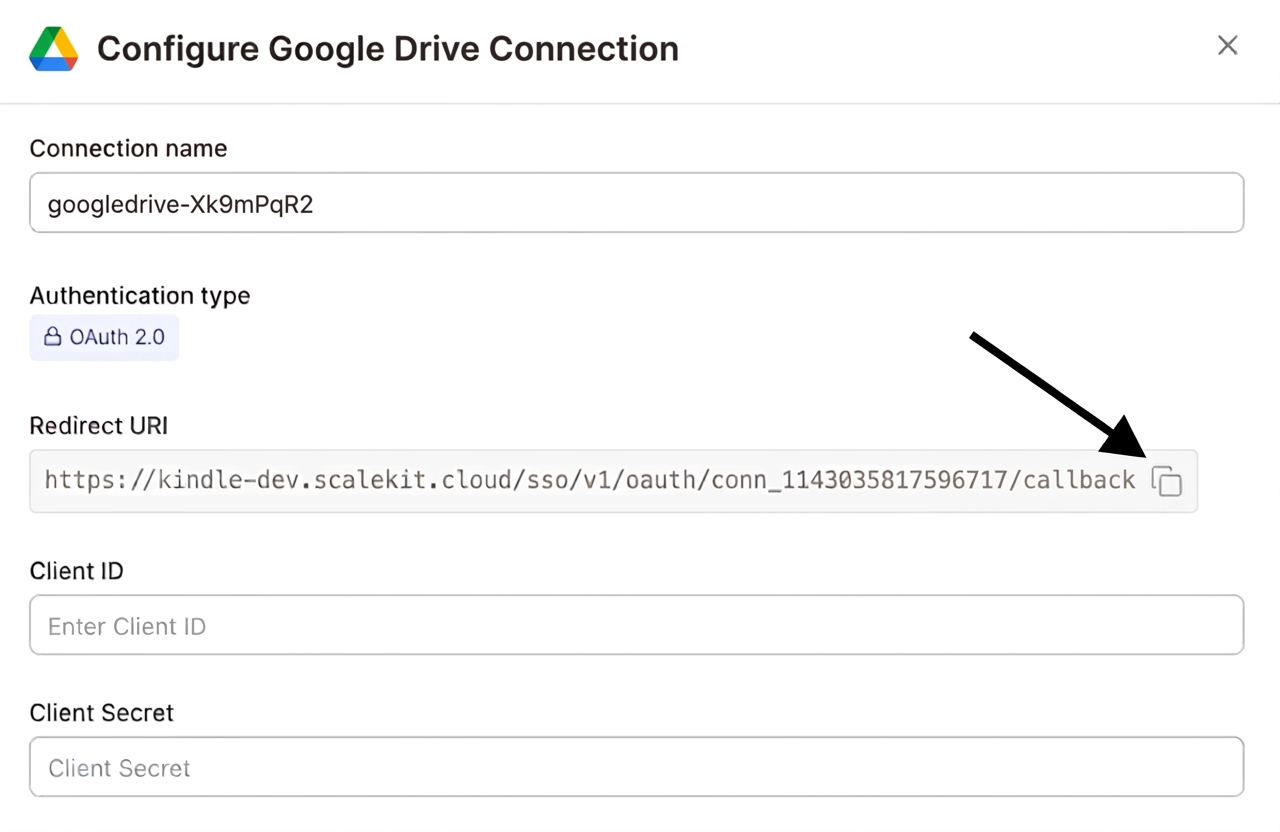
-
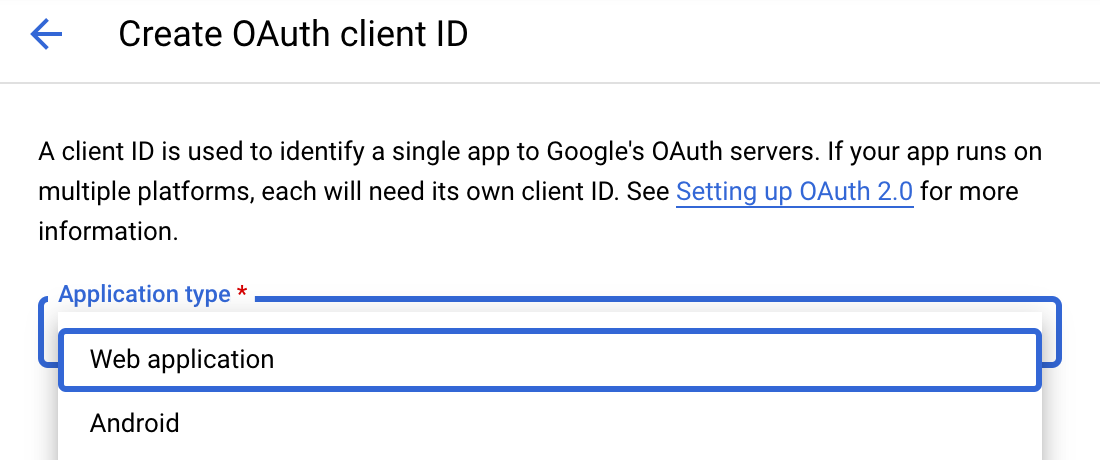
Navigate to Google Cloud Console → APIs & Services → Credentials. Select + Create Credentials, then OAuth client ID. Choose Web application from the Application type menu.
-
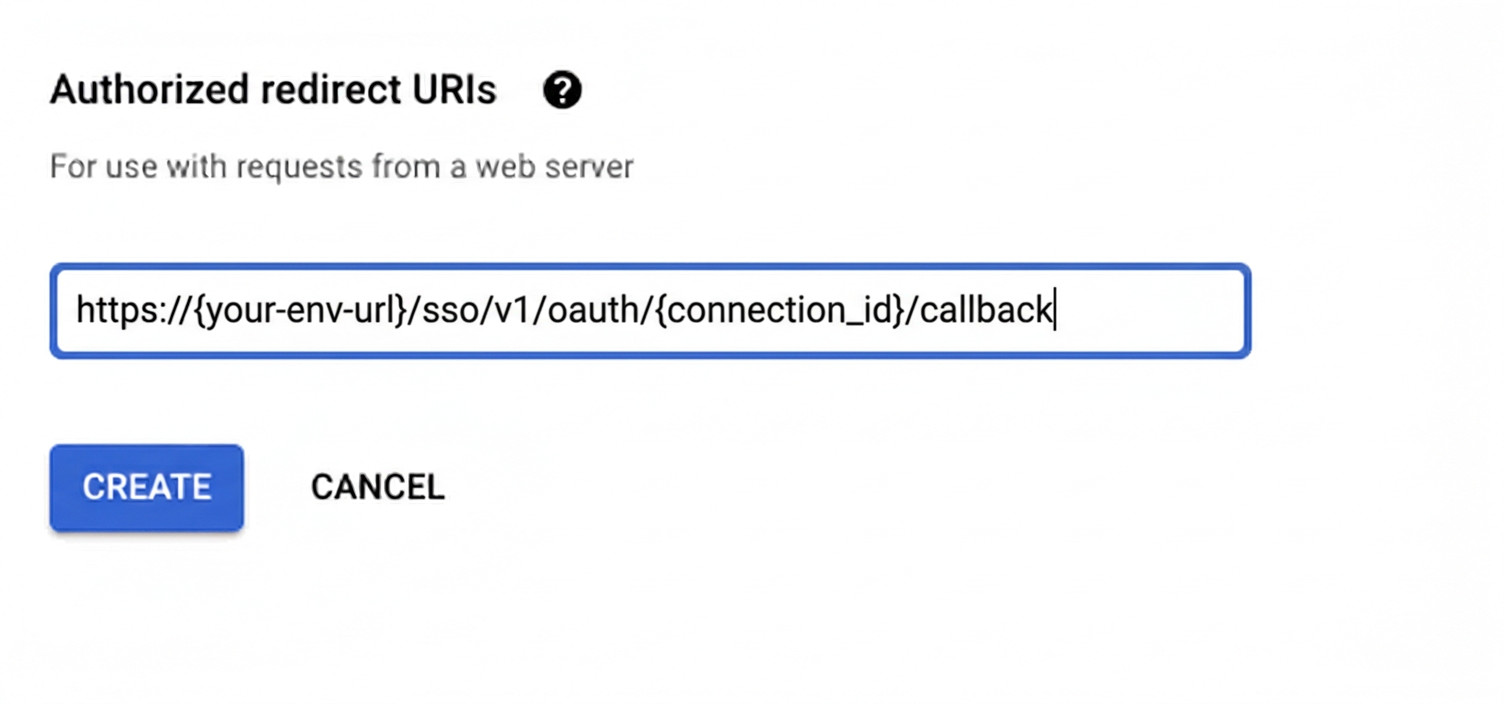
Under Authorized redirect URIs, click + Add URI, paste the redirect URI, and click Create.
-
-
Enable the Google Drive API
- In Google Cloud Console, go to APIs & Services → Library. Search for “Google Drive API” and click Enable.
-
Get client credentials
- Google provides your Client ID and Client Secret after you create the OAuth client ID in step 1.
-
Add credentials in Scalekit
-
In Scalekit dashboard, go to AgentKit > Connections and open the connection you created.
-
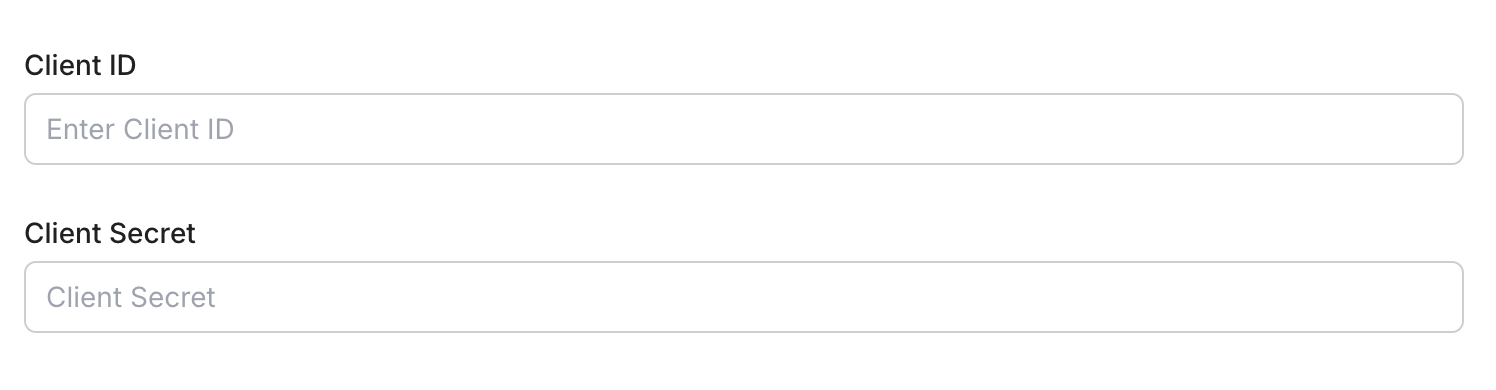
Enter your credentials:
- Client ID (from above)
- Client Secret (from above)
- Permissions (scopes — see Google API Scopes reference)
-
Click Save.
-
-
Authorize a user and make your first call
quickstart.mts import { ScalekitClient } from '@scalekit-sdk/node'import 'dotenv/config'import { createInterface } from 'node:readline/promises'const scalekit = new ScalekitClient(process.env.SCALEKIT_ENVIRONMENT_URL,process.env.SCALEKIT_CLIENT_ID,process.env.SCALEKIT_CLIENT_SECRET,)const actions = scalekit.actionsconst connector = 'googledrive'const identifier = 'user_123'// Generate an authorization link for the userconst { link } = await actions.getAuthorizationLink({ connectionName: connector, identifier })console.log('Authorize Google Drive:', link)const rl = createInterface({ input: process.stdin, output: process.stdout })await rl.question('Press Enter after authorizing...')rl.close()// Make your first callconst result = await actions.executeTool({connector,identifier,toolName: 'googledrive_get_about',toolInput: {},})console.log(result)Terminal window npx tsx quickstart.mtsquickstart.py import osfrom scalekit import ScalekitClientfrom dotenv import load_dotenvload_dotenv()scalekit_client = ScalekitClient(env_url=os.getenv("SCALEKIT_ENVIRONMENT_URL"),client_id=os.getenv("SCALEKIT_CLIENT_ID"),client_secret=os.getenv("SCALEKIT_CLIENT_SECRET"),)actions = scalekit_client.actionsconnection_name = "googledrive"identifier = "user_123"# Generate an authorization link for the userlink_response = actions.get_authorization_link(connection_name=connection_name,identifier=identifier,)print("Authorize Google Drive:", link_response.link)input("Press Enter after authorizing...")# Make your first callresult = actions.execute_tool(tool_input={},tool_name="googledrive_get_about",connection_name=connection_name,identifier=identifier,)print(result)Terminal window python quickstart.pyEach user signs in once. See Authorize a user for the full flow and statuses.
Tools
Pass the exact name toexecute_toolgoogledrive_export_fileExport a Google Workspace file (such as a Google Doc, Sheet, or Slide) from Google Drive into a specific MIME type and return the converted content.Read-onlyExport Drive File
Export a Google Workspace file (such as a Google Doc, Sheet, or Slide) from Google Drive into a specific MIME type and return the converted content. Uses OAuth credentials.
Inputs
file_idstringrequired- ID of the Google Workspace file to export
mime_typestringrequired- Target MIME type to convert and export the file as. Only certain export MIME types are supported for each source file type.
Also accepts
schema_versionandtool_versionto pin a version.googledrive_get_aboutGet information about the authenticated Google Drive user and their storage quota, including total, used, and available storage in bytes, and the user's display name and email.Read-onlyGet Drive About Info
Get information about the authenticated Google Drive user and their storage quota, including total, used, and available storage in bytes, and the user's display name and email.
Inputs
fieldsstring- Fields to include in the response. Defaults to a partial response unless specified.
googledrive_get_access_proposalRetrieve a single pending access proposal (a request from another user to be granted access) on a Google Drive file by proposal ID.Read-onlyGet Access Proposal
Retrieve a single pending access proposal (a request from another user to be granted access) on a Google Drive file by proposal ID. List and Resolve already exist for access proposals but there is no single-proposal Get.
Inputs
file_idstringrequired- ID of the file the access proposal is for
proposal_idstringrequired- ID of the access proposal to retrieve
googledrive_get_commentRetrieve a single comment on a Google Drive file by comment ID, including its content, author, and replies.Read-onlyGet Drive Comment
Retrieve a single comment on a Google Drive file by comment ID, including its content, author, and replies. Uses OAuth credentials.
Inputs
comment_idstringrequired- ID of the comment to retrieve
file_idstringrequired- ID of the file the comment belongs to
fieldsstring- Fields to include in the response. The Drive Comments API requires this parameter on every call.default
* include_deletedboolean- Whether to return the comment even if it has been deleted. Deleted comments have their fields limited.default
false
Also accepts
schema_versionandtool_versionto pin a version.googledrive_get_file_metadataRetrieve metadata for a specific file in Google Drive by its file ID.Read-onlyGet File Metadata
Retrieve metadata for a specific file in Google Drive by its file ID. Returns name, MIME type, size, creation time, and more.
Inputs
file_idstringrequired- The ID of the file to retrieve metadata for
fieldsstring- Fields to include in the response
supports_all_drivesboolean- Support shared drivesdefault
false
Also accepts
schema_versionandtool_versionto pin a version.googledrive_get_permissionRetrieve details for a single permission on a file or folder in Google Drive by its permission ID.Read-onlyGet File Permission
Retrieve details for a single permission on a file or folder in Google Drive by its permission ID. Uses OAuth credentials.
Inputs
file_idstringrequired- ID of the file or folder the permission belongs to
permission_idstringrequired- ID of the permission to retrieve
fieldsstring- Fields to include in the response. Defaults to '*' (all fields).default
*
Also accepts
schema_versionandtool_versionto pin a version.googledrive_get_replyRetrieve a single reply to a comment on a Google Drive file by reply ID.Read-onlyGet Comment Reply
Retrieve a single reply to a comment on a Google Drive file by reply ID. Create, list, and update already exist for replies but there is no single-reply Get. Uses OAuth credentials.
Inputs
comment_idstringrequired- ID of the comment the reply belongs to
file_idstringrequired- ID of the file the comment and reply belong to
reply_idstringrequired- ID of the reply to retrieve
fieldsstring- Fields to include in the response. The Drive Comments API requires this parameter on every call.default
* include_deletedboolean- Whether to return the reply even if it has been deleted. Deleted replies have their fields limited.default
false
googledrive_get_revisionRetrieve metadata for a single revision of a file in Google Drive by its revision ID.Read-onlyGet File Revision
Retrieve metadata for a single revision of a file in Google Drive by its revision ID. Uses OAuth credentials.
Inputs
file_idstringrequired- ID of the file the revision belongs to
revision_idstringrequired- ID of the revision to retrieve
fieldsstring- Fields to include in the response. Defaults to '*' (all fields).default
*
Also accepts
schema_versionandtool_versionto pin a version.googledrive_get_start_page_tokenGet the starting page token to use with List Changes when beginning a new sync of a Google Drive (or a specific shared drive).Read-onlyGet Changes Start Page Token
Get the starting page token to use with List Changes when beginning a new sync of a Google Drive (or a specific shared drive). Save the returned startPageToken and pass it as the first page_token to list_changes.
Inputs
drive_idstring- The ID of the shared drive to get a start token for. Omit to get a token for the user's My Drive.
supports_all_drivesboolean- Whether the requesting app supports both My Drive and shared drives.
googledrive_list_access_proposalsList pending access proposals (requests from other users to be granted access) on a Google Drive file.Read-onlyList Access Proposals
List pending access proposals (requests from other users to be granted access) on a Google Drive file. Use resolve_access_proposal to approve or deny each one.
Inputs
file_idstringrequired- ID of the file to list pending access proposals for.
page_sizeinteger- Maximum number of access proposals to return per page.
page_tokenstring- Token for the next page of results, from a previous list_access_proposals response.
googledrive_list_changesList changes (files created, modified, moved, deleted, or shared) since a given page token, for efficiently keeping an external system in sync with Google Drive without re-scanning everything.Read-onlyList Drive Changes
List changes (files created, modified, moved, deleted, or shared) since a given page token, for efficiently keeping an external system in sync with Google Drive without re-scanning everything. Get an initial token from Get Changes Start Page Token.
Inputs
page_tokenstringrequired- The token for continuing a previous list request, or the startPageToken from Get Changes Start Page Token for a first call.
drive_idstring- The shared drive to list changes for. Omit to list changes for the user's My Drive.
include_items_from_all_drivesboolean- Whether both My Drive and shared drive items should be included in results.
include_removedboolean- Whether to include changes indicating items removed from the change list, such as deleted files or those the user lost access to.
page_sizeinteger- Maximum number of changes to return per page (1-1000, default 100).
restrict_to_my_driveboolean- Whether to restrict results to changes inside the My Drive hierarchy, excluding shared items.
supports_all_drivesboolean- Whether the requesting app supports both My Drive and shared drives.
googledrive_list_commentsList comments on a file in Google Drive, including comment content, author, and resolution status.Read-onlyList Drive Comments
List comments on a file in Google Drive, including comment content, author, and resolution status. Uses OAuth credentials.
Inputs
file_idstringrequired- ID of the file to list comments for
fieldsstring- Fields to include in the response. The Drive Comments API requires this parameter on every call.default
comments(id,content,htmlContent,author,createdTime,modifiedTime,resolved,replies),nextPageToken include_deletedboolean- Whether to include deleted comments in the results. Deleted comments have their fields limited.default
false page_sizeinteger- Maximum number of comments to return per page
page_tokenstring- Token for the next page of results
Also accepts
schema_versionandtool_versionto pin a version.googledrive_list_folder_contentsList the files and folders directly inside a given Google Drive folder, excluding trashed items.Read-onlyList Drive Folder Contents
List the files and folders directly inside a given Google Drive folder, excluding trashed items. Supports pagination and sorting. Uses OAuth credentials.
Inputs
folder_idstringrequired- ID of the folder whose contents to list
fieldsstring- Fields to include in the responsedefault
files(id,name,mimeType,modifiedTime,size,parents),nextPageToken order_bystring- Sort order for results
page_sizeinteger- Number of items to return per pagedefault
100 page_tokenstring- Token for the next page of results
Also accepts
schema_versionandtool_versionto pin a version.googledrive_list_permissionsList the permissions on a file or folder in Google Drive, showing who has access and at what role.Read-onlyList File Permissions
List the permissions on a file or folder in Google Drive, showing who has access and at what role. Supports pagination. Uses OAuth credentials.
Inputs
file_idstringrequired- ID of the file or folder to list permissions for
fieldsstring- Fields to include in the response. Defaults to a common set of permission fields plus the next page token.default
permissions(id,type,role,emailAddress,domain,displayName,expirationTime),nextPageToken page_sizeinteger- Maximum number of permissions to return per page
page_tokenstring- Token for retrieving the next page of results, from a previous list call
Also accepts
schema_versionandtool_versionto pin a version.googledrive_list_repliesList replies to a comment on a Google Drive file.Read-onlyList Comment Replies
List replies to a comment on a Google Drive file. Uses OAuth credentials.
Inputs
comment_idstringrequired- ID of the comment to list replies for
file_idstringrequired- ID of the file the comment belongs to
fieldsstring- Fields to include in the response. The Drive Comments API requires this parameter on every call.default
replies(id,content,author,createdTime,action),nextPageToken include_deletedboolean- Whether to include deleted replies in the results. Deleted replies have their fields limited.default
false page_sizeinteger- Maximum number of replies to return per page
page_tokenstring- Token for the next page of results
Also accepts
schema_versionandtool_versionto pin a version.googledrive_list_revisionsList the revisions of a file in Google Drive, showing each revision's ID, modification time, and size.Read-onlyList File Revisions
List the revisions of a file in Google Drive, showing each revision's ID, modification time, and size. Supports pagination. Uses OAuth credentials.
Inputs
file_idstringrequired- ID of the file to list revisions for
fieldsstring- Fields to include in the response. Defaults to a common set of revision fields plus the next page token.default
revisions(id,mimeType,modifiedTime,keepForever,size,lastModifyingUser),nextPageToken page_sizeinteger- Maximum number of revisions to return per page
page_tokenstring- Token for retrieving the next page of results, from a previous list call
Also accepts
schema_versionandtool_versionto pin a version.googledrive_search_contentSearch inside the content of files stored in Google Drive using full-text search.Read-onlySearch Drive Content
Search inside the content of files stored in Google Drive using full-text search. Finds files where the body text matches the search term.
Inputs
search_termstringrequired- Text to search for inside file contents
fieldsstring- Fields to include in the response
mime_typestring- Filter results by MIME type
page_sizeinteger- Number of files to return per pagedefault
100 page_tokenstring- Token for the next page of results
supports_all_drivesboolean- Include shared drives in resultsdefault
false
Also accepts
schema_versionandtool_versionto pin a version.googledrive_search_filesSearch for files and folders in Google Drive using query filters like name, type, owner, and parent folder.Read-onlySearch Drive Files
Search for files and folders in Google Drive using query filters like name, type, owner, and parent folder.
Inputs
fieldsstring- Fields to include in the response
order_bystring- Sort order for results
page_sizeinteger- Number of files to return per pagedefault
100 page_tokenstring- Token for the next page of results
querystring- Drive search query string
supports_all_drivesboolean- Include shared drives in resultsdefault
false
Also accepts
schema_versionandtool_versionto pin a version.googledrive_copy_fileCreate a copy of an existing file in Google Drive.WriteCopy Drive File
Create a copy of an existing file in Google Drive. Optionally rename the copy, place it in a different folder, or add a description. Uses OAuth credentials.
Inputs
file_idstringrequired- ID of the file to copy
descriptionstring- Optional description for the copied file
namestring- Name for the copied file. If omitted, the copy is named 'Copy of <original name>'.
parent_folder_idstring- ID of the destination folder for the copy. If omitted, the copy is placed in the same folder as the original.
Also accepts
schema_versionandtool_versionto pin a version.googledrive_create_commentCreate a new comment on a file in Google Drive, optionally anchored to a specific region of the file.WriteCreate Drive Comment
Create a new comment on a file in Google Drive, optionally anchored to a specific region of the file. Uses OAuth credentials.
Inputs
contentstringrequired- The plain text content of the comment
file_idstringrequired- ID of the file to add the comment to
anchorstring- A region of the document represented as a JSON string, used to anchor the comment to a specific location.
fieldsstring- Fields to include in the response. The Drive Comments API requires this parameter on every call.default
*
Also accepts
schema_versionandtool_versionto pin a version.googledrive_create_fileCreate a new file's metadata in Google Drive, such as an empty file, a blank Google Doc, Sheet, or Slide, or a folder.WriteCreate Drive File
Create a new file's metadata in Google Drive, such as an empty file, a blank Google Doc, Sheet, or Slide, or a folder. This creates metadata only and does NOT upload binary file content, which requires a multipart media upload not supported by this tool. Uses OAuth credentials.
Inputs
namestringrequired- Name of the new file
descriptionstring- Optional description for the new file
mime_typestring- MIME type of the file to create. Use a Google Workspace MIME type to create a blank Google Doc, Sheet, or Slide, or 'application/vnd.google-apps.folder' to create a folder. If omitted, an empty binary file is created.
parent_folder_idstring- ID of the parent folder to create this file inside. If omitted, the file is created in the root of My Drive.
Also accepts
schema_versionandtool_versionto pin a version.googledrive_create_folderCreate a new folder in Google Drive.WriteCreate Drive Folder
Create a new folder in Google Drive. Optionally place it inside a parent folder and add a description. Uses OAuth credentials.
Inputs
namestringrequired- Name of the new folder
descriptionstring- Optional description for the new folder
parent_folder_idstring- ID of the parent folder to create this folder inside. If omitted, the folder is created in the root of My Drive.
Also accepts
schema_versionandtool_versionto pin a version.googledrive_create_replyCreate a reply to a comment on a Google Drive file, optionally resolving or reopening the comment.WriteCreate Comment Reply
Create a reply to a comment on a Google Drive file, optionally resolving or reopening the comment. Uses OAuth credentials.
Inputs
comment_idstringrequired- ID of the comment to reply to
contentstringrequired- The plain text content of the reply
file_idstringrequired- ID of the file the comment belongs to
actionstring- The action to take on the parent comment when creating the reply. One of: 'resolve', 'reopen'.one of
resolvereopen fieldsstring- Fields to include in the response. The Drive Comments API requires this parameter on every call.default
*
Also accepts
schema_versionandtool_versionto pin a version.googledrive_move_fileMove a file or folder to a different location in Google Drive by updating its parent folder.WriteMove Drive File
Move a file or folder to a different location in Google Drive by updating its parent folder. Optionally rename the file during the move. Uses OAuth credentials.
- Idempotent
Inputs
file_idstringrequired- ID of the file or folder to move
new_parent_idstringrequired- ID of the destination folder to move the file into
namestring- Optional new name for the file after moving. If omitted, the file keeps its current name.
old_parent_idstring- ID of the current parent folder to remove the file from. Providing this ensures a clean move without the file appearing in multiple folders.
Also accepts
schema_versionandtool_versionto pin a version.googledrive_query_drive_activityQuery Google Drive activity to see who viewed, edited, moved, or shared files.WriteQuery Drive Activity
Query Google Drive activity to see who viewed, edited, moved, or shared files. Useful for auditing and compliance. Uses OAuth credentials.
- Idempotent
Inputs
ancestor_namestring- Restrict activity to items under this folder. Format: 'items/FOLDER_ID'. Example: 'items/0B_abc123xyz'
consolidation_strategystring- How related activity is grouped. 'none' means each action is its own activity; 'legacy' consolidates similar actions. Valid values: 'none', 'legacy'.one of
nonelegacy filterstring- Filter string to narrow activity results. Example: "time >= \"2026-01-01T00:00:00Z\""
item_namestring- Restrict activity to a specific file or folder. Format: 'items/FILE_ID'. Example: 'items/1BxiMVs0XRA5nFMdKvBdBZjgmUUqptlbs74OgVE2upms'
page_sizeinteger- Maximum number of activity records to return per page. Max 100.
page_tokenstring- Token for the next page of results from a previous response.
Also accepts
schema_versionandtool_versionto pin a version.googledrive_resolve_access_proposalApprove or deny a pending access proposal on a Google Drive file, optionally granting a specific role and notifying the requester by email.WriteResolve Access Proposal
Approve or deny a pending access proposal on a Google Drive file, optionally granting a specific role and notifying the requester by email. Use List Access Proposals to find pending proposal IDs.
Inputs
actionstringrequired- Whether to accept or deny the access request.one of
ACCEPTDENY file_idstringrequired- ID of the file the access proposal is for.
proposal_idstringrequired- ID of the access proposal to resolve.
rolearray- The roles to grant if action is ACCEPT, e.g. ["reader"] or ["writer"]. Required when accepting.
send_notificationboolean- Whether to email the requester letting them know the outcome.
googledrive_trash_fileMove a file to the trash in Google Drive.WriteTrash Drive File
Move a file to the trash in Google Drive. Trashed files remain recoverable until the trash is emptied or the file is restored. Uses OAuth credentials.
- Idempotent
Inputs
file_idstringrequired- ID of the file to move to trash
Also accepts
schema_versionandtool_versionto pin a version.googledrive_untrash_fileRestore a file from the trash in Google Drive back to its original location.WriteUntrash Drive File
Restore a file from the trash in Google Drive back to its original location. Uses OAuth credentials.
- Idempotent
Inputs
file_idstringrequired- ID of the trashed file to restore
Also accepts
schema_versionandtool_versionto pin a version.googledrive_update_commentUpdate the content of an existing comment on a Google Drive file.WriteUpdate Drive Comment
Update the content of an existing comment on a Google Drive file. Uses OAuth credentials.
- Idempotent
Inputs
comment_idstringrequired- ID of the comment to update
contentstringrequired- The new plain text content of the comment
file_idstringrequired- ID of the file the comment belongs to
fieldsstring- Fields to include in the response. The Drive Comments API requires this parameter on every call.default
*
Also accepts
schema_versionandtool_versionto pin a version.googledrive_update_file_metadataUpdate metadata for an existing Google Drive file, such as its name, description, or starred status.WriteUpdate Drive File Metadata
Update metadata for an existing Google Drive file, such as its name, description, or starred status. Uses OAuth credentials.
- Idempotent
Inputs
file_idstringrequired- ID of the file to update
descriptionstring- New description for the file
namestring- New name for the file
starredboolean- Whether the file should be starred
Also accepts
schema_versionandtool_versionto pin a version.googledrive_update_permissionUpdate the role of an existing permission on a file or folder in Google Drive, optionally transferring ownership.WriteUpdate File Permission
Update the role of an existing permission on a file or folder in Google Drive, optionally transferring ownership. Uses OAuth credentials.
- Idempotent
Inputs
file_idstringrequired- ID of the file or folder the permission belongs to
permission_idstringrequired- ID of the permission to update
rolestringrequired- The new role to grant to the recipient. One of: 'reader', 'commenter', 'writer', 'fileOrganizer', 'organizer', 'owner'.one of
readercommenterwriterfileOrganizerorganizerowner transfer_ownershipboolean- Whether to transfer ownership of the file to the recipient. Required when role is 'owner'. Defaults to false.default
false
Also accepts
schema_versionandtool_versionto pin a version.googledrive_update_replyUpdate the content of an existing reply to a comment on a Google Drive file.WriteUpdate Comment Reply
Update the content of an existing reply to a comment on a Google Drive file.
- Idempotent
Inputs
comment_idstringrequired- ID of the comment the reply belongs to.
contentstringrequired- The new plain-text content for the reply.
file_idstringrequired- ID of the file the comment and reply belong to.
reply_idstringrequired- ID of the reply to update.
googledrive_update_revisionUpdate metadata on a specific revision of a file in Google Drive, such as whether it is kept forever or published.WriteUpdate File Revision
Update metadata on a specific revision of a file in Google Drive, such as whether it is kept forever or published. Uses OAuth credentials.
- Idempotent
Inputs
file_idstringrequired- ID of the file the revision belongs to
revision_idstringrequired- ID of the revision to update
keep_foreverboolean- Whether to keep this revision forever, even if it is no longer the head revision. Applies only to files with binary content.
publishedboolean- Whether to publish this revision, applicable to Google Docs, Sheets, and Slides files.
Also accepts
schema_versionandtool_versionto pin a version.googledrive_delete_commentPermanently delete a comment from a Google Drive file by comment ID.DestructiveDelete Drive Comment
Permanently delete a comment from a Google Drive file by comment ID. This action cannot be undone. Uses OAuth credentials.
- Idempotent
Inputs
comment_idstringrequired- ID of the comment to delete
file_idstringrequired- ID of the file the comment belongs to
Also accepts
schema_versionandtool_versionto pin a version.googledrive_delete_filePermanently delete a file or folder in Google Drive by its file ID.DestructiveDelete Drive File
Permanently delete a file or folder in Google Drive by its file ID. This action cannot be undone. Uses OAuth credentials.
- Idempotent
Inputs
file_idstringrequired- ID of the file or folder to delete
supports_all_drivesboolean- Whether the request supports files in shared drivesdefault
false
Also accepts
schema_versionandtool_versionto pin a version.googledrive_delete_permissionPermanently revoke a permission on a file or folder in Google Drive, removing the associated user's, group's, domain's, or public access.DestructiveDelete File Permission
Permanently revoke a permission on a file or folder in Google Drive, removing the associated user's, group's, domain's, or public access. This action cannot be undone. Uses OAuth credentials.
- Idempotent
Inputs
file_idstringrequired- ID of the file or folder the permission belongs to
permission_idstringrequired- ID of the permission to delete
Also accepts
schema_versionandtool_versionto pin a version.googledrive_delete_replyPermanently delete a reply to a comment on a Google Drive file by reply ID.DestructiveDelete Comment Reply
Permanently delete a reply to a comment on a Google Drive file by reply ID. This action cannot be undone. Uses OAuth credentials.
- Idempotent
Inputs
comment_idstringrequired- ID of the comment the reply belongs to
file_idstringrequired- ID of the file the comment and reply belong to
reply_idstringrequired- ID of the reply to permanently delete
googledrive_delete_revisionPermanently delete a specific revision of a file in Google Drive.DestructiveDelete File Revision
Permanently delete a specific revision of a file in Google Drive. This action cannot be undone and the revision cannot be the head (current) revision. Uses OAuth credentials.
- Idempotent
Inputs
file_idstringrequired- ID of the file the revision belongs to
revision_idstringrequired- ID of the revision to delete
Also accepts
schema_versionandtool_versionto pin a version.googledrive_empty_trashPermanently delete all files and folders currently in the trash for the authenticated user's Google Drive.DestructiveEmpty Drive Trash
Permanently delete all files and folders currently in the trash for the authenticated user's Google Drive. This action cannot be undone. Uses OAuth credentials.
- Idempotent
Inputs
This tool takes no inputs.
Also accepts
schema_versionandtool_versionto pin a version.
No tools match.
Workflows
Proxy API call
const result = await actions.request({ connectionName: 'googledrive', identifier: 'user_123', path: '/drive/v3/files', method: 'GET',});console.log(result);result = actions.request( connection_name='googledrive', identifier='user_123', path="/drive/v3/files", method="GET")print(result)Download a file
Download a file from Google Drive by its file ID via the Scalekit proxy.
file_id = "<YOUR_FILE_ID>"   # file ID from Drive (visible in the file's URL)output_path = "downloaded.pdf"
response = actions.request(    connection_name='googledrive',    identifier='user_123',    path=f"/drive/v3/files/{file_id}",    method="GET",    query_params={"alt": "media"},)
with open(output_path, "wb") as f:    f.write(response.content)
print(f"Downloaded: {output_path} ({len(response.content):,} bytes)")
Upload a file
Upload a file to Google Drive in two steps: create the file with the googledrive_create_file tool, then upload its content via the Scalekit proxy. Scalekit injects the OAuth token automatically — your app never handles credentials directly.
To create the file inside a folder, add parent_folder_id to the tool input. This example sends the whole file in one request, which suits small files.
import { readFile } from 'node:fs/promises';
const fileName = 'report.pdf';const mimeType = 'application/pdf';const fileBytes = await readFile('report.pdf');
// 1. Create the fileconst created = await actions.executeTool({ connector: 'googledrive', identifier: 'user_123', toolName: 'googledrive_create_file', toolInput: { name: fileName, mime_type: mimeType },});const fileId = created.data.id;
// 2. Upload the file contentawait actions.request({ connectionName: 'googledrive', identifier: 'user_123', path: `/upload/drive/v3/files/${fileId}`, method: 'PATCH', queryParams: { uploadType: 'media' }, body: fileBytes, headers: { 'Content-Type': mimeType },});
console.log(`Uploaded: ${fileName} (File ID: ${fileId})`);import mimetypes
file_path = "report.pdf"file_name = "report.pdf"
with open(file_path, "rb") as f: file_bytes = f.read()
mime_type = mimetypes.guess_type(file_path)[0] or "application/octet-stream"
# 1. Create the filecreated = actions.execute_tool( connection_name='googledrive', identifier='user_123', tool_name='googledrive_create_file', tool_input={"name": file_name, "mime_type": mime_type},)file_id = created.data["id"]
# 2. Upload the file contentupload = actions.request( connection_name='googledrive', identifier='user_123', path=f"/upload/drive/v3/files/{file_id}", method="PATCH", query_params={"uploadType": "media"}, raw_body=file_bytes, headers={"Content-Type": mime_type},)upload.raise_for_status()
print(f"Uploaded: {file_name} (File ID: {file_id})")Execute a tool
const result = await actions.executeTool({ connector: 'googledrive', identifier: 'user_123', toolName: 'googledrive_get_file_metadata', toolInput: {},});console.log(result);result = actions.execute_tool( connection_name='googledrive', identifier='user_123', tool_name='googledrive_get_file_metadata', tool_input={},)print(result)Google OAuth consent screen verification
Before you use your own Google OAuth credentials in production, understand what end users see on Google’s consent screen when they authorize a connected account.
| Audience type | Consent screen behavior | When to use |
|---|---|---|
| Internal | Shows your App Name and logo from Branding settings | Only users in your Google Workspace or Cloud Identity organization can authorize the connector |
| External | Shows {env_name}.scalekit.dev until Google verifies your app | Any user with a Google account can authorize the connector |
Why External is required for most AgentKit connectors:
- Internal restricts authorization to users in your Google Workspace or Cloud Identity organization. Users with
@gmail.comor other Google accounts outside your organization cannot complete OAuth. - External is required when end users outside your organization authorize tool access through connected accounts.
- Organization-managed OAuth clients follow the same rules as personal or developer OAuth clients. Switching to an org-owned client does not bypass Google verification.
- Until Google completes verification of your External app, users see
scalekit.devon the consent screen. After verification, your App Name and logo appear.
During development:
- Add Test users under APIs & Services → OAuth consent screen while publishing status is Testing.
- On unverified apps, users can click Advanced → Go to app (unsafe) to proceed during testing.
- Google Workspace admins may need to allowlist your OAuth client.
For Google’s verification requirements and timeline, refer to Google’s OAuth consent screen verification guide.