
The Butterbase MCP connector routes your AI agent's tool calls to Butterbase's own MCP server through Scalekit. Each user connects their own Butterbase access token once, and Scalekit sends it with every call, so your agent never handles credentials. It comes with 40 tools.
- Tools
- 40
- What they doRead · write · destructive
- 5 · 28 · 75 read28 write7 destructive
- Users sign in with
- Access token
Setup
Install the SDK
Terminal window npm install @scalekit-sdk/node dotenvTerminal window pip install scalekit-sdk-python python-dotenvSet your credentials
Add your Scalekit credentials to your
.envfile. Find values in app.scalekit.com > Developers > API Credentials..env SCALEKIT_ENVIRONMENT_URL=<your-environment-url>SCALEKIT_CLIENT_ID=<your-client-id>SCALEKIT_CLIENT_SECRET=<your-client-secret>Create the Butterbase MCP connection
In AgentKit > Connections, create a Butterbase MCP connection. The name you give it is the
connection_nameyour code passes. See Configure connections.Console steps with screenshots
Register your Butterbase API key with Scalekit so it can authenticate requests to the Butterbase MCP server on behalf of your users. Butterbase MCP uses API key authentication with an account-scoped key.
-
Generate a Butterbase API key
-
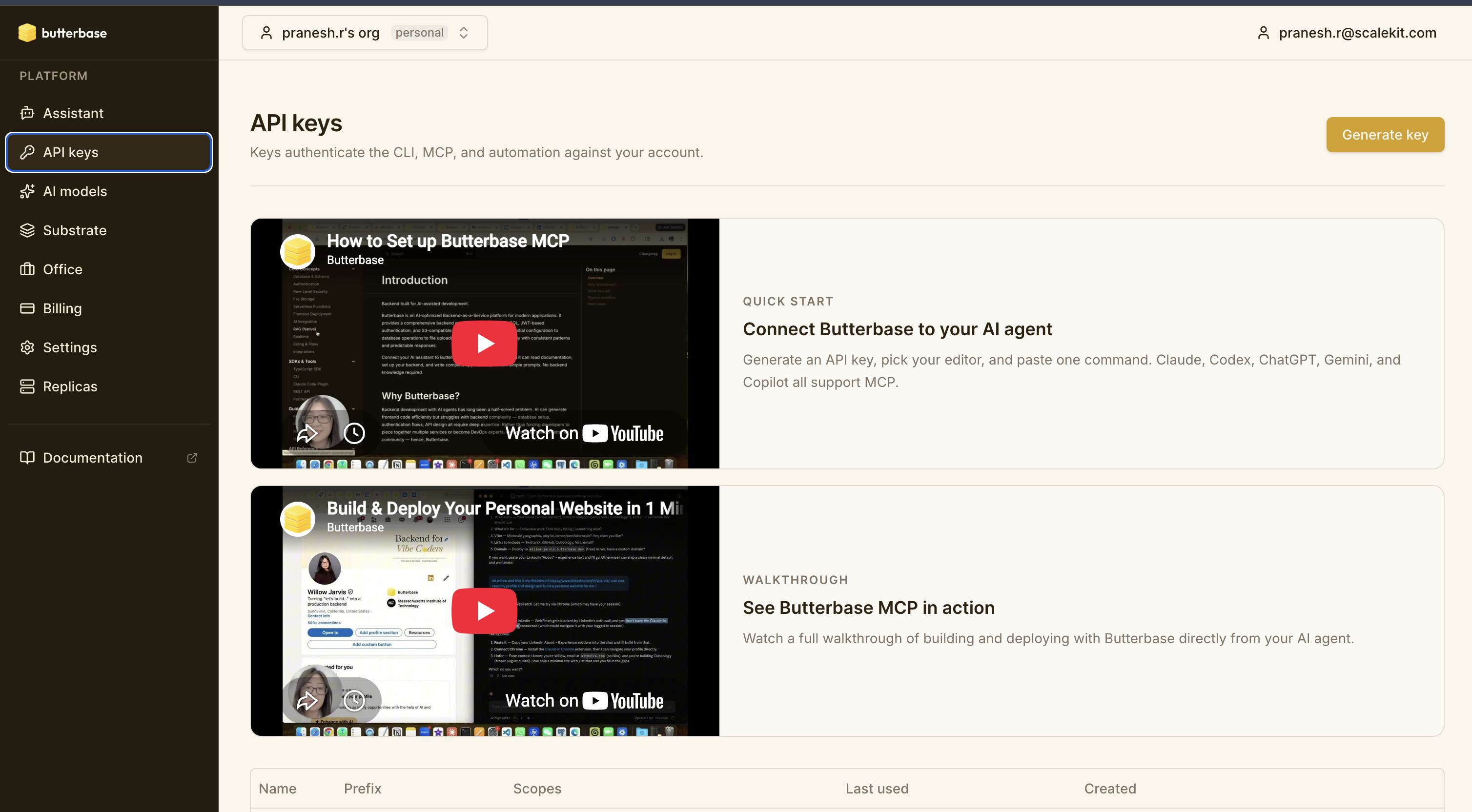
Sign in to the Butterbase dashboard and open API keys in the left sidebar.
-
Click Generate key.
-
Enter a Name for the key, such as
Scalekit.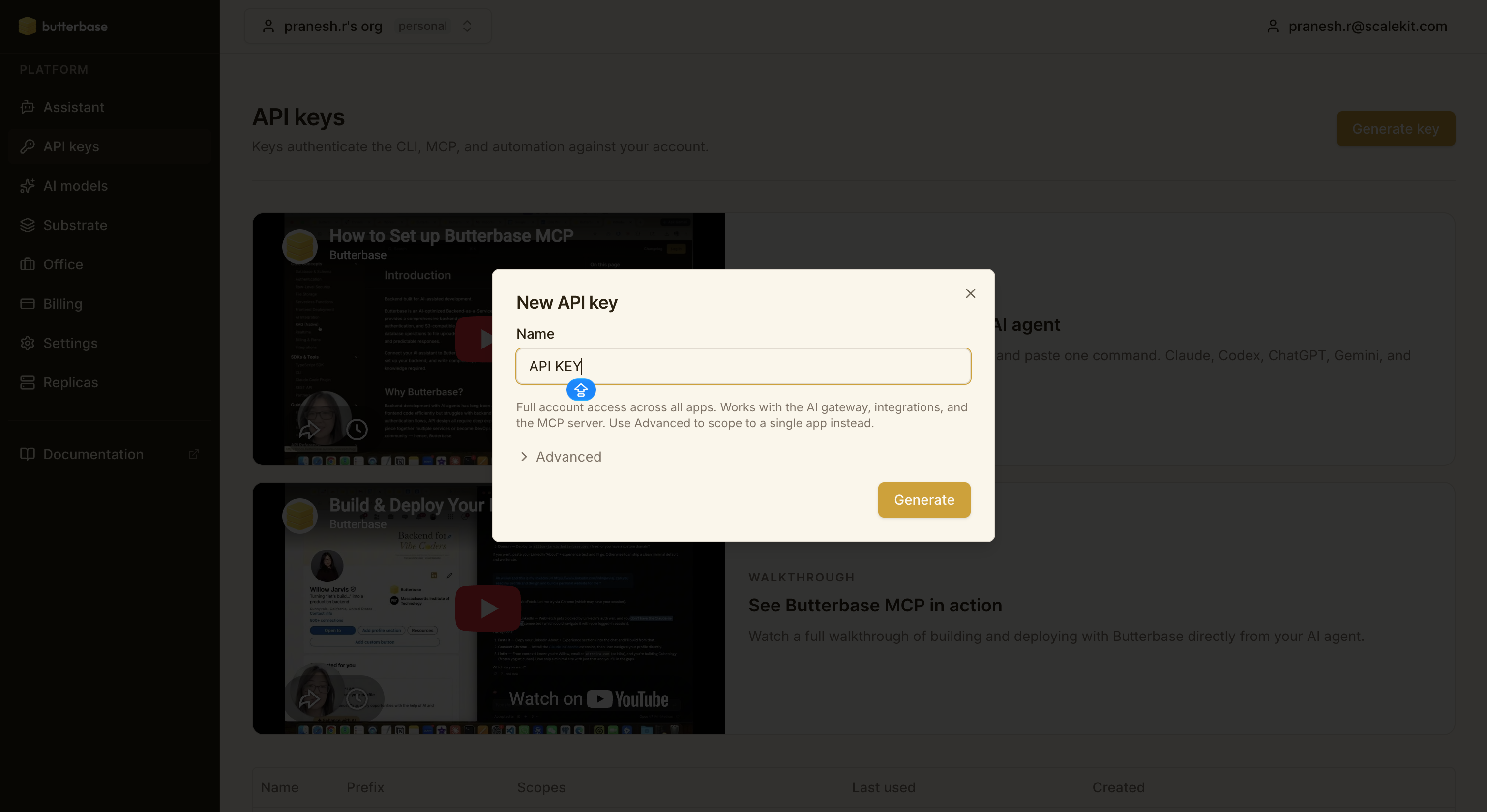
-
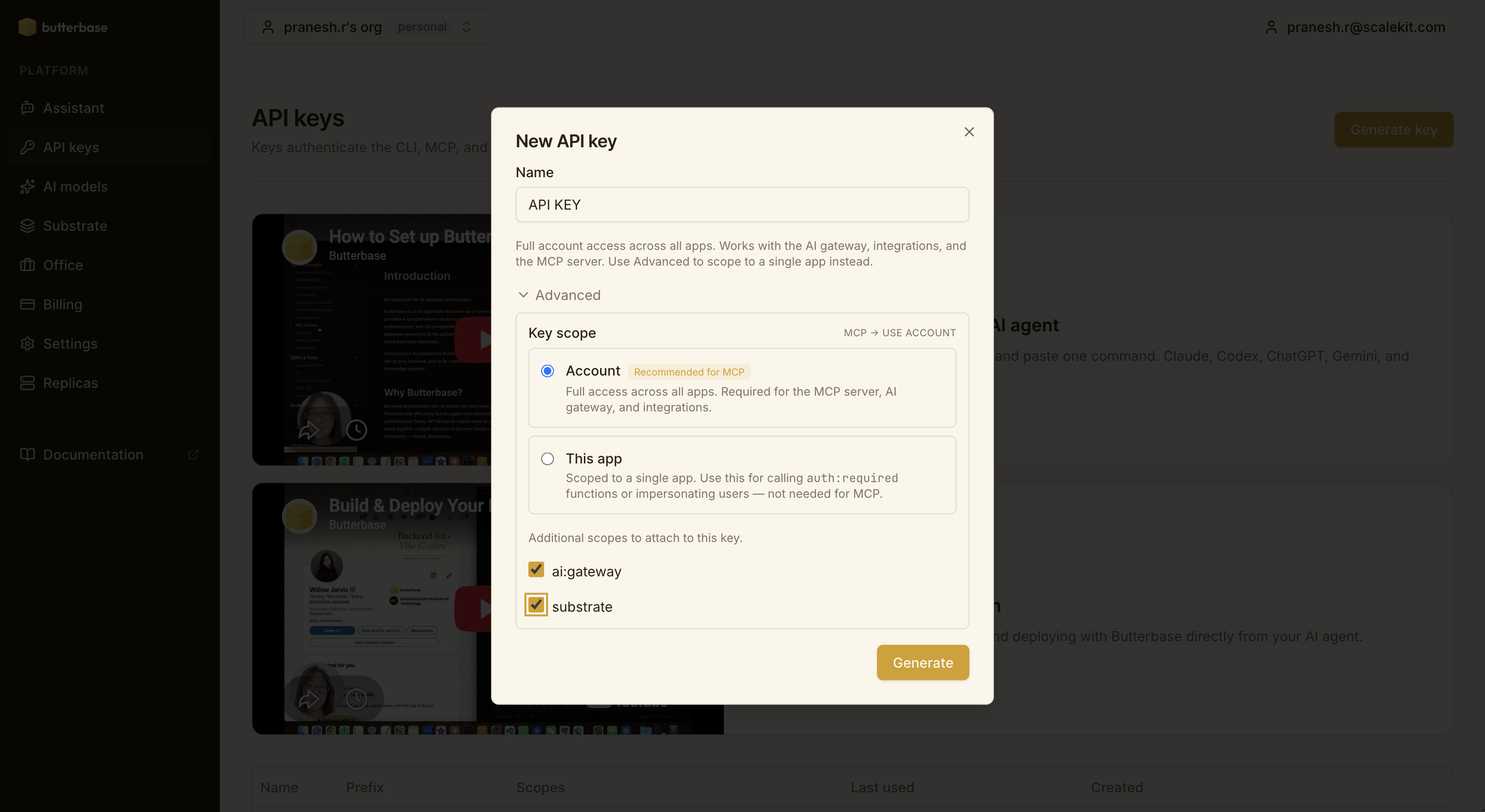
Expand Advanced and set Key scope to Account. The MCP server needs full access across all apps, so don’t pick This app.
-
Under Additional scopes, keep ai:gateway and substrate checked.
-
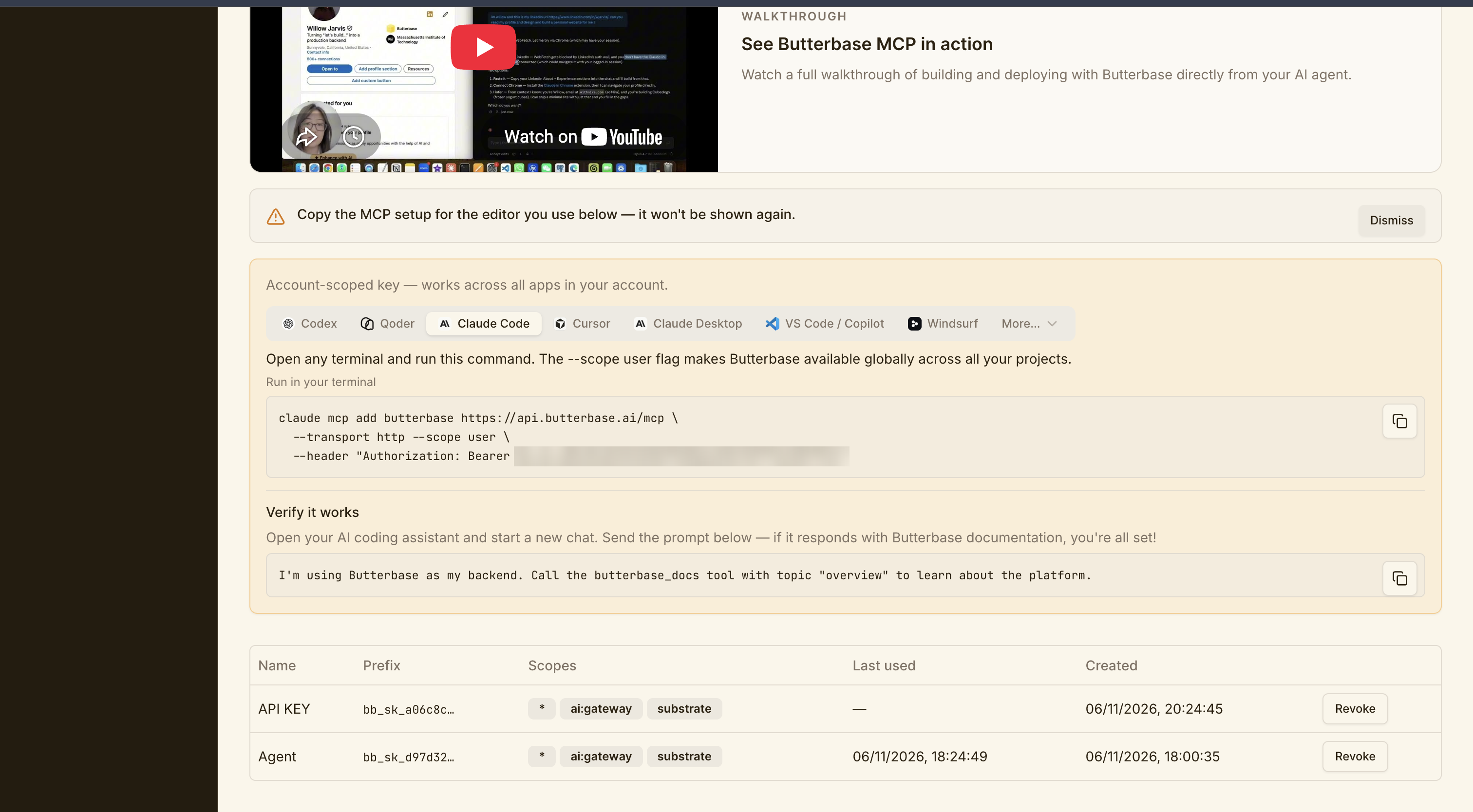
Click Generate.
-
-
Create a connection in Scalekit
- In the Scalekit dashboard, go to AgentKit → Connections → Create Connection.
- Search for Butterbase MCP and click Create.
- Note the Connection name — use this as
connection_namein your code (e.g.,butterbasemcp).
-
Add a connected account
Connected accounts link a specific user identifier in your system to a Butterbase API key. Add one in the dashboard to test. In production, each user adds their own through the authorization link: they enter their credentials on the page it opens.
In the dashboard, to test
- Open the connection and click the Connected Accounts tab → Add account.
- Fill in Your User’s ID and API Key, then click Save.
From your backend, if your app already has the credentials
For example, when users enter them on a settings page in your app:
import { ConnectorStatus } from '@scalekit-sdk/node'const authorizationDetails = {details: {case: 'staticAuth',value: { details: { token: 'bb_sk_...' } },},};let { connectedAccount } = await scalekit.actions.upsertConnectedAccount({connectionName: 'butterbasemcp',identifier: 'user_123',authorizationDetails,});// Make sure the account is ACTIVE before the first tool call.if (connectedAccount?.status !== ConnectorStatus.ACTIVE) {({ connectedAccount } = await scalekit.actions.upsertConnectedAccount({connectionName: 'butterbasemcp',identifier: 'user_123',authorizationDetails,}));}authorization_details = {"static_auth": {"token": "bb_sk_..."}}response = scalekit_client.actions.upsert_connected_account(connection_name="butterbasemcp",identifier="user_123",authorization_details=authorization_details,)# Make sure the account is ACTIVE before the first tool call.if response.connected_account.status != "ACTIVE":response = scalekit_client.actions.upsert_connected_account(connection_name="butterbasemcp",identifier="user_123",authorization_details=authorization_details,)
-
Authorize a user and make your first call
quickstart.mts import { ScalekitClient } from '@scalekit-sdk/node'import 'dotenv/config'import { createInterface } from 'node:readline/promises'const scalekit = new ScalekitClient(process.env.SCALEKIT_ENVIRONMENT_URL,process.env.SCALEKIT_CLIENT_ID,process.env.SCALEKIT_CLIENT_SECRET,)const actions = scalekit.actionsconst connector = 'butterbasemcp'const identifier = 'user_123'// Generate an authorization link for the userconst { link } = await actions.getAuthorizationLink({ connectionName: connector, identifier })console.log('Authorize Butterbase MCP:', link)const rl = createInterface({ input: process.stdin, output: process.stdout })await rl.question('Press Enter after authorizing...')rl.close()// Make your first callconst result = await actions.executeTool({connector,identifier,toolName: 'butterbasemcp_butterbase_docs',toolInput: {},})console.log(result)Terminal window npx tsx quickstart.mtsquickstart.py import osfrom scalekit import ScalekitClientfrom dotenv import load_dotenvload_dotenv()scalekit_client = ScalekitClient(env_url=os.getenv("SCALEKIT_ENVIRONMENT_URL"),client_id=os.getenv("SCALEKIT_CLIENT_ID"),client_secret=os.getenv("SCALEKIT_CLIENT_SECRET"),)actions = scalekit_client.actionsconnection_name = "butterbasemcp"identifier = "user_123"# Generate an authorization link for the userlink_response = actions.get_authorization_link(connection_name=connection_name,identifier=identifier,)print("Authorize Butterbase MCP:", link_response.link)input("Press Enter after authorizing...")# Make your first callresult = actions.execute_tool(tool_input={},tool_name="butterbasemcp_butterbase_docs",connection_name=connection_name,identifier=identifier,)print(result)Terminal window python quickstart.pyEach user opens the link once and enters their Butterbase MCP server credentials there. If your app already has a user's credentials, add the account from your backend instead, as the console steps above show. See Authorize a user for the full flow and statuses.
Tools
Pass the exact name toexecute_toolbutterbasemcp_butterbase_docsRead comprehensive Butterbase documentation (local, no API calls).Read-onlyButterbase Docs
Read comprehensive Butterbase documentation (local, no API calls). Available topics: - all: Complete documentation (default) - overview: Platform introduction and key features - mcp: MCP tool reference and examples - rest: HTTP data API (auto-generated REST endpoints) - auth: End-user authentication (OAuth, JWT) - storage: File upload/download with S3 - functions: Serverless functions (triggers, context) - frontend: Static frontend deployment (upload zip, deploy to live URL) - ai: AI model gateway (chat completions, BYOK, usage) - meetings: Meeting bots that join Zoom/Meet/Teams/Webex calls and return recordings + transcripts - billing: Your Butterbase plan, usage meters, app-level Stripe Connect (subscriptions and one-time payments) - platform: MCP over HTTP, /llms.txt, subdomains, suggestions, rate limits - regions: Choosing a region at app creation, moving apps between regions, discovering the live region list - schema: Schema DSL reference (types, indexes, constraints) - sdk: TypeScript SDK installation, client setup, query builder, auth, storage, functions - cli: CLI installation, commands for apps, schema, functions, storage, config - integrations: Third-party integrations (OAuth connect flow, tool execution, SDK, CLI) - substrate: Per-user memory + action coordination plane for AI agents (entities, decisions, attention rules, action ledger, outbox, ws stream, ctx.substrate inside functions) - office: Organization Ask, conversations, decisions, browser confirmation and native business memory across MCP/CLI/SDK Example: Input: { topic: "auth" } Output: Full authentication documentation with OAuth setup, JWT handling, etc. Don't know the topic slug? Pass a freeform { query: "..." } instead and the tool returns the best-matching section plus an index of related topics: Input: { query: "how do I send email" } Output: Ranked topic index + the full text of the top-matching section. Use this to: - Learn Butterbase features and APIs - Get code examples for common tasks - Reference schema DSL syntax - Understand authentication flow - Learn about app monetization (subscriptions and one-time purchases) Note: This is a local documentation tool. No network requests are made. Idempotency: Safe to call anytime (read-only operation).
Inputs
querystring- Freeform search across all docs. When provided (and no topic is given), returns the best-matching section plus a ranked index of related topics. Use when you do not know the exact topic slug.
topicstring- Section to return: all (default), overview, mcp, rest, auth, storage, functions, frontend, ai, meetings, billing, platform, regions, schema, sdk, cli, realtime, rag, integrations, substrate, office.one of
alloverviewmcprestauthstoragefunctionsfrontendaimeetingsbillingplatformregionsschemasdkclirealtimeragintegrationssubstrateoffice
butterbasemcp_list_regionsList the regions an app can be created or moved to.Read-onlyList Regions
List the regions an app can be created or moved to. Returns the live set of supported regions. Use this before calling init_app or manage_app (action: "move") to validate a region slug, or to present region choices to a user. Returns: { regions: string[] } e.g. { regions: ["us-east-1", "us-west-2"] } Idempotency: Safe to call anytime (read-only operation).
Inputs
This tool takes no inputs.
butterbasemcp_query_audit_logsQuery audit events for an app — authentication, admin mutations, and function invocations.Read-onlyQuery Audit Logs
Query audit events for an app — authentication, admin mutations, and function invocations. Returns a unified event stream. Each event has: category 'auth' | 'admin' | 'function' event_type e.g. 'login', 'schema.apply', 'function.deploy', 'function.invoke' action 'create' | 'update' | 'delete' | 'invoke' | 'enable' | 'disable' | null resource_type which resource the event acted on resource_id the resource identifier (function name, policy name, deployment id, etc.) actor_type 'platform_user' | 'app_user' | 'api_key' | 'system' | 'anonymous' actor_id platform user id / app user id / api key id event_data event-specific payload success whether the event succeeded correlation_id request id (ties related events together) Use this to: - Investigate who did what and when - Debug failing auth / admin / function flows - Monitor suspicious activity - Trace a request across subsystems via correlation_id Common filters: - category='admin' to see only administrative mutations - resource_type='function' + resource_id='my-fn' to see one function's history - actor_id=<user-id> to see one actor's activity - from / to to narrow to a time window Use nextCursor to resume from the last row without deduplication; omit offset when cursor is set. Idempotency: Safe to call anytime (read-only). Historical auth events predating migration 034 are included (normalized).
Inputs
app_idstringrequired- The app ID (e.g. app_abc123def456)
actionstring- Action filterone of
createupdatedeleteinvokeenabledisable actor_idstring- Actor ID filter (platform user, app user, or API key id)
categorystring- Event category filterone of
authadminfunction cursorstring- Opaque nextCursor from a previous response. Do not combine with offset.
event_typestring- Exact event type match (e.g. "login", "schema.apply", "function.invoke")
fromstring- ISO-8601 timestamp, inclusive lower bound on created_at
limitinteger- Number of logs to return (default 100, max 500)default
100 offsetinteger- Pagination offset (default 0). Do not combine with cursor.default
0 resource_idstring- Resource identifier filter
resource_typestring- Resource type filter (e.g. "function", "rls_policy")
tostring- ISO-8601 timestamp, exclusive upper bound on created_at
user_idstring- DEPRECATED — alias for actor_id
butterbasemcp_rag_queryQuery a RAG collection using natural language to retrieve relevant document chunks.Read-onlyQuery RAG Collection
Query a RAG collection using natural language to retrieve relevant document chunks. Performs semantic search over the collection's indexed documents and returns the most relevant chunks ranked by similarity. Optionally synthesizes an AI-generated answer using the retrieved context. Parameters: - query: Natural language question or search phrase - top_k: Number of chunks to retrieve (default 5, max 20) - threshold: Minimum similarity score 0-1 (only return chunks above this score) - synthesize: If true, uses an LLM to generate a natural language answer from the retrieved chunks (default false — returns raw chunks only) - model: LLM model to use for synthesis (only relevant when synthesize is true, default: anthropic/claude-haiku-4.5) - filter: Metadata filter to narrow results (e.g. { category: "faq" }) Example — raw retrieval: Input: { app_id: "app_abc123", collection: "knowledge-base", query: "How do I reset my password?", top_k: 3 } Output: { chunks: [ { text: "To reset your password, go to Settings > Security > Reset Password...", score: 0.92, document_id: "doc_abc", metadata: { category: "faq", source: "help-center" } }, ... ] } Example — with synthesis: Input: { app_id: "app_abc123", collection: "knowledge-base", query: "How do I reset my password?", top_k: 5, synthesize: true } Output: { answer: "To reset your password, navigate to Settings > Security and click...", chunks: [ ... ], model: "gpt-4o-mini" } Example — with metadata filter: Input: { app_id: "app_abc123", collection: "knowledge-base", query: "pricing plans", filter: { category: "billing", version: "2.0" } } Use this to: - Search documentation or knowledge bases using natural language - Build AI-powered Q&A features for end users - Find relevant context for AI assistants - Power search bars with semantic understanding Common errors: - RESOURCE_NOT_FOUND: App or collection doesn't exist - COLLECTION_EMPTY: No documents have been ingested yet Idempotency: Safe to call anytime (read-only operation).
Inputs
app_idstringrequired- The app ID (e.g. app_abc123def456)
collectionstringrequired- The collection name to query
querystringrequired- Natural language query or search phrase
filterobject- Metadata filter to narrow results (e.g. { category: "faq" })
modelstring- LLM model for synthesis (only used when synthesize is true)
synthesizeboolean- If true, generate a natural language answer from retrieved chunks using an LLMdefault
false thresholdnumber- Minimum similarity score (0-1). Only chunks scoring above this threshold are returned.
top_knumber- Number of top matching chunks to return (default 5, max 20)default
5
butterbasemcp_select_rowsQuery rows from a table using the auto-generated REST API.Read-onlySelect Rows
Query rows from a table using the auto-generated REST API. By default, this tool authenticates with the platform API key (butterbase_service role), which bypasses Row-Level Security and returns ALL rows regardless of RLS policies. To test RLS enforcement from this tool, use the as_role and as_user parameters: - as_role: "anon" — simulate an anonymous request (butterbase_anon role) - as_role: "user", as_user: "<user-uuid>" — simulate a specific end-user (butterbase_user role) Without as_role, this tool always runs as butterbase_service (full access). Use this to: - Fetch data from tables (as admin/service — sees all rows) - Filter, sort, and paginate results - Select specific columns Example — Basic query: Input: { app_id: "app_abc123", table: "posts", limit: 10 } Output: [ { id: "uuid-1", title: "Hello World", created_at: "2024-01-15T10:00:00Z" }, ... ] Example — With filters: Input: { app_id: "app_abc123", table: "posts", filters: { "status": "eq.published", "created_at": "gt.2024-01-01" }, order: "created_at.desc", limit: 20 } Filter operators: - eq (equals): status=eq.published - neq (not equals): status=neq.draft - gt (greater than): age=gt.18 - gte (greater than or equal): age=gte.18 - lt (less than): price=lt.100 - lte (less than or equal): price=lte.100 - like (pattern match): title=like.%hello% - ilike (case-insensitive): title=ilike.%hello% - is (null/true/false): deleted_at=is.null - in (list): id=in.(1,2,3) - fts (full-text search): title=fts.hello world Common errors: - VALIDATION_TABLE_NOT_FOUND: Table doesn't exist, use manage_schema (action: "get") to verify - VALIDATION_INVALID_SCHEMA: Invalid filter format Idempotency: Safe to call multiple times (read-only operation).
Inputs
app_idstringrequired- The app ID
tablestringrequired- The table name
as_rolestring- Simulate a specific role for RLS testing. "anon" for anonymous, "user" for authenticated end-user (requires as_user).one of
anonuser as_userstring- User ID (UUID) to simulate when as_role is "user". Required when as_role is "user".
filtersobject- Filter conditions (column: "operator.value")
limitinteger- Maximum number of rows to return
offsetinteger- Number of rows to skip
orderstring- Sort order (e.g., "created_at.desc")
selectstring- Comma-separated column names to return
butterbasemcp_create_frontend_deploymentCreate a frontend deployment and get an upload URL.WriteCreate Frontend Deployment
Create a frontend deployment and get an upload URL. Upload your built frontend as a zip file to the returned URL, then use manage_frontend (action: "start_deployment") to trigger the deploy. Steps: 1. Call this tool to get an upload URL 2. Upload your zip file to the URL (e.g. curl -X PUT "{uploadUrl}" -H "Content-Type: application/zip" --data-binary @frontend.zip) 3. Call manage_frontend (action: "start_deployment") with the returned deployment_id Example: Input: { app_id: "app_abc123", framework: "react-vite" } Output: { deployment_id: "uuid-1234", uploadUrl: "https://...", expiresIn: 900, maxSizeBytes: 104857600 } Prerequisites: - App must exist (use init_app to create) Free plan: 1 deployment per app. Deploying again automatically replaces the previous deployment (no need to delete first). Starter+: unlimited deployments. Framework options: - react-vite: React app built with Vite (zip the dist/ folder) - nextjs-static: Next.js static export (zip the out/ folder) - static: Plain HTML/CSS/JS - other: Any framework that produces static output SPA routing: For SPA frameworks (react-vite, nextjs-static, other), a _redirects file is auto-injected so all routes serve index.html. If your zip already includes a _redirects file, it is preserved. IMPORTANT — Zip file paths must use forward slashes (/), not backslashes (\). On Windows, zips created with built-in tools use backslashes, which causes all files to be served as text/html (breaking JS/CSS with MIME errors). On Windows use Git Bash or WSL to run: cd dist && zip -r ../frontend.zip . Common errors: - RESOURCE_NOT_FOUND: App doesn't exist Idempotency: Not idempotent — creates a new deployment each time (replaces existing on free plan). Your frontend will be deployed to https://<app-name>.butterbase.dev. Next steps: Upload your zip to the returned URL, then call manage_frontend (action: "start_deployment").
Inputs
app_idstringrequired- The app ID
frameworkstring- Frontend framework typeone of
react-vitenextjs-staticstaticother
butterbasemcp_deploy_functionDeploy or update a serverless function with custom business logic.WriteDeploy Function
Deploy or update a serverless function with custom business logic. Example: Input: { app_id: "app_abc123", name: "send-welcome-email", code: "export async function handler(req, ctx) { ... }", trigger: { type: "http", config: { method: "POST", path: "/welcome", auth: "required" } } } Output: { function_id: "fn_xyz789", name: "send-welcome-email", url: "https://api.butterbase.ai/v1/app_abc123/fn/send-welcome-email", status: "deployed" } Function signature: export async function handler(request: Request, context: { db: PostgresClient, // Query your app database env: Record<string, string>, // Access envVars user: { id: string } | null, // Current user (if auth: required) waitUntil: (promise: Promise) => void, // Keep alive for background work after response idempotency: { // Webhook / event dedup primitive claim: (key: string, opts?: { scope?: string; ttlSeconds?: number }) => Promise<boolean> } }): Promise<Response> Console output: console.log(), console.info(), console.warn(), console.error(), and console.debug() calls are captured and stored with invocation logs. View them via manage_function (action: "get_logs"). IMPORTANT: Handlers MUST return a Response object (Web API standard). Do NOT return plain objects like { status: 200, body: "..." }. Idempotent webhook handlers with ctx.idempotency.claim(): Third-party webhook providers (Stripe, Telegram, GitHub, Slack, Twilio, Discord) retry delivery on non-2xx responses with the same event id. Use ctx.idempotency.claim() to atomically dedupe — it returns true if you're the first to see this key, false if another invocation already claimed it. export async function handler(req, ctx) { const event = await req.json(); if (!(await ctx.idempotency.claim(event.id))) { // Already processed — ack the retry without re-doing work. return new Response('duplicate', { status: 200 }); } await processEvent(event); return new Response('ok', { status: 200 }); } Options: - scope: 'stripe' | 'telegram' | ... (default: 'default'). Namespace claims so keys from different providers can never collide. - ttlSeconds: mark the claim with an expiry. Cleanup is your responsibility: DELETE FROM _idempotency_keys WHERE expires_at < now(); Background work with ctx.waitUntil(): Use ctx.waitUntil(promise) to keep the function alive after the response is sent. This is useful for fire-and-forget tasks like sending emails or logging. Background work has a 30-second timeout. ctx.db is available inside waitUntil promises. export async function handler(req, ctx) { ctx.waitUntil(fetch("https://api.email.com/send", { method: "POST", body: "..." })); return new Response(JSON.stringify({ accepted: true }), { headers: { "Content-Type": "application/json" } }); } Example: export async function handler(req, ctx) { const data = { hello: "world" }; return new Response(JSON.stringify(data), { status: 200, headers: { "Content-Type": "application/json" } }); } Server-to-server calls from inside a function: - ctx.invoke('fn-name', body?, opts?) — call a sibling function in the same app. Platform-managed bearer, no env plumbing. ctx.user.id propagates automatically; the callee sees ctx.caller.type === 'loopback'. Loop-depth capped at 4. - ctx.invokeDO('class-name', 'instance-key', body?, opts?) — call a sibling Durable Object in the same app. Routed through a platform shim; no public URL or bearer to plumb. Depth shared with ctx.invoke. See docs → Functions → Server-to-server, and Durable Objects → Server-to-server. Row-Level Security in Functions: Functions respect RLS policies based on how they're invoked: - Invoked with end-user JWT → butterbase_user role (RLS enforced) * ctx.db queries see only the user's data * ctx.user.id contains the authenticated user ID * Use case: User-facing operations - Invoked with platform API key → butterbase_service role (RLS bypassed) * ctx.db queries see all data * ctx.user is null * Use case: Admin operations, background jobs - Invoked by cron trigger → butterbase_service role (RLS bypassed) * ctx.db queries see all data * ctx.user is null * Use case: Scheduled tasks, cleanup jobs Trigger types: - http: Invoke via HTTP request (GET, POST, etc) - cron: Schedule periodic execution (e.g., "0 9 * * *" = daily at 9am) - websocket: Trigger on WebSocket event from client via realtime connection - s3_upload: Trigger on file upload [not yet implemented] - webhook: Receive webhooks from external services [not yet implemented] Common errors: - VALIDATION_INVALID_SCHEMA: Check code exports a handler function - RESOURCE_NOT_FOUND: App doesn't exist - Syntax error: Code must be valid TypeScript/JavaScript envVars on redeploy: MERGES into the function's existing env by default — incoming keys overwrite matching existing keys, everything else is kept. Pass envVarsReplace: true to instead REPLACE the entire env blob with just the keys you send (deletes every key you don't include). Use manage_function (action: "update_env") for a dedicated partial update, including deleting a single key by setting its value to null. Idempotency: Safe to call multiple times (updates existing function with same name). Next steps: Use invoke_function to test, then manage_function (action: "get_logs") to debug.
- Idempotent
Inputs
app_idstringrequired- The app ID to deploy the function to
codestringrequired- TypeScript/JavaScript code that exports a handler function
namestringrequired- Function name (alphanumeric, hyphens, underscores)
agent_toolboolean- When true, this function is exposed to agents in this app as a tool. Agents must still list its name under their graph_spec.tools.functions[] to call it.
agent_tool_descriptionstring- Short imperative description shown to the LLM (max 500 chars). Required for any function the model is expected to choose intelligently.
agent_tool_exposed_tostring- developer_only (default) — only dashboard/CLI test runs can call it. end_user — also callable by public agent invocations.one of
developer_onlyend_user agent_tool_modestring- read_only (default) | read_write. read_write tools require human approval per call (HITL).one of
read_onlyread_write allow_service_key_impersonationboolean- Default true. Lets an app-scoped service-key caller assert "act as user X" via the X-Butterbase-As-User header — the runtime populates ctx.user with the asserted id before invoking. Set to false on admin-only or billing-webhook handlers that must never accept an as-user assertion: control-api will 403 such calls at the edge.
descriptionstring- Function description
envVarsobject- Environment variables (will be encrypted). On redeploy, MERGES into the existing env by default (incoming keys overwrite matching keys; other existing keys are kept). Pass envVarsReplace: true to replace the entire env blob instead.
envVarsReplaceboolean- Default false (merge). Set true to REPLACE the entire env blob with just the envVars you send on this call, deleting any existing key not included.
memoryLimitMbnumber- Memory limit in MB (default: 128)
timeoutMsnumber- Execution timeout in milliseconds (default: 30000)
triggerobject- Single-trigger shorthand. Prefer `triggers` for new code; this is kept for back-compat.
triggersarray- Canonical multi-trigger array. At most one trigger per type.
butterbasemcp_init_appCreate a new backend app with isolated database and API endpoints.WriteInitialize App
Create a new backend app with isolated database and API endpoints. Returns: app_id, api_url, url (frontend URL), and provisioning status. Example: Input: { name: "my-blog" } Output: { app_id: "app_abc123", api_url: "https://api.butterbase.dev/v1/app_abc123", url: "https://my-blog.butterbase.dev", _meta: { next_actions: [...] } } URL guide: - api_url: Your API endpoint for database queries, auth, and functions (e.g. https://api.butterbase.dev/v1/app_abc123) - url: Your frontend URL where your deployed site is served (e.g. https://my-blog.butterbase.dev) - These are different! The api_url is for backend requests, the url is where users visit your app. Next steps: Use manage_schema (action: "apply") to define tables, then manage_oauth (action: "configure") for auth. Common errors: - Name already exists: Choose a different name or use manage_app (action: "list") to find existing app - Invalid characters: Use only lowercase letters, numbers, hyphens, underscores - Name too long: Maximum 63 characters The response includes _meta.next_actions with recommended next steps.
Inputs
namestringrequired- App name (lowercase alphanumeric, hyphens, underscores)
organization_idstring- Organization to create the app under. Requires membership. Defaults to the API key's bound org, or the caller's personal org.
regionstring- Region to provision in (e.g. "us-east-1", "us-west-2"). Defaults to the control-api's home region.
butterbasemcp_insert_rowInsert a new row into a table using the auto-generated REST API.WriteInsert Row
Insert a new row into a table using the auto-generated REST API. By default, this tool authenticates with the platform API key (butterbase_service role), which bypasses Row-Level Security. Inserts via this tool are not subject to RLS policies. To test RLS enforcement on writes, use the as_role and as_user parameters: - as_role: "anon" — simulate an anonymous insert (butterbase_anon role) - as_role: "user", as_user: "<user-uuid>" — simulate a specific end-user (butterbase_user role) Without as_role, this tool always runs as butterbase_service (full access, bypasses RLS). Use this to: - Add new records to tables (as admin/service — bypasses RLS) - Bootstrap initial data - Create test data Example: Input: { app_id: "app_abc123", table: "posts", data: { "title": "Hello World", "body": "This is my first post", "status": "draft" } } Output: { id: "uuid-1234", title: "Hello World", body: "This is my first post", status: "draft", created_at: "2024-01-15T10:00:00Z" } Notes: - Only provide columns that exist in the table schema - Columns with defaults (like id, created_at) can be omitted - The response includes the full inserted row with generated values Common errors: - VALIDATION_TABLE_NOT_FOUND: Table doesn't exist, use manage_schema (action: "get") to verify - VALIDATION_UNIQUE_CONSTRAINT_VIOLATION: Duplicate value in unique column - VALIDATION_FOREIGN_KEY_VIOLATION: Referenced record doesn't exist - VALIDATION_NOT_NULL_VIOLATION: Required field is missing Idempotency: Not idempotent - creates a new row each time.
Inputs
app_idstringrequired- The app ID
dataobjectrequired- Column values to insert
tablestringrequired- The table name
as_rolestring- Simulate a specific role for RLS testing. "anon" for anonymous, "user" for authenticated end-user (requires as_user).one of
anonuser as_userstring- User ID (UUID) to simulate when as_role is "user". Required when as_role is "user".
butterbasemcp_invoke_functionInvoke a deployed function and return its full HTTP response.WriteInvoke Function
Invoke a deployed function and return its full HTTP response. Example — POST with body: Input: { app_id: "app_abc123", function_name: "submit-inquiry", body: { email: "user@example.com", message: "hello" } } Output: { status: 200, headers: { "content-type": "application/json" }, body: { id: "uuid-1234" }, duration_ms: 47 } Example — GET (no body): Input: { app_id: "app_abc123", function_name: "public-catalog", method: "GET" } Parameters: - method defaults to POST. The function's trigger config determines which methods are valid. - body is sent as JSON. Omit for GET/HEAD requests. - headers are merged with the default auth headers. Use this to: - Test a function immediately after deployment - Debug function logic with different inputs - Verify function response format and status codes Common errors: - RESOURCE_NOT_FOUND: Function doesn't exist, use manage_function (action: "list") to verify - Function timeout: Increase timeoutMs in deploy_function - Runtime error: Check manage_function (action: "get_logs") for stack trace Idempotency: Depends on function implementation (may have side effects).
Inputs
app_idstringrequired- The app ID
function_namestringrequired- The function name to invoke
bodystring- Request body (sent as JSON)
headersobject- Additional request headers
methodstring- HTTP method (default: POST)one of
GETPOSTPUTPATCHDELETEdefaultPOST
butterbasemcp_manage_aiUse the app's AI gateway: chat, embeddings, list models, read/update config, read usage.WriteManage AI
Use the app's AI gateway: chat, embeddings, list models, read/update config, read usage. Actions: - chat { app_id, messages, model?, temperature?, max_tokens? } Synchronous (no streaming). Returns the full assistant response. Default model is the app's configured default, or "openai/gpt-4o-mini". - embed { app_id, input (string | string[]), model?, encoding_format? } Returns OpenAI-shaped embedding response. - decide { app_id, questions, state?, model? } Typed decisions (choice / yes-no "noul" / score) with probabilities from a decision model (default typesafe/jev-1.13). NOT for text generation — use chat. Billed on input tokens. Unrelated to substrate decisions. - list_models { app_id, modality? } Returns { models: AiModel[] } — discover what the app can call. modality: chat | embedding | image | video | audio | decisions. - get_config { app_id } Returns { defaultModel, allowedModels, maxTokensPerRequest, ... } - update_config { app_id, config } Set defaultModel, defaultDecisionModel, allowedModels, maxTokensPerRequest (1–100000), or rotate BYOK. - get_usage { app_id, startDate?, endDate? } Aggregate token counts and costs over a window. - submit_video { app_id, model, prompt, duration?, resolution?, aspect_ratio?, generate_audio?, seed?, input_images?, input_references?, frame_images?, reference_declarations?, prepare_references?, provider? } Submits an async video-generation job. Returns { job_id, status, polling_url }. Poll the returned URL until status is "completed". For image-to-video, supply seed imagery in the shape the target model's upstream expects — frame_images / input_references objects are forwarded verbatim; input_images accepts plain HTTPS URL strings. Seed params are passed through without inspection, so consult list_models for the model's accepted vocabulary rather than assuming a single canonical form. - poll_video { app_id, job_id } Returns current { status, model, content_urls?, error?, created_at }. When status is "completed", content_urls contains absolute URLs (same origin as the polling_url) that the caller can fetch() directly using the same Authorization header. Use this to drive your own polling loop. - submit_image { app_id, model, prompt, size?, aspect_ratio?, n?, seed?, input_images?, mask?, negative_prompt?, provider? } Submits an async image-generation job. Returns { job_id, status, polling_url }. Model IDs: openai/gpt-image-2, google/gemini-3-pro-image-preview, bytedance/seedream-5-pro, alibaba/wan-2.7-image-pro, prunaai/p-image-edit — see list_models for the full catalog. Different models accept different params; a param outside the model's whitelist returns 400 UNSUPPORTED_PARAM listing what the model does accept. Use "provider" for model-specific extras (e.g. { bbox_list, color_palette } for Wan; { quality, background, mask } for GPT Image). - poll_image { app_id, job_id } Returns current { status, model, content_urls?, error?, created_at, charged_credits_usd }. When status is "completed", content_urls contains absolute URLs (image/png or image/jpeg) fetchable with the same Authorization header. Content URLs expire ~30 days after generation — mirror to your own storage if you need long-term retention. - start_meeting { app_id, meeting_url, transcript?, recording?, metadata?, bot_name?, automatic_leave? } Spawn a meeting bot that joins a Zoom/Meet/Teams/Webex call. recording: "mp4" (default), "audio_only", or false. transcript defaults to true. bot_name (1–64 chars) sets the display name attendees see; defaults to "Butterbase Notetaker". automatic_leave: per-bot overrides for the auto-leave timers (in seconds, positive ints, max 86400). Any sub-field omitted inherits the provider default. - waiting_room_timeout_sec — leave if still in the waiting room after N seconds - no_one_joined_timeout_sec — leave if no participants joined within N seconds - everyone_left_timeout_sec — leave N seconds after the last participant leaves - in_call_not_recording_timeout_sec — leave if in-call but not recording for N seconds Example: automatic_leave: { waiting_room_timeout_sec: 900 } makes the bot give up after 15 min in the waiting room. Returns { id, status, botName, ... }. Save id to call get_meeting / stop_meeting later. - get_meeting { app_id, meeting_id } Current status + recordingUrl / transcriptUrl (populated when artifacts are ready). - list_meetings { app_id, status?, limit?, cursor? } Page through this app's bots. status filters to a lifecycle phase (joining / waiting_room / in_call / recording / ended / done / fatal). - stop_meeting { app_id, meeting_id } Force the bot to leave the call. Returns 204 / no body on success. - estimate_meeting { app_id, duration_minutes, transcript? } Predict the USD charge for a hypothetical session at this duration. - configure_meetings_webhook { app_id, forward_url, rotate_secret? } Upsert the app's meetings webhook forward URL. When rotate_secret is true (or no row exists), generates a new signing secret (wsec_…) and returns it once — store it immediately. The secret is the HMAC-SHA256 key that signs every forwarded event for THIS app — see the "meetings" topic in butterbase_docs for verification details. Returns { ok, app_id, forward_url, secret } where secret is null when not rotated. - usage_meetings { app_id } Returns the last 100 rows from actor_usage_logs for the app. Each row has { id, dimension, seconds, usd_charged, created_at }. This tool wraps the same /v1/:app_id/chat/completions, /embeddings, /ai/decide, /ai/config, /ai/models, /ai/usage routes the SDK uses. The "chat" action sets stream: false; for streamed deltas, drive the SDK from inside a function or DO.
Inputs
actionstringrequired- The action to performone of
chatembeddecidelist_modelsget_configupdate_configget_usagesubmit_videopoll_videosubmit_imagepoll_imagestart_meetingget_meetinglist_meetingsstop_meetingestimate_meetingconfigure_meetings_webhookusage_meetings app_idstringrequired- The app ID
aspect_ratiostring- No description.
automatic_leaveobject- For start_meeting — per-bot overrides for auto-leave timers (seconds). Any field omitted inherits the provider default. e.g. { waiting_room_timeout_sec: 900 } leaves if not admitted within 15 min.
bot_namestring- For start_meeting — display name the bot uses when it joins (1–64 chars). Defaults to "Butterbase Notetaker".
configobject- Required for update_config
cursorstring- For list_meetings pagination
durationinteger- No description.
duration_minutesinteger- Required for estimate_meeting
encoding_formatstring- No description.one of
floatbase64 endDatestring- No description.
forward_urlstring- Required for configure_meetings_webhook
frame_imagesarray- For submit_video: seed frames in the upstream's native object form, forwarded as-is — e.g. { type: "image_url", image_url: { url }, frame_type: "first_frame" | "last_frame" }
generate_audioboolean- No description.
inputstring- Required for embed
input_imagesarray- For submit_image / submit_video: HTTPS URLs for reference / image-to-image / edit source
input_referencesarray- For submit_video: style/content reference images (reference-to-video). HTTPS URL strings, or the upstream's native object form, forwarded as-is
job_idstring- Required for poll_video / poll_image
limitinteger- For list_meetings (default 20)
maskstring- For submit_image: HTTPS URL of alpha mask (GPT Image 2 edit mode)
max_tokensinteger- No description.
meeting_idstring- Required for get_meeting / stop_meeting
meeting_urlstring- Required for start_meeting
messagesarray- Required for chat
metadataobject- For start_meeting — arbitrary string→string map; keys may not start with bb_
modalitystring- For list_models: only return models of this typeone of
chatembeddingimagevideoaudiodecisions modelstring- No description.
ninteger- For submit_image: number of images, subject to the selected model limit (up to 10 for GPT Image; 1 for Grok and FLUX 3)
negative_promptstring- For submit_image: text of what to avoid (Wan 2.6 only)
prepare_referencesstring- For submit_video with reference_declarations: prepare declared references on an exact input-face/privacy rejection (default) or upfront. Does not retry general moderation failures.one of
on_rejectionupfront promptstring- Required for submit_video / submit_image
providerobject- For submit_image: model-specific passthrough params (e.g. bbox_list, quality, optimize_prompt_options)
questionsobject- Required for decide: { <name>: { type: "choice"|"noul"|"score", instructions, criteria } }
recordingstring- For start_meeting: "mp4" (default), "audio_only", or false to skip recordingone of
mp4audio_onlyfalsefalse reference_declarationsarray- For submit_video: explicitly declare AI-generated fictional character references by canonical slot path, e.g. /input_images/0. Available only for enabled apps and supported models; never declare real people.
resolutionstring- No description.
rotate_secretboolean- For configure_meetings_webhook — generate a new signing secret
seedinteger- No description.
sizestring- For submit_image: e.g. "1024x1024", "1K", "2K", "4K" (model-specific)
startDatestring- No description.
statestring- For decide: the application state the questions are about (any JSON)
statusstring- For list_meetings — filter to one lifecycle phaseone of
joiningwaiting_roomin_callrecordingendeddonefatal temperaturenumber- No description.
transcriptboolean- For start_meeting / estimate_meeting (default true)
butterbasemcp_manage_appManage app lifecycle: list, delete, pause, resume, get config, update access mode, secure, update CORS, clone, find templates, and migrate regions.WriteManage App
Manage app lifecycle: list, delete, pause, resume, get config, update access mode, secure, update CORS, clone, find templates, and migrate regions. Actions: - "list": List all backend apps with basic metadata (no app_id needed) - "delete": Delete an app and ALL its resources permanently (IRREVERSIBLE) - "pause": Pause all data-plane traffic for an app (kill-switch). Pass paused:false to resume (prefer "resume"). - "resume": Resume a paused app. An app paused automatically after inactivity on a free plan returns 402 APP_RESUME_REQUIRES_UPGRADE; upgrading resumes it - "get_config": Get detailed configuration for an app including CORS, storage settings, and metadata - "set_visibility": Toggle the app's template visibility between "public" and "private" - "update_access_mode": Toggle an app's access mode between "public" and "authenticated" - "secure": Lock down an app: sets access_mode to "authenticated" and optionally enables RLS user isolation - "update_cors": Update CORS allowed origins to control which frontend domains can access your API - "preview_clone_env_vars": Preview which env vars a source app's functions and Durable Objects need before cloning. Returns { functions: [{ fn_name, keys, conventions }], durable_objects: { env_keys, note? }, app_env: { keys, note } }. Call this before clone to decide what to supply via env_var_values or auto_mint_api_key. DO env values are never carried across clones — re-set them via manage_durable_objects action=set_env after clone completes. app_env.keys are the app-level env var names that WILL be copied to the clone (inherited config, not per-function overrides). - "clone": Create a clone of a public app. Returns { job_id, pending_env_vars }. The dest app is a fresh empty-DB app owned by the caller. Source must be public and have a repo snapshot. Supply env_var_values and/or auto_mint_api_key to pre-fill function env vars; pending_env_vars lists keys still needing values. app_env_vars are copied to the clone (values included). Override any of them with manage_app action: "update_env" after the clone completes. - "get_clone_job": Look up the status of a previously-started clone job. Returns { status, dest_app_id?, error_message? }. - "find_templates": Search public templates by name, region, sort order, and pagination. Returns paginated list of public app templates. - "set_clone_webhook": Set or clear a webhook that fires when someone clones this app. Pass webhook_url + webhook_secret to configure, or clear_webhook: true to remove. - "link_substrate": Link this app to the caller's substrate. Once linked, the app's deployed functions receive ctx.substrate and its actions/entities flow into the caller's substrate ledger. - "unlink_substrate": Unlink this app from substrate. ctx.substrate stops being injected; in-flight actions are unaffected. - "set_substrate_autopropagate": Toggle per-event auto-mirroring of app activity into the linked owner's substrate. Currently supports 'users' (signup / email-verified / user-deleted). Requires the app to already be linked via 'link_substrate'. - "move": Migrate an app to a different region. Returns migration_id + initial status "queued". - "move_status": Get the current status of an in-progress migration. - "teardown_source_replica": After a completed move, decommission the retained source-region replica. - "get_env": Get app-level environment variables. Returns { keys, updated_at }. - "update_env": Update app-level environment variables. Values null delete a key. Returns { updated_keys, invalidated }. - "publish_template_release": Publish a new release of this app as a template. Returns release number, timestamp, and metadata. - "list_template_releases": List all releases of a template. Returns array of release metadata. - "get_template_release": Get detailed info about a template release (commit hash, timestamp, notes, divergence summary). - "check_template_updates": Check if this fork has updates available from its template (returns divergence status and available release details). - "update_from_template": Reset this fork's code to match the template. Only allowed for unmodified forks; returns job_id on success. Parameters by action: list: { action: "list" } delete: { action: "delete", app_id } pause: { action: "pause", app_id, paused, reason? } resume: { action: "resume", app_id } get_config: { action: "get_config", app_id } set_visibility: { action: "set_visibility", app_id, visibility, listed? } update_access_mode: { action: "update_access_mode", app_id, access_mode } secure: { action: "secure", app_id, tables? } update_cors: { action: "update_cors", app_id, allowed_origins } preview_clone_env_vars: { action: "preview_clone_env_vars", source_app_id } clone: { action: "clone", source_app_id, name?, region?, env_var_values?, auto_mint_api_key? } get_clone_job: { action: "get_clone_job", job_id } find_templates: { action: "find_templates", q?, region?, sort?, limit?, offset? } set_clone_webhook: { action: "set_clone_webhook", app_id, webhook_url, webhook_secret } or { action: "set_clone_webhook", app_id, clear_webhook: true } link_substrate: { action: "link_substrate", app_id } unlink_substrate: { action: "unlink_substrate", app_id } set_substrate_autopropagate: { action: "set_substrate_autopropagate", app_id, users? } move: { action: "move", app_id, dest_region } move_status: { action: "move_status", app_id, migration_id } teardown_source_replica: { action: "teardown_source_replica", migration_id } get_env: { action: "get_env", app_id } update_env: { action: "update_env", app_id, env } publish_template_release: { action: "publish_template_release", app_id, label?, notes? } list_template_releases: { action: "list_template_releases", app_id or source_app_id } get_template_release: { action: "get_template_release", app_id or source_app_id, release_number } check_template_updates: { action: "check_template_updates", app_id } update_from_template: { action: "update_from_template", app_id } Common errors: - RESOURCE_NOT_FOUND: App doesn't exist, verify app_id with action: "list" - AUTH_INVALID_API_KEY: Check your API key is set correctly
- Idempotent
Inputs
actionstringrequired- The action to performone of
listdeletepauseresumeget_configupdate_access_modesecureupdate_corsset_visibilitypreview_clone_env_varscloneget_clone_jobfind_templatesset_clone_webhooklink_substrateunlink_substrateset_substrate_autopropagatemovemove_statusteardown_source_replicaget_envupdate_envpublish_template_releaselist_template_releasesget_template_releasecheck_template_updatesupdate_from_template access_modestring- Required for "update_access_mode". "public" allows anonymous access, "authenticated" requires end-user JWT or API key.one of
publicauthenticated allowed_originsarray- Required for "update_cors". Array of allowed origin URLs (e.g. ["http://localhost:3000", "https://myapp.com"])
app_idstring- The app ID (e.g. app_abc123def456). Required for all actions except "list".
auto_mint_api_keyarray- Optional for "clone". Keys to auto-mint a scoped bb_sk_* into, typically [{ fn_name: "agent-chat", key: "BUTTERBASE_API_KEY" }].
clear_webhookboolean- Optional for "set_clone_webhook". Pass true to remove the clone webhook instead of setting one.
dest_regionstring- Required for "move". Target region slug (e.g. "us-west-2").
envobject- Required for "update_env". App-level env vars to merge. Value null deletes a key.
env_var_valuesobject- Optional for "clone". Per-function env var values: { fn_name: { KEY: "value" } }. Use preview_clone_env_vars to see what keys the source needs.
job_idstring- Required for "get_clone_job".
labelstring- Display label for a published release, e.g. "v1.2.0".
limitinteger- Optional for "find_templates". Max results per page (default 20).
listedboolean- Optional for "set_visibility". When false and visibility=public, app is clonable by direct ID but not in /v1/templates.
migration_idstring- Required for "move_status" and "teardown_source_replica". The migration ID returned by action: "move".
namestring- Optional for "clone". A name for the new app; defaults to `Clone of <source_app_id>`.
notesstring- Release notes. For forks that have customized their app, these notes are the main way they benefit from an update — be specific about what changed.
offsetinteger- Optional for "find_templates". Pagination offset (default 0).
organization_idstring- Optional for "clone" and "link_substrate". For "clone", the org to create the destination app under (requires membership; defaults to caller's personal org). For "link_substrate", the org whose substrate the app should be linked to (requires caller membership; server 403s otherwise; defaults to caller's active/personal org).
pausedboolean- Required for "pause". true to pause; false to resume.
qstring- Optional for "find_templates". Search query to filter templates by name.
reasonstring- Optional for "pause". Human-readable reason; surfaced in 503 responses while paused.
regionstring- Optional for "clone". The region for the new app; defaults to the source app's region.
release_numberinteger- Which release to fetch.
sortstring- Optional for "find_templates". Sort order: "recent" or "popular". Defaults to "recent".one of
recentpopular source_app_idstring- Required for "clone" and "preview_clone_env_vars". The id of the public app to clone.
tablesarray- Optional for "secure". Tables to enable RLS user isolation on. Omit to only toggle access_mode.
usersboolean- Optional for "set_substrate_autopropagate". true to mirror user signup / email-verified / user-deleted events into the substrate; false to disable. At least one toggle key must be provided.
visibilitystring- Required for "set_visibility". Template visibility.one of
privatepublic webhook_secretstring- Required for "set_clone_webhook" (unless clear_webhook is true). Secret used to sign the HMAC-SHA256 webhook payload (16–256 characters).
webhook_urlstring- Required for "set_clone_webhook" (unless clear_webhook is true). HTTPS URL to receive clone event POST requests.
butterbasemcp_manage_auth_configManage authentication configuration for an app.WriteManage Auth Config
Manage authentication configuration for an app. Actions: - "configure_auth_hook": Configure a post-authentication hook function - "update_jwt": Update JWT token expiration times - "generate_service_key": Generate a new API key (service key) Parameters by action: configure_auth_hook: { app_id, action: "configure_auth_hook", post_auth_function } update_jwt: { app_id, action: "update_jwt", accessTokenTtl?, refreshTokenTtlDays? } generate_service_key: { action: "generate_service_key", name } --- ### configure_auth_hook Configure a post-authentication hook function for an app. When set, the specified Butterbase function is invoked (fire-and-forget) after every successful auth event: OAuth login, email login, and email signup. The hook function receives a JSON POST body: { "event": "oauth_login" | "signup" | "login", "user": { "id": "uuid", "email": "...", "provider": "google", "display_name": "...", "avatar_url": "..." }, "isNewUser": true | false, "provider": "google" | "github" | "email" | ... } The function runs as butterbase_service (RLS bypassed, ctx.user is null). Use the payload body to identify the user. Set post_auth_function to null to remove the hook. Prerequisites: The function must be deployed first (use deploy_function). Example — set hook: Input: { app_id: "app_abc123", action: "configure_auth_hook", post_auth_function: "on-auth" } Output: { auth_hook_function: "on-auth", message: "Post-auth hook set to function \"on-auth\"" } Example — remove hook: Input: { app_id: "app_abc123", action: "configure_auth_hook", post_auth_function: null } Output: { auth_hook_function: null, message: "Post-auth hook removed" } Common errors: - Function not found: Deploy the function first before configuring it as a hook. Idempotency: Safe to call multiple times (overwrites previous setting). --- ### update_jwt Update JWT token expiration times for access and refresh tokens. Example: Input: { app_id: "app_abc123", action: "update_jwt", accessTokenTtl: "1h", refreshTokenTtlDays: 30 } Output: { message: "JWT config updated", app_id: "app_abc123", jwt_config: { accessTokenTtl: "1h", refreshTokenTtlDays: 30 } } Token types: - Access token: Short-lived token for API requests (default: 15m) - Refresh token: Long-lived token to get new access tokens (default: 7 days) Time formats: - Access token: "15m", "1h", "2h", "1d" (s=seconds, m=minutes, h=hours, d=days) - Refresh token: Integer days (7, 30, 90) Use this to: - Increase security with shorter access tokens - Improve UX with longer refresh tokens - Balance security vs. convenience Common errors: - RESOURCE_NOT_FOUND: App doesn't exist - VALIDATION_INVALID_SCHEMA: Check time format is valid Idempotency: Safe to call multiple times (updates config). Note: Changes apply to new tokens only. Existing tokens keep their original expiration. --- ### generate_service_key Generate a new API key (service key) for programmatic access to the Control API. Use this to: - Create API keys for automation scripts - Generate keys for CI/CD pipelines - Provide keys to team members or services The generated key (bb_sk_...) can be used to: - Access all MCP tools programmatically - Call the Control API directly - Manage apps, schemas, functions, and data Example: Input: { action: "generate_service_key", name: "CI/CD Pipeline Key" } Output: { key: "bb_sk_a1b2c3d4e5f6...", key_id: "uuid-1234", prefix: "bb_sk_a1b2c3", name: "CI/CD Pipeline Key", created_at: "2024-01-15T10:00:00Z" } IMPORTANT: The full key is only shown ONCE. Store it securely - it cannot be retrieved again. Common errors: - AUTH_INSUFFICIENT_PERMISSIONS: Only authenticated users can generate keys Idempotency: Not idempotent - creates a new key each time. Security notes: - Keys have full access to all your apps and data - Treat keys like passwords - never commit them to git - Revoke keys immediately if compromised - Use descriptive names to track key usage Example — with substrate access: Input: { action: "generate_service_key", name: "Agent Key", substrate_access: true } Output: { key: "bb_sk_a1b2c3d4e5f6...", key_id: "uuid-1234", prefix: "bb_sk_a1b2c3", name: "Agent Key", created_at: "2024-01-15T10:00:00Z" } Note: key works on app endpoints AND on substrate endpoints for this account. ### generate_service_key (app-scoped, for function impersonation) Input: { app_id: "app_abc123", action: "generate_service_key", name: "My Function Caller", key_scope: "app" } Output: { key: "bb_sk_...", scopes: ["app:app_abc123", "ai:gateway"], ... } Use the returned key with the X-Butterbase-As-User header to invoke auth:required functions. ### generate_service_key (account-scoped, default) Input: { action: "generate_service_key", name: "Platform Admin" } Output: { key: "bb_sk_...", scopes: ["*"], ... } Use for AI gateway, integrations, control-API surfaces.
- Idempotent
Inputs
actionstringrequired- The action to performone of
configure_auth_hookupdate_jwtgenerate_service_key accessTokenTtlstring- Access token TTL (e.g., "15m", "1h", "2h", "1d"). Supports: s (seconds), m (minutes), h (hours), d (days) (update_jwt only)
additional_scopesarray- Optional extra scope tokens to add. Allowed: 'ai:gateway', 'substrate'. Do NOT pass 'app:<id>' or '*' — use key_scope instead. (generate_service_key only)
app_idstring- The app ID (required for configure_auth_hook and update_jwt); also required for generate_service_key when key_scope === 'app'.
key_scopestring- Whether the key is scoped to your whole account or to a single app. Use 'app' (required for calling auth:required functions via X-Butterbase-As-User impersonation). Use 'account' for platform APIs. Default 'account'. (generate_service_key only)one of
accountapp namestring- Descriptive name for the key (e.g., "Production Deploy Key") (generate_service_key only)
organization_idstring- Optional organization to bind the key to. Caller must be a member. Defaults to the caller's personal organization when omitted. Use this to mint keys that operate on a shared org's substrate/quota/billing. (generate_service_key only)
post_auth_functionstring- Name of deployed function to call after auth events, or null to remove (configure_auth_hook only)
refreshTokenTtlDaysinteger- Refresh token TTL in days (e.g., 7, 30) (update_jwt only)
substrate_accessboolean- When true, the generated key works for BOTH app operations and substrate operations on the caller's substrate. Default false (app-only). (generate_service_key only)
butterbasemcp_manage_billingManage billing, plans, usage, and spending caps for the Butterbase platform account.WriteManage Billing
Manage billing, plans, usage, and spending caps for the Butterbase platform account. This is a platform-scoped tool — it operates on the authenticated account, not on a specific app. Actions: - "status": Get current plan, usage summary, and spending cap in one call - "portal": Generate a Stripe billing portal URL for payment method / invoice management - "topup": Add credit to the account balance (prepaid top-up) - "cap_get": Retrieve the current monthly spending cap - "cap_raise": Raise the monthly spending cap by a given amount - "plans": List all available subscription plans with pricing - "usage": Query detailed metered usage for a date range and optional meter type Parameters by action: status: { action: "status" } portal: { action: "portal" } topup: { action: "topup", amount: <whole USD dollars, $5–$500> } cap_get: { action: "cap_get" } cap_raise: { action: "cap_raise", raise_by: <whole USD dollars> } plans: { action: "plans" } usage: { action: "usage", start_date?: "YYYY-MM-DD", end_date?: "YYYY-MM-DD", meter?: "compute" | "storage" | ... } Examples: Check current plan and balance: Input: { action: "status" } Output: { plan: "launch", balance_usd: 50, spending_cap_usd: 200, usage: { ... } } Open billing portal: Input: { action: "portal" } Output: { url: "https://billing.stripe.com/session/..." } Top up $25: Input: { action: "topup", amount: 25 } Output: { success: true, new_balance_usd: 75 } Get current spending cap: Input: { action: "cap_get" } Output: { spending_cap_usd: 200 } Raise spending cap by $50: Input: { action: "cap_raise", raise_by: 50 } Output: { spending_cap_usd: 250 } List available plans: Input: { action: "plans" } Output: [{ id: "free", name: "Free", ... }, { id: "pro", name: "Pro", ... }] Query compute usage for April 2025: Input: { action: "usage", start_date: "2025-04-01", end_date: "2025-04-30", meter: "compute" } Output: { usage: [{ date: "2025-04-01", value: 1234 }, ...] } Common errors: - AUTH_INSUFFICIENT_PERMISSIONS: Must be authenticated as the account owner - INSUFFICIENT_BALANCE: Account balance too low for top-up operation - INVALID_AMOUNT: amount / raise_by must be a positive whole-dollar integer
Inputs
actionstringrequired- The billing action to performone of
statusportaltopupcap_getcap_raiseplansusage amountinteger- Amount in whole USD dollars, $5–$500 (required for "topup")
end_datestring- End date for usage query in YYYY-MM-DD format (used with "usage")
meterstring- Meter type to filter usage by, e.g. "compute", "storage" (used with "usage")
org_idstring- Organization id to view billing for. Requires membership. Defaults to the caller's personal org. Applies to "status" and "usage".
raise_byinteger- Amount in whole USD dollars to raise the spending cap by (required for "cap_raise")
start_datestring- Start date for usage query in YYYY-MM-DD format (used with "usage")
butterbasemcp_manage_durable_objectsManage Durable Object (DO) classes for an app: register/update code, list/get/delete, view usage, and manage shared env vars.WriteManage Durable Objects
Manage Durable Object (DO) classes for an app: register/update code, list/get/delete, view usage, and manage shared env vars. DOs are stateful per-key actors that persist state in memory and built-in storage. Use them when you need state for a single room/user/agent across requests (multiplayer games, chat rooms, rate limiters, long-running agents). For stateless work, use a Function instead. Actions: - "deploy": Register or update a DO class (single TypeScript file, one exported class) - "list": List all DO classes for the app - "get": Get a single DO class — includes the source code and current status - "delete": Delete a DO class — Cloudflare immediately deletes all instances and storage; cannot be undone - "usage": Get current-month DO usage (do_requests, do_cpu_ms) — refreshed every 15 min, app-wide totals - "list_env": List all env vars set on the app's DOs - "set_env": Create or overwrite a single env var - "delete_env": Remove a single env var Parameters by action: deploy: { app_id, action: "deploy", name, code, access_mode? } list: { app_id, action: "list" } get: { app_id, action: "get", name } delete: { app_id, action: "delete", name } usage: { app_id, action: "usage", name } list_env: { app_id, action: "list_env" } set_env: { app_id, action: "set_env", key, value } delete_env: { app_id, action: "delete_env", key } Deploy constraints: - One TypeScript file, exporting exactly ONE class with fetch(req) and optional state.storage / state.acceptWebSocket - No npm imports — only `import { ... } from 'cloudflare:workers'` - Max 5 DO classes per app. Bundle (sum of all DO code per app) ≤ 10 MB compressed. - Class name in code (PascalCase) is parsed automatically; URL "name" arg is kebab-case. URL after deploy: https://<subdomain>.butterbase.dev/_do/<name>/<instance-id> (HTTP and WebSocket) access_mode (v1 — shape check only at the dispatcher; validate inside fetch() for strong auth): - "public": open to anyone - "authenticated": requires Authorization that looks like an end-user JWT (default) - "service_key": requires Authorization starting with "Bearer bb_sk_" Env vars are key-value pairs injected into every DO class at runtime, scoped to all DO classes within the app. They are separate from function env vars. After set_env / delete_env, redeploy DOs for the change to take effect. Server-to-server ctx: DO code can opt into a per-request context object by calling `const ctx = butterbase.ctx(req, this.env, this.state)` at the top of `fetch(req)`. From it, DO code can call a sibling function with `ctx.invoke('fn-name', body)` and call a sibling DO with `ctx.invokeDO('class-name', 'instance-key', body)` — no bearer plumbing, platform-managed auth. Old DO code that doesn't call `butterbase.ctx(...)` continues to work unchanged. Common errors: - RESOURCE_NOT_FOUND: app_id or DO class doesn't exist - AUTH_INSUFFICIENT_PERMISSIONS: must be app owner or collaborator - VALIDATION_ERROR: env key must be alphanumeric + underscores; class code must export exactly one class Idempotency: deploy/set_env/delete_env are safe to retry. delete is irreversible.
- Idempotent
Inputs
actionstringrequired- The action to performone of
deploylistgetdeleteusagelist_envset_envdelete_env app_idstringrequired- The app ID (e.g. app_abc123)
access_modestring- Optional for deploy. Default: authenticated.one of
publicauthenticatedservice_key codestring- Required for deploy. TypeScript source — must export exactly one class.
keystring- Env var name. Required for set_env and delete_env.
namestring- DO class URL name (kebab-case). Required for deploy/get/delete/usage.
valuestring- Env var value. Required for set_env.
butterbasemcp_manage_edge_ssrManage Edge SSR (Cloudflare Workers) deployments: prebuilt-zip flow, server-side build flow, list history.WriteManage Edge SSR Deployments
Manage Edge SSR (Cloudflare Workers) deployments: prebuilt-zip flow, server-side build flow, list history. Actions: - "create": Create a deployment from a locally-built zip; returns upload URL + deployment_id - "start": Start the deployment after the zip is uploaded; polls until READY/ERROR (≤60s) - "create_from_source": Server-side build — Mode 1: create deployment + return upload_url - "start_from_source": Server-side build — Mode 2: kick off the build after source upload - "list": List recent deployments (status, URL, sizes) Two flows (pick ONE): FLOW A — local build (you build with @cloudflare/next-on-pages locally): 1. Run `npx @cloudflare/next-on-pages` then zip the CONTENTS of `.vercel/output/static/` (cd .vercel/output/static && zip -r ../../../edge-ssr.zip .) On Windows use Git Bash or WSL; built-in zip tools use backslashes which break uploads. 2. action: "create" → { deployment_id, uploadUrl, expiresIn } 3. PUT zip to uploadUrl with Content-Type: application/zip 4. action: "start" → polls; returns { url, status: "READY" } FLOW B — server-side build (Butterbase runs the build for you): 1. action: "create_from_source" → { deployment_id, upload_url, max_source_bytes } 2. PUT source zip (≤50 MB) to upload_url with Content-Type: application/zip 3. action: "start_from_source" with deployment_id + lockfile_hash (sha256 of package-lock.json) → { build_id, status, logs_url, status_url } 4. Stream logs_url for live build output; poll status_url for terminal status Parameters by action: create: { app_id, action, framework? } start: { app_id, action, deployment_id } create_from_source: { app_id, action, framework? } start_from_source: { app_id, action, deployment_id, lockfile_hash, build_command?, output_dir?, package_manager?, user_env? } list: { app_id, action, limit? } framework: "nextjs-edge" (default) | "remix-edge" | "other-edge" Status values: WAITING | UPLOADING | BUILDING | READY | ERROR | CANCELED | TIMEOUT On TIMEOUT: deployment did not reach a terminal state within 60s. Use action: "list" to check the current status, or call "start" again if it is still BUILDING. Plan limits: Free = 1 deployment per app (replaces previous). Starter+ = unlimited. Common errors: - INVALID_STATUS / UPLOAD_EXPIRED: zip not uploaded before "start" - STATE_PREREQUISITE_MISSING: source zip not uploaded before "start_from_source" - QUOTA_FILE_SIZE_EXCEEDED: source zip exceeds 50 MB - RESOURCE_NOT_FOUND: app or deployment doesn't exist - EXTERNAL_CLOUDFLARE_ERROR: Workers for Platforms not configured Build caching (start_from_source): lockfile_hash is the node_modules cache key — same hash means cached node_modules (faster builds). Compute it with: sha256sum package-lock.json | cut -d' ' -f1
Inputs
actionstringrequired- The action to performone of
createstartcreate_from_sourcestart_from_sourcelist app_idstringrequired- The app ID
build_commandstring- start_from_source. Default: "npx @cloudflare/next-on-pages".
deployment_idstring- Required for start and start_from_source.
frameworkstring- Framework for create / create_from_source. Default: nextjs-edge.one of
nextjs-edgeremix-edgeother-edge limitnumber- Optional for list. Default: 20.
lockfile_hashstring- Required for start_from_source. sha256 of package-lock.json — node_modules cache key.
output_dirstring- start_from_source. Default: ".vercel/output/static".
package_managerstring- start_from_source. Default: npm.one of
npmpnpmyarn user_envobject- start_from_source. Build-time env vars.
butterbasemcp_manage_frontendManage frontend deployments, environment variables, and custom domains for a Butterbase app.WriteManage Frontend
Manage frontend deployments, environment variables, and custom domains for a Butterbase app. Actions: - "start_deployment": Start a frontend deployment after uploading your zip file. Call after uploading zip to the URL returned by create_frontend_deployment. Polls until complete (up to 5 minutes). - "list_deployments": List frontend deployment history for an app (read-only). - "create_from_source": Create a source-based deployment and get a presigned upload URL (Mode 1). Upload your source zip to the URL via HTTP PUT with Content-Type: application/zip (max 50 MB). - "start_from_source": Start the build for a source-based deployment (Mode 2). Requires deployment_id from create_from_source and a lockfile_hash. - "set_env": Set environment variables for frontend builds (upserts). - "configure_custom_domain": Manage custom domains. Requires domain_action sub-option. Parameters by action: start_deployment: { app_id, action: "start_deployment", deployment_id } list_deployments: { app_id, action: "list_deployments" } create_from_source: { app_id, action: "create_from_source" } start_from_source: { app_id, action: "start_from_source", deployment_id, lockfile_hash, build_command?, output_dir?, package_manager?, user_env? } set_env: { app_id, action: "set_env", vars } configure_custom_domain: { app_id, action: "configure_custom_domain", domain_action, hostname?, domain_id?, validation_method? } domain_action sub-options: "add": { hostname, validation_method? } — Register a new custom domain. validation_method is "http" (default) or "txt"; use "txt" for any apex hostname on a Cloudflare-hosted zone. "list": {} — List all custom domains for an app "status": { domain_id } — Check verification/SSL status of a domain "remove": { domain_id } — Remove a custom domain "verify": { domain_id } — Trigger re-verification of a pending domain Common errors: - RESOURCE_NOT_FOUND: App or deployment doesn't exist - INVALID_STATUS: Deployment is not in WAITING status (zip may not have been uploaded yet) - UPLOAD_EXPIRED: The upload URL expired before the zip was uploaded - STATE_PREREQUISITE_MISSING: Source zip not yet uploaded (PUT to upload_url first) - QUOTA_FILE_SIZE_EXCEEDED: Source zip exceeds 50 MB - BUILD_FAILED: Build command exited with non-zero status (check logs_url for details) - VALIDATION_INVALID_SCHEMA: vars must be a non-empty object - feature_not_available: Free plan — upgrade to Pro (custom domains) - RESOURCE_ALREADY_EXISTS: Hostname already registered
- Idempotent
Inputs
actionstringrequired- The action to performone of
start_deploymentlist_deploymentscreate_from_sourcestart_from_sourceset_envconfigure_custom_domain app_idstringrequired- The app ID
build_commandstring- "start_from_source": build command to run after install (default: npm run build)
deployment_idstring- The deployment ID (required for "start_deployment" and "start_from_source")
domain_actionstring- Required for "configure_custom_domain": the domain sub-action to performone of
addliststatusremoveverify domain_idstring- Domain ID (required for domain_action "status", "remove", "verify")
hostnamestring- Custom domain hostname (required for domain_action "add", e.g. app.example.com)
lockfile_hashstring- Required for "start_from_source": hex sha256 hash of the lockfile — used as the node_modules cache key
output_dirstring- "start_from_source": output directory containing built static files (default: dist)
package_managerstring- "start_from_source": package manager to use for install (default: npm)one of
npmpnpmyarn user_envobject- "start_from_source": environment variables to inject during the build (default: {})
validation_methodstring- Optional for domain_action "add". SSL validation method: "http" (default — Cloudflare auto-validates via an HTTP challenge served from our zone; convenient but cannot work for apex domains whose DNS is on Cloudflare) or "txt" (Cloudflare emits a TXT record the customer adds to DNS; works in every case including apex on a Cloudflare-proxied zone). Use "txt" whenever the target hostname is an apex on a Cloudflare-hosted zone.one of
httptxt varsobject- Required for "set_env": environment variables as key-value pairs
butterbasemcp_manage_functionManage function lifecycle: list, get source, delete, get logs, and update environment variables.WriteManage Function
Manage function lifecycle: list, get source, delete, get logs, and update environment variables. Actions: - "list": List all deployed functions with status, metrics, and invocation URLs - "get": Retrieve a single function's full detail including its deployed source code - "delete": Delete a deployed function permanently (IRREVERSIBLE) - "get_logs": Retrieve recent invocation logs for debugging and monitoring - "update_env": Update environment variables for a deployed function without redeploying code - "update_settings": Toggle per-function settings (currently: allow_service_key_impersonation) Parameters by action: list: { app_id, action: "list" } get: { app_id, action: "get", function_name } delete: { app_id, action: "delete", function_name } get_logs: { app_id, action: "get_logs", function_name, limit?, since?, level?, include_deleted? } update_env: { app_id, action: "update_env", function_name, env } update_settings: { app_id, action: "update_settings", function_name, allow_service_key_impersonation? } Common errors: - RESOURCE_NOT_FOUND: Function doesn't exist - VALIDATION_INVALID_SCHEMA: Invalid parameter format Idempotency: Safe to call anytime (list is read-only; delete is idempotent; update_env is safe to call multiple times).
- Idempotent
Inputs
actionstringrequired- The action to performone of
listgetdeleteget_logsupdate_envupdate_settings app_idstringrequired- The app ID
allow_service_key_impersonationboolean- Per-function gate (Phase 2). When false, the platform 403s any call carrying X-Butterbase-As-User at the edge — use for admin-only or billing-webhook handlers that must never accept an as-user assertion.
envobject- Environment variables to set (string) or delete (null)
function_namestring- The function name (required for get, delete, get_logs, update_env, update_settings)
include_deletedboolean- Include logs for soft-deleted functions (post-incident forensics). Default: false.
levelstring- Filter by log level (default: all)one of
errorall limitnumber- Maximum number of logs to return (default: 100)
sincestring- ISO timestamp to filter logs after this time
butterbasemcp_manage_integrationsManage third-party integrations for a Butterbase app (e.g., Gmail, Slack, Google Calendar).WriteManage Integrations
Manage third-party integrations for a Butterbase app (e.g., Gmail, Slack, Google Calendar). Actions: - "configure": Enable or manage a third-party integration toolkit for an app - "rotate_credentials": Swap in new BYO OAuth client_id/client_secret without dropping connected accounts - "disable": Disable a configured integration toolkit - "list_available": List available integrations that can be enabled (curated or full catalog) - "list_connected": List connected integration accounts for an app - "list_tools": List available tool actions for connected integrations - "execute_action": Execute a tool action on a connected integration (e.g., send email, create event) "execute_read" is the organization-scoped read path used by Office and is not available on this app-scoped tool. Parameters by action: configure: { app_id, action: "configure", toolkit, scopes?, display_name?, oauth_credentials? } rotate_credentials: { app_id, action: "rotate_credentials", toolkit, oauth_credentials } disable: { app_id, action: "disable", toolkit } list_available: { app_id, action: "list_available", search? } list_connected: { app_id, action: "list_connected" } list_tools: { app_id, action: "list_tools", toolkit? } execute_action: { app_id, action: "execute_action", tool_name (or tool_slug), params?, user_id? } Curated toolkits (first-class support, no BYO credentials needed): gmail, google-calendar, slack, google-sheets, notion, github, hubspot, outlook, google-drive, discord Non-curated toolkits (Twitter, LinkedIn, Reddit, etc.) usually require BYO OAuth credentials. Use list_available with search=<name> first to inspect requires_byo_credentials and auth_schemes. Example — configure (curated, managed auth): Input: { app_id: "app_abc123", action: "configure", toolkit: "gmail", scopes: ["gmail.send"] } Output: { id: "...", toolkit_slug: "gmail", enabled: true } Example — configure (BYO OAuth credentials, e.g. Twitter/X): Input: { app_id: "app_abc123", action: "configure", toolkit: "twitter", scopes: ["tweet.read", "tweet.write", "users.read", "offline.access"], oauth_credentials: { client_id: "...", client_secret: "...", generic_id: "<Twitter App Bearer Token>", // toolkit-specific extra field auth_scheme: "OAUTH2" } } Output: { id: "...", toolkit_slug: "twitter", enabled: true } Example — rotate_credentials (after upstream OAuth client rotation): Input: { app_id: "app_abc123", action: "rotate_credentials", toolkit: "twitter", oauth_credentials: { client_id: "new...", client_secret: "new..." } } Output: { id: "...", toolkit_slug: "twitter", enabled: true } Example — list_available: Input: { app_id: "app_abc123", action: "list_available", search: "twitter" } Output: { integrations: [{ toolkit: "twitter", displayName: "Twitter", curated: false, auth_schemes: ["OAUTH2"], requires_byo_credentials: true }, ...] } Example — list_connected: Input: { app_id: "app_abc123", action: "list_connected" } Output: { connections: [{ toolkit_slug: "gmail", status: "active", connected_at: "..." }, ...] } Example — list_tools: Input: { app_id: "app_abc123", action: "list_tools", toolkit: "gmail" } Output: { tools: [{ name: "GMAIL_SEND_EMAIL", description: "Send an email", parameters: {...} }, ...] } Example — execute_action (send email): Input: { app_id: "app_abc123", action: "execute_action", tool_name: "GMAIL_SEND_EMAIL", params: { to: "user@example.com", subject: "Hello", body: "World" } } Output: { successful: true, data: { messageId: "..." } } Common errors: - INTEGRATIONS_NOT_CONFIGURED: Integration API key not set - INTEGRATIONS_BYO_CREDENTIALS_REQUIRED: Toolkit has no Composio-managed auth; pass oauth_credentials - INTEGRATIONS_UPSTREAM_ERROR: Composio rejected the auth config (bad slug or bad credentials) - INTEGRATIONS_NOT_CONNECTED: User hasn't connected this integration - INTEGRATIONS_EXECUTION_FAILED: Integration tool execution failed - RESOURCE_NOT_FOUND: App doesn't exist
- Idempotent
Inputs
actionstringrequired- The action to performone of
configurerotate_credentialsdisablelist_availablelist_connectedlist_toolsexecute_action app_idstringrequired- The app ID (e.g. app_abc123def456)
display_namestring- Custom display name (configure only)
oauth_credentialsobject- BYO OAuth credentials for non-curated toolkits (configure / rotate_credentials). Required fields vary by toolkit — pass any extras the toolkit needs (e.g. twitter requires `generic_id` as the App Bearer Token). Omit for curated toolkits.
paramsobject- Arguments for the tool action (execute_action only)
scopesarray- OAuth scopes to request (configure only)
searchstring- Search query to find integrations by name (list_available only)
tool_namestring- Integration tool slug (e.g. GMAIL_SEND_EMAIL). Required for execute_action unless tool_slug is given.
tool_slugstring- Alias for tool_name (the Office vocabulary). Accepted for execute_action.
toolkitstring- Integration toolkit slug (e.g. gmail, slack). Required for configure and disable.
user_idstring- Execute on behalf of a specific user, service-level only (execute_action only)
butterbasemcp_manage_kvManage app KV store: config rules (expose/unexpose namespaces) and data-plane operations (get/set/del/incr etc).WriteManage KV
Manage app KV store: config rules (expose/unexpose namespaces) and data-plane operations (get/set/del/incr etc). Actions — Config: - "list_rules": List all KV namespace exposure rules for the app - "expose": Expose a key pattern with read/write role access control - "unexpose": Remove an exposure rule by pattern - "stats": Get KV usage stats (key count, memory, etc.) - "scan": Scan keys by prefix (cursor-based, params: prefix, limit, cursor) - "flush": Delete ALL keys in the KV store (requires confirm: true; include_config?: true also wipes rules) Actions — Data plane: - "get": Get the value of a key (opts: raw?, touch?) - "set": Set a key to a value (opts: ttl?, ephemeral?, raw?) - "del": Delete one key - "incr": Increment a key's integer value (opts: by?) - "decr": Decrement a key's integer value (opts: by?) - "setnx": Set a key only if it does not already exist (opts: value, ttl?) - "setex": Set a key with an explicit TTL in seconds (same as set + ttl) - "cas": Compare-and-swap: atomically set next only if current value matches expected - "exists": Check if a key exists - "ttl": Get remaining TTL of a key in seconds - "expire": Set a TTL on an existing key - "mget": Get values of multiple keys at once (uses batch op) - "mset": Set multiple key-value pairs at once (uses batch op; entries: {key: value}) Parameters by action: list_rules: { app_id, action: "list_rules" } expose: { app_id, action: "expose", pattern, read, write } unexpose: { app_id, action: "unexpose", pattern } stats: { app_id, action: "stats" } scan: { app_id, action: "scan", prefix?, limit?, cursor? } flush: { app_id, action: "flush", confirm: true, include_config? } get: { app_id, action: "get", key, raw?, touch? } set: { app_id, action: "set", key, value, ttl?, ephemeral?, raw? } del: { app_id, action: "del", key } incr: { app_id, action: "incr", key, by? } decr: { app_id, action: "decr", key, by? } setnx: { app_id, action: "setnx", key, value, ttl? } setex: { app_id, action: "setex", key, value, ttl } cas: { app_id, action: "cas", key, expected, next } exists: { app_id, action: "exists", key } ttl: { app_id, action: "ttl", key } expire: { app_id, action: "expire", key, ttl } mget: { app_id, action: "mget", keys } mset: { app_id, action: "mset", entries } Warning: "flush" deletes ALL keys and cannot be undone. Always pass confirm: true explicitly.
Inputs
actionstringrequired- The action to performone of
list_rulesexposeunexposestatsscanflushgetsetdelincrdecrsetnxsetexcasexiststtlexpiremgetmset app_idstringrequired- The app ID (e.g. app_abc123def456)
bynumber- Amount to increment/decrement (default 1, for incr/decr)
confirmboolean- Must be true to execute flush
cursorstring- Pagination cursor for scan (omit for first page)
entriesobject- Object of key→value pairs for mset (values can be any JSON)
ephemeralboolean- Store in ephemeral DB (shorter-lived, for set/setnx)
expectedstring- The expected current value for CAS (compare-and-swap)
include_configboolean- Also wipe exposure rules when flushing (use with flush)
keystring- The KV key for single-key data-plane actions
keysarray- Array of keys for mget
limitinteger- Max keys to return per scan page (max 1000)
nextstring- The next value to set for CAS if expected matches
patternstring- Key pattern for expose/unexpose (e.g. "user:*")
prefixstring- Key prefix for scan (e.g. "user:")
rawboolean- Return the stored JSON text without decoding (get/mget only). Writes reject raw=true.
readstring- Read access role for exposeone of
publicauthedownerdeny touchboolean- Reset TTL to original on read (for get)
ttlnumber- TTL in seconds (null = no expiry; for set, setex, expire, setnx)
valuestring- The value to set — can be any JSON (object, array, string, number)
writestring- Write access role for exposeone of
publicauthedownerdeny
butterbasemcp_manage_oauthManage OAuth providers for end-user authentication (configure, get, update, delete).WriteManage OAuth Providers
Manage OAuth providers for end-user authentication (configure, get, update, delete). Actions: - "configure": Set up a new OAuth provider (idempotent upsert) - "get": Read provider config (single provider or all). client_secret is redacted. - "update": Patch existing provider — only supplied fields change - "delete": Remove a provider. Existing sessions remain valid until expiry. Built-in providers (URLs/scopes auto-filled — only client_id, client_secret, redirect_uris required): google, github, discord, facebook, linkedin, microsoft, apple, x For any other provider name, supply authorization_url, token_url, userinfo_url manually. Parameters by action: configure: { app_id, action: "configure", provider, client_id, client_secret, redirect_uris, scopes?, authorization_url?, token_url?, userinfo_url?, provider_metadata? } get: { app_id, action: "get", provider? } // omit provider to list all update: { app_id, action: "update", provider, ...fields-to-change } delete: { app_id, action: "delete", provider } Example — configure (Google): Input: { app_id: "app_abc123", action: "configure", provider: "google", client_id: "...", client_secret: "GOCSPX-...", redirect_uris: ["https://api.butterbase.ai/auth/app_abc123/oauth/google/callback"] } Example — configure (Apple, requires provider_metadata): Input: { ..., provider: "apple", provider_metadata: { teamId, keyId, privateKey } } Provider notes: - X (Twitter): no email — synthetic {username}@users.noreply.x.local is used - Apple: only returns name on first auth; uses POST callback (handled automatically); requires provider_metadata { teamId, keyId, privateKey } - Facebook: default scopes email, public_profile OAuth flow after configure: GET {api_base}/auth/{app_id}/oauth/{provider}?redirect_to=https://yourapp.com/auth/callback After successful authentication, user is redirected to redirect_to with tokens as query params. Common errors: - RESOURCE_NOT_FOUND: app or provider doesn't exist - VALIDATION_INVALID_SCHEMA: empty client_id/client_secret, or invalid URL on a custom provider Idempotency: configure/update/delete are safe to retry. Warning (delete): prevents future sign-ins via that provider; existing sessions remain valid until they expire.
- Idempotent
Inputs
actionstringrequired- The action to performone of
configuregetupdatedelete app_idstringrequired- The app ID (e.g. app_abc123def456)
authorization_urlstring- Required for custom providers on configure.
client_idstring- OAuth client ID. Required for configure.
client_secretstring- OAuth client secret. Required for configure (Apple: placeholder OK; real secret derived from provider_metadata).
providerstring- Provider name. Required for configure/update/delete. Optional for get (omit to list all).
provider_metadataobject- Provider-specific metadata. Required for Apple: { teamId, keyId, privateKey }.
redirect_urisarray- Required for configure. Format: ["{api_base}/auth/{app_id}/oauth/{provider}/callback"]
scopesarray- OAuth scopes. Optional for built-in providers (sensible defaults).
token_urlstring- Required for custom providers on configure.
userinfo_urlstring- Required for custom providers on configure.
butterbasemcp_manage_organizationsManage Butterbase organizations: list, create, rename, delete, and members.WriteManage organizations
Manage Butterbase organizations: list, create, rename, delete, and members. Actions: - "list": List every organization the caller is a member of. - "get": Detail + members. { org_id } - "create": Create a non-personal org. { name } - "rename": Rename an org (owner only). { org_id, name } - "delete": Delete a non-personal org (owner only). { org_id } - "list_members": List members of an org. { org_id } - "remove_member": Remove a member (owner only). { org_id, user_id } Invitations aren't in this tool yet — use the dashboard web UI for now. Common errors: - 401 unauthorized: caller not logged in - 403 not a member / not an owner - 404 org not found - 409 cannot delete personal org
Inputs
actionstringrequired- The organization operation to perform.one of
listgetcreaterenamedeletelist_membersremove_member namestring- Organization name. Required for create/rename.
org_idstring- The organization id. Required for get/rename/delete/list_members/remove_member.
user_idstring- Target user id. Required for remove_member.
butterbasemcp_manage_peopleUse the app's People integration: search person/company, fetch profiles, queue email lookups, manage credits and BYOK keys.WriteManage People
Use the app's People integration: search person/company, fetch profiles, queue email lookups, manage credits and BYOK keys. Actions: - search_person { app_id, current_role_title?, past_role_title?, current_company_name?, current_company_industry?, country?, region?, city?, education_school_name?, education_degree_name?, education_field_of_study?, page_size?, next_token?, enrich_profiles? } Structured-filter search for a person. Boolean syntax works inside any field, e.g. current_role_title: '(VP OR "Vice President") AND NOT assistant' education_school_name: '(Harvard OR Stanford OR MIT OR Princeton OR Yale)' Returns enriched person data and credit usage. - search_company { app_id, industry?, country?, employee_count_max?, page_size?, next_token?, enrich_profiles? } Structured-filter search for a company. Returns enriched company data and credit usage. - get_profile { app_id, linkedin_profile_url, live_fetch? } Fetch a full profile from a LinkedIn URL. live_fetch: "force" for live (not cached). Returns cached flag and credit usage. - queue_email_lookup { app_id, linkedin_profile_url } Queue an async email lookup job. Returns lookup_id to poll with get_email_lookup. - get_email_lookup { app_id, id } Poll the status of an email lookup. Returns status, email (when complete), credits used. // BYOK actions are disabled — the platform manages the People key. If // your MCP client previously called set_byok_key/clear_byok_key they will // now return an error. // - set_byok_key (disabled) // - clear_byok_key (disabled) This tool wraps the app's /v1/:app_id/people/* routes (search, profile, email lookup, BYOK).
Inputs
actionstringrequired- The action to performone of
search_personsearch_companyget_profilequeue_email_lookupget_email_lookupset_byok_keyclear_byok_key app_idstringrequired- The app ID
api_keystring- People API key (required for set_byok_key)
citystring- City filter (for search_person)
countrystring- Country filter (for search_person and search_company)
current_company_industrystring- Current company industry filter (for search_person)
current_company_namestring- Current company name filter (for search_person)
current_role_titlestring- Current role/job title filter (for search_person)
education_degree_namestring- Education degree filter (e.g. "MBA", "PhD") — for search_person
education_field_of_studystring- Education field of study filter (e.g. "Computer Science") — for search_person
education_school_namestring- Education school name filter, supports boolean (e.g. "(Harvard OR Stanford OR MIT)") — for search_person
employee_count_maxnumber- Maximum employee count filter (for search_company)
enrich_profilesboolean- Whether to enrich results with full profile data (for search_person and search_company)
idstring- Lookup ID (required for get_email_lookup)
industrystring- Industry filter (for search_company)
linkedin_profile_urlstring- LinkedIn profile URL (required for get_profile and queue_email_lookup)
live_fetchstring- For get_profile: "force" to skip cache and fetch liveone of
force next_tokenstring- Pagination token from a previous search response (for search_person and search_company)
page_sizenumber- Number of results per page (for search_person and search_company)
past_role_titlestring- Past role/job title filter (for search_person)
regionstring- Region/state filter (for search_person)
butterbasemcp_manage_rag_contentManage RAG (Retrieval-Augmented Generation) collections and documents.WriteManage RAG Content
Manage RAG (Retrieval-Augmented Generation) collections and documents. Collections are named containers for documents that are chunked, embedded, and indexed for semantic search. Actions: Collection actions: - "create_collection": Create a new collection - "list_collections": List all collections in an app - "get_collection": Get details for a specific collection (includes document counts by status) - "delete_collection": Permanently delete a collection and all its documents/embeddings Document actions: - "ingest_document": Add a document (raw text or uploaded file) to be chunked, embedded, and indexed - "list_documents": List all documents in a collection with their status - "get_document_status": Check the processing status of a specific document - "delete_document": Permanently delete a document and its chunks/embeddings Parameters by action: create_collection: { app_id, action: "create_collection", name, description?, access_mode?, chunk_size?, chunk_overlap? } list_collections: { app_id, action: "list_collections" } get_collection: { app_id, action: "get_collection", name } delete_collection: { app_id, action: "delete_collection", name } ingest_document: { app_id, collection, action: "ingest_document", text?, storage_object_id?, filename?, metadata? } list_documents: { app_id, collection, action: "list_documents" } get_document_status: { app_id, collection, action: "get_document_status", document_id } delete_document: { app_id, collection, action: "delete_document", document_id } access_mode options (create_collection): - "private" (default): Only the app owner can query - "shared": All authenticated users can query - "custom": Use RLS policies for fine-grained access Ingestion modes for ingest_document (provide one): 1. Raw text: provide "text" directly 2. File-based: upload via manage_storage (action: "upload_url") first, then provide "storage_object_id" Supported file types: PDF, TXT, Markdown, CSV, HTML, DOCX, XLSX, PPTX. Document statuses: "pending" → "processing" → "ready" (or "failed") Workflow: create_collection → ingest_document → poll get_document_status until "ready" → query with rag_query. Warning: "delete_collection" permanently removes the collection, all documents, and embeddings. Cannot be undone. Warning: "delete_document" permanently removes the document and its embeddings. To replace, delete then re-ingest. Common errors: - RESOURCE_NOT_FOUND: App, collection, or document doesn't exist - VALIDATION_DUPLICATE_NAME: Collection name already exists (create_collection) - VALIDATION_ERROR: Neither text nor storage_object_id provided (ingest_document)
Inputs
actionstringrequired- The action to performone of
create_collectionlist_collectionsget_collectiondelete_collectioningest_documentlist_documentsget_document_statusdelete_document app_idstringrequired- The app ID (e.g. app_abc123def456)
access_modestring- Access control mode (create_collection only, default: private)one of
privatesharedcustom chunk_overlapnumber- Overlap tokens between chunks (create_collection only, default: 50)
chunk_sizenumber- Max tokens per chunk (create_collection only, default: 512)
collectionstring- The collection name (required for document actions)
descriptionstring- Human-readable description (create_collection only)
document_idstring- Document ID (required for get_document_status/delete_document)
filenamestring- Filename hint for display and format detection (ingest_document only)
metadataobject- Key-value metadata to attach (ingest_document only, e.g. { source: "wiki" })
namestring- Collection name (required for create_collection/get_collection/delete_collection). Lowercase alphanumeric, hyphens, underscores only.
storage_object_idstring- UUID of an uploaded storage object from manage_storage action: "upload_url" (ingest_document only)
textstring- Raw text content to ingest (ingest_document only)
butterbasemcp_manage_realtimeManage realtime WebSocket notifications for database tables.WriteManage Realtime
Manage realtime WebSocket notifications for database tables. Actions: - "configure": Enable realtime broadcasts (INSERT/UPDATE/DELETE) on the given tables. Idempotent — already-enabled tables are skipped. - "get": Return current realtime config (which tables, active LISTEN connection, websocket URL). Parameters by action: configure: { app_id, action: "configure", tables: [...] } get: { app_id, action: "get" } After configuring, clients connect via WebSocket: ws://api.butterbase.local/v1/{app_id}/realtime Client sends: { "type": "subscribe", "table": "messages" } Server sends: { "type": "change", "table": "messages", "op": "INSERT", "record": {...} } RLS enforcement: - End-user JWT connections only receive changes they have permission to see - API key / service connections receive all changes (RLS bypassed) - Anonymous connections use butterbase_anon role policies Prerequisites: - Tables must already exist (use manage_schema action: "apply" first) - For user-scoped data, enable RLS on the table first (manage_rls action: "enable" / "create_user_isolation")
- Idempotent
Inputs
actionstringrequired- The action to performone of
configureget app_idstringrequired- The app ID
tablesarray- Required for configure. Table names to enable realtime on.
butterbasemcp_manage_repoManage an app's repo (content-addressed code snapshots).WriteManage Repo
Manage an app's repo (content-addressed code snapshots). Actions: - "push": Push a small set of files (≤1 MB total over MCP — for larger repos shell out to `butterbase repo push`). Files are { path, content_base64 } pairs. Server computes sha and runs prepare → upload → commit. - "pull_latest": Fetch the latest snapshot's manifest (does not write files locally). Returns { snapshot_id, files: [{ path, sha256, size, downloadUrl }] } — agents fetch each downloadUrl directly. - "pull_snapshot": Fetch a SPECIFIC snapshot's manifest by snapshot_id (does not write files locally). Returns the same shape as "pull_latest" but for that snapshot. - "status": Returns { app_id, pinned_snapshot_id?, remote_latest_snapshot_id?, file_count }. No working-tree comparison (the server has no working tree). - "list_snapshots": List snapshot history newest-first. - "wipe": Delete every snapshot and blob, then null repo_latest_snapshot. Irreversible. Parameters by action: push: { action: "push", app_id, files: [{ path, content_base64 }], message? } pull_latest: { action: "pull_latest", app_id } pull_snapshot: { action: "pull_snapshot", app_id, snapshot_id } status: { action: "status", app_id } list_snapshots: { action: "list_snapshots", app_id } wipe: { action: "wipe", app_id } Auth matrix: writes (push, wipe) require app owner. Reads (pull_latest, pull_snapshot, status, list_snapshots) work for owner or anonymously on a public app; private+non-owner gets 404.
- Idempotent
Inputs
actionstringrequired- No description.one of
pushpull_latestpull_snapshotstatuslist_snapshotswipe app_idstringrequired- App ID — required for every action.
filesarray- Required for "push".
messagestring- Optional snapshot message for "push".
snapshot_idstring- REQUIRED for "pull_snapshot". The specific snapshot_id to fetch (as returned by push/pull_latest/list_snapshots).
butterbasemcp_manage_rlsManage Row-Level Security (RLS): enable on tables, create/update/delete policies, list, and one-shot user isolation setup.WriteManage RLS
Manage Row-Level Security (RLS): enable on tables, create/update/delete policies, list, and one-shot user isolation setup. Actions: - "enable": Enable RLS on a table (foundation — no policies yet) - "create_policy": Create a custom RLS policy with USING / WITH CHECK expressions - "update_policy": Atomically update an existing policy (drops and re-creates in one tx) - "create_user_isolation": One-shot — enable RLS, create policy so users see only their rows, install auto-populate trigger - "list": List all RLS policies for the app (and tables_with_rls without policies) - "delete": Delete one policy (if policy_name set) or ALL policies on the table (and disable RLS) Parameters by action: enable: { app_id, action: "enable", table_name } create_policy: { app_id, action: "create_policy", table_name, policy_name, command?, role?, using_expression?, with_check_expression?, restrictive?, user_column? } update_policy: { app_id, action: "update_policy", table_name, policy_name, command?, role?, using_expression?, with_check_expression?, restrictive? } create_user_isolation: { app_id, action: "create_user_isolation", table_name, user_column, public_read_column? } list: { app_id, action: "list" } delete: { app_id, action: "delete", table_name, policy_name? } Built-in roles (assigned automatically by the platform — you never create them): - butterbase_anon: no auth header → "anon" in policies - butterbase_user: valid end-user JWT → "user" in policies; current_user_id() returns user id - butterbase_service: platform API key → automatic full-access bypass; no policy needed create_policy guidance: - command defaults to ALL. SELECT/DELETE: only using_expression. INSERT: only with_check_expression. UPDATE/ALL: both. - role: omit to apply to all roles, or set "anon" / "user" to scope and prevent cross-role policy leaks. - restrictive: true → policy is AND'd with permissive ones; useful for cross-table checks that must always hold. - user_column: pass to install a BEFORE INSERT trigger that auto-fills the column from current_user_id() — without it, clients must include the column in POST bodies or insert is rejected with AUTH_RLS_POLICY_VIOLATION. - For UUID columns, cast: current_user_id()::uuid Cross-table subqueries pitfall (ANY policy, USING or WITH CHECK): EXISTS/IN/scalar subqueries inside a policy expression read the referenced table THROUGH that table's own RLS, under the SAME calling role. Symptom: policy evaluates false and the write fails AUTH_RLS_POLICY_VIOLATION (or SELECT returns empty), even for expressions that look trivially true. Three flavors: 1. Referenced table has RLS enabled but NO permissive SELECT policy for role "user" → subquery sees 0 rows → EXISTS false. Even a hardcoded EXISTS(SELECT 1 FROM t WHERE id='<real id>') fails. 2. Referenced table has user_isolation → subquery only sees the CURRENT user's rows, never other users' rows (blocks the "user B interacts with user A's public row" pattern). 3. Referenced table's user_isolation gates by column X, but the subquery keys by column Y (e.g. users isolated on "id = current_user_id()" but subquery joins on "auth_user_id = current_user_id()", or vice versa). The row exists but isn't visible via the subquery's join column. Fix — pick one: - Add a permissive SELECT policy for role "user" on the referenced table for the rows the subquery needs (create_policy with command: "SELECT", role: "user", using_expression: <predicate>). - Or use create_user_isolation with public_read_column to expose specific rows to everyone. - Or align the subquery join column with the referenced table's isolation column. create_user_isolation does: 1. Enables RLS on the table 2. User isolation policy (rows where user_column = current_user_id()) 3. Auto-populate trigger for user_column on INSERT 4. Auto service bypass policy 5. If public_read_column set: extra SELECT policies for butterbase_user + butterbase_anon allowing reads where that boolean column is true ("own rows + public read" pattern in one call) delete behavior: - With policy_name: removes that single policy (RLS stays enabled) - Without policy_name: removes ALL policies AND disables RLS — table becomes globally accessible Common errors: - VALIDATION_TABLE_NOT_FOUND: create the table with manage_schema (action: "apply") first - VALIDATION_COLUMN_NOT_FOUND: user_column missing from the table - VALIDATION_INVALID_TYPE: user_column must be UUID or TEXT - RLS_TYPE_MISMATCH: cast types in expressions, e.g. current_user_id()::uuid - RLS_INVALID_EXPRESSION: SQL syntax error - RESOURCE_NOT_FOUND: policy doesn't exist (update_policy) — use create_policy first Idempotency: enable, create_policy, update_policy, create_user_isolation, delete — all safe to retry.
- Idempotent
Inputs
actionstringrequired- The action to performone of
enablecreate_policyupdate_policycreate_user_isolationlistdelete app_idstringrequired- The app ID
commandstring- create_policy/update_policy. Default: ALL.one of
SELECTINSERTUPDATEDELETEALL policy_namestring- Required for create_policy/update_policy. Optional for delete (omit to remove ALL policies). Alphanumeric + underscores.
public_read_columnstring- create_user_isolation only. Boolean column — adds SELECT policies for user/anon allowing reads where this is true.
restrictiveboolean- create_policy/update_policy. If true, AS RESTRICTIVE policy (AND with permissive).
rolestring- create_policy/update_policy. Scope to butterbase_anon or butterbase_user. Recommended.one of
anonuser table_namestring- Required for enable/create_policy/update_policy/create_user_isolation/delete.
user_columnstring- create_policy: install BEFORE INSERT auto-populate trigger. create_user_isolation: required, the user-id column.
using_expressionstring- create_policy/update_policy. SQL for USING clause. Required for SELECT/DELETE/ALL/UPDATE.
with_check_expressionstring- create_policy/update_policy. SQL for WITH CHECK clause. Required for INSERT.
butterbasemcp_manage_schemaManage the database schema: read current schema, apply changes, preview changes, and audit migration history.WriteManage Schema
Manage the database schema: read current schema, apply changes, preview changes, and audit migration history. Actions: - "get": Get the current schema (tables, columns, indexes) and api_base - "apply": Apply a declarative schema. Diffs against current and runs the safe DDL. - "dry_run": Preview the SQL that "apply" would run, without executing - "list_migrations": List applied migrations (most recent first) Parameters by action: get: { app_id, action: "get" } apply: { app_id, action: "apply", schema, name? } dry_run: { app_id, action: "dry_run", schema } list_migrations: { app_id, action: "list_migrations" } Schema example: { tables: { posts: { columns: { id: { type: "uuid", primaryKey: true, default: "gen_random_uuid()" }, title: { type: "text", nullable: false }, author_id: { type: "uuid", references: { table: "users", column: "id", onDelete: "CASCADE" } }, created_at: { type: "timestamptz", default: "now()" } } } } } Idempotency: "apply" is safe to call multiple times. If the schema is already up-to-date, returns "Schema is up to date". Destructive operations: Require explicit opt-in via the _drop (table-level) or _dropColumns (column-level) fields. Common errors: - VALIDATION_INVALID_SCHEMA: schema format does not match the DSL - STATE_PREREQUISITE_MISSING: add _drop / _dropColumns to authorize destructive ops - QUOTA_TABLE_LIMIT: max 50 tables per app - RESOURCE_NOT_FOUND: app_id does not exist
- Idempotent
Inputs
actionstringrequired- The action to performone of
getapplydry_runlist_migrations app_idstringrequired- The app ID
namestring- Optional for apply. Migration name (auto-generated if omitted).
schemaobject- Required for apply/dry_run. The desired database schema.
butterbasemcp_manage_storageManage app storage: presigned upload/download URLs, list/delete objects, update config.WriteManage Storage
Manage app storage: presigned upload/download URLs, list/delete objects, update config. Actions: - "upload_url": Get a presigned PUT URL to upload a file (expires in 15 min) - "download_url": Get a presigned GET URL for a stored file (expires in 1 hour) - "list": List all objects in app storage with metadata - "delete": Permanently delete an object from S3 + database - "update_config": Update storage config (publicReadEnabled, per-app storage cap, per-file size cap) Parameters by action: upload_url: { app_id, action: "upload_url", filename, content_type, size_bytes, public? } download_url: { app_id, action: "download_url", object_id } list: { app_id, action: "list" } delete: { app_id, action: "delete", object_id } update_config: { app_id, action: "update_config", publicReadEnabled?, storageLimitBytes?, maxFileSizeMb? } object_id is the UUID returned from upload or list. Do NOT pass the s3_key / bucket path (e.g. app_id/user_id/uuid_file.jpg) — that is metadata only and is not a usable URL. Upload workflow: 1. action: "upload_url" → returns { upload_url, object_id, expires_at } 2. PUT the file to upload_url with the matching Content-Type header 3. Persist object_id (e.g. users.avatar_id) 4. Later: action: "download_url" with that object_id Set public: true on upload_url to make the file downloadable by any authenticated user (e.g. post images, avatars). Files are private by default. publicReadEnabled (update_config): - true: any authenticated user can download any file (uploads/deletes still user-scoped) - false (default): users can only download their own files; platform auth (API key) can still access any file storageLimitBytes (update_config): - Per-app total storage cap in bytes. Defaults to 1 GB (1073741824) when unset. - Must be a positive integer and cannot exceed the org's plan cap (rejected with VALIDATION_INVALID_SCHEMA if it does). To raise it above the plan cap, upgrade the plan via manage_billing. maxFileSizeMb (update_config): - Per-file size cap in megabytes. Defaults to 10 MB when unset. - Raise this to accept larger uploads (e.g. video/audio). Must be a positive integer. At least one of publicReadEnabled, storageLimitBytes, or maxFileSizeMb must be supplied. Limits & errors: - Files: default max 10 MB each; raise via maxFileSizeMb (QUOTA_FILE_SIZE_EXCEEDED) - QUOTA_STORAGE_EXCEEDED: delete unused files or upgrade plan - RESOURCE_NOT_FOUND: app or object doesn't exist (verify object_id, not s3_key) - delete is idempotent (no-op if already deleted); upload/download URL generation is not (new URL each call) Warning: "delete" cannot be undone. Update DB references (e.g. users.avatar_id) first.
Inputs
actionstringrequired- The action to performone of
upload_urldownload_urllistdeleteupdate_config app_idstringrequired- The app ID (e.g. app_abc123def456)
content_typestring- Required for upload_url. MIME type (e.g. "image/png", "application/pdf").
filenamestring- Required for upload_url. The filename for the upload.
maxFileSizeMbinteger- Optional for update_config. Per-file size cap in megabytes. Default 10 MB.
object_idstring- Required for download_url and delete. Storage object UUID — not the s3_key path.
publicboolean- Optional for upload_url. Mark file as publicly downloadable. Default: false.
publicReadEnabledboolean- Optional for update_config. Enable/disable app-wide public read.
size_bytesinteger- Required for upload_url. File size in bytes.
storageLimitBytesinteger- Optional for update_config. Per-app total storage cap in bytes. Cannot exceed the plan cap.
butterbasemcp_manage_substrateManage the entire Butterbase substrate: the action ledger, the entity graph, source artifacts, institutional memory (decisions/commitments/learnings), outbox, attention rules, snapshots, and settings.WriteManage substrate
Manage the entire Butterbase substrate: the action ledger, the entity graph, source artifacts, institutional memory (decisions/commitments/learnings), outbox, attention rules, snapshots, and settings. Every substrate write goes through the action ledger via "propose". The ledger captures the proposer, the policy verdict, and the result; nothing is written to the substrate without an action_id you can trace. Actions — Writes (action ledger): - "propose": Propose a write. capability ∈ {upsert_entity, update_entity, patch_entity, record_decision, record_commitment, record_learning, upsert_source_artifact, merge_entities, delete_entity, bulk_revert_actions, record_principle, retire_principle, supersede_decision, send_email_draft, revert_action}. Body: { capability, payload, dangerously_skip_approval?, idempotency_key? }. A replay key binds the normalized capability, payload and trusted app/rule scope within the organization, without a TTL. Matched replays return the prior verdict, result and actual status with replay: true. Reusing the key for different work, or replaying an ambiguous historical key, returns 409 idempotency_intent_conflict; different work requires a fresh key and authorization. - "approve": Approve a previously-proposed action that is awaiting review. { action_id }. - "reject": Reject a previously-proposed action. { action_id, reason }. Actions — Ledger reads: - "list_actions": List action ledger rows. Optional: { status?, capability?, source_app_id?, source_rule_id?, limit?, before?, include_noops? }. Status: proposed, approved, rejected, executing, executed, failed, reverted; pending aliases proposed. status=approved means "a human approved this row" (approved_at is set), regardless of its current terminal state. Unsupported statuses are rejected. No-op rows (result.changed=false) are hidden unless include_noops is true. - "get_action": Get one ledger row by id. { action_id }. - "list_removals": List hard entity removals, newest first. Optional: { before?, limit? }. action_id is the ledger row for capability deletes and null for deletes outside the capability path. Actions — Entity graph: - "find_entities": List/fuzzy-search entities. Optional: { type?, q?, primary_email?, limit? (max 1000), cursor?, include_deleted? }. type ∈ person|company|fund|workspace|team|project|event|agent|self. Soft-deleted entities are excluded unless include_deleted is true. Returns { entities, next_cursor? }. - "get_entity": Get one entity by id. { entity_id }. - (writes use "propose" with capability=upsert_entity / update_entity / patch_entity / merge_entities / delete_entity) Actions — Source artifacts (meeting transcripts, email threads, call recordings, etc.): - "list_source_artifacts": List/search. Optional: { kind?, q?, limit?, count? }. q runs FTS over title+summary+content. - "get_source_artifact": Get one artifact by id (incl. full content). { artifact_id }. - (writes use "propose" with capability=upsert_source_artifact) Actions — Institutional memory: - "search_memory": FTS across decisions, commitments, learnings, and source_artifacts. { q?, kinds?, limit? }. q is optional — omit to list recent items. kinds = comma-separated subset of {decisions,commitments,learnings,source_artifacts}. - "list_memory": Browse memory chronologically (no FTS). Filter by source_artifact_id, kinds, superseded. { kinds?, source_artifact_id?, superseded?, before?, limit? }. - "list_agent_memories": Browse compact curated memory summaries. { cursor?, limit? }. - "search_agent_memories": Search only curated agent memories. { q, cursor?, limit? }. - "get_agent_memory": Read one complete curated memory and its evidence. { memory_id }. - Curated memory writes use "propose" with record_agent_memory, amend_agent_memory, or archive_agent_memory. Amend/archive require memory_id and expected_revision in payload. These records never change policy. - (writes use "propose" with capability=record_decision / record_commitment / record_learning / record_principle / supersede_decision / retire_principle) - record_decision with kind="policy_decision" and applies_to {"operator_sweep":"archive"} stops timer sweeps; event wakes and user turns still run. Supersede the decision to resume. Actions — Outbox (side-effect dispatch queue): - "list_outbox": List rows. Optional: { status?, limit? }. status ∈ pending|in_flight|succeeded|failed|dead_letter|cancelled. - "retry_outbox": Manually re-queue a failed/dead-letter row. { outbox_id }. - "cancel_outbox": Mark a not-yet-completed row as cancelled. { outbox_id }. Actions — Attention rules (cron-triggered automation): - "list_rules": List all attention rules. Optional: { enabled? }. - "get_rule": Get one rule by id. { rule_id }. - "create_rule": Create a new rule. { rule: {name, description?, trigger_cron, condition_mode, condition, action_capability, action_payload_template, enabled?, max_fires_per_day?} }. - "update_rule": Full replace by id. { rule_id, rule }. - "delete_rule": Delete by id. { rule_id }. - "enable_rule": Set enabled=true. { rule_id }. - "disable_rule": Set enabled=false. { rule_id }. - "list_rule_firings": History for one rule. { rule_id, status?, limit?, before? }. Actions — Snapshots & settings: - "snapshots": Daily aggregate snapshots. Optional: { days? }. - "get_settings": Show substrate settings (e.g. yolo_mode). - "set_yolo": Toggle YOLO mode. { yolo_mode: boolean }. Actions — Policy (read the rules that govern you BEFORE proposing): - "list_capabilities": The guardrail matrix — every capability's default_policy, yolo_eligible, reversible. Read this to know what will gate. - "list_principles": Active principles with their applies_to scope and constraint_spec. Optional: { status?: 'active'|'expired'|'all', limit?, before? }. Defaults to active. - "get_principle": One principle + how many conflicts it has caused. { principle_id }. - "list_policy_conflicts": Conflicts your proposals hit. Optional: { resolved?: 'true'|'false', principle_id?, limit?, before? }. - "get_policy_conflict": One conflict with the principle and blocked action inlined. { conflict_id }. - "resolve_policy_conflict": Record how a human disposed of a conflict. { conflict_id, resolution, reason? } where resolution is one of overridden | amended_principle | retired_principle | confirmed_principle | cancelled_action. NOTE: 'cancelled_action' also rejects the blocked action. 'overridden' does NOT approve it — call approve explicitly. Capability default policies (what happens when you "propose" each capability): record_decision → auto (reversible) record_commitment → auto (reversible) record_learning → auto (reversible) upsert_entity → auto (reversible) update_entity → auto (reversible) patch_entity → auto (reversible) upsert_source_artifact → auto (reversible) revert_action → auto (not reversible) record_principle → approval_required (not reversible) ← mutates policy layer amend_principle → approval_required (not reversible) ← mutates policy layer supersede_decision → approval_required (not reversible) ← mutates policy layer retire_principle → approval_required (not reversible) ← mutates policy layer delete_entity → approval_required (not reversible) merge_entities → approval_required (not reversible) bulk_revert_actions → approval_required (not reversible) send_email_draft → approval_required (not reversible; yolo_eligible but agent proposals always gate) Note: record_decision auto-approves, but record_principle / amend_principle / supersede_decision / retire_principle always require human approval — they mutate the policy-enforcement layer of the substrate. They are also yolo_eligible=false, so neither yolo_mode nor dangerously_skip_approval can auto-approve them. You cannot rewrite the rules that gate you. To CHANGE a principle, propose one of: record_principle { title, applies_to, constraint_spec, rationale?, salience? } — create amend_principle { principle_id, reason, title?/rationale?/applies_to?/constraint_spec?/salience? } — edit in place, keeps the id stable so existing conflict rows still resolve retire_principle { principle_id, reason } — set status=expired (not a delete) Use "list_principles" to read constraints BEFORE proposing, rather than discovering them by being blocked. Common returns: the raw substrate API JSON response. The agent has full CRUD over the substrate via this single tool — there is no other substrate tool to call.
Inputs
actionstringrequired- The substrate operation to perform.one of
provisionproposeapproverejectlist_actionsget_actionlist_removalsfind_entitiesget_entitylist_source_artifactsget_source_artifactsearch_memorylist_memorylist_agent_memoriessearch_agent_memoriesget_agent_memorylist_outboxretry_outboxcancel_outboxlist_rulesget_rulecreate_ruleupdate_ruledelete_ruleenable_ruledisable_rulelist_rule_firingssnapshotsget_settingsset_yololist_capabilitieslist_principlesget_principlelist_policy_conflictsget_policy_conflictresolve_policy_conflict action_idstring- Ledger action id (act_…) — for approve/reject/get_action.
artifact_idstring- Source artifact id (art_…) — for get_source_artifact.
beforestring- ISO-8601 timestamp cursor — list_actions/list_rule_firings/list_memory.
capabilitystring- Capability name — required for "propose".
conflict_idstring- Policy conflict id (pcf_…) — for get_policy_conflict/resolve_policy_conflict.
countboolean- Include precise total — list_source_artifacts.
cursorstring- Opaque cursor from a previous find_entities response.next_cursor.
dangerously_skip_approvalboolean- Owner-only YOLO override for propose. Principle conflicts still block.
daysinteger- Number of days — snapshots.
display_namestring- Required for "provision" — display name for the substrate self-entity.
enabledboolean- Filter rules by enabled — list_rules.
entity_idstring- Entity id (ent_…) — for get_entity.
idempotency_keystring- Optional client key to dedupe retries on propose.
include_deletedboolean- Include soft-deleted entities — find_entities. Default false.
include_noopsboolean- Include ledger rows whose result.changed is false — list_actions. Default false.
kindstring- Kind filter — list_source_artifacts.
kindsstring- Comma-separated memory kinds — search_memory/list_memory.
limitinteger- Max rows (up to 1000 for find_entities).
matchstring- Tsquery mode: 'and' (default — every word required), 'or' (any word), 'phrase' (adjacent).one of
andorphrase memory_idstring- Curated agent memory id — for get_agent_memory.
org_idstring- Optional target organization id (UUID). Sent as `x-organization-id` header. Use to operate on a shared org's substrate. Requires the caller's API key to be bound to the same org (mint one via manage_auth_config generate_service_key + organization_id). For JWT auth (dashboard), the auth layer validates membership against organization_members.
outbox_idstring- Outbox row id (obx_…) — for retry_outbox/cancel_outbox.
payloadobject- Capability payload — required for "propose".
primary_emailstring- Exact email filter (case-insensitive) — find_entities.
principle_idstring- Principle id (dec_…) — for get_principle / list_policy_conflicts filter.
qstring- Search query — find_entities (fuzzy), list_source_artifacts (FTS), search_memory.
reasonstring- Required reason for "reject". Appended to the audit trail.
resolutionstring- Required for "resolve_policy_conflict". How the human disposed of the conflict.one of
overriddenamended_principleretired_principleconfirmed_principlecancelled_action resolvedstring- Filter conflicts by resolved state — list_policy_conflicts.one of
truefalse ruleobject- Rule body — create_rule/update_rule.
rule_idstring- Attention rule id (rule_…) — for *_rule actions.
source_app_idstring- Filter ledger by source app — list_actions.
source_artifact_idstring- Restrict memory rows / artifacts to those linked to this source_artifact_id — list_memory.
source_rule_idstring- Filter ledger by source rule — list_actions.
statusstring- Status filter: list_actions accepts proposed, approved, rejected, executing, executed, failed, reverted; pending aliases proposed. Other actions use their own states (outbox pending is unchanged).
supersededstring- list_memory only: include superseded rows (default: include all).one of
truefalse typestring- Entity type filter — find_entities.
yolo_modeboolean- Required for "set_yolo".
butterbasemcp_prep_and_submit_hackathon_entryPrep and submit your project to a Butterbase hackathon.WritePrep and Submit Hackathon Entry
Prep and submit your project to a Butterbase hackathon. Two-step flow. The tool resolves which hackathon you mean from your submission_code (or, if you've already submitted before, your existing binding). You do NOT pass a slug — that's figured out for you. If resolution is ambiguous (no code, not yet bound, and multiple hackathons are open), the tool returns the list of open hackathons; ask the user which one they mean and re-run with a code. STEP 1 — action: "prep" Resolves the hackathon and returns its field_schema if exactly one is identified. Pass submission_code when you have it. Otherwise the tool will fall back to "user already bound" or "only one hackathon open". Use the schema to: • Show the user every field's "label" and "description" (never the internal "key"). • Propose a value for each field and wait for the user's explicit confirmation before STEP 2. Do NOT auto-fill values from guesses, prior context, or app metadata without showing the user every field value first. If resolution returns multiple open hackathons with no match, present "open_hackathons" to the user and ask them to provide the submission_code. STEP 2 — action: "submit" Submits the confirmed "data" object. Pass hackathon_slug = matched.slug from the prep response so submit always targets the same hackathon prep resolved (matters when multiple are open). Re-running updates the existing submission and bumps version. Closes after the hackathon's submission_deadline. App scoring: Always pass app_id on submit when you can. Hackathon scoring awards up to 50 points for a demo URL on butterbase.dev and up to 50 additional points for Butterbase features measured on that specific app (database, functions, deployed frontend, auth users, storage, OAuth, realtime, integrations, etc.). Without app_id only the demo URL is scored, so entries without it almost always rank lower. Including app_id also ties the submission to a real app, which is much better for human judges. Submission code: On the FIRST submission you must include the submission_code provided by the hackathon organizers. The same code is used to identify the hackathon during prep, so pass it on prep too. After the first successful submission the code is no longer required (the user is bound by user_id). Recommended flow: 1. Get the submission_code from the user (skip if they've already submitted before). 2. Call with action: "prep", submission_code to resolve + retrieve the schema. • If matched is null and open_hackathons has multiple entries, ask the user which one and re-run with a code. 3. Show the user each field's label / description, propose values, and wait for confirmation. 4. Call with action: "submit", hackathon_slug = matched.slug from prep, data: {...confirmed values}, app_id, and submission_code (if provided in step 1). Returns: prep → { matched: { slug, name, submission_deadline, ends_at, field_schema } | null, match_reason, open_hackathons, next_call?: { tool, arguments, instructions } } When matched is non-null, next_call contains a fully-formed example submit invocation with placeholders for each field. Use it as the literal shape for STEP 2: replace each placeholder in arguments.data with the user-confirmed value, then call this tool with those args. submit → { submission: { id, hackathon_slug, version, data, app_id, ... }, participant_created }
Inputs
actionstringrequired- "prep" resolves the hackathon and returns its schema. "submit" sends the confirmed data.one of
prepsubmit app_idstring- Butterbase app id for the project being submitted (e.g. app_abc123). Strongly recommended on submit: scoring awards up to 50 extra points for Butterbase usage on this app. Ignored on prep.
datastring- Submission fields per the hackathon field_schema, as an object keyed by field "key". Required on submit; ignored on prep. Example: {"project_name":"My App","demo_url":"https://my-app.butterbase.app","description":"What it does"}. A JSON-encoded string is also accepted and will be parsed.
hackathon_slugstring- Slug of the hackathon. Optional. Pass on submit using the slug returned by prep (matched.slug) so submit targets the exact hackathon prep resolved. Ignored on prep.
submission_codestring- Per-hackathon code from the organizer. Used to identify which open hackathon the user means and to bind them on first submission. Required for prep when multiple hackathons are open and the user is not yet bound. Required on the FIRST submission. Ignored on submit after the user is already a participant.
butterbasemcp_seed_databaseInsert multiple rows into a table in a single call.WriteSeed Database
Insert multiple rows into a table in a single call. Useful for seeding sample data, bootstrapping test fixtures, or populating lookup tables. IMPORTANT: This tool authenticates with the platform API key (butterbase_service role), which bypasses Row-Level Security. Inserts via this tool are not subject to RLS policies. Rows are inserted sequentially. If a row fails (e.g., duplicate key, constraint violation), the tool skips it and continues with the remaining rows. The response reports how many rows were inserted vs failed, with error details for each failure. Example: Input: { app_id: "app_abc123", table: "products", rows: [ { "name": "Widget", "price": 999, "category": "tools" }, { "name": "Gadget", "price": 1499, "category": "electronics" }, { "name": "Doohickey", "price": 299, "category": "tools" } ] } Output: { inserted: 3, failed: 0, errors: [], rows: [ { id: "uuid-1", ... }, { id: "uuid-2", ... }, { id: "uuid-3", ... } ] } Notes: - Columns with defaults (like id, created_at) can be omitted - Each row is an independent insert — failures don't roll back other rows - Maximum 100 rows per call Common errors (per row): - VALIDATION_UNIQUE_CONSTRAINT_VIOLATION: Duplicate value in unique column - VALIDATION_FOREIGN_KEY_VIOLATION: Referenced record doesn't exist - VALIDATION_NOT_NULL_VIOLATION: Required field is missing Idempotency: Not idempotent — creates new rows each time.
Inputs
app_idstringrequired- The app ID
rowsarrayrequired- Array of row objects to insert (max 100)
tablestringrequired- The table name
butterbasemcp_submit_suggestionSubmit feedback, bug reports, or feature suggestions to the Butterbase platform team.WriteSubmit Suggestion
Submit feedback, bug reports, or feature suggestions to the Butterbase platform team. Use this tool when you encounter issues with Butterbase tools, want to suggest improvements, or when a user asks you to report something to the Butterbase team. Categories: - bug_report: Something isn't working as expected or documented. Example: "apply_schema fails silently when adding an enum column with a default value" - feature_request: A capability that doesn't exist yet but would be useful. Example: "Support for composite unique constraints across multiple columns" - improvement: An existing feature works but could be better. Example: "get_schema should include index definitions in its output" - documentation: The docs are missing, unclear, or incorrect. Example: "The deploy_function tool description doesn't mention the 50MB size limit" Source: - agent: You (the AI agent) are reporting this on your own initiative - human_prompted: The human user asked you to report this Returns: The created suggestion with a unique ID and status. Example output: { suggestion: { id: "a1b2c3d4-...", category: "bug_report", severity: "medium", description: "apply_schema returns success but...", affected_tool: "apply_schema", status: "new", created_at: "2026-04-05T10:00:00Z" } } Recent tool calls are automatically captured as context — you don't need to manually describe what you called. Just describe the issue or suggestion clearly. Idempotency: Each call creates a new suggestion. Avoid submitting duplicates.
Inputs
categorystringrequired- Type of feedbackone of
bug_reportfeature_requestimprovementdocumentation descriptionstringrequired- Clear description of the issue, suggestion, or request. Be specific.
affected_toolstring- Name of the Butterbase tool affected (e.g. apply_schema, deploy_function)
agent_contextobject- Any additional structured context you want to attach (error messages, parameters tried, etc.)
app_idstring- The app ID if this suggestion relates to a specific app
proposed_solutionstring- Your suggested fix or approach, if you have one
severitystring- How impactful is this? critical = blocks work, high = significant pain, medium = annoying, low = minorone of
lowmediumhighcritical sourcestring- Whether you are reporting this on your own or at the user's request (default: agent)one of
agenthuman_prompted
butterbasemcp_manage_agentsManage agents for a Butterbase app: list, get, create, update, delete, and validate specs.DestructiveManage Agents
Manage agents for a Butterbase app: list, get, create, update, delete, and validate specs. Actions: - "list": List all agents defined for an app. - "get": Get a single agent by name (full record incl. graph_spec). - "create": Create a new agent. Requires name + graph_spec. - "update": Patch an existing agent (partial update). Requires name. - "delete": Permanently delete an agent and all its runs. Requires name. - "validate": Validate a graph_spec without creating an agent. Requires graph_spec. Parameters by action: list: { action: "list", app_id } get: { action: "get", app_id, name } create: { action: "create", app_id, name, graph_spec, display_name?, description?, default_model?, ...access_fields? } update: { action: "update", app_id, name, display_name?, description?, graph_spec?, default_model?, status?, ...access_fields? } delete: { action: "delete", app_id, name } validate: { action: "validate", app_id, graph_spec } Common errors: - 404: Agent or app not found - 403: Not authorized - 409: Agent name already exists (on create) - 400: Invalid body or unsafe public agent (pass safety_acknowledged=true to override)
Inputs
actionstringrequired- The action to performone of
listgetcreateupdatedeletevalidate app_idstringrequired- The app ID (e.g. app_abc123)
daily_budget_usdnumber- Daily spend cap in USD (null = unlimited)
default_modelstring- Default LLM model identifier. Optional for create/update.
descriptionstring- What this agent does. Optional for create/update.
display_namestring- Human-readable name. Optional for create/update.
graph_specstring- Graph spec object. Required for create and validate; optional for update. Validated by graphSpecSchema except on validate (which returns structured issues instead of rejecting).
max_concurrent_runsinteger- Maximum simultaneous active runs (null = unlimited)
max_runs_per_app_per_hourinteger- Rate limit across the whole app per hour (null = unlimited)
max_runs_per_ip_per_hourinteger- Rate limit per IP address per hour (null = unlimited)
max_runs_per_user_per_hourinteger- Rate limit per authenticated user per hour (null = unlimited)
namestring- Agent slug. Required for get/update/delete; required for create (must match /^[a-z0-9][a-z0-9_-]{0,63}$/)
safety_acknowledgedboolean- Set true to confirm you accept the risks of public write-capable agents
statusstring- Optional for update. Set to "disabled" to stop the agent accepting new runs.one of
activedisabled visibilitystring- Who can invoke the agentone of
privateauthenticatedpublic
butterbasemcp_manage_api_keysList and revoke API keys (service keys) for the Butterbase platform account.DestructiveManage API Keys
List and revoke API keys (service keys) for the Butterbase platform account. This is a platform-scoped tool — it operates on the authenticated account, not on a specific app. To generate a new API key, use manage_auth_config (action: "generate_service_key"). Actions: - "list": List all active API keys on the account (key secrets are NOT returned — only metadata) - "revoke": Permanently revoke a specific key by its ID Parameters by action: list: { action: "list" } revoke: { action: "revoke", key_id: "<uuid>" } Examples: List all keys: Input: { action: "list" } Output: [ { id: "uuid-1234", prefix: "bb_sk_a1b2c3", name: "CI/CD Pipeline Key", created_at: "2025-01-15T10:00:00Z", last_used_at: "2025-04-01T08:30:00Z" }, ... ] Revoke a key: Input: { action: "revoke", key_id: "uuid-1234" } Output: { message: "API key revoked", key_id: "uuid-1234" } Workflow — rotate a key: 1. Call "list" to identify the key by name or prefix 2. Call manage_auth_config (action: "generate_service_key") to create the replacement key (store the new secret immediately) 3. Update all consumers (CI, scripts, MCP config) with the new key 4. Call "revoke" with the old key_id to invalidate it Common errors: - AUTH_INSUFFICIENT_PERMISSIONS: Must be authenticated as the account owner - RESOURCE_NOT_FOUND: key_id does not exist or belongs to a different account Security notes: - Revocation is immediate and irreversible - If a key is compromised, revoke it before generating a replacement to minimise exposure window
Inputs
actionstringrequired- The action to perform on API keysone of
listrevoke key_idstring- The UUID of the API key to revoke (required for "revoke")
butterbasemcp_manage_auth_usersManage end-user auth records for an app.DestructiveManage Auth Users
Manage end-user auth records for an app. Actions: - "list": Paginated list of app_users (id, email, provider, provider_uid, email_verified, last_sign_in_at, created_at). Pass the next_cursor from a prior response to page. - "delete": Hard-delete an app user by id. Cascades to refresh tokens and verification codes. Use this to unblock OAuth migrations when an existing email/password row collides. Parameters by action: list: { app_id, action: "list", limit?, cursor? } delete: { app_id, action: "delete", user_id } Tips: - Looking for a user by email? Call list and filter client-side; this tool does not search by email. - To switch a user from email/password to Google OAuth without deleting, just have them sign in with Google — the OAuth callback now links the existing email row in place automatically.
Inputs
actionstringrequired- The action to performone of
listdelete app_idstringrequired- The app ID
cursorstring- Optional for list. Pass next_cursor from a prior response.
limitinteger- Optional for list. 1–200, default 50.
user_idstring- Required for delete. The app_user UUID to delete.
butterbasemcp_manage_migrationsRead and control in-flight app migrations.DestructiveManage Migrations
Read and control in-flight app migrations. This complements manage_app (actions: move / move_status / teardown_source_replica) with the four operational routes those actions don't cover. Actions: - get_active : { app_id, action: "get_active" } Returns the running migration for this app, or { migration: null }. - abort : { app_id, migration_id, action: "abort" } Cancel a migration that has NOT yet reached "flipping_routing". Returns 409 if already past cutover; use "reverse" instead. - reverse : { app_id, migration_id, action: "reverse" } Roll a COMPLETED migration back to source. Only works while the source replica is still retained (see list_source_replicas). - list_source_replicas : { action: "list_source_replicas" } Lists active retained source replicas for the caller's apps. Use this before tearing down to discover what's still around. Use list_regions + manage_app (action: "move") to start a move; manage_app (action: "move_status") to watch progress; manage_app (action: "teardown_source_replica") when you're confident the move is stable.
Inputs
actionstringrequired- The action to performone of
get_activeabortreverselist_source_replicas app_idstring- Required for get_active / abort / reverse.
migration_idstring- Required for abort / reverse.
butterbasemcp_manage_officeUse Butterbase Office for one explicit organization (org_id, UUID).DestructiveManage Office
Use Butterbase Office for one explicit organization (org_id, UUID). Actions: status, enable, pause, resume, list_decisions, get_decision, get_decision_context, approve, deny, create_conversation, list_conversations, get_conversation, ask, list_memory, search_memory, get_source_artifact, record_decision, record_commitment, record_learning, list_principles, get_principle, record_principle, list_agent_memories, search_agent_memories, get_agent_memory, record_agent_memory, amend_agent_memory, archive_agent_memory, list_skills, get_skill, list_skill_versions, list_skill_runs, draft_skill, test_skill, reject_skill, approve_skill, set_skill_enabled, rollback_skill, run_skill, amend_principle, retire_principle, get_office_settings, update_office_settings, list_office_records. Protected enable/pause/resume/approve, update_office_settings and skill approve/set-enabled/rollback/run return a confirmation receipt and browser URL; show the URL to the initiating owner and never resolve it yourself. status with confirmation_id observes that receipt. Settings updates require the revision returned by get_office_settings. Skill draft submits once through Ask; observe its conversation_id and turn_id. Skill test pins one read-only job: retry with the same idempotency_key to observe that run, never create a fresh test just to poll. Skills and their versions/runs are separately paginated. API-key/member reads show approved content; private drafts/tests are inspected by the owner in the browser. Ask submits once with message and idempotency_key, waits at most 25 seconds, and may return a running or awaiting_approval turn. Observe it with get_conversation using its exact conversation_id and turn_id; never submit another Ask just to poll. Agent-memory list/search return compact summaries; get_agent_memory reads the full entry. Agent-memory amend/archive require expected_revision in the payload. Legacy memory actions explicitly access business records rather than curated agent context. Use a fresh idempotency_key for each intended write, reuse it for retries. Decisions use decision_id and decision_source (office or substrate). Memory payloads follow the matching native record schema. Members may read/deny; new Ask, conversation creation and memory writes require the owner. Managed background keys cannot mutate through this facade.
Inputs
actionstringrequired- No description.one of
statusenablepauseresumelist_decisionsget_decisionget_decision_contextapprovedenycreate_conversationlist_conversationsget_conversationasklist_memorysearch_memoryget_source_artifactrecord_decisionrecord_commitmentrecord_learninglist_principlesget_principlerecord_principlelist_agent_memoriessearch_agent_memoriesget_agent_memoryrecord_agent_memoryamend_agent_memoryarchive_agent_memorylist_skillsget_skilllist_skill_versionslist_skill_runsdraft_skilltest_skillreject_skillapprove_skillset_skill_enabledrollback_skillrun_skillamend_principleretire_principleget_office_settingsupdate_office_settingslist_office_records org_idstringrequired- No description.
after_sequenceinteger- No description.
confirmation_idstring- No description.
conversation_idstring- No description.
cursorstring- No description.
decision_idstring- No description.
decision_sourcestring- No description.
enabledboolean- No description.
expected_revisioninteger- No description.
idempotency_keystring- No description.
interval_minutesnumber- No description.one of
10153060 kindstring- No description.
limitstring- No description.
memory_idstring- No description.
messagestring- No description.
payloadstring- No description.
principle_idstring- No description.
querystring- No description.
reasonstring- No description.
resourcestring- No description.one of
entitiesbusiness_memorysource_artifactsactionsprinciplesskillsskill_versionsskill_runs skill_idstring- No description.
source_artifact_idstring- No description.
statusstring- No description.
titlestring- No description.
turn_idstring- No description.
versionstring- No description.
wait_msinteger- No description.default
15000
butterbasemcp_manage_previewCreate, inspect, or re-copy an app's preview deployment.DestructiveManage Preview Deployment
Create, inspect, or re-copy an app's preview deployment. A preview deployment is a copy of the live app that the user can safely break. It is a separate app with its own database, its own files and its own sign-ups, so nothing done in it reaches the app real users are on. Note this is a whole second app, not a frontend deploy. WHAT IT CONTAINS. A preview starts as a copy of the live app: its tables, its functions, its access rules, and the live app's DATA — every table's rows, every signed-up account (with password hashes, so people sign in with the passwords they already have), and every uploaded file. That includes any personal data the live app holds about its users. TELL THE USER THIS BEFORE CREATING ONE. What deliberately does NOT travel: - The VALUES of app-level secrets and API keys (see SECRETS below). - Connected third-party accounts. The records are copied and then disconnected, and integrations and scheduled jobs are switched off, so a preview cannot act as the user against Stripe, Google or anything else. Reconnect on the preview if needed. - Billing and analytics history (subscriptions, orders, daily activity): that belongs to the live app. - Uploaded file IDs change. If the app stores a file id inside one of its own tables, that column still points at the live app's copy of the file. - Files whose contents are already missing in the live app (a file record with no data, e.g. an upload that never finished). They are skipped, and the create/reset job's warnings name them by their live object ids. On a self-hosted deployment without the app-copy engine, a preview is populated from tables marked _seed:true only; the create/reset job says so in its warnings. Actions: "create" — provision a preview deployment for this app. Needs Launch or a paid plan above it (the free Playground plan is not allowed). A preview counts as one project against the plan's max_projects limit, so creating when the limit is reached fails with 403 (the message names the current count and the limit). A plan without previews at all also fails with 403. Returns a job_id; poll GET /v1/clone-jobs/{job_id} for progress. One per app. The job reaches status "copying_data" once the app exists and the data copy is running, and only reports "completed" once that copy has finished — a job that is not "completed" is not a usable preview, and the preview app is not linked or listed by "status" until it is. "status" — return the linked preview app id and the last push-live/re-copy times, or { staging_app_id: null } if there is none. "reset" — throw away the preview's data and copy it fresh from the live app. Destructive to the preview only; the live app is never written to. Same "copying_data" then "completed" progression as create. "get_env_overrides" — list the KEY NAMES of the preview's secret overrides. Values are never returned. "set_env_overrides" — replace this app's preview secret overrides with `env_overrides`. Pass {} to clear them all. Can be called BEFORE "create" — overrides are stored against the live app, so setting them first makes the preview come up working rather than with every key empty. They also survive deleting and re-creating the preview. SECRETS: the live app's secret VALUES are deliberately NOT copied into a preview. Each key is created on the preview app with an EMPTY value, so a function that needs it fails with a missing-key error instead of quietly running against live credentials (a preview holding the live Stripe key charges real cards). The create job's warnings name every key that was withheld. Supply test values with "set_env_overrides" — ideally BEFORE "create", so the preview is usable the moment it finishes. To push a preview's changes onto the live app, use the separate promote_preview tool. Note on naming: the REST paths and some response fields still say "staging" — that is the internal name for the same thing. What the user reads says "preview". Idempotency: "status" and "get_env_overrides" are read-only. "create" refuses with 409 if a preview already exists. "reset" is destructive to the preview app. "set_env_overrides" is idempotent (it replaces the whole set).
Inputs
actionstringrequired- No description.one of
createstatusresetget_env_overridesset_env_overrides app_idstringrequired- The live app id.
env_overridesobject- For action="set_env_overrides": the preview app's secret values, as a flat string->string object. Replaces the whole override set; pass {} to clear.
butterbasemcp_promote_previewPush a preview deployment's changes onto the live app.DestructivePush Preview Deployment Live
Push a preview deployment's changes onto the live app. Copies the preview's STRUCTURE onto its live app — tables, access rules, functions, Durable Objects, config, the code snapshot — AND DEPLOYS THE FRONTEND. This is a real deploy to the app real users are on. Data is never pushed. The live app's rows are never overwritten and never removed. Only the shape of the database and the application code change. A table added in the preview is created on the live app EMPTY. Anything that would throw away live data is refused outright: if pushing would require deleting a field, deleting a table, changing a field's type, or making an existing field required, the WHOLE push is blocked and none of it is applied. The refusal names exactly which statements are stuck, so the user can apply them to the live app themselves (if they actually intend them) and push again. This is all-or-nothing on purpose — one blocked statement cancels the five safe ones alongside it, because a half-updated app is worse off than an un-updated one. Deletions made only in the preview are KEPT on the live app (a push never deletes anything) — the "check" action lists these separately as informational, not as something blocking the push. Actions: "check" — read-only, no side effects. Returns { can_promote, additive[], blocked[], ignored_removals[] }. `additive` is what will be applied; `blocked` is what is stuck. "run" — performs the push for real, including a frontend deploy to the live app. Returns a job_id; poll GET /v1/clone-jobs/{job_id} for progress. Always call "check" before "run" so both you and the user know whether the push will be blocked and what will not carry over. Because "run" deploys to the live app, CONFIRM WITH THE USER BEFORE CALLING IT — never call "run" unprompted. Note on naming: the REST paths and some response fields still say "staging" and "promote" — those are the internal names for the same thing. What the user reads says "preview" and "push live".
Inputs
actionstringrequired- No description.one of
checkrun app_idstringrequired- The live app id (not the preview app id).
No tools match.