


The Carbone.io MCP connector routes your AI agent's tool calls to Carbone.io's own MCP server through Scalekit. Each user connects their own Carbone.io access token once, and Scalekit sends it with every call, so your agent never handles credentials. It comes with 12 tools.
- Tools
- 12
- What they doRead · write · destructive
- 0 · 12 · 00 read12 write0 destructive
- Users sign in with
- Access token
Setup
Install the SDK
Terminal window npm install @scalekit-sdk/node dotenvTerminal window pip install scalekit-sdk-python python-dotenvSet your credentials
Add your Scalekit credentials to your
.envfile. Find values in app.scalekit.com > Developers > API Credentials..env SCALEKIT_ENVIRONMENT_URL=<your-environment-url>SCALEKIT_CLIENT_ID=<your-client-id>SCALEKIT_CLIENT_SECRET=<your-client-secret>Create the Carbone.io MCP connection
In AgentKit > Connections, create a Carbone.io MCP connection. The name you give it is the
connection_nameyour code passes. See Configure connections.Console steps with screenshots
Register your Carbone API key with Scalekit so it can authenticate and proxy document generation requests on behalf of your users. Carbone.io MCP uses Bearer Token authentication.
-
Get a Carbone API key
- Go to account.carbone.io and sign in.
- Click My subscription in the left sidebar.
- On the right side, find the API Access Keys panel.
- For production use, click the lock icon next to Production API key to reveal and copy it.
- For testing, click the eye icon next to Test API key to reveal it.
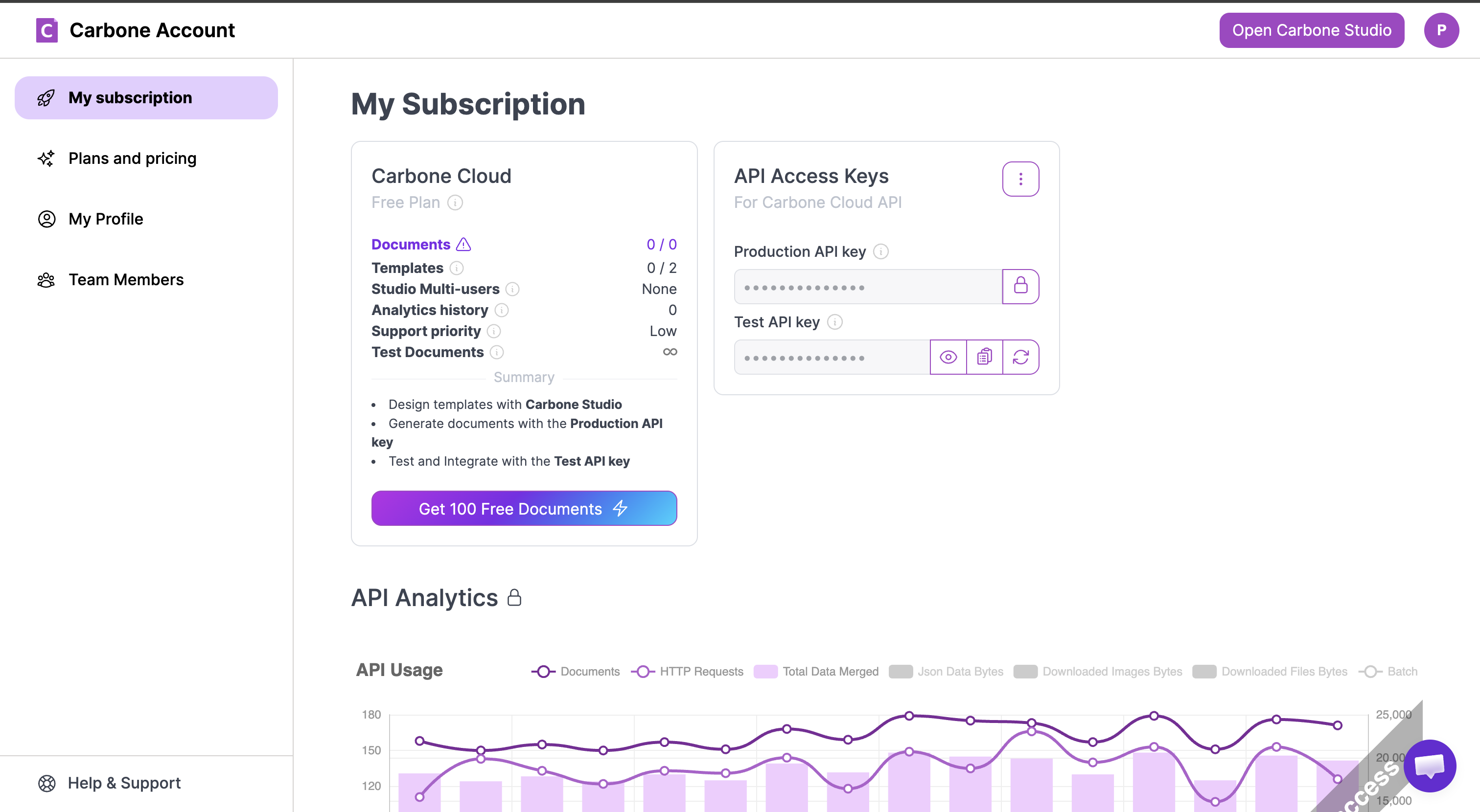
-
Create a connection in Scalekit
- In the Scalekit dashboard, go to AgentKit → Connections → Create Connection.
- Search for Carbone.io MCP and click Create.
- Note the Connection name — use this as
connection_namein your code (e.g.,carboneiomcp).
-
Add a connected account
Connected accounts link a specific user identifier in your system to a Carbone API key. Add one in the dashboard to test. In production, each user adds their own through the authorization link: they enter their credentials on the page it opens.
In the dashboard, to test
- Open the connection and click the Connected Accounts tab → Add account.
- Fill in Your User’s ID and API Key, then click Save.
From your backend, if your app already has the credentials
For example, when users enter them on a settings page in your app:
import { ConnectorStatus } from '@scalekit-sdk/node'const authorizationDetails = {details: {case: 'staticAuth',value: { details: { token: 'your-carbone-api-key' } },},}let { connectedAccount } = await scalekit.actions.upsertConnectedAccount({connectionName: 'carboneiomcp',identifier: 'user_123',authorizationDetails,})// Make sure the account is ACTIVE before the first tool call.if (connectedAccount?.status !== ConnectorStatus.ACTIVE) {;({ connectedAccount } = await scalekit.actions.upsertConnectedAccount({connectionName: 'carboneiomcp',identifier: 'user_123',authorizationDetails,}))}authorization_details = {"static_auth": {"token": "your-carbone-api-key"}}response = scalekit_client.actions.upsert_connected_account(connection_name="carboneiomcp",identifier="user_123",authorization_details=authorization_details,)# Make sure the account is ACTIVE before the first tool call.if response.connected_account.status != "ACTIVE":response = scalekit_client.actions.upsert_connected_account(connection_name="carboneiomcp",identifier="user_123",authorization_details=authorization_details,)
-
Authorize a user and make your first call
quickstart.mts import { ScalekitClient } from '@scalekit-sdk/node'import 'dotenv/config'import { createInterface } from 'node:readline/promises'const scalekit = new ScalekitClient(process.env.SCALEKIT_ENVIRONMENT_URL,process.env.SCALEKIT_CLIENT_ID,process.env.SCALEKIT_CLIENT_SECRET,)const actions = scalekit.actionsconst connector = 'carboneiomcp'const identifier = 'user_123'// Generate an authorization link for the userconst { link } = await actions.getAuthorizationLink({ connectionName: connector, identifier })console.log('Authorize Carbone.io MCP:', link)const rl = createInterface({ input: process.stdin, output: process.stdout })await rl.question('Press Enter after authorizing...')rl.close()// Make your first callconst result = await actions.executeTool({connector,identifier,toolName: 'carboneiomcp_get_api_status',toolInput: {},})console.log(result)Terminal window npx tsx quickstart.mtsquickstart.py import osfrom scalekit import ScalekitClientfrom dotenv import load_dotenvload_dotenv()scalekit_client = ScalekitClient(env_url=os.getenv("SCALEKIT_ENVIRONMENT_URL"),client_id=os.getenv("SCALEKIT_CLIENT_ID"),client_secret=os.getenv("SCALEKIT_CLIENT_SECRET"),)actions = scalekit_client.actionsconnection_name = "carboneiomcp"identifier = "user_123"# Generate an authorization link for the userlink_response = actions.get_authorization_link(connection_name=connection_name,identifier=identifier,)print("Authorize Carbone.io MCP:", link_response.link)input("Press Enter after authorizing...")# Make your first callresult = actions.execute_tool(tool_input={},tool_name="carboneiomcp_get_api_status",connection_name=connection_name,identifier=identifier,)print(result)Terminal window python quickstart.pyEach user opens the link once and enters their Carbone.io MCP server credentials there. If your app already has a user's credentials, add the account from your backend instead, as the console steps above show. See Authorize a user for the full flow and statuses.
Tools
Pass the exact name toexecute_toolcarboneiomcp_convert_documentConvert any document to another format without storing a template.WriteConvert Document
Convert any document to another format without storing a template. Supports 100+ input/output format combinations: Office documents, PDFs, images, web pages, spreadsheets, and more. The source file can be a local path, a URL, or a base64 string. Carbone tags are PRESERVED, not resolved: converting a template keeps every {d.field} intact, so this is also how you proof a template in another format (DOCX template → PDF, or DOCX → ODT while it stays a template). Use render_document instead when you need data injection ({d.field} tags resolved), translations, or batch generation. Common conversions: DOCX → PDF (file: "report.docx", convertTo: "pdf"; add converter: "I" for the fastest DOCX→PDF path), XLSX → PDF (file: "data.xlsx", convertTo: "pdf"), PPTX → PDF (file: "slides.pptx", convertTo: "pdf", converter: "O" for best fidelity), HTML → PDF (file: "page.html", convertTo: "pdf", converter: "C" for full CSS/JS rendering), DOCX → HTML (file: "doc.docx", convertTo: "html"), XLSX → CSV (file: "sheet.xlsx", convertTo: "csv"), PDF → PNG (file: "doc.pdf", convertTo: "png"), PPTX → PNG (first slide as image), MD → PDF (file: "readme.md", convertTo: "pdf").
Inputs
convertTostringrequired- Target output format. Valid outputs depend on the input format (e.g. HTML converts to pdf, docx or png, but not xlsx); see the conversion matrix: https://carbone.io/documentation/developer/http-api/generate-reports.html#output-file-type. "doc", "xls" and "ppt" are output formats; as input, use DOCX, XLSX or PPTX. Simple usage: "pdf". With options: { "formatName": "pdf", "formatOptions": { ... } }.
filestringrequired- The document to convert. Two input forms are accepted: (1) HTTPS URL â the file is downloaded automatically, e.g. "https://example.com/file.pptx". (2) Base64-encoded string â the raw file content encoded as base64. Local file paths are NOT accepted â this server is reached over HTTP, so a path would resolve on the server's disk rather than yours and is rejected. Upload the bytes as base64, or host the file at a URL. Supported input formats: DOCX, XLSX, PPTX, ODT, ODS, ODP, ODG, HTML, XHTML, XML, SVG, IDML, MD, TXT, CSV, RTF, PDF. Carbone reads XML-based and text-based documents (plus PDF): the legacy binary Office formats DOC, XLS and PPT are rejected as input, although they are valid outputs. Re-save such a file as DOCX, XLSX or PPTX first. Full conversion matrix: https://carbone.io/documentation/developer/http-api/generate-reports.html#output-file-type
asAttachmentboolean- If true, return the document as a downloadable file attachment (a base64 EmbeddedResource), for any format. Default delivery: text and png/jpg/gif/webp are returned inline; other binary outputs (PDF, Office, â¦) are returned as an attachment. Ignored when outputPath or returnLink is set.
converterstring- Converter engine, used whenever the format changes (not only for PDF). If omitted, "L" is used. "L" LibreOffice: DOCX, XLSX, PPTX, ODT, ODS, ODP, ODG, MD, PDF; the only converter supporting all PDF options. "I" Carbone ICE: DOCX and ODT to PDF; Carbone's own engine, 3x to 300x faster, recommended over "O" for DOCX from v5.15.0. It converts all content except WEBP and EMF/WMF images, SmartArt and complex charts (bar, line, area, pie and doughnut charts are drawn), comments, tracked changes, form fields and equations: keep the default "L" for documents with those. A missing font is replaced by Noto Sans (https://carbone.io/documentation/developer/http-api/generate-reports.html#converters-carbone-ice-limitations). "O" OnlyOffice: DOCX, XLSX, PPTX to PDF. "C" Chromium: HTML to PDF, JPG, PNG, WEBP with full CSS/JS; 100 MB max. PDF options: "L" supports all of them; "O", "C" and "I" apply Security (passwords, permissions) and Watermarks. Docs: https://carbone.io/documentation/developer/http-api/generate-reports.html#convertersone of
LOCI egressAuthorizationstring- Value for the Authorization header Carbone adds to its OUTBOUND (egress) requests during conversion â e.g. when a Chromium HTMLâPDF conversion fetches a protected external image or stylesheet. For example "Bearer abc123" makes Carbone send `authorization: Bearer abc123` to those hosts. Only the authorization header can be customised; max 511 characters.
hardRefreshboolean- If true, Carbone runs the converter even when the output format equals the input format, and recomputes pagination and the table of contents at the end of the conversion. Needed for PDF â PDF: without it Carbone returns the PDF unchanged and formatOptions (password, permissions, watermarks, PDF/A, â¦) are NOT applied. This server sets it automatically when the input is a PDF, convertTo is "pdf" and formatOptions are given; pass false to opt out. Example (PDF â PDF/A-4): { "hardRefresh": true, "convertTo": { "formatName": "pdf", "formatOptions": { "SelectPdfVersion": 4 } } }.
outputPathstring- NOT AVAILABLE on this server, which is reached over HTTP: the converted document would be written to the server's disk instead of yours, so passing outputPath is rejected. Use asAttachment to receive the bytes, or returnLink for a one-time download URL.
reportNamestring- Name of the delivered file, WITHOUT extension (e.g. "contract", "2026-invoice"). The document is delivered as "<reportName>.<ext>", with the extension of convertTo, used as the attachment name. This server names the file itself: a conversion has no templating pass, which is where Carbone resolves reportName. Used literally: Carbone tags such as {d.id} are not resolved here. Ignored with returnLink (a download URL, not a named file).
returnLinkboolean- If true, generate the document and return a public download URL instead of the file contents. The link is SHORT-LIVED and ONE-TIME â Carbone deletes the file after the first download â so it is meant for the end user to download once (do not fetch it programmatically). Works in stdio and HTTP. Mutually exclusive with outputPath and asAttachment.
carboneiomcp_delete_templateDelete a stored Carbone template.WriteDelete Template
Delete a stored Carbone template. This is a soft delete: the template is marked for garbage collection and removed after a delay (default 24 hours). You can delete by Template ID (removes all versions) or by Version ID (removes only that specific version). For immediate or scheduled deletion, use update_template_metadata with expireAt = 42000000000 (NOW) or a future Unix timestamp.
Inputs
templateIdstringrequired- Template ID (64-bit) or Version ID (SHA-256) to delete. Template ID — deletes the template record and all its versions. Version ID — deletes only that specific version, leaving other versions intact. Both formats are returned by upload_template and list_templates.
carboneiomcp_download_templateDownload the original source file of a stored Carbone template (e.g.WriteDownload Template
Download the original source file of a stored Carbone template (e.g. the DOCX, XLSX, PPTX, or HTML file that was uploaded). Use this to inspect, edit, or back up a template. Pass a Template ID to download the currently deployed version, or a Version ID to download a specific version. Set sample:true to fetch the JSON sample dataset stored with the template instead of the template file itself.
Inputs
templateIdstringrequired- Template ID (64-bit) or Version ID (SHA-256) to download. Template ID — downloads the currently deployed version of the template. Version ID — downloads that exact version regardless of deployment status. Both formats are returned by upload_template and list_templates.
asAttachmentboolean- If true, return the template as a downloadable file attachment (base64 resource) instead of inline text/image. Useful in HTTP mode where outputPath is unavailable. Default: false. Ignored when outputPath is set.
outputPathstring- NOT AVAILABLE on this server, which is reached over HTTP: the template file would be written to the server's disk instead of yours, so passing outputPath is rejected. Use asAttachment to receive the bytes, or returnLink for a one-time download URL.
sampleboolean- If true, download the JSON SAMPLE DATASET saved with the template (the "sample" array passed to upload_template) instead of the template file. Returns JSON of the form [{ "data": {...}, "complement": {...}, "translations": {...}, "enum": {...} }]. Use it to recover the example data a template expects — handy before calling render_document against an unfamiliar template. Errors if the template was uploaded without a sample.
carboneiomcp_get_api_statusCheck Carbone API health and version.WriteGet Api Status
Check Carbone API health and version. Returns the current API version and a status message. Useful for verifying connectivity and confirming which Carbone version is active.
Inputs
This tool takes no inputs.
carboneiomcp_get_capabilitiesReturns a summary of all Carbone capabilities: supported formats, features, tool usage examples, and links to full documentation.WriteGet Capabilities
Returns a summary of all Carbone capabilities: supported formats, features, tool usage examples, and links to full documentation. Call this first if you are unsure what Carbone can do.
Inputs
This tool takes no inputs.
carboneiomcp_inspect_templateList the Carbone tags a template uses and return a sample JSON dataset matching its structure.WriteInspect Template
List the Carbone tags a template uses and return a sample JSON dataset matching its structure. Call it before render_document when you do not know which data a template expects. Pass exactly one of templateId (a stored template: Template ID or Version ID) or template: an HTTPS URL or a base64-encoded string (local file paths are not accepted over HTTP). It runs one render on the Carbone account and discards the document. {t()} translation tags are not listed.
Inputs
templatestring- Inline template to inspect, without storing it. Two input forms are accepted: (1) HTTPS URL â the file is downloaded automatically, e.g. "https://example.com/file.pptx". (2) Base64-encoded string â the raw file content encoded as base64. Local file paths are NOT accepted â this server is reached over HTTP, so a path would resolve on the server's disk rather than yours and is rejected. Upload the bytes as base64, or host the file at a URL. Supported input formats: DOCX, XLSX, PPTX, ODT, ODS, ODP, ODG, HTML, XHTML, XML, SVG, IDML, MD, TXT, CSV, RTF, PDF. Carbone reads XML-based and text-based documents (plus PDF): the legacy binary Office formats DOC, XLS and PPT are rejected as input, although they are valid outputs. Re-save such a file as DOCX, XLSX or PPTX first. Mutually exclusive with templateId â provide exactly one, never both.
templateIdstring- The ID of a stored template to inspect. Two ID formats are accepted: (1) Template ID (64-bit) â the deployed version is inspected. (2) Version ID (SHA-256) â that exact version is inspected. Both are returned by upload_template and list_templates. Mutually exclusive with template â provide exactly one, never both.
carboneiomcp_list_categoriesList all template categories currently in use in your Carbone account.WriteList Categories
List all template categories currently in use in your Carbone account. Categories act like folders for organising templates (e.g. "invoices", "legal", "hr"). Use the returned names as the category filter in list_templates or upload_template.
Inputs
This tool takes no inputs.
carboneiomcp_list_templatesList stored Carbone templates with filtering, search, and pagination.WriteList Templates
List stored Carbone templates with filtering, search, and pagination. Filter by Template ID, Version ID, category, or upload origin. Use includeVersions to see the full version history of each template. Supports cursor-based pagination for large collections. Note: filtering by tags is not supported by the Carbone API — use list_tags to discover tags, then filter results manually. Note: templates uploaded with versioning disabled appear with id = null and are identified only by their versionId — pass that versionId where a Template ID is expected (e.g. delete_template, download_template).
Inputs
categorystring- Filter by category (e.g. "invoices", "legal").
cursorstring- Pagination cursor from the previous response nextCursor field. Use to fetch the next page.
idstring- Filter by Template ID (64-bit format). Cannot be a Version ID.
includeVersionsboolean- If true, returns all versions for each template. Default: false (only deployed version).
limitinteger- Maximum number of results to return, between 1 and 100. Default: 100. Use cursor to page beyond that.
origininteger- Filter by upload origin. 0 = API, 1 = Carbone Studio, 2 = Salesforce, 3 = Odoo, 4 = HubSpot. Templates created through this MCP are origin 0.
searchstring- Fuzzy search in template names, or exact match on Template ID / Version ID.
versionIdstring- Filter by Version ID (SHA-256 format).
carboneiomcp_render_documentGenerate a document by merging a Carbone template with JSON data.WriteRender Document
Generate a document by merging a Carbone template with JSON data. Two modes: (1) pass templateId to use a previously uploaded template; (2) pass template (file path, URL, or base64) to upload and render in a single request without storing a template. Supports output format conversion, multilingual rendering, currency conversion, batch generation, and advanced PDF options (watermark, password, PDF/A). Async mode: pass webhookUrl to render asynchronously — Carbone will POST the renderId to your URL when the document is ready. Async mode is required when using batch generation (batchSplitBy).
Inputs
asAttachmentboolean- If true, return the document as a downloadable file attachment (a base64 EmbeddedResource), for any format. Default delivery: text and png/jpg/gif/webp are returned inline; other binary outputs (PDF, Office, â¦) are returned as an attachment. Ignored when outputPath or returnLink is set.
batchOutputstring- Batch result type, with batchSplitBy. "zip" (default): an archive of all generated documents. "pdf": the generated PDFs concatenated into one file; requires convertTo "pdf".one of
zippdf batchReportNamestring- Name of each file inside the batch ZIP, WITHOUT extension (Carbone appends it). Carbone tags are resolved against each batch item, e.g. "invoice-{d.id}". Ignored when batchOutput is "pdf". From v5.14, an index is appended to every file as soon as two names collide (invoice_1.pdf, invoice_2.pdf). Requires batchSplitBy.
batchSplitBystring- Batch generation: one document per object of an array. Use "d" when data itself is an array, or "d.items" for a direct child array of data. Requires webhookUrl (batch is always asynchronous: the result goes to the webhook, not to this tool). At most 100 objects on Carbone Cloud. Combine with batchOutput and batchReportName. Docs: https://carbone.io/documentation/developer/http-api/generate-reports.html#batch-processing
complementstring- Extra data object accessible in templates with {c.field} tags (as opposed to {d.field} for main data). Useful for static or shared values that should not be mixed into the main dataset: company info, logo URLs, footer text, configuration constants. Example: { "company": "Acme Corp", "address": "123 Main St", "vatNumber": "FR12345" }. Like data, may instead be passed by reference as a string â an HTTPS URL or a base64-encoded JSON string (local file paths are not accepted over HTTP).
converterstring- Converter engine, used whenever the format changes (not only for PDF). If omitted, "L" is used. "L" LibreOffice: DOCX, XLSX, PPTX, ODT, ODS, ODP, ODG, MD, PDF; the only converter supporting all PDF options. "I" Carbone ICE: DOCX and ODT to PDF; Carbone's own engine, 3x to 300x faster, recommended over "O" for DOCX from v5.15.0. It converts all content except WEBP and EMF/WMF images, SmartArt and complex charts (bar, line, area, pie and doughnut charts are drawn), comments, tracked changes, form fields and equations: keep the default "L" for documents with those. A missing font is replaced by Noto Sans (https://carbone.io/documentation/developer/http-api/generate-reports.html#converters-carbone-ice-limitations). "O" OnlyOffice: DOCX, XLSX, PPTX to PDF. "C" Chromium: HTML to PDF, JPG, PNG, WEBP with full CSS/JS; 100 MB max. PDF options: "L" supports all of them; "O", "C" and "I" apply Security (passwords, permissions) and Watermarks. Docs: https://carbone.io/documentation/developer/http-api/generate-reports.html#convertersone of
LOCI convertTostring- Output format. If omitted, the output keeps the template format. Valid outputs depend on the input format (e.g. HTML converts to pdf, docx or png, but not xlsx); see the conversion matrix: https://carbone.io/documentation/developer/http-api/generate-reports.html#output-file-type. "doc", "xls" and "ppt" are output formats; as input, use DOCX, XLSX or PPTX. Simple usage: "pdf". With options: { "formatName": "pdf", "formatOptions": { ... } }.
currencyRatesstring- Exchange rate table used by :formatC for currency conversion. Keys are ISO 4217 currency codes; values are rates relative to a common base. The base currency should have rate 1. Example: { "EUR": 1, "USD": 1.08, "GBP": 0.86, "JPY": 160.5 }. May instead be passed by reference as a string â an HTTPS URL or a base64-encoded JSON string (local file paths are not accepted over HTTP).
currencySourcestring- ISO 4217 currency code of the monetary amounts in the JSON data. Used by the :formatC formatter as the conversion source. Must be set together with currencyTarget and currencyRates. Example: "EUR" if all prices in your data are in euros.
currencyTargetstring- ISO 4217 currency code of the output document. The :formatC formatter converts amounts from currencySource to this currency using currencyRates. Must be set together with currencySource and currencyRates. Example: "USD" to display prices in US dollars. Documentation: https://carbone.io/documentation/design/formatters/currency.html#formatc-precisionorformat-targetcurrency
datastring- JSON data merged into the template â an object, or a top-level array (accessed with {d[i].field}). Access fields with {d.fieldName} tags. Nested objects: {d.customer.name}. Array loops: {d.items[i].description} ⦠{d.items[i+1]}. Conditions: {d.status:ifEQ(active):show(Yes):elseShow(No)}. Optional: if omitted, {} is sent, so every tag resolves to empty ("Hello {d.name}!" becomes "Hello !"). To keep the tags as written instead, pass keepTags: true (and no data). Instead of inlining a large dataset, you may pass a STRING reference to the JSON: an HTTPS URL or a base64-encoded JSON string (local file paths are not accepted over HTTP) â it is read and parsed server-side.
egressAuthorizationstring- Value for the Authorization header Carbone adds to its OUTBOUND (egress) requests while rendering â fetching external images ({d.imageUrl}), external PDFs (:appendFile / :attachFile), and calling webhooks. For example "Bearer abc123" or "my-secret" makes Carbone send `authorization: <value>` to those hosts. Only the authorization header can be customised; max 511 characters. For webhook calls specifically, webhookHeaders.authorization (if set) overrides this value.
enumstring- Enumeration map used with the :convEnum(TYPE) formatter to translate code values into human-readable labels. Define one key per enum type; each value is an object mapping code â label. Example: { "STATUS": { "1": "Active", "2": "Inactive", "3": "Pending" }, "ROLE": { "A": "Admin", "U": "User" } }. Template usage: {d.status:convEnum(STATUS)}, {d.role:convEnum(ROLE)}. May instead be passed by reference as a string â an HTTPS URL or a base64-encoded JSON string (local file paths are not accepted over HTTP). Documentation: https://carbone.io/documentation/design/advanced-features/key-value-mapping.html#convenum-type
failOnarray- Conditions that stop the render and return an error (Carbone v5.15.0+). "IMAGE_URL_ERROR": an image that cannot be downloaded from its URL fails the render, instead of being replaced with the broken-image placeholder. Empty image values are skipped; base64 images, barcodes and charts are not concerned. Example: ["IMAGE_URL_ERROR"]. Docs: https://carbone.io/documentation/developer/http-api/generate-reports.html#fail-on
hardRefreshboolean- If true, Carbone recomputes pagination and refreshes the table of contents after rendering. Requires convertTo to be defined. Use this for DOCX/ODT templates that contain a TOC field or cross-references that need updating after data injection.
keepTagsboolean- If true, SKIP templating entirely and leave every Carbone tag in the document exactly as written: {d.customer} comes out as the literal text "{d.customer}", formatters included. Use it to proof a stored template in another format (e.g. render templateId to PDF to check the tag layout), or to convert a template between formats while it stays a template. Mutually exclusive with data: passing both is rejected, because data would have nothing to fill. Not the same as omitting data: no data renders the template with an EMPTY dataset, so every tag resolves to an empty string; keepTags leaves the tags themselves in place.
langstring- Locale of the generated document. Affects three things: (1) {t(key)} translation tags â selects the matching translation from the translations map. (2) :formatN number formatter â applies locale-specific thousand/decimal separators. (3) :formatC currency formatter â applies locale-specific currency symbols and formatting. Format: BCP-47 lowercase, e.g. "fr-fr", "en-us", "de-de", "es-es", "pt-br", "zh-cn", "ja-jp". Full list: https://github.com/carboneio/carbone/blob/master/formatters/_locale.js
outputPathstring- NOT AVAILABLE on this server, which is reached over HTTP: the generated document would be written to the server's disk instead of yours, so passing outputPath is rejected. Use asAttachment to receive the bytes, or returnLink for a one-time download URL. Ignored for async/webhook renders (no document is returned inline).
preReleaseFeatureIninteger- Pre-release feature level for this render only: features and fixes introduced up to this tag apply, later ones stay disabled. Overrides the server default; a tag set in the template overrides it. Example: 5000000. Docs: https://carbone.io/documentation/design/overview/version-lifecycle.html#pre-release-features
reportNamestring- Filename (WITHOUT extension) for the generated document, returned in the Content-Disposition header. Carbone automatically appends the extension that matches convertTo, so do not include one â passing "invoice.pdf" yields "invoice.pdf.pdf". Supports Carbone tags resolved against the data at render time. Examples: "invoice" (static), "{d.type}-{d.id}" (dynamic), "{d.client}-{d.date:formatD(YYYY-MM)}". With keepTags (no templating pass), this server names the file "<reportName>.<ext>" itself, literally (tags are not resolved).
returnLinkboolean- If true, generate the document and return a public download URL instead of the file contents. The link is SHORT-LIVED and ONE-TIME â Carbone deletes the file after the first download â so it is meant for the end user to download once (do not fetch it programmatically). Works in stdio and HTTP. Mutually exclusive with outputPath and asAttachment. Ignored when webhookUrl is set (no link is returned).
templatestring- Inline template for one-shot render without storing a template first. Two input forms are accepted: (1) HTTPS URL â the file is downloaded automatically, e.g. "https://example.com/file.pptx". (2) Base64-encoded string â the raw file content encoded as base64. Local file paths are NOT accepted â this server is reached over HTTP, so a path would resolve on the server's disk rather than yours and is rejected. Upload the bytes as base64, or host the file at a URL. The template is uploaded and rendered in a single API request â no Template ID is returned. Use this for ephemeral renders; use upload_template + templateId when you need to reuse the template. Supported input formats: DOCX, XLSX, PPTX, ODT, ODS, ODP, ODG, HTML, XHTML, XML, SVG, IDML, MD, TXT, CSV, RTF, PDF. Carbone reads XML-based and text-based documents (plus PDF): the legacy binary Office formats DOC, XLS and PPT are rejected as input, although they are valid outputs. Re-save such a file as DOCX, XLSX or PPTX first. Mutually exclusive with templateId â provide exactly one, never both.
templateIdstring- The ID of a previously uploaded template to render. Two ID formats are accepted: (1) Template ID (64-bit) â stable identifier shared across versions; Carbone automatically uses the deployed version. (2) Version ID (SHA-256) â pins rendering to a specific version regardless of deployment status. Both are returned by upload_template. Mutually exclusive with template â provide exactly one, never both.
timezonestring- IANA timezone used to convert dates in the rendered document. Default: "Europe/Paris". Applied when templates use the :formatD formatter, e.g. {d.date:formatD(YYYY-MM-DD HH:mm)}. Common values: "UTC", "America/New_York", "America/Los_Angeles", "Europe/London", "Europe/Paris", "Europe/Berlin", "Asia/Tokyo", "Asia/Shanghai", "Australia/Sydney". Full list (TZ identifier column): https://en.wikipedia.org/wiki/List_of_tz_database_time_zones
translationsstring- Translation map for multilingual documents. Requires "lang" to be set to select the active locale. Top-level keys are BCP-47 locale codes; values are key â translated-string maps. Template usage: {t(greeting)} is replaced by the matching string for the active locale. Example: { "fr-fr": { "greeting": "Bonjour", "total": "Total" }, "en-us": { "greeting": "Hello", "total": "Total" } }. These dictionaries get large, so you may instead pass a string reference â an HTTPS URL or a base64-encoded JSON string (local file paths are not accepted over HTTP). Documentation: https://carbone.io/documentation/design/advanced-features/translations-i18n.html
variableStrstring- Carbone alias definitions applied to the whole template, as if written in it. An alias is a shortcut to a data path, not a variable: it stores no value and computes nothing (no arithmetic, no concatenation). Define with {#alias = d.path}, optionally with $parameters: {#mealOf($weekday) = d[weekday = $weekday]}. Use them in the template with {$alias}, e.g. {$mealOf(2).name}. Example: "{#buyer = d.order.customer}", then {$buyer.name} in the template renders d.order.customer.name. To store a computed value, use the :set formatter instead. Documentation: https://carbone.io/documentation/design/substitutions/aliases.html#alias
webhookHeadersobject- Custom headers Carbone will include when POSTing to your webhookUrl. Pass plain header names as keys â the prefix "carbone-webhook-header-" is added automatically before sending to Carbone, and Carbone forwards the original header names to your webhook endpoint. Example: { "authorization": "my-secret", "custom-id": "12345", "custom-name": "Jane Doe" } â Carbone will call your URL with headers: authorization: my-secret, custom-id: 12345, custom-name: Jane Doe. Requires webhookUrl to be set.
webhookUrlstring- Webhook URL that enables asynchronous rendering (render timeout raised to 5 minutes). This tool then returns only Carbone's acceptance message, never the document. When the document is ready, Carbone POSTs { "success": true, "data": { "renderId": "..." } } to this URL; the server behind it must download the document itself with GET /render/{renderId} on the Carbone API (one-time, no auth). You cannot fetch it from here. Required for batchSplitBy: batch output is always delivered this way. outputPath, asAttachment and returnLink are ignored in this mode. Example: "https://your-server.com/carbone-webhook".
carboneiomcp_update_template_metadataUpdate the metadata of a stored template: name, comment, category, tags, deployment timestamp, or expiration.WriteUpdate Template Metadata
Update the metadata of a stored template: name, comment, category, tags, deployment timestamp, or expiration. Use deployedAt to activate a specific version for rendering. Use expireAt to schedule or trigger immediate deletion.
Inputs
templateIdstringrequired- Template ID (64-bit) or Version ID (SHA-256) of the version to update. A Template ID patches only its currently deployed version (not every version). A Version ID patches that exact version.
categorystring- New category, max 200 characters.
commentstring- New free-text comment, max 200 characters.
deployedAtinteger- Unix timestamp (seconds) to set as the deployment time for this version. Carbone picks the version with the most recent deployedAt when rendering by Template ID. Use 42000000000 to deploy immediately (special "NOW" value). Future values are not allowed, and the deployed version's deployedAt cannot move back in time.
expireAtinteger- Schedule deletion of the patched version at a UTC Unix timestamp (seconds). After that time it is no longer listed, downloadable or renderable (404), and the file is purged after the retention delay. Send 0 to cancel a scheduled deletion (permanent again); omit to leave it unchanged. To delete now, use delete_template.
idstring- DEPRECATED: the 1.6.0 name of moveToTemplateId, kept so existing callers keep working. Use moveToTemplateId; passing both with different values is rejected.
moveToTemplateIdstring- CAUTION, structural change: moves the patched version to this other Template ID (64-bit; a Version ID is rejected). It is NOT the template to patch (that is templateId). Pass the version's Version ID as templateId; with a Template ID, its currently deployed version is moved and that Template ID falls back to its next most recent version (or stops resolving if none is left). Fails if the move creates a deployedAt conflict at the destination. Only use it when the user asks to move a version.
namestring- New display name, max 200 characters.
tagsarray- New list of tags, replacing the existing ones. Duplicates are removed and the list is sorted; the whole list is limited to 100 characters (about 8 tags of 9 characters).
carboneiomcp_upload_templateUpload and store a reusable Carbone template.WriteUpload Template
Upload and store a reusable Carbone template. Once uploaded, use render_document with the returned Template ID to generate documents from it. Supports versioning: multiple versions can live under a single stable Template ID, with deployedAt controlling which version is active. Accepted formats: DOCX, XLSX, PPTX, ODT, ODS, ODP, ODG, HTML, XHTML, IDML, XML, Markdown, PDF, and more.
Inputs
namestringrequired- Display name for the template, max 200 characters (e.g. "Invoice Template", "NDA Contract"). Optional but recommended: list_templates shows it and its search matches it.
templatestringrequired- The template file. Two input forms are accepted: (1) HTTPS URL â the file is downloaded automatically, e.g. "https://example.com/file.pptx". (2) Base64-encoded string â the raw file content encoded as base64. Local file paths are NOT accepted â this server is reached over HTTP, so a path would resolve on the server's disk rather than yours and is rejected. Upload the bytes as base64, or host the file at a URL. Supported input formats: DOCX, XLSX, PPTX, ODT, ODS, ODP, ODG, HTML, XHTML, XML, SVG, IDML, MD, TXT, CSV, RTF, PDF. Carbone reads XML-based and text-based documents (plus PDF): the legacy binary Office formats DOC, XLS and PPT are rejected as input, although they are valid outputs. Re-save such a file as DOCX, XLSX or PPTX first.
categorystring- Group templates into folders/categories, max 200 characters (e.g. "invoices", "legal", "hr").
commentstring- Free-text comment to describe the template version or its purpose, max 200 characters.
deployedAtinteger- UTC Unix timestamp (seconds) to set as the deployment time for this version. Carbone uses the version with the most recent deployedAt when rendering via Template ID. Use 42000000000 to deploy immediately (special "NOW" sentinel value). Future values are not allowed.
expireAtinteger- Schedule deletion at a UTC Unix timestamp (seconds); 0 (default) means the template never expires. After that time it is no longer listed, downloadable or renderable (404), and the file is purged after the retention delay. To remove a template now, use delete_template.
idstring- Existing Template ID (64-bit format) to add this upload to its version history. If omitted, a new Template ID is generated. Providing a Version ID (SHA-256) is not allowed and will cause an error.
samplearray- Sample input data attached to the template for testing in Carbone Studio: an array with at most ONE object, whose keys data, complement, translations and enum are all optional. Example: [{ "data": { "name": "Acme" } }].
tagsarray- Labels shown by list_tags and on each list_templates result (e.g. ["sales", "billing", "v2"]). Duplicates are removed and the list is sorted; the whole list is limited to 100 characters (about 8 tags of 9 characters).
versioningboolean- Enable template versioning (default: true). When true, a stable Template ID is generated and multiple versions can be managed under it. When false, behaves as legacy mode and returns only a templateId (SHA-256 hash) and templateExtension.default
true
No tools match.


