


The Context7 MCP connector routes your AI agent's tool calls to Context7's own MCP server through Scalekit. Each user connects their own Context7 API key once, and Scalekit sends it with every call, so your agent never handles credentials. It comes with 2 tools.
- Tools
- 2
- What they doRead · write · destructive
- 2 · 0 · 02 read0 write0 destructive
- Users sign in with
- API key
Setup
Install the SDK
Terminal window npm install @scalekit-sdk/node dotenvTerminal window pip install scalekit-sdk-python python-dotenvSet your credentials
Add your Scalekit credentials to your
.envfile. Find values in app.scalekit.com > Developers > API Credentials..env SCALEKIT_ENVIRONMENT_URL=<your-environment-url>SCALEKIT_CLIENT_ID=<your-client-id>SCALEKIT_CLIENT_SECRET=<your-client-secret>Create the Context7 MCP connection
In AgentKit > Connections, create a Context7 MCP connection. The name you give it is the
connection_nameyour code passes. See Configure connections.Console steps with screenshots
Register your Context7 API key with Scalekit so it can authenticate and proxy documentation requests on behalf of your users. Context7 MCP uses API key authentication.
-
Get a Context7 API key
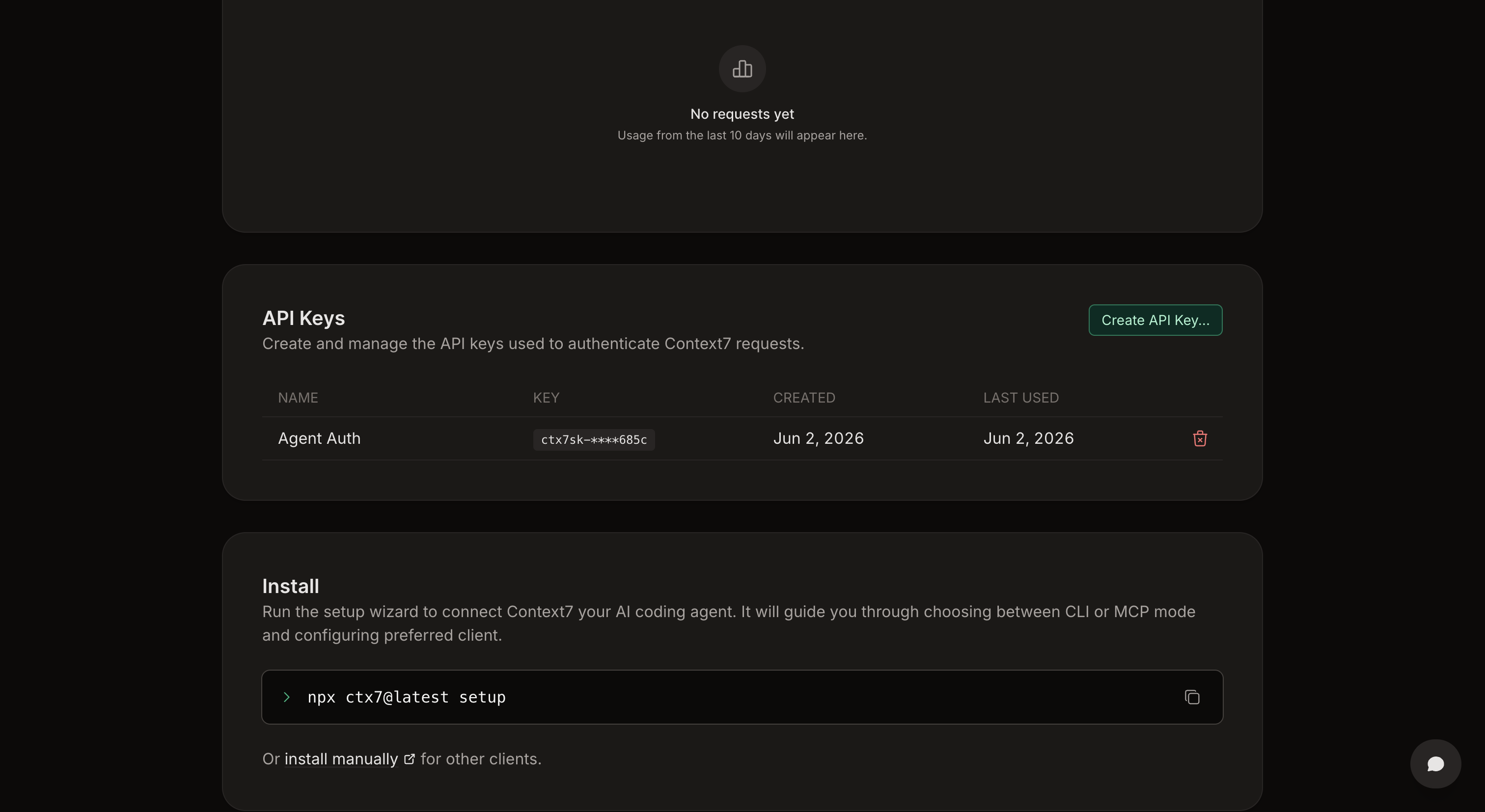
- Go to context7.com and sign in to your account.
- Navigate to the API Keys section in the dashboard.
- Click Create API Key… and give it a name (e.g.
Agent Auth). - Copy the generated key — it starts with
ctx7sk-.
-
Create a connection in Scalekit
- In the Scalekit dashboard, go to AgentKit → Connections → Create Connection.
- Search for Context7 MCP and click Create.
- Note the Connection name — use this as
connection_namein your code (e.g.,context7mcp).
-
Add a connected account
Connected accounts link a specific user identifier in your system to a Context7 API key. Add one in the dashboard to test. In production, each user adds their own through the authorization link: they enter their credentials on the page it opens.
In the dashboard, to test
- Open the connection and click the Connected Accounts tab → Add account.
- Fill in Your User’s ID and API Key, then click Save.
From your backend, if your app already has the credentials
For example, when users enter them on a settings page in your app:
import { ConnectorStatus } from '@scalekit-sdk/node'const authorizationDetails = {details: {case: 'staticAuth',value: { details: { api_key: 'ctx7sk-...' } },},}let { connectedAccount } = await scalekit.actions.upsertConnectedAccount({connectionName: 'context7mcp',identifier: 'user_123',authorizationDetails,})// Make sure the account is ACTIVE before the first tool call.if (connectedAccount?.status !== ConnectorStatus.ACTIVE) {;({ connectedAccount } = await scalekit.actions.upsertConnectedAccount({connectionName: 'context7mcp',identifier: 'user_123',authorizationDetails,}))}authorization_details = {"static_auth": {"api_key": "ctx7sk-..."}}response = scalekit_client.actions.upsert_connected_account(connection_name="context7mcp",identifier="user_123",authorization_details=authorization_details,)# Make sure the account is ACTIVE before the first tool call.if response.connected_account.status != "ACTIVE":response = scalekit_client.actions.upsert_connected_account(connection_name="context7mcp",identifier="user_123",authorization_details=authorization_details,)
-
Authorize a user and make your first call
quickstart.mts import { ScalekitClient } from '@scalekit-sdk/node'import 'dotenv/config'import { createInterface } from 'node:readline/promises'const scalekit = new ScalekitClient(process.env.SCALEKIT_ENVIRONMENT_URL,process.env.SCALEKIT_CLIENT_ID,process.env.SCALEKIT_CLIENT_SECRET,)const actions = scalekit.actionsconst connector = 'context7mcp'const identifier = 'user_123'// Generate an authorization link for the userconst { link } = await actions.getAuthorizationLink({ connectionName: connector, identifier })console.log('Authorize Context7 MCP:', link)const rl = createInterface({ input: process.stdin, output: process.stdout })await rl.question('Press Enter after authorizing...')rl.close()// Make your first callconst result = await actions.executeTool({connector,identifier,toolName: 'context7mcp_query_docs',toolInput: { libraryId: '/mongodb/docs', query: 'YOUR_QUERY' },})console.log(result)Terminal window npx tsx quickstart.mtsquickstart.py import osfrom scalekit import ScalekitClientfrom dotenv import load_dotenvload_dotenv()scalekit_client = ScalekitClient(env_url=os.getenv("SCALEKIT_ENVIRONMENT_URL"),client_id=os.getenv("SCALEKIT_CLIENT_ID"),client_secret=os.getenv("SCALEKIT_CLIENT_SECRET"),)actions = scalekit_client.actionsconnection_name = "context7mcp"identifier = "user_123"# Generate an authorization link for the userlink_response = actions.get_authorization_link(connection_name=connection_name,identifier=identifier,)print("Authorize Context7 MCP:", link_response.link)input("Press Enter after authorizing...")# Make your first callresult = actions.execute_tool(tool_input={"libraryId":"/mongodb/docs","query":"YOUR_QUERY"},tool_name="context7mcp_query_docs",connection_name=connection_name,identifier=identifier,)print(result)Terminal window python quickstart.pyEach user opens the link once and enters their Context7 MCP server credentials there. If your app already has a user's credentials, add the account from your backend instead, as the console steps above show. See Authorize a user for the full flow and statuses.
Tools
Pass the exact name toexecute_toolcontext7mcp_query_docsRetrieves and queries up-to-date documentation and code examples from Context7 for any programming library or framework.Read-onlyContext7 Query Docs
Retrieves and queries up-to-date documentation and code examples from Context7 for any programming library or framework. You must call 'Resolve Context7 Library ID' tool first to obtain the exact Context7-compatible library ID required to use this tool, UNLESS the user explicitly provides a library ID in the format '/org/project' or '/org/project/version' in their query. Do not call this tool more than 3 times per question.
Inputs
libraryIdstringrequired- Exact Context7-compatible library ID (e.g., '/mongodb/docs', '/vercel/next.js', '/supabase/supabase', '/vercel/next.js/v14.3.0-canary.87') retrieved from 'resolve-library-id' or directly from user query in the format '/org/project' or '/org/project/version'.
querystringrequired- What to look up in the library's documentation, scoped to a single concept. Be specific and include relevant details, but keep each query to one topic — if the user's question spans multiple distinct concepts, make a separate call per concept instead of combining them, unless the question is about how the concepts interact. Good: 'How to set up authentication with JWT in Express.js' or 'React useEffect cleanup function examples'. Bad (too vague): 'auth' or 'hooks'. Bad (too broad): 'routing and auth and caching in Next.js'. The query is sent to the Context7 API for processing. Do not include any sensitive or confidential information such as API keys, passwords, credentials, personal data, or proprietary code in your query.
Also accepts
schema_versionandtool_versionto pin a version.context7mcp_resolve_library_idResolves a package/product name to a Context7-compatible library ID and returns matching libraries.Read-onlyContext7 Resolve Library ID
Resolves a package/product name to a Context7-compatible library ID and returns matching libraries. You MUST call this function before 'Query Documentation' tool to obtain a valid Context7-compatible library ID UNLESS the user explicitly provides a library ID in the format '/org/project' or '/org/project/version' in their query. Each result includes: - Library ID: Context7-compatible identifier (format: /org/project) - Name: Library or package name - Description: Short summary - Code Snippets: Number of available code examples - Source Reputation: Authority indicator (High, Medium, Low, or Unknown) - Benchmark Score: Quality indicator (100 is the highest score) - Versions: List of versions if available. Use one of those versions if the user provides a version in their query. The format of the version is /org/project/version. For best results, select libraries based on name match, source reputation, snippet coverage, benchmark score, and relevance to your use case. Selection Process: 1. Analyze the query to understand what library/package the user is looking for 2. Return the most relevant match based on: - Name similarity to the query (exact matches prioritized) - Description relevance to the query's intent - Documentation coverage (prioritize libraries with higher Code Snippet counts) - Source reputation (consider libraries with High or Medium reputation more authoritative) - Benchmark Score: Quality indicator (100 is the highest score) Response Format: - Return the selected library ID in a clearly marked section - Provide a brief explanation for why this library was chosen - If multiple good matches exist, acknowledge this but proceed with the most relevant one - If no good matches exist, clearly state this and suggest query refinements For ambiguous queries, request clarification before proceeding with a best-guess match. IMPORTANT: Do not call this tool more than 3 times per question. If you cannot find what you need after 3 calls, use the best result you have.
Inputs
libraryNamestringrequired- Library name to search for and retrieve a Context7-compatible library ID. Use the official library name with proper punctuation — e.g., 'Next.js' instead of 'nextjs', 'Customer.io' instead of 'customerio', 'Three.js' instead of 'threejs'.
querystringrequired- What to look up in the library's documentation. This is used to rank library results by relevance to what the user is trying to accomplish. The query is sent to the Context7 API for processing. Do not include any sensitive or confidential information such as API keys, passwords, credentials, personal data, or proprietary code in your query.
Also accepts
schema_versionandtool_versionto pin a version.
No tools match.


