


The Dev Rev MCP connector routes your AI agent's tool calls to Dev Rev's own MCP server through Scalekit. Each user connects their own Dev Rev access token once, and Scalekit sends it with every call, so your agent never handles credentials. It comes with 13 tools.
- Tools
- 13
- What they doRead · write · destructive
- 9 · 3 · 19 read3 write1 destructive
- Users sign in with
- Access token
Setup
Install the SDK
Terminal window npm install @scalekit-sdk/node dotenvTerminal window pip install scalekit-sdk-python python-dotenvSet your credentials
Add your Scalekit credentials to your
.envfile. Find values in app.scalekit.com > Developers > API Credentials..env SCALEKIT_ENVIRONMENT_URL=<your-environment-url>SCALEKIT_CLIENT_ID=<your-client-id>SCALEKIT_CLIENT_SECRET=<your-client-secret>Create the Dev Rev MCP connection
In AgentKit > Connections, create a Dev Rev MCP connection. The name you give it is the
connection_nameyour code passes. See Configure connections.Console steps with screenshots
Connect DevRev to Scalekit using a Personal Access Token (PAT). Scalekit stores the token securely and injects it into every tool call — your agent code never handles it directly.
-
Generate a Personal Access Token
- Log in to the DevRev dashboard.
- Click the Settings icon in the top-right corner.
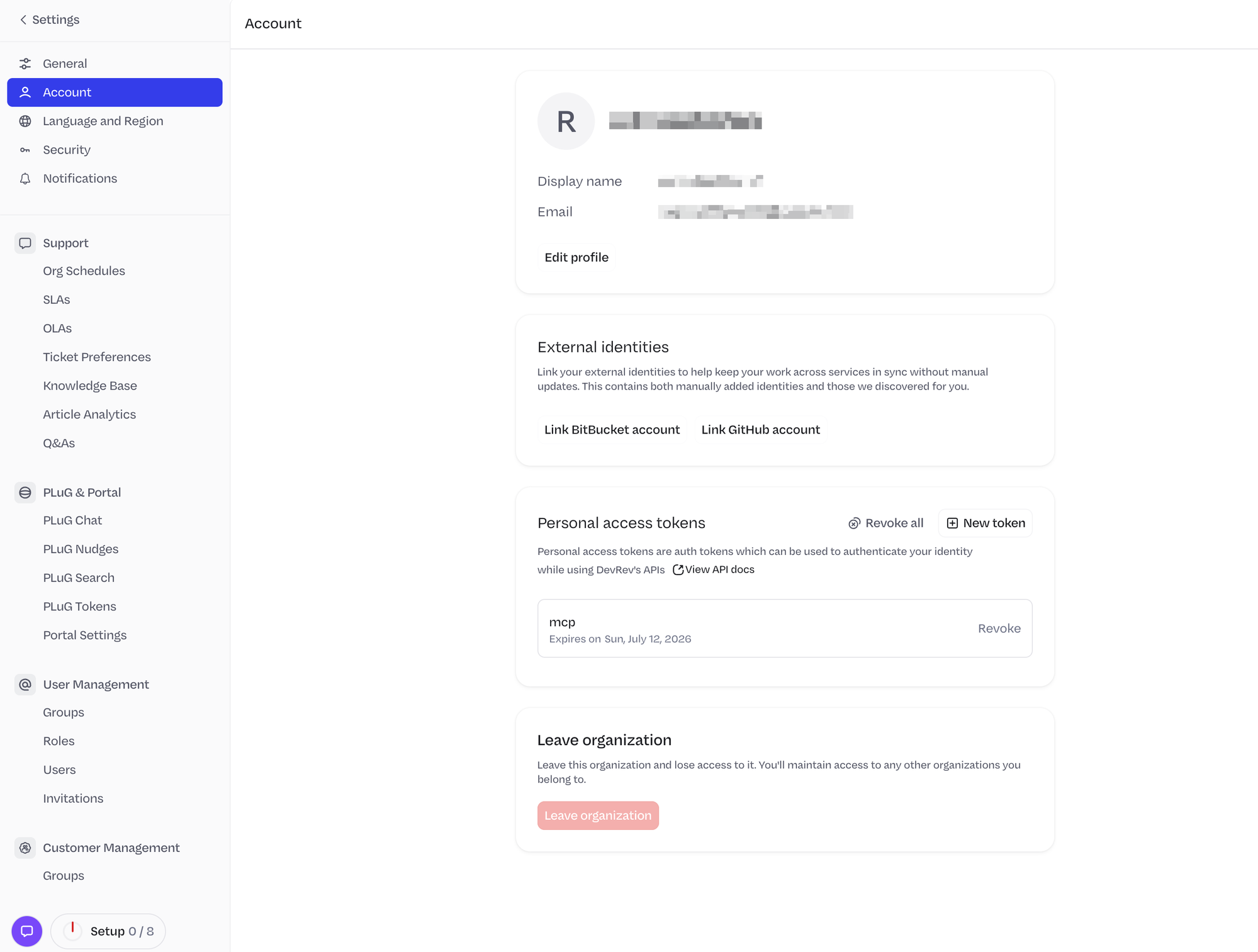
- In the left sidebar, select Account.
- Scroll down to the Personal access tokens section and click New token.
- Enter a name (e.g.
mcp), set an expiry date, and click Create. - Copy the token — it is shown only once.
-
Create a connection in Scalekit
- In the Scalekit dashboard, go to AgentKit → Connections → Create Connection.
- Search for DevRev MCP and click Create.
- Paste your Personal Access Token into the Token field.
- Click Save and note the Connection name — use this as
connection_namein your code.
-
Authorize a user and make your first call
quickstart.mts import { ScalekitClient } from '@scalekit-sdk/node'import 'dotenv/config'import { createInterface } from 'node:readline/promises'const scalekit = new ScalekitClient(process.env.SCALEKIT_ENVIRONMENT_URL,process.env.SCALEKIT_CLIENT_ID,process.env.SCALEKIT_CLIENT_SECRET,)const actions = scalekit.actionsconst connector = 'devrevmcp'const identifier = 'user_123'// Generate an authorization link for the userconst { link } = await actions.getAuthorizationLink({ connectionName: connector, identifier })console.log('Authorize Dev Rev MCP:', link)const rl = createInterface({ input: process.stdin, output: process.stdout })await rl.question('Press Enter after authorizing...')rl.close()// Make your first callconst result = await actions.executeTool({connector,identifier,toolName: 'devrevmcp_discover_schema',toolInput: {},})console.log(result)Terminal window npx tsx quickstart.mtsquickstart.py import osfrom scalekit import ScalekitClientfrom dotenv import load_dotenvload_dotenv()scalekit_client = ScalekitClient(env_url=os.getenv("SCALEKIT_ENVIRONMENT_URL"),client_id=os.getenv("SCALEKIT_CLIENT_ID"),client_secret=os.getenv("SCALEKIT_CLIENT_SECRET"),)actions = scalekit_client.actionsconnection_name = "devrevmcp"identifier = "user_123"# Generate an authorization link for the userlink_response = actions.get_authorization_link(connection_name=connection_name,identifier=identifier,)print("Authorize Dev Rev MCP:", link_response.link)input("Press Enter after authorizing...")# Make your first callresult = actions.execute_tool(tool_input={},tool_name="devrevmcp_discover_schema",connection_name=connection_name,identifier=identifier,)print(result)Terminal window python quickstart.pyEach user opens the link once and enters their Dev Rev MCP server credentials there. If your app already has a user's credentials, add the account from your backend instead, as the console steps above show. See Authorize a user for the full flow and statuses.
Tools
Pass the exact name toexecute_tooldevrevmcp_discover_schemaRetrieve the input schema for a DevRev action, or list all available actions.Read-onlyDiscover Schema
Retrieve the input schema for a DevRev action, or list all available actions.
Inputs
action_namestring- The action name to retrieve the schema for (e.g., create_issue). Omit to list all available actions.
subtypestring- The subtype to get the schema for. Omit to retrieve the schema for the stock type.
devrevmcp_fetch_object_contextFetch contextual information about any DevRev object by its DON ID or display ID.Read-onlyFetch Object Context
Fetch contextual information about any DevRev object by its DON ID or display ID.
Inputs
object_idstringrequired- The DON ID or display ID of the DevRev object to fetch context for.
devrevmcp_get_selfRetrieve the profile details of the currently authenticated DevRev user.Read-onlyGet Self
Retrieve the profile details of the currently authenticated DevRev user.
Inputs
This tool takes no inputs.
devrevmcp_get_sprintRetrieve the details of a specific DevRev sprint by its DON ID.Read-onlyGet Sprint
Retrieve the details of a specific DevRev sprint by its DON ID.
Inputs
idstringrequired- The DON ID of the sprint to retrieve.
devrevmcp_get_sprint_boardRetrieve the details of a specific DevRev sprint board (vista) by its DON ID.Read-onlyGet Sprint Board
Retrieve the details of a specific DevRev sprint board (vista) by its DON ID.
Inputs
idstringrequired- The DON ID of the sprint board (vista) to retrieve.
devrevmcp_get_tool_metadataRetrieve comprehensive metadata about available DevRev MCP tools.Read-onlyGet Tool Metadata
Retrieve comprehensive metadata about available DevRev MCP tools. Call this first before any other operation.
Inputs
This tool takes no inputs.
devrevmcp_get_valid_stage_transitionsReturn valid stage transitions for a given DevRev object type and its current stage.Read-onlyGet Valid Stage Transitions
Return valid stage transitions for a given DevRev object type and its current stage.
Inputs
object_typestringrequired- The stock leaf type of the object.one of
ticketissueincidentconversationopportunityaccount stage_idstringrequired- The DON ID of the current stage of the object.
devrevmcp_hybrid_searchSearch across DevRev's knowledge graph using natural language to find issues, tickets, articles, and other objects.Read-onlyHybrid Search
Search across DevRev's knowledge graph using natural language to find issues, tickets, articles, and other objects.
Inputs
namespacestringrequired- Primary namespace to search in.one of
accountarticlecapabilityconversationdashboarddev_userdirectorydmenhancementfeaturegroupincidentissuemeetingopportunityproductquestion_answerrev_orgrev_usertagticketvistawidgetcustom_object.ai_agent_session_metrics querystringrequired- A natural language question to search across DevRev's knowledge graph.
reranking_instructionstringrequired- A single sentence (≤15 words) guiding document ranking based on the query.
allowed_namespacesarray- Namespaces to restrict the search to. Leave empty to search all namespaces.
idsarray- DON IDs to filter search results by.
include_commentsboolean- Whether to include object comments in results. When true, results are limited to 10 objects.
limitnumber- Maximum number of results to return.
projection_typestring- Shape of each returned object: id, id_with_label, or summary.one of
idid_with_labelsummary
devrevmcp_list_objectsList DevRev objects (issues, tickets, etc.) with optional filters using a specified list action.Read-onlyList Objects
List DevRev objects (issues, tickets, etc.) with optional filters using a specified list action.
Inputs
action_namestringrequired- The list action identifier (e.g., list_issues, list_tickets). Must be one of the list actions returned by discover_schema.
fieldsarray- Field names to include in each returned object. Omit to return all fields.
valuesobject- Filter parameters to narrow results. Call discover_schema first to get available filter fields.
devrevmcp_add_commentAdd a comment to any DevRev object, with support for markdown formatting and user mentions.WriteAdd Comment
Add a comment to any DevRev object, with support for markdown formatting and user mentions.
Inputs
objectstringrequired- DON ID of the DevRev object to comment on.
bodystring- The markdown-formatted body of the comment.
snap_kit_bodystring- Optional snap-kit UI component to render with the comment. Accepts a static snap-kit component as a valid JSON object.
visibilitystring- Visibility of the comment: external (default), internal (dev org only), or private (specified users only).one of
externalinternalprivate
devrevmcp_create_objectCreate a new DevRev object (issue, ticket, etc.) by specifying an action name and field values.WriteCreate Object
Create a new DevRev object (issue, ticket, etc.) by specifying an action name and field values.
Inputs
action_namestringrequired- The create action identifier (e.g., create_issue, create_ticket). Must be one of the create actions returned by discover_schema.
valuesobjectrequired- Key-value pairs of field names and values for the new object. Call discover_schema first to get required and optional fields.
subtypestring- The subtype of the object to create (e.g., issue, ticket). Omit to create the stock type.
devrevmcp_link_objectsCreate a link between two DevRev objects using a specified link action.WriteLink Objects
Create a link between two DevRev objects using a specified link action.
Inputs
action_namestringrequired- The link action identifier (e.g., link_ticket_with_issue). Must be one of the link actions returned by discover_schema.
sourcestringrequired- The display ID of the source object to link from (e.g., ISS-123, TKT-123).
targetstringrequired- The display ID of the target object to link to (e.g., TKT-456, ISS-456).
link_typestring- Type of link defining the relationship between the two objects.one of
is_parent_ofis_dependent_onis_duplicate_of
devrevmcp_update_objectUpdate fields on an existing DevRev object using a specified update action.DestructiveUpdate Object
Update fields on an existing DevRev object using a specified update action.
- Idempotent
Inputs
action_namestringrequired- The update action identifier (e.g., update_issue, update_ticket). Must be one of the update actions returned by discover_schema.
valuesobjectrequired- Fields to update including the object ID. Use discover_schema for allowed fields.
subtypestring- The subtype of the object to update. Omit to update the stock type.
No tools match.


