


The Devin MCP connector routes your AI agent's tool calls to Devin's own MCP server through Scalekit. Each user connects their own Devin access token once, and Scalekit sends it with every call, so your agent never handles credentials. It comes with 25 tools.
- Tools
- 25
- What they doRead · write · destructive
- 1 · 24 · 01 read24 write0 destructive
- Users sign in with
- Access token
Setup
Install the SDK
Terminal window npm install @scalekit-sdk/node dotenvTerminal window pip install scalekit-sdk-python python-dotenvSet your credentials
Add your Scalekit credentials to your
.envfile. Find values in app.scalekit.com > Developers > API Credentials..env SCALEKIT_ENVIRONMENT_URL=<your-environment-url>SCALEKIT_CLIENT_ID=<your-client-id>SCALEKIT_CLIENT_SECRET=<your-client-secret>Create the Devin MCP connection
In AgentKit > Connections, create a Devin MCP connection. The name you give it is the
connection_nameyour code passes. See Configure connections.Console steps with screenshots
Register your Devin API key with Scalekit so it stores it securely and injects it into every request. Devin uses API key authentication.
-
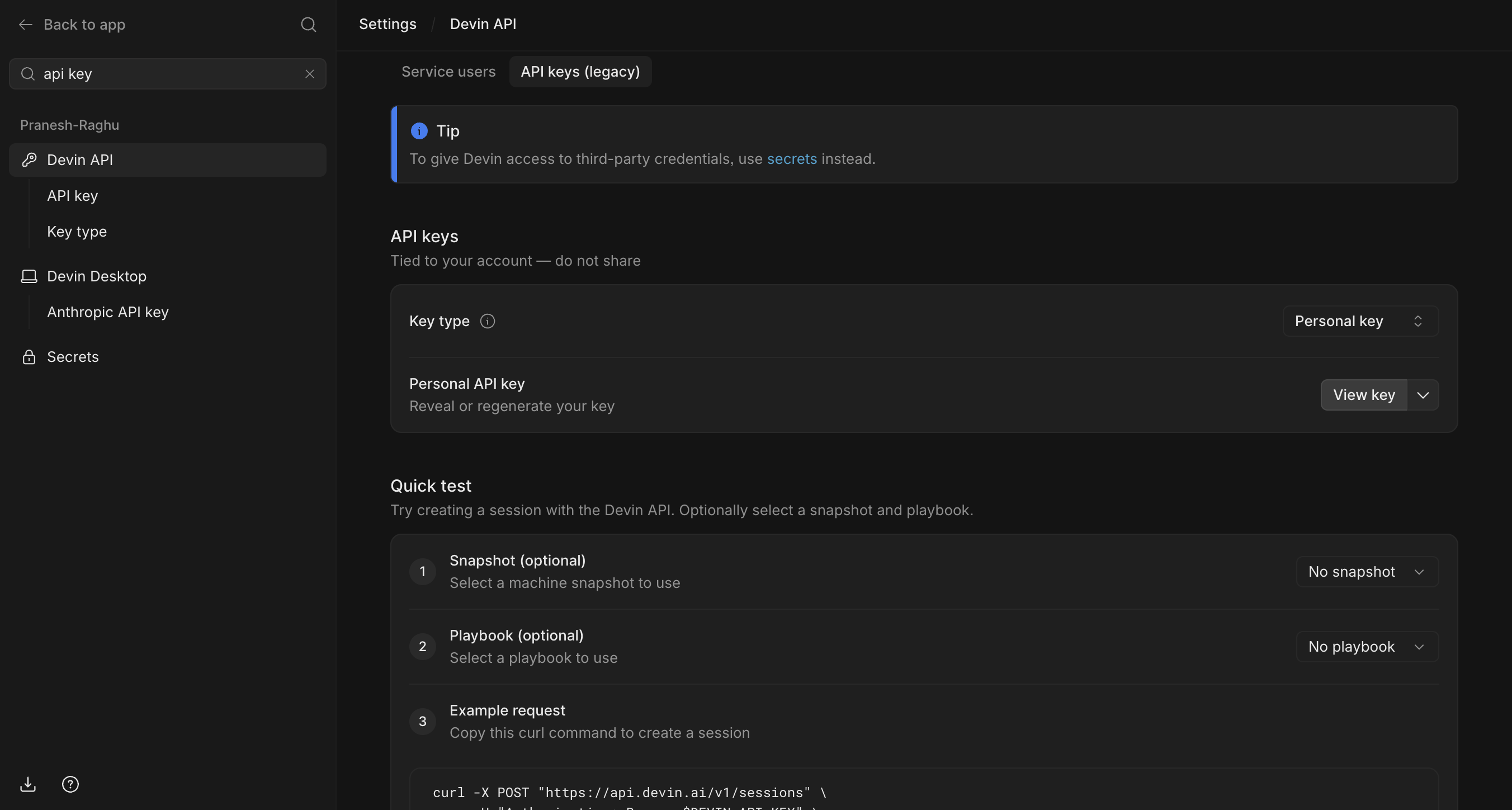
Get your Devin API key
- Sign in to Devin and go to Settings → Devin API.
- Click the API keys (legacy) tab.
- Under Personal API key, click View key to reveal your key, or expand the dropdown to regenerate it.
-
Create a connection in Scalekit
- In Scalekit dashboard, go to AgentKit → Connections → Create Connection. Find Devin MCP and click Create.
- Note the Connection name — you will use this as
connection_namein your code (e.g.,devinmcp). - Click Save.
-
Add a connected account
Connected accounts link a specific user identifier in your system to their Devin API key. Add one in the dashboard to test. In production, each user adds their own through the authorization link: they enter their credentials on the page it opens.
In the dashboard, to test
- Open the connection you created and click the Connected Accounts tab → Add account.
- Fill in:
- Your User’s ID — a unique identifier for this user in your system (e.g.,
user_123) - API Key — the Devin API key from step 1
- Your User’s ID — a unique identifier for this user in your system (e.g.,
- Click Create Account.
From your backend, if your app already has the credentials
For example, when users enter them on a settings page in your app:
import { Scalekit, ConnectorStatus } from '@scalekit-sdk/node';const scalekit = new Scalekit(process.env.SCALEKIT_ENVIRONMENT_URL,process.env.SCALEKIT_CLIENT_ID,process.env.SCALEKIT_CLIENT_SECRET,);// Never hard-code credentials — read from secure storage or user inputconst devinApiKey = getUserDevinApiKey(); // retrieve from your secure storeconst authorizationDetails = {details: {case: 'staticAuth',value: {details: {token: devinApiKey,},},},};let { connectedAccount } = await scalekit.actions.upsertConnectedAccount({connectionName: 'devinmcp',identifier: 'user_123',authorizationDetails,});// Make sure the account is ACTIVE before the first tool call.if (connectedAccount?.status !== ConnectorStatus.ACTIVE) {({ connectedAccount } = await scalekit.actions.upsertConnectedAccount({connectionName: 'devinmcp',identifier: 'user_123',authorizationDetails,}));}import osfrom scalekit import ScalekitClientscalekit_client = ScalekitClient(env_url=os.environ["SCALEKIT_ENVIRONMENT_URL"],client_id=os.environ["SCALEKIT_CLIENT_ID"],client_secret=os.environ["SCALEKIT_CLIENT_SECRET"],)# Never hard-code credentials — read from secure storage or user inputdevin_api_key = get_user_devin_api_key() # retrieve from your secure storeauthorization_details = {"static_auth": {"token": devin_api_key}}response = scalekit_client.actions.upsert_connected_account(connection_name="devinmcp",identifier="user_123",authorization_details=authorization_details,)# Make sure the account is ACTIVE before the first tool call.if response.connected_account.status != "ACTIVE":response = scalekit_client.actions.upsert_connected_account(connection_name="devinmcp",identifier="user_123",authorization_details=authorization_details,)
-
Authorize a user and make your first call
quickstart.mts import { ScalekitClient } from '@scalekit-sdk/node'import 'dotenv/config'import { createInterface } from 'node:readline/promises'const scalekit = new ScalekitClient(process.env.SCALEKIT_ENVIRONMENT_URL,process.env.SCALEKIT_CLIENT_ID,process.env.SCALEKIT_CLIENT_SECRET,)const actions = scalekit.actionsconst connector = 'devinmcp'const identifier = 'user_123'// Generate an authorization link for the userconst { link } = await actions.getAuthorizationLink({ connectionName: connector, identifier })console.log('Authorize Devin MCP:', link)const rl = createInterface({ input: process.stdin, output: process.stdout })await rl.question('Press Enter after authorizing...')rl.close()// Make your first callconst result = await actions.executeTool({connector,identifier,toolName: 'devinmcp_list_wiki_repos',toolInput: {},})console.log(result)Terminal window npx tsx quickstart.mtsquickstart.py import osfrom scalekit import ScalekitClientfrom dotenv import load_dotenvload_dotenv()scalekit_client = ScalekitClient(env_url=os.getenv("SCALEKIT_ENVIRONMENT_URL"),client_id=os.getenv("SCALEKIT_CLIENT_ID"),client_secret=os.getenv("SCALEKIT_CLIENT_SECRET"),)actions = scalekit_client.actionsconnection_name = "devinmcp"identifier = "user_123"# Generate an authorization link for the userlink_response = actions.get_authorization_link(connection_name=connection_name,identifier=identifier,)print("Authorize Devin MCP:", link_response.link)input("Press Enter after authorizing...")# Make your first callresult = actions.execute_tool(tool_input={},tool_name="devinmcp_list_wiki_repos",connection_name=connection_name,identifier=identifier,)print(result)Terminal window python quickstart.pyEach user opens the link once and enters their Devin MCP server credentials there. If your app already has a user's credentials, add the account from your backend instead, as the console steps above show. See Authorize a user for the full flow and statuses.
Tools
Pass the exact name toexecute_tooldevinmcp_list_wiki_reposList the repositories that have a DeepWiki index, i.e.Read-onlyList Wiki Repos
List the repositories that have a DeepWiki index, i.e. the ones that ask_wiki_question and read_wiki_* can answer about. This is not the set of repositories you have access to: repositories without a generated wiki are omitted.
Inputs
This tool takes no inputs.
devinmcp_ask_wiki_questionAsk any question about a GitHub repository's codebase and get an AI-powered answer grounded in its DeepWiki.WriteAsk Wiki Question
Ask any question about a GitHub repository's codebase and get an AI-powered answer grounded in its DeepWiki.
Inputs
questionstringrequired- The question to ask about the repository.
repoNamestringrequired- GitHub repository or list of repositories (max 10) in owner/repo format.
devinmcp_devin_automation_manageManage Devin automations that run Devin in response to events (GitHub, Slack, Linear, schedules, webhooks) — list, get, create, update, delete, or run them.WriteDevin Automation Manage
Manage Devin automations that run Devin in response to events (GitHub, Slack, Linear, schedules, webhooks) — list, get, create, update, delete, or run them.
Inputs
actionstringrequired- 'templates' lists the built-in templates whose template_id 'create' accepts. 'run' fires an enabled automation now and bypasses its trigger conditions. 'validate_create' and 'validate_update' dry-run the payload without approval. Preflight actions (only when 'schemas' reports it available): 'preflight_get' (saved script and settings), 'preflight_samples' (canned sample events to test against before any real event exists; with sample_event_type, that sample's $EVENT_FILE), 'preflight_events' (an automation's recent matched events), 'preflight_event' (one event's $EVENT_FILE), 'preflight_test' (run a script, saved or not, on a real VM against a sample or a recent event; starts no actions; without automation_id it is a draft run for an automation that does not exist yet), 'preflight_run' (poll a test run's outcome and logs). Save the script through the 'preflight' parameter of create/update.one of
listgetschemastemplatescreatevalidate_createupdatevalidate_updatedeleterunpreflight_getpreflight_samplespreflight_eventspreflight_eventpreflight_testpreflight_run actionsstring- What the automation does. Required for 'create'. Replaces all existing actions on 'update'. On a draft 'preflight_test' (no automation_id) pass the actions you will create with, so the draft applies the same default network policy as 'create'. Most automations use one start_session action. Code scans use start_code_scan or scan_new_commits instead. Long prompts render as BEGIN/END PROMPT <label> blocks: extract only the text between those two lines into a local file, edit it, and update with the full actions array and 'prompt': 'file:///absolute/path' (Devin's client resolves file URIs; other MCP clients must pass the text inline). Never retype a long prompt.
afterstring- Opaque cursor for 'list'/'preflight_events' pagination (from a previous response's end_cursor).
agent_typesstring- Filter 'list' results by agent type; multiple values match automations containing at least one action of any given type (OR). Values: 'new_session' (start_session), 'long_running' (message_session), 'triage_session' (auto-triage), 'auto_triage' (legacy monitor_session), 'code_scan' (start_code_scan / scan_new_commits), 'remediate_finding', 'incident_session'.
automation_idstring- The automation ID. Required for 'get', 'update', 'validate_update', 'delete', 'run', 'preflight_get', 'preflight_events', and 'preflight_event'. Optional for 'preflight_test'/'preflight_run': omit it to test a script for an automation that does not exist yet (a draft run against a sample event), then pass the same 'preflight' group to 'create'. IDs are `auto-<uuid>`; a bare UUID (e.g. from a webapp `/automations/<uuid>` URL) is accepted and normalized.
concurrencystring- Caps on simultaneous runs and the queue of events waiting to run.
creator_idstring- Filter 'list' results to automations created by this user id.
descriptionstring- For 'create' only: one plain sentence of at most 70 characters saying what the automation does and where the result goes, starting with a verb (e.g. 'Summarizes new support tickets and posts top issues to #support-leads.'). The card already shows the schedule or trigger, so leave out when it runs. Shown on the approval and created cards in this chat; it is not saved on the automation.
enabledstring- Enable or disable the automation on 'create'/'update'; on 'list', filter to automations in that enabled state.
event_datastring- For 'run' only: structured stand-in for the event data the real source would have sent. Mutually exclusive with prompt.
event_typestring- Filter 'list' results to automations with a trigger of this event type, e.g. 'slack:message'.
firststring- Page size for 'list' (default 100) and 'preflight_events' (default 20) pagination; max 200.
limitsstring- Resource limits for the automation and the sessions it spawns.
metadatastring- Org-visible string key/value labels (max 16 pairs; keys <= 32 chars, values <= 128). Update behavior follows the org's update semantics from action="schemas". On 'list', filters to automations whose metadata matches every given pair (null values are invalid there).
namestring- Human-readable name for the automation (1-500 characters). Required for 'create' and 'validate_create'.
notificationsstring- Email/Slack pings about the automation's dispatch outcomes.
preflightstring- For 'create'/'update' and their validate_ dry-runs: the Preflight check, a script that runs before the actions and decides per trigger event whether to proceed, skip, or fan out. For 'preflight_test': the script to run (saved or not). Pass the source as 'file:///absolute/path'. On update the whole group replaces the stored one; omitted keeps it. Preflight actions: 'preflight_get' (saved script), 'preflight_events' (recent matched trigger events), 'preflight_event' (one event's full $EVENT_FILE document), 'preflight_test' (run a script against a recent event on a real VM; starts no actions), 'preflight_run' (poll a test run's outcome and logs). Available only when action='schemas' reports it.
promptstring- For 'run' only: free-text stand-in for the triggering event, included in the event payload as additional context (max 10000 chars). Mutually exclusive with event_data.
queued_event_idstring- For 'preflight_event' (required) and 'preflight_test' (optional; default = the most recent matched event that is not a manual run): a queued_event_id from 'preflight_events'. Mutually exclusive with sample_event_type.
reasonstring- For 'update' and 'delete': one plain sentence of at most 100 characters saying why you are making the change. Shown on the approval card in this chat; it is not saved on the automation.
report_required_permissionsboolean- For 'validate_create'/'validate_update' only: append the organization permissions a save of this payload is judged on (set by the pre-approval hook to declare them on the approval request; not needed when validating by hand).default
false run_asstring- Identity the triggered sessions run under. REQUIRED for 'create', no default. Choose it together with tools.mcp_servers. On 'update', omitted means unchanged.
run_idstring- For 'preflight_run': the run_id returned by 'preflight_test'.
sample_event_typestring- For 'preflight_samples' (optional: show that sample's full $EVENT_FILE document) and 'preflight_test' (test against the canned sample for this trigger event type, e.g. 'github:pull_request'; required when automation_id is omitted). Mutually exclusive with queued_event_id.
sample_webhook_bodystring- For 'preflight_test' with sample_event_type 'webhook:incoming' only: the JSON body the user's system will POST to the webhook, used in place of the canned body (webhook payloads are user-defined; every other source's shape is fixed and the canned sample is authoritative). Ask the user for a real example. At most 64KB.
searchstring- Filter 'list' results by name substring.
security_profilestring- Security-profile binding: {'profile_id': '...'} pins that profile, {'profile_id': null} records an explicit opt-out, omitted inherits the org/enterprise default. Writing it requires the security-profile management permission and is rejected from a Devin session: there, omit it and tell the user to pick the profile in the automation's editor in the webapp and, when that profile has a network policy, to turn off the automation's Network policy there so sessions use the profile's allowlist. An opt-out cannot escape a mandatory profile. Reads return {'selection': 'inherit'|'none'|'profile', 'profile_id', 'warnings': [...]}. Warnings are non-blocking configuration conflicts; show them to the user.
session_settingsstring- Settings applied to every session the automation spawns.
template_idstring- Create-only provenance marker from the automation templates endpoint.
toolsstring- Tool grants for the sessions the automation spawns (slack_dm_scope and teams_dm_scope go inside this group, never as top-level arguments).
triggersstring- Events that dispatch the automation. Required for 'create'. Replaces all existing triggers on 'update'. Schedule triggers use an RFC 5545 RRULE condition with the 'recurrence' operator, e.g. {'event_type': 'schedule:recurring', 'conditions': {'any': [{'all': [{'field': 'rrule', 'operator': 'recurrence', 'value': 'DTSTART;TZID=America/Los_Angeles:19700101T000000\nRRULE:FREQ=DAILY;BYHOUR=6;BYMINUTE=0'}]}]}}. Read the full RRULE rules and examples from action='schemas'.
devinmcp_devin_billing_tag_manageManage Devin billing tags (groupings of Devin sessions for usage tracking) with a single action-based tool: list/get/create tags, assign sessions one at a time or in bulk (up to 500 per call, sent in sequential batches of 100), and read the billing tags of up to 100 sessions at once ('get_session_tags').WriteDevin Billing Tag Manage
Manage Devin billing tags (groupings of Devin sessions for usage tracking) with a single action-based tool: list/get/create tags, assign sessions one at a time or in bulk (up to 500 per call, sent in sequential batches of 100), and read the billing tags of up to 100 sessions at once ('get_session_tags'). Only available in private mode (via devin.ai endpoints).
Inputs
actionstringrequired- Operation to perform: 'list', 'get', 'create', 'assign_session', 'assign_sessions', or 'get_session_tags'.one of
listgetcreateassign_sessionassign_sessionsget_session_tags afterstring- Opaque cursor for 'list' pagination (from a previous response's end_cursor).
assignmentsstring- Map of Devin session ID -> billing tag ID (1-500 entries). Required for 'assign_sessions'. A null value marks the session as miscellaneous (no billing tag). Assignments are sent to the API in sequential batches of 100. Partial success: sessions or tags not found in the organization, or sessions you can't write, are reported per entry.
billing_tag_idstring- Billing tag id. Required for 'get'. For 'assign_session', the tag to assign; omit it to mark the session as miscellaneous (no tag).
descriptionstring- Free-form description of what work the tag covers. Optional for 'create'.
devin_idstring- ID of the Devin session to assign. Required for 'assign_session'. Assigning replaces the session's current billing tag.
firststring- Page size for 'list' pagination (default 100, max 200).
namestring- Billing tag display name. Required for 'create'.
session_idsstring- Session ids to look up billing tags for, at most 100. Required for 'get_session_tags'. Both 'devin-abc123' and 'abc123' are accepted. Each session comes back with its billing tag, as having no billing tag when it was categorized as Miscellaneous or its tag was deleted, as never categorized, or as not found.
devinmcp_devin_blueprint_testTest a candidate blueprint YAML in an authoring VM: start â run initialize â fix â run initialize again (clean VM) â run maintenance â then persist with update_environment_config.WriteDevin Blueprint Test
Test a candidate blueprint YAML in an authoring VM: start â run initialize â fix â run initialize again (clean VM) â run maintenance â then persist with update_environment_config.
Inputs
actionstringrequired- Operation: start, run, get, cancel, or close.one of
startrungetcancelclose afterinteger- Log cursor for get.default
0 author_session_idstring- Author session ID for run, get, cancel, and close.
namestring- Knowledge command name, when target is knowledge.
platformstring- Authoring VM platform label.default
default platformsstring- Platform labels matching YAML "runs-on" values; use "default" for the default platform. Defaults to [platform].
poll_interval_secondsinteger- Seconds between run polls; capped so keepalives keep flowing.default
5 repo_namestring- Repository name used to create or set the session working directory.
run_idstring- Run ID for get and cancel.
scopestring- Optional repository scope for the run working directory.
targetstring- Blueprint target: initialize, maintenance, or knowledge.
wait_timeout_secondsinteger- Maximum time to wait for a run. Capped below the 15-minute approval window; use `get` to keep following a longer run.default
600 yamlstring- Candidate blueprint YAML for a run.
devinmcp_devin_campaign_manageRead and publish a bot's campaign: its plan, its append-only readings and its status.WriteDevin Campaign Manage
Read and publish a bot's campaign: its plan, its append-only readings and its status. Access follows the bot: a personal bot's owner and the bot's own sessions, or any org member for a multiplayer bot; org admins may read a personal bot's campaign. A Devin session may publish drafts, readings and status, but never approve the plan: send plan.approved exactly as stored (a person approves in the campaign panel). 'running' requires an approved plan. The first update creates the campaign.
Inputs
actionstringrequired- 'get' reads the campaign; 'update' publishes the given fields; 'validate' runs every check 'update' makes without saving.one of
getupdatevalidate automation_idstring- The bot's root automation (auto-<id>), resolved to its bot. A campaign Devin passes its own session automation id here. Pass this or bot_id.
bot_idstring- The bot (bot-<id>) whose campaign to read or publish. Pass this or automation_id.
campaignstring- For update/validate: the complete plan and/or complete latest_readings document, plus an optional status. Omitted fields stay unchanged. Parse local YAML into JSON first.
devinmcp_devin_code_scan_manageManage Devin code scans and scan profiles — list scans and findings, manage profiles, create scans, or remediate findings.WriteDevin Code Scan Manage
Manage Devin code scans and scan profiles — list scans and findings, manage profiles, create scans, or remediate findings.
Inputs
actionstringrequired- The operation to perform: 'list_scans', 'get_scan', 'list_findings', 'list_scan_types', 'list_profiles', 'get_profile', 'create_profile', 'update_profile', 'create_scan', 'update_scan', 'scan_new_commits', 'get_session', 'remediate_finding', or 'remediate_findings'. 'list_scan_types' returns the scan types enabled for this org â only ever use those types (when general scans are disabled, only 'security'). Pick the type from the user's request yourself rather than presenting the types as a menu; use 'general' for anything no standard type covers. 'create_scan' launches the scan: only call it after the user has explicitly confirmed the setup by submitting code_scan_setup_form, or confirming a text summary when the form cannot be used. Preserve approved repositories, objective, effort, and notifications. 'scan_new_commits' re-runs an existing, completed scan against only the commits landed since it last ran â use it (not 'create_scan') whenever the user wants an existing scan brought up to date, e.g. "scan for new commits" or "rescan"; findings accumulate on the same scan. 'update_scan' changes the profile an existing scan applies to its future incremental runs (manual scan_new_commits and scan_new_commits automations alike) â use it (not a new scan) when the user wants an existing scan moved onto a different or revised profile. 'get_scan' reads one scan by scan_id, including the URLs of files attached to it. 'get_session' retrieves the latest run's orchestrating session link for a scan.one of
list_scansget_scanlist_findingslist_scan_typeslist_profilesget_profilecreate_profileupdate_profilecreate_scanupdate_scanscan_new_commitsget_sessionremediate_findingremediate_findings afterstring- Opaque cursor for list pagination (from a previous response's end_cursor).
commit_shastring- Optional Git commit SHA to check out for the initial scan ('create_scan' only, single repository). Accepts 7-64 hexadecimal characters; omit to scan the default branch. Later 'scan_new_commits' runs scan new commits rather than reusing this pin.
communication_guidancestring- Guidance for the communication phase: what happens when the scan finishes, e.g. Slack the requester a summary, or ping the code owners of each finding with it and its fix ('create_profile' and 'update_profile'). Always ask the user about this for non-security discover profiles. Security and ingest scans do not run this phase.
descriptionstring- Description of the profile ('create_profile' and 'update_profile').
effortstring- Scan effort ('create_scan' only): 'normal' (default) uses lower model reasoning effort and larger investigation batches â faster; 'deep' runs the full pipeline, tracing each finding further and validating findings one at a time â most thorough, slower. Only security scans offer the choice; every other scan type uses 'normal'. Explain the trade-off in terms of time and thoroughness only (never cost or usage).
exclude_globsstring- Glob patterns of files to exclude from scans ('create_profile' and 'update_profile').
finding_idstring- The finding ID. Required for 'remediate_finding'.
finding_idsstring- Findings of scan_id to fix together ('remediate_findings'; at least one). One session plans and groups them, then opens one pull request per group.
firststring- Page size for list actions (default 100, max 200).
hoststring- Git host of the repository/repositories ('create_scan' only).
include_globsstring- Glob patterns of files to include in scans ('create_profile' and 'update_profile').
ingestion_source_guidancestring- Guidance describing the ingestion source ('create_profile' and 'update_profile').
interactivestring- Interactive mode ('create_scan', security scans only): true pauses the scan once it has drafted its threat model and opens a session where the user reviews and adjusts it before investigation starts; false (default) runs end to end unattended. For security scans explain the difference, then ask. Never offer or set it for any other scan type â those always run unattended.
investigation_guidancestring- Guidance for the investigation phase ('create_profile' and 'update_profile').
localestring- BCP-47 language tag of the language the user is conversing in, e.g. 'ja' or 'pt-BR' ('create_scan' only). The scan writes its findings and report in this language. Always pass it when the user is not writing in English; omit it for English.
modestring- Profile mode: 'discover' (default) or 'ingest' ('create_profile' only; the mode is fixed at creation).
post_ingestion_guidancestring- Guidance for the post-ingestion phase ('create_profile' and 'update_profile').
profile_idstring- The profile ID. Required for 'get_profile', 'update_profile' and 'update_scan' (the profile future incremental runs use; must match the scan's type and mode); optional for 'create_scan'.
profile_namestring- Name of the profile. Required for 'create_profile'; optional new name for 'update_profile'.
remediation_guidancestring- Guidance for the remediation phase ('create_profile' and 'update_profile').
repo_namestring- Filter to this repository ('list_scans' and 'list_findings'), or the full repository name to scan ('create_scan'; provide exactly one of repo_name or repos).
report_guidancestring- Guidance for the report phase ('create_profile' and 'update_profile').
reposstring- Full names of the repositories to scan together as one scan ('create_scan'; provide exactly one of repo_name or repos). The first entry is the scan's primary repo. Use this whenever the user wants more than one repository covered.
scan_idstring- The scan to read ('get_scan'), or filter findings to this scan ('list_findings'), or the scan ID containing the finding(s) ('remediate_finding', 'remediate_findings'), or the scan to re-run ('scan_new_commits'), or the scan to reconfigure ('update_scan'), or the scan whose orchestrating session to retrieve ('get_session').
scan_pathsstring- Repository-relative paths to restrict scans to ('create_profile' and 'update_profile'). Include globs do not widen an existing restriction; pass [] with 'update_profile' to lift it.
scan_typestring- Type of scan, e.g. 'security' or 'general' ('create_scan', 'create_profile', 'list_profiles'). For 'list_profiles': only return profiles for this scan type â always pass the chosen type so profiles for other types are never shown or considered. For 'create_scan': must match the chosen profile's scan type; defaults to the profile's type, or 'security' when neither a profile nor a type is given. Every non-security scan type requires a profile_id â the profile defines the scan's objective. For 'create_profile': the type of scan the profile configures (defaults to 'security'). For 'update_profile': the new scan type of the profile.
severitystring- Filter findings to these severities: 'critical', 'high', 'medium', 'low' ('list_findings' only).
statusstring- Filter findings to these statuses: 'open', 'dismissed', 'resolved' ('list_findings' only).
summarystring- One-sentence, user-facing description of the proposed change, shown on the approval card when 'update_profile' targets a 'security' profile.
threat_model_guidancestring- Guidance describing the threat model ('create_profile' and 'update_profile').
time_afterstring- Unix seconds lower bound. Optional creation-time filter ('list_scans' only).
time_beforestring- Unix seconds upper bound. Optional creation-time filter ('list_scans' only).
triage_guidancestring- Guidance for the triage phase ('create_profile' and 'update_profile').
type_configstring- Configuration specific to the profile's scan type ('create_profile' and 'update_profile'). Only 'compliance' profiles define one: {'system': {'slug', 'name', 'repos', 'path_globs', 'guidance'}, 'framework': {'slug', 'name'}, 'criteria': [{'id', 'text', ...}]}. 'system' is the one authorization boundary the catalog assesses and 'framework' the standard its criteria come from; catalogs sharing a system slug roll up together on the Compliance page. 'system.guidance' is the user's guidance for every scan of the system: copy it unchanged whenever you pass 'system', and never write it unless asked. 'update_profile' keeps the stored top-level keys you do not pass, so send only the ones you are changing ('system', 'framework' or 'criteria', each replaced whole); pass {} to clear the object. Omit for every other scan type.
validation_guidancestring- Guidance for the validation phase ('create_profile' and 'update_profile').
validation_severitiesstring- Finding severities runtime validation covers, from 'critical', 'high', 'medium', 'low' ('create_profile' and 'update_profile'; security profiles only). Omit for the default (critical, high, medium); pass [] with 'update_profile' to restore it.
devinmcp_devin_find_settingFind a Devin webapp setting and get a deep-link URL to it.WriteDevin Find Setting
Find a Devin webapp setting and get a deep-link URL to it. Use for "where do I change X?". The output includes everything needed to build the final URL.
Inputs
querystring- Feature keywords (e.g. "queue messages", "fast mode"). Omit for the full settings catalog.
devinmcp_devin_knowledge_manageManage Devin knowledge notes and suggestions — list, get, create, or update entries.WriteDevin Knowledge Manage
Manage Devin knowledge notes and suggestions — list, get, create, or update entries.
Inputs
actionstringrequired- No description.one of
listgetcreateupdatedeletefolderslist_suggestionsview_suggestiondismiss_suggestions afterstring- No description.
bodystring- No description.
contentstring- No description.
event_idstring- No description.
event_idsstring- No description.
firststring- No description.
folder_pathstring- No description.
limitstring- No description.
namestring- No description.
note_idstring- No description.
offsetstring- No description.
pinned_repostring- No description.
querystring- No description.
searchstring- No description.
since_daysstring- No description.
statusstring- No description.
triggerstring- No description.
devinmcp_devin_list_integrationsList native integrations and MCP servers for the organization, with status and settings/install URLs.WriteDevin List Integrations
List native integrations and MCP servers for the organization, with status and settings/install URLs. Returns a JSON object with two arrays: "integrations" (native integrations like GitHub, Jira, Slack) and "mcp_servers" (marketplace MCP servers). Each entry includes whether it's installed and a path-only URL to the settings/setup page (no host, works with custom enterprise domains). Pass `query` to look up a specific server by name â an empty "mcp_servers" array then means it is not in the marketplace (install it as a custom server with devin_mcp_server_manage instead).
Inputs
filterstring- Filter results â 'all' (default), 'installed', or 'not_installed'.one of
allinstallednot_installeddefaultall querystring- Case-insensitive substring matched against name, slug, and description. Use it whenever you are looking for one specific integration or MCP server (e.g. query='whimsical'); the unfiltered catalog is large.
devinmcp_devin_mcp_server_manageManage MCP server installations for the organization: install (from the marketplace or custom), update, delete, enable, or disable.WriteDevin Mcp Server Manage
Manage MCP server installations for the organization: install (from the marketplace or custom), update, delete, enable, or disable. To connect a server, call install with marketplace_server_slug set to its name or slug as the first and only step: the name is resolved against the marketplace catalog in-tool, so there is no skill for this and no need to call devin_list_integrations, grep the repo, or web-search first. Only if the result says the server is not in the marketplace, look up the provider's official remote MCP endpoint and authentication method and install it as a custom server. For an API key, use request_secret first, then pass only its name: as auth_header_secret_name for HTTP servers, or in env_secret_names for STDIO servers. Never ask the user to paste a secret into normal session text. The pre-approval check rejects OAuth when automatic registration cannot complete. Install, update, and delete show the approval card unless the call is pre-approved; that card is the approval prompt, so do not send a separate "please approve" message. Only available in private mode.
Inputs
actionstringrequired- Operation to perform. 'resolve_install' is read-only: it resolves a marketplace server or validates a custom server before the approval card.one of
installresolve_installupdatedeleteenabledisable auth_header_formatstring- How to format auth_header_secret_name: 'bearer' creates 'Bearer ${SECRET_NAME}'; 'raw' creates '${SECRET_NAME}'. Defaults to 'bearer'.
auth_header_keystring- Header name for custom auth_header installs. Defaults to Authorization.
auth_header_secret_namestring- Protected Brain secret name for a custom auth_header install. First use request_secret and tell the user never to paste the value into normal session text. Pass only the name here; the credential value is never included in the install card. The name must start with MCP_ to limit access to MCP-specific secrets. For an org installation, use an org-scoped saved secret. A temporary secret works only in the current session.
auth_methodstring- 'none', 'auth_header', or 'oauth'. Before a custom install, research the provider's official documentation and select a supported method. Never put a credential value in this tool call.
commandstring- Command line to run, e.g. '/home/ubuntu/.fly/bin/flyctl mcp server'. Required for STDIO transport on a custom 'install'. The process starts from a login shell with only the env below plus the session's default environment, so use an absolute executable path.
descriptionstring- Longer description. Optional.
env_secret_namesstring- Environment variables for a custom STDIO server, as env var name -> protected Brain secret name (e.g. {'FLY_API_TOKEN': 'MCP_FLY_API_TOKEN'}). The value is never in the tool call: first use request_secret with a name that starts with MCP_, then pass only that name here. Each variable expands to that secret when the server starts.
iconstring- Icon URL for the approval card. Set automatically; do not set it.
installation_idstring- Installation id. Required for 'update', 'delete', 'enable', and 'disable'. Find it with devin_list_integrations.
installation_scopestring- Optional override: 'org' (Organization) shares one credential org-wide; 'user' (Personal) has each member connect their own account. Omit unless the user requests a scope; the marketplace default (or 'org') applies. Only for install. Change an existing scope in Settings.
marketplace_server_slugstring- For 'install': the marketplace server's slug or exact name (e.g. 'notion' or 'Notion'); no prior devin_list_integrations call is needed. Transport, command, and auth come from the marketplace manifest and cannot be overridden; url may only select a variant the manifest allows. Omit to install a custom server.
namestring- Display name. Required for a custom 'install'.
oauth_client_idstring- Pre-registered OAuth client ID for a custom install. Client IDs are identifiers, not secret values. If the provider also requires a client secret, configure that secret in Settings instead of putting it in session text.
oauth_resourcestring- OAuth resource indicator. Custom installs only.
oauth_scopestring- OAuth scope. Custom installs only.
short_descriptionstring- One-line description. Required for a custom 'install'.
slugstring- URL-safe identifier for the installation. Required for a custom 'install'.
transportstring- 'HTTP', 'SSE', or 'STDIO'. Required for a custom 'install'.
urlstring- Server URL. Required for HTTP/SSE transport on a custom 'install'. On a marketplace 'install', only to select a URL variant (e.g. a region): it must keep the scheme and host of one of the manifest's URLs; omit it for the default.
devinmcp_devin_oncall_manageView a Devin Oncall report's current responder membership, or a responder's open issues.WriteDevin Oncall Manage
View a Devin Oncall report's current responder membership, or a responder's open issues.
Inputs
actionstringrequired- Operation to perform on 'resource': 'list', 'get', 'create', 'validate_create', 'update', 'validate_update', 'delete', 'issues' (responder), 'stop'/'resume' (incident), 'runs'/'run' (report). Without a resource: 'schemas' (defaults, available modes, Slack connectivity) or 'ingest_dashboard'. The flat legacy names (report_context, responder_issues, ...) are aliases for older prompts; do not use them in new ones.one of
listgetcreatevalidate_createupdatevalidate_updatedeleteissuesstopresumerunsrunschemasingest_dashboardreport_contextresponder_issuesreport_statsdigest_runsincident_candidatessubmit_report_run afterstring- Opaque cursor for list/issues/runs pagination (from a previous response).
auto_join_enabledstring- incident_settings: whether Devin auto-joins new public channels matching the prefix (default true â keep it on unless the user wants to invite Devin manually).
dashboardstring- 'ingest_dashboard': reference to the dashboard to ingest â a URL, id, or name.
enabledstring- Responder: whether it triages new messages (default true). incident_settings: whether the incident feature is on for the org.
firststring- Page size for list/issues/runs (default 100, max 200).
incident_idstring- Incident id for incident get/stop/resume.
incident_idsstring- Report 'runs' POST: incident ids classified into the report for this period (from incident list with report_id). Supplying this (even []) submits a run instead of listing runs.
incident_session_settingsstring- incident_settings: devin_mode plus the staged investigation overrides initial_investigation_mode and thread_session_mode. Omit either override to use the application default; explicit null clears it. net_policy follows the deployment default and explicit-null semantics. The legacy session_settings alias is also accepted.
incidents_matchstring- Report create/update: natural-language description of which incidents belong in this report (e.g. 'incidents affecting the payments service'). Omit for a responders-only report; pass '' on update to clear it.
limitsstring- Responder limits: max_acu_limit per triage session and invocations rate (server default 150 per hour). Omit unless the user asks.
metadatastring- Responder labels (e.g. {'team': ...}, {'service': ...}); reports can select members by these tags (responder_tags). Only set when the user asks for labels. Update merges per key; a null value deletes the key.
namestring- Display name for responder/report create (required) or update.
notificationsstring- Report create only: {'slack': {'channel_id': 'C...'}} or {'teams': {'team_id': '...', 'channel_id': '19:...'}} (not both) delivers each run to that channel. Recommend it when the user names a channel or one is obvious (e.g. the team's channel); never invent an ID. Cannot be changed on update.
order_bystring- Issue ordering for responder 'issues': 'last_activity' (default) or 'occurrence_count'. A cursor is only valid for the ordering it was minted under.
pagerduty_connection_idstring- PagerDuty responders only: the account's PagerDuty connection id the responder posts incident notes through â read it from 'schemas' (pagerduty_connection_id; null means PagerDuty is not connected / not enabled for this org, so no PagerDuty responder can be created). Required with pagerduty:* triggers, rejected with slack:message.
reportstring- Report 'runs' POST: the full report body in markdown.
report_idstring- Report id for report get/update/validate_update/delete/runs/run, and the optional filter for incident list (returns that report's candidate period + incidents to classify).
resourcestring- What to operate on: 'responder' (a triage bot for one Slack channel or for PagerDuty incidents), 'incident_settings' (the org's single incident-channel config), 'incident' (an incident channel + investigation session), or 'report' (recurring report over responders/incidents; runs live under it). Omit only for 'schemas' and 'ingest_dashboard'.
responder_automation_idsstring- Report create/update: fixed responder membership (ids from responder list). Mutually exclusive with responder_tags; on update the list replaces wholesale.
responder_idstring- Responder id for responder get/update/validate_update/delete/issues.
responder_tagsstring- Report create/update: tag-managed membership â every responder whose metadata matches ALL these key/values (e.g. {'team': 'payments'}), resolved live at each run. Preferred when the user describes members by team/service.
response_modestring- incident_settings: response mode, 'proactive' or 'one_shot_rca'. Omit to preserve it; pass '' to clear it to the application default.
reveal_secretboolean- Webhook responder create/update only: include the generated one-time webhook secret in the result. Off by default because the result is stored in this session's transcript; set it only when the user explicitly wants the secret here. Otherwise the user rotates the secret on the responder's Oncall page or via the Oncall API to obtain it.default
false run_asstring- Identity spawned sessions run as: {'type': 'organization'} (default; the org system user, recommended so triage survives the creator leaving) or {'type': 'creator'}.
run_idstring- Report run id for report 'run'.
runbookstring- Responder investigation instructions. Omit by default â the server applies its default runbook (shown by the schemas action). Only supply one when the user gives concrete investigation steps; pass '' on update to reset to the default. incident_settings: the org incident runbook, extra instructions snapshotted onto every future incident's sessions (none by default); pass '' on update to clear it.
sessionstring- Responder / incident_settings / report session tags (cost codes) spawned sessions bill to, validated as the run identity. Orgs that require session tags must supply exactly one allowed tag; otherwise omit.
session_settingsstring- Responder: devin_mode (omit on create for the server default â the best of ultra > fusion > normal the org can use; Ultra is recommended for Oncall) and net_policy (omit on create for the default from 'schemas': the deployment Git Manager-only policy, or the governing security profile's allowlist when one governs the network; explicit null = unrestricted, only when the user asks). On update, preserve unless asked.
slack_channel_prefixstring- incident_settings: prefix for auto-created incident channels (server default 'inc-'). Pass '' on update to clear the stored prefix.
slack_team_idstring- incident_settings: Slack workspace ID incidents are watched in (omit for one workspace). Pass '' on update to clear the stored workspace.
summarystring- Report 'runs' POST: at-most-2-sentence overview of the period vs the previous run.
team_idstring- Slack workspace (team) ID for the responder's channel; omit when the org has one workspace.
toolsstring- Responder / incident_settings tool grants for spawned sessions: mcp_servers (only telemetry servers the org has installed â check devin_list_integrations), slack_channels, teams_channels (omit on create to use the watched channels), linear_enabled. Omit slack_channels on responder create to use the default: watched channels for channel-scoped triggers, All public channels for channel-less triggers. Explicit permissions override the default; matching a message never adds its channel to Slack tool permissions. Update merges per member; lists replace wholesale.
triggersstring- Responder create (required)/update. Up to 10 triggers from one provider, OR'd, each with its own conditions; no two identical. Slack: 'slack:message' and/or 'slack:usergroup_mentioned' triggers, all in one Slack workspace. Usergroup mentioned requires a usergroup eq filter with a real Slack usergroup ID (S...), not a handle or user ID, in every OR group. Keep a channel restriction by default; only omit it when the user intends to watch across channels, explain the broader scope, and include at least one completed filter in every OR group (is_thread_reply alone does not count). Channel-scoped example: [{'event_type': 'slack:message', 'conditions': {'any': [{'all': [{'field': 'channel', 'operator': 'eq', 'value': 'C0123ABC456'}]}]}}]. Ask the user for the channel ID (or find it via devin_list_integrations / Slack tools); never invent one. PagerDuty responder: 'pagerduty:incident_*' triggers (default just 'pagerduty:incident_triggered'); an event type may repeat with different conditions, plus pagerduty_connection_id. Microsoft Teams responder (only when 'schemas' lists the teams:message trigger): 'teams:message' triggers, e.g. [{'event_type': 'teams:message', 'conditions': {'any': [{'all': [{'field': 'team_id', 'operator': 'eq', 'value': '<team GUID>'}, {'field': 'channel_id', 'operator': 'eq', 'value': '19:...@thread.tacv2'}]}]}}]; omit the team_id param. Webhook responder (only when 'schemas' reports webhook_responders_enabled): exactly one [{'event_type': 'webhook:incoming'}] with no conditions; the create response returns the inbox URL, and the one-time secret the external system must send as X-Webhook-Secret only with reveal_secret=true. Never mix providers. On update the list replaces wholesale.
typestring- 'ingest_dashboard': dashboard source, 'datadog' (default) or 'newrelic'.
devinmcp_devin_playbook_manageManage Devin playbooks — list, get, create, or update playbook entries.WriteDevin Playbook Manage
Manage Devin playbooks — list, get, create, or update playbook entries.
Inputs
actionstringrequired- No description.one of
listgetcreateupdatedelete afterstring- No description.
bodystring- No description.
contentstring- No description.
firststring- No description.
macrostring- No description.
playbook_idstring- No description.
structured_output_schemastring- No description.
titlestring- No description.
devinmcp_devin_review_manageTrigger a Devin Review for a pull/merge request, or fetch its latest review status.WriteDevin Review Manage
Trigger a Devin Review for a pull/merge request, or fetch its latest review status.
Inputs
actionstringrequired- 'trigger' starts a Devin Review for the PR; 'get_status' fetches the latest review status for the PR; 'get_findings' fetches the findings of a completed review. By default, only the severities the org delivers to sessions are returned; the rest remain available on the Devin Review page and can be fetched by passing the severity explicitly. 'report_triage' reports what you did about each finding of a review in a single call; findings marked needs_human are then posted on the PR (code_quality findings are counted in the PR status comment and stay on the Devin Review page). Call it only when the review's findings notification asked you to report triage; other reviews already post their findings on the PR.one of
triggerget_statusget_findingsreport_triage pr_urlstringrequired- Full URL of the pull/merge request (e.g. 'https://github.com/owner/repo/pull/123').
commit_shastring- get_status/get_findings: commit SHA to look up (full or short prefix). Defaults to the PR's current head commit. report_triage: required; the commit the findings were reported for.
decisionsstring- report_triage only: one decision for every finding of the review.
severitystring- get_findings only: filter findings to one severity ('bug', 'security', 'flag', 'info', 'code_quality', or 'reviewer'). Bug means a concrete correctness, regression, or repo-rule violation; security means a vulnerability or hardening gap; flag means something needing further investigation that may or may not be a bug; info means an informational note; code_quality means a maintainability or readability issue; reviewer means a finding raised by one of the account's custom reviewers. Omit to return only the severities the org delivers to sessions; the remaining severities stay available on the Devin Review page and can be fetched by passing the severity explicitly.
devinmcp_devin_schedule_manageManage scheduled Devin sessions — list, get, create, update, or delete schedules.WriteDevin Schedule Manage
Manage scheduled Devin sessions — list, get, create, update, or delete schedules.
Inputs
actionstringrequired- The operation to perform: 'list', 'get', 'create', 'update', or 'delete'.one of
listgetcreateupdatedelete agentstring- Which agent to run: 'devin', 'data_analyst', or 'advanced'.
bypass_approvalstring- Skip MCP tool permission checks for created sessions.
enabledstring- Enable or disable the schedule (used with 'update').
frequencystring- Cron expression (e.g. '0 9 * * 1-5'). Required for 'create' with recurring schedules.
limitstring- Max number of results for 'list' (capped at 100).
namestring- Human-readable name for the schedule. Required for 'create'.
notify_onstring- When to send notifications: 'always', 'failure', or 'never'.
offsetstring- Pagination offset for 'list'.
platformstring- VM platform for sessions spawned by this schedule (e.g. 'windows'). When omitted, sessions fall back to the org's default platform at trigger time. Must match a platform configured for the organization (case-insensitive); unknown values are rejected with a 400 that lists the available platform labels.
playbook_idstring- Optional playbook to attach to the scheduled session.
promptstring- The prompt Devin will run on each trigger. Required for 'create'.
schedule_idstring- The schedule ID. Required for 'get', 'update', and 'delete'.
schedule_typestring- 'recurring' (default) or 'one_time'.
scheduled_atstring- ISO 8601 datetime to run at. Required for 'create' with one_time schedules.
tagsstring- Session tags (cost codes) for sessions this schedule spawns. Orgs that require session tags need exactly one tag from their allowed list. On update, omit to keep or pass [] to clear.
target_devin_idstring- Devin session ID to send the prompt to instead of starting a new session. Only valid for one_time schedules. Use this to schedule a message to be sent to an existing session at a future time (e.g. to wake yourself up later).
devinmcp_devin_session_createCreate one or more child Devin sessions via the REST API.WriteDevin Session Create
Create one or more child Devin sessions via the REST API.
Inputs
sessionsarrayrequired- Array of session specs; only 'prompt' is required in each.
board_ticket_idsstring- Devin Boards ticket ids (from devin_ticket_manage) that ALL created sessions are dispatched to work on. Each session spec can also include a 'board_ticket_ids' key to override this value for that session. The server validates the ids against the org, persists them on the child and tags it 'board'. Each ticket is checked before the session is created (the create fails if a ticket is already claimed or has unfinished prerequisites) and then claimed for the new session. If another session claims a ticket in between, the create still succeeds without that claim and the session tries to claim it on its first turn.
devin_modestring- Devin agent mode for ALL created sessions, by the id of an option in the user's agent picker. Picker names â ids: 'Normal' = 'normal', 'Fast' = 'fast', 'Fusion' = 'fusion', 'Lite' = 'lite', 'Ultra' = 'ultra', 'SWE-2 Medium' = 'swe-2-medium', 'SWE-2 High' = 'swe-2-high', 'SWE-2 Max' = 'swe-2-max'. Always refer to modes by picker name when talking to the user, never by id. Batch-level only â a 'devin_mode' key inside a session spec is rejected with guidance to move it to this batch-level field. When omitted, children run on the parent session's agent. Gated like the picker (feature flags and enterprise agent-mode policies); a 400 lists the modes available to this user.
platformstring- Prefer leaving this unset. When omitted (or set to 'inherit'), the child inherits the parent session's placement â its VM platform AND its outpost (BYOB) pool â so a Windows session spawns Windows children, and a session running on an outpost pool spawns children on the same pool, by default. Only set this when the user explicitly asks for a different machine type or a specific outpost pool: pass a platform label (e.g. 'linux', 'windows') or the name of an outpost pool. Each session spec can also include a 'platform' key to override this value for that session. Any value must match either a platform label or an outpost pool name registered for the org (built-in platforms take priority when a name matches both).
reposstring- List of repository identifiers in 'owner/repo' format (e.g. ['myorg/myrepo']) to restrict ALL created sessions to. Each session spec can also include a 'repos' key to override this value for that session.
structured_output_schemastring- JSON Schema (Draft 7) applied to ALL sessions that don't specify their own. Only pass this when you need a task-specific result from the child; without it no structured output is requested. The child reports output conforming to the schema via provide_structured_output. Don't poll for it: set notify_on_response=true on each spec in sessions, and when notified that the child settled, read structured_output once via devin_session_interact(action='get'). If it is absent, handle the settled child as you would any other (check status_detail and its latest messages) instead of polling.
tagsstring- Tags to apply to ALL created sessions (e.g. a shared run or campaign identifier). Each session spec can also include a 'tags' key to override this value for that session.
devinmcp_devin_session_eventsInspect events within a Devin session — list summaries, fetch full details, or search.WriteDevin Session Events
Inspect events within a Devin session — list summaries, fetch full details, or search.
Inputs
actionstringrequired- No description.one of
listdetailssearch session_idstringrequired- No description.
afterstring- No description.
categoriesstring- No description.
created_afterstring- No description.
created_beforestring- No description.
directionstring- No description.
event_idsstring- No description.
event_typesstring- No description.
firststring- No description.
limitstring- No description.
max_content_lengthstring- No description.
offsetstring- No description.
querystring- No description.
devinmcp_devin_session_gatherWait for multiple Devin sessions to reach a settled state before returning.WriteDevin Session Gather
Wait for multiple Devin sessions to reach a settled state before returning.
Inputs
session_idsarrayrequired- No description.
poll_interval_secondsinteger- No description.default
30 timeout_secondsinteger- No description.default
300
devinmcp_devin_session_insightsPer-session cost, message counts and AI-generated analysis (session insights).WriteDevin Session Insights
Per-session cost, message counts and AI-generated analysis (session insights). Cost fields: acus_consumed is always present; on_demand_usage_usd is the USD overage of the session itself (children excluded) and only appears for organizations on a Teams plan â when it is absent, acus_consumed is the cost. Actions: list: sessions matching the filters (all optional, combined with AND; same filters as devin_session_search), one block per session â cost, num_user_messages, num_devin_messages, session_size, analysis_status, then classification, issues (title, impact, label) and action items when an analysis exists. Long issue titles are cut short here; use 'get' for the full text. Paginated via first / after. get: the same for one session with full issue titles, plus each issue's id and description, the timeline (one line per step, with the issue_id of the issue it belongs to, if any) and the suggested improved prompt. generate: starts analysis generation for one session in the background and reports 'started', or 'already_exists' when an analysis exists or is already running. Poll 'get' for the result.
Inputs
actionstringrequired- Operation to perform â list, get, generate.one of
listgetgenerate afterstring- Opaque cursor for 'list' pagination (from a previous response's end_cursor).
automation_idsstring- Filter to sessions created by any of these automations (automation ids, e.g. 'auto-abc123...').
billing_tag_idsstring- Filter by billing tag. Values are billing tag ids (see devin_billing_tag_manage) or the special values 'miscellaneous' (explicitly tagged Miscellaneous) and 'uncategorized' (never tagged); a session matches if it matches any value. Only available for organizations with billing tags enabled â the search fails with an error otherwise.
categorystring- Filter by session category. Valid values: 'bug_fixing', 'ci_cd_and_devops', 'code_quality_and_security', 'code_review', 'code_review_and_analysis', 'data_and_automation', 'documentation_and_content', 'feature_development', 'migrations_and_upgrades', 'other', 'production_investigation', 'refactoring_and_optimization', 'research_and_exploration', 'security', 'unit_test_generation'.
created_afterstring- Unix timestamp lower bound for creation time.
created_beforestring- Unix timestamp upper bound for creation time.
firststring- Number of results per page for 'list' (default 20, max 100).
originsstring- Filter by origin. Valid values: 'webapp', 'slack', 'teams', 'api', 'linear', 'jira', 'automation', 'cli', 'desktop', 'code_scan', 'other'.
parent_session_idstring- Filter to child sessions spawned by this parent session (accepts the 'devin-' prefix).
playbook_idstring- Filter by playbook.
schedule_idstring- Filter by schedule.
session_idstring- Target Devin session ID, e.g. 'devin-abc123...' (required for 'get' and 'generate').
session_idsstring- Filter to specific session IDs (must include the 'devin-' prefix, e.g. 'devin-abc123...').
tagsstring- Filter by tags.
updated_afterstring- Unix timestamp lower bound for update time.
updated_beforestring- Unix timestamp upper bound for update time.
user_idsstring- Filter by user.
devinmcp_devin_session_interactInteract with a Devin session — get status, send a message, sleep, or terminate.WriteDevin Session Interact
Interact with a Devin session — get status, send a message, sleep, or terminate.
Inputs
actionstringrequired- Operation to perform â get, message, sleep, terminate, archive, unarchive, get_messages, get_attachments, set_tags.one of
getmessagesleepterminatearchiveunarchiveget_messagesget_attachmentsset_tags session_idstringrequired- Target Devin session ID, e.g. 'devin-abc123...' (the 'devin-' prefix is optional â bare IDs, such as the ones in child_session_ids, also work). A bot is targeted through its current conversation: pass 'boss-<id>' (the id in its page URL '.../boss/<id>') or its 'bot-...' id in place of a session ID (terminate, archive and unarchive need the conversation's own session ID, which action='get' returns). action='get' also accepts a list of up to 100 IDs to read several sessions in one call; every other action takes exactly one ID.
afterstring- Opaque cursor for get_messages pagination (v3 cursor param).
archive_on_terminateboolean- Also archive the session when terminating (default False).default
false attachment_urlsstring- Optional list of already-uploaded attachment URLs to attach to the message (only used when action is 'message'). Listing a URL here is what links the file to the session and lets it read the file; a URL that only appears in the message text is not linked. Each URL must belong to the session's org â same mechanism as the initial prompt's attachments.
firststring- Page size for get_messages pagination (v3 cursor param). get_attachments is not paginated â v3 returns the full list.
forward_user_message_idsstring- Only used when action is 'message', in place of `message`: the `message_id` of user messages of your own session, in order. Each is delivered verbatim (text, attachments, original sender and time), marked as forwarded by you. Prefer this to retyping or summarizing what the user said.
messagestring- Message text (required when action is 'message').
notify_on_responsestring- Only used when action is 'message'. When true, you are notified (and woken if sleeping) once when this session next settles (finishes, blocks, or exits). One-shot: consumed on delivery â pass it again on a later message to re-subscribe. Works for any session you are allowed to message (descendants, same-automation siblings, and sessions currently claiming tickets on a board you manage).
summaryboolean- Only used when action is 'get'. When true, each session also carries a short AI-written summary of what happened in it (about 500 characters). Summaries are generated after a session sleeps or finishes, so very recent or still-running sessions may have none yet.default
false tagsstring- Tag list (required when action is 'set_tags'). Replaces all existing tags on the session â this is a full replacement, not a union/append.
devinmcp_devin_session_searchSearch and filter Devin sessions by date, tags, playbook, schedule, or user.WriteDevin Session Search
Search and filter Devin sessions by date, tags, playbook, schedule, or user.
Inputs
afterstring- Opaque cursor for pagination (from a previous response's end_cursor).
automation_idsstring- Filter to sessions created by any of these automations (automation ids, e.g. 'auto-abc123...').
billing_tag_idsstring- Filter by billing tag. Values are billing tag ids (see devin_billing_tag_manage) or the special values 'miscellaneous' (explicitly tagged Miscellaneous) and 'uncategorized' (never tagged); a session matches if it matches any value. Only available for organizations with billing tags enabled â the search fails with an error otherwise.
categorystring- Filter by session category. Valid values: 'bug_fixing', 'ci_cd_and_devops', 'code_quality_and_security', 'code_review', 'code_review_and_analysis', 'data_and_automation', 'documentation_and_content', 'feature_development', 'migrations_and_upgrades', 'other', 'production_investigation', 'refactoring_and_optimization', 'research_and_exploration', 'security', 'unit_test_generation'.
created_afterstring- Unix timestamp lower bound for creation time.
created_beforestring- Unix timestamp upper bound for creation time.
firststring- Number of results per page (default 20, max 100 â tool-level cap below server's 200).
originsstring- Filter by origin. Valid values: 'webapp', 'slack', 'teams', 'api', 'linear', 'jira', 'automation', 'cli', 'desktop', 'code_scan', 'other'.
parent_session_idstring- Filter to child sessions spawned by this parent session (accepts the 'devin-' prefix).
playbook_idstring- Filter by playbook.
schedule_idstring- Filter by schedule.
session_idsstring- Filter to specific session IDs (must include the 'devin-' prefix, e.g. 'devin-abc123...').
tagsstring- Filter by tags.
updated_afterstring- Unix timestamp lower bound for update time.
updated_beforestring- Unix timestamp upper bound for update time.
user_idsstring- Filter by user.
devinmcp_devin_user_listList the current organization's users, one membership kind per call.WriteDevin User List
List the current organization's users, one membership kind per call. Rows are `user_id | email | name` (roles appended with include_roles).
Inputs
afterstring- Opaque cursor for pagination (from a previous response's 'after=' notice).
emailstring- Exact email address to filter by (case-insensitive).
firststring- Number of results per page (default 20, max 100).
include_rolesboolean- Append each user's organization roles to their row (default false).default
false membershipstring- 'direct': users added to the organization individually, with roles assigned to them. 'idp': users who are members via an identity-provider (SSO/SCIM) group mapped to the organization, with roles inherited from the group. A user can be both; list both to enumerate every member.one of
directidpdefaultdirect
devinmcp_generate_wikiGenerate a codebase wiki for a repository and wait for it to complete.WriteGenerate Wiki
Generate a codebase wiki for a repository and wait for it to complete.
Inputs
repoNamestringrequired- No description.
devinmcp_read_wiki_contentsView documentation content for a GitHub repository.WriteRead Wiki Contents
View documentation content for a GitHub repository.
Inputs
repoNamestringrequired- No description.
devinmcp_read_wiki_structureGet a list of documentation topics for a GitHub repository.WriteRead Wiki Structure
Get a list of documentation topics for a GitHub repository.
Inputs
repoNamestringrequired- No description.
No tools match.


