


The Dropbox MCP connector routes your AI agent's tool calls to Dropbox's own MCP server through Scalekit. Each user signs in to Dropbox once, and Scalekit stores and refreshes their tokens, so your agent never handles credentials. It comes with 25 tools.
- Tools
- 25
- What they doRead · write · destructive
- 16 · 5 · 416 read5 write4 destructive
- Users sign in with
- OAuth
- OAuth app
- Scalekit's or your own
What you can do
- Browse and search files: list folder contents, search by name, and fetch file details and content
- Manage files and folders: create, copy, move, and delete files and folders
- Convert and transcribe: turn documents into markdown and transcribe audio or video files
- Share files: create shared links with access controls, get download links, and set up file requests
- Restore earlier versions: view file revision history and restore files or folders to a previous state
Setup
Install the SDK
Terminal window npm install @scalekit-sdk/node dotenvTerminal window pip install scalekit-sdk-python python-dotenvSet your credentials
Add your Scalekit credentials to your
.envfile. Find values in app.scalekit.com > Developers > API Credentials..env SCALEKIT_ENVIRONMENT_URL=<your-environment-url>SCALEKIT_CLIENT_ID=<your-client-id>SCALEKIT_CLIENT_SECRET=<your-client-secret>Create the Dropbox MCP connection
In AgentKit > Connections, create a Dropbox MCP connection. The name you give it is the
connection_nameyour code passes. See Configure connections.Scalekit credentials are available for Dropbox, so you don't need to register an OAuth app. To show your own app on the consent screen, use your own credentials instead.
Use your own OAuth app
Create a Dropbox OAuth app to get a client ID and secret, then register your Scalekit redirect URI so Dropbox can redirect users back after authorization.
-
Create a Dropbox developer app
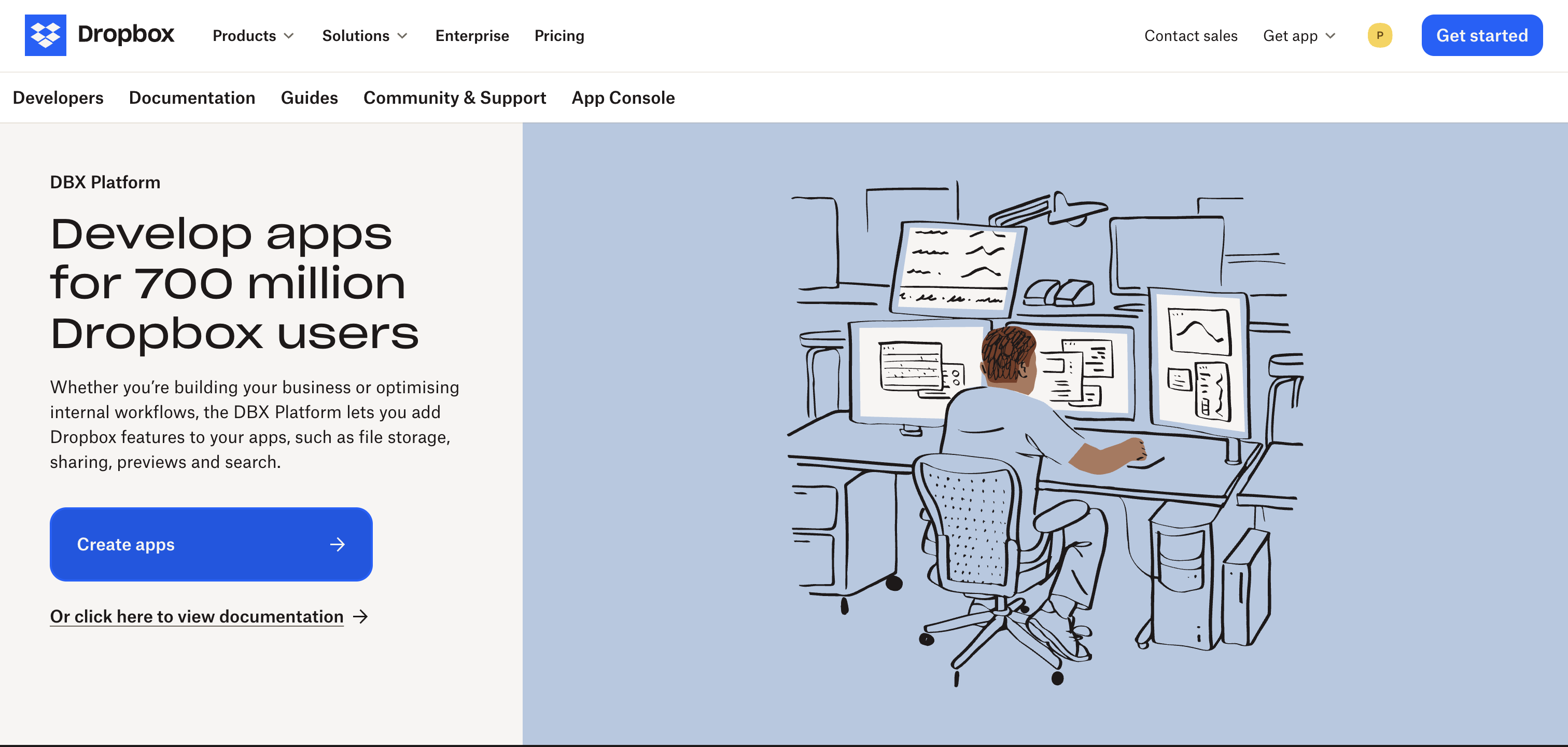
- Go to dropbox.com/developers and sign in.
- Click Create apps.
-
Configure the app
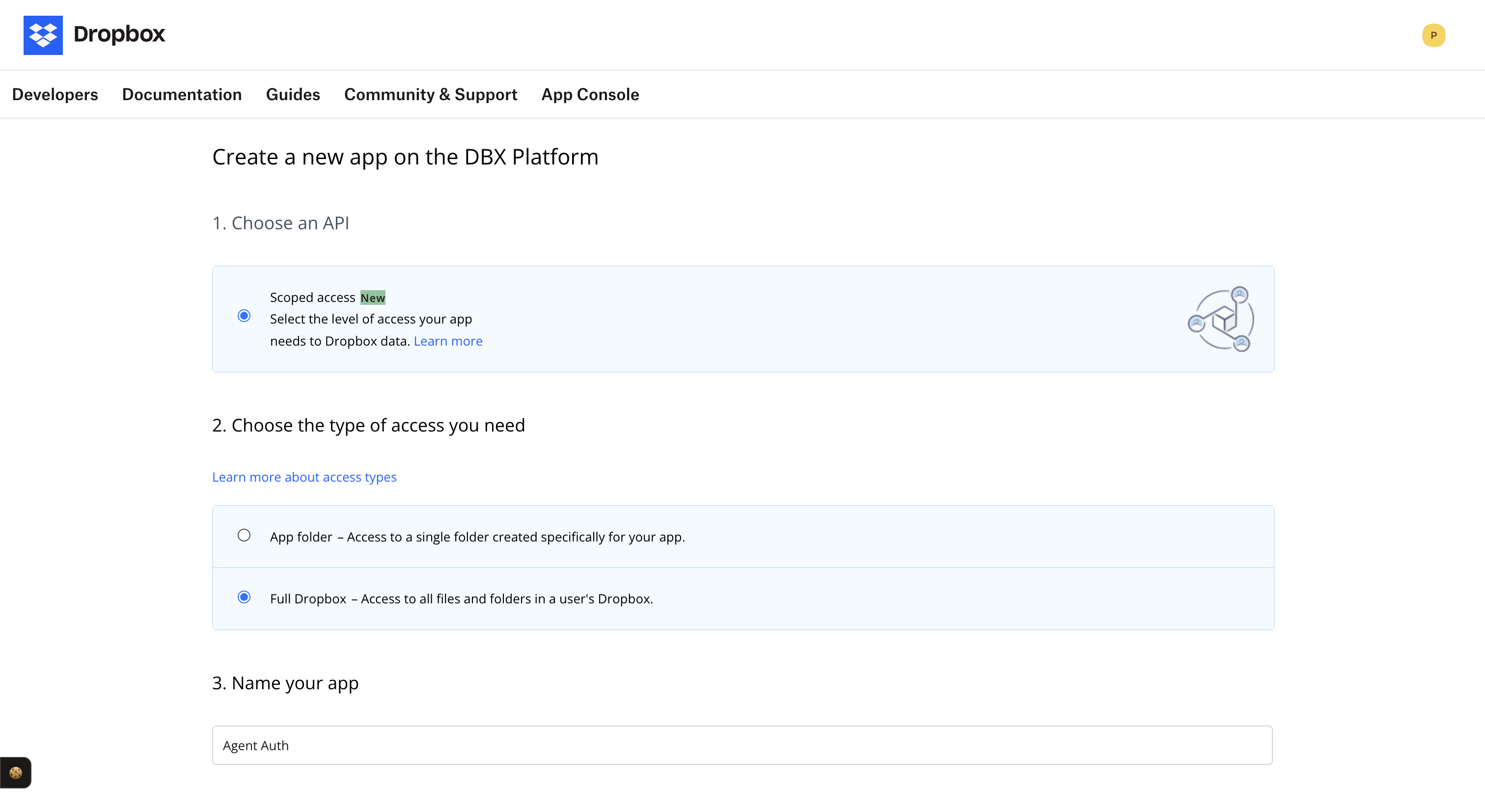
On the app creation form:
- Choose an API: Select Scoped access.
- Choose the type of access: Select Full Dropbox — Access to all files and folders in a user’s Dropbox.
- Name your app: Enter a name (e.g.
Agent Auth). - Click Create app.
-
Copy your credentials and add the redirect URI
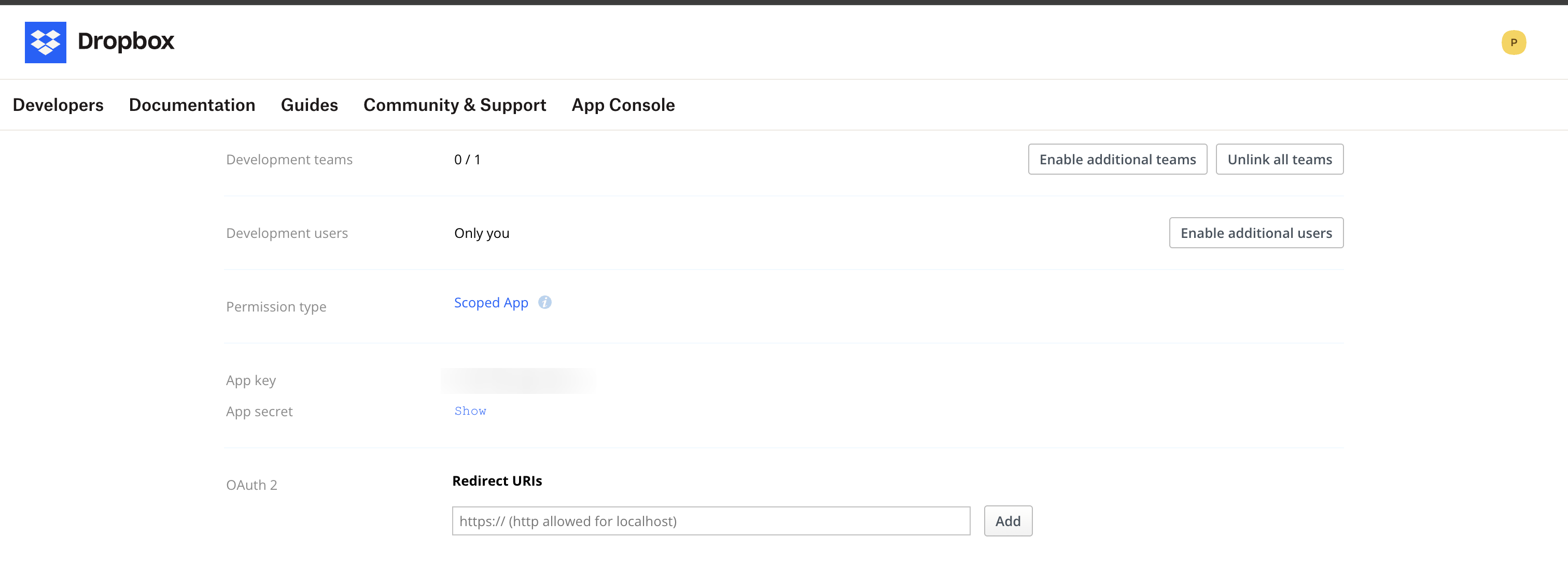
On your app’s settings page:
- Copy the App key (this is your client ID) and App secret (click Show to reveal).
- Under OAuth 2 → Redirect URIs, add your Scalekit redirect URI and click Add.
-
Create a connection in Scalekit
- In the Scalekit dashboard, go to AgentKit → Connections → Create Connection.
- Search for Dropbox MCP and click Create.
- Enter the App key as the client ID and App secret as the client secret.
- Note the Connection name — use this as
connection_namein your code (e.g.,dropboxmcp).
-
Authorize a user and make your first call
quickstart.mts import { ScalekitClient } from '@scalekit-sdk/node'import 'dotenv/config'import { createInterface } from 'node:readline/promises'const scalekit = new ScalekitClient(process.env.SCALEKIT_ENVIRONMENT_URL,process.env.SCALEKIT_CLIENT_ID,process.env.SCALEKIT_CLIENT_SECRET,)const actions = scalekit.actionsconst connector = 'dropboxmcp'const identifier = 'user_123'// Generate an authorization link for the userconst { link } = await actions.getAuthorizationLink({ connectionName: connector, identifier })console.log('Authorize Dropbox MCP:', link)const rl = createInterface({ input: process.stdin, output: process.stdout })await rl.question('Press Enter after authorizing...')rl.close()// Make your first callconst result = await actions.executeTool({connector,identifier,toolName: 'dropboxmcp_check_job_status',toolInput: {},})console.log(result)Terminal window npx tsx quickstart.mtsquickstart.py import osfrom scalekit import ScalekitClientfrom dotenv import load_dotenvload_dotenv()scalekit_client = ScalekitClient(env_url=os.getenv("SCALEKIT_ENVIRONMENT_URL"),client_id=os.getenv("SCALEKIT_CLIENT_ID"),client_secret=os.getenv("SCALEKIT_CLIENT_SECRET"),)actions = scalekit_client.actionsconnection_name = "dropboxmcp"identifier = "user_123"# Generate an authorization link for the userlink_response = actions.get_authorization_link(connection_name=connection_name,identifier=identifier,)print("Authorize Dropbox MCP:", link_response.link)input("Press Enter after authorizing...")# Make your first callresult = actions.execute_tool(tool_input={},tool_name="dropboxmcp_check_job_status",connection_name=connection_name,identifier=identifier,)print(result)Terminal window python quickstart.pyEach user signs in once. See Authorize a user for the full flow and statuses.
Tools
Pass the exact name toexecute_tooldropboxmcp_check_job_statusCheck the status of an async Dropbox operation by its job ID.Read-onlyCheck Job Status
Check the status of an async Dropbox operation by its job ID.
Inputs
operation_idstring- The async job ID returned from a previous Dropbox operation.
wait_msinteger- Milliseconds to wait for the job to complete before returning.
dropboxmcp_download_linkGet temporary download URLs for one or more files.Read-onlyDownload Link
Get temporary download URLs for one or more files.
Inputs
entriesarrayrequired- List of file or folder paths to operate on.
expiration_in_secinteger- Seconds until the temporary download URL expires. Must be 0 (no expiry) or between 60 and 900.
dropboxmcp_get_file_contentRetrieve the raw content of a file by path or file ID.Read-onlyGet File Content
Retrieve the raw content of a file by path or file ID.
Inputs
path_or_file_idstringrequired- The Dropbox path or file ID of the file or folder.
dropboxmcp_get_file_metadataRetrieve metadata for a file or folder by path or file ID.Read-onlyGet File Metadata
Retrieve metadata for a file or folder by path or file ID.
Inputs
path_or_file_idstringrequired- The Dropbox path or file ID of the file or folder.
dropboxmcp_get_file_requestRetrieve details of a specific file request by its ID.Read-onlyGet File Request
Retrieve details of a specific file request by its ID.
Inputs
idstringrequired- The unique ID of the file request.
dropboxmcp_get_markdownConvert a Dropbox document to markdown, optionally polling an in-progress async conversion job.Read-onlyGet Markdown
Convert a Dropbox document to markdown, optionally polling an in-progress async conversion job.
Inputs
async_job_idstring- Opaque token from a previous in_progress get_markdown response. Send this alone to poll for completion.
embed_imagesboolean- Embed images as base64 data URIs in the markdown output. Can significantly increase output size. Omit to disable.
enable_ocrboolean- Run OCR on PDF documents. Processing is slower when enabled. Omit to disable.
path_or_file_idstring- Document to convert to markdown. Required on a new request; omit when polling with async_job_id.
dropboxmcp_get_transcriptTranscribe a Dropbox audio or video file, optionally polling an in-progress async transcription job.Read-onlyGet Transcript
Transcribe a Dropbox audio or video file, optionally polling an in-progress async transcription job.
Inputs
async_job_idstring- Opaque token from a previous in_progress get_transcript response. Send this alone to poll for completion.
audio_languagestring- ISO 639-1 two-letter language code such as "en". Omit for auto-detection.
path_or_file_idstring- Audio or video file to transcribe. Required on a new request; omit when polling with async_job_id.
timestamp_levelstring- Granularity of segment timestamps. Omit for the default of "sentence".one of
sentenceword
dropboxmcp_get_usage_and_quotaRetrieve the current storage usage and quota for the Dropbox account.Read-onlyGet Usage And Quota
Retrieve the current storage usage and quota for the Dropbox account.
Inputs
This tool takes no inputs.
dropboxmcp_list_file_requestsList all file requests for the Dropbox account with optional pagination.Read-onlyList File Requests
List all file requests for the Dropbox account with optional pagination.
Inputs
cursorstring- Pagination cursor from the previous response to fetch the next page.
limitinteger- Maximum number of results to return per page.
dropboxmcp_list_file_revisionsList the revision history of a file in Dropbox.Read-onlyList File Revisions
List the revision history of a file in Dropbox.
Inputs
path_or_file_idstringrequired- The Dropbox path or file ID of the file or folder.
limitinteger- Maximum number of revisions to return. Valid range is 1-100. Omit to use the default of 10.
dropboxmcp_list_folderList the contents of a Dropbox folder with optional pagination and filters.Read-onlyList Folder
List the contents of a Dropbox folder with optional pagination and filters.
Inputs
cursorstring- Pagination cursor from the previous response to fetch the next page.
max_resultsinteger- Maximum number of results to return.
object_typesarray- Optional object type filters for the first list_folder call. Valid values: "file" and "folder".
pathstring- The Dropbox path to the file or folder (e.g. /Documents/report.pdf).
recursiveboolean- If true, include the contents of all subdirectories.
dropboxmcp_list_restore_eventsList restorable file and folder history events in Dropbox, optionally scoped to a path.Read-onlyList Restore Events
List restorable file and folder history events in Dropbox, optionally scoped to a path.
Inputs
cursorstring- Opaque cursor from a previous list_restore_events response. Reuse only with list_restore_events pagination; send cursor only.
directionstring- Time direction to traverse. Empty or omitted defaults to "PAST".one of
PASTFUTURE only_rewindableboolean- If true, only include events that can still be rewound.
pathstring- Optional folder path to scope history. Accepts "" or "/" for root.
timestampinteger- Starting point in time, in seconds since epoch UTC.
dropboxmcp_searchSearch for files and folders in Dropbox by query with optional filters.Read-onlySearch
Search for files and folders in Dropbox by query with optional filters.
Inputs
cursorstring- Pagination cursor from the previous response to fetch the next page.
file_categoriesarray- No description.
file_extensionsarray- No description.
file_statusstring- Filter search results by file status (active or deleted).
filename_onlyboolean- If true, restricts the search to file and folder names only.
last_modified_afterstring- No description.
last_modified_beforestring- No description.
max_resultsinteger- Maximum number of results to return.
order_bystring- Field to sort search results by.
pathstring- The Dropbox path to the file or folder (e.g. /Documents/report.pdf).
querystring- The search query string to match against file and folder names.
reverse_orderboolean- If true, returns results in reverse order.
dropboxmcp_who_am_iRetrieve the current Dropbox account profile information.Read-onlyWho Am I
Retrieve the current Dropbox account profile information.
Inputs
This tool takes no inputs.
dropboxmcp_copyCopy one or more files or folders to a new location in Dropbox.WriteCopy
Copy one or more files or folders to a new location in Dropbox.
Inputs
entriesarrayrequired- List of file or folder paths to operate on.
autorenameboolean- If true, renames the destination if a conflict exists.
dropboxmcp_create_fileCreate a new file at the specified path with the given content.WriteCreate File
Create a new file at the specified path with the given content.
Inputs
contentstringrequired- The text content to write to the new file.
pathstringrequired- The Dropbox path to the file or folder (e.g. /Documents/report.pdf).
dropboxmcp_create_file_requestCreate a file request so others can upload files to your Dropbox.WriteCreate File Request
Create a file request so others can upload files to your Dropbox.
Inputs
destinationstringrequired- The Dropbox folder path where uploaded files will be saved.
titlestringrequired- The title of the file request shown to uploaders.
closedboolean- If true, the file request is closed and no longer accepts uploads.
deadlinestring- The deadline for the file request in ISO 8601 format.
deadline_allow_late_uploadsstring- No description.one of
one_daytwo_daysseven_daysthirty_daysalways descriptionstring- An optional description shown to uploaders.
video_project_idstring- No description.
dropboxmcp_create_folderCreate a new folder at the specified path in Dropbox.WriteCreate Folder
Create a new folder at the specified path in Dropbox.
Inputs
pathstringrequired- The Dropbox path to the file or folder (e.g. /Documents/report.pdf).
dropboxmcp_deletePermanently delete one or more files or folders from Dropbox.DestructiveDelete
Permanently delete one or more files or folders from Dropbox.
Inputs
entriesarrayrequired- List of file or folder paths to operate on.
dropboxmcp_moveMove one or more files or folders to a new location in Dropbox.DestructiveMove
Move one or more files or folders to a new location in Dropbox.
Inputs
entriesarrayrequired- List of file or folder paths to operate on.
autorenameboolean- If true, renames the destination if a conflict exists.
dropboxmcp_restore_file_revisionRestore a file to a previous revision in Dropbox.DestructiveRestore File Revision
Restore a file to a previous revision in Dropbox.
Inputs
destination_pathstringrequired- Destination path to restore. Accepts fq_path such as "/Documents/file.txt" or ns_path such as "ns:123//Documents/file.txt".
revstringrequired- Revision hash to restore.
dropboxmcp_restore_folderRestore a folder to a previous point in time in Dropbox.DestructiveRestore Folder
Restore a folder to a previous point in time in Dropbox.
Inputs
pathstringrequired- Folder path to restore.
target_ts_microsecondsintegerrequired- Target timestamp to restore to, in microseconds since epoch UTC.
is_teamboolean- If true, restore the folder as a team-owned resource.
No tools match.


