


The Google Analytics connector lets your AI agent act in each user's Google Analytics account. Each user signs in to Google Analytics once, and Scalekit stores and refreshes their tokens, so your agent never handles credentials. It comes with 66 tools.
- Tools
- 66
- What they doRead · write · destructive
- 33 · 23 · 1033 read23 write10 destructive
- Users sign in with
- OAuth
- OAuth app
- Your own Google app
Setup
Install the SDK
Terminal window npm install @scalekit-sdk/node dotenvTerminal window pip install scalekit-sdk-python python-dotenvSet your credentials
Add your Scalekit credentials to your
.envfile. Find values in app.scalekit.com > Developers > API Credentials..env SCALEKIT_ENVIRONMENT_URL=<your-environment-url>SCALEKIT_CLIENT_ID=<your-client-id>SCALEKIT_CLIENT_SECRET=<your-client-secret>Create the Google Analytics connection
In AgentKit > Connections, create a Google Analytics connection and copy its redirect URI. The name you give it is the
connection_nameyour code passes. See Configure connections.Register a Google OAuth app
Google Analytics connections use your own OAuth app. Register one with Google and add the redirect URI you copied.
Then enter the app's Client ID and Client Secret on the Google Analytics connection.
Console steps with screenshots
Register your Scalekit environment with the Google Analytics connector so Scalekit handles the OAuth flow and token lifecycle for you. The connection name you create will be used to identify and invoke the connection programmatically. Then complete the configuration in your application as follows:
-
Set up auth redirects
-
In Scalekit dashboard, go to AgentKit > Connections > Create Connection. Find Google Analytics and click Create. Click Use your own credentials and copy the redirect URI. It looks like
https://<SCALEKIT_ENVIRONMENT_URL>/sso/v1/oauth/<CONNECTION_ID>/callback. -
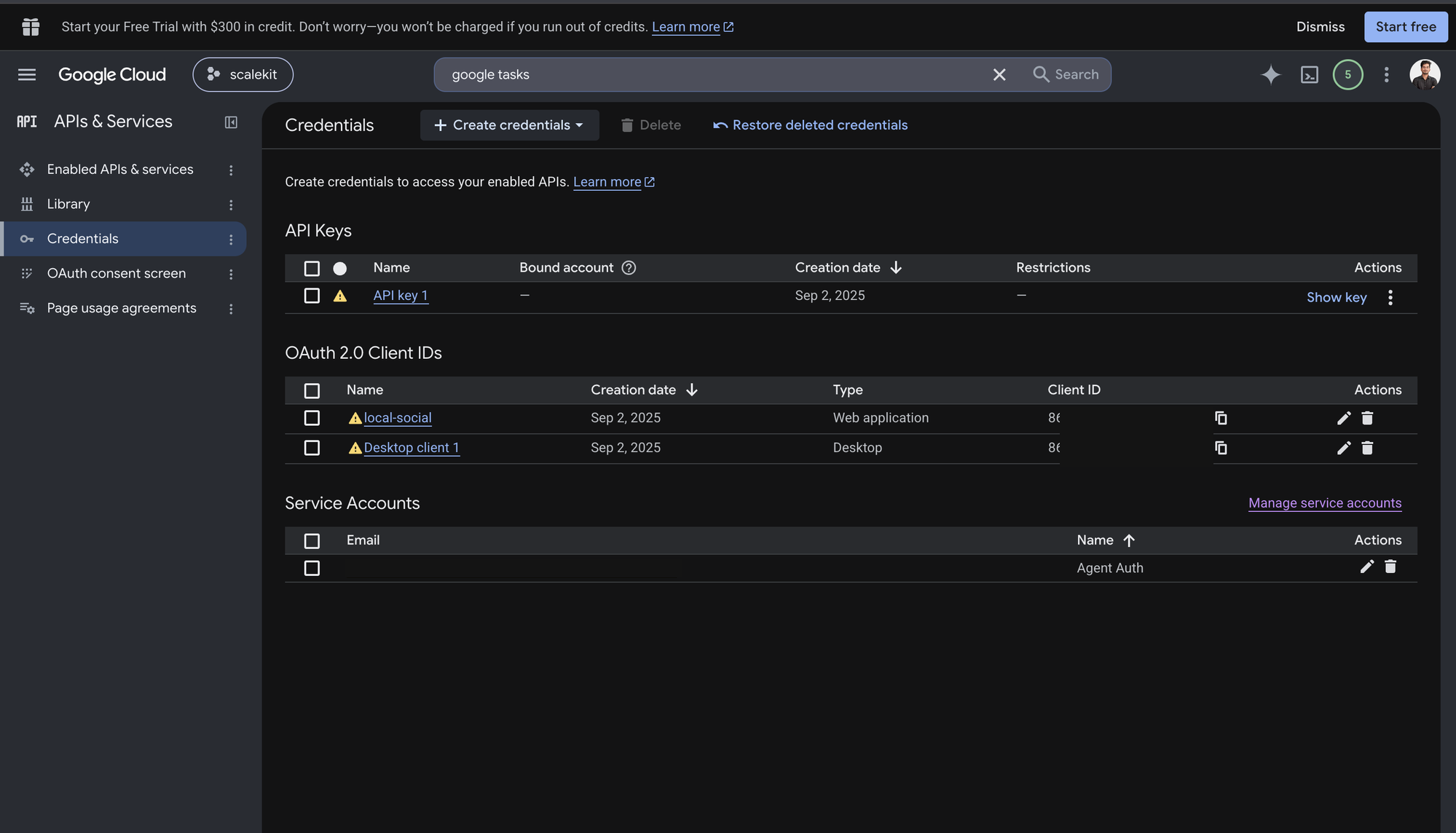
Navigate to Google Cloud Console → APIs & Services → Credentials.
-
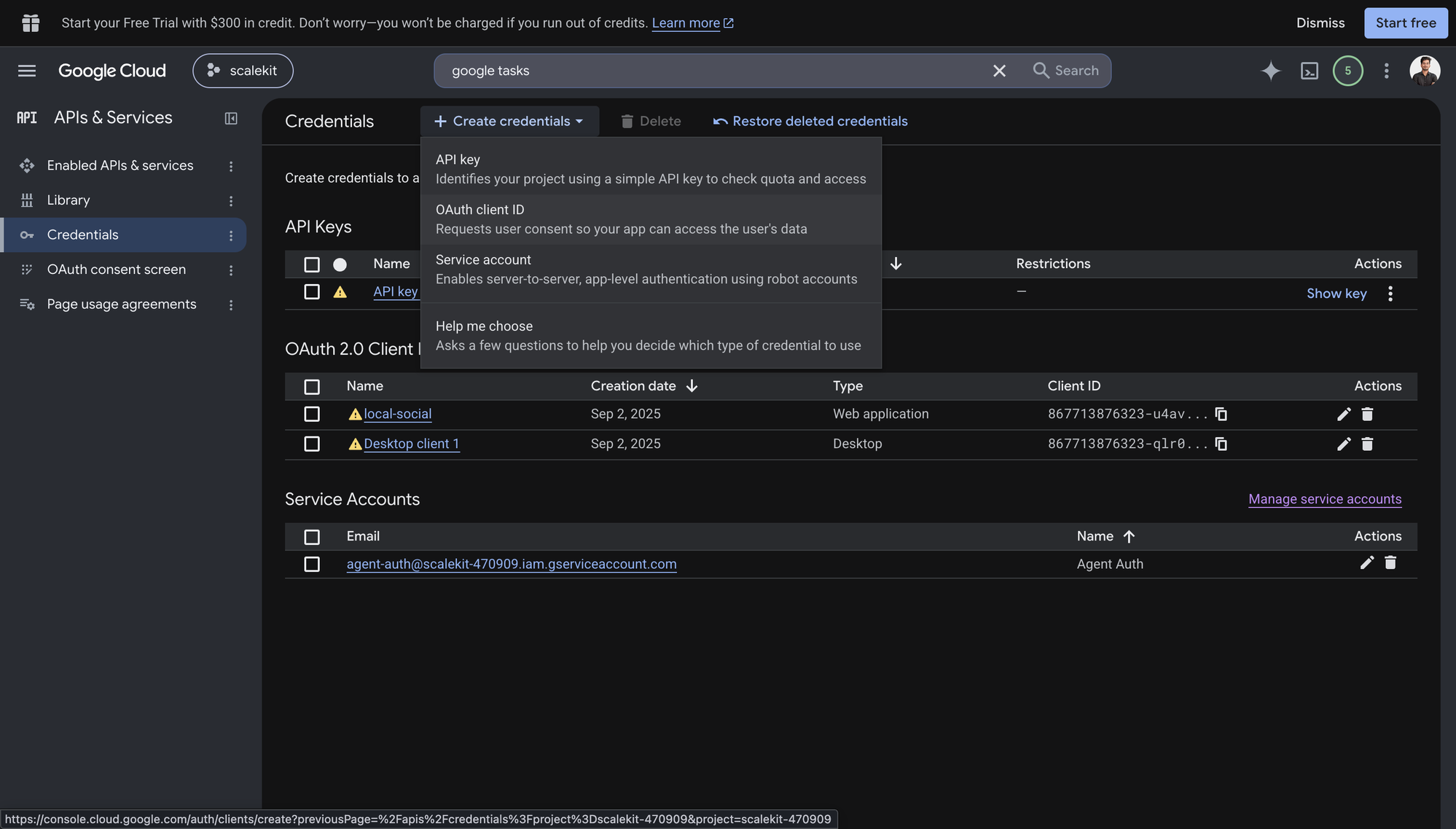
Click + Create Credentials, then OAuth client ID.
-
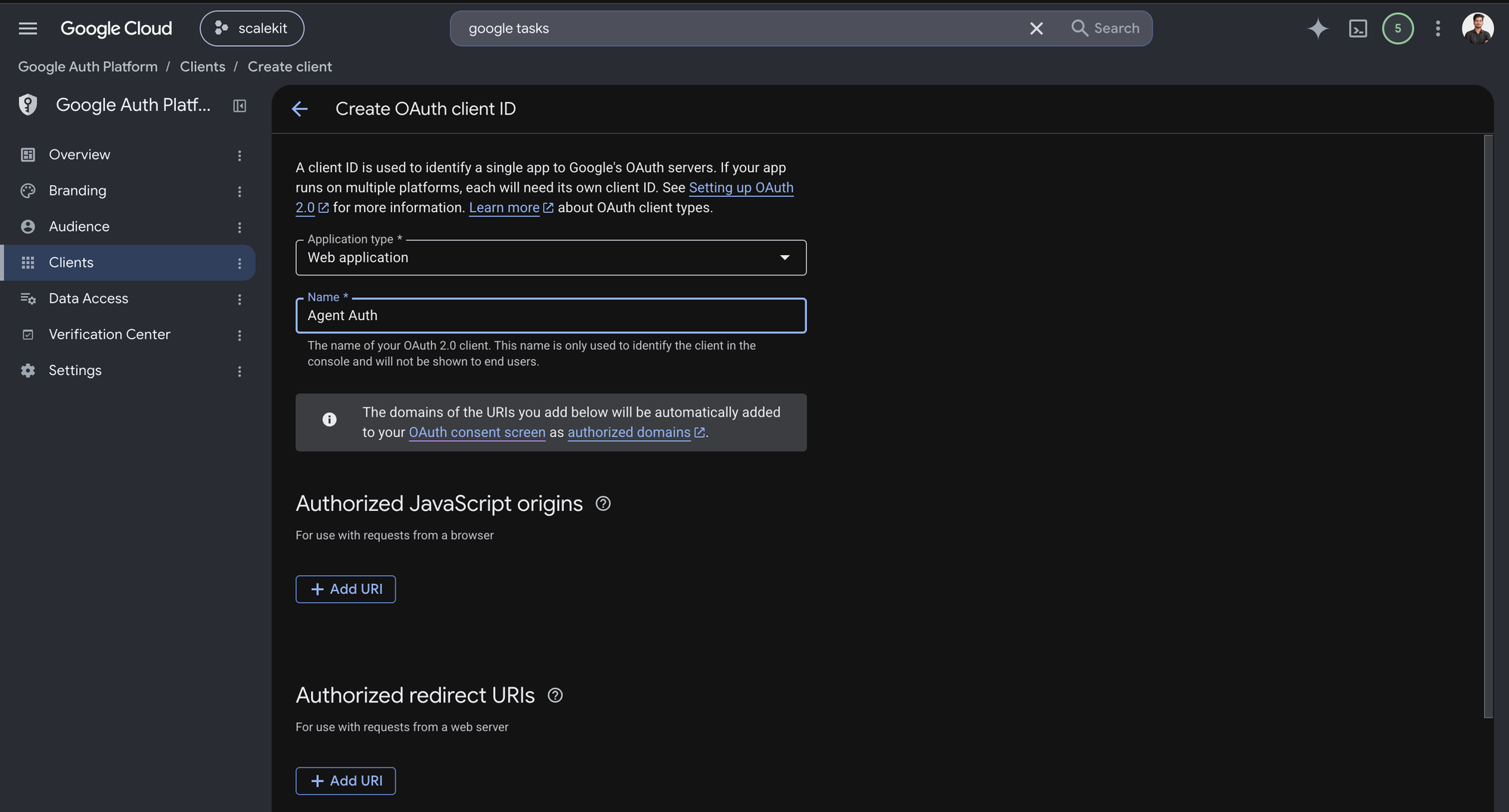
Choose Web application from the Application type menu and give the client a name, for example
Agent Auth.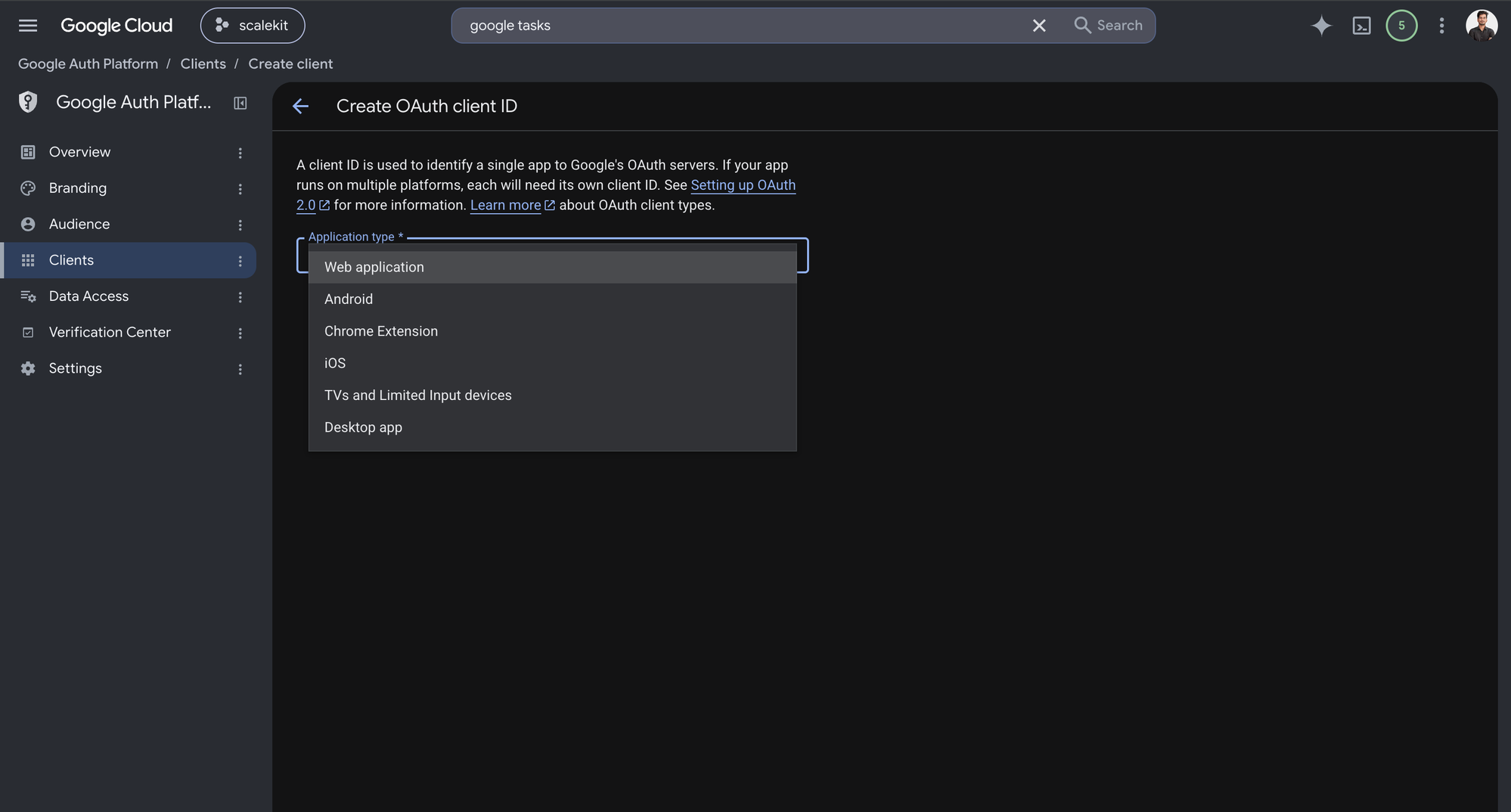
-
Under Authorized redirect URIs, click + Add URI, paste the redirect URI you copied from Scalekit, and click Create.
-
-
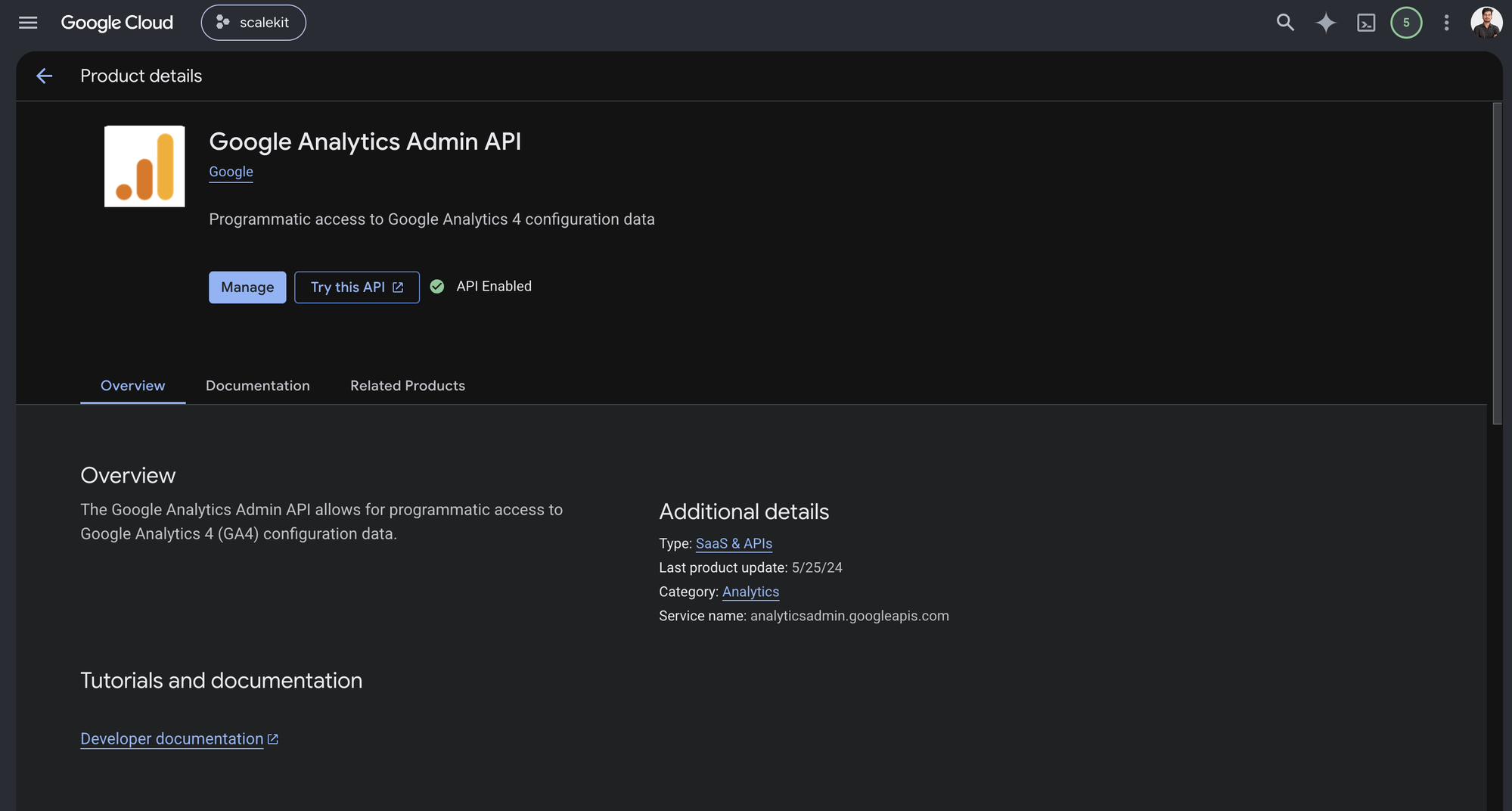
Enable the Google Analytics Admin API
-
In Google Cloud Console, go to APIs & Services → Library. Search for “Google Analytics Admin API” and click Enable.
-
-
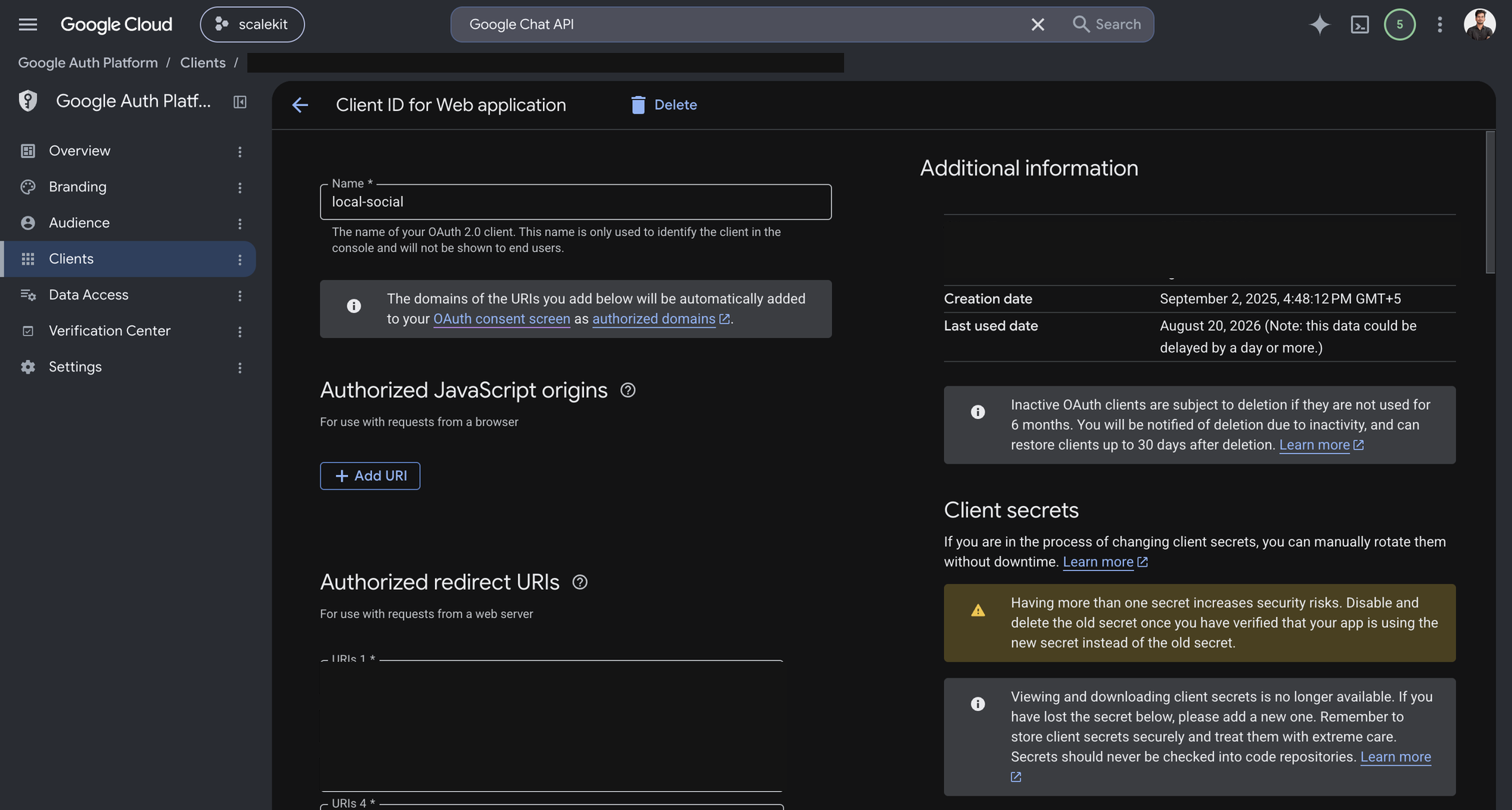
Get client credentials
-
Open the OAuth client you created in step 1. Google shows the Client ID under Additional information, and lets you generate a Client secret from the same page.
-
-
Add credentials in Scalekit
- In Scalekit dashboard, go to AgentKit > Connections and open the connection you created.
- Copy the Connection name shown on that connection and use that exact value in your code as
connection_nameorconnectionName. - Enter your credentials:
- Client ID (from above)
- Client Secret (from above)
- Permissions (scopes — see Google API Scopes reference)
- Click Save.
-
Authorize a user and make your first call
quickstart.mts import { ScalekitClient } from '@scalekit-sdk/node'import 'dotenv/config'import { createInterface } from 'node:readline/promises'const scalekit = new ScalekitClient(process.env.SCALEKIT_ENVIRONMENT_URL,process.env.SCALEKIT_CLIENT_ID,process.env.SCALEKIT_CLIENT_SECRET,)const actions = scalekit.actionsconst connector = 'googleanalytics'const identifier = 'user_123'// Generate an authorization link for the userconst { link } = await actions.getAuthorizationLink({ connectionName: connector, identifier })console.log('Authorize Google Analytics:', link)const rl = createInterface({ input: process.stdin, output: process.stdout })await rl.question('Press Enter after authorizing...')rl.close()// Make your first callconst result = await actions.executeTool({connector,identifier,toolName: 'googleanalytics_list_account_summaries',toolInput: {},})console.log(result)Terminal window npx tsx quickstart.mtsquickstart.py import osfrom scalekit import ScalekitClientfrom dotenv import load_dotenvload_dotenv()scalekit_client = ScalekitClient(env_url=os.getenv("SCALEKIT_ENVIRONMENT_URL"),client_id=os.getenv("SCALEKIT_CLIENT_ID"),client_secret=os.getenv("SCALEKIT_CLIENT_SECRET"),)actions = scalekit_client.actionsconnection_name = "googleanalytics"identifier = "user_123"# Generate an authorization link for the userlink_response = actions.get_authorization_link(connection_name=connection_name,identifier=identifier,)print("Authorize Google Analytics:", link_response.link)input("Press Enter after authorizing...")# Make your first callresult = actions.execute_tool(tool_input={},tool_name="googleanalytics_list_account_summaries",connection_name=connection_name,identifier=identifier,)print(result)Terminal window python quickstart.pyEach user signs in once. See Authorize a user for the full flow and statuses.
Tools
Pass the exact name toexecute_toolgoogleanalytics_accounts_run_access_reportRun a Data Access Record Report for a Google Analytics account: an audit log of who accessed report data and when, across every property in the account.Read-onlyRun Account Access Report
Run a Data Access Record Report for a Google Analytics account: an audit log of who accessed report data and when, across every property in the account. Useful for compliance/security reviews. Returns rows broken down by the requested access-report dimensions and metrics (e.g. userEmail, accessCount) over a date range.
Inputs
end_datestringrequired- End of the report date range (YYYY-MM-DD, or relative: today/yesterday/NdaysAgo).
entitystringrequired- The account to run the access report for, in the form accounts/{accountId}.
metricsarrayrequired- Access-report metric names, e.g. ["accessCount"]. At least one metric is required. See the Data Access API schema docs for valid names.
start_datestringrequired- Start of the report date range (YYYY-MM-DD, or relative: today/yesterday/NdaysAgo).
dimension_filterobject- Advanced: a raw FilterExpression object to filter rows by dimension values.
dimensionsarray- Access-report dimension names, e.g. ["userEmail", "propertyId"]. See the Data Access API schema docs for valid names.
limitinteger- Maximum rows to return. Defaults to 10000; the API returns at most 100000 rows regardless.
offsetinteger- Row offset for pagination. Omit or set to 0 for the first page.
return_entity_quotaboolean- If true, the response includes this account's current Data Access API quota consumption.
time_zonestring- IANA time zone (e.g. America/New_York) used to interpret start/end dates. Defaults to the property's time zone if omitted.
googleanalytics_batch_run_pivot_reportsRun multiple GA4 pivot reports against the same property in a single call.Read-onlyBatch Run Pivot Reports
Run multiple GA4 pivot reports against the same property in a single call. Provide an array of RunPivotReportRequest-shaped objects (each with dimensions, metrics, pivots, dateRanges, etc. using the GA4 Data API's own field names); each entry's property, if set, must match the top-level property.
Inputs
propertystringrequired- The GA4 property identifier all requests in the batch run against, in the form properties/{propertyId}.
requestsarrayrequired- Array of RunPivotReportRequest objects, one per pivot report, using the GA4 Data API's native field names (dimensions: [{name}], metrics: [{name}], pivots: [...], dateRanges: [{startDate,endDate}], etc). Example: [{"dimensions":[{"name":"country"}],"metrics":[{"name":"activeUsers"}],"pivots":[{"fieldNames":["country"],"limit":"5"}],"dateRanges":[{"startDate":"7daysAgo","endDate":"today"}]}]
googleanalytics_batch_run_reportsRun multiple GA4 reports against the same property in a single call.Read-onlyBatch Run Reports
Run multiple GA4 reports against the same property in a single call. Provide an array of RunReportRequest-shaped objects (each with dimensions, metrics, dateRanges, etc. using the GA4 Data API's own field names); each entry's property, if set, must match the top-level property.
Inputs
propertystringrequired- The GA4 property identifier all requests in the batch run against, in the form properties/{propertyId}.
requestsarrayrequired- Array of RunReportRequest objects, one per report, using the GA4 Data API's native field names (dimensions: [{name}], metrics: [{name}], dateRanges: [{startDate,endDate}], etc). Example: [{"dimensions":[{"name":"country"}],"metrics":[{"name":"activeUsers"}],"dateRanges":[{"startDate":"7daysAgo","endDate":"today"}]}]
googleanalytics_check_compatibilityCheck which dimensions and metrics are compatible with each other for a GA4 property before running a report.Read-onlyCheck Compatibility
Check which dimensions and metrics are compatible with each other for a GA4 property before running a report. Pass the same dimensions/metrics/filters you intend to use in Run Report to preview which combinations are valid.
Inputs
propertystringrequired- The GA4 property identifier to check against, in the form properties/{propertyId}. Should match the property you intend to use in Run Report.
compatibility_filterstring- Restrict results to only this compatibility level. Valid values: COMPATIBILITY_UNSPECIFIED, COMPATIBLE, INCOMPATIBLE. Commonly set to COMPATIBLE to only return usable dimensions/metrics.one of
COMPATIBILITY_UNSPECIFIEDCOMPATIBLEINCOMPATIBLE dimension_filterobject- Advanced: a raw GA4 FilterExpression object matching what you intend to use in Run Report's dimension filter.
dimensionsarray- Dimension names to check, e.g. ["country", "city"]. Should be the same value you intend to use in Run Report.
metric_filterobject- Advanced: a raw GA4 FilterExpression object matching what you intend to use in Run Report's metric filter.
metricsarray- Metric names to check, e.g. ["activeUsers", "sessions"]. Should be the same value you intend to use in Run Report.
googleanalytics_get_accountFetch a single Google Analytics account's details by resource name.Read-onlyGet Account
Fetch a single Google Analytics account's details by resource name.
Inputs
namestringrequired- Resource name of the account to fetch, in the form accounts/{accountId}.
googleanalytics_get_audience_exportFetch the configuration and current state (CREATING, ACTIVE, or FAILED) of a GA4 audience export.Read-onlyGet Audience Export
Fetch the configuration and current state (CREATING, ACTIVE, or FAILED) of a GA4 audience export. Use this to poll a newly created export until it becomes ACTIVE before querying its rows.
Inputs
namestringrequired- The audience export resource name, in the form properties/{propertyId}/audienceExports/{audienceExportId}.
googleanalytics_get_conversion_eventDeprecated: prefer the equivalent Key Event tool.Read-onlyGet Conversion Event
Deprecated: prefer the equivalent Key Event tool. Fetch a single Google Analytics conversion event by its resource name.
Inputs
namestringrequired- Resource name of the conversion event to fetch, in the form properties/{propertyId}/conversionEvents/{conversionEventId}.
googleanalytics_get_custom_dimensionFetch a single custom dimension by resource name.Read-onlyGet Custom Dimension
Fetch a single custom dimension by resource name.
Inputs
namestringrequired- Resource name of the custom dimension to fetch, in the form properties/{propertyId}/customDimensions/{customDimensionId}.
googleanalytics_get_custom_metricFetch a single custom metric by resource name.Read-onlyGet Custom Metric
Fetch a single custom metric by resource name.
Inputs
namestringrequired- Resource name of the custom metric to fetch, in the form properties/{propertyId}/customMetrics/{customMetricId}.
googleanalytics_get_data_retention_settingsGet a property's event-level and user-level data retention settings.Read-onlyGet Data Retention Settings
Get a property's event-level and user-level data retention settings.
Inputs
namestringrequired- Resource name of the data retention settings, in the form properties/{propertyId}/dataRetentionSettings.
googleanalytics_get_data_sharing_settingsGet the data-sharing settings for a Google Analytics account.Read-onlyGet Data Sharing Settings
Get the data-sharing settings for a Google Analytics account. These settings control what account data Google may use for benchmarking, technical support, and other Google products.
Inputs
namestringrequired- Resource name of the data sharing settings to fetch, in the form accounts/{accountId}/dataSharingSettings.
googleanalytics_get_data_streamFetch a single Google Analytics 4 data stream (web, Android app, or iOS app) by its resource name.Read-onlyGet Data Stream
Fetch a single Google Analytics 4 data stream (web, Android app, or iOS app) by its resource name.
Inputs
namestringrequired- The data stream resource name to fetch, in the form properties/{propertyId}/dataStreams/{streamId}.
googleanalytics_get_key_eventFetch a single key event by resource name, in the form properties/{propertyId}/keyEvents/{keyEventId}.Read-onlyGet Key Event
Fetch a single key event by resource name, in the form properties/{propertyId}/keyEvents/{keyEventId}.
Inputs
namestringrequired- Resource name of the key event to fetch, in the form properties/{propertyId}/keyEvents/{keyEventId}.
googleanalytics_get_measurement_protocol_secretFetch a single Measurement Protocol secret by resource name.Read-onlyGet Measurement Protocol Secret
Fetch a single Measurement Protocol secret by resource name. The response includes the secret value itself, which is used as the api_secret parameter when sending Measurement Protocol hits.
Inputs
namestringrequired- The Measurement Protocol secret resource name to fetch, in the form properties/{propertyId}/dataStreams/{streamId}/measurementProtocolSecrets/{secretId}.
googleanalytics_get_metadataFetch the dimensions and metrics available for a GA4 property, including custom dimensions/metrics defined on that property.Read-onlyGet Metadata
Fetch the dimensions and metrics available for a GA4 property, including custom dimensions/metrics defined on that property. Use this to discover valid dimension/metric API names before calling Run Report.
Inputs
namestringrequired- The metadata resource name, in the form properties/{propertyId}/metadata. Set the property ID to 0 (properties/0/metadata) to retrieve dimensions/metrics common to all properties, excluding custom ones.
googleanalytics_get_propertyFetch a single Google Analytics property's details by resource name.Read-onlyGet Property
Fetch a single Google Analytics property's details by resource name.
Inputs
namestringrequired- Resource name of the property to fetch, in the form properties/{propertyId}.
googleanalytics_list_account_summariesList account summaries for all accounts the caller has access to — a convenient combined view of accounts and their properties without needing separate List Accounts / List Properties calls.Read-onlyList Account Summaries
List account summaries for all accounts the caller has access to — a convenient combined view of accounts and their properties without needing separate List Accounts / List Properties calls. This is the easiest way to discover which properties you can query.
Inputs
page_sizeinteger- Maximum number of account summaries to return in one page. Defaults to 50 if omitted; the maximum allowed value is 200.
page_tokenstring- A page token received from a previous list_account_summaries call, used to fetch the next page of results.
googleanalytics_list_accountsList all Google Analytics accounts accessible by the caller.Read-onlyList Accounts
List all Google Analytics accounts accessible by the caller. Soft-deleted (trashed) accounts are excluded from the results unless show_deleted is set to true.
Inputs
page_sizeinteger- Maximum number of accounts to return per page. Defaults to 50 if omitted; the API caps this at 200.
page_tokenstring- A page token from a previous List Accounts call, used to retrieve the next page of results.
show_deletedboolean- Whether to include soft-deleted (trashed) accounts in the results. Defaults to false — trashed accounts are hidden unless this is set to true.
googleanalytics_list_audience_exportsList all audience exports for a GA4 property, showing each export's state (CREATING, ACTIVE, FAILED) and row count.Read-onlyList Audience Exports
List all audience exports for a GA4 property, showing each export's state (CREATING, ACTIVE, FAILED) and row count.
Inputs
parentstringrequired- The GA4 property whose audience exports to list, in the form properties/{propertyId}.
page_sizeinteger- Maximum number of audience exports to return. Defaults to 200 if omitted; the API caps this at 1000.
page_tokenstring- A page token from a previous List Audience Exports call, used to retrieve the next page of results.
googleanalytics_list_conversion_eventsDeprecated: prefer the equivalent Key Event tool.Read-onlyList Conversion Events
Deprecated: prefer the equivalent Key Event tool. List the conversion events defined on a Google Analytics property.
Inputs
parentstringrequired- Resource name of the parent property whose conversion events to list, in the form properties/{propertyId}.
page_sizeinteger- Maximum number of conversion events to return. Defaults to 50 if omitted; the maximum value is 200.
page_tokenstring- A page token received from a previous list_conversion_events call, used to fetch the next page of results.
googleanalytics_list_custom_dimensionsList custom dimensions defined on a property.Read-onlyList Custom Dimensions
List custom dimensions defined on a property.
Inputs
parentstringrequired- Resource name of the parent property to list custom dimensions for, in the form properties/{propertyId}.
page_sizeinteger- Maximum number of custom dimensions to return per page. Defaults to 50 if omitted; the API caps this at 200.
page_tokenstring- A page token from a previous List Custom Dimensions call, used to retrieve the next page of results.
googleanalytics_list_custom_metricsList custom metrics defined on a property.Read-onlyList Custom Metrics
List custom metrics defined on a property.
Inputs
parentstringrequired- Resource name of the parent property to list custom metrics for, in the form properties/{propertyId}.
page_sizeinteger- Maximum number of custom metrics to return per page. Defaults to 50 if omitted; the API caps this at 200.
page_tokenstring- A page token from a previous List Custom Metrics call, used to retrieve the next page of results.
googleanalytics_list_data_streamsList all data streams (web, Android app, iOS app) for a Google Analytics 4 property, with pagination support.Read-onlyList Data Streams
List all data streams (web, Android app, iOS app) for a Google Analytics 4 property, with pagination support.
Inputs
parentstringrequired- The resource name of the parent property whose data streams to list, in the form properties/{propertyId}.
page_sizeinteger- Maximum number of data streams to return. Defaults to 50 if omitted; the API caps this at 200.
page_tokenstring- A page token received from a previous list_data_streams call, used to fetch the next page of results.
googleanalytics_list_firebase_linksList Firebase project links for a property.Read-onlyList Firebase Links
List Firebase project links for a property. A property can have at most one Firebase link.
Inputs
parentstringrequired- Resource name of the parent property to list Firebase links for, in the form properties/{propertyId}.
page_sizeinteger- Maximum number of Firebase links to return in one page. Defaults to 50 if omitted; the maximum allowed value is 200.
page_tokenstring- A page token received from a previous list_firebase_links call, used to fetch the next page of results.
googleanalytics_list_google_ads_linksList Google Ads account links for a property.Read-onlyList Google Ads Links
List Google Ads account links for a property.
Inputs
parentstringrequired- Resource name of the parent property to list Google Ads links for, in the form properties/{propertyId}.
page_sizeinteger- Maximum number of Google Ads links to return in one page. Defaults to 50 if omitted; the maximum allowed value is 200.
page_tokenstring- A page token received from a previous list_google_ads_links call, used to fetch the next page of results.
googleanalytics_list_key_eventsList the key events defined on a Google Analytics property.Read-onlyList Key Events
List the key events defined on a Google Analytics property.
Inputs
parentstringrequired- Resource name of the parent property whose key events to list, in the form properties/{propertyId}.
page_sizeinteger- Maximum number of key events to return. Defaults to 50 if omitted; the maximum value is 200.
page_tokenstring- A page token received from a previous list_key_events call, used to fetch the next page of results.
googleanalytics_list_measurement_protocol_secretsList all Measurement Protocol secrets registered for a data stream, with pagination support.Read-onlyList Measurement Protocol Secrets
List all Measurement Protocol secrets registered for a data stream, with pagination support.
Inputs
parentstringrequired- The resource name of the parent data stream whose secrets to list, in the form properties/{propertyId}/dataStreams/{streamId}.
page_sizeinteger- Maximum number of secrets to return. Defaults to 10 if omitted; the API caps this at 10 since this resource is small by design.
page_tokenstring- A page token received from a previous list_measurement_protocol_secrets call, used to fetch the next page of results.
googleanalytics_list_propertiesList Google Analytics properties matching a filter, such as those belonging to a parent account/property or linked to a Firebase project.Read-onlyList Properties
List Google Analytics properties matching a filter, such as those belonging to a parent account/property or linked to a Firebase project. For a simple list of everything you can access, Get Account Summaries is usually more convenient.
Inputs
filterstringrequired- Required filter expression restricting which properties are returned. Eligible fields: parent: (resource name of the parent account or property), ancestor: (resource name of the parent account), firebase_project: (linked Firebase project ID or number). Examples: "parent:accounts/123", "parent:properties/123", "ancestor:accounts/123", "firebase_project:my-project".
page_sizeinteger- Maximum number of properties to return per page. Defaults to 50 if omitted; the API caps this at 200 (larger values are coerced down).
page_tokenstring- Page token from a previous list call, used to fetch the next page of results. Omit for the first page.
show_deletedboolean- If true, includes soft-deleted (trashed) properties in the results. Defaults to false if omitted.
googleanalytics_properties_run_access_reportRun a Data Access Record Report for a single Google Analytics property: an audit log of who accessed report data and when.Read-onlyRun Property Access Report
Run a Data Access Record Report for a single Google Analytics property: an audit log of who accessed report data and when. Useful for compliance/security reviews. Returns rows broken down by the requested access-report dimensions and metrics (e.g. userEmail, accessCount) over a date range.
Inputs
end_datestringrequired- End of the report date range (YYYY-MM-DD, or relative: today/yesterday/NdaysAgo).
entitystringrequired- The property to run the access report for, in the form properties/{propertyId}.
metricsarrayrequired- Access-report metric names, e.g. ["accessCount"]. At least one metric is required. See the Data Access API schema docs for valid names.
start_datestringrequired- Start of the report date range (YYYY-MM-DD, or relative: today/yesterday/NdaysAgo).
dimension_filterobject- Advanced: a raw FilterExpression object to filter rows by dimension values.
dimensionsarray- Access-report dimension names, e.g. ["userEmail", "propertyId"]. See the Data Access API schema docs for valid names.
limitinteger- Maximum rows to return. Defaults to 10000; the API returns at most 100000 rows regardless.
offsetinteger- Row offset for pagination. Omit or set to 0 for the first page.
return_entity_quotaboolean- If true, the response includes this account's current Data Access API quota consumption.
time_zonestring- IANA time zone (e.g. America/New_York) used to interpret start/end dates. Defaults to the property's time zone if omitted.
googleanalytics_run_pivot_reportRun a GA4 pivot report: returns a report with pivot tables built from the requested dimensions and metrics.Read-onlyRun Pivot Report
Run a GA4 pivot report: returns a report with pivot tables built from the requested dimensions and metrics. Unlike Run Report, results are organized into pivot dimension headers rather than flat rows — use this for cross-tabulated views (e.g. sessions by country x device category).
Inputs
dimensionsarrayrequired- Dimension names available to the pivots, e.g. ["country", "deviceCategory"]. Referenced by name in the pivots field.
end_datestringrequired- End of the reporting date range. Accepts an ISO date (YYYY-MM-DD) or a relative value like today, yesterday, or NdaysAgo.
metricsarrayrequired- Metric names to include in the report, e.g. ["activeUsers", "sessions"]. At least one metric is required.
pivotsarrayrequired- Array of raw GA4 Pivot objects describing how to cross-tabulate the dimensions, e.g. [{"fieldNames":["country"],"limit":"5"},{"fieldNames":["deviceCategory"],"limit":"3"}]. Each pivot's fieldNames must reference names from Dimensions above.
propertystringrequired- The GA4 property identifier to query, in the form properties/{propertyId}.
start_datestringrequired- Start of the reporting date range. Accepts an ISO date (YYYY-MM-DD) or a relative value like today, yesterday, or NdaysAgo.
dimension_filterobject- Advanced: a raw GA4 FilterExpression object to filter rows by dimension values.
metric_filterobject- Advanced: a raw GA4 FilterExpression object to filter rows by metric values.
googleanalytics_run_realtime_reportRun a GA4 realtime report: returns event data from the last 30 minutes (or a custom minute range) for a property, broken down by the requested dimensions and metrics.Read-onlyRun Realtime Report
Run a GA4 realtime report: returns event data from the last 30 minutes (or a custom minute range) for a property, broken down by the requested dimensions and metrics. Use this for live/active-user dashboards rather than historical reporting.
Inputs
metricsarrayrequired- Realtime metric names to include, e.g. ["activeUsers", "screenPageViews"]. At least one metric is required.
propertystringrequired- The GA4 property identifier to query, in the form properties/{propertyId}.
dimension_filterobject- Advanced: a raw GA4 FilterExpression object to filter rows by dimension values.
dimensionsarray- Realtime dimension names to break the report down by, e.g. ["country", "unifiedScreenName"]. Optional — omit for a totals-only report.
limitinteger- Maximum number of rows to return. Defaults to 10000 if omitted.
metric_filterobject- Advanced: a raw GA4 FilterExpression object to filter rows by metric values.
minute_rangesarray- Advanced: a raw array of GA4 MinuteRange objects (each optionally with startMinutesAgo/endMinutesAgo). If omitted, the API defaults to the last 30 minutes.
return_property_quotaboolean- If true, the response includes the property's current Realtime API quota consumption.
googleanalytics_run_reportRun a Google Analytics 4 (GA4) report: returns a customized table of event data for a property, broken down by the requested dimensions and metrics over a date range.Read-onlyRun Report
Run a Google Analytics 4 (GA4) report: returns a customized table of event data for a property, broken down by the requested dimensions and metrics over a date range. Use this for standard analytics queries like sessions by country, active users by day, or conversions by channel.
Inputs
end_datestringrequired- End of the reporting date range. Accepts an ISO date (YYYY-MM-DD) or a relative value like today, yesterday, or NdaysAgo (e.g. 7daysAgo).
metricsarrayrequired- Metric names to include in the report, e.g. ["activeUsers", "sessions", "screenPageViews"]. At least one metric is required. See the Google Analytics Data API dimensions & metrics reference for valid names.
propertystringrequired- The GA4 property identifier to query, in the form properties/{propertyId}. Find the numeric property ID in Google Analytics Admin settings.
start_datestringrequired- Start of the reporting date range. Accepts an ISO date (YYYY-MM-DD) or a relative value like today, yesterday, or NdaysAgo (e.g. 7daysAgo).
currency_codestring- A currency code in ISO 4217 format (e.g. USD, EUR, JPY) used for currency-denominated metrics. Defaults to the property's own currency if omitted.
dimension_filterobject- Advanced: a raw GA4 FilterExpression object to filter rows by dimension values. Example: {"filter":{"fieldName":"country","stringFilter":{"value":"United States"}}}
dimensionsarray- Dimension names to break the report down by, e.g. ["country", "date"]. Optional — omit for a totals-only report with no breakdown.
keep_empty_rowsboolean- If true, rows where every metric is 0 are still returned (unless removed by a filter). If false or omitted, all-zero rows are dropped.
limitinteger- Maximum number of rows to return. Defaults to 10000 if omitted. The API returns at most 250000 rows regardless of this value.
metric_filterobject- Advanced: a raw GA4 FilterExpression object to filter rows by metric values. Example: {"filter":{"fieldName":"sessions","numericFilter":{"operation":"GREATER_THAN","value":{"int64Value":"10"}}}}
offsetinteger- Row offset for pagination. The first request should omit this or set it to 0.
order_bysarray- Advanced: a raw array of GA4 OrderBy objects controlling row ordering in the response. Example: [{"metric":{"metricName":"sessions"},"desc":true}]
return_property_quotaboolean- If true, the response includes the property's current Analytics Data API quota consumption.
googleanalytics_search_change_history_eventsSearch the configuration change history for a Google Analytics account or its child properties (e.g.Read-onlySearch Change History Events
Search the configuration change history for a Google Analytics account or its child properties (e.g. property created, data stream updated). Does not include Data Access records — use Run Account Access Report for those.
Inputs
accountstringrequired- The account to search change history for, in the form accounts/{accountId}.
actionarray- Optional list of action types to filter changes by. Only change events of these action types are returned, e.g. ["CREATED", "UPDATED"].
actor_emailarray- Optional list of actor email addresses to filter changes by. Only changes made by users with these emails are returned, e.g. ["user@example.com"].
earliest_change_timestring- Optional. Only return changes made after this time, as an RFC 3339 UTC "Zulu" datetime (e.g. 2024-01-01T00:00:00Z).
latest_change_timestring- Optional. Only return changes made before this time, as an RFC 3339 UTC "Zulu" datetime (e.g. 2024-12-31T23:59:59Z).
page_sizeinteger- Maximum number of change history events to return per page. Defaults to 50 if omitted; the API caps this at 200.
page_tokenstring- A page token from a previous Search Change History Events call, used to retrieve the next page of results.
propertystring- Optional resource name of a property to filter changes for, in the form properties/{propertyId}. If omitted, returns changes for the whole account and all its properties.
resource_typearray- Optional list of resource types to filter changes by. Only change events touching these resource types are returned. Pass a raw array of strings, e.g. ["PROPERTY", "DATA_STREAM"].
googleanalytics_acknowledge_user_data_collectionAcknowledge that the caller has the necessary privacy disclosures and rights from end users for the collection and processing of their data on this property.WriteAcknowledge User Data Collection
Acknowledge that the caller has the necessary privacy disclosures and rights from end users for the collection and processing of their data on this property. Required before certain data-collection features (such as user-ID reporting) can be used.
Inputs
acknowledgementstringrequired- Required. The exact acknowledgement text confirming the caller has the necessary privacy disclosures and rights from end users for the collection and processing of their data, including associating that data with the visitation information Google Analytics collects. Must match exactly: "I acknowledge that I have the necessary privacy disclosures and rights from my end users for the collection and processing of their data, including the association of such data with the visitation information Google Analytics collects from my site and/or app property."
propertystringrequired- Property for which to acknowledge user data collection, in the form properties/{propertyId}.
googleanalytics_create_audience_exportCreate an audience export for a GA4 audience, listing the users currently in that audience along with the requested dimension values.WriteCreate Audience Export
Create an audience export for a GA4 audience, listing the users currently in that audience along with the requested dimension values. Creation is asynchronous — the export moves from CREATING to ACTIVE (typically within ~15 minutes); poll Get Audience Export or List Audience Exports until state is ACTIVE, then use Query Audience Export to read the rows.
Inputs
audiencestringrequired- The audience resource name to export, in the form properties/{propertyId}/audiences/{audienceId}. Find audience IDs via the Admin API's List Audiences.
dimensionsarrayrequired- Dimension API names to include for each exported user, e.g. ["deviceCategory", "country"]. At least one dimension is required.
parentstringrequired- The GA4 property under which to create the audience export, in the form properties/{propertyId}.
googleanalytics_create_conversion_eventDeprecated: prefer the equivalent Key Event tool.WriteCreate Conversion Event
Deprecated: prefer the equivalent Key Event tool. Create a conversion event for an existing GA4 event name.
Inputs
event_namestringrequired- The GA4 event name this conversion event tracks, e.g. "purchase" or "sign_up". The event must already be recorded on the property.
parentstringrequired- Resource name of the parent property to create the conversion event under, in the form properties/{propertyId}.
counting_methodstring- How conversions are counted across multiple events within a session. One of CONVERSION_COUNTING_METHOD_UNSPECIFIED, ONCE_PER_EVENT, or ONCE_PER_SESSION. Defaults to ONCE_PER_EVENT if omitted.one of
CONVERSION_COUNTING_METHOD_UNSPECIFIEDONCE_PER_EVENTONCE_PER_SESSION default_conversion_valueobject- Default conversion value as a raw DefaultConversionValue object: {"value": <number>, "currencyCode": "<ISO4217>"}. Both fields are required together if set.
googleanalytics_create_custom_dimensionCreate a custom dimension on a property to track a custom event parameter, user property, or eCommerce item parameter as a report dimension.WriteCreate Custom Dimension
Create a custom dimension on a property to track a custom event parameter, user property, or eCommerce item parameter as a report dimension.
Inputs
display_namestringrequired- Required. Display name shown for this custom dimension in the Analytics UI. Max 82 characters, alphanumeric plus spaces and underscores, starting with a letter.
parameter_namestringrequired- Required. Immutable. The event parameter, user property, or item parameter name being tracked by this custom dimension. Must be alphanumeric plus underscores, starting with a letter. Max 24 characters for user-scoped dimensions, 40 characters for event-scoped dimensions.
parentstringrequired- Resource name of the parent property to create the custom dimension on, in the form properties/{propertyId}.
scopestringrequired- Required. Immutable. The scope of this custom dimension — which kind of entity the tracked parameter belongs to.one of
DIMENSION_SCOPE_UNSPECIFIEDEVENTUSERITEM descriptionstring- Description of this custom dimension shown in the Analytics UI. Max 150 characters.
disallow_ads_personalizationboolean- If true, sets this dimension as NPA (No Personalized Ads) and excludes it from ads personalization. Only supported for user-scoped dimensions.
googleanalytics_create_custom_metricCreate a custom metric on a property to track a custom event parameter as a report metric.WriteCreate Custom Metric
Create a custom metric on a property to track a custom event parameter as a report metric.
Inputs
display_namestringrequired- Required. Display name shown for this custom metric in the Analytics UI. Max 82 characters, alphanumeric plus spaces and underscores, starting with a letter.
measurement_unitstringrequired- Required. The unit of measurement for this custom metric's value.one of
MEASUREMENT_UNIT_UNSPECIFIEDSTANDARDCURRENCYFEETMETERSKILOMETERSMILESMILLISECONDSSECONDSMINUTESHOURS parameter_namestringrequired- Required. Immutable. The event parameter name being tracked by this custom metric. Must be alphanumeric plus underscores, starting with a letter. Max 40 characters.
parentstringrequired- Resource name of the parent property to create the custom metric on, in the form properties/{propertyId}.
scopestringrequired- Required. Immutable. The scope of this custom metric. Currently only EVENT is supported.one of
METRIC_SCOPE_UNSPECIFIEDEVENT descriptionstring- Description of this custom metric shown in the Analytics UI. Max 150 characters.
restricted_metric_typearray- Types of restricted data this metric may contain, e.g. ["COST_DATA"] or ["REVENUE_DATA"]. Required and non-empty if measurement_unit is CURRENCY; must be empty otherwise.
googleanalytics_create_data_streamCreate a new WEB data stream for a Google Analytics 4 property.WriteCreate Data Stream
Create a new WEB data stream for a Google Analytics 4 property. Note: Google's Admin API only supports creating WEB_DATA_STREAM directly here — creating ANDROID_APP_DATA_STREAM or IOS_APP_DATA_STREAM through this endpoint is rejected by Google with "To create app streams, use the Firebase API" (confirmed live); app streams must be created via Firebase, then they appear here read-only through Get/List Data Stream.
Inputs
parentstringrequired- The resource name of the parent property to create the data stream under, in the form properties/{propertyId}.
typestringrequired- The type of data stream to create. This is immutable once the stream is created. In practice only WEB_DATA_STREAM can be created through this API — Google rejects ANDROID_APP_DATA_STREAM/IOS_APP_DATA_STREAM here with "To create app streams, use the Firebase API".one of
DATA_STREAM_TYPE_UNSPECIFIEDWEB_DATA_STREAMANDROID_APP_DATA_STREAMIOS_APP_DATA_STREAM android_app_stream_dataobject- Raw AndroidAppStreamData object, required when type is ANDROID_APP_DATA_STREAM. Example: {"packageName": "com.example.myapp"}.
display_namestring- Human-readable display name for the stream, up to 255 UTF-16 code units. Required for web streams.
ios_app_stream_dataobject- Raw IosAppStreamData object, required when type is IOS_APP_DATA_STREAM. Example: {"bundleId": "com.example.myapp"}.
web_stream_dataobject- Raw WebStreamData object, required when type is WEB_DATA_STREAM. Example: {"defaultUri": "https://www.example.com"}.
googleanalytics_create_firebase_linkLink a Firebase project to a Google Analytics property.WriteCreate Firebase Link
Link a Firebase project to a Google Analytics property.
Inputs
parentstringrequired- Resource name of the parent property to create the Firebase link under, in the form properties/{propertyId}.
projectstringrequired- Immutable. The Firebase project resource name to link, e.g. "projects/1234". Either a project number or a project ID works when creating the link.
googleanalytics_create_google_ads_linkLink a Google Ads customer account to a Google Analytics property.WriteCreate Google Ads Link
Link a Google Ads customer account to a Google Analytics property.
Inputs
customer_idstringrequired- Immutable. The Google Ads customer ID to link, provided as digits only with no dashes, e.g. "1234567890".
parentstringrequired- Resource name of the parent property to create the Google Ads link under, in the form properties/{propertyId}.
ads_personalization_enabledboolean- Whether personalized advertising features are enabled for this link — publishing GA4 audiences and remarketing data to the linked Google Ads account. Defaults to true if omitted.
googleanalytics_create_key_eventCreate a key event for an existing GA4 event name.WriteCreate Key Event
Create a key event for an existing GA4 event name. Key Events (formerly Conversion Events) mark events that represent valuable user actions.
Inputs
counting_methodstringrequired- Required. How this key event is counted across multiple events within a session. One of COUNTING_METHOD_UNSPECIFIED, ONCE_PER_EVENT, or ONCE_PER_SESSION.one of
COUNTING_METHOD_UNSPECIFIEDONCE_PER_EVENTONCE_PER_SESSION event_namestringrequired- The GA4 event name this key event tracks, e.g. "purchase" or "sign_up". The event must already be recorded on the property.
parentstringrequired- Resource name of the parent property to create the key event under, in the form properties/{propertyId}.
default_valueobject- Default value for this key event as a raw KeyEventDefaultValue object: {"numericValue": <number>, "currencyCode": "<ISO4217>"}. Both fields are required together if set.
googleanalytics_create_measurement_protocol_secretCreate a Measurement Protocol secret for a data stream.WriteCreate Measurement Protocol Secret
Create a Measurement Protocol secret for a data stream. The generated secret value is used as the api_secret parameter when sending Measurement Protocol hits to this stream.
Inputs
display_namestringrequired- Required human-readable display name for this Measurement Protocol secret.
parentstringrequired- The resource name of the parent data stream to create the secret under, in the form properties/{propertyId}/dataStreams/{streamId}.
googleanalytics_create_propertyCreate a new Google Analytics 4 property under an existing account.WriteCreate Property
Create a new Google Analytics 4 property under an existing account.
Inputs
display_namestringrequired- Human-readable display name for the new property. Max 100 UTF-16 code units.
parentstringrequired- Resource name of the parent account under which to create the property, in the form accounts/{accountId}.
time_zonestringrequired- IANA reporting time zone for the property, e.g. America/Los_Angeles. Used for the boundaries of every day in reports, regardless of where the data originated.
currency_codestring- ISO 4217 currency code used to display currency-denominated metrics in reports, e.g. USD.
industry_categorystring- Industry associated with this property.one of
INDUSTRY_CATEGORY_UNSPECIFIEDAUTOMOTIVEBUSINESS_AND_INDUSTRIAL_MARKETSFINANCEHEALTHCARETECHNOLOGYTRAVELOTHERARTS_AND_ENTERTAINMENTBEAUTY_AND_FITNESSBOOKS_AND_LITERATUREFOOD_AND_DRINKGAMESHOBBIES_AND_LEISUREHOME_AND_GARDENINTERNET_AND_TELECOMLAW_AND_GOVERNMENTNEWSONLINE_COMMUNITIESPEOPLE_AND_SOCIETYPETS_AND_ANIMALSREAL_ESTATEREFERENCESCIENCESPORTSJOBS_AND_EDUCATIONSHOPPING property_typestring- Type of the property to create. Defaults to PROPERTY_TYPE_ORDINARY if unspecified.one of
PROPERTY_TYPE_UNSPECIFIEDPROPERTY_TYPE_ORDINARYPROPERTY_TYPE_SUBPROPERTYPROPERTY_TYPE_ROLLUP
googleanalytics_provision_account_ticketRequest a ticket for creating a new Google Analytics account.WriteProvision Account Ticket
Request a ticket for creating a new Google Analytics account. Returns an account ticket ID; the user must complete account creation by visiting Google's Terms of Service acceptance flow at https://analytics.google.com/analytics/web/?provisioningSignup=false#/termsofservice/{account_ticket_id} before the account actually exists.
Inputs
display_namestringrequired- Human-readable display name for the account to be created.
redirect_uristringrequired- Redirect URI where the user is sent after accepting the Terms of Service. Must be configured in Google Cloud Console as an authorized redirect URI for this OAuth client.
region_codestringrequired- Country of business for the new account, as a Unicode CLDR region code.
googleanalytics_query_audience_exportRetrieve the rows (users and their dimension values) from a GA4 audience export that is in the ACTIVE state.WriteQuery Audience Export
Retrieve the rows (users and their dimension values) from a GA4 audience export that is in the ACTIVE state. Supports pagination via limit/offset.
- Idempotent
Inputs
namestringrequired- The audience export resource name to read rows from, in the form properties/{propertyId}/audienceExports/{audienceExportId}. The export must be in the ACTIVE state.
limitinteger- Number of rows to return. Defaults to 10000 if omitted; the API returns at most 250000 rows regardless of this value.
offsetinteger- Row offset for pagination. The first request should omit this or set it to 0; subsequent pages set it to the previous request's limit.
googleanalytics_update_accountUpdate an existing Google Analytics account's editable fields (display name, region code).WriteUpdate Account
Update an existing Google Analytics account's editable fields (display name, region code). Requires the account resource name and an update mask listing which fields to change; only the fields named in the mask are applied.
- Idempotent
Inputs
namestringrequired- The account resource name to update, in the form accounts/{accountId}.
update_maskstringrequired- Comma-separated list of field names to update, in snake_case (e.g. "display_name,region_code"). Only fields named here are changed; use "*" to replace the entire entity.
display_namestring- New human-readable display name for the account. Include this field's name in update_mask (display_name) for it to take effect.
region_codestring- New country of business as a Unicode CLDR region code (e.g. US, GB, IN). Include this field's name in update_mask (region_code) for it to take effect.
googleanalytics_update_conversion_eventDeprecated: prefer the equivalent Key Event tool.WriteUpdate Conversion Event
Deprecated: prefer the equivalent Key Event tool. Update a conversion event's counting method or default conversion value. Requires the event resource name and an update mask listing which fields to change; only the fields named in the mask are applied.
- Idempotent
Inputs
namestringrequired- Resource name of the conversion event to update, in the form properties/{propertyId}/conversionEvents/{conversionEventId}.
update_maskstringrequired- Comma-separated list of field names to update, in snake_case (e.g. "counting_method"). Only fields named here are changed.
counting_methodstring- How conversions are counted across multiple events within a session. One of CONVERSION_COUNTING_METHOD_UNSPECIFIED, ONCE_PER_EVENT, or ONCE_PER_SESSION. Include this field's name in update_mask (counting_method) for it to take effect.one of
CONVERSION_COUNTING_METHOD_UNSPECIFIEDONCE_PER_EVENTONCE_PER_SESSION default_conversion_valueobject- New default conversion value as a raw DefaultConversionValue object: {"value": <number>, "currencyCode": "<ISO4217>"}. Both fields are required together if set. Include this field's name in update_mask (default_conversion_value) for it to take effect.
googleanalytics_update_custom_dimensionUpdate a custom dimension's display name or description.WriteUpdate Custom Dimension
Update a custom dimension's display name or description. Scope and parameter name are immutable and cannot be changed. Note: disallow_ads_personalization cannot be changed after creation either — confirmed live, Google rejects it in update_mask with "One or more values in the field 'update_mask.paths_list' was invalid" even though the field itself is not documented as immutable; set it at creation time via Create Custom Dimension instead.
- Idempotent
Inputs
namestringrequired- Resource name of the custom dimension to update, in the form properties/{propertyId}/customDimensions/{customDimensionId}.
update_maskstringrequired- Comma-separated list of field names to update, in snake_case (e.g. "display_name,description"). Only fields named here are changed.
descriptionstring- New description shown in the Analytics UI. Include description in update_mask for it to take effect.
display_namestring- New display name shown in the Analytics UI. Include display_name in update_mask for it to take effect.
googleanalytics_update_custom_metricUpdate a custom metric's display name or description.WriteUpdate Custom Metric
Update a custom metric's display name or description. Parameter name, scope, and measurement unit are immutable and cannot be changed.
- Idempotent
Inputs
namestringrequired- Resource name of the custom metric to update, in the form properties/{propertyId}/customMetrics/{customMetricId}.
update_maskstringrequired- Comma-separated list of field names to update, in snake_case (e.g. "display_name,description"). Only fields named here are changed.
descriptionstring- New description shown in the Analytics UI. Include description in update_mask for it to take effect.
display_namestring- New display name shown in the Analytics UI. Include display_name in update_mask for it to take effect.
googleanalytics_update_data_retention_settingsUpdate a property's event-level and user-level data retention settings.WriteUpdate Data Retention Settings
Update a property's event-level and user-level data retention settings. Requires the settings resource name and an update mask listing which fields to change; only the fields named in the mask are applied.
- Idempotent
Inputs
namestringrequired- Resource name of the data retention settings to update, in the form properties/{propertyId}/dataRetentionSettings.
update_maskstringrequired- Comma-separated list of field names to update, in snake_case (e.g. "event_data_retention,user_data_retention"). Only fields named here are changed.
event_data_retentionstring- New retention duration for event-level data before it is automatically deleted. Include this field's name in update_mask (event_data_retention) for it to take effect. The 26/38/50-month values are available only to GA4 360 properties.one of
RETENTION_DURATION_UNSPECIFIEDTWO_MONTHSFOURTEEN_MONTHSTWENTY_SIX_MONTHSTHIRTY_EIGHT_MONTHSFIFTY_MONTHS reset_user_data_on_new_activityboolean- If true, the retention period for a given user's identifier resets to the full duration every time that user sends a new event to the property (a rolling window instead of a fixed one). Include this field's name in update_mask (reset_user_data_on_new_activity) for it to take effect.
user_data_retentionstring- New retention duration for user-level data (including user-ID and advertising-ID associated data) before it is automatically deleted. Include this field's name in update_mask (user_data_retention) for it to take effect.one of
RETENTION_DURATION_UNSPECIFIEDTWO_MONTHSFOURTEEN_MONTHSTWENTY_SIX_MONTHSTHIRTY_EIGHT_MONTHSFIFTY_MONTHS
googleanalytics_update_data_streamUpdate a data stream's display name, or its type-specific web/Android/iOS stream data (e.g.WriteUpdate Data Stream
Update a data stream's display name, or its type-specific web/Android/iOS stream data (e.g. the default URI for a web stream). Only fields named in the update mask are applied.
- Idempotent
Inputs
namestringrequired- The data stream resource name to update, in the form properties/{propertyId}/dataStreams/{streamId}.
update_maskstringrequired- Comma-separated list of field names to update, in snake_case (e.g. "display_name,web_stream_data"). Only fields named here are changed.
android_app_stream_dataobject- Raw AndroidAppStreamData object carrying Android-app-stream-specific settings, e.g. {"packageName": "com.example.myapp"}. Only settable when this stream's type is ANDROID_APP_DATA_STREAM. Include this field's name in update_mask (android_app_stream_data) for it to take effect.
display_namestring- New display name for the stream, up to 255 UTF-16 code units. Include this field's name in update_mask (display_name) for it to take effect.
ios_app_stream_dataobject- Raw IosAppStreamData object carrying iOS-app-stream-specific settings, e.g. {"bundleId": "com.example.myapp"}. Only settable when this stream's type is IOS_APP_DATA_STREAM. Include this field's name in update_mask (ios_app_stream_data) for it to take effect.
web_stream_dataobject- Raw WebStreamData object carrying web-stream-specific settings, e.g. {"defaultUri": "https://www.example.com"}. Only settable when this stream's type is WEB_DATA_STREAM. Include this field's name in update_mask (web_stream_data) for it to take effect.
googleanalytics_update_google_ads_linkUpdate a Google Ads link's personalized-advertising setting.WriteUpdate Google Ads Link
Update a Google Ads link's personalized-advertising setting.
- Idempotent
Inputs
namestringrequired- Resource name of the Google Ads link to update, in the form properties/{propertyId}/googleAdsLinks/{googleAdsLinkId}.
update_maskstringrequired- Comma-separated list of field names to update, in snake_case (e.g. "ads_personalization_enabled"). Only fields named here are changed.
ads_personalization_enabledboolean- New value for whether personalized advertising features are enabled for this link. Include this field's name in update_mask (ads_personalization_enabled) for it to take effect.
googleanalytics_update_key_eventUpdate a key event's counting method or default value.WriteUpdate Key Event
Update a key event's counting method or default value. Requires the event resource name and an update mask listing which fields to change; only the fields named in the mask are applied.
- Idempotent
Inputs
namestringrequired- Resource name of the key event to update, in the form properties/{propertyId}/keyEvents/{keyEventId}.
update_maskstringrequired- Comma-separated list of field names to update, in snake_case (e.g. "counting_method"). Only fields named here are changed.
counting_methodstring- How this key event is counted across multiple events within a session. One of COUNTING_METHOD_UNSPECIFIED, ONCE_PER_EVENT, or ONCE_PER_SESSION. Include this field's name in update_mask (counting_method) for it to take effect.one of
COUNTING_METHOD_UNSPECIFIEDONCE_PER_EVENTONCE_PER_SESSION default_valueobject- New default value for this key event as a raw KeyEventDefaultValue object: {"numericValue": <number>, "currencyCode": "<ISO4217>"}. Include this field's name in update_mask (default_value) for it to take effect.
googleanalytics_update_measurement_protocol_secretUpdate a Measurement Protocol secret's display name.WriteUpdate Measurement Protocol Secret
Update a Measurement Protocol secret's display name. Only fields named in the update mask are applied; the secret value itself cannot be changed.
- Idempotent
Inputs
namestringrequired- The Measurement Protocol secret resource name to update, in the form properties/{propertyId}/dataStreams/{streamId}/measurementProtocolSecrets/{secretId}.
update_maskstringrequired- Comma-separated list of field names to update, in snake_case (e.g. "display_name"). Only fields named here are changed.
display_namestring- New human-readable display name for this secret. Include this field's name in update_mask (display_name) for it to take effect.
googleanalytics_update_propertyUpdate an existing Google Analytics property's editable fields (display name, industry category, time zone, currency code).WriteUpdate Property
Update an existing Google Analytics property's editable fields (display name, industry category, time zone, currency code). Requires the property resource name and an update mask listing which fields to change; only the fields named in the mask are applied.
- Idempotent
Inputs
namestringrequired- Resource name of the property to update, in the form properties/{propertyId}.
update_maskstringrequired- Comma-separated list of field names to update, in snake_case (e.g. "display_name,time_zone"). Only fields named here are changed.
currency_codestring- New ISO 4217 currency code for the property, e.g. USD. Include this field's name in update_mask (currency_code) for it to take effect.
display_namestring- New human-readable display name for the property (max 100 UTF-16 code units). Include this field's name in update_mask (display_name) for it to take effect.
industry_categorystring- New industry category for the property. Include this field's name in update_mask (industry_category) for it to take effect.one of
INDUSTRY_CATEGORY_UNSPECIFIEDAUTOMOTIVEBUSINESS_AND_INDUSTRIAL_MARKETSFINANCEHEALTHCARETECHNOLOGYTRAVELOTHERARTS_AND_ENTERTAINMENTBEAUTY_AND_FITNESSBOOKS_AND_LITERATUREFOOD_AND_DRINKGAMESHOBBIES_AND_LEISUREHOME_AND_GARDENINTERNET_AND_TELECOMLAW_AND_GOVERNMENTNEWSONLINE_COMMUNITIESPEOPLE_AND_SOCIETYPETS_AND_ANIMALSREAL_ESTATEREFERENCESCIENCESPORTSJOBS_AND_EDUCATIONSHOPPING time_zonestring- New IANA reporting time zone for the property, e.g. America/Los_Angeles. Include this field's name in update_mask (time_zone) for it to take effect.
googleanalytics_archive_custom_dimensionArchive a custom dimension on a property.DestructiveArchive Custom Dimension
Archive a custom dimension on a property. Archived custom dimensions are permanently removed and cannot be restored, but historical data collected under them remains available in reports.
- Idempotent
Inputs
namestringrequired- Resource name of the custom dimension to archive, in the form properties/{propertyId}/customDimensions/{customDimensionId}.
googleanalytics_archive_custom_metricArchive a custom metric on a property.DestructiveArchive Custom Metric
Archive a custom metric on a property. Archived custom metrics are permanently removed and cannot be restored, but historical data collected under them remains available in reports.
- Idempotent
Inputs
namestringrequired- Resource name of the custom metric to archive, in the form properties/{propertyId}/customMetrics/{customMetricId}.
googleanalytics_delete_accountSoft-delete a Google Analytics account.DestructiveDelete Account
Soft-delete a Google Analytics account. The account and all its properties are marked for deletion; Google permanently purges them after roughly 35 days unless the account is restored before then.
- Idempotent
Inputs
namestringrequired- Resource name of the account to delete, in the form accounts/{accountId}.
googleanalytics_delete_conversion_eventDeprecated: prefer the equivalent Key Event tool.DestructiveDelete Conversion Event
Deprecated: prefer the equivalent Key Event tool. Permanently delete a conversion event. Only events where 'deletable' is true can be deleted (custom events created by the property admin).
- Idempotent
Inputs
namestringrequired- Resource name of the conversion event to delete, in the form properties/{propertyId}/conversionEvents/{conversionEventId}.
googleanalytics_delete_data_streamPermanently delete a data stream (web, Android app, or iOS app) from a property.DestructiveDelete Data Stream
Permanently delete a data stream (web, Android app, or iOS app) from a property. Data collection tied to this stream's measurement ID stops immediately and cannot be undone.
- Idempotent
Inputs
namestringrequired- The data stream resource name to delete, in the form properties/{propertyId}/dataStreams/{streamId}.
googleanalytics_delete_firebase_linkUnlink a Firebase project from a Google Analytics property.DestructiveDelete Firebase Link
Unlink a Firebase project from a Google Analytics property.
- Idempotent
Inputs
namestringrequired- Resource name of the Firebase link to delete, in the form properties/{propertyId}/firebaseLinks/{firebaseLinkId}.
googleanalytics_delete_google_ads_linkUnlink a Google Ads account from a Google Analytics property.DestructiveDelete Google Ads Link
Unlink a Google Ads account from a Google Analytics property.
- Idempotent
Inputs
namestringrequired- Resource name of the Google Ads link to delete, in the form properties/{propertyId}/googleAdsLinks/{googleAdsLinkId}.
googleanalytics_delete_key_eventPermanently delete a key event.DestructiveDelete Key Event
Permanently delete a key event. Only events where 'deletable' is true can be deleted (custom events created by the property admin).
- Idempotent
Inputs
namestringrequired- Resource name of the key event to delete, in the form properties/{propertyId}/keyEvents/{keyEventId}.
googleanalytics_delete_measurement_protocol_secretPermanently delete a Measurement Protocol secret.DestructiveDelete Measurement Protocol Secret
Permanently delete a Measurement Protocol secret. Any Measurement Protocol hits sent with this secret's api_secret value are rejected once it is deleted, and this action cannot be undone.
- Idempotent
Inputs
namestringrequired- The Measurement Protocol secret resource name to delete, in the form properties/{propertyId}/dataStreams/{streamId}/measurementProtocolSecrets/{secretId}.
googleanalytics_delete_propertySoft-delete a Google Analytics property.DestructiveDelete Property
Soft-delete a Google Analytics property. The property is marked for deletion and Google permanently purges it after approximately 35 days unless it is restored before then.
- Idempotent
Inputs
namestringrequired- Resource name of the property to delete, in the form properties/{propertyId}.
No tools match.


