


The Google Contacts connector lets your AI agent act in each user's Google Contacts account. Each user signs in to Google Contacts once, and Scalekit stores and refreshes their tokens, so your agent never handles credentials. It comes with 24 tools.
- Tools
- 24
- What they doRead · write · destructive
- 11 · 9 · 411 read9 write4 destructive
- Users sign in with
- OAuth
- OAuth app
- Your own Google app
Setup
Install the SDK
Terminal window npm install @scalekit-sdk/node dotenvTerminal window pip install scalekit-sdk-python python-dotenvSet your credentials
Add your Scalekit credentials to your
.envfile. Find values in app.scalekit.com > Developers > API Credentials..env SCALEKIT_ENVIRONMENT_URL=<your-environment-url>SCALEKIT_CLIENT_ID=<your-client-id>SCALEKIT_CLIENT_SECRET=<your-client-secret>Create the Google Contacts connection
In AgentKit > Connections, create a Google Contacts connection and copy its redirect URI. The name you give it is the
connection_nameyour code passes. See Configure connections.Register a Google OAuth app
Google Contacts connections use your own OAuth app. Register one with Google and add the redirect URI you copied.
Then enter the app's Client ID and Client Secret on the Google Contacts connection.
Console steps with screenshots
Register your Scalekit environment with the Google Contacts connector so Scalekit handles the OAuth flow and token lifecycle for you. The connection name you create will be used to identify and invoke the connection programmatically. Then complete the configuration in your application as follows:
-
Set up auth redirects
-
In Scalekit dashboard, go to AgentKit > Connections > Create Connection. Find Google Contacts and click Create. Click Use your own credentials and copy the redirect URI. It looks like
https://<SCALEKIT_ENVIRONMENT_URL>/sso/v1/oauth/<CONNECTION_ID>/callback. -
Navigate to Google Cloud Console → APIs & Services → Credentials.
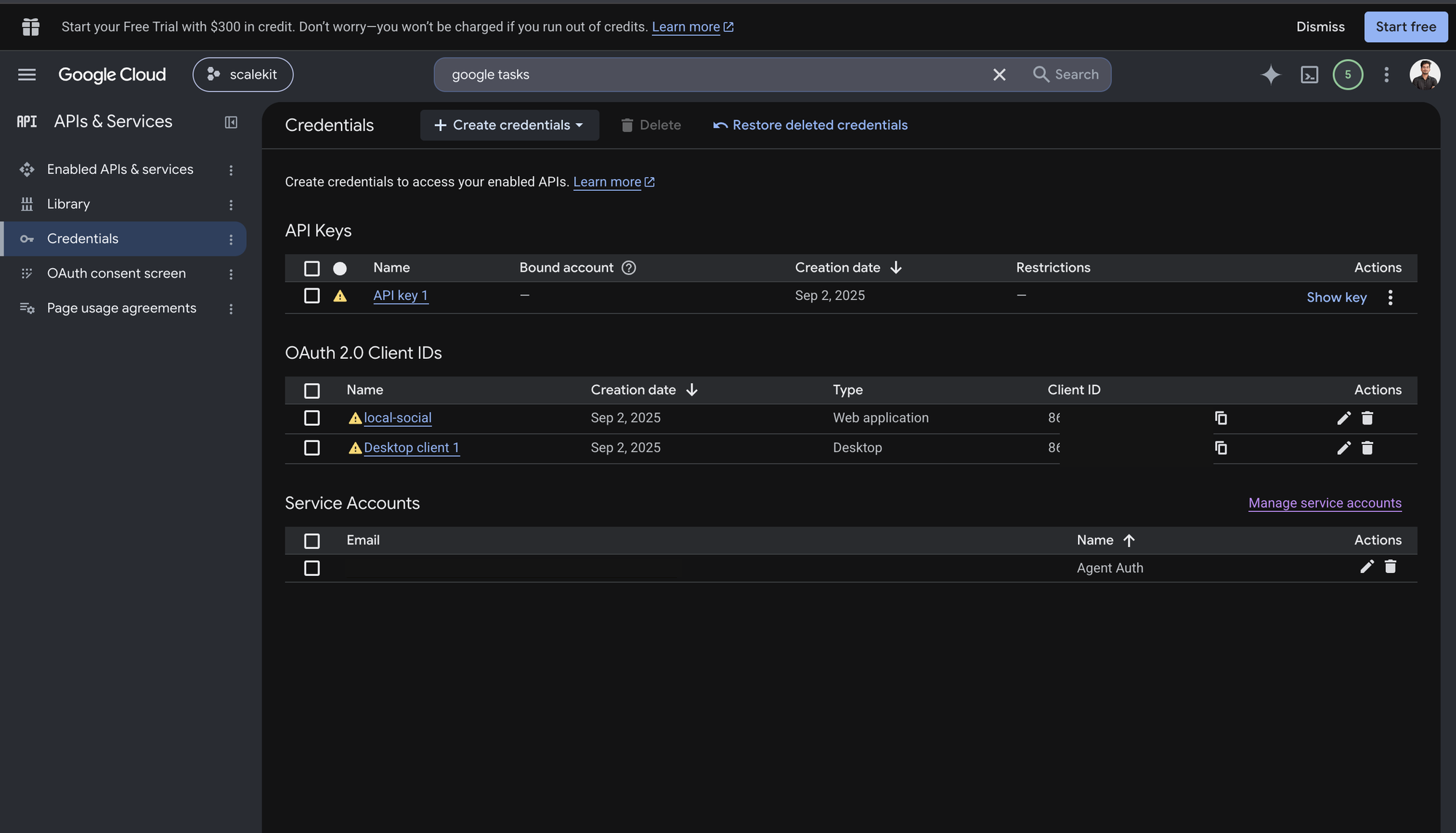
-
Click + Create Credentials, then OAuth client ID.
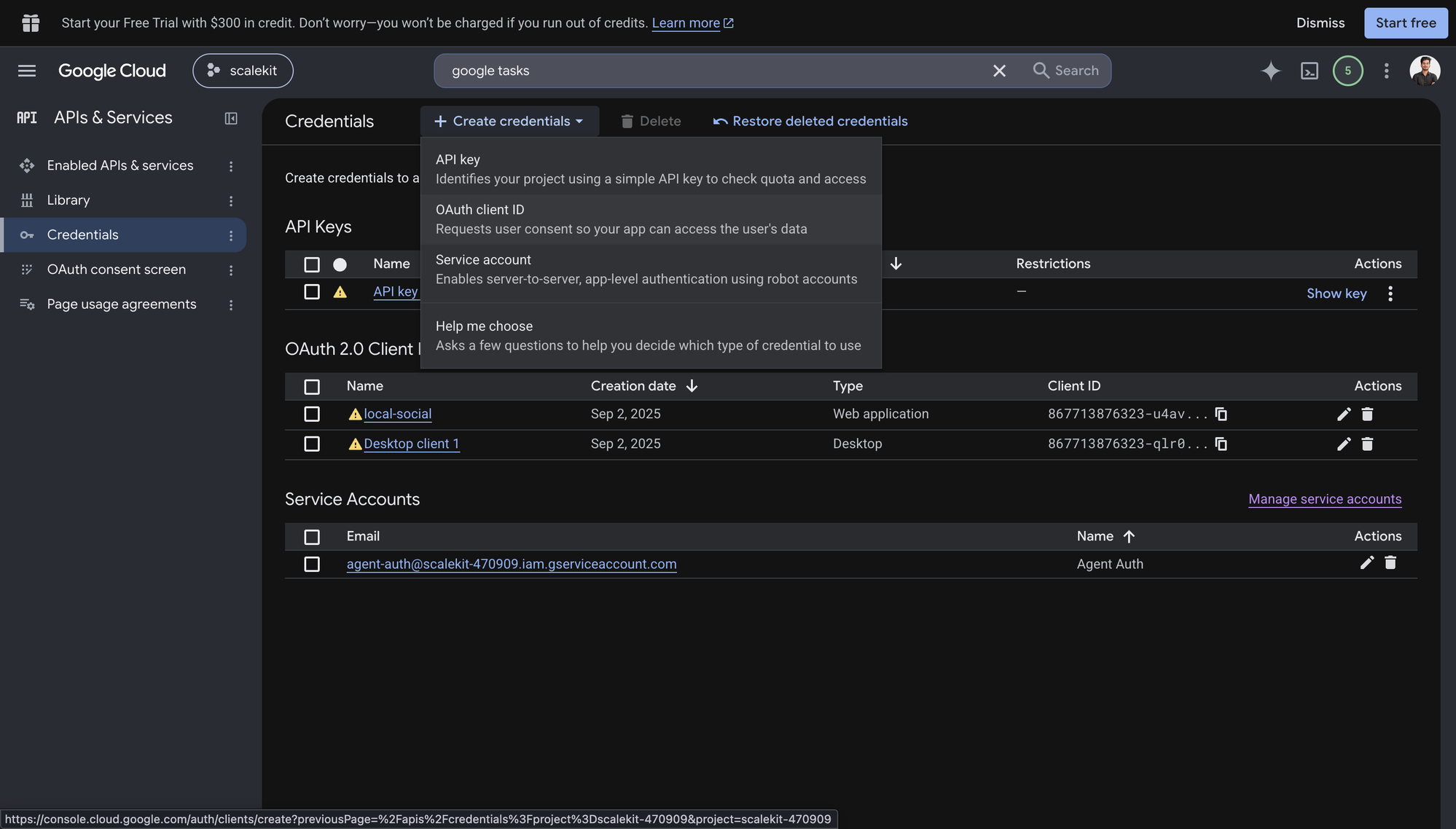
-
Choose Web application from the Application type menu and give the client a name, for example
Agent Auth.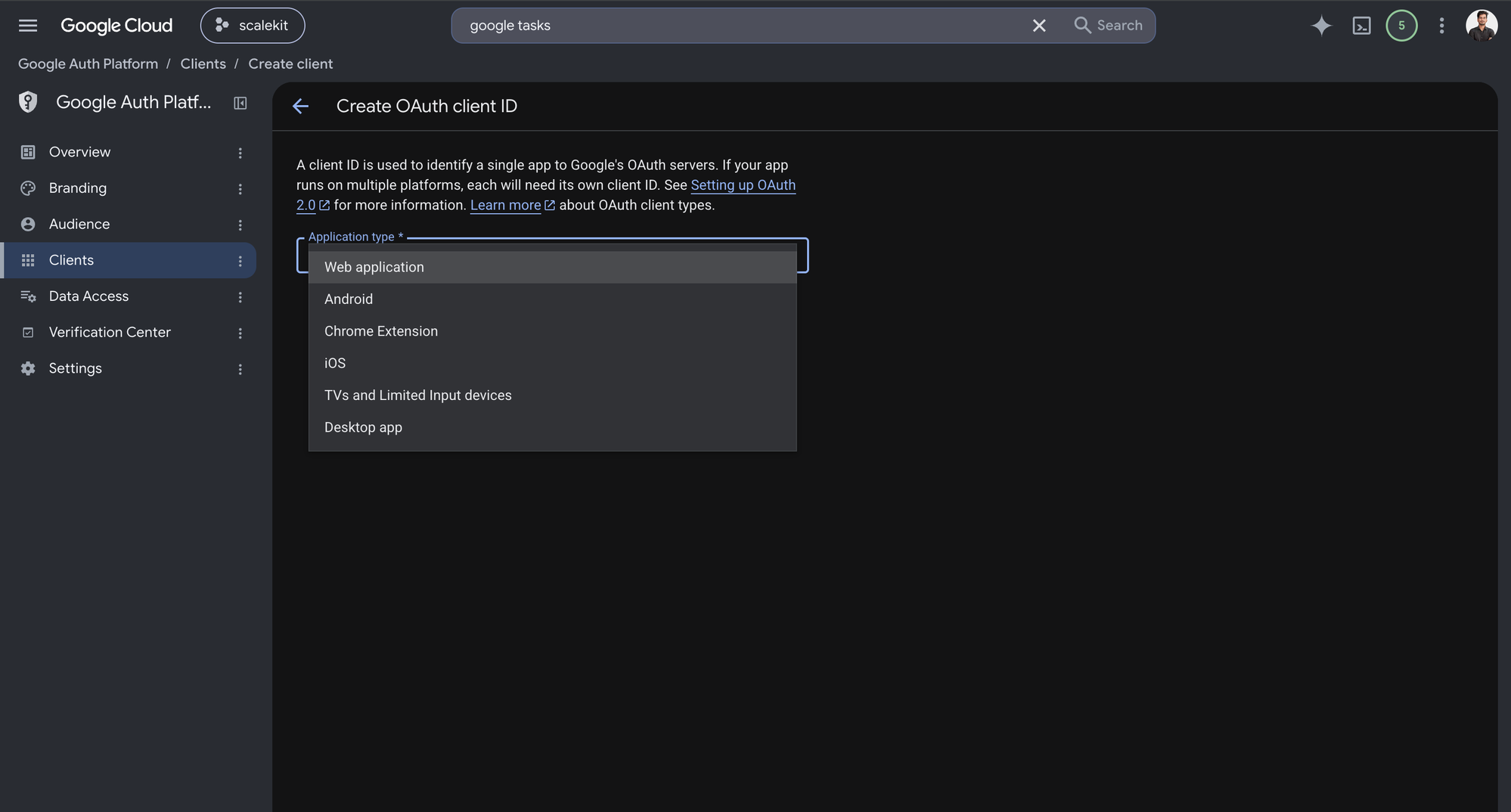
-
Under Authorized redirect URIs, click + Add URI, paste the redirect URI you copied from Scalekit, and click Create.
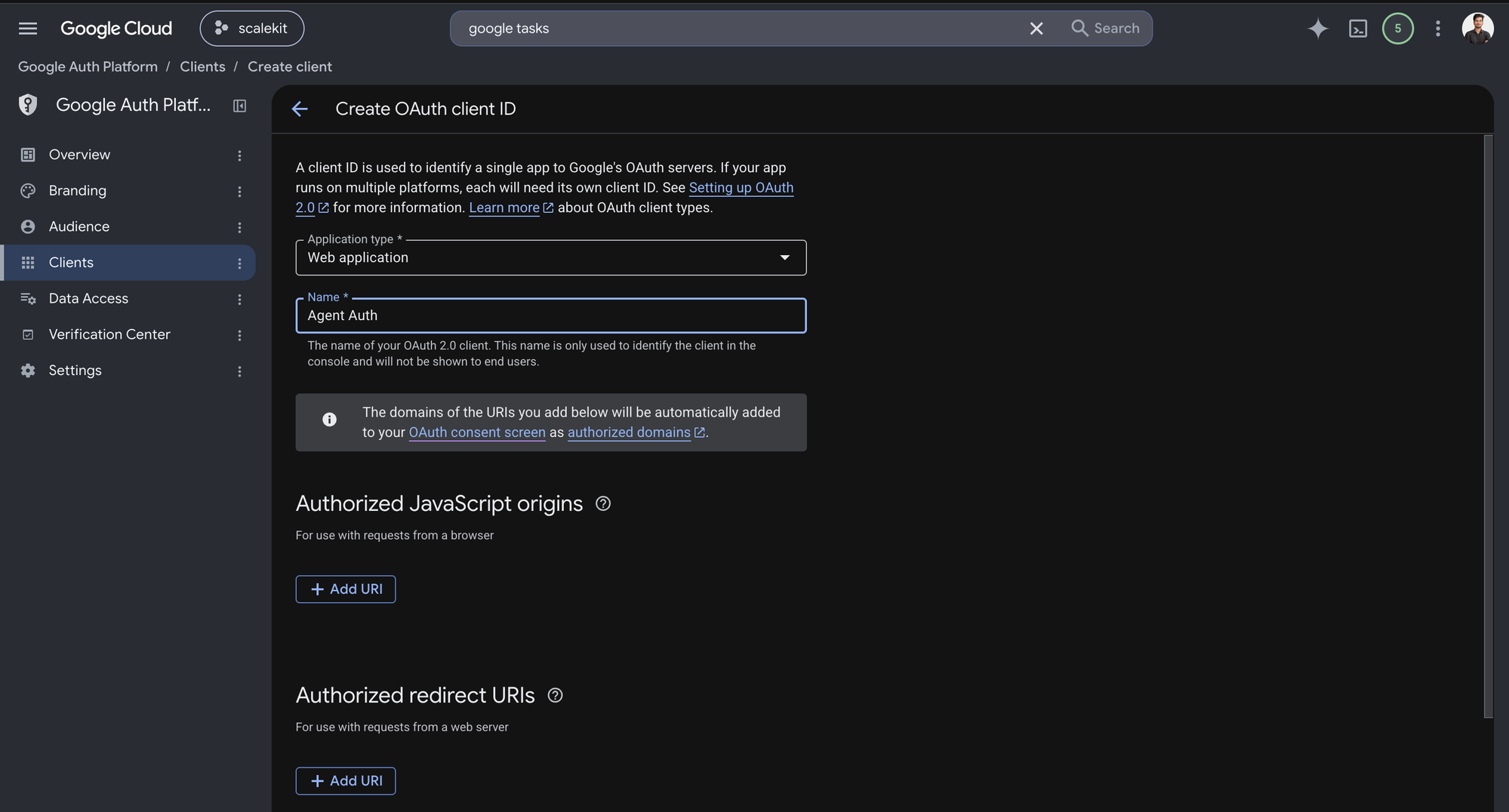
-
-
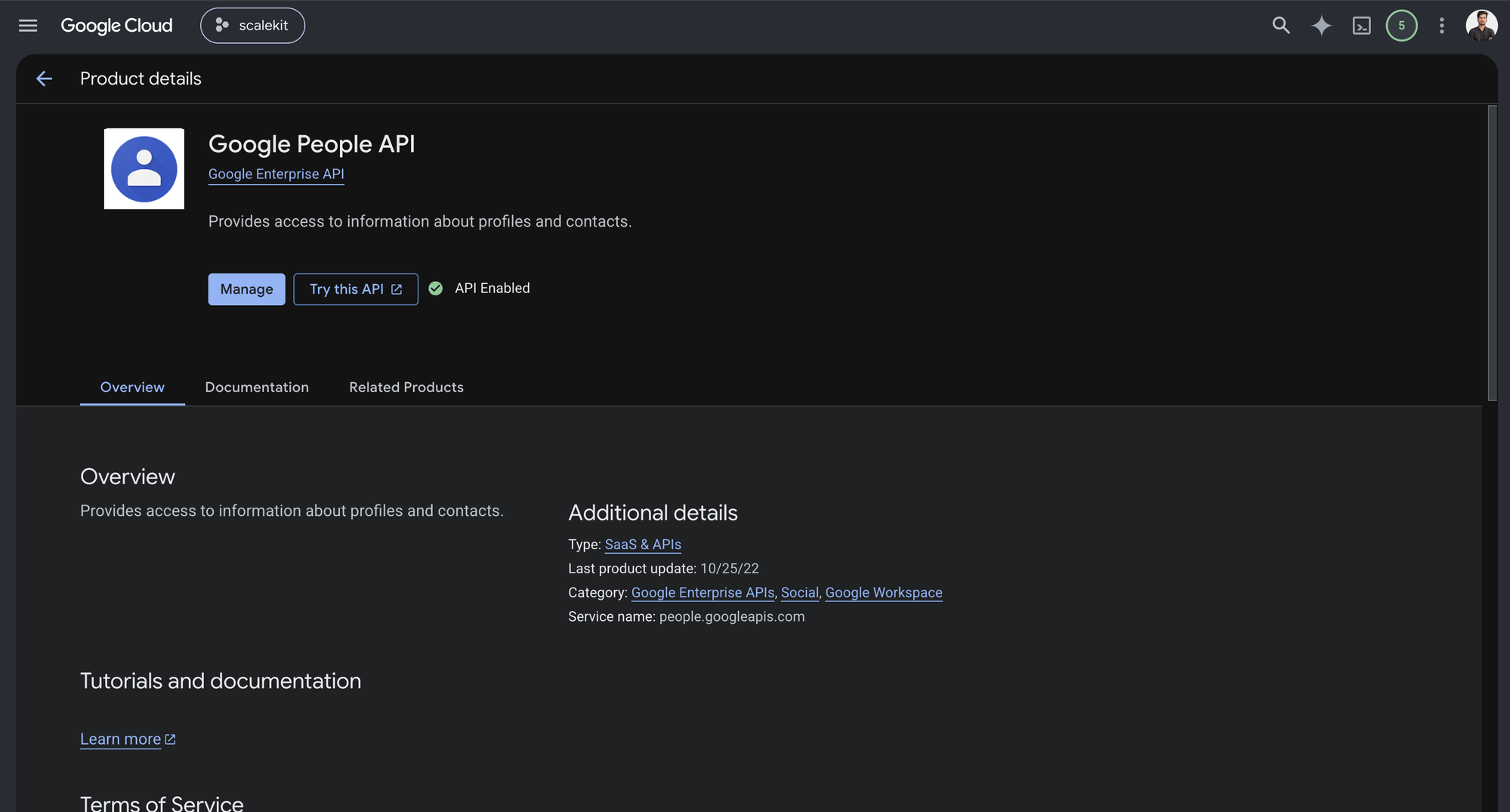
Enable the Google People API
Google Contacts is powered by the People API — Google’s underlying API for profile and contact data.
-
In Google Cloud Console, go to APIs & Services → Library. Search for “Google People API” and click Enable.
-
-
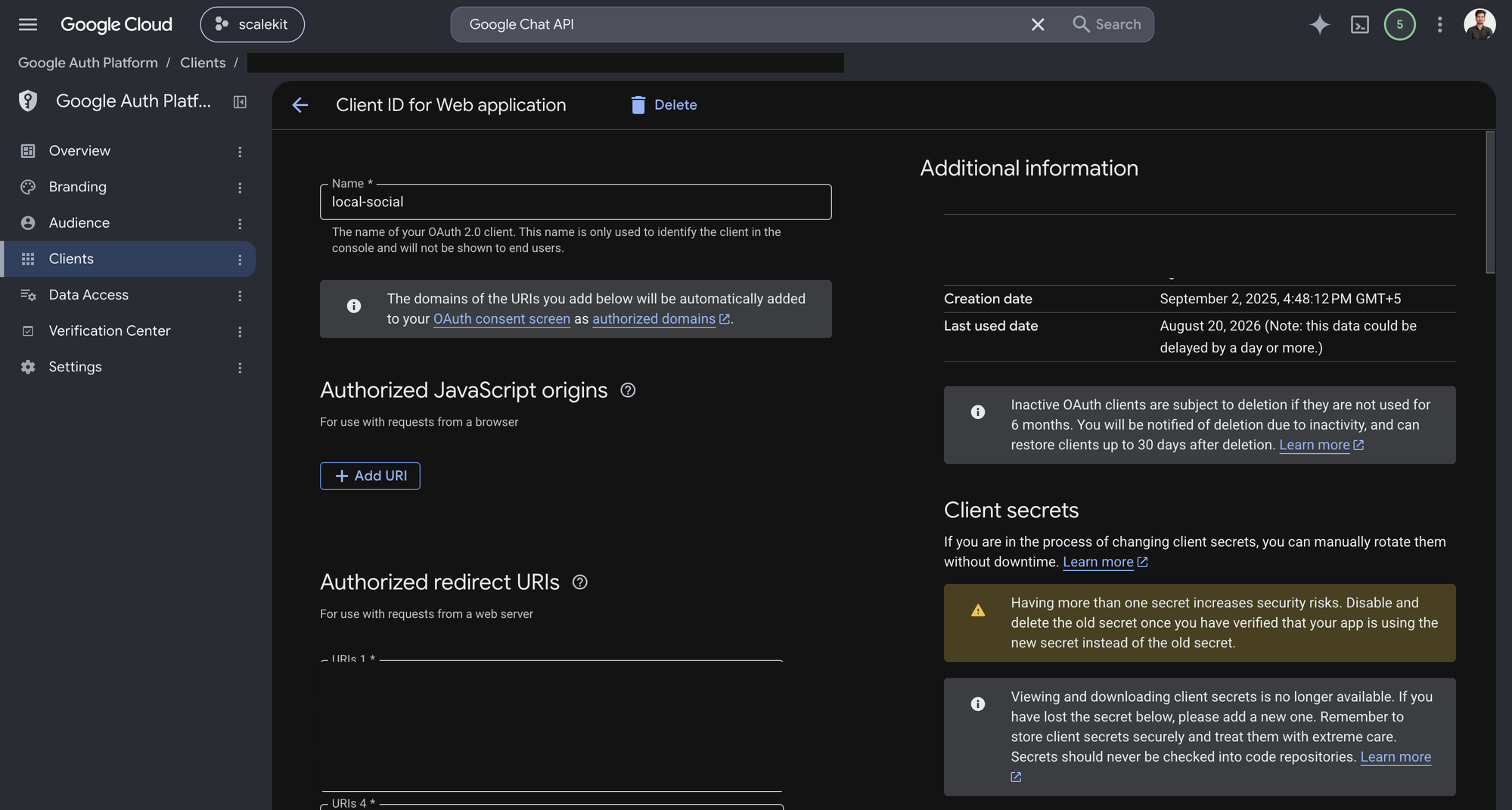
Get client credentials
-
Open the OAuth client you created in step 1. Google shows the Client ID under Additional information, and lets you generate a Client secret from the same page.
-
-
Add credentials in Scalekit
- In Scalekit dashboard, go to AgentKit > Connections and open the connection you created.
- Copy the Connection name shown on that connection and use that exact value in your code as
connection_nameorconnectionName. - Enter your credentials:
- Client ID (from above)
- Client Secret (from above)
- Permissions (scopes — see Google API Scopes reference)
- Click Save.
-
Authorize a user and make your first call
quickstart.mts import { ScalekitClient } from '@scalekit-sdk/node'import 'dotenv/config'import { createInterface } from 'node:readline/promises'const scalekit = new ScalekitClient(process.env.SCALEKIT_ENVIRONMENT_URL,process.env.SCALEKIT_CLIENT_ID,process.env.SCALEKIT_CLIENT_SECRET,)const actions = scalekit.actionsconst connector = 'googlecontacts'const identifier = 'user_123'// Generate an authorization link for the userconst { link } = await actions.getAuthorizationLink({ connectionName: connector, identifier })console.log('Authorize Google Contacts:', link)const rl = createInterface({ input: process.stdin, output: process.stdout })await rl.question('Press Enter after authorizing...')rl.close()// Make your first callconst result = await actions.executeTool({connector,identifier,toolName: 'googlecontacts_groups_list',toolInput: {},})console.log(result)Terminal window npx tsx quickstart.mtsquickstart.py import osfrom scalekit import ScalekitClientfrom dotenv import load_dotenvload_dotenv()scalekit_client = ScalekitClient(env_url=os.getenv("SCALEKIT_ENVIRONMENT_URL"),client_id=os.getenv("SCALEKIT_CLIENT_ID"),client_secret=os.getenv("SCALEKIT_CLIENT_SECRET"),)actions = scalekit_client.actionsconnection_name = "googlecontacts"identifier = "user_123"# Generate an authorization link for the userlink_response = actions.get_authorization_link(connection_name=connection_name,identifier=identifier,)print("Authorize Google Contacts:", link_response.link)input("Press Enter after authorizing...")# Make your first callresult = actions.execute_tool(tool_input={},tool_name="googlecontacts_groups_list",connection_name=connection_name,identifier=identifier,)print(result)Terminal window python quickstart.pyEach user signs in once. See Authorize a user for the full flow and statuses.
Tools
Pass the exact name toexecute_toolgooglecontacts_contact_getReturns a single contact by resource name from Google Contacts.Read-onlyGet Contact
Returns a single contact by resource name from Google Contacts.
Inputs
person_fieldsstringrequired- Comma-separated fields to return for the contact.
person_idstringrequired- The person ID of the contact to retrieve (the part after 'people/'). 'me' is not supported by this connector: it requires Google's userinfo.profile scope, which is not part of this connection's granted scopes and will return a 403.
googlecontacts_contacts_listReturns all contacts (connections) for the authenticated user from Google Contacts, with cursor-based pagination and optional sync token support.Read-onlyList Contacts
Returns all contacts (connections) for the authenticated user from Google Contacts, with cursor-based pagination and optional sync token support.
Inputs
person_fieldsstringrequired- Comma-separated FieldMask of person fields to return. Valid values: addresses, ageRanges, biographies, birthdays, calendarUrls, clientData, coverPhotos, emailAddresses, events, externalIds, genders, imClients, interests, locales, locations, memberships, metadata, miscKeywords, names, nicknames, occupations, organizations, phoneNumbers, photos, relations, sipAddresses, skills, urls, userDefined.
page_sizeinteger- Number of contacts to return per page (max 1000).
page_tokenstring- Page token from a previous response for pagination.
request_sync_tokenboolean- If true, returns a sync token on the last page for incremental sync.
sort_orderstring- Sort order for contacts. One of: LAST_MODIFIED_ASCENDING, LAST_MODIFIED_DESCENDING, FIRST_NAME_ASCENDING, LAST_NAME_ASCENDING.
sync_tokenstring- Sync token from a previous response to fetch only changed contacts.
googlecontacts_contacts_searchSearches the authenticated user's contacts by prefix query across names, email addresses, and phone numbers.Read-onlySearch Contacts
Searches the authenticated user's contacts by prefix query across names, email addresses, and phone numbers.
Inputs
querystringrequired- Prefix phrase to search across contact fields.
read_maskstringrequired- Comma-separated fields to return for each matching contact.
page_sizeinteger- Maximum number of results to return (default 10, max 30).
googlecontacts_directory_listLists people in the Google Workspace domain directory.Read-onlyList Directory People
Lists people in the Google Workspace domain directory. Requires the directory.readonly OAuth scope.
Inputs
read_maskstringrequired- Comma-separated FieldMask of person fields to return. Valid values: addresses, ageRanges, biographies, birthdays, calendarUrls, clientData, coverPhotos, emailAddresses, events, externalIds, genders, imClients, interests, locales, locations, memberships, metadata, miscKeywords, names, nicknames, occupations, organizations, phoneNumbers, photos, relations, sipAddresses, skills, urls, userDefined.
sourcesstringrequired- Directory source type to return. Use DIRECTORY_SOURCE_TYPE_DOMAIN_CONTACT for domain contacts or DIRECTORY_SOURCE_TYPE_DOMAIN_PROFILE for domain profiles.
page_sizeinteger- Number of people to return per page (1–1000, default 100).
page_tokenstring- Page token from a previous response for pagination.
request_sync_tokenboolean- If true, returns a sync token on the last page for incremental sync.
sync_tokenstring- Sync token from a previous response to fetch only changed people.
googlecontacts_directory_searchSearches the Google Workspace domain directory by prefix query across names, email addresses, and phone numbers.Read-onlySearch Directory People
Searches the Google Workspace domain directory by prefix query across names, email addresses, and phone numbers. Requires the directory.readonly OAuth scope.
Inputs
querystringrequired- Prefix query string to search across directory people.
read_maskstringrequired- Comma-separated FieldMask of person fields to return. Valid values: addresses, ageRanges, biographies, birthdays, calendarUrls, clientData, coverPhotos, emailAddresses, events, externalIds, genders, imClients, interests, locales, locations, memberships, metadata, miscKeywords, names, nicknames, occupations, organizations, phoneNumbers, photos, relations, sipAddresses, skills, urls, userDefined.
sourcesstringrequired- Directory source type to search. Use DIRECTORY_SOURCE_TYPE_DOMAIN_CONTACT or DIRECTORY_SOURCE_TYPE_DOMAIN_PROFILE.
page_sizeinteger- Number of results to return per page (1–500, default 100).
page_tokenstring- Page token from a previous response for pagination.
googlecontacts_group_getReturns a single contact group by resource name, including its members if requested.Read-onlyGet Contact Group
Returns a single contact group by resource name, including its members if requested.
Inputs
group_idstringrequired- The group ID of the contact group (the part after 'contactGroups/').
group_fieldsstring- Comma-separated fields to return: clientData, groupType, memberCount, metadata, name.
max_membersinteger- Maximum number of group members to return (default 0 = none).
googlecontacts_groups_batch_getRetrieves up to 200 contact groups in a single request from Google Contacts.Read-onlyBatch Get Contact Groups
Retrieves up to 200 contact groups in a single request from Google Contacts.
Inputs
resource_namesarrayrequired- One or more contact group resource names to retrieve, in the format 'contactGroups/<id>' (e.g. 'contactGroups/myContacts' or 'contactGroups/starred'), up to 200. Get IDs from googlecontacts_groups_list. Sent as repeated resourceNames query parameters.
group_fieldsstring- Comma-separated fields to return for each group: clientData, groupType, memberCount, metadata, name.
max_membersinteger- Maximum number of group members to return per group (default 0 = none).
googlecontacts_groups_listReturns all contact groups owned by the authenticated user, including system groups like 'My Contacts' and 'Starred'.Read-onlyList Contact Groups
Returns all contact groups owned by the authenticated user, including system groups like 'My Contacts' and 'Starred'.
Inputs
group_fieldsstring- Comma-separated fields to return: clientData, groupType, memberCount, metadata, name.
page_sizeinteger- Number of contact groups to return per page (max 1000).
page_tokenstring- Page token from a previous response for pagination.
sync_tokenstring- Sync token to fetch only changed contact groups. Unlike googlecontacts_contacts_list, this endpoint always returns nextSyncToken on the last page — no request flag is needed.
googlecontacts_other_contacts_listReturns the authenticated user's 'Other Contacts' — contacts auto-generated from email history that haven't been saved to personal contacts.Read-onlyList Other Contacts
Returns the authenticated user's 'Other Contacts' — contacts auto-generated from email history that haven't been saved to personal contacts.
Inputs
read_maskstringrequired- Comma-separated fields to return. Valid values: emailAddresses, metadata, names, phoneNumbers, photos.
page_sizeinteger- Number of contacts to return per page (max 1000).
page_tokenstring- Page token from a previous response for pagination.
request_sync_tokenboolean- If true, returns a sync token on the last page.
sync_tokenstring- Sync token to fetch only changed contacts (expires after 7 days).
googlecontacts_other_contacts_searchSearches the authenticated user's 'Other Contacts' by prefix query across names, email addresses, and phone numbers.Read-onlySearch Other Contacts
Searches the authenticated user's 'Other Contacts' by prefix query across names, email addresses, and phone numbers.
Inputs
querystringrequired- Prefix phrase to search across other contact fields.
read_maskstringrequired- Comma-separated fields to return. Valid values: emailAddresses, metadata, names, phoneNumbers.
page_sizeinteger- Maximum number of results to return (default 10, max 30).
googlecontacts_people_batch_getRetrieves up to 200 contacts in a single request by their resource names from Google Contacts.Read-onlyBatch Get Contacts
Retrieves up to 200 contacts in a single request by their resource names from Google Contacts.
Inputs
person_fieldsstringrequired- Comma-separated FieldMask of person fields to return. Valid values: addresses, ageRanges, biographies, birthdays, calendarUrls, clientData, coverPhotos, emailAddresses, events, externalIds, genders, imClients, interests, locales, locations, memberships, metadata, miscKeywords, names, nicknames, occupations, organizations, phoneNumbers, photos, relations, sipAddresses, skills, urls, userDefined.
resource_namesarrayrequired- One or more contact resource names in the format 'people/<id>' (e.g. 'people/c123456789'), up to 200. Get resource names from googlecontacts_contacts_list. Sent as repeated resourceNames query parameters.
googlecontacts_contact_createCreates a new contact in Google Contacts for the authenticated user.WriteCreate Contact
Creates a new contact in Google Contacts for the authenticated user.
Inputs
person_fieldsstringrequired- Comma-separated fields to return in the response.
emailstring- Primary email address of the contact.
email_typestring- Type of email: home, work, or other.
family_namestring- Last name of the contact.
given_namestring- First name of the contact.
job_titlestring- Job title at the organization.
notesstring- Free-text notes or biography for the contact.
organizationstring- Company or organization name.
phonestring- Primary phone number of the contact.
phone_typestring- Type of phone: mobile, home, work, or other.
googlecontacts_contact_updateUpdates an existing contact in Google Contacts.WriteUpdate Contact
Updates an existing contact in Google Contacts. Only fields specified in update_person_fields are modified.
- Idempotent
Inputs
person_idstringrequired- The person ID of the contact to update (the part after 'people/').
update_person_fieldsstringrequired- Comma-separated list of fields to update (FieldMask).
emailstring- Updated primary email address.
email_typestring- Type of email: home, work, or other.
etagstring- Etag of the contact for conflict detection (recommended).
family_namestring- Updated last name of the contact.
given_namestring- Updated first name of the contact.
job_titlestring- Updated job title at the organization.
notesstring- Updated free-text notes or biography.
organizationstring- Updated company or organization name.
person_fieldsstring- Comma-separated fields to return in the response.
phonestring- Updated primary phone number.
phone_typestring- Type of phone: mobile, home, work, or other.
googlecontacts_contact_update_photoUploads a new profile photo for a contact in Google Contacts.WriteUpdate Contact Photo
Uploads a new profile photo for a contact in Google Contacts. The photo must be provided as base64-encoded bytes.
- Idempotent
Inputs
person_idstringrequired- The person ID of the contact to update (the part after 'people/').
photo_bytesstringrequired- Base64-encoded bytes of the photo to upload.
person_fieldsstring- Comma-separated FieldMask of person fields to return after updating the photo.
googlecontacts_contacts_batch_createCreates up to 200 new contacts in a single request in Google Contacts.WriteBatch Create Contacts
Creates up to 200 new contacts in a single request in Google Contacts.
Inputs
contactsstringrequired- JSON array of contact objects to create (max 200). Each object is a Person resource with fields like names, emailAddresses, phoneNumbers.
read_maskstringrequired- Comma-separated FieldMask of person fields to return for each created contact. Valid values: addresses, biographies, birthdays, emailAddresses, memberships, names, nicknames, organizations, phoneNumbers, photos, urls.
googlecontacts_contacts_batch_updateUpdates up to 200 existing contacts in a single request in Google Contacts.WriteBatch Update Contacts
Updates up to 200 existing contacts in a single request in Google Contacts.
- Idempotent
Inputs
contactsstringrequired- JSON object mapping each contact's resourceName (e.g. 'people/c123') to a Person object with updated fields (max 200 entries).
read_maskstringrequired- Comma-separated FieldMask of person fields to return for each updated contact.
update_maskstringrequired- Comma-separated FieldMask of person fields to update across all contacts.
googlecontacts_group_createCreates a new contact group with the given name in Google Contacts.WriteCreate Contact Group
Creates a new contact group with the given name in Google Contacts. Group names must be unique per user.
Inputs
namestringrequired- Name of the new contact group (must be unique).
read_group_fieldsstring- Comma-separated fields to return in the response.
googlecontacts_group_members_modifyAdds or removes contacts from a contact group.WriteModify Contact Group Members
Adds or removes contacts from a contact group. Supports adding to 'myContacts' and 'starred' groups, and removing from any group.
Inputs
group_idstringrequired- The group ID of the contact group to modify (the part after 'contactGroups/').
resource_names_to_addarray- JSON array of contact resource names to add to the group.
resource_names_to_removearray- JSON array of contact resource names to remove from the group.
googlecontacts_group_updateUpdates the name of an existing contact group in Google Contacts.WriteUpdate Contact Group
Updates the name of an existing contact group in Google Contacts.
- Idempotent
Inputs
group_idstringrequired- The group ID of the contact group to update (the part after 'contactGroups/').
namestringrequired- New name for the contact group (must be unique).
etagstring- Etag of the contact group for conflict detection.
read_group_fieldsstring- Comma-separated fields to return in the response.
update_group_fieldsstring- Comma-separated fields to update: clientData, name. Defaults to name.
googlecontacts_other_contact_copyCopies an 'Other Contact' (auto-generated from email history) into the authenticated user's main contacts (myContacts group).WriteCopy Other Contact to My Contacts
Copies an 'Other Contact' (auto-generated from email history) into the authenticated user's main contacts (myContacts group).
Inputs
copy_maskstringrequired- Comma-separated FieldMask of fields to copy from the Other Contact. Valid values: emailAddresses, names, phoneNumbers.
person_idstringrequired- The person ID of the Other Contact to copy (the part after 'otherContacts/').
read_maskstring- Comma-separated FieldMask of person fields to return for the newly created contact.
googlecontacts_contact_deletePermanently deletes a contact from Google Contacts by resource name.DestructiveDelete Contact
Permanently deletes a contact from Google Contacts by resource name.
- Idempotent
Inputs
person_idstringrequired- The person ID of the contact to delete (the part after 'people/').
googlecontacts_contact_delete_photoRemoves the profile photo of a contact in Google Contacts.DestructiveDelete Contact Photo
Removes the profile photo of a contact in Google Contacts.
- Idempotent
Inputs
person_idstringrequired- The person ID of the contact (the part after 'people/').
person_fieldsstring- Comma-separated FieldMask of person fields to return after deleting the photo.
googlecontacts_contacts_batch_deletePermanently deletes up to 500 contacts in a single request from Google Contacts.DestructiveBatch Delete Contacts
Permanently deletes up to 500 contacts in a single request from Google Contacts.
- Idempotent
Inputs
resource_namesarrayrequired- Array of contact resource names to delete (max 500). e.g. ['people/c123456789']
googlecontacts_group_deleteDeletes a contact group from Google Contacts.DestructiveDelete Contact Group
Deletes a contact group from Google Contacts. Optionally also deletes all contacts that belong to the group.
- Idempotent
Inputs
group_idstringrequired- The group ID of the contact group to delete (the part after 'contactGroups/').
delete_contactsboolean- If true, also deletes all contacts in the group.
No tools match.


