


The Google Tasks connector lets your AI agent act in each user's Google Tasks account. Each user signs in to Google Tasks once, and Scalekit stores and refreshes their tokens, so your agent never handles credentials. It comes with 12 tools.
- Tools
- 12
- What they doRead · write · destructive
- 4 · 6 · 24 read6 write2 destructive
- Users sign in with
- OAuth
- OAuth app
- Your own Google app
Setup
Install the SDK
Terminal window npm install @scalekit-sdk/node dotenvTerminal window pip install scalekit-sdk-python python-dotenvSet your credentials
Add your Scalekit credentials to your
.envfile. Find values in app.scalekit.com > Developers > API Credentials..env SCALEKIT_ENVIRONMENT_URL=<your-environment-url>SCALEKIT_CLIENT_ID=<your-client-id>SCALEKIT_CLIENT_SECRET=<your-client-secret>Create the Google Tasks connection
In AgentKit > Connections, create a Google Tasks connection and copy its redirect URI. The name you give it is the
connection_nameyour code passes. See Configure connections.Register a Google OAuth app
Google Tasks connections use your own OAuth app. Register one with Google and add the redirect URI you copied.
Then enter the app's Client ID and Client Secret on the Google Tasks connection.
Console steps with screenshots
Register your Scalekit environment with the Google Tasks connector so Scalekit handles the OAuth flow and token lifecycle for you. The connection name you create will be used to identify and invoke the connection programmatically. Then complete the configuration in your application as follows:
-
Set up auth redirects
-
In Scalekit dashboard, go to AgentKit > Connections > Create Connection. Find Google Tasks and click Create. Click Use your own credentials and copy the redirect URI. It looks like
https://<SCALEKIT_ENVIRONMENT_URL>/sso/v1/oauth/<CONNECTION_ID>/callback. -
Navigate to Google Cloud Console → APIs & Services → Credentials.
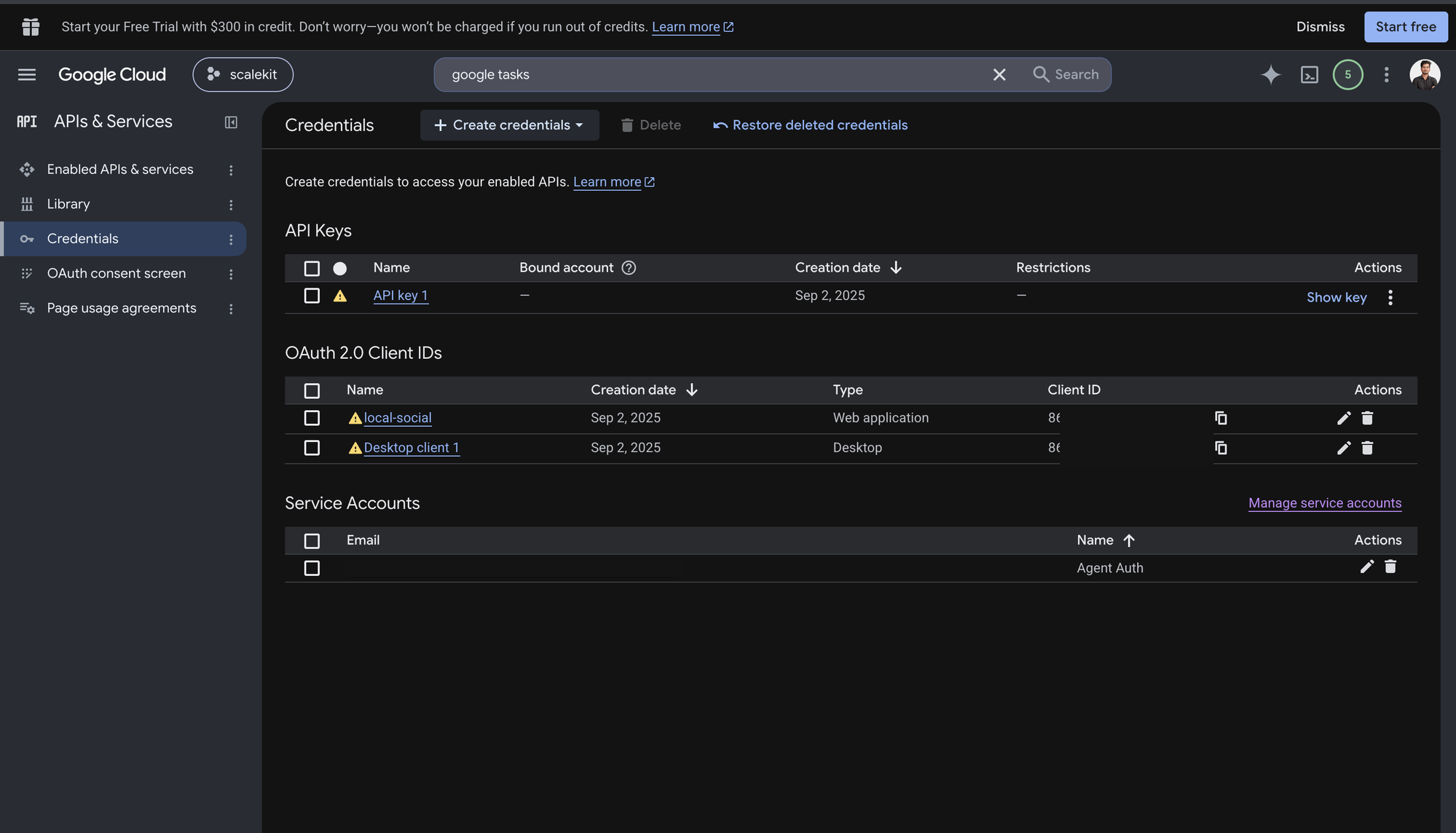
-
Click + Create Credentials, then OAuth client ID.
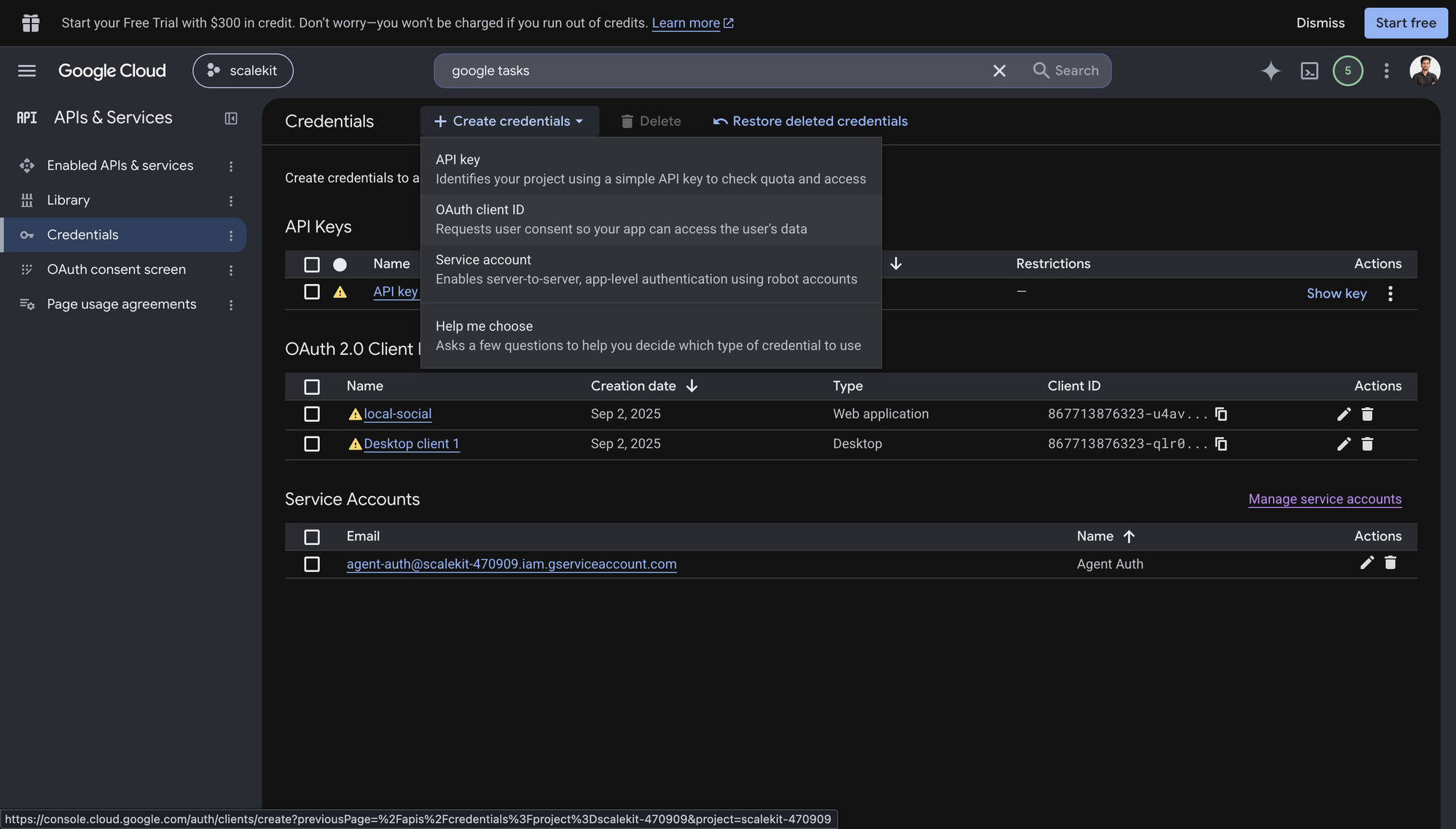
-
Choose Web application from the Application type menu and give the client a name, for example
Agent Auth.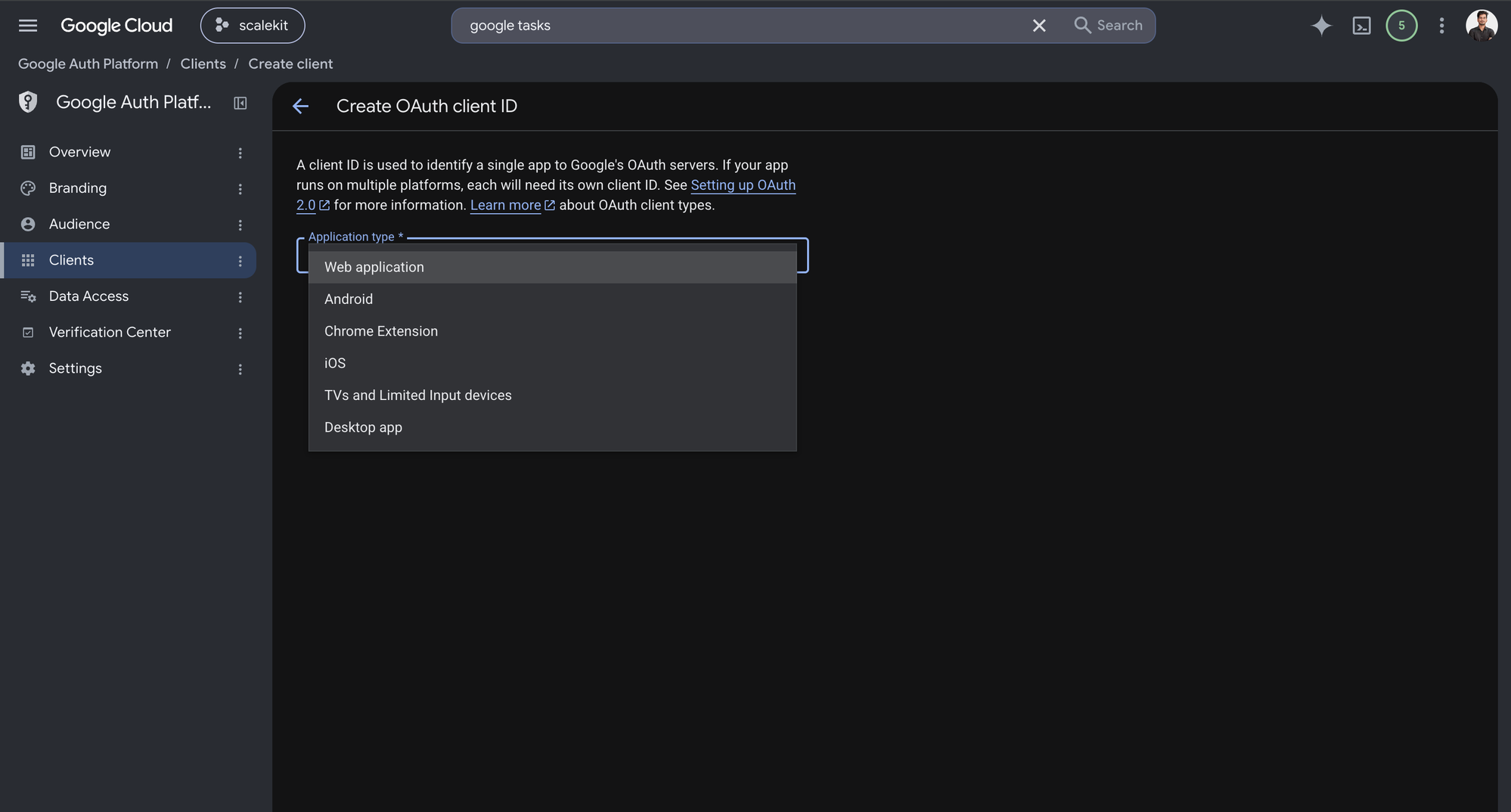
-
Under Authorized redirect URIs, click + Add URI, paste the redirect URI you copied from Scalekit, and click Create.
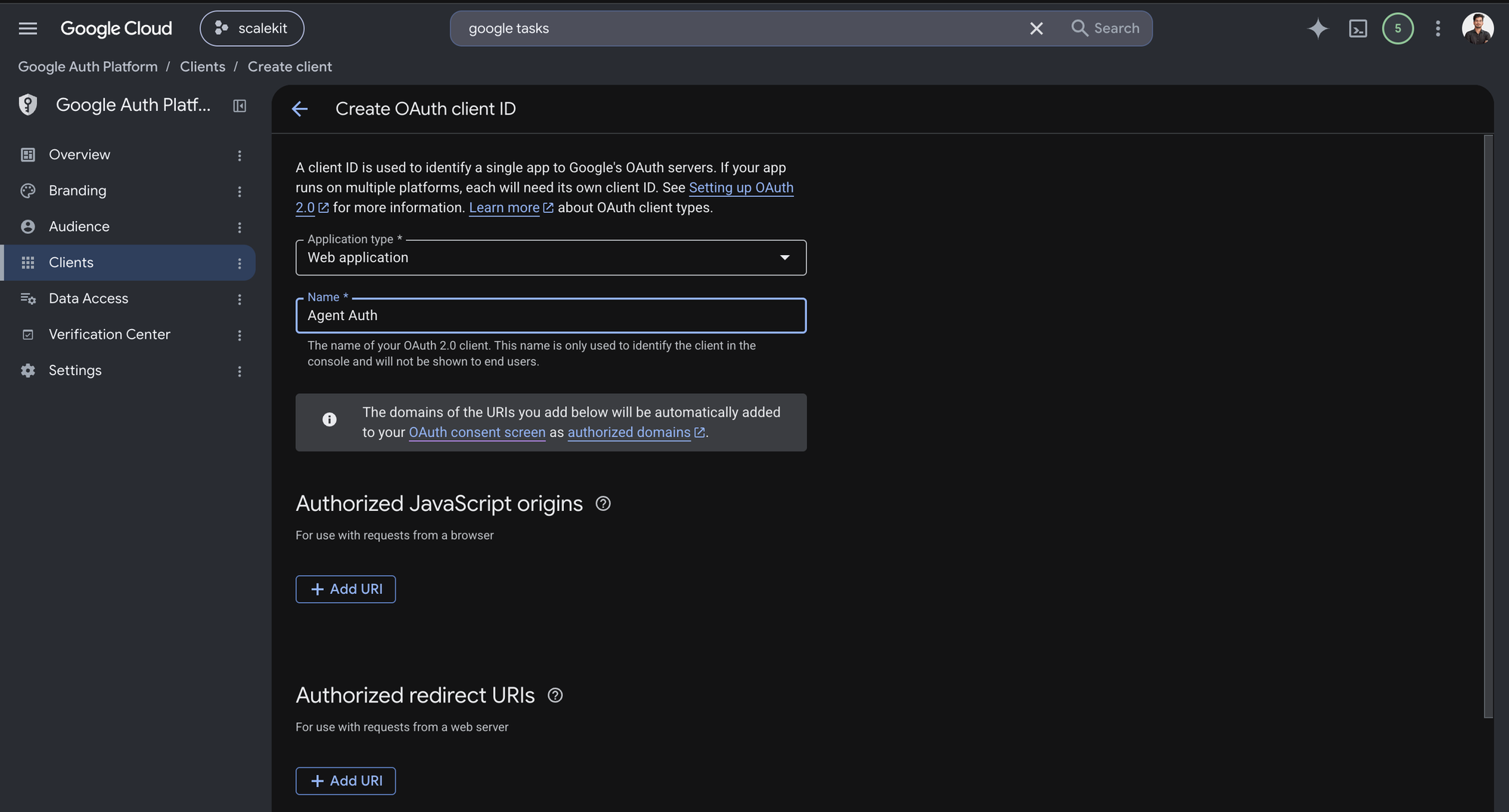
-
-
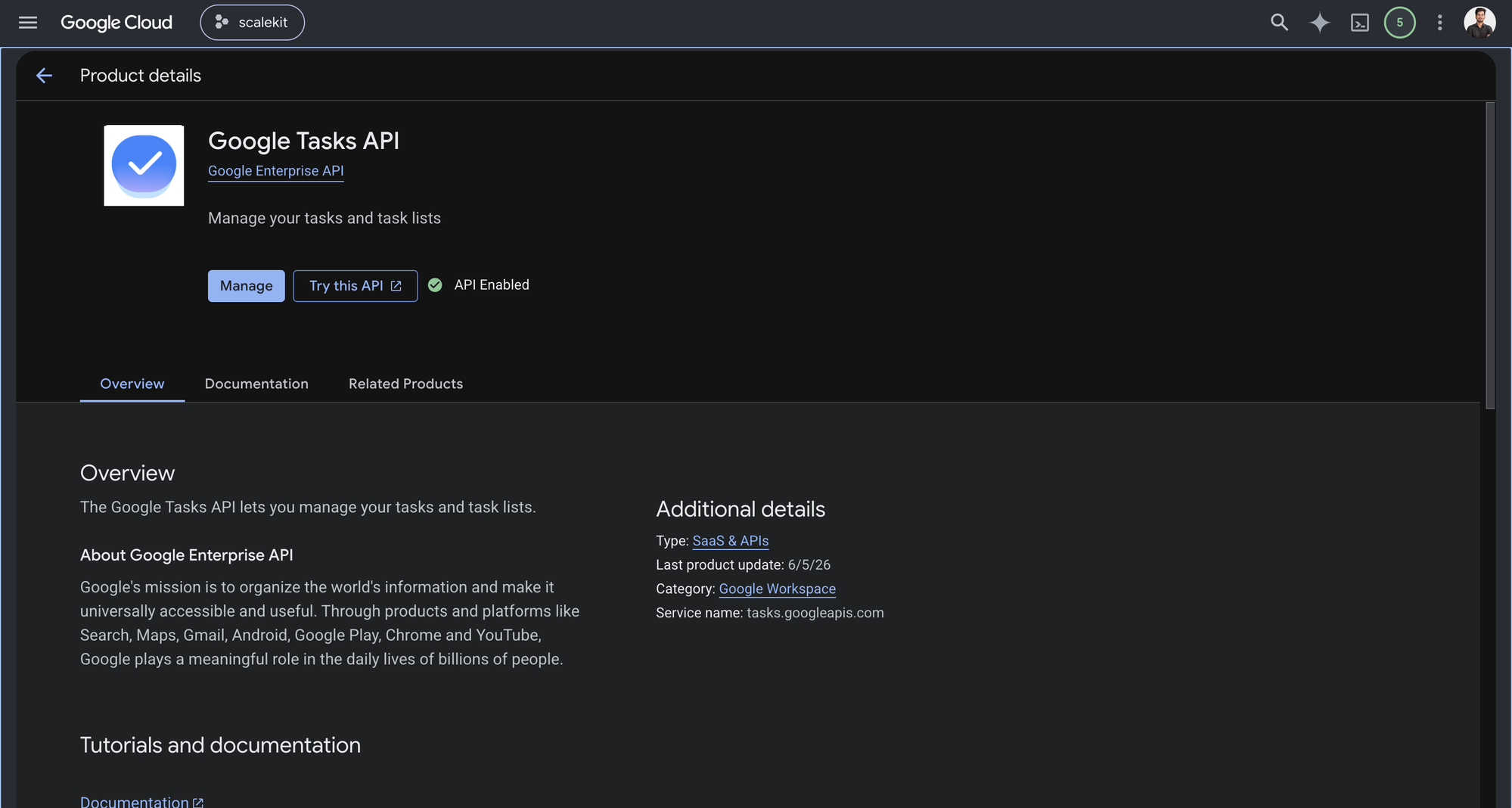
Enable the Google Tasks API
-
In Google Cloud Console, go to APIs & Services → Library. Search for “Google Tasks API” and click Enable.
-
-
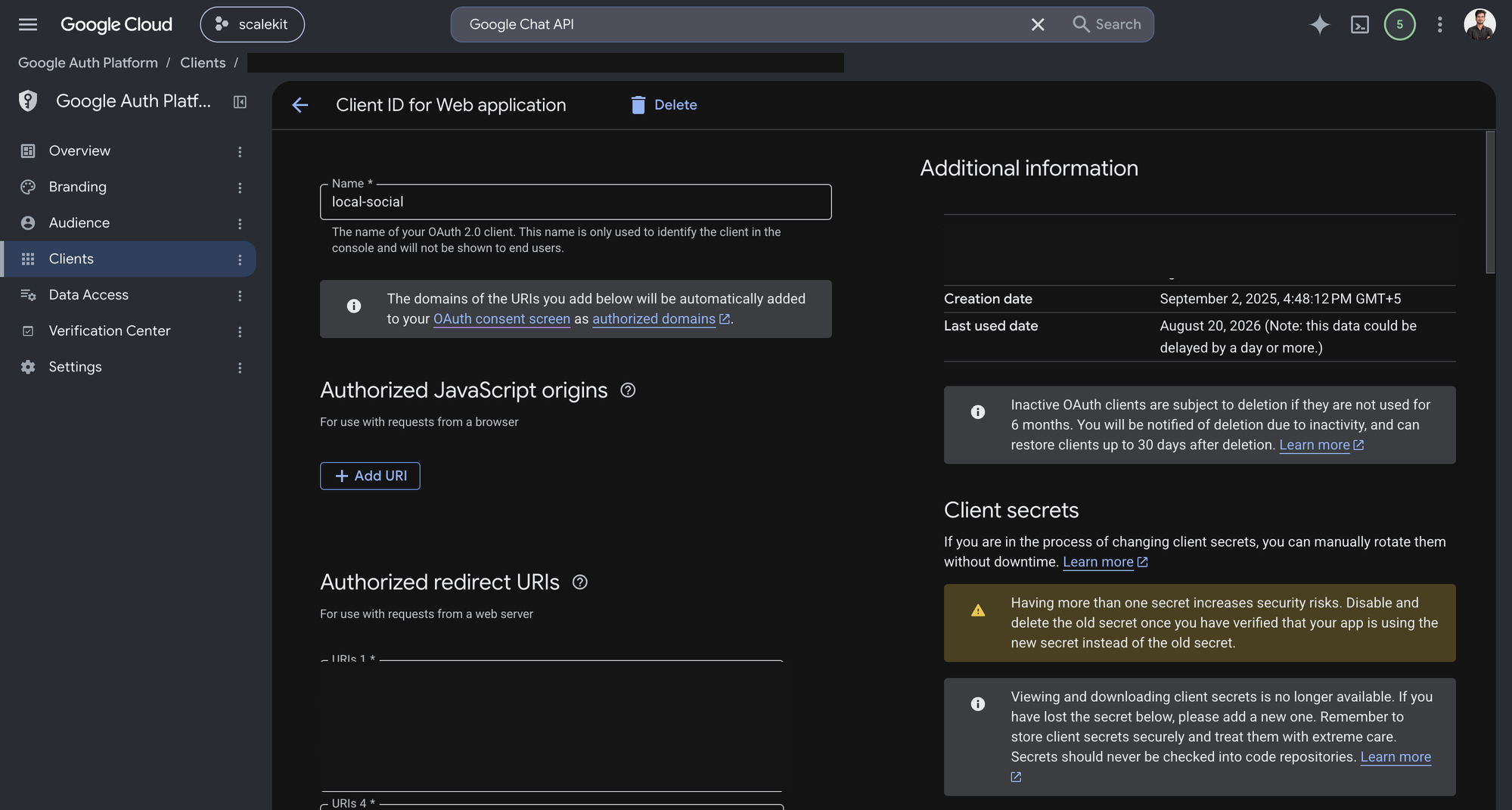
Get client credentials
-
Open the OAuth client you created in step 1. Google shows the Client ID under Additional information, and lets you generate a Client secret from the same page.
-
-
Add credentials in Scalekit
- In Scalekit dashboard, go to AgentKit > Connections and open the connection you created.
- Copy the Connection name shown on that connection and use that exact value in your code as
connection_nameorconnectionName. - Enter your credentials:
- Client ID (from above)
- Client Secret (from above)
- Permissions (scopes — see Google API Scopes reference)
- Click Save.
-
Authorize a user and make your first call
quickstart.mts import { ScalekitClient } from '@scalekit-sdk/node'import 'dotenv/config'import { createInterface } from 'node:readline/promises'const scalekit = new ScalekitClient(process.env.SCALEKIT_ENVIRONMENT_URL,process.env.SCALEKIT_CLIENT_ID,process.env.SCALEKIT_CLIENT_SECRET,)const actions = scalekit.actionsconst connector = 'googletasks'const identifier = 'user_123'// Generate an authorization link for the userconst { link } = await actions.getAuthorizationLink({ connectionName: connector, identifier })console.log('Authorize Google Tasks:', link)const rl = createInterface({ input: process.stdin, output: process.stdout })await rl.question('Press Enter after authorizing...')rl.close()// Make your first callconst result = await actions.executeTool({connector,identifier,toolName: 'googletasks_list_tasklists',toolInput: {},})console.log(result)Terminal window npx tsx quickstart.mtsquickstart.py import osfrom scalekit import ScalekitClientfrom dotenv import load_dotenvload_dotenv()scalekit_client = ScalekitClient(env_url=os.getenv("SCALEKIT_ENVIRONMENT_URL"),client_id=os.getenv("SCALEKIT_CLIENT_ID"),client_secret=os.getenv("SCALEKIT_CLIENT_SECRET"),)actions = scalekit_client.actionsconnection_name = "googletasks"identifier = "user_123"# Generate an authorization link for the userlink_response = actions.get_authorization_link(connection_name=connection_name,identifier=identifier,)print("Authorize Google Tasks:", link_response.link)input("Press Enter after authorizing...")# Make your first callresult = actions.execute_tool(tool_input={},tool_name="googletasks_list_tasklists",connection_name=connection_name,identifier=identifier,)print(result)Terminal window python quickstart.pyEach user signs in once. See Authorize a user for the full flow and statuses.
Tools
Pass the exact name toexecute_toolgoogletasks_get_taskGet a single task by ID from a task list in a connected Google Tasks account.Read-onlyGet Task
Get a single task by ID from a task list in a connected Google Tasks account. Returns the task's full details including title, notes, status, due date, completion date, and position. Use get_task to look up one task. Use list_tasks to browse all tasks in a list.
Inputs
task_idstringrequired- Identifier of the task to retrieve
tasklist_idstringrequired- Identifier of the task list the task belongs to
Also accepts
schema_versionandtool_versionto pin a version.googletasks_get_tasklistGet the details of a single task list by ID from a connected Google Tasks account.Read-onlyGet Task List
Get the details of a single task list by ID from a connected Google Tasks account. Returns the list's id, title, etag, and last-updated time. Use get_tasklist to look up one list. Use list_tasklists to browse all lists and find the ID.
Inputs
tasklist_idstringrequired- Identifier of the task list to retrieve
Also accepts
schema_versionandtool_versionto pin a version.googletasks_list_tasklistsList all of the authenticated user's task lists in a connected Google Tasks account.Read-onlyList Task Lists
List all of the authenticated user's task lists in a connected Google Tasks account. Returns each list's id, title, and last-updated time, with pagination via a page token. Use list_tasklists to browse or find a task list ID before working with its tasks. Use get_tasklist to fetch a single list's details.
Inputs
max_resultsinteger- Maximum number of task lists to return on one page (max 1000)default
1000 page_tokenstring- Token identifying the result page to return, from a previous response's next_page_token
Also accepts
schema_versionandtool_versionto pin a version.googletasks_list_tasksList tasks in a task list from a connected Google Tasks account, with filters for completion, due date, and visibility of hidden/deleted items.Read-onlyList Tasks
List tasks in a task list from a connected Google Tasks account, with filters for completion, due date, and visibility of hidden/deleted items. Returns an array of tasks (id, title, status, notes, due date, position) with pagination via a page token. Use list_tasks to browse a list's tasks. Use get_task to fetch a single task by ID.
Inputs
tasklist_idstringrequired- Identifier of the task list to list tasks from
completed_maxstring- Upper bound (RFC 3339 timestamp) for a task's completion date, to filter tasks completed before this time
completed_minstring- Lower bound (RFC 3339 timestamp) for a task's completion date, to filter tasks completed after this time
due_maxstring- Upper bound (RFC 3339 timestamp) for a task's due date, to filter by due date
due_minstring- Lower bound (RFC 3339 timestamp) for a task's due date, to filter by due date
max_resultsinteger- Maximum number of tasks to return on one page (max 100)default
20 page_tokenstring- Token identifying the result page to return, from a previous response's next_page_token
show_assignedboolean- Whether tasks assigned to the current user (from Docs, Chat Spaces) are returned in the resultdefault
false show_completedboolean- Whether completed tasks are returned in the result. show_hidden must also be true to show tasks completed in first-party clients such as the web UIdefault
true show_deletedboolean- Whether deleted tasks are returned in the resultdefault
false show_hiddenboolean- Whether hidden tasks are returned in the resultdefault
false updated_minstring- Lower bound (RFC 3339 timestamp) for a task's last modification time, to filter by last modification time
Also accepts
schema_versionandtool_versionto pin a version.googletasks_clear_completed_tasksClear all completed tasks from a task list in a connected Google Tasks account.WriteClear Completed Tasks
Clear all completed tasks from a task list in a connected Google Tasks account. The affected tasks are marked hidden and no longer returned by default when listing tasks. Use clear_completed_tasks to tidy up a list after finishing items. Use list_tasks with show_completed and show_hidden set to true to review cleared tasks first.
- Idempotent
Inputs
tasklist_idstringrequired- Identifier of the task list to clear completed tasks from
Also accepts
schema_versionandtool_versionto pin a version.googletasks_create_taskCreate a new task in a task list of a connected Google Tasks account, optionally as a subtask of another task or positioned after a sibling.WriteCreate Task
Create a new task in a task list of a connected Google Tasks account, optionally as a subtask of another task or positioned after a sibling. Returns the created task with its assigned id and position. Use create_task to add a to-do item. Use move_task afterward to reposition or nest it.
Inputs
tasklist_idstringrequired- Identifier of the task list to create the task in
titlestringrequired- Title of the task. Maximum length allowed: 1024 characters
duestring- Scheduled date for the task (RFC 3339 timestamp). Only the date portion is recorded; time is discarded
notesstring- Notes describing the task. Maximum length allowed: 8192 characters
parent_task_idstring- Parent task identifier. If set, the new task is created as a subtask under this task. Omit to create it at the top level
previous_task_idstring- Identifier of the sibling task that should immediately precede the new task. Omit to create it at the first position among its siblings
statusstring- Status of the taskone of
needsActioncompleted
Also accepts
schema_versionandtool_versionto pin a version.googletasks_create_tasklistCreate a new task list for the authenticated user in a connected Google Tasks account.WriteCreate Task List
Create a new task list for the authenticated user in a connected Google Tasks account. Returns the created list's id, title, etag, and last-updated time. Use create_tasklist to start a new list before adding tasks to it with create_task.
Inputs
titlestringrequired- Title of the new task list. Maximum length allowed: 1024 characters.
Also accepts
schema_versionandtool_versionto pin a version.googletasks_move_taskMove a task to another position in a connected Google Tasks account: reorder it among siblings, nest it under a new parent, move it to the top level, or move it to a different task list.WriteMove Task
Move a task to another position in a connected Google Tasks account: reorder it among siblings, nest it under a new parent, move it to the top level, or move it to a different task list. Returns the moved task with its updated position and parent. Use move_task to reorganize tasks. Use update_task instead to change task content like title or notes.
Inputs
task_idstringrequired- Identifier of the task to move
tasklist_idstringrequired- Identifier of the task list the task currently belongs to
destination_tasklist_idstring- Destination task list identifier. If set, the task is moved from tasklist_id to this list. Otherwise the task is moved within its current list. Recurrent tasks cannot currently be moved between lists
parent_task_idstring- New parent task identifier. If the task is moved to the top level, omit this parameter. The parent task must exist in the task list and cannot be hidden
previous_task_idstring- New previous sibling task identifier. If the task is moved to the first position among its siblings, omit this parameter. The sibling must exist in the task list and cannot be hidden
Also accepts
schema_versionandtool_versionto pin a version.googletasks_update_taskUpdate fields of an existing task in a connected Google Tasks account, such as title, notes, status, or due date.WriteUpdate Task
Update fields of an existing task in a connected Google Tasks account, such as title, notes, status, or due date. Only fields you provide are changed. Returns the updated task, including its title, notes, status, due date, and completion date. Use update_task to edit task content or mark it complete. Use move_task instead to change its position or parent.
- Idempotent
Inputs
task_idstringrequired- Identifier of the task to update
tasklist_idstringrequired- Identifier of the task list the task belongs to
completedstring- Completion date of the task (RFC 3339 timestamp). Normally set automatically when status is changed to completed; set explicitly to backdate completion
duestring- Scheduled date for the task (RFC 3339 timestamp). Only the date portion is recorded; time is discarded
notesstring- Notes describing the task. Maximum length allowed: 8192 characters
statusstring- Status of the taskone of
needsActioncompleted titlestring- New title for the task. Maximum length allowed: 1024 characters
Also accepts
schema_versionandtool_versionto pin a version.googletasks_update_tasklistUpdate the title of an existing task list in a connected Google Tasks account.WriteUpdate Task List
Update the title of an existing task list in a connected Google Tasks account. Only fields you provide are changed. Returns the updated list's id, title, etag, and last-updated time. Use update_tasklist to rename a list. Use delete_tasklist to remove one entirely.
- Idempotent
Inputs
tasklist_idstringrequired- Identifier of the task list to update
titlestring- New title for the task list. Maximum length allowed: 1024 characters.
Also accepts
schema_versionandtool_versionto pin a version.googletasks_delete_taskDelete a task from a task list in a connected Google Tasks account.DestructiveDelete Task
Delete a task from a task list in a connected Google Tasks account. If the task is assigned, both the assigned task and the original task (in Docs, Chat Spaces) are deleted. This cannot be undone. Use delete_task to permanently remove a task. Use clear_completed_tasks instead to hide all completed tasks in a list at once.
- Idempotent
Inputs
task_idstringrequired- Identifier of the task to delete
tasklist_idstringrequired- Identifier of the task list the task belongs to
Also accepts
schema_versionandtool_versionto pin a version.googletasks_delete_tasklistDelete a task list and all tasks it contains from a connected Google Tasks account.DestructiveDelete Task List
Delete a task list and all tasks it contains from a connected Google Tasks account. This cannot be undone. Use delete_tasklist to permanently remove a list. Use delete_task instead to remove a single task without deleting the whole list.
- Idempotent
Inputs
tasklist_idstringrequired- Identifier of the task list to delete
Also accepts
schema_versionandtool_versionto pin a version.
No tools match.


