The HubSpot MCP connector routes your AI agent's tool calls to HubSpot's own MCP server through Scalekit. Each user signs in to HubSpot once, and Scalekit stores and refreshes their tokens, so your agent never handles credentials. It comes with 28 tools.
- Tools
- 28
- What they doRead · write · destructive
- 20 · 5 · 320 read5 write3 destructive
- Users sign in with
- OAuth
- OAuth app
- Scalekit's or your own
Setup
Install the SDK
Terminal window npm install @scalekit-sdk/node dotenvTerminal window pip install scalekit-sdk-python python-dotenvSet your credentials
Add your Scalekit credentials to your
.envfile. Find values in app.scalekit.com > Developers > API Credentials..env SCALEKIT_ENVIRONMENT_URL=<your-environment-url>SCALEKIT_CLIENT_ID=<your-client-id>SCALEKIT_CLIENT_SECRET=<your-client-secret>Create the HubSpot MCP connection
In AgentKit > Connections, create a HubSpot MCP connection. The name you give it is the
connection_nameyour code passes. See Configure connections.Scalekit credentials are available for HubSpot, so you don't need to register an OAuth app. To show your own app on the consent screen, use your own credentials instead.
Use your own OAuth app
Register your Scalekit environment with the HubSpot MCP connector so Scalekit handles the OAuth flow and token lifecycle for your users. HubSpot MCP uses a dedicated MCP Auth App — not a Legacy App or a standard Public App.
-
Copy the redirect URI from Scalekit
- In Scalekit dashboard, go to AgentKit > Connections > Create Connection.
- Search for HubSpot MCP and click Create.
- Copy the Redirect URI from the connection details panel. It looks like:
https://<YOUR_ENV>.scalekit.cloud/sso/v1/oauth/conn_<ID>/callback
-
Create an MCP auth app in HubSpot
- Log in to developers.hubspot.com and open your developer account.
- In the left sidebar, click MCP Auth Apps (marked Beta). Do not use Legacy Apps or Projects.
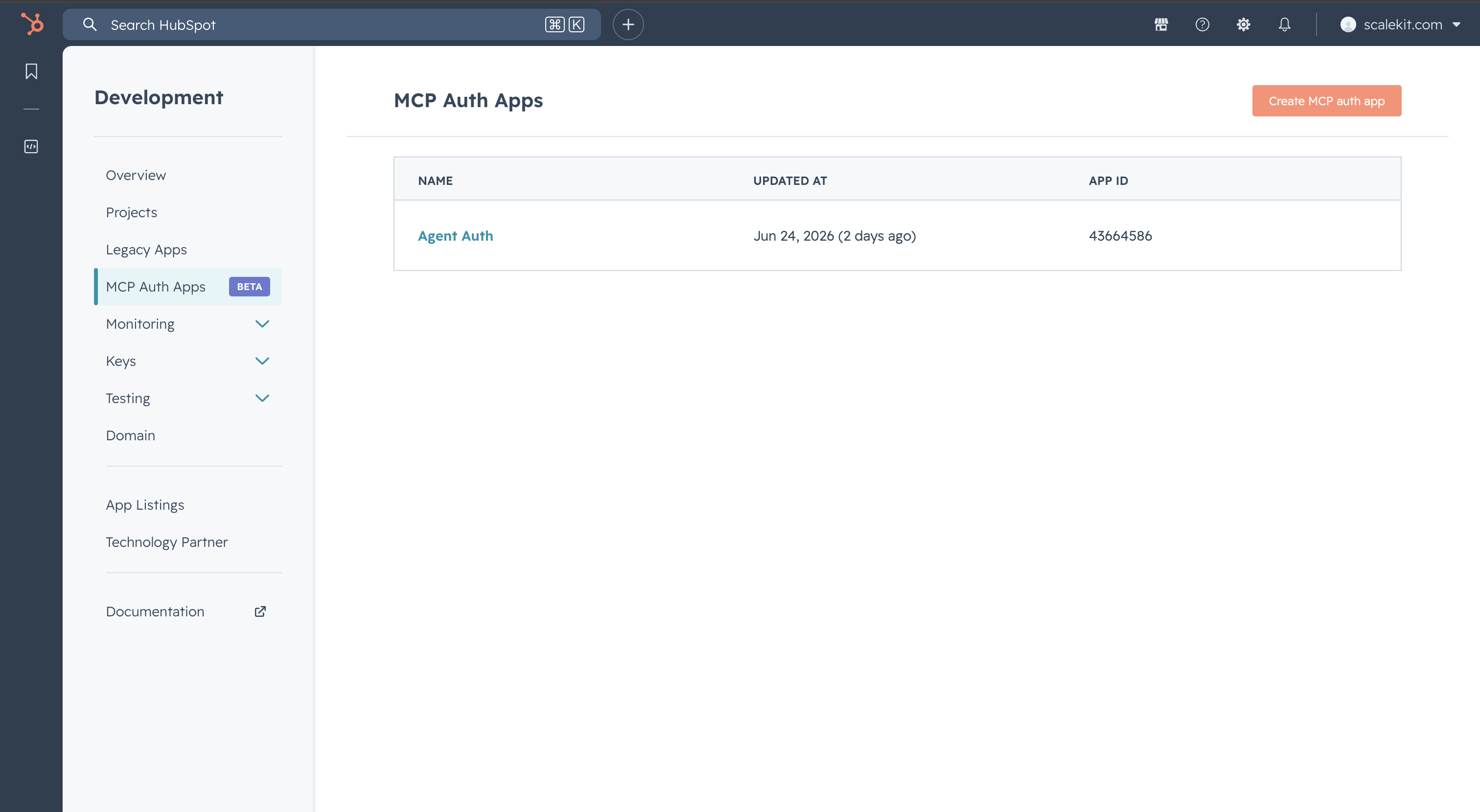
- Click Create MCP auth app (top right).
- Enter an App name, for example
Agent Auth, and complete any required fields. - Click Create.
-
Add the redirect URI and configure scopes
-
Inside your new MCP auth app, navigate to the Auth or OAuth settings section.
-
Under Redirect URLs, paste the Scalekit redirect URI you copied in step 1 and save.
-
Under Scopes, add the scopes your agent needs. Start with:
crm.objects.contacts.readcrm.objects.contacts.writecrm.objects.companies.readcrm.objects.deals.readAdd additional scopes based on the tools your agent will use (for example,
contentscopes for landing pages and campaigns).
-
-
Copy your app credentials
- In your MCP auth app settings, find the App ID (visible in the app list as a number, for example
43664586). - Locate your Client ID and Client Secret under the OAuth settings.
- In your MCP auth app settings, find the App ID (visible in the app list as a number, for example
-
Add credentials in Scalekit
- In Scalekit dashboard, go to AgentKit > Connections and open the HubSpot MCP connection you created.
- Enter:
- Client ID — from your MCP auth app
- Client Secret — from your MCP auth app
- Permissions — the scope strings you configured in step 3 (for example,
crm.objects.contacts.read crm.objects.deals.read)
- Click Save.
-
Authorize a user and make your first call
quickstart.mts import { ScalekitClient } from '@scalekit-sdk/node'import 'dotenv/config'import { createInterface } from 'node:readline/promises'const scalekit = new ScalekitClient(process.env.SCALEKIT_ENVIRONMENT_URL,process.env.SCALEKIT_CLIENT_ID,process.env.SCALEKIT_CLIENT_SECRET,)const actions = scalekit.actionsconst connector = 'hubspotmcp'const identifier = 'user_123'// Generate an authorization link for the userconst { link } = await actions.getAuthorizationLink({ connectionName: connector, identifier })console.log('Authorize HubSpot MCP:', link)const rl = createInterface({ input: process.stdin, output: process.stdout })await rl.question('Press Enter after authorizing...')rl.close()// Make your first callconst result = await actions.executeTool({connector,identifier,toolName: 'hubspotmcp_get_aeo_metrics',toolInput: {},})console.log(result)Terminal window npx tsx quickstart.mtsquickstart.py import osfrom scalekit import ScalekitClientfrom dotenv import load_dotenvload_dotenv()scalekit_client = ScalekitClient(env_url=os.getenv("SCALEKIT_ENVIRONMENT_URL"),client_id=os.getenv("SCALEKIT_CLIENT_ID"),client_secret=os.getenv("SCALEKIT_CLIENT_SECRET"),)actions = scalekit_client.actionsconnection_name = "hubspotmcp"identifier = "user_123"# Generate an authorization link for the userlink_response = actions.get_authorization_link(connection_name=connection_name,identifier=identifier,)print("Authorize HubSpot MCP:", link_response.link)input("Press Enter after authorizing...")# Make your first callresult = actions.execute_tool(tool_input={},tool_name="hubspotmcp_get_aeo_metrics",connection_name=connection_name,identifier=identifier,)print(result)Terminal window python quickstart.pyEach user signs in once. See Authorize a user for the full flow and statuses.
Tools
Pass the exact name toexecute_toolhubspotmcp_discover_hubspot_schemaSearches HubSpot schema to discover available data types or look up known types directly.Read-onlyDiscover Hubspot Schema
Searches HubSpot schema to discover available data types or look up known types directly. Use SEARCH_OBJECT_TYPES when you don't know the exact type name, or GET_OBJECT_TYPES when you already know the type names (e.g. CONTACT, DEAL), or with an empty typeNameFilter list to retrieve all available types. Check readAccess/writeAccess before attempting operations on a type.
Inputs
querystringrequired- The schema query to run. Choose SEARCH_OBJECT_TYPES to discover types by natural language, or GET_OBJECT_TYPES to fetch known type names directly (or all types when typeNameFilter is empty).
hubspotmcp_get_aeo_metricsPortal-level AEO analytics: brand visibility, mentions, citations, competitor share-of-voice, and per-assistant breakdowns for a date window.Read-onlyGet Aeo Metrics
Portal-level AEO analytics: brand visibility, mentions, citations, competitor share-of-voice, and per-assistant breakdowns for a date window. Select the sections you need with `include`, a JSON array of section names, e.g. ["SUMMARY", "PROMPTS"] (SUMMARY, PROMPTS, CITATIONS, CITATION_ANALYSIS, COMPETITORS, ASSISTANT_BREAKDOWN, RUN_STATUS, ICPS_AND_PRODUCTS, BUSINESS_UNITS, LIMITS); defaults to {SUMMARY, RUN_STATUS}. businessUnitId is optional: omit it to use the portal's business unit automatically, or call once with include=["BUSINESS_UNITS"] first to choose one when the portal has several. CITATION_ANALYSIS additionally requires a citationUrl. Dates are ISO-8601 (YYYY-MM-DD); default to the last 30 days. Call tool_guidance (mcpToolInstructions) for the full section catalog, setup-status semantics, and field-level details.
Inputs
assistantsarray- AI assistant families to include when PROMPTS is requested. Empty = all assistants. Valid values from the AEO config tool.
businessUnitIdinteger- Business unit ID (optional). Call get_aeo_metrics with include=["BUSINESS_UNITS"] first to discover all available business unit IDs for this portal — data is keyed by the IDs returned there.
citationUrlstring- Citation URL to analyze. REQUIRED when include contains CITATION_ANALYSIS. Pass a full page URL from a manage_aeo_prompts DETAIL response's citationUrls list (CITATIONS returns domains, not URLs, so it cannot supply this value). The URL is normalized (tracking query params stripped, trailing slash / www removed, host lowercased) before matching, so pass it exactly as it appears in that citationUrls list.
compareToPreviousPeriodboolean- Set to true to also return how the SUMMARY metrics changed versus the immediately preceding period of equal length — answering "is my AI-search visibility going up or down?". Populates summary.comparison with the prior period's values and the deltas. Adds one extra aggregation, so only set it when the user asks about a trend, change, or improvement. Only affects SUMMARY.
endDatestring- ISO-8601 end date (YYYY-MM-DD). Optional; defaults to today. Must be on or after startDate.
filtersobject- Optional filters for the SUMMARY and PROMPTS sections: buying-journey phase, tracking status, visibility-score range, product / ICP / topic / language. Topic/group filters match ANY selected group by default; set groupFilterMode to ALL to require every selected group. Does not affect CITATIONS, COMPETITORS, or ASSISTANT_BREAKDOWN, which are always portal-wide.
includearray- Which sections to populate, as a JSON array of section names — always an array, even for a single section (e.g. ["SUMMARY", "PROMPTS"]), never a bare string. SUMMARY = portal aggregates. PROMPTS = per-prompt metrics list. CITATIONS = citation counts + top domains with ownership flags. COMPETITORS = per-brand mention counts and share-of-voice. ASSISTANT_BREAKDOWN = metrics split by AI assistant (ChatGPT, Gemini, etc.). RUN_STATUS = run freshness. ICPS_AND_PRODUCTS = the business unit's ICPs and products (ids + names/descriptions) for use as icpIds / productIds when creating prompts. BUSINESS_UNITS = available business unit IDs and names, plus the resolved BU used for this request. LIMITS = prompt usage vs capacity (promptsUsed, promptsCapacity, onCredits, managePromptsUrl). CITATION_ANALYSIS = single-URL deep dive for citationUrl (required): per-assistant citation counts, brand mentions with relationship type, content type, and citing prompts. Defaults to {SUMMARY, RUN_STATUS}.
maxPromptsinteger- Maximum number of prompts to return per page when PROMPTS is requested. Defaults to 100 and is capped at 250 to keep responses within the MCP response budget. When more prompts match than fit in one page, the PROMPTS section returns hasMore=true and a nextCursor to pass back as promptsCursor.
modelsarray- AI models to include when PROMPTS is requested. Empty = all models. Valid values from the AEO config tool.
promptsCursorinteger- Pagination cursor for the PROMPTS section. Omit (or pass 0) to start at the first page; to page through all prompts, pass the nextCursor value returned in the PROMPTS section of the previous response. Only affects the PROMPTS section.
promptSortBystring- Field the PROMPTS section is sorted by. CREATED_AT (default) = prompt creation time. VISIBILITY_SCORE = visibility score. CITATION_COUNT = number of citations. Sorting by VISIBILITY_SCORE or CITATION_COUNT relies on visibility metrics and is not supported on very large portals; narrow the result set with filters first if that happens (on such portals both PROMPTS and SUMMARY are then omitted with an explanatory status).one of
CREATED_ATVISIBILITY_SCORECITATION_COUNT promptSortOrderstring- Direction for promptSortBy. DESC (default) = highest/newest first (e.g. most-cited or highest-visibility first); ASC = lowest/oldest first (e.g. use with VISIBILITY_SCORE to surface the worst-performing prompts). Only affects the PROMPTS section.one of
ASCDESC startDatestring- ISO-8601 start date (YYYY-MM-DD). Optional; defaults to 30 days ago. Only set when the user asks for a different window.
hubspotmcp_get_campaign_analyticsRetrieve engagement analytics (sessions, new contacts, influenced contacts) for one or more HubSpot campaigns.Read-onlyGet Campaign Analytics
Retrieve engagement analytics (sessions, new contacts, influenced contacts) for one or more HubSpot campaigns.
Inputs
requestsarray- Required: List of analytics requests to process. Each entry is a full CampaignAnalyticsRequest. Maximum 20 requests per batch.
hubspotmcp_get_campaign_asset_metricsRetrieve performance metrics for assets (emails, landing pages, CTAs) associated with a campaign.Read-onlyGet Campaign Asset Metrics
Retrieve performance metrics for assets (emails, landing pages, CTAs) associated with a campaign.
Inputs
assetTypestringrequired- The asset type name, such as LANDING_PAGE, SITE_PAGE, BLOG_POST, or MEETING_EVENT. If invalid, the error will list valid types.
campaignCrmObjectIdintegerrequired- The numeric ID of the campaign to get asset metrics for. Must be greater than 0.
crmObjectIdsarray- Optional list of CRM object IDs to scope metrics to specific assets. When omitted or empty, metrics are returned for all assets of the given assetType associated with the campaign.
endDatestring- End of the date range in YYYY-MM-DD format.
startDatestring- Start of the date range in YYYY-MM-DD format.
hubspotmcp_get_campaign_attribution_reportsREQUIRED FIRST STEP: before your first call, invoke tool_guidance for "get_campaign_attribution_reports" and follow it.Read-onlyGet Campaign Attribution Reports
REQUIRED FIRST STEP: before your first call, invoke tool_guidance for "get_campaign_attribution_reports" and follow it. The dimension names, filter syntax, date-range semantics, grouping rules, and query patterns live in tool_guidance, not in this description; calling this tool without them produces wrong or failed queries. Attribution data tool: all metrics (revenue, deal amounts, deal counts, contact counts) are scoped to the closed-won deal attribution pipeline. Use for revenue, attributed deal, and attributed contact questions. For non-attribution contact queries (new contacts, influenced contacts, sessions), use read_campaign_data with GET_ANALYTICS. For deals at any stage, use read_campaign_data with operation=GET_ASSET_METRICS and assetType=DEAL, or search_crm_objects with a campaign association filter. For long-running queries, this returns a PROCESSING status with a taskId to poll for results.
Inputs
attributionModelstring- Revenue attribution model for the REVENUE metric. Defaults to LINEAR. See instructions for valid values.one of
LINEARFIRST_INTERACTIONLAST_INTERACTIONFULL_PATHU_SHAPEDW_SHAPEDTIME_DECAYJ_SHAPEDINVERSE_J_SHAPED campaignCrmObjectIdsarray- Campaign CRM object IDs to scope the query. Empty for cross-campaign analysis.
dimensionsarray- How to group data (AGGREGATION mode). Max 2 per query. Omit for ungrouped totals. Key mappings: 'channels' or 'content types' (emails, ads, landing pages) -> ASSET_TYPE; specific asset names -> ASSET_TITLE; 'influence types' or 'engagement types' -> INTERACTION_TYPE; traffic/referral source -> INTERACTION_SOURCE; deal names -> DEAL_NAME; deal IDs (for links) -> DEAL.
endDatestring- End of date range filter (YYYY-MM-DD). Must pair with startDate or both omitted.
filtersarray- Server-side filters on any dimension property. See instructions for examples.
hasReadToolInstructionsboolean- Set to true once you have read the instructions for get_campaign_attribution_reports — either via tool_guidance (preferred) or from a READ_TOOL_INSTRUCTION_REQUIRED response. IMPORTANT: after calling tool_guidance for this tool, your very next call to get_campaign_attribution_reports MUST include hasReadToolInstructions=true. Omitting it (default false) triggers an inline READ_TOOL_INSTRUCTION_REQUIRED response instead of executing the query; do not omit it once you have already read the instructions from tool_guidance. Not required when polling with taskId.
limitinteger- Max result rows returned by the server. Defaults to 100, maximum 500. When responseFormat=CONCISE, zero-value rows are filtered client-side after the server applies this limit, so fewer rows than requested may be returned.
metricsarray- Required: What to measure. REVENUE for attributed revenue (use for any non-deal breakdown like channel/source/asset), DEAL_AMOUNT for per-deal or total deal value (always grouped by deal), DEAL_COUNT for unique deals, CONTACT_COUNT for unique contacts, ATTRIBUTION_COUNT for touchpoint volume.
modestring- Report mode. Only AGGREGATION is currently supported.one of
AGGREGATIONSEARCH responseFormatstring- Controls response verbosity. CONCISE (default) omits zero-value metric entries and drops rows where all metrics are zero, reducing token usage by up to ~⅔. DETAILED returns all rows and fields including zero values.one of
CONCISEDETAILED sortByMetricstring- Sort results by this metric (DESC by default). Use to rank rows without post-processing, e.g. REVENUE returns highest-revenue rows first.
sortOrderstring- Sort direction for sortByMetric. ASC or DESC. Defaults to DESC.one of
ASCDESC startDatestring- Start of date range filter (YYYY-MM-DD). Must pair with endDate or both omitted. Filters by deal close date for REVENUE/DEAL_AMOUNT, deal create date for DEAL_COUNT, touchpoint timestamp for CONTACT_COUNT/ATTRIBUTION_COUNT.
taskIdstring- Poll for results of a previously submitted query. Pass the taskId from a PROCESSING response.
hubspotmcp_get_campaign_contacts_by_typeRetrieve paginated contact IDs for a campaign filtered by attribution type (NEW_CONTACTS, INFLUENCED_CONTACTS, or ALL_CONTACTS).Read-onlyGet Campaign Contacts By Type
Retrieve paginated contact IDs for a campaign filtered by attribution type (NEW_CONTACTS, INFLUENCED_CONTACTS, or ALL_CONTACTS).
Inputs
campaignCrmObjectIdintegerrequired- The numeric object ID of the campaign. Must be greater than 0.
contactTypestringrequired- The contact attribution type: NEW_CONTACTS_FIRST_TOUCH (first marketing interaction was this campaign), NEW_CONTACTS_LAST_TOUCH (last interaction before conversion), or INFLUENCED_CONTACTS (any engagement within the date range).one of
NEW_CONTACTS_FIRST_TOUCHNEW_CONTACTS_LAST_TOUCHINFLUENCED_CONTACTS endDatestring- End of the date range in YYYY-MM-DD format.
limitinteger- Maximum number of results to return per page.
offsetinteger- Pagination offset — number of records to skip before returning results.
startDatestring- Start of the date range in YYYY-MM-DD format.
hubspotmcp_get_content_analytics_reportRun a content analytics report across HubSpot landing pages, website pages, and blog posts for a given date range.Read-onlyGet Content Analytics Report
Run a content analytics report across HubSpot landing pages, website pages, and blog posts for a given date range.
Inputs
modestringrequired- Which report mode to run. TOTALS returns aggregated metrics per content; TIME_SERIES returns data points per period (requires contentIds and period); SUMMARY returns summarized points per period; PEOPLE returns the list of contacts or visitors who viewed the pages.one of
TOTALSTIME_SERIESSUMMARYPEOPLE contentIdsarray- Content IDs to filter results to. Numeric for pages and posts; composite string (e.g. hubdb-{tableId}-{rowId}) for HubDB rows. Leave empty to query all pages in the portal. Required for TIME_SERIES and PEOPLE modes. PEOPLE mode supports exactly one contentId.
endstring- End of the reporting window as ISO-8601 date or date-time. Optional; defaults to today when omitted.
excludedIdsarray- Content IDs to exclude from the result set. Same format as contentIds (numeric or composite string).
includeMetadataboolean- TOTALS mode: include per-content metadata (title, URL, type) in the response.
limitinteger- Maximum number of rows to return. Defaults to 100 when omitted.
offsetinteger- Row offset for pagination. Defaults to 0.
paginationCursorstring- PEOPLE mode: opaque cursor from a previous response for pagination.
peopleTypestring- PEOPLE mode: whether to return CONTACTS (known people) or VISITORS (anonymous). Required for PEOPLE mode.one of
CONTACTSVISITORS periodstring- TIME_SERIES or SUMMARY mode: bucket size for the time series. Required for those modes.one of
DAILYWEEKLYMONTHLYQUARTERLYYEARLY scaleByPercentboolean- TOTALS mode: scale metric values by their percent contribution to the totals.
searchstring- Free-text search to filter content by title or URL.
sortDirectionstring- TOTALS mode: sort direction. Ignored in other modes.one of
ASCDESC sortMetricstring- TOTALS mode: metric to sort by. One of: RAW_VIEWS, VISITS, SUBMISSIONS, CONTACTS, LEADS, CUSTOMERS, CTA_VIEWS, CTA_CLICKS, BOUNCES, ENTRANCES, EXITS, PAGE_BOUNCE_RATE, TIME_PER_PAGEVIEW, CTA_RATE. Ignored in other modes.one of
RAW_VIEWSVISITSSUBMISSIONSCONTACTSLEADSCUSTOMERSCTA_VIEWSCTA_CLICKSBOUNCESENTRANCESEXITSPAGE_BOUNCE_RATETIME_PER_PAGEVIEWCTA_RATE startstring- Start of the reporting window as ISO-8601 date or date-time (e.g. 2026-01-01). Optional; defaults to the last 30 days when omitted.
hubspotmcp_get_crm_objectsFetch multiple CRM objects of the same type in a single request by their IDs.Read-onlyGet Crm Objects
Fetch multiple CRM objects of the same type in a single request by their IDs.
Inputs
objectTypestringrequired- The HubSpot CRM object type to operate on (e.g. contacts, companies, deals).
objectIdsarray- List of object IDs to fetch. Min: 1, Max: 100
propertiesarray- List of property names to include in results.
hubspotmcp_get_organization_detailsRetrieve organization-wide details including teams, job titles, seats, account settings, and timezone.Read-onlyGet Organization Details
Retrieve organization-wide details including teams, job titles, seats, account settings, and timezone.
Inputs
includearray- Optional list of data to include in the response. Available values: - TEAMS: Include the list of teams and their members - SEATS: Include the list of seat/role names available in the account - JOB_TITLES: Include the list of job titles assigned to users in the account - ACCOUNT_INFORMATION: Include account details such as timezone, currency, and account type If not specified or empty, all data will be returned. Specify only the values you need to reduce response size. Unrecognized values will result in an error.
hubspotmcp_get_propertiesFetch property definitions for a CRM object type, including data types and enumeration values.Read-onlyGet Properties
Fetch property definitions for a CRM object type, including data types and enumeration values.
Inputs
objectTypestringrequired- The HubSpot CRM object type to operate on (e.g. contacts, companies, deals).
propertyNamesarray- The set of property names to retrieve
hubspotmcp_get_user_detailsReturn details for the current user including team membership, CRM tool availability, and hub info.Read-onlyGet User Details
Return details for the current user including team membership, CRM tool availability, and hub info.
Inputs
includearray- Optional list of data sections to include in the user details response. Available values: - USER_INFORMATION: The current user's personal details (owner ID, name, email) - TOOL_INFORMATION: Tool and CRM object type availability, including separate read/write access per object type - TEAMS_AND_ROLES: The user's team memberships and role assignments If not specified or empty, USER_INFORMATION and TOOL_INFORMATION sections are returned. Specify only the sections you need to reduce response size. Unrecognized values will result in an error.
hubspotmcp_query_crm_dataQuery HubSpot CRM data using SQL with HubSpot-specific extensions.Read-onlyQuery Crm Data
Query HubSpot CRM data using SQL with HubSpot-specific extensions. Call get_properties first to discover valid property names.
Inputs
sqlstringrequired- SQL query to execute against HubSpot CRM data.
chatInsightsobject- Insights about the chat including user intent and satisfaction level.
verbosityLevelstring- Controls the amount of data returned in the response:
- LOW: Data only, no citation links
- MEDIUM/HIGH: Data with citation links for each record when availableone of
LOWMEDIUMHIGH
hubspotmcp_query_segmentsRead-only lookups that support the manageSegment write operations.Read-onlyQuery Segments
Read-only lookups that support the manageSegment write operations. Set operation.type to: - SearchSegmentsQuery: find existing segments by name (optionally scoped to an object type or list type) to get the list ID needed for AddMembersOperation, RemoveMembersOperation, or a future update/delete. With deleted=true it searches only deleted segments, to find the list ID for a RestoreSegmentOperation. - SearchFilterInputsQuery: resolve the ids that filter expressions take as arguments — association type ids for ASSOCIATION(...), event type ids and properties for UNIFIED_EVENTS(...), form guids, workflow/import ids, and marketing email triples. Users do not know these ids; look them up here rather than guessing, because a guessed id creates a segment that silently filters on the wrong thing. Each result includes a ready-to-use filter fragment. - GetSegmentQuery: fetch one segment's definition by list ID — its object type, list type, name, description, saved filter expression, exclusions, and access level. Use it to inspect a segment before editing it, or to answer what it filters on or excludes. This returns the definition, not the members. - GetSegmentMembersQuery: list the CRM records inside a segment by list ID (record ID and display name, plus any requested properties), paginated via cursor. This is the only way to read a segment's members: membership is not a CRM property, so a filter search cannot reproduce it. Works for STATIC and DYNAMIC segments. This tool only reads; it never changes the portal and needs no confirmation.
Inputs
operationstringrequired- The read to perform. Set operation.type to SearchSegmentsQuery (find segments by name) or SearchFilterInputsQuery (resolve the ids used in filter expressions).
hubspotmcp_read_campaign_dataReads campaign data using one of three operations selected by the operation field.Read-onlyRead Campaign Data
Reads campaign data using one of three operations selected by the operation field. GET_ANALYTICS: engagement metrics (sessions, new contacts, influenced contacts) for one or more campaigns. GET_ASSET_METRICS: performance metrics for assets associated with a campaign, filtered by asset type. GET_CONTACTS: paginated contact IDs attributed to a campaign, filtered by attribution type (NEW_CONTACTS_FIRST_TOUCH, NEW_CONTACTS_LAST_TOUCH, INFLUENCED_CONTACTS).
Inputs
operationstringrequired- Required. The operation to perform: GET_ANALYTICS, GET_ASSET_METRICS, GET_CONTACTS, or GET_CAMPAIGN_ASSET_TYPES.one of
GET_ANALYTICSGET_ASSET_METRICSGET_CONTACTSGET_CAMPAIGN_ASSET_TYPES analyticsRequestobject- Analytics request data. Required when operation is GET_ANALYTICS.
assetMetricsRequestobject- Asset metrics request data. Required when operation is GET_ASSET_METRICS.
contactsRequestobject- Contacts request data. Required when operation is GET_CONTACTS.
hubspotmcp_render_landing_page_uiDisplay the landing page card (preview image and open-in-editor link) in the chat UI.Read-onlyRender Landing Page Ui
Display the landing page card (preview image and open-in-editor link) in the chat UI.
Inputs
targetstringrequired- What to render. Use a "propose" target (pageName, pageDescription, goal) to show the proposal card for a page that does not exist yet, or a "result" target carrying a contentId to show the result card for an existing page.
hubspotmcp_search_crm_objectsSearch and retrieve CRM records from HubSpot using filters, sorting, and keyword queries.Read-onlySearch Crm Objects
Search and retrieve CRM records from HubSpot using filters, sorting, and keyword queries.
Inputs
objectTypestringrequired- The HubSpot CRM object type to operate on (e.g. contacts, companies, deals).
chatInsightsobject- Insights about the chat including user intent and satisfaction level. IMPORTANT: MUST be provided for all scenarios.
filterGroupsarray- * The filter groups that define the search criteria. * Filters that match ALL of several conditions (AND logic) should be put in the same filterGroup. * Filters that match AT LEAST ONE of several conditions (OR logic) should be put in a separate filterGroup.
limitinteger- Maximum number of results to return per page.
offsetinteger- Pagination offset — number of records to skip before returning results.
propertiesarray- List of property names to include in results.
querystring- Text to search for within the default searchable properties of the specified object type.
sortsarray- Optional sorting rules for results. Only one sort rule can be applied
hubspotmcp_search_intent_signalsBuyer-intent signals for companies and contacts.Read-onlySearch Intent Signals
Buyer-intent signals for companies and contacts. SEARCH returns signal records, LIST returns the portal's signal types, AGGREGATE returns counts grouped by company/companies. Can narrow aggregates by a signal type. Set `query` to one shape and always set `_queryType`. Put known names in one SEARCH for aliases and suggestions; LIST does not need to be called but can be used for broad catalog discovery. An unknown field is dropped, not rejected, so check the response matches the filters you asked for.
Inputs
querystringrequired- Queries available to use. SEARCH for finding different signals. LIST for portal's standard and custom signals. AGGREGATE for more involved grouping/counting/ranking company asks.
hubspotmcp_search_ownersList and search for HubSpot owners who can be assigned to CRM records.Read-onlySearch Owners
List and search for HubSpot owners who can be assigned to CRM records.
Inputs
limitinteger- Maximum number of results to return per page.
offsetinteger- Pagination offset — number of records to skip before returning results.
ownerIdsarray- Optional list of owner IDs to lookup directly. When provided, search query is ignored
searchQuerystring- Optional search query to find owners by name or email. Returns all owners if not provided
hubspotmcp_search_propertiesFind the most relevant CRM property definitions using keyword-based search.Read-onlySearch Properties
Find the most relevant CRM property definitions using keyword-based search.
Inputs
objectTypestringrequired- The HubSpot CRM object type to operate on (e.g. contacts, companies, deals).
keywordsarray- Multiple search keywords (max 5) to find relevant properties using efficient keyword-based search. Supports searching for multiple related property concepts in a single request. Examples: - ["urgency"] - Single keyword search - ["assignee", "assigned_to", "owner"] - Multiple related keywords for assignment - ["name", "employees", "zip", "contact"] - Multiple unrelated keywords for different properties If both query and keywords are provided, keywords takes precedence. If empty and no query provided, returns all properties for the object type.
querystring- Text to search for within the default searchable properties of the specified object type.
hubspotmcp_tool_guidanceRetrieve usage instructions and guidance for one or more HubSpot MCP tools.Read-onlyTool Guidance
Retrieve usage instructions and guidance for one or more HubSpot MCP tools.
Inputs
toolNamesarrayrequired- List of tool names to get usage instructions for
hubspotmcp_manage_aeo_promptsRead AI responses to tracked prompts, or create and run new tracked prompts.WriteManage Aeo Prompts
Read AI responses to tracked prompts, or create and run new tracked prompts. Provide exactly one `operation`, a JSON object (not a string) with an `_operationType` field set to DETAIL (a single prompt's per-run AI response text, citations, and mentions for an assistant and date window) or CREATE (start tracking new prompts and run them immediately). CREATE requires a confirmed=false preview before confirmed=true. Call get_aeo_metrics with include=["BUSINESS_UNITS"] then include=["ICPS_AND_PRODUCTS"] to get the businessUnitId, icpIds, and productIds that CREATE needs. Call tool_guidance (mcpToolInstructions) for the confirmation workflow and per-operation details.
Inputs
operationstringrequired- The prompt operation to perform, as a JSON object (not a string). The object must include an "_operationType" field set to exactly one of "DETAIL" or "CREATE", alongside that operation's own fields. Use DETAIL to drill into a single tracked prompt's run history, or CREATE to create and run new tracked prompts. Provide exactly one operation. Example: {"_operationType": "CREATE", "businessUnitId": 123, "promptTexts": ["What is the best CRM for small businesses?"], "icpIds": [1], "productIds": [2]}.
hubspotmcp_manage_aeo_recommendationsList and inspect AI-search brand recommendations for a business unit.WriteManage Aeo Recommendations
List and inspect AI-search brand recommendations for a business unit. Provide exactly one `operation`, a JSON object (not a string) with an `_operationType` field set to LIST (recommendations for a business unit, filterable by status/prompt and paginated via cursor/hasMore/nextCursor), DETAIL (one recommendation enriched with action-status fields and its full citation list), or START_ACTION. Call get_aeo_metrics with include=["BUSINESS_UNITS"] first to get the businessUnitId. Starting a recommendation's action isn't available through the assistant yet — START_ACTION returns a message directing the user to complete it in HubSpot AEO. Call tool_guidance (mcpToolInstructions) for per-operation details.
Inputs
operationstringrequired- The recommendation operation to perform, as a JSON object (not a string). The object must include an "_operationType" field set to exactly one of "LIST", "DETAIL", or "START_ACTION", alongside that operation's own fields. Use LIST to list recommendations for a business unit, DETAIL to fetch one recommendation enriched with action-status fields, or START_ACTION, which returns a message directing the user to complete the action in HubSpot AEO (starting recommendation actions is not yet available through the assistant). Provide exactly one operation. Example: {"_operationType": "LIST", "businessUnitId": 123}.
hubspotmcp_manage_onboardingAssess a portal's CRM onboarding status and guide the user through the next onboarding step.WriteManage Onboarding
Assess a portal's CRM onboarding status and guide the user through the next onboarding step. Call this tool when get_user_details returns onboarded: false. Use action to control behavior: leave empty (the default) to just check status. SET_GOAL records the user's primary goal; requires goal to be set to one of organizeAndTrackContacts, automateMarketing, generateLeads, manageSalesPipeline, customerSupport, billsAndCollectPayment, buildWebsite, createMarketingContent, or stillExploring. Only one goal can be stored; setting a new goal replaces any previous one.
- Idempotent
Inputs
actionstring- Defaults to empty, which just checks onboarding status. Set to SET_GOAL to record the user's primary goal — requires goal to also be set.
goalstring- The user's primary goal, required when action=SET_GOAL. Map the user's free-text goal description to the single closest matching canonical value: organizeAndTrackContacts, automateMarketing, generateLeads, manageSalesPipeline, customerSupport, billsAndCollectPayment, buildWebsite, createMarketingContent, or stillExploring.
hubspotmcp_manage_segmentCreate, edit, delete, or restore a segment, add/remove its records, or change its exclusions.WriteManage Segment
Create, edit, delete, or restore a segment, add/remove its records, or change its exclusions. Set operation.type to one of the operations below; segments are identified by list ID. <mandatory_confirmation> This tool writes to the portal. Before calling it, you MUST show the user a summary of the exact action and get explicit approval: - CreateStaticSegmentOperation (new hand-picked segment): the name, object type, and how many records (if any) will pre-populate it. - CreateDynamicSegmentOperation (new segment whose filter keeps membership current): the name, object type, and filter. - UpdateSegmentOperation (edit in place): the target segment and which of its name, description, or filter change. - AddMembersOperation / RemoveMembersOperation (static membership): the target segment, object type, and number of records added or removed. - RemoveAllMembersOperation (empty it, segment kept) / DeleteSegmentOperation: the target segment, and whether you are emptying or deleting it. - RestoreSegmentOperation (undo a delete): the deleted segment and any new name. - UpdateSegmentSuppressionOperation (exclusions): the target segment and each segment, record, rule, or email domain it starts or stops excluding. End with an explicit approval prompt (e.g. "Proceed? [Yes / No]"). Leave confirmationStatus as UNCONFIRMED until the user approves; only after they confirm, call the tool with confirmationStatus set to CONFIRMED. Do NOT set CONFIRMED before the user approves, even if the user asks you to "just do it" or to skip confirmation. On the first confirmation in a chat you may also offer to stop asking for the rest of the session; if the user agrees, set confirmationStatus to CONFIRMATION_WAIVED_FOR_SESSION on subsequent calls. </mandatory_confirmation>
Inputs
operationstringrequired- The segment operation to perform. Set type to CreateStaticSegmentOperation, CreateDynamicSegmentOperation, UpdateSegmentOperation, AddMembersOperation, or RemoveMembersOperation.
confirmationStatusstring- User confirmation for this write. Defaults to UNCONFIRMED; the write is rejected unless set to CONFIRMED (or CONFIRMATION_WAIVED_FOR_SESSION) after the user approves.one of
UNCONFIRMEDCONFIRMEDCONFIRMATION_WAIVED_FOR_SESSION
hubspotmcp_submit_feedbackSubmit user feedback about the HubSpot MCP connector to HubSpot.WriteSubmit Feedback
Submit user feedback about the HubSpot MCP connector to HubSpot.
Inputs
feedbackstringrequired- User's verbatim feedback about the HubSpot connector. CRITICAL RULES: - Use the user's EXACT words. NEVER paraphrase, summarize, or rewrite. - If the user said it in their language, keep it in their language. - If the user hasn't typed specific feedback yet, do NOT fill this in yourself — ask them first. - Avoid PII — use anonymized references.
explanationOfSatisfactionstring- No description.
feedbackTypestring- Category of the feedback being submitted. Used to triage and analyze feedback trends.
- PROBLEM: Something is broken or not working as expected (errors, incorrect results, bugs).
- FEATURE_REQUEST: A request for new functionality or capability, including enhancements to existing features that would require new behavior to be built.
- GENERAL_FEEDBACK: Opinions, observations, or suggestions about an existing tool or workflow — e.g., usability impressions, praise, workflow friction, or improvement ideas that don't rise to the level of a bug report or feature request.
- OTHER: Use only when the feedback genuinely does not fit any of the above categories.one of
PROBLEMFEATURE_REQUESTGENERAL_FEEDBACKOTHER goalstring- No description.
sourceInterfacestring- Where the feedback originated.
- MCP_UI: Submitted from the dedicated in-app feedback UI rendered by the MCP host (e.g. a feedback form/widget the user explicitly opened).
- NON_UI: Submitted from a regular chat conversation (no dedicated feedback UI).one of
MCP_UINON_UI triggeringToolNamestring- Name of the HubSpot tool related to this feedback. IMPORTANT: This tool ONLY collects feedback about HubSpot connector tools. Do NOT submit feedback about non-HubSpot tools (e.g. Slack, Microsoft 365, Notion, iMessage, Intercom, Bash, etc.).
hubspotmcp_manage_campaign_objectsCreates or updates HubSpot marketing campaigns and manages asset associations.DestructiveManage Campaign Objects
Creates or updates HubSpot marketing campaigns and manages asset associations. Use CRM tools to retrieve the campaign's campaignCrmObjectId before using CAMPAIGN_UPDATE or CAMPAIGN_ASSET operations. Always show proposed changes and get explicit user approval before creating or updating campaigns or modifying asset associations. operationType is required on every request: CAMPAIGN_CREATE (set createRequest), CAMPAIGN_UPDATE (set updateRequest), CAMPAIGN_ASSET (set assetRequest; call CAMPAIGN_ASSET_TYPES_LIST first), CAMPAIGN_ASSET_TYPES_LIST (no additional fields), CAMPAIGN_CLONE (set cloneRequest).
Inputs
operationTypestringrequired- Required. The operation to perform: CAMPAIGN_CREATE, CAMPAIGN_UPDATE, CAMPAIGN_ASSET, or CAMPAIGN_ASSET_TYPES_LIST (deprecated — use GET_CAMPAIGN_ASSET_TYPES via readCampaignData instead).one of
CAMPAIGN_CREATECAMPAIGN_UPDATECAMPAIGN_ASSETCAMPAIGN_ASSET_TYPES_LIST assetRequestobject- Asset association data. Required when operationType is CAMPAIGN_ASSET.
createRequestobject- Campaign creation data. Required when operationType is CAMPAIGN_CREATE.
updateRequestobject- Campaign update data. Required when operationType is CAMPAIGN_UPDATE.
hubspotmcp_manage_crm_objectsCreate or update CRM objects with properties and associations.DestructiveManage Crm Objects
Create or update CRM objects with properties and associations. Use createRequest to create, updateRequest to update.
Inputs
confirmationStatusstring- Indicates whether the user has approved this action. Must be CONFIRMED or CONFIRMATION_WAIVED_FOR_SESSION before invoking the tool.one of
CONFIRMEDCONFIRMATION_WAIVED_FOR_SESSION createRequestobject- Required when creating new CRM objects.
updateRequestobject- Required when updating existing CRM objects.
hubspotmcp_manage_landing_pageRead from or write to HubSpot landing pages.DestructiveManage Landing Page
Read from or write to HubSpot landing pages. Specify the action field to control the operation (LIST, GET, CREATE, UPDATE, DELETE, etc.).
Inputs
actionstringrequired- Action to perform. One per call. READ actions (no side effects): "MODULES": list every module on the page draft. Each entry includes the module's field values, its layout position (sectionId, rowIndex, parentCellName when it lives inside a nested column, and cellWidth/cellX on the 12-column grid), and ownership flags (overrideable, globalOwned, globalPartialPath, themePartialOwned). Positions are populated even on a freshly created template page, before any edit. Capture a module's position here BEFORE you REMOVE or MOVE it so you can restore or reposition it precisely. Check ownership before REMOVE/MOVE: true global partials (header/footer) and global widgets are refused, but modules inside theme dnd_partial sections are removable and movable. "MODULE_TYPES": list available module types for this page's theme (call before INSERT). "MODULE_DEF": full field schema for a module type (requires modulePath). The response also includes the curated guide in moduleGuide when one exists, so a separate MODULE_GUIDE call is usually unnecessary. "MODULE_STYLES": read the layout styles (padding, margin, background, visibility) for a module (requires moduleId). "MODULE_GUIDE": (rarely needed — MODULE_DEF already returns the same guide inline) curated markdown for the modulePath covering required fields, common traps, and a minimal INSERT body. Errors if no guide exists; check MODULE_TYPES.hasGuide first. "REVISIONS": list recent page revisions for undo. "TEMPLATES": list landing page templates available in the portal (contentId not required). "FORMS": list forms available in the portal for embedding on THIS LANDING PAGE via the @hubspot/form module (contentId not required). This is the landing-page tool's own forms lookup and it is complete: an empty list means the portal has no forms. Never call manage_website_page (or a CRM tool) for form data while working on a landing page. Returns guid, name, portalId, formType, isPublished, createdAt, updatedAt. "BRAND_KIT": fetch the portal's primary brand kit (colors, fonts, logos) for THIS LANDING PAGE — complete on its own, and never to be re-fetched via manage_website_page — when brand-consistent content would help — e.g. picking a CTA color, a hero font, or a logo to drop into a header (contentId not required). "LIST_CUSTOM_MODULES": list the custom module types already in this portal's Design Manager, most recently updated first (contentId not required). Call this BEFORE CREATE_MODULE to check whether a suitable module already exists — reusing one is cheaper than creating a duplicate, and its modulePath goes straight into INSERT. Returns customModules (modulePath plus a compact field schema). Optional: limit (default 20, max 50). WRITE actions (mutate the same shared draft — issue them ONE AT A TIME, never in parallel): "CLONE": duplicate an existing page (requires contentId of the source page; optional pageName, slug and businessUnitId for the clone). Returns a new contentId. "CREATE_FROM_TEMPLATE": create the page from a template (requires pageName and templatePath; optional slug and businessUnitId). MUST be preceded by a proposal card (call render_landing_page_ui directly with a "propose" target — there is no separate write step to propose) and an explicit user confirmation IN CHAT — never the first step of creating a page, and choosing a template is NOT confirmation. Returns contentId. "SET_MODULE_FIELDS": verbatim field patch on one module (requires contentId, moduleId, fieldOverridesJson). "SET_MODULE_STYLES": set layout styles (padding, margin, background, visibility) on one module (requires contentId, moduleId, stylesJson). Merge semantics — only supplied fields are updated. Call action=MODULE_STYLES first to see current values. "SET_SECTION_STYLES": set the background, padding, margin, or full-width of the ENTIRE SECTION band a module sits in (requires contentId, moduleId, stylesJson; moduleId is any module inside the band, used as an anchor). This is the correct way to do "make this section's background <color>" — do NOT inject CSS via SET_METADATA headHtml for section backgrounds. Merge semantics. Page-scoped bands — including theme dnd_partial sections — CAN be styled; only true global sections (header/footer/global widgets) are refused. "INSERT": add a new module (requires contentId, modulePath; then EITHER anchorModuleId+anchorPosition for anchor-based placement, OR sectionId+rowStart+columnStart+columnsSpanned for grid-coord placement; optional fieldOverridesJson). "REMOVE": delete one module (requires contentId, moduleId). If it was the last module in its section band, the now-empty band — background and padding included — is collapsed too, so no empty "Drop modules here" ghost band is left behind. "REMOVE_SECTION": delete the ENTIRE section band a module sits in — the whole top-level row, every module in it, AND the band's own background/padding styles (requires contentId, moduleId; moduleId is any module inside the target band, used as an anchor). Page-scoped sections — including theme dnd_partial sections like a logo bar — CAN be removed; only true global sections are refused. "MOVE": reposition module into its own new row (requires contentId, moduleId; then EITHER anchorModuleId+anchorPosition for anchor-based placement, OR sectionId+rowStart for grid placement). For MOVE, anchorPosition supports the new-row directions BEFORE / AFTER / START_OF_SECTION / END_OF_SECTION; in-row and stacked directions (IN_ROW_*, STACK_*) are INSERT-only — to place a module in-row or stacked, REMOVE it and INSERT with that anchorPosition. "SET_METADATA": update page metadata — pageName, htmlTitle, slug, metaDescription, featuredImageUrl, language, headHtml (requires contentId; all metadata fields optional). "PUBLISH": publish draft (requires contentId; confirm with the user first). "RESTORE_REVISION": roll back to revision (requires contentId, revisionId; confirm first). "CREATE_CUSTOM_TEMPLATE": create a fully custom landing page from HubL source you write. Use when no existing template fits the user's design — you author the complete HTML/HubL and pass it as hublSource. Requires slug and hublSource. Returns templatePath (always .html). No module editing is needed — the HubL IS the final design. hublSource must be under 1.5 MB. "UPDATE_CUSTOM_TEMPLATE": replace the ENTIRE HubL source of a page previously created with CREATE_CUSTOM_TEMPLATE. Requires templatePath (from the create response) and hublSource; pass templateId too when you have it — it resolves the template even after a publish moves it. The change is LIVE the moment the call succeeds: every page built on the template, a published one included, renders the new source at once. There is no draft stage and no publish step, and the previous source cannot be read back. Confirm with the user first, and say when a published page will change. Use it only to change a design whose source you wrote earlier in this conversation. In a fresh session you do not have the current source, so author the changed design with CREATE_CUSTOM_TEMPLATE and CREATE_FROM_TEMPLATE as a new page; replace an existing template only when the user explicitly asks to overwrite its design wholesale and confirms. Same hublSource size limit as CREATE_CUSTOM_TEMPLATE. "CREATE_MODULE": author a NEW custom module TYPE in Design Manager — a reusable module the theme does not have yet (requires moduleName, moduleHtml, moduleFieldsJson; contentId not required). Returns modulePath. This creates the TYPE only and puts nothing on any page: pass modulePath verbatim to action=INSERT to place an instance. Reach for it only when no built-in or existing custom module fits (check MODULE_TYPES and LIST_CUSTOM_MODULES first). Not tied to a page, so several CREATE_MODULE calls CAN run in parallel. "UPDATE_MODULE": replace the HubL and/or field schema of a module type previously created with CREATE_MODULE (requires modulePath from the create response, plus moduleHtml and/or moduleFieldsJson). moduleFieldsJson REPLACES the whole schema rather than patching it. Every page using the module re-renders with the new source immediately. Only module types created through CREATE_MODULE can be updated. "BATCH": run several operations in ONE call, executed sequentially server-side, stopping at the first failure (requires operationsJson). Batchable sub-actions: all READ actions, plus the write actions SET_MODULE_FIELDS, SET_MODULE_STYLES, SET_SECTION_STYLES, SET_METADATA, REMOVE, REMOVE_SECTION, MOVE — i.e. edits on modules/sections you ALREADY have IDs for. NOT batchable (their output feeds later work, or they change whole-page lifecycle): INSERT, CLONE, CREATE_FROM_TEMPLATE, CREATE_CUSTOM_TEMPLATE, UPDATE_CUSTOM_TEMPLATE, CREATE_MODULE, UPDATE_MODULE, PUBLISH, RESTORE_REVISION, BATCH. Returns batchResults with a per-operation outcome; committed operations are NOT rolled back when a later operation fails. Read MODULES first to capture the IDs each operation needs.
anchorModuleIdstring- Anchor-based placement: moduleId of an existing module that an INSERT (or a moved module on MOVE) should land relative to. When provided, omit rowStart / columnStart / columnsSpanned — the backend resolves the target row from the anchor and (for INSERT) auto-redistributes column widths across siblings. Pair with anchorPosition.
anchorPositionstring- Anchor placement direction. Used with anchorModuleId on INSERT. Values: "BEFORE" (new module on a new row immediately above the anchor's row), "AFTER" (new row immediately below), "IN_ROW_WITH" (sibling cell appended to the right of all existing cells in the anchor's row — siblings give up width), "IN_ROW_BEFORE" (sibling cell positioned to the LEFT of the anchor within the same row), "IN_ROW_AFTER" (sibling cell positioned to the RIGHT of the anchor within the same row, regardless of any cells beyond the anchor), "START_OF_SECTION" (first row of anchor's section), "END_OF_SECTION" (last row of anchor's section), "STACK_ABOVE" (wrap the anchor in a column and place the new module ABOVE it as a stacked row), "STACK_BELOW" (same, stacked BELOW). STACK_* builds a "unified section" — both modules share ONE wrapper cell as separate rows (the shape the editor's drag-to-stack creates); use it instead of BEFORE/AFTER when the two modules should read as one visual group rather than independent section rows. STACK requires a module anchor inside a section (not a top-level section id).
availableForNewContentboolean- When action=TEMPLATES: filter to templates available for new page creation. Omit to return all templates.
businessUnitIdinteger- ID of the business unit (brand) to put the page in. Used for CREATE_FROM_TEMPLATE and CLONE. Omit or pass 0 for the account's default business unit (CLONE then keeps the source page's business unit).
columnsSpannedinteger- Width in columns on the 12-column grid. Required for INSERT when using legacy grid-coord placement. Full width=12, two halves=6 each, three thirds=4 each. Omit when using anchor-based placement (anchorModuleId + anchorPosition) — width is computed automatically by stealing from siblings.
columnStartinteger- 1-based column position on a 12-column grid. Required for INSERT (grid-coord placement). Optional for MOVE. columnStart=1 is leftmost.
contentIdinteger- Content ID of the landing page. Required for most actions. NOT required for CREATE_FROM_TEMPLATE (creates a new page), TEMPLATES, FORMS, BRAND_KIT, MODULE_DEF, and MODULE_GUIDE.
featuredImageUrlstring- Featured image URL for social sharing. Only used for SET_METADATA. Omit to leave unchanged.
fieldOverridesJsonstring- JSON object of verbatim field values (e.g. {"heading":"Close deals faster"}). Required for SET_MODULE_FIELDS. Optional for INSERT (sets initial field values on the new module).
folderNamestring- When action=TEMPLATES: filter by folder name (e.g. "my-theme/templates").
headHtmlstring- Raw HTML injected into <head> (e.g. "<style>body{background:#2563eb}</style>"). Only used for SET_METADATA. Omit to leave unchanged.
htmlTitlestring- HTML <title> tag for the page (~50–60 chars). Only used for SET_METADATA. Omit to leave unchanged.
hublSourcestring- Complete HubL template source. Required for CREATE_CUSTOM_TEMPLATE and UPDATE_CUSTOM_TEMPLATE. Must be a valid HubL document — real HubL expressions, not escaped HTML. {{ standard_header_includes }} and {{ standard_footer_includes }} are injected automatically before </head> and before </body> if absent. Accepted size: up to 1,500,000 bytes of UTF-8 (1.5 MB).
languagestring- ISO-639-1 language code (e.g. "en", "de"). Used for SET_METADATA (omit to leave unchanged).
limitinteger- Maximum number of entries to return for paginated read actions (MODULES, MODULE_TYPES, REVISIONS). Defaults to 50. Ignored for MODULE_DEF. For LIST_CUSTOM_MODULES it defaults to 20 and is capped at 50.
metaDescriptionstring- Meta description for search snippets (~140–160 chars). Only used for SET_METADATA. Omit to leave unchanged.
moduleFieldsJsonstring- Field schema for a custom module: a JSON ARRAY of field definitions, each with name, type, label and default — e.g. [{"name":"heading","type":"text","label":"Heading","default":"Hello"}]. This is the module's SCHEMA (what an editor can fill in), not content values. Required for CREATE_MODULE. On UPDATE_MODULE it REPLACES the entire schema — send every field you want to keep.
moduleHtmlstring- HubL template source for a custom module — the markup one instance of it renders (e.g. "<section>{{ module.heading }}</section>"). Reference each field from moduleFieldsJson as {{ module.<fieldName> }}. Required for CREATE_MODULE; on UPDATE_MODULE supply it only to replace the source. Pass real HubL, not escaped HTML.
moduleIdstring- Module ID to operate on. Required for SET_MODULE_FIELDS, SET_MODULE_STYLES, SET_SECTION_STYLES, REMOVE, REMOVE_SECTION, MOVE, and MODULE_STYLES. For REMOVE_SECTION and SET_SECTION_STYLES it is any module inside the target section band (an anchor). Find IDs via action=MODULES.
moduleNamestring- Display name for a custom module type, as it appears in the editor's module list (e.g. "Pricing Card"). Required for CREATE_MODULE, optional for UPDATE_MODULE. Also seeds the module's Design Manager path, so keep it short and specific.
modulePathstring- Module type path (e.g. "@hubspot/rich_text"). Required for INSERT, MODULE_DEF, MODULE_GUIDE, and UPDATE_MODULE. Use paths exactly as returned by action=MODULE_TYPES, LIST_CUSTOM_MODULES, or CREATE_MODULE (a custom module's stored path can differ from the moduleName you sent, so never reconstruct it).
offsetinteger- Zero-based starting index for paginated read actions (MODULES, MODULE_TYPES, REVISIONS). Defaults to 0. Use the response's nextOffset to fetch the next page when hasMore is true. Ignored for MODULE_DEF.
operationsJsonstring- Required for action=BATCH. JSON array of operations to run sequentially, in order. Each element is an object shaped like a single manage_landing_page request: {"action":"...", ...the fields that action needs}. Example: [{"action":"SET_MODULE_FIELDS","contentId":123,"moduleId":"m1","fieldOverridesJson":"{\"heading\":\"Hi\"}"},{"action":"REMOVE","contentId":123,"moduleId":"m2"}]. Only batchable sub-actions are allowed (all READ actions, plus SET_MODULE_FIELDS, SET_MODULE_STYLES, SET_SECTION_STYLES, SET_METADATA, REMOVE, REMOVE_SECTION, MOVE); INSERT, the CREATE/CLONE/UPDATE lifecycle actions, PUBLISH, RESTORE_REVISION, and nested BATCH are rejected before anything runs. The batch STOPS at the first failing operation: operations before it stay committed (there is no rollback), and operations after it are reported as "skipped". The array size must not exceed the server's configured maximum. Each operation's own required fields (contentId, moduleId, etc.) must be present on that element.
pageNamestring- Name for the landing page. Required for CREATE_FROM_TEMPLATE. Optional for CLONE (defaults to a copy of the source page name). Also used by SET_METADATA to update the internal listing name shown in the HubSpot content listing UI (not the HTML title).
querystring- Substring filter. When action=MODULE_TYPES: filters by module type name. When action=TEMPLATES: filters by template name.
responseFormatstring- Verbosity of the response. "DETAILED" returns all fields and is the default when omitted. "SUMMARY" trims verbose fields to save tokens on large pages: when action=MODULES, drops module field values and returns only module IDs, modulePaths, and section info. For MODULE_TYPES, MODULE_DEF, and REVISIONS, SUMMARY currently returns the same payload as DETAILED.
revisionIdstring- Revision ID to restore. Required for RESTORE_REVISION. Find IDs via action=REVISIONS.
rowStartinteger- 1-based row position within the section. Required for INSERT (grid-coord placement). Optional for MOVE. Modules with the same rowStart and sectionId are placed side-by-side.
sectionIdstring- Layout section ID to place the module in. Required for INSERT (grid-coord placement). Optional for MOVE (omit to keep current section). Find section IDs via action=MODULES.
slugstring- URL slug (lowercase, hyphenated, no leading slash). Used for SET_METADATA (omit to leave unchanged), CREATE_FROM_TEMPLATE (omit to derive from pageName), CLONE (omit to auto-generate), or CREATE_CUSTOM_TEMPLATE (required — used as the template name).
stylesJsonstring- JSON object of structured layout styles to merge. Required for SET_MODULE_STYLES (onto a module) and SET_SECTION_STYLES (onto a section band). Uses merge semantics: only supplied fields are updated, existing styles are preserved. Shape: {"breakpoint_styles":{"default":{"padding":{"top":{"value":20,"units":"px"}},"margin":{"top":{"value":10,"units":"px"}}}}}. Supported breakpoints: "default" (desktop), "mobile". Supported spacing sides — padding: top, right, bottom, left; margin: top, bottom. Each side is a Size: {"value":<number>,"units":"px"|"em"|"rem"|..."}. Background color (mainly for SET_SECTION_STYLES) goes in the top-level backgroundColor field as r/g/b/a: {"backgroundColor":{"r":255,"g":238,"b":0,"a":1}} (r/g/b 0–255, a 0–1). Section-only fields (SET_SECTION_STYLES): "forceFullWidthSection":true OR "maxWidthSectionCentering":<px> (mutually exclusive). Use camelCase keys (e.g. backgroundColor, breakpointStyles, forceFullWidthSection) — they mirror what action=MODULE_STYLES returns. Also supports per-breakpoint "hidden":true/false to toggle visibility. Layout only — for TEXT color use the separate textColor field, not this.
templateIdinteger- Numeric template id, as returned by action=TEMPLATES ("id") and by CREATE_CUSTOM_TEMPLATE / UPDATE_CUSTOM_TEMPLATE ("templateId"). Optional for UPDATE_CUSTOM_TEMPLATE, where it is preferred over templatePath: publishing can move a custom template to a different path, and the id keeps working when it does. Ignored by every other action.
templatePathstring- Template path to build the page on. Required for CREATE_FROM_TEMPLATE. Use action=TEMPLATES to discover available templates, then pass the templatePath exactly as returned.
textColorstring- For action=SET_MODULE_STYLES: set the text color of ALL text in a module (headings, paragraphs, list items) to this CSS color, e.g. "#cc0000", "red", or "rgb(204,0,0)". This is the reliable way to recolor module text — it writes a scoped, !important rule the renderer applies to the module's own elements, overriding the theme. Do NOT hand-roll headHtml CSS for text color, and do NOT use it to recolor a whole section (use the section's sectionStyleVariant for that). Supply with moduleId; may be combined with stylesJson.
themePathstring- When action=TEMPLATES: filter templates by theme path. Use for HubSpot themes ("@hubspot/elevate", "@hubspot/growth"), marketplace themes ("@marketplace/vendor/theme-name"), or custom themes ("my-custom-theme"). Omit to return templates across all themes.
No tools match.