


The Meta Ads connector lets your AI agent act in each user's Meta Ads account. Each user signs in to Meta Ads once, and Scalekit stores and refreshes their tokens, so your agent never handles credentials. It comes with 148 tools.
- Tools
- 148
- What they doRead · write · destructive
- 81 · 47 · 2081 read47 write20 destructive
- Users sign in with
- OAuth
- OAuth app
- Your own Meta Ads app
Setup
Install the SDK
Terminal window npm install @scalekit-sdk/node dotenvTerminal window pip install scalekit-sdk-python python-dotenvSet your credentials
Add your Scalekit credentials to your
.envfile. Find values in app.scalekit.com > Developers > API Credentials..env SCALEKIT_ENVIRONMENT_URL=<your-environment-url>SCALEKIT_CLIENT_ID=<your-client-id>SCALEKIT_CLIENT_SECRET=<your-client-secret>Create the Meta Ads connection
In AgentKit > Connections, create a Meta Ads connection and copy its redirect URI. The name you give it is the
connection_nameyour code passes. See Configure connections.Register an OAuth app
Meta Ads connections use your own OAuth app. Register one with Meta Ads and add the redirect URI you copied.
Then enter the app's Client ID and Client Secret on the Meta Ads connection.
Console steps with screenshots
Create a Meta app with Facebook Login enabled so Scalekit can authorize access to your Meta Ads accounts on behalf of your users. You’ll register the Scalekit redirect URI in the app, then add the app’s ID and secret to your Scalekit connection.
-
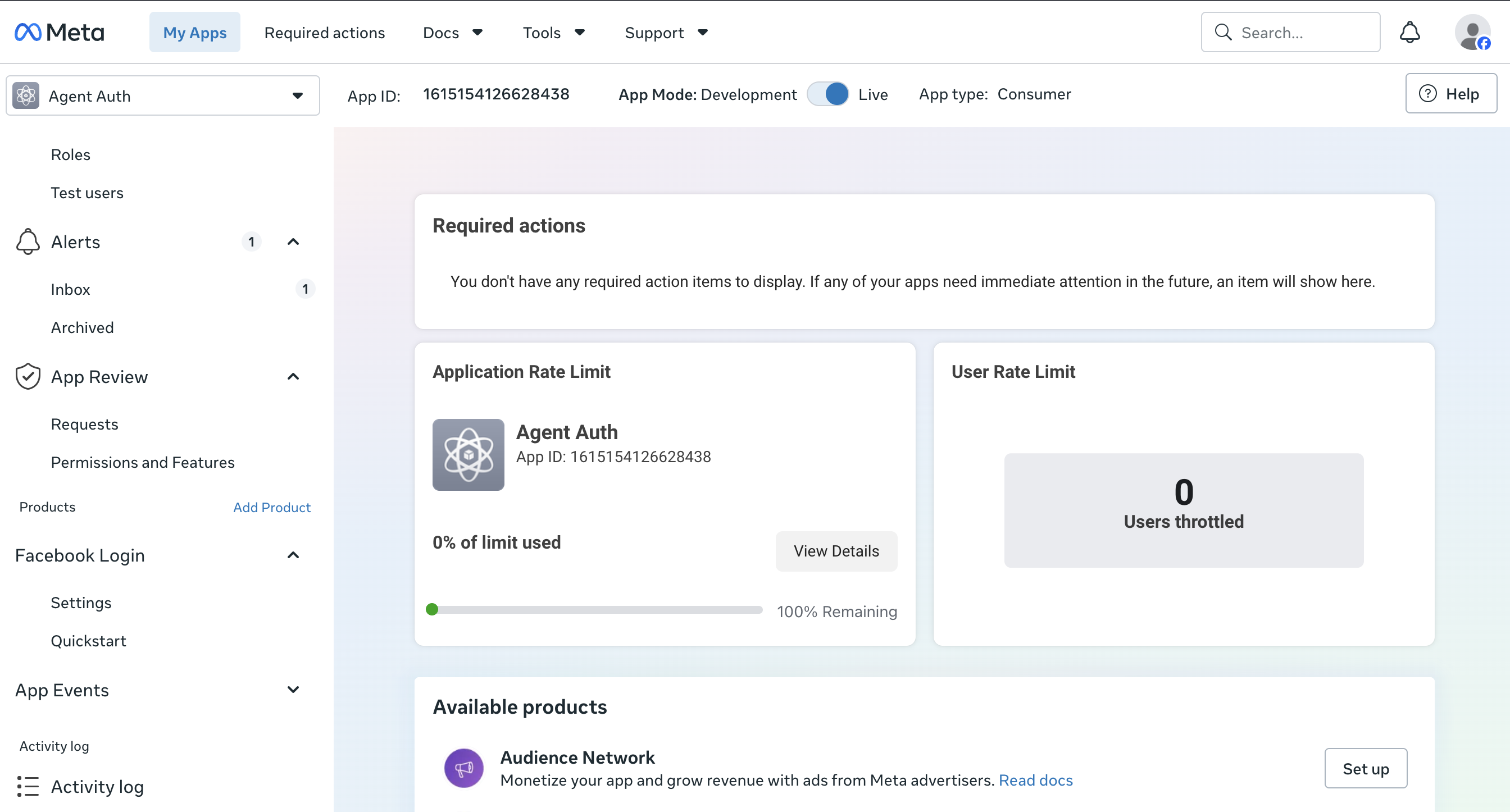
Create or open a Meta app
-
Go to the Meta for Developers dashboard.
-
Select an existing app or click Create App and choose the Business app type, since Marketing API access requires a business app.
-
-
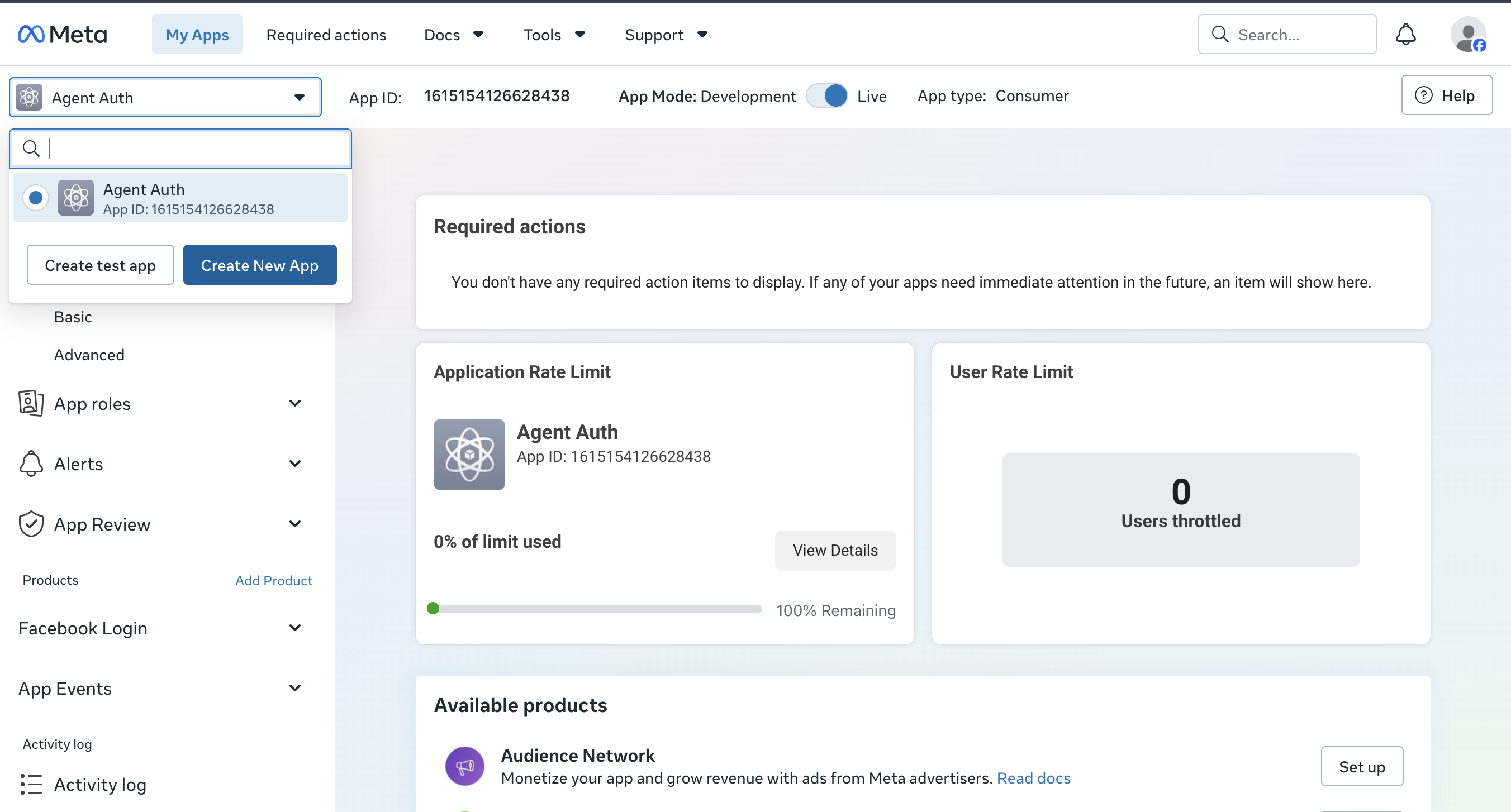
Add the Marketing API and Facebook Login products
-
From the app’s Add Product page, add Marketing API so the app can call ad account endpoints.
-
Add Facebook Login as well, since Scalekit uses it to run the OAuth authorization flow.
-
-
Copy the redirect URI from Scalekit
-
In the Scalekit dashboard, go to AgentKit > Connections > Create Connection. Find Meta Ads and click Create.
-
Click Use your own credentials and copy the redirect URI. It looks like
https://<SCALEKIT_ENVIRONMENT_URL>/sso/v1/oauth/<CONNECTION_ID>/callback.
-
-
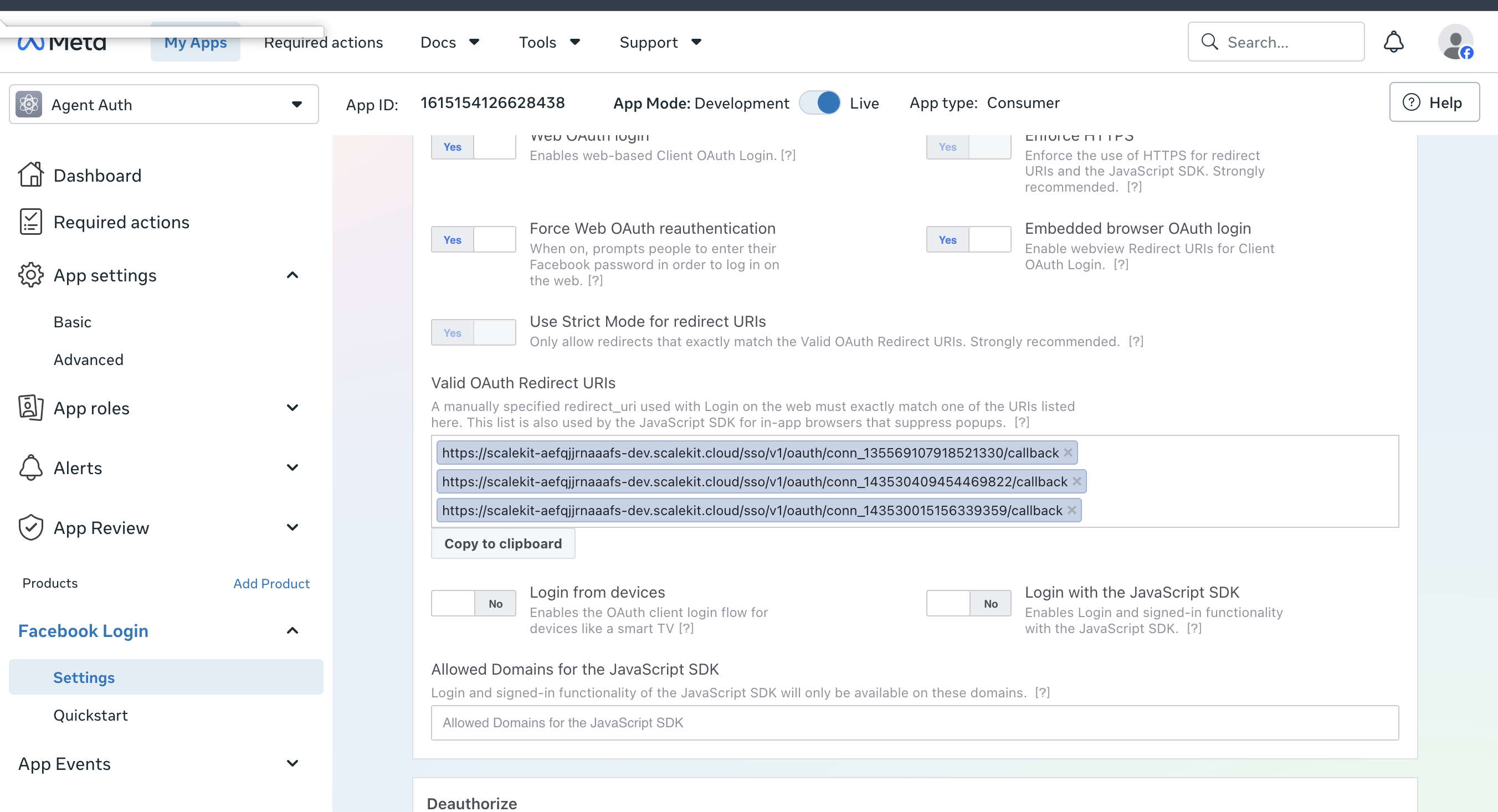
Add the redirect URI to Facebook Login settings
-
In your Meta app, go to Facebook Login > Settings.
-
Paste the redirect URI you copied into Valid OAuth Redirect URIs and save changes.
-
-
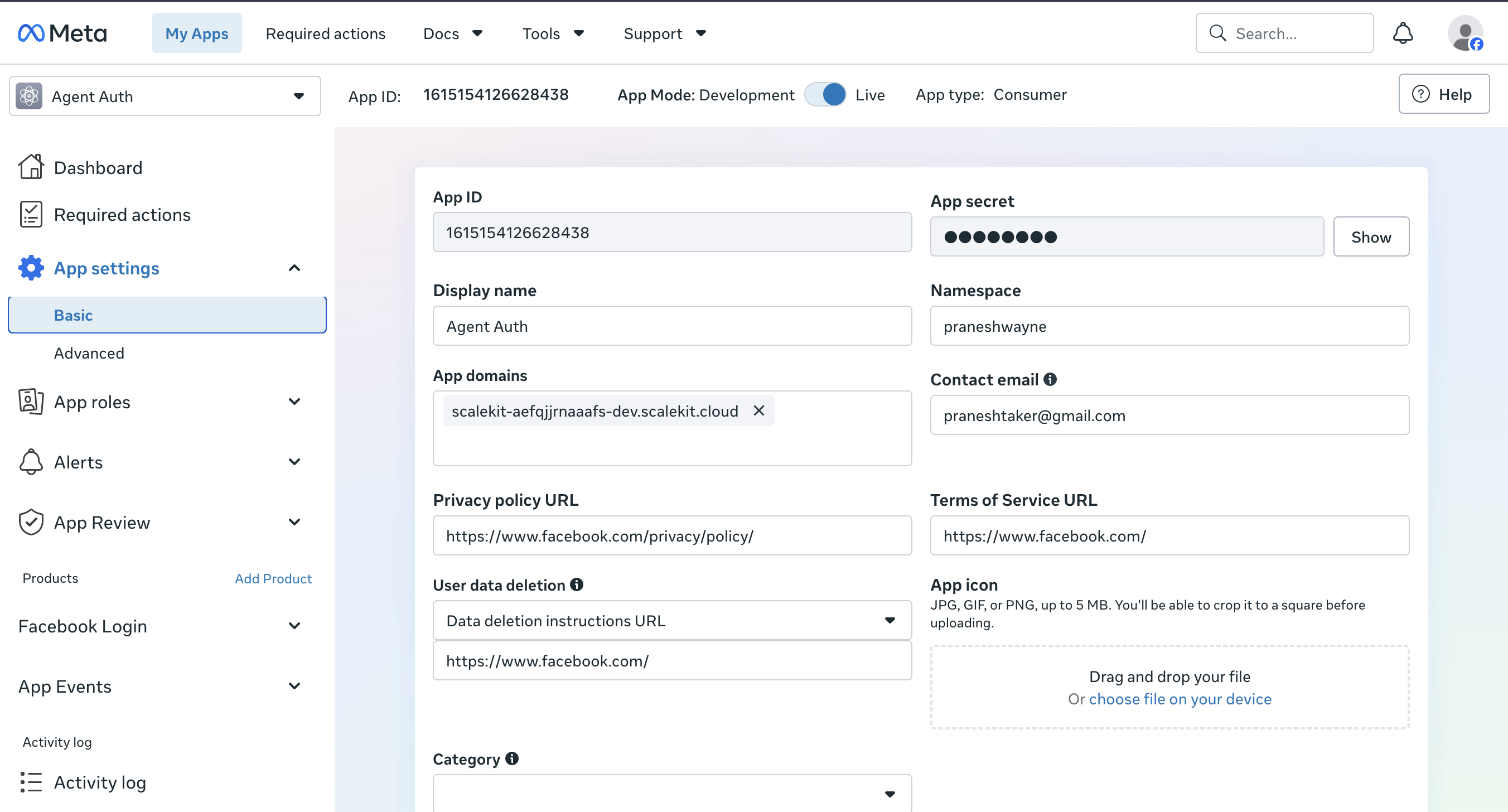
Copy your App ID and App secret
-
Go to App settings > Basic.
-
Copy the App ID and click Show to reveal and copy the App secret.
-
-
Add credentials in Scalekit
-
Return to the connection you created in Scalekit and enter:
- Client ID — your Meta app’s App ID
- Client Secret — your Meta app’s App secret
-
Click Save.
-
-
Authorize a user and make your first call
quickstart.mts import { ScalekitClient } from '@scalekit-sdk/node'import 'dotenv/config'import { createInterface } from 'node:readline/promises'const scalekit = new ScalekitClient(process.env.SCALEKIT_ENVIRONMENT_URL,process.env.SCALEKIT_CLIENT_ID,process.env.SCALEKIT_CLIENT_SECRET,)const actions = scalekit.actionsconst connector = 'metaads'const identifier = 'user_123'// Generate an authorization link for the userconst { link } = await actions.getAuthorizationLink({ connectionName: connector, identifier })console.log('Authorize Meta Ads:', link)const rl = createInterface({ input: process.stdin, output: process.stdout })await rl.question('Press Enter after authorizing...')rl.close()// Make your first callconst result = await actions.executeTool({connector,identifier,toolName: 'metaads_account_insights_get',toolInput: { ad_account_id: 'YOUR_AD_ACCOUNT_ID' },})console.log(result)Terminal window npx tsx quickstart.mtsquickstart.py import osfrom scalekit import ScalekitClientfrom dotenv import load_dotenvload_dotenv()scalekit_client = ScalekitClient(env_url=os.getenv("SCALEKIT_ENVIRONMENT_URL"),client_id=os.getenv("SCALEKIT_CLIENT_ID"),client_secret=os.getenv("SCALEKIT_CLIENT_SECRET"),)actions = scalekit_client.actionsconnection_name = "metaads"identifier = "user_123"# Generate an authorization link for the userlink_response = actions.get_authorization_link(connection_name=connection_name,identifier=identifier,)print("Authorize Meta Ads:", link_response.link)input("Press Enter after authorizing...")# Make your first callresult = actions.execute_tool(tool_input={"ad_account_id":"YOUR_AD_ACCOUNT_ID"},tool_name="metaads_account_insights_get",connection_name=connection_name,identifier=identifier,)print(result)Terminal window python quickstart.pyEach user signs in once. See Authorize a user for the full flow and statuses.
Tools
Pass the exact name toexecute_toolmetaads_account_insights_getRetrieve advertising performance insights for an ad account, synchronously aggregated at the account, campaign, ad set, or ad level (level controls the grain even though the call is made on the account edge).Read-onlyGet Account Insights
Retrieve advertising performance insights for an ad account, synchronously aggregated at the account, campaign, ad set, or ad level (level controls the grain even though the call is made on the account edge). Returns a data array of insight rows for the requested fields and breakdowns, plus paging.cursors for pagination. Use this for smaller or moderate reporting pulls; for large, high-cardinality, or long-date-range requests that risk timing out or being truncated, use metaads_account_insights_create_report_run instead and poll the async job. Subject to a dedicated insights rate limit reported via the x-fb-ads-insights-throttle response header (app_id_util_pct, acc_id_util_pct, ads_api_access_tier) -- back off as utilization nears 100%.
Inputs
ad_account_idstringrequired- Meta Ads ad account ID to fetch insights for, without the leading 'act_' prefix (the tool adds it automatically). Example: 123456789012345.
action_attribution_windowsstring- Comma-separated attribution windows to apply to action-based metrics, e.g. "1d_view,7d_click". If omitted, Meta uses the ad account's default attribution setting (or use_account_attribution_setting).
action_breakdownsstring- Comma-separated dimensions used to segment the 'actions' and other action-based metrics, e.g. "action_type" or "action_type,action_device". Defaults to action_type if omitted.default
action_type afterstring- Pagination cursor from a previous response's paging.cursors.after, used to fetch the next page of results.
beforestring- Pagination cursor from a previous response's paging.cursors.before, used to fetch the previous page of results.
breakdownsstring- Comma-separated dimensions to segment results by, e.g. "age,gender" or "publisher_platform". High-cardinality or incompatible breakdown combinations can trigger a data-per-call limit (error code 100) -- combine fewer breakdowns or narrow the date range if that happens.
date_presetstring- Predefined date range for the metrics window, e.g. last_30d or maximum (Meta's cap of 37 months back). Mutually exclusive with time_range and time_ranges -- provide only one of the three.one of
todayyesterdaythis_monthlast_monththis_quartermaximumdata_maximumlast_3dlast_7dlast_14dlast_28dlast_30dlast_90dlast_week_mon_sunlast_week_sun_satlast_quarterlast_yearthis_week_mon_todaythis_week_sun_todaythis_year fieldsstring- Comma-separated list of insight metrics to return, e.g. "impressions,clicks,spend,ctr,actions,reach". If omitted, Meta returns a small default metric set (impressions and spend).
filteringstring- JSON array, as a string, of filter objects in {field, operator, value} form to restrict which insight rows are returned, e.g. [{"field":"campaign.name","operator":"CONTAIN","value":"Sale"}].
levelstring- Aggregation grain for the returned rows: 'account' rolls everything into one row per account, 'campaign'/'adset'/'ad' return one row per entity at that level. If a breakdown is specified, Meta may automatically raise this to the breakdown's natural level.one of
accountcampaignadsetaddefaultaccount limitinteger- Maximum number of insight rows to return in this page of results. Use the after cursor from a previous response to fetch subsequent pages.
sortstring- Field and direction to sort insight rows by, e.g. "impressions_descending" or "spend_ascending".
time_incrementstring- Splits the requested time range into smaller windows. Use a number of days (as a string, e.g. "1" for daily rows), "all_days" for one row per day across the whole range, or "monthly" for one row per month. If omitted, Meta returns one aggregated row for the whole range.
time_rangeobject- Custom single date range {since, until} (each formatted "YYYY-MM-DD") for the metrics window. Example: {"since": "2026-08-01", "until": "2026-08-31"}. Cannot start more than 37 months in the past. Mutually exclusive with date_preset and time_ranges.
time_rangesstring- JSON array, as a string, of custom {since, until} date ranges (each formatted "YYYY-MM-DD") to compare in a single call, e.g. [{"since": "2026-07-01", "until": "2026-07-31"}, {"since": "2026-08-01", "until": "2026-08-31"}]. Overrides time_range and date_preset when provided.
use_account_attribution_settingboolean- When true, ignore action_attribution_windows and use the ad account's own configured attribution setting instead. Defaults to false.default
false
metaads_ad_getRetrieve a single Meta Ads ad by ID with the exact fields you request (e.g.Read-onlyGet Ad
Retrieve a single Meta Ads ad by ID with the exact fields you request (e.g. status, creative, adset_id, campaign_id, review feedback). Returns one Ad object containing only the fields listed in fields; if fields is omitted, Meta returns just id. Use this to check one ad's delivery state, creative, or rejection reason by ID; use List Ads to browse or filter ads across an account instead. effective_status carries far more values than configured_status (e.g. PENDING_REVIEW, DISAPPROVED, PREAPPROVED, WITH_ISSUES) -- surface it separately when explaining why an ad isn't delivering, since configured_status alone (ACTIVE/PAUSED/DELETED/ARCHIVED) won't show a review or issue state.
Inputs
ad_idstringrequired- Meta Ads ad ID to retrieve. Find it in Meta Ads Manager, or from the id field returned by List Ads or Create Ad. Example: 120210000000002.
fieldsstring- Comma-separated list of Ad fields to return, e.g. "name,status,effective_status,configured_status,adset_id,campaign_id,creative,bid_type,bid_info,ad_review_feedback,issues_info,tracking_specs,conversion_specs,preview_shareable_link". If omitted, Meta returns only the id field.
metaads_ad_get_insightsFetch performance metrics — impressions, clicks, spend, actions, and more — for a single ad, synchronously.Read-onlyGet Ad Insights
Fetch performance metrics — impressions, clicks, spend, actions, and more — for a single ad, synchronously. Returns a data array of insight rows for the requested fields plus a paging.cursors object for pagination. Use this for smaller, ad-hoc reporting pulls on one ad; for broad, high-cardinality, or account-wide pulls, use an async insights report job instead of this synchronous call. Requires ads_read (or ads_management) permission; subject to a dedicated insights rate-limit reported via the x-fb-ads-insights-throttle response header.
Inputs
ad_idstringrequired- ID of the ad to fetch insights for. Example: 23851234567890123.
action_attribution_windowsstring- Comma-separated attribution windows to apply to action-based metrics, e.g. "1d_view,7d_click". If omitted, Meta uses the ad account's default attribution setting.
afterstring- Pagination cursor from a previous response's paging.cursors.after, used to fetch the next page of results.
beforestring- Pagination cursor from a previous response's paging.cursors.before, used to fetch the previous page of results.
breakdownsstring- Comma-separated dimensions to segment results by, e.g. "age,gender" or "publisher_platform". High-cardinality breakdowns can trigger a data-per-call limit (error code 100) — combine fewer breakdowns or narrow the date range if that happens.
date_presetstring- Predefined date range for the metrics window, e.g. last_7d. Mutually exclusive with time_range — provide one or the other, not both.one of
todayyesterdaythis_monthlast_monththis_quartermaximumdata_maximumlast_3dlast_7dlast_14dlast_28dlast_30dlast_90dlast_week_mon_sunlast_week_sun_satlast_quarterlast_yearthis_week_mon_todaythis_week_sun_todaythis_year fieldsstring- Comma-separated list of insight metrics to return, e.g. "impressions,clicks,spend,ctr,actions,cpc". If omitted, Meta returns a small default metric set.
filteringstring- JSON array, as a string, of filter objects in {field, operator, value} form to restrict which insight rows are returned, e.g. [{"field":"action_type","operator":"IN","value":["link_click"]}].
limitinteger- Maximum number of insight rows to return in this page of results. Use the after cursor from a previous response to fetch subsequent pages.
sortstring- Field and direction to sort insight rows by, e.g. "impressions_descending" or "spend_ascending".
time_incrementstring- Splits the requested time range into smaller windows. Use a number of days (as a string, e.g. "1" for daily breakdown), "all_days" for one row per day across the whole range, or "monthly" for one row per month. If omitted, Meta returns one aggregated row for the whole range.
time_rangeobject- Custom date range {since, until} (each formatted "YYYY-MM-DD") for the metrics window. Example: {"since": "2026-08-01", "until": "2026-08-31"}. Mutually exclusive with date_preset.
metaads_ad_get_previewsGenerate a preview iframe of how an existing Meta Ads ad will render in a specific placement/format.Read-onlyGet Ad Previews
Generate a preview iframe of how an existing Meta Ads ad will render in a specific placement/format. Returns a data array containing an AdPreview object with a body field: iframe HTML valid for only 24 hours. Use this to preview an ad that already exists in a given ad_format; use the account-level Generate Previews endpoint instead to preview a creative before an ad has been created. Requires ads_read (or ads_management) permission. width/height only resize the returned iframe's container, not the ad itself, and some creative/format combinations are unsupported and will error.
Inputs
ad_formatstringrequired- The placement/format to render the preview for, e.g. DESKTOP_FEED_STANDARD, MOBILE_FEED_STANDARD, INSTAGRAM_STANDARD, INSTAGRAM_STORY, or RIGHT_COLUMN_STANDARD. Not every format is valid for every ad -- an incompatible combination returns an error.one of
DESKTOP_FEED_STANDARDFACEBOOK_STORY_MOBILEINSTANT_ARTICLE_STANDARDINSTREAM_VIDEO_DESKTOPINSTREAM_VIDEO_MOBILEMARKETPLACE_MOBILEMOBILE_FEED_BASICMOBILE_FEED_STANDARDRIGHT_COLUMN_STANDARDSUGGESTED_VIDEO_DESKTOPSUGGESTED_VIDEO_MOBILEWATCH_FEED_MOBILEFACEBOOK_REELS_BANNERFACEBOOK_REELS_BANNER_DESKTOPFACEBOOK_REELS_MOBILEFACEBOOK_REELS_POSTLOOPFACEBOOK_REELS_STICKERFACEBOOK_STORY_STICKER_MOBILEWATCH_FEED_HOMEINSTAGRAM_STANDARDINSTAGRAM_STORYINSTAGRAM_EXPLORE_CONTEXTUALINSTAGRAM_EXPLORE_IMMERSIVEINSTAGRAM_EXPLORE_GRID_HOMEINSTAGRAM_FEED_WEBINSTAGRAM_FEED_WEB_M_SITEINSTAGRAM_PROFILE_FEEDINSTAGRAM_REELSINSTAGRAM_REELS_OVERLAYINSTAGRAM_SEARCH_CHAININSTAGRAM_SEARCH_GRIDINSTAGRAM_STORY_WEBINSTAGRAM_STORY_WEB_M_SITEMESSENGER_MOBILE_INBOX_MEDIAMESSENGER_MOBILE_STORY_MEDIAAUDIENCE_NETWORK_INSTREAM_VIDEOAUDIENCE_NETWORK_INSTREAM_VIDEO_MOBILEAUDIENCE_NETWORK_OUTSTREAM_VIDEOAUDIENCE_NETWORK_REWARDED_VIDEOMOBILE_BANNERMOBILE_FULLWIDTHMOBILE_INTERSTITIALMOBILE_MEDIUM_RECTANGLEMOBILE_NATIVE ad_idstringrequired- Meta Ads ad ID to preview. Find it in Meta Ads Manager, or from the id field returned by List Ads or Create Ad. Example: 23851234567890123.
dynamic_asset_labelstring- Label identifying which asset variation to render, for a dynamic creative ad with multiple asset options. Leave blank to preview the default combination.
dynamic_creative_specobject- JSON object overriding which specific asset combination (images, titles, bodies, etc.) of a dynamic creative ad to render in the preview. Leave blank to preview the ad's default combination.
dynamic_customizationobject- JSON object specifying customization (e.g. country or locale) for previewing a multi-language or geographically customized dynamic ad. Leave blank to preview the default customization.
end_datestring- Trip end date/time (ISO 8601), used only when previewing a trip or flight ad format that requires one. Leave blank otherwise.
heightinteger- Custom iframe container height in pixels. Only affects the returned iframe's container size, not the actual ad's dimensions. Meta recommends at least 280.
place_page_idstring- Page ID of the specific local business Page to render in a dynamic local ad's preview. Leave blank for non-local ads.
postobject- JSON object describing a Page post to preview instead of the ad's saved creative, e.g. {"link": "...", "message": "...", "picture": "...", "name": "...", "caption": "...", "description": "...", "call_to_action": {...}}. Leave blank to preview the ad's actual saved creative.
product_item_idsarray- Product item IDs to render in the preview, for dynamic/catalog ads whose creative pulls from a product catalog. Leave blank for non-catalog ads.
start_datestring- Trip start date/time (ISO 8601), used only when previewing a trip or flight ad format that requires one. Leave blank otherwise.
widthinteger- Custom iframe container width in pixels. Only affects the returned iframe's container size, not the actual ad's dimensions. Meta recommends at least 280.
metaads_ad_listList ads under a Meta Ads ad account, optionally filtered by effective status or other conditions, with field selection.Read-onlyList Ads
List ads under a Meta Ads ad account, optionally filtered by effective status or other conditions, with field selection. Returns an array of ad objects with the requested fields plus cursor-based pagination info (paging.cursors, next/previous). Use this to browse or audit ads in bulk, or to find the ad_id needed by Get Ad; pass an effective_status or filtering condition to scope large accounts. The same /ads edge also exists nested under a specific campaign or ad set (/{campaign_id}/ads, /{ad_set_id}/ads) -- to scope to one of those, filter with a campaign.id or adset.id condition here instead of a separate tool. Regular accounts cap at 5,000 non-deleted ads (50,000 for Bulk accounts).
Inputs
ad_account_idstringrequired- Meta Ads ad account ID to list ads for, without the leading 'act_' prefix (the tool adds it automatically). Find it in Meta Ads Manager account settings or via the /me/adaccounts endpoint. Example: 123456789012345.
afterstring- Pagination cursor from a previous response's paging.cursors.after (or paging.next), used to fetch the next page of results.
beforestring- Pagination cursor from a previous response's paging.cursors.before (or paging.previous), used to fetch the previous page of results.
date_presetstring- Predefined date range used to aggregate any requested insights-style metrics on the returned ads (does not filter which ads are returned, only the metric window). One of: today, yesterday, this_month, last_month, this_quarter, maximum, data_maximum, last_3d, last_7d, last_14d, last_28d, last_30d, last_90d, last_week_mon_sun, last_week_sun_sat, last_quarter, last_year, this_week_mon_today, this_week_sun_today, this_year. Mutually exclusive with time_range.one of
todayyesterdaythis_monthlast_monththis_quartermaximumdata_maximumlast_3dlast_7dlast_14dlast_28dlast_30dlast_90dlast_week_mon_sunlast_week_sun_satlast_quarterlast_yearthis_week_mon_todaythis_week_sun_todaythis_year effective_statusstring- JSON array, as a string, of effective_status values to filter by, e.g. ["ACTIVE","PAUSED"]. Valid values: ACTIVE, PAUSED, DELETED, PENDING_REVIEW, DISAPPROVED, PREAPPROVED, PENDING_BILLING_INFO, CAMPAIGN_PAUSED, ARCHIVED, ADSET_PAUSED, IN_PROCESS, WITH_ISSUES. If omitted, Meta excludes DELETED and ARCHIVED ads by default.
fieldsstring- Comma-separated list of Ad fields to return, e.g. "id,name,status,effective_status,adset_id,campaign_id,creative,bid_type,tracking_specs". If omitted, Meta returns a small default field set (typically id and name).
filteringstring- JSON array, as a string, of filter conditions in the form {"field": "...", "operator": "...", "value": ...}, e.g. [{"field": "adset.id", "operator": "EQUAL", "value": "120210000000001"}] or [{"field": "campaign.id", "operator": "EQUAL", "value": "120210000000000"}]. Use this to scope results to a specific ad set or campaign. Leave blank to list all ads in the account.
limitinteger- Maximum number of ads to return in this page of results. Meta applies its own default and maximum when omitted; use the after cursor from a previous response to fetch subsequent pages.
time_rangeobject- Custom date range {since, until} (each formatted "YYYY-MM-DD") used to aggregate any requested insights-style metrics on the returned ads. Example: {"since": "2026-08-01", "until": "2026-08-31"}. Mutually exclusive with date_preset.
metaads_ad_list_adcreativesList the ad creative(s) attached to a specific Meta Ads ad.Read-onlyList Ad's Creatives
List the ad creative(s) attached to a specific Meta Ads ad. Returns an array of AdCreative objects with the requested fields plus cursor-based pagination info (paging.cursors, next/previous). Most ads have exactly one creative, but dynamic/flexible creative ads can return several. Use this to inspect the creative(s) an ad actually uses without a separate lookup once you have its ad_id; use List Ad Creatives to browse all creatives in an ad account instead, or Get Ad Creative when you already have a creative ID. Requires ads_read permission.
Inputs
ad_idstringrequired- Meta Ads ad ID to list creatives for. Find it in Meta Ads Manager, or from the id field returned by List Ads or Create Ad. Example: 23851234567890123.
afterstring- Pagination cursor from a previous response's paging.cursors.after (or paging.next), used to fetch the next page of results.
beforestring- Pagination cursor from a previous response's paging.cursors.before (or paging.previous), used to fetch the previous page of results.
fieldsstring- Comma-separated list of AdCreative fields to return, e.g. "id,name,object_story_spec,image_url,body,title". If omitted, Meta returns a small default field set (typically id and name).
limitinteger- Maximum number of creatives to return in this page of results. Meta applies its own default and maximum when omitted; use the after cursor from a previous response to fetch subsequent pages.
metaads_ad_list_leadsList the leads generated by a specific ad, as an alternative to listing leads by form.Read-onlyList Leads By Ad
List the leads generated by a specific ad, as an alternative to listing leads by form. Returns an array of lead objects (id, created_time, ad_id, form_id, field_data, and any other requested fields) plus cursor-based pagination info. Use this when you have an ad_id but not the form_id -- a lead form can be reused across multiple ads, so this returns only the leads tied to this one ad; go to the form's own leads edge instead if you need every lead across all ads using that form. Requires the caller to be a Page Admin (or granted access by one) for the Page behind this ad, plus the leads_retrieval, ads_management, pages_show_list, and pages_read_engagement permissions.
Inputs
ad_idstringrequired- Meta Ads ad ID whose leads to list. Find it in Meta Ads Manager, or from the id field returned by metaads_ad_list. Example: 120210000000002.
afterstring- Pagination cursor from a previous response's paging.cursors.after (or paging.next), used to fetch the next page of results.
beforestring- Pagination cursor from a previous response's paging.cursors.before (or paging.previous), used to fetch the previous page of results.
fieldsstring- Comma-separated list of fields to return per lead, e.g. "id,created_time,ad_id,ad_name,form_id,campaign_id,adset_id,field_data". If omitted, Meta returns a small default field set.
filteringstring- JSON array, as a string, of filter objects with field/operator/value, e.g. "[{\"field\":\"time_created\",\"operator\":\"GREATER_THAN\",\"value\":1717000000}]". operator is one of LESS_THAN, GREATER_THAN, GREATER_THAN_OR_EQUAL. Leave blank for no filter.
limitinteger- Maximum number of leads to return in this page of results. Meta applies its own default and maximum when omitted; use the after cursor from a previous response to fetch subsequent pages.
metaads_adaccount_getRetrieve details for a single ad account, such as status, currency, spend cap, balance, timezone, and business info.Read-onlyGet Ad Account
Retrieve details for a single ad account, such as status, currency, spend cap, balance, timezone, and business info. Returns the fields you request for the account; account_status and disable_reason come back as numeric enums (e.g. account_status 1=ACTIVE, 2=DISABLED) worth mapping to a human-readable label in your own logic. Use this to check account health, currency, or billing state before running campaigns; you must pass fields explicitly — Meta returns almost nothing without it. Requires ads_management or ads_read on the account; some fields need extra permissions (funding_source_details needs the MANAGE task, spend-related fields need ADVERTISE).
Inputs
ad_account_idstringrequired- Meta Ads ad account ID to retrieve, without the leading 'act_' prefix (the tool adds it automatically). Find it in Meta Ads Manager account settings or via the /me/adaccounts endpoint. Example: 123456789012345.
fieldsstringrequired- Comma-separated list of ad account fields to return, e.g. "id,name,account_status,currency,timezone_name,spend_cap,balance,amount_spent,disable_reason,business". Required — Meta returns essentially no fields on this endpoint if this is left blank.
metaads_adaccount_get_ads_volumeGet the current count of non-archived, non-deleted ads that are active or pending review on an ad account, to check usage against Meta's per-account ad ceilings.Read-onlyGet Ad Account Ads Volume
Get the current count of non-archived, non-deleted ads that are active or pending review on an ad account, to check usage against Meta's per-account ad ceilings. Returns data: an array with ads_running_or_in_review_count (one entry per Page when show_breakdown_by_actor is set). Use this before bulk-creating ads or ad sets to check headroom against the account's limit (6,000 ads for regular accounts, 50,000 for accounts with Bulk status; lower ceilings apply to ad sets and campaigns). Future-scheduled ads are excluded from the count, and a day-parted ad counts as active for the whole day it runs.
Inputs
ad_account_idstringrequired- Meta Ads ad account ID to check ad volume for, without the leading 'act_' prefix (the tool adds it automatically). Example: 123456789012345.
show_breakdown_by_actorboolean- When true, breaks down the count per Page instead of returning a single account-wide total. Leave blank or false for the account-wide count only.
metaads_adaccount_get_delivery_estimateGet an estimated monthly-active-users reach range for a proposed (not-yet-created) ad set's targeting spec and optimization goal, before creating it.Read-onlyGet Delivery Estimate
Get an estimated monthly-active-users reach range for a proposed (not-yet-created) ad set's targeting spec and optimization goal, before creating it. Returns estimate_mau_lower_bound and estimate_mau_upper_bound (the reach range), estimate_ready (false if the audience hasn't finished populating enough to estimate yet), and targeting_optimization_types. Use this to sanity-check a targeting_spec's reach before calling Create Ad Set; it is not available for inactive Lookalike Audiences.
Inputs
ad_account_idstringrequired- Meta Ads ad account ID to estimate delivery for, without the leading 'act_' prefix (the tool adds it automatically). Example: 123456789012345.
optimization_goalstringrequired- The optimization goal to estimate reach for, matching what the proposed ad set would optimize delivery for (e.g. REACH, LINK_CLICKS, OFFSITE_CONVERSIONS, IMPRESSIONS).one of
NONEAPP_INSTALLSAD_RECALL_LIFTENGAGED_USERSEVENT_RESPONSESIMPRESSIONSLEAD_GENERATIONQUALITY_LEADLINK_CLICKSOFFSITE_CONVERSIONSPAGE_LIKESPOST_ENGAGEMENTQUALITY_CALLREACHLANDING_PAGE_VIEWSVISIT_INSTAGRAM_PROFILEENGAGED_PAGE_VIEWSVALUETHRUPLAYDERIVED_EVENTSAPP_INSTALLS_AND_OFFSITE_CONVERSIONSCONVERSATIONSIN_APP_VALUEMESSAGING_PURCHASE_CONVERSIONMESSAGING_DEEP_CONVERSATION_AND_FOLLOWSUBSCRIBERSREMINDERS_SETMEANINGFUL_CALL_ATTEMPTPROFILE_VISITPROFILE_AND_PAGE_ENGAGEMENTADVERTISER_SILOED_VALUEAUTOMATIC_OBJECTIVEMESSAGING_APPOINTMENT_CONVERSION targeting_specstringrequired- JSON-encoded Targeting object (as a string) describing the proposed ad set's audience -- geo_locations, age range, interests/behaviors (from Search Targeting Options), custom audiences, etc. Same shape used when creating an ad set. Example: "{\"geo_locations\":{\"countries\":[\"US\"]},\"age_min\":18,\"age_max\":65}".
promoted_objectstring- JSON-encoded object (as a string) describing what the proposed ad set promotes -- e.g. {"pixel_id":...}, {"page_id":...}, {"application_id":...}, {"product_catalog_id":...} -- matching the same shape used when creating an ad set. Leave blank if the optimization goal doesn't need one (e.g. REACH, IMPRESSIONS).
metaads_adaccount_get_reach_estimateGet a legacy lower/upper bound estimate of the number of people reachable by a targeting spec on this ad account.Read-onlyGet Reach Estimate (Legacy)
Get a legacy lower/upper bound estimate of the number of people reachable by a targeting spec on this ad account. Returns users_lower_bound and users_upper_bound; both come back as -1 when an estimate isn't available for the given spec (e.g. one that includes a custom audience) -- that's not an error, just "no estimate". This is a legacy endpoint kept for back-compat; use metaads_adaccount_get_delivery_estimate instead for the current recommended reach estimate for a proposed ad set, since it also accounts for optimization_goal and promoted_object. targeting_spec's countries field is required. Watch for error 2641 if the spec includes/excludes a restricted location, and for rate-limit errors 613/80004 on accounts that call this frequently.
Inputs
ad_account_idstringrequired- Meta Ads ad account ID to estimate reach for, without the leading 'act_' prefix (the tool adds it automatically). Example: 123456789012345.
targeting_specstringrequired- JSON-encoded Targeting object (as a string) describing the audience to estimate reach for. The countries sub-field is required. Example: "{\"geo_locations\":{\"countries\":[\"US\"]},\"age_min\":18,\"age_max\":65}".
object_store_urlstring- App store URL for the mobile app being promoted, used only for mobile app install campaigns. Leave blank for non-app campaigns.
metaads_adaccount_list_assigned_to_userList the ad accounts a specific business-scoped user has been granted permission on, with the tasks permitted on each.Read-onlyList Ad Accounts Assigned to User
List the ad accounts a specific business-scoped user has been granted permission on, with the tasks permitted on each. Returns an array of ad account objects plus each one's permitted_tasks and access_type (OWNER or AGENCY), with cursor-based pagination. Use this to check one person's overall reach across accounts ("which accounts can this person touch"); use metaads_adaccount_list_users instead to check one account's full list of users. Requires a business-scoped user ID (not a plain Facebook user ID or /me) -- typically resolved first from metaads_business_list_business_users.
Inputs
business_scoped_user_idstringrequired- Business-scoped user ID to list assigned ad accounts for. This is distinct from a plain Facebook user ID -- resolve it first via metaads_business_list_business_users. Example: 122345678901234567.
afterstring- Pagination cursor from a previous response's paging.cursors.after (or paging.next), used to fetch the next page of results.
beforestring- Pagination cursor from a previous response's paging.cursors.before (or paging.previous), used to fetch the previous page of results.
fieldsstring- Comma-separated list of fields to return per ad account entry, e.g. "id,name,permitted_tasks,access_type". If omitted, Meta returns its default field set.
limitinteger- Maximum number of ad accounts to return in this page of results. Use the after cursor from a previous response to fetch subsequent pages.
metaads_adaccount_list_usersList the business or system users assigned to an ad account, along with each user's tasks (their unpacked permissions) and permitted_tasks (the tasks they could be assigned).Read-onlyList Ad Account Users
List the business or system users assigned to an ad account, along with each user's tasks (their unpacked permissions) and permitted_tasks (the tasks they could be assigned). Returns an array of user objects plus cursor-based pagination info (paging.cursors) and a summary.total_count. Use this to audit who has access to an ad account and at what task level -- MANAGE, ADVERTISE, ANALYZE, DRAFT, AA_ANALYZE -- since these task-based permissions are replacing legacy account roles. Requires the ID of the Business Manager business associated with the ad account, in addition to the account ID itself.
Inputs
ad_account_idstringrequired- Meta Ads ad account ID to list assigned users for, without the leading 'act_' prefix (the tool adds it automatically). Find it in Meta Ads Manager account settings or via the /me/adaccounts endpoint. Example: 123456789012345.
businessstringrequired- ID of the Business Manager business associated with this ad account. This is required by Meta's API to resolve which business's users to check assignments against. Find it in Business Settings.
afterstring- Pagination cursor from a previous response's paging.cursors.after (or paging.next), used to fetch the next page of results.
beforestring- Pagination cursor from a previous response's paging.cursors.before (or paging.previous), used to fetch the previous page of results.
fieldsstring- Comma-separated list of fields to return per assigned user, e.g. "id,tasks,permitted_tasks". If omitted, Meta returns the default field set (id, tasks, permitted_tasks).
limitinteger- Maximum number of assigned users to return in this page of results. Use the after cursor from a previous response to fetch subsequent pages.
metaads_adcreative_getRetrieve a single ad creative's fields by id.Read-onlyGet Ad Creative
Retrieve a single ad creative's fields by id. Returns the creative's requested fields, such as object_story_spec, image/video reference, call_to_action_type, and status. Use this to inspect one known creative; use metaads_adcreative_list to browse or search the library instead. Always pass an explicit fields list — Meta's default field set here is minimal. Requires ads_management or ads_read permission, and the caller must be an admin of both the app and the ad account (Development-tier apps are rejected).
Inputs
ad_creative_idstringrequired- ID of the ad creative to retrieve. Find it via metaads_adcreative_list or metaads_adcreative_create's response. Example: 6398765432109876.
fieldsstring- Comma-separated list of ad creative fields to return, e.g. "name,object_story_spec,image_url,video_id,asset_feed_spec,call_to_action_type,effective_authorization_category,status". Strongly recommended — Meta's default field set without this param is minimal.
thumbnail_heightinteger- Height in pixels for any rendered thumbnail_url returned by this call.default
64 thumbnail_widthinteger- Width in pixels for any rendered thumbnail_url returned by this call.default
64
metaads_adcreative_get_previewsGenerate an HTML/iframe preview of how a stored ad creative will render for a given placement.Read-onlyGet Ad Creative Previews
Generate an HTML/iframe preview of how a stored ad creative will render for a given placement. Returns data: an array of AdPreview objects, each containing an iframe body string that is only valid for about 24 hours. Use this to visually QA a creative in a specific placement (e.g. desktop feed vs. Instagram Stories) before it goes live; re-fetch to get a fresh iframe rather than caching one long-term. Not every creative/ad_format combination is supported -- e.g. some link or event ad creatives fail without a valid Page association.
Inputs
ad_creative_idstringrequired- ID of the stored ad creative to preview. Find it via metaads_adcreative_list or metaads_adcreative_create's response. Example: 6398765432109876.
ad_formatstringrequired- The placement/format to render the preview for, e.g. DESKTOP_FEED_STANDARD, MOBILE_FEED_STANDARD, INSTAGRAM_STANDARD, INSTAGRAM_STORY, FACEBOOK_REELS_MOBILE. Not every creative supports every format.one of
AUDIENCE_NETWORK_INSTREAM_VIDEOAUDIENCE_NETWORK_INSTREAM_VIDEO_MOBILEAUDIENCE_NETWORK_OUTSTREAM_VIDEOAUDIENCE_NETWORK_REWARDED_VIDEOBIZ_DISCO_FEED_MOBILEDESKTOP_FEED_STANDARDFACEBOOK_IFU_REELS_MOBILEFACEBOOK_PROFILE_FEED_DESKTOPFACEBOOK_PROFILE_FEED_MOBILEFACEBOOK_PROFILE_REELS_MOBILEFACEBOOK_REELS_BANNERFACEBOOK_REELS_BANNER_DESKTOPFACEBOOK_REELS_BANNER_FEED_ANDROIDFACEBOOK_REELS_BANNER_FEED_ANDROID_LARGEFACEBOOK_REELS_BANNER_FULLSCREEN_IOSFACEBOOK_REELS_BANNER_FULLSCREEN_MOBILEFACEBOOK_REELS_MOBILEFACEBOOK_REELS_POSTLOOPFACEBOOK_REELS_POSTLOOP_FEEDFACEBOOK_REELS_SIMILAR_PRODUCTS_MOBILEFACEBOOK_REELS_STICKERFACEBOOK_STORY_MOBILEFACEBOOK_STORY_STICKER_MOBILEINSTAGRAM_EXPLORE_CONTEXTUALINSTAGRAM_EXPLORE_GRID_HOMEINSTAGRAM_EXPLORE_IMMERSIVEINSTAGRAM_FEED_WEBINSTAGRAM_FEED_WEB_M_SITEINSTAGRAM_LEAD_GEN_MULTI_SUBMIT_ADSINSTAGRAM_PROFILE_FEEDINSTAGRAM_PROFILE_REELSINSTAGRAM_REELSINSTAGRAM_REELS_OVERLAYINSTAGRAM_REELS_WEBINSTAGRAM_REELS_WEB_M_SITEINSTAGRAM_SEARCH_CHAININSTAGRAM_SEARCH_GRIDINSTAGRAM_STANDARDINSTAGRAM_STORYINSTAGRAM_STORY_EFFECT_TRAYINSTAGRAM_STORY_WEBINSTAGRAM_STORY_WEB_M_SITEINSTANT_ARTICLE_RECIRCULATION_ADINSTANT_ARTICLE_STANDARDINSTREAM_BANNER_DESKTOPINSTREAM_BANNER_FEED_IOSINSTREAM_BANNER_FULLSCREEN_IOSINSTREAM_BANNER_FULLSCREEN_MOBILEINSTREAM_BANNER_IMMERSIVE_MOBILEINSTREAM_BANNER_MOBILEINSTREAM_VIDEO_DESKTOPINSTREAM_VIDEO_FULLSCREEN_IOSINSTREAM_VIDEO_FULLSCREEN_MOBILEINSTREAM_VIDEO_IMAGEINSTREAM_VIDEO_IMMERSIVE_MOBILEINSTREAM_VIDEO_MOBILEJOB_BROWSER_DESKTOPJOB_BROWSER_MOBILEMARKETPLACE_MOBILEMESSENGER_MOBILE_INBOX_MEDIAMESSENGER_MOBILE_STORY_MEDIAMOBILE_BANNERMOBILE_FEED_BASICMOBILE_FEED_STANDARDMOBILE_FULLWIDTHMOBILE_INTERSTITIALMOBILE_MEDIUM_RECTANGLEMOBILE_NATIVERIGHT_COLUMN_STANDARDSUGGESTED_VIDEO_DESKTOPSUGGESTED_VIDEO_FULLSCREEN_MOBILESUGGESTED_VIDEO_IMMERSIVE_MOBILESUGGESTED_VIDEO_MOBILEWATCH_FEED_HOMEWATCH_FEED_MOBILEWHATSAPP_STATUS_MEDIA creative_featurestring- Render the preview with a specific creative feature enabled, e.g. an image-animation or subtitle overlay variant. Leave blank for the plain preview.
dynamic_asset_labelstring- For a dynamic/asset-customization creative, the specific asset-variation label to render. Leave blank for the default variation.
dynamic_creative_specobject- Object describing which combination of assets to render when previewing a dynamic creative built from asset_feed_spec. Leave blank to let Meta pick a representative combination.
dynamic_customizationobject- Object applying multi-language or per-audience customization when previewing a dynamic creative, e.g. specifying which locale's text to show. Leave blank for the default.
end_datestring- End date (YYYY-MM-DD) used when previewing trip/travel creative fields that depend on a date range. Leave blank for non-trip creatives.
heightinteger- Height in pixels for the returned iframe's render container. This only affects the preview iframe's size, not the actual ad's dimensions in the placement. Meta recommends at least 280.
place_page_idstring- Page ID used to render local-ad-style previews (e.g. Page location info in the ad). Leave blank if not applicable.
product_item_idsarray- Array of catalog product item IDs to render in the preview, for a catalog/dynamic-product-ads creative. Leave blank for non-catalog creatives.
start_datestring- Start date (YYYY-MM-DD) used when previewing trip/travel creative fields that depend on a date range. Leave blank for non-trip creatives.
widthinteger- Width in pixels for the returned iframe's render container. This only affects the preview iframe's size, not the actual ad's dimensions in the placement. Meta recommends at least 280.
metaads_adcreative_listList ad creatives stored in an ad account's creative library.Read-onlyList Ad Creatives
List ad creatives stored in an ad account's creative library. Returns an array of creative objects with the requested fields plus cursor-based pagination info (paging.cursors, next/previous). Use this to browse or audit an account's creatives in bulk; pass fields and/or filtering to scope large libraries — Meta caps this edge at 50,000 total creatives, beyond which pagination is unavailable. Requires ads_management or ads_read permission, and the caller must be an admin of both the app and the ad account (Development-tier apps are rejected).
Inputs
ad_account_idstringrequired- Meta Ads ad account ID to list creatives for, without the leading 'act_' prefix (the tool adds it automatically). Example: 123456789012345.
afterstring- Pagination cursor from a previous response's paging.cursors.after, used to fetch the next page of results.
beforestring- Pagination cursor from a previous response's paging.cursors.before, used to fetch the previous page of results.
fieldsstring- Comma-separated list of ad creative fields to return, e.g. "id,name,object_story_spec,image_hash,thumbnail_url,status". If omitted, Meta returns a small default field set.
filteringstring- JSON array, as a string, of filter objects in {field, operator, value} form to restrict which creatives are returned, e.g. [{"field":"name","operator":"CONTAIN","value":"Summer"}].
limitinteger- Maximum number of creatives to return in this page of results. Use the after cursor from a previous response to fetch subsequent pages.
metaads_adimage_listList the ad images stored in an ad account's image library.Read-onlyList Ad Images
List the ad images stored in an ad account's image library. Returns each image's id, hash, temporary url, dimensions, status (ACTIVE/INTERNAL/DELETED), and the creatives that reference it. Use this to find an existing image's hash before building a creative with metaads_adcreative_create, or to audit the library; the returned url is temporary and should not be persisted or embedded in a creative. Requires ads_management or ads_read permission on the ad account.
Inputs
ad_account_idstringrequired- Meta Ads ad account ID to list images for, without the leading 'act_' prefix (the tool adds it automatically). Example: 123456789012345.
afterstring- Pagination cursor from a previous response's paging.cursors.after, used to fetch the next page of results.
beforestring- Pagination cursor from a previous response's paging.cursors.before, used to fetch the previous page of results.
fieldsstring- Comma-separated list of ad image fields to return, e.g. "id,hash,url,width,height,status,permalink_url,created_time". If omitted, Meta returns a small default field set.
limitinteger- Maximum number of images to return in this page of results. Use the after cursor from a previous response to fetch subsequent pages.
metaads_adrule_getRetrieve a single automated (ad) rule by ID with the exact fields you request (e.g.Read-onlyGet Ad Rule
Retrieve a single automated (ad) rule by ID with the exact fields you request (e.g. name, status, evaluation_spec, execution_spec, schedule_spec). Returns one AdRule object containing only the fields listed in fields; if fields is omitted, Meta returns just id and name. Use this to inspect one rule's full definition by ID; use List Ad Rules to browse or find rules across an account instead.
Inputs
ad_rule_idstringrequired- Meta Ads automated rule ID to retrieve. Find it in Meta Ads Manager's Rules tab or from the id field returned by List Ad Rules / Create Ad Rule. Example: 23850000000000.
fieldsstring- Comma-separated list of AdRule fields to return, e.g. "id,name,account_id,status,disable_error_code,evaluation_spec,execution_spec,schedule_spec,created_by,created_time,updated_time". If omitted, Meta returns a small default field set (typically id and name).
metaads_adrule_listList the automated (ad) rules stored on an ad account.Read-onlyList Ad Rules
List the automated (ad) rules stored on an ad account. Returns an array of AdRule objects with the requested fields plus cursor-based pagination info (paging.cursors, next/previous). Use this to browse or audit an account's automation rules -- e.g. before creating a new rule to check for an existing similar one, or to find a rule's id for Get Ad Rule / Update Ad Rule.
Inputs
ad_account_idstringrequired- Meta Ads ad account ID to list automated rules for, without the leading 'act_' prefix (the tool adds it automatically). Example: 123456789012345.
afterstring- Pagination cursor from a previous response's paging.cursors.after (or paging.next), used to fetch the next page of results.
beforestring- Pagination cursor from a previous response's paging.cursors.before (or paging.previous), used to fetch the previous page of results.
fieldsstring- Comma-separated list of AdRule fields to return, e.g. "name,status,evaluation_spec,execution_spec,schedule_spec,created_time,updated_time". If omitted, Meta returns a small default field set (typically id and name).
limitinteger- Maximum number of ad rules to return in this page of results. Meta applies its own default and maximum when omitted; use the after cursor from a previous response to fetch subsequent pages.
metaads_adrule_list_historyList the execution history (audit log of past runs and actions taken) for an automated ad rule.Read-onlyList Ad Rule History
List the execution history (audit log of past runs and actions taken) for an automated ad rule. Returns an array of history entries -- each shows the action Meta's rules engine took (e.g. PAUSED, CHANGED_BUDGET, EMAIL, NOT_CHANGED) and, depending on fields requested, a timestamp and the evaluation/execution results for the objects the rule governed -- plus cursor-based pagination info. Use this to confirm whether and when a rule actually fired, and what it did, after creating or updating it with metaads_adrule_create / metaads_adrule_update; use metaads_adrule_list to browse the rules themselves rather than their run history. Read-only edge -- there is no create/update/delete here, only reading past executions.
Inputs
ad_rule_idstringrequired- Meta Ads automated rule ID to list execution history for. Find it via metaads_adrule_list or metaads_adrule_create's response. Example: 987654321098765.
actionstring- Restrict results to entries where this specific action was taken. Common values include PAUSED, UNPAUSED, CHANGED_BUDGET, CHANGED_BID, EMAIL, MESSAGE_SENT, FACEBOOK_NOTIFICATION_SENT, ENDPOINT_PINGED, NOT_CHANGED, ERROR, BUDGET_NOT_REDISTRIBUTED, and various ENABLE_* actions (e.g. ENABLE_AUTOFLOW, ENABLE_ADVANTAGE_PLUS_CREATIVE). Leave blank to return entries for every action.
afterstring- Pagination cursor from a previous response's paging.cursors.after (or paging.next), used to fetch the next page of results.
beforestring- Pagination cursor from a previous response's paging.cursors.before (or paging.previous), used to fetch the previous page of results.
fieldsstring- Comma-separated list of fields to return per history entry, e.g. "action,timestamp,evaluation_spec,execution_spec,results". If omitted, Meta returns a small default field set.
hide_no_changesboolean- When true, drop entries where the rule evaluated an object but made no change (action NOT_CHANGED, or no results at all). Defaults to false (all entries shown).default
false limitinteger- Maximum number of history entries to return in this page of results. Meta applies its own default and maximum when omitted; use the after cursor from a previous response to fetch subsequent pages.
object_idstring- Restrict results to history entries about this one governed object (an ad, ad set, or campaign ID that the rule evaluated/acted on). Leave blank to see history across every object the rule covers.
metaads_adset_getRetrieve a single Meta Ads ad set by ID with the exact fields you request (e.g.Read-onlyGet Ad Set
Retrieve a single Meta Ads ad set by ID with the exact fields you request (e.g. targeting, budget, schedule, status, optimization_goal, promoted_object). Returns one Ad Set object containing only the fields listed in fields; if fields is omitted, Meta returns just id. Use this to fetch one ad set's current configuration by ID; use List Ad Sets to browse or filter ad sets across an account instead. effective_status reflects rollups from the parent campaign (e.g. CAMPAIGN_PAUSED when the campaign itself is paused), which can differ from this ad set's own configured status.
Inputs
ad_set_idstringrequired- Meta Ads ad set ID to retrieve. Find it in Meta Ads Manager, or from the id field returned by List Ad Sets or Create Ad Set. Example: 120210000000001.
fieldsstring- Comma-separated list of Ad Set fields to return, e.g. "name,status,effective_status,daily_budget,lifetime_budget,targeting,optimization_goal,billing_event,bid_strategy,promoted_object,start_time,end_time". If omitted, Meta returns only the id field.
metaads_adset_get_delivery_estimateGet an estimated audience reach range for an existing Meta Ads ad set, using its current targeting or a proposed replacement.Read-onlyGet Ad Set Delivery Estimate
Get an estimated audience reach range for an existing Meta Ads ad set, using its current targeting or a proposed replacement. Returns estimate_mau_lower_bound and estimate_mau_upper_bound (the reach range), estimate_ready (false if the audience hasn't finished populating enough to estimate yet), and targeting_optimization_types. Use this to sanity-check reach for an ad set that already exists; pass targeting_spec to preview a modified targeting without saving it to the ad set first. Use Get Delivery Estimate (the ad-account version) instead when the ad set doesn't exist yet. Estimates are directional approximations, not guarantees, and can return empty/zero for very narrow audiences. Requires ads_read or ads_management permission.
Inputs
ad_set_idstringrequired- Meta Ads ad set ID to estimate delivery for. Find it in Meta Ads Manager, or from the id field returned by List Ad Sets or Create Ad Set. Example: 120210000000001.
optimization_goalstringrequired- The optimization goal to estimate reach for, matching (or proposing a change to) what the ad set optimizes delivery for (e.g. REACH, LINK_CLICKS, OFFSITE_CONVERSIONS, IMPRESSIONS).one of
NONEAPP_INSTALLSAD_RECALL_LIFTENGAGED_USERSEVENT_RESPONSESIMPRESSIONSLEAD_GENERATIONQUALITY_LEADLINK_CLICKSOFFSITE_CONVERSIONSPAGE_LIKESPOST_ENGAGEMENTQUALITY_CALLREACHLANDING_PAGE_VIEWSVISIT_INSTAGRAM_PROFILEENGAGED_PAGE_VIEWSVALUETHRUPLAYDERIVED_EVENTSAPP_INSTALLS_AND_OFFSITE_CONVERSIONSCONVERSATIONSIN_APP_VALUEMESSAGING_PURCHASE_CONVERSIONMESSAGING_DEEP_CONVERSATION_AND_FOLLOWSUBSCRIBERSREMINDERS_SETMEANINGFUL_CALL_ATTEMPTPROFILE_VISITPROFILE_AND_PAGE_ENGAGEMENTADVERTISER_SILOED_VALUEAUTOMATIC_OBJECTIVEMESSAGING_APPOINTMENT_CONVERSION targeting_specstring- JSON-encoded Targeting object (as a string) to preview a modified targeting for this ad set without saving it -- same shape used when creating or updating an ad set. Example: "{\"geo_locations\":{\"countries\":[\"US\"]},\"age_min\":18,\"age_max\":65}". Leave blank to estimate using the ad set's current saved targeting.
metaads_adset_get_insightsFetch performance metrics -- spend, impressions, clicks, conversions, and more -- for a single Meta Ads ad set over a time range, synchronously.Read-onlyGet Ad Set Insights
Fetch performance metrics -- spend, impressions, clicks, conversions, and more -- for a single Meta Ads ad set over a time range, synchronously. Returns a data array of insight rows for the requested fields plus a paging.cursors object for pagination. Use this for smaller, ad-hoc reporting pulls on one ad set; for wide date ranges, many breakdowns, or account-wide pulls that risk timing out, use the asynchronous insights report-run workflow instead of this synchronous call. Requires ads_read (or ads_management) permission; insights calls are rate-limited on a separate, tighter budget than other Marketing API calls, and data may be updated retroactively for a few days after the fact.
Inputs
ad_set_idstringrequired- Meta Ads ad set ID to fetch insights for. Find it in Meta Ads Manager, or from the id field returned by List Ad Sets or Create Ad Set. Example: 120210000000001.
action_attribution_windowsstring- Comma-separated attribution windows to apply to action-based metrics, e.g. "1d_view,7d_click". If omitted, Meta uses the ad account's default attribution setting.
action_breakdownsstring- Comma-separated dimensions to segment action-based metrics (e.g. actions, action_values) by, e.g. "action_type" or "action_device". Leave blank to return actions unsegmented.
afterstring- Pagination cursor from a previous response's paging.cursors.after, used to fetch the next page of results.
beforestring- Pagination cursor from a previous response's paging.cursors.before, used to fetch the previous page of results.
breakdownsstring- Comma-separated dimensions to segment results by, e.g. "age,gender" or "country". Cannot always be combined with certain action_breakdowns values, and high-cardinality combinations can trigger a data-per-call limit (error code 100).
date_presetstring- Predefined date range for the metrics window, e.g. last_7d. Mutually exclusive with time_range -- provide one or the other, not both. If omitted, Meta defaults to roughly the last 30 days.one of
todayyesterdaythis_monthlast_monththis_quartermaximumdata_maximumlast_3dlast_7dlast_14dlast_28dlast_30dlast_90dlast_week_mon_sunlast_week_sun_satlast_quarterlast_yearthis_week_mon_todaythis_week_sun_todaythis_year fieldsstring- Comma-separated list of insight metrics to return, e.g. "impressions,clicks,spend,ctr,actions,cpc". If omitted, Meta returns a small default metric set for the last 30 days.
limitinteger- Maximum number of insight rows to return in this page of results. Use the after cursor from a previous response to fetch subsequent pages.
sortstring- Field and direction to sort insight rows by, e.g. "impressions_descending" or "spend_ascending".
time_incrementstring- Splits the requested time range into smaller windows. Use a number of days (as a string, e.g. "1" for daily breakdown), "all_days" for one row per day across the whole range, or "monthly" for one row per month. If omitted, Meta returns one aggregated row for the whole range.
time_rangeobject- Custom date range {since, until} (each formatted "YYYY-MM-DD") for the metrics window. Example: {"since": "2026-08-01", "until": "2026-08-31"}. Mutually exclusive with date_preset.
metaads_adset_get_targeting_sentence_linesGet a human-readable text summary of an existing Meta Ads ad set's targeting spec.Read-onlyGet Ad Set Targeting Sentence Lines
Get a human-readable text summary of an existing Meta Ads ad set's targeting spec. Returns an array of plain-English lines (e.g. geographic, age, and interest targeting) describing how the ad set's targeting_spec is being interpreted. Use this after Create Ad Set or Update Ad Set to confirm a targeting spec was interpreted as intended, or to show a readable summary in an agent UI; use Get Ad Set instead when you need the raw targeting JSON. Read-only; requires ads_read or ads_management permission.
Inputs
ad_set_idstringrequired- Meta Ads ad set ID to summarize targeting for. Find it in Meta Ads Manager, or from the id field returned by List Ad Sets or Create Ad Set. Example: 120210000000001.
fieldsstring- Comma-separated list of fields to return on each targeting sentence line object. If omitted, Meta returns its default field set (the plain-English line text).
metaads_adset_listList ad sets under a Meta Ads ad account, optionally filtered by effective status, campaign, or other conditions, with field selection.Read-onlyList Ad Sets
List ad sets under a Meta Ads ad account, optionally filtered by effective status, campaign, or other conditions, with field selection. Returns an array of ad set objects with the requested fields plus cursor-based pagination info (paging.cursors, next/previous). Use this to browse or audit ad sets in bulk, or to find the ad_set_id needed by Get Ad Set / Update Ad Set; pass an effective_status or filtering condition to scope large accounts, or filter by campaign.id to see only one campaign's ad sets.
Inputs
ad_account_idstringrequired- Meta Ads ad account ID to list ad sets for, without the leading 'act_' prefix (the tool adds it automatically). Find it in Meta Ads Manager account settings or via the /me/adaccounts endpoint. Example: 123456789012345.
afterstring- Pagination cursor from a previous response's paging.cursors.after (or paging.next), used to fetch the next page of results.
beforestring- Pagination cursor from a previous response's paging.cursors.before (or paging.previous), used to fetch the previous page of results.
date_presetstring- Predefined date range used to aggregate any requested insights-style metrics on the returned ad sets (does not filter which ad sets are returned, only the metric window). One of: today, yesterday, this_month, last_month, this_quarter, maximum, data_maximum, last_3d, last_7d, last_14d, last_28d, last_30d, last_90d, last_week_mon_sun, last_week_sun_sat, last_quarter, last_year, this_week_mon_today, this_week_sun_today, this_year. Mutually exclusive with time_range.one of
todayyesterdaythis_monthlast_monththis_quartermaximumdata_maximumlast_3dlast_7dlast_14dlast_28dlast_30dlast_90dlast_week_mon_sunlast_week_sun_satlast_quarterlast_yearthis_week_mon_todaythis_week_sun_todaythis_year effective_statusstring- JSON array, as a string, of effective_status values to filter by, e.g. ["ACTIVE","PAUSED"]. Valid values: ACTIVE, PAUSED, DELETED, CAMPAIGN_PAUSED, ARCHIVED, IN_PROCESS, WITH_ISSUES. If omitted, Meta excludes DELETED and ARCHIVED ad sets by default.
fieldsstring- Comma-separated list of Ad Set fields to return, e.g. "id,name,status,effective_status,campaign_id,daily_budget,lifetime_budget,optimization_goal,billing_event,bid_strategy,targeting,start_time,end_time". If omitted, Meta returns a small default field set (typically id and name).
filteringstring- JSON array, as a string, of filter conditions in the form {"field": "...", "operator": "...", "value": ...}, e.g. [{"field": "campaign.id", "operator": "EQUAL", "value": "120210000000000"}]. Use this to scope results to a specific campaign or match on other ad set fields. Leave blank to list all ad sets in the account.
limitinteger- Maximum number of ad sets to return in this page of results. Meta applies its own default and maximum when omitted; use the after cursor from a previous response to fetch subsequent pages.
time_rangeobject- Custom date range {since, until} (each formatted "YYYY-MM-DD") used to aggregate any requested insights-style metrics on the returned ad sets. Example: {"since": "2026-08-01", "until": "2026-08-31"}. Mutually exclusive with date_preset.
metaads_adspixel_getRetrieve a single Meta Pixel's fields by ID.Read-onlyGet Meta Pixel
Retrieve a single Meta Pixel's fields by ID. Returns the requested pixel fields, such as name, code (the pixel's JS snippet), creation_time, last_fired_time, enable_automatic_matching, automatic_matching_fields, data_use_setting, and owner_business; without fields, only minimal defaults are returned. Use this to inspect one known pixel, e.g. after finding its id via metaads_adspixel_list. Always pass an explicit fields list -- Meta's default field set here is minimal. Requires ads_management or ads_read permission and access to the ad account or business that owns the pixel.
Inputs
ads_pixel_idstringrequired- ID of the Meta Pixel to retrieve. Find it via metaads_adspixel_list or metaads_adspixel_create's response. Example: 987654321098765.
fieldsstring- Comma-separated list of AdsPixel fields to return, e.g. "id,name,code,creation_time,creator,enable_automatic_matching,automatic_matching_fields,last_fired_time,has_1p_pixel_event,first_party_cookie_status,data_use_setting,owner_business,is_created_by_business,server_events_business_ids". Strongly recommended -- Meta's default field set without this param is minimal.
metaads_adspixel_get_statsGet aggregated firing and match statistics for a Meta Pixel over a time window.Read-onlyGet Pixel Stats
Get aggregated firing and match statistics for a Meta Pixel over a time window. Returns {data: [AdsPixelStatsResult...], paging}, broken down according to aggregation -- by event, device/browser, host/URL, custom data field, or hourly raw fire counts. Use this to monitor pixel health and volume rather than to browse individual events; pass event_source to separate browser-pixel firing from server-side (Conversions API) traffic. The retrieval window is capped at 7 days from the request time. Requires ads_management or ads_read permission and access to the ad account or business that owns the pixel.
Inputs
ads_pixel_idstringrequired- ID of the Meta Pixel to get statistics for. Find it via metaads_adspixel_list or metaads_adspixel_create's response. Example: 987654321098765.
start_timestringrequired- Start of the stats window, as a Unix timestamp or ISO 8601 datetime. The retrieval window this defines is capped at 7 days back from the request time.
agentstring- Optional agent identifier associated with this request, used by Meta partners/tooling. Leave blank if not applicable.
aggregationstring- How to group the returned stats. One of: event (top 100 events, hourly -- the default), browser_type, device_os, device_type (breakdowns by device characteristics), host, url (top 10,000 hosts/URLs by hour), pixel_fire (raw hourly fire counts), custom_data_field (top 100 custom data fields for one event -- requires event), event_total_counts (aggregate counts across the whole window).one of
eventbrowser_typedevice_osdevice_typehosturlpixel_firecustom_data_fieldevent_total_countsdefaultevent end_timestring- End of the stats window, as a Unix timestamp or ISO 8601 datetime. Leave blank to default to now.
eventstring- Event name to break down by custom data field, e.g. "Purchase". Required only when aggregation is custom_data_field; leave blank for every other aggregation.
event_sourcestring- Restrict results to one traffic source: WEB_ONLY for browser-pixel events only, or SERVER_ONLY for server-side (Conversions API) events only. Leave blank to include both.one of
WEB_ONLYSERVER_ONLY
metaads_adspixel_listList all Meta Pixels (AdsPixel objects) belonging to an ad account.Read-onlyList Meta Pixels
List all Meta Pixels (AdsPixel objects) belonging to an ad account. Returns an array of pixel objects with the requested fields plus cursor-based pagination info (paging.cursors, next/previous); pass summary="total_count" to also get summary.total_count. Use this to discover an account's existing pixel(s) before calling metaads_adspixel_get or metaads_adspixel_create -- most ad accounts are limited to a single pixel, so this list is usually short. Requires ads_management or ads_read permission and access to the ad account.
Inputs
ad_account_idstringrequired- Meta Ads ad account ID to list pixels for, without the leading 'act_' prefix (the tool adds it automatically). Example: 123456789012345.
afterstring- Pagination cursor from a previous response's paging.cursors.after (or paging.next), used to fetch the next page of results.
beforestring- Pagination cursor from a previous response's paging.cursors.before (or paging.previous), used to fetch the previous page of results.
fieldsstring- Comma-separated list of AdsPixel fields to return, e.g. "id,name,code,creation_time,last_fired_time,data_use_setting". If omitted, Meta returns a small default field set (typically id and name).
limitinteger- Maximum number of pixels to return in this page of results. Use the after cursor from a previous response to fetch subsequent pages.
summarystring- Set to "total_count" to also receive a summary.total_count field with the overall number of matching pixels. Leave blank to omit the summary.
metaads_adspixel_list_assigned_usersList the users assigned to (with access to) a Meta Pixel.Read-onlyList Pixel Assigned Users
List the users assigned to (with access to) a Meta Pixel. Returns an array of AssignedUser objects with their tasks (currently granted) and permitted_tasks (what's assignable), plus cursor-based pagination. Use this to audit who can manage a given pixel; assigning or removing users is done via Business Manager rather than this tool, since only GET is documented on this edge. Requires ads_management or ads_read permission and access to the ad account or business that owns the pixel.
Inputs
ads_pixel_idstringrequired- ID of the Meta Pixel to list assigned users for. Find it via metaads_adspixel_list or metaads_adspixel_get. Example: 987654321098765.
afterstring- Pagination cursor from a previous response's paging.cursors.after (or paging.next), used to fetch the next page of results.
beforestring- Pagination cursor from a previous response's paging.cursors.before (or paging.previous), used to fetch the previous page of results.
fieldsstring- Comma-separated list of AssignedUser fields to return, e.g. "id,name,tasks,permitted_tasks". If omitted, Meta returns a small default field set.
limitinteger- Maximum number of assigned users to return in this page of results. Meta applies its own default and maximum when omitted; use the after cursor from a previous response to fetch subsequent pages.
metaads_adspixel_list_offline_event_uploadsList offline conversion event upload batches associated with this pixel or event set.Read-onlyList Pixel Offline Event Uploads
List offline conversion event upload batches associated with this pixel or event set. Returns an array of upload-batch objects (fields like id, upload_tag, event_time_min/event_time_max, valid_entries, matched_entries, match_rate_approx, duplicate_entries, creation_time) plus cursor-based pagination info (paging.cursors, next/previous). Use this to audit or troubleshoot batch offline-event uploads made against this pixel/event-set ID; it isn't relevant if you send events in real time via the Conversions API instead of uploading offline batch files. Available since Marketing API v13.0. Read-only; requires the standard ads_read/ads_management access you already use to read this pixel.
Inputs
pixel_idstringrequired- ID of the Meta pixel (or offline event set) whose offline upload batches to list. Find it via metaads_adspixel_list. Example: 234567890123456.
afterstring- Pagination cursor from a previous response's paging.cursors.after (or paging.next), used to fetch the next page of results.
beforestring- Pagination cursor from a previous response's paging.cursors.before (or paging.previous), used to fetch the previous page of results.
fieldsstring- Comma-separated list of upload-batch fields to return, e.g. "id,upload_tag,event_time_min,event_time_max,valid_entries,matched_entries,match_rate_approx,duplicate_entries". If omitted, Meta returns its default field set.
limitinteger- Maximum number of upload batches to return in this page of results. Meta applies its own default and maximum when omitted; use the after cursor from a previous response to fetch subsequent pages.
metaads_advideo_getFetch a single ad video by id.Read-onlyGet Ad Video
Fetch a single ad video by id. Returns the requested fields, such as name, description, source (playback URL), picture (thumbnail), embed_html, format, created_time, and updated_time. Use this to inspect one known video's metadata after uploading it with metaads_advideo_create or finding it via metaads_advideo_list; always pass an explicit fields list since Meta's default field set here is minimal. Requires ads_management or ads_read permission, or the video otherwise being visible to the caller (e.g. via user_videos for a person-specific video).
Inputs
video_idstringrequired- ID of the video to retrieve. Find it via metaads_advideo_list or metaads_advideo_create's response. Example: 9876543210.
fieldsstring- Comma-separated list of video fields to return, e.g. "id,name,description,source,picture,created_time,updated_time". If omitted, Meta returns a small default field set.
metaads_advideo_listList the videos in an ad account's video library, optionally filtered by dimensions, aspect ratio, length, or title.Read-onlyList Ad Videos
List the videos in an ad account's video library, optionally filtered by dimensions, aspect ratio, length, or title. Returns an array of video objects plus paging info and a summary.total_count. Use this to find an existing video's id before building a creative with metaads_adcreative_create, or to audit the library. Requires ads_management or ads_read permission on the ad account.
Inputs
ad_account_idstringrequired- Meta Ads ad account ID to list videos for, without the leading 'act_' prefix (the tool adds it automatically). Example: 123456789012345.
afterstring- Pagination cursor from a previous response's paging.cursors.after, used to fetch the next page of results.
beforestring- Pagination cursor from a previous response's paging.cursors.before, used to fetch the previous page of results.
fieldsstring- Comma-separated list of video fields to return, e.g. "id,title,length,created_time,permalink_url". If omitted, Meta returns a small default field set.
limitinteger- Maximum number of videos to return in this page of results. Use the after cursor from a previous response to fetch subsequent pages.
max_aspect_rationumber- Maximum aspect ratio (width/height as a float) to include.
maxheightinteger- Maximum video height in pixels to include.
maxlengthinteger- Maximum video duration in seconds to include.
maxwidthinteger- Maximum video width in pixels to include.
min_aspect_rationumber- Minimum aspect ratio (width/height as a float) to include.
minheightinteger- Minimum video height in pixels to include.
minlengthinteger- Minimum video duration in seconds to include.
minwidthinteger- Minimum video width in pixels to include.
titlestring- Substring to filter videos by title (case-insensitive).
metaads_business_getRetrieve details of a specific Business Manager account -- name, verification status, timezone, primary Page, and related metadata.Read-onlyGet Business
Retrieve details of a specific Business Manager account -- name, verification status, timezone, primary Page, and related metadata. Returns the requested fields for a single Business object (id and name by default if fields is left blank). Use this to check a business's identity or verification status; use List Owned Ad Accounts, List Owned Pages, or List Owned Product Catalogs to see what it manages. Requires business_management permission, or an access token belonging to an admin/employee of the business.
Inputs
business_idstringrequired- Business Manager ID to retrieve. Find it in Business Settings > Business Info, or from the id field of a prior business lookup. Example: 123456789012345.
fieldsstring- Comma-separated list of Business fields to return, e.g. "id,name,verification_status,timezone_id,primary_page,created_time,vertical,link". If omitted, Meta returns a small default field set (typically id and name).
metaads_business_list_business_usersList the human (employee/admin) users who are members of a business.Read-onlyList Business Users
List the human (employee/admin) users who are members of a business. Returns an array of BusinessUser objects with cursor-based pagination (paging.cursors, next/previous), plus summary.total_count when you request summary="total_count". Use this for business-level membership (who belongs to the Business Manager); use List Assigned Users on a specific ad account for per-asset task permissions instead. Can fail with error 415 if the business requires two-factor authentication the caller hasn't completed, or error 200 if the token lacks visibility into the business.
Inputs
business_idstringrequired- Business Manager ID whose members to list. Find it in Business Settings > Business Info. Example: 123456789012345.
afterstring- Pagination cursor from a previous response's paging.cursors.after (or paging.next), used to fetch the next page of results.
beforestring- Pagination cursor from a previous response's paging.cursors.before (or paging.previous), used to fetch the previous page of results.
fieldsstring- Comma-separated list of BusinessUser fields to return, e.g. "id,name,email,role". If omitted, Meta returns a small default field set (typically id and name).
limitinteger- Maximum number of business users to return in this page of results. Meta applies its own default and maximum when omitted; use the after cursor from a previous response to fetch subsequent pages.
summarystring- Set to "total_count" to also receive a summary.total_count field with the overall number of business users. Leave blank to omit the summary.
metaads_business_list_owned_ad_accountsList ad accounts directly owned by a business, as opposed to accounts merely shared with it as a client.Read-onlyList Owned Ad Accounts
List ad accounts directly owned by a business, as opposed to accounts merely shared with it as a client. Returns an array of ad account objects with cursor-based pagination (paging.cursors, next/previous), plus summary.total_count when you request summary="total_count". Use this to inventory a business's own ad accounts; pass search_query to filter by name or ID, or use List Assigned Users afterward to see who has access to a given account. Distinct from a business's client ad accounts (accounts shared with it, not owned by it), which this tool does not return.
Inputs
business_idstringrequired- Business Manager ID whose owned ad accounts to list. Find it in Business Settings > Business Info. Example: 123456789012345.
afterstring- Pagination cursor from a previous response's paging.cursors.after (or paging.next), used to fetch the next page of results.
beforestring- Pagination cursor from a previous response's paging.cursors.before (or paging.previous), used to fetch the previous page of results.
fieldsstring- Comma-separated list of AdAccount fields to return, e.g. "id,name,account_status,currency,timezone_name". If omitted, Meta returns a small default field set (typically id and name).
limitinteger- Maximum number of ad accounts to return in this page of results. Meta applies its own default and maximum when omitted; use the after cursor from a previous response to fetch subsequent pages.
search_querystring- Optional text to filter owned ad accounts by, matched against account name/ID. Leave blank to return all owned ad accounts.
summarystring- Set to "total_count" to also receive a summary.total_count field with the overall number of owned ad accounts. Leave blank to omit the summary.
metaads_business_list_owned_pagesList Facebook Pages directly owned by a business, as opposed to Pages merely shared with it as a client.Read-onlyList Owned Pages
List Facebook Pages directly owned by a business, as opposed to Pages merely shared with it as a client. Returns an array of Page objects with cursor-based pagination (paging.cursors, next/previous), plus summary.total_count when you request summary="total_count". Use this to inventory a business's own Pages; there's no dedicated filter param here, so pull the full list and filter client-side if needed. Distinct from a business's client Pages (Pages shared with it, not owned by it), which this tool does not return.
Inputs
business_idstringrequired- Business Manager ID whose owned Pages to list. Find it in Business Settings > Business Info. Example: 123456789012345.
afterstring- Pagination cursor from a previous response's paging.cursors.after (or paging.next), used to fetch the next page of results.
beforestring- Pagination cursor from a previous response's paging.cursors.before (or paging.previous), used to fetch the previous page of results.
fieldsstring- Comma-separated list of Page fields to return, e.g. "id,name,category,link,fan_count". If omitted, Meta returns a small default field set (typically id and name).
limitinteger- Maximum number of Pages to return in this page of results. Meta applies its own default and maximum when omitted; use the after cursor from a previous response to fetch subsequent pages.
summarystring- Set to "total_count" to also receive a summary.total_count field with the overall number of owned Pages. Leave blank to omit the summary.
metaads_business_list_system_usersList the system (bot/API-only) users that belong to a business.Read-onlyList System Users
List the system (bot/API-only) users that belong to a business. Returns an array of SystemUser objects with cursor-based pagination (paging.cursors, next/previous), plus summary.total_count when you request summary="total_count". Use this to audit which API-only users exist on a business; the returned role field only reflects base roles (Admin/Employee), so check List Assigned Users on a specific ad account or Page to see what a system user can actually do there. Requires business_management permission.
Inputs
business_idstringrequired- Business Manager ID whose system users to list. Find it in Business Settings > Business Info. Example: 123456789012345.
afterstring- Pagination cursor from a previous response's paging.cursors.after (or paging.next), used to fetch the next page of results.
beforestring- Pagination cursor from a previous response's paging.cursors.before (or paging.previous), used to fetch the previous page of results.
fieldsstring- Comma-separated list of SystemUser fields to return, e.g. "id,name,role,created_time". If omitted, Meta returns a small default field set (typically id and name).
limitinteger- Maximum number of system users to return in this page of results. Meta applies its own default and maximum when omitted; use the after cursor from a previous response to fetch subsequent pages.
summarystring- Set to "total_count" to also receive a summary.total_count field with the overall number of system users. Leave blank to omit the summary.
metaads_campaign_getRetrieve a single Meta Ads campaign by ID with the exact fields you request (e.g.Read-onlyGet Campaign
Retrieve a single Meta Ads campaign by ID with the exact fields you request (e.g. name, objective, status, effective_status, daily_budget, lifetime_budget, bid_strategy, special_ad_categories). Returns one Campaign object containing only the fields listed in the fields parameter; if fields is omitted, Meta returns just id and name. Use this to fetch one campaign's current values by ID; use List Campaigns to browse or filter campaigns across an account instead. date_preset and time_range only control the aggregation window for any embedded insights-style fields you request -- they do not filter or change core campaign attributes like status, objective, or budget, and start_time/stop_time on the campaign are read-only reflections of its child ad sets' schedules.
Inputs
campaign_idstringrequired- Meta Ads campaign ID to retrieve. Find it in Meta Ads Manager, or from the id field returned by List Campaigns or Create Campaign. Example: 120210000000000.
date_presetstring- Predefined date range used only to aggregate any requested insights-style metrics on this campaign (does not affect core fields like status or budget). One of: today, yesterday, this_month, last_month, this_quarter, maximum, data_maximum, last_3d, last_7d, last_14d, last_28d, last_30d, last_90d, last_week_mon_sun, last_week_sun_sat, last_quarter, last_year, this_week_mon_today, this_week_sun_today, this_year. Mutually exclusive with time_range.one of
todayyesterdaythis_monthlast_monththis_quartermaximumdata_maximumlast_3dlast_7dlast_14dlast_28dlast_30dlast_90dlast_week_mon_sunlast_week_sun_satlast_quarterlast_yearthis_week_mon_todaythis_week_sun_todaythis_year fieldsstring- Comma-separated list of Campaign fields to return, e.g. "id,name,status,objective,effective_status,daily_budget,lifetime_budget,bid_strategy,special_ad_categories,created_time,start_time,stop_time". If omitted, Meta returns a small default field set (typically id and name).
time_rangeobject- Custom date range {since, until} (each formatted "YYYY-MM-DD") used only to aggregate any requested insights-style metrics on this campaign. Example: {"since": "2026-08-01", "until": "2026-08-31"}. Mutually exclusive with date_preset.
metaads_campaign_get_insightsFetch performance insights -- impressions, clicks, spend, actions, and more -- for a single Meta Ads campaign over a date range or breakdown, synchronously.Read-onlyGet Campaign Insights
Fetch performance insights -- impressions, clicks, spend, actions, and more -- for a single Meta Ads campaign over a date range or breakdown, synchronously. Returns a data array of insight rows for the requested fields plus a paging.cursors object for pagination. Use this for smaller, ad-hoc reporting pulls on one campaign; pass level to force ad- or ad-set-level rows instead of the default campaign-level aggregation. For wide date ranges or many breakdowns that risk timing out or getting rate-limited, use the asynchronous insights report-run workflow instead of this synchronous call. Requires ads_read (or ads_management) permission; insights data is subject to Meta's attribution windows and may be updated retroactively for a few days after the fact.
Inputs
campaign_idstringrequired- Meta Ads campaign ID to fetch insights for. Find it in Meta Ads Manager, or from the id field returned by List Campaigns or Create Campaign. Example: 120210000000000.
action_attribution_windowsstring- Comma-separated attribution windows to apply to action-based metrics, e.g. "1d_view,7d_click". If omitted, Meta uses the ad account's default attribution setting.
afterstring- Pagination cursor from a previous response's paging.cursors.after, used to fetch the next page of results.
beforestring- Pagination cursor from a previous response's paging.cursors.before, used to fetch the previous page of results.
breakdownsstring- Comma-separated dimensions to segment results by, e.g. "age,gender" or "publisher_platform". High-cardinality breakdowns can trigger a data-per-call limit (error code 100) or be incompatible with certain action_attribution_windows/action_breakdowns combinations -- combine fewer breakdowns or narrow the date range if that happens.
date_presetstring- Predefined date range for the metrics window, e.g. last_7d. Mutually exclusive with time_range -- provide one or the other, not both.one of
todayyesterdaythis_monthlast_monththis_quartermaximumdata_maximumlast_3dlast_7dlast_14dlast_28dlast_30dlast_90dlast_week_mon_sunlast_week_sun_satlast_quarterlast_yearthis_week_mon_todaythis_week_sun_todaythis_year fieldsstring- Comma-separated list of insight metrics to return, e.g. "impressions,clicks,spend,ctr,actions,cpc". If omitted, Meta returns a small default metric set.
filteringstring- JSON array, as a string, of filter objects in {field, operator, value} form to restrict which insight rows are returned, e.g. [{"field":"action_type","operator":"IN","value":["link_click"]}].
levelstring- Aggregation level for the returned rows. Defaults to "campaign" (one row per campaign) when omitted; set to "adset" or "ad" to break this campaign's insights down by its child ad sets or ads instead.one of
adadsetcampaign limitinteger- Maximum number of insight rows to return in this page of results. Use the after cursor from a previous response to fetch subsequent pages.
sortstring- Field and direction to sort insight rows by, e.g. "impressions_descending" or "spend_ascending".
time_incrementstring- Splits the requested time range into smaller windows. Use a number of days (as a string, e.g. "1" for daily breakdown), "all_days" for one row per day across the whole range, or "monthly" for one row per month. If omitted, Meta returns one aggregated row for the whole range.
time_rangeobject- Custom date range {since, until} (each formatted "YYYY-MM-DD") for the metrics window. Example: {"since": "2026-08-01", "until": "2026-08-31"}. Mutually exclusive with date_preset.
metaads_campaign_listList campaigns under a Meta Ads ad account, optionally filtered by effective status, completion state, or date range.Read-onlyList Campaigns
List campaigns under a Meta Ads ad account, optionally filtered by effective status, completion state, or date range. Returns an array of campaign objects with the requested fields plus cursor-based pagination info (paging.cursors, next/previous) and, by default, a summary.total_count. Use this to browse or audit campaigns in bulk; pass an effective_status, is_completed, or date filter to scope large accounts.
Inputs
ad_account_idstringrequired- Meta Ads ad account ID to list campaigns for, without the leading 'act_' prefix (the tool adds it automatically). Find it in Meta Ads Manager account settings or via the /me/adaccounts endpoint. Example: 123456789012345.
afterstring- Pagination cursor from a previous response's paging.cursors.after (or paging.next), used to fetch the next page of results.
beforestring- Pagination cursor from a previous response's paging.cursors.before (or paging.previous), used to fetch the previous page of results.
date_presetstring- Predefined date range used to aggregate any requested insights metrics on the returned campaigns (does not filter which campaigns are returned, only the metric window). One of: today, yesterday, this_month, last_month, this_quarter, maximum, data_maximum, last_3d, last_7d, last_14d, last_28d, last_30d, last_90d, last_week_mon_sun, last_week_sun_sat, last_quarter, last_year, this_week_mon_today, this_week_sun_today, this_year. Mutually exclusive with time_range.one of
todayyesterdaythis_monthlast_monththis_quartermaximumdata_maximumlast_3dlast_7dlast_14dlast_28dlast_30dlast_90dlast_week_mon_sunlast_week_sun_satlast_quarterlast_yearthis_week_mon_todaythis_week_sun_todaythis_year effective_statusstring- JSON array, as a string, of effective_status values to filter by, e.g. ["ACTIVE","PAUSED"]. Valid values: ACTIVE, PAUSED, DELETED, PENDING_REVIEW, DISAPPROVED, PREAPPROVED, PENDING_BILLING_INFO, CAMPAIGN_PAUSED, ARCHIVED, ADSET_PAUSED, IN_PROCESS, WITH_ISSUES. If omitted, Meta excludes DELETED and ARCHIVED campaigns by default.
fieldsstring- Comma-separated list of Campaign fields to return, e.g. "id,name,status,objective,effective_status,created_time,start_time,stop_time,daily_budget,lifetime_budget". If omitted, Meta returns a small default field set (typically id and name).
is_completedboolean- When true, restricts results to campaigns Meta considers completed (their end date has passed). When false or omitted, no completion filter is applied.
limitinteger- Maximum number of campaigns to return in this page of results. Meta applies its own default and maximum when omitted; use the after cursor from a previous response to fetch subsequent pages.
time_rangeobject- Custom date range {since, until} (each formatted "YYYY-MM-DD") used to aggregate any requested insights metrics on the returned campaigns. Example: {"since": "2026-08-01", "until": "2026-08-31"}. Mutually exclusive with date_preset.
metaads_custom_conversion_getFetch a single custom conversion by ID, including its matching rule and event type.Read-onlyGet Custom Conversion
Fetch a single custom conversion by ID, including its matching rule and event type. Returns the requested fields, such as name, custom_event_type, rule (or advanced_rule), action_source_type, default_conversion_value, description, pixel, retention_days, and first/last_fired_time. Use this to inspect one known custom conversion, e.g. after finding its id via metaads_custom_conversion_list. Requires ads_management or ads_read permission on the ad account.
Inputs
custom_conversion_idstringrequired- ID of the custom conversion to retrieve. Find it via metaads_custom_conversion_list. Example: 6021234567890.
fieldsstring- Comma-separated list of custom conversion fields to return, e.g. "name,custom_event_type,rule,advanced_rule,action_source_type,default_conversion_value,description,data_sources,event_source_type,is_archived". If omitted, Meta returns a small default field set (typically id and name).
metaads_custom_conversion_get_statsRetrieve aggregated firing statistics for a custom conversion over a time window.Read-onlyGet Custom Conversion Stats
Retrieve aggregated firing statistics for a custom conversion over a time window. Returns {data: [CustomConversionStatsResult...], paging}, broken down according to aggregation -- fire counts, device type, host, URL, unmatched counts, or USD amounts. Use this to monitor a custom conversion's volume and matched/unmatched split; use metaads_custom_conversion_get to inspect its configuration (rule, event type) instead. Requires ads_management or ads_read permission on the ad account.
Inputs
custom_conversion_idstringrequired- ID of the custom conversion to get statistics for. Find it via metaads_custom_conversion_list. Example: 6021234567890.
aggregationstring- How to group the returned stats. One of: count (number of event fires -- pixel events grouped hourly, offline conversions grouped daily), device_type (fires per mobile device type, hourly), host (fires for top 10,000 hosts, hourly), url (fires for top 10,000 URLs, hourly), pixel_fire (deprecated -- use count instead), unmatched_count (fires Meta couldn't match to a user, grouped daily), usd_amount (revenue in cents, grouped daily), unmatched_usd_amount (USD amount, in cents, for unmatched fires). Leave blank to use Meta's default aggregation.one of
countdevice_typehostpixel_fireurlusd_amountunmatched_countunmatched_usd_amount end_timestring- End of the stats window, as a Unix timestamp or ISO 8601 datetime. Leave blank to default to now.
start_timestring- Start of the stats window, as a Unix timestamp or ISO 8601 datetime. Leave blank to use Meta's default window.
metaads_custom_conversion_listList the custom conversions defined on an ad account.Read-onlyList Custom Conversions
List the custom conversions defined on an ad account. Returns an array of custom conversion objects with the requested fields plus cursor-based pagination info (paging.cursors, next/previous). Use this to browse or audit an account's custom conversions before referencing one by id elsewhere (e.g. in ad set optimization); use metaads_custom_conversion_get instead when you already know the id. An ad account can hold at most 100 custom conversions in total. Requires ads_management or ads_read permission on the ad account.
Inputs
ad_account_idstringrequired- Meta Ads ad account ID to list custom conversions for, without the leading 'act_' prefix (the tool adds it automatically). Example: 123456789012345.
afterstring- Pagination cursor from a previous response's paging.cursors.after (or paging.next), used to fetch the next page of results.
beforestring- Pagination cursor from a previous response's paging.cursors.before (or paging.previous), used to fetch the previous page of results.
fieldsstring- Comma-separated list of custom conversion fields to return, e.g. "id,name,custom_event_type,rule,default_conversion_value,is_archived,is_unavailable,pixel,retention_days,first_fired_time,last_fired_time". If omitted, Meta returns a small default field set (typically id and name).
limitinteger- Maximum number of custom conversions to return in this page of results. Use the after cursor from a previous response to fetch subsequent pages.
metaads_customaudience_getRetrieve details and status of a single Custom Audience or Lookalike Audience by id.Read-onlyGet Custom Audience
Retrieve details and status of a single Custom Audience or Lookalike Audience by id. Returns the requested fields, e.g. name, subtype, approximate_count (with lower/upper bounds), operation_status, delivery_status, effective_status, issues_info, rule, lookalike_spec, lookalike_audience_ids, sharing_status, and time_created/time_updated. Use this after metaads_customaudience_create to poll operation_status and delivery_status before referencing the audience in a campaign, or to inspect one result from metaads_customaudience_list in full detail. operation_status code 441/442 means the audience is still populating (up to 24h, or up to 6h for lookalikes); code 471 means it was flagged for a policy violation (as of 2025-09-02) and cannot be used in new campaigns.
Inputs
custom_audience_idstringrequired- ID of the Custom Audience or Lookalike Audience to retrieve. Find it via metaads_customaudience_list or the id returned by metaads_customaudience_create. Example: 23851234567890123.
fieldsstring- Comma-separated list of Custom Audience fields to return, e.g. "id,name,subtype,description,approximate_count,operation_status,delivery_status,effective_status,rule,lookalike_spec,sharing_status,time_created,time_updated". If omitted, Meta returns only the id.
metaads_customaudience_listList Custom Audiences and Lookalike Audiences belonging to an ad account, with optional field selection and filtering.Read-onlyList Custom Audiences
List Custom Audiences and Lookalike Audiences belonging to an ad account, with optional field selection and filtering. Returns an array of audience objects (id only unless you request more fields) plus cursor-based pagination info (paging.cursors). Use this to browse an account's audiences or find a custom_audience_id for use with metaads_customaudience_get or in ad set targeting; pass fields to also get name, subtype, approximate_count, operation_status, or delivery_status, and filtering to narrow by name or other properties. Requires the ad account to have accepted Meta's Custom Audience Terms of Service; max 500 custom audiences per ad account.
Inputs
ad_account_idstringrequired- Meta Ads ad account ID to list custom audiences for, without the leading 'act_' prefix (the tool adds it automatically). Example: 123456789012345.
afterstring- Pagination cursor from a previous response's paging.cursors.after (or paging.next), used to fetch the next page of results.
beforestring- Pagination cursor from a previous response's paging.cursors.before (or paging.previous), used to fetch the previous page of results.
business_idstring- Restrict results to custom audiences associated with this Business Manager business ID. Leave blank to not filter by business.
fetch_primary_audienceboolean- When true, includes the account's primary shared audience in the results. Defaults to false.default
false fieldsstring- Comma-separated list of Custom Audience fields to return, e.g. "id,name,subtype,approximate_count,operation_status,delivery_status,time_created". If omitted, Meta returns only the id for each audience.
filteringstring- JSON array, as a string, of filter conditions in the form {"field": "...", "operator": "...", "value": ...}, e.g. [{"field": "name", "operator": "CONTAIN", "value": "Website"}]. Operators include EQUAL, NOT_EQUAL, IN_RANGE, CONTAIN, STARTS_WITH. Leave blank to list all audiences.
limitinteger- Maximum number of custom audiences to return in this page of results. Use the after cursor from a previous response to fetch subsequent pages.
pixel_idstring- Restrict results to custom audiences built from this Meta Pixel ID. Leave blank to not filter by pixel.
metaads_lead_getRetrieve a single lead's submitted data by lead ID.Read-onlyGet Lead
Retrieve a single lead's submitted data by lead ID. Returns one Lead object with id, created_time, ad_id, form_id, field_data (an array of question/answer pairs), and optionally is_organic and custom_disclaimer_responses (checkbox_key/is_checked pairs). Use this when you already have one lead's ID -- typically the leadgen_id delivered by a real-time lead webhook payload; use List Form Leads instead to bulk-read all leads for a form. Requires leads_retrieval plus pages_manage_ads (in addition to ads_management, pages_read_engagement, pages_show_list) for full PII access. Subject to the same per-Page rate limit as List Form Leads (200 x 24 x leads created on that Page in the last 90 days).
Inputs
lead_idstringrequired- Meta lead ID to retrieve. Typically the leadgen_id delivered in a real-time Lead Ads webhook payload, or an id from a prior List Form Leads call. Example: 123456789012345.
fieldsstring- Comma-separated list of Lead fields to return, e.g. "id,created_time,ad_id,form_id,field_data". If omitted, Meta returns a small default field set (typically id and created_time).
metaads_leadgen_form_getRetrieve a single Meta Ads lead generation form by ID with the exact fields you request (e.g.Read-onlyGet Leadgen Form
Retrieve a single Meta Ads lead generation form by ID with the exact fields you request (e.g. name, status, questions, leads_count, created_time, expired_leads_count). Returns one Leadgen Form object containing only the fields listed in the fields parameter; if fields is omitted, Meta returns just id and name. Use this to inspect one form's questions or status before pulling its submissions with List Form Leads; use List Leadgen Forms to browse a Page's forms instead of fetching one by ID. Requires a Page access token with pages_read_engagement (or pages_show_list) at minimum; ads_management, pages_manage_ads, and leads_retrieval unlock additional fields.
Inputs
leadgen_form_idstringrequired- Meta lead generation form ID to retrieve. Find it in Meta Ads Manager under Lead Ads Forms, or from the id field returned by List Leadgen Forms. Example: 123456789012345.
fieldsstring- Comma-separated list of leadgen form fields to return, e.g. "questions,name,status,leads_count,created_time,expired_leads_count". If omitted, Meta returns a small default field set (typically id and name).
metaads_leadgen_form_listList the lead generation forms that have been created for a given Facebook Page.Read-onlyList Leadgen Forms
List the lead generation forms that have been created for a given Facebook Page. Returns an array of leadgen form objects with the requested fields plus cursor-based pagination info. Use this to find a Page's form ids (and names/status) before reading leads from a specific form or checking a form's questions. Requires a Page access token with pages_show_list and pages_read_engagement at minimum; ads_management, pages_manage_ads, and leads_retrieval give access to more fields.
Inputs
page_idstringrequired- Facebook Page ID to list lead generation forms for. Find it in Page settings or via the /me/accounts endpoint.
afterstring- Pagination cursor from a previous response's paging.cursors.after (or paging.next), used to fetch the next page of results.
beforestring- Pagination cursor from a previous response's paging.cursors.before (or paging.previous), used to fetch the previous page of results.
fieldsstring- Comma-separated list of leadgen form fields to return, e.g. "id,name,status,leads_count,created_time". If omitted, Meta returns a small default field set (typically id and name).
limitinteger- Maximum number of forms to return in this page of results. Meta applies its own default and maximum when omitted; use the after cursor from a previous response to fetch subsequent pages.
metaads_leadgen_form_list_leadsList the leads that have been submitted to a specific Meta Ads lead generation form.Read-onlyList Form Leads
List the leads that have been submitted to a specific Meta Ads lead generation form. Returns an array of Lead objects (id, created_time, ad_id, form_id, field_data question/answer pairs, plus optionally is_organic and custom_disclaimer_responses) plus cursor-based pagination info. Use this to bulk-read all of a form's leads or a date-bounded slice of them; use Get Lead instead when you already have one lead's ID, typically from a real-time lead webhook payload. Requires leads_retrieval plus pages_manage_ads (in addition to ads_management, pages_read_engagement, pages_show_list) for full field access -- without leads_retrieval some PII fields may be withheld. Subject to a per-Page rate limit of 200 x 24 x the number of leads created on that Page in the last 90 days.
Inputs
leadgen_form_idstringrequired- Meta lead generation form ID to list leads for. Find it in Meta Ads Manager under Lead Ads Forms, or from the id field returned by List Leadgen Forms. Example: 123456789012345.
afterstring- Pagination cursor from a previous response's paging.cursors.after (or paging.next), used to fetch the next page of results.
beforestring- Pagination cursor from a previous response's paging.cursors.before (or paging.previous), used to fetch the previous page of results.
fieldsstring- Comma-separated list of Lead fields to return, e.g. "created_time,id,ad_id,form_id,field_data". If omitted, Meta returns a small default field set (typically id and created_time).
filteringstring- JSON array, as a string, of filter objects to date-range leads by their time_created (a Unix timestamp), e.g. [{"field": "time_created", "operator": "GREATER_THAN", "value": 1735689600}]. Supported operators: LESS_THAN, GREATER_THAN, GREATER_THAN_OR_EQUAL. Leave blank to return leads from any time.
limitinteger- Maximum number of leads to return in this page of results. Meta applies its own default and maximum when omitted; use the after cursor from a previous response to fetch subsequent pages.
metaads_merchant_settings_getGet a single Commerce Merchant Settings (CMS) object by ID -- a Business's Commerce/shop onboarding and configuration.Read-onlyGet Commerce Merchant Settings
Get a single Commerce Merchant Settings (CMS) object by ID -- a Business's Commerce/shop onboarding and configuration. Returns the requested fields (e.g. id, display_name, merchant_page_id, and other configuration fields Meta exposes on this node); without an explicit fields list, only minimal defaults come back. Use this to inspect one known CMS_ID's configuration, e.g. after finding it via metaads_merchant_settings_list -- pass that same cms_id on to metaads_order_list and other order-management tools. Requires a Page or Business access token with commerce permissions on the Business that owns the shop.
Inputs
cms_idstringrequired- Commerce Merchant Settings ID (CMS_ID) to retrieve. Find it via metaads_merchant_settings_list -- it's the id of the CommerceMerchantSettings object for the target Business. Example: 345678901234567.
fieldsstring- Comma-separated list of CommerceMerchantSettings fields to return, e.g. "id,display_name,merchant_page_id". If omitted, Meta returns only a small default field set.
metaads_merchant_settings_listList the Commerce Merchant Settings (CMS) objects associated with a Business -- how you discover the CMS_ID needed for every order/shipment/cancellation/refund call against that Business's shop.Read-onlyList Commerce Merchant Settings
List the Commerce Merchant Settings (CMS) objects associated with a Business -- how you discover the CMS_ID needed for every order/shipment/cancellation/refund call against that Business's shop. Returns an array of CommerceMerchantSettings objects with cursor-based pagination info (paging.cursors, next/previous); each object's id is the CMS_ID. Use this once per Business to find its CMS_ID, then pass that id as cms_id to metaads_order_list and related order-management tools. Requires a Page or Business access token with commerce permissions on the Business that owns the shop.
Inputs
business_idstringrequired- Business Manager ID whose Commerce Merchant Settings to list. Find it in Business Settings > Business Info. Example: 123456789012345.
afterstring- Pagination cursor from a previous response's paging.cursors.after (or paging.next), used to fetch the next page of results.
beforestring- Pagination cursor from a previous response's paging.cursors.before (or paging.previous), used to fetch the previous page of results.
fieldsstring- Comma-separated list of CommerceMerchantSettings fields to return, e.g. "id,display_name,merchant_page_id". If omitted, Meta returns its default field set.
limitinteger- Maximum number of CMS objects to return in this page of results. Meta applies its own default and maximum when omitted; use the after cursor from a previous response to fetch subsequent pages.
metaads_offline_event_set_getRetrieve a single offline event set (dataset)'s fields by ID, such as its name and availability, before uploading events to it.Read-onlyGet Offline Event Set
Retrieve a single offline event set (dataset)'s fields by ID, such as its name and availability, before uploading events to it. Returns the requested fields on the underlying dataset object (the same AdsPixel-shaped object Meta also uses for web pixels) -- e.g. name, is_unavailable, data_use_setting, creation_time, last_fired_time, event_time_min, event_time_max; if fields is omitted, Meta returns only a minimal default (typically id). Use this to validate a dataset_id and confirm it isn't unavailable/disabled before calling metaads_offline_event_set_upload_events, or to check its data_use_setting; use metaads_offline_event_set_list_uploads instead to see upload history, and metaads_adspixel_get if you already know the ID belongs to a web pixel rather than an offline dataset (both call the same underlying object). Requires ads_management or ads_read permission and access to the business or ad account that owns the dataset.
Inputs
dataset_idstringrequired- ID of the offline event set (dataset) to retrieve. This is the same ID you upload events to with metaads_offline_event_set_upload_events. Find it in Events Manager under the offline event set's settings. Example: 1234567890123456.
fieldsstring- Comma-separated list of fields to return, e.g. "id,name,is_unavailable,data_use_setting,creation_time,last_fired_time,event_time_min,event_time_max,owner_business". Strongly recommended -- Meta's default field set without this param is minimal.
metaads_offline_event_set_list_uploadsList the history of offline event upload batches for an offline event set (dataset), for monitoring recent uploads.Read-onlyList Offline Event Uploads
List the history of offline event upload batches for an offline event set (dataset), for monitoring recent uploads. Returns an array of upload-batch objects (fields such as id, upload_tag, first_upload_time, last_upload_time, api_calls, event_time_min, event_time_max, and match/validity stats depend on the fields you request) plus cursor-based pagination info (paging.cursors, next/previous). Use this as a lightweight verification step after metaads_offline_event_set_upload_events to confirm a batch (matched by upload_tag) was received and processed; use metaads_offline_event_set_get instead to check the dataset's own metadata rather than its upload history. Read-only edge -- there is no create/update/delete here, only reading upload history.
Inputs
dataset_idstringrequired- ID of the offline event set (dataset) whose upload history to list. Example: 1234567890123456.
afterstring- Pagination cursor from a previous response's paging.cursors.after (or paging.next), used to fetch the next page of results.
beforestring- Pagination cursor from a previous response's paging.cursors.before (or paging.previous), used to fetch the previous page of results.
end_timestring- Unix timestamp (or ISO 8601 datetime). Only return upload batches whose upload time is at or before this time. Leave blank for no upper bound.
fieldsstring- Comma-separated list of fields to return per upload batch, e.g. "id,upload_tag,first_upload_time,last_upload_time,api_calls,event_time_min,event_time_max,matched_entries,valid_entries,is_excluded_for_lift". If omitted, Meta returns a small default field set.
limitinteger- Maximum number of upload batches to return in this page of results. Meta applies its own default and maximum when omitted; use the after cursor from a previous response to fetch subsequent pages.
orderstring- Sort direction to apply with sort_by. ASCENDING or DESCENDING (default).one of
ASCENDINGDESCENDINGdefaultDESCENDING sort_bystring- Field to sort results by. One of CREATION_TIME, FIRST_UPLOAD_TIME, LAST_UPLOAD_TIME (default), API_CALLS, EVENT_TIME_MIN, EVENT_TIME_MAX, IS_EXCLUDED_FOR_LIFT.one of
CREATION_TIMEFIRST_UPLOAD_TIMELAST_UPLOAD_TIMEAPI_CALLSEVENT_TIME_MINEVENT_TIME_MAXIS_EXCLUDED_FOR_LIFTdefaultLAST_UPLOAD_TIME start_timestring- Unix timestamp (or ISO 8601 datetime). Only return upload batches whose upload time is at or after this time. Leave blank for no lower bound.
upload_tagstring- Restrict results to the upload batch(es) tagged with this exact upload_tag value -- the same string you passed as upload_tag to metaads_offline_event_set_upload_events. Leave blank to list all batches.
metaads_order_getGet a single Commerce order's details by order ID, including buyer, shipping, and payment fields when explicitly requested.Read-onlyGet Order
Get a single Commerce order's details by order ID, including buyer, shipping, and payment fields when explicitly requested. Returns one order object with id, order_status, created, and last_updated by default; pass fields to also get items, buyer_details, channel, merchant_order_id, ship_by_date, shipping_address, selected_shipping_option, or estimated_payment_details. Use this to inspect one specific order (e.g. after finding its id via List Orders, or from a webhook/notification); use List Orders to browse or filter multiple orders instead. Requires a Page Access Token for the Page/Business tied to the order's CMS_ID, with EDITOR role or higher on that Page.
Inputs
order_idstringrequired- ID of the order to retrieve. Order IDs should be treated as opaque strings -- their length/structure is subject to change. Find it via metaads_order_list. Example: 1234567890123456789.
fieldsstring- Comma-separated list of Order fields to return, e.g. "items,buyer_details,channel,merchant_order_id,ship_by_date,shipping_address,selected_shipping_option,estimated_payment_details". If omitted, Meta returns only id, order_status, created, and last_updated.
metaads_order_items_listList the line items -- products, quantities, and prices -- belonging to a specific Commerce order.Read-onlyList Order Items
List the line items -- products, quantities, and prices -- belonging to a specific Commerce order. Returns an array of item objects (id, product_id, retailer_id, quantity, price_per_unit by default; pass fields for product_name, selected_shipping_option, status, tax_details, or customization) plus cursor-based pagination. Use this before building a shipment, cancellation, or refund request, since those reference items by retailer_id or item_id -- find the order_id first via metaads_order_list or metaads_order_get. Requires a Page Access Token for the Page/Business tied to the order's CMS_ID, with EDITOR role or higher on that Page.
Inputs
order_idstringrequired- ID of the order whose line items to list. Order IDs should be treated as opaque strings -- their length/structure is subject to change. Find it via metaads_order_list. Example: 1234567890123456789.
afterstring- Pagination cursor from a previous response's paging.cursors.after (or paging.next), used to fetch the next page of results.
beforestring- Pagination cursor from a previous response's paging.cursors.before (or paging.previous), used to fetch the previous page of results.
fieldsstring- Comma-separated list of order item fields to return, e.g. "id,product_id,retailer_id,quantity,price_per_unit,product_name,status,tax_details,selected_shipping_option,customization". If omitted, Meta returns only id, product_id, retailer_id, quantity, and price_per_unit for each item.
limitinteger- Maximum number of items to return in this page of results. Meta applies its own default and maximum when omitted; use the after cursor from a previous response to fetch subsequent pages.
metaads_order_listList Commerce orders under a Commerce Merchant Settings (CMS) account, filtered by order state, last-updated time window, or shipment/cancellation/refund status.Read-onlyList Orders
List Commerce orders under a Commerce Merchant Settings (CMS) account, filtered by order state, last-updated time window, or shipment/cancellation/refund status. Returns an array of order objects (id, order_status, created, last_updated by default -- pass fields for more) with cursor-based pagination (default page size 25, via before/after cursors). Use this to find orders needing action (e.g. state=["CREATED"] for orders awaiting acknowledgement) before acting on them individually with Get Order or Acknowledge Order; omitting state returns only CREATED orders by default. Requires a Page Access Token for the Page/Business tied to the CMS_ID, with EDITOR role or higher on that Page -- find the CMS_ID first with metaads_merchant_settings_list.
Inputs
cms_idstringrequired- Commerce Merchant Settings ID (CMS_ID) whose orders to list. Find it via metaads_merchant_settings_list -- it's the id of the CommerceMerchantSettings object for the target Business. Example: 345678901234567.
afterstring- Pagination cursor from a previous response's paging.cursors.after (or paging.next), used to fetch the next page of results.
beforestring- Pagination cursor from a previous response's paging.cursors.before (or paging.previous), used to fetch the previous page of results.
fieldsstring- Comma-separated list of Order fields to return, e.g. "items,buyer_details,channel,merchant_order_id,shipping_address,estimated_payment_details". If omitted, Meta returns only id, order_status, created, and last_updated for each order.
filtersstring- JSON array, as a string, of additional filter codes, combined with AND when more than one is given: no_shipments (no items shipped yet), has_cancellations, no_cancellations, has_refunds, no_refunds. Leave blank for no extra filtering.
limitinteger- Maximum number of orders to return in this page of results (Meta's default page size is 25; actual page sizes may vary). Use the after cursor from a previous response to fetch subsequent pages.
statestring- JSON array, as a string, of order states to filter by: FB_PROCESSING (Facebook still processing), CREATED (finalized, awaiting your acknowledgement), IN_PROGRESS (acknowledged, in your fulfillment flow), COMPLETED (all items shipped and/or cancelled). If omitted, only CREATED orders are returned.
updated_afterstring- Unix timestamp (seconds). Only return orders whose status last changed after this time. Leave blank for no lower bound restriction.
updated_beforestring- Unix timestamp (seconds). Only return orders whose status last changed before this time. Leave blank for no lower bound on the time filter.
metaads_order_refunds_listList refunds already issued against a Commerce order.Read-onlyList Order Refunds
List refunds already issued against a Commerce order. Returns an array of refund objects (id, refunded items with retailer_id/product_id/refund_subtotal, refund_reason, and refund_amount with subtotal/tax/shipping/total) plus cursor-based pagination. Use this to check refund history and amounts already issued before calling metaads_order_refund for another partial refund on the same order. Requires a Page Access Token for the Page/Business tied to the order's CMS_ID, with EDITOR role or higher on that Page.
Inputs
order_idstringrequired- ID of the order whose refunds to list. Order IDs should be treated as opaque strings -- their length/structure is subject to change. Find it via metaads_order_list. Example: 1234567890123456789.
afterstring- Pagination cursor from a previous response's paging.cursors.after (or paging.next), used to fetch the next page of results.
beforestring- Pagination cursor from a previous response's paging.cursors.before (or paging.previous), used to fetch the previous page of results.
fieldsstring- Comma-separated list of refund fields to return, e.g. "id,items{product_id,retailer_id,refund_subtotal,quantity},refund_reason,refund_amount{subtotal,tax,total,amount,currency}". If omitted, Meta returns its default field set.
limitinteger- Maximum number of refunds to return in this page of results. Meta applies its own default and maximum when omitted; use the after cursor from a previous response to fetch subsequent pages.
metaads_order_shipment_listList the shipments already recorded against a Commerce order, including their tracking info and shipped items.Read-onlyList Order Shipments
List the shipments already recorded against a Commerce order, including their tracking info and shipped items. Returns an array of shipment objects (id, external_shipment_id, items with per-item tax detail, and tracking_info with carrier/tracking_number) plus cursor-based pagination. Use this to check existing shipments before calling metaads_order_shipment_create for the remaining unfulfilled items, or before issuing a refund tied to a specific shipment. Requires a Page Access Token for the Page/Business tied to the order's CMS_ID, with EDITOR role or higher on that Page.
Inputs
order_idstringrequired- ID of the order whose shipments to list. Order IDs should be treated as opaque strings -- their length/structure is subject to change. Find it via metaads_order_list. Example: 1234567890123456789.
afterstring- Pagination cursor from a previous response's paging.cursors.after (or paging.next), used to fetch the next page of results.
beforestring- Pagination cursor from a previous response's paging.cursors.before (or paging.previous), used to fetch the previous page of results.
fieldsstring- Comma-separated list of shipment fields to return, e.g. "id,external_shipment_id,items,tracking_info". If omitted, Meta returns its default field set.
limitinteger- Maximum number of shipments to return in this page of results. Meta applies its own default and maximum when omitted; use the after cursor from a previous response to fetch subsequent pages.
metaads_page_list_assigned_usersList the business and system users assigned to a Page owned by a business, with their granted and permitted tasks.Read-onlyList Page Assigned Users
List the business and system users assigned to a Page owned by a business, with their granted and permitted tasks. Returns an array of AssignedUser objects, each with tasks (currently granted, from a Page-specific set including MANAGE, CREATE_CONTENT, MODERATE, MESSAGING, ADVERTISE, ANALYZE, and other specialized roles) and permitted_tasks (what's assignable), plus paging and, when requested, summary.total_count. Use this to audit who can manage a specific Page; use List Business Users or List System Users first if you need to resolve a user's name from its ID. This tasks enum is Page-specific and differs from the ad-account/catalog task set (MANAGE, ADVERTISE, ANALYZE, DRAFT, AA_ANALYZE). Requires a business ID scoping the lookup, a Page access token with the MANAGE task, and typically the pages_manage_metadata permission (some apps additionally need the Page Public Content Access feature to avoid rate limits).
Inputs
businessstringrequired- Business Manager ID that owns/manages this Page -- required by this endpoint to scope the lookup. Find it in Business Settings > Business Info. Example: 987654321098765.
page_idstringrequired- Facebook Page ID to list assigned users for. Find it in Page settings or via the /me/accounts endpoint. Example: 112233445566778.
afterstring- Pagination cursor from a previous response's paging.cursors.after (or paging.next), used to fetch the next page of results.
beforestring- Pagination cursor from a previous response's paging.cursors.before (or paging.previous), used to fetch the previous page of results.
fieldsstring- Comma-separated list of AssignedUser fields to return, e.g. "id,name,tasks,permitted_tasks". If omitted, Meta returns a small default field set.
limitinteger- Maximum number of assigned users to return in this page of results. Meta applies its own default and maximum when omitted; use the after cursor from a previous response to fetch subsequent pages.
summarystring- Set to "total_count" to also receive a summary.total_count field with the overall number of assigned users. Leave blank to omit the summary.
metaads_product_feed_getRetrieve fields and metadata for a single product feed, including its fetch schedule, latest upload summary, and product count.Read-onlyGet Product Feed
Retrieve fields and metadata for a single product feed, including its fetch schedule, latest upload summary, and product count. Returns one ProductFeed object containing only the fields listed in fields; schedule, update_schedule, and latest_upload come back as nested objects. If fields is omitted, Meta returns just id and name. Use this to check a feed's configuration or most recent ingestion result by ID; use List Product Feeds to browse or discover feed IDs under a catalog first. Requires catalog_management access on the catalog that owns this feed.
Inputs
product_feed_idstringrequired- ID of the product feed to retrieve. Find it via metaads_product_feed_list or from the id returned by metaads_product_feed_create. Example: 234567890123456.
fieldsstring- Comma-separated list of ProductFeed fields to return, chosen from: id, name, country, default_currency, deletion_enabled, delimiter, encoding, file_name, ingestion_source_type, item_sub_type, latest_upload, migrated_from_feed_id, override_type, primary_feeds, product_count, quoted_fields_mode, schedule, update_schedule. If omitted, Meta returns just id and name.
metaads_product_feed_listList the product feeds belonging to a Meta product catalog.Read-onlyList Product Feeds
List the product feeds belonging to a Meta product catalog. Returns an array of ProductFeed objects with the requested fields plus cursor-based pagination info (paging.cursors, next/previous). Use this to find a feed's ID before reading its schedule/upload history with Get Product Feed, or before listing its upload sessions. Requires the caller's business to be registered in Business Manager and to have catalog_management access on the catalog (as an owner or an assigned agency).
Inputs
product_catalog_idstringrequired- Meta product catalog ID whose product feeds to list. Find it in Commerce Manager > Catalog settings, or via metaads_business_list_owned_pages / the catalog's own object. Example: 123456789012345.
afterstring- Pagination cursor from a previous response's paging.cursors.after (or paging.next), used to fetch the next page of results.
beforestring- Pagination cursor from a previous response's paging.cursors.before (or paging.previous), used to fetch the previous page of results.
fieldsstring- Comma-separated list of ProductFeed fields to return, e.g. "id,name,product_count,latest_upload". If omitted, Meta returns a small default field set (typically id and name).
limitinteger- Maximum number of product feeds to return in this page of results. Meta applies its own default and maximum when omitted; use the after cursor from a previous response to fetch subsequent pages.
metaads_product_feed_rule_listList the attribute-transformation rules configured on a product feed for scheduled catalog ingestion.Read-onlyList Product Feed Rules
List the attribute-transformation rules configured on a product feed for scheduled catalog ingestion. Returns an array of ProductFeedRule objects plus cursor-based pagination (paging.cursors, next/previous); there are no documented filter parameters, so every rule on the feed is returned a page at a time. Use this to audit or debug how a feed's incoming rows get transformed (e.g. renamed or computed fields) before they're ingested; set rules on Create Product Feed to add new ones. Requires catalog_management access on the catalog that owns this feed.
Inputs
product_feed_idstringrequired- ID of the product feed whose transformation rules to list. Find it via metaads_product_feed_list. Example: 234567890123456.
afterstring- Pagination cursor from a previous response's paging.cursors.after (or paging.next), used to fetch the next page of results.
beforestring- Pagination cursor from a previous response's paging.cursors.before (or paging.previous), used to fetch the previous page of results.
fieldsstring- Comma-separated list of ProductFeedRule fields to return. If omitted, Meta returns its default field set.
limitinteger- Maximum number of rules to return in this page of results. Meta applies its own default and maximum when omitted; use the after cursor from a previous response to fetch subsequent pages.
metaads_product_feed_upload_getRetrieve status, item counts, and error/warning counts for a single product feed upload session.Read-onlyGet Product Feed Upload
Retrieve status, item counts, and error/warning counts for a single product feed upload session. Returns one ProductFeedUpload object containing only the fields listed in fields -- id, start_time, end_time, filename, url, num_detected_items, num_invalid_items, num_deleted_items, num_persisted_items, error_count, warning_count, input_method (e.g. Manual Upload, Server Fetch, Google Sheets Fetch, Reupload Last File, User initiated server fetch), and error_report (a file handle, populated only after requesting it on the error_report edge). If fields is omitted, Meta returns just id. Use this to poll an upload triggered by metaads_product_feed_upload_trigger, or to inspect one found via metaads_product_feed_upload_list, until end_time is set and the counts settle. Requires catalog_management access on the catalog that owns the feed this upload belongs to.
Inputs
product_feed_upload_idstringrequired- ID of the product feed upload session to retrieve. Find it from the id returned by metaads_product_feed_upload_trigger, or via metaads_product_feed_upload_list. Example: 345678901234567.
fieldsstring- Comma-separated list of ProductFeedUpload fields to return, chosen from: id, start_time, end_time, filename, url, num_detected_items, num_invalid_items, num_deleted_items, num_persisted_items, error_count, warning_count, input_method, error_report. If omitted, Meta returns just id.
metaads_product_feed_upload_listList recent upload sessions (manual and scheduled) for a product feed.Read-onlyList Product Feed Uploads
List recent upload sessions (manual and scheduled) for a product feed. Returns an array of ProductFeedUpload objects (id, start_time, end_time, filename, url, num_detected_items, num_invalid_items, num_deleted_items, num_persisted_items, error_count, warning_count, input_method, error_report) plus cursor-based pagination info. Use this to check whether a scheduled or manual upload succeeded, and how many items it detected/persisted/rejected; pass an upload's id to metaads_product_feed_get-adjacent detail calls (not included in this tool set) to inspect a specific error report further. Requires catalog_management access on the catalog that owns this feed.
Inputs
product_feed_idstringrequired- ID of the product feed whose upload history to list. Find it via metaads_product_feed_list. Example: 234567890123456.
afterstring- Pagination cursor from a previous response's paging.cursors.after (or paging.next), used to fetch the next page of results.
beforestring- Pagination cursor from a previous response's paging.cursors.before (or paging.previous), used to fetch the previous page of results.
fieldsstring- Comma-separated list of ProductFeedUpload fields to return, e.g. "id,start_time,end_time,num_detected_items,num_persisted_items,error_count". If omitted, Meta returns its default field set.
limitinteger- Maximum number of upload sessions to return in this page of results. Meta applies its own default and maximum when omitted; use the after cursor from a previous response to fetch subsequent pages.
metaads_productcatalog_getRetrieve a single product catalog's fields and settings by ID.Read-onlyGet Product Catalog
Retrieve a single product catalog's fields and settings by ID. Returns the requested ProductCatalog fields (e.g. name, business, vertical, product_count, feed_count, is_catalog_segment, is_local_catalog, default_image_url, fallback_image_url, da_display_settings) as a single object. Use this to inspect or verify one catalog's configuration; use List Product Catalogs to browse all catalogs owned by a business.
Inputs
product_catalog_idstringrequired- ID of the product catalog to retrieve. Find it via List Product Catalogs or in Commerce Manager > Catalog settings. Example: 123456789012345.
fieldsstring- Comma-separated list of ProductCatalog fields to return, e.g. "name,business,vertical,product_count,feed_count,is_catalog_segment,is_local_catalog,default_image_url,fallback_image_url,da_display_settings". If omitted, Meta returns a small default field set (typically id and name).
metaads_productcatalog_listList the product catalogs owned directly by a business, for use with Commerce and Dynamic/Catalog ads.Read-onlyList Product Catalogs
List the product catalogs owned directly by a business, for use with Commerce and Dynamic/Catalog ads. Returns an array of ProductCatalog objects with cursor-based pagination (paging.cursors, next/previous), plus summary.total_count when you request summary="total_count". Use this to find a catalog's ID before referencing it (e.g. as product_set_id) in a Custom Audience or a catalog-driven ad. Requires catalog_management (and typically ads_management) permission on the business.
Inputs
business_idstringrequired- Business Manager ID whose owned product catalogs to list. Find it in Business Settings > Business Info. Example: 123456789012345.
afterstring- Pagination cursor from a previous response's paging.cursors.after (or paging.next), used to fetch the next page of results.
beforestring- Pagination cursor from a previous response's paging.cursors.before (or paging.previous), used to fetch the previous page of results.
fieldsstring- Comma-separated list of ProductCatalog fields to return, e.g. "id,name,product_count,vertical". If omitted, Meta returns a small default field set (typically id and name).
limitinteger- Maximum number of product catalogs to return in this page of results. Meta applies its own default and maximum when omitted; use the after cursor from a previous response to fetch subsequent pages.
summarystring- Set to "total_count" to also receive a summary.total_count field with the overall number of owned product catalogs. Leave blank to omit the summary.
metaads_productcatalog_list_assigned_usersList the business and system users assigned to a product catalog, with their granted and permitted tasks.Read-onlyList Product Catalog Assigned Users
List the business and system users assigned to a product catalog, with their granted and permitted tasks. Returns an array of AssignedUser objects, each with tasks (currently granted, e.g. MANAGE, ADVERTISE, MANAGE_AR, AA_ANALYZE) and permitted_tasks (what's assignable), plus paging and, when requested, summary.total_count. Use this to audit who can manage a specific catalog before granting or changing access with Assign Product Catalog User; use List Business Users or List System Users first if you need to resolve a user's name from its ID. Requires a business ID scoping the lookup, plus ads_management and catalog_management permissions.
Inputs
businessstringrequired- Business Manager ID associated with this catalog -- required by this endpoint to scope the lookup. Find it in Business Settings > Business Info. Example: 987654321098765.
product_catalog_idstringrequired- ID of the product catalog whose assigned users to list. Find it via List Product Catalogs. Example: 123456789012345.
afterstring- Pagination cursor from a previous response's paging.cursors.after (or paging.next), used to fetch the next page of results.
beforestring- Pagination cursor from a previous response's paging.cursors.before (or paging.previous), used to fetch the previous page of results.
fieldsstring- Comma-separated list of AssignedUser fields to return, e.g. "id,name,tasks,permitted_tasks". If omitted, Meta returns a small default field set.
limitinteger- Maximum number of assigned users to return in this page of results. Meta applies its own default and maximum when omitted; use the after cursor from a previous response to fetch subsequent pages.
summarystring- Set to "total_count" to also receive a summary.total_count field with the overall number of assigned users. Leave blank to omit the summary.
metaads_productcatalog_list_client_catalogsList product catalogs owned by other businesses (clients) that have been shared with this business.Read-onlyList Client Product Catalogs
List product catalogs owned by other businesses (clients) that have been shared with this business. Returns an array of ProductCatalog objects, each including permitted_roles (the roles this business may assign on that catalog), plus cursor-based pagination (paging.cursors, next/previous) and, when requested, summary.total_count. Use this to find catalogs a client has shared with you; use List Product Catalogs instead for catalogs this business owns directly. This edge is read-only -- creating or removing a catalog share isn't supported here. Requires catalog_management (and typically ads_management) permission on the business.
Inputs
business_idstringrequired- Business Manager ID whose shared client product catalogs to list. Find it in Business Settings > Business Info. Example: 123456789012345.
afterstring- Pagination cursor from a previous response's paging.cursors.after (or paging.next), used to fetch the next page of results.
beforestring- Pagination cursor from a previous response's paging.cursors.before (or paging.previous), used to fetch the previous page of results.
fieldsstring- Comma-separated list of ProductCatalog fields to return, e.g. "id,name,product_count,vertical,permitted_roles". If omitted, Meta returns a small default field set (typically id and name).
limitinteger- Maximum number of client catalogs to return in this page of results. Meta applies its own default and maximum when omitted; use the after cursor from a previous response to fetch subsequent pages.
summarystring- Set to "total_count" to also receive a summary.total_count field with the overall number of client catalogs shared with this business. Leave blank to omit the summary.
metaads_productitem_getRetrieve full details of a single product item by its Graph API node ID.Read-onlyGet Product Item
Retrieve full details of a single product item by its Graph API node ID. Returns the requested Product fields (e.g. id, name, retailer_id, price, currency, availability, condition, brand, inventory, sale_price, gtin, errors) as a single object. Use this to inspect one SKU's current data and any validation errors flagged by Meta; use List Product Items to browse or filter items across a whole catalog.
Inputs
product_item_idstringrequired- Graph API node ID of the product item to retrieve. Find it via List Product Items or from a previous Create Product Item response. Example: 234567890123456.
catalog_idstring- ID of the catalog this item belongs to. Some deployments require this alongside product_item_id to disambiguate the lookup. Leave blank if not needed.
fieldsstring- Comma-separated list of Product fields to return, e.g. "id,name,retailer_id,price,currency,availability,condition,brand,inventory,sale_price,gtin,errors". If omitted, Meta returns a small default field set (typically id and name).
image_heightinteger- When set, returns image_url resized to this height in pixels instead of the original. Leave blank for the original image size.
image_widthinteger- When set, returns image_url resized to this width in pixels instead of the original. Leave blank for the original image size.
override_countrystring- ISO country code to return this item's localized field overrides for that market (if configured). Leave blank to use the item's default field values.
override_languagestring- Language code to return this item's localized field overrides for that language (if configured). Leave blank to use the item's default field values.
metaads_productitem_listList product items (SKUs) in a catalog, optionally filtered by approval status or a specific data-quality error type.Read-onlyList Product Items
List product items (SKUs) in a catalog, optionally filtered by approval status or a specific data-quality error type. Returns an array of Product objects with the requested fields plus cursor-based pagination (paging.cursors, next/previous) and, when requested, summary.total_count. Use this to audit catalog inventory or find items flagged with a given error before fixing and re-syncing them; use Get Product Item to fetch one item's full details by ID.
Inputs
product_catalog_idstringrequired- ID of the product catalog whose items to list. Find it via List Product Catalogs. Example: 123456789012345.
afterstring- Pagination cursor from a previous response's paging.cursors.after (or paging.next), used to fetch the next page of results.
beforestring- Pagination cursor from a previous response's paging.cursors.before (or paging.previous), used to fetch the previous page of results.
bulk_paginationboolean- When true, iterates the catalog in larger, more efficient chunks -- recommended for catalogs with hundreds of thousands of items. Leave blank to use standard cursor pagination.
error_prioritystring- Restrict results to items whose data-quality issues are at this severity: HIGH, MEDIUM, or LOW. Leave blank to not filter by error severity.one of
HIGHMEDIUMLOW error_typestring- Restrict results to items flagged with this specific data-quality issue code. Meta defines 100+ codes, e.g. IMAGE_RESOLUTION_LOW, EMPTY_PRICE, INVALID_IMAGES, PRODUCT_OUT_OF_STOCK. Leave blank to not filter by error type.
fieldsstring- Comma-separated list of Product fields to return, e.g. "id,name,retailer_id,price,currency,availability,errors". If omitted, Meta returns a small default field set (typically id and name).
filterstring- JSON-encoded WCA (What Counts As) rule string to filter which items are returned, e.g. "{\"availability\": {\"eq\": \"in stock\"}}". Leave blank to return all items (subject to other filters below).
limitinteger- Maximum number of product items to return in this page of results. Meta applies its own default and maximum when omitted; use the after cursor from a previous response to fetch subsequent pages.
return_only_approved_productsboolean- When true, only returns items that have passed Meta's review and are approved for use in ads. Defaults to false (returns items regardless of approval status).default
false summarystring- Set to "total_count" to also receive a summary.total_count field with the overall number of matching items. Leave blank to omit the summary.
metaads_productset_getRetrieve a single product set's details -- name, filter rule, product_count, and metadata -- by ID.Read-onlyGet Product Set
Retrieve a single product set's details -- name, filter rule, product_count, and metadata -- by ID. Returns the requested ProductSet fields as a single object. Use this to inspect a specific set or confirm a create/update took effect; use List Product Sets to browse or search all sets in a catalog.
Inputs
product_set_idstringrequired- ID of the product set to retrieve. Find it via List Product Sets or from a previous Create Product Set response. Example: 987654321098765.
fieldsstring- Comma-separated list of ProductSet fields to return, e.g. "name,filter,product_count,metadata,retailer_id". If omitted, Meta returns a small default field set (typically id and name).
metaads_productset_listList the product sets defined in a product catalog, optionally filtered by parent/ancestor set or retailer ID.Read-onlyList Product Sets
List the product sets defined in a product catalog, optionally filtered by parent/ancestor set or retailer ID. Returns an array of ProductSet objects with the requested fields plus cursor-based pagination (paging.cursors, next/previous) and, when requested, summary.total_count. Use this to browse or audit a catalog's product sets before referencing one by ID (e.g. in a Custom Audience or ad targeting scope); use Get Product Set for a single set's full details.
Inputs
product_catalog_idstringrequired- ID of the product catalog whose product sets to list. Find it via List Product Catalogs. Example: 123456789012345.
afterstring- Pagination cursor from a previous response's paging.cursors.after (or paging.next), used to fetch the next page of results.
ancestor_idstring- Restrict results to product sets that are descendants (children, grandchildren, etc.) of this product set ID. Leave blank to not filter by ancestor.
beforestring- Pagination cursor from a previous response's paging.cursors.before (or paging.previous), used to fetch the previous page of results.
fieldsstring- Comma-separated list of ProductSet fields to return, e.g. "id,name,product_count,retailer_id". If omitted, Meta returns a small default field set (typically id and name).
has_childrenboolean- When set, restrict results to product sets that do (true) or do not (false) have any child sets. Leave blank to not filter on this.
limitinteger- Maximum number of product sets to return in this page of results. Meta applies its own default and maximum when omitted; use the after cursor from a previous response to fetch subsequent pages.
parent_idstring- Restrict results to product sets that are direct children of this product set ID. Pass "0" to list only root-level (top-most) sets. Leave blank to not filter by parent.
retailer_idstring- Restrict results to the product set with this exact retailer_id (the external identifier you assigned when creating the set). Leave blank to not filter by retailer ID.
summarystring- Set to "total_count" to also receive a summary.total_count field with the overall number of matching product sets. Leave blank to omit the summary.
metaads_productset_list_productsList the product items that currently belong to (match the filter of) a specific product set.Read-onlyList Product Set Products
List the product items that currently belong to (match the filter of) a specific product set. Returns an array of Product objects with the requested fields plus cursor-based pagination (paging.cursors, next/previous) and, when requested, summary.total_count. Use this to audit or QA which items match a set's filter, scoped to just that one set; use List Product Items instead to list every item in the whole catalog regardless of set membership. Requires catalog_management access on the catalog that owns this product set.
Inputs
product_set_idstringrequired- ID of the product set whose matching items to list. Find it via List Product Sets. Example: 345678901234567.
afterstring- Pagination cursor from a previous response's paging.cursors.after (or paging.next), used to fetch the next page of results.
beforestring- Pagination cursor from a previous response's paging.cursors.before (or paging.previous), used to fetch the previous page of results.
fieldsstring- Comma-separated list of Product fields to return, e.g. "id,name,retailer_id,price,currency,availability". If omitted, Meta returns a small default field set (typically id and name).
filterstring- JSON-encoded WCA (What Counts As) rule string to further filter which of the set's matching items are returned, e.g. "{\"availability\": {\"eq\": \"in stock\"}}". Leave blank to return all items already matching the set's own filter.
limitinteger- Maximum number of product items to return in this page of results. Meta applies its own default and maximum when omitted; use the after cursor from a previous response to fetch subsequent pages.
summarystring- Set to "total_count" to also receive a summary.total_count field with the overall number of matching items. Leave blank to omit the summary.
metaads_report_run_get_insightsFetch the paginated result rows produced by a completed asynchronous Ads Insights report run.Read-onlyGet Report Run Insights
Fetch the paginated result rows produced by a completed asynchronous Ads Insights report run. Returns a data array of insight rows for the fields/breakdowns configured when the report run was created, plus paging.cursors for pagination. Call this only after metaads_report_run_get_status reports async_status 'Job Completed' and async_percent_completion 100 -- querying earlier can return empty or partial data. Results (and the report_run_id itself) are only guaranteed retrievable for 30 days after the run was created; once expired, start a new job with metaads_account_insights_create_report_run.
Inputs
report_run_idstringrequired- ID of the completed asynchronous report run to fetch results for, as returned by metaads_account_insights_create_report_run's report_run_id field. Example: 6023920149050.
afterstring- Pagination cursor from a previous response's paging.cursors.after, used to fetch the next page of results.
beforestring- Pagination cursor from a previous response's paging.cursors.before, used to fetch the previous page of results.
limitinteger- Maximum number of insight rows to return in this page of results. Use the after cursor from a previous response to fetch subsequent pages.
metaads_report_run_get_statusCheck the processing status and completion percentage of an asynchronous Ads Insights report run.Read-onlyGet Report Run Status
Check the processing status and completion percentage of an asynchronous Ads Insights report run. Returns the AdReportRun object: async_status (e.g. Job Not Started, Job Started, Job Running, Job Completed, Job Failed, Job Skipped), async_percent_completion (0-100), time_completed, and error_code/error_message when failed. Poll this after metaads_account_insights_create_report_run until async_status is 'Job Completed' and async_percent_completion is 100, then fetch rows with metaads_report_run_get_insights; it works for a report_run_id created at any level (account, campaign, ad set, or ad), so use it regardless of which level started the job. Use sensible polling intervals rather than tight loops -- there is no cancel operation, and the run simply expires 30 days after creation.
Inputs
report_run_idstringrequired- ID of the asynchronous report run to check, as returned by metaads_account_insights_create_report_run's report_run_id field. Example: 6023920149050.
fieldsstring- Comma-separated list of AdReportRun fields to return, e.g. "async_status,async_percent_completion,time_completed,error_code,error_message". If omitted, Meta returns its default field set for this object.
metaads_targeting_get_option_statusCheck whether specific targeting options (interest, behavior, demographic, or other targeting-taxonomy IDs you already have) are currently deliverable, deprecating, or blocked from exclusion use.Read-onlyGet Targeting Option Status
Check whether specific targeting options (interest, behavior, demographic, or other targeting-taxonomy IDs you already have) are currently deliverable, deprecating, or blocked from exclusion use. Returns one entry per requested id with current_status (NORMAL, NON-DELIVERABLE, DEPRECATING, NON-DELIVERABLE-IN-EXCLUSION, or UNKNOWN) plus a future_plan map of any upcoming status changes keyed by timestamp. Use this to audit targeting option IDs already saved in a targeting_spec before reusing it (e.g. an old flexible_spec whose interest/behavior ids may have gone stale); use Search Targeting Options instead when starting from a free-text keyword, or Validate Interest Targeting to check/expand interests specifically by name. Get the option ids to check from Search Targeting Options, Validate Interest Targeting, or an existing targeting_spec's flexible_spec.
Inputs
targeting_option_liststringrequired- JSON array, as a string, of targeting option IDs to check the current delivery status of. Get these ids from Search Targeting Options or Validate Interest Targeting results (their id field), or from an existing targeting_spec's flexible_spec entries. Example: ["6003139266461", "6003107902433"].
metaads_targeting_searchAutocomplete-search Meta's targeting taxonomy -- interests, behaviors, demographics, life events, industries, locales, employers, job titles, and schools/majors -- by keyword, or browse a whole category class without a keyword.Read-onlySearch Targeting Options
Autocomplete-search Meta's targeting taxonomy -- interests, behaviors, demographics, life events, industries, locales, employers, job titles, and schools/majors -- by keyword, or browse a whole category class without a keyword. Returns an array of matching options; the fields present (id/name/path/audience_size vs coverage/subtext) depend on which type you requested. Use this to look up interest/behavior/demographic ids and audience sizes for building a targeting_spec's flexible_spec (e.g. for Create Ad Set or Get Delivery Estimate); use Search Locations for geographic targeting instead.
Inputs
typestringrequired- Which targeting taxonomy to search. adinterest/adworkemployer/adworkposition/adeducationschool/adeducationmajor/adlocale are keyword searches (require q). adTargetingCategory browses a whole category by class instead (use the class param; q is optional).one of
adinterestadworkemployeradworkpositionadeducationschooladeducationmajoradlocaleadTargetingCategory classstring- Category class to browse, used only when type is adTargetingCategory. One of interests, behaviors, demographics, life_events, industries, income, family_statuses, user_device, user_os. Leave blank for the keyword search types.one of
interestsbehaviorsdemographicslife_eventsindustriesincomefamily_statusesuser_deviceuser_os limitinteger- Maximum number of results to return. Defaults to 8 if omitted.default
8 qstring- Search keyword/prefix to autocomplete against. Required for adinterest, adworkemployer, adworkposition, adeducationschool, adeducationmajor, and adlocale. Optional for adTargetingCategory (omit to browse the whole class).
metaads_targeting_search_locationsSearch or validate geographic targeting locations (countries, regions, cities, zips, electoral districts), bulk-fetch metadata for known location keys, or get a suggested radius size for radius-based targeting around a point.Read-onlySearch Targeting Locations
Search or validate geographic targeting locations (countries, regions, cities, zips, electoral districts), bulk-fetch metadata for known location keys, or get a suggested radius size for radius-based targeting around a point. Returns an array of location objects (for adgeolocation/adgeolocationmeta, fields like key, name, type, supports_city/supports_region, country_codes) or, for adradiussuggestion, a suggested_radius and distance_unit. Use this to build the geo_locations block of a targeting_spec (e.g. for Create Ad Set or Get Delivery Estimate); use Search Targeting Options for interests/behaviors/demographics instead.
Inputs
typestringrequired- Which location lookup to perform. adgeolocation searches by keyword (q); adgeolocationmeta bulk-fetches metadata for known keys (countries/regions/cities/zips/country_groups, no q); adradiussuggestion returns a suggested radius around a lat/long point.one of
adgeolocationadgeolocationmetaadradiussuggestion citiesstring- JSON array, as a string, of city keys to bulk-fetch metadata for. Used with adgeolocationmeta only.
countriesstring- JSON array, as a string, of two-letter country codes to bulk-fetch metadata for, e.g. ["US","CA"]. Used with adgeolocationmeta only.
country_codestring- Two-letter country code to scope an adgeolocation search to (e.g. US). Leave blank to search all countries.
country_groupsstring- JSON array, as a string, of country group codes to bulk-fetch metadata for. Used with adgeolocationmeta only.
distance_unitstring- Unit for the suggested radius, mile or kilometer. Leave blank to use Meta's default. Used with adradiussuggestion only.one of
milekilometer latitudenumber- Latitude of the center point to suggest a radius around. Required when type is adradiussuggestion.
location_typesstring- JSON array, as a string, restricting an adgeolocation search to specific location kinds, e.g. ["city","region"]. Valid values: country, country_group, region, city, zip, geo_market, electoral_district. Leave blank to search across all kinds.
longitudenumber- Longitude of the center point to suggest a radius around. Required when type is adradiussuggestion.
match_country_codeboolean- For adgeolocation, whether to match country_code against the location's ISO code rather than its name. Leave blank to use Meta's default matching behavior.
qstring- Search keyword/prefix, e.g. a city or country name. Required when type is adgeolocation; unused otherwise.
region_idinteger- Region key to scope an adgeolocation city search to a specific region. Leave blank to search all regions.
regionsstring- JSON array, as a string, of region keys to bulk-fetch metadata for, e.g. ["4081","3847"]. Used with adgeolocationmeta only.
zipsstring- JSON array, as a string, of country-prefixed zip keys to bulk-fetch metadata for, e.g. ["US:92103"]. Used with adgeolocationmeta only.
metaads_targeting_validate_interestsValidate a list of known interest IDs or names as still targetable (type=adinterestvalid), or get related interest suggestions to expand an audience from a set of existing interests (type=adinterestsuggestion).Read-onlyValidate Interest Targeting
Validate a list of known interest IDs or names as still targetable (type=adinterestvalid), or get related interest suggestions to expand an audience from a set of existing interests (type=adinterestsuggestion). For adinterestvalid, returns one entry per input interest with a valid boolean plus id and audience_size when it's still valid. For adinterestsuggestion, returns an array of related interests with id, name, audience_size, path (category hierarchy), and description. Use this when you already have a batch of known interest IDs/names to check or expand -- e.g. before saving a targeting_spec someone else authored, or to grow reach on an existing flexible_spec. Use metaads_targeting_search instead when starting from a free-text keyword rather than known interests. Commonly chained after metaads_targeting_search when building or auditing an ad set's flexible_spec.
Inputs
typestringrequired- Which check to run. adinterestvalid checks whether given interests (by name and/or id) are still valid targeting options. adinterestsuggestion returns related interests given a seed list, to help expand reach.one of
adinterestvalidadinterestsuggestion interest_fbid_liststring- JSON array, as a string, of interest IDs to check, e.g. ["6003139266461", "6003107902433"]. Only used with type=adinterestvalid -- ignored for type=adinterestsuggestion. For adinterestvalid, provide this and/or interest_list -- at least one of the two is required.
interest_liststring- JSON array, as a string, of interest names to check or expand on, e.g. ["Yoga", "Running"]. Required for type=adinterestsuggestion. For type=adinterestvalid, provide this and/or interest_fbid_list -- at least one of the two is required. Case-sensitive; must match the interest's display name exactly.
metaads_account_insights_create_report_runStart an asynchronous Ads Insights report job for an ad account, using the same field/level/breakdown/date parameters as a synchronous insights request.WriteCreate Insights Report Run
Start an asynchronous Ads Insights report job for an ad account, using the same field/level/breakdown/date parameters as a synchronous insights request. Returns {report_run_id: "<id>"} immediately; the job continues running server-side after this call returns. Use this instead of metaads_account_insights_get for large or high-cardinality pulls (many breakdowns, long date ranges, reach breakdowns on data older than 13 months) that risk timing out or being truncated synchronously; poll metaads_report_run_get_status with the returned report_run_id, then fetch rows with metaads_report_run_get_insights once it reports Job Completed. report_run_id expires 30 days after creation -- do not store it for long-term use; reach-breakdown async requests on data older than 13 months are capped at 10 per ad account per day.
Inputs
ad_account_idstringrequired- Meta Ads ad account ID to run the insights report against, without the leading 'act_' prefix (the tool adds it automatically). Example: 123456789012345.
action_attribution_windowsstring- Comma-separated attribution windows to apply to action-based metrics, e.g. "1d_view,7d_click". If omitted, Meta uses the ad account's default attribution setting.
action_breakdownsstring- Comma-separated dimensions used to segment the 'actions' and other action-based metrics, e.g. "action_type" or "action_type,action_device". Defaults to action_type if omitted.default
action_type breakdownsstring- Comma-separated dimensions to segment results by, e.g. "age,gender" or a reach-related breakdown for historical data. Required (via the async path) for reach breakdowns on data older than 13 months, which are capped at 10 requests per ad account per day.
date_presetstring- Predefined date range for the metrics window, e.g. last_30d or maximum (Meta's cap of 37 months back). Mutually exclusive with time_range and time_ranges -- provide only one of the three.one of
todayyesterdaythis_monthlast_monththis_quartermaximumdata_maximumlast_3dlast_7dlast_14dlast_28dlast_30dlast_90dlast_week_mon_sunlast_week_sun_satlast_quarterlast_yearthis_week_mon_todaythis_week_sun_todaythis_year export_formatstring- Request a downloadable export of the report instead of (or in addition to) JSON results. 'csv' produces a comma-separated file, 'xls' produces an Excel file. Leave blank for a plain JSON result set.one of
csvxls export_namestring- Display name for the exported report file, used only when export_format is set.
fieldsstring- Comma-separated list of insight metrics to return, e.g. "impressions,clicks,spend,ctr,actions,reach". If omitted, Meta returns a small default metric set (impressions and spend).
filteringstring- JSON array, as a string, of filter objects in {field, operator, value} form to restrict which insight rows are returned, e.g. [{"field":"campaign.name","operator":"CONTAIN","value":"Sale"}].
levelstring- Aggregation grain for the returned rows: 'account' rolls everything into one row per account, 'campaign'/'adset'/'ad' return one row per entity at that level.one of
accountcampaignadsetaddefaultaccount time_incrementstring- Splits the requested time range into smaller windows. Use a number of days (as a string, e.g. "1" for daily rows), "all_days" for one row per day across the whole range, or "monthly" for one row per month. If omitted, Meta returns one aggregated row for the whole range.
time_rangeobject- Custom single date range {since, until} (each formatted "YYYY-MM-DD") for the metrics window. Example: {"since": "2026-08-01", "until": "2026-08-31"}. Cannot start more than 37 months in the past. Mutually exclusive with date_preset and time_ranges.
time_rangesarray- Array of custom {since, until} date ranges (each formatted "YYYY-MM-DD") to compare in a single call, e.g. [{"since": "2026-07-01", "until": "2026-07-31"}, {"since": "2026-08-01", "until": "2026-08-31"}]. Overrides time_range and date_preset when provided.
use_account_attribution_settingboolean- When true, ignore action_attribution_windows and use the ad account's own configured attribution setting instead. Defaults to false.default
false
metaads_ad_copyDuplicate an existing Meta Ads ad, optionally into a different ad set and with a renamed or modified creative.WriteCopy Ad
Duplicate an existing Meta Ads ad, optionally into a different ad set and with a renamed or modified creative. Returns copied_ad_id, the new ad's id. Use this to quickly clone a working ad instead of rebuilding it with metaads_ad_create; pair with rename_options to keep names organized when duplicating in bulk, or with creative_parameters to tweak copy/creative on the new ad without touching the original. Requires ads_management permission on the source ad.
Inputs
ad_idstringrequired- ID of the existing ad to duplicate. Find it via metaads_ad_list, Meta Ads Manager, or a prior create/update call. Example: 23851234567890123.
adset_idstring- ID of a different ad set to place the copy under. Leave blank to keep the copy in the same ad set as the source ad.
creative_parametersobject- AdCreative field overrides applied to the new ad's creative, using the same shape as metaads_adcreative_create's fields (e.g. {"name": "Copy - v2"} to just rename the creative, or a fuller inline spec to change copy/media). Leave blank to give the copy an identical creative to the source ad.
rename_optionsobject- Controls how the copy (and, depending on strategy, its child objects) gets renamed. rename_strategy is one of DEEP_RENAME (rename this object and its children), ONLY_TOP_LEVEL_RENAME (rename just this ad, the default), or NO_RENAME (keep the same name). rename_prefix and rename_suffix add text before/after the existing name; if you set a strategy but no suffix, Meta appends a localized "- Copy" by default. Example: {"rename_strategy": "ONLY_TOP_LEVEL_RENAME", "rename_suffix": " - Copy 2"}.
status_optionstring- Status to give the copied ad. ACTIVE launches it immediately, PAUSED (the default) creates it paused, and INHERITED_FROM_SOURCE copies the source ad's current status.one of
ACTIVEPAUSEDINHERITED_FROM_SOURCEdefaultPAUSED
metaads_ad_createCreate a new Meta Ads ad under an ad account, attaching it to an ad set and a creative.WriteCreate Ad
Create a new Meta Ads ad under an ad account, attaching it to an ad set and a creative. Returns {id, success} for the newly created ad. Use this after Create Ad Set and after an ad creative already exists (built separately, e.g. via Ads Manager or an AdCreative call) -- pass that creative's ID via the creative parameter. New ads enter PENDING_REVIEW and won't deliver until Meta approves them, regardless of the status you set. The request body is sent as ordinary JSON (all fields, including the nested creative object, are plain JSON values) -- this is not a multipart/file upload.
Inputs
ad_account_idstringrequired- Meta Ads ad account ID to create the ad under, without the leading 'act_' prefix (the tool adds it automatically). Find it in Meta Ads Manager account settings or via the /me/adaccounts endpoint. Example: 123456789012345.
adset_idstringrequired- ID of the ad set this ad belongs to. Get this from Create Ad Set or List Ad Sets.
creativeobjectrequired- The ad creative to use, most commonly {"creative_id": "<CREATIVE_ID>"} referencing a creative you already created (via an AdCreative call or Ads Manager). Meta also accepts a full inline creative spec (e.g. {"name": "...", "object_story_spec": {...}}) if you want to define the creative in this same call instead of referencing an existing one.
namestringrequired- Name for the new ad, shown in Meta Ads Manager. Example: "US Broad - Video Creative A".
statusstringrequired- Initial ad status. Only ACTIVE or PAUSED are valid at creation time. Note the ad still won't deliver until it clears PENDING_REVIEW regardless of this value.one of
ACTIVEPAUSED adlabelsarray- Optional list of organizational labels to attach to this ad, each an object like {"name": "label-name"}. Leave blank if you don't use ad labels for organization.
authorization_categorystring- Set to POLITICAL when this ad is about social issues, elections, or politics -- Meta requires this for such ads and the advertiser's Page must already be authorized for political ads or the request is rejected. Leave blank for ordinary commercial ads.one of
NONEPOLITICAL conversion_domainstring- The domain where conversions for this ad occur, required when the campaign's pixel is shared across multiple domains so Meta can attribute correctly. Leave blank if the account/pixel setup doesn't require it.
display_sequenceinteger- Delivery sequence position for this ad relative to other ads in the same campaign, when using sequential ad delivery. Leave blank for the default ordering.
execution_optionsarray- Flags controlling how the create request itself is processed. "validate_only" checks the request without creating the ad; "synchronous_ad_review" runs a fast preliminary review synchronously (its result is not the final review decision); "include_recommendations" asks Meta to return setup recommendations. Leave blank for a normal create with the standard asynchronous review.
priorityinteger- Delivery priority ranking for this ad relative to others. Leave blank for the default priority.
tracking_specsobject- Optional conversion tracking specification overriding what the ad set/campaign already tracks, shaped as an object mapping an action type to the pixel/application/offline event source(s) to attribute conversions to. Leave blank to inherit tracking from the ad set.
metaads_ad_create_insights_reportStart an asynchronous Ads Insights report job for a single ad, using the same fields/breakdowns/filtering/date parameters as a synchronous insights request.WriteCreate Ad Insights Report Run
Start an asynchronous Ads Insights report job for a single ad, using the same fields/breakdowns/filtering/date parameters as a synchronous insights request. Returns {report_run_id: "<id>"} immediately; the job continues running server-side after this call returns. Use this instead of metaads_ad_get_insights for larger or more complex queries (wide date ranges, high-cardinality breakdowns) that risk timing out or getting rate-limited synchronously; poll metaads_report_run_get_status with the returned report_run_id until async_status is 'Job Completed', then fetch rows with metaads_report_run_get_insights. Prefer date_preset over a custom time_range, and avoid combining many breakdowns at broad scope to reduce throttling (reported via the x-fb-ads-insights-throttle response header). Requires ads_read permission. report_run_id expires 30 days after creation -- do not store it for long-term use.
Inputs
ad_idstringrequired- Meta Ads ad ID to run the insights report against. Find it in Meta Ads Manager, or from the id field returned by List Ads or Create Ad. Example: 120210000000002.
action_attribution_windowsstring- Comma-separated attribution windows to apply to action-based metrics, e.g. "1d_view,7d_click". If omitted, Meta uses the ad account's default attribution setting.
breakdownsstring- Comma-separated dimensions to segment results by, e.g. "age,gender" or "publisher_platform". High-cardinality breakdowns at broad scope can trigger a data-per-call limit (error code 100) or heavier throttling -- combine fewer breakdowns or narrow the date range if that happens.
date_presetstring- Predefined date range for the metrics window, e.g. last_7d. Mutually exclusive with time_range -- provide one or the other, not both.one of
todayyesterdaythis_monthlast_monththis_quartermaximumdata_maximumlast_3dlast_7dlast_14dlast_28dlast_30dlast_90dlast_week_mon_sunlast_week_sun_satlast_quarterlast_yearthis_week_mon_todaythis_week_sun_todaythis_year fieldsstring- Comma-separated list of insight metrics to return, e.g. "impressions,clicks,spend,ctr,actions,cpc". If omitted, Meta returns a small default metric set.
filteringstring- JSON array, as a string, of filter objects in {field, operator, value} form to restrict which insight rows are returned, e.g. [{"field":"action_type","operator":"IN","value":["link_click"]}].
time_incrementstring- Splits the requested time range into smaller windows. Use a number of days (as a string, e.g. "1" for daily breakdown), "all_days" for one row per day across the whole range, or "monthly" for one row per month. If omitted, Meta returns one aggregated row for the whole range.
time_rangeobject- Custom date range {since, until} (each formatted "YYYY-MM-DD") for the metrics window. Example: {"since": "2026-08-01", "until": "2026-08-31"}. Mutually exclusive with date_preset.
metaads_ad_updateUpdate an existing ad's name, status, creative, or other mutable fields.WriteUpdate Ad
Update an existing ad's name, status, creative, or other mutable fields. Returns the updated ad's id on success. Use this to pause, resume, rename, archive, or delete an ad, or attach a different existing ad creative to it; it cannot move the ad to a new ad set. Requires ads_management permission; archived ads only accept name changes and status→DELETED, and deleted ads only accept name changes.
Inputs
ad_idstringrequired- ID of the ad to update. Find it via metaads_adcreative_list's parent ad, Meta Ads Manager, or a prior ad-list/insights call. Example: 23851234567890123.
adlabelsarray- Array of ad label names to associate with this ad, e.g. ["Q3-Push","Retargeting"]. Replaces the ad's current label set.
conversion_domainstring- Domain where conversions from this ad are expected to occur, e.g. example.com. Used for domain-based conversion attribution.
creative_idstring- ID of an existing ad creative (from metaads_adcreative_list or metaads_adcreative_create) to attach to this ad, replacing its current creative.
execution_optionsarray- Array of execution modifiers for this call. "validate_only" checks the request without saving changes; "include_recovered_items" includes items Meta auto-recovered during validation in the response.
namestring- New name for the ad. Always updatable, even on archived or deleted ads.
statusstring- New status for the ad. One of ACTIVE, PAUSED, ARCHIVED, DELETED. Archived ads may only move to DELETED; ads whose ad set uses creative_sequence cannot move to PAUSED, ARCHIVED, or DELETED via this call.one of
ACTIVEPAUSEDARCHIVEDDELETED tracking_specsarray- Array of conversion tracking spec objects, in Meta's tracking_specs format, e.g. [{"action.type":["offsite_conversion"],"fb_pixel":["<pixel_id>"]}]. Advanced use only; leave unset to keep the ad's current tracking.
metaads_adaccount_assign_userAssign or update a business or system user's task-based permissions on a Meta Ads ad account.WriteAssign Ad Account User
Assign or update a business or system user's task-based permissions on a Meta Ads ad account. Returns {success: true} -- not the updated resource, so re-fetch with metaads_adaccount_list_users to confirm the new task set. Use this to grant or change access with Meta's task-based model (MANAGE, ADVERTISE, ANALYZE, DRAFT, AA_ANALYZE) instead of legacy account roles; calling it again for the same user replaces their entire task set, it does not merge with what they already had. Requires the caller to already have rights to grant the requested tasks on this ad account; error 2620 means the call itself is invalid for that purpose.
Inputs
ad_account_idstringrequired- Meta Ads ad account ID to assign the user to, without the leading 'act_' prefix (the tool adds it automatically). Example: 123456789012345.
tasksarrayrequired- Array of task-based permissions to grant this user on the ad account. Valid values: MANAGE (full control), ADVERTISE (create/edit campaigns), ANALYZE (view performance), DRAFT (create drafts only), AA_ANALYZE (view Advantage+ automated analytics). This replaces the user's entire current task set on this account.
userstringrequired- Business user id or system user id to assign permissions to. Find these in Business Settings -> People / System Users.
metaads_adaccount_createCreate a new ad account under a Business Manager business.WriteCreate Ad Account
Create a new ad account under a Business Manager business. Returns the new account's id/account_id plus business_id, end_advertiser_id, media_agency_id, and partner_id. Use this only when you need to provision a brand-new ad account programmatically; most workflows create ad accounts through the Business Manager or Ads Manager UI instead, and this endpoint typically requires an elevated Marketing API access tier plus business verification. Use metaads_adaccount_list_owned_by_business afterward to confirm the new account shows up. Requires business_management permission and admin rights on the business. end_advertiser, media_agency, and partner each become immutable once set to a value other than 'NONE'. Common errors: 3979 (business exceeded its max ad accounts), 3980/3902 (account in review or technical creation failure).
Inputs
business_idstringrequired- Business Manager business ID to create the ad account under. Find it in Business Settings > Business Info. Example: 123456789012345.
currencystringrequired- ISO 4217 currency code the account will bill and report in, e.g. "USD" or "EUR". Cannot be changed after creation.
end_advertiserstringrequired- Entity that the ads created under this account will ultimately promote/target for: a Page ID, an App ID, "NONE" (no end advertiser), or "UNFOUND" (advertiser not on Meta yet). Becomes immutable once set to anything other than 'NONE'.
media_agencystringrequired- Entity representing the advertising/media agency associated with this account: a Page ID, an App ID, "NONE", or "UNFOUND". Becomes immutable once set to anything other than 'NONE'.
namestringrequired- Name for the new ad account, shown in Ads Manager and Business Settings.
partnerstringrequired- Entity representing the advertising partner associated with this account, if any: a Page ID, an App ID, "NONE", or "UNFOUND". Becomes immutable once set to anything other than 'NONE'.
timezone_idintegerrequired- Numeric Meta timezone identifier for the account's reporting timezone. See Meta's timezone ID reference for the full list (e.g. 1 = America/Los_Angeles / Pacific Time).
funding_idstring- ID of an existing payment method (funding source) on the business to attach to the new account. Leave blank to set up billing later.
invoiceboolean- When true, attach this account to the business's credit line for invoicing, if one is available. Leave blank for Meta's default (no invoicing).
invoice_group_idstring- ID of an existing invoice group to associate this account's billing with. Leave blank for no invoice group.
invoicing_emailsarray- Array of email addresses that should receive this account's invoices. Leave blank to use the business's default billing contacts.
ioboolean- When true, marks this account as billed through a direct insertion-order (IO) sales channel rather than self-serve. Leave blank for Meta's default.
po_numberstring- Purchase order number to associate with this account's billing, for organizations that require one on invoices.
metaads_adaccount_updateUpdate an ad account's name, spend cap, notification preference, DSA payor/beneficiary, or its reseller/agency declarations (end_advertiser, media_agency, partner, agency_client_declaration).WriteUpdate Ad Account
Update an ad account's name, spend cap, notification preference, DSA payor/beneficiary, or its reseller/agency declarations (end_advertiser, media_agency, partner, agency_client_declaration). Returns {success: true} on completion; fetch the account afterward with metaads_adaccount_get to confirm the new values. Use this to rename an account, raise or remove its spend cap, toggle notifications, or record a required regulatory declaration -- set default_dsa_payor and default_dsa_beneficiary together (both or neither), since a partial update to just one is rejected. end_advertiser, media_agency, and partner each require a real numeric Page/App ID on update (Meta rejects a 'NONE'/'UNFOUND' sentinel here, unlike at account creation) and become permanently locked once set, so a second update call on an already-set field will fail; agency_client_declaration additionally requires Business Manager Admin privileges on the account.
Inputs
ad_account_idstringrequired- Meta Ads ad account ID to update, without the leading 'act_' prefix (the tool adds it automatically). Find it in Meta Ads Manager account settings or via the /me/adaccounts endpoint. Example: 123456789012345.
agency_client_declarationobject- Declaration identifying the client this account is being managed for by an agency. Shape: {"agency_representing_client": 1, "client_based_in_france": 0, "client_city": "...", "client_country_code": "US", "client_email_address": "...", "client_name": "...", "client_postal_code": "...", "client_state_province": "...", "client_street": "...", "client_street2": "...", "is_client_paying_invoices": 1} (boolean-like fields are 1/0). Requires Business Manager Admin privileges on the account. Leave blank if this account isn't agency-managed on a client's behalf.
default_dsa_beneficiarystring- Default Digital Services Act (DSA) beneficiary name applied to new ads run under this account, required for ads served to the EU. Must be set together with default_dsa_payor -- setting only one of the pair is rejected.
default_dsa_payorstring- Default Digital Services Act (DSA) payor name applied to new ads run under this account, required for ads served to the EU. Must be set together with default_dsa_beneficiary -- setting only one of the pair is rejected. Leave both blank if this account isn't subject to DSA disclosure requirements.
end_advertiserstring- The numeric Facebook Page ID or App ID of the business the ads in this account actually promote (the end advertiser), required in some regions for agency-managed accounts. Meta's update endpoint requires a real numeric ID here -- unlike account creation, it rejects the 'NONE'/'UNFOUND' sentinel on update (returns 'Param end_advertiser must be a numeric string'). Leave this field unset if there is no end advertiser to set. Once set to a real value this field becomes permanently locked -- calling update again with a new value will fail.
is_notifications_enabledboolean- Whether Meta sends account-level notifications (e.g. delivery/billing alerts) to admins of this ad account. Leave blank to keep the current setting.
media_agencystring- The numeric Facebook Page ID or App ID of the media agency managing this account on behalf of the end advertiser. Meta's update endpoint requires a real numeric ID here -- unlike account creation, it rejects the 'NONE'/'UNFOUND' sentinel on update (returns 'Param media_agency must be a numeric string'). Leave this field unset if no agency is involved. Once set to a real value this field becomes permanently locked -- calling update again with a new value will fail.
namestring- New display name for the ad account, shown throughout Meta Ads Manager. Leave blank to keep the current name.
partnerstring- The numeric Facebook Page ID or App ID of a third-party partner involved in managing this account. Meta's update endpoint requires a real numeric ID here -- unlike account creation, it rejects the 'NONE'/'UNFOUND' sentinel on update (returns 'Param partner must be a numeric string'). Leave this field unset if no partner is involved. Once set to a real value this field becomes permanently locked -- calling update again with a new value will fail.
spend_capnumber- New hard ceiling on the account's total lifetime spend, in the account's currency major unit (e.g. dollars, not cents). A value of 0 removes the cap (unlimited spend). Only affects spend that happens after this call -- it is not applied retroactively to spend already recorded. Leave blank to keep the current cap.
spend_cap_actionstring- Optional action to apply to the spend cap instead of setting a new value. 'reset' zeroes out the account's recorded amount_spent; 'delete' removes the spend cap entirely. Leave blank if you are only setting spend_cap to a new number.one of
resetdelete
metaads_adcreative_createCreate a new ad creative in an ad account's library from an image/video reference or an inline unpublished page post.WriteCreate Ad Creative
Create a new ad creative in an ad account's library from an image/video reference or an inline unpublished page post. Returns the new creative's id (or, if the submission is a byte-for-byte duplicate of an existing creative, that existing creative's id). Upload the image or video first with metaads_adimage_create / metaads_advideo_create so you can reference it here by hash or id; provide exactly one of object_story_spec, object_story_id, or a simple image/video + link_url combination. Requires ads_management permission; political or social-issue ads must also set authorization_category.
Inputs
ad_account_idstringrequired- Meta Ads ad account ID to create the creative in, without the leading 'act_' prefix (the tool adds it automatically). Example: 123456789012345.
adlabelsarray- Array of ad label names to associate with this creative, e.g. ["Q3-Push"].
asset_feed_specobject- Dynamic creative spec listing multiple image/video/text/link variations for automatic combination testing, e.g. {"images": [{"hash": "..."}], "bodies": [{"text": "..."}], "titles": [{"text": "..."}], "call_to_action_types": ["SHOP_NOW"]}. Mutually exclusive with a single object_story_spec-based creative.
authorization_categorystring- Required if this creative will be used for ads about social issues, elections, or politics. POLITICAL for standard political/issue content; POLITICAL_WITH_DIGITALLY_CREATED_MEDIA if the ad contains digitally created or altered media. Must be paired with a campaign that sets special_ad_categories.one of
POLITICALPOLITICAL_WITH_DIGITALLY_CREATED_MEDIA bodystring- Body/description text for a simple image/video creative (recommended 1-90 characters). Same ad-copy constraints as title apply.
call_to_action_typestring- Call-to-action button type shown on the ad, e.g. SHOP_NOW, LEARN_MORE, SIGN_UP.one of
OPEN_LINKLIKE_PAGESHOP_NOWLEARN_MORESIGN_UPDOWNLOADWATCH_MOREGET_QUOTECONTACT_USAPPLY_NOWDONATE_NOWSUBSCRIBEMESSAGE_PAGECALL_NOWGET_DIRECTIONSBOOK_TRAVELBUY_NOWORDER_NOWSAVESEE_MENULISTEN_NOWREQUEST_TIMEUSE_APPPLAY_GAMEINSTALL_MOBILE_APPUSE_MOBILE_APPINSTALL_APPVIDEO_CALL degrees_of_freedom_specobject- Controls which Advantage+ creative enhancements (e.g. text/image optimizations) Meta may automatically apply to this creative.
image_hashstring- Hash of an image already uploaded via metaads_adimage_create, for a simple image creative. Pair with title/body/link_url. Mutually exclusive with image_url.
image_urlstring- Publicly reachable URL of an image to use for a simple image creative, as an alternative to image_hash. Pair with title/body/link_url.
link_urlstring- Destination URL the ad links to, for a simple image/video creative.
namestring- Internal name for the creative, shown in Ads Manager (max 100 characters). Not shown to end users.
object_story_idstring- ID of an existing published page post to use as this creative, in "<page_id>_<post_id>" form. Mutually exclusive with object_story_spec.
object_story_specobject- Inline unpublished page post to turn into a creative. Shape: {"page_id": "<page id>", "link_data": {"link": "https://...", "message": "...", "name": "...", "caption": "...", "description": "...", "picture": "https://...", "call_to_action": {"type": "SHOP_NOW", "value": {"link": "https://..."}}, "image_hash": "..."}} for a link/image post, or use "video_data": {"video_id": "...", "image_url": "https://...", "call_to_action": {...}, "title": "...", "message": "..."} for a video post instead of link_data. Mutually exclusive with object_story_id and with the standalone image_hash/image_url + link_url style below.
titlestring- Headline/title text for a simple image/video creative (recommended 1-25 characters). Text outside Meta's ad-copy constraints (restricted symbols, leading punctuation) can push the creative to WITH_ISSUES status rather than a hard failure.
video_idstring- ID of a video already uploaded via metaads_advideo_create, for a simple video creative. Pair with title/body/link_url.
metaads_adcreative_updateUpdate an existing ad creative's name, status, or ad labels -- the only fields Meta lets you change once a creative is created.WriteUpdate Ad Creative
Update an existing ad creative's name, status, or ad labels -- the only fields Meta lets you change once a creative is created. Returns {success: true}, plus an echo of any fields you request via the fields parameter (Graph API's read-after-write behavior). Use this to rename a creative, move it between ACTIVE and DELETED, or retag its labels; to change actual creative content (image, video, copy, object_story_spec) create a new creative with metaads_adcreative_create instead. Requires ads_management permission and admin access to both the app and the ad account.
Inputs
ad_creative_idstringrequired- ID of the ad creative to update. Find it via metaads_adcreative_list or metaads_adcreative_create's response. Example: 6398765432109876.
adlabelsarray- Array of ad label names to associate with this creative, e.g. ["Q3-Push","Retargeting"]. Replaces the creative's current label set. Leave blank to keep the current labels.
fieldsstring- Comma-separated list of ad creative fields to read back in the response after the update (Graph API read-after-write), e.g. "id,name,status". Leave blank to just get {success: true}.
namestring- New name for the creative in the creative library (max 100 characters). Leave blank to keep the current name.
statusstring- New status for the creative. ACTIVE and DELETED are the operational states you set directly; IN_PROCESS and WITH_ISSUES normally reflect Meta's own review pipeline rather than values you push. Leave blank to keep the current status.one of
ACTIVEIN_PROCESSWITH_ISSUESDELETED
metaads_adimage_createUpload a new image into an ad account's library from base64-encoded bytes, or copy an existing image from another ad account without re-uploading it.WriteCreate Ad Image
Upload a new image into an ad account's library from base64-encoded bytes, or copy an existing image from another ad account without re-uploading it. Returns a map keyed by the filename you supplied, containing that image's hash, url, url_128, url_256, height, and width. Use the returned hash to reference this image from metaads_adcreative_create; use copy_from instead of bytes/filename when you already have read access to the image in another ad account. Provide exactly one of bytes+filename or copy_from. Requires ads_management on the target ad account, and read access to source_account_id when using copy_from. There is no update operation — re-upload to change an image.
Inputs
ad_account_idstringrequired- Meta Ads ad account ID to upload the image into, without the leading 'act_' prefix (the tool adds it automatically). Example: 123456789012345.
bytesstring- Base64-UTF8-encoded content of the image file. Required unless copy_from is used instead. Pair with filename so Meta can infer the image format.
copy_fromobject- Copy an image the caller can already read from another ad account, instead of uploading new bytes. Shape: {"source_account_id": "<other ad account id, without act_>", "hash": "<image hash in that account>"}. Mutually exclusive with bytes/filename.
filenamestring- Filename with extension for the uploaded image, e.g. "sample.jpg". Determines the image format and becomes the key under which this image's data is returned in the response map. Required when bytes is set; ignored when using copy_from.
metaads_adrule_createCreate a new automated rule on an ad account that evaluates campaigns, ad sets, or ads on a schedule or trigger and takes an action (pause, notify, change budget/bid, etc.) when its filters match.WriteCreate Ad Rule
Create a new automated rule on an ad account that evaluates campaigns, ad sets, or ads on a schedule or trigger and takes an action (pause, notify, change budget/bid, etc.) when its filters match. Returns {id} for the new ad rule. Use this to automate routine account management, e.g. pausing underperforming ads or notifying on a budget change; use Update Ad Rule afterward to enable/disable it or adjust its conditions. Trigger-based rules only support NOTIFICATION, PAUSE, UNPAUSE, or PING_ENDPOINT execution types; schedule-based rules support all execution types except PING_ENDPOINT.
Inputs
ad_account_idstringrequired- Meta Ads ad account ID to create the automated rule in, without the leading 'act_' prefix (the tool adds it automatically). Example: 123456789012345.
evaluation_specobjectrequired- Defines when and what this rule evaluates. Shape: {evaluation_type: "SCHEDULE"|"TRIGGER", filters: [{field, value, operator}], trigger: {...} (only for TRIGGER rules, describing the metric/stat change that fires evaluation)}. Every filter set must include either an entity_type filter (AD, ADSET, or CAMPAIGN) or a static id filter -- omitting both causes the rule to scan the whole account and gets rejected. Example: {"evaluation_type": "SCHEDULE", "filters": [{"field": "entity_type", "value": "AD", "operator": "EQUAL"}, {"field": "time_since_last_status_update", "value": 40, "operator": "GREATER_THAN"}]}
execution_specobjectrequired- Defines the action taken when the rule's filters match. Shape: {execution_type: ..., is_once_off: <bool>, execution_options: [{field, value, operator}]}. Trigger-based rules (evaluation_spec.evaluation_type=TRIGGER) only support NOTIFICATION, PAUSE, UNPAUSE, or PING_ENDPOINT and need no execution_options; schedule-based rules support all types except PING_ENDPOINT. Example: {"execution_type": "PAUSE"}
namestringrequired- Display name for the new rule, shown in Meta Ads Manager's Rules tab.
schedule_specobject- Required only when evaluation_spec.evaluation_type is SCHEDULE; leave blank for TRIGGER-based rules. Shape: {schedule_type: "DAILY"|"HOURLY"|"SEMI_HOURLY"|"CUSTOM", schedule: [{start_minute, end_minute, days}]}, where start_minute/end_minute are minutes since midnight and days is an array of weekday numbers (0=Sunday). Example: {"schedule_type": "DAILY", "schedule": [{"start_minute": 0, "end_minute": 1440, "days": [0,1,2,3,4,5,6]}]}
statusstring- Initial status of the rule. ENABLED runs it on its schedule/trigger immediately; DISABLED creates it without running. Leave blank to use Meta's default (ENABLED).one of
ENABLEDDISABLED
metaads_adrule_updateUpdate an existing automated rule's name, status, evaluation_spec, execution_spec, or schedule_spec.WriteUpdate Ad Rule
Update an existing automated rule's name, status, evaluation_spec, execution_spec, or schedule_spec. Returns {success: true} on completion; fetch the rule afterward with Get Ad Rule to confirm the new values. Use this to pause or resume a rule's automatic evaluation (set status to DISABLED/ENABLED -- there is no separate enable/disable endpoint), or to change its conditions/action without recreating it; use Create Ad Rule to make a new one instead. Only the fields you provide are changed; leave the rest blank to keep their current values.
Inputs
ad_rule_idstringrequired- Meta Ads automated rule ID to update. Find it in Meta Ads Manager's Rules tab or from the id returned by List Ad Rules / Create Ad Rule. Example: 23850000000000.
evaluation_specobject- Optional partial update to what/when this rule evaluates. Leave blank to keep the current spec. Defines when and what this rule evaluates. Shape: {evaluation_type: "SCHEDULE"|"TRIGGER", filters: [{field, value, operator}], trigger: {...} (only for TRIGGER rules, describing the metric/stat change that fires evaluation)}. Every filter set must include either an entity_type filter (AD, ADSET, or CAMPAIGN) or a static id filter -- omitting both causes the rule to scan the whole account and gets rejected. Example: {"evaluation_type": "SCHEDULE", "filters": [{"field": "entity_type", "value": "AD", "operator": "EQUAL"}, {"field": "time_since_last_status_update", "value": 40, "operator": "GREATER_THAN"}]}
execution_specobject- Optional partial update to the action this rule takes when it matches. Leave blank to keep the current spec. Defines the action taken when the rule's filters match. Shape: {execution_type: ..., is_once_off: <bool>, execution_options: [{field, value, operator}]}. Trigger-based rules (evaluation_spec.evaluation_type=TRIGGER) only support NOTIFICATION, PAUSE, UNPAUSE, or PING_ENDPOINT and need no execution_options; schedule-based rules support all types except PING_ENDPOINT. Example: {"execution_type": "PAUSE"}
namestring- New name for the rule, shown in Meta Ads Manager. Leave blank to keep the current name.
schedule_specobject- Required only when evaluation_spec.evaluation_type is SCHEDULE; leave blank for TRIGGER-based rules. Shape: {schedule_type: "DAILY"|"HOURLY"|"SEMI_HOURLY"|"CUSTOM", schedule: [{start_minute, end_minute, days}]}, where start_minute/end_minute are minutes since midnight and days is an array of weekday numbers (0=Sunday). Example: {"schedule_type": "DAILY", "schedule": [{"start_minute": 0, "end_minute": 1440, "days": [0,1,2,3,4,5,6]}]}
statusstring- New rule status. ENABLED resumes automatic evaluation, DISABLED stops it, DELETED removes the rule. Leave blank to keep the current status.one of
ENABLEDDISABLEDDELETED
metaads_adset_copyDuplicate an existing Meta Ads ad set, optionally deep-copying its child ads, into the same campaign or a different one.WriteCopy Ad Set
Duplicate an existing Meta Ads ad set, optionally deep-copying its child ads, into the same campaign or a different one. Returns {copied_adset_id, ad_object_ids} where ad_object_ids lists each copied child object's ad_object_type, source_id, and copied_id. Use this to clone an existing ad set as a starting point instead of building one from scratch with Create Ad Set; use metaads_campaign_copy instead to duplicate a whole campaign (optionally with its ad sets and ads). deep_copy is capped at 3 child ads for a synchronous call (51 for asynchronous), so prefer manual ad creation for larger structures. Requires ads_management permission on the source ad set; the copy is created PAUSED unless status_option says otherwise. Counts against the destination campaign's ad-set-per-account limits (5,000 for standard accounts, 10,000 for bulk accounts).
Inputs
ad_set_idstringrequired- Meta Ads ad set ID to copy. Find it in Meta Ads Manager, or from the id field returned by metaads_adset_list or metaads_adset_create. Example: 120210000000001.
campaign_idstring- Campaign ID to place the copy under, if different from the source ad set's own campaign. Leave blank to copy into the same campaign as the source.
deep_copyboolean- When true, also copies this ad set's child ads, not just the ad set shell. Limited to 3 child ads for a synchronous call and 51 for an asynchronous call -- exceeding that limit causes an error. Defaults to false (ad set only).default
false end_timestring- End time (ISO 8601 datetime or Unix timestamp) applied to the copied ad set; use 0 for an ongoing daily-budget ad set. If omitted, the copy inherits the source ad set's end time.
rename_prefixstring- Text prepended to each renamed object's name, per rename_strategy. Leave blank for no prefix.
rename_strategystring- How to rename the copy (and, with deep_copy, its children). DEEP_RENAME renames the ad set and every copied child ad; ONLY_TOP_LEVEL_RENAME (Meta's default when omitted) renames only the ad set; NO_RENAME leaves all names identical to the source. Combine with rename_prefix/rename_suffix to control the added text.one of
DEEP_RENAMEONLY_TOP_LEVEL_RENAMENO_RENAME rename_suffixstring- Text appended to each renamed object's name, per rename_strategy. If omitted, Meta appends its own localized "- Copy" style suffix.
start_timestring- Start time (ISO 8601 datetime or Unix timestamp) applied to the copied ad set. If omitted, the copy inherits the source ad set's start time.
status_optionstring- Initial status of the copied ad set. PAUSED (default) creates the copy paused regardless of the source's status; ACTIVE creates it active immediately; INHERITED_FROM_SOURCE copies the source ad set's current status as-is.one of
ACTIVEPAUSEDINHERITED_FROM_SOURCEdefaultPAUSED
metaads_adset_createCreate a new Meta Ads ad set under an ad account, attaching it to a campaign with targeting, a budget/schedule, an optimization goal, and (for most objectives) a promoted object.WriteCreate Ad Set
Create a new Meta Ads ad set under an ad account, attaching it to a campaign with targeting, a budget/schedule, an optimization goal, and (for most objectives) a promoted object. Returns {id, success} for the newly created ad set, which you then use with Create Ad to attach ads. Use this to build out a campaign's structure; use Update Ad Set to change an existing one afterward. New ad sets default to PAUSED status unless status is set to ACTIVE, and won't deliver until their parent campaign is also ACTIVE.
Inputs
ad_account_idstringrequired- Meta Ads ad account ID to create the ad set under, without the leading 'act_' prefix (the tool adds it automatically). Find it in Meta Ads Manager account settings or via the /me/adaccounts endpoint. Example: 123456789012345.
billing_eventstringrequired- What you're charged for. Must be an event Meta can bill for the chosen optimization_goal (e.g. IMPRESSIONS is always valid; LINK_CLICKS only for click-optimized ad sets). Example: IMPRESSIONS.one of
APP_INSTALLSCLICKSIMPRESSIONSLINK_CLICKSNONEOFFER_CLAIMSPAGE_LIKESPOST_ENGAGEMENTTHRUPLAYPURCHASELISTING_INTERACTION campaign_idstringrequired- ID of the campaign this ad set belongs to. Get this from Create Campaign or List Campaigns.
namestringrequired- Name for the new ad set, shown in Meta Ads Manager (max 400 characters). Example: "US - Broad - 25-54".
optimization_goalstringrequired- What Meta's delivery system optimizes for when choosing who to show ads to. Must be compatible with the parent campaign's objective and, for conversion-related goals (OFFSITE_CONVERSIONS, VALUE, etc.), usually requires promoted_object to also be set. Example: OFFSITE_CONVERSIONS for a sales campaign optimizing for a Pixel purchase event.one of
NONEAPP_INSTALLSAD_RECALL_LIFTENGAGED_USERSEVENT_RESPONSESIMPRESSIONSLEAD_GENERATIONQUALITY_LEADLINK_CLICKSOFFSITE_CONVERSIONSPAGE_LIKESPOST_ENGAGEMENTQUALITY_CALLREACHLANDING_PAGE_VIEWSVISIT_INSTAGRAM_PROFILEENGAGED_PAGE_VIEWSVALUETHRUPLAYDERIVED_EVENTSAPP_INSTALLS_AND_OFFSITE_CONVERSIONSCONVERSATIONSIN_APP_VALUEMESSAGING_PURCHASE_CONVERSIONMESSAGING_DEEP_CONVERSATION_AND_FOLLOWSUBSCRIBERSREMINDERS_SETMEANINGFUL_CALL_ATTEMPTPROFILE_VISITPROFILE_AND_PAGE_ENGAGEMENTADVERTISER_SILOED_VALUEAUTOMATIC_OBJECTIVEMESSAGING_APPOINTMENT_CONVERSION targetingobjectrequired- Audience targeting spec for this ad set. Must include a geo_locations object with at least one location list (most commonly countries, an array of ISO country codes). Can also include publisher_platforms, facebook_positions, device_platforms, user_os, age_min/age_max, and other targeting dimensions. Minimal example: {"geo_locations": {"countries": ["US"]}}.
adset_schedulearray- Optional day-parting schedule limiting delivery to specific hours/days of the week, as a list of day-part entries (each with days, start_minute, end_minute, and timezone_type). Only usable with lifetime_budget ad sets. Leave blank to deliver at all hours.
attribution_specarray- Optional conversion attribution window(s) used when optimizing for conversions, each an object with event_type (e.g. "CLICK_THROUGH", "VIEW_THROUGH") and window_days (e.g. 1, 7, 28). Example: [{"event_type": "CLICK_THROUGH", "window_days": 7}]. Leave blank to use the account's default attribution setting.
bid_amountinteger- Bid cap or target cost, as an integer in the account's currency minor unit (e.g. cents). Required when bid_strategy is LOWEST_COST_WITH_BID_CAP or COST_CAP; optional otherwise. Minimum values depend on optimization_goal and country -- roughly $0.02 per 1,000 impressions or $0.01 per click/action, doubled in some countries.
bid_strategystring- Bid strategy for this ad set under AUCTION buying. If the parent campaign uses Campaign Budget Optimization, set bid_strategy on the campaign instead and leave this blank. LOWEST_COST_WITHOUT_CAP is the default if omitted.one of
LOWEST_COST_WITHOUT_CAPLOWEST_COST_WITH_BID_CAPCOST_CAPLOWEST_COST_WITH_MIN_ROAS daily_budgetstring- Ad set daily spend limit, as a numeric string in the ad account's currency minor unit (e.g. cents for USD). Either daily_budget or lifetime_budget is required unless the parent campaign uses Campaign Budget Optimization. If used, the ad set must run for more than 24 hours. Mutually exclusive with lifetime_budget.
dsa_beneficiarystring- Required by the EU Digital Services Act when this ad set's targeting includes the EU or associated territories, unless an account-level default beneficiary is configured: the entity benefiting from these ads (max 512 characters). Provide both dsa_payor and dsa_beneficiary together -- Meta does not infer one from the other. Leave blank for non-EU-targeted ad sets or when an account default is set.
dsa_payorstring- Required by the EU Digital Services Act when this ad set's targeting includes the EU or associated territories, unless an account-level default payor is configured: the legal entity paying for these ads (max 512 characters). If required and omitted, Meta rejects the request. Leave blank for non-EU-targeted ad sets or when an account default is set.
end_timestring- Ad set end time, as an ISO 8601 datetime. Required if lifetime_budget is set; optional (and can be set to run indefinitely) for daily_budget ad sets.
frequency_control_specsarray- Optional frequency cap, only usable when optimization_goal is REACH or THRUPLAY. Each entry needs event ("IMPRESSIONS" or "VIDEO_VIEW"), interval_days, and max_frequency. Example: [{"event": "IMPRESSIONS", "interval_days": 7, "max_frequency": 2}]. Leave blank for no explicit cap.
lifetime_budgetstring- Total ad set budget for its entire run, as a numeric string in the ad account's currency minor unit (e.g. cents). Requires end_time to also be set so Meta knows the pacing window. Mutually exclusive with daily_budget.
promoted_objectobject- The object this ad set's ads promote, required for most conversion/engagement optimization_goal values. Shape depends on the goal: {"pixel_id": "...", "custom_event_type": "PURCHASE"} or {"event_id": "...", "custom_event_type": "PURCHASE"} for OFFSITE_CONVERSIONS/VALUE, {"application_id": "...", "object_store_url": "..."} for APP_INSTALLS, {"page_id": "..."} for PAGE_LIKES/OFFER_CLAIMS, or {"product_set_id": "..."} for catalog-driven ad sets. Leave blank for goals that don't need one (e.g. REACH, IMPRESSIONS).
start_timestring- Ad set start time, as an ISO 8601 datetime. Leave blank to start as soon as the ad set and campaign are ACTIVE.
statusstring- Initial ad set status. Only ACTIVE or PAUSED are valid at creation time. Defaults to PAUSED so nothing delivers until you're ready.one of
ACTIVEPAUSEDdefaultPAUSED
metaads_adset_updateUpdate an existing Meta Ads ad set's name, status, budget, schedule, targeting, or bid settings.WriteUpdate Ad Set
Update an existing Meta Ads ad set's name, status, budget, schedule, targeting, or bid settings. Returns {success: true} on completion; fetch the ad set afterward with Get Ad Set to confirm the new values. Use this to pause/resume an ad set, adjust its budget, or retarget it -- use Create Ad Set to make a new one instead. status can also be set to ARCHIVED or DELETED here (soft-removal states not available at creation), and some fields (e.g. the custom conversion behind an existing promoted_object) become immutable once the ad set has delivery history, which Meta rejects with a 400 error.
Inputs
ad_set_idstringrequired- Meta Ads ad set ID to update. Find it in Meta Ads Manager, or from the id field returned by List Ad Sets or Create Ad Set. Example: 120210000000001.
adset_schedulearray- New day-parting schedule (lifetime-budget ad sets only), as a list of day-part entries. Leave blank to keep the current schedule or deliver at all hours.
attribution_specarray- New conversion attribution window(s). Leave blank to keep the current setting.
bid_amountinteger- New bid cap or target cost, as an integer in the account's currency minor unit (e.g. cents). Only meaningful if bid_strategy is LOWEST_COST_WITH_BID_CAP or COST_CAP. Leave blank to keep the current bid.
bid_strategystring- New bid strategy for this ad set under AUCTION buying. Leave blank to keep the current strategy, or if the parent campaign uses Campaign Budget Optimization (in which case change it on the campaign instead).one of
LOWEST_COST_WITHOUT_CAPLOWEST_COST_WITH_BID_CAPCOST_CAPLOWEST_COST_WITH_MIN_ROAS daily_budgetstring- New ad set daily spend limit, as a numeric string in the ad account's currency minor unit (e.g. cents for USD). Mutually exclusive with lifetime_budget. Leave blank to keep the current budget.
dsa_beneficiarystring- New DSA beneficiary (max 512 characters), required if this ad set targets the EU or associated territories and no account-level default is set. Provide alongside dsa_payor. Leave blank to keep the current value.
dsa_payorstring- New DSA payor (max 512 characters), required if this ad set targets the EU or associated territories and no account-level default is set. Leave blank to keep the current value.
end_timestring- New ad set end time, as an ISO 8601 datetime. Leave blank to keep the current schedule, or to run indefinitely for a daily-budget ad set.
frequency_control_specsarray- New frequency cap, only usable when optimization_goal is REACH or THRUPLAY. Leave blank to keep the current cap.
lifetime_budgetstring- New total ad set budget for its remaining run, as a numeric string in the ad account's currency minor unit (e.g. cents). Mutually exclusive with daily_budget. Leave blank to keep the current budget.
namestring- New name for the ad set, shown in Meta Ads Manager (max 400 characters). Leave blank to keep the current name.
optimization_goalstring- New optimization goal for this ad set. Changing this on an ad set with delivery history can reset its learning phase. Leave blank to keep the current goal.one of
NONEAPP_INSTALLSAD_RECALL_LIFTENGAGED_USERSEVENT_RESPONSESIMPRESSIONSLEAD_GENERATIONQUALITY_LEADLINK_CLICKSOFFSITE_CONVERSIONSPAGE_LIKESPOST_ENGAGEMENTQUALITY_CALLREACHLANDING_PAGE_VIEWSVISIT_INSTAGRAM_PROFILEENGAGED_PAGE_VIEWSVALUETHRUPLAYDERIVED_EVENTSAPP_INSTALLS_AND_OFFSITE_CONVERSIONSCONVERSATIONSIN_APP_VALUEMESSAGING_PURCHASE_CONVERSIONMESSAGING_DEEP_CONVERSATION_AND_FOLLOWSUBSCRIBERSREMINDERS_SETMEANINGFUL_CALL_ATTEMPTPROFILE_VISITPROFILE_AND_PAGE_ENGAGEMENTADVERTISER_SILOED_VALUEAUTOMATIC_OBJECTIVEMESSAGING_APPOINTMENT_CONVERSION promoted_objectobject- New promoted object for this ad set's ads. Once the ad set has delivery history, some sub-fields (e.g. the custom conversion tied to it) cannot be removed or swapped and Meta returns a 400 error if you try. Leave blank to keep the current value.
start_timestring- New ad set start time, as an ISO 8601 datetime. Leave blank to keep the current schedule.
statusstring- New ad set status. ACTIVE resumes delivery, PAUSED stops it, ARCHIVED puts it in a read-mostly archived state, and DELETED permanently removes it. Leave blank to keep the current status.one of
ACTIVEPAUSEDARCHIVEDDELETED targetingobject- New audience targeting spec, replacing the ad set's current targeting entirely. Must include geo_locations at minimum. Example: {"geo_locations": {"countries": ["US"]}}. Leave blank to keep the current targeting.
metaads_adspixel_createCreate a new Meta Pixel under an ad account.WriteCreate Meta Pixel
Create a new Meta Pixel under an ad account. Returns {id} for the newly created pixel. Use metaads_adspixel_list first to check whether the account already has a pixel -- Meta restricts most ad accounts to a single pixel, so this call commonly fails with error code 6200 ("a pixel already exists for this account") or 6202 ("more than one pixel exists") when one is already present; use metaads_adspixel_update on the existing pixel instead of retrying create. Requires ads_management permission on the ad account.
Inputs
ad_account_idstringrequired- Meta Ads ad account ID to create the pixel under, without the leading 'act_' prefix (the tool adds it automatically). Example: 123456789012345.
namestringrequired- Name for the new pixel, shown in Events Manager and Ads Manager.
metaads_adspixel_send_eventsSend one or more server-side conversion events for a pixel via the Conversions API.WriteSend Pixel Events
Send one or more server-side conversion events for a pixel via the Conversions API. Returns Meta's events_received count, fbtrace_id, and (when test_event_code is set) a messages array describing how the Test Events tool processed each event. Use this to report events (Purchase, Lead, ViewContent, etc.) directly from your server, deduplicated against browser Pixel events via a shared event_id -- pass test_event_code only while validating in Events Manager's Test Events tab, and omit it in production. Requires an access token with ads_management (or a system-user token) tied to the pixel; all user_data identity fields except client_ip_address, client_user_agent, fbc, fbp, subscription_id, fb_login_id, and anon_id must already be SHA-256 hashed (lowercased and trimmed) before being sent.
Inputs
eventsarrayrequired- Array of up to 1,000 server event objects to report. Each needs event_name, event_time (Unix timestamp, within the last 7 days for website events or 62 days for offline events, never in the future), and action_source; event_id enables deduplication against a browser Pixel event; event_source_url is required for web events; user_data carries hashed/raw identifiers used for matching; custom_data carries event-specific values like value, currency, and content_ids. Example: [{"event_name": "Purchase", "event_time": 1893456000, "event_id": "evt_001", "action_source": "website", "event_source_url": "https://example.com/checkout", "user_data": {"em": ["3ba15006bc8be5b90ec0ec2c78f47b68e4c9928cff9d95f76bcbcc3c1c3b1e2f"], "client_ip_address": "203.0.113.5", "client_user_agent": "Mozilla/5.0"}, "custom_data": {"value": 29.99, "currency": "USD"}}].
pixel_idstringrequired- ID of the pixel (or dataset) to send events to. Find it via metaads_adspixel_list or metaads_adspixel_get. Example: 987654321098765.
test_event_codestring- Test code from Events Manager's Test Events tab, e.g. "TEST12345". When set, these events are routed to Test Events for validation instead of live reporting -- omit this in production so events count toward normal reporting and optimization.
metaads_adspixel_updateUpdate a Meta Pixel's settings such as its name, automatic matching configuration, and data-use restrictions.WriteUpdate Meta Pixel
Update a Meta Pixel's settings such as its name, automatic matching configuration, and data-use restrictions. Returns {"success": true} on success. Use this to rename an existing pixel, toggle automatic (advanced) matching and which fields it uses, or change data_use_setting / first_party_cookie_status / server_events_business_ids -- since most ad accounts are limited to one pixel, this is the usual way to change pixel behavior instead of creating a new one via metaads_adspixel_create. Requires ads_management permission on the ad account or business that owns the pixel.
- Idempotent
Inputs
ads_pixel_idstringrequired- ID of the Meta Pixel to update. Find it via metaads_adspixel_list or metaads_adspixel_get. Example: 987654321098765.
automatic_matching_fieldsarray- Which visitor fields automatic matching is allowed to use, when enable_automatic_matching is true. Array of: em (email), ph (phone), fn (first name), ln (last name), ge (gender), zp (zip), ct (city), st (state), country, db (date of birth), external_id. Leave blank to keep the current setting.
data_use_settingstring- Controls how data collected by this pixel may be used. One of: EMPTY (no restriction set), ADVERTISING_AND_ANALYTICS, ANALYTICS_ONLY. Leave blank to keep the current setting.one of
EMPTYADVERTISING_AND_ANALYTICSANALYTICS_ONLY enable_automatic_matchingboolean- Whether to enable automatic (advanced) matching, which lets Meta match additional site visitor fields to improve attribution. Leave blank to keep the current setting.
first_party_cookie_statusstring- Controls whether this pixel sets a first-party cookie on the advertiser's domain. One of: EMPTY, FIRST_PARTY_COOKIE_ENABLED, FIRST_PARTY_COOKIE_DISABLED. Leave blank to keep the current setting.one of
EMPTYFIRST_PARTY_COOKIE_ENABLEDFIRST_PARTY_COOKIE_DISABLED namestring- New name for the pixel, shown in Events Manager and Ads Manager. Leave blank to keep the current name.
server_events_business_idsarray- Array of Business Manager IDs allowed to send server-side (Conversions API) events to this pixel. Leave blank to keep the current setting.
metaads_advideo_createUpload a new video into an ad account's library from a hosted file URL, or reuse an existing Instagram video.WriteCreate Ad Video
Upload a new video into an ad account's library from a hosted file URL, or reuse an existing Instagram video. Returns the new video's id. Use file_url for a video already reachable at a public URL; use source_instagram_media_id to reuse an Instagram video instead of re-uploading. Reference the returned id from metaads_adcreative_create's video-based creatives. Requires ads_management permission (and instagram_basic when pulling from an Instagram media id). Provide exactly one of file_url or source_instagram_media_id.
Inputs
ad_account_idstringrequired- Meta Ads ad account ID to upload the video into, without the leading 'act_' prefix (the tool adds it automatically). Example: 123456789012345.
descriptionstring- Description text for the uploaded video.
file_urlstring- Publicly reachable URL Meta will fetch the video from. Required unless source_instagram_media_id is used instead. Errors: 389 (URL fetch failed), 352 (unsupported format), 382 (file too small).
namestring- Internal filename/label for the uploaded video, shown in Ads Manager.
source_instagram_media_idstring- ID of an existing Instagram media item to reuse as this ad video, instead of uploading a file. Requires instagram_basic permission.
titlestring- Title for the uploaded video.
unpublished_content_typestring- Publishing state for the uploaded video: SCHEDULED, DRAFT, PUBLISH_PENDING, or ADS_POST (unpublished, for use in ads only). If omitted, Meta applies its own default handling.one of
SCHEDULEDDRAFTPUBLISH_PENDINGADS_POST
metaads_business_create_system_userCreate a new system (bot) user within a business for programmatic, token-based API access.WriteCreate System User
Create a new system (bot) user within a business for programmatic, token-based API access. Returns {id: "<SYSTEM_USER_ID>"} for the new system user -- not a full SystemUser object, so re-fetch with List System Users to see its role and other fields. Use this before granting a bot access to any ad account, Page, or catalog; creating the system user alone does not grant it any asset access -- follow up with an assign-user tool (e.g. Assign Ad Account User) on each target asset. Requires business_management permission and admin-level access on the business; the calling app must also be part of that business.
Inputs
business_idstringrequired- Business Manager ID to create the system user under. Find it in Business Settings > Business Info. Example: 123456789012345.
namestringrequired- Name of the system user to create, shown in Business Settings > System Users.
rolestring- Base role to assign the new system user within the business. Valid values: ADMIN, EMPLOYEE, DEFAULT, MANAGE, DEVELOPER, FINANCE_EDITOR, FINANCE_ANALYST, FINANCE_EDIT, FINANCE_VIEW, ADS_RIGHTS_REVIEWER, PARTNER_CENTER_ADMIN, PARTNER_CENTER_ANALYST, PARTNER_CENTER_OPERATIONS, PARTNER_CENTER_MARKETING, PARTNER_CENTER_EDUCATION. Leave blank to let Meta apply its default (EMPLOYEE-level access). Note this base role only controls business-level standing -- actual permissions on a specific ad account, Page, or catalog still come from a separate assign-user call.one of
ADMINEMPLOYEEDEFAULTMANAGEDEVELOPERFINANCE_EDITORFINANCE_ANALYSTFINANCE_EDITFINANCE_VIEWADS_RIGHTS_REVIEWERPARTNER_CENTER_ADMINPARTNER_CENTER_ANALYSTPARTNER_CENTER_OPERATIONSPARTNER_CENTER_MARKETINGPARTNER_CENTER_EDUCATION system_user_idstring- ID of an existing system user to link/re-associate instead of minting a brand-new one. Leave blank to always create a new system user.
metaads_campaign_copyDuplicate a Meta Ads campaign, optionally deep-copying its child ad sets and ads, with field overrides and rename rules applied to the copy.WriteCopy Campaign
Duplicate a Meta Ads campaign, optionally deep-copying its child ad sets and ads, with field overrides and rename rules applied to the copy. Returns {copied_campaign_id, ad_object_ids} where ad_object_ids lists each copied object's ad_object_type, source_id, and copied_id. Use this to clone an existing campaign as a starting point instead of building one from scratch with Create Campaign. deep_copy is capped at 3 child objects for a synchronous call (51 for asynchronous), so prefer manual Create Ad Set / Create Ad calls for larger structures. Requires ads_management permission on the source campaign; the copy is created PAUSED unless status_option says otherwise.
Inputs
campaign_idstringrequired- Meta Ads campaign ID to copy. Find it in Meta Ads Manager, or from the id field returned by List Campaigns or Create Campaign. Example: 120210000000000.
deep_copyboolean- When true, also copies this campaign's child ad sets and ads, not just the campaign shell. Limited to 3 child objects for a synchronous call and 51 for an asynchronous call -- exceeding that limit causes an error. Defaults to false (campaign only).default
false end_timestring- When deep_copy is true, the end time (ISO 8601 datetime or Unix timestamp) applied to the copied ad sets; use 0 for an ongoing daily-budget campaign. If omitted, copied ad sets inherit the source ad sets' end time. Ignored when deep_copy is false.
parameter_overridesobject- Fields to override on the copied campaign, using the same shape as Campaign fields (e.g. name, status, daily_budget, objective). Any field included here replaces the source campaign's value on the copy; fields left out are copied unchanged from the source. Example: {"name": "Q4 Holiday Sale - Copy", "daily_budget": "5000"}. Leave blank to copy the campaign's own field values unchanged.
rename_prefixstring- Text prepended to each renamed object's name, per rename_strategy. Leave blank for no prefix.
rename_strategystring- How to rename the copy (and, with deep_copy, its children). DEEP_RENAME renames the campaign and every copied child object; ONLY_TOP_LEVEL_RENAME (Meta's default when omitted) renames only the campaign; NO_RENAME leaves all names identical to the source. Combine with rename_prefix/rename_suffix to control the added text.one of
DEEP_RENAMEONLY_TOP_LEVEL_RENAMENO_RENAME rename_suffixstring- Text appended to each renamed object's name, per rename_strategy. If omitted, Meta appends its own localized "- Copy" style suffix.
start_timestring- When deep_copy is true, the start time (ISO 8601 datetime or Unix timestamp) applied to the copied ad sets. If omitted, copied ad sets inherit the source ad sets' start time. Ignored when deep_copy is false.
status_optionstring- Initial status of the copied campaign. PAUSED (default) creates the copy paused regardless of the source's status; ACTIVE creates it active immediately; INHERITED_FROM_SOURCE copies the source campaign's current status as-is.one of
ACTIVEPAUSEDINHERITED_FROM_SOURCEdefaultPAUSED
metaads_campaign_createCreate a new Meta Ads campaign under an ad account with an objective, a special ad category declaration, and optional budget or bid strategy settings.WriteCreate Campaign
Create a new Meta Ads campaign under an ad account with an objective, a special ad category declaration, and optional budget or bid strategy settings. Returns {id, success} for the newly created campaign, which you then use with Create Ad Set to build out its structure. Use this to start a brand-new campaign; use Update Campaign to change an existing one's settings afterward. New campaigns default to PAUSED status unless status is set to ACTIVE, and set either daily_budget or lifetime_budget here only if you intend to manage budget at the campaign level (Campaign Budget Optimization) rather than per ad set.
Inputs
ad_account_idstringrequired- Meta Ads ad account ID to create the campaign under, without the leading 'act_' prefix (the tool adds it automatically). Find it in Meta Ads Manager account settings or via the /me/adaccounts endpoint. Example: 123456789012345.
namestringrequired- Name for the new campaign, shown in Meta Ads Manager. Example: "Q4 Holiday Sale - Conversions".
objectivestringrequired- The campaign's business objective, which determines which optimization goals and ad formats are available downstream. Prefer the modern OUTCOME_* values (OUTCOME_APP_PROMOTION, OUTCOME_AWARENESS, OUTCOME_ENGAGEMENT, OUTCOME_LEADS, OUTCOME_SALES, OUTCOME_TRAFFIC) for new campaigns; the older values (LINK_CLICKS, CONVERSIONS, REACH, etc.) remain supported for legacy compatibility. Example: OUTCOME_SALES.one of
APP_INSTALLSBRAND_AWARENESSCONVERSIONSEVENT_RESPONSESLEAD_GENERATIONLINK_CLICKSLOCAL_AWARENESSMESSAGESOFFER_CLAIMSOUTCOME_APP_PROMOTIONOUTCOME_AWARENESSOUTCOME_ENGAGEMENTOUTCOME_LEADSOUTCOME_SALESOUTCOME_TRAFFICPAGE_LIKESPOST_ENGAGEMENTPRODUCT_CATALOG_SALESREACHSTORE_VISITSVIDEO_VIEWS special_ad_categoriesarrayrequired- Required declaration of whether this campaign advertises housing, employment, credit, or other regulated categories. Since v7.0 Meta requires this array to be present on every campaign; pass ["NONE"] for a standard campaign that isn't in a special category, or one of the specific categories otherwise. Example: ["NONE"] or ["HOUSING"].
bid_strategystring- Campaign-level bid strategy, used when Campaign Budget Optimization is enabled (i.e. when you set daily_budget/lifetime_budget here rather than on each ad set). LOWEST_COST_WITHOUT_CAP lets Meta bid to spend the full budget at the best available cost; LOWEST_COST_WITH_BID_CAP and COST_CAP cap the average cost per result; LOWEST_COST_WITH_MIN_ROAS targets a minimum return on ad spend. Defaults to LOWEST_COST_WITHOUT_CAP if omitted.one of
LOWEST_COST_WITHOUT_CAPLOWEST_COST_WITH_BID_CAPCOST_CAPLOWEST_COST_WITH_MIN_ROAS budget_schedule_specsarray- Optional list of time-boxed budget boosts layered on top of the campaign's base budget, for planned high-demand periods (e.g. a holiday weekend). Each entry needs a time_start and time_end (datetimes), a budget_value plus budget_value_type ("ABSOLUTE" for a flat extra amount or "MULTIPLIER" for a multiple of the base budget), and a recurrence_type ("ONE_TIME" or "WEEKLY"). Example: [{"time_start": "2026-11-27T00:00:00-0800", "time_end": "2026-11-30T23:59:59-0800", "budget_value": 20000, "budget_value_type": "ABSOLUTE", "recurrence_type": "ONE_TIME"}]. Leave blank if the campaign uses one flat budget throughout.
buying_typestring- How ad delivery is purchased. AUCTION (the default) is standard real-time bidding used by almost all campaigns; RESERVED is used only for fixed-price reach & frequency buys negotiated in advance.one of
AUCTIONRESERVEDdefaultAUCTION daily_budgetstring- Campaign-level daily spend limit, as a numeric string in the ad account's currency minor unit (e.g. cents for USD -- "5000" means $50.00/day). Set this only if you want Campaign Budget Optimization (Meta distributes spend across child ad sets automatically); leave blank to manage budget at the ad set level instead. Mutually exclusive with lifetime_budget.
execution_optionsarray- Flags controlling how the create request itself is processed rather than the campaign's settings. "validate_only" checks the request without actually creating the campaign; "include_recommendations" asks Meta to return setup recommendations alongside the result. Leave blank for normal creation with no recommendations.
lifetime_budgetstring- Total campaign-level budget for its entire run, as a numeric string in the ad account's currency minor unit (e.g. cents). Requires stop_time/end date to be set on the campaign's ad sets so Meta can pace spend. Mutually exclusive with daily_budget.
promoted_objectobject- The single object this campaign as a whole is promoting, required for objectives tied to a specific conversion source or destination (e.g. app installs, catalog sales). Shape depends on the objective: pass {"pixel_id": "...", "custom_event_type": "PURCHASE"} to optimize for a Meta Pixel event, {"application_id": "...", "object_store_url": "..."} for app installs, {"page_id": "..."} for Page-based objectives like Page Likes or Offer Claims, or {"product_set_id": "..."} for catalog/product-set campaigns. Leave blank for objectives that don't need a promoted object (e.g. BRAND_AWARENESS, REACH).
source_campaign_idstring- ID of an existing campaign to duplicate settings from when creating this one. Leave blank to create a fresh campaign from the other parameters instead.
spend_capstring- Hard ceiling on total campaign spend for its lifetime, as a numeric string in the account's currency minor unit. Once reached, delivery stops even if budget remains. Must be at least the equivalent of $100 USD if set.
statusstring- Initial campaign status. Only ACTIVE or PAUSED are valid at creation time (other states like ARCHIVED/DELETED are only reachable via Update Campaign). Defaults to PAUSED so nothing delivers until you're ready.one of
ACTIVEPAUSEDdefaultPAUSED
metaads_campaign_updateUpdate an existing Meta Ads campaign's name, status, budget, bid strategy, schedule, or objective.WriteUpdate Campaign
Update an existing Meta Ads campaign's name, status, budget, bid strategy, schedule, or objective. Returns {success: true} on completion; fetch the campaign afterward with Get Campaign to confirm the new values. Use this to pause/resume a campaign, adjust its Campaign Budget Optimization budget, or change its schedule -- use Create Campaign to make a new one instead. Set daily_budget or lifetime_budget here only if the campaign already manages budget at the campaign level; switching a campaign between campaign-level and ad-set-level budgeting while child ad sets already have their own budgets set can fail, and campaigns with 70+ CBO-optimized ad sets cannot change bid_strategy or disable CBO.
Inputs
campaign_idstringrequired- Meta Ads campaign ID to update. Find it in Meta Ads Manager, or from the id field returned by List Campaigns or Create Campaign. Example: 120210000000000.
adset_bid_amountsobject- Used only when moving bid control from the campaign down to individual ad sets: an object mapping each ad set ID to its new bid amount (integer, in the account's currency minor unit). Example: {"120210000000001": 250}. Leave blank if you are not redistributing bids to ad sets in this call.
adset_budgetsarray- Used only when moving budget control from the campaign down to individual ad sets (or redistributing it across them): a list of {"adset_id": "...", "daily_budget": "..."} or {"adset_id": "...", "lifetime_budget": "..."} entries, one per child ad set. Leave blank if you are not redistributing budget to ad sets in this call.
bid_strategystring- New campaign-level bid strategy, used when Campaign Budget Optimization is enabled. LOWEST_COST_WITHOUT_CAP spends the full budget at the best available cost; LOWEST_COST_WITH_BID_CAP and COST_CAP cap the average cost per result; LOWEST_COST_WITH_MIN_ROAS targets a minimum return on ad spend. Cannot be changed on campaigns with 70+ ad sets using CBO. Leave blank to keep the current strategy.one of
LOWEST_COST_WITHOUT_CAPLOWEST_COST_WITH_BID_CAPCOST_CAPLOWEST_COST_WITH_MIN_ROAS daily_budgetstring- New campaign-level daily spend limit, as a numeric string in the ad account's currency minor unit (e.g. cents for USD). Only applies if the campaign already uses campaign-level (CBO) budgeting. Mutually exclusive with lifetime_budget. Leave blank to keep the current budget.
lifetime_budgetstring- New total campaign-level budget for its remaining run, as a numeric string in the ad account's currency minor unit (e.g. cents). Only applies if the campaign already uses campaign-level (CBO) budgeting. Mutually exclusive with daily_budget. Leave blank to keep the current budget.
namestring- New name for the campaign, shown in Meta Ads Manager. Leave blank to keep the current name.
objectivestring- New campaign objective. Changing the objective is restricted or rejected once the campaign has active ads delivering under the current one -- prefer creating a new campaign in that case. Leave blank to keep the current objective.one of
APP_INSTALLSBRAND_AWARENESSCONVERSIONSEVENT_RESPONSESLEAD_GENERATIONLINK_CLICKSLOCAL_AWARENESSMESSAGESOFFER_CLAIMSOUTCOME_APP_PROMOTIONOUTCOME_AWARENESSOUTCOME_ENGAGEMENTOUTCOME_LEADSOUTCOME_SALESOUTCOME_TRAFFICPAGE_LIKESPOST_ENGAGEMENTPRODUCT_CATALOG_SALESREACHSTORE_VISITSVIDEO_VIEWS promoted_objectobject- New campaign-wide promoted object. Shape depends on the objective, e.g. {"pixel_id": "...", "custom_event_type": "PURCHASE"} for a Pixel event, {"application_id": "...", "object_store_url": "..."} for app installs, {"page_id": "..."} for Page-based objectives, or {"product_set_id": "..."} for catalog campaigns. Some sub-fields become immutable once the campaign has delivery history. Leave blank to keep the current value.
spend_capstring- New hard ceiling on total campaign spend, as a numeric string in the account's currency minor unit. Once reached, delivery stops even if budget remains. Leave blank to keep the current cap, or send a very large value (e.g. "922337203685478") to effectively remove it.
start_timestring- New campaign start time, as an ISO 8601 datetime. Note this is a read-only rollup on GET (derived from child ad sets), but can be set here to shift when new/updated ad sets under this campaign begin. Leave blank to leave scheduling unchanged.
statusstring- New campaign status. ACTIVE resumes delivery, PAUSED stops it (and marks child ad sets CAMPAIGN_PAUSED in their effective_status), ARCHIVED puts the campaign in a read-mostly archived state, and DELETED permanently removes it from normal views. Leave blank to keep the current status.one of
ACTIVEPAUSEDARCHIVEDDELETED stop_timestring- New campaign stop time, as an ISO 8601 datetime. Leave blank to leave scheduling unchanged or to run indefinitely.
metaads_custom_conversion_createCreate a new custom conversion on an ad account from a pixel or dataset event, optionally filtered by a rule and categorized by a conversion event type.WriteCreate Custom Conversion
Create a new custom conversion on an ad account from a pixel or dataset event, optionally filtered by a rule and categorized by a conversion event type. Returns {id} identifying the new custom conversion (plus is_custom_event_type_predicted). Use this once to define a trackable conversion -- e.g. visits matching a URL pattern, or a specific pixel/dataset event -- before referencing its id in ad set optimization, campaign reporting, or conversion-based audiences. Ad accounts are capped at 100 custom conversions.
Inputs
ad_account_idstringrequired- Meta Ads ad account ID to create the custom conversion in, without the leading 'act_' prefix (the tool adds it automatically). Example: 123456789012345.
namestringrequired- Display name for the new custom conversion, shown in Events Manager and when selecting optimization/reporting conversions.
action_source_typestring- Where the conversion action originates: website, app, phone_call, chat, email, physical_store, system_generated, business_messaging, or other. Leave blank to let Meta infer it from the event source.one of
appchatemailotherphone_callphysical_storesystem_generatedwebsitebusiness_messaging advanced_rulestring- JSON-encoded advanced ruleset (as a string) for a custom conversion that spans multiple event sources or needs boolean logic beyond what rule supports. Mutually exclusive with rule in practice -- use one or the other. Leave blank for a simple single-source rule or no rule.
custom_event_typestring- Conversion category this custom conversion is classified under, used for optimization and standard-event-style reporting. Common values: PURCHASE, LEAD, ADD_TO_CART, COMPLETE_REGISTRATION, SUBSCRIBE, START_TRIAL, DONATE. Leave blank to let Meta infer/predict the type from the rule (returned as is_custom_event_type_predicted=true).one of
ADD_PAYMENT_INFOADD_TO_CARTADD_TO_WISHLISTCOMPLETE_REGISTRATIONCONTENT_VIEWINITIATED_CHECKOUTLEADPURCHASESEARCHCONTACTCUSTOMIZE_PRODUCTDONATEFIND_LOCATIONSCHEDULESTART_TRIALSUBMIT_APPLICATIONSUBSCRIBELISTING_INTERACTIONFACEBOOK_SELECTEDOTHER default_conversion_valuenumber- Default monetary value (in the ad account's currency) assigned to this conversion when an individual event doesn't carry its own value. Defaults to 0.default
0 descriptionstring- Free-text description of what this custom conversion tracks, shown in Events Manager. Leave blank for none.
event_source_idstring- ID of the Meta Pixel or dataset this custom conversion is built from. Leave blank to build from any/all of the ad account's connected event sources.
rulestring- JSON-encoded filter (as a string) that determines which pixel/dataset events count toward this conversion, e.g. matching a URL or an event parameter. Supports operators like eq, contains, i_contains, regex_match, lt, gt, lte, gte, combined with "and"/"or". Example: "{\"and\":[{\"event\":{\"eq\":\"Purchase\"}},{\"url\":{\"i_contains\":\"/checkout/thank-you\"}}]}". Leave blank to match on custom_event_type alone (or use advanced_rule instead).
metaads_custom_conversion_updateUpdate an existing custom conversion's name, description, or default conversion value.WriteUpdate Custom Conversion
Update an existing custom conversion's name, description, or default conversion value. Returns {"success": true} on success. Use this to rename a custom conversion, change its Events Manager description, or adjust its default value -- the matching rule and event type can't be changed after creation, so create a new custom conversion (metaads_custom_conversion_create) instead if those need to differ. Fails if the conversion has been flagged by Meta for policy reasons; such conversions can't be modified.
- Idempotent
Inputs
custom_conversion_idstringrequired- ID of the custom conversion to update. Find it via metaads_custom_conversion_list. Example: 6021234567890.
default_conversion_valuenumber- New default monetary value (in the ad account's currency) assigned to this conversion when an individual event doesn't carry its own value. Leave blank to keep the current value.
descriptionstring- New free-text description of what this custom conversion tracks, shown in Events Manager. Leave blank to keep the current description.
namestring- New display name for the custom conversion, shown in Events Manager and when selecting optimization/reporting conversions. Leave blank to keep the current name.
metaads_customaudience_add_usersAdd or update members of a Custom Audience by uploading hashed user identifiers (email, phone, external ID, mobile advertiser ID, etc.), up to 10,000 records per call.WriteAdd Users to Custom Audience
Add or update members of a Custom Audience by uploading hashed user identifiers (email, phone, external ID, mobile advertiser ID, etc.), up to 10,000 records per call. Returns num_received, num_invalid_entries, and invalid_entry_samples; membership changes apply asynchronously and can take up to about 24 hours to show up in targeting. Use this to grow or refresh a customer-list Custom Audience; use Create Lookalike Audience afterward to model new users from the audience you build here. Values other than the pre-hashed *_SHA256 schema keys must already be normalized (lowercased/trimmed) and SHA256-hashed client-side before calling this tool -- the caller must be an admin of both the app and the ad account.
Inputs
custom_audience_idstringrequired- Meta Ads Custom Audience ID to add or update members in. Find it in Meta Ads Manager's Audiences tab or from the id returned when the audience was created. Example: 6021234567890.
dataarrayrequired- Array of records to upload, one array of values per user in the same order as `schema`. Values must already be normalized and SHA256-hashed (lowercase hex) before being sent here, except for fields whose schema key already ends in _SHA256. Example for schema="EMAIL": [["3ba1...e2f"], ["9c7d...a01"]].
schemastringrequired- Identifier type(s) the values in `data` are hashed/formatted as. A single key like "EMAIL", "PHONE", "EXTERN_ID", or "MADID" (also accepts pre-hashed EMAIL_SHA256/PHONE_SHA256), or an array of keys for combinational matching, e.g. ["EMAIL","LN","FN","ZIP"]. Other valid keys: GEN, DOBY, DOBM, DOBD, FN, LN, FI, CT, ST, ZIP, COUNTRY. Each row in `data` must list its values in this same order.
app_idsarray- Array of Facebook App IDs, required when `schema` contains a Facebook UID collected through app integration. Leave blank otherwise.
data_sourceobject- Optional metadata describing how this audience's data was collected, shape {"type": ..., "sub_type": ...}. Valid type values: UNKNOWN, FILE_IMPORTED, EVENT_BASED, SEED_BASED, THIRD_PARTY_IMPORTED, COPY_PASTE, CONTACT_IMPORTER, HOUSEHOLD_AUDIENCE. Leave blank if not applicable.
ig_account_idsarray- Array of Instagram account IDs, required when `schema` contains an Instagram-scoped identifier. Leave blank otherwise.
is_rawboolean- Set to true when schema is a single key (e.g. "EMAIL"); set to false when schema is an array of combinational keys (e.g. ["EMAIL","LN","FN","ZIP"]). Defaults to false.default
false page_idsarray- Array of Facebook Page IDs, required when `schema` contains a Facebook UID collected via Page webhooks (e.g. Messenger). Leave blank otherwise.
sessionobject- Optional session object used to split a very large upload across multiple sequential calls: {session_id (advertiser-generated unique int), estimated_num_total (expected total records in the whole session), batch_seq (1-based sequence number of this call), last_batch_flag (true on the final call)}. Leave blank for a single-call upload.
metaads_customaudience_createCreate a new Custom Audience under an ad account -- a blank or customer-file audience, a website/app/engagement rule-based remarketing audience, or a catalog-driven value-based audience.WriteCreate Custom Audience
Create a new Custom Audience under an ad account -- a blank or customer-file audience, a website/app/engagement rule-based remarketing audience, or a catalog-driven value-based audience. Returns {id: "<CUSTOM_AUDIENCE_ID>"} for the new audience (or an existing audience's id if this exact submission duplicates one already created with enable_fetch_or_create). The audience starts blank -- for a customer-file audience, add members afterward via the Custom Audience's /users edge; poll it with metaads_customaudience_get (operation_status, delivery_status) before referencing it in campaign targeting. Most audiences only need name and subtype: CUSTOM (a plain or customer-file audience, optionally combined with rule for website/app/video remarketing). A few UI-only subtypes (e.g. IG_BUSINESS_EVENTS, FB_EVENT_SIGNALS, MULTI_DATA_EVENTS) cannot be created through this API. Max 500 custom audiences per ad account.
Inputs
ad_account_idstringrequired- Meta Ads ad account ID to create the custom audience in, without the leading 'act_' prefix (the tool adds it automatically). Example: 123456789012345.
namestringrequired- Display name for the new audience, shown in Ads Manager and Audience Manager.
subtypestringrequired- The kind of audience to create. Use 'CUSTOM' for a blank or customer-file audience, and for website/app/video remarketing audiences (pair with rule). Other values such as 'CLAIM' or 'ENGAGEMENT' are used for specific catalog/engagement flows described by claim_objective/content_type or event_source_group/event_sources. A few subtypes shown in Ads Manager (e.g. IG_BUSINESS_EVENTS, FB_EVENT_SIGNALS, MULTI_DATA_EVENTS) are UI-only and cannot be created through this API.
allowed_domainsarray- Array of domains this audience's data (e.g. a rule-based website audience) is restricted to. Leave blank for no domain restriction.
claim_objectivestring- For a catalog-driven (CLAIM) audience, the type of catalog content being claimed. Leave blank for non-catalog audiences.one of
AUTOMOTIVE_MODELCOLLABORATIVE_ADSHOME_LISTINGMEDIA_TITLEPRODUCTTRAVELVEHICLEVEHICLE_OFFER content_typestring- For a catalog-driven audience, the catalog content type it's built from. Leave blank for non-catalog audiences.one of
AUTOMOTIVE_MODELDESTINATIONFLIGHTGENERICHOME_LISTINGHOTELLOCAL_SERVICE_BUSINESSMEDIA_TITLEOFFLINE_PRODUCTPRODUCTVEHICLEVEHICLE_OFFER customer_file_sourcestring- For a customer-file audience, identifies whether the uploaded identifiers came from the advertiser, a partner, or both. USER_PROVIDED_ONLY = advertiser's own customer list; PARTNER_PROVIDED_ONLY = supplied entirely by a partner; BOTH_USER_AND_PARTNER_PROVIDED = a mix. Leave blank for non-customer-file audiences.one of
USER_PROVIDED_ONLYPARTNER_PROVIDED_ONLYBOTH_USER_AND_PARTNER_PROVIDED descriptionstring- Free-text description of the audience, shown in Ads Manager and Audience Manager. Leave blank for none.
enable_fetch_or_createboolean- When true, if an audience identical to this submission already exists, Meta returns its existing id instead of creating a duplicate. Leave blank to always attempt a new creation.
event_source_groupstring- ID of a group of event sources (pixels/apps) to build an ENGAGEMENT-style audience from. Leave blank if using event_sources instead, or for non-engagement audiences.
event_sourcesarray- Array of individual event sources to build an ENGAGEMENT-style audience from, each shaped {"id": <numeric id>, "type": "APP"|"OFFLINE_EVENTS"|"PAGE"|"PIXEL"}. Leave blank if using event_source_group instead, or for non-engagement audiences.
opt_out_linkstring- URL where people in this audience can opt out of being targeted. Leave blank if not applicable.
product_set_idstring- ID of the product catalog product set this audience is built from, for a catalog-driven (CLAIM) audience. Leave blank for non-catalog audiences.
rulestring- JSON-encoded rule (as a string) defining which website visitors, app users, or video viewers belong to this audience, used for website/product/video remarketing. Example: "{\"inclusions\":{\"operator\":\"or\",\"rules\":[{\"event_sources\":[{\"id\":\"123456789\",\"type\":\"pixel\"}],\"retention_seconds\":2592000,\"filter\":{\"operator\":\"and\",\"filters\":[{\"field\":\"url\",\"operator\":\"i_contains\",\"value\":\"checkout\"}]}}]}}". Leave blank for a blank or customer-file audience.
rule_aggregationstring- Aggregation strategy applied on top of rule for value-based or count-based remarketing rules, e.g. "count". Leave blank unless rule requires it.
use_for_productsarray- Array restricting what this audience may be used for, e.g. ["ADS"] or ["ADS","MARKETING_MESSAGES"]. Leave blank to allow the default usage.
use_in_campaignsboolean- Whether this audience is allowed to be used for campaign targeting once ready. Leave blank to use Meta's default.
metaads_customaudience_create_lookalikeCreate a Lookalike Audience modeled on a seed Custom Audience, a Facebook Page's fans, or people who converted through specific campaigns or ad sets.WriteCreate Lookalike Audience
Create a Lookalike Audience modeled on a seed Custom Audience, a Facebook Page's fans, or people who converted through specific campaigns or ad sets. Returns the new audience's id; the lookalike takes 1-6 hours to fully populate before it's ready to target with ads (poll it separately to confirm). Use this instead of a plain Custom Audience when you want Meta to algorithmically find similar users at scale from a seed source; use Update Custom Audience afterward to rename or retarget it. Requires exactly one seed: origin_audience_id (an existing Custom Audience with 100+ members), page_id (a page-fan lookalike), or origin_ids with conversion_type=campaign_conversions (100+ unique conversions, 200+ recommended).
Inputs
ad_account_idstringrequired- Meta Ads ad account ID to create the lookalike audience under, without the leading 'act_' prefix (the tool adds it automatically). Find it in Meta Ads Manager account settings or via the /me/adaccounts endpoint. Example: 123456789012345.
countrystringrequired- Target country for the lookalike audience, as a 2-letter ISO country code. Required by Meta for every lookalike regardless of seed type. Example: "US".
namestringrequired- Name for the new lookalike audience, shown in Meta Ads Manager. Example: "US Lookalike 1% - Purchasers".
allow_international_seedsboolean- Whether to include seed users located outside the lookalike's target country when building the model. Defaults to false (only in-country seed users are used).default
false conversion_typestring- Required only when seeding from origin_ids ("campaign_conversions") or page_id ("page_like"). Leave blank when seeding from an existing Custom Audience via origin_audience_id.one of
campaign_conversionspage_like origin_audience_idstring- ID of an existing Custom Audience to use as the seed. That audience must have at least 100 members. Provide this OR page_id OR origin_ids -- not more than one seed type.
origin_idsarray- Array of campaign or ad set IDs whose converters seed the lookalike. Needs at least 100 unique conversions across the given IDs (200+ recommended). Provide this OR origin_audience_id OR page_id -- not more than one seed type. Requires conversion_type set to "campaign_conversions".
page_idstring- Facebook Page ID to build a page-fan lookalike from (models people similar to the Page's fans). Provide this OR origin_audience_id OR origin_ids -- not more than one seed type. Requires conversion_type set to "page_like".
rationumber- Manual size specification: fraction of the target country's population to match, from 0.01 to 0.20 (1%-20%) in 0.01 increments. Provide this OR type, not both -- ratio gives precise control over audience size.
starting_rationumber- Optional lower bound for a ratio-range lookalike, expressed the same way as ratio (must be less than ratio). For example, starting_ratio=0.01 with ratio=0.03 targets the 1%-3% similarity band instead of 0%-3%. Leave blank to start from 0%.
typestring- Preset size specification: "similarity" targets the top 1% most similar users (precise matching), "reach" targets the top 5% (broader reach). Provide this OR ratio, not both.one of
similarityreach
metaads_customaudience_updateUpdate an existing Custom Audience's metadata or targeting rule -- name, description, retention window, opt-out link, allowed domains, or remarketing rule.WriteUpdate Custom Audience
Update an existing Custom Audience's metadata or targeting rule -- name, description, retention window, opt-out link, allowed domains, or remarketing rule. Returns {success: true} on completion; the audience's subtype (e.g. LOOKALIKE, WEBSITE, CUSTOM) can never be changed after creation. Use this to adjust an audience you already created; use Create Lookalike Audience or Add Users to Custom Audience to build a new one instead. Fails with an integrity-restriction error (1713231) if the audience is flagged and the update doesn't remove the violating fields; flagged lookalike/DFCA audiences (1713228) can't be edited at all.
- Idempotent
Inputs
custom_audience_idstringrequired- Meta Ads Custom Audience ID to update. Find it in Meta Ads Manager's Audiences tab or from the id returned when the audience was created. Example: 6021234567890.
allowed_domainsarray- New list of domains this audience is allowed to be used on (relevant for pixel/website-rule audiences shared across a Business's assets). Leave blank to keep the current list.
claim_objectivestring- New claim objective for a Dynamic-Ads/DFCA style audience, describing what kind of catalog item it's built around. Leave blank to keep the current value.one of
AUTOMOTIVE_MODELCOLLABORATIVE_ADSHOME_LISTINGMEDIA_TITLEPRODUCTTRAVELVEHICLEVEHICLE_OFFER content_typestring- New content type for a catalog-driven audience, matching the kind of items in its product_set_id. Leave blank to keep the current value.one of
AUTOMOTIVE_MODELDESTINATIONFLIGHTGENERICHOME_LISTINGHOTELLOCAL_SERVICE_BUSINESSMEDIA_TITLEOFFLINE_PRODUCTPRODUCTVEHICLEVEHICLE_OFFER customer_file_sourcestring- New declaration of whose data was used to build a customer-list audience. USER_PROVIDED_ONLY: only your own first-party customer data. PARTNER_PROVIDED_ONLY: only a partner's data. BOTH_USER_AND_PARTNER_PROVIDED: a mix of both. Leave blank to keep the current value.one of
USER_PROVIDED_ONLYPARTNER_PROVIDED_ONLYBOTH_USER_AND_PARTNER_PROVIDED descriptionstring- New internal description for the audience (not shown to end users). Leave blank to keep the current description.
namestring- New name for the audience, shown in Meta Ads Manager. Leave blank to keep the current name.
opt_out_linkstring- New URL where members of this audience can opt out of data use, required by Meta for certain customer-list audiences in some regions. Leave blank to keep the current link.
product_set_idstring- New product set ID this audience is scoped to, for catalog-driven audiences. Leave blank to keep the current value.
retention_daysinteger- New retention window in days (1-180) for a customer-file audience -- members older than this roll off automatically. Only applies to customer-file audiences; omit or leave unset for audiences that should retain members indefinitely. Leave blank to keep the current value.
rulestring- New targeting rule for a website, engagement, or video-remarketing audience, as a JSON-encoded string. Example: "{\"inclusions\":{\"operator\":\"or\",\"rules\":[{\"event_sources\":[{\"id\":\"123456789\",\"type\":\"pixel\"}],\"retention_seconds\":5184000,\"filter\":{\"operator\":\"and\",\"filters\":[{\"field\":\"url\",\"operator\":\"i_contains\",\"value\":\"checkout\"}]}}]}}". Leave blank to keep the current rule.
rule_aggregationstring- New aggregation window (in seconds, as a string) applied when evaluating a multi-event rule, for audiences whose rule uses time-based aggregation. Leave blank to keep the current value.
metaads_offline_event_set_upload_eventsUpload a batch of offline conversion events (e.g.WriteUpload Offline Events
Upload a batch of offline conversion events (e.g. in-store purchases, phone orders) to a dataset's offline event set so they can be matched back to ad exposure. Returns a summary of the upload, typically an events_received count and any per-event validation messages. Use this after a point-of-sale or CRM transaction to attribute it to a Meta ad; each event's event_time must be within the last 7 days at call time, and physical-store events should be uploaded within 62 days of the transaction. Deduplication runs automatically within a 7-day window, keyed by order_id (or by user-match fields if order_id is absent). Requires the calling app/system user to already have ads_management access to the dataset, granted by sharing it with that app/system user in Business Manager.
Inputs
dataarrayrequired- Array of up to 1,000 offline event objects. Each object requires event_name (e.g. "Purchase"), event_time (Unix timestamp, must be within the last 7 days), and action_source set to "physical_store" for in-store/offline conversions. Include a user_data object with hashed match keys -- em (email), ph (phone), fn/ln (first/last name), ct/st/zip/country, each lowercased/trimmed and SHA-256 hex-hashed -- plus, if available, the non-hashed madid (mobile advertiser ID), lead_id (Lead Ads form lead ID), or external_id (your own customer ID). For Purchase events, also include a custom_data object with currency (3-letter ISO code) and value (numeric), and optionally order_id (used for deduplication), item_number, contents ([{id, quantity, ...}]), and store_data. Example: [{"event_name": "Purchase", "event_time": 1717000000, "action_source": "physical_store", "user_data": {"em": ["3ba15006bc8be5b90ec0ec2c78f47b68e4c9928cff9d95f76bcbcc3c1c3b1e2f"], "external_id": ["cust_9001"]}, "custom_data": {"currency": "USD", "value": 42.50, "order_id": "ORDER-9001"}}]
dataset_idstringrequired- ID of the offline event set (dataset) to upload events into. Find it in Events Manager under the offline event set's settings.
upload_sourcestring- Free-text label identifying the system or integration that produced this batch (e.g. your POS or CRM's name), shown alongside upload_tag in Events Manager. Leave blank if not needed.
upload_tagstring- Free-text label to group this batch of events together for debugging in Events Manager (e.g. a batch/job name). Leave blank if not needed.
metaads_order_acknowledgeAcknowledge a newly created Commerce order to move it from CREATED to IN_PROGRESS, confirming it has entered your fulfillment system.WriteAcknowledge Order
Acknowledge a newly created Commerce order to move it from CREATED to IN_PROGRESS, confirming it has entered your fulfillment system. Returns {id, state} where state becomes IN_PROGRESS on success. Use this immediately after an order first appears (e.g. from List Orders or a webhook) and before you start fulfilling it -- do not begin processing an order in your own systems until this call succeeds; acknowledging an order that's still in FB_PROCESSING state fails. Requires a Page Access Token with EDITOR role or higher, for a Page already associated with Commerce Seller Settings.
Inputs
idempotency_keystringrequired- A unique key (e.g. a UUID) identifying this acknowledgement attempt. Retrying with the same key returns the same cached result -- generate a brand-new key for a genuinely new retry attempt rather than reusing one from a prior failed call for a different reason.
order_idstringrequired- ID of the order to acknowledge. Find it via metaads_order_list or metaads_order_get. Example: 1234567890123456789.
merchant_order_referencestring- Your own internal order/system ID to associate with this Facebook order, for cross-referencing in your order management system. Leave blank if you don't track a separate internal ID.
metaads_order_acknowledge_batchAcknowledge up to 100 Commerce orders in a single call, moving each from CREATED to IN_PROGRESS.WriteAcknowledge Orders (Batch)
Acknowledge up to 100 Commerce orders in a single call, moving each from CREATED to IN_PROGRESS. Returns an orders array where each element is either {id, state} on success or {id, error: {error_code}} on failure -- inspect every element individually rather than relying on one top-level success flag. Use this to acknowledge many orders at once (e.g. a batch pulled from List Orders or several webhook notifications) instead of calling metaads_order_acknowledge once per order; do not begin fulfillment on an order until its element in the response shows state=IN_PROGRESS. Requires a Page Access Token with EDITOR role or higher for a Page already associated with Commerce Seller Settings. If an order's element reports a coded exception (e.g. it's still FB_PROCESSING), retry that order with a brand-new idempotency_key rather than reusing the one from the failed attempt.
Inputs
idempotency_keystringrequired- A unique key (e.g. a UUID) identifying this batch acknowledgement attempt. Retrying with the same key returns the same cached result for the whole batch -- generate a brand-new key for a genuinely new retry attempt rather than reusing one from a prior failed call.
ordersarrayrequired- Array of up to 100 orders to acknowledge in this call. Each entry needs the order's id; you may also include your own merchant_order_reference (your internal order/system ID) for cross-referencing, though it isn't required. Example: [{"id": "1234567890123456789", "merchant_order_reference": "ORD-2026-000123"}, {"id": "9876543210987654321"}].
page_idstringrequired- ID of the Facebook Page these orders belong to (the Page associated with your Commerce Seller Settings). Example: 987650001234567.
metaads_order_shipment_createMark all or part of a Commerce order as shipped by attaching a carrier and tracking number, updating its fulfillment status.WriteCreate Order Shipment
Mark all or part of a Commerce order as shipped by attaching a carrier and tracking number, updating its fulfillment status. Returns {"success": true} on success; Meta disburses the seller payout for the shipped items once the shipment is confirmed. Use this after acknowledging an order (metaads_order_acknowledge) to fulfill it in whole or in part -- pass items to ship specific line items, or omit items to ship all remaining unfulfilled quantities on the order. Each call carries exactly one tracking number, so split multi-package or multi-carrier shipments across separate calls. Requires a Page Access Token with EDITOR role or higher for the Page tied to the order's Commerce Seller Settings.
Inputs
idempotency_keystringrequired- A unique key (e.g. a UUID) identifying this shipment attempt. Retrying with the same key returns the same cached result -- generate a brand-new key for a genuinely new shipment rather than reusing one from a prior failed call for a different reason.
order_idstringrequired- ID of the order to mark as shipped. Find it via metaads_order_list or metaads_order_get. Example: 1234567890123456789.
external_shipment_idstring- Your own alphanumeric/underscore identifier for this shipment, for cross-referencing in your fulfillment system. Leave blank if you don't track a separate shipment ID.
fulfillmentobject- Where this shipment fulfilled from, used for tax calculation. Provide either fulfillment_location_id (an ID pre-configured in Commerce Manager) or a full fulfillment_address object with street_1, city, state, country, and postal_code required (street_2 and province_code optional). Example: {"fulfillment_address": {"street_1": "1 Hacker Way", "city": "Menlo Park", "state": "CA", "country": "US", "postal_code": "94025"}}.
itemsarray- Line items included in this shipment. Each entry needs a quantity plus either retailer_id (your own SKU/retailer ID for the item) or item_id (Facebook's internal ID for this order line item) -- not both. Omit this field entirely to ship all remaining unfulfilled quantities of every item on the order. Example: [{"retailer_id": "sku_123", "quantity": 2}].
merchant_order_referencestring- Your own internal order/system ID to associate with this Facebook order, for cross-referencing in your order management system. Leave blank if you don't track a separate internal ID.
tracking_infoobject- Carrier and tracking details for this shipment, strongly recommended for a good buyer experience. Shape: {"carrier": "<carrier code, e.g. fedex, ups, usps, dhl, ontrac, tnt>", "tracking_number": "<carrier's tracking number>", "shipping_method_name": "<optional human-readable method, e.g. Standard Shipping>"}. Both carrier and tracking_number are required when this object is provided.
metaads_product_feed_createCreate a new product feed under a Meta product catalog, optionally with a recurring fetch schedule for full refreshes and/or a faster price/availability-only update schedule.WriteCreate Product Feed
Create a new product feed under a Meta product catalog, optionally with a recurring fetch schedule for full refreshes and/or a faster price/availability-only update schedule. Returns {id: "<PRODUCT_FEED_ID>"} for the new feed, plus an errors array if any submitted fields were rejected. Use this to set up a new automated feed source for a catalog -- once created, populate it either by letting schedule pull from url on its own cadence, or by calling metaads_product_feed_upload_list-adjacent one-time /uploads calls (not included in this tool set) for ad-hoc uploads. Requires catalog_management access on the target catalog; a supplementary feed (ingestion_source_type=SUPPLEMENTARY_FEED) additionally requires primary_feed_ids identifying the primary feed(s) it augments.
Inputs
namestringrequired- Name for the new feed, shown in Commerce Manager to distinguish it from other feeds on the same catalog.
product_catalog_idstringrequired- Meta product catalog ID to create the new feed under. Find it in Commerce Manager > Catalog settings. Example: 123456789012345.
countrystring- ISO 3166-1 alpha-2 country code the items in this feed are sold in/targeted at. Defaults to US if not provided.default
US default_currencystring- ISO 4217 currency code used for any item in this feed that doesn't specify its own currency. Defaults to USD if not provided.default
USD deletion_enabledboolean- When true, items missing from a later upload of this feed are automatically deleted from the catalog. This is a one-way switch -- once enabled it cannot be disabled again on this feed. Defaults to false.default
false delimiterstring- Delimiter character used to separate fields in a CSV/TSV feed file (e.g. ",", "\t", ";"). Leave blank to let Meta auto-detect it, or if the feed is XML/JSON.
encodingstring- Character encoding of the feed file (e.g. "UTF-8", "LATIN1", "AUTODETECT"). Leave blank to let Meta auto-detect it.
feed_typestring- Type of feed, which determines what kind of catalog item this feed populates (e.g. "PRODUCTS" for a standard e-commerce catalog, or a vertical-specific type such as "VEHICLES", "HOTELS", or "DESTINATIONS" for those catalog verticals). Leave blank to default to the catalog's own vertical (typically PRODUCTS for a commerce catalog).
file_namestring- Display file name to associate with this feed in Commerce Manager (informational only; does not have to match the actual source file name). Leave blank to let Meta assign one.
ingestion_source_typestring- Whether this feed stands on its own (PRIMARY_FEED, the default) or only supplies updates to items that already exist in one or more primary feeds (SUPPLEMENTARY_FEED). A supplementary feed can update existing items but cannot create or delete them, and requires primary_feed_ids.one of
PRIMARY_FEEDSUPPLEMENTARY_FEEDdefaultPRIMARY_FEED item_sub_typestring- Sub-type of items uploaded by this feed, narrowing feed_type for verticals that have sub-categories (e.g. specific product sub-types such as "APPLIANCES", "BABY_FEEDING", "CAMERAS"). Leave blank if not applicable to this feed's vertical.
migrated_from_feed_idstring- ID of an existing, larger feed this new feed is being split off from. Lets you divide one large feed into several without deleting the items already ingested under the original feed. Leave blank for a brand-new feed.
primary_feed_idsarray- JSON array of primary product feed IDs this feed supplements. Required when ingestion_source_type is SUPPLEMENTARY_FEED; leave blank otherwise.
quoted_fields_modestring- How CSV/TSV field quoting is interpreted for this feed (e.g. "AUTODETECT", "STRICT_QUOTED", "STRICT_NOT_QUOTED"). Leave blank to let Meta auto-detect it, or if the feed isn't a delimited text file.
rulesarray- Transformation rules applied to incoming feed rows before they're ingested, as a JSON array of JSON-encoded rule strings (e.g. renaming or computing fields). Leave blank if the feed file already matches Meta's schema.
scheduleobject- Recurring fetch schedule for full feed refreshes: {"url": "<feed file URL>", "interval": "HOURLY|DAILY|WEEKLY|MONTHLY", "hour": 0-23, "minute": 0-59, "day_of_week": "MONDAY".."SUNDAY" (WEEKLY only), "day_of_month": 1-28 (MONTHLY only), "timezone": "America/Los_Angeles", "username": "...", "password": "..."}. username/password are only needed if url requires HTTP basic auth. Scheduled feeds cannot be fetched more than once per hour. Defaults timezone to America/Los_Angeles when omitted. Leave blank to create the feed without an automatic pull schedule (populate it via one-time uploads instead).
update_scheduleobject- Recurring schedule for lighter-weight price/availability-only updates (does not add or remove items), in the same shape as schedule: {"url": "...", "interval": "HOURLY|DAILY|WEEKLY|MONTHLY", "hour": 0-23, "timezone": "America/Los_Angeles"}. Useful for high-frequency inventory/price changes without re-uploading the full catalog. Leave blank if you don't need a separate lightweight update schedule.
use_casestring- Optional use-case hint for how this feed's items will be used (e.g. "AUTOMOTIVE_MODEL"). Leave blank for a standard commerce feed.
metaads_product_feed_rule_createCreate a rule on a product feed that Meta applies to one feed attribute during every future ingestion -- value mapping, letter-case change, fallback default, or regex replace.WriteCreate Product Feed Rule
Create a rule on a product feed that Meta applies to one feed attribute during every future ingestion -- value mapping, letter-case change, fallback default, or regex replace. Returns {id} identifying the new rule. Use this to normalize or backfill a single feed column at the source (e.g. remap values, default blanks, fix letter case, or regex-replace text) instead of re-exporting the feed file; a feed cannot have more than one rule with the same attribute + rule_type combination. No update or delete exists for this edge -- to change a rule's behavior, remove the conflicting rule (via feed re-creation) and create a new one for that attribute.
Inputs
attributestringrequired- The feed column/property this rule applies to, e.g. "price", "availability", or "description". A feed cannot have more than one rule with the same attribute + rule_type pair.
paramsobjectrequired- Parameters for the rule, shaped according to rule_type: for mapping_rule, {"map_from": "<source column name in your feed file>"} -- renames that column to attribute. For value_mapping_rule, an arbitrary set of "<source value>": "<replacement value>" pairs -- every value in attribute that matches a key is replaced with its mapped value. For letter_case_rule, {"type": "to_upper"|"to_lower"|"capitalize_all"|"capitalize_first"} -- changes the case of attribute's text. For fallback_rule, {"user_default_value": "<string>"} -- used whenever attribute is empty. For regex_replace_rule, {"regex": "<a valid regular expression>"} -- matches within attribute are removed/replaced per Meta's regex rule semantics. Examples: mapping_rule -> {"map_from": "in_stock"}; value_mapping_rule -> {"yes": "in stock", "no": "out of stock"}; letter_case_rule -> {"type": "capitalize_first"}; fallback_rule -> {"user_default_value": "N/A"}; regex_replace_rule -> {"regex": "[^0-9.]"}.
product_feed_idstringrequired- ID of the product feed to add this rule to. Find it via metaads_product_feed_list or metaads_product_feed_create's response. Example: 234567890123456.
rule_typestringrequired- Kind of transformation this rule performs. mapping_rule renames a source column to a Facebook-recognized one; value_mapping_rule remaps specific values; letter_case_rule changes text case; fallback_rule fills in a default when the attribute is blank; regex_replace_rule finds and replaces text using a regular expression. The shape of params depends on this value -- see the Params field for the exact shape per type.one of
mapping_rulevalue_mapping_ruleletter_case_rulefallback_ruleregex_replace_rule
metaads_product_feed_updateUpdate an existing product feed's configuration, such as its name, currency, delimiter/encoding, deletion behavior, or fetch/update schedules.WriteUpdate Product Feed
Update an existing product feed's configuration, such as its name, currency, delimiter/encoding, deletion behavior, or fetch/update schedules. Returns {success: true} on completion; fetch the feed afterward with Get Product Feed to confirm the new values. Use this to change how an already-created feed behaves -- e.g. adjust its pull schedule or rename it; feed_type, country, ingestion_source_type, and rules cannot be changed here, and a feed once created with deletion_enabled=true cannot have it turned off again. Requires catalog_management access on the catalog that owns this feed.
Inputs
product_feed_idstringrequired- ID of the product feed to update. Find it via metaads_product_feed_list or from the id returned by metaads_product_feed_create. Example: 234567890123456.
default_currencystring- New ISO 4217 default currency code applied to items in this feed that don't specify their own currency. Leave blank to keep the current value.
deletion_enabledboolean- Enable automatic deletion of items missing from a later upload of this feed. This is a one-way switch -- once set to true it cannot be set back to false on this feed. Leave blank to keep the current setting.
delimiterstring- New delimiter character for a CSV/TSV feed file (e.g. ",", "\t", ";"). Leave blank to keep the current value.
encodingstring- New character encoding of the feed file (e.g. "UTF-8", "LATIN1", "AUTODETECT"). Leave blank to keep the current value.
migrated_from_feed_idstring- ID of an existing feed this feed is being split off from, if reassigning that relationship after creation. Leave blank to keep the current value.
namestring- New name for this feed, shown in Commerce Manager. Leave blank to keep the current name.
quoted_fields_modestring- New CSV/TSV field-quoting mode for this feed (e.g. "AUTODETECT", "STRICT_QUOTED", "STRICT_NOT_QUOTED"). Leave blank to keep the current value.
scheduleobject- New recurring fetch schedule for full feed refreshes: {"url": "<feed file URL>", "interval": "HOURLY|DAILY|WEEKLY|MONTHLY", "hour": 0-23, "minute": 0-59, "day_of_week": "MONDAY".."SUNDAY" (WEEKLY only), "day_of_month": 1-28 (MONTHLY only), "timezone": "America/Los_Angeles", "username": "...", "password": "..."}. Replaces the feed's existing schedule entirely. Leave blank to keep the current schedule.
update_scheduleobject- New recurring schedule for lighter-weight price/availability-only updates, in the same shape as schedule. Replaces the feed's existing update schedule entirely. Leave blank to keep the current value.
metaads_product_feed_upload_triggerTrigger a one-time fetch of a product feed from a hosted URL, outside its regular schedule.WriteTrigger Product Feed Upload
Trigger a one-time fetch of a product feed from a hosted URL, outside its regular schedule. Returns {id: "<PRODUCT_FEED_UPLOAD_ID>"} for the new upload session -- pass it to Get Product Feed Upload to poll status, item counts, and error/warning counts once processing finishes. Use this to force an immediate refresh of a scheduled or ad-hoc feed instead of waiting for the next automatic pull; use update_only to push price/availability-only changes without risking accidental deletions. This tool only supports feeds hosted at a URL Meta can fetch -- it cannot upload raw file bytes from your local machine. Requires catalog_management access on the catalog that owns this feed; both scheduled and manually triggered uploads on the same feed are capped at once per hour -- use the separate Catalog Batch API for faster updates.
Inputs
product_feed_idstringrequired- ID of the product feed to trigger an upload for. Find it via metaads_product_feed_list. Example: 234567890123456.
urlstringrequired- URL where the feed file (CSV, TSV, RSS XML, or ATOM XML) is hosted. Meta fetches this URL directly -- it must be publicly reachable or require only HTTP basic auth (see username/password below).
passwordstring- Password for HTTP basic auth, only needed if url requires it. Leave blank for a publicly reachable feed URL.
update_onlyboolean- When true, upserts items from the feed but never deletes items missing from it -- useful for fast price/availability-only updates. Defaults to false, which allows deletions of items no longer present in the feed (if deletion_enabled is set on the feed).default
false usernamestring- Username for HTTP basic auth, only needed if url requires it. Leave blank for a publicly reachable feed URL.
metaads_productcatalog_assign_userGrant a business or system user specific task-based permissions on a product catalog.WriteAssign Product Catalog User
Grant a business or system user specific task-based permissions on a product catalog. Returns {success: true} -- not the updated resource, so re-fetch with List Product Catalog Assigned Users to confirm the new task set. Use this to grant or change catalog access with Meta's task-based model (MANAGE, ADVERTISE, MANAGE_AR, AA_ANALYZE); calling it again for the same user replaces their entire task set on this catalog, it does not merge with what they already had. Requires catalog_management permission, and may require the caller to complete two-factor authentication.
Inputs
product_catalog_idstringrequired- ID of the product catalog to assign the user to. Find it via List Product Catalogs. Example: 123456789012345.
tasksarrayrequired- Array of task-based permissions to grant this user on the product catalog. Valid values: MANAGE (full control), ADVERTISE (use the catalog in ads), MANAGE_AR (manage AR/3D content on the catalog), AA_ANALYZE (view Advantage+ automated analytics). This replaces the user's entire current task set on this catalog.
userstringrequired- Business user ID or system user ID to assign permissions to. Find these in Business Settings > People / System Users, or from the id returned by Create System User.
metaads_productcatalog_createCreate a new product catalog under a Business Manager, for Commerce, Dynamic Ads, or another vertical such as hotels, flights, vehicles, destinations, or home listings.WriteCreate Product Catalog
Create a new product catalog under a Business Manager, for Commerce, Dynamic Ads, or another vertical such as hotels, flights, vehicles, destinations, or home listings. Returns {id} for the newly created catalog. Use this to provision a fresh catalog before adding product sets or product items to it; use Update Product Catalog to change an existing catalog's settings afterward. The business must have accepted Meta's Business Manager Terms of Service before its first catalog can be created.
Inputs
business_idstringrequired- Business Manager ID to create the product catalog under. Find it in Business Settings > Business Info. Example: 123456789012345.
namestringrequired- Name of the new catalog, shown in Commerce Manager and Business Settings.
additional_vertical_optionstring- Additional vertical refinement for certain local-inventory setups. LOCAL_DA_CATALOG marks this as a local dynamic-ads catalog; LOCAL_PRODUCTS marks it as a local products catalog. Leave blank for a standard catalog.one of
LOCAL_DA_CATALOGLOCAL_PRODUCTS business_metadatastring- JSON-encoded string (not a nested object) containing business-specific catalog metadata. Must include a page_id (numeric string) identifying the associated Facebook Page, and may include external_business_id for your own reference. Example: "{\"page_id\": \"123456789012345\", \"external_business_id\": \"ext-001\"}". Leave blank if not applicable to this catalog's vertical.
catalog_segment_filterstring- JSON-encoded WCA (What Counts As) rule string that scopes this catalog as a segment of a parent catalog, matching only the items the rule selects. Example: "{\"retailer_id\": {\"is_any\": [\"sku_1\", \"sku_2\"]}}". Only used when creating a catalog segment (with parent_catalog_id set); leave blank for a standalone catalog.
da_display_settingsstring- JSON-encoded string (not a nested object) controlling how product images are cropped or padded in dynamic ads. Must include carousel_ad and single_ad objects, each with a required transformation_type of background_cropping_and_padding, background_padding, or none. Example: "{\"carousel_ad\": {\"transformation_type\": \"background_cropping_and_padding\"}, \"single_ad\": {\"transformation_type\": \"background_cropping_and_padding\"}}". Leave blank to use Meta's default image handling.
destination_catalog_settingsstring- JSON-encoded string (not a nested object) configuring a destinations catalog, containing generate_items_from_pages (boolean, default false) to auto-generate destination items from your Pages. Example: "{\"generate_items_from_pages\": false}". Leave blank unless vertical is destinations.
flight_catalog_settingsstring- JSON-encoded string (not a nested object) configuring a flights catalog, containing generate_items_from_events (boolean, default false) to auto-generate flight items from events. Example: "{\"generate_items_from_events\": false}". Leave blank unless vertical is flights.
parent_catalog_idstring- ID of an existing catalog to nest this new catalog under as a child/segment catalog. Leave blank to create a standalone top-level catalog.
partner_integrationstring- JSON-encoded string (not a nested object) identifying a third-party partner integration for this catalog, containing external_access_token and external_merchant_id (both strings). Example: "{\"external_access_token\": \"token123\", \"external_merchant_id\": \"merchant123\"}". Leave blank if this catalog isn't managed through a partner integration.
store_catalog_settingsstring- JSON-encoded string (not a nested object) configuring this catalog for a physical retail store, containing a required page_id (numeric string) identifying the store's Facebook Page. Example: "{\"page_id\": \"123456789012345\"}". Leave blank unless this is a store catalog.
verticalstring- The catalog's industry vertical, which determines what kind of items it holds and which vertical-specific settings apply. Defaults to "commerce" for a standard product catalog; use "hotels", "flights", "vehicles", "destinations", "home_listings", "adoptable_pets", or another supported vertical for specialized inventory. This cannot be changed after the catalog is created.one of
adoptable_petsapps_and_softwarearticles_and_publicationscommercedestinationsflightsgenerichome_listingshotelslocal_service_businessesmedia_titlesoffer_itemsservicesoffline_commercetransactable_itemsvehiclesdefaultcommerce
metaads_productcatalog_updateUpdate an existing product catalog's name, display settings, default images, or vertical-specific configuration.WriteUpdate Product Catalog
Update an existing product catalog's name, display settings, default images, or vertical-specific configuration. Returns {success: true} on completion; use Get Product Catalog to fetch the updated fields afterward. Use this to change catalog settings after creation. The catalog's vertical itself cannot be changed post-creation -- create a new catalog instead if you need a different vertical.
- Idempotent
Inputs
product_catalog_idstringrequired- ID of the product catalog to update. Find it via List Product Catalogs. Example: 123456789012345.
additional_vertical_optionstring- Additional vertical refinement for certain local-inventory setups. LOCAL_DA_CATALOG marks this as a local dynamic-ads catalog; LOCAL_PRODUCTS marks it as a local products catalog. Leave blank to keep the current setting.one of
LOCAL_DA_CATALOGLOCAL_PRODUCTS da_display_settingsstring- JSON-encoded string (not a nested object) controlling how product images are cropped or padded in dynamic ads. Must include carousel_ad and single_ad objects, each with a required transformation_type of background_cropping_and_padding, background_padding, or none. Example: "{\"carousel_ad\": {\"transformation_type\": \"background_cropping_and_padding\"}, \"single_ad\": {\"transformation_type\": \"background_cropping_and_padding\"}}". Leave blank to keep the current setting.
default_image_urlstring- URL of the image to use for products in this catalog that don't have their own image. Leave blank to keep the current setting.
destination_catalog_settingsstring- JSON-encoded string (not a nested object) reconfiguring a destinations catalog, containing generate_items_from_pages (boolean). Example: "{\"generate_items_from_pages\": false}". Leave blank to keep the current setting.
fallback_image_urlstring- URL of the image used for auto-generated dynamic items in this catalog. Leave blank to keep the current setting.
flight_catalog_settingsstring- JSON-encoded string (not a nested object) reconfiguring a flights catalog, containing generate_items_from_events (boolean). Example: "{\"generate_items_from_events\": false}". Leave blank to keep the current setting.
namestring- New name for the catalog, shown in Commerce Manager and Business Settings. Leave blank to keep the current name.
partner_integrationstring- JSON-encoded string (not a nested object) reconfiguring this catalog's third-party partner integration, containing external_access_token and external_merchant_id (both strings). Example: "{\"external_access_token\": \"token123\", \"external_merchant_id\": \"merchant123\"}". Leave blank to keep the current setting.
store_catalog_settingsstring- JSON-encoded string (not a nested object) reconfiguring this catalog for a physical retail store, containing a required page_id (numeric string) identifying the store's Facebook Page. Example: "{\"page_id\": \"123456789012345\"}". Leave blank to keep the current setting.
metaads_productitem_batch_upsertCreate, update, or delete up to 5,000 product items in a catalog in one asynchronous batch request.WriteBatch Upsert Product Items
Create, update, or delete up to 5,000 product items in a catalog in one asynchronous batch request. Returns {handles: [...], validation_status: [...]} -- handles is a job-handle array you poll via the catalog's check_batch_request_status edge for final per-item success/error counts, while validation_status carries any immediate per-item errors or warnings. Use this instead of looping metaads_productitem_create, metaads_productitem_update, or metaads_productitem_delete calls whenever you're bulk-loading or bulk-updating catalog items -- it's Meta's recommended, scalable mechanism for that. Each entry in requests needs a method (CREATE, UPDATE, or DELETE) and a data object: CREATE needs all required item fields for the given item_type, UPDATE needs the item's identifier plus whichever fields changed, and DELETE needs only the identifier. Keep each call to roughly 3,000 requests or fewer for reliable latency even though the hard limit is 5,000 requests / 28 MB.
Inputs
item_typestringrequired- The type of items in this batch. Most Commerce catalogs use PRODUCT_ITEM; pick the type that matches what your catalog actually stores (e.g. HOTEL for a hotel catalog, VEHICLE for a vehicle catalog).one of
PRODUCT_ITEMAPP_AND_SOFTWAREDESTINATIONFLIGHTHOME_LISTINGHOTELHOTEL_ROOMMEDIA_TITLESTORE_PRODUCT_ITEMVEHICLEVEHICLE_OFFER product_catalog_idstringrequired- ID of the product catalog that owns these items. Find it via metaads_productcatalog_list. Example: 123456789012345.
requestsstringrequired- A JSON-encoded array (provide it as a JSON string, not a native array) of up to 5,000 operations to apply. Each element looks like {"method": "CREATE"|"UPDATE"|"DELETE", "data": {...}}. For CREATE, data must include every field the item type requires (e.g. id, title, availability, price, link, image_link for a PRODUCT_ITEM -- see the Product Item reference for the full per-type field list). For UPDATE, data needs the item's identifier plus only the fields you're changing; with allow_upsert left at its default, an UPDATE for an id that doesn't exist yet creates it. For DELETE, data needs only the identifier field. Example: "[{\"method\":\"UPDATE\",\"data\":{\"id\":\"sku_123\",\"availability\":\"in stock\",\"price\":\"19.99 USD\"}},{\"method\":\"DELETE\",\"data\":{\"id\":\"sku_999\"}}]".
allow_upsertboolean- When true (the default), a request with method=UPDATE for an item ID that doesn't exist yet creates it instead of failing. Set to false if you want UPDATE requests to strictly fail for unknown IDs rather than silently creating new items.default
true item_sub_typestring- Optional sub-type classification for the items in this batch, when your item_type supports one (e.g. a HOME_LISTING or VEHICLE sub-category). Leave blank to use the catalog's default sub-type handling.
metaads_productitem_createCreate (or, with allow_upsert, update) a single product item in a catalog, identified by your own retailer_id.WriteCreate Product Item
Create (or, with allow_upsert, update) a single product item in a catalog, identified by your own retailer_id. Returns {id} for the created or updated item. Use this to add or refresh one SKU at a time; provide description, availability, condition, brand, and link even though they aren't hard-required, since Meta's ad delivery and review rely on them. Requires an existing product catalog to add the item to -- see Create Product Catalog.
Inputs
currencystringrequired- ISO 4217 currency code the price is denominated in. Example: USD.
image_urlstringrequired- URL of the product's primary image, used in ads and Shops listings.
namestringrequired- Name of the product, shown to shoppers wherever the item is displayed.
priceintegerrequired- Product price as an integer in the minor currency unit (e.g. cents for USD -- 1999 means $19.99).
product_catalog_idstringrequired- ID of the product catalog to create the item in. Find it via List Product Catalogs. Example: 123456789012345.
retailer_idstringrequired- Unique external identifier (SKU/content ID) for this item within the catalog, max 100 characters. Used to reference and, with allow_upsert, update this exact item later.
additional_image_urlsarray- Array of extra image URLs shown alongside the primary image_url, e.g. alternate angles or lifestyle shots. Leave blank for a single-image listing.
additional_variant_attributesobject- Key-value object of extra attributes (beyond color/size/gender) that distinguish this item from other variants of the same base product, e.g. {"Scent": "Fruity"}. Leave blank if this item has no additional variant dimensions.
allow_upsertboolean- When true (the default since v24.0), a repeat call using the same retailer_id updates the existing item instead of failing. Set to false to require this to be a brand-new retailer_id, which then errors (10800) if one already exists.default
true android_urlstring- Deep link URL that opens this product directly in your Android app, used for app-install and re-engagement ad formats. Leave blank if you don't have an Android deep link for this item.
availabilitystring- Current stock status of the item. Strongly recommended for ad approval and delivery. Defaults to "in stock" if omitted.one of
in stockout of stockpreorderavailable for orderdiscontinuedpendingmark_as_soldmark_as_expireddefaultin stock brandstring- Brand or manufacturer name for the product. Strongly recommended for ad approval and delivery. Leave blank if not applicable.
categorystring- Product category, ideally a Google Product Taxonomy category (e.g. "Apparel & Accessories > Clothing > Shirts & Tops"). Leave blank if not applicable.
category_specific_fieldsobject- Key-value object of fields required or recommended only for this item's specific category (e.g. attributes for vehicles or apparel size systems), as defined by Meta's category-specific field guides. Leave blank if this category has no special fields.
colorstring- Color of this specific product/variant. Leave blank if not applicable.
conditionstring- Condition of the item. Strongly recommended for ad approval and delivery. Defaults to "new" if omitted.one of
newrefurbishedusedused_like_newused_goodused_faircpoopen_box_newdefaultnew custom_dataobject- Free-form key-value object for additional attributes you want stored on this item but that don't map to a standard field. Example: {"warranty_months": "12"}. Leave blank if not needed.
custom_label_0string- Custom label 0 for your own catalog segmentation/filtering (e.g. in Dynamic Ads product set rules), max 100 characters. Leave blank if unused.
custom_label_1string- Custom label 1 for your own catalog segmentation/filtering, max 100 characters. Leave blank if unused.
custom_label_2string- Custom label 2 for your own catalog segmentation/filtering, max 100 characters. Leave blank if unused.
custom_label_3string- Custom label 3 for your own catalog segmentation/filtering, max 100 characters. Leave blank if unused.
custom_label_4string- Custom label 4 for your own catalog segmentation/filtering, max 100 characters. Leave blank if unused.
descriptionstring- Descriptive text about the product shown to shoppers. Strongly recommended for ad approval and delivery even though not strictly required. Leave blank for none.
genderstring- Target gender for the product, used for filtering and some ad formats. Leave blank if not applicable.one of
femalemaleunisex gtinstring- Global Trade Item Number (UPC, EAN, ISBN, etc.) for the product, used for catalog matching and Shops eligibility. Leave blank if none.
inventoryinteger- Number of units currently in stock. Leave blank if you don't track per-item inventory counts.
ios_urlstring- Deep link URL that opens this product directly in your iOS app, used for app-install and re-engagement ad formats. Leave blank if you don't have an iOS deep link for this item.
linkstring- URL of the specific product page on your website where people can learn more about or buy this exact item. Strongly recommended for ad approval and delivery. Leave blank if not applicable.
sale_priceinteger- Discounted price as an integer in the minor currency unit (same unit as price), shown as a strikethrough sale alongside the regular price. Leave blank if the item isn't currently on sale.
sizestring- Size of this specific product/variant. Leave blank if not applicable.
metaads_productitem_updateUpdate one or more fields of an existing product item in a Meta product catalog -- e.g.WriteUpdate Product Item
Update one or more fields of an existing product item in a Meta product catalog -- e.g. price, availability, inventory, sale pricing, images, or attributes like condition, color, size, gender, age_group, or custom labels. Returns {success: true} on completion; Meta does not echo back the updated item, so re-fetch it afterward to confirm the new values. Use this to correct or refresh a single item already in the catalog -- pass only the fields you want to change, and leave every other field blank so it stays untouched; add brand-new items through a product feed upload or the catalog batch API instead. Requires catalog_management permission on the product catalog that owns this item.
Inputs
product_item_idstringrequired- ID of the product item to update. This is the item's own ID within the catalog (retail_item_id / product_id), not the catalog or feed ID. Example: 987654321098765.
additional_image_urlsarray- Additional gallery image URLs for this item, as a JSON array of HTTPS URLs (Meta allows up to 20). Replaces the existing set of additional images. Leave blank to keep the current set.
age_groupstring- New target age group for this item. Leave blank to keep the current value.one of
adultall agesinfantkidsnewbornteentoddler android_urlstring- New Android deep-link URL that opens this product inside your Android app. Leave blank to keep the current value.
availabilitystring- New stock availability for this item. Leave blank to keep the current value.one of
in stockout of stockpreorderavailable for orderdiscontinued brandstring- New brand name for this item. Leave blank to keep the current value.
categorystring- New product category, ideally a Google Product Taxonomy category path (e.g. "Apparel & Accessories > Clothing > Shirts & Tops"). Leave blank to keep the current value.
colorstring- New color attribute for this item, used for variant grouping and filtering. Leave blank to keep the current value.
conditionstring- New condition of the item. Leave blank to keep the current value.one of
newrefurbishedused currencystring- ISO 4217 currency code the price/sale_price fields are denominated in (e.g. USD, EUR, GBP). Leave blank to keep the current currency.
custom_label_0string- New value for the merchant-defined custom_label_0 field (up to 100 characters), often used for ad-set-level segmentation (e.g. clearance tier, margin band). Leave blank to keep the current value.
custom_label_1string- New value for the merchant-defined custom_label_1 field (up to 100 characters). Leave blank to keep the current value.
custom_label_2string- New value for the merchant-defined custom_label_2 field (up to 100 characters). Leave blank to keep the current value.
custom_label_3string- New value for the merchant-defined custom_label_3 field (up to 100 characters). Leave blank to keep the current value.
custom_label_4string- New value for the merchant-defined custom_label_4 field (up to 100 characters). Leave blank to keep the current value.
descriptionstring- New product description shown in ads and catalog listings (up to 5000 characters). Leave blank to keep the current description.
genderstring- New target gender for this item. Leave blank to keep the current value.one of
malefemaleunisex image_urlstring- New primary image URL for this item. Must be a publicly reachable HTTPS image URL. Leave blank to keep the current image.
inventoryinteger- New stock quantity on hand for this item. Leave blank to keep the current value.
ios_urlstring- New iOS deep-link URL that opens this product inside your iOS app (used for app-install/engagement ads driven by this catalog). Leave blank to keep the current value.
materialstring- New material attribute for this item (up to 200 characters), e.g. "100% cotton". Leave blank to keep the current value.
mobile_linkstring- New mobile-optimized web URL for this item, used when a shopper on mobile doesn't have the app installed. Leave blank to keep the current value.
namestring- New product title shown in ads and catalog listings. Leave blank to keep the current name.
patternstring- New pattern attribute for this item (e.g. striped, solid, plaid). Leave blank to keep the current value.
priceinteger- New price, in the minor currency unit (cents) of the currency field -- e.g. 1999 means 19.99 in that currency. Leave blank to keep the current price.
product_typestring- New merchant-defined product type/category path (up to 750 characters), e.g. "Clothing > Men's > Shirts". Leave blank to keep the current value.
sale_priceinteger- New discounted price, in the minor currency unit (cents) of the currency field. Displayed alongside the regular price during the sale window set by sale_price_start_date/sale_price_end_date. Leave blank to remove/keep as-is.
sale_price_end_datestring- Date/time the sale_price stops being active, in ISO 8601 format. After this date the item reverts to price. Leave blank to keep the current value.
sale_price_start_datestring- Date/time the sale_price becomes active, in ISO 8601 format (e.g. 2026-11-20T00:00:00-0800). Leave blank to keep the current value.
sizestring- New size attribute for this item, used for variant grouping and filtering. Leave blank to keep the current value.
visibilitystring- Whether this item is published (eligible for ads/Shops) or held in staging (visible only in catalog management, not usable in ads). Leave blank to keep the current value.one of
stagingpublished
metaads_productset_createCreate a new product set -- a named, filter-defined subset of items -- inside a product catalog.WriteCreate Product Set
Create a new product set -- a named, filter-defined subset of items -- inside a product catalog. Returns {id} for the newly created product set. Use this to scope a group of catalog items (e.g. by category or retailer ID) for Dynamic Ads, Shops collections, or a catalog-driven Custom Audience; reference the returned id wherever a product_set_id is needed. An empty or omitted filter matches every item currently in the catalog, so double-check the filter before creating a set meant to be a narrow subset.
Inputs
namestringrequired- Name for the new product set, shown in Commerce Manager and Ads Manager.
product_catalog_idstringrequired- ID of the product catalog to create the product set in. Find it via List Product Catalogs. Example: 123456789012345.
filterstring- JSON-encoded string (not a nested object) defining a WCA (What Counts As) rule that selects which catalog items belong to this set, up to 500 KiB. Example: "{\"category\": {\"eq\": \"Luggage & Bags\"}}" or "{\"retailer_id\": {\"is_any\": [\"sku_1\", \"sku_2\"]}}". Leave blank (or pass "{}") to include every item in the catalog -- do this deliberately, as it can unintentionally include everything.
metadatastring- JSON-encoded string (not a nested object) with display metadata for this set, e.g. cover_image_url, description, external_url, and external_url_handle. Example: "{\"cover_image_url\": \"https://example.com/cover.jpg\", \"description\": \"Warm-weather tops\"}". Leave blank for no metadata.
publish_to_shopsarray- Array of Shop placements to publish this set to directly, each an object with shop_id (the destination Shop's ID) and an optional ordering_index controlling its display position within that Shop. Example: [{"shop_id": "123456789", "ordering_index": 1}]. Leave blank to not publish this set to any Shop from here.
retailer_idstring- External identifier for this product set, used to reference it from your own systems. Leave blank to rely on the returned numeric id only.
metaads_productset_updateUpdate an existing product set's name, filter rule, metadata, retailer ID, or Shop placements.WriteUpdate Product Set
Update an existing product set's name, filter rule, metadata, retailer ID, or Shop placements. Returns {success: true} on completion; use Get Product Set to fetch the updated fields afterward. Changing filter re-evaluates which catalog items belong to the set, which can affect any live ads or Shops collections that reference it.
- Idempotent
Inputs
product_set_idstringrequired- ID of the product set to update. Find it via List Product Sets. Example: 987654321098765.
filterstring- JSON-encoded string (not a nested object) defining a new WCA (What Counts As) rule that selects which catalog items belong to this set, up to 500 KiB. Example: "{\"category\": {\"eq\": \"Luggage & Bags\"}}". Leave blank to keep the current filter -- changing it re-evaluates set membership immediately.
metadatastring- JSON-encoded string (not a nested object) with display metadata for this set, e.g. cover_image_url, description, external_url, and external_url_handle. Leave blank to keep the current metadata.
namestring- New name for the product set, shown in Commerce Manager and Ads Manager. Leave blank to keep the current name.
publish_to_shopsarray- Array of Shop placements to publish this set to, each an object with shop_id (the destination Shop's ID) and an optional ordering_index controlling its display position within that Shop. Leave blank to keep the current placements.
retailer_idstring- New external identifier for this product set, used to reference it from your own systems. Leave blank to keep the current retailer_id.
metaads_ad_deleteDelete a Meta Ads ad by setting it to the DELETED state -- this is a soft delete, not a permanent removal.DestructiveDelete Ad
Delete a Meta Ads ad by setting it to the DELETED state -- this is a soft delete, not a permanent removal. Returns {success: true} on completion. Use this to take an ad out of active management; deleted ads still count toward the ad account's cap of 100,000 archived/deleted ads, and once DELETED only the ad's name field remains editable. Use metaads_ad_update instead if you only want to pause an ad (set status to PAUSED) and keep it fully editable. Requires ads_management permission. Cannot delete an ad belonging to an ad set configured with creative_sequence. This action is irreversible via the API -- there is no un-delete.
- Idempotent
Inputs
ad_idstringrequired- Meta Ads ad ID to delete. Find it in Meta Ads Manager, or from the id field returned by List Ads or Create Ad. Example: 120210000000002.
metaads_adaccount_remove_userRemove a business or system user's access from a Meta Ads ad account.DestructiveRemove Ad Account User
Remove a business or system user's access from a Meta Ads ad account. Returns {success: true} on completion. Use this to revoke someone's assignment entirely; this removes all of the user's tasks on the account in one call -- there is no partial or single-task removal. Use metaads_adaccount_assign_user instead if you only want to change their task set, since assigning replaces (rather than merges with) their current tasks. Requires the caller to have admin-level rights on the ad account or business. This action is destructive and takes effect immediately.
- Idempotent
Inputs
ad_account_idstringrequired- Meta Ads ad account ID to remove the user's access from, without the leading 'act_' prefix (the tool adds it automatically). Find it in Meta Ads Manager account settings or via the /me/adaccounts endpoint. Example: 123456789012345.
userstringrequired- Business user ID or system user ID whose access should be removed. Find these in Business Settings > People / System Users.
metaads_adcreative_deleteDelete an ad creative from the ad account's creative library.DestructiveDelete Ad Creative
Delete an ad creative from the ad account's creative library. Returns {success: true} on completion. Use this to permanently remove a creative you no longer need; use metaads_adcreative_get first to confirm the creative isn't referenced by an active or paused ad -- deleting a creative that's still in use can be rejected or can break that ad's rendering, depending on Meta's current enforcement, so detach or delete the dependent ad first. Requires ads_management permission and admin access to both the app and the ad account. This action is irreversible.
- Idempotent
Inputs
ad_creative_idstringrequired- ID of the ad creative to delete. Find it via metaads_adcreative_list or metaads_adcreative_create's response. Example: 6398765432109876.
metaads_adimage_deleteDelete an image from an ad account's image library by its hash (or image_id), permanently removing it from Meta's storage.DestructiveDelete Ad Image
Delete an image from an ad account's image library by its hash (or image_id), permanently removing it from Meta's storage. Returns {success: true} on completion. Use this to clean up unused images from metaads_adimage_create or metaads_adimage_list; Meta refuses the deletion if the image is still referenced by an active ad creative, so detach or delete the dependent creative(s) first. Requires ads_management permission on the ad account. This action is irreversible.
- Idempotent
Inputs
ad_account_idstringrequired- Meta Ads ad account ID that owns the image, without the leading 'act_' prefix (the tool adds it automatically). Example: 123456789012345.
hashstring- Hash of the image to delete, as returned by metaads_adimage_create or metaads_adimage_list. Provide this or image_id -- hash is Meta's primary identifier for this operation.
image_idstring- ID of the image to delete, accepted as an alternative identifier to hash.
metaads_adrule_deletePermanently delete an automated ad rule.DestructiveDelete Ad Rule
Permanently delete an automated ad rule. Returns {success: true} on completion. Use this to remove a rule entirely; unlike setting status=DELETED via metaads_adrule_update (which just marks the rule deleted while preserving the object for audit purposes), this is a hard delete that removes the rule outright. Requires ads_management permission. This action is non-recoverable, same as the status=DELETED update path.
- Idempotent
Inputs
ad_rule_idstringrequired- ID of the automated rule to delete. Find it via metaads_adrule_list. Example: 778899001122334.
metaads_adset_deleteDelete a Meta Ads ad set by ID.DestructiveDelete Ad Set
Delete a Meta Ads ad set by ID. Returns {success: true} on success. This is a soft delete -- Meta sets the ad set's status to DELETED and keeps the object retrievable by ID afterward, rather than purging it; the ad set stops delivering and is excluded from default effective_status filters, such as metaads_adset_list's. Use metaads_adset_copy first if you want a similar ad set to keep running after this one is gone. Requires ads_management permission on the ad set's ad account. DELETED ad sets cannot be reactivated back to ACTIVE via the API.
- Idempotent
Inputs
ad_set_idstringrequired- Meta Ads ad set ID to delete. Find it in Meta Ads Manager, or from the id field returned by metaads_adset_list or metaads_adset_create. Example: 120210000000001.
metaads_advideo_deleteRemove a video from an ad account's video library by its video id.DestructiveDelete Ad Video
Remove a video from an ad account's video library by its video id. Returns {success: true} on completion. Use this to clean up unused videos from metaads_advideo_create or metaads_advideo_list; there is no separate node-level delete for a video, so deletion always goes through this account-scoped advideos edge. Requires ads_management permission on the ad account. This action is irreversible and subject to rate limiting (error 613).
- Idempotent
Inputs
ad_account_idstringrequired- Meta Ads ad account ID that owns the video, without the leading 'act_' prefix (the tool adds it automatically). Example: 123456789012345.
video_idstringrequired- ID of the video to delete, as returned by metaads_advideo_create or metaads_advideo_list. Example: 1234567890123456.
metaads_campaign_bulk_deleteBulk-delete multiple campaigns under an ad account in one call, using a strategy (any, oldest first, or archived-before-a-date) instead of deleting one campaign at a time.DestructiveBulk Delete Campaigns
Bulk-delete multiple campaigns under an ad account in one call, using a strategy (any, oldest first, or archived-before-a-date) instead of deleting one campaign at a time. Returns objects_left_to_delete_count (how many more campaigns still match the strategy after this call) and deleted_object_ids (the campaign IDs this call actually deleted). Use metaads_campaign_delete instead when you only need to remove one specific campaign by ID. This bulk operation is destructive and, in aggregate, effectively irreversible via the API -- gate it behind explicit confirmation in any automated workflow. before_date only applies with delete_strategy=DELETE_ARCHIVED_BEFORE; object_count caps how many campaigns a single call deletes. Requires ads_management permission on the ad account.
- Idempotent
Inputs
ad_account_idstringrequired- Meta Ads ad account ID to bulk-delete campaigns from, without the leading 'act_' prefix (the tool adds it automatically). Example: 123456789012345.
delete_strategystringrequired- Which campaigns to target for deletion. DELETE_ANY removes campaigns without any ordering constraint. DELETE_OLDEST removes the oldest campaigns first. DELETE_ARCHIVED_BEFORE removes only archived campaigns created before before_date.one of
DELETE_ANYDELETE_OLDESTDELETE_ARCHIVED_BEFORE before_datestring- Cutoff date (YYYY-MM-DD) -- only archived campaigns created before this date are deleted. Required when delete_strategy is DELETE_ARCHIVED_BEFORE; ignored for other strategies.
object_countinteger- Maximum number of campaigns to delete in this call. Leave blank to let Meta apply its own cap for the chosen strategy.
metaads_campaign_deleteDelete a single Meta Ads campaign by ID.DestructiveDelete Campaign
Delete a single Meta Ads campaign by ID. Returns {success: true} on success. This is a soft delete -- Meta flips the campaign's status to DELETED and keeps the object around for reporting, rather than purging it; a DELETED campaign is excluded from metaads_campaign_list's default effective_status filter. Use metaads_campaign_bulk_delete instead to remove many campaigns at once by strategy rather than one at a time. Requires ads_management permission on the campaign's ad account. Deleting via the API cannot be reversed back to ACTIVE.
- Idempotent
Inputs
campaign_idstringrequired- Meta Ads campaign ID to delete. Find it in Meta Ads Manager, or from the id field returned by metaads_campaign_list or metaads_campaign_create. Example: 120210000000000.
metaads_custom_conversion_deletePermanently delete a custom conversion by ID.DestructiveDelete Custom Conversion
Permanently delete a custom conversion by ID. Returns {success: true} on completion. Use this to remove a custom conversion you no longer need; check first (e.g. via metaads_custom_conversion_get) whether it's still referenced by an ad set's optimization or reporting setup, since deleting one that's actively used can break those dependents. Requires ads_management permission and admin-level access to the owning ad account or business. This action is irreversible.
- Idempotent
Inputs
custom_conversion_idstringrequired- ID of the custom conversion to delete. Find it via metaads_custom_conversion_list. Example: 667788990011223.
metaads_customaudience_deletePermanently delete a Custom Audience or Lookalike Audience.DestructiveDelete Custom Audience
Permanently delete a Custom Audience or Lookalike Audience. Returns {success: true} on completion. Use this once an audience is no longer needed; ads currently using this audience stop running and cannot be restarted once access is revoked, so pause or repoint dependent ads first. Fails with error 2656 if any Lookalike Audiences are still derived from this one -- delete those first with this same tool. Requires ads_management permission on the owning ad account. This action is irreversible; Meta may also auto-delete audiences left unused for 2+ years, and flags ones unused 30-90+ days with operation_status 450 (outdated) as an early warning.
- Idempotent
Inputs
custom_audience_idstringrequired- Meta Ads Custom Audience ID (or Lookalike Audience ID) to delete. Find it via metaads_customaudience_list or the id returned by metaads_customaudience_create. Example: 6021234567890.
metaads_customaudience_remove_usersRemove specific members from a Custom Audience by their hashed user identifiers, using the same schema/data shape as adding members.DestructiveRemove Users from Custom Audience
Remove specific members from a Custom Audience by their hashed user identifiers, using the same schema/data shape as adding members. Returns audience_id, num_received, num_invalid_entries, and invalid_entry_samples; the removal applies asynchronously and can take up to about 24 hours to fully reflect in targeting. Use this to prune a customer-list Custom Audience; use metaads_customaudience_add_users to add members instead. Limited to 10,000 records per call. Values other than an already-hashed *_SHA256 schema key must be normalized (lowercased/trimmed) and SHA256-hashed client-side before calling this tool -- the caller must be an admin of both the app and the ad account.
- Idempotent
Inputs
custom_audience_idstringrequired- Meta Ads Custom Audience ID to remove members from. Find it in Meta Ads Manager's Audiences tab or from the id returned when the audience was created. Example: 6021234567890.
dataarrayrequired- Array of records to remove, one array of values per user in the same order as `schema`. Values must already be normalized and SHA256-hashed (lowercase hex) before being sent here, except for fields whose schema key already ends in _SHA256. Example for schema="EMAIL": [["3ba1...e2f"], ["9c7d...a01"]].
schemastringrequired- Identifier type(s) the values in `data` are hashed/formatted as. A single key like "EMAIL", "PHONE", "EXTERN_ID", or "MADID" (also accepts pre-hashed EMAIL_SHA256/PHONE_SHA256), or an array of keys for combinational matching, e.g. ["EMAIL","LN","FN","ZIP"]. Other valid keys: GEN, DOBY, DOBM, DOBD, FN, LN, FI, CT, ST, ZIP, COUNTRY. Each row in `data` must list its values in this same order.
app_idsarray- Array of Facebook App IDs, required when `schema` contains a Facebook UID collected through app integration. Leave blank otherwise.
data_sourceobject- Optional metadata describing how this audience's data was collected, shape {"type": ..., "sub_type": ...}. Valid type values: UNKNOWN, FILE_IMPORTED, EVENT_BASED, SEED_BASED, THIRD_PARTY_IMPORTED, COPY_PASTE, CONTACT_IMPORTER, HOUSEHOLD_AUDIENCE. Leave blank if not applicable.
ig_account_idsarray- Array of Instagram account IDs, required when `schema` contains an Instagram-scoped identifier. Leave blank otherwise.
is_rawboolean- Set to true when schema is a single key (e.g. "EMAIL"); set to false when schema is an array of combinational keys (e.g. ["EMAIL","LN","FN","ZIP"]). Defaults to false.default
false page_idsarray- Array of Facebook Page IDs, required when `schema` contains a Facebook UID collected via Page webhooks (e.g. Messenger). Leave blank otherwise.
sessionobject- Optional session object used to split a very large removal across multiple sequential calls: {session_id (advertiser-generated unique int), estimated_num_total (expected total records in the whole session), batch_seq (1-based sequence number of this call), last_batch_flag (true on the final call)}. Leave blank for a single-call removal.
metaads_order_cancelCancel an entire Commerce order or specific line items while it is still IN_PROGRESS, optionally restocking inventory.DestructiveCancel Order
Cancel an entire Commerce order or specific line items while it is still IN_PROGRESS, optionally restocking inventory. Returns {"success": true} on success. Use this to stop fulfillment before shipping -- pass items to cancel only specific line items, or omit items to cancel the whole order. Only orders in IN_PROGRESS state can be canceled; use metaads_order_refund instead for an order that has already shipped. Requires a Page Access Token with EDITOR role or higher for the Page tied to the order's Commerce Seller Settings.
Inputs
idempotency_keystringrequired- A unique key (e.g. a UUID) identifying this cancellation attempt. Retrying with the same key returns the same cached result -- generate a brand-new key for a genuinely new retry attempt rather than reusing one from a prior failed call for a different reason.
order_idstringrequired- ID of the order to cancel. The order must currently be in IN_PROGRESS state. Find it via metaads_order_list or metaads_order_get. Example: 1234567890123456789.
cancel_reasonobject- Structured reason for the cancellation, shown to the buyer. Shape: {"reason_code": "<CUSTOMER_REQUESTED|OUT_OF_STOCK|INVALID_ADDRESS|SUSPICIOUS_ORDER|CANCEL_REASON_OTHER>", "reason_description": "<optional free-text explanation>"}. Leave blank if you don't need to record a reason.
itemsarray- Specific line items to cancel, for a partial cancellation. Each entry needs a quantity plus either retailer_id (your own SKU/retailer ID) or item_id (Facebook's internal ID for this order line item) -- not both. Omit this field entirely to cancel the whole order. Example: [{"retailer_id": "sku_123", "quantity": 1}].
restock_itemsboolean- Whether to return the canceled item quantities to your inventory count. Defaults to false (no restock).default
false
metaads_order_refundRefund a Commerce order in full or partially -- specific items, shipping, or deductions -- completing the order lifecycle.DestructiveRefund Order
Refund a Commerce order in full or partially -- specific items, shipping, or deductions -- completing the order lifecycle. Returns {"success": true} on success. Use this after an order has shipped (or whenever a full/partial refund is owed); pass items with either item_refund_amount or item_refund_quantity for a partial refund, or omit items for a full refund. Use metaads_order_cancel instead if the order hasn't shipped yet. Requires a Page Access Token with EDITOR role or higher for the Page tied to the order's Commerce Seller Settings.
Inputs
idempotency_keystringrequired- A unique key (e.g. a UUID) identifying this refund attempt. Retrying with the same key returns the same cached result -- generate a brand-new key for a genuinely new retry attempt rather than reusing one from a prior failed call for a different reason.
order_idstringrequired- ID of the order to refund. Find it via metaads_order_list or metaads_order_get. Example: 1234567890123456789.
reason_codestringrequired- Category of refund reason, shown to the buyer. One of: BUYERS_REMORSE, DAMAGED_GOODS, NOT_AS_DESCRIBED, QUALITY_ISSUE, WRONG_ITEM, REFUND_REASON_OTHER, FACEBOOK_INITIATED.one of
BUYERS_REMORSEDAMAGED_GOODSNOT_AS_DESCRIBEDQUALITY_ISSUEWRONG_ITEMREFUND_REASON_OTHERFACEBOOK_INITIATED deductionsarray- Deductions to apply against the refund total, e.g. a return-shipping fee charged back to the buyer. Each entry is {"deduction_type": "RETURN_SHIPPING", "deduction_amount": {"amount": "<decimal string>", "currency": "<ISO 4217 code>"}} -- RETURN_SHIPPING is currently the only supported deduction_type. Leave blank if none apply.
itemsarray- Line items to refund, for a partial refund. Each entry needs either retailer_id or item_id (not both), plus either item_refund_amount ({"amount": "<decimal string>", "currency": "<ISO 4217 code>"}) or item_refund_quantity (an integer count). Omit this field entirely for a full-order refund. Example: [{"retailer_id": "sku_123", "item_refund_amount": {"amount": "19.99", "currency": "USD"}}].
reason_textstring- Optional free-text explanation of the refund reason, shown alongside reason_code. Leave blank if not needed.
return_idstring- ID of the associated return, if this refund is tied to a Meta-tracked return flow. Leave blank if not applicable.
shippingobject- Shipping fee to refund. Shape: {"shipping_refund": {"amount": "<decimal string>", "currency": "<ISO 4217 code>"}}. Leave blank if no shipping refund applies.
metaads_product_feed_deleteDelete a product feed, which disables all ads using products sourced from it.DestructiveDelete Product Feed
Delete a product feed, which disables all ads using products sourced from it. Returns {success: true} on completion. Use this to remove a feed you no longer maintain; note it is not fully destructive to ad delivery history -- creating a new feed containing the same product IDs can re-enable ads that were disabled by this deletion. Requires being assigned as an admin of this specific product feed -- Meta returns error 3964 otherwise.
- Idempotent
Inputs
product_feed_idstringrequired- ID of the product feed to delete. Find it via metaads_product_feed_list. Example: 445566778899001.
metaads_productcatalog_deletePermanently delete a product catalog from Meta Commerce Manager.DestructiveDelete Product Catalog
Permanently delete a product catalog from Meta Commerce Manager. Returns {success: true} on completion. Use this to remove a catalog you no longer need; deletion is blocked by default if the catalog has live product sets -- pass allow_delete_catalog_with_live_product_set=true to force it anyway, understanding that ads, Shops, and other placements sourcing from those sets may then break. This is irreversible and requires admin-level assignment on the catalog -- Meta returns error 3970 if you aren't assigned as an admin of this specific catalog.
- Idempotent
Inputs
product_catalog_idstringrequired- ID of the product catalog to delete. Find it via metaads_productcatalog_list. Example: 123456789012345.
allow_delete_catalog_with_live_product_setboolean- When true, allows deletion of the catalog even if it still has live (actively used) product sets. When false or omitted, Meta blocks the deletion and returns an error if any product set on this catalog is live. Only set this to true after confirming you accept that dependent ads or Shops collections may break as a result.default
false
metaads_productcatalog_remove_assigned_userRevoke a business or system user's assignment and task-based permissions on a product catalog.DestructiveRemove Product Catalog Assigned User
Revoke a business or system user's assignment and task-based permissions on a product catalog. Returns {success: true} once the assignment is removed. Use this to remove someone's access to a catalog, e.g. after they leave a team or should no longer manage or advertise with it; use metaads_productcatalog_list_assigned_users first to find the exact user ID to remove. Requires ads_management and catalog_management permissions.
- Idempotent
Inputs
product_catalog_idstringrequired- ID of the product catalog to revoke access from. Find it via metaads_productcatalog_list. Example: 123456789012345.
userstringrequired- Business user ID or system user ID whose assignment on this catalog should be revoked. Find it via metaads_productcatalog_list_assigned_users.
metaads_productitem_deleteDelete a single product item from its catalog.DestructiveDelete Product Item
Delete a single product item from its catalog. Returns {success: true} on completion. Use this to remove one product; to delete many items at once use metaads_productitem_batch_upsert with DELETE-method entries instead of looping this tool per item. Requires appropriate catalog access -- common errors are 200 (permissions) and 190 (invalid access token). This action is irreversible.
- Idempotent
Inputs
product_item_idstringrequired- ID of the product item to delete. Find it via metaads_productitem_list or metaads_productset_list_products. Example: 5551234567890123.
metaads_productset_deletePermanently delete a product set from its catalog.DestructiveDelete Product Set
Permanently delete a product set from its catalog. Returns {success: true} on completion. Use this to remove a product set you no longer need; deletion is blocked by default if the set is actively used in running ads, Shops collections, or other placements -- pass allow_live_product_set_deletion=true to force it anyway. This is irreversible, and forcing deletion of a live product set can break the ads or collections that reference it -- confirm nothing depends on it first (e.g. via metaads_productset_get) unless you intend that outcome.
- Idempotent
Inputs
product_set_idstringrequired- ID of the product set to delete. Find it via metaads_productset_list. Example: 987654321098765.
allow_live_product_set_deletionboolean- When true, allows deletion even if this product set is actively used by running ads, Shops collections, or other placements. When false or omitted, Meta blocks the deletion in that case. Only set this to true after confirming you accept that dependent ads or collections may break.default
false
No tools match.


