


The Mixpanel Ingestion connector lets your AI agent work with Mixpanel Ingestion. You connect it once with a service account, and Scalekit authenticates every call, so your agent never handles credentials. It comes with 25 tools.
- Tools
- 25
- What they doRead · write · destructive
- 3 · 19 · 33 read19 write3 destructive
- Users sign in with
- Service account
Setup
Install the SDK
Terminal window npm install @scalekit-sdk/node dotenvTerminal window pip install scalekit-sdk-python python-dotenvSet your credentials
Add your Scalekit credentials to your
.envfile. Find values in app.scalekit.com > Developers > API Credentials..env SCALEKIT_ENVIRONMENT_URL=<your-environment-url>SCALEKIT_CLIENT_ID=<your-client-id>SCALEKIT_CLIENT_SECRET=<your-client-secret>Create the Mixpanel Ingestion connection
In AgentKit > Connections, create a Mixpanel Ingestion connection. The name you give it is the
connection_nameyour code passes. See Configure connections.Console steps with screenshots
Register your Mixpanel Service Account username and secret with Scalekit so it can authenticate and proxy requests on behalf of your users. Mixpanel uses HTTP Basic Auth — the Service Account username is the username and the secret is the password. There is no redirect URI or OAuth flow.
-
Find your Mixpanel data residency region
Mixpanel hosts projects in three separate data residency regions. Before generating a Service Account, confirm which region your project lives in:
Region API host United States (default) mixpanel.com/apiEuropean Union eu.mixpanel.com/apiIndia in.mixpanel.com/api -
Create a Service Account
-
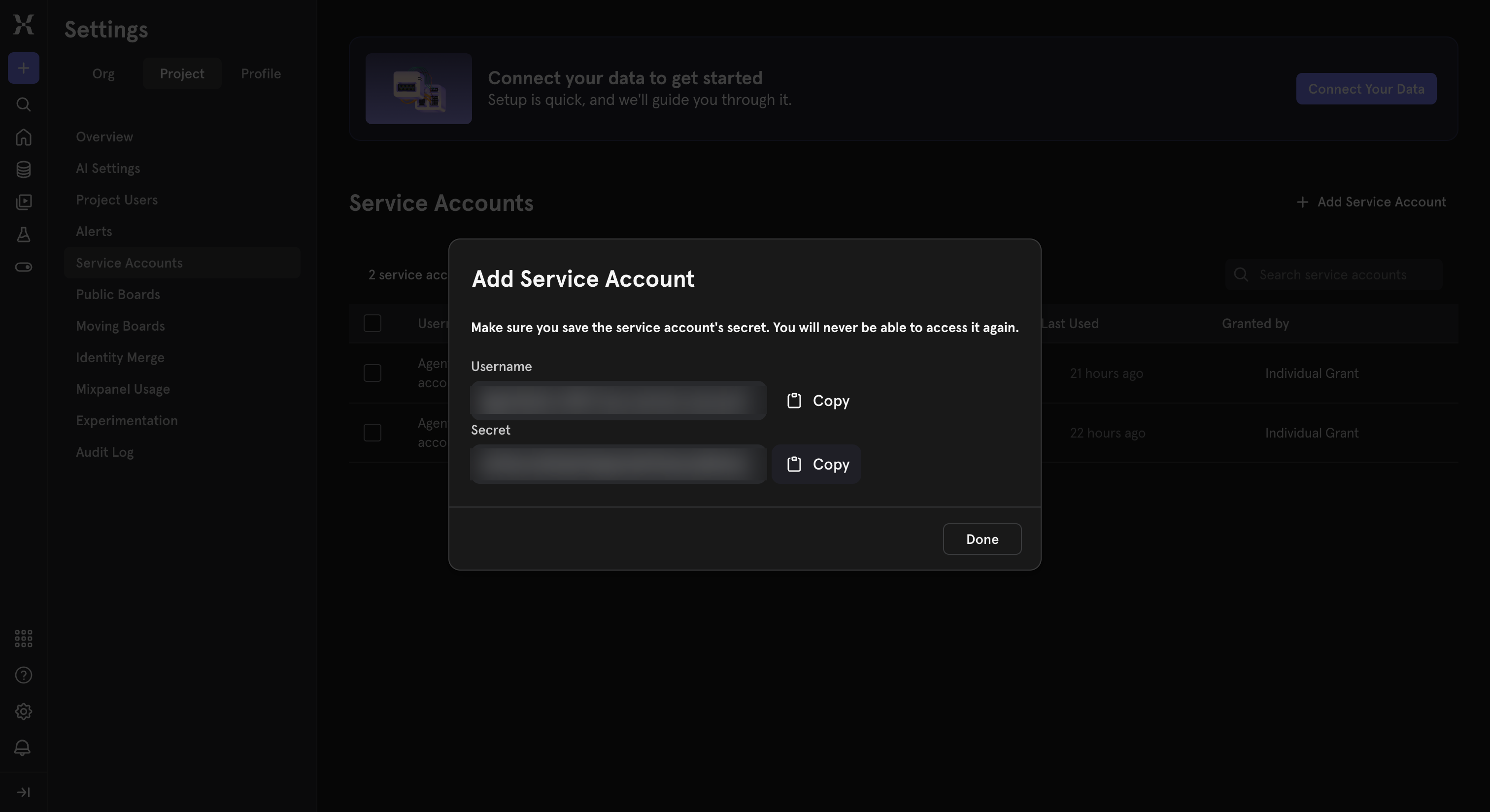
Sign in to Mixpanel and go to Settings → Project → Service Accounts.
-
Click Add Service Account, give it a name (for example,
Agent Auth), and choose a role. -
Copy the generated Username and Secret immediately — Mixpanel shows the secret only once.
-
-
Create a connection in Scalekit
- In the Scalekit dashboard, go to AgentKit → Connections → Create Connection.
- Search for Mixpanel Ingestion and click Create.
- Note the Connection name — use this as
connection_namein your code (e.g.,mixpanelingestion).
-
Add a connected account
Connected accounts link a specific user identifier in your system to a Mixpanel Service Account and region. Add one in the dashboard to test. In production, each user adds their own through the authorization link: they enter their credentials on the page it opens.
In the dashboard, to test
- Open the connection and click the Connected Accounts tab → Add account.
- Fill in Your User’s ID, the Username, Secret, and select the matching Data Residency.
- Click Save.
From your backend, if your app already has the credentials
For example, when users enter them on a settings page in your app:
import { ConnectorStatus } from '@scalekit-sdk/node'// Upsert the account, then make sure it is ACTIVE before the first tool call.async function connectUser(connectionName, identifier, details) {const authorizationDetails = { details: { case: 'staticAuth', value: { details } } }let { connectedAccount } = await scalekit.actions.upsertConnectedAccount({connectionName,identifier,authorizationDetails,})if (connectedAccount?.status !== ConnectorStatus.ACTIVE) {;({ connectedAccount } = await scalekit.actions.upsertConnectedAccount({connectionName,identifier,authorizationDetails,}))}return connectedAccount}// US region (default) — omit `domain` or set it to 'mixpanel.com/api'await connectUser('mixpanelingestion', 'user_123', {username: 'your-service-account-username',password: 'your-service-account-secret',domain: 'mixpanel.com/api',})// EU regionawait connectUser('mixpanelingestion', 'user_123', {username: 'your-eu-service-account-username',password: 'your-eu-service-account-secret',domain: 'eu.mixpanel.com/api',})# Upsert the account, then make sure it is ACTIVE before the first tool call.def connect_user(connection_name, identifier, details):authorization_details = {"static_auth": details}response = scalekit_client.actions.upsert_connected_account(connection_name=connection_name,identifier=identifier,authorization_details=authorization_details,)if response.connected_account.status != "ACTIVE":response = scalekit_client.actions.upsert_connected_account(connection_name=connection_name,identifier=identifier,authorization_details=authorization_details,)return response.connected_account# US region (default) — omit domain or set it to "mixpanel.com/api"connect_user("mixpanelingestion", "user_123", {"username": "your-service-account-username","password": "your-service-account-secret","domain": "mixpanel.com/api",})# EU regionconnect_user("mixpanelingestion", "user_123", {"username": "your-eu-service-account-username","password": "your-eu-service-account-secret","domain": "eu.mixpanel.com/api",})
-
Tools
Pass the exact name toexecute_toolmixpanelingestion_feature_flags_definitionsGet the full definitions of every feature flag/experiment configured in a Mixpanel project, including each flag's variants, rollout rules, and linked experiment.Read-onlyGet Feature Flag Definitions
Get the full definitions of every feature flag/experiment configured in a Mixpanel project, including each flag's variants, rollout rules, and linked experiment. Provide either 'project_token' or 'project_id' to authenticate (project_id uses your Service Account credentials).
Inputs
project_idstring- Your numeric Mixpanel Project ID, used if authenticating with a Service Account. Provide this or 'project_token'.
project_tokenstring- Your Mixpanel Project Token, used if authenticating without a Service Account. Provide this or 'project_id'.
mixpanelingestion_feature_flags_evaluateEvaluate all enabled Mixpanel feature flags and experiments for a given user, returning the variant each flag assigns them.Read-onlyEvaluate Feature Flags
Evaluate all enabled Mixpanel feature flags and experiments for a given user, returning the variant each flag assigns them. Provide either 'project_token' or 'project_id' to authenticate (project_id uses your Service Account credentials).
Inputs
contextobjectrequired- JSON object describing the user to evaluate flags for. Must include 'distinct_id'; may include 'device_id' and 'custom_properties' (used for targeting rules). Example: {"distinct_id": "user_00123", "custom_properties": {"plan": "pro"}}.
project_idstring- Your numeric Mixpanel Project ID, used if authenticating with a Service Account. Provide this or 'project_token'.
project_tokenstring- Your Mixpanel Project Token, used if authenticating without a Service Account. Provide this or 'project_id'.
mixpanelingestion_lookup_tables_listList the Lookup Tables defined in a Mixpanel project.Read-onlyList Lookup Tables
List the Lookup Tables defined in a Mixpanel project. Returns each table's id and name. Use the id with 'mixpanelingestion_lookup_table_replace' to update a table's contents, or find it in Lexicon under the lookup table's details.
Inputs
project_idstringrequired- Your numeric Mixpanel Project ID, required to authenticate Service Account requests. Find it in Mixpanel under Project Settings > Overview.
mixpanelingestion_group_batch_updateSend a batch of mixed group-profile updates to Mixpanel in a single call, analogous to 'mixpanelingestion_profile_batch_update' for user profiles.WriteBatch Update Groups
Send a batch of mixed group-profile updates to Mixpanel in a single call, analogous to 'mixpanelingestion_profile_batch_update' for user profiles. Each item in 'updates' is a fully-formed update object with its own "$token", "$group_key", "$group_id", and one operation key ($set, $set_once, $add, $union, $remove, $unset, or $delete). Example: [{"$token": "...", "$group_key": "Company", "$group_id": "Acme", "$set": {"Plan": "Enterprise"}}].
Inputs
updatesarrayrequired- Array of fully-formed group update objects, each with $token, $group_key, $group_id, and one operation key ($set/$set_once/$add/$union/$remove/$unset/$delete).
mixpanelingestion_group_removeRemove a specific value from a list-valued property on a Mixpanel group profile, analogous to 'mixpanelingestion_profile_remove' for user profiles.WriteRemove from Group List Property
Remove a specific value from a list-valued property on a Mixpanel group profile, analogous to 'mixpanelingestion_profile_remove' for user profiles. If the value is not present, no change is made.
Inputs
group_idstringrequired- The value identifying this specific group, e.g. the company name or account ID.
group_keystringrequired- The name of the group key as configured in Mixpanel, e.g. "Company" or "Account ID".
project_tokenstringrequired- Your Mixpanel Project Token (Project Settings > Overview). Embedded in the payload to authenticate the request.
removalsobjectrequired- JSON object mapping list-property names to the single value to remove from each. Example: {"Enabled Features": "beta-search"}.
ipinteger- Set to 1 to let Mixpanel geolocate the group profile from the request IP. Recommended to leave at 0 for server-side calls.one of
01default0 strictinteger- Set to 1 to have Mixpanel validate the record and return per-record error messages if validation fails.one of
01 verboseinteger- Set to 1 to receive a JSON object describing success/failure instead of a bare "1"/"0".one of
01
mixpanelingestion_group_setSet (overwrite) properties on a Mixpanel group profile (e.g.WriteSet Group Properties
Set (overwrite) properties on a Mixpanel group profile (e.g. a company or team account), analogous to 'mixpanelingestion_profile_set' for user profiles. Creates the group profile if it does not already exist. Requires Group Analytics to be enabled on your Mixpanel project.
- Idempotent
Inputs
group_idstringrequired- The value identifying this specific group, e.g. the company name or account ID.
group_keystringrequired- The name of the group key as configured in Mixpanel, e.g. "Company" or "Account ID".
project_tokenstringrequired- Your Mixpanel Project Token (Project Settings > Overview). Embedded in the payload to authenticate the request.
propertiesobjectrequired- JSON object of property names and values to set on the group profile, overwriting any existing values. Example: {"Plan": "Enterprise", "Seats": 50}.
ipinteger- Set to 1 to let Mixpanel geolocate the group profile from the request IP. Recommended to leave at 0 for server-side calls.one of
01default0 strictinteger- Set to 1 to have Mixpanel validate the record and return per-record error messages if validation fails.one of
01 verboseinteger- Set to 1 to receive a JSON object describing success/failure instead of a bare "1"/"0".one of
01
mixpanelingestion_group_set_onceSet properties on a Mixpanel group profile only if they are not already set — existing values are never overwritten, analogous to 'mixpanelingestion_profile_set_once' for user profiles.WriteSet Group Properties Once
Set properties on a Mixpanel group profile only if they are not already set — existing values are never overwritten, analogous to 'mixpanelingestion_profile_set_once' for user profiles. Creates the group profile if it does not already exist.
- Idempotent
Inputs
group_idstringrequired- The value identifying this specific group, e.g. the company name or account ID.
group_keystringrequired- The name of the group key as configured in Mixpanel, e.g. "Company" or "Account ID".
project_tokenstringrequired- Your Mixpanel Project Token (Project Settings > Overview). Embedded in the payload to authenticate the request.
propertiesobjectrequired- JSON object of property names and values to set only if not already present on the group profile. Example: {"First Seen": "2026-01-01"}.
ipinteger- Set to 1 to let Mixpanel geolocate the group profile from the request IP. Recommended to leave at 0 for server-side calls.one of
01default0 strictinteger- Set to 1 to have Mixpanel validate the record and return per-record error messages if validation fails.one of
01 verboseinteger- Set to 1 to receive a JSON object describing success/failure instead of a bare "1"/"0".one of
01
mixpanelingestion_group_unionAdd values to a list-valued property on a Mixpanel group profile, ensuring each value only appears once, analogous to 'mixpanelingestion_profile_union' for user profiles.WriteUnion Group List Property
Add values to a list-valued property on a Mixpanel group profile, ensuring each value only appears once, analogous to 'mixpanelingestion_profile_union' for user profiles. Creates the group profile if it does not already exist.
- Idempotent
Inputs
group_idstringrequired- The value identifying this specific group, e.g. the company name or account ID.
group_keystringrequired- The name of the group key as configured in Mixpanel, e.g. "Company" or "Account ID".
project_tokenstringrequired- Your Mixpanel Project Token (Project Settings > Overview). Embedded in the payload to authenticate the request.
unionsobjectrequired- JSON object mapping list-property names to arrays of values to add (duplicates are not re-added). Example: {"Enabled Features": ["beta-search", "dark-mode"]}.
ipinteger- Set to 1 to let Mixpanel geolocate the group profile from the request IP. Recommended to leave at 0 for server-side calls.one of
01default0 strictinteger- Set to 1 to have Mixpanel validate the record and return per-record error messages if validation fails.one of
01 verboseinteger- Set to 1 to receive a JSON object describing success/failure instead of a bare "1"/"0".one of
01
mixpanelingestion_group_unsetPermanently remove one or more named properties (and their values) from a Mixpanel group profile, analogous to 'mixpanelingestion_profile_unset' for user profiles.WriteDelete Group Properties
Permanently remove one or more named properties (and their values) from a Mixpanel group profile, analogous to 'mixpanelingestion_profile_unset' for user profiles.
- Idempotent
Inputs
group_idstringrequired- The value identifying this specific group, e.g. the company name or account ID.
group_keystringrequired- The name of the group key as configured in Mixpanel, e.g. "Company" or "Account ID".
project_tokenstringrequired- Your Mixpanel Project Token (Project Settings > Overview). Embedded in the payload to authenticate the request.
property_namesarrayrequired- Array of property names to permanently remove from the group profile. Example: ["Trial Ends At"].
ipinteger- Set to 1 to let Mixpanel geolocate the group profile from the request IP. Recommended to leave at 0 for server-side calls.one of
01default0 strictinteger- Set to 1 to have Mixpanel validate the record and return per-record error messages if validation fails.one of
01 verboseinteger- Set to 1 to receive a JSON object describing success/failure instead of a bare "1"/"0".one of
01
mixpanelingestion_identity_createLink an anonymous distinct_id to a known, identified distinct_id by sending a Mixpanel $identify event via /track.WriteCreate Identity ($identify)
Link an anonymous distinct_id to a known, identified distinct_id by sending a Mixpanel $identify event via /track. Use this the first time you learn a user's real identifier (e.g. after login or signup) so that pre-login and post-login activity is merged onto one profile. Returns the literal text "1" on success or "0" on failure.
Inputs
anon_idstringrequired- The anonymous distinct_id that was used before the user was identified (mapped to $anon_id).
identified_idstringrequired- The known, identified distinct_id to link the anonymous ID to (mapped to $identified_id).
project_tokenstringrequired- Your Mixpanel Project Token (Project Settings > Overview). Embedded in the event payload to authenticate the request.
mixpanelingestion_identity_create_aliasCreate a legacy alias linking a new distinct_id to an existing one by sending a Mixpanel $create_alias event via /track.WriteCreate Alias (Legacy)
Create a legacy alias linking a new distinct_id to an existing one by sending a Mixpanel $create_alias event via /track. This is the legacy identity-linking mechanism; for new integrations prefer 'mixpanelingestion_identity_create' ($identify) or 'mixpanelingestion_identity_merge'. Returns the literal text "1" on success or "0" on failure.
Inputs
aliasstringrequired- The new alias distinct_id to associate with the existing distinct_id.
distinct_idstringrequired- The existing distinct_id that the alias should resolve to.
project_tokenstringrequired- Your Mixpanel Project Token (Project Settings > Overview). Embedded in the event payload to authenticate the request.
mixpanelingestion_identity_mergeMerge two distinct_ids into a single identity using Mixpanel's modern Identity Merge API (a $merge event sent through /import, authenticated with your Service Account).WriteMerge Identities
Merge two distinct_ids into a single identity using Mixpanel's modern Identity Merge API (a $merge event sent through /import, authenticated with your Service Account). All historical events and profile data from both distinct_ids are combined under one identity. Use this instead of the legacy 'mixpanelingestion_identity_create_alias' for new integrations. Requires your Mixpanel project to use 'Original ID Merge' (Project Settings > Identity Merge) — projects on 'Simplified ID Merge' reject $merge events outright ("identity events are not allowed when project is using simplified identity management"); use 'mixpanelingestion_identity_create_alias' instead on those projects.
Inputs
distinct_id_1stringrequired- The first distinct_id to merge (order does not matter).
distinct_id_2stringrequired- The second distinct_id to merge (order does not matter).
project_idstringrequired- Your numeric Mixpanel Project ID, required to authenticate Service Account requests. Find it in Mixpanel under Project Settings > Overview.
mixpanelingestion_import_eventsImport a batch of up to 2000 events into Mixpanel via the modern, Service Account-authenticated /import endpoint.WriteImport Events (Batch)
Import a batch of up to 2000 events into Mixpanel via the modern, Service Account-authenticated /import endpoint. This is Mixpanel's recommended way to send events from a trusted server-side integration (unlike the classic /track endpoint). Each event needs an 'event' name and a 'properties' object containing at minimum 'time' (epoch seconds/ms), 'distinct_id', and '$insert_id' (a unique string used for deduplication). With strict=1 (default, recommended), Mixpanel validates every event and returns per-record errors for any that fail.
Inputs
eventsarrayrequired- Array of event objects to import (max 2000 per call, 10MB uncompressed total). Each object must have 'event' (string) and 'properties' (object) with 'properties.time' (epoch seconds/ms), 'properties.distinct_id', and 'properties.$insert_id' for deduplication, plus any custom properties. Example: [{"event": "Purchased", "properties": {"time": 1719859200, "distinct_id": "user_00123", "$insert_id": "a1b2c3", "amount": 19.99}}]
project_idstringrequired- Your numeric Mixpanel Project ID, required to authenticate Service Account requests. Find it in Mixpanel under Project Settings > Overview.
strictstring- When "1" (recommended), Mixpanel validates the whole batch and returns per-event errors for any records that fail. When "0", invalid records are silently dropped.one of
01default1
mixpanelingestion_profile_appendAppend a value to a list-valued property on a Mixpanel user profile via Engage $append.WriteAppend to Profile List Property
Append a value to a list-valued property on a Mixpanel user profile via Engage $append. If the property does not yet exist, it is created as a single-element list. Unlike $union, duplicate values are allowed. Useful for ordered logs like "Recent Searches".
Inputs
appendsobjectrequired- JSON object mapping list-property names to the single value to append to each. Example: {"Recent Searches": "running shoes"}.
distinct_idstringrequired- The unique identifier of the profile to update.
project_tokenstringrequired- Your Mixpanel Project Token (Project Settings > Overview). Embedded in the payload to authenticate the request.
ipinteger- Set to 1 to let Mixpanel geolocate the profile from the request IP. Recommended to leave at 0 for server-side calls.one of
01default0 strictinteger- Set to 1 to have Mixpanel validate the record and return per-record error messages if validation fails.one of
01 verboseinteger- Set to 1 to receive a JSON object describing success/failure instead of a bare "1"/"0".one of
01
mixpanelingestion_profile_batch_updateSend a batch of mixed user-profile updates to Mixpanel Engage in a single call.WriteBatch Update Profiles
Send a batch of mixed user-profile updates to Mixpanel Engage in a single call. Each item in 'updates' is a fully-formed update object with its own "$token", "$distinct_id", and one operation key ($set, $set_once, $add, $union, $append, $remove, $unset, or $delete) — the same shapes used by 'mixpanelingestion_profile_set' etc. Example: [{"$token": "...", "$distinct_id": "u1", "$set": {"Plan": "Pro"}}, {"$token": "...", "$distinct_id": "u2", "$add": {"Coins": 13}}]. Use this to reduce round trips when updating many profiles at once.
Inputs
updatesarrayrequired- Array of fully-formed profile update objects, each with $token, $distinct_id, and one operation key ($set/$set_once/$add/$union/$append/$remove/$unset/$delete).
mixpanelingestion_profile_incrementIncrement (or decrement, using a negative value) numeric properties on a Mixpanel user profile via Engage $add.WriteIncrement Numeric Profile Property
Increment (or decrement, using a negative value) numeric properties on a Mixpanel user profile via Engage $add. The given amounts are added to the existing values; if a property is not yet present it is treated as 0. Useful for counters such as "Number of Logins" or "Files Uploaded".
Inputs
distinct_idstringrequired- The unique identifier of the profile to update.
incrementsobjectrequired- JSON object mapping property names to numeric amounts to add (use a negative number to decrement). Example: {"Number of Logins": 1, "Credits": -5}.
project_tokenstringrequired- Your Mixpanel Project Token (Project Settings > Overview). Embedded in the payload to authenticate the request.
ipinteger- Set to 1 to let Mixpanel geolocate the profile from the request IP. Recommended to leave at 0 for server-side calls.one of
01default0 strictinteger- Set to 1 to have Mixpanel validate the record and return per-record error messages if validation fails.one of
01 verboseinteger- Set to 1 to receive a JSON object describing success/failure instead of a bare "1"/"0".one of
01
mixpanelingestion_profile_removeRemove a specific value from a list-valued property on a Mixpanel user profile via Engage $remove.WriteRemove from Profile List Property
Remove a specific value from a list-valued property on a Mixpanel user profile via Engage $remove. If the value is not present, no change is made. The opposite of 'mixpanelingestion_profile_append'.
Inputs
distinct_idstringrequired- The unique identifier of the profile to update.
project_tokenstringrequired- Your Mixpanel Project Token (Project Settings > Overview). Embedded in the payload to authenticate the request.
removalsobjectrequired- JSON object mapping list-property names to the single value to remove from each. Example: {"Recent Searches": "running shoes"}.
ipinteger- Set to 1 to let Mixpanel geolocate the profile from the request IP. Recommended to leave at 0 for server-side calls.one of
01default0 strictinteger- Set to 1 to have Mixpanel validate the record and return per-record error messages if validation fails.one of
01 verboseinteger- Set to 1 to receive a JSON object describing success/failure instead of a bare "1"/"0".one of
01
mixpanelingestion_profile_setSet (overwrite) properties on a Mixpanel user profile via Engage $set.WriteSet Profile Properties
Set (overwrite) properties on a Mixpanel user profile via Engage $set. Creates the profile if it does not already exist. Use this for properties that should always reflect the latest value, such as "Plan" or "Last Login". For properties that should only be set the first time, use 'mixpanelingestion_profile_set_once' instead.
- Idempotent
Inputs
distinct_idstringrequired- The unique identifier of the profile to update.
project_tokenstringrequired- Your Mixpanel Project Token (Project Settings > Overview). Embedded in the payload to authenticate the request.
propertiesobjectrequired- JSON object of property names and values to set on the profile, overwriting any existing values. Example: {"Plan": "Pro", "$email": "user@example.com"}.
ipinteger- Set to 1 to let Mixpanel geolocate the profile from the request IP. Recommended to leave at 0 for server-side calls to avoid overwriting the profile's real geolocation with your server's location.one of
01default0 strictinteger- Set to 1 to have Mixpanel validate the record and return per-record error messages if validation fails.one of
01 verboseinteger- Set to 1 to receive a JSON object describing success/failure instead of a bare "1"/"0".one of
01
mixpanelingestion_profile_set_onceSet properties on a Mixpanel user profile via Engage $set_once, but only if they are not already set — existing values are never overwritten.WriteSet Profile Properties Once
Set properties on a Mixpanel user profile via Engage $set_once, but only if they are not already set — existing values are never overwritten. Creates the profile if it does not already exist. Useful for properties like "First Login Date" that should be recorded once and never changed.
- Idempotent
Inputs
distinct_idstringrequired- The unique identifier of the profile to update.
project_tokenstringrequired- Your Mixpanel Project Token (Project Settings > Overview). Embedded in the payload to authenticate the request.
propertiesobjectrequired- JSON object of property names and values to set only if not already present on the profile. Example: {"First Login Date": "2026-06-01"}.
ipinteger- Set to 1 to let Mixpanel geolocate the profile from the request IP. Recommended to leave at 0 for server-side calls.one of
01default0 strictinteger- Set to 1 to have Mixpanel validate the record and return per-record error messages if validation fails.one of
01 verboseinteger- Set to 1 to receive a JSON object describing success/failure instead of a bare "1"/"0".one of
01
mixpanelingestion_profile_unionAdd values to a list-valued property on a Mixpanel user profile via Engage $union, ensuring each value only appears once in the resulting list.WriteUnion Profile List Property
Add values to a list-valued property on a Mixpanel user profile via Engage $union, ensuring each value only appears once in the resulting list. Creates the profile if it does not already exist. Useful for properties like "Purchased Categories" that accumulate unique values over time.
- Idempotent
Inputs
distinct_idstringrequired- The unique identifier of the profile to update.
project_tokenstringrequired- Your Mixpanel Project Token (Project Settings > Overview). Embedded in the payload to authenticate the request.
unionsobjectrequired- JSON object mapping list-property names to arrays of values to add (duplicates are not re-added). Example: {"Purchased Categories": ["Books", "Electronics"]}.
ipinteger- Set to 1 to let Mixpanel geolocate the profile from the request IP. Recommended to leave at 0 for server-side calls.one of
01default0 strictinteger- Set to 1 to have Mixpanel validate the record and return per-record error messages if validation fails.one of
01 verboseinteger- Set to 1 to receive a JSON object describing success/failure instead of a bare "1"/"0".one of
01
mixpanelingestion_profile_unsetPermanently remove one or more named properties (and their values) from a Mixpanel user profile via Engage $unset.WriteDelete Profile Properties
Permanently remove one or more named properties (and their values) from a Mixpanel user profile via Engage $unset. This deletes the properties themselves, not the profile — use 'mixpanelingestion_profile_delete' to delete the whole profile.
- Idempotent
Inputs
distinct_idstringrequired- The unique identifier of the profile to update.
project_tokenstringrequired- Your Mixpanel Project Token (Project Settings > Overview). Embedded in the payload to authenticate the request.
property_namesarrayrequired- Array of property names to permanently remove from the profile. Example: ["$email", "Trial Ends At"].
ipinteger- Set to 1 to let Mixpanel geolocate the profile from the request IP. Recommended to leave at 0 for server-side calls.one of
01default0 strictinteger- Set to 1 to have Mixpanel validate the record and return per-record error messages if validation fails.one of
01 verboseinteger- Set to 1 to receive a JSON object describing success/failure instead of a bare "1"/"0".one of
01
mixpanelingestion_track_eventSend a single event to Mixpanel via the classic /track endpoint, authenticated with your Mixpanel Project Token (not your Service Account).WriteTrack Event
Send a single event to Mixpanel via the classic /track endpoint, authenticated with your Mixpanel Project Token (not your Service Account). Use this for lightweight, fire-and-forget event tracking. For reliable server-side ingestion with validation and duplicate protection, prefer 'mixpanelingestion_import_events' instead. Returns the literal text "1" on success or "0" on failure unless 'verbose' is set to 1.
Inputs
eventstringrequired- The name of the event to track, e.g. "Signed up" or "Purchased item".
project_tokenstringrequired- Your Mixpanel Project Token (Project Settings > Overview). This is embedded in the event payload and is how /track authenticates the request — it is not your Service Account.
distinct_idstring- The unique identifier of the user who performed the event. If omitted and 'ip' is set to 1, Mixpanel derives one from the request IP.
insert_idstring- A unique identifier for this event used for deduplication (mapped to $insert_id). Events with identical (event, time, distinct_id, insert_id) are deduplicated; only the latest is kept. Max 36 bytes, alphanumeric or dash.
ipinteger- Set to 1 to have Mixpanel derive geolocation and distinct_id from the request's IP address. Recommended to leave at 0 for server-side calls to avoid attributing your server's location to the event.one of
01default0 profile_propertiesobject- Additional custom event properties to merge into the event's properties object, as a JSON object. Example: {"Plan": "Pro", "Referrer": "google"}.
timeinteger- The time the event occurred, in seconds or milliseconds since the UTC epoch. If omitted, Mixpanel uses the ingestion time. Future timestamps are overwritten with the current time.
verboseinteger- Set to 1 to receive a JSON object describing success/failure instead of a bare "1"/"0".one of
01
mixpanelingestion_group_deletePermanently delete a Mixpanel group profile and all of its properties, analogous to 'mixpanelingestion_profile_delete' for user profiles.DestructiveDelete Group
Permanently delete a Mixpanel group profile and all of its properties, analogous to 'mixpanelingestion_profile_delete' for user profiles. This does not delete historical events associated with the group.
- Idempotent
Inputs
group_idstringrequired- The value identifying this specific group, e.g. the company name or account ID.
group_keystringrequired- The name of the group key as configured in Mixpanel, e.g. "Company" or "Account ID".
project_tokenstringrequired- Your Mixpanel Project Token (Project Settings > Overview). Embedded in the payload to authenticate the request.
verboseinteger- Set to 1 to receive a JSON object describing success/failure instead of a bare "1"/"0".one of
01
mixpanelingestion_lookup_table_replaceReplace the entire contents of a Mixpanel Lookup Table with new CSV data.DestructiveReplace Lookup Table
Replace the entire contents of a Mixpanel Lookup Table with new CSV data. This overwrites all existing rows in the table — use 'mixpanelingestion_lookup_tables_list' first to find the table's id. The first column of the CSV must be the table's key (matching the property it enriches); subsequent columns become additional properties joined onto matching events or profiles.
- Idempotent
Inputs
csv_datastringrequired- The full replacement contents of the lookup table as CSV text, including a header row. Example: "id,field1,field2\nkey1,v1,z1\nkey2,z1,z2\n".
project_idstringrequired- Your numeric Mixpanel Project ID, required to authenticate Service Account requests. Find it in Mixpanel under Project Settings > Overview.
table_idstringrequired- The UUID of the lookup table to replace. Retrieve it with 'mixpanelingestion_lookup_tables_list' or from Lexicon under the lookup table's details.
mixpanelingestion_profile_deletePermanently delete a Mixpanel user profile and all of its properties via Engage $delete.DestructiveDelete Profile
Permanently delete a Mixpanel user profile and all of its properties via Engage $delete. This does not delete the user's historical events, only their profile. If duplicate profiles exist due to identity merging, set 'ignore_alias' to true so you don't accidentally delete the original profile when the distinct_id passed in is actually an alias.
- Idempotent
Inputs
distinct_idstringrequired- The unique identifier of the profile to permanently delete.
project_tokenstringrequired- Your Mixpanel Project Token (Project Settings > Overview). Embedded in the payload to authenticate the request.
ignore_aliasboolean- Set to true if the distinct_id may be an alias, to avoid deleting the original profile it resolves to.default
false strictinteger- Set to 1 to have Mixpanel validate the record and return per-record error messages if validation fails.one of
01 verboseinteger- Set to 1 to receive a JSON object describing success/failure instead of a bare "1"/"0".one of
01
No tools match.


