


The Mixpanel Compliance connector lets your AI agent act in each user's Mixpanel Compliance account. Each user connects their own Mixpanel Compliance access token once, and Scalekit sends it with every call, so your agent never handles credentials. It comes with 5 tools.
- Tools
- 5
- What they doRead · write · destructive
- 2 · 2 · 12 read2 write1 destructive
- Users sign in with
- Access token
Setup
Install the SDK
Terminal window npm install @scalekit-sdk/node dotenvTerminal window pip install scalekit-sdk-python python-dotenvSet your credentials
Add your Scalekit credentials to your
.envfile. Find values in app.scalekit.com > Developers > API Credentials..env SCALEKIT_ENVIRONMENT_URL=<your-environment-url>SCALEKIT_CLIENT_ID=<your-client-id>SCALEKIT_CLIENT_SECRET=<your-client-secret>Create the Mixpanel Compliance connection
In AgentKit > Connections, create a Mixpanel Compliance connection. The name you give it is the
connection_nameyour code passes. See Configure connections.Console steps with screenshots
Register your Mixpanel GDPR/CCPA compliance token with Scalekit so it can authenticate and proxy data deletion and retrieval requests on behalf of your users. This connector uses a Bearer token.
-
Find your Mixpanel data residency region
Mixpanel hosts projects in three separate data residency regions. Before generating a token, confirm which region your project lives in:
Region API host United States (default) mixpanel.com/apiEuropean Union eu.mixpanel.com/apiIndia in.mixpanel.com/api -
Get your GDPR compliance token
-
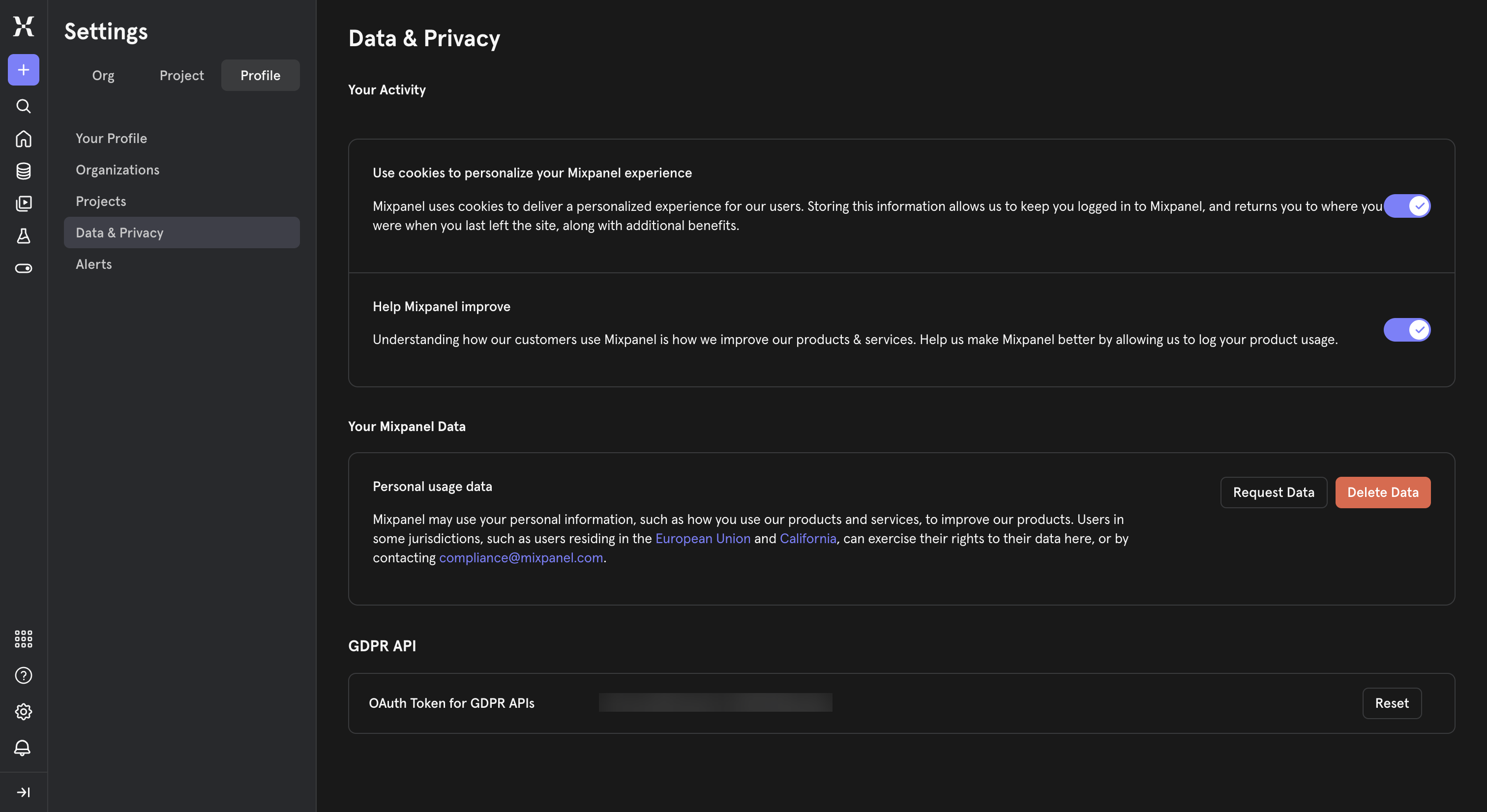
Sign in to Mixpanel and go to Settings → Profile → Data & Privacy.
-
Under GDPR API, copy the OAuth Token for GDPR APIs. If none exists yet, click Reset to generate one.
-
-
Create a connection in Scalekit
- In the Scalekit dashboard, go to AgentKit → Connections → Create Connection.
- Search for Mixpanel Compliance and click Create.
- Note the Connection name — use this as
connection_namein your code (e.g.,mixpanelcompliance).
-
Add a connected account
Connected accounts link a specific user identifier in your system to a GDPR compliance token and region. Add one in the dashboard to test. In production, each user adds their own through the authorization link: they enter their credentials on the page it opens.
In the dashboard, to test
- Open the connection and click the Connected Accounts tab → Add account.
- Fill in Your User’s ID, the GDPR Token, and select the matching Data Residency.
- Click Save.
From your backend, if your app already has the credentials
For example, when users enter them on a settings page in your app:
import { ConnectorStatus } from '@scalekit-sdk/node'// Upsert the account, then make sure it is ACTIVE before the first tool call.async function connectUser(connectionName, identifier, details) {const authorizationDetails = { details: { case: 'staticAuth', value: { details } } }let { connectedAccount } = await scalekit.actions.upsertConnectedAccount({connectionName,identifier,authorizationDetails,})if (connectedAccount?.status !== ConnectorStatus.ACTIVE) {;({ connectedAccount } = await scalekit.actions.upsertConnectedAccount({connectionName,identifier,authorizationDetails,}))}return connectedAccount}// US region (default) — omit `domain` or set it to 'mixpanel.com/api'await connectUser('mixpanelcompliance', 'user_123', {token: 'your-gdpr-compliance-token',domain: 'mixpanel.com/api',})// EU regionawait connectUser('mixpanelcompliance', 'user_123', {token: 'your-eu-gdpr-compliance-token',domain: 'eu.mixpanel.com/api',})# Upsert the account, then make sure it is ACTIVE before the first tool call.def connect_user(connection_name, identifier, details):authorization_details = {"static_auth": details}response = scalekit_client.actions.upsert_connected_account(connection_name=connection_name,identifier=identifier,authorization_details=authorization_details,)if response.connected_account.status != "ACTIVE":response = scalekit_client.actions.upsert_connected_account(connection_name=connection_name,identifier=identifier,authorization_details=authorization_details,)return response.connected_account# US region (default) — omit domain or set it to "mixpanel.com/api"connect_user("mixpanelcompliance", "user_123", {"token": "your-gdpr-compliance-token","domain": "mixpanel.com/api",})# EU regionconnect_user("mixpanelcompliance", "user_123", {"token": "your-eu-gdpr-compliance-token","domain": "eu.mixpanel.com/api",})
-
Authorize a user and make your first call
quickstart.mts import { ScalekitClient } from '@scalekit-sdk/node'import 'dotenv/config'import { createInterface } from 'node:readline/promises'const scalekit = new ScalekitClient(process.env.SCALEKIT_ENVIRONMENT_URL,process.env.SCALEKIT_CLIENT_ID,process.env.SCALEKIT_CLIENT_SECRET,)const actions = scalekit.actionsconst connector = 'mixpanelcompliance'const identifier = 'user_123'// Generate an authorization link for the userconst { link } = await actions.getAuthorizationLink({ connectionName: connector, identifier })console.log('Authorize Mixpanel Compliance:', link)const rl = createInterface({ input: process.stdin, output: process.stdout })await rl.question('Press Enter after authorizing...')rl.close()// Make your first callconst result = await actions.executeTool({connector,identifier,toolName: 'mixpanelcompliance_gdpr_deletion_status',toolInput: { tracking_id: 'YOUR_TRACKING_ID', project_token: 'YOUR_PROJECT_TOKEN' },})console.log(result)Terminal window npx tsx quickstart.mtsquickstart.py import osfrom scalekit import ScalekitClientfrom dotenv import load_dotenvload_dotenv()scalekit_client = ScalekitClient(env_url=os.getenv("SCALEKIT_ENVIRONMENT_URL"),client_id=os.getenv("SCALEKIT_CLIENT_ID"),client_secret=os.getenv("SCALEKIT_CLIENT_SECRET"),)actions = scalekit_client.actionsconnection_name = "mixpanelcompliance"identifier = "user_123"# Generate an authorization link for the userlink_response = actions.get_authorization_link(connection_name=connection_name,identifier=identifier,)print("Authorize Mixpanel Compliance:", link_response.link)input("Press Enter after authorizing...")# Make your first callresult = actions.execute_tool(tool_input={"tracking_id":"YOUR_TRACKING_ID","project_token":"YOUR_PROJECT_TOKEN"},tool_name="mixpanelcompliance_gdpr_deletion_status",connection_name=connection_name,identifier=identifier,)print(result)Terminal window python quickstart.pyEach user opens the link once and enters their Mixpanel credentials there. If your app already has a user's credentials, add the account from your backend instead, as the console steps above show. See Authorize a user for the full flow and statuses.
Tools
Pass the exact name toexecute_toolmixpanelcompliance_gdpr_deletion_statusCheck the status of a GDPR/CCPA data deletion request previously created with 'mixpanelcompliance_gdpr_deletion_create'.Read-onlyGet Data Deletion Status
Check the status of a GDPR/CCPA data deletion request previously created with 'mixpanelcompliance_gdpr_deletion_create'. The response's status field is one of: PENDING, STAGING, STARTED, SUCCESS, FAILURE, REVOKED, NOT_FOUND, or UNKNOWN. Deletions can take up to 30 days to reach SUCCESS. While a request is still PENDING or STAGING it may still be cancellable via 'mixpanelcompliance_gdpr_deletion_cancel'.
Inputs
project_tokenstringrequired- Your Mixpanel Project Token (Project Settings > Overview), identifying which project to check this request against. Sent as the 'token' query parameter. This is distinct from the GDPR Compliance Token used to authenticate this connection.
tracking_idstringrequired- The tracking ID returned by 'mixpanelcompliance_gdpr_deletion_create' when the deletion request was created.
mixpanelcompliance_gdpr_retrieval_statusCheck the status of a GDPR/CCPA data retrieval (Subject Access Request) previously created with 'mixpanelcompliance_gdpr_retrieval_create'.Read-onlyGet Data Retrieval Status
Check the status of a GDPR/CCPA data retrieval (Subject Access Request) previously created with 'mixpanelcompliance_gdpr_retrieval_create'. The response's status field is one of: PENDING, STAGING, STARTED, SUCCESS, FAILURE, REVOKED, NOT_FOUND, or UNKNOWN. Poll this until the status reaches SUCCESS (the export is ready), FAILURE, or REVOKED.
Inputs
project_tokenstringrequired- Your Mixpanel Project Token (Project Settings > Overview), identifying which project to check this request against. Sent as the 'token' query parameter. This is distinct from the GDPR Compliance Token used to authenticate this connection.
tracking_idstringrequired- The tracking ID returned by 'mixpanelcompliance_gdpr_retrieval_create' when the retrieval request was created.
mixpanelcompliance_gdpr_deletion_cancelCancel a pending GDPR/CCPA data deletion request before Mixpanel begins permanently erasing the data.WriteCancel Data Deletion Request
Cancel a pending GDPR/CCPA data deletion request before Mixpanel begins permanently erasing the data. Returns no content on success. Cancellation can fail once the deletion has already progressed too far to stop — check 'mixpanelcompliance_gdpr_deletion_status' first if you're unsure, and be prepared for this call to be rejected once a deletion is underway.
- Idempotent
Inputs
project_tokenstringrequired- Your Mixpanel Project Token (Project Settings > Overview), identifying which project this request applies to. Sent as the 'token' query parameter. This is distinct from the GDPR Compliance Token used to authenticate this connection.
tracking_idstringrequired- The tracking ID returned by 'mixpanelcompliance_gdpr_deletion_create' when the deletion request was created.
mixpanelcompliance_gdpr_retrieval_createCreate a GDPR or CCPA Subject Access Request (SAR) for one or more Mixpanel distinct_ids.WriteCreate Data Retrieval Request
Create a GDPR or CCPA Subject Access Request (SAR) for one or more Mixpanel distinct_ids. Mixpanel asynchronously compiles an export of every event and profile property it holds for the given distinct_ids so you can fulfill a data subject's access request. This call only queues the export — use 'mixpanelcompliance_gdpr_retrieval_status' with the returned tracking_id to poll for completion and get the download details.
Inputs
distinct_idsarrayrequired- The Mixpanel distinct_ids to retrieve all held data for. Mixpanel accepts at most 2000 distinct_ids per retrieval request — split larger batches into multiple calls.
project_tokenstringrequired- Your Mixpanel Project Token (Project Settings > Overview), identifying which project to run this request against. Sent as the 'token' query parameter. This is distinct from the GDPR Compliance Token used to authenticate this connection.
compliance_typestring- The privacy regulation this request is being made under. Defaults to 'GDPR' when omitted.one of
GDPRCCPAdefaultGDPR disclosure_typestring- The category of data to disclose. Required by Mixpanel when compliance_type is CCPA; ignored for GDPR requests.one of
DataCategoriesSources
mixpanelcompliance_gdpr_deletion_createPermanently delete ALL data Mixpanel holds for the given distinct_ids — every event and profile property, across all time.DestructiveCreate Data Deletion Request
Permanently delete ALL data Mixpanel holds for the given distinct_ids — every event and profile property, across all time. This is irreversible once processing completes, and per Mixpanel's GDPR/CCPA documentation it can take up to 30 days to fully propagate through Mixpanel's systems. Only call this to fulfill a genuine right-to-erasure request — never speculatively or for testing. Use 'mixpanelcompliance_gdpr_deletion_status' with the returned tracking_id to monitor progress, and 'mixpanelcompliance_gdpr_deletion_cancel' to attempt to stop it before processing starts.
Inputs
distinct_idsarrayrequired- The Mixpanel distinct_ids whose data will be PERMANENTLY deleted. This cannot be undone. Mixpanel accepts at most 1999 distinct_ids per deletion request — split larger batches into multiple calls.
project_tokenstringrequired- Your Mixpanel Project Token (Project Settings > Overview), identifying which project to run this request against. Sent as the 'token' query parameter. This is distinct from the GDPR Compliance Token used to authenticate this connection.
compliance_typestring- The privacy regulation this request is being made under. Defaults to 'GDPR' when omitted.one of
GDPRCCPAdefaultGDPR
No tools match.


