


The Mixpanel Analytics connector lets your AI agent work with Mixpanel Analytics. You connect it once with a service account, and Scalekit authenticates every call, so your agent never handles credentials. It comes with 51 tools.
- Tools
- 51
- What they doRead · write · destructive
- 32 · 11 · 832 read11 write8 destructive
- Users sign in with
- Service account
Setup
Install the SDK
Terminal window npm install @scalekit-sdk/node dotenvTerminal window pip install scalekit-sdk-python python-dotenvSet your credentials
Add your Scalekit credentials to your
.envfile. Find values in app.scalekit.com > Developers > API Credentials..env SCALEKIT_ENVIRONMENT_URL=<your-environment-url>SCALEKIT_CLIENT_ID=<your-client-id>SCALEKIT_CLIENT_SECRET=<your-client-secret>Create the Mixpanel Analytics connection
In AgentKit > Connections, create a Mixpanel Analytics connection. The name you give it is the
connection_nameyour code passes. See Configure connections.Console steps with screenshots
Register your Mixpanel Service Account username and secret with Scalekit so it can authenticate and proxy requests on behalf of your users. Mixpanel uses HTTP Basic Auth — the Service Account username is the username and the secret is the password. There is no redirect URI or OAuth flow.
-
Find your Mixpanel data residency region
Mixpanel hosts projects in three separate data residency regions. Before generating a Service Account, confirm which region your project lives in:
Region API host United States (default) mixpanel.com/apiEuropean Union eu.mixpanel.com/apiIndia in.mixpanel.com/api -
Create a Service Account
-
Sign in to Mixpanel and go to Settings → Project → Service Accounts.
-
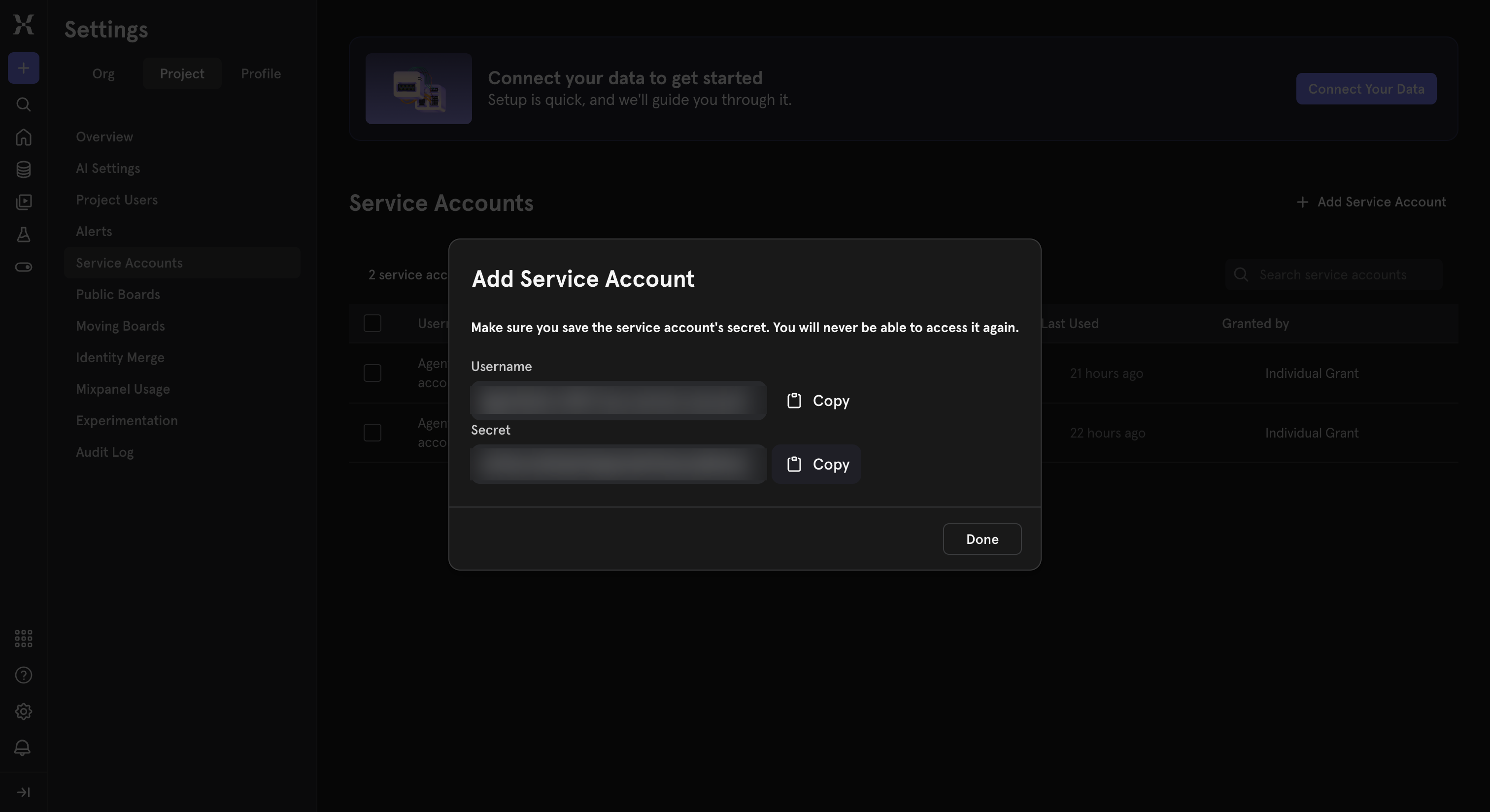
Click Add Service Account, give it a name (for example,
Agent Auth), and choose a role. -
Copy the generated Username and Secret immediately — Mixpanel shows the secret only once.
-
-
Create a connection in Scalekit
- In the Scalekit dashboard, go to AgentKit → Connections → Create Connection.
- Search for Mixpanel Analytics and click Create.
- Note the Connection name — use this as
connection_namein your code (e.g.,mixpanelanalytics).
-
Add a connected account
Connected accounts link a specific user identifier in your system to a Mixpanel Service Account and region. Add one in the dashboard to test. In production, each user adds their own through the authorization link: they enter their credentials on the page it opens.
In the dashboard, to test
- Open the connection and click the Connected Accounts tab → Add account.
- Fill in Your User’s ID, the Username, Secret, and select the matching Data Residency.
- Click Save.
From your backend, if your app already has the credentials
For example, when users enter them on a settings page in your app:
import { ConnectorStatus } from '@scalekit-sdk/node'// Upsert the account, then make sure it is ACTIVE before the first tool call.async function connectUser(connectionName, identifier, details) {const authorizationDetails = { details: { case: 'staticAuth', value: { details } } }let { connectedAccount } = await scalekit.actions.upsertConnectedAccount({connectionName,identifier,authorizationDetails,})if (connectedAccount?.status !== ConnectorStatus.ACTIVE) {;({ connectedAccount } = await scalekit.actions.upsertConnectedAccount({connectionName,identifier,authorizationDetails,}))}return connectedAccount}// US region (default) — omit `domain` or set it to 'mixpanel.com/api'await connectUser('mixpanelanalytics', 'user_123', {username: 'your-service-account-username',password: 'your-service-account-secret',domain: 'mixpanel.com/api',})// EU regionawait connectUser('mixpanelanalytics', 'user_123', {username: 'your-eu-service-account-username',password: 'your-eu-service-account-secret',domain: 'eu.mixpanel.com/api',})# Upsert the account, then make sure it is ACTIVE before the first tool call.def connect_user(connection_name, identifier, details):authorization_details = {"static_auth": details}response = scalekit_client.actions.upsert_connected_account(connection_name=connection_name,identifier=identifier,authorization_details=authorization_details,)if response.connected_account.status != "ACTIVE":response = scalekit_client.actions.upsert_connected_account(connection_name=connection_name,identifier=identifier,authorization_details=authorization_details,)return response.connected_account# US region (default) — omit domain or set it to "mixpanel.com/api"connect_user("mixpanelanalytics", "user_123", {"username": "your-service-account-username","password": "your-service-account-secret","domain": "mixpanel.com/api",})# EU regionconnect_user("mixpanelanalytics", "user_123", {"username": "your-eu-service-account-username","password": "your-eu-service-account-secret","domain": "eu.mixpanel.com/api",})
-
Tools
Pass the exact name toexecute_toolmixpanelanalytics_activity_streamGet the raw event stream (activity feed) for one or more specific users over a date range — every event each user did, in order.Read-onlyGet User Activity Stream
Get the raw event stream (activity feed) for one or more specific users over a date range — every event each user did, in order. Useful for inspecting an individual user's journey rather than aggregate analytics. Rate limited to 60 queries/hour and 5 concurrent queries.
Inputs
distinct_idsarrayrequired- The user distinct_ids to fetch activity for, as a JSON array of strings.
from_datestringrequired- Start date of the query range, in yyyy-mm-dd format (inclusive).
project_idintegerrequired- Your Mixpanel numeric Project ID (Project Settings > Overview). Required when authenticating with a Service Account; not needed with a legacy Project Secret.
to_datestringrequired- End date of the query range, in yyyy-mm-dd format (inclusive).
workspace_idinteger- The numeric ID of the Mixpanel workspace to query, for projects with multiple workspaces. Omit to use the project's default workspace.
mixpanelanalytics_annotation_getGet a single annotation by its numeric id, including its date, description, tags, and creator.Read-onlyGet Annotation
Get a single annotation by its numeric id, including its date, description, tags, and creator. Use 'mixpanelanalytics_annotations_list' to find the id.
Inputs
annotation_idstringrequired- The numeric id of the annotation to fetch. Find it via 'mixpanelanalytics_annotations_list'.
project_idstringrequired- Your numeric Mixpanel Project ID, required to authenticate Service Account requests. Find it in Mixpanel under Project Settings > Overview.
mixpanelanalytics_annotations_listList annotations in a Mixpanel project, optionally filtered to a date range.Read-onlyList Annotations
List annotations in a Mixpanel project, optionally filtered to a date range. Use 'mixpanelanalytics_annotation_get' to fetch a single annotation by id, or 'mixpanelanalytics_annotation_create' to add a new one.
Inputs
project_idstringrequired- Your numeric Mixpanel Project ID, required to authenticate Service Account requests. Find it in Mixpanel under Project Settings > Overview.
from_datestring- Only return annotations on or after this date, in yyyy-mm-dd format (inclusive). Omit to return annotations from the start of the project's data.
to_datestring- Only return annotations on or before this date, in yyyy-mm-dd format (inclusive). Omit to return annotations up to the most recent.
mixpanelanalytics_cohorts_listList every saved cohort in a Mixpanel project, including each cohort's numeric id, name, member count, description, and creation date.Read-onlyList Saved Cohorts
List every saved cohort in a Mixpanel project, including each cohort's numeric id, name, member count, description, and creation date. Use the id with 'mixpanelanalytics_profiles_query' (filter_by_cohort) to fetch the profiles in a cohort.
Inputs
project_idintegerrequired- Your Mixpanel numeric Project ID (Project Settings > Overview). Required when authenticating with a Service Account; not needed with a legacy Project Secret.
workspace_idinteger- The numeric ID of the Mixpanel workspace to query, for projects with multiple workspaces. Omit to use the project's default workspace.
mixpanelanalytics_event_propertiesGet a time series broken down by the values of a single event property, e.g.Read-onlyQuery Event Property Values Over Time
Get a time series broken down by the values of a single event property, e.g. purchase count per day segmented by product_category. Similar to segmentation, but focused on exploring one property's values rather than an arbitrary 'on' expression.
Inputs
eventstringrequired- The single event name to get data for, e.g. "purchase". Not an array.
namestringrequired- The name of the event property to analyze, e.g. "product_category".
project_idintegerrequired- Your Mixpanel numeric Project ID (Project Settings > Overview). Required when authenticating with a Service Account; not needed with a legacy Project Secret.
typestringrequired- The analysis type: 'general' for total count, 'unique' for distinct user count, or 'average' for count per unique user.one of
generaluniqueaverage unitstringrequired- The time bucket granularity: 'minute', 'hour', 'day', 'week', or 'month'.one of
minutehourdayweekmonth from_datestring- Start date of the query range, in yyyy-mm-dd format (inclusive). Required unless 'interval' is set.
intervalinteger- Number of time units (see 'unit') to return, counting back from now. Alternative to 'from_date'/'to_date'.
limitinteger- Maximum number of property values to return.default
255 to_datestring- End date of the query range, in yyyy-mm-dd format (inclusive). Required unless 'interval' is set.
valuesarray- A specific list of property values to return data for, as a JSON array. Omit to return the top values automatically.
workspace_idinteger- The numeric ID of the Mixpanel workspace to query, for projects with multiple workspaces. Omit to use the project's default workspace.
mixpanelanalytics_event_top_propertiesList the property names most commonly sent with a given event, along with how many times each appears.Read-onlyTop Properties for an Event
List the property names most commonly sent with a given event, along with how many times each appears. Useful for discovering what properties are available before writing a segmentation query or property-values lookup.
Inputs
eventstringrequired- The single event name to get property data for, e.g. "purchase". Not an array.
project_idintegerrequired- Your Mixpanel numeric Project ID (Project Settings > Overview). Required when authenticating with a Service Account; not needed with a legacy Project Secret.
limitinteger- Maximum number of properties to return.default
10 workspace_idinteger- The numeric ID of the Mixpanel workspace to query, for projects with multiple workspaces. Omit to use the project's default workspace.
mixpanelanalytics_event_top_property_valuesList the most common values seen for a given event property, e.g.Read-onlyTop Values for an Event Property
List the most common values seen for a given event property, e.g. the top product_category values sent with the 'purchase' event. Useful for discovering what filter/segment values are available before writing a query.
Inputs
eventstringrequired- The single event name to get data for, e.g. "purchase". Not an array.
namestringrequired- The name of the event property to list values for, e.g. "product_category".
project_idintegerrequired- Your Mixpanel numeric Project ID (Project Settings > Overview). Required when authenticating with a Service Account; not needed with a legacy Project Secret.
limitinteger- Maximum number of values to return.default
255 workspace_idinteger- The numeric ID of the Mixpanel workspace to query, for projects with multiple workspaces. Omit to use the project's default workspace.
mixpanelanalytics_events_queryGet aggregate counts for one or more events over time, without any property segmentation.Read-onlyAggregate Event Counts
Get aggregate counts for one or more events over time, without any property segmentation. Faster and simpler than 'mixpanelanalytics_segmentation_query' when you just need raw counts for a set of events, e.g. daily counts of 'login' and 'signup' side by side.
Inputs
eventarrayrequired- The event name(s) to get data for, as a JSON array of strings, e.g. ["login", "signup"].
project_idintegerrequired- Your Mixpanel numeric Project ID (Project Settings > Overview). Required when authenticating with a Service Account; not needed with a legacy Project Secret.
typestringrequired- The analysis type: 'general' for total count, 'unique' for distinct user count, or 'average' for count per unique user.one of
generaluniqueaverage unitstringrequired- The time bucket granularity: 'minute', 'hour', 'day', 'week', or 'month'.one of
minutehourdayweekmonth from_datestring- Start date of the query range, in yyyy-mm-dd format (inclusive). Required unless 'interval' is set.
intervalinteger- How many time buckets to return: 1 for the current period only, 2 for current plus previous, etc. Alternative to 'from_date'/'to_date'.
to_datestring- End date of the query range, in yyyy-mm-dd format (inclusive). Required unless 'interval' is set.
workspace_idinteger- The numeric ID of the Mixpanel workspace to query, for projects with multiple workspaces. Omit to use the project's default workspace.
mixpanelanalytics_events_top_namesList the most common event names tracked in the project over its lifetime, ranked by the given analysis type.Read-onlyTop Event Names
List the most common event names tracked in the project over its lifetime, ranked by the given analysis type. Useful for discovering what events exist before writing a segmentation or funnel query.
Inputs
project_idintegerrequired- Your Mixpanel numeric Project ID (Project Settings > Overview). Required when authenticating with a Service Account; not needed with a legacy Project Secret.
typestringrequired- The analysis type to rank by: 'general' for total event count, 'unique' for distinct user count, or 'average' for count per unique user.one of
generaluniqueaverage limitinteger- Maximum number of event names to return.default
255 workspace_idinteger- The numeric ID of the Mixpanel workspace to query, for projects with multiple workspaces. Omit to use the project's default workspace.
mixpanelanalytics_events_top_todayGet the top events for today, ranked by count, along with their percent change compared to the same time yesterday.Read-onlyToday's Top Events
Get the top events for today, ranked by count, along with their percent change compared to the same time yesterday. Useful for a quick 'what's happening right now' snapshot.
Inputs
project_idintegerrequired- Your Mixpanel numeric Project ID (Project Settings > Overview). Required when authenticating with a Service Account; not needed with a legacy Project Secret.
typestringrequired- The analysis type: 'general' for total event count, 'unique' for distinct user count, or 'average' for count per unique user.one of
generaluniqueaverage limitinteger- Maximum number of events to return.default
100 workspace_idinteger- The numeric ID of the Mixpanel workspace to query, for projects with multiple workspaces. Omit to use the project's default workspace.
mixpanelanalytics_feature_flag_definitions_getRetrieve all enabled feature flag definitions (rulesets, variants, rollout config) for the project, from the same evaluation-API host used by 'mixpanelanalytics_feature_flag_variant_assignments_get'.Read-onlyGet Feature Flag Definitions
Retrieve all enabled feature flag definitions (rulesets, variants, rollout config) for the project, from the same evaluation-API host used by 'mixpanelanalytics_feature_flag_variant_assignments_get'. The identical operation is also available as 'mixpanelingestion_feature_flags_definitions' on the Mixpanel Ingestion connector; use whichever connection you already have set up. Provide either 'project_token' or 'project_id' to authenticate.
Inputs
project_idstring- Your numeric Mixpanel Project ID, used if authenticating with a Service Account. Provide this or project_token.
project_tokenstring- Your Mixpanel Project Token, used if authenticating without a Service Account. Provide this or project_id.
mixpanelanalytics_feature_flag_getGet a single feature flag's full configuration by id, including its variants, rollout rules, and status.Read-onlyGet Feature Flag
Get a single feature flag's full configuration by id, including its variants, rollout rules, and status. Use 'mixpanelanalytics_feature_flags_list' to find the flag_id.
Inputs
flag_idstringrequired- The id of the feature flag to fetch. Find it via 'mixpanelanalytics_feature_flags_list'.
project_idstringrequired- Your numeric Mixpanel Project ID, required to authenticate Service Account requests. Find it in Mixpanel under Project Settings > Overview.
workspace_idstringrequired- The numeric ID of the Mixpanel workspace this flag belongs to. Found in the Mixpanel URL when viewing the project, or use your project's default workspace ID from Project Settings.
mixpanelanalytics_feature_flag_variant_assignments_getEvaluate all enabled feature flags and experiments for a given user/context, returning the variant each flag assigns them.Read-onlyEvaluate Feature Flags
Evaluate all enabled feature flags and experiments for a given user/context, returning the variant each flag assigns them. This is the real-time evaluation API (distinct from the already-covered management CRUD API for defining flags). Runs on api.mixpanel.com rather than this connector's usual host — the identical operation is also available as 'mixpanelingestion_feature_flags_evaluate' on the Mixpanel Ingestion connector; use whichever connection you already have set up. Provide either 'project_token' or 'project_id' to authenticate.
Inputs
contextobjectrequired- JSON object describing the user/context to evaluate flags for. Must include 'distinct_id'; may include 'device_id' and 'custom_properties' used for targeting rules.
project_idstring- Your numeric Mixpanel Project ID, used if authenticating with a Service Account. Provide this or project_token.
project_tokenstring- Your Mixpanel Project Token, used if authenticating without a Service Account. Provide this or project_id.
mixpanelanalytics_feature_flags_listList every feature flag/experiment defined in a Mixpanel project workspace, including each flag's variants, rollout rules, and status.Read-onlyList Feature Flags
List every feature flag/experiment defined in a Mixpanel project workspace, including each flag's variants, rollout rules, and status. This manages flag configuration via Service Account auth; to evaluate flags for a specific user at runtime, use 'mixpanelingestion_feature_flags_evaluate' instead.
Inputs
project_idstringrequired- Your numeric Mixpanel Project ID, required to authenticate Service Account requests. Find it in Mixpanel under Project Settings > Overview.
workspace_idstringrequired- The numeric ID of the Mixpanel workspace to list flags for. Found in the Mixpanel URL when viewing the project, or use your project's default workspace ID from Project Settings.
include_archivedboolean- Whether to include archived feature flags in the results. Defaults to false.default
false
mixpanelanalytics_funnels_list_savedList all saved funnels in a Mixpanel project, returning each funnel's numeric funnel_id and name.Read-onlyList Saved Funnels
List all saved funnels in a Mixpanel project, returning each funnel's numeric funnel_id and name. Use the funnel_id with 'mixpanelanalytics_funnels_query' to fetch its conversion data.
Inputs
project_idintegerrequired- Your Mixpanel numeric Project ID (Project Settings > Overview). Required when authenticating with a Service Account; not needed with a legacy Project Secret.
workspace_idinteger- The numeric ID of the Mixpanel workspace to query, for projects with multiple workspaces. Omit to use the project's default workspace.
mixpanelanalytics_funnels_queryGet conversion data for an existing saved funnel by its funnel_id, showing per-step counts and conversion ratios over time.Read-onlyFunnel Report
Get conversion data for an existing saved funnel by its funnel_id, showing per-step counts and conversion ratios over time. Use 'mixpanelanalytics_funnels_list_saved' to find a funnel_id. Note: Mixpanel considers this endpoint in maintenance mode and recommends building the funnel in the Insights report and using 'mixpanelanalytics_insights_query' instead where possible.
Inputs
from_datestringrequired- Start date of the query range, in yyyy-mm-dd format (inclusive).
funnel_idintegerrequired- The numeric ID of the saved funnel to get data for. Find this via 'mixpanelanalytics_funnels_list_saved'.
project_idintegerrequired- Your Mixpanel numeric Project ID (Project Settings > Overview). Required when authenticating with a Service Account; not needed with a legacy Project Secret.
to_datestringrequired- End date of the query range, in yyyy-mm-dd format (inclusive).
intervalinteger- Number of days per bucket in the returned time series.default
1 lengthinteger- The number of time units (see 'length_unit') a user has to complete the funnel. Max 90 days. Defaults to the funnel's saved conversion window if omitted.
length_unitstring- The unit for 'length': 'second', 'minute', 'hour', or 'day'. Defaults to the funnel's saved setting if omitted.one of
secondminutehourday limitinteger- Maximum number of top property values to return when 'on' is set. Max 10,000.default
255 onstring- A Mixpanel property expression to segment the funnel by, e.g. properties["Plan"].
unitstring- Alternative to 'interval': time bucket granularity as 'day', 'week', or 'month'.one of
dayweekmonth wherestring- A Mixpanel expression to filter which events are included, e.g. properties["plan"] == "paid".
workspace_idinteger- The numeric ID of the Mixpanel workspace to query, for projects with multiple workspaces. Omit to use the project's default workspace.
mixpanelanalytics_insights_queryGet the computed data for an existing saved Insights report by its bookmark_id.Read-onlyGet Saved Insights Report
Get the computed data for an existing saved Insights report by its bookmark_id. This is Mixpanel's recommended, actively maintained way to pull report data (in place of the older segmentation/funnels/retention query endpoints), but it can only run a report that already exists in the Mixpanel UI — it does not accept an ad hoc query definition. Find the bookmark_id in the report's URL, e.g. the number after 'report-' in .../reports/1234/report-56789.
Inputs
bookmark_idintegerrequired- The ID of the saved Insights report, found in its URL (the number after 'report-').
project_idintegerrequired- Your Mixpanel numeric Project ID (Project Settings > Overview). Required when authenticating with a Service Account; not needed with a legacy Project Secret.
workspace_idinteger- The numeric ID of the Mixpanel workspace to query, for projects with multiple workspaces. Omit to use the project's default workspace.
mixpanelanalytics_jql_queryRun a custom JQL (JavaScript Query Language) script against raw Mixpanel event/profile data for analysis that the standard segmentation/funnel/retention/insights endpoints can't express, e.g.Read-onlyRun JQL Script
Run a custom JQL (JavaScript Query Language) script against raw Mixpanel event/profile data for analysis that the standard segmentation/funnel/retention/insights endpoints can't express, e.g. custom aggregations, joins across events and profiles, or arbitrary groupBy/reduce pipelines. The script must define a top-level 'function main(){...}' that returns the result. Returns a JSON array.
Inputs
project_idintegerrequired- Your Mixpanel numeric Project ID (Project Settings > Overview). Required when authenticating with a Service Account; not needed with a legacy Project Secret.
scriptstringrequired- The JQL script to run, as JavaScript source defining 'function main(){...}'. Example: function main(){ return Events(params).groupBy(["name"], mixpanel.reducer.count()) }
paramsobject- A JSON object made available to the script as the global 'params' variable, e.g. {"from_date": "2024-01-01T00:00:00.000Z"}. Use this to parameterize the script instead of hard-coding values.
workspace_idinteger- The numeric ID of the Mixpanel workspace to query, for projects with multiple workspaces. Omit to use the project's default workspace.
mixpanelanalytics_profiles_queryQuery Mixpanel user (or group) profiles and return a paginated list of profiles matching the given filters.Read-onlyQuery User Profiles
Query Mixpanel user (or group) profiles and return a paginated list of profiles matching the given filters. Supports filtering by a specific list of distinct_ids, a free-form 'where' expression, or a saved cohort. Rate limited to 60 queries/hour and 5 concurrent queries.
Inputs
project_idintegerrequired- Your Mixpanel numeric Project ID (Project Settings > Overview). Required when authenticating with a Service Account; not needed with a legacy Project Secret.
as_of_timestampinteger- Unix timestamp to evaluate 'behaviors' against. Required if using 'behaviors' against more than 1,000 profiles.
data_group_idstring- The group key ID to query group profiles instead of user profiles. Omit to query user profiles.
distinct_idstring- Return only the single profile with this distinct_id.
distinct_idsarray- Return only the profiles matching these distinct_ids, as a JSON array of strings.
filter_by_cohortobject- Restrict results to members of a saved cohort, e.g. {"id": 12345}. Mutually exclusive with 'behaviors'. Find cohort IDs via 'mixpanelanalytics_cohorts_list'.
include_all_usersboolean- When using 'filter_by_cohort', whether to include profiles with no associated user data. Defaults to true.
output_propertiesarray- Restrict which profile properties are returned, as a JSON array of property names. Omit to return all properties.
pageinteger- The page of results to return, starting at 0. Requires 'session_id' when greater than 0.default
0 session_idstring- The session_id token returned by a previous call, used to fetch subsequent pages of the same query.
wherestring- A Mixpanel expression to filter profiles by, e.g. properties["$email"] == "test@example.com".
workspace_idinteger- The numeric ID of the Mixpanel workspace to query, for projects with multiple workspaces. Omit to use the project's default workspace.
mixpanelanalytics_retention_frequency_queryMeasure how frequently users return to do an event within a period, broken into fine-grained buckets (e.g.Read-onlyRetention Frequency (Addiction) Report
Measure how frequently users return to do an event within a period, broken into fine-grained buckets (e.g. how many of the hours in each day a user was active). Useful for engagement/'stickiness' analysis.
Inputs
addiction_unitstringrequired- The granularity of each bucket within a period: 'hour' or 'day'.one of
hourday from_datestringrequired- Start date of the query range, in yyyy-mm-dd format (inclusive).
project_idintegerrequired- Your Mixpanel numeric Project ID (Project Settings > Overview). Required when authenticating with a Service Account; not needed with a legacy Project Secret.
to_datestringrequired- End date of the query range, in yyyy-mm-dd format (inclusive).
unitstringrequired- The overall period each bucket set covers: 'day', 'week', or 'month'.one of
dayweekmonth eventstring- The event to measure return frequency for. Omit to measure across any event.
limitinteger- Return only the top N segmentation values. Only applies when 'on' is set.
onstring- A Mixpanel property expression to segment results by, e.g. properties["Plan"].
wherestring- A Mixpanel expression to filter which occurrences of the event count.
workspace_idinteger- The numeric ID of the Mixpanel workspace to query, for projects with multiple workspaces. Omit to use the project's default workspace.
mixpanelanalytics_retention_queryMeasure how many users who did a 'born' event came back to do a later event, bucketed into cohorts.Read-onlyRetention Report
Measure how many users who did a 'born' event came back to do a later event, bucketed into cohorts. Supports 'birth' retention (users grouped by when they first did the born event) or 'compounded' retention (users grouped by every time they did the born event).
Inputs
from_datestringrequired- Start date of the query range, in yyyy-mm-dd format (inclusive).
project_idintegerrequired- Your Mixpanel numeric Project ID (Project Settings > Overview). Required when authenticating with a Service Account; not needed with a legacy Project Secret.
to_datestringrequired- End date of the query range, in yyyy-mm-dd format (inclusive).
born_eventstring- The event that defines when a user enters a cohort. Required when 'retention_type' is 'birth' (the default).
born_wherestring- A Mixpanel expression to filter which occurrences of 'born_event' count.
eventstring- The returning event to measure retention against. Omit to measure retention against any event.
intervalinteger- Number of units (see 'unit') per retention bucket. Max 90 days.default
1 interval_countinteger- Number of intervals to return in the response.default
1 limitinteger- Return only the top N segmentation values. Only applies when 'on' is set.
onstring- A Mixpanel property expression to segment the returning event by, e.g. properties["Plan"].
retention_typestring- 'birth' groups users by when they first did 'born_event'. 'compounded' groups users by every time they did 'born_event'.one of
birthcompoundeddefaultbirth unbounded_retentionboolean- If true, accumulate retention counts from right to left across all subsequent intervals instead of a single fixed bucket.default
false unitstring- The bucket time unit: 'day', 'week', or 'month'.one of
dayweekmonthdefaultday wherestring- A Mixpanel expression to filter which occurrences of the returning event count.
workspace_idinteger- The numeric ID of the Mixpanel workspace to query, for projects with multiple workspaces. Omit to use the project's default workspace.
mixpanelanalytics_schema_getRetrieve the Lexicon schema for a single event or profile property, identified by entity type and name.Read-onlyGet Schema
Retrieve the Lexicon schema for a single event or profile property, identified by entity type and name. Returns the schema's description, JSON-schema-style property definitions, and Lexicon metadata such as display name, tags, and owners. Returns an error if no schema exists for that entity type and name; use 'mixpanelanalytics_schemas_list_by_entity' first if you're unsure of the exact name.
Inputs
entity_typestringrequired- Which kind of Lexicon entity this schema describes: 'event' for a Mixpanel event schema, or 'profile' for a user profile property schema.one of
eventprofile namestringrequired- The exact event name or profile property name this schema describes, matching how it appears in Lexicon, e.g. "Added to Cart" for an event or "Plan" for a profile property.
project_idstringrequired- Your numeric Mixpanel Project ID, required to authenticate Service Account requests. Find it in Mixpanel under Project Settings > Overview.
mixpanelanalytics_schemas_listList all schemas (data dictionary entries) defined in a Mixpanel project's Lexicon, across both event and profile-property entity types.Read-onlyList Schemas
List all schemas (data dictionary entries) defined in a Mixpanel project's Lexicon, across both event and profile-property entity types. Each schema includes the entity's description, JSON-schema-style property definitions, and Lexicon metadata such as display name, tags, and owners. Only entities that already have an associated schema are returned; events or properties visible in the Lexicon UI without one won't appear here. Use 'mixpanelanalytics_schemas_list_by_entity' to filter to a single entity type, or 'mixpanelanalytics_schema_get' to fetch one schema by name.
Inputs
project_idstringrequired- Your numeric Mixpanel Project ID, required to authenticate Service Account requests. Find it in Mixpanel under Project Settings > Overview.
mixpanelanalytics_schemas_list_by_entityList the Lexicon schemas for one entity type ('event' or 'profile') in a Mixpanel project.Read-onlyList Schemas by Entity Type
List the Lexicon schemas for one entity type ('event' or 'profile') in a Mixpanel project. Optionally pass 'entity_name' to filter the results down to a single schema by name. Only entities that already have an associated schema are returned. Use 'mixpanelanalytics_schemas_list' to list schemas across both entity types at once, or 'mixpanelanalytics_schema_get' to fetch a single schema directly.
Inputs
entity_typestringrequired- Which kind of Lexicon entity to list schemas for: 'event' for Mixpanel event schemas, or 'profile' for user profile property schemas.one of
eventprofile project_idstringrequired- Your numeric Mixpanel Project ID, required to authenticate Service Account requests. Find it in Mixpanel under Project Settings > Overview.
entity_namestring- Filter the results down to the schema with this exact entity name. Omit to list every schema for the given entity type.
mixpanelanalytics_segmentation_average_queryGet the average value of a numeric property expression per unit time for a single event, e.g.Read-onlySegmentation Report (Average)
Get the average value of a numeric property expression per unit time for a single event, e.g. average order value per day. Note: in maintenance mode per Mixpanel — prefer 'mixpanelanalytics_insights_query' for new use cases where possible.
Inputs
eventstringrequired- The single event name to get data for, e.g. "Purchase". Not an array.
from_datestringrequired- Start date of the query range, in yyyy-mm-dd format (inclusive).
onstringrequired- The numeric property expression to average per unit time, e.g. properties["amount"]. Must evaluate to a number.
project_idintegerrequired- Your Mixpanel numeric Project ID (Project Settings > Overview). Required when authenticating with a Service Account; not needed with a legacy Project Secret.
to_datestringrequired- End date of the query range, in yyyy-mm-dd format (inclusive).
unitstring- Time bucket granularity: 'hour' or 'day'.one of
hourdaydefaultday wherestring- A Mixpanel expression to filter which events are included, e.g. properties["plan"] == "paid".
workspace_idinteger- The numeric ID of the Mixpanel workspace to query, for projects with multiple workspaces. Omit to use the project's default workspace.
mixpanelanalytics_segmentation_numeric_queryGet event counts for a single event, bucketed by the numeric value of a property expression (e.g.Read-onlySegmentation Report (Numeric Buckets)
Get event counts for a single event, bucketed by the numeric value of a property expression (e.g. distribution of purchase amounts). Note: in maintenance mode per Mixpanel — prefer 'mixpanelanalytics_insights_query' for new use cases where possible.
Inputs
eventstringrequired- The single event name to get data for, e.g. "Purchase". Not an array.
from_datestringrequired- Start date of the query range, in yyyy-mm-dd format (inclusive).
onstringrequired- A numeric property expression to bucket by, e.g. properties["amount"]. The expression must evaluate to a number.
project_idintegerrequired- Your Mixpanel numeric Project ID (Project Settings > Overview). Required when authenticating with a Service Account; not needed with a legacy Project Secret.
to_datestringrequired- End date of the query range, in yyyy-mm-dd format (inclusive).
typestring- The analysis type: 'general' for total, 'unique' for distinct user count, or 'average' for average per unique user.one of
generaluniqueaverage unitstring- Time bucket granularity: 'hour' or 'day'.one of
hourdaydefaultday wherestring- A Mixpanel expression to filter which events are included, e.g. properties["plan"] == "paid".
workspace_idinteger- The numeric ID of the Mixpanel workspace to query, for projects with multiple workspaces. Omit to use the project's default workspace.
mixpanelanalytics_segmentation_queryGet event counts for a single event over time, optionally segmented and filtered by properties.Read-onlySegmentation Report
Get event counts for a single event over time, optionally segmented and filtered by properties. Note: Mixpanel's Query API team considers this endpoint in maintenance mode and recommends 'mixpanelanalytics_insights_query' (against a saved Insights report) for new use cases, but this remains fully supported for ad hoc queries.
Inputs
eventstringrequired- The single event name to get data for, e.g. "Purchased item". Not an array.
from_datestringrequired- Start date of the query range, in yyyy-mm-dd format (inclusive).
project_idintegerrequired- Your Mixpanel numeric Project ID (Project Settings > Overview). Required when authenticating with a Service Account; not needed with a legacy Project Secret.
to_datestringrequired- End date of the query range, in yyyy-mm-dd format (inclusive).
intervalinteger- Number of days to bucket results into. Alternative to 'unit' for custom bucket sizes.
limitinteger- Maximum number of top segment values to return. Defaults to 60, max 10,000.default
60 onstring- A Mixpanel property expression to segment the results by, e.g. properties["Plan"]. Omit for an unsegmented total.
typestring- The analysis type: 'general' for total event count, 'unique' for distinct user count, or 'average' for count per unique user.one of
generaluniqueaverage unitstring- Time bucket granularity: 'minute', 'hour', 'day', or 'month'.one of
minutehourdaymonthdefaultday wherestring- A Mixpanel expression to filter which events are included, e.g. properties["plan"] == "paid".
workspace_idinteger- The numeric ID of the Mixpanel workspace to query, for projects with multiple workspaces. Omit to use the project's default workspace.
mixpanelanalytics_segmentation_sum_queryGet the sum of a numeric property expression per unit time for a single event, e.g.Read-onlySegmentation Report (Sum)
Get the sum of a numeric property expression per unit time for a single event, e.g. total revenue per day. Note: in maintenance mode per Mixpanel — prefer 'mixpanelanalytics_insights_query' for new use cases where possible.
Inputs
eventstringrequired- The single event name to get data for, e.g. "Purchase". Not an array.
from_datestringrequired- Start date of the query range, in yyyy-mm-dd format (inclusive).
onstringrequired- The numeric property expression to sum per unit time, e.g. properties["amount"]. Must evaluate to a number.
project_idintegerrequired- Your Mixpanel numeric Project ID (Project Settings > Overview). Required when authenticating with a Service Account; not needed with a legacy Project Secret.
to_datestringrequired- End date of the query range, in yyyy-mm-dd format (inclusive).
unitstring- Time bucket granularity: 'hour' or 'day'.one of
hourdaydefaultday wherestring- A Mixpanel expression to filter which events are included, e.g. properties["plan"] == "paid".
workspace_idinteger- The numeric ID of the Mixpanel workspace to query, for projects with multiple workspaces. Omit to use the project's default workspace.
mixpanelanalytics_warehouse_import_getGet the full configuration and current status of a single warehouse import by id, including its sync schedule ('run_every'), pause state, and warehouse-specific parameters.Read-onlyGet Warehouse Import
Get the full configuration and current status of a single warehouse import by id, including its sync schedule ('run_every'), pause state, and warehouse-specific parameters. Use 'mixpanelanalytics_warehouse_imports_list' first to find the import_id.
Inputs
import_idstringrequired- The numeric ID of the warehouse import to operate on. Use 'mixpanelanalytics_warehouse_imports_list' to look up the id for each configured import.
project_idstringrequired- Your numeric Mixpanel Project ID, required to authenticate Service Account requests. Find it in Mixpanel under Project Settings > Overview.
mixpanelanalytics_warehouse_import_historyGet the history of past sync runs for a warehouse import, e.g.Read-onlyGet Warehouse Import Sync History
Get the history of past sync runs for a warehouse import, e.g. to check when it last ran, whether recent runs succeeded, and how long each run took. Use 'mixpanelanalytics_warehouse_imports_list' to find the import_id first.
Inputs
import_idstringrequired- The numeric ID of the warehouse import to operate on. Use 'mixpanelanalytics_warehouse_imports_list' to look up the id for each configured import.
project_idstringrequired- Your numeric Mixpanel Project ID, required to authenticate Service Account requests. Find it in Mixpanel under Project Settings > Overview.
mixpanelanalytics_warehouse_imports_listList all warehouse import connectors configured for a Mixpanel project, across every warehouse source (Snowflake, BigQuery, Databricks, Redshift).Read-onlyList Warehouse Imports
List all warehouse import connectors configured for a Mixpanel project, across every warehouse source (Snowflake, BigQuery, Databricks, Redshift). Each entry includes its import id, import type (event stream, people, groups, or lookup table), warehouse source, and current sync status — use the id with 'mixpanelanalytics_warehouse_import_get' or 'mixpanelanalytics_warehouse_import_update' to inspect or change a specific import.
Inputs
project_idstringrequired- Your numeric Mixpanel Project ID, required to authenticate Service Account requests. Find it in Mixpanel under Project Settings > Overview.
mixpanelanalytics_annotation_createCreate a new annotation — a dated note shown as a marker on Mixpanel charts and reports, e.g.WriteCreate Annotation
Create a new annotation — a dated note shown as a marker on Mixpanel charts and reports, e.g. "Shipped v2.0 checkout flow" — in a project. Optionally attach existing tag IDs; use 'mixpanelanalytics_annotation_tags_list' to find tag IDs or 'mixpanelanalytics_annotation_tag_create' to create a new one first. Requires an Analyst role or higher on the Mixpanel project.
Inputs
datestringrequired- The date and time this annotation marks, in "YYYY-MM-DD HH:mm:ss" format.
descriptionstringrequired- The note text to display for this annotation.
project_idstringrequired- Your numeric Mixpanel Project ID, required to authenticate Service Account requests. Find it in Mixpanel under Project Settings > Overview.
tagsarray- Existing annotation tag IDs to attach to this annotation, as a JSON array of integers. Use 'mixpanelanalytics_annotation_tags_list' to find tag IDs.
mixpanelanalytics_annotation_tag_createCreate a new annotation tag in a project, which can then be attached to annotations via 'mixpanelanalytics_annotation_create' or 'mixpanelanalytics_annotation_update'.WriteCreate Annotation Tag
Create a new annotation tag in a project, which can then be attached to annotations via 'mixpanelanalytics_annotation_create' or 'mixpanelanalytics_annotation_update'. Use 'mixpanelanalytics_annotation_tags_list' first to check whether a similar tag already exists. Requires an Analyst role or higher.
Inputs
namestringrequired- The text shown when this tag is added to an annotation.
project_idstringrequired- Your numeric Mixpanel Project ID, required to authenticate Service Account requests. Find it in Mixpanel under Project Settings > Overview.
mixpanelanalytics_annotation_updateUpdate the description and/or tags of an existing annotation.WriteUpdate Annotation
Update the description and/or tags of an existing annotation. The annotation's date cannot be changed this way — delete and recreate it instead. Use 'mixpanelanalytics_annotations_list' to find the annotation_id. Requires an Analyst role or higher.
- Idempotent
Inputs
annotation_idstringrequired- The numeric id of the annotation to update. Find it via 'mixpanelanalytics_annotations_list'.
project_idstringrequired- Your numeric Mixpanel Project ID, required to authenticate Service Account requests. Find it in Mixpanel under Project Settings > Overview.
descriptionstring- New note text to display for this annotation. Omit to leave the current description unchanged.
tagsarray- Replacement set of tag IDs to attach to this annotation, as a JSON array of integers. Omit to leave the current tags unchanged. Use 'mixpanelanalytics_annotation_tags_list' to find tag IDs.
mixpanelanalytics_feature_flag_createCreate a new feature flag/experiment definition in a Mixpanel project workspace, including its variants and rollout rules.WriteCreate Feature Flag
Create a new feature flag/experiment definition in a Mixpanel project workspace, including its variants and rollout rules. This manages the flag's configuration via Service Account auth; to evaluate a flag for a user at runtime, or to fetch all flag definitions, use 'mixpanelingestion_feature_flags_evaluate' / 'mixpanelingestion_feature_flags_definitions' instead. Check an existing flag (via 'mixpanelanalytics_feature_flags_list' or 'mixpanelanalytics_feature_flag_get') or current Mixpanel documentation for a full worked 'ruleset' example before writing one from scratch — its nested targeting/cohort options are not fully reproduced here.
Inputs
contextstringrequired- A short label (1-255 characters) identifying the context this flag belongs to. Mixpanel's API reference does not fully define the allowed values or meaning beyond the length constraint — check an existing flag definition in your project (via 'mixpanelanalytics_feature_flags_list') for the convention your team uses.
keystringrequired- The unique programmatic key SDKs use to reference this flag, e.g. "new-checkout-flow". Must be unique within the project.
namestringrequired- The human-readable display name for this flag, shown in the Mixpanel UI.
project_idstringrequired- Your numeric Mixpanel Project ID, required to authenticate Service Account requests. Find it in Mixpanel under Project Settings > Overview.
rulesetobjectrequired- A JSON object defining this flag's variants and rollout rules. Shape: {"variants": [{"key": "control", "value": true, "is_control": true, "split": 0.5}, {"key": "treatment", "value": true, "is_control": false, "split": 0.5}] (max 11 variants), "rollout": [{"rollout_percentage": 1.0, "variant_splits": {"control": 0.5, "treatment": 0.5}}]}. Mixpanel supports additional optional targeting fields on each rollout entry (cohort-based or runtime-event-based triggers) not fully reproduced here — check an existing flag's ruleset (via 'mixpanelanalytics_feature_flag_get') or current Mixpanel documentation before building a complex ruleset from scratch.
serving_methodstringrequired- How this flag is served: 'client' (evaluated in client SDKs), 'server' (evaluated in server SDKs), 'remote_or_local' (either), or 'remote_only' (must be evaluated via a live call to Mixpanel, not cached locally).one of
clientserverremote_or_localremote_only tagsarrayrequired- Tags to categorize this flag, as a JSON array of strings.
workspace_idstringrequired- The numeric ID of the Mixpanel workspace this flag belongs to. Found in the Mixpanel URL when viewing the project, or use your project's default workspace ID from Project Settings.
data_group_idstring- The group key this flag is evaluated against for group-level (rather than user-level) targeting, if this flag uses Group Analytics. Omit for user-level flags.
descriptionstring- A human-readable description of what this flag controls.
experiment_idstring- The UUID of a Mixpanel experiment to link this flag to, if it powers an A/B experiment. Omit for a plain rollout/release flag with no linked experiment.
hash_saltstring- A 32-character string used to deterministically hash users into variants for this flag. Omit to let Mixpanel generate one.
is_experiment_activeboolean- Whether the linked experiment (see 'experiment_id') is actively running. Irrelevant if this flag has no linked experiment.
reset_hash_saltboolean- If true, generate a new random hash salt for this flag instead of using 'hash_salt', re-randomizing which variant every user is bucketed into.
statusstring- The flag's status: 'enabled' to start serving it, 'disabled' to turn it off (default for new flags), or 'archived' to retire it.one of
enableddisabledarchiveddefaultdisabled
mixpanelanalytics_feature_flag_updateReplace an existing feature flag's full configuration by id — this is a full update, not a partial patch, so provide the complete desired 'name', 'key', 'tags', 'context', 'serving_method', and 'ruleset' (not just the fields you're changing).WriteUpdate Feature Flag
Replace an existing feature flag's full configuration by id — this is a full update, not a partial patch, so provide the complete desired 'name', 'key', 'tags', 'context', 'serving_method', and 'ruleset' (not just the fields you're changing). Use 'mixpanelanalytics_feature_flag_get' first to see the flag's current configuration. Use 'mixpanelanalytics_feature_flags_list' to find the flag_id.
- Idempotent
Inputs
contextstringrequired- A short label (1-255 characters) identifying the context this flag belongs to. Mixpanel's API reference does not fully define the allowed values or meaning beyond the length constraint — check the flag's current value (via 'mixpanelanalytics_feature_flag_get') for the convention your team uses.
flag_idstringrequired- The id of the feature flag to update. Find it via 'mixpanelanalytics_feature_flags_list'.
keystringrequired- The unique programmatic key SDKs use to reference this flag, e.g. "new-checkout-flow".
namestringrequired- The human-readable display name for this flag, shown in the Mixpanel UI.
project_idstringrequired- Your numeric Mixpanel Project ID, required to authenticate Service Account requests. Find it in Mixpanel under Project Settings > Overview.
rulesetobjectrequired- A JSON object defining this flag's variants and rollout rules. Shape: {"variants": [{"key": "control", "value": true, "is_control": true, "split": 0.5}, {"key": "treatment", "value": true, "is_control": false, "split": 0.5}] (max 11 variants), "rollout": [{"rollout_percentage": 1.0, "variant_splits": {"control": 0.5, "treatment": 0.5}}]}. This replaces the flag's entire ruleset — fetch the current one with 'mixpanelanalytics_feature_flag_get' and modify it rather than writing a new one from scratch, since Mixpanel supports additional optional targeting fields (cohort-based or runtime-event-based triggers) not fully reproduced here.
serving_methodstringrequired- How this flag is served: 'client' (evaluated in client SDKs), 'server' (evaluated in server SDKs), 'remote_or_local' (either), or 'remote_only' (must be evaluated via a live call to Mixpanel, not cached locally).one of
clientserverremote_or_localremote_only tagsarrayrequired- Tags to categorize this flag, as a JSON array of strings.
workspace_idstringrequired- The numeric ID of the Mixpanel workspace this flag belongs to.
data_group_idstring- The group key this flag is evaluated against for group-level (rather than user-level) targeting, if this flag uses Group Analytics. Omit for user-level flags.
descriptionstring- A human-readable description of what this flag controls.
experiment_idstring- The UUID of a Mixpanel experiment to link this flag to, if it powers an A/B experiment. Omit for a plain rollout/release flag with no linked experiment.
hash_saltstring- A 32-character string used to deterministically hash users into variants for this flag. Omit to leave the current salt unchanged.
is_experiment_activeboolean- Whether the linked experiment (see 'experiment_id') is actively running. Irrelevant if this flag has no linked experiment.
reset_hash_saltboolean- If true, generate a new random hash salt for this flag instead of using 'hash_salt', re-randomizing which variant every user is bucketed into.
statusstring- The flag's status: 'enabled' to serve it, 'disabled' to turn it off, or 'archived' to retire it.one of
enableddisabledarchived
mixpanelanalytics_warehouse_import_create_event_streamCreate a new warehouse import that streams warehouse rows into Mixpanel as events.WriteCreate Event Stream Warehouse Import
Create a new warehouse import that streams warehouse rows into Mixpanel as events. Maps a warehouse table to Mixpanel's Events dataset using 'table_params' to select the source table/columns and 'time_column_name' (plus 'event_name' or 'event_column_name') to derive each event's timestamp and name. Requires a warehouse source to already be configured in Mixpanel (Lexicon > Warehouse Sources) — pass its id as 'warehouse_source_id'. Requires Warehouse Connectors to be enabled on your Mixpanel plan; without it, calls to this endpoint return a 403 Forbidden regardless of input.
Inputs
project_idstringrequired- Your numeric Mixpanel Project ID, required to authenticate Service Account requests. Find it in Mixpanel under Project Settings > Overview.
sync_modestringrequired- How this import stays in sync with the warehouse table over time, e.g. a full re-sync mode or an incremental mode based on a time column. Mixpanel's Warehouse Connectors API does not fully document every valid value for this import type in one place — the sibling lookup-table import accepts 'full_sync' or 'one_time', but event/people/group streaming imports may support additional incremental modes. Check your warehouse source configuration in the Mixpanel dashboard, or current Mixpanel documentation, to confirm the exact values accepted before relying on a value here.
table_paramsobjectrequired- JSON object describing which warehouse table (and columns) this import reads from, e.g. the database, schema, and table name. The exact shape depends on your warehouse type (Snowflake, BigQuery, Databricks, or Redshift) and is passed through to Mixpanel as-is — check an existing import's configuration (via 'mixpanelanalytics_warehouse_import_get') or current Mixpanel documentation for the precise fields your warehouse type expects. Example: {"schema": "public", "table_name": "events"}.
time_column_namestringrequired- The name of the warehouse column containing each row's event timestamp. Mixpanel uses this column to set the imported event's time.
warehouse_source_idintegerrequired- The numeric ID of the warehouse source (the connected Snowflake, BigQuery, Databricks, or Redshift warehouse) this import reads from. Warehouse sources are configured separately in Mixpanel under Lexicon > Warehouse Sources.
company_column_namestring- The name of the warehouse column containing a company/account identifier to associate with each imported event, for B2B group analytics.
databricks_paramsobject- Databricks-specific cluster configuration for this import, passed through to Mixpanel as-is. Only relevant when the underlying warehouse source is Databricks — omit for Snowflake, BigQuery, or Redshift sources. Check current Mixpanel documentation or an existing Databricks import (via 'mixpanelanalytics_warehouse_import_get') for the exact fields expected, such as a cluster id or SQL warehouse id.
device_column_namestring- The name of the warehouse column containing a device identifier to associate with each imported event.
event_column_namestring- The name of the warehouse column whose value supplies each row's event name, when different rows should become different event types. Provide this or a fixed 'event_name'.
event_namestring- A fixed event name to apply to every row imported from this table. Provide this or 'event_column_name' (a column whose value supplies the event name per-row) — check Mixpanel's current Warehouse Connectors documentation for which one your use case requires.
insert_time_column_namestring- The name of a warehouse column marking when each row was inserted into the warehouse, used by Mixpanel to incrementally pick up only new rows on subsequent syncs instead of rescanning the whole table.
json_properties_column_namestring- The name of a warehouse column containing a JSON blob of additional event properties to merge into each imported event, for schemas that store extra attributes as a single JSON column rather than one column per property.
property_mappingsobject- JSON object remapping warehouse column names to different Mixpanel property names on import, e.g. {"warehouse_col": "Mixpanel Property Name"}. Omit to import columns using their original warehouse column names.
run_everyinteger- How often this warehouse import syncs, in NANOSECONDS — not seconds or milliseconds. This unit is easy to get wrong: 86400000000000 nanoseconds = 1 day (86400 seconds × 1,000,000,000). Common values: 3600000000000 = hourly, 86400000000000 = daily, 604800000000000 = weekly. Omit to keep Mixpanel's default sync frequency for this import type.
user_column_namestring- The name of the warehouse column containing the user identifier (Mixpanel distinct_id) to associate with each imported event.
mixpanelanalytics_warehouse_import_create_groupsCreate a new warehouse import that syncs warehouse rows into Mixpanel as group profile updates, analogous to 'mixpanelanalytics_warehouse_import_create_people' but for group analytics (e.g.WriteCreate Groups Warehouse Import
Create a new warehouse import that syncs warehouse rows into Mixpanel as group profile updates, analogous to 'mixpanelanalytics_warehouse_import_create_people' but for group analytics (e.g. company/account-level profiles) instead of individual users. Maps a warehouse table using 'table_params', with 'group_key' naming the configured Mixpanel group type and 'group_id_column' identifying which warehouse column holds each row's group id. Requires a warehouse source to already be configured in Mixpanel (Lexicon > Warehouse Sources) — pass its id as 'warehouse_source_id'. Requires Group Analytics to be enabled on your Mixpanel project, and Warehouse Connectors to be enabled on your Mixpanel plan; without the latter, calls to this endpoint return a 403 Forbidden regardless of input.
Inputs
group_id_columnstringrequired- The name of the warehouse column containing each row's group identifier (the value for the group key above), e.g. the company name or account ID column.
group_keystringrequired- The name of the group key as configured in Mixpanel for this group analytics type, e.g. "Company" or "Account ID". This must match a group key already defined in your project.
project_idstringrequired- Your numeric Mixpanel Project ID, required to authenticate Service Account requests. Find it in Mixpanel under Project Settings > Overview.
sync_modestringrequired- How this import stays in sync with the warehouse table over time, e.g. a full re-sync mode or an incremental mode based on a time column. Mixpanel's Warehouse Connectors API does not fully document every valid value for this import type in one place — the sibling lookup-table import accepts 'full_sync' or 'one_time', but event/people/group streaming imports may support additional incremental modes. Check your warehouse source configuration in the Mixpanel dashboard, or current Mixpanel documentation, to confirm the exact values accepted before relying on a value here.
table_paramsobjectrequired- JSON object describing which warehouse table (and columns) this import reads from, e.g. the database, schema, and table name. The exact shape depends on your warehouse type (Snowflake, BigQuery, Databricks, or Redshift) and is passed through to Mixpanel as-is — check an existing import's configuration (via 'mixpanelanalytics_warehouse_import_get') or current Mixpanel documentation for the precise fields your warehouse type expects. Example: {"schema": "public", "table_name": "events"}.
warehouse_source_idintegerrequired- The numeric ID of the warehouse source (the connected Snowflake, BigQuery, Databricks, or Redshift warehouse) this import reads from. Warehouse sources are configured separately in Mixpanel under Lexicon > Warehouse Sources.
databricks_paramsobject- Databricks-specific cluster configuration for this import, passed through to Mixpanel as-is. Only relevant when the underlying warehouse source is Databricks — omit for Snowflake, BigQuery, or Redshift sources. Check current Mixpanel documentation or an existing Databricks import (via 'mixpanelanalytics_warehouse_import_get') for the exact fields expected, such as a cluster id or SQL warehouse id.
insert_time_column_namestring- The name of a warehouse column marking when each row was inserted into the warehouse, used by Mixpanel to incrementally pick up only new rows on subsequent syncs instead of rescanning the whole table.
json_properties_column_namestring- The name of a warehouse column containing a JSON blob of additional group properties to merge into each imported group profile, for schemas that store extra attributes as a single JSON column rather than one column per property.
property_mappingsobject- JSON object remapping warehouse column names to different Mixpanel property names on import, e.g. {"warehouse_col": "Mixpanel Property Name"}. Omit to import columns using their original warehouse column names.
run_everyinteger- How often this warehouse import syncs, in NANOSECONDS — not seconds or milliseconds. This unit is easy to get wrong: 86400000000000 nanoseconds = 1 day (86400 seconds × 1,000,000,000). Common values: 3600000000000 = hourly, 86400000000000 = daily, 604800000000000 = weekly. Omit to keep Mixpanel's default sync frequency for this import type.
mixpanelanalytics_warehouse_import_create_lookup_tableCreate a new warehouse import that syncs a warehouse table into Mixpanel as a Lookup Table, joining additional properties onto events or user profiles by a shared key (similar in effect to 'mixpanelingestion_lookup_table_replace', but kept continuously in sync from the warehouse instead of being replaced manually via CSV).WriteCreate Lookup Table Warehouse Import
Create a new warehouse import that syncs a warehouse table into Mixpanel as a Lookup Table, joining additional properties onto events or user profiles by a shared key (similar in effect to 'mixpanelingestion_lookup_table_replace', but kept continuously in sync from the warehouse instead of being replaced manually via CSV). 'mixpanel_property' identifies which Mixpanel property this table enriches, and 'property_key_column_name' is the warehouse column holding the join key. Requires a warehouse source to already be configured in Mixpanel (Lexicon > Warehouse Sources) — pass its id as 'warehouse_source_id'. Requires Warehouse Connectors to be enabled on your Mixpanel plan; without it, calls to this endpoint return a 403 Forbidden regardless of input.
Inputs
mixpanel_propertyobjectrequired- JSON object identifying which Mixpanel property this lookup table enriches. Shape: {"value": <property name, string>, "resourceType": <"event" or "user">, "customPropertyId": <integer id of a custom/computed property, or null for a standard property>}. Example: {"value": "Total Revenue", "resourceType": "event", "customPropertyId": null} enriches the event property "Total Revenue". Find the exact property identifiers in Lexicon.
project_idstringrequired- Your numeric Mixpanel Project ID, required to authenticate Service Account requests. Find it in Mixpanel under Project Settings > Overview.
property_key_column_namestringrequired- The name of the warehouse column containing the lookup key — the value that matches this property's values on incoming events or profiles.
sync_modestringrequired- How this lookup table import stays in sync with the warehouse table. 'full_sync' re-imports the entire table on every scheduled run (see 'run_every'), keeping it continuously up to date. 'one_time' imports the table once and does not sync again automatically.one of
full_syncone_time table_paramsobjectrequired- JSON object describing which warehouse table (and columns) this import reads from, e.g. the database, schema, and table name. The exact shape depends on your warehouse type (Snowflake, BigQuery, Databricks, or Redshift) and is passed through to Mixpanel as-is — check an existing import's configuration (via 'mixpanelanalytics_warehouse_import_get') or current Mixpanel documentation for the precise fields your warehouse type expects. Example: {"schema": "public", "table_name": "events"}.
warehouse_source_idintegerrequired- The numeric ID of the warehouse source (the connected Snowflake, BigQuery, Databricks, or Redshift warehouse) this import reads from. Warehouse sources are configured separately in Mixpanel under Lexicon > Warehouse Sources.
databricks_paramsobject- Databricks-specific cluster configuration for this import, passed through to Mixpanel as-is. Only relevant when the underlying warehouse source is Databricks — omit for Snowflake, BigQuery, or Redshift sources. Check current Mixpanel documentation or an existing Databricks import (via 'mixpanelanalytics_warehouse_import_get') for the exact fields expected, such as a cluster id or SQL warehouse id.
run_everyinteger- How often this warehouse import syncs, in NANOSECONDS — not seconds or milliseconds. This unit is easy to get wrong: 86400000000000 nanoseconds = 1 day (86400 seconds × 1,000,000,000). Common values: 3600000000000 = hourly, 86400000000000 = daily, 604800000000000 = weekly. Omit to keep Mixpanel's default sync frequency for this import type.
mixpanelanalytics_warehouse_import_create_peopleCreate a new warehouse import that syncs warehouse rows into Mixpanel as user profile updates (equivalent to Engage '$set').WriteCreate People Warehouse Import
Create a new warehouse import that syncs warehouse rows into Mixpanel as user profile updates (equivalent to Engage '$set'). Maps a warehouse table to Mixpanel user profiles using 'table_params' to select the source table/columns and 'user_column_name' to identify which column holds each profile's distinct_id. Requires a warehouse source to already be configured in Mixpanel (Lexicon > Warehouse Sources) — pass its id as 'warehouse_source_id'. Requires Warehouse Connectors to be enabled on your Mixpanel plan; without it, calls to this endpoint return a 403 Forbidden regardless of input.
Inputs
project_idstringrequired- Your numeric Mixpanel Project ID, required to authenticate Service Account requests. Find it in Mixpanel under Project Settings > Overview.
sync_modestringrequired- How this import stays in sync with the warehouse table over time, e.g. a full re-sync mode or an incremental mode based on a time column. Mixpanel's Warehouse Connectors API does not fully document every valid value for this import type in one place — the sibling lookup-table import accepts 'full_sync' or 'one_time', but event/people/group streaming imports may support additional incremental modes. Check your warehouse source configuration in the Mixpanel dashboard, or current Mixpanel documentation, to confirm the exact values accepted before relying on a value here.
table_paramsobjectrequired- JSON object describing which warehouse table (and columns) this import reads from, e.g. the database, schema, and table name. The exact shape depends on your warehouse type (Snowflake, BigQuery, Databricks, or Redshift) and is passed through to Mixpanel as-is — check an existing import's configuration (via 'mixpanelanalytics_warehouse_import_get') or current Mixpanel documentation for the precise fields your warehouse type expects. Example: {"schema": "public", "table_name": "events"}.
user_column_namestringrequired- The name of the warehouse column containing the user identifier (Mixpanel distinct_id) that each row's profile updates apply to.
warehouse_source_idintegerrequired- The numeric ID of the warehouse source (the connected Snowflake, BigQuery, Databricks, or Redshift warehouse) this import reads from. Warehouse sources are configured separately in Mixpanel under Lexicon > Warehouse Sources.
databricks_paramsobject- Databricks-specific cluster configuration for this import, passed through to Mixpanel as-is. Only relevant when the underlying warehouse source is Databricks — omit for Snowflake, BigQuery, or Redshift sources. Check current Mixpanel documentation or an existing Databricks import (via 'mixpanelanalytics_warehouse_import_get') for the exact fields expected, such as a cluster id or SQL warehouse id.
insert_time_column_namestring- The name of a warehouse column marking when each row was inserted into the warehouse, used by Mixpanel to incrementally pick up only new rows on subsequent syncs instead of rescanning the whole table.
json_properties_column_namestring- The name of a warehouse column containing a JSON blob of additional profile properties to merge into each imported profile, for schemas that store extra attributes as a single JSON column rather than one column per property.
property_mappingsobject- JSON object remapping warehouse column names to different Mixpanel property names on import, e.g. {"warehouse_col": "Mixpanel Property Name"}. Omit to import columns using their original warehouse column names.
run_everyinteger- How often this warehouse import syncs, in NANOSECONDS — not seconds or milliseconds. This unit is easy to get wrong: 86400000000000 nanoseconds = 1 day (86400 seconds × 1,000,000,000). Common values: 3600000000000 = hourly, 86400000000000 = daily, 604800000000000 = weekly. Omit to keep Mixpanel's default sync frequency for this import type.
mixpanelanalytics_warehouse_import_run_syncManually trigger an immediate sync run for a warehouse import, outside its configured schedule ('run_every').WriteRun Warehouse Import Sync
Manually trigger an immediate sync run for a warehouse import, outside its configured schedule ('run_every'). Use this to pull the latest warehouse data on demand instead of waiting for the next scheduled run, e.g. after fixing an upstream data issue. Use 'mixpanelanalytics_warehouse_imports_list' to find the import_id first. Requires Warehouse Connectors to be enabled on your Mixpanel plan; without it, calls to this endpoint return a 403 Forbidden regardless of input.
Inputs
import_idstringrequired- The numeric ID of the warehouse import to operate on. Use 'mixpanelanalytics_warehouse_imports_list' to look up the id for each configured import.
project_idstringrequired- Your numeric Mixpanel Project ID, required to authenticate Service Account requests. Find it in Mixpanel under Project Settings > Overview.
mixpanelanalytics_warehouse_import_updatePause, resume, or reschedule an existing warehouse import.WriteUpdate Warehouse Import
Pause, resume, or reschedule an existing warehouse import. Use this to stop a sync temporarily ('paused': true), resume it ('paused': false), change how often it runs ('run_every'), or update Databricks-specific cluster settings. Use 'mixpanelanalytics_warehouse_imports_list' or 'mixpanelanalytics_warehouse_import_get' to find the import_id first. This does not change what data the import reads — to change the source table or columns, delete and recreate the import.
- Idempotent
Inputs
import_idstringrequired- The numeric ID of the warehouse import to operate on. Use 'mixpanelanalytics_warehouse_imports_list' to look up the id for each configured import.
pausedbooleanrequired- Whether this warehouse import's sync schedule is paused. Set to true to pause the sync (no new data will be imported until resumed), or false to resume or keep it actively running.
project_idstringrequired- Your numeric Mixpanel Project ID, required to authenticate Service Account requests. Find it in Mixpanel under Project Settings > Overview.
run_everyintegerrequired- How often this warehouse import syncs, in NANOSECONDS — not seconds or milliseconds. This unit is easy to get wrong: 86400000000000 nanoseconds = 1 day (86400 seconds × 1,000,000,000). Common values: 3600000000000 = hourly, 86400000000000 = daily, 604800000000000 = weekly.
databricks_paramsobject- Databricks-specific cluster configuration for this import, passed through to Mixpanel as-is. Only relevant when the underlying warehouse source is Databricks — omit for Snowflake, BigQuery, or Redshift sources. Check current Mixpanel documentation or an existing Databricks import (via 'mixpanelanalytics_warehouse_import_get') for the exact fields expected, such as a cluster id or SQL warehouse id.
mixpanelanalytics_annotation_deletePermanently delete an annotation from a Mixpanel project.DestructiveDelete Annotation
Permanently delete an annotation from a Mixpanel project. This action is irreversible. Use 'mixpanelanalytics_annotations_list' to find the annotation_id. Requires an Analyst role or higher.
- Idempotent
Inputs
annotation_idstringrequired- The numeric id of the annotation to delete. Find it via 'mixpanelanalytics_annotations_list'.
project_idstringrequired- Your numeric Mixpanel Project ID, required to authenticate Service Account requests. Find it in Mixpanel under Project Settings > Overview.
mixpanelanalytics_feature_flag_deletePermanently delete a feature flag from a Mixpanel project workspace.DestructiveDelete Feature Flag
Permanently delete a feature flag from a Mixpanel project workspace. This action is irreversible — consider setting its status to 'archived' via 'mixpanelanalytics_feature_flag_update' instead if you may need it again. Use 'mixpanelanalytics_feature_flags_list' to find the flag_id.
- Idempotent
Inputs
flag_idstringrequired- The id of the feature flag to delete. Find it via 'mixpanelanalytics_feature_flags_list'.
project_idstringrequired- Your numeric Mixpanel Project ID, required to authenticate Service Account requests. Find it in Mixpanel under Project Settings > Overview.
workspace_idstringrequired- The numeric ID of the Mixpanel workspace this flag belongs to.
mixpanelanalytics_schema_deletePermanently delete the Lexicon schema for a single event or profile property, identified by entity type and name.DestructiveDelete Schema
Permanently delete the Lexicon schema for a single event or profile property, identified by entity type and name. This removes only the Lexicon schema definition; the underlying event or profile property is not deleted and will show as un-schematized until a new schema is uploaded. This action is irreversible.
- Idempotent
Inputs
entity_typestringrequired- Which kind of Lexicon entity this schema describes: 'event' for a Mixpanel event schema, or 'profile' for a user profile property schema.one of
eventprofile namestringrequired- The exact event name or profile property name this schema describes, matching how it appears in Lexicon, e.g. "Added to Cart" for an event or "Plan" for a profile property.
project_idstringrequired- Your numeric Mixpanel Project ID, required to authenticate Service Account requests. Find it in Mixpanel under Project Settings > Overview.
mixpanelanalytics_schema_uploadCreate or replace the Lexicon schema for a single event or profile property, identified by entity type and name.DestructiveUpload Schema
Create or replace the Lexicon schema for a single event or profile property, identified by entity type and name. Any existing schema for this entity type and name is fully overwritten with the fields you provide. Use 'description' for a human-readable summary of the entity, 'properties' for JSON-schema-style definitions of its data properties, and 'metadata' for Lexicon display settings such as tags, owners, or visibility. Use 'mixpanelanalytics_schemas_upload_batch' instead to upload many schemas in one call.
- Idempotent
Inputs
entity_typestringrequired- Which kind of Lexicon entity this schema describes: 'event' for a Mixpanel event schema, or 'profile' for a user profile property schema.one of
eventprofile namestringrequired- The exact event name or profile property name this schema describes, matching how it appears in Lexicon, e.g. "Added to Cart" for an event or "Plan" for a profile property.
project_idstringrequired- Your numeric Mixpanel Project ID, required to authenticate Service Account requests. Find it in Mixpanel under Project Settings > Overview.
descriptionstring- A human-readable description of this event or profile property, shown in Lexicon.
metadataobject- Lexicon display metadata for this entity, such as a custom display name, tags, or ownership contacts, nested under a "com.mixpanel" key. Example: {"com.mixpanel": {"displayName": "Added to Cart", "tags": ["ecommerce"]}}.
propertiesobject- JSON-schema-style definitions for this entity's data properties, keyed by property name. Each value is an object such as {"type": "string", "description": "..."}. Omit to leave the entity's property definitions unset.
mixpanelanalytics_schemas_delete_allPermanently delete every schema in the project's Lexicon data dictionary, for both event and profile-property entity types.DestructiveDelete All Schemas
Permanently delete every schema in the project's Lexicon data dictionary, for both event and profile-property entity types. This removes only the Lexicon schema definitions (descriptions, JSON-schema property definitions, and metadata); the underlying events and profile properties are not deleted and will simply show as un-schematized until new schemas are uploaded. This action is irreversible and removes ALL schemas in the project; use 'mixpanelanalytics_schemas_delete_by_entity' or 'mixpanelanalytics_schema_delete' if you only need to remove a narrower subset.
- Idempotent
Inputs
project_idstringrequired- Your numeric Mixpanel Project ID, required to authenticate Service Account requests. Find it in Mixpanel under Project Settings > Overview.
mixpanelanalytics_schemas_delete_by_entityPermanently delete every Lexicon schema for one entity type ('event' or 'profile') in a Mixpanel project, leaving schemas for the other entity type untouched.DestructiveDelete Schemas by Entity Type
Permanently delete every Lexicon schema for one entity type ('event' or 'profile') in a Mixpanel project, leaving schemas for the other entity type untouched. Pass 'entity_name' to narrow this to a single schema by name instead of deleting all schemas for the entity type. This removes only the Lexicon schema definitions; the underlying events or profile properties are not deleted and will show as un-schematized until new schemas are uploaded. This action is irreversible; use 'mixpanelanalytics_schema_delete' to remove a single schema by path instead, or 'mixpanelanalytics_schemas_delete_all' to clear the entire project.
- Idempotent
Inputs
entity_typestringrequired- Which kind of Lexicon entity to delete schemas for: 'event' for Mixpanel event schemas, or 'profile' for user profile property schemas. All schemas of this entity type are deleted unless 'entity_name' narrows it further.one of
eventprofile project_idstringrequired- Your numeric Mixpanel Project ID, required to authenticate Service Account requests. Find it in Mixpanel under Project Settings > Overview.
entity_namestring- Narrow the deletion down to the schema with this exact entity name. Omit to delete every schema for the given entity type.
mixpanelanalytics_schemas_upload_batchCreate or replace multiple Lexicon schemas in a single call.DestructiveUpload Schemas (Batch)
Create or replace multiple Lexicon schemas in a single call. Each object in 'entries' defines one event or profile property's schema (entity type, name, and JSON-schema definition) and is merged into the project's existing data dictionary. Set 'truncate' to true to first remove every schema not present in this upload, effectively replacing the entire data dictionary; use with caution, since this permanently deletes any schemas you don't include. Use 'mixpanelanalytics_schema_upload' instead when you only need to create or update a single schema.
Inputs
entriesarrayrequired- Array of schema entries to create or replace, merged into the project's existing data dictionary. Each entry is a JSON object describing one event or profile property's schema, e.g. {"entityType": "event", "name": "Added to Cart", "schemaJson": {"properties": {"amount": {"type": "number"}}}}. Passed through as-is; see Mixpanel's Lexicon Schemas API docs for the full entry shape.
project_idstringrequired- Your numeric Mixpanel Project ID, required to authenticate Service Account requests. Find it in Mixpanel under Project Settings > Overview.
truncateboolean- If true, removes every existing schema not present in this upload before inserting the new entries, effectively replacing the entire data dictionary. If false (default), the uploaded entries are merged with existing schemas and nothing is removed.default
false
mixpanelanalytics_warehouse_import_deleteDelete a warehouse import's sync configuration, stopping future syncs.DestructiveDelete Warehouse Import
Delete a warehouse import's sync configuration, stopping future syncs. By default this only removes the connector configuration — data already imported into Mixpanel is kept. Set 'delete_data' to true to also permanently delete the data previously imported by this connector. Use 'mixpanelanalytics_warehouse_imports_list' to find the import_id first. This cannot be undone.
Inputs
import_idstringrequired- The numeric ID of the warehouse import to operate on. Use 'mixpanelanalytics_warehouse_imports_list' to look up the id for each configured import.
project_idstringrequired- Your numeric Mixpanel Project ID, required to authenticate Service Account requests. Find it in Mixpanel under Project Settings > Overview.
delete_databoolean- If true, also permanently deletes the data previously imported into Mixpanel by this connector, not just the sync configuration. If false or omitted (default), only the import configuration is removed and previously imported data is kept.default
false
No tools match.


