


The Railway MCP connector routes your AI agent's tool calls to Railway's own MCP server through Scalekit. Each user signs in to Railway once, and Scalekit stores and refreshes their tokens, so your agent never handles credentials. It comes with 78 tools.
- Tools
- 78
- What they doRead · write · destructive
- 38 · 14 · 2638 read14 write26 destructive
- Users sign in with
- OAuth
- OAuth app
- Your own Railway MCP server app
Setup
Install the SDK
Terminal window npm install @scalekit-sdk/node dotenvTerminal window pip install scalekit-sdk-python python-dotenvSet your credentials
Add your Scalekit credentials to your
.envfile. Find values in app.scalekit.com > Developers > API Credentials..env SCALEKIT_ENVIRONMENT_URL=<your-environment-url>SCALEKIT_CLIENT_ID=<your-client-id>SCALEKIT_CLIENT_SECRET=<your-client-secret>Create the Railway MCP connection
In AgentKit > Connections, create a Railway MCP connection and copy its redirect URI. The name you give it is the
connection_nameyour code passes. See Configure connections.Register an OAuth app
Railway MCP server connections use your own OAuth app. Register one with Railway MCP server and add the redirect URI you copied.
Then enter the app's Client ID and Client Secret on the Railway MCP connection.
Console steps with screenshots
Create a Railway OAuth app so Scalekit can authorize access to your users’ Railway workspaces through the Railway MCP server. You register the Scalekit redirect URI in the app, then add the app’s client ID and secret to your Scalekit connection.
-
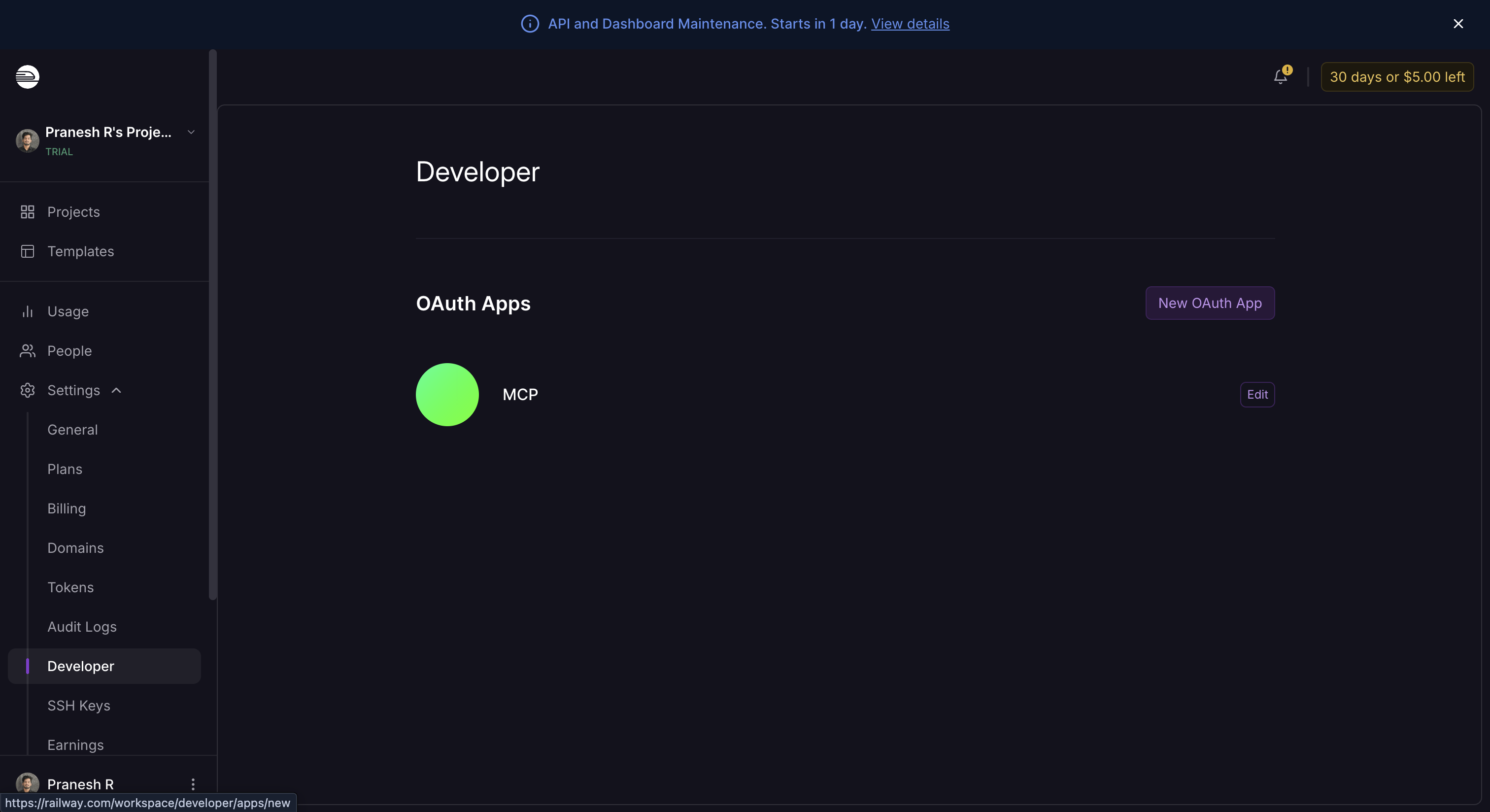
Open Developer settings in Railway
-
Sign in to Railway and open Settings > Developer for your workspace.
-
Under OAuth Apps, click New OAuth App.
-
-
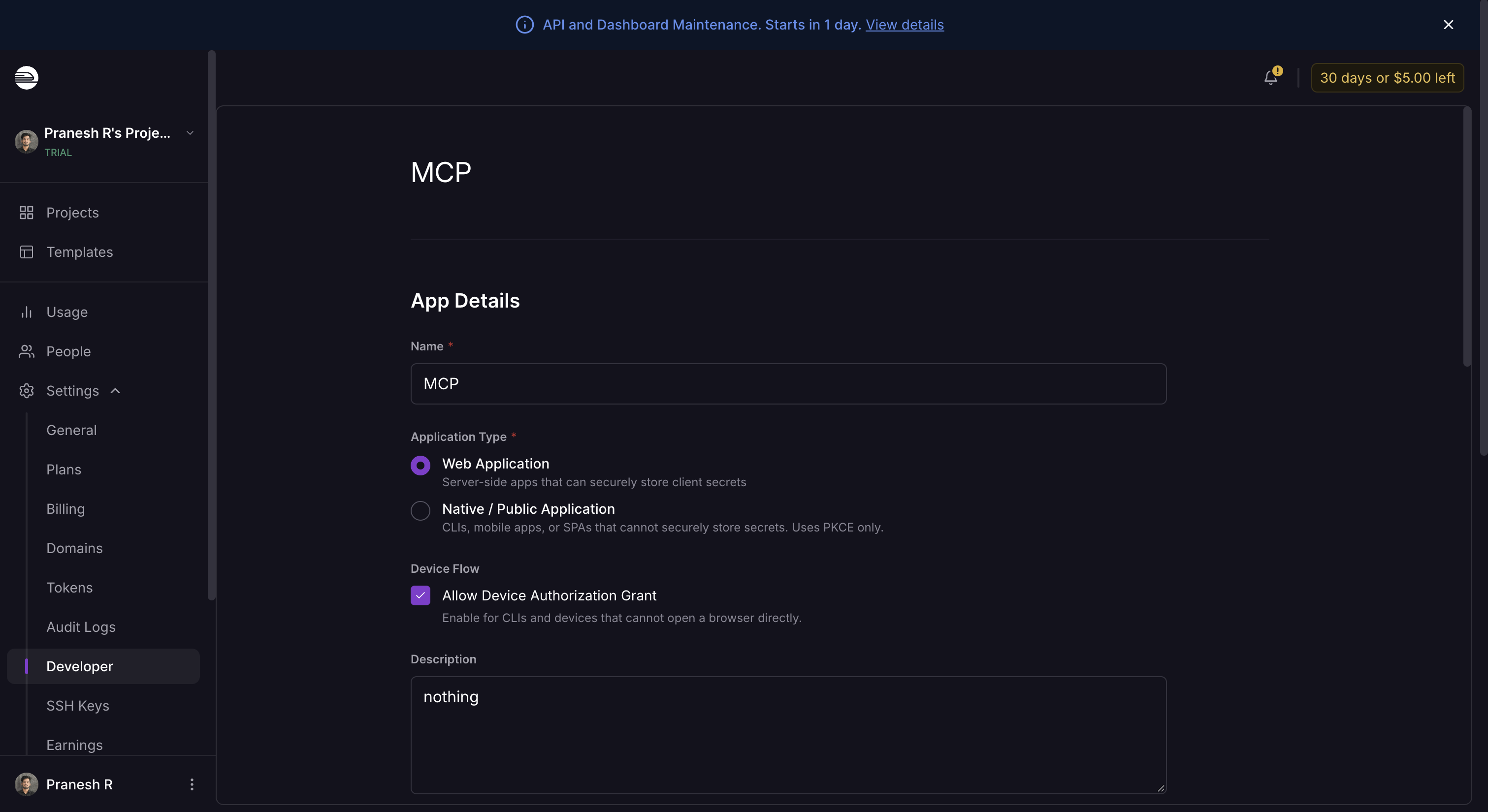
Create the OAuth app
-
Enter a Name for the app, such as
Scalekit. -
Set Application Type to Web Application. Scalekit runs the OAuth flow on the server, where it can store the client secret.
-
Add a short Description, then save the app.
-
-
Copy the redirect URI from Scalekit
- In the Scalekit dashboard, go to AgentKit > Connections > Create Connection. Find Railway MCP and click Create.
- Click Use your own credentials and copy the redirect URI. It looks like
https://<SCALEKIT_ENVIRONMENT_URL>/sso/v1/oauth/<CONNECTION_ID>/callback.
-
Add the redirect URI in Railway
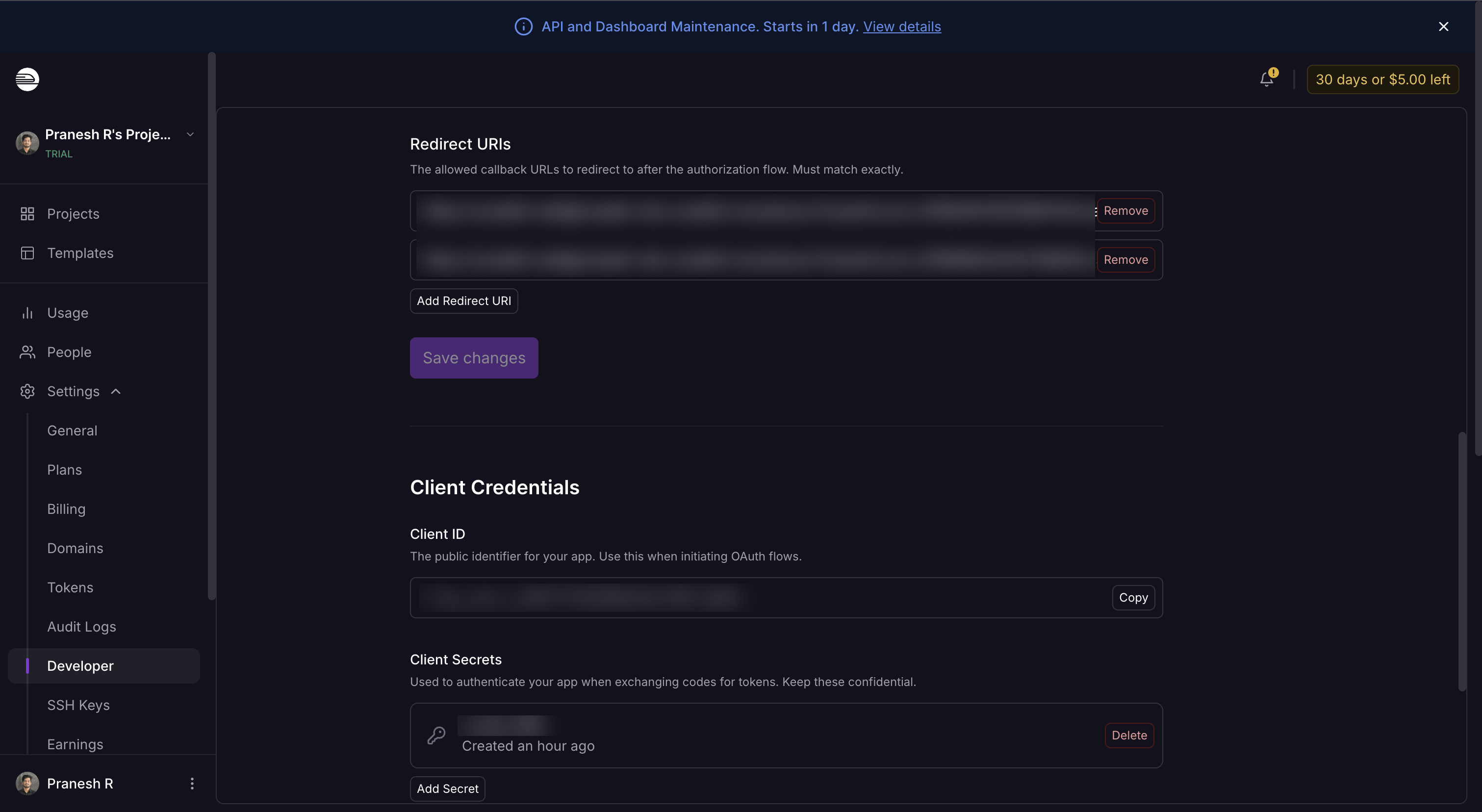
- Open your OAuth app in Railway and scroll to Redirect URIs.
- Click Add Redirect URI, paste the URI you copied, and click Save changes. Railway requires an exact match.
-
Copy the client ID and client secret
-
Under Client Credentials, copy the Client ID.
-
Under Client Secrets, click Add Secret and copy the new secret.
-
-
Add credentials in Scalekit
- Return to the connection you created in Scalekit and enter:
- Client ID — the Client ID from Railway
- Client Secret — the client secret from Railway
- Select the scopes your tools need. Railway MCP supports
openid,profile,email,offline_access, andworkspace:member. Includeoffline_accessso Scalekit can refresh tokens without asking the user to authorize again. - Click Save.
- Return to the connection you created in Scalekit and enter:
-
Authorize a user and make your first call
quickstart.mts import { ScalekitClient } from '@scalekit-sdk/node'import 'dotenv/config'import { createInterface } from 'node:readline/promises'const scalekit = new ScalekitClient(process.env.SCALEKIT_ENVIRONMENT_URL,process.env.SCALEKIT_CLIENT_ID,process.env.SCALEKIT_CLIENT_SECRET,)const actions = scalekit.actionsconst connector = 'railwaymcp'const identifier = 'user_123'// Generate an authorization link for the userconst { link } = await actions.getAuthorizationLink({ connectionName: connector, identifier })console.log('Authorize Railway MCP:', link)const rl = createInterface({ input: process.stdin, output: process.stdout })await rl.question('Press Enter after authorizing...')rl.close()// Make your first callconst result = await actions.executeTool({connector,identifier,toolName: 'railwaymcp_whoami',toolInput: {},})console.log(result)Terminal window npx tsx quickstart.mtsquickstart.py import osfrom scalekit import ScalekitClientfrom dotenv import load_dotenvload_dotenv()scalekit_client = ScalekitClient(env_url=os.getenv("SCALEKIT_ENVIRONMENT_URL"),client_id=os.getenv("SCALEKIT_CLIENT_ID"),client_secret=os.getenv("SCALEKIT_CLIENT_SECRET"),)actions = scalekit_client.actionsconnection_name = "railwaymcp"identifier = "user_123"# Generate an authorization link for the userlink_response = actions.get_authorization_link(connection_name=connection_name,identifier=identifier,)print("Authorize Railway MCP:", link_response.link)input("Press Enter after authorizing...")# Make your first callresult = actions.execute_tool(tool_input={},tool_name="railwaymcp_whoami",connection_name=connection_name,identifier=identifier,)print(result)Terminal window python quickstart.pyEach user signs in once. See Authorize a user for the full flow and statuses.
Tools
Pass the exact name toexecute_toolrailwaymcp_describe_environmentInventory of everything in a Railway environment — services, volumes, buckets, shared variable names — with staged changes applied.Read-onlyDescribe environment
Inventory of everything in a Railway environment — services, volumes, buckets, shared variable names — with staged changes applied. Each resource carries a `state`: live, staged-create (exists only in the pending patch), staged-delete, or live-with-staged-changes. Includes each service's source, regions, replicas, cron, volume mounts and latest deployment, and a `staged` summary of the pending patch. Pass `region` to keep only resources in that region. For per-field staged diffs use get-staged-changes; for one service's full config use describe-service; for runtime health use environment-status. If environmentId is omitted, the production environment is used.
Inputs
projectIdstringrequired- The project ID
environmentIdstring- Environment to describe. Defaults to `production` if present, otherwise the project's oldest environment.
regionstring- Only return services deploying to, and volumes/buckets provisioned in, this region (e.g. us-west2, sjc).
railwaymcp_describe_serviceEverything about one service in an environment: its config with staged changes applied (source, build, deploy, networking, volume mounts), the per-field staged changes pending on it, mounted volumes, live domains and TCP proxies, the latest deployment, and its tracing state.Read-onlyDescribe service
Everything about one service in an environment: its config with staged changes applied (source, build, deploy, networking, volume mounts), the per-field staged changes pending on it, mounted volumes, live domains and TCP proxies, the latest deployment, and its tracing state. `state` says whether the service is live, staged-create, staged-delete, or live-with-staged-changes. Variable names are listed but values are not — use list-variables for values. If environmentId is omitted, the production environment is used.
Inputs
projectIdstringrequired- The project ID
serviceIdstringrequired- The service ID
environmentIdstring- Environment ID. Defaults to `production` if present, otherwise the project's oldest environment.
railwaymcp_describe_templateRead one Railway template: its name, description, README, the services it creates, every env-var input it takes (which are required and which are optional), and — for clustered database templates like postgres-ha — the HA topology counts deploy-template can size.Read-onlyDescribe template
Read one Railway template: its name, description, README, the services it creates, every env-var input it takes (which are required and which are optional), and — for clustered database templates like postgres-ha — the HA topology counts deploy-template can size. Call this before deploy-template so required inputs are collected from the user rather than guessed.
Inputs
codestringrequired- The template's code (the slug in its railway.com/template/<code> URL), e.g. 'postgres', 'postgres-ha', 'redis'.
railwaymcp_domain_statusGet detailed status for one domain on a service, by hostname, URL, or domain ID: required DNS records and whether they currently match, ownership verification, certificate status, and any certificate error.Read-onlyDomain status
Get detailed status for one domain on a service, by hostname, URL, or domain ID: required DNS records and whether they currently match, ownership verification, certificate status, and any certificate error. Use list-domains first if you do not know which domains exist. If environmentId is omitted, the production environment is used.
Inputs
domainstringrequired- Hostname, full URL, or domain ID. For example api.example.com, https://api.example.com, or the id from list-domains.
projectIdstringrequired- The project ID
serviceIdstringrequired- The service ID
environmentIdstring- Environment ID. Defaults to `production` if present, otherwise the project's oldest environment.
railwaymcp_environment_statusHealth overview of every service in an environment in one call: current LIVE (settled) deployment state, replica status, recent failures, unresolved warnings/criticals, and cron execution results.Read-onlyEnvironment status
Health overview of every service in an environment in one call: current LIVE (settled) deployment state, replica status, recent failures, unresolved warnings/criticals, and cron execution results. Also includes `pendingWork`: the environment's pending (staged/applying) work that is not live yet — a staged patch or a commit still rolling out (poll until the operation leaves this list). By default only services with issues are returned — pass includeSuccessful to see everything. For error details, follow up with get-logs on the deployment IDs returned here.
Inputs
projectIdstringrequired- The project ID
environmentIdstring- Environment to check. Defaults to the production environment.
hoursBackinteger- How many hours back to count failures (default 8)
includeSuccessfulboolean- Include healthy services too (default false: only services with issues)
limitinteger- Maximum services to return (default 10)
serviceFilterstring- Minimatch pattern to filter services by name — NOT fuzzy; wrap in wildcards for substring matching, e.g. "*api*". Omit for all services.
railwaymcp_fetch_docsFetch the full markdown content of a Railway documentation page by URL or slug (e.g.Read-onlyFetch Railway docs page
Fetch the full markdown content of a Railway documentation page by URL or slug (e.g. 'https://docs.railway.com/quick-start' or 'reference/variables'). Use search-docs first to find the right page.
Inputs
urlstringrequired- Documentation page URL or slug from search-docs results
railwaymcp_get_bucket_credentialsGet the S3-compatible connection details for a bucket in an environment: endpoint, bucket name, region, URL style, access key and secret.Read-onlyGet bucket credentials
Get the S3-compatible connection details for a bucket in an environment: endpoint, bucket name, region, URL style, access key and secret. With a Railway session or API token the access key and secret are returned in plaintext; connected OAuth apps receive the connection details only. Services in the same project should normally not copy these values but reference them as variables (${{BucketName.ENDPOINT}}, ${{BucketName.BUCKET}}, ${{BucketName.REGION}}, ${{BucketName.ACCESS_KEY_ID}}, ${{BucketName.SECRET_ACCESS_KEY}}), which also survive a credential reset. To rotate the credentials use reset-bucket-credentials. If environmentId is omitted, the production environment is used.
Inputs
bucketIdstringrequired- The bucket ID
projectIdstringrequired- The project ID the bucket belongs to
environmentIdstring- Environment the bucket is provisioned in. Defaults to the production environment.
railwaymcp_get_cloud_agent_transcriptRead what a cloud agent session is doing: its messages, tool calls and short tool results, oldest first, including the turn in flight.Read-onlyGet cloud agent transcript
Read what a cloud agent session is doing: its messages, tool calls and short tool results, oldest first, including the turn in flight. Every line names the cloud agent: these are its actions, not yours, so relay them as such. Pass since = the previous nextCursor to get only new activity. Pass waitSeconds to long-poll: the call returns as soon as the agent starts or finishes a tool, finishes a message or ends its turn. To follow a task started with run-cloud-agent-task (waitSeconds 0), call this back to back with waitSeconds 45 until the turn is finished. Also reports the agent's live preview URL (whatever it serves on port 8080). Never wakes the VM.
Inputs
cloudAgentIdstringrequired- No description.
sessionIdstringrequired- No description.
limitinteger- Most events to return, newest kept. Default 60
sincestring- nextCursor from the previous call; omit for the whole session
waitSecondsinteger- Long-poll for new activity, up to 50s. Default 0 returns at once
railwaymcp_get_deployment_diagnosisGet the AI-generated diagnosis for a failed deployment: root cause category, analysis, and suggested fixes, along with deployment context (service config, source repo, branch, commit, PR, failure stage and error).Read-onlyGet deployment diagnosis
Get the AI-generated diagnosis for a failed deployment: root cause category, analysis, and suggested fixes, along with deployment context (service config, source repo, branch, commit, PR, failure stage and error). Diagnoses run automatically when a deployment fails — if one isn't available yet, fall back to get-logs to inspect the failure directly.
Inputs
deploymentIdstringrequired- The deployment ID to get the diagnosis for
projectIdstringrequired- The project ID
railwaymcp_get_feature_flagGet a Railway feature flag (Signal) by name for a project or its parent workspace scope.Read-onlyGet feature flag
Get a Railway feature flag (Signal) by name for a project or its parent workspace scope.
Inputs
namestringrequired- Feature flag name
projectIdstringrequired- The project ID
scopestring- Owner scope to read from (default "project")one of
projectworkspace
railwaymcp_get_function_source_codeGet a Railway Function's source code and runtime in an environment.Read-onlyGet function source code
Get a Railway Function's source code and runtime in an environment. Works for a function that is deployed and for one that exists only as a staged change — `code` is whichever is current, `deployedCode` is what is actually running, and `staged` says whether a commit is pending. Read this before update-function-source-code, which replaces the whole file. For a function's other configuration use get-service-config, and for its variables use list-variables. If environmentId is omitted, the default environment is used.
Inputs
projectIdstringrequired- The project ID
serviceIdstringrequired- The function service ID
environmentIdstring- Environment ID. Defaults to `production` if present, otherwise the project's oldest environment.
railwaymcp_get_logsGet logs from Railway — deploy (runtime), build, http (proxy request), network-flow (per-connection egress/ingress) and dns (name lookups) streams.Read-onlyGet logs
Get logs from Railway — deploy (runtime), build, http (proxy request), network-flow (per-connection egress/ingress) and dns (name lookups) streams. Pass a deploymentId to read one deployment, or serviceId (+ optional environmentId) to read the service's logs across its recent deployments in that environment. Use `types` to choose which streams to return (default: ['deploy']).
Inputs
projectIdstringrequired- The project ID
deploymentIdstring- A specific deployment ID. Omit it and pass serviceId to read the service's logs across its recent deployments.
endDatestring- ISO 8601 timestamp with an explicit timezone, at minute precision or finer. Example: "2026-07-27T15:30:00.000Z". Fractional seconds are optional; defaults to now.
environmentIdstring- Environment ID to read logs from. Optional — when omitted with a serviceId, the project's production environment is used (or its oldest, if there is no production).
filterstring- Optional log filter expression (Loki-style, same syntax as the Railway dashboard). Applies to build and deploy streams; http, network-flow and dns take their own @field filters (e.g. @status:500, @direction:egress, @rcode:NXDOMAIN).
limitinteger- Max log entries per stream (default 100, max 500)
serviceIdstring- Service ID. With no deploymentId, returns the service's logs across its deployments in the environment (build logs come from the latest deployment).
startDatestring- ISO 8601 timestamp with an explicit timezone, at minute precision or finer. Example: "2026-07-27T14:30:00.000Z". Fractional seconds are optional.
typesarray- Array of log stream names. Example: ["build", "deploy"] or ["http", "network-flow", "dns"]. Omit to fetch only deploy logs.
railwaymcp_get_service_configPrefer describe-service: it applies the staged changes onto the live config for you and adds mounted volumes, domains, TCP proxies and the latest deployment.Read-onlyGet service config
Prefer describe-service: it applies the staged changes onto the live config for you and adds mounted volumes, domains, TCP proxies and the latest deployment. Get a service's configuration in an environment: source (repo/image), build settings, deploy settings (start command, healthcheck, replicas, cron, restart policy), networking, and volume mounts. `config` is what is live; `staged` holds the not-yet-deployed changes for this service, or null when nothing is staged. A service created with `staged: true` has an empty `config` until accept-deploy commits it. Variable names are listed but values are not included — use list-variables for values. If environmentId is omitted, the production environment is used.
Inputs
projectIdstringrequired- The project ID
serviceIdstringrequired- The service ID
environmentIdstring- Environment ID. Defaults to `production` if present, otherwise the project's oldest environment.
railwaymcp_get_service_metricsGet resource usage metrics (CPU, memory, disk, network) for a service, summarized as current/average/min/max over a time window.Read-onlyGet service metrics
Get resource usage metrics (CPU, memory, disk, network) for a service, summarized as current/average/min/max over a time window. Defaults to CPU_USAGE and MEMORY_USAGE_GB over the last hour. If environmentId is omitted, the production environment is used.
Inputs
projectIdstringrequired- The project ID
serviceIdstringrequired- The service ID
environmentIdstring- Environment ID. Defaults to `production` if present, otherwise the project's oldest environment.
hoursBackinteger- Time window in hours, up to 168 (7 days). Defaults to 1.
measurementsarray- Array of measurement names. Example: ["CPU_USAGE", "MEMORY_USAGE_GB"]. Omit to use those defaults.
sampleRateSecondsinteger- Sampling rate in seconds
railwaymcp_get_staged_changesShow the changes staged in a Railway environment that accept-deploy would commit: per resource (service, volume, bucket, group) the action — create, delete, update — and each changed field with its live and staged value.Read-onlyGet staged changes
Show the changes staged in a Railway environment that accept-deploy would commit: per resource (service, volume, bucket, group) the action — create, delete, update — and each changed field with its live and staged value. Variable values and registry credentials are redacted to names. Also reports whether the patch is destructive and whether a commit is already applying. Review this before calling accept-deploy. If environmentId is omitted, the production environment is used.
Inputs
projectIdstringrequired- The project ID
environmentIdstring- Environment to inspect. Defaults to `production` if present, otherwise the project's oldest environment.
railwaymcp_get_statusPrefer describe-environment: it also lists services that exist only in the staged patch, unattached volumes, and each resource's staged state.Read-onlyGet project status
Prefer describe-environment: it also lists services that exist only in the staged patch, unattached volumes, and each resource's staged state. Get the deployment status of a Railway project environment. Returns project + environment metadata, whether the environment has undeployed staged changes, the environment's buckets, and for each live service its latest deployment status, replica count, cron schedule, and attached volumes. Also includes `pendingWork`: the environment's pending (staged/applying) work that is not live yet — a staged patch or a commit still rolling out (poll until the operation leaves this list). If environmentId is omitted, the project's `production` environment is used when present, otherwise the oldest environment.
Inputs
projectIdstringrequired- The project ID
environmentIdstring- Environment to report on. Defaults to `production` if present, otherwise the project's oldest environment.
railwaymcp_get_traceGet the spans of one distributed trace, as a tree from the edge down through every service that handled the request.Read-onlyGet trace
Get the spans of one distributed trace, as a tree from the edge down through every service that handled the request. Find trace IDs with list-traces. Only spans belonging to the environment are returned. If environmentId is omitted, the production environment is used.
Inputs
projectIdstringrequired- The project ID
traceIdstringrequired- W3C trace id, 32 hex characters
environmentIdstring- Environment the trace belongs to. Defaults to `production` if present, otherwise the project's oldest environment.
maxSpansinteger- Max spans to return, oldest first (default 1000, max 2000)
railwaymcp_get_tracingRead the tracing settings of an environment's services: whether each is traced and its auto-instrumentation switch.Read-onlyGet tracing settings
Read the tracing settings of an environment's services: whether each is traced and its auto-instrumentation switch. Pass serviceId for one service, omit it for every service in the environment. Tracing is set per service and environment; if environmentId is omitted, the production environment is used. Change it with update-service (tracing) or set-service-tracing; use list-traces to see whether spans are arriving.
Inputs
projectIdstringrequired- The project ID
environmentIdstring- The environment ID. Defaults to production.
serviceIdstring- One service to read. Omit for every service in the environment.
railwaymcp_get_tracing_coverageReport what one service's own instrumentation covers: the spans its app exported in the window, by span kind, by the remote system they name (database, cache, queue, RPC or HTTP client) and by the instrumentation library that emitted them.Read-onlyGet tracing coverage
Report what one service's own instrumentation covers: the spans its app exported in the window, by span kind, by the remote system they name (database, cache, queue, RPC or HTTP client) and by the instrumentation library that emitted them. Use it after instrumenting a service to prove that its database queries and outgoing calls produce spans, not just its incoming requests. Defaults to the last hour. If environmentId is omitted, the production environment is used.
Inputs
projectIdstringrequired- The project ID
serviceIdstringrequired- The service whose spans to summarise
endDatestring- Latest span start to consider. ISO 8601 with an explicit timezone, e.g. "2026-07-27T15:30:00.000Z". Defaults to now.
environmentIdstring- Environment to read spans from. Defaults to `production` if present, otherwise the project's oldest environment.
startDatestring- Oldest span start to consider. ISO 8601 with an explicit timezone, e.g. "2026-07-27T14:30:00.000Z". Clamped to the project's log retention; defaults to one hour before endDate.
railwaymcp_http_error_rateGet the HTTP error rate for a service over time — the share of requests answered with a 5xx.Read-onlyHTTP error rate
Get the HTTP error rate for a service over time — the share of requests answered with a 5xx. Use this for reliability and to locate error spikes. 4xx responses are reported separately and are not counted in the rate, since a 404 or a rejected payload is usually the caller's doing. Defaults to the last hour. If environmentId is omitted, the production environment is used.
Inputs
projectIdstringrequired- The project ID
serviceIdstringrequired- The service ID
environmentIdstring- Environment ID. Defaults to `production` if present, otherwise the project's oldest environment.
hoursBackinteger- Time window in hours, up to 168 (7 days). Defaults to 1.
maxDataPointsinteger- Target number of buckets across the window. Defaults to 30, max 60 — the same cap the chat agent uses. Buckets are never finer than one minute, so a short window returns fewer than requested.
methodstring- Restrict to one HTTP method, e.g. GET.
pathstring- Restrict to one request path.
railwaymcp_http_requestsGet HTTP request counts for a service, bucketed over time and split by response status class (2xx/3xx/4xx/5xx).Read-onlyHTTP request counts
Get HTTP request counts for a service, bucketed over time and split by response status class (2xx/3xx/4xx/5xx). Use this for traffic volume and the mix of successful versus failing responses. Defaults to the last hour. If environmentId is omitted, the production environment is used.
Inputs
projectIdstringrequired- The project ID
serviceIdstringrequired- The service ID
environmentIdstring- Environment ID. Defaults to `production` if present, otherwise the project's oldest environment.
hoursBackinteger- Time window in hours, up to 168 (7 days). Defaults to 1.
maxDataPointsinteger- Target number of buckets across the window. Defaults to 30, max 60 — the same cap the chat agent uses. Buckets are never finer than one minute, so a short window returns fewer than requested.
methodstring- Restrict to one HTTP method, e.g. GET.
pathstring- Restrict to one request path.
railwaymcp_http_response_timeGet HTTP latency percentiles (p50, p90, p95, p99) for a service, bucketed over time, in milliseconds.Read-onlyHTTP response times
Get HTTP latency percentiles (p50, p90, p95, p99) for a service, bucketed over time, in milliseconds. Use this for performance and to find slow requests. Defaults to the last hour. If environmentId is omitted, the production environment is used.
Inputs
projectIdstringrequired- The project ID
serviceIdstringrequired- The service ID
environmentIdstring- Environment ID. Defaults to `production` if present, otherwise the project's oldest environment.
hoursBackinteger- Time window in hours, up to 168 (7 days). Defaults to 1.
maxDataPointsinteger- Target number of buckets across the window. Defaults to 30, max 60 — the same cap the chat agent uses. Buckets are never finer than one minute, so a short window returns fewer than requested.
methodstring- Restrict to one HTTP method, e.g. GET.
pathstring- Restrict to one request path.
statusCodeinteger- Restrict to one exact response status code, e.g. 200.
railwaymcp_list_beta_featuresList the account's beta features: whether the user is in Priority Boarding (Railway's beta programme, which auto-enables new beta features) and every beta feature they may turn on or off, with its current state.Read-onlyList beta features
List the account's beta features: whether the user is in Priority Boarding (Railway's beta programme, which auto-enables new beta features) and every beta feature they may turn on or off, with its current state. These are account-level toggles, not the project feature flags from list-feature-flags. Change them with set-beta-feature.
Inputs
This tool takes no inputs.
railwaymcp_list_cloud_agent_modelsList the models a cloud-agent task in this environment can run on, with each model's reasoning efforts and the default a new conversation starts on.Read-onlyList cloud agent models
List the models a cloud-agent task in this environment can run on, with each model's reasoning efforts and the default a new conversation starts on. Pass an id as run-cloud-agent-task's model.
Inputs
environmentIdstringrequired- Environment ID
projectIdstringrequired- Project ID
railwaymcp_list_cloud_agent_tasksList cloud-agent task lifecycle records in an environment, newest first.Read-onlyList cloud agent tasks
List cloud-agent task lifecycle records in an environment, newest first. Filter by status and paginate with nextCursor. Use check-cloud-agent-task for the latest session response.
Inputs
environmentIdstringrequired- Environment ID
cloudAgentIdstring- Cloud Agent ID
cursorstring- Cursor
limitinteger- Limit
sessionIdstring- One session's turns; requires cloudAgentId
statusstring- Statusone of
pendingrunningawaiting_inputcompletedfailed
railwaymcp_list_deploymentsList recent deployments for a Railway project, optionally filtered by environment, service, or status.Read-onlyList deployments
List recent deployments for a Railway project, optionally filtered by environment, service, or status. Returns the most recent first, with who triggered each one, its regions, and whether it can be redeployed or rolled back.
Inputs
projectIdstringrequired- The project ID
environmentIdstring- Filter to a specific environment
limitinteger- Max deployments to return (default 10, max 50)
serviceIdstring- Filter to a specific service
statusstring- Filter to deployments with this status (e.g. SUCCESS, FAILED, CRASHED, BUILDING, DEPLOYING)one of
WAITINGNEEDS_APPROVALQUEUEDINITIALIZINGSKIPPEDBUILDINGDEPLOYINGSUCCESSFAILEDREMOVEDCRASHEDREMOVINGSLEEPING
railwaymcp_list_domainsList all domains (Railway-generated service domains and custom domains) for a service in an environment.Read-onlyList domains
List all domains (Railway-generated service domains and custom domains) for a service in an environment. If environmentId is omitted, the production environment is used.
Inputs
projectIdstringrequired- The project ID
serviceIdstringrequired- The service ID
environmentIdstring- Environment ID. Defaults to `production` if present, otherwise the project's oldest environment.
railwaymcp_list_feature_flagsList Railway feature flags (Signals) for a project and optionally the parent workspace.Read-onlyList feature flags
List Railway feature flags (Signals) for a project and optionally the parent workspace. Project flags are editable with admin access; workspace flags are read-only from project context.
Inputs
projectIdstringrequired- The project ID
includeWorkspaceboolean- Include workspace-scoped flags inherited by the project (default true)
railwaymcp_list_projectsList all Railway projects accessible to the authenticated userRead-onlyList projects
List all Railway projects accessible to the authenticated user
Inputs
This tool takes no inputs.
railwaymcp_list_servicesList the ids and names of all services and environments in a Railway project.Read-onlyList services
List the ids and names of all services and environments in a Railway project. Prefer describe-environment for what is actually in an environment: it includes volumes, buckets, deployments and staged changes.
Inputs
projectIdstringrequired- The project ID to list services for
railwaymcp_list_tcp_proxiesList the TCP proxies exposing a service over the public internet on a raw TCP port (e.g.Read-onlyList TCP proxies
List the TCP proxies exposing a service over the public internet on a raw TCP port (e.g. a database's public endpoint). Returns the public endpoint (host:port) and the application port each proxy forwards to.
Inputs
projectIdstringrequired- The project ID
serviceIdstringrequired- The service ID
environmentIdstring- Environment ID. Defaults to the production environment.
railwaymcp_list_tracesList distributed traces of an environment, newest first — one row per request that has at least one span matching the filter.Read-onlyList traces
List distributed traces of an environment, newest first — one row per request that has at least one span matching the filter. Use it to find slow or failing requests across services, then call get-trace with a traceId for the spans. Defaults to the last hour. If environmentId is omitted, the production environment is used.
Inputs
projectIdstringrequired- The project ID
endDatestring- Latest span start to consider. ISO 8601 with an explicit timezone, e.g. "2026-07-27T15:30:00.000Z". Defaults to now.
environmentIdstring- Environment to read traces from. Defaults to `production` if present, otherwise the project's oldest environment.
filterstring- Filter expression over spans, e.g. @status:error @component:edge @duration:>500 @http.route:/api/users. Built-in fields: trace, span, name, serviceName, service, deployment, replica, component, kind, status, duration (ms). Any other @key looks the key up in the span and resource attributes; free text matches the span name. Prefix a term with - to exclude it.
limitinteger- Max traces to return (default 100, max 500)
serviceIdstring- Only traces with at least one span from this service. Omit for the whole environment.
startDatestring- Oldest span start to consider. ISO 8601 with an explicit timezone, e.g. "2026-07-27T14:30:00.000Z". Clamped to the project's log retention; defaults to one hour before endDate.
railwaymcp_list_variablesList all environment variables for a service, fully rendered (reference variables like ${{Postgres.DATABASE_URL}} are resolved).Read-onlyList variables
List all environment variables for a service, fully rendered (reference variables like ${{Postgres.DATABASE_URL}} are resolved). With a Railway session or API token, values are returned in plaintext and may contain secrets. Connected OAuth apps receive variable names only. Sealed variables are always listed by name with no value — they are set, but nobody can read them back, so never recreate one. If environmentId is omitted, the production environment is used.
Inputs
projectIdstringrequired- The project ID
serviceIdstringrequired- The service ID
environmentIdstring- Environment ID. Defaults to `production` if present, otherwise the project's oldest environment.
railwaymcp_list_webhooksList a project's webhooks: for each, the URL Railway POSTs to, the deployment, monitor and volume-alert events that trigger it, whether it covers preview (PR) environments, the names of its custom headers (values are write-only), and its ID for update-webhook and delete-webhook.Read-onlyList webhooks
List a project's webhooks: for each, the URL Railway POSTs to, the deployment, monitor and volume-alert events that trigger it, whether it covers preview (PR) environments, the names of its custom headers (values are write-only), and its ID for update-webhook and delete-webhook.
Inputs
projectIdstringrequired- The project ID
railwaymcp_list_workspacesList the Railway workspaces the current user belongs to.Read-onlyList workspaces
List the Railway workspaces the current user belongs to. Use a workspace ID with create-project to choose where a project is created.
Inputs
This tool takes no inputs.
railwaymcp_search_docsSearch the Railway documentation (docs.railway.com) for features, configuration, guides, and tutorials.Read-onlySearch Railway docs
Search the Railway documentation (docs.railway.com) for features, configuration, guides, and tutorials. Returns matching sections with URLs — use fetch-docs to read a full page.
Inputs
querystringrequired- The search query (e.g. 'environment variables', 'deploy docker', 'postgres connection')
railwaymcp_search_templatesSearch the Railway template marketplace by name, description or keyword — databases (postgres, mysql, mongo, redis, clickhouse), their high-availability variants, and application templates.Read-onlySearch templates
Search the Railway template marketplace by name, description or keyword — databases (postgres, mysql, mongo, redis, clickhouse), their high-availability variants, and application templates. Returns published templates ranked by relevance. Use describe-template to read a result's inputs before deploying it with deploy-template.
Inputs
querystringrequired- What to search for, e.g. 'postgres', 'high availability redis', 'n8n'.
limitinteger- Maximum templates to return. Defaults to 5.default
5 verifiedOnlyboolean- Only return templates Railway has verified. Prefer this for databases the user will run in production.
railwaymcp_whoamiGet the current authenticated Railway user's profile informationRead-onlyWho am I
Get the current authenticated Railway user's profile information
Inputs
This tool takes no inputs.
railwaymcp_check_cloud_agent_taskRead status and the response for the latest task on an agent/session.WriteCheck cloud agent task
Read status and the response for the latest task on an agent/session. Polling does not wake the VM. Set recover=true to read a missing terminal response from the VM; recovery may wake it.
- Idempotent
Inputs
cloudAgentIdstringrequired- No description.
sessionIdstringrequired- No description.
recoverboolean- No description.
taskIdstring- An earlier turn on this session (from list-cloud-agent-tasks); default the latest
railwaymcp_create_bucketCreate an S3-compatible object storage bucket in a project and provision it in an environment.WriteCreate bucket
Create an S3-compatible object storage bucket in a project and provision it in an environment. Default region is sjc. Pass staged: true to stage the bucket in the environment's pending changes instead of provisioning it live — it then only becomes real when the staged changes are committed with accept-deploy.
Inputs
projectIdstringrequired- The project ID
environmentIdstring- Environment to provision the bucket in. Defaults to the production environment.
namestring- Name for the bucket. If omitted, a name is generated.
regionstring- Region to provision the bucket in (default: sjc)one of
sjciadamssin stagedboolean- Stage the bucket in the environment's pending changes instead of provisioning it live. It becomes real only when the staged changes are committed with accept-deploy (or the user applies them in the dashboard).default
false
railwaymcp_create_deploymentCreate a new service from a GitHub repository and trigger its first deployment.WriteCreate deployment
Create a new service from a GitHub repository and trigger its first deployment. The repo must be one the authenticated user has connected via GitHub. Returns the new service; use get-status or list-deployments to follow the deploy. Before calling this tool you MUST have a GitHub repo to deploy. If the user has not provided one, do not guess — first ask them which GitHub repo to deploy (in 'owner/name' form). If they don't have a repo yet, offer to help create one: if you have tools available to create a GitHub repository (e.g. a GitHub MCP server or `gh` CLI), offer to scaffold and push one for them; otherwise point them to create a repo on GitHub and share its 'owner/name'. Only call this tool once a concrete repo has been confirmed.
Inputs
projectIdstringrequired- The project ID to deploy into
repostringrequired- The full name of the GitHub repo to deploy. e.g. 'railwayapp/starters'
branchstring- The branch to deploy. Defaults to 'main'. A branch is required to trigger the first deploy.
environmentIdstring- Environment ID to deploy into. If omitted, the service is created in all non-fork environments.
namestring- Name for the new service. If omitted, a name is derived from the repo.
railwaymcp_create_functionCreate a Railway Function: a service that runs one file of TypeScript on the Bun runtime, with no repository, Dockerfile or build step.WriteCreate function
Create a Railway Function: a service that runs one file of TypeScript on the Bun runtime, with no repository, Dockerfile or build step. Use this for webhook receivers, small HTTP APIs, cron jobs and scripts. Pass the complete code — a function with no code deploys nothing. Applies live by default, which deploys the function immediately. Pass staged: true with an environmentId to stage it in that environment's pending changes instead, in which case nothing deploys until the staged changes are committed with accept-deploy. For a service built from a repository use create-deployment, and for one from a Docker image use create-service. To change a function's code afterwards use update-function-source-code; for its other settings (variables, cron schedule, healthcheck) use set-variables and update-service. Writing function code: - One file, TypeScript or TSX. The runtime writes it to `index.tsx` and runs it with Bun — Python, Go, Ruby and other languages will not run. For those, use create-service with an image, or create-deployment from a repo. - Imports are allowed. The runtime scans them, generates a package.json and installs with Bun, including versioned specifiers like `hono@4` and `zod@3`. Do not reference local files other than this one. - An HTTP service must listen: call `Bun.serve`, or default-export a fetch handler or Hono app. Read the port from `Bun.env.PORT`. Use generate-domain to give it a public URL. - If it is not an HTTP service, do not start a server. Write a script; it runs to completion. - Do not schedule work with a top-level `setInterval` — set a cronSchedule with update-service instead. - Prefer Bun globals over Node APIs: `Bun.env` for variables, `Bun.file`/`Bun.write` for file I/O, `Bun.sql` for Postgres, `Bun.s3` for object storage. The function filesystem is not durable — persist to a database or object storage. - Top-level await is available. Await every async call. - JSX needs the pragma, e.g. `/** @jsx jsx */` with `/** @jsxImportSource hono/jsx */`. - Send complete, working code. Placeholders and elided bodies get deployed as written.
Inputs
codestringrequired- The function's complete TypeScript/TSX source, as one file. This is what gets deployed.
projectIdstringrequired- The project ID to create the function in
environmentIdstring- Environment ID to create the function in. If omitted, it is created in all non-fork environments. Required when staged is true.
namestring- Name for the new function. If omitted, a name is generated.
stagedboolean- Stage the function in the environment's pending changes instead of deploying it. It shows up on the canvas immediately but gets no instance until accept-deploy commits the staged changes (or the user applies them in the dashboard). Requires environmentId.default
false
railwaymcp_create_projectCreate a new Railway projectWriteCreate project
Create a new Railway project
Inputs
namestringrequired- Name for the new project
defaultEnvironmentNamestring- Name of the project's first environment (default: "production")
descriptionstring- Optional project description
isPublicboolean- Whether the project should be public (default: false)
prDeploysboolean- Enable PR deploys: pull requests on services' connected GitHub repos get their own ephemeral environment (default: false)
workspaceIdstring- Workspace ID to create the project in. If omitted, uses the first available workspace.
railwaymcp_create_serviceCreate a new service in a project from a Docker image, or an empty service to configure later (e.g.WriteCreate service
Create a new service in a project from a Docker image, or an empty service to configure later (e.g. before setting variables and attaching a source). Public images only: credentials for a private registry are not accepted here — the user sets them on the service in the Railway dashboard. Pass staged: true to stage the service in one environment instead of applying it live — it then only becomes real when the staged changes are committed with accept-deploy. To create a service from a GitHub repository, use create-deployment instead.
Inputs
projectIdstringrequired- The project ID to create the service in
environmentIdstring- Environment ID to create the service in. If omitted, the service is created in all non-fork environments. Required when staged is true.
imagestring- Docker image to deploy, e.g. 'redis' or 'ghcr.io/org/app:latest'. Omit to create an empty service.
namestring- Name for the new service. If omitted, a name is derived from the image or generated.
stagedboolean- Stage the service in the environment's pending changes instead of applying it live. The service shows up on the canvas immediately but gets no instance until accept-deploy commits the staged changes (or the user applies them in the dashboard). Requires environmentId.default
false
railwaymcp_create_webhookCreate a project webhook: Railway POSTs a JSON payload to the URL whenever one of the chosen deployment, monitor or volume-alert events happens in the project.WriteCreate webhook
Create a project webhook: Railway POSTs a JSON payload to the URL whenever one of the chosen deployment, monitor or volume-alert events happens in the project. Defaults to the deployment failure events (failed, crashed, out of memory) across regular and preview environments. This tool does not take custom headers or other secrets: if the endpoint needs an auth or signature header, the user adds it to the webhook in the Railway dashboard. Discord and Slack incoming-webhook URLs are detected and receive a formatted message. Use test-webhook first to check the URL accepts the payload.
Inputs
projectIdstringrequired- The project ID
urlstringrequired- The URL Railway POSTs to when a matching event occurs. A Discord or Slack incoming-webhook URL is detected and gets a formatted message instead of the raw JSON.
eventTypesarray- Events that trigger the webhook. Defaults to Deployment.failed, Deployment.crashed and Deployment.oom_killed.
includePreviewEnvironmentsboolean- Also fire for preview (PR/ephemeral) environments. Defaults to true.
railwaymcp_deploy_templateDeploy a Railway template into a project — a database (postgres, mysql, redis, mongo), a clustered high-availability database, or an application template.WriteDeploy template
Deploy a Railway template into a project — a database (postgres, mysql, redis, mongo), a clustered high-availability database, or an application template. Creates every service the template declares, wired together, and deploys them. Pass staged: true to stage them for the user to review instead. Call describe-template first: it lists the env-var inputs the template requires and the HA counts it accepts. This tool does not take secrets: never ask the user for, or pass, a password, API key, token or other credential. Use `variables` only for non-secret settings such as names, regions or public URLs. Omit optional inputs to keep the template's defaults — database passwords and other secrets the template declares as generated are created by Railway at deploy time. If a template requires a secret the user must supply, do not deploy it here: give the user the template's dashboard link (in the error this tool returns) so they enter it there.
Inputs
codestringrequired- The template's code (the slug in its railway.com/template/<code> URL), e.g. 'postgres', 'postgres-ha', 'redis'.
projectIdstringrequired- The project to deploy the template into
coordinatorCountinteger- For a clustered database template: how many coordinator nodes (etcd/Sentinel-style consensus members). Must be odd and at least 3. Omit to keep the template's authored count.
environmentIdstring- Environment to deploy into. Defaults to `production` if present, otherwise the project's oldest environment.
proxyCountinteger- For a clustered database template: how many instances of the proxy/load-balancer tier (e.g. HAProxy). Omit to keep the template's authored count.
replicaCountinteger- For a clustered database template: how many replicas to deploy alongside the primary (2 replicas = 3 data nodes). Only counts describe-template lists under `allowedCounts` are accepted. Omit to keep the template's authored topology.
stagedboolean- Stage the template's services in the environment's pending changes instead of deploying them. Nothing is provisioned until the staged changes are committed with accept-deploy (or applied in the dashboard).default
false variablesobject- Values for the template's non-secret env-var inputs, keyed by variable name as reported by describe-template. Never pass passwords, API keys, tokens or other credentials here. A name several of the template's services declare gets the same value on each. Unknown names are rejected rather than ignored.
railwaymcp_generate_domainExpose a service publicly.WriteGenerate domain
Expose a service publicly. Without `domain`, generates a Railway *.up.railway.app service domain (if the service already has domains, they are returned instead of creating another). With `domain`, attaches a custom domain you own and returns the DNS records the user must create for it to verify. If environmentId is omitted, the production environment is used.
Inputs
projectIdstringrequired- The project ID
serviceIdstringrequired- The service ID
domainstring- A custom domain you own (e.g. app.example.com). Omit to generate a Railway domain.
environmentIdstring- Environment ID. Defaults to `production` if present, otherwise the project's oldest environment.
targetPortinteger- Container port the domain routes to. Usually only needed when the service listens on multiple ports.
railwaymcp_purge_cdn_cachePurge the CDN cache of a service right now, so every edge node refetches from the service on the next request.WritePurge CDN cache
Purge the CDN cache of a service right now, so every edge node refetches from the service on the next request. Scope `html` drops only cached HTML pages and keeps static assets (scripts, styles, images) cached; `all` drops everything. The purge covers the whole service: per-URL purge is not supported. This is an immediate action, not configuration — enabling CDN caching, its TTL and `purgeOnDeploy` are set with update-service's `cdn` field, and `purgeOnDeploy` only decides what the next deployment purges. Purging a service that has CDN caching off is a no-op.
- Idempotent
Inputs
projectIdstringrequired- The project ID
scopestringrequired- What to purge: `html` for cached HTML pages only, `all` for every cached response.one of
allhtml serviceIdstringrequired- The service ID
environmentIdstring- Environment ID. Defaults to `production` if present, otherwise the project's oldest environment.
railwaymcp_retry_domain_certificateRequest a new TLS certificate for a custom domain whose issuance failed.WriteRetry domain certificate
Request a new TLS certificate for a custom domain whose issuance failed. Use domain-status first: it reports the certificate error and whether a retry can help (certificate.retryable). A retry cannot succeed until the domain's DNS records point at Railway. Railway-generated service domains have their certificates managed by Railway and need no retry. If environmentId is omitted, the production environment is used.
- Idempotent
Inputs
domainstringrequired- Hostname, full URL, or domain ID of the custom domain. For example api.example.com or the id from list-domains.
projectIdstringrequired- The project ID
serviceIdstringrequired- The service ID
environmentIdstring- Environment ID. Defaults to `production` if present, otherwise the project's oldest environment.
railwaymcp_set_beta_featureTurn an account beta feature on or off for the current user.WriteSet beta feature
Turn an account beta feature on or off for the current user. PRIORITY_BOARDING joins or leaves Priority Boarding, Railway's beta programme; any other value toggles that one beta feature. Use list-beta-features to see what is available and its current state.
- Idempotent
Inputs
enabledbooleanrequired- true to turn it on, false to turn it off
featurestringrequired- The beta feature, as listed by list-beta-featuresone of
PRIORITY_BOARDINGMAGIC_CONFIGIN_DASHBOARD_SUPPORTCHAT_SANDBOXCLOUD_AGENTSRAILWAY_AUTOMATIONSVM_STORAGE_TRACESCLOUD_AGENT_BUILDERCLOUD_AGENT_CHATAGENT_BOOTSTRAPSCS_MCP_EXPRESSAGENT_BYOKAGENT_BYOK_FIREWORKSAGENT_BYOK_OPENAIAGENT_BYOK_ANTHROPICAGENT_CLAUDE_CONNECTAGENT_CONNECTORSCONNECTOR_TUNNELSHA_FOR_MONGOUSAGE_INSIGHTSTRACINGRAILWAY_AGENT_DASHBOARDCLEARANCEMANAGED_DATABASE_EDIT_WARNINGMANAGED_DATABASE_SETUPVERIFIERSRAILQLDATABASE_AGENT_TOOLS
railwaymcp_set_service_tracingEnable or disable tracing and auto-instrumentation for one service in one environment, each independently.WriteSet service tracing
Enable or disable tracing and auto-instrumentation for one service in one environment, each independently. tracingEnabled switches whether the edge traces requests to the service; changing it redeploys the service so the OpenTelemetry exporter variables follow. autoInstrumentationEnabled switches eBPF (OBI) instrumentation of the service's processes, which only takes effect while tracing is enabled and reaches running containers without a redeploy. If environmentId is omitted, the production environment is used. Read the current state with get-tracing. The same switches are update-service's tracing field, which can also stage the change with staged: true.
- Idempotent
Inputs
projectIdstringrequired- The project ID
serviceIdstringrequired- The service ID
autoInstrumentationEnabledboolean- Switch auto-instrumentation (eBPF/OBI) for this service in the environment. Omit to leave it alone.
environmentIdstring- The environment ID. Defaults to production.
tracingEnabledboolean- Trace requests to this service in the environment. Omit to leave it alone.
railwaymcp_test_webhookPOST a sample event payload to a URL and report the HTTP status it answered with, to check a webhook endpoint before creating or after updating a webhook.WriteTest webhook
POST a sample event payload to a URL and report the HTTP status it answered with, to check a webhook endpoint before creating or after updating a webhook. Pass a URL to try a new endpoint, or a webhookId to send to an existing webhook with its stored URL and any custom headers the user set on it in the dashboard. This tool does not take header values or other secrets. Nothing is stored. Discord and Slack incoming-webhook URLs receive a formatted message, like a real event would.
- Idempotent
Inputs
projectIdstringrequired- The project ID
eventTypestring- The event type of the sample payload. Defaults to Deployment.failed.one of
VolumeAlert.triggeredVolumeAlert.resolvedMonitor.triggeredMonitor.resolvedMonitor.deletedDeployment.crashedDeployment.oom_killedDeployment.failedDeployment.deployedDeployment.redeployedDeployment.sleptDeployment.resumedDeployment.restartedDeployment.removedDeployment.buildingDeployment.deployingDeployment.waitingDeployment.needs_approvalDeployment.queued urlstring- The URL to POST the sample to. Required unless webhookId is given, in which case it defaults to that webhook's URL.
webhookIdstring- An existing webhook to test: its stored URL and custom headers are used. Get it from list-webhooks.
railwaymcp_accept_deployDESTRUCTIVE: Commits all staged changes in a Railway environment and triggers a deploy.DestructiveAccept deploy
DESTRUCTIVE: Commits all staged changes in a Railway environment and triggers a deploy. Only use this when the user has explicitly confirmed they want to deploy.
Inputs
environmentIdstringrequired- The environment ID to commit staged changes for
commitMessagestring- Optional commit message for the deploy
railwaymcp_cancel_cloud_agent_taskStop a cloud-agent task.DestructiveCancel cloud agent task
Stop a cloud-agent task. Before its prompt is sent it never starts; after, only that task's run is aborted, never another. Returns at once; the task ends failed with "The task was cancelled". A finished task is left as is. Refused for a task queued into another run, since stopping it would stop that run.
- Idempotent
Inputs
taskIdstringrequired- No description.
railwaymcp_connect_service_sourceAttach a source to an existing service: a GitHub repository (deploys on push, builds immediately) or a Docker image.DestructiveConnect service source
Attach a source to an existing service: a GitHub repository (deploys on push, builds immediately) or a Docker image. This is how a service that has never deployed gets its first deployment, and how an existing service's source is switched. Provide exactly one of repo or image. Pass commitSha with repo to pin the service to one commit instead of following the branch. Images must be public: credentials for a private registry are not accepted here — the user sets them on the service in the Railway dashboard. By default it applies to the service in all environments; pass staged: true with an environmentId to stage the source in that one environment's pending changes instead, in which case nothing builds until the staged changes are committed with accept-deploy.
- Idempotent
Inputs
projectIdstringrequired- The project ID
serviceIdstringrequired- The service ID to attach the source to
branchstring- Branch to deploy from. Only valid with repo; defaults to the repository's default branch.
commitShastring- Commit SHA to pin the service to. Only valid with repo. The service deploys exactly this commit and pushes to the branch no longer deploy it, until the source is connected again without commitSha.
environmentIdstring- Environment to scope a staged source change to. Only valid with staged: true, and required by it — a live connect always applies to every environment.
imagestring- Docker image to deploy, e.g. ghcr.io/org/app:latest
repostring- GitHub repository as owner/repo, e.g. railwayapp/starters. The user's GitHub account must have access to it.
stagedboolean- Stage the change in the environment's pending changes instead of applying it live. It takes effect only when the staged changes are committed with accept-deploy (or the user applies them in the dashboard).default
false
railwaymcp_create_tcp_proxyExpose a service on the public internet over a raw TCP port (e.g.DestructiveCreate TCP proxy
Expose a service on the public internet over a raw TCP port (e.g. make a database reachable externally). Creates a TCP proxy forwarding a public endpoint to the given application port, applied through the environment config so the service redeploys with it active. Pass staged: true to stage the proxy in the environment's pending changes instead — it is only provisioned, and only gets a public endpoint, once the staged changes are committed with accept-deploy. A service can have at most one TCP proxy.
- Idempotent
Inputs
applicationPortintegerrequired- The port the service listens on, e.g. 5432 for Postgres
projectIdstringrequired- The project ID
serviceIdstringrequired- The service ID
environmentIdstring- Environment ID. Defaults to the production environment.
stagedboolean- Stage the change in the environment's pending changes instead of applying it live. It takes effect only when the staged changes are committed with accept-deploy (or the user applies them in the dashboard).default
false
railwaymcp_create_volumeCreate a persistent volume in a project and optionally attach it to a service at a mount path.DestructiveCreate volume
Create a persistent volume in a project and optionally attach it to a service at a mount path. Attaching redeploys the service with the mount applied, and the empty volume hides whatever the service's image had at that path. The size can be grown later but not shrunk. Pass staged: true to stage the volume in one environment instead of provisioning it live.
Inputs
mountPathstringrequired- Path in the container to mount the volume at, e.g. /data
projectIdstringrequired- The project ID
environmentIdstring- Environment to provision the volume in. If omitted, the volume is provisioned in all environments. Required when staged is true.
namestring- Name for the volume. If omitted, a name is derived from the service or generated.
regionstring- Region to place the volume in, e.g. us-west2 or europe-west4. If omitted, the volume follows the attached service's region, or the workspace's default region.
serviceIdstring- Service to attach the volume to. Omit to create an unattached volume.
sizeMBinteger- Initial size in MB, up to the plan's maximum volume size. If omitted, the plan's default size is used. The volume can be grown later but not shrunk.
stagedboolean- Stage the volume in the environment's pending changes instead of provisioning it live. It becomes real only when the staged changes are committed with accept-deploy (or the user applies them in the dashboard). Requires environmentId.default
false
railwaymcp_delete_bucketPermanently delete an object storage bucket and its contents.DestructiveDelete bucket
Permanently delete an object storage bucket and its contents. By default it is removed from every environment it is provisioned in; pass an environmentId to remove it from that one environment only. Pass staged: true to stage the removal in one environment instead of applying it live. Deleting from every environment is irreversible.
Inputs
bucketIdstringrequired- The bucket ID to delete
projectIdstringrequired- The project ID the bucket belongs to
environmentIdstring- Environment to remove the bucket from. If omitted, it is removed from every environment it is provisioned in. Required when staged is true.
stagedboolean- Stage the change in the environment's pending changes instead of applying it live. It takes effect only when the staged changes are committed with accept-deploy (or the user applies them in the dashboard).default
false
railwaymcp_delete_domainRemove a domain from a service: a Railway-generated *.up.railway.app service domain or a custom domain.DestructiveDelete domain
Remove a domain from a service: a Railway-generated *.up.railway.app service domain or a custom domain. Requests to that hostname stop being routed to the service as soon as the removal applies. Pass staged: true to stage the removal of a service domain in the environment's pending changes instead of applying it live. Custom domain removal always applies live. If environmentId is omitted, the production environment is used.
Inputs
domainstringrequired- Hostname, full URL, or domain ID. For example api.example.com, https://api.example.com, or the id from list-domains.
projectIdstringrequired- The project ID
serviceIdstringrequired- The service ID
environmentIdstring- Environment ID. Defaults to `production` if present, otherwise the project's oldest environment.
stagedboolean- Stage the change in the environment's pending changes instead of applying it live. It takes effect only when the staged changes are committed with accept-deploy (or the user applies them in the dashboard).default
false
railwaymcp_delete_feature_flagDelete a project-scoped feature flag.DestructiveDelete feature flag
Delete a project-scoped feature flag. Workspace-scoped flags cannot be deleted from project context.
Inputs
namestringrequired- Feature flag name to delete
projectIdstringrequired- The project ID
railwaymcp_delete_servicePermanently delete a service: its deployments stop and are removed, along with its domains, variables and deployment triggers.DestructiveDelete service
Permanently delete a service: its deployments stop and are removed, along with its domains, variables and deployment triggers. Any volume attached to it is detached and kept — delete-volume removes a volume and its data. By default the service is deleted in every environment that is not a fork; pass an environmentId to delete it in that one environment only. Pass staged: true to stage the removal in one environment instead of applying it live. A service whose creation is itself still staged is taken back out of the pending changes instead. This cannot be undone.
Inputs
projectIdstringrequired- The project ID the service belongs to
serviceIdstringrequired- The service ID to delete
environmentIdstring- Environment to delete the service in. If omitted, it is deleted in every environment that is not a fork. Required when staged is true.
stagedboolean- Stage the change in the environment's pending changes instead of applying it live. It takes effect only when the staged changes are committed with accept-deploy (or the user applies them in the dashboard).default
false
railwaymcp_delete_tcp_proxyRemove a service's TCP proxy, taking its public endpoint offline.DestructiveDelete TCP proxy
Remove a service's TCP proxy, taking its public endpoint offline. Anything connecting through that endpoint (e.g. external database clients) loses access. Pass staged: true to stage the removal in the environment's pending changes instead — that is also how a proxy that is itself only staged gets dropped again.
Inputs
applicationPortintegerrequired- The application port of the proxy to remove
projectIdstringrequired- The project ID
serviceIdstringrequired- The service ID
environmentIdstring- Environment ID. Defaults to the production environment.
stagedboolean- Stage the change in the environment's pending changes instead of applying it live. It takes effect only when the staged changes are committed with accept-deploy (or the user applies them in the dashboard).default
false
railwaymcp_delete_volumePermanently delete a volume and its data.DestructiveDelete volume
Permanently delete a volume and its data. The volume is unmounted from any service it is attached to (redeploying that service). By default it is removed from every environment; pass an environmentId to remove it from that one environment only. Pass staged: true to stage the removal in one environment instead of applying it live. Deleting from every environment is irreversible.
Inputs
projectIdstringrequired- The project ID the volume belongs to
volumeIdstringrequired- The volume ID to delete
environmentIdstring- Environment to remove the volume from. If omitted, it is removed from every environment. Required when staged is true.
stagedboolean- Stage the change in the environment's pending changes instead of applying it live. It takes effect only when the staged changes are committed with accept-deploy (or the user applies them in the dashboard).default
false
railwaymcp_delete_webhookDelete a project webhook so Railway stops POSTing to its URL.DestructiveDelete webhook
Delete a project webhook so Railway stops POSTing to its URL. Get the webhook ID from list-webhooks. This cannot be undone; create-webhook makes a new one.
Inputs
projectIdstringrequired- The project ID
webhookIdstringrequired- The webhook ID, from list-webhooks
railwaymcp_railway_agentHand a multi-step task in one project environment to Railway's own AI agent, for work too open-ended for the direct tools: investigating a failing deploy across services, or planning and making a set of related changes.DestructiveRailway agent
Hand a multi-step task in one project environment to Railway's own AI agent, for work too open-ended for the direct tools: investigating a failing deploy across services, or planning and making a set of related changes. The agent reads the environment's config, logs, metrics and linked GitHub repository, and searches the web and Railway docs. It can also change the environment as the calling user: create, update and remove services, volumes, buckets and webhooks, set variables, restart services, deploy its staged changes, and open pull requests on the linked repository. Describe the task in plain language and say what it may change; do not put passwords, API keys or other secrets in the message. A call waits up to 4 minutes; if the agent is still working it returns early with a threadId — pass it back as threadId to continue the same conversation, which also works for follow-up questions. For a single read or change, use the direct tool instead (get-logs, set-variables, update-service and so on).
Inputs
environmentIdstringrequired- The environment ID
messagestringrequired- The message to send to the agent
projectIdstringrequired- The project ID
serviceIdstring- Optional service ID to scope the agent's context
threadIdstring- Thread ID to continue an existing conversation. Omit to start a new one.
railwaymcp_redeployRe-run the most recent deployment of a service in a given environment, reusing that deployment's existing build.DestructiveRedeploy service
Re-run the most recent deployment of a service in a given environment, reusing that deployment's existing build. Pass deploymentId to redeploy an earlier deployment's build instead (list-deployments has the ids). Only works on a service that has already deployed in that environment — check with list-deployments if you are unsure. This does NOT give a service its first deployment: if it has never deployed, nothing here can deploy it — use the Railway CLI (`railway up --project <id> --environment <id> --service <id>`), or attach a GitHub repo to the service in the dashboard. create-deployment would build a separate new service from a GitHub repo rather than deploying this one.
Inputs
environmentIdstringrequired- The environment ID to redeploy in
projectIdstringrequired- The project ID
serviceIdstringrequired- The service ID to redeploy
deploymentIdstring- Redeploy this deployment's build instead of the service's latest one. Must belong to the given service and environment.
railwaymcp_reset_bucket_credentialsRegenerate the S3-compatible credentials for a bucket in an environment and return the new ones.DestructiveReset bucket credentials
Regenerate the S3-compatible credentials for a bucket in an environment and return the new ones. The current access key stops working immediately; bucket data is not affected. Every client using the old key needs the new values, and services that reference the bucket through variables keep the old key until redeployed — the result lists them so you can follow up with redeploy. With a Railway session or API token the new access key and secret are returned in plaintext; connected OAuth apps receive the connection details only. If environmentId is omitted, the production environment is used.
Inputs
bucketIdstringrequired- The bucket ID
projectIdstringrequired- The project ID the bucket belongs to
environmentIdstring- Environment whose bucket credentials to reset. Defaults to the production environment.
railwaymcp_respond_cloud_agent_taskAnswer a question a cloud-agent task is waiting on, from check-cloud-agent-task's pendingInteractions.DestructiveRespond to cloud agent task
Answer a question a cloud-agent task is waiting on, from check-cloud-agent-task's pendingInteractions. Approvals take allow or deny and apply once. MCP server questions take accept (with content keyed by field name), decline, or cancel. Relay the user's answer; don't answer on their behalf. Wakes a sleeping agent to deliver the answer.
Inputs
actionstringrequired- approve is the same as allowone of
allowdenyacceptdeclinecancelapprove requestIdstringrequired- No description.
taskIdstringrequired- No description.
answeredBystring- Who gave the answer, for the audit log (e.g. linear:<userId>)
contentobject- accept only: form values keyed by field name
railwaymcp_restart_serviceRestart a service's running deployment in place — the containers restart without rebuilding the image, and no new deployment is created (use redeploy for a fresh build copy).DestructiveRestart service
Restart a service's running deployment in place — the containers restart without rebuilding the image, and no new deployment is created (use redeploy for a fresh build copy). Restarting causes brief downtime; do NOT restart database services (Postgres, MySQL, Redis, MongoDB) or services with attached volumes unless the user explicitly asked, as it can interrupt in-flight queries and transactions.
Inputs
projectIdstringrequired- The project ID
serviceIdstringrequired- The service ID to restart
deploymentIdstring- Specific deployment to restart. If omitted, the latest running or crashed deployment is restarted.
environmentIdstring- Environment whose deployment to restart. Defaults to the production environment.
railwaymcp_run_cloud_agent_taskRun a coding task on a Railway cloud agent: a persistent VM with a workspace and optional repo checkout.DestructiveRun cloud agent task
Run a coding task on a Railway cloud agent: a persistent VM with a workspace and optional repo checkout. Creates a fresh agent by default; pass cloudAgentId to reuse an agent, or replyToTaskId to continue the original conversation. Returns a response within waitSeconds or a handle to poll with check-cloud-agent-task. Task results address the latest turn on the agent/session. When the agent is waiting on your answer to its question, a message on the same conversation is delivered as that answer. Idle agents sleep after five minutes; active compute is billed.
Inputs
environmentIdstringrequired- No description.
projectIdstringrequired- No description.
promptstringrequired- No description.
agentNamestring- No description.
branchstring- No description.
cloudAgentIdstring- Agent to reuse; omit all targets to create a fresh agent
contextarray- Background the model reads beside the prompt, not instructions: [{type, text?, ...attributes}], e.g. earlier messages or a log excerpt. On a continued conversation send only what's new: earlier turns are already in the session
conversationKeystring- Your conversation's id (e.g. linear:DEMO-1): the first task starts an agent, later ones continue its session, each after the one before it finishes. Instead of replyToTaskId/cloudAgentId
externalRefstring- No description.
idempotencyKeystring- Unique per workspace. Identical retries reuse the original task
imagesarray- Up to 4 PNG/JPEG/WebP images the model sees with the prompt, e.g. a screenshot of the bug. Prefer url; inline data shares the 1 MB request limit
interactiveboolean- true: the agent may ask you a question (the task waits in awaiting_input; your next message on the conversation is the answer). false: nobody will answer, so the agent decides or gives up with a reason. Omit for neither
metadataobject- No description.
modestring- No description.one of
promptfollow_upsteer modelstring- A model id from list-cloud-agent-models. Applies when the task starts a conversation; a later turn may repeat it but not change it. Default: the user's agent model setting
outputSchemaobject- JSON Schema for structured output; requires prompt mode
reasoningEffortstring- One of the model's reasoningEfforts; may change between turns in prompt modeone of
nonelowmediumhighxhighmax replyToTaskIdstring- Continue this task's original agent/session, instead of cloudAgentId/sessionId
repostring- GitHub owner/repo to clone into a new agent
serviceIdstring- Resolve a new agent's repository from this service instead of repo
sessionIdstring- Session to continue; requires cloudAgentId
waitSecondsinteger- Default 120; 0 returns immediately; maximum 240
webhookProgressboolean- Also send task.progress callbacks, at most one per task every 15 seconds
webhookSecretstring- HMAC-SHA256 signing secret for X-Railway-Signature
webhookUrlstring- Best-effort callback for started/completed/failed/awaiting_input; polling is the fallback
railwaymcp_set_feature_flagCreate a project-scoped feature flag or update its default value, optionally replacing its targeting rules.DestructiveSet feature flag
Create a project-scoped feature flag or update its default value, optionally replacing its targeting rules. Use list-feature-flags and get-feature-flag to inspect existing flags first.
- Idempotent
Inputs
defaultValuestringrequired- Default value as text: "true"/"false", a raw string, a number, or JSON
namestringrequired- Feature flag name (letters, numbers, dots, dashes, underscores)
projectIdstringrequired- The project ID
rulesarray- The flag's complete, ordered list of targeting rules, evaluated before the default. Omit to leave existing rules untouched; pass [] to clear them. Rules not in the list are removed.
typestring- Flag type (required when creating a new flag)one of
boolstringnumberjson
railwaymcp_set_variablesSet one or more environment variables on a service (or environment-wide shared variables when serviceId is omitted).DestructiveSet variables
Set one or more environment variables on a service (or environment-wide shared variables when serviceId is omitted). Existing variables with the same name are overwritten; others are left unchanged. Reference syntax like ${{Postgres.DATABASE_URL}} is supported. Affected services are redeployed unless skipDeploys is true. Pass staged: true to stage the variables in the environment's pending changes instead of setting them live — nothing is written or redeployed until the staged changes are committed with accept-deploy.
- Idempotent
Inputs
projectIdstringrequired- The project ID
variablesobjectrequired- Object mapping variable names to string values. Example: {"NODE_ENV":"production","PORT":"3000"}.
environmentIdstring- Environment ID. Defaults to `production` if present, otherwise the project's oldest environment. That default applies to staged: true as well — unlike the other staging tools this one never refuses an omitted environmentId, so pass one explicitly unless you mean to stage onto production.
serviceIdstring- The service to set variables on. Omit to set environment-level shared variables.
skipDeploysboolean- Skip redeploying the affected services. Implied by staged: true, which deploys nothing until the patch is committed.
stagedboolean- Stage the change in the environment's pending changes instead of applying it live. It takes effect only when the staged changes are committed with accept-deploy (or the user applies them in the dashboard).default
false
railwaymcp_update_bucketRename a bucket.DestructiveUpdate bucket
Rename a bucket. The name is project-wide (not per environment) and takes effect immediately. Reference variables address the bucket by name (${{BucketName.ACCESS_KEY_ID}} and so on), so after a rename update any service variables that reference the old name and redeploy those services. The S3 bucket name and credentials do not change.
- Idempotent
Inputs
bucketIdstringrequired- The bucket ID to rename
namestringrequired- New name for the bucket
projectIdstringrequired- The project ID the bucket belongs to
railwaymcp_update_domainRepoint or rename an existing domain on a service.DestructiveUpdate domain
Repoint or rename an existing domain on a service. targetPort changes which container port the domain routes to (for a service listening on several ports). subdomain renames a Railway-generated service domain to <subdomain>.up.railway.app; custom domains cannot be renamed — delete the old one and add the new one with generate-domain. The change applies live. If environmentId is omitted, the production environment is used.
- Idempotent
Inputs
domainstringrequired- Hostname, full URL, or domain ID of the domain to change. For example api.example.com or the id from list-domains.
projectIdstringrequired- The project ID
serviceIdstringrequired- The service ID
environmentIdstring- Environment ID. Defaults to `production` if present, otherwise the project's oldest environment.
subdomainstring- New label for a Railway service domain: `my-api` renames it to my-api.up.railway.app. Service domains only.
targetPortinteger- Container port the domain should route to.
railwaymcp_update_function_source_codeReplace a Railway Function's source code.DestructiveUpdate function source code
Replace a Railway Function's source code. Send the complete file — this overwrites the function's code, it does not patch it, so anything you leave out is gone. Read the current code with get-function-source-code first if you are modifying rather than rewriting. Applies live by default, which deploys the new code immediately. Pass staged: true to stage it in the environment's pending changes instead, in which case the current code keeps running until the staged changes are committed with accept-deploy. Updates one environment: the one you name, or the default environment. Code is the thing a function is, and a live update deploys it, so this does not fan out across every environment the way update-service does — call it per environment if you need that. For a function's other settings (variables, cron schedule, healthcheck, domains) use set-variables, update-service and generate-domain. For a service built from a repo or image, this is the wrong tool: use connect-service-source or redeploy. Writing function code: - One file, TypeScript or TSX. The runtime writes it to `index.tsx` and runs it with Bun — Python, Go, Ruby and other languages will not run. For those, use create-service with an image, or create-deployment from a repo. - Imports are allowed. The runtime scans them, generates a package.json and installs with Bun, including versioned specifiers like `hono@4` and `zod@3`. Do not reference local files other than this one. - An HTTP service must listen: call `Bun.serve`, or default-export a fetch handler or Hono app. Read the port from `Bun.env.PORT`. Use generate-domain to give it a public URL. - If it is not an HTTP service, do not start a server. Write a script; it runs to completion. - Do not schedule work with a top-level `setInterval` — set a cronSchedule with update-service instead. - Prefer Bun globals over Node APIs: `Bun.env` for variables, `Bun.file`/`Bun.write` for file I/O, `Bun.sql` for Postgres, `Bun.s3` for object storage. The function filesystem is not durable — persist to a database or object storage. - Top-level await is available. Await every async call. - JSX needs the pragma, e.g. `/** @jsx jsx */` with `/** @jsxImportSource hono/jsx */`. - Send complete, working code. Placeholders and elided bodies get deployed as written.
- Idempotent
Inputs
codestringrequired- The function's complete new TypeScript/TSX source, as one file. Replaces the existing code entirely.
projectIdstringrequired- The project ID
serviceIdstringrequired- The function service ID
environmentIdstring- Environment ID. Defaults to `production` if present, otherwise the project's oldest environment.
stagedboolean- Stage the new code in the environment's pending changes instead of deploying it. The currently deployed code keeps running until the staged changes are committed with accept-deploy (or the user applies them in the dashboard).default
false
railwaymcp_update_serviceUpdate a service's configuration: build/start/pre-deploy commands and pre-deploy timeout, builder, healthcheck, sleep mode, root directory, cron schedule, Dockerfile path, restart policy, config file path, watch patterns, replicas per region, resource limits, deployment overlap/draining, outbound IPv6, the private network endpoint name, tracing (edge tracing and eBPF auto-instrumentation) and cdn (edge caching of the service's public domains).DestructiveUpdate service
Update a service's configuration: build/start/pre-deploy commands and pre-deploy timeout, builder, healthcheck, sleep mode, root directory, cron schedule, Dockerfile path, restart policy, config file path, watch patterns, replicas per region, resource limits, deployment overlap/draining, outbound IPv6, the private network endpoint name, tracing (edge tracing and eBPF auto-instrumentation) and cdn (edge caching of the service's public domains). Only the fields you pass are changed. Config changes apply on the service's next deployment (use redeploy to apply immediately); regions and limits scale the running deployment right away; privateNetworkEndpoint, tracing and cdn are committed to the environment like a config change from the dashboard or railway.json: the endpoint rename and a change to tracing.enabled redeploy the service, tracing.autoInstrumentation and cdn take effect without a redeploy. Pass staged: true to stage the update in one environment's pending changes instead of writing it to the service — it then applies when the staged changes are committed with accept-deploy. Source changes are not handled by this tool (use connect-service-source), and private registry credentials are set by the user in the Railway dashboard.
- Idempotent
Inputs
projectIdstringrequired- The project ID
serviceIdstringrequired- The service ID
buildCommandstring- Custom build command
builderstring- Build system for services without a Dockerfile. RAILPACK is the default; NIXPACKS is the legacy builder.one of
RAILPACKNIXPACKS cdnobject- Edge caching for the service's public domains in the environment. enabled turns it on or off; the other settings tune it and, when enabled is omitted, keep the current on/off state. Turning it on needs a public domain on the service and is refused while Railway Authentication protects it. Settings live on the edge and take effect without a redeploy.
cronSchedulestring- Cron schedule, e.g. '0 * * * *'. Minimum interval is 5 minutes. Pass null to remove the schedule and run the service continuously.
dockerfilePathstring- Path to a custom Dockerfile
drainingSecondsinteger- Seconds between the old deployment's containers receiving SIGTERM and SIGKILL. Pass null to reset to the default.
environmentIdstring- Environment to update. If omitted, the service is updated in all environments. Required when staged is true.
healthcheckPathstring- HTTP healthcheck path, e.g. /health
healthcheckTimeoutinteger- Healthcheck timeout in seconds (0-3600). Pass null to reset.
ipv6EgressEnabledboolean- Enable/disable outbound IPv6 internet access
limitsobject- Resource limits per replica, capped by the workspace plan. Only the values you pass change.
overlapSecondsinteger- Seconds the old deployment keeps serving after the new one is healthy. Pass null to reset to the default.
preDeployCommandarray- Commands run before each deploy
preDeployTimeoutSecondsinteger- How long the pre-deploy command may run, in seconds (1-3600). Pass null to reset to the default.
privateNetworkEndpointstring- The service's private DNS label, reachable as <label>.railway.internal: lowercase letters, digits and hyphens.
railwayConfigFilestring- Deprecated (Config as Code). Only for services that already use a railway.json / railway.toml; new services cannot opt in, and passing it fails the whole update. Set buildCommand, startCommand, healthcheckPath etc. directly instead. An empty string clears it.
regionsobject- Replicas per region, e.g. { "us-west2": { "numReplicas": 2 } }. Replaces the whole region map: a region absent from it is removed. Services with a volume run in one region only.
restartPolicyMaxRetriesinteger- Max restart retries for ON_FAILURE policy
restartPolicyTypestring- Restart policy for crashed deploymentsone of
ALWAYSNEVERON_FAILURE rootDirectorystring- Root directory for builds, e.g. /packages/api. With staged: true this counts as a source change: committing it recreates the service's deployment triggers and re-resolves its GitHub authorization from whoever commits. Stage it on its own if that matters.
sleepApplicationboolean- Enable/disable app sleeping (serverless mode)
stagedboolean- Stage the change in the environment's pending changes instead of applying it live. It takes effect only when the staged changes are committed with accept-deploy (or the user applies them in the dashboard).default
false startCommandstring- Custom start command
tracingobject- Tracing for the service in the environment. enabled switches whether the edge traces requests to it; changing it redeploys the service so the OpenTelemetry exporter variables follow. autoInstrumentation switches eBPF (OBI) instrumentation of its processes, which only takes effect while enabled is true and reaches running containers without a redeploy. Omit a switch to leave it alone. Read the current state with get-tracing.
watchPatternsarray- File patterns that trigger automatic redeploys
railwaymcp_update_volumeUpdate a volume's name, mount path, or which service it is attached to.DestructiveUpdate volume
Update a volume's name, mount path, or which service it is attached to. Pass serviceId with mountPath to attach or move the volume; pass serviceId: null to detach it from its service, keeping the data. Every mount change redeploys the affected service so it takes effect. Only the fields you pass are changed. Pass staged: true with an environmentId to stage the mount change in that environment's pending changes instead of applying it live; the volume's name is not environment-scoped and cannot be staged.
- Idempotent
Inputs
projectIdstringrequired- The project ID the volume belongs to
volumeIdstringrequired- The volume ID to update
environmentIdstring- Environment whose volume instance to update. If omitted, the mount change applies in every environment the volume is provisioned in. Required when staged is true.
mountPathstring- New mount path, e.g. /data. Redeploys the mounted service.
namestring- New name for the volume
serviceIdstring- Service to attach or move the volume to, together with mountPath. Pass null to detach the volume from its service: the data is kept and the service redeploys without the mount. If omitted, the volume stays on the service it is already attached to.
stagedboolean- Stage the change in the environment's pending changes instead of applying it live. It takes effect only when the staged changes are committed with accept-deploy (or the user applies them in the dashboard).default
false
railwaymcp_update_webhookChange a project webhook's URL, the events that trigger it, or whether it covers preview (PR) environments.DestructiveUpdate webhook
Change a project webhook's URL, the events that trigger it, or whether it covers preview (PR) environments. Only the fields passed change; eventTypes replaces the whole set. Custom headers the user set in the Railway dashboard are kept as they are — this tool does not take header values or other secrets. Get the webhook ID from list-webhooks.
- Idempotent
Inputs
projectIdstringrequired- The project ID
webhookIdstringrequired- The webhook ID, from list-webhooks
eventTypesarray- Replaces the events that trigger the webhook. Omit to leave unchanged.
includePreviewEnvironmentsboolean- Omit to leave unchanged.
urlstring- The URL Railway POSTs to when a matching event occurs. A Discord or Slack incoming-webhook URL is detected and gets a formatted message instead of the raw JSON.
No tools match.


