
The You.com MCP connector routes your AI agent's tool calls to You.com's own MCP server through Scalekit. Each user connects their own You.com access token once, and Scalekit sends it with every call, so your agent never handles credentials. It comes with 6 tools.
- Tools
- 6
- What they doRead · write · destructive
- 3 · 3 · 03 read3 write0 destructive
- Users sign in with
- Access token
Setup
Install the SDK
Terminal window npm install @scalekit-sdk/node dotenvTerminal window pip install scalekit-sdk-python python-dotenvSet your credentials
Add your Scalekit credentials to your
.envfile. Find values in app.scalekit.com > Developers > API Credentials..env SCALEKIT_ENVIRONMENT_URL=<your-environment-url>SCALEKIT_CLIENT_ID=<your-client-id>SCALEKIT_CLIENT_SECRET=<your-client-secret>Create the You.com MCP connection
In AgentKit > Connections, create a You.com MCP connection. The name you give it is the
connection_nameyour code passes. See Configure connections.Console steps with screenshots
Register your You.com API key with Scalekit so it can authenticate and proxy search requests on behalf of your users. You.com MCP uses API key authentication.
-
Get a You.com API key
- Go to you.platform and sign in or create an account.
- In the left sidebar, under API Management, click API Keys.
- Enter a name for your key (e.g.
Agent Auth) and click Create.
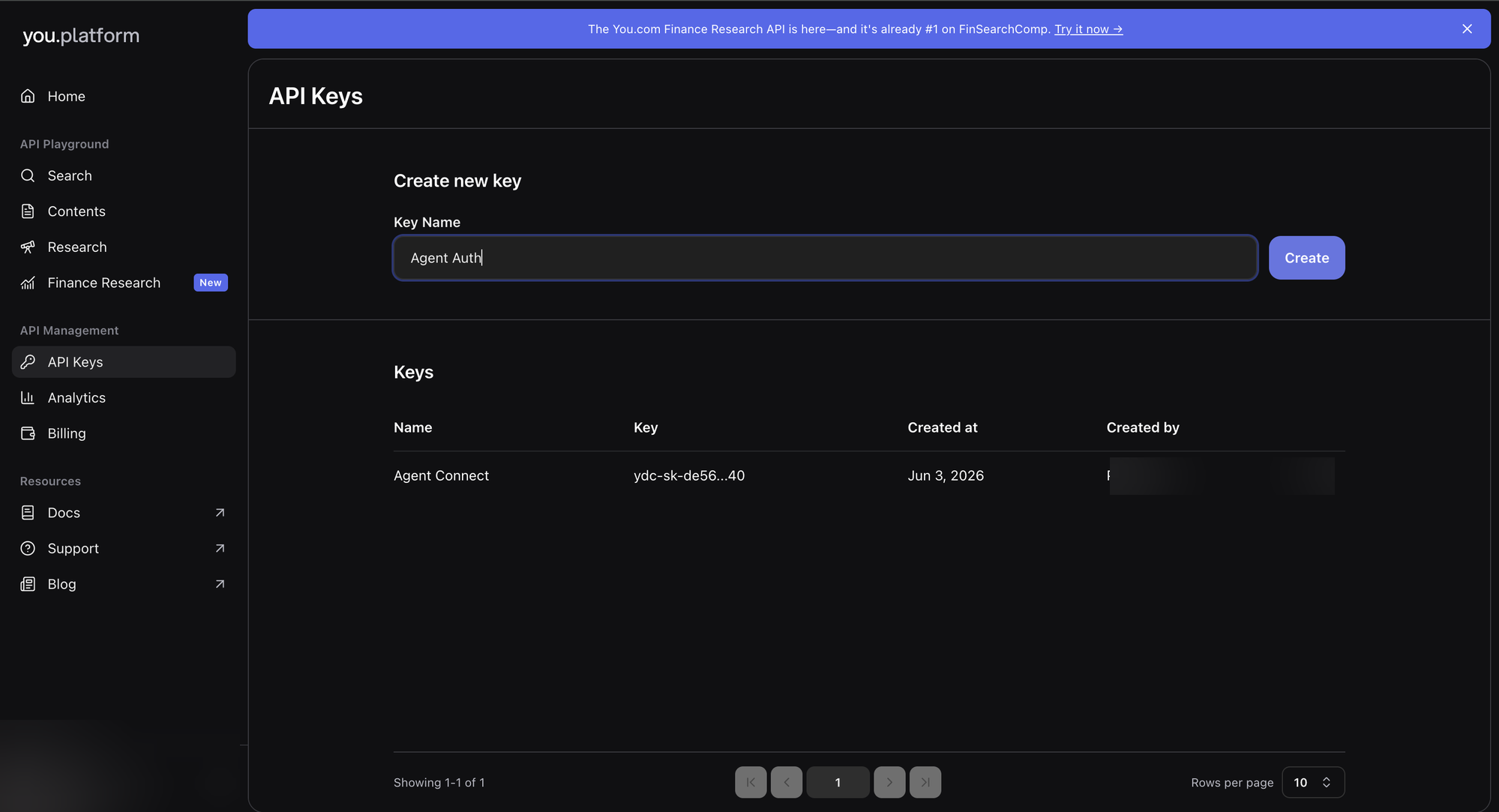
- Copy the generated key — it starts with
ydc-sk-.
-
Create a connection in Scalekit
- In the Scalekit dashboard, go to AgentKit → Connections → Create Connection.
- Search for You.com MCP and click Create.
- Note the Connection name — use this as
connection_namein your code (e.g.,youmcp).
-
Add a connected account
Connected accounts link a specific user identifier in your system to a You.com API key. Add one in the dashboard to test. In production, each user adds their own through the authorization link: they enter their credentials on the page it opens.
In the dashboard, to test
- Open the connection and click the Connected Accounts tab → Add account.
- Fill in Your User’s ID and API Key, then click Save.
From your backend, if your app already has the credentials
For example, when users enter them on a settings page in your app:
import { ConnectorStatus } from '@scalekit-sdk/node'const authorizationDetails = {details: {case: 'staticAuth',value: { details: { token: 'ydc-sk-...' } },},}let { connectedAccount } = await scalekit.actions.upsertConnectedAccount({connectionName: 'youmcp',identifier: 'user_123',authorizationDetails,})// Make sure the account is ACTIVE before the first tool call.if (connectedAccount?.status !== ConnectorStatus.ACTIVE) {;({ connectedAccount } = await scalekit.actions.upsertConnectedAccount({connectionName: 'youmcp',identifier: 'user_123',authorizationDetails,}))}authorization_details = {"static_auth": {"token": "ydc-sk-..."}}response = scalekit_client.actions.upsert_connected_account(connection_name="youmcp",identifier="user_123",authorization_details=authorization_details,)# Make sure the account is ACTIVE before the first tool call.if response.connected_account.status != "ACTIVE":response = scalekit_client.actions.upsert_connected_account(connection_name="youmcp",identifier="user_123",authorization_details=authorization_details,)
-
Authorize a user and make your first call
quickstart.mts import { ScalekitClient } from '@scalekit-sdk/node'import 'dotenv/config'import { createInterface } from 'node:readline/promises'const scalekit = new ScalekitClient(process.env.SCALEKIT_ENVIRONMENT_URL,process.env.SCALEKIT_CLIENT_ID,process.env.SCALEKIT_CLIENT_SECRET,)const actions = scalekit.actionsconst connector = 'youmcp'const identifier = 'user_123'// Generate an authorization link for the userconst { link } = await actions.getAuthorizationLink({ connectionName: connector, identifier })console.log('Authorize You.com MCP:', link)const rl = createInterface({ input: process.stdin, output: process.stdout })await rl.question('Press Enter after authorizing...')rl.close()// Make your first callconst result = await actions.executeTool({connector,identifier,toolName: 'youmcp_you-balance',toolInput: {},})console.log(result)Terminal window npx tsx quickstart.mtsquickstart.py import osfrom scalekit import ScalekitClientfrom dotenv import load_dotenvload_dotenv()scalekit_client = ScalekitClient(env_url=os.getenv("SCALEKIT_ENVIRONMENT_URL"),client_id=os.getenv("SCALEKIT_CLIENT_ID"),client_secret=os.getenv("SCALEKIT_CLIENT_SECRET"),)actions = scalekit_client.actionsconnection_name = "youmcp"identifier = "user_123"# Generate an authorization link for the userlink_response = actions.get_authorization_link(connection_name=connection_name,identifier=identifier,)print("Authorize You.com MCP:", link_response.link)input("Press Enter after authorizing...")# Make your first callresult = actions.execute_tool(tool_input={},tool_name="youmcp_you-balance",connection_name=connection_name,identifier=identifier,)print(result)Terminal window python quickstart.pyEach user opens the link once and enters their You.com MCP server credentials there. If your app already has a user's credentials, add the account from your backend instead, as the console steps above show. See Authorize a user for the full flow and statuses.
Tools
Pass the exact name toexecute_toolyoumcp_you-answerFast live-web answer generation returning one synthesized answer with verified inline citations, citation excerpts, and supporting web results.Read-onlyYou Answer
Fast live-web answer generation returning one synthesized answer with verified inline citations, citation excerpts, and supporting web results. Use when the caller wants a single sourced answer; use research for deeper multi-step investigation, effort control, structured output, or background tasks. Supports freshness, country, language, and domain filters.
Inputs
querystringrequired- Focused live-web question or lookup request. Returns a synthesized answer with inline citations, citation excerpts, and supporting web results.
boost_domainsarray- Domains to prefer in ranking (up to 500). Can combine with exclude_domains, not include_domains.
countrystring- A supported country code that determines the geographical focus.one of
ARAUATBEBRCACLDKFIFRDEHKINIDITJPKRMYMXNLNZNOCNPLPTPHRUSAZAESSECHTWTRGBUS exclude_domainsarray- Domains to exclude from results (up to 500).
freshnessstring- day/week/month/year or YYYY-MM-DDtoYYYY-MM-DD.
include_domainsarray- Domains to exclusively include (up to 500).
languagestring- A supported BCP 47 language tag that determines the language.one of
AREUBNBGCAHRCSDANLENEN-GBETFIFRGLDEELGUHEHIHUISITKNKOLVLTMSMLMRNBPLPARORUSRSKSLESSVTATETHTRUKVI
youmcp_you-balanceGet the remaining credit balance for the billing entity associated with your You.com API key.Read-onlyYou Account Balance
Get the remaining credit balance for the billing entity associated with your You.com API key. Balance is in cents (divide by 100 for USD).
Inputs
This tool takes no inputs.
youmcp_you-discoverDiscover AI agents, MCP servers, A2A agents, and skills via ARD Agent Finder services.Read-onlyYou Agent Discovery
Discover AI agents, MCP servers, A2A agents, and skills via ARD Agent Finder services. Search-only — never installs or connects. Returns ranked results with relevance scores.
Inputs
querystringrequired- Natural-language task to find agents/tools for.
finderstring- Which Agent Finder discovery service(s) to query.one of
githubhuggingfacealldefaultall finder_urlstring- Optional custom finder URL (must be public http/https). Augments selected finders.
limitinteger- Max consolidated results (1–25).default
10
youmcp_you-contentsExtract content from one or more web pages in markdown, HTML, or structured metadata format.WriteYou Contents
Extract content from one or more web pages in markdown, HTML, or structured metadata format. Supports up to 100 URLs per call.
Inputs
urlsarrayrequired- One or more public HTTP/HTTPS URLs to extract content from (up to 100).
crawl_timeoutnumber- Timeout in seconds for live-crawling pages (1–60).
formatstring- (Deprecated) Output format - use formats array insteadone of
markdownhtml formatsarray- Output formats to return: markdown (plain text), html (layout preserved), or metadata (structured data).
youmcp_you-researchResearch a topic in depth using You.com's AI.WriteYou Research
Research a topic in depth using You.com's AI. Returns comprehensive answers with cited sources at configurable effort levels (lite, standard, deep, exhaustive).
Inputs
inputstringrequired- The research question or complex query for in-depth multi-step investigation (max 40,000 characters).
research_effortstring- How much effort to spend: lite (fast), standard (balanced), deep (thorough), exhaustive (most comprehensive).one of
litestandarddeepexhaustivedefaultstandard
youmcp_you-searchSearch the web and news using You.com.WriteYou Search
Search the web and news using You.com. Supports domain filtering, language and country targeting, freshness filters, and live-crawl for full page content.
Inputs
querystringrequired- Search query string. Supports operators: site:domain.com, filetype:pdf, +term, -term, AND/OR/NOT, lang:en.
countinteger- Maximum number of results to return per section (1–100).
countrystring- Country code to localize search results (ISO 3166-1 alpha-2).one of
ARAUATBEBRCACLDKFIFRDEHKINIDITJPKRMYMXNLNZNOCNPLPTPHRUSAZAESSECHTWTRGBUS crawl_timeoutinteger- Timeout in seconds for live-crawling pages (1–60).
exclude_domainsarray- List of domains to exclude from search results (up to 500).
freshnessstring- Limit results by recency: day, week, month, year, or a date range YYYY-MM-DDtoYYYY-MM-DD.
include_domainsarray- List of domains to restrict search results to (up to 500).
languagestring- Language code (BCP 47) to filter search results.one of
AREUBNBGCAZH-HANSZH-HANTHRCSDANLENEN-GBETFIFRGLDEELGUHEHIHUISITJPKNKOLVLTMSMLMRNBPLPT-BRPT-PTPARORUSRSKSLESSVTATETHTRUKVI livecrawlstring- Enable live-crawling of full page content for the specified section: web, news, or all.one of
webnewsall livecrawl_formatsarray- Output formats for live-crawled content: html and/or markdown.
offsetinteger- Pagination offset for results (0–9).
safesearchstring- Safe-search filter level applied to results.one of
offmoderatestrict
No tools match.