

Implement enterprise SSO
How to implement enterprise SSO for your application
Enterprise single sign-on (SSO) enables users to authenticate using their organization’s identity provider (IdP), such as Okta, Azure AD, or Google Workspace. After completing the quickstart, follow this guide to implement SSO for an organization, streamline admin onboarding, enforce login requirements, and validate your configuration.
-
Enable SSO for the organization
Section titled “Enable SSO for the organization”When a user signs up for your application, Scalekit automatically creates an organization and assigns an admin role to the user. Provide an option in your user interface to enable SSO for the organization or workspace.
Here’s how you can do that with Scalekit. Use the following SDK method to activate SSO for the organization:
Enable SSO const settings = {features: [{name: 'sso',enabled: true,}],};await scalekit.organization.updateOrganizationSettings('<organization_id>', // Get this from the idToken or accessTokensettings);Enable SSO settings = [{"name": "sso","enabled": True}]scalekit.organization.update_organization_settings(organization_id='<organization_id>', # Get this from the idToken or accessTokensettings=settings)Enable SSO OrganizationSettingsFeature featureSSO = OrganizationSettingsFeature.newBuilder().setName("sso").setEnabled(true).build();updatedOrganization = scalekitClient.organizations().updateOrganizationSettings(organizationId, List.of(featureSSO));Enable SSO settings := OrganizationSettings{Features: []Feature{{Name: "sso",Enabled: true,},},}organization, err := sc.Organization().UpdateOrganizationSettings(ctx, organizationId, settings)if err != nil {// Handle error}You can also enable this from the organization settings in the Scalekit dashboard.
-
Enable admin portal for enterprise customer onboarding
Section titled “Enable admin portal for enterprise customer onboarding”After SSO is enabled for that organization, provide a method for configuring a SSO connection with the organization’s identity provider.
Scalekit offers two primary approaches:
- Generate a link to the admin portal from the Scalekit dashboard and share it with organization admins via your usual channels.
- Or embed the admin portal in your application in an inline frame so administrators can configure their IdP without leaving your app.
-
Identify and enforce SSO for organization users
Section titled “Identify and enforce SSO for organization users”Administrators typically register organization-owned domains through the admin portal. When a user attempts to sign in with an email address matching a registered domain, they are automatically redirected to their organization’s designated identity provider for authentication.
Organization domains automatically route users to the correct SSO connection based on their email address. When a user signs in with an email domain that matches a registered organization domain, Scalekit redirects them to that organization’s SSO provider and enforces SSO login.
For example, if an organization registers
megacorp.org, any user signing in with anjoe@megacorp.orgemail address is redirected to Megacorp’s SSO provider.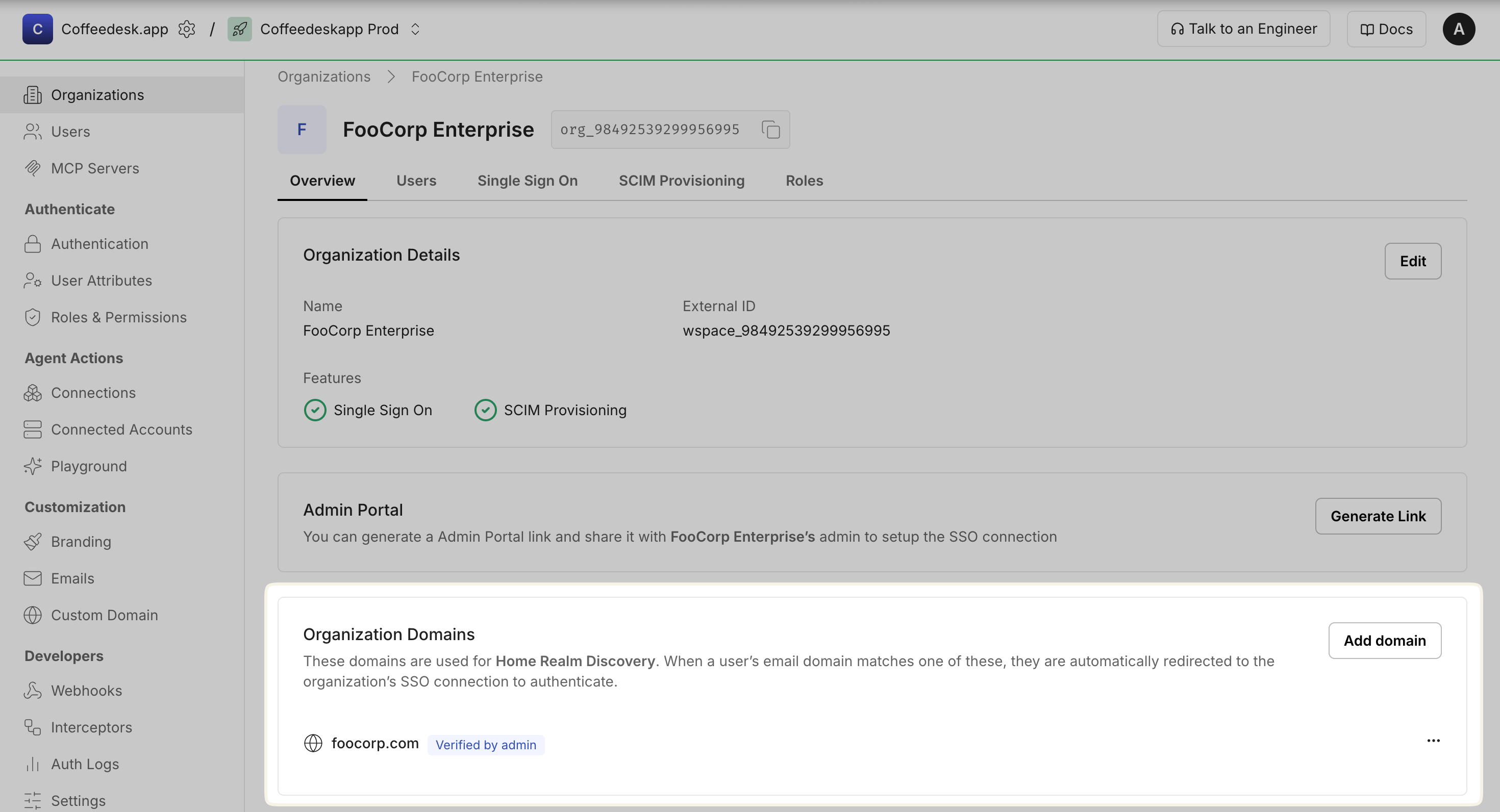
Navigate to Dashboard > Organizations and select the target organization > Overview > Organization Domains section to register organization domains.
-
Test your SSO integration
Section titled “Test your SSO integration”Scalekit offers a “Test Organization” feature that enables SSO flow validation without requiring test accounts from your customers’ identity providers.
To quickly test the integration, enter an email address using the domains
joe@example.comorjane@example.org. This will trigger a redirect to the IdP simulator, which serves as the test organization’s identity provider for authentication.For a comprehensive step-by-step walkthrough, refer to the Test SSO integration guide.