

Implement logout
Terminate user sessions across your application and Scalekit
When implementing logout functionality, you need to consider three session layers where user authentication state is maintained:
-
Application session layer: Your application stores session tokens (access tokens, refresh tokens, ID tokens) in browser cookies. You control this layer completely.
-
Scalekit session layer: Scalekit maintains a session for the user and stores their information. When users return to Scalekit’s authentication page, their information is remembered for a smoother experience.
-
Identity provider session layer: When users authenticate with external providers (for example, Okta through enterprise SSO), those providers maintain their own sessions. Users won’t be prompted to sign in again if they’re already signed into the provider.
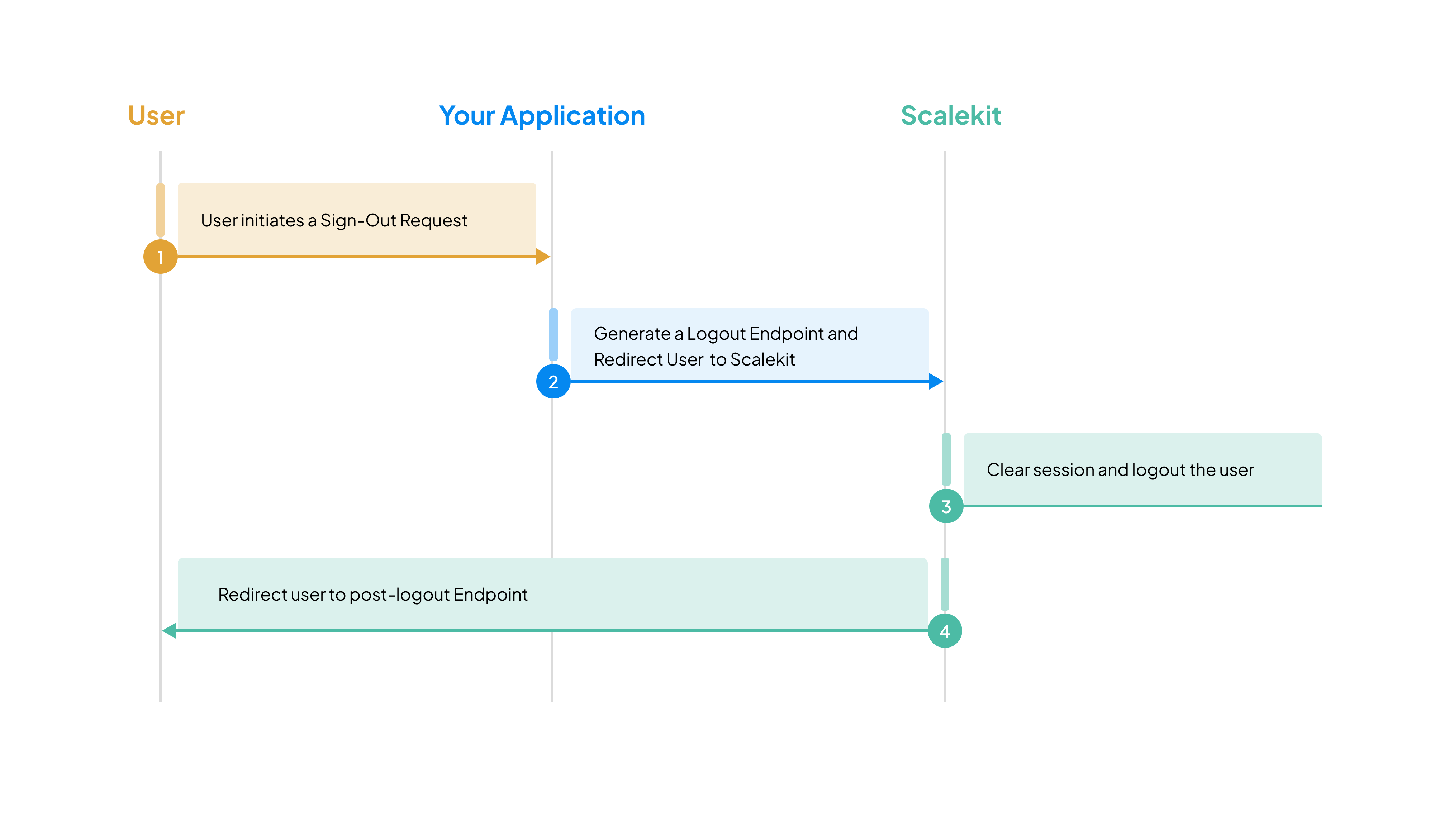
This guide shows you how to clear the application session layer and invalidate the Scalekit session layer in a single logout endpoint.
-
Create a logout endpoint
Section titled “Create a logout endpoint”Create a
/logoutendpoint in your application that handles the complete logout flow: extracting the ID token, generating the Scalekit logout URL (which points to Scalekit’s/oidc/logoutendpoint), clearing session cookies, and redirecting to Scalekit.Express.js app.get('/logout', (req, res) => {// Step 1: Extract the ID token (needed for Scalekit logout)const idTokenHint = req.cookies.idToken;const postLogoutRedirectUri = 'http://localhost:3000/login';// Step 2: Generate the Scalekit logout URL (points to /oidc/logout endpoint)const logoutUrl = scalekit.getLogoutUrl(idTokenHint, // ID token to invalidatepostLogoutRedirectUri // URL that scalekit redirects after session invalidation);// Step 3: Clear all session cookiesres.clearCookie('accessToken');res.clearCookie('refreshToken');res.clearCookie('idToken'); // Clear AFTER using it for logout URL// Step 4: Redirect to Scalekit to invalidate the sessionres.redirect(logoutUrl);});Flask from flask import request, redirect, make_responsefrom scalekit import LogoutUrlOptions@app.route('/logout')def logout():# Step 1: Extract the ID token (needed for Scalekit logout)id_token = request.cookies.get('idToken')post_logout_redirect_uri = 'http://localhost:3000/login'# Step 2: Generate the Scalekit logout URL (points to /oidc/logout endpoint)logout_url = scalekit_client.get_logout_url(LogoutUrlOptions(id_token_hint=id_token,post_logout_redirect_uri=post_logout_redirect_uri))# Step 3: Create response and clear all session cookiesresponse = make_response(redirect(logout_url))response.set_cookie('accessToken', '', max_age=0)response.set_cookie('refreshToken', '', max_age=0)response.set_cookie('idToken', '', max_age=0) # Clear AFTER using it for logout URL# Step 4: Return response that redirects to Scalekitreturn responseGin func logoutHandler(c *gin.Context) {// Step 1: Extract the ID token (needed for Scalekit logout)idToken, _ := c.Cookie("idToken")postLogoutRedirectURI := "http://localhost:3000/login"// Step 2: Generate the Scalekit logout URL (points to /oidc/logout endpoint)logoutURL, err := scalekitClient.GetLogoutUrl(LogoutUrlOptions{IdTokenHint: idToken,PostLogoutRedirectUri: postLogoutRedirectURI,})if err != nil {c.JSON(http.StatusInternalServerError, gin.H{"error": err.Error()})return}// Step 3: Clear all session cookiesc.SetCookie("accessToken", "", -1, "/", "", true, true)c.SetCookie("refreshToken", "", -1, "/", "", true, true)c.SetCookie("idToken", "", -1, "/", "", true, true) // Clear AFTER using it for logout URL// Step 4: Redirect to Scalekit to invalidate the sessionc.Redirect(http.StatusFound, logoutURL.String())}Spring Boot @GetMapping("/logout")public void logout(HttpServletRequest request, HttpServletResponse response) throws IOException {// Step 1: Extract the ID token (needed for Scalekit logout)String idToken = request.getCookies() != null ?Arrays.stream(request.getCookies()).filter(c -> c.getName().equals("idToken")).findFirst().map(Cookie::getValue).orElse(null) : null;String postLogoutRedirectUri = "http://localhost:3000/login";// Step 2: Generate the Scalekit logout URL (points to /oidc/logout endpoint)LogoutUrlOptions options = new LogoutUrlOptions();options.setIdTokenHint(idToken);options.setPostLogoutRedirectUri(postLogoutRedirectUri);URL logoutUrl = scalekitClient.authentication().getLogoutUrl(options);// Step 3: Clear all session cookies with security attributesCookie accessTokenCookie = new Cookie("accessToken", null);accessTokenCookie.setMaxAge(0);accessTokenCookie.setPath("/");accessTokenCookie.setHttpOnly(true);accessTokenCookie.setSecure(true);response.addCookie(accessTokenCookie);Cookie refreshTokenCookie = new Cookie("refreshToken", null);refreshTokenCookie.setMaxAge(0);refreshTokenCookie.setPath("/");refreshTokenCookie.setHttpOnly(true);refreshTokenCookie.setSecure(true);response.addCookie(refreshTokenCookie);Cookie idTokenCookie = new Cookie("idToken", null);idTokenCookie.setMaxAge(0);idTokenCookie.setPath("/");idTokenCookie.setHttpOnly(true);idTokenCookie.setSecure(true);response.addCookie(idTokenCookie); // Clear AFTER using it for logout URL// Step 4: Redirect to Scalekit to invalidate the sessionresponse.sendRedirect(logoutUrl.toString());}The logout flow clears cookies AFTER extracting the ID token and generating the logout URL. This ensures the ID token is available for Scalekit’s logout endpoint.
-
Configure post-logout redirect URL
Section titled “Configure post-logout redirect URL”After users log out, Scalekit redirects them to the URL you specify in the
post_logout_redirect_uriparameter. This URL must be registered in your Scalekit dashboard under Dashboard > Authentication > Redirects > Post Logout URL.Scalekit only redirects to URLs from your allow list. This prevents unauthorized redirects and protects your users. If you need different redirect URLs for different applications, you can register multiple post-logout URLs in your dashboard.
Common logout scenarios
Section titled “Common logout scenarios”Which endpoint should I use for logout?
Use /oidc/logout (end_session_endpoint) for user logout functionality. This endpoint requires a browser redirect and clears the user’s session server-side.
Why must logout be a browser redirect?
You need to route to the /oidc/logout endpoint through a browser redirect, not with an API request. Redirecting the browser to Scalekit’s logout URL ensures the session cookie is sent automatically, so Scalekit can correctly locate and end the user’s session.
❌ Doesn’t work - API call from frontend:
fetch('https://your-env.scalekit.dev/oidc/logout', { method: 'POST', body: JSON.stringify({ id_token_hint: idToken })});// Session cookie is NOT included, Scalekit can't identify the session✅ Works - Browser redirect:
const logoutUrl = scalekit.getLogoutUrl(idToken, postLogoutRedirectUri);window.location.href = logoutUrl;// Browser includes session cookies automaticallyWhy: Your user session is stored in an HttpOnly cookie. API requests from JavaScript or backend servers don’t include this cookie, so Scalekit can’t identify which session to terminate.
Session not clearing after logout?
If clicking login after logout bypasses the login screen and logs you back in automatically, check the following:
-
Verify the logout method - Open browser DevTools → Network tab and trigger logout:
- ✅ Type should show “document” (navigation)
- ❌ Type should NOT show “fetch” or “xhr”
- Check that the
Cookieheader is present in the request
-
Check post-logout redirect URI - Ensure it’s registered in Dashboard > Authentication > Redirects > Post Logout URL.