The GitHub MCP connector routes your AI agent's tool calls to GitHub's own MCP server through Scalekit. Each user signs in to GitHub once, and Scalekit stores and refreshes their tokens, so your agent never handles credentials. It comes with 44 tools.
- Tools
- 44
- What they doRead · write · destructive
- 27 · 16 · 127 read16 write1 destructive
- Users sign in with
- OAuth
- OAuth app
- Your own GitHub app
What you can do
- Manage issues: create, update, comment on, and search issues, including sub-issues
- Work with pull requests: open, update, review, merge, and search pull requests and their comments
- Edit repository files: read, create, update, and delete files, and push multiple files in one commit
- Manage repositories and branches: create or fork repositories, create branches, and list commits, tags, and releases
- Search code and people: search code, commits, repositories, and users across GitHub
- Scan for secrets: check files or content for exposed API keys, passwords, and tokens
Setup
Install the SDK
Terminal window npm install @scalekit-sdk/node dotenvTerminal window pip install scalekit-sdk-python python-dotenvSet your credentials
Add your Scalekit credentials to your
.envfile. Find values in app.scalekit.com > Developers > API Credentials..env SCALEKIT_ENVIRONMENT_URL=<your-environment-url>SCALEKIT_CLIENT_ID=<your-client-id>SCALEKIT_CLIENT_SECRET=<your-client-secret>Create the GitHub MCP connection
In AgentKit > Connections, create a GitHub MCP connection and copy its redirect URI. The name you give it is the
connection_nameyour code passes. See Configure connections.Register an OAuth app
GitHub connections use your own OAuth app. Register one with GitHub and add the redirect URI you copied.
Then enter the app's Client ID and Client Secret on the GitHub MCP connection.
Console steps with screenshots
Register your GitHub credentials with Scalekit so it handles the token lifecycle. You do this once per environment.
-
Set up auth redirects
-
In Scalekit dashboard, go to AgentKit > Connections > Create Connection. Find GitHub MCP and click Create.
-
Click Use your own credentials and copy the redirect URI. It looks like
https://<SCALEKIT_ENVIRONMENT_URL>/sso/v1/oauth/<CONNECTION_ID>/callback.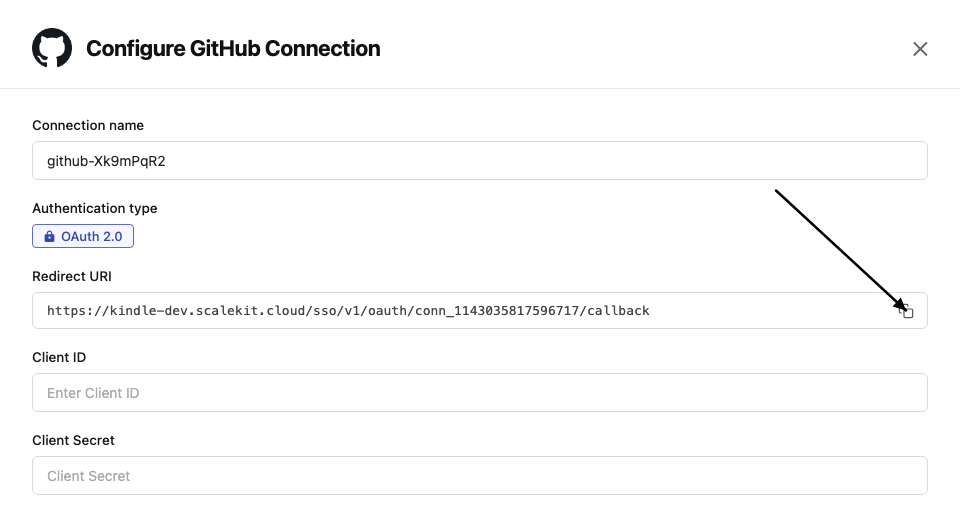
-
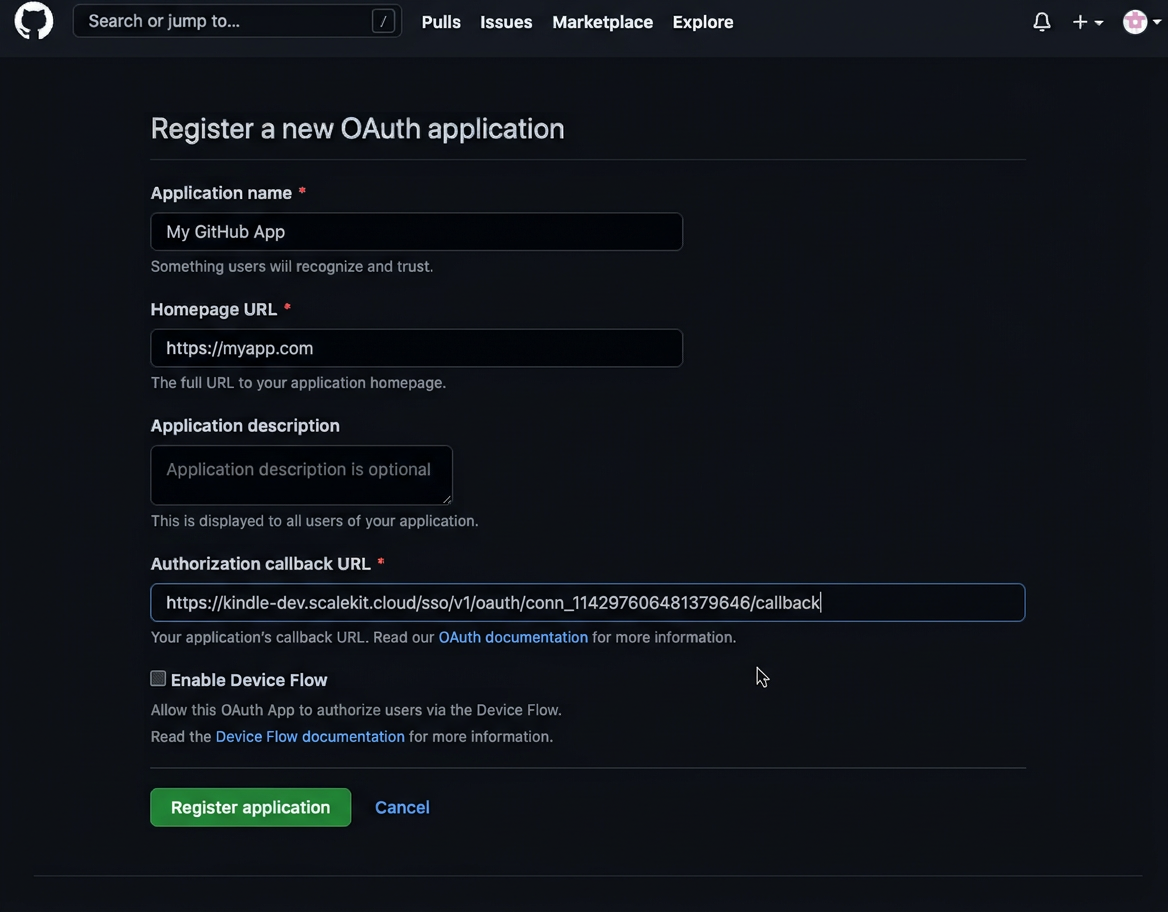
Go to GitHub Developer Settings and open your OAuth app.
-
Under General, paste the copied URI into the Authorization callback URL field and click Save application.
-
-
Get client credentials
In GitHub Developer Settings, open your OAuth app:
- Client ID — listed on the app’s main settings page
- Client Secret — click Generate a new client secret if you don’t have one
-
Add credentials in Scalekit
-
In Scalekit dashboard, go to AgentKit > Connections and open the connection you created.
-
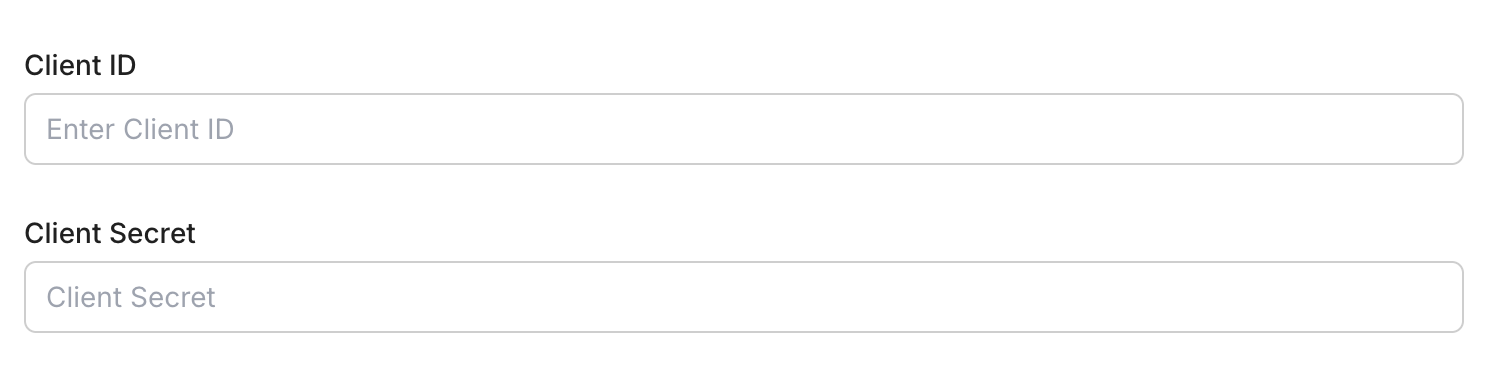
Enter your credentials:
- Client ID (from your GitHub OAuth app)
- Client Secret (from your GitHub OAuth app)
-
Click Save.
-
-
Authorize a user and make your first call
quickstart.mts import { ScalekitClient } from '@scalekit-sdk/node'import 'dotenv/config'import { createInterface } from 'node:readline/promises'const scalekit = new ScalekitClient(process.env.SCALEKIT_ENVIRONMENT_URL,process.env.SCALEKIT_CLIENT_ID,process.env.SCALEKIT_CLIENT_SECRET,)const actions = scalekit.actionsconst connector = 'githubmcp'const identifier = 'user_123'// Generate an authorization link for the userconst { link } = await actions.getAuthorizationLink({ connectionName: connector, identifier })console.log('Authorize GitHub MCP:', link)const rl = createInterface({ input: process.stdin, output: process.stdout })await rl.question('Press Enter after authorizing...')rl.close()// Make your first callconst result = await actions.executeTool({connector,identifier,toolName: 'githubmcp_get_me',toolInput: {},})console.log(result)Terminal window npx tsx quickstart.mtsquickstart.py import osfrom scalekit import ScalekitClientfrom dotenv import load_dotenvload_dotenv()scalekit_client = ScalekitClient(env_url=os.getenv("SCALEKIT_ENVIRONMENT_URL"),client_id=os.getenv("SCALEKIT_CLIENT_ID"),client_secret=os.getenv("SCALEKIT_CLIENT_SECRET"),)actions = scalekit_client.actionsconnection_name = "githubmcp"identifier = "user_123"# Generate an authorization link for the userlink_response = actions.get_authorization_link(connection_name=connection_name,identifier=identifier,)print("Authorize GitHub MCP:", link_response.link)input("Press Enter after authorizing...")# Make your first callresult = actions.execute_tool(tool_input={},tool_name="githubmcp_get_me",connection_name=connection_name,identifier=identifier,)print(result)Terminal window python quickstart.pyEach user signs in once. See Authorize a user for the full flow and statuses.
Tools
Pass the exact name toexecute_toolgithubmcp_get_commitGet details for a specific commit from a GitHub repository.Read-onlyGet Commit
Get details for a specific commit from a GitHub repository.
Inputs
ownerstringrequired- The GitHub repository owner (username or organization name).
repostringrequired- The GitHub repository name.
shastringrequired- The blob SHA of the file being replaced. Required when updating an existing file.
detailstring- Level of detail to include for changed files. "none" omits stats and files entirely. "stats" (default) includes per-file metadata: filename, status, and lines-of-code counts (additions, deletions, changes), with no patch content. "full_patch" additionally includes the unified diff content for each file and can be very large.one of
nonestatsfull_patchdefaultstats pagenumber- The page number for pagination.
perPagenumber- The number of results per page (max 100).
githubmcp_get_file_contentsGet the contents of a file or directory from a GitHub repository.Read-onlyGet File Contents
Get the contents of a file or directory from a GitHub repository.
Inputs
ownerstringrequired- The GitHub repository owner (username or organization name).
repostringrequired- The GitHub repository name.
fieldsarray- Subset of fields to return for each entry when the path is a directory. If omitted, all fields are returned. Ignored when the path is a single file. Use this to reduce response size when listing directories and you only need specific fields, e.g. just 'name' and 'type'.
pathstring- The file path within the repository.default
/ refstring- The git ref (branch, tag, or commit SHA) to fetch the file from.
shastring- The blob SHA of the file being replaced. Required when updating an existing file.
githubmcp_get_labelGet a specific label from a GitHub repository.Read-onlyGet Label
Get a specific label from a GitHub repository.
Inputs
namestringrequired- The repository name.
ownerstringrequired- The GitHub repository owner (username or organization name).
repostringrequired- The GitHub repository name.
githubmcp_get_latest_releaseGet the latest release in a GitHub repository.Read-onlyGet Latest Release
Get the latest release in a GitHub repository.
Inputs
ownerstringrequired- The GitHub repository owner (username or organization name).
repostringrequired- The GitHub repository name.
githubmcp_get_meGet details of the authenticated GitHub user.Read-onlyGet Me
Get details of the authenticated GitHub user.
Inputs
This tool takes no inputs.
githubmcp_get_release_by_tagGet a specific release by its tag name in a GitHub repository.Read-onlyGet Release By Tag
Get a specific release by its tag name in a GitHub repository.
Inputs
ownerstringrequired- The GitHub repository owner (username or organization name).
repostringrequired- The GitHub repository name.
tagstringrequired- The tag name of the release.
githubmcp_get_tagGet details about a specific git tag in a GitHub repository.Read-onlyGet Tag
Get details about a specific git tag in a GitHub repository.
Inputs
ownerstringrequired- The GitHub repository owner (username or organization name).
repostringrequired- The GitHub repository name.
tagstringrequired- The tag name of the release.
githubmcp_get_team_membersGet the member usernames of a specific team in a GitHub organization.Read-onlyGet Team Members
Get the member usernames of a specific team in a GitHub organization.
Inputs
orgstringrequired- The GitHub organization slug.
team_slugstringrequired- The team slug within the organization.
githubmcp_get_teamsGet details of the teams the authenticated user is a member of.Read-onlyGet Teams
Get details of the teams the authenticated user is a member of.
Inputs
userstring- The GitHub username to filter teams by.
githubmcp_issue_readGet information about a specific issue or its comments in a GitHub repository.Read-onlyIssue Read
Get information about a specific issue or its comments in a GitHub repository.
Inputs
issue_numbernumberrequired- The issue number.
methodstringrequired- The operation to perform. Check the tool description for available methods.one of
getget_commentsget_sub_issuesget_parentget_labels ownerstringrequired- The GitHub repository owner (username or organization name).
repostringrequired- The GitHub repository name.
pagenumber- The page number for pagination.
perPagenumber- The number of results per page (max 100).
githubmcp_list_branchesList branches in a GitHub repository.Read-onlyList Branches
List branches in a GitHub repository.
Inputs
ownerstringrequired- The GitHub repository owner (username or organization name).
repostringrequired- The GitHub repository name.
pagenumber- The page number for pagination.
perPagenumber- The number of results per page (max 100).
githubmcp_list_commitsList commits on a branch in a GitHub repository.Read-onlyList Commits
List commits on a branch in a GitHub repository.
Inputs
ownerstringrequired- The GitHub repository owner (username or organization name).
repostringrequired- The GitHub repository name.
authorstring- Filter commits by author username or email.
fieldsarray- Subset of fields to return for each commit. If omitted, all fields are returned. Use this to reduce response size when you only need specific fields, e.g. just 'sha' and 'html_url'.
pagenumber- The page number for pagination.
pathstring- The file path within the repository.
perPagenumber- The number of results per page (max 100).
shastring- The blob SHA of the file being replaced. Required when updating an existing file.
sincestring- Filter results created after this ISO 8601 timestamp.
untilstring- Filter results created before this ISO 8601 timestamp.
githubmcp_list_issue_fieldsList custom issue fields available for a GitHub repository or organization.Read-onlyList Issue Fields
List custom issue fields available for a GitHub repository or organization.
Inputs
ownerstringrequired- The account owner of the repository or organization. The name is not case sensitive.
repostring- The name of the repository. When provided, returns fields for this specific repository (inherited from its organization). When omitted, returns org-level fields directly.
githubmcp_list_issue_typesList supported issue types for a GitHub organization.Read-onlyList Issue Types
List supported issue types for a GitHub organization.
Inputs
ownerstringrequired- The GitHub repository owner (username or organization name).
repostring- The name of the repository. When provided, returns issue types for this specific repository. When omitted, returns org-level issue types directly.
githubmcp_list_issuesList issues in a GitHub repository with optional filters for state, labels, and date range.Read-onlyList Issues
List issues in a GitHub repository with optional filters for state, labels, and date range.
Inputs
ownerstringrequired- The GitHub repository owner (username or organization name).
repostringrequired- The GitHub repository name.
afterstring- Pagination cursor from the previous response to fetch the next page.
directionstring- The sort direction: asc or desc.one of
ASCDESC field_filtersarray- Filter by custom issue field values. Each entry takes a field_name and a value; the server looks up the field and coerces the value to its type (single-select option name, text, number, or YYYY-MM-DD date).
fieldsarray- Subset of fields to return for each issue. If omitted, all fields are returned. Use this to reduce response size when you only need specific fields; omitting 'body' and 'field_values' in particular drops the largest per-result data.
labelsarray- List of label names to apply to the issue.
orderBystring- The field to order results by.one of
CREATED_ATUPDATED_ATCOMMENTS perPagenumber- The number of results per page (max 100).
sincestring- Filter results created after this ISO 8601 timestamp.
statestring- Filter by state: open, closed, or all.one of
OPENCLOSED
githubmcp_list_pull_requestsList pull requests in a GitHub repository with optional filters.Read-onlyList Pull Requests
List pull requests in a GitHub repository with optional filters.
Inputs
ownerstringrequired- The GitHub repository owner (username or organization name).
repostringrequired- The GitHub repository name.
basestring- The name of the branch you want the changes merged into.
directionstring- The sort direction: asc or desc.one of
ascdesc fieldsarray- Subset of fields to return for each pull request. If omitted, all fields are returned. Use this to reduce response size when you only need specific fields; omitting 'body' in particular drops the largest per-result data.
headstring- The name of the branch where changes are implemented.
pagenumber- The page number for pagination.
perPagenumber- The number of results per page (max 100).
sortstring- The field to sort results by.one of
createdupdatedpopularitylong-running statestring- Filter by state: open, closed, or all.one of
openclosedall
githubmcp_list_releasesList releases in a GitHub repository.Read-onlyList Releases
List releases in a GitHub repository.
Inputs
ownerstringrequired- The GitHub repository owner (username or organization name).
repostringrequired- The GitHub repository name.
fieldsarray- Subset of fields to return for each release. If omitted, all fields are returned. Use this to reduce response size when you only need specific fields; omitting 'body' in particular drops the largest per-release data.
pagenumber- The page number for pagination.
perPagenumber- The number of results per page (max 100).
githubmcp_list_repository_collaboratorsList collaborators of a GitHub repository.Read-onlyList Repository Collaborators
List collaborators of a GitHub repository.
Inputs
ownerstringrequired- The GitHub repository owner (username or organization name).
repostringrequired- The GitHub repository name.
affiliationstring- Filter collaborators by affiliation: direct, outside, or all.one of
outsidedirectall pagenumber- The page number for pagination.
perPagenumber- The number of results per page (max 100).
githubmcp_pull_request_readGet information about a specific pull request or its reviews, comments, or files.Read-onlyPull Request Read
Get information about a specific pull request or its reviews, comments, or files.
Inputs
methodstringrequired- Action to specify what pull request data needs to be retrieved from GitHub.
Possible options:
1. get - Get details of a specific pull request.
2. get_diff - Get the diff of a pull request.
3. get_status - Get combined commit status of a head commit in a pull request.
4. get_files - Get the list of files changed in a pull request. Use with pagination parameters to control the number of results returned.
5. get_commits - Get the list of commits on a pull request. Use with pagination parameters to control the number of results returned.
6. get_review_comments - Get review threads on a pull request. Each thread contains logically grouped review comments made on the same code location during pull request reviews. Returns threads with metadata (isResolved, isOutdated, isCollapsed) and their associated comments. Use cursor-based pagination (perPage, after) to control results.
7. get_reviews - Get the reviews on a pull request. When asked for review comments, use get_review_comments method. Use with pagination parameters to control the number of results returned.
8. get_comments - Get comments on a pull request. Use this if user doesn't specifically want review comments. Use with pagination parameters to control the number of results returned.
9. get_check_runs - Get check runs for the head commit of a pull request. Check runs are the individual CI/CD jobs and checks that run on the PR.
one of
getget_diffget_statusget_filesget_commitsget_review_commentsget_reviewsget_commentsget_check_runs ownerstringrequired- The GitHub repository owner (username or organization name).
pullNumbernumberrequired- The pull request number.
repostringrequired- The GitHub repository name.
afterstring- Cursor for pagination, used only by the get_review_comments method. Pass the endCursor from the previous page's PageInfo to fetch the next page.
pagenumber- The page number for pagination.
perPagenumber- The number of results per page (max 100).
githubmcp_run_secret_scanningScan files or content for exposed secrets such as API keys, passwords, and tokens.Read-onlyRun Secret Scanning
Scan files or content for exposed secrets such as API keys, passwords, and tokens.
Inputs
filesstringrequired- List of files to push, each with a path and content.
ownerstringrequired- The GitHub repository owner (username or organization name).
repostringrequired- The GitHub repository name.
githubmcp_search_codeSearch for code across GitHub repositories using GitHub code search syntax.Read-onlySearch Code
Search for code across GitHub repositories using GitHub code search syntax.
Inputs
querystringrequired- The search query string.
fieldsarray- Subset of fields to return for each code search result. If omitted, all fields are returned. Use this to reduce response size when you only need specific fields; omitting 'repository' and 'text_matches' in particular drops the largest per-result data.
orderstring- The sort order: asc or desc.one of
ascdesc pagenumber- The page number for pagination.
perPagenumber- The number of results per page (max 100).
sortstring- The field to sort results by.
githubmcp_search_commitsSearch for GitHub commits by commit message and other metadata.Read-onlySearch Commits
Search for GitHub commits by commit message and other metadata.
Inputs
querystringrequired- Commit search query (GitHub commit search REST). Searches commit messages on the default branch only. Scope the search with `repo:owner/repo`, `org:`, or `user:` (queries without a scope qualifier match across all of GitHub and are usually not what you want). Other qualifiers: `author:`, `committer:`, `author-name:`, `committer-name:`, `author-email:`, `committer-email:`, `author-date:`, `committer-date:` (supports `>`, `<`, `>=`, `<=`, and `YYYY-MM-DD..YYYY-MM-DD` ranges), `merge:true|false`, `hash:`, `tree:`, `parent:`, `is:public`.
orderstring- The sort order: asc or desc.one of
ascdesc pagenumber- The page number for pagination.
perPagenumber- The number of results per page (max 100).
sortstring- Sort by author or committer date (defaults to best match).one of
author-datecommitter-date
githubmcp_search_issuesSearch for issues across GitHub repositories using GitHub issues search syntax.Read-onlySearch Issues
Search for issues across GitHub repositories using GitHub issues search syntax.
Inputs
querystringrequired- The search query string.
fieldsarray- Subset of fields to return for each issue result. If omitted, all fields are returned. Use this to reduce response size when you only need specific fields; omitting 'body', 'reactions', and 'labels' in particular drops the largest per-result data.
orderstring- The sort order: asc or desc.one of
ascdesc ownerstring- The GitHub repository owner (username or organization name).
pagenumber- The page number for pagination.
perPagenumber- The number of results per page (max 100).
repostring- The GitHub repository name.
sortstring- The field to sort results by.one of
commentsreactionsreactions-+1reactions--1reactions-smilereactions-thinking_facereactions-heartreactions-tadainteractionscreatedupdated
githubmcp_search_pull_requestsSearch for pull requests across GitHub repositories using GitHub search syntax.Read-onlySearch Pull Requests
Search for pull requests across GitHub repositories using GitHub search syntax.
Inputs
querystringrequired- The search query string.
fieldsarray- Subset of fields to return for each pull request result. If omitted, all fields are returned. Use this to reduce response size when you only need specific fields; omitting 'body', 'reactions', and 'labels' in particular drops the largest per-result data.
orderstring- The sort order: asc or desc.one of
ascdesc ownerstring- The GitHub repository owner (username or organization name).
pagenumber- The page number for pagination.
perPagenumber- The number of results per page (max 100).
repostring- The GitHub repository name.
sortstring- The field to sort results by.one of
commentsreactionsreactions-+1reactions--1reactions-smilereactions-thinking_facereactions-heartreactions-tadainteractionscreatedupdated
githubmcp_search_repositoriesSearch for GitHub repositories by name, description, topics, or other metadata.Read-onlySearch Repositories
Search for GitHub repositories by name, description, topics, or other metadata.
Inputs
querystringrequired- The search query string.
minimal_outputboolean- Whether to return minimal output to reduce response size.default
true orderstring- The sort order: asc or desc.one of
ascdesc pagenumber- The page number for pagination.
perPagenumber- The number of results per page (max 100).
sortstring- The field to sort results by.one of
starsforkshelp-wanted-issuesupdated
githubmcp_search_usersSearch for GitHub users by username, name, or other profile information.Read-onlySearch Users
Search for GitHub users by username, name, or other profile information.
Inputs
querystringrequired- The search query string.
orderstring- The sort order: asc or desc.one of
ascdesc pagenumber- The page number for pagination.
perPagenumber- The number of results per page (max 100).
sortstring- The field to sort results by.one of
followersrepositoriesjoined
githubmcp_add_comment_to_pending_reviewAdd a review comment to the requester's latest pending pull request review.WriteAdd Comment To Pending Review
Add a review comment to the requester's latest pending pull request review.
Inputs
bodystringrequired- The text content of the comment, review, or description.
ownerstringrequired- The GitHub repository owner (username or organization name).
pathstringrequired- The file path within the repository.
pullNumbernumberrequired- The pull request number.
repostringrequired- The GitHub repository name.
subjectTypestringrequired- The subject type for the review comment: line or file.one of
FILELINE linenumber- The line number in the file the comment applies to.
sidestring- The side of the diff the comment applies to: LEFT or RIGHT.one of
LEFTRIGHT startLinenumber- The first line of a multi-line comment range.
startSidestring- The side of the diff for the start of a multi-line comment: LEFT or RIGHT.one of
LEFTRIGHT
githubmcp_add_issue_commentAdd a comment to a specific issue in a GitHub repository.WriteAdd Issue Comment
Add a comment to a specific issue in a GitHub repository.
Inputs
issue_numbernumberrequired- The issue number.
ownerstringrequired- The GitHub repository owner (username or organization name).
repostringrequired- The GitHub repository name.
bodystring- Comment content. Required unless reaction is provided.
comment_idnumber- The numeric ID of the issue or pull request comment to react to. Use this for reactions to comments; omit it to react to the issue or pull request itself. Cannot be combined with body.
reactionstring- Emoji reaction to add. Required unless body is provided.one of
+1-1laughconfusedhearthoorayrocketeyes
githubmcp_add_reply_to_pull_request_commentAdd a reply to an existing pull request review comment.WriteAdd Reply To Pull Request Comment
Add a reply to an existing pull request review comment.
Inputs
commentIdnumberrequired- The numeric ID of the comment to reply to.
ownerstringrequired- The GitHub repository owner (username or organization name).
repostringrequired- The GitHub repository name.
bodystring- The text of the reply. Required unless reaction is provided.
pullNumbernumber- Pull request number. Required when body is provided.
reactionstring- Emoji reaction to add. Required unless body is provided.one of
+1-1laughconfusedhearthoorayrocketeyes
githubmcp_create_branchCreate a new branch in a GitHub repository.WriteCreate Branch
Create a new branch in a GitHub repository.
Inputs
branchstringrequired- The branch name.
ownerstringrequired- The GitHub repository owner (username or organization name).
repostringrequired- The GitHub repository name.
from_branchstring- The source branch to create the new branch from. Defaults to the default branch if omitted.
githubmcp_create_or_update_fileCreate or update a single file in a GitHub repository.WriteCreate Or Update File
Create or update a single file in a GitHub repository. Provide the file SHA when updating an existing file.
Inputs
branchstringrequired- The branch name.
contentstringrequired- The base64-encoded file content.
messagestringrequired- The commit message.
ownerstringrequired- The GitHub repository owner (username or organization name).
pathstringrequired- The file path within the repository.
repostringrequired- The GitHub repository name.
shastring- The blob SHA of the file being replaced. Required when updating an existing file.
githubmcp_create_pull_requestCreate a new pull request in a GitHub repository.WriteCreate Pull Request
Create a new pull request in a GitHub repository.
Inputs
basestringrequired- The name of the branch you want the changes merged into.
headstringrequired- The name of the branch where changes are implemented.
ownerstringrequired- The GitHub repository owner (username or organization name).
repostringrequired- The GitHub repository name.
titlestringrequired- The title of the issue or pull request.
bodystring- The text content of the comment, review, or description.
draftboolean- Whether to create the pull request as a draft.
maintainer_can_modifyboolean- Whether maintainers can modify the pull request.
reviewersarray- GitHub usernames or ORG/team-slug team reviewers to request reviews from
githubmcp_create_repositoryCreate a new GitHub repository in your account or a specified organization.WriteCreate Repository
Create a new GitHub repository in your account or a specified organization.
Inputs
namestringrequired- The repository name.
autoInitboolean- Whether to initialize the repository with a README.
descriptionstring- Repository description
organizationstring- The GitHub organization to create the repository in. Defaults to your personal account.
privateboolean- Whether to make the repository private.
githubmcp_fork_repositoryFork a GitHub repository to your account or a specified organization.WriteFork Repository
Fork a GitHub repository to your account or a specified organization.
Inputs
ownerstringrequired- The GitHub repository owner (username or organization name).
repostringrequired- The GitHub repository name.
organizationstring- The GitHub organization to create the repository in. Defaults to your personal account.
githubmcp_issue_writeCreate a new issue or update an existing issue in a GitHub repository.WriteIssue Write
Create a new issue or update an existing issue in a GitHub repository.
Inputs
methodstringrequired- The operation to perform. Check the tool description for available methods.one of
createupdate ownerstringrequired- The GitHub repository owner (username or organization name).
repostringrequired- The GitHub repository name.
assigneesarray- List of GitHub usernames to assign to the issue.
bodystring- The text content of the comment, review, or description.
duplicate_ofnumber- The issue number this issue is a duplicate of.
issue_fieldsarray- Issue field values to set or clear. Each item requires 'field_name' and exactly one of 'value', 'field_option_name', or 'delete: true'.
issue_numbernumber- The issue number.
labelsarray- List of label names to apply to the issue.
milestonenumber- The milestone number to associate with the issue.
statestring- Filter by state: open, closed, or all.one of
openclosed state_reasonstring- The reason for closing: completed, not_planned, or reopened.one of
completednot_plannedduplicate titlestring- The title of the issue or pull request.
typestring- The issue type name to assign.
githubmcp_merge_pull_requestMerge a pull request in a GitHub repository.WriteMerge Pull Request
Merge a pull request in a GitHub repository.
Inputs
ownerstringrequired- The GitHub repository owner (username or organization name).
pullNumbernumberrequired- The pull request number.
repostringrequired- The GitHub repository name.
commit_messagestring- An optional longer message to accompany the commit title.
commit_titlestring- The title for the merge commit.
merge_methodstring- The merge method: merge, squash, or rebase.one of
mergesquashrebase
githubmcp_pull_request_review_writeCreate, submit, or delete a pull request review.WritePull Request Review Write
Create, submit, or delete a pull request review. Supported methods: create, submit, delete, resolve_thread, unresolve_thread.
Inputs
methodstringrequired- The operation to perform. Check the tool description for available methods.one of
createsubmit_pendingdelete_pendingresolve_threadunresolve_thread ownerstringrequired- The GitHub repository owner (username or organization name).
pullNumbernumberrequired- The pull request number.
repostringrequired- The GitHub repository name.
bodystring- The text content of the comment, review, or description.
commitIDstring- The SHA of the commit to associate with the review.
eventstring- The review action: APPROVE, REQUEST_CHANGES, or COMMENT.one of
APPROVEREQUEST_CHANGESCOMMENT threadIdstring- The ID of the review thread to resolve or unresolve.
githubmcp_push_filesPush multiple files to a GitHub repository in a single commit.WritePush Files
Push multiple files to a GitHub repository in a single commit.
Inputs
branchstringrequired- The branch name.
filesarrayrequired- List of files to push, each with a path and content.
messagestringrequired- The commit message.
ownerstringrequired- The GitHub repository owner (username or organization name).
repostringrequired- The GitHub repository name.
githubmcp_request_copilot_reviewRequest a GitHub Copilot automated code review for a pull request.WriteRequest Copilot Review
Request a GitHub Copilot automated code review for a pull request.
Inputs
ownerstringrequired- The GitHub repository owner (username or organization name).
pullNumbernumberrequired- The pull request number.
repostringrequired- The GitHub repository name.
githubmcp_sub_issue_writeAdd, remove, or reorder a sub-issue under a parent issue in a GitHub repository.WriteSub Issue Write
Add, remove, or reorder a sub-issue under a parent issue in a GitHub repository.
Inputs
issue_numbernumberrequired- The issue number.
methodstringrequired- The operation to perform. Check the tool description for available methods.
ownerstringrequired- The GitHub repository owner (username or organization name).
repostringrequired- The GitHub repository name.
sub_issue_idnumberrequired- The issue number of the sub-issue.
after_idnumber- Insert the sub-issue after this sub-issue ID.
before_idnumber- Insert the sub-issue before this sub-issue ID.
replace_parentboolean- Whether to replace the existing parent issue.
githubmcp_update_pull_requestUpdate the title, body, state, or other fields of an existing pull request.WriteUpdate Pull Request
Update the title, body, state, or other fields of an existing pull request.
Inputs
ownerstringrequired- The GitHub repository owner (username or organization name).
pullNumbernumberrequired- The pull request number.
repostringrequired- The GitHub repository name.
basestring- The name of the branch you want the changes merged into.
bodystring- The text content of the comment, review, or description.
draftboolean- Whether to create the pull request as a draft.
maintainer_can_modifyboolean- Whether maintainers can modify the pull request.
reviewersarray- List of GitHub usernames to request reviews from.
statestring- Filter by state: open, closed, or all.one of
openclosed titlestring- The title of the issue or pull request.
githubmcp_update_pull_request_branchUpdate a pull request branch with the latest changes from the base branch.WriteUpdate Pull Request Branch
Update a pull request branch with the latest changes from the base branch.
Inputs
ownerstringrequired- The GitHub repository owner (username or organization name).
pullNumbernumberrequired- The pull request number.
repostringrequired- The GitHub repository name.
expectedHeadShastring- The expected SHA of the pull request HEAD ref for optimistic locking.
githubmcp_delete_fileDelete a file from a GitHub repository.DestructiveDelete File
Delete a file from a GitHub repository.
Inputs
branchstringrequired- The branch name.
messagestringrequired- The commit message.
ownerstringrequired- The GitHub repository owner (username or organization name).
pathstringrequired- The file path within the repository.
repostringrequired- The GitHub repository name.
No tools match.