


The Render MCP connector routes your AI agent's tool calls to Render's own MCP server through Scalekit. Each user connects their own Render access token once, and Scalekit sends it with every call, so your agent never handles credentials. It comes with 48 tools.
- Tools
- 48
- What they doRead · write · destructive
- 32 · 10 · 632 read10 write6 destructive
- Users sign in with
- Access token
Setup
Install the SDK
Terminal window npm install @scalekit-sdk/node dotenvTerminal window pip install scalekit-sdk-python python-dotenvSet your credentials
Add your Scalekit credentials to your
.envfile. Find values in app.scalekit.com > Developers > API Credentials..env SCALEKIT_ENVIRONMENT_URL=<your-environment-url>SCALEKIT_CLIENT_ID=<your-client-id>SCALEKIT_CLIENT_SECRET=<your-client-secret>Create the Render MCP connection
In AgentKit > Connections, create a Render MCP connection. The name you give it is the
connection_nameyour code passes. See Configure connections.Console steps with screenshots
Register your Render API key with Scalekit so it can authenticate requests to the Render MCP server on behalf of your users. Render MCP uses API key authentication: the key is sent as a Bearer token.
-
Create a Render API key
-
Log in to your Render dashboard.
-
Click your workspace name, then Account Settings.
-
Select API Keys from the settings sidebar.
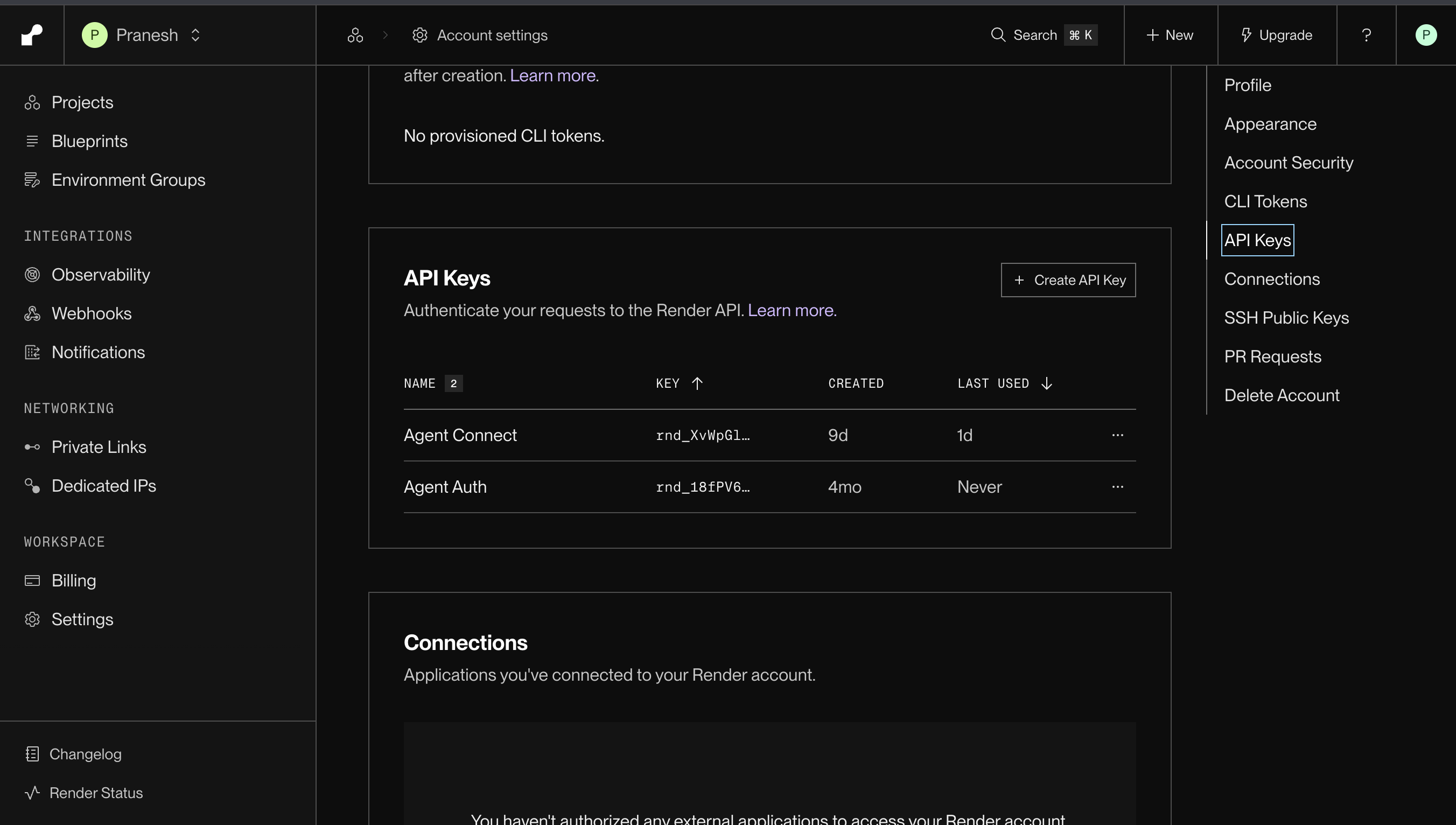
-
Click Create API Key, give it a descriptive name (for example,
Scalekit), and copy the key.
-
-
Create a connection in Scalekit
- In the Scalekit dashboard, go to AgentKit → Connections → Create Connection.
- Search for Render MCP and click Create.
- Note the Connection name — use this as
connection_namein your code (for example,rendermcp).
-
Add a connected account
Connected accounts link a specific user identifier in your system to a Render API key. Add one in the dashboard to test. In production, each user adds their own through the authorization link: they enter their credentials on the page it opens.
In the dashboard, to test
- Open the connection and click the Connected Accounts tab → Add account.
- Fill in Your User’s ID and API Key, then click Save.
From your backend, if your app already has the credentials
For example, when users enter them on a settings page in your app:
import { ConnectorStatus } from '@scalekit-sdk/node'const authorizationDetails = {details: {case: 'staticAuth',value: { details: { token: process.env.USER_API_KEY } },},};let { connectedAccount } = await scalekit.actions.upsertConnectedAccount({connectionName: 'rendermcp',identifier: 'user_123',authorizationDetails,});// Make sure the account is ACTIVE before the first tool call.if (connectedAccount?.status !== ConnectorStatus.ACTIVE) {({ connectedAccount } = await scalekit.actions.upsertConnectedAccount({connectionName: 'rendermcp',identifier: 'user_123',authorizationDetails,}));}authorization_details = {"static_auth": {"token": user_api_key}}response = scalekit_client.actions.upsert_connected_account(connection_name="rendermcp",identifier="user_123",authorization_details=authorization_details,)# Make sure the account is ACTIVE before the first tool call.if response.connected_account.status != "ACTIVE":response = scalekit_client.actions.upsert_connected_account(connection_name="rendermcp",identifier="user_123",authorization_details=authorization_details,)
-
Authorize a user and make your first call
quickstart.mts import { ScalekitClient } from '@scalekit-sdk/node'import 'dotenv/config'import { createInterface } from 'node:readline/promises'const scalekit = new ScalekitClient(process.env.SCALEKIT_ENVIRONMENT_URL,process.env.SCALEKIT_CLIENT_ID,process.env.SCALEKIT_CLIENT_SECRET,)const actions = scalekit.actionsconst connector = 'rendermcp'const identifier = 'user_123'// Generate an authorization link for the userconst { link } = await actions.getAuthorizationLink({ connectionName: connector, identifier })console.log('Authorize Render MCP:', link)const rl = createInterface({ input: process.stdin, output: process.stdout })await rl.question('Press Enter after authorizing...')rl.close()// Make your first callconst result = await actions.executeTool({connector,identifier,toolName: 'rendermcp_get_selected_workspace',toolInput: {},})console.log(result)Terminal window npx tsx quickstart.mtsquickstart.py import osfrom scalekit import ScalekitClientfrom dotenv import load_dotenvload_dotenv()scalekit_client = ScalekitClient(env_url=os.getenv("SCALEKIT_ENVIRONMENT_URL"),client_id=os.getenv("SCALEKIT_CLIENT_ID"),client_secret=os.getenv("SCALEKIT_CLIENT_SECRET"),)actions = scalekit_client.actionsconnection_name = "rendermcp"identifier = "user_123"# Generate an authorization link for the userlink_response = actions.get_authorization_link(connection_name=connection_name,identifier=identifier,)print("Authorize Render MCP:", link_response.link)input("Press Enter after authorizing...")# Make your first callresult = actions.execute_tool(tool_input={},tool_name="rendermcp_get_selected_workspace",connection_name=connection_name,identifier=identifier,)print(result)Terminal window python quickstart.pyEach user opens the link once and enters their Render MCP server credentials there. If your app already has a user's credentials, add the account from your backend instead, as the console steps above show. See Authorize a user for the full flow and statuses.
Tools
Pass the exact name toexecute_toolrendermcp_get_blueprintThis tool is in public alpha (early access).Read-onlyGet Blueprint details
This tool is in public alpha (early access). Access to this tool and its contract are subject to change. Retrieve a Blueprint's settings and status, along with the IDs of the resources it manages. The tool returns the Blueprint detail object from the REST API. When autoSync is true, the Blueprint is configured to sync automatically on Git pushes to its configured branch. Automatic syncing requires approval of the Blueprint's first sync. When autoSync is false, syncing requires manual planning and approval. The Blueprint's status remains "created" until its first sync has been approved. After that approval, the status is "paused" whenever autoSync is false, regardless of the state of any manual sync. You can still use plan_blueprint and approve_blueprint while automatic syncing is paused. When autoSync is true and the first sync has been approved, the status reflects the latest sync. A status of "syncing" means that the sync is queued or running, and "error" means that it failed. The status can be "in_sync" when the latest sync has succeeded or when a plan is awaiting approval. Do not use the status alone to determine whether services are healthy or whether the infrastructure matches the current Blueprint file. To check for infrastructure changes, use plan_blueprint and follow its guidance for reviewing the plan with the user before approval. This tool does not create a plan or apply infrastructure changes.
Inputs
blueprintIdstringrequired- This ID identifies the Blueprint to retrieve. Blueprint IDs start with exs-.
workspaceIdstring- The ID of the Render workspace to use. Reuse the workspaceId the user confirmed from list_workspaces.
rendermcp_get_deployRetrieve the details of a particular deploy for a particular service.Read-onlyGet deploy details
Retrieve the details of a particular deploy for a particular service.
Inputs
deployIdstringrequired- The ID of the deployment to retrieve
serviceIdstringrequired- The ID of the service to get deployments for
workspaceIdstring- The ID of the Render workspace to use. Reuse the workspaceId the user confirmed from list_workspaces.
rendermcp_get_flowGet a registered flow's name, workflow ID and version ID in the selected workspace.Read-onlyGet flow
Get a registered flow's name, workflow ID and version ID in the selected workspace.
Inputs
flowIdstringrequired- Flow ID
workspaceIdstring- The ID of the Render workspace to use. Reuse the workspaceId the user confirmed from list_workspaces.
rendermcp_get_flow_runInspect a flow run's status, error, error details and attempts (zero-indexed).Read-onlyGet flow run
Inspect a flow run's status, error, error details and attempts (zero-indexed). A flow run gets a new attempt when it resumes after its process is interrupted; it replays completed steps rather than rerunning them. Errors are capped at 4 KiB each with errorTruncated flags. Inputs and results are omitted: use get_flow_run_results for results, list_flow_run_steps for steps, and list_logs with the workflow ID as resource and this ID as taskRun for logs. Poll this tool to wait for a run started with start_flow_run. Flow failure is data, not a tool failure.
Inputs
flowRunIdstringrequired- Flow run ID
workspaceIdstring- The ID of the Render workspace to use. Reuse the workspaceId the user confirmed from list_workspaces.
rendermcp_get_flow_run_resultsRead a terminal flow run's results as paged JSON text, preserving arrays and integers exactly.Read-onlyGet flow run results
Read a terminal flow run's results as paged JSON text, preserving arrays and integers exactly. Nonterminal runs return ready=false, not a final result. Concatenate content pages, passing nextOffset and sha256 on each follow-up; nextOffset=null marks the end. Do not infer success from ready=true: inspect status. Failed and canceled runs may have null or empty results.
Inputs
flowRunIdstringrequired- Flow run ID
limitnumber- Maximum result bytes in this pagedefault
32768 offsetnumber- UTF-8 byte offset, use nextOffset from the preceding pagedefault
0 sha256string- Result hash from the first page; required for offsets greater than zero
workspaceIdstring- The ID of the Render workspace to use. Reuse the workspaceId the user confirmed from list_workspaces.
rendermcp_get_flow_run_stepGet one flow run step's status, result, and error.Read-onlyGet flow run step
Get one flow run step's status, result, and error. The step's input is omitted. Errors are capped at 4 KiB each with errorTruncated flags. result is present only when the step succeeded; null means the step returned no value.
Inputs
flowRunIdstringrequired- Flow run ID
seqnumberrequired- The step's seq from list_flow_run_steps
stepKeystring- The stepKey from list_flow_run_steps, used to distinguish steps with the same seq. Omit for a step recorded without a key
workspaceIdstring- The ID of the Render workspace to use. Reuse the workspaceId the user confirmed from list_workspaces.
rendermcp_get_key_valueRetrieve a Key Value instance by IDRead-onlyGet Key Value instance details
Retrieve a Key Value instance by ID
Inputs
keyValueIdstringrequired- The ID of the Key Value instance to retrieve
workspaceIdstring- The ID of the Render workspace to use. Reuse the workspaceId the user confirmed from list_workspaces.
rendermcp_get_metricsGet performance metrics for any Render resource (services, Postgres databases, key-value stores).Read-onlyGet resource metrics
Get performance metrics for any Render resource (services, Postgres databases, key-value stores). Supports CPU usage/limits/targets, memory usage/limits/targets, service instance counts, HTTP request counts and response time metrics, bandwidth usage metrics, database active connection counts for debugging, capacity planning, and performance optimization. Returns time-series data with timestamps and values for the specified time range. HTTP metrics support filtering by host and path for more granular analysis. Limits and targets help understand resource constraints and autoscaling thresholds. Metrics may be empty if the metric is not valid for the given resource.
Inputs
metricTypesarrayrequired- Which metrics to fetch. CPU usage/limits/targets, memory usage/limits/targets, and instance count metrics are available for all resources. HTTP request counts and response time metrics, and bandwidth usage metrics are only available for services. Active connection metrics are only available for databases and key-value stores. Limits show resource constraints, targets show autoscaling thresholds.
resourceIdstringrequired- The ID of the resource to get metrics for (service ID, Postgres ID, or key-value store ID)
aggregateHttpRequestCountsBystring- Field to aggregate HTTP request metrics by. Only supported for http_request_count metric. Options: host (aggregate by request host), statusCode (aggregate by HTTP status code). When not specified, returns total request counts.one of
hoststatusCode cpuUsageAggregationMethodstring- Method for aggregating metric values over time intervals. Only supported for CPU usage metrics. Options: AVG, MAX, MIN. Defaults to AVG.one of
AVGMAXMINdefaultAVG endTimestring- End time for metrics query in RFC3339 format (e.g., '2024-01-01T13:00:00Z'). Defaults to the current time. The end time must be within the last 30 days.
httpHoststring- Filter HTTP metrics to specific request hosts. Supported for http_request_count and http_latency metrics. Example: 'api.example.com' or 'myapp.render.com'. When not specified, includes all hosts.
httpLatencyQuantilenumber- The quantile/percentile of HTTP latency to fetch. Only supported for http_latency metric. Common values: 0.5 (median), 0.95 (95th percentile), 0.99 (99th percentile). Defaults to 0.95 if not specified.default
0.95 httpPathstring- Filter HTTP metrics to specific request paths. Supported for http_request_count and http_latency metrics. Example: '/api/users' or '/health'. When not specified, includes all paths.
resolutionnumber- Time resolution for data points in seconds. Lower values provide more granular data. Higher values provide more aggregated data points. API defaults to 60 seconds if not provided. There is a limit to the number of data points that can be returned, after which the metrics endpoint will return a 500. If you are getting a 500, try reducing granularity (increasing the value of resolution).
startTimestring- Start time for metrics query in RFC3339 format (e.g., '2024-01-01T12:00:00Z'). Defaults to 1 hour ago. The start time must be within the last 30 days.
workspaceIdstring- The ID of the Render workspace to use. Reuse the workspaceId the user confirmed from list_workspaces.
rendermcp_get_postgresRetrieve a Postgres instance by IDRead-onlyGet Postgres instance details
Retrieve a Postgres instance by ID
Inputs
postgresIdstringrequired- The ID of the Postgres instance to retrieve
workspaceIdstring- The ID of the Render workspace to use. Reuse the workspaceId the user confirmed from list_workspaces.
rendermcp_get_selected_workspaceGet the workspace stored in the session compatibility fallback.Read-onlyGet selected workspace
Get the workspace stored in the session compatibility fallback. Request-scoped workspaces supplied with an explicit workspaceId are not reflected by this tool.
Inputs
This tool takes no inputs.
rendermcp_get_serviceGet details about a specific serviceRead-onlyGet service details
Get details about a specific service
Inputs
serviceIdstringrequired- The ID of the service to retrieve
workspaceIdstring- The ID of the Render workspace to use. Reuse the workspaceId the user confirmed from list_workspaces.
rendermcp_get_workflowGet a Workflow's configuration and verify it belongs to the selected workspace.Read-onlyGet workflow
Get a Workflow's configuration and verify it belongs to the selected workspace.
Inputs
workflowIdstringrequired- Workflow ID
workspaceIdstring- The ID of the Render workspace to use. Reuse the workspaceId the user confirmed from list_workspaces.
rendermcp_get_workflow_runInspect a task run's status, errors and all attempts (zero-indexed), plus parent/root relationships.Read-onlyGet workflow run
Inspect a task run's status, errors and all attempts (zero-indexed), plus parent/root relationships. Errors are capped at 4 KiB each with errorTruncated flags. Inputs/results are omitted. Use get_workflow_run_results for results. Report attempts as returned; retries and timestamps alone do not prove how many attempts ran or how long they queued. Task failure is data, not a tool failure.
Inputs
taskRunIdstringrequired- Task run ID
workspaceIdstring- The ID of the Render workspace to use. Reuse the workspaceId the user confirmed from list_workspaces.
rendermcp_get_workflow_run_resultsRead a terminal run's or attempt's results as paged JSON text, preserving arrays and integers exactly.Read-onlyGet workflow run results
Read a terminal run's or attempt's results as paged JSON text, preserving arrays and integers exactly. Nonterminal states return ready=false, not a final result. Concatenate content pages, passing nextOffset and sha256 on each follow-up; nextOffset=null marks the end. Do not unwrap the API's results array or infer success from ready=true: inspect status. Failed/canceled runs may have null/empty results.
Inputs
taskRunIdstringrequired- Task run ID
attemptnumber- Optional zero-indexed attempt number; omit for the run's results
limitnumber- Maximum result bytes in this page
offsetnumber- UTF-8 byte offset, use nextOffset from the preceding page
sha256string- Result hash from the first page; required for offsets greater than zero
workspaceIdstring- The ID of the Render workspace to use. Reuse the workspaceId the user confirmed from list_workspaces.
rendermcp_get_workflow_taskGet a registered task's name, workflow ID and version ID in the selected workspace.Read-onlyGet workflow task
Get a registered task's name, workflow ID and version ID in the selected workspace.
Inputs
taskIdstringrequired- Task ID
workspaceIdstring- The ID of the Render workspace to use. Reuse the workspaceId the user confirmed from list_workspaces.
rendermcp_get_workflow_versionGet a Workflow version's build/registration status in the selected workspace.Read-onlyGet workflow version
Get a Workflow version's build/registration status in the selected workspace.
Inputs
workflowVersionIdstringrequired- Workflow version ID
workspaceIdstring- The ID of the Render workspace to use. Reuse the workspaceId the user confirmed from list_workspaces.
rendermcp_list_deploysList deploys matching the provided filters.Read-onlyList deploys
List deploys matching the provided filters. If no filters are provided, all deploys for the service are returned.
Inputs
serviceIdstringrequired- The ID of the service to get deployments for
cursorstring- A unique string that corresponds to a position in the result list. If provided, the endpoint returns results that appear after the corresponding position. To fetch the first page of results, set to the empty string.
limitnumber- The maximum number of deploys to return in a single page. To fetch additional pages of results, set the cursor to the last deploy in the previous page. It should be rare to need to set this value greater than 20.
workspaceIdstring- The ID of the Render workspace to use. Reuse the workspaceId the user confirmed from list_workspaces.
rendermcp_list_eventsList a service's event history: deploys, builds, restarts, failures, scaling, suspensions, and disk changes.Read-onlyList service events
List a service's event history: deploys, builds, restarts, failures, scaling, suspensions, and disk changes. Use it to find out what happened to a service and why. Failure events carry the reason a service went down, such as out-of-memory kills, non-zero exits, failed health checks, and evictions, which may not show up in logs. The first page covers the last 7 days unless startTime says otherwise. For older events, page with the cursor from the previous call. If the first page comes back empty there is no cursor to follow, so set an earlier startTime instead. Events cover services only, not Postgres or Key Value instances.
Inputs
serviceIdstringrequired- The ID of the service to list events for
cursorstring- A unique string that corresponds to a position in the result list. If provided, the endpoint returns results that appear after the corresponding position. To fetch the first page of results, set to the empty string.
endTimestring- End of the time range in RFC3339 format (e.g. '2024-01-01T13:00:00Z'). Defaults to the current time.
eventTypesarray- Filter to specific event types. Returns all types when omitted. For debugging a failure, server_failed, deploy_ended, build_ended, and image_pull_failed carry the most detail.
limitnumber- The maximum number of events to return, newest first.
startTimestring- Start of the time range in RFC3339 format (e.g. '2024-01-01T12:00:00Z'). Defaults to 7 days ago on the first page. Set it to reach events older than that.
workspaceIdstring- The ID of the Render workspace to use. Reuse the workspaceId the user confirmed from list_workspaces.
rendermcp_list_flow_run_stepsList a flow run's steps in the order the flow started them, with type, status, and timestamps.Read-onlyList flow run steps
List a flow run's steps in the order the flow started them, with type, status, and timestamps. Use get_flow_run_step for a step's result and error.
Inputs
flowRunIdstringrequired- Flow run ID
cursorstring- Cursor returned by the preceding page; omit for the first page
limitnumber- Maximum records on this page, 1 to 100
workspaceIdstring- The ID of the Render workspace to use. Reuse the workspaceId the user confirmed from list_workspaces.
rendermcp_list_flow_runsList flow runs with status and timestamps.Read-onlyList flow runs
List flow runs with status and timestamps. A page is not the entire history. Use get_flow_run for errors and attempts, get_flow_run_results for results, and list_flow_run_steps for steps.
Inputs
cursorstring- Cursor returned by the preceding page; omit for the first page
flowIdstring- Filter by flow ID
flowSlugstring- Filter by workflow-slug/flow-name, optionally :version
limitnumber- Maximum records on this page, 1 to 100
statusstring- Filter by flow run statusone of
pendingrunningsucceededfailedcanceled workflowIdstring- Filter by workflow ID
workflowVersionIdstring- Filter by workflow version ID
workspaceIdstring- The ID of the Render workspace to use. Reuse the workspaceId the user confirmed from list_workspaces.
rendermcp_list_flowsDiscover registered flows, their IDs and slugs in the selected workspace.Read-onlyList flows
Discover registered flows, their IDs and slugs in the selected workspace. Flows whose workflow cannot be retrieved are omitted. Each workflow version registers its own flows, so the same name can appear once per version. Filter by workflowVersionId to choose a version, then pass the flow's id (flw-...) to start_flow_run. Use nextCursor for another page, even if this page is empty.
Inputs
cursorstring- Cursor returned by the preceding page; omit for the first page
flowSlugstring- Filter by workflow-slug/flow-name, optionally :version
limitnumber- Maximum records on this page, 1 to 100default
20 workflowVersionIdstring- Filter by workflow version ID, for example a version from create_workflow_version
workspaceIdstring- The ID of the Render workspace to use. Reuse the workspaceId the user confirmed from list_workspaces.
rendermcp_list_key_valueList all Key Value instances in your Render accountRead-onlyList Key Value instances
List all Key Value instances in your Render account
Inputs
workspaceIdstring- The ID of the Render workspace to use. Reuse the workspaceId the user confirmed from list_workspaces.
rendermcp_list_log_label_valuesList all values for a given log label in the logs matching the provided filters.Read-onlyList log label values
List all values for a given log label in the logs matching the provided filters. This can be used to discover what values are available for filtering logs using the list_logs tool. You can query for logs across multiple resources, but all resources must be in the same region and belong to the same owner.
Inputs
labelstringrequired- The label to list values for.one of
hostinstancelevelmethodstatusCodetype resourcearrayrequired- Filter by resource. A resource is the id of a server, cronjob, job, postgres, or redis.
directionstring- The direction to query logs for. Backward will return most recent logs first. Forward will start with the oldest logs in the time range.one of
backwardforwarddefaultbackward endTimestring- End time for log query (RFC3339 format). Defaults to the current time. The end time must be within the last 30 days.
hostarray- Filter request logs by their host. Wildcards and regex are supported.
instancearray- Filter logs by the instance they were emitted from.
levelarray- Filter logs by their severity level. Wildcards and regex are supported.
methodarray- Filter request logs by their requests method. Wildcards and regex are supported.
patharray- Filter request logs by their path. Wildcards and regex are supported.
startTimestring- Start time for log query (RFC3339 format). Defaults to 1 hour ago. The start time must be within the last 30 days.
statusCodearray- Filter request logs by their status code. Wildcards and regex are supported.
textarray- Filter by the text of the logs. Wildcards and regex are supported.
typearray- Filter logs by their type.
workspaceIdstring- The ID of the Render workspace to use. Reuse the workspaceId the user confirmed from list_workspaces.
rendermcp_list_logsList logs matching the provided filters.Read-onlyList logs
List logs matching the provided filters. Logs are paginated by start and end timestamps. There are more logs to fetch if hasMore is true in the response. Provide the nextStartTime and nextEndTime timestamps as the startTime and endTime query parameters to fetch the next page of logs. You can query for logs across multiple resources, but all resources must be in the same region and belong to the same owner.
Inputs
resourcearrayrequired- Filter logs by their resource. A resource is the id of a server, cronjob, job, postgres, redis, or workflow.
directionstring- The direction to query logs for. Backward will return most recent logs first. Forward will start with the oldest logs in the time range.one of
backwardforwarddefaultbackward endTimestring- End time for log query (RFC3339 format). Defaults to the current time. The end time must be within the last 30 days.
hostarray- Filter request logs by their host. Wildcards and regex are supported.
instancearray- Filter logs by the instance they were emitted from. An instance is the id of a specific running server.
levelarray- Filter logs by their severity level. Wildcards and regex are supported.
limitnumber- Maximum number of logs to return
methodarray- Filter request logs by their requests method. Wildcards and regex are supported.
patharray- Filter request logs by their path. Wildcards and regex are supported.
startTimestring- Start time for log query (RFC3339 format). Defaults to 1 hour ago. The start time must be within the last 30 days.
statusCodearray- Filter request logs by their status code. Wildcards and regex are supported.
taskarray- Filter workflow logs by task or flow ID. Requires the workflow ID in resource.
taskRunarray- Filter workflow logs by task run or flow run ID, for example the id start_flow_run returns. Requires the workflow ID in resource. Set startTime to before the run started: the default window is the last hour.
textarray- Filter by the text of the logs. Wildcards and regex are supported.
typearray- Filter logs by their type. Types include app for application logs, request for request logs, and build for build logs. You can find the full set of types available for a query by using the list_log_label_values tool.
workspaceIdstring- The ID of the Render workspace to use. Reuse the workspaceId the user confirmed from list_workspaces.
rendermcp_list_postgres_instancesList all Postgres databases in your Render accountRead-onlyList Postgres instances
List all Postgres databases in your Render account
Inputs
workspaceIdstring- The ID of the Render workspace to use. Reuse the workspaceId the user confirmed from list_workspaces.
rendermcp_list_servicesList all services in your Render accountRead-onlyList services
List all services in your Render account
Inputs
includePreviewsboolean- Whether to include preview services in the response. Defaults to false.default
false workspaceIdstring- The ID of the Render workspace to use. Reuse the workspaceId the user confirmed from list_workspaces.
rendermcp_list_workflow_runsList task runs with status, attempts and parent/root relationships.Read-onlyList workflow runs
List task runs with status, attempts and parent/root relationships. A page is not the entire history. The API does not support status/time filters here. Use get_workflow_run for errors and get_workflow_run_results for results.
Inputs
cursorstring- Cursor returned by the preceding page; omit for the first page
limitnumber- Maximum records on this page, 1 to 100default
20 rootTaskRunIdstring- Filter to the run tree with this root run ID
taskSlugstring- Filter by workflow-slug/task-name, optionally :version
workflowIdstring- Filter by workflow ID
workflowVersionIdstring- Filter by workflow version ID
workspaceIdstring- The ID of the Render workspace to use. Reuse the workspaceId the user confirmed from list_workspaces.
rendermcp_list_workflow_tasksDiscover registered tasks, their IDs and versions in the selected workspace.Read-onlyList workflow tasks
Discover registered tasks, their IDs and versions in the selected workspace. Use nextCursor for another page.
Inputs
cursorstring- Cursor returned by the preceding page; omit for the first page
limitnumber- Maximum records on this page, 1 to 100default
20 taskSlugstring- Filter by workflow-slug/task-name, optionally :version
workflowIdstring- Filter by workflow ID
workflowVersionIdstring- Filter by workflow version ID
workspaceIdstring- The ID of the Render workspace to use. Reuse the workspaceId the user confirmed from list_workspaces.
rendermcp_list_workflow_versionsList Workflow versions and their build/registration status.Read-onlyList workflow versions
List Workflow versions and their build/registration status. Use nextCursor for another page.
Inputs
cursorstring- Cursor returned by the preceding page; omit for the first page
limitnumber- Maximum records on this page, 1 to 100default
20 workflowIdstring- Filter by workflow ID
workspaceIdstring- The ID of the Render workspace to use. Reuse the workspaceId the user confirmed from list_workspaces.
rendermcp_list_workflowsDiscover Workflows in the selected workspace.Read-onlyList workflows
Discover Workflows in the selected workspace. Returns one page and nextCursor; follow until null or an empty page.
Inputs
cursorstring- Cursor returned by the preceding page; omit for the first page
environmentIdstring- Filter by environment ID
limitnumber- Maximum records on this page, 1 to 100default
20 namestring- Filter by workflow name
workspaceIdstring- The ID of the Render workspace to use. Reuse the workspaceId the user confirmed from list_workspaces.
rendermcp_list_workspacesList the workspaces that you have access toRead-onlyList workspaces
List the workspaces that you have access to
Inputs
This tool takes no inputs.
rendermcp_query_render_postgresRun a read-only SQL query against a Render-hosted Postgres database.Read-onlyQuery Postgres
Run a read-only SQL query against a Render-hosted Postgres database. This tool creates a new connection for each query and closes it after the query completes.
Inputs
postgresIdstringrequired- The ID of the Postgres instance to query
sqlstringrequired- The SQL query to run. Note that the query will be wrapped in a read-only transaction.
workspaceIdstring- The ID of the Render workspace to use. Reuse the workspaceId the user confirmed from list_workspaces.
rendermcp_create_blueprintThis tool is in public alpha (early access).WriteCreate Blueprint
This tool is in public alpha (early access). Access to this tool and its contract are subject to change. Create a Render Blueprint from a Blueprint YAML file in a public repository or a repository accessible through a connected Git provider, and plan its first sync. By default, the plan creates separate resources and leaves existing resources unchanged. Resource changes are applied only after approval with approve_blueprint. After the first approval, later pushes deploy automatically when autoSync is enabled. All Blueprint changes are read from the remote repository. When working in a local checkout, push your changes first and pass its origin URL as repoUrl and current branch as branch. The tool returns blueprint, planningOutcome, sync, and notices. Use planningOutcome to determine whether planning succeeded and what to do next. Read planningOutcome to determine the next step. If planningOutcome is "failed", inspect the errors in notices. Address the reported issues and push any Blueprint file changes, then call plan_blueprint with the Blueprint ID again. Do not approve a failed plan, even if sync is present. If planningOutcome is "no_changes", this planning attempt found no infrastructure changes. Do not call approve_blueprint for this result. If planningOutcome is "planned", sync contains the proposed infrastructure changes. Summarize them for the user or share sync.dashboardUrl for review. To apply the changes, call approve_blueprint with the Blueprint ID and follow its guidance for supplying any required environment variable values. Call approve_blueprint only after the user authorizes applying the reviewed plan. Providing or allowing generation of manual environment values, or accepting costs, does not by itself authorize deployment.
Inputs
repoUrlstringrequired- Repository URL starting with https:// or ssh://, without a query string or fragment. SSH URLs are converted to HTTPS. SCP-style remotes (git@host:path) are not accepted. Specify the branch separately with branch.
autoSyncboolean- Automatically apply later pushes to the branch after the first sync is approved. Defaults to true.default
true branchstring- Branch containing the Blueprint file. Defaults to the repository's default branch.
existingResourcesstring- How Sync planning should handle existing resources. Defaults to create_new. create_new creates a separate set of resources using a Blueprint-specific random suffix, leaving existing resources unchanged. adopt brings matching existing resources under this Blueprint's management and updates their configuration to match the Blueprint file.one of
adoptcreate_newdefaultcreate_new namestring- Blueprint name. Defaults to the repository name without the .git suffix.
pathstring- Blueprint file path relative to the repository root. Defaults to render.yaml.default
render.yaml workspaceIdstring- The ID of the Render workspace to use. Reuse the workspaceId the user confirmed from list_workspaces.
rendermcp_create_cron_jobCreate a new cron job in your Render account.WriteCreate cron job
Create a new cron job in your Render account. A cron job is a scheduled task that runs on a recurring schedule specified using cron syntax. Cron jobs are ideal for background tasks like data processing, cleanup operations, sending emails, or generating reports. By default, these services are automatically deployed when the specified branch is updated. This tool is currently limited to support only a subset of the cron job configuration parameters. Deploying prebuilt images from a container registry is not supported. To create a cron job without those limitations, please use the dashboard at: https://dashboard.render.com/create
Inputs
namestringrequired- A unique name for your cron job.
runtimestringrequired- The runtime environment for your cron job. This determines how your job is built and run.one of
nodepythongorustrubyelixirdocker schedulestringrequired- The cron schedule expression that determines when the job runs. Uses standard cron syntax with 5 fields: minute (0-59), hour (0-23), day of month (1-31), month (1-12), day of week (0-6, Sunday=0). Examples: '0 0 * * *' (daily at midnight), '*/15 * * * *' (every 15 minutes), '0 9 * * 1-5' (weekdays at 9am), '0 0 1 * *' (first day of each month at midnight). For natural language requests like 'every hour' or 'daily at 3pm', convert to cron syntax.
autoDeploystring- Whether to automatically deploy the cron job when the specified branch is updated. Defaults to 'yes'.one of
yesnodefaultyes branchstring- The repository branch to deploy. This branch will be deployed when you manually trigger deploys and when auto-deploy is enabled. If left empty, this will fall back to the default branch of the repository.
buildCommandstring- The command used to build your cron job. For example, 'npm install' for Node.js or 'pip install -r requirements.txt' for Python. Required unless runtime is 'docker'.
dockerCommandstring- Overrides the image's startup command. When omitted, uses the Dockerfile's ENTRYPOINT and CMD. An empty string also uses that default. Applies when runtime is 'docker'.default
dockerContextstring- Build context directory, relative to the repository root. Defaults to '.'. Applies when runtime is 'docker'.default
. dockerfilePathstring- Path to the Dockerfile, relative to the repository root. Defaults to './Dockerfile'. Applies when runtime is 'docker'.default
./Dockerfile envVarsarray- Environment variables to set for your cron job. These are exposed during builds and at runtime.
planstring- The pricing plan for your cron job. Different plans offer different levels of resources and features.one of
freestarterstandardpropro_pluspro_maxpro_ultra0.5c-512mb1c-2g2c-4g2c-8g2c-16g4c-8g4c-16g4c-32g8c-16g8c-32g8c-64g12c-24g12c-48g12c-96gdefaultstarter regionstring- The geographic region where your cron job will be deployed. Defaults to Oregon.one of
oregonfrankfurtsingaporeohiovirginiadefaultoregon repostring- The repository containing the source code for your cron job. Must be a valid Git URL that Render can clone and deploy. Do not include the branch in the repo string. You can instead supply a 'branch' parameter.
startCommandstring- The command that runs when your cron job executes. For example, 'node scripts/cleanup.js' for Node.js or 'python scripts/process_data.py' for Python. Required unless runtime is 'docker'.
workspaceIdstring- The ID of the Render workspace to use. Reuse the workspaceId the user confirmed from list_workspaces.
rendermcp_create_key_valueCreate a new Key Value instance in your Render accountWriteCreate Key Value instance
Create a new Key Value instance in your Render account
Inputs
namestringrequired- Name of the Key Value instance
maxmemoryPolicystring- The eviction policy for the Key Value storeone of
noevictionallkeys_lfuallkeys_lruallkeys_randomvolatile_lfuvolatile_lruvolatile_randomvolatile_ttl persistenceModestring- The data persistence behavior for the Key Value storeone of
journal_snapshotsnapshotoff planstring- Pricing plan for the Key Value instanceone of
freestarterstandardpropro_plus256mb1g5g10g20g40gdefaultfree regionstring- Region where the Key Value instance will be deployedone of
oregonfrankfurtsingaporeohiovirginiadefaultoregon workspaceIdstring- The ID of the Render workspace to use. Reuse the workspaceId the user confirmed from list_workspaces.
rendermcp_create_postgresCreate a new Postgres instance in your Render accountWriteCreate Postgres instance
Create a new Postgres instance in your Render account
Inputs
namestringrequired- The name of the database as it will appear in the Render Dashboard
versionnumberrequired- PostgreSQL version to use (e.g., 14, 15)
diskSizeGbnumber- Your database's capacity, in GB. You can increase storage at any time, but you can't decrease it. Specify 1 GB or any multiple of 5 GB.
planstring- Pricing plan for the databaseone of
freebasic_256mbbasic_1gbbasic_4gbpro_4gbpro_8gbpro_16gbpro_32gbpro_64gbpro_128gbpro_192gbpro_256gbpro_384gbpro_512gbaccelerated_16gbaccelerated_32gbaccelerated_64gbaccelerated_128gbaccelerated_256gbaccelerated_384gbaccelerated_512gbaccelerated_768gbaccelerated_1024gb0.1c-256mb0.5c-1g1c-2g1c-4g2c-4g2c-8g2c-16g4c-16g4c-32g8c-32g8c-64g16c-64g16c-128g32c-128g32c-256g48c-192g48c-384g64c-256g64c-512g96c-384g96c-768g128c-512g128c-1024gdefaultfree regionstring- Region where the database will be deployedone of
oregonfrankfurtsingaporeohiovirginia workspaceIdstring- The ID of the Render workspace to use. Reuse the workspaceId the user confirmed from list_workspaces.
rendermcp_create_static_siteCreate a new static site in your Render account.WriteCreate static site
Create a new static site in your Render account. Apps that consist entirely of statically served assets (commonly HTML, CSS, and JS). Static sites have a public onrender.com subdomain and are served over a global CDN. Create a static site if you're building with a framework like: Create React App, Vue.js, Gatsby, etc.This tool is currently limited to support only a subset of the static site configuration parameters.To create a static site without those limitations, please use the dashboard at: https://dashboard.render.com/static/new
Inputs
buildCommandstringrequired- Render runs this command to build your app before each deploy. For example, 'yarn; yarn build' a React app.
namestringrequired- A unique name for your service. This will be used to generate the service's URL if it is public.
autoDeploystring- Whether to automatically deploy the service when the specified branch is updated. Defaults to 'yes'.one of
yesnodefaultyes branchstring- The repository branch to deploy. This branch will be deployed when you manually trigger deploys and when auto-deploy is enabled. If left empty, this will fall back to the default branch of the repository.
envVarsarray- Environment variables to set for your service. These are exposed during builds and at runtime.
publishPathstring- The relative path of the directory containing built assets to publish. Examples: ./, ./build, dist and frontend/build. This is the directory that will be served to the public.default
public repostring- The repository containing the source code for your service. Must be a valid Git URL that Render can clone and deploy. Do not include the branch in the repo string. You can instead supply a 'branch' parameter.
workspaceIdstring- The ID of the Render workspace to use. Reuse the workspaceId the user confirmed from list_workspaces.
rendermcp_create_web_serviceCreate a new web service in your Render account.WriteCreate web service
Create a new web service in your Render account. A web service is a public-facing service that can be accessed by users on the internet. By default, these services are automatically deployed when the specified branch is updated and do not require a manual trigger of a deploy. The user should only be prompted to manually trigger a deploy if auto-deploy is disabled. This tool is currently limited to support only a subset of the web service configuration parameters. Deploying prebuilt images from a container registry is not supported. To create a service without those limitations, please use the dashboard at: https://dashboard.render.com/web/new
Inputs
namestringrequired- A unique name for your service. This will be used to generate the service's URL if it is public.
runtimestringrequired- The runtime environment for your service. This determines how your service is built and run.one of
nodepythongorustrubyelixirdocker autoDeploystring- Whether to automatically deploy the service when the specified branch is updated. Defaults to 'yes'.one of
yesnodefaultyes branchstring- The repository branch to deploy. This branch will be deployed when you manually trigger deploys and when auto-deploy is enabled. If left empty, this will fall back to the default branch of the repository.
buildCommandstring- The command used to build your service. For example, 'npm run build' for Node.js or 'pip install -r requirements.txt' for Python. Required unless runtime is 'docker'.
dockerCommandstring- Overrides the image's startup command. When omitted, uses the Dockerfile's ENTRYPOINT and CMD. An empty string also uses that default. Applies when runtime is 'docker'.default
dockerContextstring- Build context directory, relative to the repository root. Defaults to '.'. Applies when runtime is 'docker'.default
. dockerfilePathstring- Path to the Dockerfile, relative to the repository root. Defaults to './Dockerfile'. Applies when runtime is 'docker'.default
./Dockerfile envVarsarray- Environment variables to set for your service. These are exposed during builds and at runtime.
planstring- The pricing plan for your service. Different plans offer different levels of resources and features.one of
freestarterstandardpropro_pluspro_maxpro_ultra0.5c-512mb1c-2g2c-4g2c-8g2c-16g4c-8g4c-16g4c-32g8c-16g8c-32g8c-64g12c-24g12c-48g12c-96gdefaultfree regionstring- The geographic region where your service will be deployed. Defaults to Oregon. Choose the region closest to your users for best performance.one of
oregonfrankfurtsingaporeohiovirginiadefaultoregon repostring- The repository containing the source code for your service. Must be a valid Git URL that Render can clone and deploy. Do not include the branch in the repo string. You can instead supply a 'branch' parameter.
startCommandstring- The command used to start your service. For example, 'npm start' for Node.js or 'gunicorn app:app' for Python. Required unless runtime is 'docker'.
workspaceIdstring- The ID of the Render workspace to use. Reuse the workspaceId the user confirmed from list_workspaces.
rendermcp_create_workflowCreate a real workflow in the selected workspace from a Git repository Render can clone.WriteCreate workflow
Create a real workflow in the selected workspace from a Git repository Render can clone. The configuration request is limited to 256 KiB. Automatic deployment defaults to commit; creation starts the initial build unless autoDeploy is off. Do not immediately call create_workflow_version after creation. Use list_workflow_versions and get_workflow_version to check readiness. A timeout does not prove creation failed; reconcile with list_workflows before retrying. Task execution is separate.
Inputs
buildCommandstringrequired- Command that installs dependencies and builds the workflow; must not be blank
namestringrequired- Name of the new workflow; must not be blank
repostringrequired- Git repository URL Render can clone. Pass its branch separately; do not include credentials in the URL
runCommandstringrequired- Command that registers the workflow's tasks; must not be blank
runtimestringrequired- Workflow language runtimeone of
nodepythongorubyelixir autoDeploystring- commit deploys on pushes, checksPass waits for repository checks, off requires a manual deploy. Omit for Render's commit default. Creation starts an initial build for commit or checksPass. Sent to the API as autoDeployTriggerone of
commitchecksPassoff branchstring- Repository branch; omit to use the repository's default branch
envVarsarray- Environment variables for builds and task execution, as key/value objects. Empty values are allowed. No fromDatabase or generateValue inputs
regionstring- Workflow region; defaults to oregonone of
oregonfrankfurtsingaporeohiovirginiadefaultoregon rootDirstring- Repository subdirectory containing the workflow; omit to use the repository root
workspaceIdstring- The ID of the Render workspace to use. Reuse the workspaceId the user confirmed from list_workspaces.
rendermcp_plan_blueprintThis tool is in public alpha (early access).WritePlan Blueprint sync
This tool is in public alpha (early access). Access to this tool and its contract are subject to change. Preview infrastructure changes for an existing Blueprint using its configured Git branch and Blueprint file path. Push any local Blueprint file changes before calling this tool so that the plan includes them. Planning does not apply infrastructure changes. Review the plan with the user before calling approve_blueprint, even when auto-sync is enabled. If another sync is pending or running, wait for it to finish before requesting a new plan. The tool waits for planning to finish and returns planningOutcome, sync, and notices. Use planningOutcome to determine whether planning succeeded and what to do next. Read planningOutcome to determine the next step. If planningOutcome is "failed", inspect the errors in notices. Address the reported issues and push any Blueprint file changes, then call plan_blueprint with the Blueprint ID again. Do not approve a failed plan, even if sync is present. If planningOutcome is "no_changes", this planning attempt found no infrastructure changes. Do not call approve_blueprint for this result. If planningOutcome is "planned", sync contains the proposed infrastructure changes. Summarize them for the user or share sync.dashboardUrl for review. To apply the changes, call approve_blueprint with the Blueprint ID and follow its guidance for supplying any required environment variable values. Call approve_blueprint only after the user authorizes applying the reviewed plan. Providing or allowing generation of manual environment values, or accepting costs, does not by itself authorize deployment.
Inputs
blueprintIdstringrequired- Specify the Blueprint ID, which starts with exs-. Use the Blueprint ID rather than a sync ID.
workspaceIdstring- The ID of the Render workspace to use. Reuse the workspaceId the user confirmed from list_workspaces.
rendermcp_select_workspaceDeprecated: this tool is scheduled for removal; pass the confirmed workspaceId directly on each tool call instead.WriteSelect workspace
Deprecated: this tool is scheduled for removal; pass the confirmed workspaceId directly on each tool call instead. Select a workspace for clients that rely on MCP session state. This tool should only be used after explicitly asking the user to select one, it should not be invoked as part of an automated process. Having the wrong workspace selected can lead to destructive actions being performed on unintended resources.
- Idempotent
Inputs
ownerIDstringrequired- The ID of the workspace to select
rendermcp_start_flow_runStart a flow run in the selected workspace using an exact flow ID from list_flows.WriteStart flow run
Start a flow run in the selected workspace using an exact flow ID from list_flows. This runs the user's code, so start a run only when asked to. The ID selects a registered workflow version; it does not automatically select the latest version. After create_workflow_version, wait until get_workflow_version reports the new version ready, then use list_flows with that workflowVersionId to find its flow ID. Returns the new run, which starts pending; poll get_flow_run until it is terminal, then read get_flow_run_results, list_flow_run_steps, and list_logs. Always pass an idempotencyKey. If the call times out or disconnects, retry with the same key to get the same run, never without one.
Inputs
flowstringrequired- Exact flow ID (flw-...) returned as id by list_flows. Select the desired workflowVersionId when listing flows. Slugs are not accepted
idempotencyKeystring- A fresh UUID for this run. Repeating it within 24 hours returns the first run instead of starting another, and ignores the repeated input. Keys are scoped to the workflow
inputarray- The flow's arguments: an array for positional arguments or an object for named ones. Omit for a flow that takes none. The request is limited to 256 KiB
workspaceIdstring- The ID of the Render workspace to use. Reuse the workspaceId the user confirmed from list_workspaces.
rendermcp_approve_blueprintThis tool is in public alpha (early access).DestructiveApprove Blueprint sync
This tool is in public alpha (early access). Access to this tool and its contract are subject to change. Approve and apply the Blueprint's newest planned sync after confirming that planning succeeded. Approval can update existing resources. After the first approval, Git pushes apply changes automatically when autoSync is enabled. Manually requested plans require approval even when autoSync is enabled. Call approve_blueprint only after the user authorizes applying the reviewed plan. Providing or allowing generation of manual environment values, or accepting costs, does not by itself authorize deployment. Supply a user-provided value in manualEnvVars for every entry in sync.requiredManualEnvVars. Use values the user has already supplied and ask only for missing values. Never invent a value. These values appear as plaintext in the agent context. If the user prefers to keep secrets outside that context, explain that they can supply manualEnvVars directly through POST /v1/blueprints/{blueprintId}/approve, or approve the sync at dashboardUrl and then set values on each service's Environment page. For the Dashboard option, explain that initial deployments may fail until the values are set. The tool returns before the sync and deployments finish. Report the returned sync state and share dashboardUrl so the user can track progress in the Render Dashboard.
Inputs
blueprintIdstringrequired- Specify the Blueprint ID, which starts with exs-. Use the Blueprint ID, not a sync ID.
manualEnvVarsarray- Provide values for the environment variables listed in sync.requiredManualEnvVars.
workspaceIdstring- The ID of the Render workspace to use. Reuse the workspaceId the user confirmed from list_workspaces.
rendermcp_cancel_flow_runRequest cancellation of a pending or running flow run.DestructiveCancel flow run
Request cancellation of a pending or running flow run. Cancellation stops the flow and cannot be undone. Returns once the request is accepted; poll get_flow_run until the status is canceled.
Inputs
flowRunIdstringrequired- Exact ID of the flow run to cancel in the selected workspace
workspaceIdstring- The ID of the Render workspace to use. Reuse the workspaceId the user confirmed from list_workspaces.
rendermcp_create_workflow_versionRequest a new deployment of an existing workflow.DestructiveCreate workflow version
Request a new deployment of an existing workflow. This changes which version subsequent task runs use once ready; it does not start a task run. Skip after creation or a push when an automatic deployment is already expected: commit starts on pushes, checksPass waits for repository checks. Use for manual deployment when autoDeploy is off, an explicitly requested redeploy, or a chosen commit. Returns acceptance, not readiness; follow with get_workflow_version or list_workflow_versions. Do not automatically retry a timed-out or disconnected request.
Inputs
workflowIdstringrequired- Exact ID of the workflow to deploy in the selected workspace
commitstring- Git commit to deploy; omit to deploy the linked branch's current commit
workspaceIdstring- The ID of the Render workspace to use. Reuse the workspaceId the user confirmed from list_workspaces.
rendermcp_trigger_deployTrigger a new deploy for a service.DestructiveTrigger deploy
Trigger a new deploy for a service. Services with autoDeploy enabled deploy automatically when their branch or image is updated, so do NOT use this tool after pushing code to such a service — the push already triggers a deploy. Use it only when a deploy won't happen automatically: services with autoDeploy disabled, redeploying without a code change, or redeploying with a cleared build cache.
Inputs
serviceIdstringrequired- The ID of the service to trigger a deploy for
clearCacheboolean- Whether to clear the build cache before deploying. Defaults to false.default
false workspaceIdstring- The ID of the Render workspace to use. Reuse the workspaceId the user confirmed from list_workspaces.
rendermcp_update_blueprintThis tool is in public alpha (early access).DestructiveUpdate Blueprint
This tool is in public alpha (early access). Access to this tool and its contract are subject to change. Update a Blueprint's name, Git branch, Blueprint file path, or auto-sync setting. Provide the Blueprint ID and at least one setting. Omitted settings retain their current values. Empty or whitespace-only names, branches, and paths are rejected. If all supplied values match the Blueprint's current settings, the tool returns the Blueprint without updating it or creating a plan. Changing the branch or path also creates a plan. Changing only the name or auto-sync setting does not create a plan. Planning uses the Blueprint file in the remote Git repository. When changing the branch or path, ensure any local Blueprint file changes intended for the plan have been pushed. The tool waits for planning to finish before returning. Changes to the Blueprint's settings take effect immediately. Review any returned plan with the user before calling approve_blueprint, even when auto-sync is enabled. To request a plan without updating the Blueprint, use plan_blueprint. If an update request fails, changes may still have been applied to the Blueprint. Consider checking its current settings before retrying. The response includes blueprint, planningOutcome, sync, notices, and error. If planningOutcome and error are both null, planning was skipped. Report the Blueprint update and the planning outcome separately to the user. If error is non-null, explain that the Blueprint was updated but no planning result is available. When planningOutcome is non-null, use it to determine the next step. Read planningOutcome to determine the next step. If planningOutcome is "failed", inspect the errors in notices. Address the reported issues and push any Blueprint file changes, then call plan_blueprint with the Blueprint ID again. Do not approve a failed plan, even if sync is present. If planningOutcome is "no_changes", this planning attempt found no infrastructure changes. Do not call approve_blueprint for this result. If planningOutcome is "planned", sync contains the proposed infrastructure changes. Summarize them for the user or share sync.dashboardUrl for review. To apply the changes, call approve_blueprint with the Blueprint ID and follow its guidance for supplying any required environment variable values. Call approve_blueprint only after the user authorizes applying the reviewed plan. Providing or allowing generation of manual environment values, or accepting costs, does not by itself authorize deployment.
Inputs
blueprintIdstringrequired- This ID identifies the Blueprint to update. Blueprint IDs start with exs-. Use the Blueprint ID rather than a sync ID.
autoSyncboolean- Set this to true to enable automatic syncing on later Git pushes, or false to disable it. Automatic syncing requires approval of the Blueprint's first sync. Omit this setting to keep its current value.
branchstring- This value sets the Git branch from which the Blueprint file is read. If it differs from the current branch, the tool also creates a plan. Omit this setting to keep the current branch.
namestring- This value sets the Blueprint's new name. Omit this setting to keep the current name.
pathstring- This value sets the Blueprint file's new path relative to the repository root. If it differs from the current path, the tool also creates a plan. Omit this setting to keep the current path.
workspaceIdstring- The ID of the Render workspace to use. Reuse the workspaceId the user confirmed from list_workspaces.
rendermcp_update_environment_variablesUpdate environment variables for a service.DestructiveUpdate environment variables
Update environment variables for a service. By default, environment variables passed in will be merged with the service's existing environment variables. This makes it safe to update environment variableswithout pulling the existing ones into the MCP host's context. To replace all existing environment variables, set the 'replace' parameter to 'true'.
Inputs
envVarsarrayrequired- The list of environment variables to update or set for the service.
serviceIdstringrequired- The ID of the service to update
replaceboolean- Whether to replace all existing environment variables with the provided list, or merge with the existing ones. Defaults to false.default
false workspaceIdstring- The ID of the Render workspace to use. Reuse the workspaceId the user confirmed from list_workspaces.
No tools match.


