

Passwordless OIDC Quickstart
Add passwordless sign-in with OTP or magic link via OIDC
Implement passwordless authentication with Scalekit over the OIDC protocol. Users verify their identity with an email verification code (OTP) or a magic link.
Review the authentication sequence

Using a coding agent?
-
Set up Scalekit and register a callback endpoint
Section titled “Set up Scalekit and register a callback endpoint”Follow the installation guide to configure Scalekit in your application.
Scalekit verifies user identities and creates sessions. After successful verification, Scalekit creates a user record and sends the user information to your callback endpoint.
Create a callback endpoint:
- Add a callback endpoint to your application (typically
https://your-app.com/auth/callback) - Register this URL in your Scalekit dashboard
Learn more about callback URL requirements.
- Add a callback endpoint to your application (typically
-
Configure passwordless settings
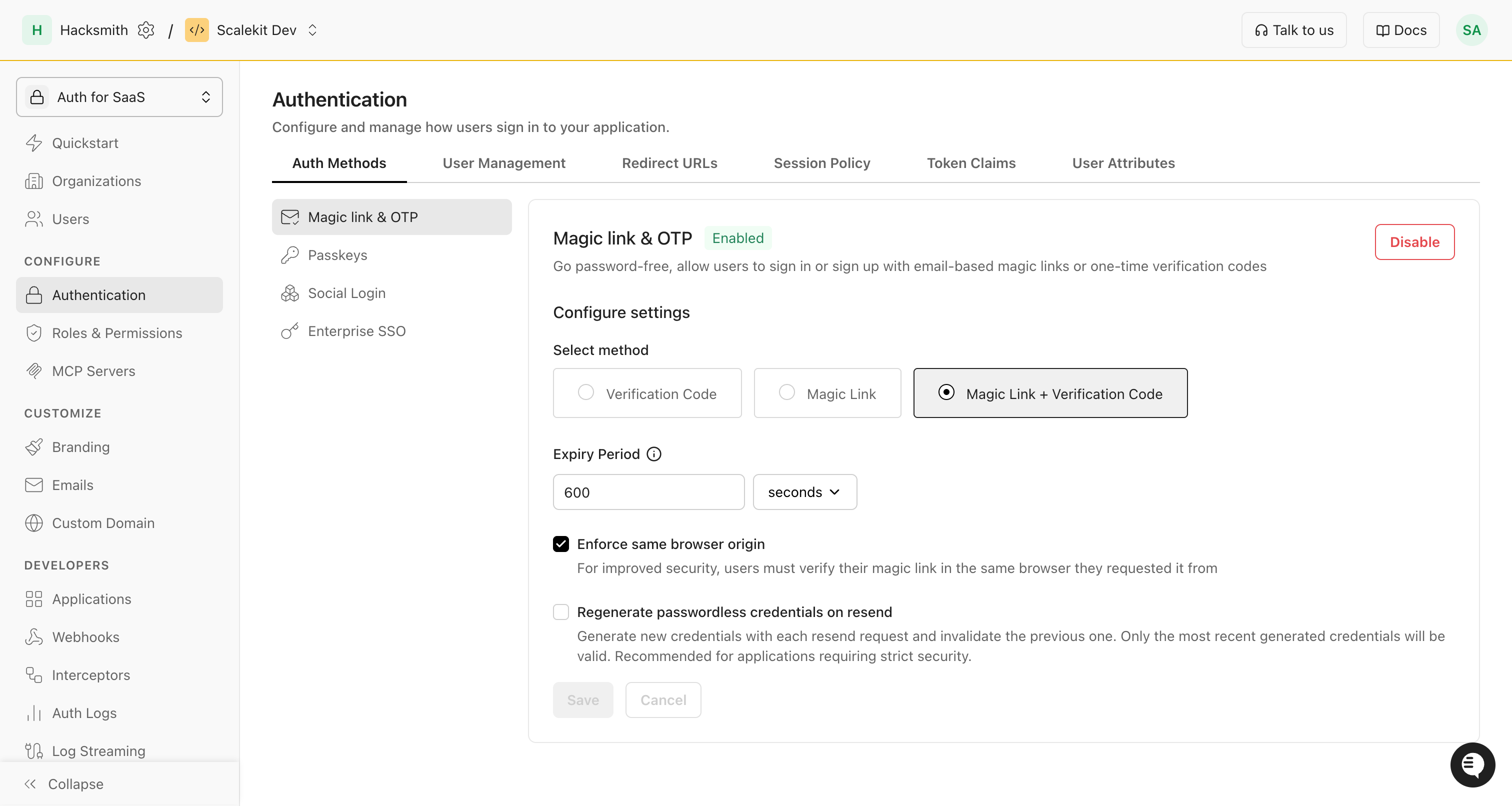
Section titled “Configure passwordless settings”In the Scalekit dashboard, enable Magic link & OTP and choose your login method.
Optional security settings:
- Enforce same-browser origin: Users must complete magic-link auth in the same browser they started in.
- Issue new credentials on resend: Each resend generates a fresh code or link and invalidates the previous one.
-
Redirect users to sign up (or) login
Section titled “Redirect users to sign up (or) login”Create an authorization URL and redirect users to Scalekit’s sign-in page. Include:
Parameter Description redirect_uriYour app’s callback endpoint (for example, https://your-app.com/auth/callback).client_idYour Scalekit application identifier (scoped to the environment). login_hintThe user’s email address to receive the verification email. Example implementation
import { ScalekitClient } from '@scalekit-sdk/node';// Initialize the SDK clientconst scalekit = new ScalekitClient('<SCALEKIT_ENVIRONMENT_URL>','<SCALEKIT_CLIENT_ID>','<SCALEKIT_CLIENT_SECRET>',);const options = {};options['loginHint'] = 'user@example.com';const authorizationUrl = scalekit.getAuthorizationUrl(redirectUri, options);// Generated URL will look like:// https://<SCALEKIT_ENVIRONMENT_URL>/oauth/authorize?response_type=code&client_id=skc_1234&scope=openid%20profile%20email&redirect_uri=https%3A%2F%2Fyourapp.com%2Fcallbackres.redirect(authorizationUrl);from scalekit import ScalekitClient, AuthorizationUrlOptions, CodeAuthenticationOptions# Initialize the SDK clientscalekit = ScalekitClient('<SCALEKIT_ENVIRONMENT_URL>','<SCALEKIT_CLIENT_ID>','<SCALEKIT_CLIENT_SECRET>')options = AuthorizationUrlOptions()# Authorization URL with login hintoptions.login_hint = 'user@example.com'authorization_url = scalekit.get_authorization_url(redirect_uri, options)# Generated URL will look like:# https://<SCALEKIT_ENVIRONMENT_URL>/oauth/authorize?response_type=code&client_id=skc_1234&scope=openid%20profile%20email&redirect_uri=https%3A%2F%2Fyourapp.com%2Fcallbackreturn redirect(authorization_url)import ("github.com/scalekit-inc/scalekit-sdk-go")func main() {// Initialize the SDK clientscalekitClient := scalekit.NewScalekitClient("<SCALEKIT_ENVIRONMENT_URL>","<SCALEKIT_CLIENT_ID>","<SCALEKIT_CLIENT_SECRET>")options := scalekitClient.AuthorizationUrlOptions{}// User's email domain detects the correct enterprise SSO connection.options.LoginHint = "user@example.com"authorizationURL := scalekitClient.GetAuthorizationUrl(redirectUrl,options,)// Next step is to redirect the user to this authorization URL}// Redirect the user to this authorization URLpackage com.scalekit;import com.scalekit.ScalekitClient;import com.scalekit.internal.http.AuthorizationUrlOptions;public class Main {public static void main(String[] args) {// Initialize the SDK clientScalekitClient scalekitClient = new ScalekitClient("<SCALEKIT_ENVIRONMENT_URL>","<SCALEKIT_CLIENT_ID>","<SCALEKIT_CLIENT_SECRET>");AuthorizationUrlOptions options = new AuthorizationUrlOptions();// User's email domain detects the correct enterprise SSO connection.options.setLoginHint("user@example.com");try {String url = scalekitClient.authentication().getAuthorizationUrl(redirectUrl, options).toString();} catch (Exception e) {System.out.println(e.getMessage());}}}// Redirect the user to this authorization URLThis redirects users to Scalekit’s authentication flow. After verification, they return to your application.
Example authorization URL
Example authorization URL <YOURAPP_SCALEKIT_ENVIRONMENT_URL>/oauth/authorize?client_id=skc_122056050118122349527&redirect_uri=https://yourapp.com/auth/callback&login_hint=user@example.com&response_type=code&scope=openid%20profile%20email&state=jAy-state1-gM4fdZdV22nqm6Q_jAy-XwpYdYFh..2nqm6QAt your
redirect_uri, handle the callback to exchange the code for the user profile. Ensure this URL is registered as an Allowed Callback URI in the dashboard. -
Get user details from the callback
Section titled “Get user details from the callback”Scalekit redirects to your
redirect_uriwith an authorization code. Exchange it server-side for the user’s profile.Always perform the code exchange on the server to validate the code and return the authenticated user’s profile.
Fetch user profile // Handle oauth redirect_url, fetch code and error_description from request paramsconst { code, error, error_description } = req.query;if (error) {// Handle errors}const result = await scalekit.authenticateWithCode(code, redirectUri);const userEmail = result.user.email;// Next step: create a session for this user and allow accessFetch user profile # Handle oauth redirect_url, fetch code and error_description from request paramscode = request.args.get('code')error = request.args.get('error')error_description = request.args.get('error_description')if error:raise Exception(error_description)result = scalekit.authenticate_with_code(code, '<redirect_uri>')# result.user has the authenticated user's detailsuser_email = result.user.email# Next step: create a session for this user and allow accessFetch user profile // Handle oauth redirect_url, fetch code and error_description from request paramscode := r.URL.Query().Get("code")errorCode := r.URL.Query().Get("error")errorDescription := r.URL.Query().Get("error_description")if errorCode != "" {// Handle errors - include errorDescription for contextreturn fmt.Errorf("OAuth error: %s - %s", errorCode, errorDescription)}result, err := scalekitClient.AuthenticateWithCode(r.Context(), code, redirectUrl)if err != nil {// Handle errors}// result.User has the authenticated user's detailsuserEmail := result.User.Email// Next step: create a session for this user and allow accessFetch user profile // Handle oauth redirect_url, fetch code and error_description from request paramsString code = request.getParameter("code");String error = request.getParameter("error");String errorDescription = request.getParameter("error_description");if (error != null && !error.isEmpty()) {// Handle errorsreturn;}try {AuthenticationResponse result = scalekit.authentication().authenticateWithCode(code, redirectUrl);String userEmail = result.getIdTokenClaims().getEmail();// Next step: create a session for this user and allow access} catch (Exception e) {// Handle errors}The
resultobject{user: {email: "john.doe@example.com" // Authenticated user's email address},idToken: "<USER_PROFILE_JWT>", // ID token (JWT) containing user profile claimsaccessToken: "<API_CALL_JWT>", // Access token (JWT) for calling backend APIs on behalf of the userexpiresIn: 899 // Time in seconds}{"alg": "RS256","kid": "snk_82937465019283746","typ": "JWT"}.{"amr": ["conn_92847563920187364"],"at_hash": "j8kqPm3nRt5Kx2Vy9wL_Zp","aud": ["skc_73645291837465928"],"azp": "skc_73645291837465928","c_hash": "Hy4k2M9pWnX7vqR8_Jt3bg","client_id": "skc_73645291837465928","email": "alice.smith@example.com","email_verified": true,"exp": 1751697469,"iat": 1751438269,"iss": "https://demo-company-dev.scalekit.cloud","sid": "ses_83746592018273645","sub": "conn_92847563920187364;alice.smith@example.com" // A scalekit user ID is sent if user management is enabled}.[Signature]{"alg": "RS256","kid": "snk_794467716206433","typ": "JWT"}.{"iss": "https://acme-corp-dev.scalekit.cloud","sub": "conn_794467724427269;robert.wilson@acme.com","aud": ["skc_794467724259497"],"exp": 1751439169,"iat": 1751438269,"nbf": 1751438269,"client_id": "skc_794467724259497","jti": "tkn_794754665320942",// External identifiers if updated on Scalekit"xoid": "ext_org_123", // Organization ID"xuid": "ext_usr_456" // User ID}.[Signature]
Congratulations! Your application now supports passwordless authentication. Users can sign in securely by:
- Entering a verification code sent to their email
- Clicking a magic link sent to their email
To complete the implementation, create a session for the user to allow access to protected resources.