

Headless email API for magic link and OTP
Implement email OTP or magic link using direct API calls with full control over UX
Implement magic link and OTP authentication using Scalekit’s headless APIs. Send either a one-time passcode (OTP) or a magic link to the user’s email, then verify their identity. Magic link and OTP offer two email-based authentication methods, clickable links or one-time passcodes, so users can sign in without passwords. You control the UI and user flows, while Scalekit provides the backend authentication infrastructure.
See the integration in action
Review the authentication sequence
Coming soon
Using a coding agent?
-
Set up Scalekit
Section titled “Set up Scalekit”Install the Scalekit SDK to your project.
npm install @scalekit-sdk/nodepip install scalekit-sdk-pythongo get -u github.com/scalekit-inc/scalekit-sdk-go/* Gradle users - add the following to your dependencies in build file */implementation "com.scalekit:scalekit-sdk-java:2.1.3"<!-- Maven users - add the following to your `pom.xml` --><dependency><groupId>com.scalekit</groupId><artifactId>scalekit-sdk-java</artifactId><version>2.1.3</version></dependency>Your application is responsible for verifying users and initiating sessions, while Scalekit securely manages authentication tokens to ensure the verification process is completed successfully
-
Configure magic link and OTP settings
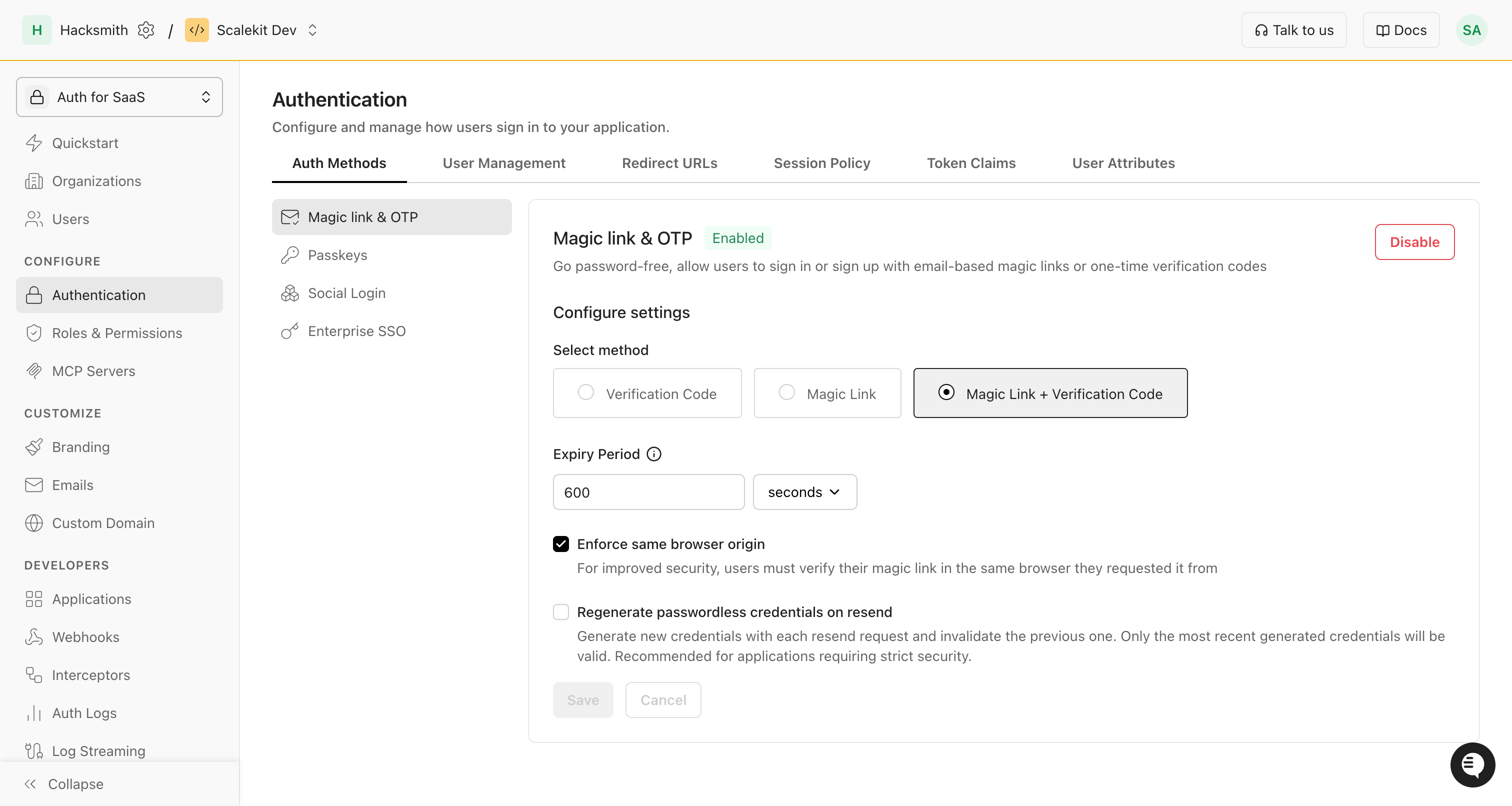
Section titled “Configure magic link and OTP settings”In the Scalekit dashboard, enable magic link and OTP and choose your login method.
Optional security settings:
- Enforce same-browser origin: Users must complete magic-link auth in the same browser they started in.
- Issue new credentials on resend: Each resend generates a fresh code or link and invalidates the previous one.
-
Send verification email
Section titled “Send verification email”The first step in the magic link and OTP flow is to send a verification email to the user’s email address. This email contains either a one-time passcode (OTP), a magic link, or both based on your selection in the Scalekit dashboard.
Follow these steps to implement the verification email flow:
- Create a form to collect the user’s email address
- Call the passwordless API (magic link and OTP) when the form is submitted
- Handle the response to provide feedback to the user
API endpoint POST /api/v1/passwordless/email/sendExample implementation
Send a verification code to user's email curl -L '<SCALEKIT_ENVIRONMENT_URL>/api/v1/passwordless/email/send' \-H 'Content-Type: application/json' \-H 'Authorization: Bearer eyJh..' \--data-raw '{"email": "john.doe@example.com","expires_in": 300,"state": "jAy-state1-gM4fdZ...2nqm6Q","template": "SIGNIN","magiclink_auth_uri": "https://yourapp.com/passwordless/verify","template_variables": {"custom_variable_key": "custom_variable_value"}}'# Response6 collapsed lines# {# "auth_request_id": "jAy-state1-gM4fdZ...2nqm6Q"# "expires_at": "1748696575"# "expires_in": 100# "passwordless_type": "OTP" | "LINK" | "LINK_OTP"# }Request parameters
Parameter Required Description emailYes Recipient’s email address string expires_inNo Code expiration time in seconds (default: 300) number stateNo OIDC state parameter for request validation string templateNo Email template to use ( SIGNINorSIGNUP) stringmagiclink_auth_uriNo Magic Link URI that will be sent to your user to complete the authentication flow. If the URL is of the format https://yourapp.com/passwordless/verify, the magic link sent to your user via email will behttps://yourapp.com/passwordless/verify?link_token=<link_token>. Required if you selected Link or Link + OTP as your authentication method.stringtemplate_variablesNo Pass variables to be used in the email template sent to the user. You may include up to 30 key-value pairs to reference in the email template. object Response parameters
Parameters Description auth_request_idA unique identifier for the authentication request that can be used to verify the code string expires_atUnix timestamp indicating when the verification code will expire string expires_inThe time in seconds after which the verification code will expire. Default is 100 seconds number passwordless_typeThe type of magic link and OTP authentication. Currently supports OTP,LINKandLINK_OTPstringconst options = {template: "SIGNIN",state: "jAy-state1-...2nqm6Q",expiresIn: 300,// Required if you selected Link or Link+OTP as your authentication methodmagiclinkAuthUri: "https://yourapp.com/passwordless/verify",templateVariables: {employeeID: "EMP523",teamName: "Alpha Team",},};const sendResponse = await scalekit.passwordless.sendPasswordlessEmail("<john.doe@example.com>",options);// sendResponse = {// authRequestId: string,// expiresAt: number, // seconds since epoch// expiresIn: number, // seconds// passwordlessType: string // "OTP" | "LINK" | "LINK_OTP"// }Request parameters
Parameter Required Description emailYes The email address to send the magic link or OTP verification code to string templateNo The template type ( SIGNIN/SIGNUP) stringstateNo Optional state parameter to maintain state between request and callback string expiresInNo Optional expiration time in seconds (default: 300) number magiclinkAuthUriNo Magic Link URI that will be sent to your user to complete the authentication flow. If the URL is of the format https://yourapp.com/passwordless/verify, the magic link sent to your user via email will behttps://yourapp.com/passwordless/verify?link_token=<link_token>. Required if you selected Link or Link + OTP as your authentication method.stringtemplate_variablesNo Pass variables to be used in the email template sent to the user. You may include up to 30 key-value pairs to reference in the email template. object Response parameters
Parameters Description authRequestIdUnique identifier for the magic link and OTP authentication request string expiresAtExpiration time in seconds since epoch number expiresInExpiration time in seconds number passwordlessTypeType of magic link and OTP authentication ( OTP,LINKorLINK_OTP) stringresponse = client.passwordless.send_passwordless_email(email="john.doe@example.com",template="SIGNIN", # or "SIGNUP", "UNSPECIFIED"expires_in=300,magiclink_auth_uri="https://yourapp.com/passwordless/verify",template_variables={"employeeID": "EMP523","teamName": "Alpha Team",},)# Extract auth request ID from responseauth_request_id = response[0].auth_request_id// Send a passwordless email (assumes you have an initialized `client` and `ctx`)templateType := scalekit.TemplateTypeSigninresp, err := scalekitClient.Passwordless().SendPasswordlessEmail(ctx,"john.doe@example.com",&scalekit.SendPasswordlessOptions{Template: &templateType,State: "jAy-state1-gM4fdZ...2nqm6Q",ExpiresIn: 300,MagiclinkAuthUri: "https://yourapp.com/passwordless/verify", // required if Link or Link+OTPTemplateVariables: map[string]string{"employeeID": "EMP523","teamName": "Alpha Team",},},)// resp contains: AuthRequestId, ExpiresAt, ExpiresIn, PasswordlessTypeRequest parameters
Parameter Required Description emailYes The email address to send the magic link or OTP verification code to string MagiclinkAuthUriNo Magic Link URI for authentication string StateNo Optional state parameter string TemplateNo Email template type ( SIGNIN/SIGNUP) stringExpiresInNo Expiration time in seconds number TemplateVariablesNo Key-value pairs for email template object Response parameters
Parameters Description AuthRequestIdUnique identifier for the magic link and OTP authentication request string ExpiresAtExpiration time in seconds since epoch number ExpiresInExpiration time in seconds number PasswordlessTypeType of magic link and OTP authentication ( OTP,LINKorLINK_OTP) stringimport java.util.HashMap;import java.util.Map;TemplateType templateType = TemplateType.SIGNIN;Map<String, String> templateVariables = new HashMap<>();templateVariables.put("employeeID", "EMP523");templateVariables.put("teamName", "Alpha Team");SendPasswordlessOptions options = new SendPasswordlessOptions();options.setTemplate(templateType);options.setExpiresIn(300);options.setMagiclinkAuthUri("https://yourapp.com/passwordless/verify");options.setTemplateVariables(templateVariables);SendPasswordlessResponse response = passwordlessClient.sendPasswordlessEmail("john.doe@example.com",options);String authRequestId = response.getAuthRequestId(); -
Resend a verification email
Section titled “Resend a verification email”Users can request a new verification email if they need one. Use the following endpoint to resend an OTP or magic link email.
Request curl -L '<SCALEKIT_ENVIRONMENT_URL>/api/v1/passwordless/email/resend' \-H 'Content-Type: application/json' \-H 'Authorization: Bearer eyJhbGciOiJSUzI1NiIsIm..' \-d '{"auth_request_id": "jAy-state1-gM4fdZ...2nqm6Q"}'# Response# {# "auth_request_id": "jAy-state1-gM4fdZ...2nqm6Q"# "expires_at": "1748696575"# "expires_in": 300# "passwordless_type": "OTP" | "LINK" | "LINK_OTP"# }Request parameters
Parameters Required Description auth_request_idYes The unique identifier for the authentication request that was sent earlier string Response parameters
Parameters Description auth_request_idA unique identifier for the authentication request that can be used to verify the code string expires_atUnix timestamp indicating when the verification code will expire string expires_inThe time in seconds after which the verification code will expire. Default is 300 seconds number passwordless_typeThe type of magic link and OTP authentication. Currently supports OTP,LINKandLINK_OTPstringconst { authRequestId } = sendResponse;const resendResponse = await scalekit.passwordless.resendPasswordlessEmail(authRequestId);// resendResponse = {// authRequestId: "jAy-state1-gM4fdZ...2nqm6Q",// expiresAt: "1748696575",// expiresIn: "300",// passwordlessType: "OTP" | "LINK" | "LINK_OTP"// }Request parameters
Parameters Required Description authRequestIdYes The unique identifier for the authentication request that was sent earlier string Response parameters
Parameters Description authRequestIdUnique identifier for the magic link and OTP authentication request string expiresAtExpiration time in seconds since epoch number expiresInExpiration time in seconds. Default is 300 seconds number passwordlessTypeOTP,LINKorLINK_OTPstringresend_response = client.passwordless.resend_passwordless_email(auth_request_id=auth_request_id,)new_auth_request_id = resend_response[0].auth_request_id// Resend passwordless email for an existing auth requestresendResp, err := scalekitClient.Passwordless().ResendPasswordlessEmail(ctx, // context.Context (e.g., context.Background())authRequestId, // string: from the send email response)if err != nil {// handle error (log, return HTTP 400/500, etc.)// ...}// resendResp is a pointer to ResendPasswordlessResponse struct:// type ResendPasswordlessResponse struct {// AuthRequestId string // Unique ID for the passwordless request// ExpiresAt int64 // Unix timestamp (seconds since epoch)// ExpiresIn int // Expiry duration in seconds// PasswordlessType string // "OTP", "LINK", or "LINK_OTP"// }Request parameters
Parameters Required Description authRequestIdYes The unique identifier for the authentication request that was sent earlier string Response parameters
Parameters Description AuthRequestIdUnique identifier for the magic link and OTP authentication request string ExpiresAtExpiration time in seconds since epoch number ExpiresInExpiration time in seconds. Default is 300 seconds number PasswordlessTypeOTP,LINKorLINK_OTPstringSendPasswordlessResponse resendResponse = passwordlessClient.resendPasswordlessEmail(authRequestId);If you enabled Enable new Magic link & OTP credentials on resend in the Scalekit dashboard, a new verification code or magic link will be sent each time the user requests a new one.
-
Verify the user’s identity
Section titled “Verify the user’s identity”Once the user receives the verification email,
- If it is a verification code, they’ll enter it in your application. Use the following endpoint to validate the code and complete authentication.
- If it is a magic link, they’ll click the link in the email to verify their address. Capture the
link_tokenquery parameter and use it to verify. - For additional security with magic links, if you enabled “Enforce same browser origin” in the dashboard, include the
auth_request_idin the verification request.
- Create a form to collect the verification code
- Call the verification API when the form is submitted to verify the code
- Handle the response to either grant access or show an error
API endpoint POST /api/v1/passwordless/email/verifyExample implementation
Request curl -L '<SCALEKIT_ENVIRONMENT_URL>/api/v1/passwordless/email/verify' \-H 'Content-Type: application/json' \-H 'Authorization: Bearer eyJhbGciOiJSUzI1NiIsIm..' \-d '{"code": "123456","auth_request_id": "YC4QR-dVZVtNNVHcHwrnHNDV..."}'Request parameters
Parameters Required Description codeYes The verification code entered by the user string auth_request_idYes The request ID from the response when the verification email was sent string Response parameters
Parameters Description emailThe email address of the user string stateThe state parameter that was passed in the original request string templateThe template that was used for the verification code string passwordless_typeThe type of magic link and OTP authentication. Currently supports OTP,LINKandLINK_OTPstringconst { authRequestId } = sendResponse;const verifyResponse = await scalekit.passwordless.verifyPasswordlessEmail({ code: "123456"},authRequestId);// verifyResponse = {// "email": "saifshine7@gmail.com",// "state": "jAy-state1-gM4fdZdV22nqm6Q_j..",// "template": "SIGNIN",// "passwordless_type": "OTP" | "LINK" | "LINK_OTP"// }Request parameters
Parameters Required Description options.codeYes The verification code received by the user string authRequestIdYes The unique identifier for the authentication request that was sent earlier string Response parameters
Parameters Description emailThe email address of the user string stateThe state parameter that was passed in the original request string templateThe template that was used for the verification code string passwordlessTypeThe type of magic link and OTP authentication. Currently supports OTP,LINKandLINK_OTPstringverify_response = client.passwordless.verify_passwordless_email(code="123456", # OTP code received via emailauth_request_id=auth_request_id,)# User verified successfullyuser_email = verify_response[0].email// Verify with OTP codeverifyResponse, err := scalekitClient.Passwordless().VerifyPasswordlessEmail(ctx,&scalekit.VerifyPasswordlessOptions{Code: "123456", // OTP codeAuthRequestId: authRequestId,},)if err != nil {// Handle errorreturn}// verifyResp contains the verified user's info// type VerifyPasswordLessResponse struct {// Email string// State string// Template string // SIGNIN | SIGNUP// PasswordlessType string // OTP | LINK | LINK_OTP// }Request parameters
Parameters Required Description options.CodeYes The verification code received by the user string options.AuthRequestIdYes The unique identifier for the authentication request that was sent earlier string Response parameters
Parameters Description EmailThe email address of the user string StateThe state parameter that was passed in the original request string TemplateThe template that was used ( SIGNINorSIGNUP) stringPasswordlessTypeOTP,LINKorLINK_OTPstring// Verify with OTP codeVerifyPasswordlessOptions verifyOptions = new VerifyPasswordlessOptions();verifyOptions.setCode("123456"); // OTP codeverifyOptions.setAuthRequestId(authRequestId);VerifyPasswordLessResponse verifyResponse = passwordlessClient.verifyPasswordlessEmail(verifyOptions);// User verified successfullyString userEmail = verifyResponse.getEmail();To support magic link verification, add a callback endpoint in your application typically at
https://your-app.com/passwordless/verify. Implement it to verify the magic link token and complete the user authentication process.- Create a verification endpoint in your application to handle the magic link verification. This is the endpoint that the user lands in when they click the link in the email.
- Capture the magic link token from the
link_tokenrequest parameter from the URL. - Call the verification API when the user clicks the link in the email.
- Based on token verification, complete the authentication process or show an error with an appropriate error message.
API endpoint POST /api/v1/passwordless/email/verifyExample implementation
Request curl -L '<SCALEKIT_ENVIRONMENT_URL>/api/v1/passwordless/email/verify' \-H 'Content-Type: application/json' \-H 'Authorization: Bearer eyJhbGciOiJSUzI1NiIsIm..' \-d '{"link_token": "a4143d8f-...c846ed91e_l","auth_request_id": "YC4QR-dVZVtNNVHcHwrnHNDV..." // (optional)}'Request parameters
Parameters Required Description link_tokenYes The link token received by the user string auth_request_idNo The request ID you received when the verification email was sent. string Response parameters
Parameters Description emailThe email address of the user string stateThe state parameter that was passed in the original request string templateThe template that was used for the verification code string passwordless_typeThe type of magic link and OTP authentication. Currently supports OTP,LINKandLINK_OTPstring// User clicks the magic link in their email// Example magic link: https://yourapp.com/passwordless/verify?link_token=a4143d8f-d13d-415c-8f5a-5a5c846ed91e_l// 2. Express endpoint to handle the magic link verificationapp.get('/passwordless/verify', async (req, res) => {const { link_token } = req.query;try {// 3. Verify the magic link token with Scalekitconst verifyResponse = await scalekit.passwordless.verifyPasswordlessEmail({ linkToken: link_token },authRequestId // (optional) sendResponse.authRequestId);7 collapsed lines// 4. Successfully log the user in// Set session/token and redirect to dashboardres.redirect('/dashboard');} catch (error) {res.status(400).json({error: 'The magic link is invalid or has expired. Please request a new verification link.'});}});// verifyResponse = {// "email": "saifshine7@gmail.com",// "state": "jAy-state1-gM4fdZdV22nqm6Q_j..",// "template": "SIGNIN",// "passwordless_type": "OTP" | "LINK" | "LINK_OTP"// }Request parameters
Parameters Required Description options.linkTokenYes The link token received by the user string authRequestIdNo The unique identifier for the authentication request that was sent earlier. string Response parameters
Parameters Description emailThe email address of the user string stateThe state parameter that was passed in the original request string templateThe template that was used for the verification code string passwordlessTypeThe type of magic link and OTP authentication. Currently supports OTP,LINKandLINK_OTPstring# Verify with magic link tokenverify_response = client.passwordless.verify_passwordless_email(link_token=link_token, # Magic link token from URL# auth_request_id=auth_request_id, # optional if same-origin enforcement enabled)# User verified successfullyuser_email = verify_response[0].emailverifyResponse, err := scalekitClient.Passwordless().VerifyPasswordlessEmail(ctx,&scalekit.VerifyPasswordlessOptions{LinkToken: linkToken, // Magic link token},)if err != nil {// Handle errorreturn}// User verified successfullyuserEmail := verifyResponse.Email// Verify with magic link tokenVerifyPasswordlessOptions verifyOptions = new VerifyPasswordlessOptions();verifyOptions.setLinkToken(linkToken); // Magic link token// verifyOptions.setAuthRequestId(authRequestId); // optional if same-origin enforcement enabledVerifyPasswordLessResponse verifyResponse = passwordlessClient.verifyPasswordlessEmail(verifyOptions);// User verified successfullyString userEmail = verifyResponse.getEmail();
You’ve successfully implemented Magic link & OTP authentication in your application. Users can now sign in securely without passwords by entering a verification code (OTP) or clicking a magic link sent to their email.