

Organization-specific redirect URLs
Register one redirect URL pattern that Scalekit resolves to an organization-specific URL at runtime.
Multi-tenant applications often need a different callback URL for each customer. Instead of registering a separate redirect URL for every organization, you can register a single template that Scalekit expands per organization at runtime.
For example, https://{{org_slug}}/oauth/callback expands to https://auth.megasoft.com/oauth/callback for Megasoft and https://auth.betacorp.com/oauth/callback for Beta Corp, with no additional configuration needed.
Available template variables
Section titled “Available template variables”| Variable | Source | Example value |
|---|---|---|
{{org_slug}} | Organization’s slug field. Can be a single DNS label (megasoft) or a full hostname (auth.megasoft.com). | auth.megasoft.com |
{{external_id}} | Organization’s external ID from your system. | megasoft-123 |
{{custom_domain}} | Any key stored in the organization’s metadata. | metadata.custom_domain = "auth.megasoft.com" |
Register an organization-specific URL
Section titled “Register an organization-specific URL”Add organization-specific URLs in Dashboard > Authentication > Redirects and type the URL pattern directly into the input field. These URLs are valid in all three redirect fields:
- Allowed callback URLs: where Scalekit sends users after authentication
- Post logout URL: where Scalekit sends users after logout
- Initiate login URL: where Scalekit sends IdP-initiated login requests
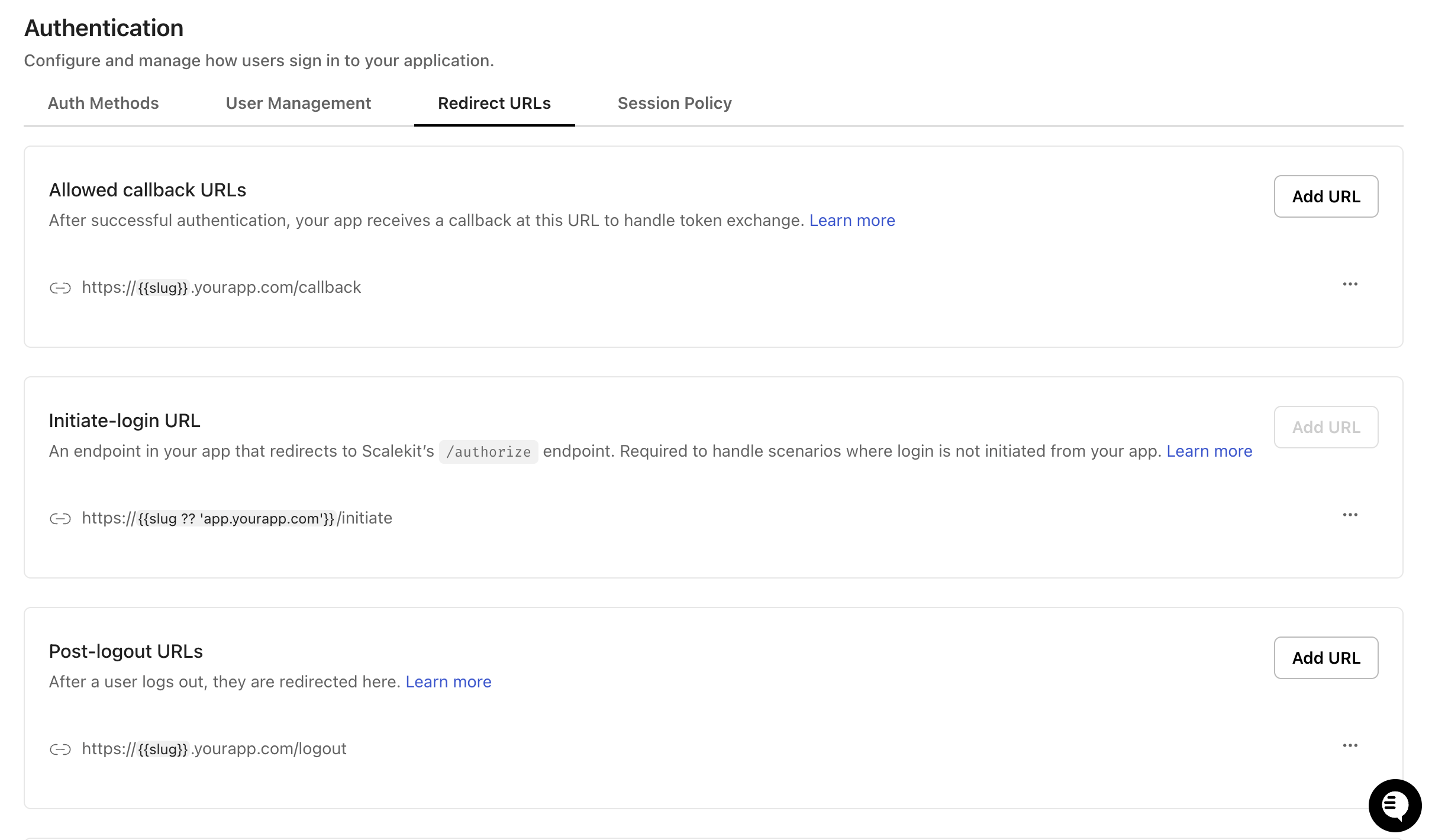
Supported patterns for redirect URLs:
| Pattern | Example | Notes |
|---|---|---|
| Subdomain | https://{{org_slug}}.yourapp.com/callback | {{org_slug}} is a single DNS label such as acme |
| Full host | https://{{org_slug}}/callback | {{org_slug}} is a full hostname such as auth.megasoft.com |
| Custom domain | https://{{custom_domain}}/callback | Value comes from org metadata |
| Path variable | https://yourapp.com/{{org_slug}}/callback | Variable in the path component |
At runtime, Scalekit substitutes each {{variable}} with its resolved value, validates the expanded URL against registered templates, and redirects the user. For logout, the organization is resolved from the active session; if the session has expired, template expansion is skipped and the redirect is rejected.
Set slug or metadata for an organization
Section titled “Set slug or metadata for an organization”Set slug on an organization to expand {{org_slug}} templates. Store any key in organization metadata to use it as a custom variable like {{custom_domain}}. Setting just one is enough. Use whichever fits your registered URL pattern.
Via dashboard
Section titled “Via dashboard”Navigate to Organizations > Select an organization > Overview > Edit. Add the organization slug in the Slug field.
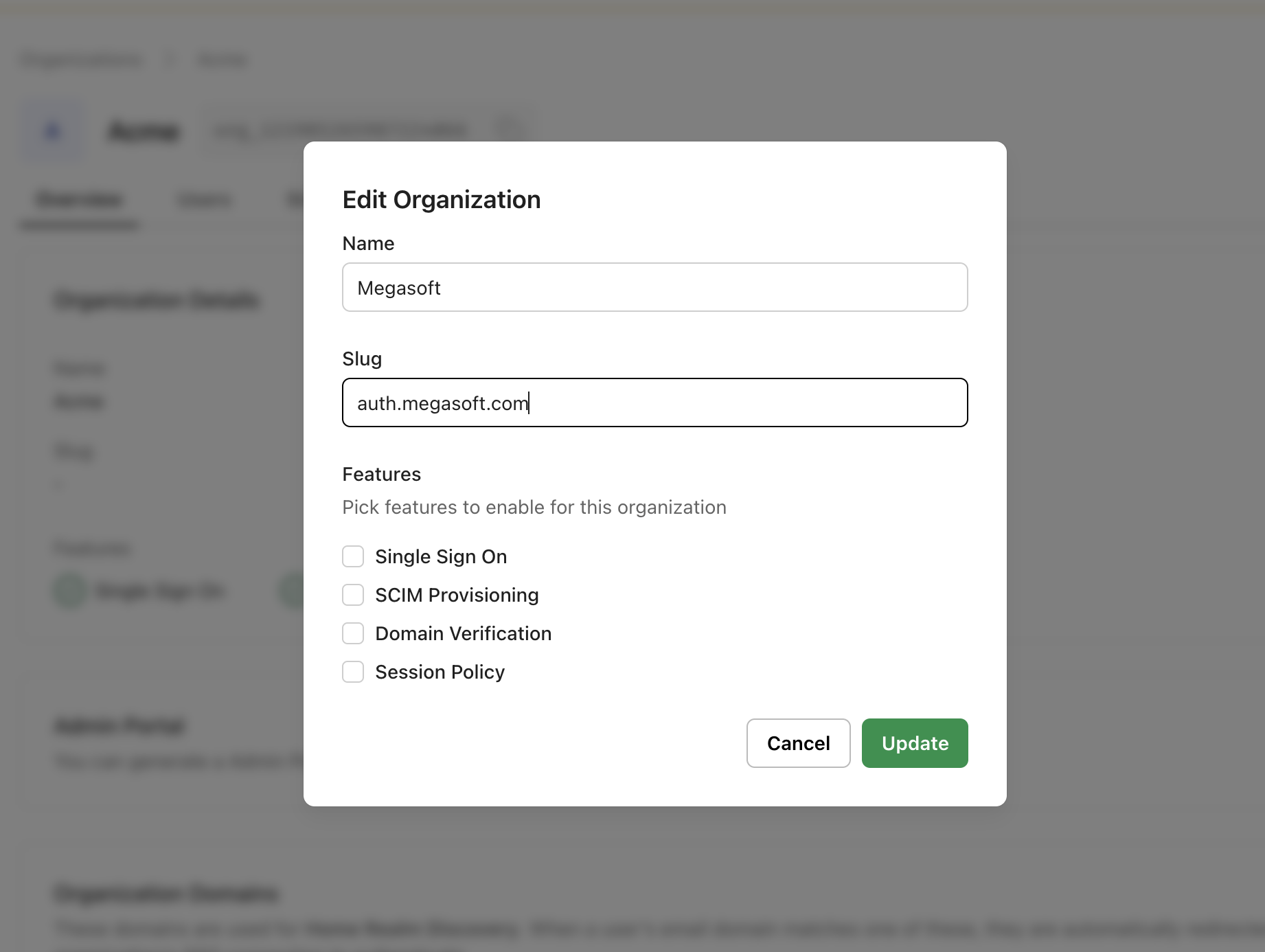
Via SDK
Section titled “Via SDK”npm install @scalekit-sdk/nodepip install scalekit-sdk-pythongo get -u github.com/scalekit-inc/scalekit-sdk-go/* Gradle users - add the following to your dependencies in build file */implementation "com.scalekit:scalekit-sdk-java:2.1.3"<!-- Maven users - add the following to your `pom.xml` --><dependency> <groupId>com.scalekit</groupId> <artifactId>scalekit-sdk-java</artifactId> <version>2.1.3</version></dependency>// Set slug, metadata, or both — each enables a different template variable.const organization = await scalekit.organization.createOrganization( 'Megasoft', { slug: 'auth.megasoft.com', metadata: { custom_domain: 'auth.megasoft.com' }, });# Set slug, metadata, or both — each enables a different template variable.from scalekit.v1.organizations.organizations_pb2 import CreateOrganization
organization = scalekit_client.organization.create_organization( CreateOrganization( display_name='Megasoft', slug='auth.megasoft.com', metadata={'custom_domain': 'auth.megasoft.com'}, ))// Set slug, metadata, or both — each enables a different template variable.slug := "auth.megasoft.com"
_, err := scalekitClient.Organization().CreateOrganization( ctx, "Megasoft", scalekit.CreateOrganizationOptions{ Slug: &slug, Metadata: map[string]interface{}{ "custom_domain": "auth.megasoft.com", }, },)if err != nil { log.Fatal(err)}// Set slug, metadata, or both — each enables a different template variable.// Requires scalekit-sdk-java v2.1.3+CreateOrganization create = CreateOrganization.newBuilder() .setDisplayName("Megasoft") .setSlug("auth.megasoft.com") .putMetadata("custom_domain", "auth.megasoft.com") .build();
scalekitClient.organizations().create(create);Pass organization_id and redirect URL in the authorization request
Section titled “Pass organization_id and redirect URL in the authorization request”Pass the organization-specific redirect_uri and organization_id in the authorization request. Scalekit validates the redirect URL against the registered pattern using the organization’s slug or metadata. See set up login flow for the full auth call reference.
const redirectUri = 'https://auth.megasoft.com/oauth/callback';const options = {  scopes: ['openid', 'profile', 'email'],  state: sessionStorage.oauthState,  organizationId: 'org_12345',};
const authorizationUrl = scalekit.getAuthorizationUrl(redirectUri, options);res.redirect(authorizationUrl);redirect_uri = 'https://auth.megasoft.com/oauth/callback'options = AuthorizationUrlOptions()options.scopes = ['openid', 'profile', 'email']options.state = session['oauth_state']options.organization_id = 'org_12345'
authorization_url = scalekit_client.get_authorization_url(redirect_uri, options)return redirect(authorization_url)redirectUri := "https://auth.megasoft.com/oauth/callback"options := scalekit.AuthorizationUrlOptions{ Scopes: []string{"openid", "profile", "email"}, State: state, OrganizationId: "org_12345",}
authorizationUrl := scalekitClient.GetAuthorizationUrl(redirectUri, options)http.Redirect(w, r, authorizationUrl, http.StatusFound)String redirectUri = "https://auth.megasoft.com/oauth/callback";AuthorizationUrlOptions options = new AuthorizationUrlOptions();options.setScopes(List.of("openid", "profile", "email"));options.setState(state);options.setOrganizationId("org_12345");
String authorizationUrl = scalekitClient.getAuthorizationUrl(redirectUri, options);response.sendRedirect(authorizationUrl);If no organization is in scope, the template is not expanded and the request is rejected.
A worked example
Section titled “A worked example”-
Register the URL pattern
In Dashboard > Authentication > Redirects > Allowed callback URLs, add the URL as
https://{{org_slug}}/oauth/callback. -
Set the organization’s slug
For Megasoft, set
slugtoauth.megasoft.com(see Set slug or metadata for an organization above). -
Pass the org-specific redirect URL and
organization_idin the authorization requestWhen a Megasoft user signs in, Scalekit validates the
redirect_uriagainst the registered pattern using the organization’s slug:https://<SCALEKIT_ENVIRONMENT_URL>/oauth/authorize?client_id=...&redirect_uri=https://auth.megasoft.com/oauth/callback&organization_id=org_megasoft_123&... -
Scalekit validates and redirects
Scalekit matches
https://auth.megasoft.com/oauth/callbackagainst the registered patternhttps://{{org_slug}}/oauth/callbackusing Megasoft’s slug and redirects the user.