

Test users
Set up test users to run automated E2E tests for login and signup flows
Test users let you run Playwright, Cypress, and other E2E tests against signup and login flows without waiting for real OTP or magic-link emails. Scalekit accepts a static 6-digit code that you configure, so tests are fast, reliable, and inbox-free.
What doesn’t change: Test users only affects OTP email delivery. Everything else — organization creation, user creation, session creation, audit logs, webhooks, and post-login redirects — behaves the same as it does for a real user.
Prerequisites
Section titled “Prerequisites”Enable the Magic Link & OTP auth method, with the delivery option set to Verification Code or Magic Link + Verification Code. Magic Link-only delivery is not supported.
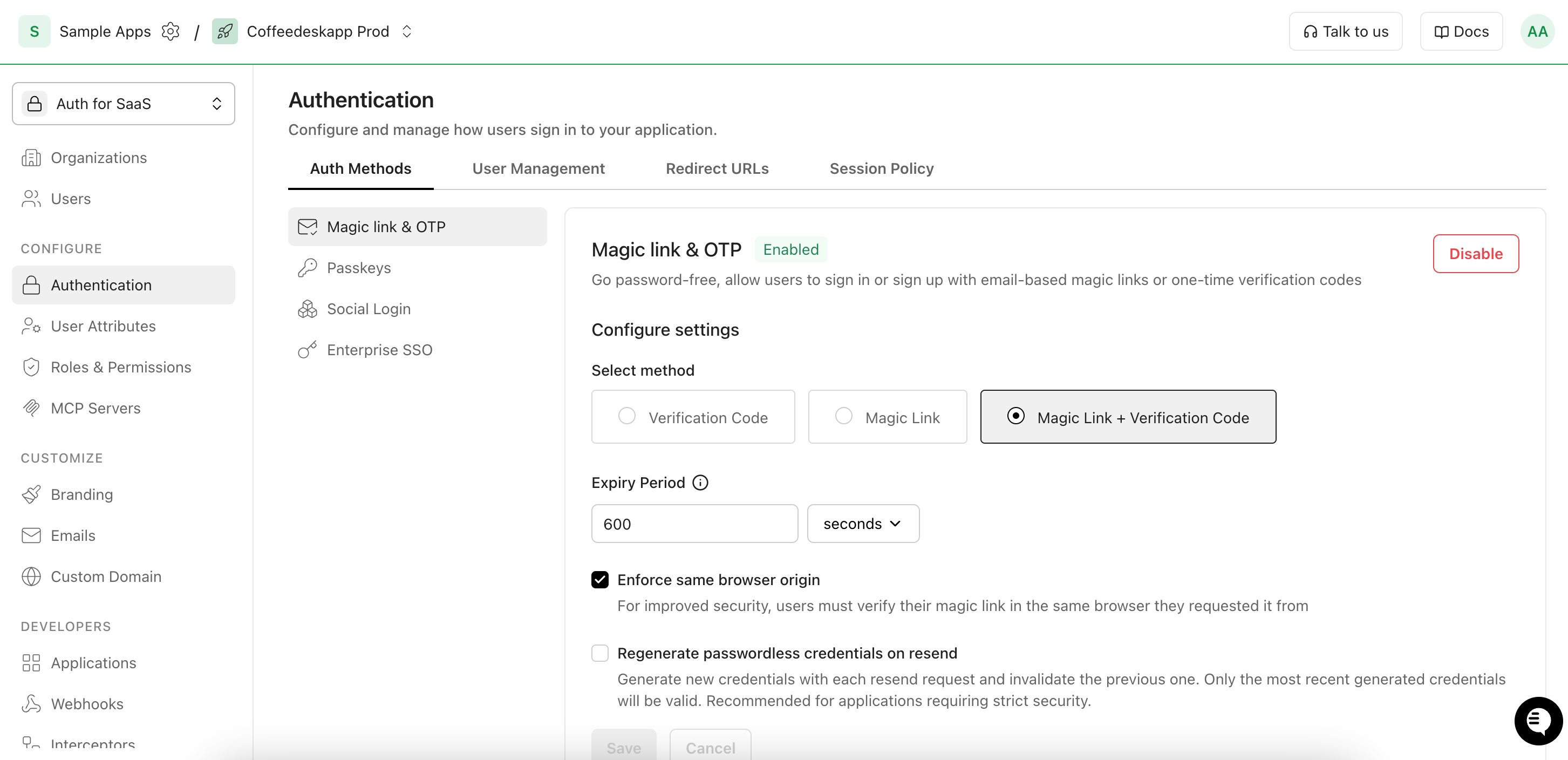
Configure test users
Section titled “Configure test users”The test users allowlist is set per environment and accepts up to 5 emails. Configure it once — every signup and login test in that environment uses the same emails and static code.
-
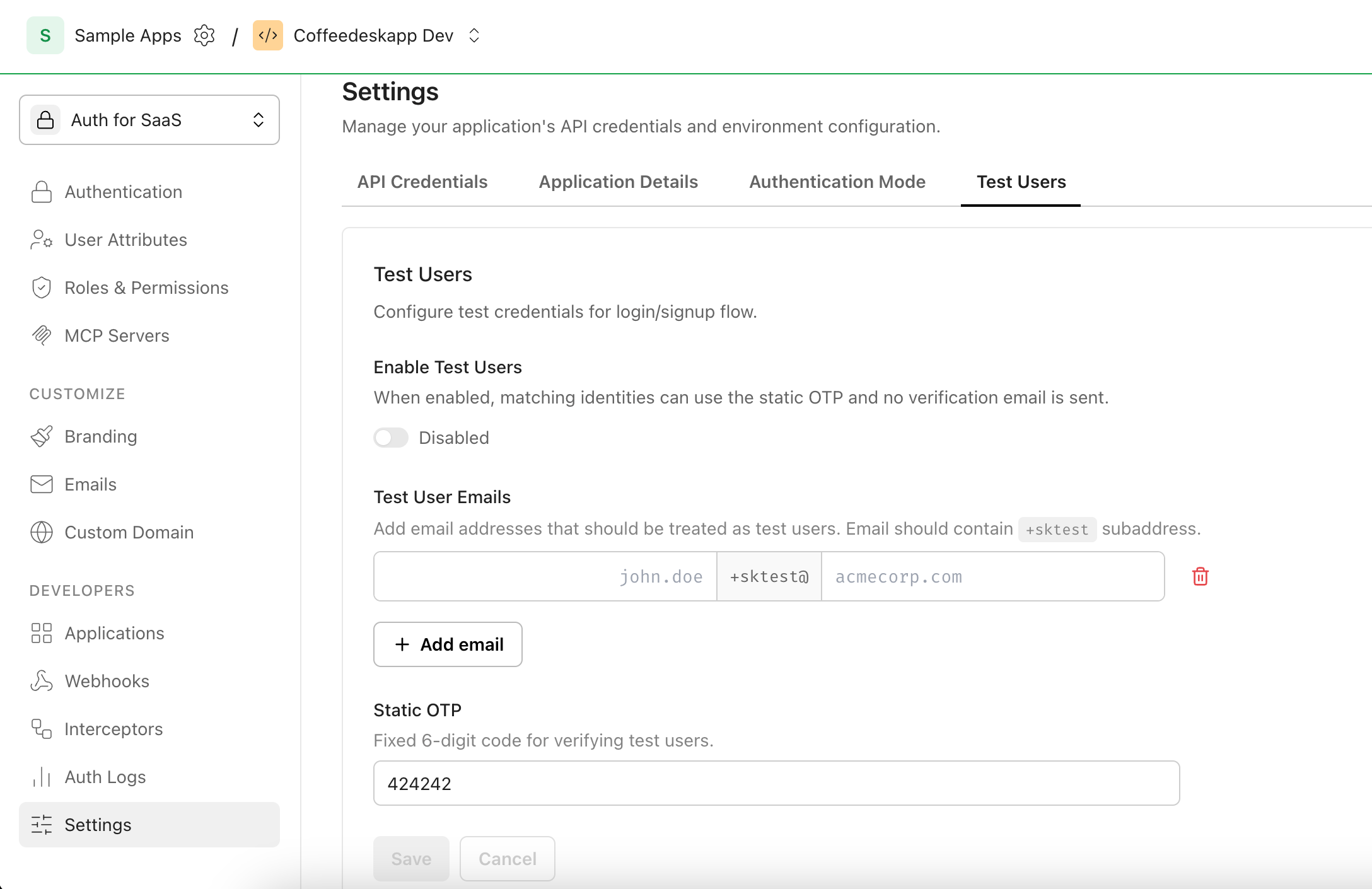
Open Test users settings
Section titled “Open Test users settings”Go to Dashboard > Environment settings > Test users.
-
Enable and add emails to the allowlist
Section titled “Enable and add emails to the allowlist”Toggle Enable test users. Add up to 5 test emails — emails are stored lowercase and de-duplicated. Each entry must contain
+sktestin the local part (before@); any domain works.Email Valid? Reason john+sktest@acmecorp.com✓ +sktestpresent in the local partbob+sktest@anything.example✓ Any domain works john@acmecorp.com✗ Missing +sktestmarkerjohn+test@acmecorp.com✗ Marker must be exactly +sktestsktest+john@acmecorp.com✗ Must appear after +, not before@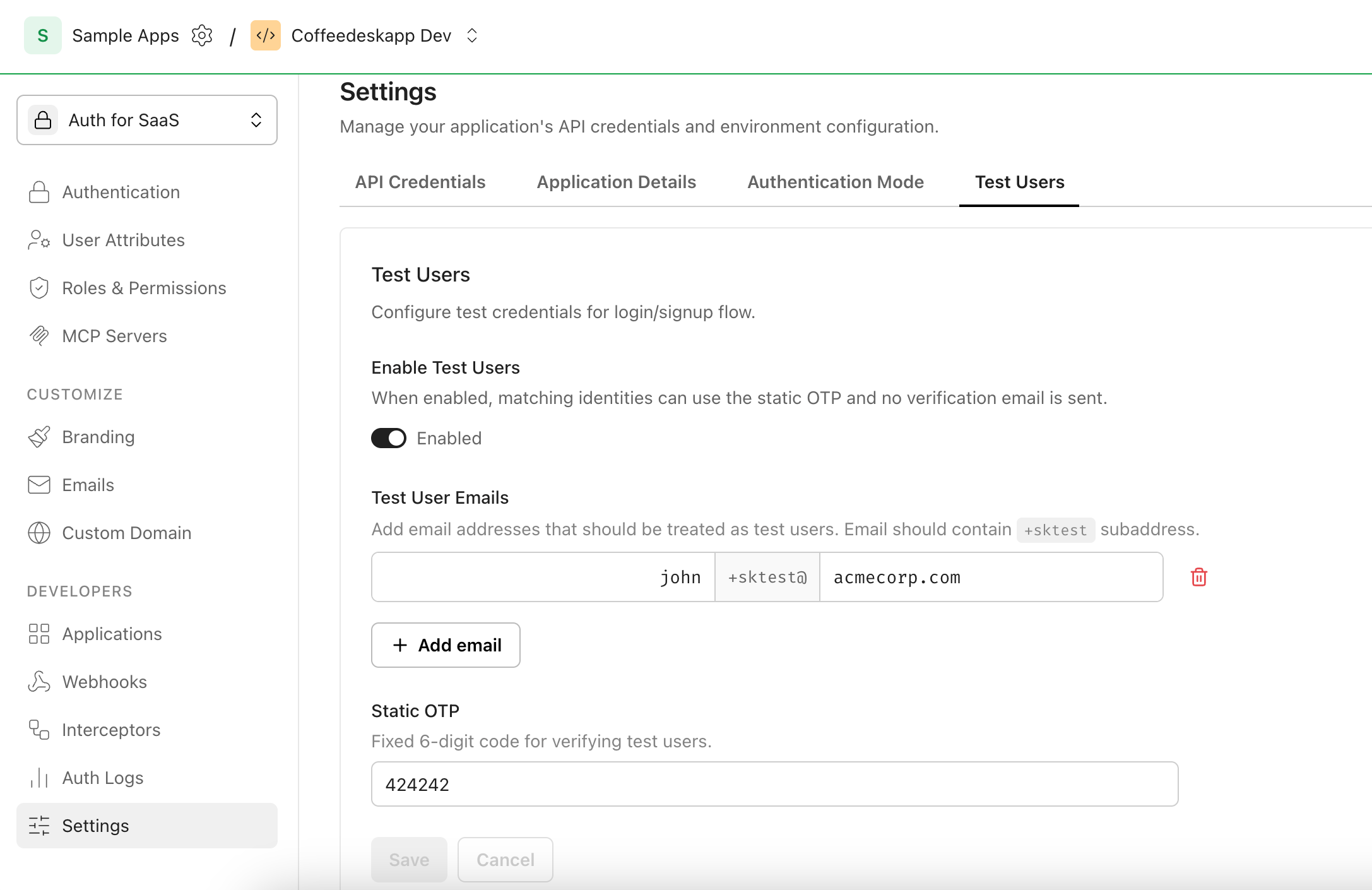
-
Set the static confirmation code
Section titled “Set the static confirmation code”Enter a Static confirmation code — exactly 6 digits. The default is
424242. Tests will enter this code at the OTP prompt. -
Click Save and reload the page to confirm the settings persisted.
Test the signup flow
Section titled “Test the signup flow”Use this flow to verify that a new user can complete signup and end up as a member of an organization.
Point the test at Scalekit’s authorization endpoint with prompt=create so the browser lands directly on the hosted signup screen:
<SCALEKIT_ENVIRONMENT_URL>/oauth/authorize? response_type=code& client_id=<SCALEKIT_CLIENT_ID>& redirect_uri=<CALLBACK_URL>& scope=openid+profile+email+offline_access& state=<RANDOM_STATE>& prompt=createAfter OTP verification, Scalekit redirects to <CALLBACK_URL> with an authorization code. Assert on the callback URL in your test.
import { test, expect } from '@playwright/test'
const AUTH_URL = process.env.SCALEKIT_TEST_AUTH_URL!const TEST_USER_EMAIL = process.env.SCALEKIT_TEST_USER_EMAIL!const TEST_USER_CODE = process.env.SCALEKIT_TEST_USER_CODE!
test('OTP signup with test user', async ({ page }) => { await page.goto(AUTH_URL)
await page.fill('input[name="email"]', TEST_USER_EMAIL) await page.getByRole('button', { name: 'Continue', exact: true }).click()
await page.locator('[data-scope="pin-input"][data-part="input"]').first().pressSequentially(TEST_USER_CODE) await page.getByRole('button', { name: 'Continue', exact: true }).click()
// Replace with your app's post-login URL pattern await expect(page).toHaveURL(/dashboard\.sampleapp\.com/)})const AUTH_URL = Cypress.env('SCALEKIT_TEST_AUTH_URL')const TEST_USER_EMAIL = Cypress.env('SCALEKIT_TEST_USER_EMAIL')const TEST_USER_CODE = Cypress.env('SCALEKIT_TEST_USER_CODE')
describe('OTP signup with test user', () => { it('signs up using the static code', () => { cy.visit(AUTH_URL)
cy.get('input[name="email"]').type(TEST_USER_EMAIL) cy.get('button[type="submit"]').contains('Continue').click()
cy.get('[data-scope="pin-input"][data-part="input"]').first().type(TEST_USER_CODE) cy.get('button[type="submit"]').contains('Continue').click()
// Replace with your app's post-login URL pattern cy.url().should('include', 'dashboard.sampleapp.com') })})Verify: After running the test, check:
-
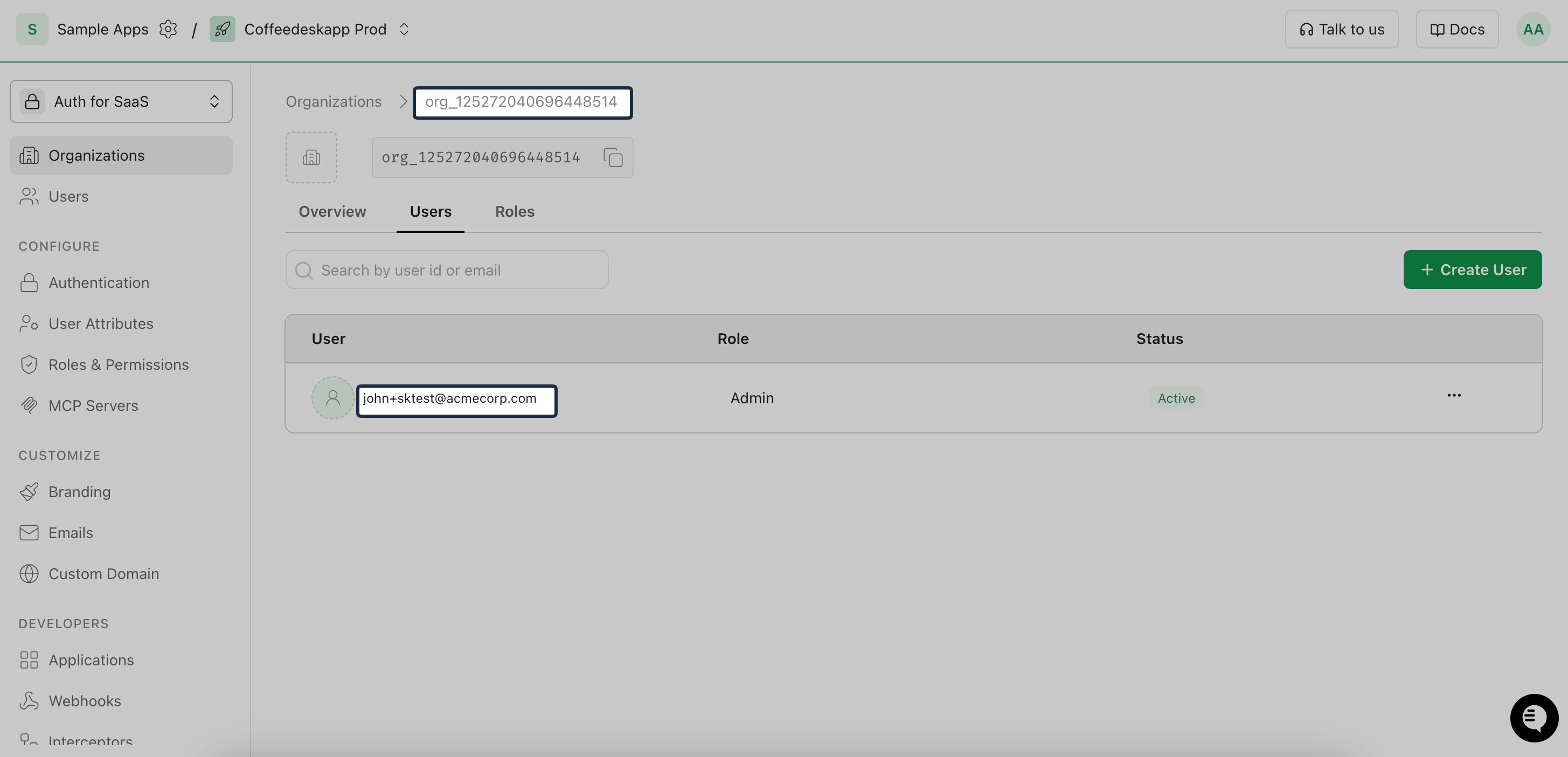
A new organization exists with the test user as a member. Verify in Dashboard > Organizations > Newly created organization > Users.
-
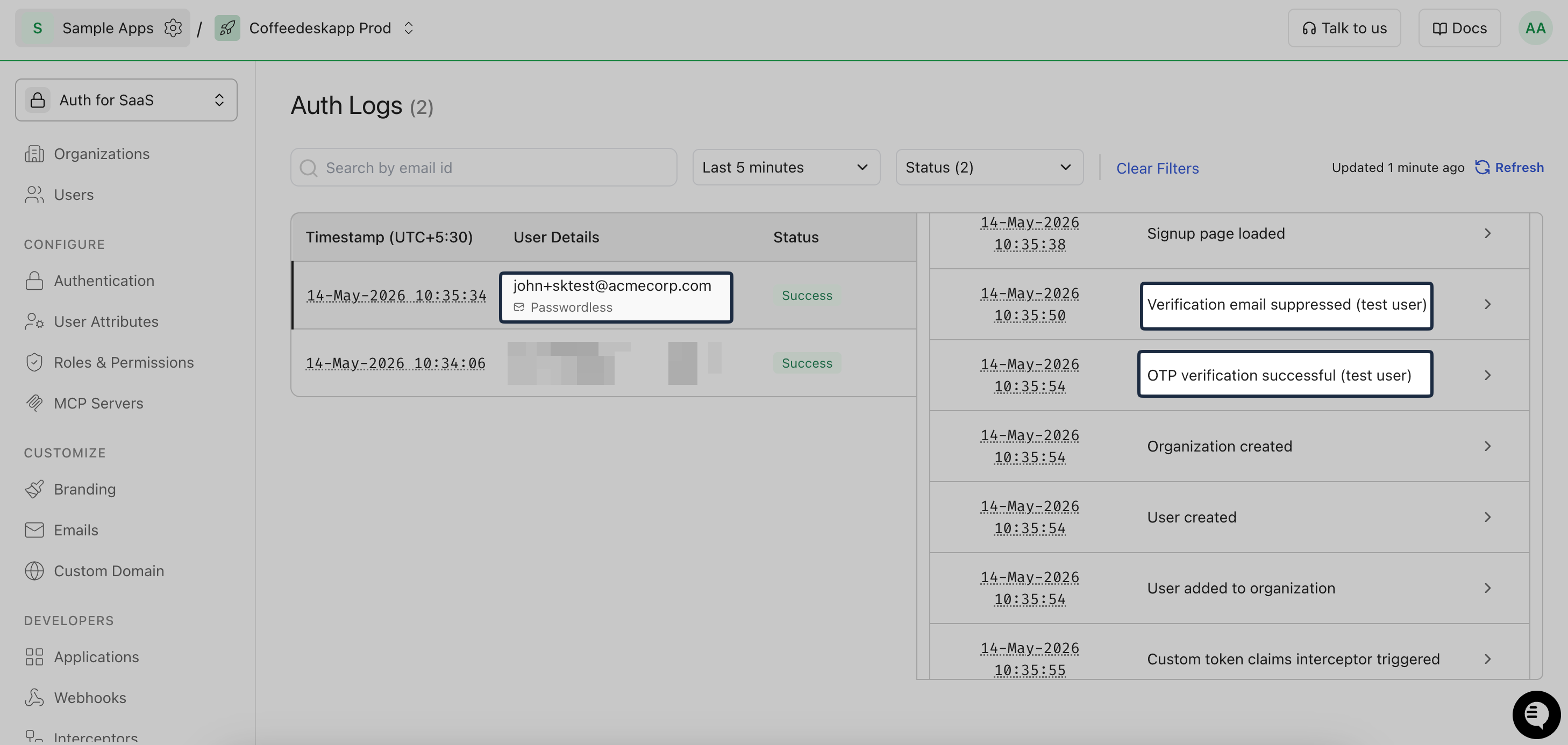
Auth logs in Dashboard > Auth logs show two test-user events:
- Verification email suppressed (test user)
- OTP verification successful (test user)
Test the login flow
Section titled “Test the login flow”Use this flow to verify login for a user that already exists in an organization. The test user must be created before the test runs. Add them manually in Dashboard > Organizations > Newly created organization > Users > Create user, or create them programmatically with the Scalekit API or SDK:
import { ScalekitClient } from '@scalekit-sdk/node'
const scalekit = new ScalekitClient(  process.env.SCALEKIT_ENVIRONMENT_URL!,  process.env.SCALEKIT_CLIENT_ID!,  process.env.SCALEKIT_CLIENT_SECRET!)
const { user } = await scalekit.user.createUserAndMembership(orgId, { email: 'john+sktest@acmecorp.com', sendInvitationEmail: false,})import osfrom scalekit import ScalekitClientfrom scalekit.v1.users.users_pb2 import CreateUser
scalekit_client = ScalekitClient( env_url=os.environ["SCALEKIT_ENVIRONMENT_URL"], client_id=os.environ["SCALEKIT_CLIENT_ID"], client_secret=os.environ["SCALEKIT_CLIENT_SECRET"])
user_response = scalekit_client.users.create_user_and_membership( org_id, CreateUser(email="john+sktest@acmecorp.com"), send_invitation_email=False,)import usersv1 "github.com/scalekit-inc/scalekit-sdk-go/v2/pkg/grpc/scalekit/v1/users"
scalekitClient := scalekit.NewScalekitClient( os.Getenv("SCALEKIT_ENVIRONMENT_URL"), os.Getenv("SCALEKIT_CLIENT_ID"), os.Getenv("SCALEKIT_CLIENT_SECRET"),)
userResp, err := scalekitClient.User().CreateUserAndMembership(ctx, orgID, &usersv1.CreateUser{Email: "john+sktest@acmecorp.com"}, false,)if err != nil { log.Fatalf("failed to create user: %v", err)}import com.scalekit.grpc.scalekit.v1.users.*;
ScalekitClient scalekitClient = new ScalekitClient( System.getenv("SCALEKIT_ENVIRONMENT_URL"), System.getenv("SCALEKIT_CLIENT_ID"), System.getenv("SCALEKIT_CLIENT_SECRET"));
CreateUserAndMembershipRequest request = CreateUserAndMembershipRequest.newBuilder() .setUser(CreateUser.newBuilder().setEmail("john+sktest@acmecorp.com").build()) .setSendInvitationEmail(false) .build();
CreateUserAndMembershipResponse userResp = scalekitClient.users() .createUserAndMembership(orgId, request);Make sure the same email is also on the test users allowlist.
Run the test
Section titled “Run the test”Point the test at Scalekit’s authorization endpoint with prompt=login so the browser lands directly on the hosted login screen:
<SCALEKIT_ENVIRONMENT_URL>/oauth/authorize? response_type=code& client_id=<SCALEKIT_CLIENT_ID>& redirect_uri=<CALLBACK_URL>& scope=openid+profile+email+offline_access& state=<RANDOM_STATE>& prompt=loginAfter OTP verification, Scalekit redirects to <CALLBACK_URL> with an authorization code. Assert on the callback URL in your test.
import { test, expect } from '@playwright/test'
const AUTH_URL = process.env.SCALEKIT_TEST_AUTH_URL!const TEST_USER_EMAIL = process.env.SCALEKIT_TEST_USER_EMAIL!const TEST_USER_CODE = process.env.SCALEKIT_TEST_USER_CODE!
test('OTP login with test user', async ({ page }) => { await page.goto(AUTH_URL)
await page.fill('input[name="email"]', TEST_USER_EMAIL) await page.getByRole('button', { name: 'Continue', exact: true }).click()
await page.locator('[data-scope="pin-input"][data-part="input"]').first().pressSequentially(TEST_USER_CODE) await page.getByRole('button', { name: 'Continue', exact: true }).click()
// Replace with your app's post-login URL pattern await expect(page).toHaveURL(/dashboard\.sampleapp\.com/)})const AUTH_URL = Cypress.env('SCALEKIT_TEST_AUTH_URL')const TEST_USER_EMAIL = Cypress.env('SCALEKIT_TEST_USER_EMAIL')const TEST_USER_CODE = Cypress.env('SCALEKIT_TEST_USER_CODE')
describe('OTP login with test user', () => { it('logs in using the static code', () => { cy.visit(AUTH_URL)
cy.get('input[name="email"]').type(TEST_USER_EMAIL) cy.get('button[type="submit"]').contains('Continue').click()
cy.get('[data-scope="pin-input"][data-part="input"]').first().type(TEST_USER_CODE) cy.get('button[type="submit"]').contains('Continue').click()
// Replace with your app's post-login URL pattern cy.url().should('include', 'dashboard.sampleapp.com') })})Verify: After running the test, check:
-
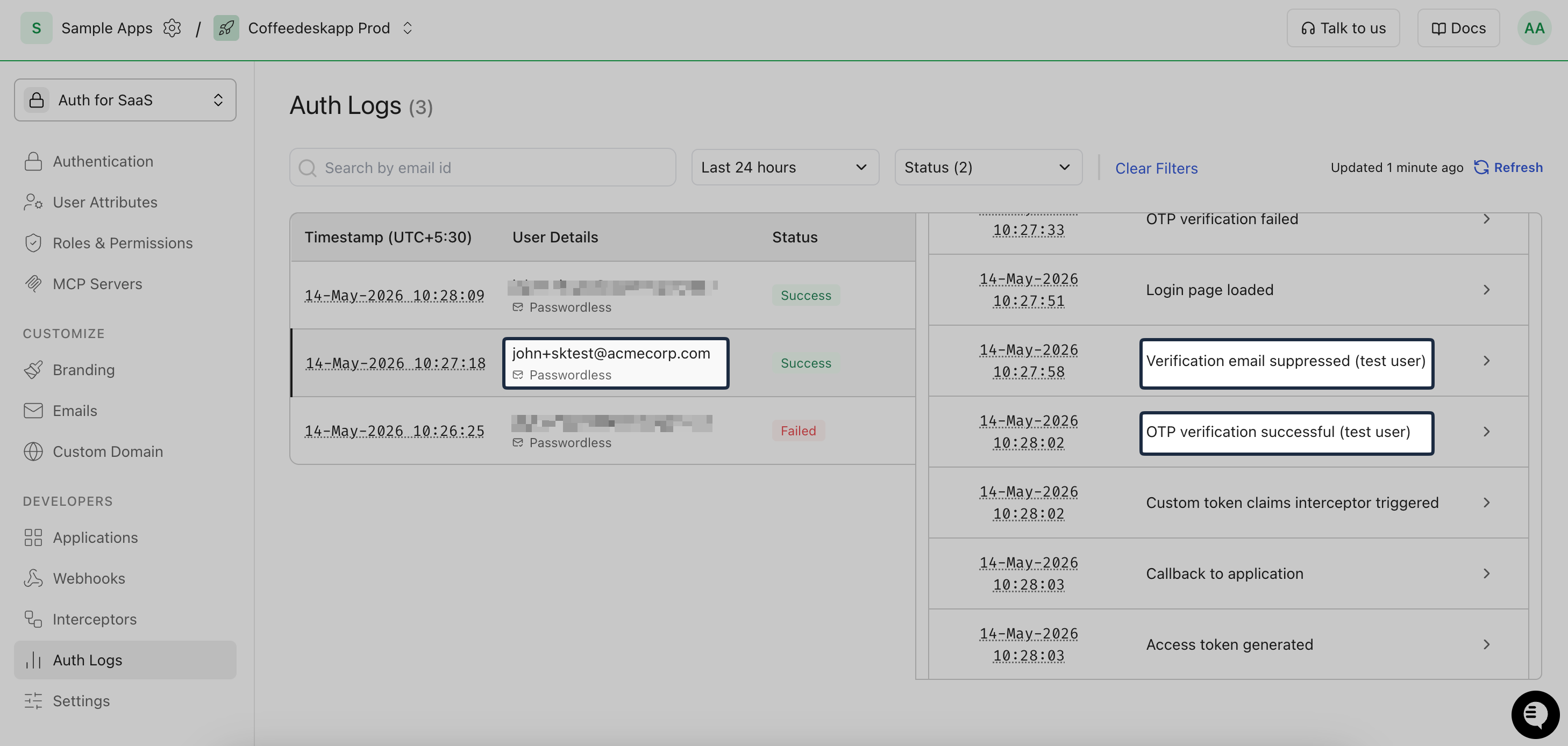
Auth logs in Dashboard > Auth logs show two test-user events:
- Verification email suppressed (test user)
- OTP verification successful (test user)
Production safety
Section titled “Production safety”Common scenarios
Section titled “Common scenarios”Why am I still getting a real verification email?
All three conditions must be true for Test Users to apply:
- Test Users feature is enabled in the environment.
- The exact email is on the allowlist (case-insensitive match).
- Magic Link & OTP auth method is enabled and the configuration is set to
Verification CodeorMagic Link + Verification Code.
Can I use a different code for each test run?
No, the static verification code is set per environment. For parallel isolation, add multiple +sktest addresses (up to 5) and assign a different one to each test run.
How do I keep Test Users out of production CI?
Never enable Test Users in your production environment. In CI, point to a dev or staging environment. Guard your test runner with an environment check — for example, require SCALEKIT_ENVIRONMENT_URL to contain .dev. or .staging. before running E2E tests.