

Organization domains
Verify ownership of customer domains so Scalekit can route Home Realm Discovery (SSO) and SCIM provisioning to the right organization.
An organization domain is a domain your customer owns — such as acmecorp.com. Proving domain ownership unlocks two key features:
- Home Realm Discovery (SSO): When a user signs in with an email address matching a registered domain, Scalekit automatically routes them to that organization’s SSO identity provider.
- SCIM Provisioning: Scalekit only processes SCIM user lifecycle events (create, update, deactivate) for users whose email domain matches a registered organization domain. This ensures only the organization that owns a domain can manage those users.
Add and verify an organization domain
Section titled “Add and verify an organization domain”Via Admin portal No-code
Section titled “Via Admin portal ”The Admin portal gives the admin of a customer organization a self-serve way to add and verify their domain — without involving your engineering team. This is the recommended approach for production onboarding.
-
Enable domain verification for the organization
Section titled “Enable domain verification for the organization”Turn on the
Domain Verificationfeature for the organization. You can do this in the Scalekit Dashboard (navigate to Organizations → select the organization → Overview → toggle Domain Verification), or via the API:Enable domain_verification feature curl --request PATCH \'https://<SCALEKIT_ENVIRONMENT_URL>/api/v1/organizations/<organization_id>/settings' \--header 'Authorization: Bearer <ACCESS_TOKEN>' \--header 'Content-Type: application/json' \--data '{"features": [{ "name": "domain_verification", "enabled": true }]}'Enable domain_verification feature await scalekit.organization.updateOrganizationSettings(organizationId, {features: [{ name: 'domain_verification', enabled: true }],});Enable domain_verification feature scalekit_client.organization.update_organization_settings(organization_id,[{"name": "domain_verification", "enabled": True}],)Enable domain_verification feature err = scalekitClient.Organization.UpdateOrganizationSettings(ctx,organizationID,scalekit.OrganizationSettings{Features: []scalekit.OrganizationSettingsFeature{{Name: "domain_verification", Enabled: true},},},)Enable domain_verification feature scalekitClient.organizations().updateOrganizationSettings(organizationId,List.of(new Feature().setName("domain_verification").setEnabled(true))); -
Generate an Admin portal link and embed in your app
Section titled “Generate an Admin portal link and embed in your app”Generate an admin portal link and embed in your application:
Generate portal link for domain verification curl 'https://<SCALEKIT_ENVIRONMENT_URL>/api/v1/organizations/<organization_id>/portal_links' \--header 'Authorization: Bearer <ACCESS_TOKEN>'Generate portal link for domain verification const link = await scalekit.organization.generatePortalLink(organizationId);// Redirect the org admin to link.locationGenerate portal link for domain verification link = scalekit_client.organization.generate_portal_link(organization_id)# Redirect the org admin to link.locationGenerate portal link for domain verification link, err := scalekitClient.Organization().GeneratePortalLink(ctx, organizationID)// Redirect the org admin to link.Link.LocationGenerate portal link for domain verification Link link = scalekitClient.organizations().generatePortalLink(organizationId,Arrays.asList(Feature.domain_verification));// Redirect the org admin to link.getLocation() -
Organization admin adds the domain and publishes the DNS record
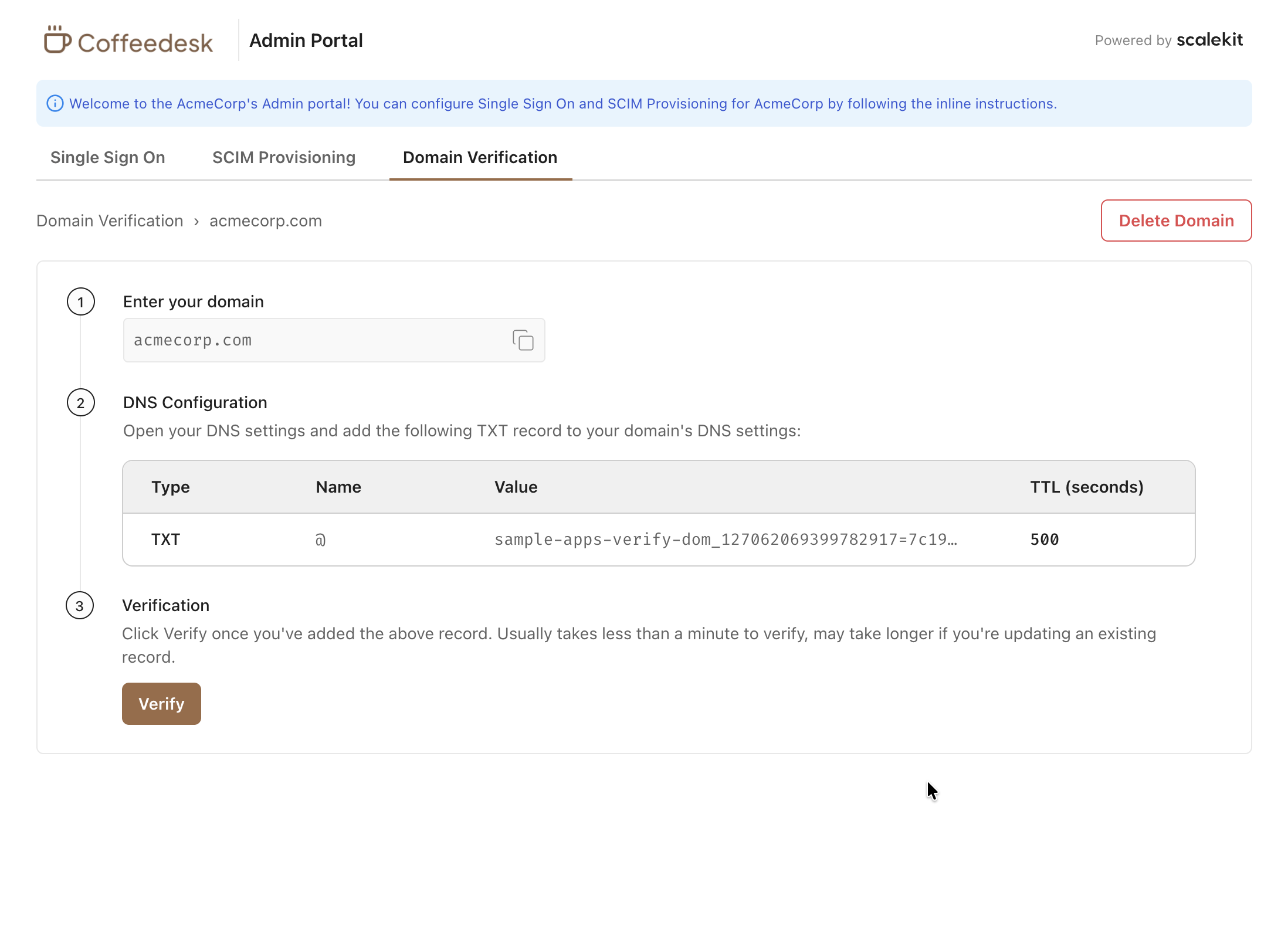
Section titled “Organization admin adds the domain and publishes the DNS record”The admin opens the portal link, clicks Add domain, and enters their domain name. The portal displays the TXT record to add and verify domain ownership. The admin adds this record in their DNS provider (e.g., Cloudflare, Route 53, GoDaddy). Propagation typically takes a few minutes but can take up to 48 hours.
-
Scalekit verifies the DNS record
Section titled “Scalekit verifies the DNS record”Scalekit polls the domain’s DNS automatically. Once the TXT record is detected, the domain status changes to Verified and SSO routing and SCIM become active.
Via Hosted UI widgets No-code
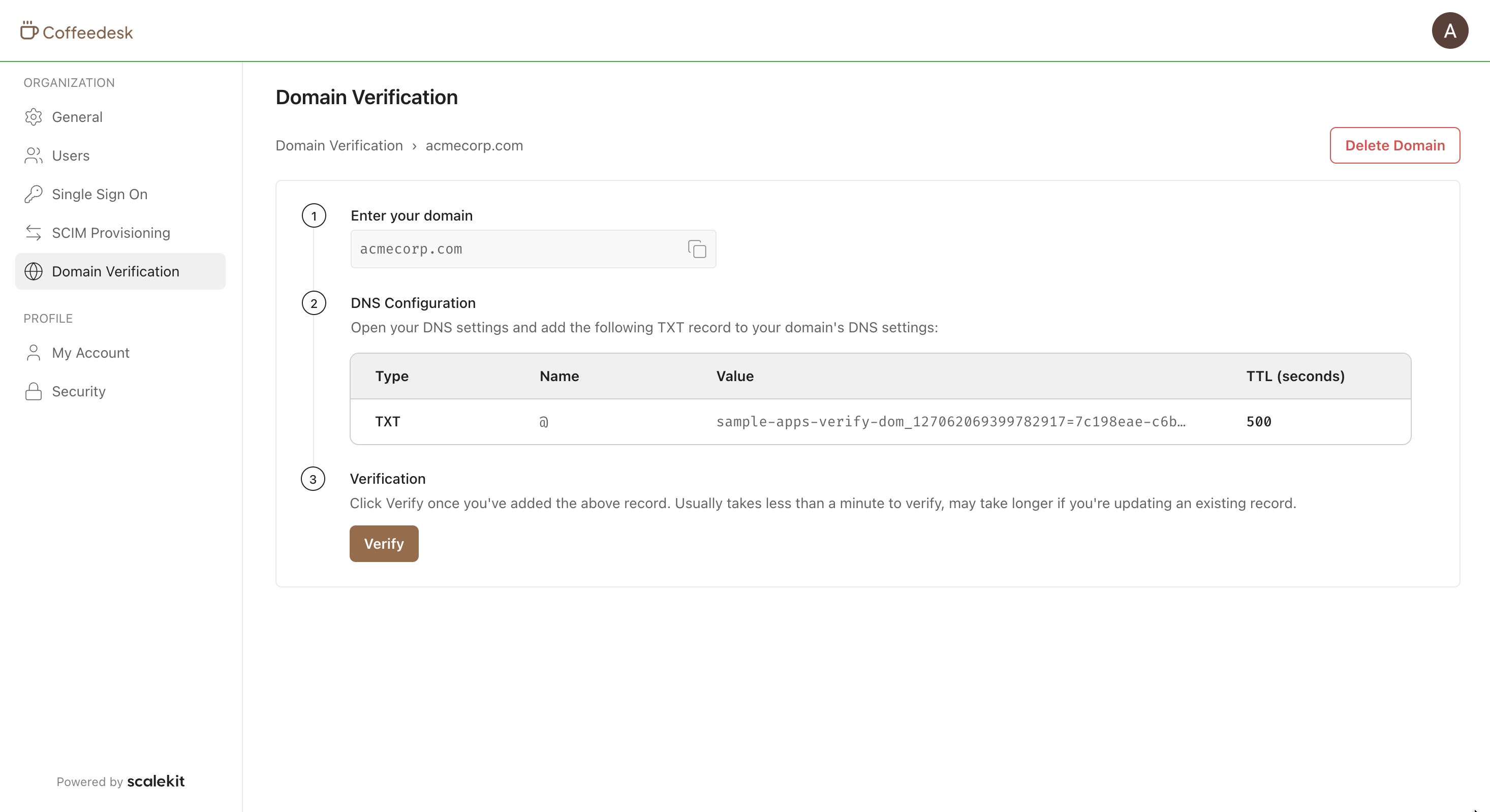
Section titled “Via Hosted UI widgets ”Turn on the Domain Verification feature for the organization. Then redirect end users to Hosted UI widgets to manage their organization’s domains. The domain verification flow inside the widget is identical to the Admin portal. For a shareable link or iframe embed aimed at enterprise IT, use the Admin portal.
Via Scalekit Dashboard No-code
Section titled “Via Scalekit Dashboard ”Your team can add organization domains directly from the Scalekit Dashboard, useful for initial setup or when you have already verified ownership through other means.
- Go to Dashboard > Organizations and select the target organization.
- Navigate to Overview > Organization Domains.
- Click Add domain and enter the domain name.
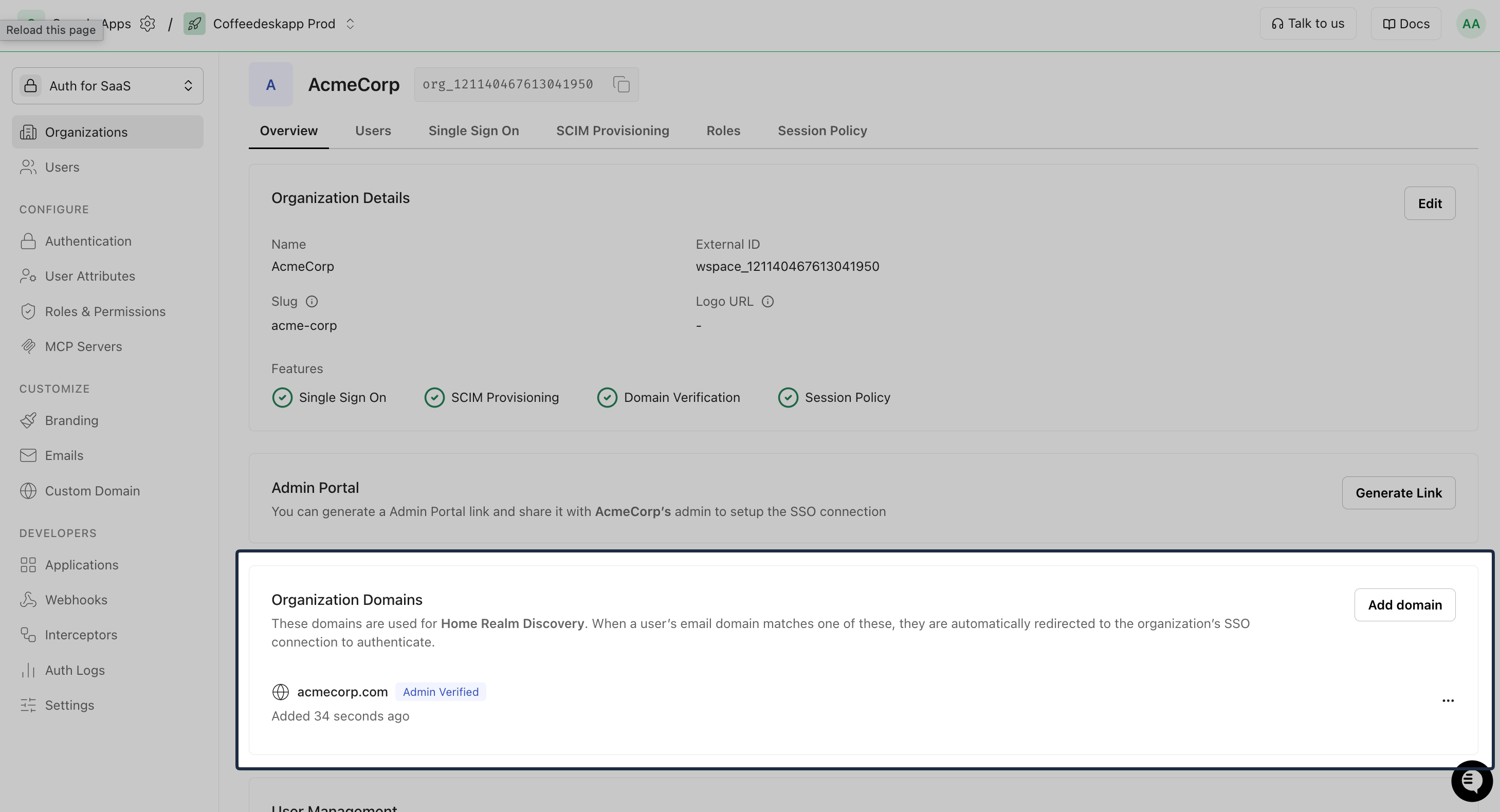
Domains added this way are marked as Admin-verified, no DNS verification is required. They become active for SSO routing and SCIM immediately.
Via API API
Section titled “Via API ”Add and manage organization domains programmatically. Domains created via the API are also Admin-verified by default, no DNS verification is required. Use this when you have already confirmed domain ownership through another process and want to activate SSO routing or SCIM immediately.
# 1. Add an organization domaincurl 'https://<SCALEKIT_ENVIRONMENT_URL>/api/v1/organizations/<organization_id>/domains' \  --request POST \  --header 'Authorization: Bearer <ACCESS_TOKEN>' \  --header 'Content-Type: application/json' \  --data '{    "domain": "acmecorp.com",    "domain_type": "ORGANIZATION_DOMAIN"  }'
# 2. List all organization domainscurl 'https://<SCALEKIT_ENVIRONMENT_URL>/api/v1/organizations/<organization_id>/domains?domain_type=ORGANIZATION_DOMAIN' \  --header 'Authorization: Bearer <ACCESS_TOKEN>'
# 3. Get details of a specific domaincurl 'https://<SCALEKIT_ENVIRONMENT_URL>/api/v1/organizations/<organization_id>/domains/<domain_id>' \  --header 'Authorization: Bearer <ACCESS_TOKEN>'
# 4. Delete a domaincurl 'https://<SCALEKIT_ENVIRONMENT_URL>/api/v1/organizations/<organization_id>/domains/<domain_id>' \ --request DELETE \ --header 'Authorization: Bearer <ACCESS_TOKEN>'import { Scalekit } from '@scalekit-sdk/node';
const scalekit = new Scalekit( process.env.SCALEKIT_ENVIRONMENT_URL, process.env.SCALEKIT_CLIENT_ID, process.env.SCALEKIT_CLIENT_SECRET,);
// 1. Add an organization domainconst newDomain = await scalekit.organization.createDomain(organizationId, { domain: 'acmecorp.com', domainType: 'ORGANIZATION_DOMAIN',});// newDomain.txtRecordKey and newDomain.txtRecordSecret contain the DNS record values
// 2. List all organization domainsconst { domains } = await scalekit.organization.listDomains(organizationId, { domainType: 'ORGANIZATION_DOMAIN',});
// 3. Get a specific domainconst domain = await scalekit.organization.getDomain(organizationId, domainId);
// 4. Delete a domainawait scalekit.organization.deleteDomain(organizationId, domainId);from scalekit import Scalekitimport os
scalekit_client = Scalekit( environment_url=os.environ.get("SCALEKIT_ENVIRONMENT_URL"), client_id=os.environ.get("SCALEKIT_CLIENT_ID"), client_secret=os.environ.get("SCALEKIT_CLIENT_SECRET"),)
# 1. Add an organization domainnew_domain = scalekit_client.organization.create_domain( organization_id, domain="acmecorp.com", domain_type="ORGANIZATION_DOMAIN",)# new_domain.txt_record_key and new_domain.txt_record_secret contain the DNS record values
# 2. List all organization domainsdomains = scalekit_client.organization.list_domains( organization_id, domain_type="ORGANIZATION_DOMAIN")
# 3. Get a specific domaindomain = scalekit_client.organization.get_domain(organization_id, domain_id)
# 4. Delete a domainscalekit_client.organization.delete_domain(organization_id, domain_id)import ( "context" "os"
"github.com/scalekit/sdk-go")
scalekitClient := scalekit.New( os.Getenv("SCALEKIT_ENVIRONMENT_URL"), os.Getenv("SCALEKIT_CLIENT_ID"), os.Getenv("SCALEKIT_CLIENT_SECRET"),)
ctx := context.Background()
// 1. Add an organization domainnewDomain, err := scalekitClient.Organization().CreateDomain(ctx, organizationID, scalekit.CreateDomainOptions{ Domain: "acmecorp.com", DomainType: "ORGANIZATION_DOMAIN",})// newDomain.TxtRecordKey and newDomain.TxtRecordSecret contain the DNS record values
// 2. List all organization domainsdomains, err := scalekitClient.Organization().ListDomains(ctx, organizationID, scalekit.ListDomainsOptions{ DomainType: "ORGANIZATION_DOMAIN",})
// 3. Get a specific domaindomain, err := scalekitClient.Organization().GetDomain(ctx, organizationID, domainID)
// 4. Delete a domainerr = scalekitClient.Organization().DeleteDomain(ctx, organizationID, domainID)import com.scalekit.client.Scalekit;
Scalekit scalekitClient = new Scalekit( System.getenv("SCALEKIT_ENVIRONMENT_URL"), System.getenv("SCALEKIT_CLIENT_ID"), System.getenv("SCALEKIT_CLIENT_SECRET"));
// 1. Add an organization domainDomain newDomain = scalekitClient.organizations() .createDomain(organizationId, new CreateDomainOptions() .setDomain("acmecorp.com") .setDomainType("ORGANIZATION_DOMAIN"));// newDomain.getTxtRecordKey() and newDomain.getTxtRecordSecret() contain the DNS record values
// 2. List all organization domainsList<Domain> domains = scalekitClient.organizations() .listDomains(organizationId, new ListDomainsOptions() .setDomainType("ORGANIZATION_DOMAIN"));
// 3. Get a specific domainDomain domain = scalekitClient.organizations().getDomain(organizationId, domainId);
// 4. Delete a domainscalekitClient.organizations().deleteDomain(organizationId, domainId);Listen for organization domain events
Section titled “Listen for organization domain events”Subscribe to these webhook events to react to domain lifecycle changes in your application:
| Event | Fires when |
|---|---|
organization.domain_created | A domain is added to an organization via any method |
organization.domain_deleted | A domain is removed from an organization |
organization.domain_dns_verification_success | The DNS check confirms domain ownership |
organization.domain_dns_verification_failed | The DNS verification window expired without a successful DNS match |
All four events have the same envelope and the same data shape. Every data key is sent, even when its value is empty or null. Domain events have no object field.
{ "spec_version": "1", "id": "evt_4567890123", "type": "organization.domain_created", "occurred_at": "2024-01-15T11:00:00.123456789Z", "environment_id": "env_1234567890", "organization_id": "org_1234567890", "data": { "domain": "acmecorp.com", "domain_type": "ORGANIZATION_DOMAIN", "id": "dom_1234567890", "organization_id": "org_1234567890", "txt_record_key": "scalekit-domain-verification", "txt_record_secret": "sk_dom_verify_abc123", "updated_at": "2024-01-15T11:00:00.123456789Z", "verification_method": "DNS", "verification_status": "PENDING" }}| Field | Type | Description |
|---|---|---|
id | string | Unique identifier for the domain (dom_ prefix) |
domain | string | The domain name |
domain_type | string | ORGANIZATION_DOMAIN for SSO/SCIM domains; ALLOWED_EMAIL_DOMAIN for auto-join domains |
organization_id | string | Organization that owns the domain (org_ prefix) |
txt_record_key | string | DNS TXT record host used for ownership verification |
txt_record_secret | string | DNS TXT value Scalekit expects. Treat as sensitive — do not log or expose in client UIs |
verification_status | string | PENDING, VERIFIED, FAILED, or AUTO_VERIFIED |
verification_method | string or null | DNS (TXT record), ADMIN (added by the B2B app team), NOT_APPLICABLE (allowed email domains), or null if no method is set |
updated_at | string | When the domain status last changed |
Configure handlers with the webhooks guide.
Common scenarios
Section titled “Common scenarios”How is organization domains different from allowed email domains?
Allowed email domains let users with a matching email address see and join the organization via the organization switcher.
Organization domains prove domain ownership by an organization and unlock SSO routing (Home Realm Discovery) and SCIM provisioning. The distinction is about what the domain enables, not just who can join.
What happens if DNS hasn’t propagated yet?
DNS propagation can take anywhere from a few minutes to 48 hours depending on the TTL and the DNS provider.
Scalekit polls the domain on a scheduled interval and retries automatically until the TXT record is found or the verification window expires. The org admin can also click Verify now in the Admin portal or Hosted UI widgets to trigger an immediate check at any time.
If the window expires before the record propagates, the domain status moves to FAILED. Delete the domain and add it again to get a fresh verification token and restart the process.
Can I verify a domain without DNS?
Yes. Domains added via the Scalekit Dashboard or API are marked as Admin-verified, no DNS verification is required. Use this when you have already confirmed domain ownership through another process (contract, business verification, etc.) and want to activate SSO routing or SCIM immediately.