

Attio
Connect to Attio CRM to manage contacts, companies, deals, notes, tasks, and lists with a modern relationship management platform.
Connect to Attio to manage CRM records, people, companies, deals, tasks, notes, and workspace data

Supports authentication: OAuth 2.0
Set up the agent connector
Section titled “Set up the agent connector”Register your Attio OAuth app credentials with Scalekit so it can manage the OAuth 2.0 authentication flow and token lifecycle on your behalf. You’ll need a Client ID and Client Secret from the Attio Developer Portal.
-
Create a connection in Scalekit and copy the redirect URI
-
Sign in to your Scalekit dashboard and go to Agent Auth in the left sidebar.
-
Click Create Connection, search for Attio, and click Create.
-
On the connection configuration panel, locate the Redirect URI field. It looks like:
https://<SCALEKIT_ENVIRONMENT_URL>/sso/v1/oauth/<CONNECTION_ID>/callback -
Click the copy icon next to the Redirect URI to copy it to your clipboard.
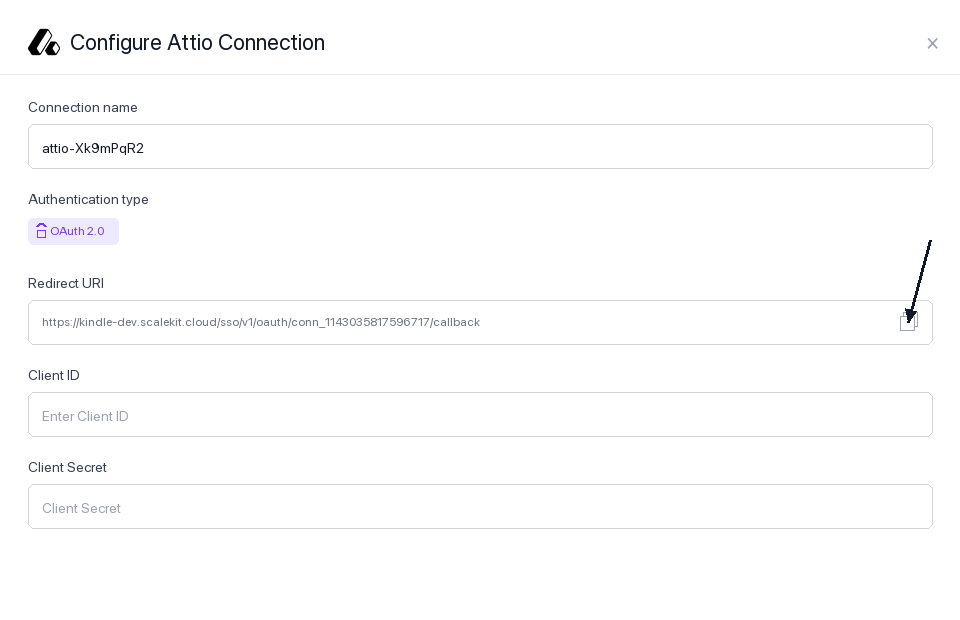
Keep this tab open — you’ll return to it in step 3.
-
-
Register the redirect URI in your Attio OAuth app
-
Sign in to build.attio.com and open the app you want to connect. If you don’t have one yet, click Create app.
-
In the left sidebar, click OAuth to open the OAuth settings tab for your app.
-
You’ll see your Client ID and Client Secret near the top of the page. Copy both values and save them somewhere safe — you’ll need them in step 3.
-
Scroll down to the Redirect URIs section. Click + New redirect URI.
-
Paste the Redirect URI you copied from Scalekit into the input field and confirm.
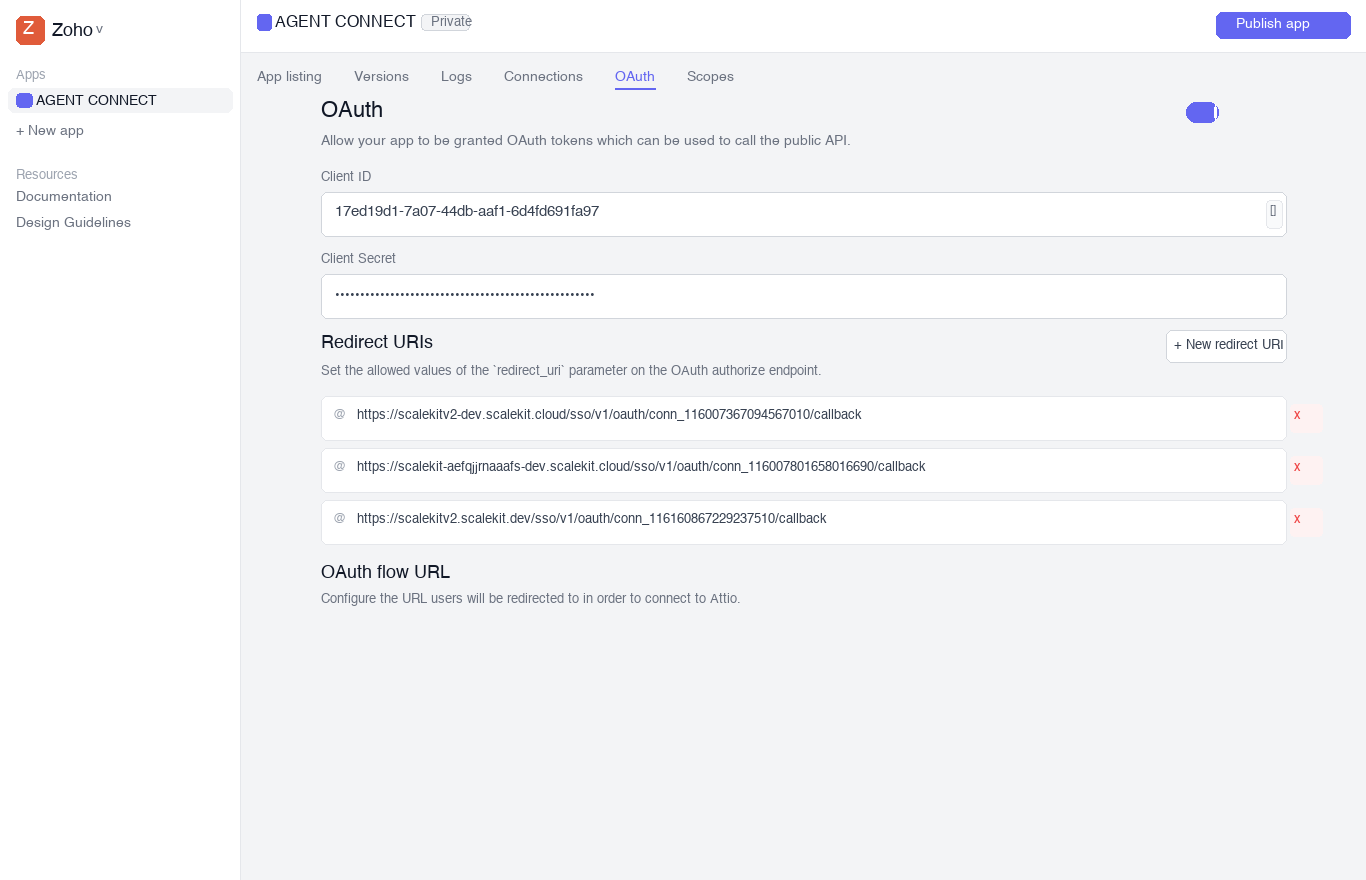
-
-
Add credentials and scopes in Scalekit
-
Return to your Scalekit dashboard → Agent Auth → Connections and open the Attio connection you created in step 1.
-
Fill in the following fields:
-
Client ID — paste the Client ID from your Attio OAuth app
-
Client Secret — paste the Client Secret from your Attio OAuth app
-
Permissions — select the OAuth scopes your app requires. Choose the minimum scopes needed. Common scopes:
Scope What it allows record_permission:readRead CRM records (people, companies, deals) record_permission:read-writeRead and write CRM records object_configuration:readRead object and attribute schemas list_configuration:readRead list schemas list_entry:readRead list entries list_entry:read-writeRead and write list entries note:readRead notes note:read-writeRead and write notes task:read-writeRead and write tasks comment:read-writeRead and write comments webhook:read-writeManage webhooks user_management:readRead workspace members For a full list, see the Attio OAuth scopes reference.
-
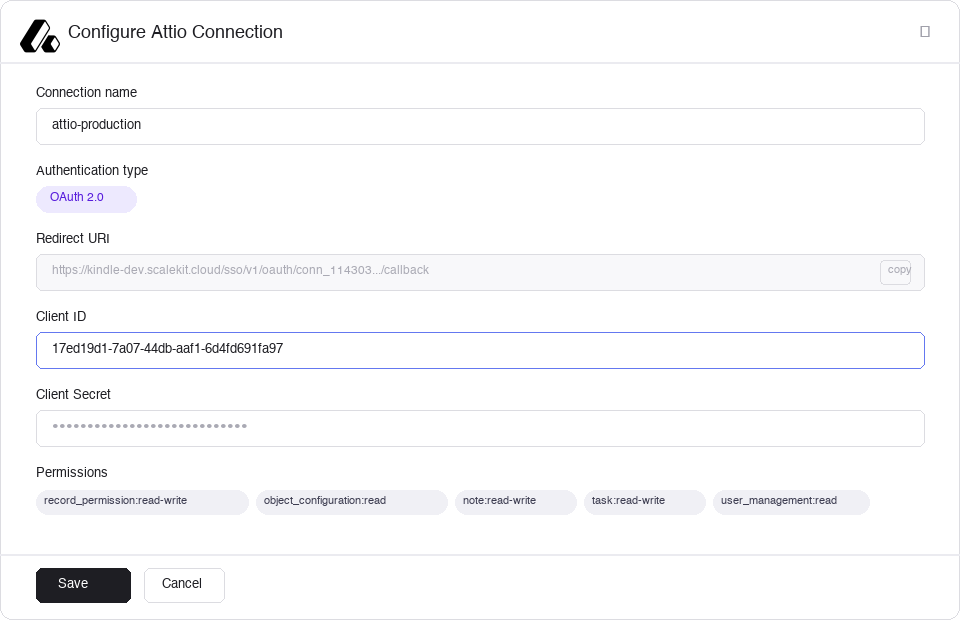
- Click Save. Scalekit will validate the credentials and mark the connection as active.
-
Connect a user’s Attio workspace and make API calls on their behalf — Scalekit handles OAuth and token management automatically.
import { ScalekitClient } from '@scalekit-sdk/node';import 'dotenv/config';
const connectionName = 'attio'; // connection name from Scalekit dashboardconst identifier = 'user_123'; // your unique user identifier
// Get credentials from app.scalekit.com → Developers → API Credentialsconst scalekit = new ScalekitClient( process.env.SCALEKIT_ENV_URL, process.env.SCALEKIT_CLIENT_ID, process.env.SCALEKIT_CLIENT_SECRET);const actions = scalekit.actions;
async function main() { try { // Step 1: Send this URL to your user to authorize Attio access const { link } = await actions.getAuthorizationLink({ connectionName, identifier }); console.log('Authorize Attio:', link); // present this link to your user for authorization, or click it yourself for testing process.stdout.write('Press Enter after authorizing...'); await new Promise(r => process.stdin.once('data', r));
// Step 2: After the user authorizes, make API calls via Scalekit proxy
// --- Query people records with a filter --- const people = await actions.request({ connectionName, identifier, path: '/v2/objects/people/records/query', method: 'POST', body: { filter: { email_addresses: [{ email_address: { $eq: 'alice@example.com' } }], }, limit: 10, }, }); console.log('People:', people.data);
// --- Create a company record --- const company = await actions.request({ connectionName, identifier, path: '/v2/objects/companies/records', method: 'POST', body: { data: { values: { name: [{ value: 'Acme Corp' }], domains: [{ domain: 'acme.com' }], }, }, }, }); const companyId = company.data.data.id.record_id; console.log('Created company:', companyId);
// --- Create a person record and associate with the company --- const person = await actions.request({ connectionName, identifier, path: '/v2/objects/people/records', method: 'POST', body: { data: { values: { name: [{ first_name: 'Alice', last_name: 'Smith' }], email_addresses: [{ email_address: 'alice@acme.com', attribute_type: 'email' }], company: [{ target_record_id: companyId }], }, }, }, }); const personId = person.data.data.id.record_id; console.log('Created person:', personId);
// --- Add a note to the person record --- const note = await actions.request({ connectionName, identifier, path: '/v2/notes', method: 'POST', body: { data: { parent_object: 'people', parent_record_id: personId, title: 'Initial outreach', content: 'Spoke with Alice about Q2 pricing. Follow up next week.', format: 'plaintext', }, }, }); console.log('Created note:', note.data.data.id.note_id);
// --- Create a task linked to the person --- const deadlineAt = new Date(Date.now() + 7 * 24 * 60 * 60 * 1000).toISOString(); // 7 days from now const task = await actions.request({ connectionName, identifier, path: '/v2/tasks', method: 'POST', body: { data: { content: 'Send Q2 pricing proposal to Alice', deadline_at: deadlineAt, is_completed: false, linked_records: [{ target_object: 'people', target_record_id: personId }], }, }, }); console.log('Created task:', task.data.data.id.task_id);
// --- Verify current token and workspace --- const tokenInfo = await actions.request({ connectionName, identifier, path: '/v2/self', method: 'GET', }); console.log('Connected to workspace:', tokenInfo.data.data.workspace.name); console.log('Granted scopes:', tokenInfo.data.data.scopes.join(', ')); } catch (err) { console.error('Attio request failed:', err); process.exit(1); }}
main();import scalekit.client, osfrom dotenv import load_dotenvload_dotenv()
connection_name = "attio" # connection name from Scalekit dashboardidentifier = "user_123" # your unique user identifier
# Get credentials from app.scalekit.com → Developers → API Credentialsscalekit_client = scalekit.client.ScalekitClient( client_id=os.getenv("SCALEKIT_CLIENT_ID"), client_secret=os.getenv("SCALEKIT_CLIENT_SECRET"), env_url=os.getenv("SCALEKIT_ENV_URL"),)
# Step 1: Send this URL to your user to authorize Attio accesslink_response = scalekit_client.actions.get_authorization_link( connection_name=connection_name, identifier=identifier)print("Authorize Attio:", link_response.link)
# Step 2: After the user authorizes, make API calls via Scalekit proxy
# --- Query people records with a filter ---people = scalekit_client.actions.request( connection_name=connection_name, identifier=identifier, path="/v2/objects/people/records/query", method="POST", json={ "filter": { "email_addresses": [{"email_address": {"$eq": "alice@example.com"}}] }, "limit": 10 })print("People:", people)
# --- Create a company record ---company = scalekit_client.actions.request( connection_name=connection_name, identifier=identifier, path="/v2/objects/companies/records", method="POST", json={ "data": { "values": { "name": [{"value": "Acme Corp"}], "domains": [{"domain": "acme.com"}] } } })company_id = company["data"]["id"]["record_id"]print("Created company:", company_id)
# --- Create a person record and associate with the company ---person = scalekit_client.actions.request( connection_name=connection_name, identifier=identifier, path="/v2/objects/people/records", method="POST", json={ "data": { "values": { "name": [{"first_name": "Alice", "last_name": "Smith"}], "email_addresses": [{"email_address": "alice@acme.com", "attribute_type": "email"}], "company": [{"target_record_id": company_id}] } } })person_id = person["data"]["id"]["record_id"]print("Created person:", person_id)
# --- Add a note to the person record ---note = scalekit_client.actions.request( connection_name=connection_name, identifier=identifier, path="/v2/notes", method="POST", json={ "data": { "parent_object": "people", "parent_record_id": person_id, "title": "Initial outreach", "content": "Spoke with Alice about Q2 pricing. Follow up next week.", "format": "plaintext" } })print("Created note:", note["data"]["id"]["note_id"])
# --- Create a task linked to the person ---task = scalekit_client.actions.request( connection_name=connection_name, identifier=identifier, path="/v2/tasks", method="POST", json={ "data": { "content": "Send Q2 pricing proposal to Alice", "deadline_at": "2026-03-20T17:00:00.000Z", "is_completed": False, "linked_records": [ {"target_object": "people", "target_record_id": person_id} ] } })print("Created task:", task["data"]["id"]["task_id"])
# --- Verify current token and workspace ---token_info = scalekit_client.actions.request( connection_name=connection_name, identifier=identifier, path="/v2/self", method="GET")workspace = token_info["data"]["workspace"]["name"]scopes = token_info["data"]["scopes"]print(f"Connected to workspace: {workspace}")print(f"Granted scopes: {', '.join(scopes)}")Tool list
Section titled “Tool list”attio_create_person
Section titled “attio_create_person”Create a new person record in Attio. Throws an error if a unique attribute like email_addresses conflicts with an existing record. The values object maps attribute slugs to their typed values — use attio_list_attributes on the people object first to discover available slugs and types.
Example values:
{ "name": [{ "first_name": "Alice", "last_name": "Smith" }], "email_addresses": [{ "email_address": "alice@acme.com", "attribute_type": "email" }], "company": [{ "target_record_id": "<company_record_id>" }]}| Name | Type | Required | Description |
|---|---|---|---|
values | object | Yes | Attribute values keyed by attribute slug. Multi-value attributes (e.g., email_addresses, phone_numbers) must be arrays. Single-value attributes (e.g., name) must also be arrays with one item. |
attio_list_people
Section titled “attio_list_people”List person records with optional filtering and sorting. Returns paginated results. Use attio_list_attributes on people to find filterable attribute slugs before building a filter object.
Filter example — find people at a specific company:
{ "company": [{ "target_record_id": "<company_record_id>" }] }Sort example — most recently created first:
[{ "direction": "desc", "attribute": "created_at" }]| Name | Type | Required | Description |
|---|---|---|---|
filter | object | No | Attribute-based filter conditions. Keys are attribute slugs; values are match expressions |
sorts | array | No | Array of sort objects, each with attribute (slug) and direction (asc or desc) |
limit | integer | No | Number of records to return per page (default 500) |
offset | integer | No | Number of records to skip for pagination (default 0) |
attio_get_person
Section titled “attio_get_person”Retrieve a single person record by its record_id. Returns all attribute values with temporal and audit metadata, including created_by_actor and active_from/active_until per value.
| Name | Type | Required | Description |
|---|---|---|---|
record_id | string | Yes | UUID of the person record to retrieve |
attio_delete_person
Section titled “attio_delete_person”Permanently delete a person record by its record_id. This operation is irreversible and cannot be undone. The underlying contact data, linked tasks, notes, and list entries associated with this person are also affected.
| Name | Type | Required | Description |
|---|---|---|---|
record_id | string | Yes | UUID of the person record to delete |
attio_create_company
Section titled “attio_create_company”Create a new company record in Attio. Throws an error if a unique attribute like domains conflicts with an existing company. Use attio_list_attributes on companies to discover available attribute slugs.
Example values:
{ "name": [{ "value": "Acme Corp" }], "domains": [{ "domain": "acme.com" }], "description": [{ "value": "Enterprise SaaS company" }]}| Name | Type | Required | Description |
|---|---|---|---|
values | object | Yes | Attribute values keyed by attribute slug. The domains attribute is unique — creating a company with an existing domain will throw a conflict error |
attio_list_companies
Section titled “attio_list_companies”List company records with optional filtering and sorting. Returns paginated results.
Filter example — companies in a specific industry:
{ "categories": [{ "value": "Software" }] }| Name | Type | Required | Description |
|---|---|---|---|
filter | object | No | Attribute-based filter conditions |
sorts | array | No | Array of sort objects with attribute and direction |
limit | integer | No | Number of records per page (default 500) |
offset | integer | No | Records to skip for pagination (default 0) |
attio_get_company
Section titled “attio_get_company”Retrieve a single company record by its record_id. Returns all attribute values with full audit metadata.
| Name | Type | Required | Description |
|---|---|---|---|
record_id | string | Yes | UUID of the company record to retrieve |
attio_delete_company
Section titled “attio_delete_company”Permanently delete a company record by its record_id. This operation is irreversible.
| Name | Type | Required | Description |
|---|---|---|---|
record_id | string | Yes | UUID of the company record to delete |
attio_create_deal
Section titled “attio_create_deal”Create a new deal record in Attio. Throws an error if a unique attribute conflict is detected. Provide at least one attribute value. Use attio_list_attributes on deals to discover available slugs.
Example values:
{ "name": [{ "value": "Acme Enterprise Contract" }], "value": [{ "currency_value": 50000, "currency_code": "USD" }], "stage": [{ "status": "In progress" }], "associated_company": [{ "target_record_id": "<company_record_id>" }]}| Name | Type | Required | Description |
|---|---|---|---|
values | object | Yes | Attribute values keyed by attribute slug |
attio_list_deals
Section titled “attio_list_deals”List deal records with optional filtering and sorting. Returns paginated results.
| Name | Type | Required | Description |
|---|---|---|---|
filter | object | No | Attribute-based filter conditions |
sorts | array | No | Array of sort objects with attribute and direction |
limit | integer | No | Number of records per page (default 500) |
offset | integer | No | Records to skip for pagination (default 0) |
attio_get_deal
Section titled “attio_get_deal”Retrieve a single deal record by its record_id. Returns all attribute values with temporal and audit metadata.
| Name | Type | Required | Description |
|---|---|---|---|
record_id | string | Yes | UUID of the deal record to retrieve |
attio_delete_deal
Section titled “attio_delete_deal”Permanently delete a deal record by its record_id. This operation is irreversible.
| Name | Type | Required | Description |
|---|---|---|---|
record_id | string | Yes | UUID of the deal record to delete |
attio_create_record
Section titled “attio_create_record”Create a new record for any Attio object type — including people, companies, deals, and custom objects. Use this as a generic alternative to attio_create_person / attio_create_company when the object type is dynamic. Throws an error if a unique attribute conflict is detected.
Example — create a custom object record:
{ "object": "projects", "values": { "name": [{ "value": "Q2 Migration" }], "status": [{ "status": "active" }] }}| Name | Type | Required | Description |
|---|---|---|---|
object | string | Yes | Object type slug (e.g., people, companies, deals) or UUID — use attio_list_objects to discover available objects |
values | object | Yes | Attribute values keyed by attribute slug. Use attio_list_attributes on the target object to discover valid slugs and types |
attio_list_records
Section titled “attio_list_records”List and filter records for any Attio object type. Returns guaranteed up-to-date data. Prefer this over attio_search_records when you need exact filtering by attribute value (e.g., find by email, status, or domain). Use attio_search_records for fuzzy, name-based lookups.
Example — filter people by email:
{ "object": "people", "filter": { "email_addresses": [{ "email_address": { "$eq": "alice@acme.com" } }] }}| Name | Type | Required | Description |
|---|---|---|---|
object | string | Yes | Object type slug or UUID |
filter | object | No | Attribute-based filter. Structure depends on attribute type — use attio_list_attributes to discover filter syntax per attribute |
sorts | array | No | Array of sort objects with attribute (slug) and direction (asc/desc) |
limit | integer | No | Records per page (default 500) |
offset | integer | No | Records to skip for pagination (default 0) |
attio_search_records
Section titled “attio_search_records”Search records using a fuzzy text query. Returns matching records with their IDs, labels, and key attributes. Best for user-facing search (e.g., “find the company called Acme”). For precise attribute-based filtering, use attio_list_records instead.
| Name | Type | Required | Description |
|---|---|---|---|
object | string | Yes | Object type slug (e.g., people, companies, deals) |
query | string | Yes | Fuzzy text query matched against names, emails, and domains. Pass an empty string to return all records |
limit | integer | No | Number of results to return (default 20) |
offset | integer | No | Results to skip for pagination (default 0) |
attio_get_record
Section titled “attio_get_record”Retrieve a specific record by object type and record ID. Returns the full record including all attribute values with their complete audit trail (created_by_actor, active_from, active_until).
| Name | Type | Required | Description |
|---|---|---|---|
object | string | Yes | Object type slug or UUID |
record_id | string | Yes | UUID of the record to retrieve |
attio_delete_record
Section titled “attio_delete_record”Permanently delete a record by object type and record ID. This action is irreversible.
| Name | Type | Required | Description |
|---|---|---|---|
object | string | Yes | Object type slug or UUID |
record_id | string | Yes | UUID of the record to delete |
attio_get_record_attribute_values
Section titled “attio_get_record_attribute_values”Retrieve all values for a specific attribute on a record. Useful for inspecting multi-value attributes (e.g., all email addresses on a person) or retrieving the full value history when show_historic is set. Not available for COMINT or enriched attributes.
| Name | Type | Required | Description |
|---|---|---|---|
object | string | Yes | Object type slug or UUID |
record_id | string | Yes | UUID of the record |
attribute | string | Yes | Attribute slug or UUID to retrieve values for |
show_historic | boolean | No | Set to true to include all historical values, not just the current ones |
attio_create_task
Section titled “attio_create_task”Create a new task in Attio. Tasks can be linked to one or more CRM records and assigned to workspace members. Only plaintext is supported for task content.
linked_records structure:
[{ "target_object": "people", "target_record_id": "<person_record_id>" }]assignees structure — use attio_list_workspace_members to get UUIDs:
[{ "referenced_actor_type": "workspace-member", "referenced_actor_id": "<member_uuid>" }]| Name | Type | Required | Description |
|---|---|---|---|
content | string | Yes | Task content in plaintext (max 2000 characters) |
deadline_at | string | No | ISO 8601 deadline timestamp including milliseconds and timezone, e.g. 2026-04-01T17:00:00.000Z |
is_completed | boolean | No | Initial completion status (default: false) |
linked_records | array | No | Records to link this task to — each item needs target_object (slug) and target_record_id (UUID) |
assignees | array | No | Workspace members to assign the task to — each item needs referenced_actor_type (workspace-member) and referenced_actor_id (UUID) |
attio_list_tasks
Section titled “attio_list_tasks”List tasks in Attio. Filter by linked record to retrieve tasks for a specific contact, company, or deal. Filter by completion status to show only open or completed tasks.
| Name | Type | Required | Description |
|---|---|---|---|
linked_object | string | No | Object type slug to filter tasks by linked record type (e.g., people, companies) |
linked_record_id | string | No | UUID of the record to filter tasks linked to a specific record — use with linked_object |
is_completed | boolean | No | Filter by completion status: true for completed, false for open, omit to return all |
limit | integer | No | Number of tasks to return (default 20) |
offset | integer | No | Tasks to skip for pagination (default 0) |
attio_get_task
Section titled “attio_get_task”Retrieve a single task by its task_id. Returns the task content, deadline, completion status, assignees, and linked records.
| Name | Type | Required | Description |
|---|---|---|---|
task_id | string | Yes | UUID of the task to retrieve |
attio_delete_task
Section titled “attio_delete_task”Permanently delete a task by its task_id. This operation is irreversible.
| Name | Type | Required | Description |
|---|---|---|---|
task_id | string | Yes | UUID of the task to delete |
attio_create_note
Section titled “attio_create_note”Create a note on a CRM record (person, company, deal, or custom object). Notes support plaintext or Markdown. Optionally backdate the note using created_at or associate it with an existing meeting via meeting_id.
| Name | Type | Required | Description |
|---|---|---|---|
parent_object | string | Yes | Object type slug the record belongs to (e.g., people, companies, deals) |
parent_record_id | string | Yes | UUID of the record to attach the note to |
title | string | No | Plaintext title for the note |
content | string | No | Note body — plaintext or Markdown depending on format |
format | string | No | Content format: plaintext (default) or markdown |
created_at | string | No | ISO 8601 timestamp to backdate the note (e.g., 2026-01-15T10:30:00Z) — defaults to now |
meeting_id | string | No | UUID of an existing meeting to associate with this note |
attio_list_notes
Section titled “attio_list_notes”List notes in Attio. Filter by parent object and record to retrieve notes for a specific person, company, or deal. Maximum 50 results per page.
| Name | Type | Required | Description |
|---|---|---|---|
parent_object | string | No | Object type slug to filter notes by record type — must be provided together with parent_record_id |
parent_record_id | string | No | UUID of the record to filter notes — must be provided together with parent_object |
limit | integer | No | Number of notes to return (max 50, default 10) |
offset | integer | No | Notes to skip for pagination (default 0) |
attio_get_note
Section titled “attio_get_note”Retrieve a single note by its note_id. Returns the note’s title, content in both plaintext and Markdown, tags, and creator information.
| Name | Type | Required | Description |
|---|---|---|---|
note_id | string | Yes | UUID of the note to retrieve |
attio_delete_note
Section titled “attio_delete_note”Permanently delete a note by its note_id. This operation is irreversible.
| Name | Type | Required | Description |
|---|---|---|---|
note_id | string | Yes | UUID of the note to delete |
attio_create_comment
Section titled “attio_create_comment”Create a comment on a CRM record or list entry. To comment on a record, provide record_object and record_id. To comment on a list entry, provide list_id and entry_id. To reply to an existing thread, include thread_id. Content is always plaintext.
Use attio_list_workspace_members to look up the author_actor_id UUID.
| Name | Type | Required | Description |
|---|---|---|---|
author_actor_id | string | Yes | UUID of the workspace member authoring the comment — retrieve with attio_list_workspace_members |
content | string | Yes | Comment content in plaintext |
record_object | string | No | Object type slug when commenting on a record (e.g., people, companies) |
record_id | string | No | UUID of the record to comment on |
list_id | string | No | UUID of the list when commenting on a list entry |
entry_id | string | No | UUID of the list entry to comment on |
thread_id | string | No | UUID of an existing comment thread to reply to — omit to start a new thread |
attio_get_comment
Section titled “attio_get_comment”Retrieve a single comment by its comment_id. Returns the comment content, author, thread ID, and resolution status.
| Name | Type | Required | Description |
|---|---|---|---|
comment_id | string | Yes | UUID of the comment to retrieve |
attio_delete_comment
Section titled “attio_delete_comment”Permanently delete a comment by its comment_id. If the comment is the head of a thread, all replies in that thread are also deleted.
| Name | Type | Required | Description |
|---|---|---|---|
comment_id | string | Yes | UUID of the comment to delete |
attio_list_threads
Section titled “attio_list_threads”List all comment threads on a record or list entry. Returns all threads with their messages and resolution status.
| Name | Type | Required | Description |
|---|---|---|---|
record_object | string | No | Object type slug when listing threads for a record |
record_id | string | No | UUID of the record |
list_id | string | No | UUID of the list when listing threads for a list entry |
entry_id | string | No | UUID of the list entry |
attio_list_lists
Section titled “attio_list_lists”Retrieve all CRM lists in the Attio workspace. Lists track pipeline stages, outreach targets, or custom groupings of records. Optionally filter returned entries by a specific parent record.
| Name | Type | Required | Description |
|---|---|---|---|
parent_record_id | string | No | Filter list entries to those belonging to this record UUID |
parent_object | string | No | Object type slug to scope entry filtering (use with parent_record_id) |
attio_create_list
Section titled “attio_create_list”Create a new CRM list in Attio. After creation, add custom attributes with attio_create_attribute and add records with attio_add_to_list.
workspace_member_access structure — to give a specific member full access:
[{ "workspace_member_id": "<member_uuid>", "level": "full-access" }]Pass an empty array [] to rely solely on workspace_access for all members.
| Name | Type | Required | Description |
|---|---|---|---|
name | string | Yes | Display name for the list |
api_slug | string | Yes | URL-safe identifier used in API calls (e.g., q2-outreach) |
workspace_access | string | Yes | Default access for all workspace members: full-access, read-and-write, or read-only |
workspace_member_access | array | Yes | Per-member access overrides — each item needs workspace_member_id and level. Pass [] for uniform access |
attio_get_list
Section titled “attio_get_list”Retrieve details of a single list by its UUID or slug, including its name, parent object type, and access configuration.
| Name | Type | Required | Description |
|---|---|---|---|
list | string | Yes | List UUID or API slug |
attio_list_entries
Section titled “attio_list_entries”List entries in a given Attio list. Returns the records that belong to the list along with any list-specific attribute values (e.g., pipeline stage, entry date).
| Name | Type | Required | Description |
|---|---|---|---|
list | string | Yes | List UUID or API slug |
filter | object | No | Filter conditions on list-level attributes |
sorts | array | No | Sort objects with attribute and direction |
limit | integer | No | Number of entries to return |
offset | integer | No | Entries to skip for pagination |
attio_get_list_entry
Section titled “attio_get_list_entry”Retrieve a single list entry by its entry_id. Returns detailed information about the entry including list-specific attribute values.
| Name | Type | Required | Description |
|---|---|---|---|
list | string | Yes | List UUID or API slug |
entry_id | string | Yes | UUID of the list entry to retrieve |
attio_add_to_list
Section titled “attio_add_to_list”Add a record to a specific Attio list. Returns the newly created list entry with its entry_id — save this if you need to remove the entry later. If the record is already in the list, a new entry is created (Attio supports multiple entries per record in the same list).
Optionally set list-level attribute values (e.g., pipeline stage) on the entry using entry_values.
entry_values example — set stage on add:
{ "stage": [{ "status": "Qualified" }] }| Name | Type | Required | Description |
|---|---|---|---|
list | string | Yes | List UUID or API slug |
record_id | string | Yes | UUID of the record to add |
entry_values | object | No | Attribute values to set on the list entry itself (not the underlying record). Keys are list attribute slugs |
attio_remove_from_list
Section titled “attio_remove_from_list”Remove a specific entry from an Attio list by its entry_id. Deletes the list entry but does not delete the underlying record. Use the entry_id returned by attio_add_to_list or attio_list_record_entries.
| Name | Type | Required | Description |
|---|---|---|---|
list | string | Yes | List UUID or API slug |
entry_id | string | Yes | UUID of the list entry to remove — this is the entry ID, not the record ID |
attio_list_record_entries
Section titled “attio_list_record_entries”List all list memberships for a specific record across all lists. Returns the list IDs, entry IDs, and creation timestamps — useful for finding the entry_id needed to remove a record from a list.
| Name | Type | Required | Description |
|---|---|---|---|
object | string | Yes | Object type slug or UUID |
record_id | string | Yes | UUID of the record |
attio_list_objects
Section titled “attio_list_objects”Retrieve all objects available in the Attio workspace — both system objects (people, companies, deals, users, workspaces) and any custom objects. Call this first to discover what object types exist before querying or writing records.
This tool takes no input parameters.
attio_get_object
Section titled “attio_get_object”Retrieve details of a single object by its slug or UUID, including its display name, API slug, and whether it is system-defined or custom.
| Name | Type | Required | Description |
|---|---|---|---|
object | string | Yes | Object slug (e.g., people, companies) or UUID |
attio_create_object
Section titled “attio_create_object”Create a new custom object type in the Attio workspace. Use this when you need an object beyond the standard types. After creation, add attributes with attio_create_attribute.
| Name | Type | Required | Description |
|---|---|---|---|
singular_noun | string | Yes | Singular display name (e.g., Project) |
plural_noun | string | Yes | Plural display name (e.g., Projects) |
api_slug | string | Yes | URL-safe identifier used in API calls (e.g., projects) |
attio_list_attributes
Section titled “attio_list_attributes”List the attribute schema for an object or list — including slugs, types, and configuration for select/status attributes. Call this before filtering or writing to confirm the correct slugs and understand the expected value structure for each attribute type.
| Name | Type | Required | Description |
|---|---|---|---|
object | string | No | Object slug or UUID to list attributes for (e.g., people, companies) |
list | string | No | List slug or UUID to list attributes for |
attio_get_attribute
Section titled “attio_get_attribute”Retrieve full details of a single attribute including its type, slug, configuration, required/unique flags, and metadata.
| Name | Type | Required | Description |
|---|---|---|---|
object | string | No | Object slug or UUID containing the attribute |
list | string | No | List slug or UUID containing the attribute |
attribute | string | Yes | Attribute slug or UUID |
attio_create_attribute
Section titled “attio_create_attribute”Create a new attribute on an object or list. The required type determines the structure of the config object.
Supported type values:
text, number, select, multiselect, status, date, timestamp, checkbox, currency, record-reference, actor-reference, location, domain, email-address, phone-number, interaction
config by type:
- Most types (text, number, date, checkbox, etc.): pass
{} select/multiselect: pass{}— add options viaattio_list_attribute_optionsafter creationrecord-reference: pass{ "relationship": { "object": "<target_object_slug>" } }
| Name | Type | Required | Description |
|---|---|---|---|
object | string | No | Object slug or UUID to add the attribute to (provide either object or list) |
list | string | No | List slug or UUID to add the attribute to |
api_slug | string | Yes | URL-safe identifier for the attribute — must be unique within the object |
title | string | Yes | Display name shown in the Attio UI |
type | string | Yes | Attribute data type — see supported values above |
description | string | Yes | Human-readable description of what this attribute stores |
is_required | boolean | Yes | Whether a value is required when creating records of this type |
is_unique | boolean | Yes | Whether values must be unique across all records |
is_multiselect | boolean | Yes | Whether multiple values are allowed per record |
config | object | Yes | Type-specific configuration — pass {} for most types; see examples above |
attio_list_attribute_options
Section titled “attio_list_attribute_options”List all select options for a select or multiselect attribute. Returns option IDs, titles, and color configuration. Use this before writing to a select attribute to confirm valid option values.
| Name | Type | Required | Description |
|---|---|---|---|
object | string | No | Object slug or UUID containing the attribute |
list | string | No | List slug or UUID containing the attribute |
attribute | string | Yes | Attribute slug or UUID of the select or multiselect attribute |
attio_list_attribute_statuses
Section titled “attio_list_attribute_statuses”List all statuses for a status attribute, including their IDs, titles, and celebration configuration. Use this before writing to a status attribute to confirm valid status titles.
| Name | Type | Required | Description |
|---|---|---|---|
object | string | No | Object slug or UUID containing the attribute |
list | string | No | List slug or UUID containing the attribute |
attribute | string | Yes | Attribute slug or UUID of the status attribute |
attio_list_workspace_members
Section titled “attio_list_workspace_members”List all workspace members. Use this to retrieve member UUIDs needed when assigning task owners, setting actor-reference attributes, or identifying comment authors.
| Name | Type | Required | Description |
|---|---|---|---|
limit | integer | No | Number of members to return |
offset | integer | No | Members to skip for pagination |
attio_get_workspace_member
Section titled “attio_get_workspace_member”Retrieve a single workspace member by their UUID. Returns name, email address, access level, and avatar information.
| Name | Type | Required | Description |
|---|---|---|---|
workspace_member_id | string | Yes | UUID of the workspace member to retrieve |
attio_list_user_records
Section titled “attio_list_user_records”List user records in Attio with optional filtering and sorting. User records represent end-users of the connected product and are distinct from workspace members. Returns paginated results.
| Name | Type | Required | Description |
|---|---|---|---|
filter | object | No | Attribute-based filter conditions |
sorts | array | No | Array of sort objects with attribute and direction |
limit | integer | No | Number of records to return |
offset | integer | No | Records to skip for pagination |
attio_delete_user_record
Section titled “attio_delete_user_record”Permanently delete a user record by its record_id. This operation is irreversible.
| Name | Type | Required | Description |
|---|---|---|---|
record_id | string | Yes | UUID of the user record to delete |
attio_list_workspace_records
Section titled “attio_list_workspace_records”List workspace records in Attio with optional filtering and sorting. Workspace records represent instances of connected SaaS products (e.g., a Slack workspace). Returns paginated results.
| Name | Type | Required | Description |
|---|---|---|---|
filter | object | No | Attribute-based filter conditions |
sorts | array | No | Array of sort objects with attribute and direction |
limit | integer | No | Number of records to return |
offset | integer | No | Records to skip for pagination |
attio_get_workspace_record
Section titled “attio_get_workspace_record”Retrieve a single workspace record by its record_id. Returns all attribute values with temporal and audit metadata.
| Name | Type | Required | Description |
|---|---|---|---|
record_id | string | Yes | UUID of the workspace record to retrieve |
attio_delete_workspace_record
Section titled “attio_delete_workspace_record”Permanently delete a workspace record by its record_id. This operation is irreversible.
| Name | Type | Required | Description |
|---|---|---|---|
record_id | string | Yes | UUID of the workspace record to delete |
attio_list_webhooks
Section titled “attio_list_webhooks”Retrieve all webhooks configured in the Attio workspace. Returns webhook configurations, event subscriptions, and statuses.
| Name | Type | Required | Description |
|---|---|---|---|
limit | integer | No | Number of webhooks to return |
offset | integer | No | Webhooks to skip for pagination |
attio_get_webhook
Section titled “attio_get_webhook”Retrieve a single webhook by its webhook_id. Returns the target URL, subscribed event types, current status, and metadata.
| Name | Type | Required | Description |
|---|---|---|---|
webhook_id | string | Yes | UUID of the webhook to retrieve |
attio_delete_webhook
Section titled “attio_delete_webhook”Permanently delete a webhook by its webhook_id. This operation is irreversible.
| Name | Type | Required | Description |
|---|---|---|---|
webhook_id | string | Yes | UUID of the webhook to delete |
attio_list_meetings
Section titled “attio_list_meetings”List all meetings in the Attio workspace. Optionally filter by participants or linked records.
| Name | Type | Required | Description |
|---|---|---|---|
filter | object | No | Filter conditions (e.g., by participant UUIDs or linked record IDs) |
limit | integer | No | Number of meetings to return |
offset | integer | No | Meetings to skip for pagination |
attio_get_current_token_info
Section titled “attio_get_current_token_info”Identify the current access token, the workspace it belongs to, the actor that authenticated, and the OAuth scopes granted. Use this to verify a user’s token is active, confirm which workspace is connected, and check permissions before making write calls.
This tool takes no input parameters. It returns:
| Field | Type | Description |
|---|---|---|
active | boolean | Whether the token is currently active and usable |
workspace.id | string | UUID of the connected Attio workspace |
workspace.name | string | Display name of the connected Attio workspace |
actor.type | string | Who authenticated — workspace-member for a user OAuth token, api-token for a service token |
actor.id | string | UUID of the workspace member or API token |
actor.name | string | Display name of the authenticated actor |
actor.email | string | Email address of the workspace member (present for workspace-member actors only) |
scopes | array | OAuth scopes granted to this token (e.g., record_permission:read, note:read-write) |
When to call this:
- After a user completes OAuth — confirm the connection succeeded and identify which workspace they authorized.
- Before a write operation — verify the required scope is in
scopesto give a clear error rather than a cryptic API rejection. - When debugging — check
activeistrueand that expected scopes are present.