


HubSpot connector
OAuth 2.0CRM & SalesConnect to HubSpot CRM. Manage contacts, deals, companies, and marketing automation
HubSpot connector
-
Install the SDK
Section titled “Install the SDK”Terminal window npm install @scalekit-sdk/nodeTerminal window pip install scalekit -
Set your credentials
Section titled “Set your credentials”Add your Scalekit credentials to your
.envfile. Find values in app.scalekit.com > Developers > API Credentials..env SCALEKIT_ENVIRONMENT_URL=<your-environment-url>SCALEKIT_CLIENT_ID=<your-client-id>SCALEKIT_CLIENT_SECRET=<your-client-secret> -
Set up the connector
Section titled “Set up the connector”Register your HubSpot credentials with Scalekit so it handles the token lifecycle. You do this once per environment.
Dashboard setup steps
Register your Scalekit environment with the HubSpot connector so Scalekit handles the authentication flow and token lifecycle for you. The connection name you create will be used to identify and invoke the connection programmatically. Then complete the configuration in your application as follows:
-
Set up auth redirects
-
In Scalekit dashboard, go to AgentKit > Connections > Create Connection. Find HubSpot and click Create. Copy the redirect URI. It looks like
https://<SCALEKIT_ENVIRONMENT_URL>/sso/v1/oauth/<CONNECTION_ID>/callback.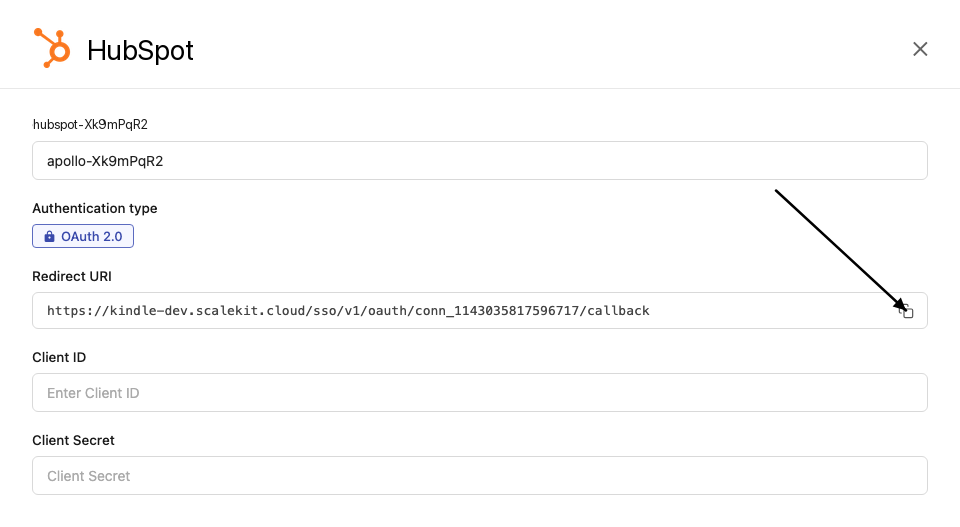
-
Log in to your HubSpot developer dashboard, click Manage apps, click Create app, and select Public app. If you already have an existing HubSpot app, open that app instead — see the Choosing a HubSpot app type section above for guidance on Public, Private, and legacy apps.
-
Go to Auth > Auth settings > Redirect URL, paste the redirect URI from Scalekit, and click Save.
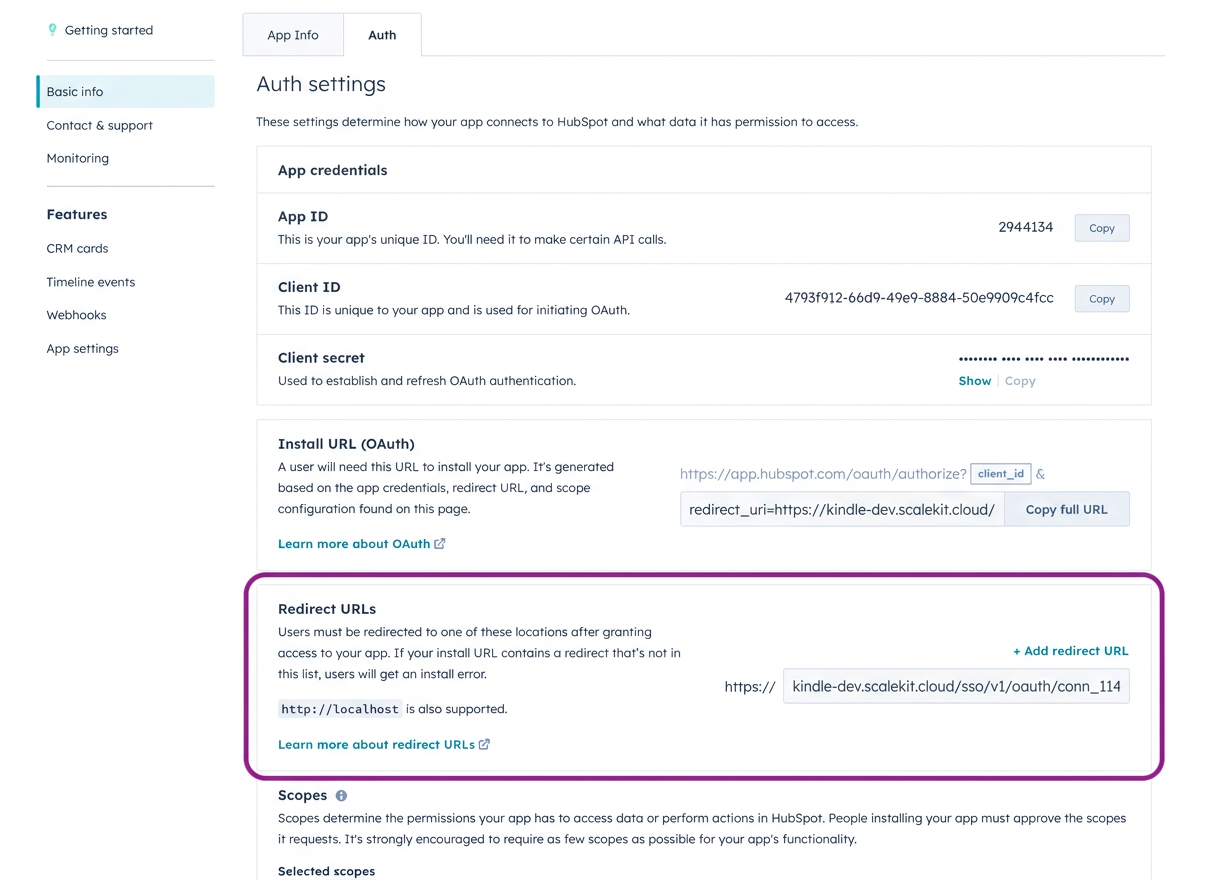
-
Under Auth > Auth settings > Scopes, select the scopes your application needs. The scopes you select here must match exactly what you configure in Scalekit. For a read-only CRM enrichment flow, start with:
crm.objects.contacts.readcrm.objects.companies.readcrm.objects.deals.readThese assume a modern Public app with dotted scope names. For legacy apps or the full scope reference, see the Required and optional scopes section on this page.
-
-
Get client credentials
-
In your HubSpot app, go to Auth > Auth settings.
-
Copy your Client ID and Client Secret.
-
-
Add credentials in Scalekit
-
In Scalekit dashboard, go to AgentKit > Connections and open the connection you created.
-
Enter your credentials:
- Client ID (from your HubSpot app)
- Client Secret (from your HubSpot app)
- Permissions (OAuth scope strings such as
crm.objects.contacts.read, entered exactly as configured in the HubSpot app). For a full list of available scopes and guidance on optional scopes, see the Required and optional scopes section on this page.
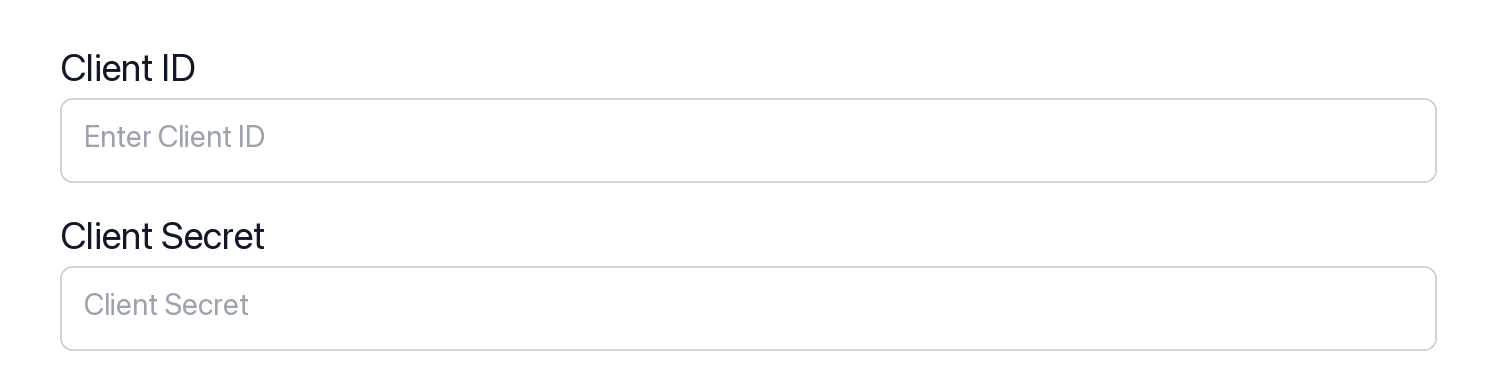
-
Click Save.
-
-
-
Authorize and make your first call
Section titled “Authorize and make your first call”quickstart.ts import { ScalekitClient } from '@scalekit-sdk/node'import 'dotenv/config'const scalekit = new ScalekitClient(process.env.SCALEKIT_ENV_URL,process.env.SCALEKIT_CLIENT_ID,process.env.SCALEKIT_CLIENT_SECRET,)const actions = scalekit.actionsconst connector = 'hubspot'const identifier = 'user_123'// Generate an authorization link for the userconst { link } = await actions.getAuthorizationLink({ connectionName: connector, identifier })console.log('Authorize HubSpot:', link)process.stdout.write('Press Enter after authorizing...')await new Promise(r => process.stdin.once('data', r))// Make your first call — list CRM ownersconst result = await actions.executeTool({connector,identifier,toolName: 'hubspot_owners_list',toolInput: {},})console.log('HubSpot owners:', result)quickstart.py import osfrom scalekit.client import ScalekitClientfrom dotenv import load_dotenvload_dotenv()scalekit_client = ScalekitClient(env_url=os.getenv("SCALEKIT_ENV_URL"),client_id=os.getenv("SCALEKIT_CLIENT_ID"),client_secret=os.getenv("SCALEKIT_CLIENT_SECRET"),)actions = scalekit_client.actionsconnection_name = "hubspot"identifier = "user_123"# Generate an authorization link for the userlink_response = actions.get_authorization_link(connection_name=connection_name,identifier=identifier,)print("Authorize HubSpot:", link_response.link)input("Press Enter after authorizing...")# Make your first call — list CRM ownersresult = actions.execute_tool(tool_input={},tool_name="hubspot_owners_list",connection_name=connection_name,identifier=identifier,)print("HubSpot owners:", result)
What you can do
Section titled “What you can do”Connect this agent connector to let your agent:
- Manage contacts — create, update, search, and list contacts; batch create, update, upsert, read, and archive
- Manage companies and deals — create and update company records and deals; batch create, update, upsert, read, and archive
- Manage tickets and tasks — create and update support tickets; create tasks with due dates and priorities
- Batch operations with inline associations — create contacts, companies, deals, or tickets and link them to related records in a single call
- Log engagements — record calls, meetings, notes, and emails against any CRM record
- Search, associate, and extend — full-text search across all CRM objects, batch-manage associations, list owners, discover properties, and work with custom objects
Choosing a HubSpot app type
Section titled “Choosing a HubSpot app type”HubSpot has three app shapes. The shape you choose determines which OAuth flow, scope format, and Scalekit configuration apply.
| App type | OAuth redirect | Scope format | Use with Scalekit |
|---|---|---|---|
| Public app | Supported | Modern (crm.objects.contacts.read) | Recommended |
| Private app | Not supported | N/A — static API token only | Not supported |
| Legacy / developer-account app | Supported | Bare strings (contacts, automation) | Supported — enter bare strings in Permissions |
Public apps are the standard choice for production integrations. They support the OAuth redirect flow that Scalekit manages, and they use the modern dotted scope format.
Private apps issue static API tokens and have no OAuth redirect endpoint. Scalekit’s HubSpot connector requires an OAuth flow, so Private apps are not compatible.
Legacy apps (older apps created in HubSpot developer test accounts before the current console) still support OAuth but use an older scope vocabulary. If you already have a legacy app, you can connect it — you just need to enter the older bare scope strings exactly as HubSpot lists them in that app’s Auth > Scopes page.
Common workflows
Section titled “Common workflows”Proxy API call
const result = await actions.request({ connectionName: 'hubspot', identifier: 'user_123', path: '/crm/v3/owners', method: 'GET',});console.log(result);result = actions.request( connection_name='hubspot', identifier='user_123', path="/crm/v3/owners", method="GET")print(result)Create a contact
const contact = await actions.executeTool({ connector: 'hubspot', identifier: 'user_123', toolName: 'hubspot_contact_create', toolInput: { email: 'jane.smith@acme.com', firstname: 'Jane', lastname: 'Smith', jobtitle: 'VP of Engineering', company: 'Acme Corp', lifecyclestage: 'lead', },});console.log('Created contact ID:', contact.id);contact = actions.execute_tool( connection_name='hubspot', identifier='user_123', tool_name="hubspot_contact_create", tool_input={ "email": "jane.smith@acme.com", "firstname": "Jane", "lastname": "Smith", "jobtitle": "VP of Engineering", "company": "Acme Corp", "lifecyclestage": "lead", },)print("Created contact ID:", contact["id"])Search deals
const deals = await actions.executeTool({ connector: 'hubspot', identifier: 'user_123', toolName: 'hubspot_deals_search', toolInput: { query: 'enterprise', filterGroups: JSON.stringify([{ filters: [{ propertyName: 'dealstage', operator: 'EQ', value: 'qualifiedtobuy' }] }]), properties: 'dealname,amount,dealstage,closedate', limit: 10, },});console.log('Found deals:', deals.results);import json
deals = actions.execute_tool( connection_name='hubspot', identifier='user_123', tool_name="hubspot_deals_search", tool_input={ "query": "enterprise", "filterGroups": json.dumps([{ "filters": [{"propertyName": "dealstage", "operator": "EQ", "value": "qualifiedtobuy"}] }]), "properties": "dealname,amount,dealstage,closedate", "limit": 10, },)print("Found deals:", deals["results"])Log a call
const call = await actions.executeTool({ connector: 'hubspot', identifier: 'user_123', toolName: 'hubspot_call_log', toolInput: { hs_call_title: 'Q4 Renewal Discussion', hs_timestamp: new Date().toISOString(), hs_call_body: 'Discussed renewal terms. Customer is interested in the enterprise plan.', hs_call_direction: 'OUTBOUND', hs_call_duration: 900000, // 15 minutes in ms hs_call_status: 'COMPLETED', },});console.log('Logged call ID:', call.id);from datetime import datetime, timezone
call = actions.execute_tool( connection_name='hubspot', identifier='user_123', tool_name="hubspot_call_log", tool_input={ "hs_call_title": "Q4 Renewal Discussion", "hs_timestamp": datetime.now(timezone.utc).isoformat(), "hs_call_body": "Discussed renewal terms. Customer is interested in the enterprise plan.", "hs_call_direction": "OUTBOUND", "hs_call_duration": 900000, # 15 minutes in ms "hs_call_status": "COMPLETED", },)print("Logged call ID:", call["id"])Create and associate a ticket
// Create the ticketconst ticket = await actions.executeTool({ connector: 'hubspot', identifier: 'user_123', toolName: 'hubspot_ticket_create', toolInput: { subject: 'Cannot export data to CSV', hs_pipeline_stage: '1', // "New" stage content: 'Customer reports that the CSV export button is unresponsive on the Reports page.', hs_ticket_priority: 'HIGH', },});
// Associate with a contactawait actions.executeTool({ connector: 'hubspot', identifier: 'user_123', toolName: 'hubspot_association_create', toolInput: { from_object_type: 'tickets', from_object_id: ticket.id, to_object_type: 'contacts', to_object_id: '12345', },});console.log('Ticket created and associated:', ticket.id);# Create the ticketticket = actions.execute_tool( connection_name='hubspot', identifier='user_123', tool_name="hubspot_ticket_create", tool_input={ "subject": "Cannot export data to CSV", "hs_pipeline_stage": "1", # "New" stage "content": "Customer reports that the CSV export button is unresponsive on the Reports page.", "hs_ticket_priority": "HIGH", },)
# Associate with a contactactions.execute_tool( connection_name='hubspot', identifier='user_123', tool_name="hubspot_association_create", tool_input={ "from_object_type": "tickets", "from_object_id": ticket["id"], "to_object_type": "contacts", "to_object_id": "12345", },)print("Ticket created and associated:", ticket["id"])Required and optional scopes
Section titled “Required and optional scopes”HubSpot’s OAuth connection requires one scope and supports up to 23 optional scopes. Grant only the scopes your tools actually need — a smaller scope set means a simpler consent screen and a faster app review for public listings.
Required scope
oauth — included automatically on every HubSpot connection. You do not need to add it manually.
Optional scopes
Add scopes that match the tools you plan to call. Common choices:
| Scope | Enables |
|---|---|
crm.objects.contacts.read | Read contacts |
crm.objects.contacts.write | Create and update contacts |
crm.objects.companies.read | Read companies |
crm.objects.companies.write | Create and update companies |
crm.objects.deals.read | Read deals |
crm.objects.deals.write | Create and update deals |
crm.objects.line_items.read | Read line items |
crm.objects.line_items.write | Create and update line items |
crm.objects.quotes.read | Read quotes |
crm.lists.read | Read contact lists |
crm.lists.write | Create and manage contact lists |
tickets | Read and write support tickets |
forms | Read forms and form submissions |
automation | Read and trigger workflows and engagements |
e-commerce | Products and orders |
See HubSpot’s scope reference for the full list.
Configure optional scopes in your HubSpot app
In your HubSpot app, go to Auth > Auth settings > Scopes. You’ll see three categories: Required scopes (always requested), Conditionally required scopes, and Optional scopes (requested only when the user’s account has access to them).

Click Add new scope and select the optional scopes your app needs. Optional scopes let users without access to a feature still install your app — HubSpot simply skips those scopes at consent time.
Enable the same optional scopes in Scalekit
- Open the connection in AgentKit > Connections.
- In the Permissions field, enter the scopes you need, space-separated. Example for a read-only CRM flow:
crm.objects.contacts.read crm.objects.companies.read crm.objects.deals.read. - Make sure the scope set here matches exactly what you’ve configured in your HubSpot app. A mismatch causes an
invalid_scopeerror when the user authorizes.
Getting resource IDs
Section titled “Getting resource IDs”Most HubSpot batch and update tools require record IDs. Always fetch IDs from the API — never guess or hard-code them.
| Resource | Tool to get ID | Field in response |
|---|---|---|
| Contact ID | hubspot_contacts_search or hubspot_contacts_list | results[].id |
| Company ID | hubspot_companies_search | results[].id |
| Deal ID | hubspot_deals_search | results[].id |
| Ticket ID | hubspot_tickets_search | results[].id |
| Line Item ID | hubspot_deal_line_items_get | results[].id |
| Product ID | hubspot_products_list | results[].id |
| Owner ID | hubspot_owners_list | results[].id |
| Pipeline ID | hubspot_deal_pipelines_list | results[].id |
| Pipeline Stage ID | hubspot_deal_pipelines_list | results[].stages[].id |
| Custom Object Type ID | hubspot_schemas_list | results[].objectTypeId |
| Custom Object Record ID | hubspot_custom_object_records_search | results[].id |
| Quote ID | hubspot_quote_get | id |
Association type IDs
When linking records, use the correct association_type_id for the object pair:
| From → To | Association Type ID |
|---|---|
| Contact → Company (primary) | 1 |
| Contact → Company | 279 |
| Contact → Deal | 4 |
| Contact → Ticket | 15 |
| Deal → Contact | 3 |
| Deal → Company | 5 |
| Ticket → Contact | 16 |
| Ticket → Company | 340 |
| Line Item → Deal | 20 |
| Company → Contact | 280 |
| Company → Deal | 6 |
Tool list
Section titled “Tool list”Use the exact tool names from the Tool list below when you call execute_tool. If you’re not sure which name to use, list the tools available for the current user first.
hubspot_account_details_get#Retrieve account details for the HubSpot portal including hub ID, timezone, currency, and data hosting location.2 params
Retrieve account details for the HubSpot portal including hub ID, timezone, currency, and data hosting location.
schema_versionstringoptionalSchema versiontool_versionstringoptionalTool versionhubspot_association_create#Create a default association between two HubSpot CRM objects. For example, associate a contact with a deal, or a company with a ticket.4 params
Create a default association between two HubSpot CRM objects. For example, associate a contact with a deal, or a company with a ticket.
from_object_idstringrequiredID of the source objectfrom_object_typestringrequiredType of the source object (e.g. contacts, companies, deals, tickets)to_object_idstringrequiredID of the target objectto_object_typestringrequiredType of the target object (e.g. contacts, companies, deals, tickets)hubspot_association_label_create#Create a new association label between two CRM object types.7 params
Create a new association label between two CRM object types.
from_object_typestringrequiredFrom object type.labelstringrequiredLabel display text.namestringrequiredLabel name.to_object_typestringrequiredTo object type.inverse_labelstringoptionalInverse label.schema_versionstringoptionalSchema versiontool_versionstringoptionalTool versionhubspot_association_label_delete#Delete a custom association label definition.5 params
Delete a custom association label definition.
association_type_idstringrequiredAssociation type ID.from_object_typestringrequiredFrom object type.to_object_typestringrequiredTo object type.schema_versionstringoptionalSchema versiontool_versionstringoptionalTool versionhubspot_association_label_update#Update an existing association label definition.7 params
Update an existing association label definition.
association_type_idstringrequiredAssociation type ID.from_object_typestringrequiredFrom object type.labelstringrequiredLabel display text.to_object_typestringrequiredTo object type.inverse_labelstringoptionalInverse label.schema_versionstringoptionalSchema versiontool_versionstringoptionalTool versionhubspot_association_labels_list#List all association label definitions between two CRM object types.4 params
List all association label definitions between two CRM object types.
from_object_typestringrequiredFrom object type.to_object_typestringrequiredTo object type.schema_versionstringoptionalSchema versiontool_versionstringoptionalTool versionhubspot_association_set#Create or update a labeled association between two CRM records.8 params
Create or update a labeled association between two CRM records.
association_categorystringrequiredAssociation category.association_type_idintegerrequiredAssociation type ID.object_idstringrequiredFrom object ID.object_typestringrequiredFrom object type.to_object_idstringrequiredTo object ID.to_object_typestringrequiredTo object type.schema_versionstringoptionalSchema versiontool_versionstringoptionalTool versionhubspot_associations_batch_archive#Remove an association between two HubSpot CRM objects using the v4 associations API.3 params
Remove an association between two HubSpot CRM objects using the v4 associations API.
from_object_typestringrequiredThe type of the source objectinputsstringrequiredJSON array of associations to archive in HubSpot v4 format.to_object_typestringrequiredThe type of the target objecthubspot_associations_batch_create#Create one or more associations between HubSpot records using the batch API. Pass arrays of IDs — up to 100 pairs per call.3 params
Create one or more associations between HubSpot records using the batch API. Pass arrays of IDs — up to 100 pairs per call.
from_object_typestringrequiredObject type of the source records (e.g. contacts, deals, companies, tickets)inputsstringrequiredJSON array of association objects in HubSpot v4 format.to_object_typestringrequiredObject type of the target records (e.g. deals, companies, contacts, tickets)hubspot_audit_logs_get#Retrieve account audit logs filtered by user, event type, object type, or date range.9 params
Retrieve account audit logs filtered by user, event type, object type, or date range.
acting_user_idintegeroptionalFilter by user ID who performed the action.afterstringoptionalPagination cursor.fill_final_timestampbooleanoptionalInclude final timestamp in response.limitintegeroptionalMaximum number of results per page.occurred_afterstringoptionalReturn logs after this timestamp.occurred_beforestringoptionalReturn logs before this timestamp.schema_versionstringoptionalSchema versionsortstringoptionalSort parameters.tool_versionstringoptionalTool versionhubspot_bulk_export#Initiate a bulk export of CRM records for the specified object type.15 params
Initiate a bulk export of CRM records for the specified object type.
export_namestringrequiredName for the export.export_typestringrequiredType of export.formatstringrequiredFile format for the export.include_labeled_associationsstringrequiredInclude labeled associations.include_primary_display_propertystringrequiredInclude primary display property for associated objects.languagestringrequiredLanguage for the export.object_propertiesstringrequiredProperties to include in the export.object_typestringrequiredCRM object type to export.override_association_limitstringrequiredOverride 1000 association limit per row.associated_object_typestringoptionalAssociated object types to include.export_internal_values_optionsstringoptionalHow to export internal values.list_idstringoptionalList ID for LIST exports.public_crm_search_requestobjectoptionalAdvanced filter and sort criteria for the export.schema_versionstringoptionalSchema versiontool_versionstringoptionalTool versionhubspot_bulk_export_status#Check the status of a bulk export job and retrieve the download URL when complete.3 params
Check the status of a bulk export job and retrieve the download URL when complete.
export_idstringrequiredExport job ID.schema_versionstringoptionalSchema versiontool_versionstringoptionalTool versionhubspot_call_get#Retrieve a single call engagement by its ID.8 params
Retrieve a single call engagement by its ID.
call_idstringrequiredCall ID.archivedbooleanoptionalReturn archived record.associationsstringoptionalAssociations to return.id_propertystringoptionalID property name.propertiesstringoptionalProperties to return.properties_with_historystringoptionalProperties with history.schema_versionstringoptionalSchema versiontool_versionstringoptionalTool versionhubspot_call_log#Log a call engagement in HubSpot CRM. Records details of a phone call including title, duration, notes, status, and direction.6 params
Log a call engagement in HubSpot CRM. Records details of a phone call including title, duration, notes, status, and direction.
hs_call_titlestringrequiredTitle or subject of the callhs_timestampstringrequiredDate and time when the call took place (ISO 8601 format)hs_call_bodystringoptionalNotes or transcript from the callhs_call_directionstringoptionalDirection of the callhs_call_durationnumberoptionalDuration of the call in millisecondshs_call_statusstringoptionalOutcome status of the callhubspot_call_transcript_get#Retrieve the full transcript for a recorded HubSpot call by transcript ID.1 param
Retrieve the full transcript for a recorded HubSpot call by transcript ID.
transcript_idstringrequiredThe unique ID of the call transcript.hubspot_call_update#Update an existing call engagement in HubSpot CRM by call ID. Provide any fields to update — only the fields you include will be changed.11 params
Update an existing call engagement in HubSpot CRM by call ID. Provide any fields to update — only the fields you include will be changed.
call_idstringrequiredID of the call to updatehs_call_bodystringoptionalNotes or transcript from the callhs_call_directionstringoptionalDirection of the callhs_call_durationnumberoptionalDuration of the call in millisecondshs_call_from_numberstringoptionalPhone number the call originated fromhs_call_recording_urlstringoptionalHTTPS URL pointing to the call recording (.mp3 or .wav)hs_call_statusstringoptionalOutcome status of the callhs_call_titlestringoptionalTitle or subject of the callhs_call_to_numberstringoptionalPhone number that received the callhs_timestampstringoptionalDate and time when the call took placehubspot_owner_idstringoptionalID of the HubSpot owner associated with the callhubspot_calls_search#Search HubSpot call engagements using filters and full-text search. Returns logged calls with their properties.5 params
Search HubSpot call engagements using filters and full-text search. Returns logged calls with their properties.
afterstringoptionalPagination offset to get results starting from a specific positionfilterGroupsstringoptionalJSON string containing filter groups for advanced filteringlimitnumberoptionalNumber of results to return per page (max 100)propertiesstringoptionalComma-separated list of properties to include in the responsequerystringoptionalFull-text search term across call propertieshubspot_campaign_asset_create#Associate a marketing asset with a HubSpot campaign. Supported asset types include BLOG_POST, LANDING_PAGE, MARKETING_EMAIL, CTA, FORM, VIDEO, SOCIAL_POST, WORKFLOW, and more.5 params
Associate a marketing asset with a HubSpot campaign. Supported asset types include BLOG_POST, LANDING_PAGE, MARKETING_EMAIL, CTA, FORM, VIDEO, SOCIAL_POST, WORKFLOW, and more.
assetIdstringrequiredThe unique ID of the asset to associate.assetTypestringrequiredType of asset. Accepted values: MARKETING_EMAIL, LANDING_PAGE, BLOG_POST, CTA, SOCIAL.campaignGuidstringrequiredThe unique GUID of the campaign.schema_versionstringoptionalOptional schema versiontool_versionstringoptionalOptional tool versionhubspot_campaign_asset_delete#Remove the association between a marketing asset and a campaign.5 params
Remove the association between a marketing asset and a campaign.
assetIdstringrequiredThe unique ID of the asset to disassociate.assetTypestringrequiredType of asset to disassociate.campaignGuidstringrequiredThe unique GUID of the campaign.schema_versionstringoptionalOptional schema versiontool_versionstringoptionalOptional tool versionhubspot_campaign_assets_get#List all assets of a specific type associated with a HubSpot campaign. Optionally include asset metrics by providing startDate and endDate.8 params
List all assets of a specific type associated with a HubSpot campaign. Optionally include asset metrics by providing startDate and endDate.
assetTypestringrequiredType of assets to retrieve. Accepted values: MARKETING_EMAIL, LANDING_PAGE, BLOG_POST, CTA, SOCIAL.campaignGuidstringrequiredThe unique GUID of the campaign.afterstringoptionalPagination cursor from previous response paging.next.after.endDatestringoptionalEnd date for asset metrics (YYYY-MM-DD).limitstringoptionalMaximum number of results per page.schema_versionstringoptionalOptional schema versionstartDatestringoptionalStart date for asset metrics (YYYY-MM-DD).tool_versionstringoptionalOptional tool versionhubspot_campaign_create#Create a new HubSpot marketing campaign.3 params
Create a new HubSpot marketing campaign.
propertiesobjectrequiredCampaign property key-value pairs.schema_versionstringoptionalOptional schema versiontool_versionstringoptionalOptional tool versionhubspot_campaign_delete#Permanently delete a HubSpot marketing campaign by its GUID.3 params
Permanently delete a HubSpot marketing campaign by its GUID.
campaignGuidstringrequiredThe unique GUID of the campaign to delete.schema_versionstringoptionalOptional schema versiontool_versionstringoptionalOptional tool versionhubspot_campaign_get#Retrieve details of a specific HubSpot marketing campaign by campaign ID.1 param
Retrieve details of a specific HubSpot marketing campaign by campaign ID.
campaign_idstringrequiredID of the campaign to retrievehubspot_campaign_revenue_get#Retrieve revenue attribution report for a specific HubSpot marketing campaign.6 params
Retrieve revenue attribution report for a specific HubSpot marketing campaign.
campaignGuidstringrequiredThe unique GUID of the campaign.attributionModelstringoptionalRevenue attribution model for calculating deal revenue credit.endDatestringoptionalEnd date for attribution data (YYYY-MM-DD).schema_versionstringoptionalOptional schema versionstartDatestringoptionalStart date for attribution data (YYYY-MM-DD).tool_versionstringoptionalOptional tool versionhubspot_campaign_update#Update an existing HubSpot marketing campaign by its GUID.4 params
Update an existing HubSpot marketing campaign by its GUID.
campaignGuidstringrequiredThe unique GUID of the campaign to update.propertiesobjectrequiredCampaign property key-value pairs to update.schema_versionstringoptionalOptional schema versiontool_versionstringoptionalOptional tool versionhubspot_campaigns_list#List all HubSpot marketing campaigns with pagination support.2 params
List all HubSpot marketing campaigns with pagination support.
afterstringoptionalPagination cursor for the next page of resultslimitnumberoptionalNumber of campaigns to return per pagehubspot_companies_batch_archive#Archive (soft delete) a company in HubSpot CRM using the batch archive API. Archived records are hidden from the UI but can be restored.1 param
Archive (soft delete) a company in HubSpot CRM using the batch archive API. Archived records are hidden from the UI but can be restored.
inputsstringrequiredJSON array of record IDs to archive. Each item has an 'id' field.hubspot_companies_batch_create#Create one or more companys in HubSpot using the batch API. Pass a list of records — up to 100 per call.1 param
Create one or more companys in HubSpot using the batch API. Pass a list of records — up to 100 per call.
inputsstringrequiredJSON array of objects to create in HubSpot batch format.hubspot_companies_batch_read#Retrieve a company record from HubSpot CRM using the batch read API. Returns the specified properties for the record.2 params
Retrieve a company record from HubSpot CRM using the batch read API. Returns the specified properties for the record.
inputsstringrequiredJSON array of record IDs to read. Each item has an 'id' field.propertiesstringoptionalJSON array of property names to return. Omit to get default properties.hubspot_companies_batch_update#Update one or more companys in HubSpot using the batch API. Pass a list of records with IDs — up to 100 per call.1 param
Update one or more companys in HubSpot using the batch API. Pass a list of records with IDs — up to 100 per call.
inputsstringrequiredJSON array of objects to update in HubSpot batch format.hubspot_companies_batch_upsert#Upsert one or more companys in HubSpot using the batch API. Pass a list of records — up to 100 per call.1 param
Upsert one or more companys in HubSpot using the batch API. Pass a list of records — up to 100 per call.
inputsstringrequiredJSON array of objects to upsert in HubSpot batch format.hubspot_companies_merge#Merge two company records into one, keeping the primary company.4 params
Merge two company records into one, keeping the primary company.
object_id_to_mergestringrequiredRecord ID to merge.primary_object_idstringrequiredPrimary record ID.schema_versionstringoptionalSchema versiontool_versionstringoptionalTool versionhubspot_companies_search#Search HubSpot companies using full-text search and pagination. Returns matching companies with specified properties.5 params
Search HubSpot companies using full-text search and pagination. Returns matching companies with specified properties.
afterstringoptionalPagination offset to get results starting from a specific positionfilterGroupsstringoptionalJSON string containing filter groups for advanced filteringlimitnumberoptionalNumber of results to return per page (max 100)propertiesarrayoptionalList of properties to include in the responsequerystringoptionalSearch term for full-text search across company propertieshubspot_company_create#Create a new company in HubSpot CRM. Requires a company name as the unique identifier. Supports additional properties like domain, industry, phone, location, and revenue information.10 params
Create a new company in HubSpot CRM. Requires a company name as the unique identifier. Supports additional properties like domain, industry, phone, location, and revenue information.
namestringrequiredCompany name (required, serves as primary identifier)annualrevenuenumberoptionalAnnual revenue of the companycitystringoptionalCompany city locationcountrystringoptionalCompany country locationdescriptionstringoptionalCompany description or overviewdomainstringoptionalCompany website domainindustrystringoptionalIndustry type of the companynumberofemployeesnumberoptionalNumber of employees at the companyphonestringoptionalCompany phone numberstatestringoptionalCompany state or regionhubspot_company_get#Retrieve details of a specific company from HubSpot by company ID. Returns company properties and associated data.2 params
Retrieve details of a specific company from HubSpot by company ID. Returns company properties and associated data.
company_idstringrequiredID of the company to retrievepropertiesstringoptionalComma-separated list of properties to include in the responsehubspot_company_update#Update an existing company in HubSpot CRM by company ID. Provide any fields to update.12 params
Update an existing company in HubSpot CRM by company ID. Provide any fields to update.
company_idstringrequiredID of the company to updateannualrevenuestringoptionalAnnual revenue of the companycitystringoptionalCity where the company is locatedcountrystringoptionalCountry where the company is locateddescriptionstringoptionalDescription of the companydomainstringoptionalCompany website domainindustrystringoptionalIndustry the company operates innamestringoptionalName of the companynumberofemployeesnumberoptionalNumber of employees at the companyphonestringoptionalCompany phone numberstatestringoptionalState or region where the company is locatedwebsitestringoptionalCompany website URLhubspot_contact_create#Create a new contact in HubSpot CRM. Requires an email address as the unique identifier. Supports additional properties like name, company, phone, and lifecycle stage.9 params
Create a new contact in HubSpot CRM. Requires an email address as the unique identifier. Supports additional properties like name, company, phone, and lifecycle stage.
emailstringrequiredPrimary email address for the contact (required, serves as unique identifier)companystringoptionalCompany name where the contact worksfirstnamestringoptionalFirst name of the contacths_lead_statusstringoptionalLead status of the contactjobtitlestringoptionalJob title of the contactlastnamestringoptionalLast name of the contactlifecyclestagestringoptionalLifecycle stage of the contactphonestringoptionalPhone number of the contactwebsitestringoptionalPersonal or company website URLhubspot_contact_email_events_get#Retrieve marketing email events for a specific contact by their email address. Returns open, click, bounce, and unsubscribe events.3 params
Retrieve marketing email events for a specific contact by their email address. Returns open, click, bounce, and unsubscribe events.
emailstringrequiredEmail address of the contact to retrieve events foreventTypestringoptionalFilter by event type (e.g., OPEN, CLICK, BOUNCE, UNSUBSCRIBE)limitnumberoptionalNumber of events to return per pagehubspot_contact_get#Retrieve details of a specific contact from HubSpot by contact ID. Returns contact properties and associated data.2 params
Retrieve details of a specific contact from HubSpot by contact ID. Returns contact properties and associated data.
contact_idstringrequiredID of the contact to retrievepropertiesstringoptionalComma-separated list of properties to include in the responsehubspot_contact_list_membership_get#Retrieve all HubSpot lists that a specific contact belongs to, identified by contact ID.1 param
Retrieve all HubSpot lists that a specific contact belongs to, identified by contact ID.
contact_idstringrequiredID of the contact to retrieve list memberships forhubspot_contact_sequence_enrollments_get#Retrieve all sequence enrollments for a specific contact, showing which sequences they are currently enrolled in.1 param
Retrieve all sequence enrollments for a specific contact, showing which sequences they are currently enrolled in.
contact_idstringrequiredThe ID of the contact whose sequence enrollments to retrieve.hubspot_contact_update#Update an existing contact in HubSpot CRM by contact ID. Provide any fields to update.10 params
Update an existing contact in HubSpot CRM by contact ID. Provide any fields to update.
contact_idstringrequiredID of the contact to updatecompanystringoptionalCompany name where the contact worksemailstringoptionalPrimary email address of the contactfirstnamestringoptionalFirst name of the contacths_lead_statusstringoptionalLead status of the contactjobtitlestringoptionalJob title of the contactlastnamestringoptionalLast name of the contactlifecyclestagestringoptionalLifecycle stage of the contactphonestringoptionalPhone number of the contactwebsitestringoptionalWebsite URL of the contacthubspot_contacts_batch_archive#Archive (soft delete) a contact in HubSpot CRM using the batch archive API. Archived records are hidden from the UI but can be restored.1 param
Archive (soft delete) a contact in HubSpot CRM using the batch archive API. Archived records are hidden from the UI but can be restored.
inputsstringrequiredJSON array of record IDs to archive. Each item has an 'id' field.hubspot_contacts_batch_create#Create one or more contacts in HubSpot using the batch API. Pass the inputs array in native HubSpot format — up to 100 records per call.1 param
Create one or more contacts in HubSpot using the batch API. Pass the inputs array in native HubSpot format — up to 100 records per call.
inputsstringrequiredJSON array of contact objects in HubSpot batch format. Each item has a 'properties' object and optional 'associations' array.hubspot_contacts_batch_read#Retrieve a contact record from HubSpot CRM using the batch read API. Returns the specified properties for the record.2 params
Retrieve a contact record from HubSpot CRM using the batch read API. Returns the specified properties for the record.
inputsstringrequiredJSON array of record IDs to read. Each item has an 'id' field.propertiesstringoptionalJSON array of property names to return. Omit to get default properties.hubspot_contacts_batch_update#Update one or more contacts in HubSpot using the batch API. Pass a list of records with IDs — up to 100 per call.1 param
Update one or more contacts in HubSpot using the batch API. Pass a list of records with IDs — up to 100 per call.
inputsstringrequiredJSON array of objects to update in HubSpot batch format.hubspot_contacts_batch_upsert#Upsert one or more contacts in HubSpot using the batch API. Pass a list of records — up to 100 per call.1 param
Upsert one or more contacts in HubSpot using the batch API. Pass a list of records — up to 100 per call.
inputsstringrequiredJSON array of objects to upsert in HubSpot batch format.hubspot_contacts_list#Retrieve a list of contacts from HubSpot with filtering and pagination. Returns contact properties and supports pagination through cursor-based navigation.4 params
Retrieve a list of contacts from HubSpot with filtering and pagination. Returns contact properties and supports pagination through cursor-based navigation.
afterstringoptionalPagination cursor to get the next set of resultsarchivedbooleanoptionalWhether to include archived contacts in the resultslimitnumberoptionalNumber of results to return per page (max 100)propertiesstringoptionalComma-separated list of properties to include in the responsehubspot_contacts_merge#Merge two contact records into one, keeping the primary contact.4 params
Merge two contact records into one, keeping the primary contact.
object_id_to_mergestringrequiredRecord ID to merge.primary_object_idstringrequiredPrimary record ID.schema_versionstringoptionalSchema versiontool_versionstringoptionalTool versionhubspot_contacts_search#Search HubSpot contacts using full-text search and pagination. Returns matching contacts with specified properties.5 params
Search HubSpot contacts using full-text search and pagination. Returns matching contacts with specified properties.
afterstringoptionalPagination offset to get results starting from a specific positionfilterGroupsstringoptionalJSON string containing filter groups for advanced filteringlimitnumberoptionalNumber of results to return per page (max 100)propertiesarrayoptionalList of properties to include in the responsequerystringoptionalSearch term for full-text search across contact propertieshubspot_custom_object_record_create#Create a new record for a HubSpot custom object type.2 params
Create a new record for a HubSpot custom object type.
object_type_idstringrequiredThe object type ID of the custom object (e.g., contacts)propertiesstringrequiredJSON object containing the properties for the new recordhubspot_custom_object_record_get#Retrieve a specific record of a HubSpot custom object by object type ID and record ID.3 params
Retrieve a specific record of a HubSpot custom object by object type ID and record ID.
object_type_idstringrequiredThe object type ID of the custom object (e.g., contacts)record_idstringrequiredID of the record to retrievepropertiesstringoptionalComma-separated list of properties to include in the responsehubspot_custom_object_record_update#Update an existing record of a HubSpot custom object by object type ID and record ID. Use hubspot_schemas_list to discover available object type IDs and their properties.3 params
Update an existing record of a HubSpot custom object by object type ID and record ID. Use hubspot_schemas_list to discover available object type IDs and their properties.
object_type_idstringrequiredThe object type ID of the custom object (e.g., contacts)propertiesobjectrequiredKey-value pairs of custom object properties to updaterecord_idstringrequiredID of the record to updatehubspot_custom_object_records_search#Search records of a HubSpot custom object by object type ID. Use hubspot_schemas_list to find the objectTypeId for your custom object.6 params
Search records of a HubSpot custom object by object type ID. Use hubspot_schemas_list to find the objectTypeId for your custom object.
object_type_idstringrequiredThe object type ID of the custom object (e.g., contacts)afterstringoptionalPagination offset to get results starting from a specific positionfilterGroupsstringoptionalJSON string containing filter groups for advanced filteringlimitnumberoptionalNumber of results to return per page (max 100)propertiesstringoptionalComma-separated list of properties to include in the responsequerystringoptionalFull-text search term across record propertieshubspot_deal_create#Create a new deal in HubSpot CRM. Requires dealname and dealstage. Supports additional properties like amount, pipeline, close date, and deal type.8 params
Create a new deal in HubSpot CRM. Requires dealname and dealstage. Supports additional properties like amount, pipeline, close date, and deal type.
dealnamestringrequiredName of the deal (required)dealstagestringrequiredCurrent stage of the deal (required)amountnumberoptionalDeal amount/valueclosedatestringoptionalExpected close date (YYYY-MM-DD format)dealtypestringoptionalType of dealdescriptionstringoptionalDeal descriptionhs_prioritystringoptionalDeal priority (high, medium, low)pipelinestringoptionalDeal pipelinehubspot_deal_get#Retrieve details of a specific deal from HubSpot by deal ID. Returns deal properties and associated data.3 params
Retrieve details of a specific deal from HubSpot by deal ID. Returns deal properties and associated data.
deal_idstringrequiredID of the deal to retrieveassociationsstringoptionalComma-separated list of object types to retrieve associations forpropertiesstringoptionalComma-separated list of properties to include in the responsehubspot_deal_line_items_get#Retrieve all line items associated with a specific HubSpot deal.1 param
Retrieve all line items associated with a specific HubSpot deal.
deal_idstringrequiredID of the deal to retrieve line items forhubspot_deal_pipelines_list#Retrieve all deal pipelines in HubSpot, including pipeline stages. Use this to get valid pipeline IDs and stage IDs for creating or updating deals.1 param
Retrieve all deal pipelines in HubSpot, including pipeline stages. Use this to get valid pipeline IDs and stage IDs for creating or updating deals.
archivedstringoptionalInclude archived pipelines in the responsehubspot_deal_splits_read#Retrieve deal split records for a batch of deal IDs.3 params
Retrieve deal split records for a batch of deal IDs.
inputsarrayrequiredDeal split IDs to read.schema_versionstringoptionalSchema versiontool_versionstringoptionalTool versionhubspot_deal_splits_upsert#Create or update deal splits for a batch of deals.3 params
Create or update deal splits for a batch of deals.
inputsarrayrequiredDeal split inputs to upsert.schema_versionstringoptionalSchema versiontool_versionstringoptionalTool versionhubspot_deal_update#Update an existing deal in HubSpot CRM by deal ID. Provide any fields to update.9 params
Update an existing deal in HubSpot CRM by deal ID. Provide any fields to update.
deal_idstringrequiredID of the deal to updateamountnumberoptionalUpdated deal amount/valueclosedatestringoptionalUpdated expected close date (YYYY-MM-DD format)dealnamestringoptionalUpdated name of the dealdealstagestringoptionalUpdated stage of the dealdealtypestringoptionalUpdated type of dealdescriptionstringoptionalUpdated deal descriptionhs_prioritystringoptionalUpdated deal prioritypipelinestringoptionalUpdated deal pipelinehubspot_deals_batch_archive#Archive (soft delete) a deal in HubSpot CRM using the batch archive API. Archived records are hidden from the UI but can be restored.1 param
Archive (soft delete) a deal in HubSpot CRM using the batch archive API. Archived records are hidden from the UI but can be restored.
inputsstringrequiredJSON array of record IDs to archive. Each item has an 'id' field.hubspot_deals_batch_create#Create one or more deals in HubSpot using the batch API. Pass a list of records — up to 100 per call.1 param
Create one or more deals in HubSpot using the batch API. Pass a list of records — up to 100 per call.
inputsstringrequiredJSON array of objects to create in HubSpot batch format.hubspot_deals_batch_read#Retrieve a deal record from HubSpot CRM using the batch read API. Returns the specified properties for the record.2 params
Retrieve a deal record from HubSpot CRM using the batch read API. Returns the specified properties for the record.
inputsstringrequiredJSON array of record IDs to read. Each item has an 'id' field.propertiesstringoptionalJSON array of property names to return. Omit to get default properties.hubspot_deals_batch_update#Update one or more deals in HubSpot using the batch API. Pass a list of records with IDs — up to 100 per call.1 param
Update one or more deals in HubSpot using the batch API. Pass a list of records with IDs — up to 100 per call.
inputsstringrequiredJSON array of objects to update in HubSpot batch format.hubspot_deals_batch_upsert#Upsert one or more deals in HubSpot using the batch API. Pass a list of records — up to 100 per call.1 param
Upsert one or more deals in HubSpot using the batch API. Pass a list of records — up to 100 per call.
inputsstringrequiredJSON array of objects to upsert in HubSpot batch format.hubspot_deals_merge#Merge two deal records of the same type into one, keeping the primary deal.4 params
Merge two deal records of the same type into one, keeping the primary deal.
object_id_to_mergestringrequiredRecord ID to merge.primary_object_idstringrequiredPrimary record ID.schema_versionstringoptionalSchema versiontool_versionstringoptionalTool versionhubspot_deals_search#Search HubSpot deals using full-text search and pagination. Returns matching deals with specified properties.5 params
Search HubSpot deals using full-text search and pagination. Returns matching deals with specified properties.
afterstringoptionalPagination offset to get results starting from a specific positionfilterGroupsstringoptionalJSON string containing filter groups for advanced filteringlimitnumberoptionalNumber of results to return per page (max 100)propertiesarrayoptionalList of properties to include in the responsequerystringoptionalSearch term for full-text search across deal propertieshubspot_email_create#Create an email engagement in HubSpot CRM to log an email interaction on a record's timeline. Use this to record sent, received, or forwarded emails against contacts, companies, or deals.8 params
Create an email engagement in HubSpot CRM to log an email interaction on a record's timeline. Use this to record sent, received, or forwarded emails against contacts, companies, or deals.
hs_email_directionstringrequiredDirection the email was senths_timestampstringrequiredDate and time of the emailhs_email_headersstringoptionalEmail headers as a JSON-escaped string containing sender and recipient detailshs_email_htmlstringoptionalHTML body of the emailhs_email_statusstringoptionalSend status of the emailhs_email_subjectstringoptionalSubject line of the emailhs_email_textstringoptionalPlain-text body of the emailhubspot_owner_idstringoptionalID of the HubSpot owner associated with the emailhubspot_email_engagement_get#Retrieve a single email engagement record by its ID.8 params
Retrieve a single email engagement record by its ID.
email_idstringrequiredEmail ID.archivedbooleanoptionalReturn archived record.associationsstringoptionalAssociations to return.id_propertystringoptionalID property name.propertiesstringoptionalProperties to return.properties_with_historystringoptionalProperties with history.schema_versionstringoptionalSchema versiontool_versionstringoptionalTool versionhubspot_email_statistics_histogram#Retrieve a time-series histogram of marketing email statistics (opens, clicks, deliveries, etc.) bucketed by a specified interval over a time range.5 params
Retrieve a time-series histogram of marketing email statistics (opens, clicks, deliveries, etc.) bucketed by a specified interval over a time range.
endTimestampstringrequiredEnd of the time range for the histogram in ISO 8601 date-time formatintervalstringrequiredTime bucket interval for grouping histogram datastartTimestampstringrequiredStart of the time range for the histogram in ISO 8601 date-time formatafterstringoptionalPagination cursor to get the next set of resultsemailIdsarrayoptionalList of marketing email IDs to filter histogram data byhubspot_email_statistics_list#Retrieve aggregated send, open, click, and other statistics for marketing emails over a specified time range. Optionally filter by specific email IDs.4 params
Retrieve aggregated send, open, click, and other statistics for marketing emails over a specified time range. Optionally filter by specific email IDs.
endTimestampstringrequiredEnd of the time range for statistics in ISO 8601 date-time formatstartTimestampstringrequiredStart of the time range for statistics in ISO 8601 date-time formatemailIdsarrayoptionalList of marketing email IDs to filter statistics bypropertystringoptionalComma-separated list of metric properties to include in the responsehubspot_email_update#Update an existing email engagement in HubSpot CRM by email ID. Provide any fields to update — only the fields you include will be changed.9 params
Update an existing email engagement in HubSpot CRM by email ID. Provide any fields to update — only the fields you include will be changed.
email_idstringrequiredID of the email engagement to updatehs_email_directionstringoptionalDirection the email was senths_email_headersstringoptionalEmail headers as a JSON-escaped string containing sender and recipient detailshs_email_htmlstringoptionalHTML body of the emailhs_email_statusstringoptionalSend status of the emailhs_email_subjectstringoptionalSubject line of the emailhs_email_textstringoptionalPlain-text body of the emailhs_timestampstringoptionalDate and time of the emailhubspot_owner_idstringoptionalID of the HubSpot owner associated with the emailhubspot_emails_search#Search HubSpot email engagements (logged emails) using filters and full-text search. Returns logged email records with their properties.5 params
Search HubSpot email engagements (logged emails) using filters and full-text search. Returns logged email records with their properties.
afterstringoptionalPagination offset to get results starting from a specific positionfilterGroupsstringoptionalJSON string containing filter groups for advanced filteringlimitnumberoptionalNumber of results to return per page (max 100)propertiesstringoptionalComma-separated list of properties to include in the responsequerystringoptionalFull-text search term across email propertieshubspot_engagements_list#List engagements (notes, tasks, calls, emails, meetings) from HubSpot CRM. Supports filtering by engagement type and pagination.3 params
List engagements (notes, tasks, calls, emails, meetings) from HubSpot CRM. Supports filtering by engagement type and pagination.
engagement_typestringrequiredType of engagement to listafterstringoptionalPagination cursor to get the next page of resultslimitintegeroptionalNumber of results to return (max 100)hubspot_export_details_get#Retrieve details and download URL for a completed bulk export job.3 params
Retrieve details and download URL for a completed bulk export job.
task_idstringrequiredTask ID.schema_versionstringoptionalSchema versiontool_versionstringoptionalTool versionhubspot_export_get#Retrieve detailed information about a specific CRM export by its export ID.3 params
Retrieve detailed information about a specific CRM export by its export ID.
export_idstringrequiredExport ID.schema_versionstringoptionalSchema versiontool_versionstringoptionalTool versionhubspot_feedback_submission_get#Retrieve a single feedback submission by ID, including survey type, response, and contact association.6 params
Retrieve a single feedback submission by ID, including survey type, response, and contact association.
submission_idstringrequiredThe unique ID of the feedback submission.archivedbooleanoptionalWhether to return only archived submissions.associationsstringoptionalObject types to retrieve associated IDs for.id_propertystringoptionalName of a unique property to use for lookup.propertiesstringoptionalProperties to include in the response.properties_with_historystringoptionalProperties to return with their full change history.hubspot_feedback_submissions_list#List feedback survey submissions (NPS, CSAT, CES) from HubSpot with pagination.6 params
List feedback survey submissions (NPS, CSAT, CES) from HubSpot with pagination.
afterstringoptionalPagination cursor from the previous response.archivedbooleanoptionalWhether to return only archived submissions.associationsstringoptionalObject types to retrieve associated IDs for.limitintegeroptionalNumber of results per page (max 100).propertiesstringoptionalProperties to include in the response.properties_with_historystringoptionalProperties to return with their full change history.hubspot_file_get#Retrieve metadata for a file stored in HubSpot by its file ID.4 params
Retrieve metadata for a file stored in HubSpot by its file ID.
file_idstringrequiredFile ID.propertiesstringoptionalProperties to return.schema_versionstringoptionalSchema versiontool_versionstringoptionalTool versionhubspot_file_signed_url_get#Get a signed download URL for a file in HubSpot. The URL expires after the specified duration.6 params
Get a signed download URL for a file in HubSpot. The URL expires after the specified duration.
file_idstringrequiredFile ID.expiration_secondsintegeroptionalExpiration seconds.schema_versionstringoptionalSchema versionsizestringoptionalImage resize size.tool_versionstringoptionalTool versionupscalebooleanoptionalUpscale image to fit size.hubspot_files_search#Search files in HubSpot file manager by name, type, extension, date range, or size.19 params
Search files in HubSpot file manager by name, type, extension, date range, or size.
afterstringoptionalPagination cursor.allows_anonymous_accessbooleanoptionalPublic files only.beforestringoptionalBefore timestamp.created_at_gtestringoptionalCreated after.created_at_ltestringoptionalCreated before.extensionstringoptionalFile extension.is_usable_in_contentbooleanoptionalUsable in content.limitintegeroptionalPage size.namestringoptionalFile name search.pathstringoptionalFile path.propertiesstringoptionalProperties to return.schema_versionstringoptionalSchema versionsize_gteintegeroptionalMin file size.size_lteintegeroptionalMax file size.sortstringoptionalSort field.tool_versionstringoptionalTool versiontypestringoptionalFile type.updated_at_gtestringoptionalUpdated after.updated_at_ltestringoptionalUpdated before.hubspot_forecast_get#Retrieve a single forecast by its ID.8 params
Retrieve a single forecast by its ID.
forecast_idstringrequiredForecast ID.archivedbooleanoptionalReturn archived.associationsstringoptionalAssociations to return.id_propertystringoptionalID property name.propertiesstringoptionalProperties to return.properties_with_historystringoptionalProperties with history.schema_versionstringoptionalSchema versiontool_versionstringoptionalTool versionhubspot_forecast_types_list#Retrieve all available forecast type definitions.2 params
Retrieve all available forecast type definitions.
schema_versionstringoptionalSchema versiontool_versionstringoptionalTool versionhubspot_forecasts_list#Retrieve a list of sales forecasts.8 params
Retrieve a list of sales forecasts.
afterstringoptionalPagination cursor.archivedbooleanoptionalReturn archived forecasts.associationsstringoptionalAssociations to return.limitintegeroptionalPage size.propertiesstringoptionalProperties to return.properties_with_historystringoptionalProperties with history.schema_versionstringoptionalSchema versiontool_versionstringoptionalTool versionhubspot_form_create#Create a new HubSpot form with fields, configuration, and submission settings.10 params
Create a new HubSpot form with fields, configuration, and submission settings.
archivedbooleanrequiredWhether the form is archived.configurationobjectrequiredForm configuration including post-submit action, language, lifecycle stages, and notification settings.createdAtstringrequiredCreation timestamp in ISO 8601 format.displayOptionsobjectrequiredVisual display options for the form including submit button text, CSS styling, and render mode.fieldGroupsarrayrequiredArray of field groups defining the form layout and fields.formTypestringrequiredType of form. Accepted values: hubspot, captured, flow, blog_comment, hubspot_internal.legalConsentOptionsobjectrequiredGDPR legal consent configuration. Accepted types: none, implicit_consent_to_process, legitimate_interest, explicit_consent_to_process.namestringrequiredDisplay name for the form.schema_versionstringoptionalOptional schema versiontool_versionstringoptionalOptional tool versionhubspot_form_delete#Archive a HubSpot form definition. New submissions will not be accepted and the form will be permanently deleted after 3 months.3 params
Archive a HubSpot form definition. New submissions will not be accepted and the form will be permanently deleted after 3 months.
formIdstringrequiredThe unique ID of the form to delete.schema_versionstringoptionalOptional schema versiontool_versionstringoptionalOptional tool versionhubspot_form_submissions_get#Retrieve all submissions for a specific HubSpot form. Returns submitted field values and submission timestamps.3 params
Retrieve all submissions for a specific HubSpot form. Returns submitted field values and submission timestamps.
form_idstringrequiredID of the form to retrieve submissions forafterstringoptionalPagination offset token for the next pagelimitnumberoptionalNumber of submissions to return per pagehubspot_form_update#Update all fields of a HubSpot form definition. This is a full update — all required fields must be provided.11 params
Update all fields of a HubSpot form definition. This is a full update — all required fields must be provided.
archivedbooleanrequiredWhether the form is archived.configurationobjectrequiredForm configuration including post-submit action, language, lifecycle stages, and notification settings.createdAtstringrequiredCreation timestamp in ISO 8601 format.displayOptionsobjectrequiredVisual display options for the form.fieldGroupsarrayrequiredArray of field groups defining the form layout and fields.formIdstringrequiredThe unique ID of the form to update.formTypestringrequiredThe type of form.legalConsentOptionsobjectrequiredGDPR legal consent configuration. Accepted types: none, implicit_consent_to_process, legitimate_interest, explicit_consent_to_process.namestringrequiredThe display name of the form.schema_versionstringoptionalOptional schema versiontool_versionstringoptionalOptional tool versionhubspot_forms_list#List all HubSpot marketing forms. Returns form IDs, names, and field definitions.3 params
List all HubSpot marketing forms. Returns form IDs, names, and field definitions.
afterstringoptionalPagination cursor for the next page of resultsformTypesstringoptionalComma-separated list of form types to filter by (e.g., hubspot,captured,flow)limitnumberoptionalNumber of forms to return per page (max 50)hubspot_goal_get#Retrieve a single HubSpot goal by its ID.3 params
Retrieve a single HubSpot goal by its ID.
goal_idstringrequiredThe unique ID of the goal.associationsstringoptionalComma-separated associated object types to include.propertiesstringoptionalComma-separated list of properties to return.hubspot_goal_target_delete#Permanently delete a goal target record.3 params
Permanently delete a goal target record.
goal_target_idstringrequiredGoal target ID.schema_versionstringoptionalSchema versiontool_versionstringoptionalTool versionhubspot_goal_target_get#Retrieve a single HubSpot goal target by ID. Goal targets are the specific targets assigned to users within a goal.6 params
Retrieve a single HubSpot goal target by ID. Goal targets are the specific targets assigned to users within a goal.
goal_target_idstringrequiredThe unique ID of the goal target.archivedbooleanoptionalWhether to return only archived goal targets.associationsstringoptionalObject types to retrieve associated IDs for.id_propertystringoptionalName of a unique property to use for lookup.propertiesstringoptionalProperties to include in the response.properties_with_historystringoptionalProperties to return with full change history.hubspot_goal_target_update#Update an existing goal target record by its ID.5 params
Update an existing goal target record by its ID.
goal_target_idstringrequiredGoal target ID.id_propertystringoptionalID property name.propertiesobjectoptionalProperties to update.schema_versionstringoptionalSchema versiontool_versionstringoptionalTool versionhubspot_goal_targets_batch_update#Batch update multiple goal target records.3 params
Batch update multiple goal target records.
inputsarrayrequiredGoal target updates.schema_versionstringoptionalSchema versiontool_versionstringoptionalTool versionhubspot_goal_targets_create#Create a new goal target record with specified properties and optional associations.4 params
Create a new goal target record with specified properties and optional associations.
associationsarrayrequiredAssociations to link with this goal target.propertiesobjectrequiredGoal target properties.schema_versionstringoptionalSchema versiontool_versionstringoptionalTool versionhubspot_goal_targets_list#List HubSpot goal targets — the specific targets assigned to users within goals — with optional property filters and pagination.6 params
List HubSpot goal targets — the specific targets assigned to users within goals — with optional property filters and pagination.
afterstringoptionalPagination cursor from the previous response.archivedbooleanoptionalWhether to return only archived goal targets.associationsstringoptionalObject types to retrieve associated IDs for.limitintegeroptionalNumber of results per page (max 100).propertiesstringoptionalProperties to include in the response.properties_with_historystringoptionalProperties to return with full change history.hubspot_goals_list#List HubSpot goals with optional property selection and pagination.4 params
List HubSpot goals with optional property selection and pagination.
afterstringoptionalPagination cursor from the previous response.associationsstringoptionalComma-separated associated object types to include.limitintegeroptionalNumber of results per page (max 100).propertiesstringoptionalComma-separated list of properties to return.hubspot_graphql_execute#Execute a GraphQL query against HubSpot data using the CRM GraphQL endpoint.5 params
Execute a GraphQL query against HubSpot data using the CRM GraphQL endpoint.
querystringrequiredGraphQL query string.operation_namestringoptionalOperation name.schema_versionstringoptionalSchema versiontool_versionstringoptionalTool versionvariablesobjectoptionalQuery variables.hubspot_import_cancel#Cancel an active import job.3 params
Cancel an active import job.
import_idstringrequiredImport ID.schema_versionstringoptionalSchema versiontool_versionstringoptionalTool versionhubspot_import_errors_get#Retrieve validation errors for a specific import job.7 params
Retrieve validation errors for a specific import job.
import_idstringrequiredImport ID.afterstringoptionalPagination cursor.include_error_messagebooleanoptionalInclude error message.include_row_databooleanoptionalInclude row data.limitintegeroptionalPage size.schema_versionstringoptionalSchema versiontool_versionstringoptionalTool versionhubspot_import_get#Get details and status of a specific import job by its ID.3 params
Get details and status of a specific import job by its ID.
import_idstringrequiredImport ID.schema_versionstringoptionalSchema versiontool_versionstringoptionalTool versionhubspot_imports_list#Retrieve all active and recently completed CRM imports.4 params
Retrieve all active and recently completed CRM imports.
afterstringoptionalPagination cursor.limitintegeroptionalPage size.schema_versionstringoptionalSchema versiontool_versionstringoptionalTool versionhubspot_inboxes_list#Retrieve all conversation inboxes in the HubSpot account.6 params
Retrieve all conversation inboxes in the HubSpot account.
afterstringoptionalPagination cursor.archivedbooleanoptionalReturn archived inboxes only.limitintegeroptionalMaximum results per page.schema_versionstringoptionalSchema versionsortstringoptionalSort parameters.tool_versionstringoptionalTool versionhubspot_lead_create#Create a new lead in HubSpot CRM with optional pipeline stage and contact associations.5 params
Create a new lead in HubSpot CRM with optional pipeline stage and contact associations.
associationsarrayrequiredObjects to associate with this lead.hs_lead_namestringrequiredName of the lead.hs_pipelinestringoptionalPipeline ID for this lead.hs_pipeline_stagestringoptionalPipeline stage ID.propertiesobjectoptionalAdditional lead properties as key-value pairs.hubspot_lead_get#Retrieve a single HubSpot lead by its ID with specified properties.6 params
Retrieve a single HubSpot lead by its ID with specified properties.
lead_idstringrequiredThe unique ID of the lead.archivedbooleanoptionalWhether to return only archived leads.associationsstringoptionalObject types to retrieve associated IDs for.id_propertystringoptionalName of a unique property to use for lookup instead of the internal object ID.propertiesstringoptionalProperties to include in the response.properties_with_historystringoptionalProperties to return with full change history.hubspot_lead_update#Update an existing HubSpot lead by ID. Only provided fields are modified.6 params
Update an existing HubSpot lead by ID. Only provided fields are modified.
lead_idstringrequiredThe unique ID of the lead to update.hs_lead_namestringoptionalUpdated lead name.hs_pipelinestringoptionalUpdated pipeline ID.hs_pipeline_stagestringoptionalUpdated pipeline stage ID.id_propertystringoptionalName of a unique property to use for lookup instead of the internal object ID.propertiesobjectoptionalAdditional lead properties as key-value pairs.hubspot_leads_search#Search HubSpot leads using filters, full-text query, and property selection.6 params
Search HubSpot leads using filters, full-text query, and property selection.
filterGroupsarrayrequiredFilter groups for advanced lead filtering.limitintegerrequiredNumber of results to return (max 100).propertiesarrayrequiredProperties to return for each lead.sortsarrayrequiredSort criteria as property name strings.afterstringoptionalPagination cursor from the previous response.querystringoptionalFull-text search query across lead properties.hubspot_line_item_create#Create a new line item in HubSpot. Line items represent individual products or services in a deal.5 params
Create a new line item in HubSpot. Line items represent individual products or services in a deal.
namestringrequiredName of the line itemdeal_idstringoptionalID of the deal to associate this line item withhs_product_idstringoptionalID of the associated product from HubSpot product librarypricestringoptionalUnit price of the line itemquantitystringoptionalQuantity of the line itemhubspot_line_items_batch_archive#Archive (soft delete) a line item in HubSpot CRM using the batch archive API. Archived records are hidden from the UI but can be restored.1 param
Archive (soft delete) a line item in HubSpot CRM using the batch archive API. Archived records are hidden from the UI but can be restored.
inputsstringrequiredJSON array of record IDs to archive. Each item has an 'id' field.hubspot_line_items_batch_create#Create one or more line items in HubSpot using the batch API. Pass a list of records — up to 100 per call.1 param
Create one or more line items in HubSpot using the batch API. Pass a list of records — up to 100 per call.
inputsstringrequiredJSON array of objects to create in HubSpot batch format.hubspot_line_items_batch_read#Retrieve a line item record from HubSpot CRM using the batch read API. Returns the specified properties for the record.2 params
Retrieve a line item record from HubSpot CRM using the batch read API. Returns the specified properties for the record.
inputsstringrequiredJSON array of record IDs to read. Each item has an 'id' field.propertiesstringoptionalJSON array of property names to return. Omit to get default properties.hubspot_line_items_batch_update#Update one or more line items in HubSpot using the batch API. Pass a list of records with IDs — up to 100 per call.1 param
Update one or more line items in HubSpot using the batch API. Pass a list of records with IDs — up to 100 per call.
inputsstringrequiredJSON array of objects to update in HubSpot batch format.hubspot_line_items_search#Search line item records using filters, sorting, and pagination.8 params
Search line item records using filters, sorting, and pagination.
afterstringrequiredPagination cursor.filter_groupsarrayrequiredFilter groups.limitintegerrequiredPage size.propertiesarrayrequiredProperties to return.sortsarrayrequiredSort order.querystringoptionalSearch query string.schema_versionstringoptionalSchema versiontool_versionstringoptionalTool versionhubspot_list_create#Create a new HubSpot CRM list for contacts, companies, or deals. Supports static (MANUAL), one-time snapshot (SNAPSHOT), and auto-updating dynamic (DYNAMIC) lists.8 params
Create a new HubSpot CRM list for contacts, companies, or deals. Supports static (MANUAL), one-time snapshot (SNAPSHOT), and auto-updating dynamic (DYNAMIC) lists.
namestringrequiredDisplay name of the list. Must be unique across all public lists in the portal.objectTypeIdstringrequiredObject type the list will contain. Use 0-1 for contacts, 0-2 for companies, 0-3 for deals.processingTypestringrequiredHow list membership is determined. MANUAL for static lists, SNAPSHOT for a one-time filter run, DYNAMIC for continuously updated lists.customPropertiesstringoptionalCustom key-value metadata to attach to the list.filterBranchstringoptionalNested filter tree defining membership criteria for DYNAMIC or SNAPSHOT lists.listFolderIdintegeroptionalID of the folder to place this list in. Defaults to the root folder if omitted.listPermissionsstringoptionalTeams and users that should have edit access to this list, identified by their numeric HubSpot IDs.membershipSettingsstringoptionalControls whether unassigned records are included in the list and which team owns the membership.hubspot_list_delete#Permanently delete a HubSpot CRM list by its list ID. This removes the list definition but does not delete the records it contains.1 param
Permanently delete a HubSpot CRM list by its list ID. This removes the list definition but does not delete the records it contains.
listIdstringrequiredThe ID of the list to delete.hubspot_list_filters_update#Replace the filter branch of a DYNAMIC HubSpot list. The new filterBranch fully replaces the existing definition — include any filters you want to keep. The list immediately begins reprocessing its membership after the update.2 params
Replace the filter branch of a DYNAMIC HubSpot list. The new filterBranch fully replaces the existing definition — include any filters you want to keep. The list immediately begins reprocessing its membership after the update.
filterBranchstringrequiredThe new filter branch definition that replaces the existing one. Must be a complete OR root branch with nested AND branches.listIdstringrequiredThe ID of the list whose filters should be updated.hubspot_list_get#Retrieve a specific CRM list by its list ID.4 params
Retrieve a specific CRM list by its list ID.
list_idstringrequiredList ID.include_filtersbooleanoptionalInclude filters.schema_versionstringoptionalSchema versiontool_versionstringoptionalTool versionhubspot_list_memberships_add#Add one or more records to a MANUAL HubSpot list by their record IDs.2 params
Add one or more records to a MANUAL HubSpot list by their record IDs.
listIdstringrequiredID of the list to add contacts to.recordIdsstringrequiredJSON array of contact record IDs to add to the list.hubspot_list_memberships_get#Fetch memberships of a list sorted by recordId. Use after/before for pagination; after takes precedence over before when both are provided.6 params
Fetch memberships of a list sorted by recordId. Use after/before for pagination; after takes precedence over before when both are provided.
list_idstringrequiredThe ILS ID of the list.afterstringoptionalPaging offset token for the next page (ascending order).beforestringoptionalPaging offset token for the previous page (descending order).limitintegeroptionalNumber of records to return per page (max 250, default 100).schema_versionstringoptionalOptional schema version to use for tool executiontool_versionstringoptionalOptional tool version to use for executionhubspot_list_memberships_remove#Remove one or more records from a MANUAL HubSpot list by their record IDs.2 params
Remove one or more records from a MANUAL HubSpot list by their record IDs.
listIdstringrequiredID of the list to remove contacts from.recordIdsstringrequiredJSON array of contact record IDs to remove from the list.hubspot_list_name_update#Rename a HubSpot CRM list. The new name must be unique across all public lists in the portal. Optionally return filter definitions in the response by setting includeFilters to true.3 params
Rename a HubSpot CRM list. The new name must be unique across all public lists in the portal. Optionally return filter definitions in the response by setting includeFilters to true.
listIdstringrequiredThe ID of the list to update.listNamestringrequiredThe new name for the list.includeFiltersbooleanoptionalWhether to include filter branch definitions in the response.hubspot_list_restore#Restore a previously deleted CRM list by its list ID.3 params
Restore a previously deleted CRM list by its list ID.
list_idstringrequiredList ID.schema_versionstringoptionalSchema versiontool_versionstringoptionalTool versionhubspot_lists_list#Retrieve all CRM lists with optional filters and pagination.4 params
Retrieve all CRM lists with optional filters and pagination.
include_filtersbooleanoptionalInclude filter definitions in response.list_idsstringoptionalFilter by specific list IDs.schema_versionstringoptionalSchema versiontool_versionstringoptionalTool versionhubspot_lists_search#Search CRM lists by name, IDs, object type, or processing type with pagination.10 params
Search CRM lists by name, IDs, object type, or processing type with pagination.
additional_propertiesarrayrequiredAdditional properties.countintegeroptionalPage size.list_idsarrayoptionalList IDs to filter.object_type_idstringoptionalObject type ID.offsetintegeroptionalPagination offset.processing_typesarrayoptionalProcessing types.querystringoptionalSearch query.schema_versionstringoptionalSchema versionsortstringoptionalSort.tool_versionstringoptionalTool versionhubspot_marketing_email_create#Create a new HubSpot marketing email.23 params
Create a new HubSpot marketing email.
namestringrequiredInternal name for the email.activeDomainstringoptionalThe active domain of the email.archivedbooleanoptionalSet to true to archive the email.businessUnitIdintegeroptionalID of the business unit to associate with the email.campaignstringoptionalCampaign GUID to associate this email with.contentobjectoptionalEmail body content including flexAreas, widgets, and styleSettings.feedbackSurveyIdstringoptionalThe ID of the feedback survey linked to the email.folderIdV2integeroptionalID of the folder where the email will be stored.fromobjectoptionalSender details: fromName, replyTo, customReplyTo.jitterSendTimebooleanoptionalRandomize send time slightly to avoid all sends at exactly the same moment.languagestringoptionalLanguage code, e.g. en, fr, de, es.publishDatestringoptionalScheduled send date in ISO 8601 format.rssDataobjectoptionalRSS email configuration: hubspotBlogId, url, maxEntries, timing.schema_versionstringoptionalOptional schema versionsendOnPublishbooleanoptionalSet to true to send immediately on publish.statestringoptionalEmail state. Common values: DRAFT, SCHEDULED, PUBLISHED.subcategorystringoptionalEmail subcategory. Common values: batch, automated, blog_email, rss_to_email, localtime.subjectstringoptionalEmail subject line.subscriptionDetailsobjectoptionalSubscription configuration: subscriptionId, officeLocationId, preferencesGroupId.testingobjectoptionalAB testing configuration.toobjectoptionalRecipient configuration: contactLists, contactIlsLists, contactIds, suppressGraymail.tool_versionstringoptionalOptional tool versionwebversionobjectoptionalWeb version settings: enabled, slug, title, metaDescription, redirectToUrl.hubspot_marketing_email_delete#Permanently delete a HubSpot marketing email by its ID.4 params
Permanently delete a HubSpot marketing email by its ID.
emailIdstringrequiredThe ID of the marketing email to delete.archivedbooleanoptionalFilter for archived emails.schema_versionstringoptionalOptional schema versiontool_versionstringoptionalOptional tool versionhubspot_marketing_email_get#Retrieve a single marketing email by its ID, including subject, body, send configuration, and metadata.7 params
Retrieve a single marketing email by its ID, including subject, body, send configuration, and metadata.
emailIdstringrequiredThe ID of the marketing email to retrievearchivedbooleanoptionalWhether to return the email even if it has been archivedincludedPropertiesstringoptionalComma-separated list of property names to include in the response, limiting which fields are returnedincludeStatsbooleanoptionalWhether to include send, open, click, and other statistics in the responsemarketingCampaignNamesbooleanoptionalWhether to include the names of marketing campaigns associated with the emailvariantStatsbooleanoptionalWhether to include statistics broken down by A/B test variantworkflowNamesbooleanoptionalWhether to include the names of workflows in which this email is usedhubspot_marketing_email_update#Update an existing HubSpot marketing email by its ID.24 params
Update an existing HubSpot marketing email by its ID.
emailIdstringrequiredThe ID of the marketing email to update.activeDomainstringoptionalThe active domain of the email.archivedbooleanoptionalSet to true to archive the email.businessUnitIdintegeroptionalID of the business unit to associate with the email.campaignstringoptionalCampaign GUID to associate this email with.contentobjectoptionalEmail body content including flexAreas, widgets, and styleSettings.feedbackSurveyIdstringoptionalThe ID of the feedback survey linked to the email.folderIdV2integeroptionalID of the folder where the email will be stored.fromobjectoptionalSender details: fromName, replyTo, customReplyTo.jitterSendTimebooleanoptionalRandomize send time slightly to avoid all sends at exactly the same moment.languagestringoptionalLanguage code, e.g. en, fr, de, es.namestringoptionalInternal name for the email.publishDatestringoptionalScheduled send date in ISO 8601 format.rssDataobjectoptionalRSS email configuration: hubspotBlogId, url, maxEntries, timing.schema_versionstringoptionalOptional schema versionsendOnPublishbooleanoptionalSet to true to send immediately on publish.statestringoptionalEmail state. Common values: DRAFT, SCHEDULED, PUBLISHED.subcategorystringoptionalEmail subcategory. Common values: batch, automated, blog_email, rss_to_email, localtime.subjectstringoptionalEmail subject line shown to recipients.subscriptionDetailsobjectoptionalSubscription configuration: subscriptionId, officeLocationId, preferencesGroupId.testingobjectoptionalAB testing configuration.toobjectoptionalRecipient configuration: contactLists, contactIlsLists, contactIds, suppressGraymail.tool_versionstringoptionalOptional tool versionwebversionobjectoptionalWeb version settings: enabled, slug, title, metaDescription, redirectToUrl.hubspot_marketing_event_attendance_record#Record attendance for contacts at a marketing event.6 params
Record attendance for contacts at a marketing event.
external_account_idstringrequiredExternal account ID.external_event_idstringrequiredExternal event ID.inputsarrayrequiredContacts to record attendance for.subscriber_statestringrequiredSubscriber state.schema_versionstringoptionalSchema versiontool_versionstringoptionalTool versionhubspot_marketing_event_complete#Mark a marketing event as completed.6 params
Mark a marketing event as completed.
end_date_timestringrequiredEvent end date and time.external_account_idstringrequiredExternal account ID.external_event_idstringrequiredExternal event ID.start_date_timestringrequiredEvent start date and time.schema_versionstringoptionalSchema versiontool_versionstringoptionalTool versionhubspot_marketing_event_create#Create a new marketing event in HubSpot.14 params
Create a new marketing event in HubSpot.
custom_propertiesarrayrequiredCustom properties for the marketing event.event_namestringrequiredEvent name.event_organizerstringrequiredEvent organizer name.external_account_idstringrequiredExternal account ID.external_event_idstringrequiredExternal event ID.end_date_timestringoptionalEnd date/time.event_cancelledbooleanoptionalWhether the event is cancelled.event_completedbooleanoptionalWhether the event is completed.event_descriptionstringoptionalEvent description.event_typestringoptionalEvent type.event_urlstringoptionalEvent URL.schema_versionstringoptionalSchema versionstart_date_timestringoptionalStart date/time.tool_versionstringoptionalTool versionhubspot_marketing_event_get#Retrieve a single HubSpot marketing event by its external event ID and account ID.2 params
Retrieve a single HubSpot marketing event by its external event ID and account ID.
external_account_idstringrequiredThe external account ID of the app that created the event.external_event_idstringrequiredThe external event ID in the app that created the event.hubspot_marketing_event_upsert#Create or update multiple marketing events in a single batch request.3 params
Create or update multiple marketing events in a single batch request.
inputsarrayrequiredArray of marketing event objects to upsert.schema_versionstringoptionalSchema versiontool_versionstringoptionalTool versionhubspot_marketing_events_list#List HubSpot marketing events (webinars, conferences, virtual events) with optional filters and pagination.5 params
List HubSpot marketing events (webinars, conferences, virtual events) with optional filters and pagination.
afterstringoptionalPagination cursor from the previous response.limitintegeroptionalNumber of results per page.object_idstringoptionalCRM object ID to get associated marketing events for.object_typestringoptionalCRM object type to get associated marketing events for.qstringoptionalSearch query to filter events by name.hubspot_meeting_get#Retrieve a single meeting engagement by its ID.8 params
Retrieve a single meeting engagement by its ID.
meeting_idstringrequiredMeeting ID.archivedbooleanoptionalReturn archived record.associationsstringoptionalAssociations to return.id_propertystringoptionalID property name.propertiesstringoptionalProperties to return.properties_with_historystringoptionalProperties with history.schema_versionstringoptionalSchema versiontool_versionstringoptionalTool versionhubspot_meeting_links_list#List all HubSpot meeting scheduler links (booking pages) for the connected account.5 params
List all HubSpot meeting scheduler links (booking pages) for the connected account.
afterstringoptionalPagination cursor from the previous response.limitintegeroptionalNumber of meeting links to return per page.namestringoptionalFilter meeting links by name.organizer_user_idstringoptionalFilter meeting links by the organizer's HubSpot user ID.typestringoptionalFilter by meeting link type.hubspot_meeting_log#Log a meeting engagement in HubSpot CRM. Records details of a meeting including title, start/end time, description, and outcome.6 params
Log a meeting engagement in HubSpot CRM. Records details of a meeting including title, start/end time, description, and outcome.
hs_meeting_end_timestringrequiredEnd time of the meeting (ISO 8601 format)hs_meeting_start_timestringrequiredStart time of the meeting (ISO 8601 format)hs_meeting_titlestringrequiredTitle of the meetinghs_timestampstringrequiredTimestamp for the meeting (ISO 8601 format)hs_meeting_bodystringoptionalDescription or agenda for the meetinghs_meeting_outcomestringoptionalOutcome of the meetinghubspot_meeting_update#Update an existing meeting engagement in HubSpot CRM by meeting ID. Provide any fields to update — only the fields you include will be changed.10 params
Update an existing meeting engagement in HubSpot CRM by meeting ID. Provide any fields to update — only the fields you include will be changed.
meeting_idstringrequiredID of the meeting to updatehs_internal_meeting_notesstringoptionalInternal notes not shared with attendeeshs_meeting_bodystringoptionalDescription or agenda for the meetinghs_meeting_end_timestringoptionalEnd time of the meeting (ISO 8601 format)hs_meeting_locationstringoptionalLocation of the meetinghs_meeting_outcomestringoptionalOutcome of the meetinghs_meeting_start_timestringoptionalStart time of the meeting (ISO 8601 format)hs_meeting_titlestringoptionalTitle of the meetinghs_timestampstringoptionalTimestamp for the meeting (ISO 8601 format)hubspot_owner_idstringoptionalID of the HubSpot owner associated with the meetinghubspot_meetings_search#Search HubSpot meeting engagements using filters and full-text search. Returns logged meetings with their properties.5 params
Search HubSpot meeting engagements using filters and full-text search. Returns logged meetings with their properties.
afterstringoptionalPagination offset to get results starting from a specific positionfilterGroupsstringoptionalJSON string containing filter groups for advanced filteringlimitnumberoptionalNumber of results to return per page (max 100)propertiesstringoptionalComma-separated list of properties to include in the responsequerystringoptionalFull-text search term across meeting propertieshubspot_note_create#Create a note in HubSpot CRM to log interactions, meeting summaries, or important information. Notes can be associated with contacts, companies, or deals.1 param
Create a note in HubSpot CRM to log interactions, meeting summaries, or important information. Notes can be associated with contacts, companies, or deals.
propsobjectrequiredNote properties. hs_note_body (required) is the note content. hs_timestamp (required) is Unix ms timestamp e.g. 1700000000000.hubspot_note_get#Retrieve a single note engagement by its ID.8 params
Retrieve a single note engagement by its ID.
note_idstringrequiredNote ID.archivedbooleanoptionalReturn archived record.associationsstringoptionalAssociations to return.id_propertystringoptionalID property name.propertiesstringoptionalProperties to return.properties_with_historystringoptionalProperties with history.schema_versionstringoptionalSchema versiontool_versionstringoptionalTool versionhubspot_note_log#Log a note engagement in HubSpot CRM. Creates a text note that can be associated with contacts, companies, or deals.2 params
Log a note engagement in HubSpot CRM. Creates a text note that can be associated with contacts, companies, or deals.
hs_note_bodystringrequiredContent of the notehs_timestampstringrequiredTimestamp for the note (ISO 8601 format)hubspot_note_update#Update an existing note in HubSpot CRM by note ID. Provide any fields to update — only the fields you include will be changed.4 params
Update an existing note in HubSpot CRM by note ID. Provide any fields to update — only the fields you include will be changed.
note_idstringrequiredID of the note to updatehs_note_bodystringoptionalText content of the notehs_timestampstringoptionalDate and time of the notehubspot_owner_idstringoptionalID of the HubSpot owner associated with the notehubspot_notes_search#Search HubSpot note engagements using filters and full-text search. Returns logged notes with their content and timestamps.5 params
Search HubSpot note engagements using filters and full-text search. Returns logged notes with their content and timestamps.
afterstringoptionalPagination offset to get results starting from a specific positionfilterGroupsstringoptionalJSON string containing filter groups for advanced filteringlimitnumberoptionalNumber of results to return per page (max 100)propertiesstringoptionalComma-separated list of properties to include in the responsequerystringoptionalFull-text search term across note contenthubspot_object_properties_list#Retrieve all properties defined for a HubSpot CRM object type (contacts, companies, deals, tickets, etc.).2 params
Retrieve all properties defined for a HubSpot CRM object type (contacts, companies, deals, tickets, etc.).
object_typestringrequiredThe CRM object type to list properties forarchivedstringoptionalInclude archived properties in the responsehubspot_owners_list#List all HubSpot owners (users). Use this to find owner IDs for assigning contacts, deals, tickets, and other CRM records.3 params
List all HubSpot owners (users). Use this to find owner IDs for assigning contacts, deals, tickets, and other CRM records.
afterstringoptionalPagination cursor for the next page of resultsemailstringoptionalFilter owners by email addresslimitnumberoptionalNumber of owners to return per page (max 500)hubspot_pipeline_audit_log_get#Retrieve the audit log for a specific pipeline showing all changes made over time.4 params
Retrieve the audit log for a specific pipeline showing all changes made over time.
object_typestringrequiredObject type.pipeline_idstringrequiredPipeline ID.schema_versionstringoptionalSchema versiontool_versionstringoptionalTool versionhubspot_pipeline_create#Create a new pipeline for the specified object type.7 params
Create a new pipeline for the specified object type.
display_orderintegerrequiredDisplay order.labelstringrequiredPipeline label.object_typestringrequiredObject type.stagesarrayrequiredPipeline stages.pipeline_idstringoptionalOptional pipeline identifier.schema_versionstringoptionalSchema versiontool_versionstringoptionalTool versionhubspot_pipeline_delete#Permanently delete a pipeline for the specified object type.5 params
Permanently delete a pipeline for the specified object type.
object_typestringrequiredObject type.pipeline_idstringrequiredPipeline ID.schema_versionstringoptionalSchema versiontool_versionstringoptionalTool versionvalidate_referencesbooleanoptionalValidate references.hubspot_pipeline_stage_create#Create a new stage within an existing pipeline.8 params
Create a new stage within an existing pipeline.
display_orderintegerrequiredDisplay order.labelstringrequiredStage label.metadataobjectrequiredStage metadata.object_typestringrequiredObject type.pipeline_idstringrequiredPipeline ID.schema_versionstringoptionalSchema versionstage_idstringoptionalOptional custom stage identifier.tool_versionstringoptionalTool versionhubspot_pipeline_stage_delete#Permanently delete a stage from a pipeline.5 params
Permanently delete a stage from a pipeline.
object_typestringrequiredObject type.pipeline_idstringrequiredPipeline ID.stage_idstringrequiredStage ID.schema_versionstringoptionalSchema versiontool_versionstringoptionalTool versionhubspot_pipeline_stage_update#Update an existing stage within a pipeline.8 params
Update an existing stage within a pipeline.
display_orderintegerrequiredDisplay order.labelstringrequiredStage label.metadataobjectrequiredStage metadata.object_typestringrequiredObject type.pipeline_idstringrequiredPipeline ID.stage_idstringrequiredStage ID.schema_versionstringoptionalSchema versiontool_versionstringoptionalTool versionhubspot_pipeline_update#Update an existing pipeline for the specified object type.9 params
Update an existing pipeline for the specified object type.
display_orderintegerrequiredDisplay order.labelstringrequiredPipeline label.object_typestringrequiredObject type.pipeline_idstringrequiredPipeline ID.stagesarrayrequiredPipeline stages to replace.schema_versionstringoptionalSchema versiontool_versionstringoptionalTool versionvalidate_deal_stage_usagesbooleanoptionalValidate deal stage usages before delete.validate_referencesbooleanoptionalValidate references before delete.hubspot_product_create#Create a new product in the HubSpot product library.4 params
Create a new product in the HubSpot product library.
namestringrequiredName of the productdescriptionstringoptionalDescription of the producths_skustringoptionalStock keeping unit (SKU) identifier for the productpricestringoptionalPrice of the producthubspot_product_get#Retrieve a single product by its ID.8 params
Retrieve a single product by its ID.
product_idstringrequiredProduct ID.archivedbooleanoptionalReturn archived.associationsstringoptionalAssociations.id_propertystringoptionalID property name.propertiesstringoptionalProperties.properties_with_historystringoptionalProperties with history.schema_versionstringoptionalSchema versiontool_versionstringoptionalTool versionhubspot_product_update#Update an existing product in the HubSpot product library by its product ID.9 params
Update an existing product in the HubSpot product library by its product ID.
product_idstringrequiredThe ID of the product to update.descriptionstringoptionalNew description of the product.hs_cost_of_goods_soldstringoptionalCost of goods sold for the product.hs_recurring_billing_periodstringoptionalBilling period for recurring products (e.g. P1M for monthly, P1Y for annual).hs_skustringoptionalNew stock keeping unit (SKU) identifier for the product.idPropertystringoptionalThe name of a unique property to use as the identifier instead of the default productId.namestringoptionalNew name of the product.pricestringoptionalNew unit price of the product.propertiesstringoptionalArbitrary key-value pairs of any HubSpot product properties to update.hubspot_products_batch_archive#Archive (soft delete) a product in HubSpot CRM using the batch archive API. Archived records are hidden from the UI but can be restored.1 param
Archive (soft delete) a product in HubSpot CRM using the batch archive API. Archived records are hidden from the UI but can be restored.
inputsstringrequiredJSON array of record IDs to archive. Each item has an 'id' field.hubspot_products_batch_read#Retrieve a product record from HubSpot CRM using the batch read API. Returns the specified properties for the record.2 params
Retrieve a product record from HubSpot CRM using the batch read API. Returns the specified properties for the record.
inputsstringrequiredJSON array of record IDs to read. Each item has an 'id' field.propertiesstringoptionalJSON array of property names to return. Omit to get default properties.hubspot_products_list#Retrieve a list of products from the HubSpot product library.3 params
Retrieve a list of products from the HubSpot product library.
afterstringoptionalPagination cursor for the next page of resultslimitnumberoptionalNumber of products to return per page (max 100)propertiesstringoptionalComma-separated list of product properties to include in responsehubspot_products_search#Search product records using filters, sorting, and pagination.8 params
Search product records using filters, sorting, and pagination.
afterstringrequiredPagination cursor.filter_groupsarrayrequiredFilter groups.limitintegerrequiredPage size.propertiesarrayrequiredProperties to return.sortsarrayrequiredSort order.querystringoptionalSearch query string.schema_versionstringoptionalSchema versiontool_versionstringoptionalTool versionhubspot_property_create#Create a custom property on any HubSpot CRM object type (contacts, companies, deals, tickets, etc.).20 params
Create a custom property on any HubSpot CRM object type (contacts, companies, deals, tickets, etc.).
field_typestringrequiredUI field type for the property.group_namestringrequiredProperty group this field belongs to. Get groups from HubSpot or use defaults like contactinformation.labelstringrequiredDisplay label shown in HubSpot UI.object_typestringrequiredCRM object type to create the property on.property_namestringrequiredInternal name for the property (lowercase, underscores, no spaces).property_typestringrequiredData type of the property.calculation_formulastringoptionalFormula for calculated properties. Only applicable when fieldType=calculation_equation.currency_property_namestringoptionalProperty name used to determine the currency for currency-type properties.data_sensitivitystringoptionalSensitivity level of the property data.descriptionstringoptionalOptional description of the property.display_orderintegeroptionalDisplay order for the property. Lower positive integers appear first; -1 places after all positive values.external_optionsbooleanoptionalSet to true for enumeration properties that pull options from HubSpot users. Use with referencedObjectType='OWNER'.form_fieldbooleanoptionalWhether the property can be used in HubSpot forms.hasUniqueValuebooleanoptionalSet to true to enforce unique values across all records.hiddenbooleanoptionalSet to true to hide the property in HubSpot UI.number_display_hintstringoptionalControls how number values are formatted in HubSpot.optionsarrayoptionalOptions for enumeration/select fields.referenced_object_typestringoptionalSet to 'OWNER' when externalOptions is true to pull option values from HubSpot users.show_currency_symbolbooleanoptionalWhether to display the currency symbol alongside the property value.text_display_hintstringoptionalControls the display format for text properties.hubspot_property_delete#Permanently delete a custom property from a HubSpot CRM object. Built-in HubSpot properties cannot be deleted.2 params
Permanently delete a custom property from a HubSpot CRM object. Built-in HubSpot properties cannot be deleted.
object_typestringrequiredCRM object type the property belongs to.property_namestringrequiredInternal name of the custom property to delete.hubspot_property_group_create#Create a new property group for the specified object type.6 params
Create a new property group for the specified object type.
labelstringrequiredDisplay label.namestringrequiredGroup name.object_typestringrequiredObject type.display_orderintegeroptionalDisplay order.schema_versionstringoptionalSchema versiontool_versionstringoptionalTool versionhubspot_property_group_delete#Permanently delete a property group for the specified object type.4 params
Permanently delete a property group for the specified object type.
group_namestringrequiredGroup name.object_typestringrequiredObject type.schema_versionstringoptionalSchema versiontool_versionstringoptionalTool versionhubspot_property_group_update#Update an existing property group for the specified object type.6 params
Update an existing property group for the specified object type.
group_namestringrequiredGroup name.object_typestringrequiredObject type.display_orderintegeroptionalDisplay order.labelstringoptionalDisplay label.schema_versionstringoptionalSchema versiontool_versionstringoptionalTool versionhubspot_property_groups_list#Retrieve all property groups for the specified object type.4 params
Retrieve all property groups for the specified object type.
object_typestringrequiredObject type.localestringoptionalLocale for the response.schema_versionstringoptionalSchema versiontool_versionstringoptionalTool versionhubspot_property_update#Update an existing custom property on a HubSpot CRM object. Only provided fields are modified.16 params
Update an existing custom property on a HubSpot CRM object. Only provided fields are modified.
object_typestringrequiredCRM object type the property belongs to.property_namestringrequiredInternal name of the property to update.calculation_formulastringoptionalUpdated formula for calculated properties.currency_property_namestringoptionalUpdated property name used to determine currency for currency-type properties.descriptionstringoptionalNew description for the property.display_orderintegeroptionalDisplay order for the property.field_typestringoptionalUpdated UI field type.form_fieldbooleanoptionalWhether the property can be used in HubSpot forms.group_namestringoptionalThe property group to move this property to.hiddenbooleanoptionalSet to true to hide the property in HubSpot UI.labelstringoptionalNew display label for the property.number_display_hintstringoptionalUpdated display format for number properties.optionsarrayoptionalUpdated options for enumeration fields.property_typestringoptionalUpdated data type of the property.show_currency_symbolbooleanoptionalWhether to display the currency symbol alongside the value.text_display_hintstringoptionalUpdated display format for text properties.hubspot_property_validation_rule_get#Retrieve the validation rule for a specific property on a given object type.5 params
Retrieve the validation rule for a specific property on a given object type.
object_type_idstringrequiredObject type ID.property_namestringrequiredProperty name.rule_typestringrequiredRule type.schema_versionstringoptionalSchema versiontool_versionstringoptionalTool versionhubspot_property_validation_rule_set#Create or update the validation rule for a specific property on a given object type.7 params
Create or update the validation rule for a specific property on a given object type.
object_type_idstringrequiredObject type ID.property_namestringrequiredProperty name.rule_argumentsstringrequiredArguments defining the constraints for the validation rule.rule_typestringrequiredRule type.schema_versionstringoptionalSchema versionshould_apply_normalizationbooleanoptionalWhether normalization should be applied to the value.tool_versionstringoptionalTool versionhubspot_quote_create#Create a new quote in HubSpot. Requires a title and language. Optionally associate with a deal and set expiration date, currency, status, and additional properties. Returns the created quote ID.8 params
Create a new quote in HubSpot. Requires a title and language. Optionally associate with a deal and set expiration date, currency, status, and additional properties. Returns the created quote ID.
hs_expiration_datestringrequiredExpiration date of the quote (YYYY-MM-DD format)hs_languagestringrequiredLanguage of the quote (ISO 639-1 code, e.g. en, de, fr, es)hs_titlestringrequiredTitle of the quotedeal_idstringoptionalID of the deal to associate this quote withhs_currencystringoptionalCurrency code for the quote (e.g. USD, EUR).hs_sender_company_namestringoptionalSender company name shown on the quote.hs_statusstringoptionalStatus of the quote (DRAFT, PENDING_APPROVAL, APPROVED, REJECTED)propertiesobjectoptionalAdditional HubSpot quote properties as a JSON object.hubspot_quote_get#Retrieve a specific HubSpot quote by its ID.2 params
Retrieve a specific HubSpot quote by its ID.
quote_idstringrequiredID of the quote to retrievepropertiesstringoptionalComma-separated list of quote properties to include in responsehubspot_quote_update#Update an existing quote in HubSpot by its quote ID. Use this to change the title, status, expiration date, or currency of a quote.8 params
Update an existing quote in HubSpot by its quote ID. Use this to change the title, status, expiration date, or currency of a quote.
quote_idstringrequiredThe ID of the quote to update.hs_currencystringoptionalCurrency code for the quote (ISO 4217).hs_expiration_datestringoptionalNew expiration date for the quote (YYYY-MM-DD).hs_languagestringoptionalLanguage of the quote (ISO 639-1 code).hs_statusstringoptionalNew status of the quote.hs_titlestringoptionalNew title of the quote.idPropertystringoptionalThe name of a unique property to use as the identifier instead of the default quoteId.propertiesstringoptionalArbitrary key-value pairs of any HubSpot quote properties to update.hubspot_quotes_list#Retrieve a paginated list of quote records.8 params
Retrieve a paginated list of quote records.
afterstringoptionalPagination cursor.archivedbooleanoptionalReturn archived.associationsstringoptionalAssociations to return.limitintegeroptionalPage size.propertiesstringoptionalProperties.properties_with_historystringoptionalProperties with history.schema_versionstringoptionalSchema versiontool_versionstringoptionalTool versionhubspot_quotes_search#Search quote records using filters, sorting, and pagination.8 params
Search quote records using filters, sorting, and pagination.
afterstringrequiredPagination cursor.filter_groupsarrayrequiredFilter groups.limitintegerrequiredPage size.propertiesarrayrequiredProperties to return.sortsarrayrequiredSort order.querystringoptionalSearch query string.schema_versionstringoptionalSchema versiontool_versionstringoptionalTool versionhubspot_record_associations_get#Retrieve all associations for a specific CRM record.7 params
Retrieve all associations for a specific CRM record.
object_idstringrequiredObject ID.object_typestringrequiredObject type.to_object_typestringrequiredTo object type.afterstringoptionalPagination cursor.limitintegeroptionalPage size.schema_versionstringoptionalSchema versiontool_versionstringoptionalTool versionhubspot_record_list_memberships_get#Retrieve all lists that a given CRM record is a member of, identified by object type and record ID.4 params
Retrieve all lists that a given CRM record is a member of, identified by object type and record ID.
object_type_idstringrequiredThe object type ID of the record.record_idstringrequiredThe ID of the CRM record.schema_versionstringoptionalOptional schema version to use for tool executiontool_versionstringoptionalOptional tool version to use for executionhubspot_record_with_history_get#Retrieve a CRM record including full property change history for specified properties.9 params
Retrieve a CRM record including full property change history for specified properties.
object_idstringrequiredObject ID.object_typestringrequiredObject type.properties_with_historystringrequiredProperties with history.archivedbooleanoptionalReturn archived.associationsstringoptionalAssociations.id_propertystringoptionalID property.propertiesstringoptionalAdditional properties.schema_versionstringoptionalSchema versiontool_versionstringoptionalTool versionhubspot_schema_association_create#Create a new association definition between a custom object schema and another object type.6 params
Create a new association definition between a custom object schema and another object type.
from_object_type_idstringrequiredFrom object type ID.namestringrequiredAssociation name.object_type_idstringrequiredObject type ID.to_object_type_idstringrequiredTo object type ID.schema_versionstringoptionalSchema versiontool_versionstringoptionalTool versionhubspot_schema_create#Create a new custom CRM object schema (type definition) in HubSpot.11 params
Create a new custom CRM object schema (type definition) in HubSpot.
associated_objectsarrayrequiredAssociated object types.labelsobjectrequiredDisplay labels.namestringrequiredSchema name.propertiesarrayrequiredProperty definitions.required_propertiesarrayrequiredRequired property names.descriptionstringoptionalSchema description.primary_display_propertystringoptionalPrimary display property.schema_versionstringoptionalSchema versionsearchable_propertiesarrayoptionalSearchable properties.secondary_display_propertiesarrayoptionalSecondary display properties.tool_versionstringoptionalTool versionhubspot_schema_delete#Delete a custom CRM object schema. Set purge=true to permanently delete including all records.4 params
Delete a custom CRM object schema. Set purge=true to permanently delete including all records.
object_typestringrequiredObject type.archivedbooleanoptionalPurge schema.schema_versionstringoptionalSchema versiontool_versionstringoptionalTool versionhubspot_schema_update#Update an existing custom CRM object schema definition.12 params
Update an existing custom CRM object schema definition.
object_typestringrequiredObject type.allows_sensitive_propertiesbooleanoptionalAllows sensitive properties.clear_descriptionbooleanoptionalClear description.descriptionstringoptionalDescription.labelsobjectoptionalDisplay labels.primary_display_propertystringoptionalPrimary display property.required_propertiesarrayoptionalRequired properties.restorablebooleanoptionalRestorable.schema_versionstringoptionalSchema versionsearchable_propertiesarrayoptionalSearchable properties.secondary_display_propertiesarrayoptionalSecondary display properties.tool_versionstringoptionalTool versionhubspot_schemas_list#List all custom object schemas defined in HubSpot. Returns object type IDs, labels, and property definitions needed to work with custom objects.1 param
List all custom object schemas defined in HubSpot. Returns object type IDs, labels, and property definitions needed to work with custom objects.
archivedstringoptionalInclude archived schemas in the responsehubspot_sequence_enroll#Enroll a contact into a HubSpot sequence. Requires the sequence ID, contact ID, sender email, and the enrolling user's ID.5 params
Enroll a contact into a HubSpot sequence. Requires the sequence ID, contact ID, sender email, and the enrolling user's ID.
contact_idstringrequiredThe ID of the contact to enroll in the sequence.sender_emailstringrequiredThe email address of the sender enrolling the contact.sequence_idstringrequiredThe ID of the sequence to enroll the contact in.user_idstringrequiredThe ID of the HubSpot user enrolling the contact.sender_alias_addressstringoptionalAn alias email address used by the sender when enrolling the contact.hubspot_sequence_get#Retrieve details of a specific sequence by ID, including its steps, status, and settings.2 params
Retrieve details of a specific sequence by ID, including its steps, status, and settings.
sequence_idstringrequiredThe ID of the sequence to retrieve.user_idstringrequiredThe ID of the HubSpot user associated with the sequence.hubspot_sequences_list#List all sequences in HubSpot. Returns a paginated list of sequences with their IDs, names, and status.4 params
List all sequences in HubSpot. Returns a paginated list of sequences with their IDs, names, and status.
user_idstringrequiredThe ID of the HubSpot user whose sequences to list.afterstringoptionalCursor token for the next page of results.limitintegeroptionalMaximum number of sequences to return per page.namestringoptionalFilter sequences by name.hubspot_subscription_definitions_list#Retrieve all email subscription type definitions for the portal.2 params
Retrieve all email subscription type definitions for the portal.
schema_versionstringoptionalSchema versiontool_versionstringoptionalTool versionhubspot_subscription_status_get#Get the email subscription status for a contact by their email address.3 params
Get the email subscription status for a contact by their email address.
email_addressstringrequiredContact email address.schema_versionstringoptionalSchema versiontool_versionstringoptionalTool versionhubspot_task_complete#Mark a HubSpot task as completed or update its status. Use the task ID from hubspot_tasks_search or hubspot_task_create.3 params
Mark a HubSpot task as completed or update its status. Use the task ID from hubspot_tasks_search or hubspot_task_create.
task_idstringrequiredID of the task to updatehs_task_bodystringoptionalUpdated notes for the taskhs_task_statusstringoptionalNew status to set for the taskhubspot_task_create#Create a new task in HubSpot CRM. Tasks can be assigned to owners and associated with contacts, companies, or deals.6 params
Create a new task in HubSpot CRM. Tasks can be assigned to owners and associated with contacts, companies, or deals.
hs_task_subjectstringrequiredSubject or title of the taskhs_timestampstringrequiredDue date and time for the task (ISO 8601 format)hs_task_bodystringoptionalNotes or description for the taskhs_task_prioritystringoptionalPriority level of the taskhs_task_statusstringoptionalStatus of the taskhs_task_typestringoptionalType of taskhubspot_task_get#Retrieve a single task by its ID.8 params
Retrieve a single task by its ID.
task_idstringrequiredTask ID.archivedbooleanoptionalReturn archived record.associationsstringoptionalAssociations to return.id_propertystringoptionalID property name.propertiesstringoptionalProperties to return.properties_with_historystringoptionalProperties with history.schema_versionstringoptionalSchema versiontool_versionstringoptionalTool versionhubspot_task_update#Update an existing task record in HubSpot CRM.10 params
Update an existing task record in HubSpot CRM.
task_idstringrequiredTask ID.hs_task_bodystringoptionalTask notes.hs_task_prioritystringoptionalTask priority.hs_task_statusstringoptionalTask status.hs_task_subjectstringoptionalTask subject.hs_task_typestringoptionalTask type.hs_timestampstringoptionalDue date.propertiesobjectoptionalAdditional properties.schema_versionstringoptionalSchema versiontool_versionstringoptionalTool versionhubspot_tasks_search#Search HubSpot tasks using filters and full-text search. Returns tasks with their subject, status, due date, and priority.5 params
Search HubSpot tasks using filters and full-text search. Returns tasks with their subject, status, due date, and priority.
afterstringoptionalPagination offset to get results starting from a specific positionfilterGroupsstringoptionalJSON string containing filter groups for advanced filteringlimitnumberoptionalNumber of results to return per page (max 100)propertiesstringoptionalComma-separated list of properties to include in the responsequerystringoptionalFull-text search term across task propertieshubspot_teams_list#Retrieve all teams in the HubSpot account.2 params
Retrieve all teams in the HubSpot account.
schema_versionstringoptionalSchema versiontool_versionstringoptionalTool versionhubspot_thread_get#Retrieve a specific conversation thread by its ID.5 params
Retrieve a specific conversation thread by its ID.
thread_idstringrequiredThread ID.archivedbooleanoptionalReturn archived thread.propertystringoptionalSpecific property to return.schema_versionstringoptionalSchema versiontool_versionstringoptionalTool versionhubspot_thread_message_send#Send a new message to a conversation thread. Option 1 (MESSAGE): requires senderActorId, channelId, channelAccountId, recipients. Option 2 (COMMENT): only requires type, text, and attachments.12 params
Send a new message to a conversation thread. Option 1 (MESSAGE): requires senderActorId, channelId, channelAccountId, recipients. Option 2 (COMMENT): only requires type, text, and attachments.
textstringrequiredMessage text.thread_idstringrequiredThread ID.typestringrequiredMessage type.attachmentsarrayoptionalMessage attachments.channel_account_idstringoptionalChannel account ID.channel_idstringoptionalChannel ID.recipientsarrayoptionalMessage recipients.rich_textstringoptionalRich text content.schema_versionstringoptionalSchema versionsender_actor_idstringoptionalSender actor ID.subjectstringoptionalMessage subject.tool_versionstringoptionalTool versionhubspot_thread_messages_get#Retrieve all messages in a specific conversation thread.8 params
Retrieve all messages in a specific conversation thread.
thread_idstringrequiredThread ID.afterstringoptionalPagination cursor.archivedbooleanoptionalReturn archived messages only.limitintegeroptionalPage size.propertystringoptionalSpecific property to return.schema_versionstringoptionalSchema versionsortstringoptionalSort parameters.tool_versionstringoptionalTool versionhubspot_thread_update#Update a conversation thread status, assignment, or inbox.6 params
Update a conversation thread status, assignment, or inbox.
thread_idstringrequiredThread ID to update.archivedbooleanoptionalArchive or restore thread.archived_querybooleanoptionalFilter archived threads.schema_versionstringoptionalSchema versionstatusstringoptionalThread status.tool_versionstringoptionalTool versionhubspot_threads_list#Retrieve a paginated list of conversation threads, optionally filtered by inbox or status.13 params
Retrieve a paginated list of conversation threads, optionally filtered by inbox or status.
afterstringoptionalPagination cursor.archivedbooleanoptionalReturn archived threads only.associated_contact_idintegeroptionalFilter by associated contact ID.associated_ticket_idintegeroptionalFilter by associated ticket ID.inbox_idstringoptionalInbox ID.latest_message_afterstringoptionalFilter by latest message timestamp.limitintegeroptionalPage size.propertystringoptionalProperty to return.schema_versionstringoptionalSchema versionsortstringoptionalSort parameters.statusstringoptionalThread status.thread_statusstringoptionalFilter by thread status.tool_versionstringoptionalTool versionhubspot_ticket_create#Create a new support ticket in HubSpot. Use hubspot_deal_pipelines_list with object type 'tickets' to find valid pipeline and stage IDs.5 params
Create a new support ticket in HubSpot. Use hubspot_deal_pipelines_list with object type 'tickets' to find valid pipeline and stage IDs.
hs_pipeline_stagestringrequiredPipeline stage ID for the ticketsubjectstringrequiredSubject of the ticketcontentstringoptionalDetailed description of the support issuehs_pipelinestringoptionalPipeline ID for the ticket (defaults to '0' for the default pipeline)hs_ticket_prioritystringoptionalPriority level of the tickethubspot_ticket_get#Retrieve details of a specific HubSpot support ticket by ticket ID.2 params
Retrieve details of a specific HubSpot support ticket by ticket ID.
ticket_idstringrequiredID of the ticket to retrievepropertiesstringoptionalComma-separated list of properties to include in the responsehubspot_ticket_update#Update an existing HubSpot support ticket by ticket ID. Provide any fields to update.6 params
Update an existing HubSpot support ticket by ticket ID. Provide any fields to update.
ticket_idstringrequiredID of the ticket to updatecontentstringoptionalUpdated description of the support issuehs_pipelinestringoptionalUpdated pipeline ID for the tickeths_pipeline_stagestringoptionalUpdated pipeline stage ID for the tickeths_ticket_prioritystringoptionalUpdated priority level of the ticketsubjectstringoptionalUpdated subject of the tickethubspot_tickets_batch_archive#Archive (soft delete) a ticket in HubSpot CRM using the batch archive API. Archived records are hidden from the UI but can be restored.1 param
Archive (soft delete) a ticket in HubSpot CRM using the batch archive API. Archived records are hidden from the UI but can be restored.
inputsstringrequiredJSON array of record IDs to archive. Each item has an 'id' field.hubspot_tickets_batch_create#Create one or more tickets in HubSpot using the batch API. Pass a list of records — up to 100 per call.1 param
Create one or more tickets in HubSpot using the batch API. Pass a list of records — up to 100 per call.
inputsstringrequiredJSON array of objects to create in HubSpot batch format.hubspot_tickets_batch_read#Retrieve a ticket record from HubSpot CRM using the batch read API. Returns the specified properties for the record.2 params
Retrieve a ticket record from HubSpot CRM using the batch read API. Returns the specified properties for the record.
inputsstringrequiredJSON array of record IDs to read. Each item has an 'id' field.propertiesstringoptionalJSON array of property names to return. Omit to get default properties.hubspot_tickets_batch_update#Update one or more tickets in HubSpot using the batch API. Pass a list of records with IDs — up to 100 per call.1 param
Update one or more tickets in HubSpot using the batch API. Pass a list of records with IDs — up to 100 per call.
inputsstringrequiredJSON array of objects to update in HubSpot batch format.hubspot_tickets_batch_upsert#Upsert one or more tickets in HubSpot using the batch API. Pass a list of records — up to 100 per call.1 param
Upsert one or more tickets in HubSpot using the batch API. Pass a list of records — up to 100 per call.
inputsstringrequiredJSON array of objects to upsert in HubSpot batch format.hubspot_tickets_search#Search HubSpot support tickets using filters and full-text search. Returns matching tickets with their properties.5 params
Search HubSpot support tickets using filters and full-text search. Returns matching tickets with their properties.
afterstringoptionalPagination offset to get results starting from a specific positionfilterGroupsstringoptionalJSON string containing filter groups for advanced filteringlimitnumberoptionalNumber of results to return per page (max 100)propertiesstringoptionalComma-separated list of properties to include in the responsequerystringoptionalFull-text search term across ticket propertieshubspot_transactional_email_send#Send a transactional (single) email using a HubSpot email template.6 params
Send a transactional (single) email using a HubSpot email template.
email_idintegerrequiredEmail template ID.messageobjectrequiredEmail delivery details.contact_propertiesobjectoptionalContact property values to set.custom_propertiesobjectoptionalCustom property values for template.schema_versionstringoptionalSchema versiontool_versionstringoptionalTool versionhubspot_user_get#Retrieve details of a specific user by their user ID.4 params
Retrieve details of a specific user by their user ID.
user_idstringrequiredUser ID.id_propertystringoptionalHow to interpret the userId — as a user ID or email address.schema_versionstringoptionalSchema versiontool_versionstringoptionalTool versionhubspot_users_list#Retrieve a list of all users in the HubSpot account.4 params
Retrieve a list of all users in the HubSpot account.
afterstringoptionalPagination cursor.limitintegeroptionalPage size.schema_versionstringoptionalSchema versiontool_versionstringoptionalTool versionhubspot_workflow_create#Create a new automation workflow in HubSpot. Use type CONTACT_FLOW for contact-based workflows. The workflow starts disabled by default unless isEnabled is set to true.21 params
Create a new automation workflow in HubSpot. Use type CONTACT_FLOW for contact-based workflows. The workflow starts disabled by default unless isEnabled is set to true.
namestringrequiredDisplay name of the workflow.objectTypeIdstringrequiredObject type the workflow operates on.typestringrequiredWorkflow type. Use CONTACT_FLOW for contact-based workflows.actionsstringoptionalArray of action steps in the workflow. Each action type can be STATIC_BRANCH, LIST_BRANCH, AB_TEST_BRANCH, CUSTOM_CODE, WEBHOOK, or SINGLE_CONNECTION.blockedDatesstringoptionalDates on which workflow actions are suppressed.canEnrollFromSalesforcebooleanoptionalWhether contacts can be enrolled from Salesforce. Only applicable for CONTACT_FLOW type.customPropertiesstringoptionalCustom metadata key-value pairs attached to the workflow.dataSourcesstringoptionalData sources the workflow can reference, such as associated objects.descriptionstringoptionalOptional description of the workflow's purpose.enrollmentCriteriastringoptionalCriteria for enrolling contacts into the workflow.enrollmentSchedulestringoptionalSchedule for re-enrollment checks.eventAnchorstringoptionalThe anchor point for date-based workflows, referencing a contact property or a static date.flowTypestringoptionalFlow sub-type. Use WORKFLOW for standard automation or ACTION_SET for action-only flows.goalFilterBranchstringoptionalFilter branch defining the goal criteria that unenrolls contacts when met. Only for CONTACT_FLOW.isEnabledbooleanoptionalWhether the workflow is active immediately after creation. Defaults to false.startActionIdstringoptionalThe ID of the first action to execute in the workflow.suppressionFilterBranchstringoptionalFilter branch defining contacts to exclude from enrollment. Only for PLATFORM_FLOW type.suppressionListIdsstringoptionalArray of list IDs whose members are excluded from workflow enrollment.timeWindowsstringoptionalTime windows that restrict when workflow actions can execute.unEnrollmentSettingstringoptionalControls when and how contacts are unenrolled. Only for CONTACT_FLOW.uuidstringoptionalOptional stable identifier for the workflow, preserved across revisions.hubspot_workflow_delete#Permanently delete a HubSpot workflow by its workflow ID. This action cannot be undone.1 param
Permanently delete a HubSpot workflow by its workflow ID. This action cannot be undone.
flow_idstringrequiredThe ID of the workflow to delete.hubspot_workflow_email_campaigns_get#Retrieve email campaigns associated with one or more HubSpot workflows. Filter by flow IDs to see which email campaigns a specific workflow sends.4 params
Retrieve email campaigns associated with one or more HubSpot workflows. Filter by flow IDs to see which email campaigns a specific workflow sends.
flowIdstringrequiredComma-separated list of flow IDs to filter email campaigns by specific workflows.afterstringoptionalPagination cursor from the previous response to fetch the next page.beforestringoptionalPagination cursor from the previous response to fetch the previous page.limitintegeroptionalMaximum number of results to return per page.hubspot_workflow_enroll#Enroll a contact into a HubSpot workflow by workflow ID and the contact's email address.2 params
Enroll a contact into a HubSpot workflow by workflow ID and the contact's email address.
emailstringrequiredThe email address of the contact to enroll in the workflow.workflow_idstringrequiredThe ID of the workflow to enroll the contact into.hubspot_workflow_get#Retrieve details of a specific automation workflow by flow ID, including its trigger, actions, and enrollment criteria.1 param
Retrieve details of a specific automation workflow by flow ID, including its trigger, actions, and enrollment criteria.
flow_idstringrequiredThe ID of the workflow to retrieve.hubspot_workflow_get_v3#Retrieve metadata for a specific v3 workflow by its v3 workflow ID, including name, type, enabled status, and optionally validation errors and statistics.3 params
Retrieve metadata for a specific v3 workflow by its v3 workflow ID, including name, type, enabled status, and optionally validation errors and statistics.
workflow_idstringrequiredThe ID of the v3 workflow to retrieve.errorsbooleanoptionalWhether to include validation errors and warnings in the response.statsbooleanoptionalWhether to include workflow statistics in the response.hubspot_workflow_unenroll#Remove a contact from a HubSpot workflow by workflow ID and the contact's email address.2 params
Remove a contact from a HubSpot workflow by workflow ID and the contact's email address.
emailstringrequiredThe email address of the contact to unenroll from the workflow.workflow_idstringrequiredThe ID of the workflow to unenroll the contact from.hubspot_workflow_update#Replace a HubSpot workflow's full definition by flow ID. Requires the current revisionId for optimistic locking — fetch it first with Get Workflow. Provide all required fields (actions, blockedDates, customProperties, timeWindows, type, isEnabled) plus the revisionId.19 params
Replace a HubSpot workflow's full definition by flow ID. Requires the current revisionId for optimistic locking — fetch it first with Get Workflow. Provide all required fields (actions, blockedDates, customProperties, timeWindows, type, isEnabled) plus the revisionId.
flow_idstringrequiredThe ID of the workflow to update.isEnabledbooleanrequiredWhether the workflow should be active after the update.revisionIdstringrequiredThe current revision ID of the workflow, used for optimistic locking to prevent concurrent overwrites.typestringrequiredWorkflow type. Must match the existing workflow type.actionsstringoptionalArray of action steps in the workflow. Replaces the existing actions. Each action type can be STATIC_BRANCH, LIST_BRANCH, AB_TEST_BRANCH, CUSTOM_CODE, WEBHOOK, or SINGLE_CONNECTION.blockedDatesstringoptionalArray of date ranges during which the workflow will not send actions.canEnrollFromSalesforcebooleanoptionalWhether contacts can be enrolled from Salesforce. Only applicable for CONTACT_FLOW type.customPropertiesstringoptionalCustom metadata key-value pairs attached to the workflow.descriptionstringoptionalUpdated description of the workflow's purpose.enrollmentCriteriastringoptionalHow contacts are enrolled into the workflow.enrollmentSchedulestringoptionalSchedule for re-enrollment checks.goalFilterBranchstringoptionalFilter branch defining the goal criteria that unenrolls contacts when met. Only for CONTACT_FLOW workflows.namestringoptionalNew display name for the workflow.startActionIdstringoptionalThe ID of the first action to execute in the workflow.suppressionFilterBranchstringoptionalFilter branch defining contacts to exclude from enrollment. Only for PLATFORM_FLOW workflows.suppressionListIdsstringoptionalArray of list IDs whose members are excluded from workflow enrollment.timeWindowsstringoptionalTime windows that restrict when workflow actions can execute.unEnrollmentSettingstringoptionalControls when and how contacts are unenrolled from the workflow. Only for CONTACT_FLOW workflows.uuidstringoptionalOptional stable identifier for the workflow, useful for tracking across revisions.hubspot_workflows_list#List all automation workflows in HubSpot. Returns workflow IDs, names, types, and enabled status.2 params
List all automation workflows in HubSpot. Returns workflow IDs, names, types, and enabled status.
afterstringoptionalCursor token for the next page of results.limitintegeroptionalMaximum number of workflows to return per page.hubspot_workflows_list_v3#List all v3 (v2) automation workflows in HubSpot. Returns the workflow IDs required by the Enroll in Workflow and Unenroll from Workflow tools. Use this instead of List Workflows when you need to enroll or unenroll a contact.0 params
List all v3 (v2) automation workflows in HubSpot. Returns the workflow IDs required by the Enroll in Workflow and Unenroll from Workflow tools. Use this instead of List Workflows when you need to enroll or unenroll a contact.