


Jira connector
OAuth 2.0Developer ToolsProject ManagementConnect to Jira. Manage issues, projects, workflows, and agile development processes
Jira connector
-
Install the SDK
Section titled “Install the SDK”Terminal window npm install @scalekit-sdk/nodeTerminal window pip install scalekit -
Set your credentials
Section titled “Set your credentials”Add your Scalekit credentials to your
.envfile. Find values in app.scalekit.com > Developers > API Credentials..env SCALEKIT_ENVIRONMENT_URL=<your-environment-url>SCALEKIT_CLIENT_ID=<your-client-id>SCALEKIT_CLIENT_SECRET=<your-client-secret> -
Set up the connector
Section titled “Set up the connector”Register your Jira credentials with Scalekit so it handles the token lifecycle. You do this once per environment.
Dashboard setup steps
Register your Scalekit environment with the Jira connector so Scalekit handles the authentication flow and token lifecycle for you. The connection name you create will be used to identify and invoke the connection programmatically. Then complete the configuration in your application as follows:
-
Set up auth redirects
-
In Scalekit dashboard, go to AgentKit > Connections > Create Connection. Find Jira and click Create. Copy the redirect URI. It looks like
https://<SCALEKIT_ENVIRONMENT_URL>/sso/v1/oauth/<CONNECTION_ID>/callback.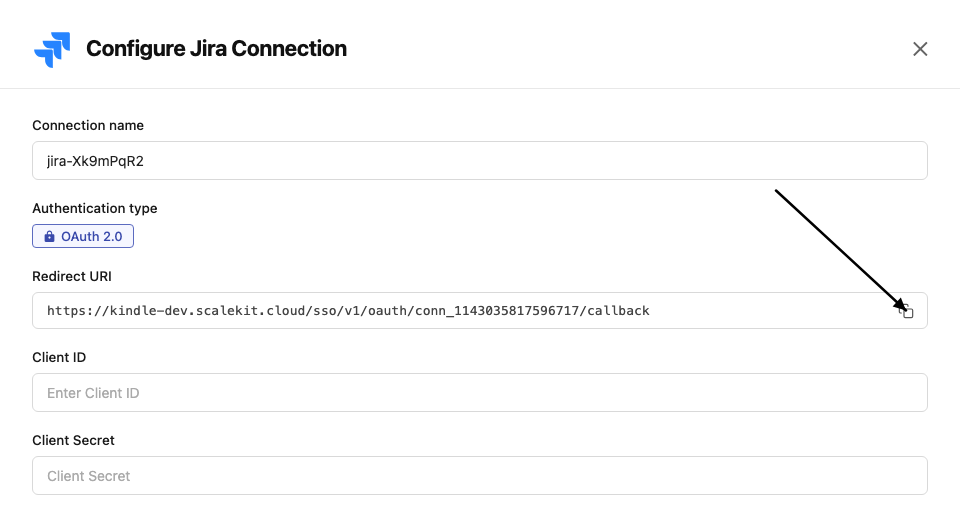
-
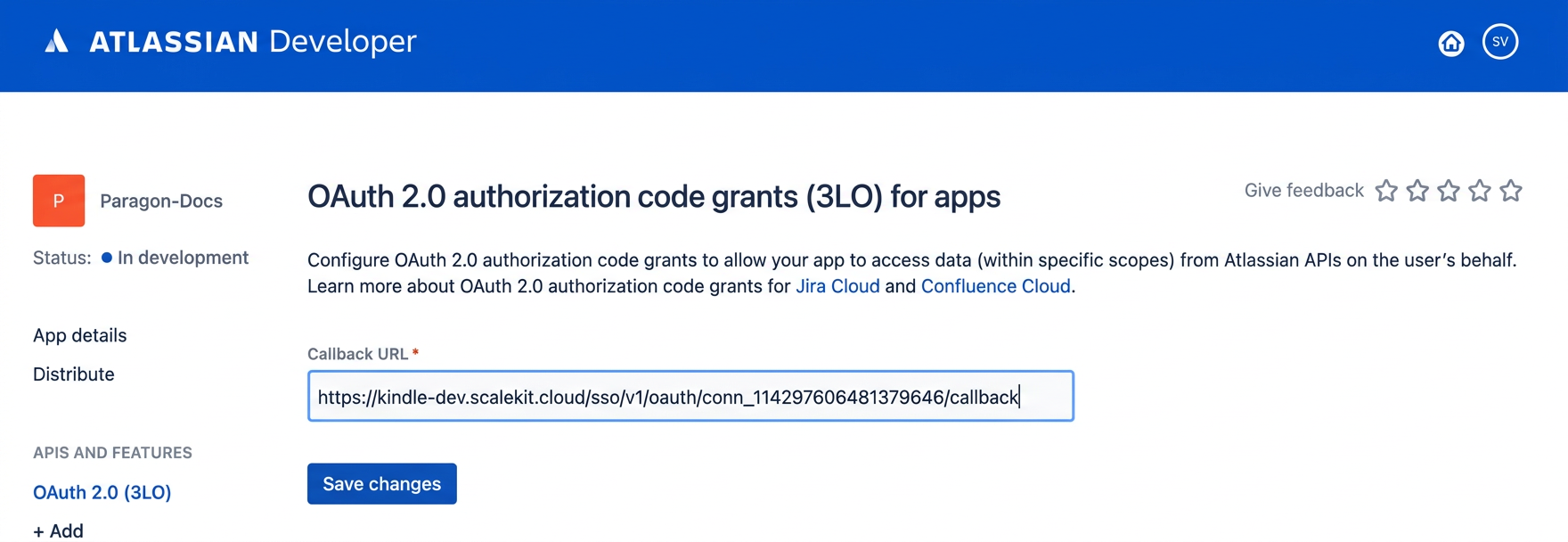
In the Atlassian Developer Console, open your app and go to Authorization → OAuth 2.0 (3LO) → Configure.
-
Paste the copied URI into the Callback URL field and click Save changes.
-
-
Get client credentials
In the Atlassian Developer Console, open your app and go to Settings:
- Client ID — listed under Client ID
- Client Secret — listed under Secret
-
Add credentials in Scalekit
-
In Scalekit dashboard, go to AgentKit > Connections and open the connection you created.
-
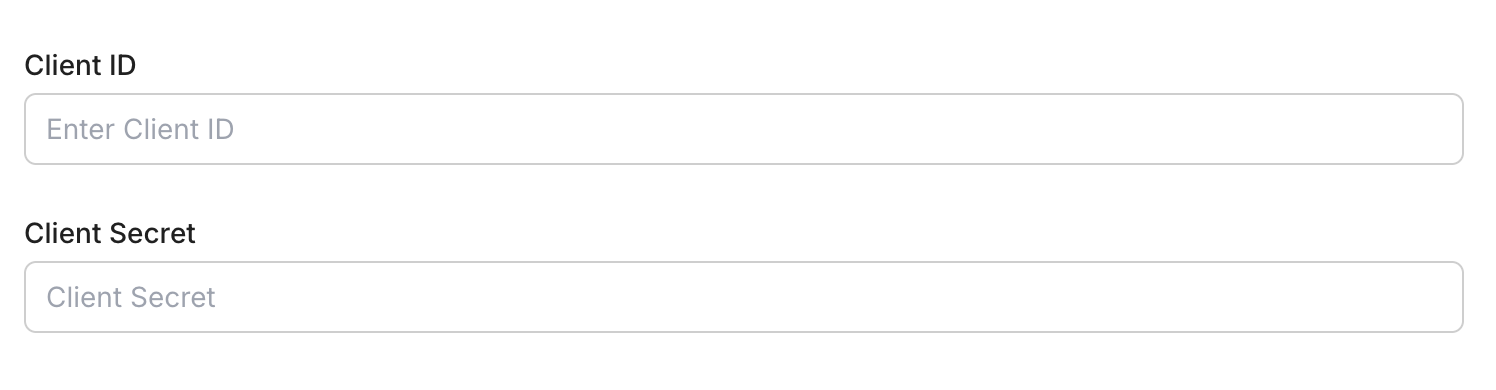
Enter your credentials:
- Client ID (from your Atlassian app)
- Client Secret (from your Atlassian app)
- Permissions (scopes — see Jira OAuth scopes reference)
-
Click Save.
-
-
-
Authorize and make your first call
Section titled “Authorize and make your first call”quickstart.ts import { ScalekitClient } from '@scalekit-sdk/node'import 'dotenv/config'const scalekit = new ScalekitClient(process.env.SCALEKIT_ENV_URL,process.env.SCALEKIT_CLIENT_ID,process.env.SCALEKIT_CLIENT_SECRET,)const actions = scalekit.actionsconst connector = 'jira'const identifier = 'user_123'// Generate an authorization link for the userconst { link } = await actions.getAuthorizationLink({ connectionName: connector, identifier })console.log('Authorize Jira:', link)process.stdout.write('Press Enter after authorizing...')await new Promise(r => process.stdin.once('data', r))// Make your first callconst result = await actions.executeTool({connector,identifier,toolName: 'jira_field_search',toolInput: {},})console.log(result)quickstart.py import osfrom scalekit.client import ScalekitClientfrom dotenv import load_dotenvload_dotenv()scalekit_client = ScalekitClient(env_url=os.getenv("SCALEKIT_ENV_URL"),client_id=os.getenv("SCALEKIT_CLIENT_ID"),client_secret=os.getenv("SCALEKIT_CLIENT_SECRET"),)actions = scalekit_client.actionsconnection_name = "jira"identifier = "user_123"# Generate an authorization link for the userlink_response = actions.get_authorization_link(connection_name=connection_name,identifier=identifier,)print("Authorize Jira:", link_response.link)input("Press Enter after authorizing...")# Make your first callresult = actions.execute_tool(tool_input={},tool_name="jira_field_search",connection_name=connection_name,identifier=identifier,)print(result)
What you can do
Section titled “What you can do”Connect this agent connector to let your agent:
- Read issues — fetch issue details, comments, attachments, and linked items
- Create and update issues — file bugs, stories, and tasks; update status and assignees
- Manage projects — list projects, sprints, and boards
- Search with JQL — execute Jira Query Language searches for advanced filtering
Common workflows
Section titled “Common workflows”Don’t worry about the Jira cloud ID in the path. Scalekit resolves {{cloud_id}} from the connected account configuration automatically. A request with path="/rest/api/3/myself" is routed to the correct Atlassian instance without any extra setup.
Proxy API call
// Fetch the authenticated user's Jira profileconst me = await actions.request({ connectionName: 'jira', identifier: 'user_123', path: '/rest/api/3/myself', method: 'GET',});console.log(me);# Fetch the authenticated user's Jira profileme = actions.request( connection_name="jira", identifier="user_123", path="/rest/api/3/myself", method="GET")print(me)Get the current user
const me = await actions.executeTool({ connector: 'jira', identifier: 'user_123', toolName: 'jira_myself_get', toolInput: {},});console.log(me.accountId, me.displayName);me = actions.execute_tool( connection_name="jira", identifier="user_123", tool_name="jira_myself_get", tool_input={})print(me["accountId"], me["displayName"])Advanced enrichment workflow
This example shows a complete Jira issue triage pipeline: search open bugs assigned to the current user, log triage time, transition issues to “In Progress”, create follow-up tasks, and link them — all in one automated flow.
const opts = { connector: 'jira', identifier: 'user_123' };
async function triageMyBugs(projectKey: string) { // 1. Get the current user's account ID const me = await actions.executeTool({ toolName: 'jira_myself_get', ...opts, toolInput: {}, }); console.log(`Triaging bugs for: ${me.displayName}`);
// 2. Search for open bugs assigned to the current user const searchResult = await actions.executeTool({ toolName: 'jira_issues_search', ...opts, toolInput: { jql: `project = ${projectKey} AND issuetype = Bug AND assignee = currentUser() AND status = "To Do" ORDER BY priority DESC`, maxResults: 10, fields: 'summary,status,priority,issuetype', }, });
const bugs = searchResult.issues ?? []; console.log(`Found ${bugs.length} open bugs`);
for (const bug of bugs) { const issueKey = bug.key; console.log(`Processing ${issueKey}: ${bug.fields.summary}`);
// 3. Add a triage comment await actions.executeTool({ toolName: 'jira_issue_comment_add', ...opts, toolInput: { issueIdOrKey: issueKey, body: `Automated triage: picking up for sprint. Moving to In Progress.`, }, });
// 4. Log 30 minutes of triage work await actions.executeTool({ toolName: 'jira_issue_worklog_add', ...opts, toolInput: { issueIdOrKey: issueKey, timeSpent: '30m', comment: 'Initial triage and review', }, });
// 5. Get available transitions and move to "In Progress" const transitions = await actions.executeTool({ toolName: 'jira_issue_transitions_list', ...opts, toolInput: { issueIdOrKey: issueKey }, });
const inProgress = transitions.transitions?.find( (t: any) => t.name.toLowerCase().includes('progress') );
if (inProgress) { await actions.executeTool({ toolName: 'jira_issue_transition', ...opts, toolInput: { issueIdOrKey: issueKey, transitionId: inProgress.id, comment: 'Starting work on this bug.', }, }); console.log(` → Transitioned to "${inProgress.name}"`); }
// 6. Create a linked follow-up task for the fix const followUp = await actions.executeTool({ toolName: 'jira_issue_create', ...opts, toolInput: { project_key: projectKey, summary: `[Fix] ${bug.fields.summary}`, issue_type: 'Task', description: `Follow-up fix task for bug ${issueKey}.`, assignee_account_id: me.accountId, priority_name: bug.fields.priority?.name ?? 'Medium', }, }); console.log(` → Created follow-up: ${followUp.key}`);
// 7. Link the bug to its follow-up task await actions.executeTool({ toolName: 'jira_issue_link_create', ...opts, toolInput: { link_type_name: 'Relates', inward_issue_key: issueKey, outward_issue_key: followUp.key, }, }); }
console.log('\nTriage complete.');}
triageMyBugs('MYPROJECT').catch(console.error);def execute(tool_name, tool_input): return actions.execute_tool( connection_name="jira", identifier="user_123", tool_name=tool_name, tool_input=tool_input )
def triage_my_bugs(project_key: str): # 1. Get the current user's account ID me = execute("jira_myself_get", {}) print(f"Triaging bugs for: {me['displayName']}")
# 2. Search for open bugs assigned to current user search_result = execute("jira_issues_search", { "jql": f'project = {project_key} AND issuetype = Bug AND assignee = currentUser() AND status = "To Do" ORDER BY priority DESC', "maxResults": 10, "fields": "summary,status,priority,issuetype" })
bugs = search_result.get("issues", []) print(f"Found {len(bugs)} open bugs")
for bug in bugs: issue_key = bug["key"] print(f"\nProcessing {issue_key}: {bug['fields']['summary']}")
# 3. Add a triage comment execute("jira_issue_comment_add", { "issueIdOrKey": issue_key, "body": "Automated triage: picking up for sprint. Moving to In Progress." })
# 4. Log 30 minutes of triage work execute("jira_issue_worklog_add", { "issueIdOrKey": issue_key, "timeSpent": "30m", "comment": "Initial triage and review" })
# 5. Get transitions and move to "In Progress" transitions = execute("jira_issue_transitions_list", {"issueIdOrKey": issue_key}) in_progress = next( (t for t in transitions.get("transitions", []) if "progress" in t["name"].lower()), None ) if in_progress: execute("jira_issue_transition", { "issueIdOrKey": issue_key, "transitionId": in_progress["id"], "comment": "Starting work on this bug." }) print(f" → Transitioned to \"{in_progress['name']}\"")
# 6. Create a linked follow-up task follow_up = execute("jira_issue_create", { "project_key": project_key, "summary": f"[Fix] {bug['fields']['summary']}", "issue_type": "Task", "description": f"Follow-up fix task for bug {issue_key}.", "assignee_account_id": me["accountId"], "priority_name": bug["fields"].get("priority", {}).get("name", "Medium") }) print(f" → Created follow-up: {follow_up['key']}")
# 7. Link the bug to its follow-up task execute("jira_issue_link_create", { "link_type_name": "Relates", "inward_issue_key": issue_key, "outward_issue_key": follow_up["key"] })
print("\nTriage complete.")
triage_my_bugs("MYPROJECT")Tool list
Section titled “Tool list”Use the exact tool names from the Tool list below when you call execute_tool. If you’re not sure which name to use, list the tools available for the current user first.
jira_attachment_delete#Permanently delete a Jira issue attachment by its ID. This action cannot be undone. Requires Delete Attachments project permission.1 param
Permanently delete a Jira issue attachment by its ID. This action cannot be undone. Requires Delete Attachments project permission.
idstringrequiredThe attachment ID to deletejira_attachment_get#Get metadata for a Jira issue attachment by its ID. Returns the filename, MIME type, size, creation date, author, and download URL.1 param
Get metadata for a Jira issue attachment by its ID. Returns the filename, MIME type, size, creation date, author, and download URL.
idstringrequiredThe attachment ID to retrieve metadata forjira_component_create#Create a new component in a Jira project. Components are used to group and categorize issues within a project.5 params
Create a new component in a Jira project. Components are used to group and categorize issues within a project.
namestringrequiredName of the componentprojectstringrequiredKey of the project to add the component toassigneeTypestringoptionalDefault assignee type: PROJECT_DEFAULT, COMPONENT_LEAD, PROJECT_LEAD, or UNASSIGNEDdescriptionstringoptionalDescription of the componentleadAccountIdstringoptionalAccount ID of the component leadjira_component_delete#Delete a Jira project component by its ID. Optionally move issues from the deleted component to another component. Requires Administer Projects permission.2 params
Delete a Jira project component by its ID. Optionally move issues from the deleted component to another component. Requires Administer Projects permission.
idstringrequiredThe component ID to deletemoveIssuesTostringoptionalComponent ID to move issues to after deleting this componentjira_component_get#Retrieve details of a Jira project component by its ID, including name, description, lead, and default assignee settings.1 param
Retrieve details of a Jira project component by its ID, including name, description, lead, and default assignee settings.
idstringrequiredThe component ID to retrievejira_component_update#Update an existing Jira project component's name, description, lead, or default assignee settings.5 params
Update an existing Jira project component's name, description, lead, or default assignee settings.
idstringrequiredThe component ID to updateassigneeTypestringoptionalUpdated default assignee type: PROJECT_DEFAULT, COMPONENT_LEAD, PROJECT_LEAD, or UNASSIGNEDdescriptionstringoptionalUpdated component descriptionleadAccountIdstringoptionalAccount ID of the new component leadnamestringoptionalUpdated component namejira_field_search#Search for Jira fields by name, type, or other criteria with pagination support. Returns paginated field results.5 params
Search for Jira fields by name, type, or other criteria with pagination support. Returns paginated field results.
maxResultsintegeroptionalMaximum number of fields to return (default 50)orderBystringoptionalSort by: contextsCount, lastUsed, name, screensCount, or -prefixed for descendingquerystringoptionalSearch query to filter fields by name (case-insensitive)startAtintegeroptionalIndex of the first field to return (default 0)typestringoptionalFilter by field type: custom or systemjira_fields_list#Get all system and custom fields available in Jira. Returns field IDs, names, types, and whether they are custom or system fields. Use field IDs when referencing fields in JQL or issue creation.0 params
Get all system and custom fields available in Jira. Returns field IDs, names, types, and whether they are custom or system fields. Use field IDs when referencing fields in JQL or issue creation.
jira_filter_create#Create a saved Jira filter with a JQL query. Filters can be shared, added to favorites, and used on Jira dashboards.4 params
Create a saved Jira filter with a JQL query. Filters can be shared, added to favorites, and used on Jira dashboards.
namestringrequiredName of the filter (must be unique for the user)descriptionstringoptionalDescription of what this filter showsfavouritebooleanoptionalWhether to add this filter to favorites immediatelyjqlstringoptionalJQL query string for this filterjira_filter_delete#Permanently delete a saved Jira filter. Only the filter owner or admins can delete a filter. This action cannot be undone.1 param
Permanently delete a saved Jira filter. Only the filter owner or admins can delete a filter. This action cannot be undone.
idstringrequiredThe filter ID to deletejira_filter_get#Retrieve a saved Jira filter by its ID, including the JQL query, name, owner, and share permissions.2 params
Retrieve a saved Jira filter by its ID, including the JQL query, name, owner, and share permissions.
idstringrequiredThe filter ID to retrieveexpandstringoptionalAdditional data to include (e.g. sharedUsers, subscriptions)jira_filter_update#Update a saved Jira filter's name, description, or JQL query. Only the filter owner or admins can update a filter.4 params
Update a saved Jira filter's name, description, or JQL query. Only the filter owner or admins can update a filter.
idstringrequiredThe filter ID to updatenamestringrequiredUpdated filter namedescriptionstringoptionalUpdated description of the filterjqlstringoptionalUpdated JQL query stringjira_filters_search#Search for saved Jira filters with pagination. Filter results by name, owner, project, or group. Returns filter details including JQL queries.6 params
Search for saved Jira filters with pagination. Filter results by name, owner, project, or group. Returns filter details including JQL queries.
accountIdstringoptionalFilter by filter owner account IDexpandstringoptionalAdditional data to include (e.g. description, favourite, sharePermissions)filterNamestringoptionalSearch by filter name (partial match, case-insensitive)maxResultsintegeroptionalMaximum number of filters to return (default 50)orderBystringoptionalField to order by (e.g. name, id, owner, favourite_count, is_favourite)startAtintegeroptionalIndex of the first filter to return (default 0)jira_group_member_add#Add a user to a Jira group. Requires Administer Jira global permission or the Site Administration role.3 params
Add a user to a Jira group. Requires Administer Jira global permission or the Site Administration role.
accountIdstringrequiredAccount ID of the user to add to the groupgroupIdstringoptionalThe group ID to add the user to (use instead of groupname)groupnamestringoptionalThe group name to add the user tojira_group_member_remove#Remove a user from a Jira group by their account ID. Requires Administer Jira global permission.3 params
Remove a user from a Jira group by their account ID. Requires Administer Jira global permission.
accountIdstringrequiredAccount ID of the user to remove from the groupgroupIdstringoptionalThe group ID to remove the user from (use instead of groupname)groupnamestringoptionalThe group name to remove the user fromjira_group_members_list#Get a paginated list of users in a Jira group. Returns account IDs, display names, and email addresses of group members.5 params
Get a paginated list of users in a Jira group. Returns account IDs, display names, and email addresses of group members.
groupIdstringoptionalThe group ID to list members of (use instead of groupname)groupnamestringoptionalThe group name to list members ofincludeInactiveUsersbooleanoptionalWhether to include inactive (deactivated) users in the resultsmaxResultsintegeroptionalMaximum number of members to return (default 50)startAtintegeroptionalIndex of the first member to return (default 0)jira_groups_find#Find Jira user groups by name. Returns groups whose names match the query. Useful for finding group names to use in permission schemes or visibility restrictions.4 params
Find Jira user groups by name. Returns groups whose names match the query. Useful for finding group names to use in permission schemes or visibility restrictions.
accountIdstringoptionalFilter to only return groups the user with this account ID belongs toexcludeIdstringoptionalGroup IDs to exclude from results (comma-separated)maxResultsintegeroptionalMaximum number of groups to return (default 20)querystringoptionalSearch string to match against group namesjira_issue_assign#Assign or unassign a Jira issue to a user. Pass an accountId to assign, or omit/null to unassign. The user must have the Assign Issues project permission.2 params
Assign or unassign a Jira issue to a user. Pass an accountId to assign, or omit/null to unassign. The user must have the Assign Issues project permission.
issueIdOrKeystringrequiredThe issue ID or key to assign (e.g. PROJ-123)accountIdstringoptionalAccount ID of the user to assign. Leave null or omit to unassign.jira_issue_changelog_list#Get the paginated change history for a Jira issue. Returns a list of changelog entries showing which fields changed, who changed them, and when.3 params
Get the paginated change history for a Jira issue. Returns a list of changelog entries showing which fields changed, who changed them, and when.
issueIdOrKeystringrequiredThe issue ID or key to retrieve changelog formaxResultsintegeroptionalMaximum number of changelog entries to return (default 100)startAtintegeroptionalIndex of the first entry to return for pagination (default 0)jira_issue_comment_add#Add a comment to a Jira issue. The comment body is plain text and will be wrapped in ADF (Atlassian Document Format) for the v3 API. Optionally restrict visibility to a specific role or group.4 params
Add a comment to a Jira issue. The comment body is plain text and will be wrapped in ADF (Atlassian Document Format) for the v3 API. Optionally restrict visibility to a specific role or group.
bodystringrequiredThe plain-text content of the commentissueIdOrKeystringrequiredThe issue ID or key to add the comment tovisibility_typestringoptionalRestrict comment visibility by type: 'role' or 'group'visibility_valuestringoptionalName of the role or group to restrict visibility tojira_issue_comment_delete#Permanently delete a comment from a Jira issue. Only the comment author or users with Administer Projects permission can delete comments. This action cannot be undone.2 params
Permanently delete a comment from a Jira issue. Only the comment author or users with Administer Projects permission can delete comments. This action cannot be undone.
idstringrequiredThe comment ID to deleteissueIdOrKeystringrequiredThe issue ID or key the comment belongs tojira_issue_comment_get#Retrieve a specific comment on a Jira issue by comment ID. Returns the comment body, author, and timestamps.3 params
Retrieve a specific comment on a Jira issue by comment ID. Returns the comment body, author, and timestamps.
idstringrequiredThe comment ID to retrieveissueIdOrKeystringrequiredThe issue ID or key the comment belongs toexpandstringoptionalAdditional fields to include (e.g. renderedBody for HTML content)jira_issue_comment_update#Update the body of an existing comment on a Jira issue. Only the comment author or users with Administer Projects permission can update comments.4 params
Update the body of an existing comment on a Jira issue. Only the comment author or users with Administer Projects permission can update comments.
bodystringrequiredThe new plain-text content for the commentidstringrequiredThe comment ID to updateissueIdOrKeystringrequiredThe issue ID or key the comment belongs tonotifyUsersbooleanoptionalWhether to send notifications to watchers (default true)jira_issue_comments_list#Get all comments for a Jira issue with pagination support. Returns comment bodies, author details, and timestamps. Use expand=renderedBody to get HTML-rendered comment content.5 params
Get all comments for a Jira issue with pagination support. Returns comment bodies, author details, and timestamps. Use expand=renderedBody to get HTML-rendered comment content.
issueIdOrKeystringrequiredThe issue ID or key to list comments forexpandstringoptionalAdditional fields to include (e.g. renderedBody for HTML content)maxResultsintegeroptionalMaximum number of comments to return (default 50)orderBystringoptionalField to order by (created or -created for descending)startAtintegeroptionalIndex of the first comment to return (default 0)jira_issue_create#Create a new Jira issue or subtask in a specified project. Requires a project key, issue type, and summary. Supports assigning users, setting priority, labels, components, parent issue (for subtasks), and a plain-text description.10 params
Create a new Jira issue or subtask in a specified project. Requires a project key, issue type, and summary. Supports assigning users, setting priority, labels, components, parent issue (for subtasks), and a plain-text description.
issue_typestringrequiredName of the issue type (e.g. Bug, Story, Task, Sub-task)project_keystringrequiredKey of the project to create the issue in (e.g. PROJ)summarystringrequiredShort summary or title of the issueassignee_account_idstringoptionalAccount ID of the user to assign this issue tocomponentsarrayoptionalList of component names to associate with this issuedescriptionstringoptionalPlain-text description of the issue (wrapped in ADF for v3 API)fix_versionsarrayoptionalList of version names to set as fix versionslabelsarrayoptionalList of labels to apply to the issueparent_keystringoptionalKey of the parent issue (required for Sub-task issue type)priority_namestringoptionalPriority name for the issue (e.g. Highest, High, Medium, Low, Lowest)jira_issue_delete#Permanently delete a Jira issue and all its subtasks (if deleteSubtasks is true). This action cannot be undone. The user must have permission to delete the issue.2 params
Permanently delete a Jira issue and all its subtasks (if deleteSubtasks is true). This action cannot be undone. The user must have permission to delete the issue.
issueIdOrKeystringrequiredThe issue ID or key to delete (e.g. PROJ-123)deleteSubtasksstringoptionalWhether to delete subtasks of this issue (required if the issue has subtasks)jira_issue_get#Retrieve details of a Jira issue by its ID or key. Returns fields, status, assignee, priority, comments summary, and other metadata. Use the fields parameter to limit the response to specific fields.5 params
Retrieve details of a Jira issue by its ID or key. Returns fields, status, assignee, priority, comments summary, and other metadata. Use the fields parameter to limit the response to specific fields.
issueIdOrKeystringrequiredThe issue ID (e.g. 10001) or key (e.g. PROJ-123) to retrieveexpandstringoptionalComma-separated list of additional data to include (e.g. renderedFields,names,changelog)fieldsstringoptionalComma-separated list of fields to return (use * for all, -field to exclude)propertiesstringoptionalComma-separated list of issue properties to returnupdateHistorybooleanoptionalWhether to update the issue's viewed history for the current userjira_issue_link_create#Create a link between two Jira issues with a specified link type (e.g. blocks, is blocked by, relates to, duplicates). Both issues must exist and the user needs Link Issues permission.4 params
Create a link between two Jira issues with a specified link type (e.g. blocks, is blocked by, relates to, duplicates). Both issues must exist and the user needs Link Issues permission.
inward_issue_keystringrequiredKey of the inward issue (the issue on the 'is' side of the link type)link_type_namestringrequiredName of the issue link type (e.g. 'Blocks', 'Relates', 'Duplicates', 'Cloners')outward_issue_keystringrequiredKey of the outward issue (the issue on the 'causes' side of the link type)commentstringoptionalOptional comment to add when creating the linkjira_issue_link_delete#Delete a specific issue link by its ID. This removes the relationship between the two linked issues. Requires Link Issues project permission.1 param
Delete a specific issue link by its ID. This removes the relationship between the two linked issues. Requires Link Issues project permission.
linkIdstringrequiredThe issue link ID to deletejira_issue_link_get#Retrieve details of a specific issue link by its ID, including the link type and both linked issues.1 param
Retrieve details of a specific issue link by its ID, including the link type and both linked issues.
linkIdstringrequiredThe issue link ID to retrievejira_issue_property_delete#Delete a custom property from a Jira issue by its property key.2 params
Delete a custom property from a Jira issue by its property key.
issueIdOrKeystringrequiredThe issue ID or key the property belongs topropertyKeystringrequiredThe key of the property to deletejira_issue_property_get#Get the value of a custom property set on a Jira issue by its property key.2 params
Get the value of a custom property set on a Jira issue by its property key.
issueIdOrKeystringrequiredThe issue ID or key the property belongs topropertyKeystringrequiredThe key of the property to retrievejira_issue_property_keys_list#Get the keys of all custom properties set on a Jira issue. Issue properties are key-value stores attached to issues for storing custom data.1 param
Get the keys of all custom properties set on a Jira issue. Issue properties are key-value stores attached to issues for storing custom data.
issueIdOrKeystringrequiredThe issue ID or key to list property keys forjira_issue_property_set#Set or update a custom property on a Jira issue. Properties can store arbitrary JSON values and are visible to apps and API consumers. The value must be a valid JSON string.3 params
Set or update a custom property on a Jira issue. Properties can store arbitrary JSON values and are visible to apps and API consumers. The value must be a valid JSON string.
issueIdOrKeystringrequiredThe issue ID or key to set the property onpropertyKeystringrequiredThe key name for the propertyvaluestringrequiredThe JSON value to store for the property (as a JSON string)jira_issue_remote_link_create#Create a remote link from a Jira issue to an external resource (e.g. a GitHub PR, Confluence page, or deployment URL). If a globalId is provided and already exists, the remote link is updated instead.5 params
Create a remote link from a Jira issue to an external resource (e.g. a GitHub PR, Confluence page, or deployment URL). If a globalId is provided and already exists, the remote link is updated instead.
issueIdOrKeystringrequiredThe issue ID or key to attach the remote link tourlstringrequiredURL of the remote resourceurl_titlestringrequiredDisplay title for the remote linkglobalIdstringoptionalGlobal ID that identifies the remote object. Used to deduplicate links.relationshipstringoptionalThe relationship label describing how the remote object relates to the issue (e.g. 'fixes', 'is mentioned in')jira_issue_remote_link_delete#Delete a remote link from a Jira issue by its link ID or by global ID. Provide either linkId (in the path) or globalId (as query param) to identify the link to delete.3 params
Delete a remote link from a Jira issue by its link ID or by global ID. Provide either linkId (in the path) or globalId (as query param) to identify the link to delete.
issueIdOrKeystringrequiredThe issue ID or key the remote link belongs toglobalIdstringoptionalDelete all remote links matching this global ID (use instead of linkId)linkIdstringoptionalThe remote link ID to deletejira_issue_remote_link_get#Get a specific remote link on a Jira issue by its link ID.2 params
Get a specific remote link on a Jira issue by its link ID.
issueIdOrKeystringrequiredThe issue ID or key the remote link belongs tolinkIdstringrequiredThe remote link ID to retrievejira_issue_remote_link_update#Update an existing remote link on a Jira issue by its link ID. Can change the URL, title, or relationship label.5 params
Update an existing remote link on a Jira issue by its link ID. Can change the URL, title, or relationship label.
issueIdOrKeystringrequiredThe issue ID or key the remote link belongs tolinkIdstringrequiredThe remote link ID to updateurlstringrequiredUpdated URL of the remote resourceurl_titlestringrequiredUpdated display title for the remote linkrelationshipstringoptionalUpdated relationship labeljira_issue_remote_links_list#Get all remote links for a Jira issue. Remote links connect issues to external resources (e.g. GitHub PRs, Confluence pages, deployment URLs).2 params
Get all remote links for a Jira issue. Remote links connect issues to external resources (e.g. GitHub PRs, Confluence pages, deployment URLs).
issueIdOrKeystringrequiredThe issue ID or key to list remote links forglobalIdstringoptionalFilter by global ID of the remote linkjira_issue_transition#Move a Jira issue to a new workflow status using a transition. Use the List Issue Transitions tool to get valid transition IDs. Optionally update fields or add a comment during the transition.3 params
Move a Jira issue to a new workflow status using a transition. Use the List Issue Transitions tool to get valid transition IDs. Optionally update fields or add a comment during the transition.
issueIdOrKeystringrequiredThe issue ID or key to transition (e.g. PROJ-123)transitionIdstringrequiredThe ID of the transition to perform. Use jira_issue_transitions_list to find valid IDs.commentstringoptionalComment to add when performing the transitionjira_issue_transitions_list#Get the available workflow transitions for a Jira issue. Returns the list of transitions the current user can perform, including transition IDs needed for the transition endpoint.3 params
Get the available workflow transitions for a Jira issue. Returns the list of transitions the current user can perform, including transition IDs needed for the transition endpoint.
issueIdOrKeystringrequiredThe issue ID or key to retrieve transitions forexpandstringoptionalAdditional data to include (e.g. transitions.fields for field metadata per transition)transitionIdstringoptionalFilter results to only this transition IDjira_issue_type_create#Create a new issue type in the Jira instance. Requires Administer Jira global permission. The new type will be available to all projects that use the default issue type scheme.4 params
Create a new issue type in the Jira instance. Requires Administer Jira global permission. The new type will be available to all projects that use the default issue type scheme.
namestringrequiredName of the new issue typedescriptionstringoptionalDescription of the issue typehierarchyLevelintegeroptionalHierarchy level: -1 for subtask, 0 for standard (default)typestringoptionalType classification: subtask or standard (default)jira_issue_type_delete#Delete a Jira issue type. If issues of this type exist, you must provide an alternative issue type ID to migrate them to. Requires Administer Jira global permission.2 params
Delete a Jira issue type. If issues of this type exist, you must provide an alternative issue type ID to migrate them to. Requires Administer Jira global permission.
idstringrequiredThe issue type ID to deletealternativeIssueTypeIdstringoptionalID of an alternative issue type to migrate existing issues tojira_issue_type_get#Retrieve details of a specific Jira issue type by its ID, including name, description, icon URL, and hierarchy level.1 param
Retrieve details of a specific Jira issue type by its ID, including name, description, icon URL, and hierarchy level.
idstringrequiredThe issue type ID to retrievejira_issue_type_update#Update an existing Jira issue type's name or description. Requires Administer Jira global permission.3 params
Update an existing Jira issue type's name or description. Requires Administer Jira global permission.
idstringrequiredThe issue type ID to updatedescriptionstringoptionalUpdated description of the issue typenamestringoptionalUpdated name for the issue typejira_issue_types_list#Get all issue types available in the Jira instance (e.g. Bug, Story, Task, Epic, Sub-task). Returns issue type IDs, names, icons, and hierarchy levels.0 params
Get all issue types available in the Jira instance (e.g. Bug, Story, Task, Epic, Sub-task). Returns issue type IDs, names, icons, and hierarchy levels.
jira_issue_update#Update fields of an existing Jira issue. All fields are optional — only provided fields are changed. Supports updating summary, description, assignee, priority, labels, components, and fix versions.9 params
Update fields of an existing Jira issue. All fields are optional — only provided fields are changed. Supports updating summary, description, assignee, priority, labels, components, and fix versions.
issueIdOrKeystringrequiredThe issue ID or key to update (e.g. PROJ-123)assignee_account_idstringoptionalAccount ID of the new assignee. Pass empty string to unassign.componentsarrayoptionalList of component names to set on this issue (replaces existing)descriptionstringoptionalUpdated plain-text description (wrapped in ADF for v3 API)fix_versionsarrayoptionalList of version names to set as fix versions (replaces existing)labelsarrayoptionalList of labels to set on the issue (replaces existing labels)notifyUsersbooleanoptionalWhether to send notifications to watchers (default true)priority_namestringoptionalUpdated priority name (e.g. Highest, High, Medium, Low, Lowest)summarystringoptionalUpdated summary/title of the issuejira_issue_vote_add#Cast a vote for a Jira issue on behalf of the authenticated user. Voting indicates the user wants this issue resolved. Only non-resolved issues can be voted on.1 param
Cast a vote for a Jira issue on behalf of the authenticated user. Voting indicates the user wants this issue resolved. Only non-resolved issues can be voted on.
issueIdOrKeystringrequiredThe issue ID or key to vote onjira_issue_vote_delete#Remove the authenticated user's vote from a Jira issue. Only the user who cast the vote can remove it.1 param
Remove the authenticated user's vote from a Jira issue. Only the user who cast the vote can remove it.
issueIdOrKeystringrequiredThe issue ID or key to remove the vote fromjira_issue_votes_get#Get vote information for a Jira issue, including the total vote count and whether the current user has voted.1 param
Get vote information for a Jira issue, including the total vote count and whether the current user has voted.
issueIdOrKeystringrequiredThe issue ID or key to get votes forjira_issue_watcher_add#Add a user as a watcher to a Jira issue. If no accountId is provided, the currently authenticated user is added as a watcher.2 params
Add a user as a watcher to a Jira issue. If no accountId is provided, the currently authenticated user is added as a watcher.
issueIdOrKeystringrequiredThe issue ID or key to add a watcher toaccountIdstringoptionalAccount ID of the user to add as a watcher. Omit to add the authenticated user.jira_issue_watcher_remove#Remove a user from the watchers list of a Jira issue. Requires the accountId of the user to remove.2 params
Remove a user from the watchers list of a Jira issue. Requires the accountId of the user to remove.
accountIdstringrequiredAccount ID of the user to remove from watchersissueIdOrKeystringrequiredThe issue ID or key to remove the watcher fromjira_issue_watchers_get#Get the list of users watching a Jira issue. Returns the watcher count and user details for each watcher.1 param
Get the list of users watching a Jira issue. Returns the watcher count and user details for each watcher.
issueIdOrKeystringrequiredThe issue ID or key to get watchers forjira_issue_worklog_add#Log time worked against a Jira issue. Specify time spent using Jira duration format (e.g. '2h 30m', '1d'). Optionally set the start time and add a comment. Requires Log Work project permission.6 params
Log time worked against a Jira issue. Specify time spent using Jira duration format (e.g. '2h 30m', '1d'). Optionally set the start time and add a comment. Requires Log Work project permission.
issueIdOrKeystringrequiredThe issue ID or key to log time againsttimeSpentstringrequiredTime spent in Jira duration format (e.g. '2h 30m', '1d', '45m')adjustEstimatestringoptionalHow to adjust the remaining estimate: 'auto', 'new', 'manual', 'leave' (default auto)commentstringoptionalOptional comment describing the work donenewEstimatestringoptionalNew remaining estimate when adjustEstimate is 'new' or 'manual' (e.g. '2h 30m')startedstringoptionalDate/time when work started in ISO 8601 format (e.g. 2024-01-15T08:00:00.000+0000)jira_issue_worklog_delete#Delete a worklog entry from a Jira issue. Only the worklog author or admins can delete worklogs. Optionally adjust the remaining time estimate.4 params
Delete a worklog entry from a Jira issue. Only the worklog author or admins can delete worklogs. Optionally adjust the remaining time estimate.
idstringrequiredThe worklog ID to deleteissueIdOrKeystringrequiredThe issue ID or key the worklog belongs toadjustEstimatestringoptionalHow to adjust the remaining estimate: 'auto', 'manual', 'leave' (default auto)increaseBystringoptionalAmount to increase the remaining estimate by (used when adjustEstimate is 'manual')jira_issue_worklog_get#Get a specific worklog entry for a Jira issue by worklog ID. Returns time spent, author, start time, and any associated comment.2 params
Get a specific worklog entry for a Jira issue by worklog ID. Returns time spent, author, start time, and any associated comment.
idstringrequiredThe worklog ID to retrieveissueIdOrKeystringrequiredThe issue ID or key the worklog belongs tojira_issue_worklog_update#Update an existing worklog entry on a Jira issue. Can change the time spent, start time, and comment. Only the worklog author or admins can update worklogs.7 params
Update an existing worklog entry on a Jira issue. Can change the time spent, start time, and comment. Only the worklog author or admins can update worklogs.
idstringrequiredThe worklog ID to updateissueIdOrKeystringrequiredThe issue ID or key the worklog belongs toadjustEstimatestringoptionalHow to adjust the remaining estimate: 'auto', 'new', 'manual', 'leave'commentstringoptionalUpdated comment for the worklognewEstimatestringoptionalNew remaining estimate when adjustEstimate is 'new' or 'manual'startedstringoptionalUpdated start time in ISO 8601 formattimeSpentstringoptionalUpdated time spent in Jira duration format (e.g. '3h', '1d 2h')jira_issue_worklogs_list#Get all worklogs logged against a Jira issue with pagination support. Returns time spent, author, and timestamps for each worklog entry.5 params
Get all worklogs logged against a Jira issue with pagination support. Returns time spent, author, and timestamps for each worklog entry.
issueIdOrKeystringrequiredThe issue ID or key to list worklogs formaxResultsintegeroptionalMaximum number of worklogs to return (default 5000)startAtintegeroptionalIndex of the first worklog entry to return (default 0)startedAfterintegeroptionalReturn worklogs started on or after this time (Unix timestamp in milliseconds)startedBeforeintegeroptionalReturn worklogs started on or before this time (Unix timestamp in milliseconds)jira_issues_bulk_create#Create up to 50 Jira issues in a single API call. Each issue in the issueUpdates array must include fields with at minimum project, summary, and issuetype. Returns created issue keys and any errors.1 param
Create up to 50 Jira issues in a single API call. Each issue in the issueUpdates array must include fields with at minimum project, summary, and issuetype. Returns created issue keys and any errors.
issueUpdatesarrayrequiredArray of issue objects to create. Each must have a 'fields' object with project, summary, and issuetype.jira_issues_search#Search for Jira issues using JQL (Jira Query Language). Returns a paginated list of matching issues with their fields. Use fields to control what data is returned per issue.5 params
Search for Jira issues using JQL (Jira Query Language). Returns a paginated list of matching issues with their fields. Use fields to control what data is returned per issue.
jqlstringrequiredJQL query string to filter issues (e.g. 'project = PROJ AND status = Open')expandstringoptionalComma-separated list of additional data to include per issue (e.g. renderedFields,changelog)fieldsstringoptionalComma-separated list of fields to return per issue (use * for all)maxResultsintegeroptionalMaximum number of issues to return (default 50, max 100)startAtintegeroptionalIndex of the first issue to return for pagination (default 0)jira_jql_autocomplete_data#Get reference data for JQL query building, including available fields and operators. Useful for building dynamic JQL query interfaces.0 params
Get reference data for JQL query building, including available fields and operators. Useful for building dynamic JQL query interfaces.
jira_jql_autocomplete_suggestions#Get autocomplete suggestions for a JQL field value. Provide the field name and optionally a partial value to get matching suggestions.4 params
Get autocomplete suggestions for a JQL field value. Provide the field name and optionally a partial value to get matching suggestions.
fieldNamestringoptionalThe JQL field to get value suggestions forfieldValuestringoptionalPartial field value to search for suggestionspredicateNamestringoptionalThe predicate to get suggestions for (e.g. by, before, after)predicateValuestringoptionalPartial predicate value to search for suggestionsjira_jql_parse#Parse and validate one or more JQL queries. Returns the parsed structure of valid queries and error details for invalid ones. Useful for debugging JQL syntax before executing a search.2 params
Parse and validate one or more JQL queries. Returns the parsed structure of valid queries and error details for invalid ones. Useful for debugging JQL syntax before executing a search.
queriesarrayrequiredArray of JQL query strings to parse and validatevalidationstringoptionalValidation mode: strict (default), warn, or nonejira_jql_sanitize#Sanitize one or more JQL queries by converting user mentions to account IDs and fixing common formatting issues. Returns the sanitized query strings.1 param
Sanitize one or more JQL queries by converting user mentions to account IDs and fixing common formatting issues. Returns the sanitized query strings.
queriesarrayrequiredArray of JQL query objects to sanitize, each with a query stringjira_labels_list#Get a paginated list of all labels used across Jira issues in the instance. Useful for discovering available labels before applying them to issues.2 params
Get a paginated list of all labels used across Jira issues in the instance. Useful for discovering available labels before applying them to issues.
maxResultsintegeroptionalMaximum number of labels to return (default 1000)startAtintegeroptionalIndex of the first label to return (default 0)jira_myself_get#Get details of the currently authenticated Jira user. Returns account ID, display name, email address, and avatar URLs. Useful for getting your own account ID.1 param
Get details of the currently authenticated Jira user. Returns account ID, display name, email address, and avatar URLs. Useful for getting your own account ID.
expandstringoptionalAdditional data to include (e.g. groups,applicationRoles)jira_notification_scheme_get#Retrieve details of a specific Jira notification scheme by its ID, including all configured notification events and their recipients.2 params
Retrieve details of a specific Jira notification scheme by its ID, including all configured notification events and their recipients.
idstringrequiredThe notification scheme ID to retrieveexpandstringoptionalAdditional data to include (e.g. all,field,group,notificationSchemeEvents,projectRole,user)jira_notification_schemes_list#Get all notification schemes in Jira with pagination. Notification schemes define who receives emails for issue events (created, updated, resolved, etc.).3 params
Get all notification schemes in Jira with pagination. Notification schemes define who receives emails for issue events (created, updated, resolved, etc.).
expandstringoptionalAdditional data to include (e.g. all,field,group,notificationSchemeEvents,projectRole,user)maxResultsintegeroptionalMaximum number of notification schemes to return (default 50)startAtintegeroptionalIndex of the first scheme to return (default 0)jira_permission_grants_list#Get all permission grants in a Jira permission scheme. Returns each grant's permission type, holder type (user, group, role, etc.), and holder details.2 params
Get all permission grants in a Jira permission scheme. Returns each grant's permission type, holder type (user, group, role, etc.), and holder details.
schemeIdstringrequiredThe permission scheme ID to list grants forexpandstringoptionalAdditional data to include (e.g. all,field,group,permissions,projectRole,user)jira_permission_scheme_get#Retrieve details of a specific Jira permission scheme by its ID, including all permission grants and who they apply to.2 params
Retrieve details of a specific Jira permission scheme by its ID, including all permission grants and who they apply to.
schemeIdstringrequiredThe permission scheme ID to retrieveexpandstringoptionalAdditional data to include (e.g. all,field,group,permissions,projectRole,user)jira_permission_schemes_list#Get all permission schemes defined in the Jira instance. Returns scheme IDs, names, and descriptions. Permission schemes define who can perform which actions on issues in a project.1 param
Get all permission schemes defined in the Jira instance. Returns scheme IDs, names, and descriptions. Permission schemes define who can perform which actions on issues in a project.
expandstringoptionalAdditional data to include (e.g. all,field,group,permissions,projectRole,user)jira_priorities_list#Get all issue priority levels configured in the Jira instance (e.g. Highest, High, Medium, Low, Lowest). Returns priority names and IDs for use in issue creation and filtering.0 params
Get all issue priority levels configured in the Jira instance (e.g. Highest, High, Medium, Low, Lowest). Returns priority names and IDs for use in issue creation and filtering.
jira_priority_get#Retrieve details of a specific Jira priority level by its ID, including name, description, icon URL, and status color.1 param
Retrieve details of a specific Jira priority level by its ID, including name, description, icon URL, and status color.
idstringrequiredThe priority ID to retrievejira_project_components_list#Get a paginated list of components for a Jira project. Components are sub-sections that group issues within a project.5 params
Get a paginated list of components for a Jira project. Components are sub-sections that group issues within a project.
projectIdOrKeystringrequiredThe project ID or key to list components formaxResultsintegeroptionalMaximum number of components to returnorderBystringoptionalField to order results by (e.g. name, +name, -name)querystringoptionalFilter components by name (case-insensitive partial match)startAtintegeroptionalIndex of the first component to return (default 0)jira_project_create#Create a new Jira project. Requires a unique project key, project type key, and project template key. The authenticated user becomes the project lead by default.7 params
Create a new Jira project. Requires a unique project key, project type key, and project template key. The authenticated user becomes the project lead by default.
keystringrequiredUnique project key (2-10 uppercase letters, e.g. PROJ)leadAccountIdstringrequiredAccount ID of the project leadnamestringrequiredFull display name of the projectprojectTemplateKeystringrequiredTemplate key to use for the project (e.g. com.pyxis.greenhopper.jira:gh-scrum-template)projectTypeKeystringrequiredType of project: software, business, or service_deskassigneeTypestringoptionalDefault assignee type: PROJECT_LEAD or UNASSIGNEDdescriptionstringoptionalProject descriptionjira_project_delete#Delete a Jira project and all its issues. This is a permanent, irreversible operation. Requires Administer Jira global permission.2 params
Delete a Jira project and all its issues. This is a permanent, irreversible operation. Requires Administer Jira global permission.
projectIdOrKeystringrequiredThe project ID or key to deleteenableUndobooleanoptionalWhether to place the project in a recycle bin instead of permanently deletingjira_project_get#Retrieve details of a Jira project by its ID or key, including name, type, lead, category, and metadata.2 params
Retrieve details of a Jira project by its ID or key, including name, type, lead, category, and metadata.
projectIdOrKeystringrequiredThe project ID or key to retrieve (e.g. PROJ or 10001)expandstringoptionalAdditional information to include (e.g. description,lead,issueTypes,url,projectKeys,permissions,insight)jira_project_role_get#Get details of a project role for a specific Jira project, including the list of members (users and groups) in the role.2 params
Get details of a project role for a specific Jira project, including the list of members (users and groups) in the role.
idstringrequiredThe role ID to retrieve (numeric)projectIdOrKeystringrequiredThe project ID or key to get the role forjira_project_roles_list#Get all project roles defined for a specific Jira project, with URLs to get member details for each role.1 param
Get all project roles defined for a specific Jira project, with URLs to get member details for each role.
projectIdOrKeystringrequiredThe project ID or key to list roles forjira_project_statuses_list#Get all valid issue statuses for a Jira project, grouped by issue type. Returns statuses with their names, IDs, and category colors.1 param
Get all valid issue statuses for a Jira project, grouped by issue type. Returns statuses with their names, IDs, and category colors.
projectIdOrKeystringrequiredThe project ID or key to get statuses forjira_project_types_list#Get all project types available in Jira (e.g. software, business, service_desk). Returns type keys, formatted names, and descriptions.0 params
Get all project types available in Jira (e.g. software, business, service_desk). Returns type keys, formatted names, and descriptions.
jira_project_update#Update an existing Jira project's name, description, lead, or category. Only fields provided are updated. Requires Administer Projects permission.6 params
Update an existing Jira project's name, description, lead, or category. Only fields provided are updated. Requires Administer Projects permission.
projectIdOrKeystringrequiredThe project ID or key to updateassigneeTypestringoptionalDefault assignee type: PROJECT_LEAD or UNASSIGNEDdescriptionstringoptionalUpdated project descriptionleadAccountIdstringoptionalAccount ID of the new project leadnamestringoptionalUpdated project nameurlstringoptionalA link to information about this projectjira_project_versions_list#Get a paginated list of versions for a Jira project. Versions are used to track releases and fix versions on issues.7 params
Get a paginated list of versions for a Jira project. Versions are used to track releases and fix versions on issues.
projectIdOrKeystringrequiredThe project ID or key to list versions forexpandstringoptionalAdditional data to include (e.g. operations, issuesstatus, remotelinks, approvers)maxResultsintegeroptionalMaximum number of versions to returnorderBystringoptionalField to order by (e.g. description, name, releaseDate, sequence, startDate)querystringoptionalFilter versions by name (case-insensitive partial match)startAtintegeroptionalIndex of the first version to return (default 0)statusstringoptionalFilter by release status: released, unreleased, or archivedjira_projects_list#List all Jira projects visible to the authenticated user with support for filtering and pagination. Projects are returned only where the user has Browse Projects or Administer Projects permission.12 params
List all Jira projects visible to the authenticated user with support for filtering and pagination. Projects are returned only where the user has Browse Projects or Administer Projects permission.
actionstringoptionalFilter results by the action the user can perform on the projectcategoryIdintegeroptionalFilter projects by category IDexpandstringoptionalAdditional information to include in the response (comma-separated)idstringoptionalList of project IDs to filter by (comma-separated)keysstringoptionalList of project keys to filter by (comma-separated)maxResultsintegeroptionalMaximum number of projects to return per page (default 50)orderBystringoptionalField to order results by (e.g., name, key, category)propertiesstringoptionalProject properties to return (comma-separated)querystringoptionalText query to search for in project name and keystartAtintegeroptionalStarting index for pagination (default 0)statusstringoptionalFilter projects by status (comma-separated: live, archived, deleted)typeKeystringoptionalFilter projects by project type keyjira_role_create#Create a new project role in the Jira instance. The role will be available to all projects. Requires Administer Jira global permission.2 params
Create a new project role in the Jira instance. The role will be available to all projects. Requires Administer Jira global permission.
namestringrequiredName of the new project roledescriptionstringoptionalDescription of the role's purposejira_role_delete#Delete a global project role from the Jira instance. Optionally swap the role's usage in projects with another role. Requires Administer Jira global permission.2 params
Delete a global project role from the Jira instance. Optionally swap the role's usage in projects with another role. Requires Administer Jira global permission.
idstringrequiredThe role ID to deleteswapstringoptionalRole ID to use as a replacement wherever this role is usedjira_role_get#Retrieve details of a global Jira project role by its ID, including name, description, and scope.1 param
Retrieve details of a global Jira project role by its ID, including name, description, and scope.
idstringrequiredThe role ID to retrievejira_roles_list#Get all project roles defined in the Jira instance (global role list, not project-specific). Returns role IDs, names, and descriptions.0 params
Get all project roles defined in the Jira instance (global role list, not project-specific). Returns role IDs, names, and descriptions.
jira_user_assignable_search#Find users who can be assigned to issues in a Jira project or specific issue. Provide either projectKey or issueKey (not both). Returns account IDs for use with the Assign Issue tool.5 params
Find users who can be assigned to issues in a Jira project or specific issue. Provide either projectKey or issueKey (not both). Returns account IDs for use with the Assign Issue tool.
issueKeystringoptionalFind users assignable to this specific issue (use instead of projectKey for issue-specific rules)maxResultsintegeroptionalMaximum number of users to return (default 50)projectKeystringoptionalFind users assignable to issues in this projectquerystringoptionalFilter users by display name, email, or account IDstartAtintegeroptionalIndex of the first user to return (default 0)jira_user_get#Get details for a Jira user by their account ID. Returns display name, email address, account type, avatar URLs, and active status.2 params
Get details for a Jira user by their account ID. Returns display name, email address, account type, avatar URLs, and active status.
accountIdstringrequiredThe account ID of the user to retrieveexpandstringoptionalAdditional data to include (e.g. groups,applicationRoles)jira_users_search#Search for Jira users by query string. Returns users whose name, email, or display name matches the query. Useful for finding account IDs to use with other tools.3 params
Search for Jira users by query string. Returns users whose name, email, or display name matches the query. Useful for finding account IDs to use with other tools.
maxResultsintegeroptionalMaximum number of users to return (default 50, max 1000)querystringoptionalSearch string to match against user display name, email, or account IDstartAtintegeroptionalIndex of the first user to return (default 0)jira_version_create#Create a new version (release) in a Jira project. Versions track which release fixed or introduced an issue. Requires Administer Projects permission.7 params
Create a new version (release) in a Jira project. Versions track which release fixed or introduced an issue. Requires Administer Projects permission.
namestringrequiredName of the version (e.g. v1.0, Sprint 5)projectstringrequiredKey of the project to add the version toarchivedbooleanoptionalWhether to archive this version immediately (default false)descriptionstringoptionalDescription of the versionreleasedbooleanoptionalWhether this version has been released (default false)releaseDatestringoptionalThe release date in ISO 8601 date format (e.g. 2024-06-30)startDatestringoptionalThe start date in ISO 8601 date format (e.g. 2024-06-01)jira_version_delete#Delete a Jira project version. Optionally move unresolved and/or fixed issues to another version before deleting. Requires Administer Projects permission.3 params
Delete a Jira project version. Optionally move unresolved and/or fixed issues to another version before deleting. Requires Administer Projects permission.
idstringrequiredThe version ID to deletemoveAffectedIssuesTostringoptionalVersion ID to move issues with this version as an affected version tomoveFixIssuesTostringoptionalVersion ID to move unresolved issues with this version as a fix version tojira_version_get#Retrieve details of a Jira project version by its ID, including name, release date, status, and associated project.2 params
Retrieve details of a Jira project version by its ID, including name, release date, status, and associated project.
idstringrequiredThe version ID to retrieveexpandstringoptionalAdditional data to include (e.g. operations, issuesstatus, remotelinks, approvers)jira_version_update#Update a Jira project version's name, description, release date, or status (released/archived). Requires Administer Projects permission.7 params
Update a Jira project version's name, description, release date, or status (released/archived). Requires Administer Projects permission.
idstringrequiredThe version ID to updatearchivedbooleanoptionalWhether this version is archiveddescriptionstringoptionalUpdated version descriptionnamestringoptionalUpdated version namereleasedbooleanoptionalWhether this version has been releasedreleaseDatestringoptionalUpdated release date in ISO 8601 date format (e.g. 2024-07-15)startDatestringoptionalUpdated start date in ISO 8601 date format (e.g. 2024-06-15)jira_workflows_search#Search for workflows in the Jira instance with pagination. Returns workflow names, IDs, statuses, and whether they are system or custom workflows.5 params
Search for workflows in the Jira instance with pagination. Returns workflow names, IDs, statuses, and whether they are system or custom workflows.
expandstringoptionalAdditional data to include (e.g. statuses, transitions)isActivebooleanoptionalFilter to active (true) or inactive (false) workflows onlymaxResultsintegeroptionalMaximum number of workflows to return (default 50)startAtintegeroptionalIndex of the first workflow to return (default 0)workflowNamestringoptionalFilter workflows by name (partial match)