


Exa connector
API KeyAnalyticsAIAutomationSearchConnect to Exa to perform AI-powered semantic web search, crawl websites for structured content, get natural language answers from the web, run in-depth...
Exa connector
-
Install the SDK
Section titled “Install the SDK”Terminal window npm install @scalekit-sdk/nodeTerminal window pip install scalekit -
Set your credentials
Section titled “Set your credentials”Add your Scalekit credentials to your
.envfile. Find values in app.scalekit.com > Developers > API Credentials..env SCALEKIT_ENVIRONMENT_URL=<your-environment-url>SCALEKIT_CLIENT_ID=<your-client-id>SCALEKIT_CLIENT_SECRET=<your-client-secret> -
Set up the connector
Section titled “Set up the connector”Register your Exa credentials with Scalekit so it can authenticate requests on your behalf. You do this once per environment.
Dashboard setup steps
Register your Exa API key with Scalekit so it can authenticate and proxy requests on behalf of your users. Unlike OAuth connectors, Exa uses API key authentication — there is no redirect URI or OAuth flow.
-
Generate an Exa API key
-
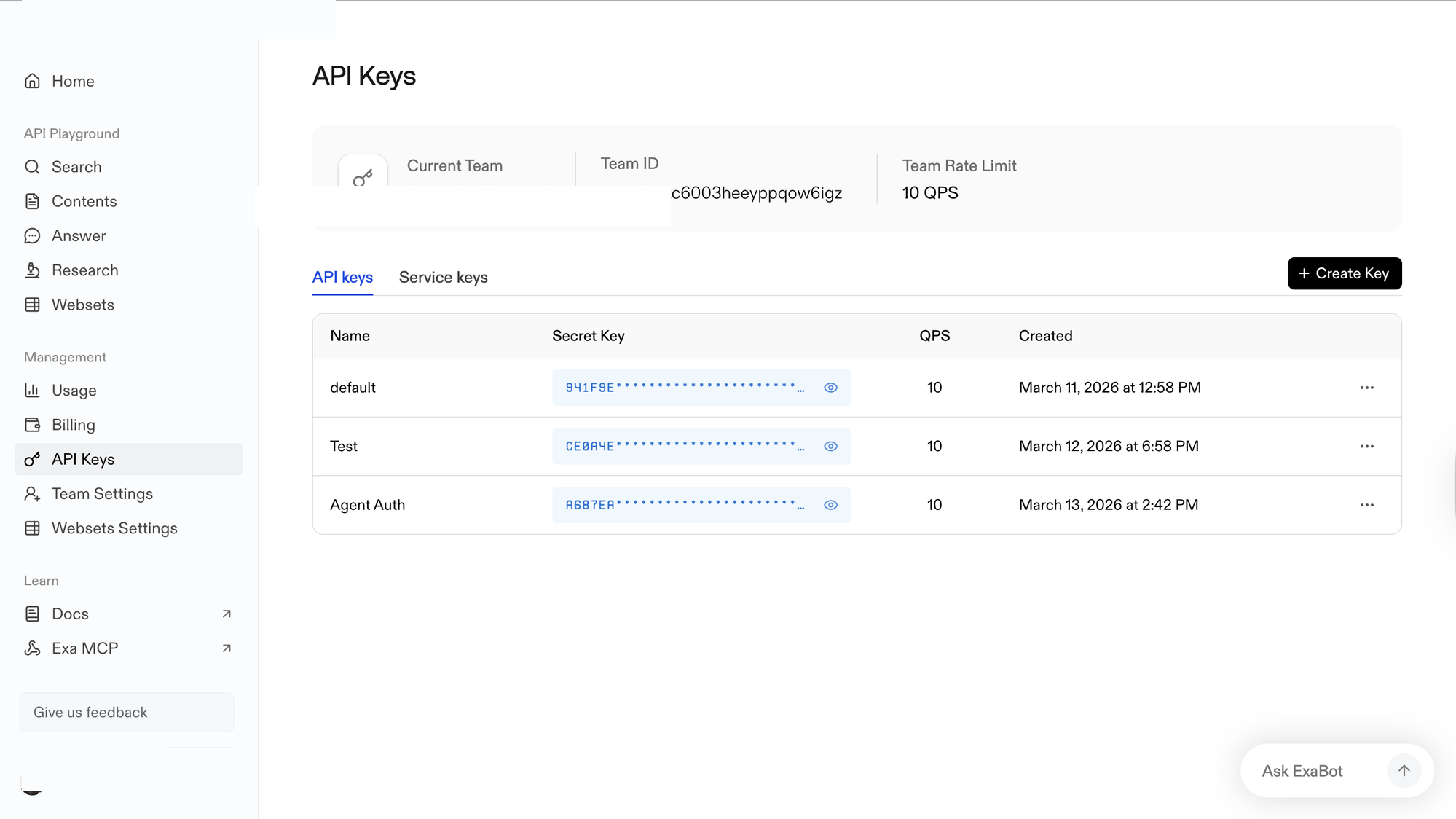
Sign in to dashboard.exa.ai/api-keys. Under Management, click API Keys.
-
Click + Create Key, enter a name (e.g.,
Agent Auth), and confirm. -
In the Secret Key column, click the eye icon to reveal the key and copy it. Store it somewhere safe — you will not be able to view it again.
-
-
Create a connection in Scalekit
-
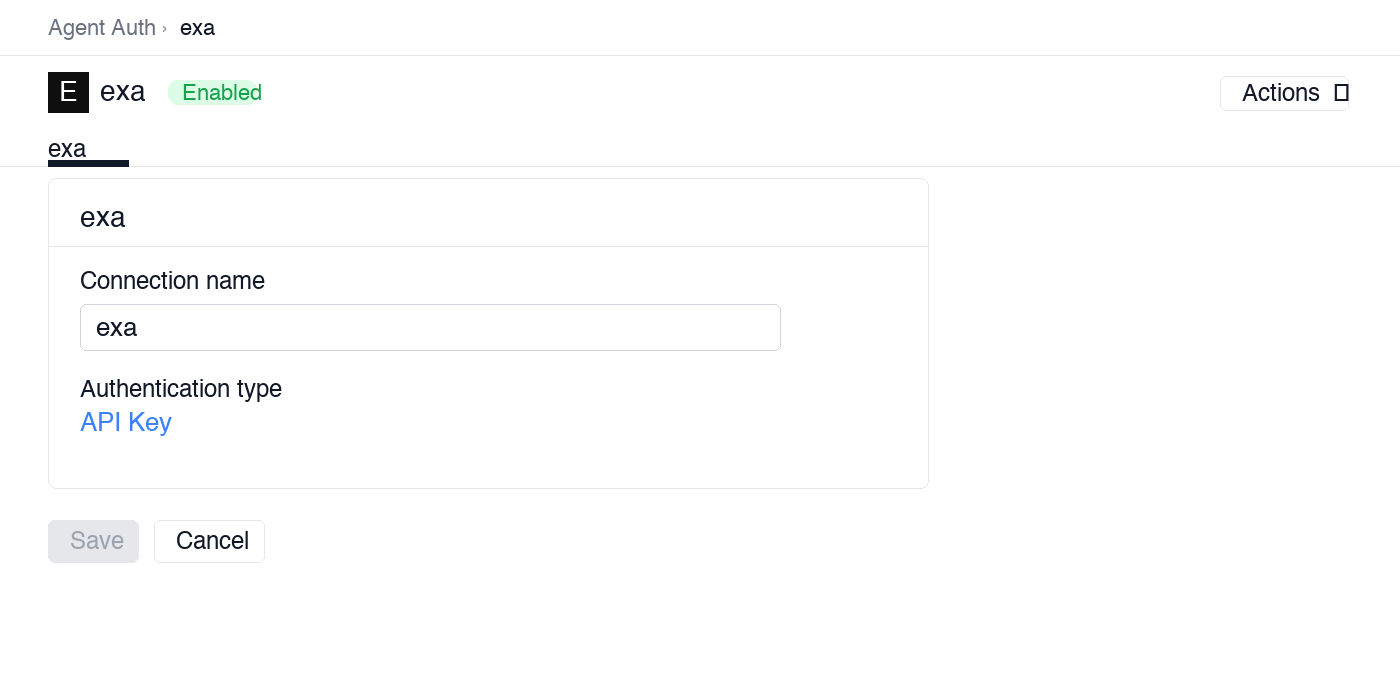
In Scalekit dashboard, go to AgentKit > Connections > Create Connection. Find Exa and click Create.
-
Note the Connection name — you will use this as
connection_namein your code (e.g.,exa).
-
-
Add a connected account
Connected accounts link a specific user identifier in your system to an Exa API key. Add accounts via the dashboard for testing, or via the Scalekit API in production.
Via dashboard (for testing)
-
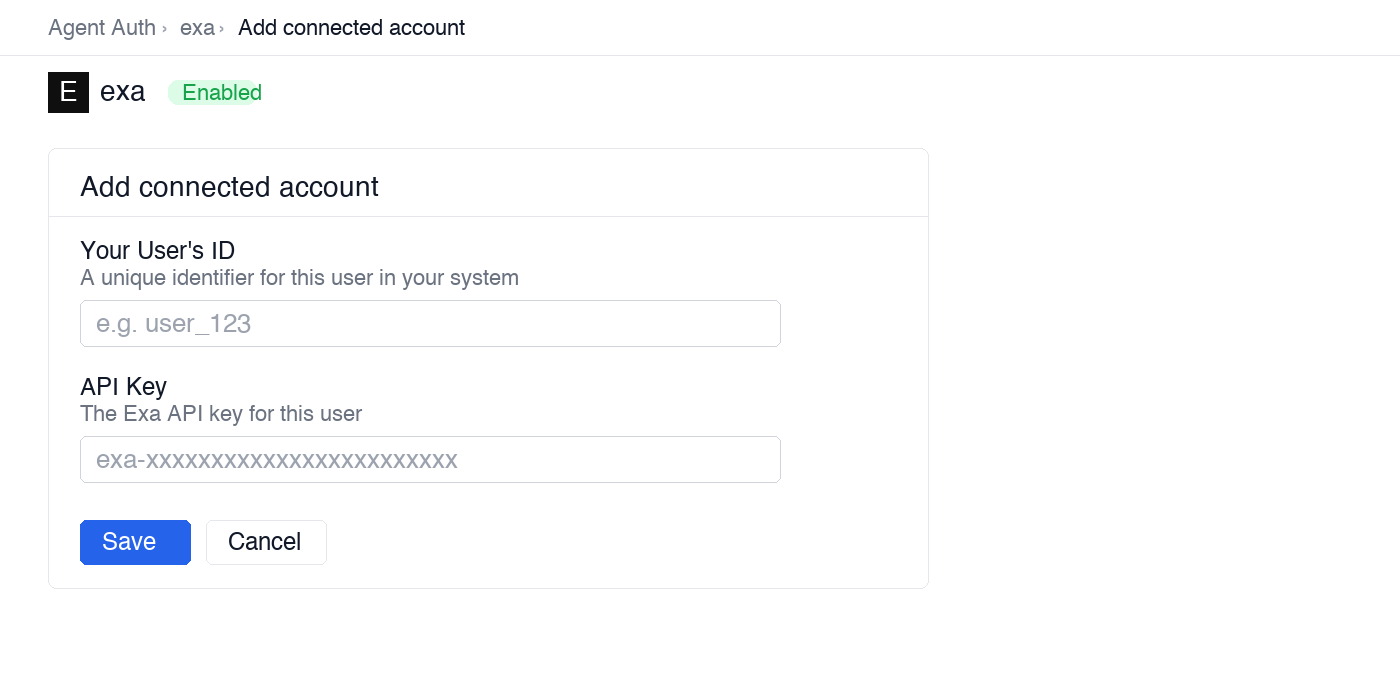
Open the connection you created and click the Connected Accounts tab → Add account.
-
Fill in:
- Your User’s ID — a unique identifier for this user in your system (e.g.,
user_123) - API Key — the Exa API key you copied in step 1
- Your User’s ID — a unique identifier for this user in your system (e.g.,
-
Click Save.
Via API (for production)
await scalekit.actions.upsertConnectedAccount({connectionName: 'exa',identifier: 'user_123',credentials: { api_key: 'your-exa-api-key' },});scalekit_client.actions.upsert_connected_account(connection_name="exa",identifier="user_123",credentials={"api_key": "your-exa-api-key"}) -
-
-
Make your first call
Section titled “Make your first call”quickstart.ts import { ScalekitClient } from '@scalekit-sdk/node'import 'dotenv/config'const scalekit = new ScalekitClient(process.env.SCALEKIT_ENV_URL,process.env.SCALEKIT_CLIENT_ID,process.env.SCALEKIT_CLIENT_SECRET,)const actions = scalekit.actionsconst connector = 'exa'const identifier = 'user_123'// Make your first callconst result = await actions.executeTool({connector,identifier,toolName: 'exa_list_websets',toolInput: {},})console.log(result)quickstart.py import osfrom scalekit.client import ScalekitClientfrom dotenv import load_dotenvload_dotenv()scalekit_client = ScalekitClient(env_url=os.getenv("SCALEKIT_ENV_URL"),client_id=os.getenv("SCALEKIT_CLIENT_ID"),client_secret=os.getenv("SCALEKIT_CLIENT_SECRET"),)actions = scalekit_client.actionsconnection_name = "exa"identifier = "user_123"# Make your first callresult = actions.execute_tool(tool_input={},tool_name="exa_list_websets",connection_name=connection_name,identifier=identifier,)print(result)
What you can do
Section titled “What you can do”Connect this agent connector to let your agent:
- Similar find — Find web pages similar to a given URL using Exa’s neural similarity search
- Search records — Search the web using Exa’s AI-powered semantic or keyword search engine
- Research records — Run in-depth research on a topic using Exa’s neural search
- Crawl records — Crawl one or more web pages by URL and extract their content including full text, highlights, and AI-generated summaries
- List websets, webset items — List all Exa Websets in your account with optional pagination
- Websets records — Execute a complex web query designed to discover and return large sets of URLs (up to thousands) matching specific criteria
Common workflows
Section titled “Common workflows”Proxy API call
const result = await actions.request({ connectionName: 'exa', identifier: 'user_123', path: '/search', method: 'POST', body: { query: 'LLM observability tools 2025', num_results: 5 },});console.log(result.data);result = actions.request( connection_name='exa', identifier='user_123', path="/search", method="POST", json={"query": "LLM observability tools 2025", "num_results": 5},)print(result)Semantic search
Search the web by meaning, not just keywords. This example searches for companies in the AI infrastructure space and returns AI-generated summaries for each result.
result = actions.execute_tool( connection_name='exa', identifier='user_123', tool_name="exa_search", tool_input={ "query": "AI infrastructure companies building GPU cloud platforms", "num_results": 10, "type": "neural", "category": "company", "contents": { "summary": {"query": "What does this company do and who are their customers?"} } })
for item in result.result.get("results", []): print(f"{item['title']}: {item['url']}") print(f" → {item.get('summary', 'No summary')}\n")Search with full content enrichment
Retrieve the full page text and highlighted snippets alongside search results — useful when you want to pass source material directly into an LLM context window.
result = actions.execute_tool( connection_name='exa', identifier='user_123', tool_name="exa_search", tool_input={ "query": "OpenAI API rate limits and pricing 2025", "num_results": 5, "type": "keyword", # keyword mode for precise terms "include_domains": ["openai.com", "platform.openai.com"], "contents": { "text": {"max_characters": 2000}, # cap text to save tokens "highlights": { "num_sentences": 3, "highlights_per_url": 2 } } })
for item in result.result.get("results", []): print(f"## {item['title']}") print(f"URL: {item['url']}") if item.get("highlights"): print("Highlights:") for h in item["highlights"]: print(f" - {h}") print()Find similar pages
Discover pages that are semantically similar to a known URL — useful for competitive research, finding alternative data sources, or discovering similar products.
# Find companies similar to a known competitorresult = actions.execute_tool( connection_name='exa', identifier='user_123', tool_name="exa_find_similar", tool_input={ "url": "https://www.linear.app", "num_results": 10, "exclude_domains": ["linear.app"], # exclude the source URL itself "start_published_date": "2024-01-01", # only recently indexed pages "contents": { "summary": {"query": "What product does this company build?"} } })
print("Similar companies to Linear:")for item in result.result.get("results", []): print(f" {item['title']} — {item['url']}") if item.get("summary"): print(f" {item['summary']}")Get content for known URLs
Extract structured content from a list of URLs you already have — from a CRM export, a prior search, or a manually curated list. No search query required.
# Enrich a list of company URLs from your CRMcompany_urls = [ "https://www.anthropic.com", "https://mistral.ai", "https://cohere.com",]
result = actions.execute_tool( connection_name='exa', identifier='user_123', tool_name="exa_get_contents", tool_input={ "urls": company_urls, "summary": { "query": "What AI models or products does this company offer, and who are their target customers?" }, "subpages": 1, # also fetch one subpage per URL (e.g. /about or /pricing) "subpage_target": "pricing", # target the pricing subpage specifically "max_age_hours": 48 # use content no older than 48 hours })
for item in result.result.get("results", []): print(f"{item['url']}: {item.get('summary', 'No summary')}")Get a direct answer
Ask a question and get a synthesized natural language answer grounded in live web sources. Returns the answer and the source URLs used — ready to display or inject into a citation-aware LLM prompt.
result = actions.execute_tool( connection_name='exa', identifier='user_123', tool_name="exa_answer", tool_input={ "query": "What are the context window sizes and pricing for Claude Sonnet and GPT-4o as of 2025?", "num_results": 8, "text": True, # include source snippets "include_domains": ["anthropic.com", "openai.com", "platform.openai.com"] })
print("Answer:", result.result.get("answer"))print("\nSources:")for source in result.result.get("sources", []): print(f" - {source['title']}: {source['url']}")Deep research on a topic
Run multi-angle research that decomposes your topic into parallel sub-queries and synthesizes the results. Use output_schema to get structured JSON instead of free-form text — useful for generating reports your code can consume directly.
result = actions.execute_tool( connection_name='exa', identifier='user_123', tool_name="exa_research", tool_input={ "topic": "Competitive landscape of AI coding assistants in 2025 — key players, pricing, and differentiators", "num_subqueries": 5, "output_schema": { "type": "object", "properties": { "summary": {"type": "string"}, "competitors": { "type": "array", "items": { "type": "object", "properties": { "name": {"type": "string"}, "pricing": {"type": "string"}, "key_differentiator": {"type": "string"}, "target_customer": {"type": "string"} } } }, "market_trends": { "type": "array", "items": {"type": "string"} } }, "required": ["summary", "competitors", "market_trends"] } })
report = result.resultprint("Summary:", report.get("summary"))print("\nCompetitors:")for c in report.get("competitors", []): print(f" {c['name']}: {c.get('key_differentiator')}")print("\nTrends:")for t in report.get("market_trends", []): print(f" - {t}")LangChain integration
Let an LLM decide which Exa tool to call based on natural language. This example builds an agent that can search, retrieve content, and answer research questions on demand.
from langchain_openai import ChatOpenAIfrom langchain.agents import AgentExecutor, create_openai_tools_agentfrom langchain_core.prompts import ( ChatPromptTemplate, SystemMessagePromptTemplate, HumanMessagePromptTemplate, MessagesPlaceholder, PromptTemplate)
# Load all Exa tools in LangChain format. Use page_size=100 so connector tool lists are not truncated.tools = actions.langchain.get_tools( identifier='user_123', providers=["EXA"], page_size=100)
prompt = ChatPromptTemplate.from_messages([ SystemMessagePromptTemplate(prompt=PromptTemplate( input_variables=[], template=( "You are a research assistant with access to Exa web search tools. " "Use exa_search for general queries, exa_answer for direct questions, " "exa_find_similar for competitive analysis, and exa_research for deep multi-source topics. " "Always cite your sources." ) )), MessagesPlaceholder(variable_name="chat_history", optional=True), HumanMessagePromptTemplate(prompt=PromptTemplate( input_variables=["input"], template="{input}" )), MessagesPlaceholder(variable_name="agent_scratchpad")])
llm = ChatOpenAI(model="gpt-4o")agent = create_openai_tools_agent(llm, tools, prompt)agent_executor = AgentExecutor(agent=agent, tools=tools, verbose=True)
result = agent_executor.invoke({ "input": "Who are the top 5 competitors to Notion for team knowledge management? Summarize each and compare their pricing."})print(result["output"])Tool list
Section titled “Tool list”Use the exact tool names from the Tool list below when you call execute_tool. If you’re not sure which name to use, list the tools available for the current user first.
exa_answer#Get a natural language answer to a question by searching the web with Exa and synthesizing results. Returns a direct answer with citations to the source pages. Ideal for factual questions, current events, and research queries. Rate limit: 60 requests/minute.5 params
Get a natural language answer to a question by searching the web with Exa and synthesizing results. Returns a direct answer with citations to the source pages. Ideal for factual questions, current events, and research queries. Rate limit: 60 requests/minute.
querystringrequiredThe question or query to answer from web sources.exclude_domainsarrayoptionalJSON array of domains to exclude from answer sources.include_domainsarrayoptionalJSON array of domains to restrict source search to. Example: ["reuters.com","bbc.com"]include_textbooleanoptionalWhen true, also returns the source page text alongside the synthesized answer.num_resultsintegeroptionalNumber of web sources to use when generating the answer (1–20). More sources improves accuracy but costs more credits.exa_crawl#Crawl one or more web pages by URL and extract their content including full text, highlights, and AI-generated summaries. Useful for reading specific pages discovered via search. Rate limit: 60 requests/minute. Credit consumption depends on number of URLs.7 params
Crawl one or more web pages by URL and extract their content including full text, highlights, and AI-generated summaries. Useful for reading specific pages discovered via search. Rate limit: 60 requests/minute. Credit consumption depends on number of URLs.
urlsarrayrequiredJSON array of URLs to crawl and extract content from.highlights_per_urlintegeroptionalNumber of highlight sentences to return per URL when include_highlights is true. Defaults to 3.include_highlightsbooleanoptionalWhen true, returns the most relevant sentence-level highlights from each page.include_html_tagsbooleanoptionalWhen true, retains HTML tags in the extracted text. Defaults to false (plain text only).include_summarybooleanoptionalWhen true, returns an AI-generated summary for each crawled page.max_charactersintegeroptionalMaximum characters of text to extract per page. Defaults to 5000.summary_querystringoptionalOptional query to focus the AI summary on a specific aspect of the page.exa_delete_webset#Delete an Exa Webset by its ID. This permanently removes the webset and all its collected items. This action cannot be undone.1 param
Delete an Exa Webset by its ID. This permanently removes the webset and all its collected items. This action cannot be undone.
webset_idstringrequiredThe ID of the webset to delete.exa_find_similar#Find web pages similar to a given URL using Exa's neural similarity search. Useful for competitor research, finding related articles, or discovering similar companies. Optionally returns page text, highlights, or summaries. Rate limit: 60 requests/minute.8 params
Find web pages similar to a given URL using Exa's neural similarity search. Useful for competitor research, finding related articles, or discovering similar companies. Optionally returns page text, highlights, or summaries. Rate limit: 60 requests/minute.
urlstringrequiredThe URL to find similar pages for.end_published_datestringoptionalOnly return pages published before this date. ISO 8601 format: YYYY-MM-DDTHH:MM:SS.000Zexclude_domainsarrayoptionalArray of domains to exclude from results.include_domainsarrayoptionalArray of domains to restrict results to.include_textbooleanoptionalWhen true, returns the full text content of each result page.max_charactersintegeroptionalMaximum characters of page text to return per result when include_text is true. Defaults to 3000.num_resultsintegeroptionalNumber of similar results to return (1–100). Defaults to 10.start_published_datestringoptionalOnly return pages published after this date. ISO 8601 format: YYYY-MM-DDTHH:MM:SS.000Zexa_get_webset#Get the status and details of an existing Exa Webset by its ID. Use this to poll the status of an async webset created with Create Webset. Returns metadata including status (created, running, completed, cancelled), progress, and configuration.1 param
Get the status and details of an existing Exa Webset by its ID. Use this to poll the status of an async webset created with Create Webset. Returns metadata including status (created, running, completed, cancelled), progress, and configuration.
webset_idstringrequiredThe ID of the webset to retrieve.exa_list_webset_items#List the collected URLs and items from a completed Exa Webset. Use this after polling Get Webset until its status is 'completed' to retrieve the discovered results.3 params
List the collected URLs and items from a completed Exa Webset. Use this after polling Get Webset until its status is 'completed' to retrieve the discovered results.
webset_idstringrequiredThe ID of the webset to retrieve items from.countintegeroptionalNumber of items to return per page. Defaults to 10.cursorstringoptionalPagination cursor from a previous response to fetch the next page of items.exa_list_websets#List all Exa Websets in your account with optional pagination. Returns a list of websets with their IDs, statuses, and configurations.2 params
List all Exa Websets in your account with optional pagination. Returns a list of websets with their IDs, statuses, and configurations.
countintegeroptionalNumber of websets to return per page. Defaults to 10.cursorstringoptionalPagination cursor from a previous response to fetch the next page.exa_research#Run in-depth research on a topic using Exa's neural search. Performs a semantic search and returns results with full page text and AI-generated summaries, providing structured multi-source research output. Best for comprehensive topic analysis. Rate limit: 60 requests/minute.8 params
Run in-depth research on a topic using Exa's neural search. Performs a semantic search and returns results with full page text and AI-generated summaries, providing structured multi-source research output. Best for comprehensive topic analysis. Rate limit: 60 requests/minute.
querystringrequiredThe research topic or question to investigate across the web.categorystringoptionalRestrict research to a specific content category for more targeted results.exclude_domainsarrayoptionalJSON array of domains to exclude from research results.include_domainsarrayoptionalJSON array of domains to restrict research sources to. Useful to focus on authoritative sources.max_charactersintegeroptionalMaximum characters of text to extract per source page. Defaults to 5000.num_resultsintegeroptionalNumber of sources to gather for the research (1–20). More sources provide broader coverage.start_published_datestringoptionalOnly include sources published after this date. ISO 8601 format.summary_querystringoptionalOptional focused question to guide the AI page summaries. Defaults to the main research query.exa_search#Search the web using Exa's AI-powered semantic or keyword search engine. Supports filtering by domain, date range, content category, and result type. Optionally returns page text, highlights, or summaries alongside search results. Rate limit: 60 requests/minute.19 params
Search the web using Exa's AI-powered semantic or keyword search engine. Supports filtering by domain, date range, content category, and result type. Optionally returns page text, highlights, or summaries alongside search results. Rate limit: 60 requests/minute.
querystringrequiredThe search query. For neural/auto type, natural language works best. For keyword type, use specific terms.categorystringoptionalRestrict results to a specific content category.end_crawl_datestringoptionalOnly return pages crawled (discovered) before this date. ISO 8601 format.end_published_datestringoptionalOnly return pages published before this date. ISO 8601 format: YYYY-MM-DDTHH:MM:SS.000Zexclude_domainsarrayoptionalJSON array of domains to exclude from results. Example: ["reddit.com","quora.com"]include_domainsarrayoptionalJSON array of domains to restrict results to. Example: ["techcrunch.com","wired.com"]include_highlightsbooleanoptionalWhen true, returns relevant text snippets from each result page.include_summarybooleanoptionalWhen true, returns an LLM-generated summary for each result page.include_textbooleanoptionalWhen true, returns the full text content of each result page (up to max_characters).max_age_hoursintegeroptionalMaximum age of cached content in hours. 0 fetches fresh content; -1 always uses cache; omit for fallback. Max 720.max_charactersintegeroptionalMaximum characters of page text to return per result when include_text is true. Defaults to 3000.moderationbooleanoptionalWhen true, enables content moderation to filter unsafe content from results.num_resultsintegeroptionalNumber of results to return (1–100). Defaults to 10.start_crawl_datestringoptionalOnly return pages crawled (discovered) after this date. ISO 8601 format.start_published_datestringoptionalOnly return pages published after this date. ISO 8601 format: YYYY-MM-DDTHH:MM:SS.000Zsystem_promptstringoptionalAdditional instructions that guide generated output, source preferences, or agent behavior.typestringoptionalSearch type: 'neural' for semantic AI search (best for natural language), 'keyword' for exact-match keyword search, 'auto' to let Exa decide.use_autopromptbooleanoptionalWhen true, Exa automatically rewrites the query to be more semantically effective.user_locationstringoptionalTwo-letter ISO country code of the user, used to localize results. e.g. US, GB, DE.exa_websets#Execute a complex web query designed to discover and return large sets of URLs (up to thousands) matching specific criteria. Websets are ideal for lead generation, market research, competitor analysis, and large-scale data collection. Returns a webset ID — poll status with GET /websets/v0/websets/{id}. High credit consumption.6 params
Execute a complex web query designed to discover and return large sets of URLs (up to thousands) matching specific criteria. Websets are ideal for lead generation, market research, competitor analysis, and large-scale data collection. Returns a webset ID — poll status with GET /websets/v0/websets/{id}. High credit consumption.
querystringrequiredThe search query describing what kinds of pages or entities to find. Be specific and descriptive for best results.countintegeroptionalTarget number of URLs to collect. Can range from hundreds to thousands. Higher counts take longer and consume more credits.entity_typestringoptionalThe type of entity to search for. Helps Exa understand what constitutes a valid result match.exclude_domainsarrayoptionalJSON array of domains to exclude from webset results.external_idstringoptionalOptional external identifier to tag this webset for reference in your system.include_domainsarrayoptionalJSON array of domains to restrict webset sources to.