


Google Meet connector
OAuth 2.0CommunicationCalendarConnect to Google Meet. Create and manage video meetings with powerful collaboration features
Google Meet connector
-
Install the SDK
Section titled “Install the SDK”Terminal window npm install @scalekit-sdk/nodeTerminal window pip install scalekit -
Set your credentials
Section titled “Set your credentials”Add your Scalekit credentials to your
.envfile. Find values in app.scalekit.com > Developers > API Credentials..env SCALEKIT_ENVIRONMENT_URL=<your-environment-url>SCALEKIT_CLIENT_ID=<your-client-id>SCALEKIT_CLIENT_SECRET=<your-client-secret> -
Set up the connector
Section titled “Set up the connector”Register your Google Meet credentials with Scalekit so it handles the token lifecycle. You do this once per environment.
Dashboard setup steps
Register your Scalekit environment with the Google Meet connector so Scalekit handles the authentication flow and token lifecycle for you. The connection name you create will be used to identify and invoke the connection programmatically. Then complete the configuration in your application as follows:
-
Set up auth redirects
-
In Scalekit dashboard, go to AgentKit > Connections > Create Connection. Find Google Meet and click Create. Click Use your own credentials and copy the redirect URI. It looks like
https://<SCALEKIT_ENVIRONMENT_URL>/sso/v1/oauth/<CONNECTION_ID>/callback.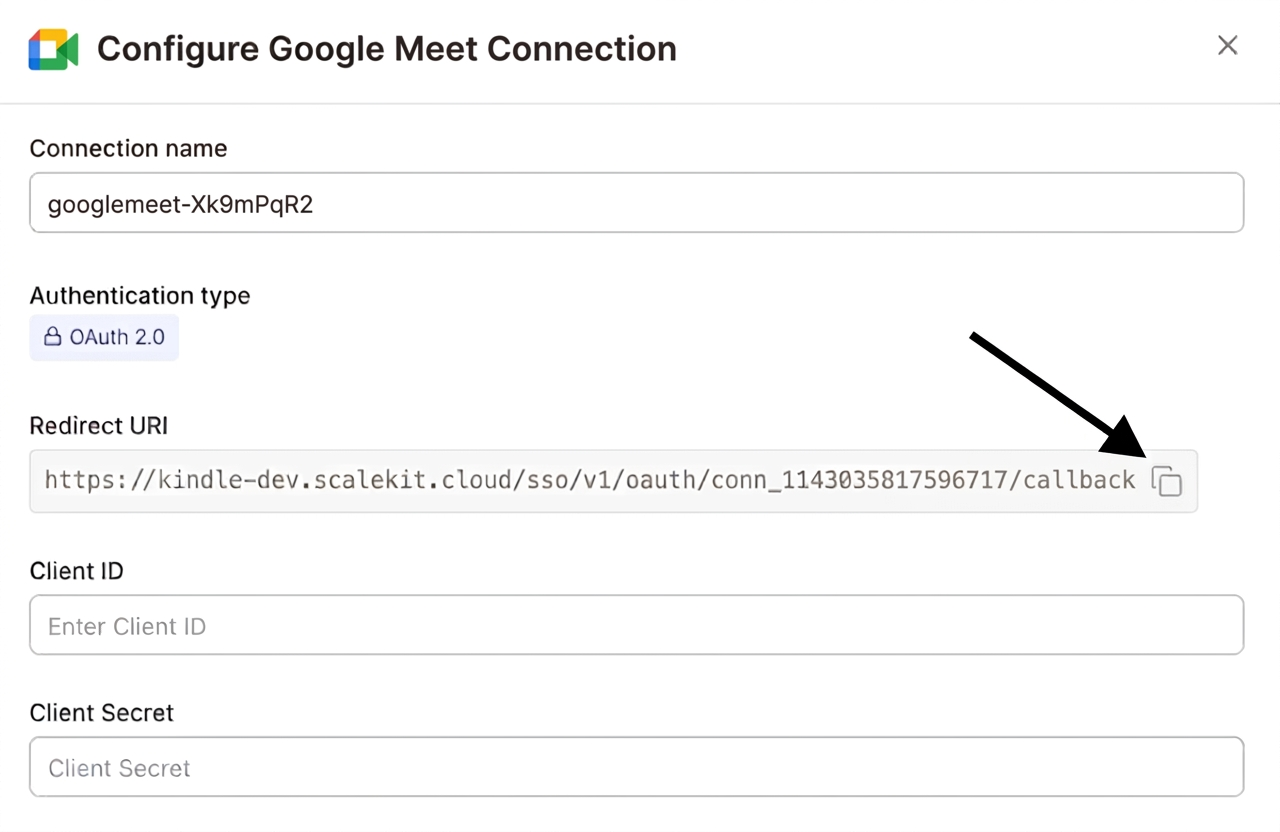
-
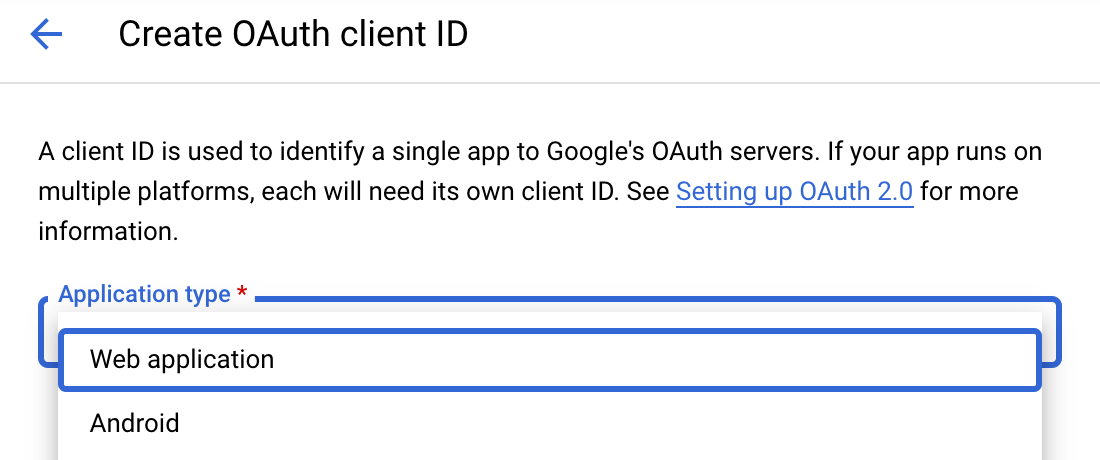
Navigate to Google Cloud Console → APIs & Services → Credentials. Select + Create Credentials, then OAuth client ID. Choose Web application from the Application type menu.
-
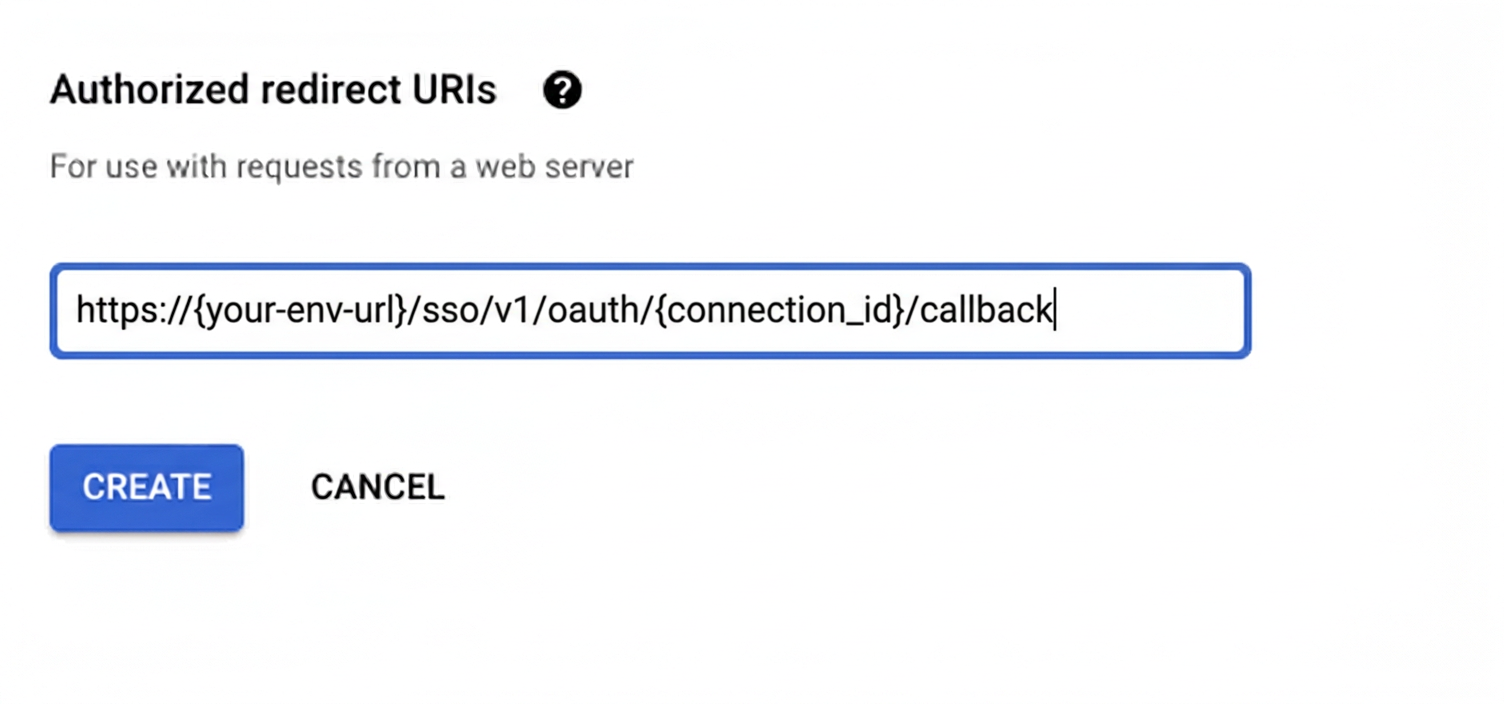
Under Authorized redirect URIs, click + Add URI, paste the redirect URI, and click Create.
-
-
Enable the Google Meet API
- In Google Cloud Console, go to APIs & Services → Library. Search for “Google Meet API” and click Enable.
-
Get client credentials
- Google provides your Client ID and Client Secret after you create the OAuth client ID in step 1.
-
Add credentials in Scalekit
-
In Scalekit dashboard, go to AgentKit > Connections and open the connection you created.
-
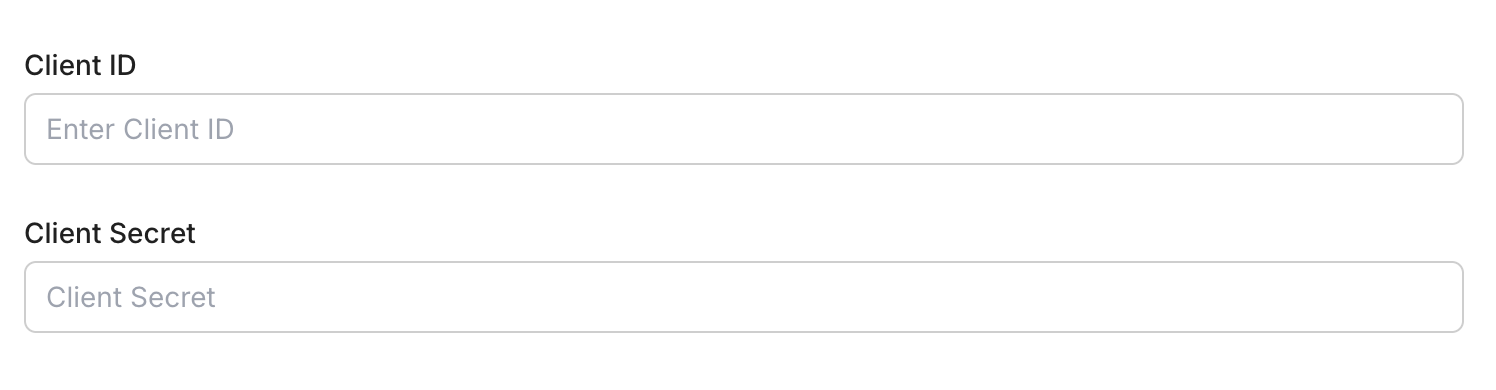
Enter your credentials:
- Client ID (from above)
- Client Secret (from above)
- Permissions (scopes — see Google API Scopes reference)
-
Click Save.
-
-
-
Authorize and make your first call
Section titled “Authorize and make your first call”quickstart.ts import { ScalekitClient } from '@scalekit-sdk/node'import 'dotenv/config'const scalekit = new ScalekitClient(process.env.SCALEKIT_ENV_URL,process.env.SCALEKIT_CLIENT_ID,process.env.SCALEKIT_CLIENT_SECRET,)const actions = scalekit.actionsconst connector = 'googlemeet'const identifier = 'user_123'// Generate an authorization link for the userconst { link } = await actions.getAuthorizationLink({ connectionName: connector, identifier })console.log('Authorize Google Meet:', link)process.stdout.write('Press Enter after authorizing...')await new Promise(r => process.stdin.once('data', r))// Make your first callconst result = await actions.executeTool({connector,identifier,toolName: 'googlemeet_get_meet_space',toolInput: { space_name: 'YOUR_SPACE_NAME' },})console.log(result)quickstart.py import osfrom scalekit.client import ScalekitClientfrom dotenv import load_dotenvload_dotenv()scalekit_client = ScalekitClient(env_url=os.getenv("SCALEKIT_ENV_URL"),client_id=os.getenv("SCALEKIT_CLIENT_ID"),client_secret=os.getenv("SCALEKIT_CLIENT_SECRET"),)actions = scalekit_client.actionsconnection_name = "googlemeet"identifier = "user_123"# Generate an authorization link for the userlink_response = actions.get_authorization_link(connection_name=connection_name,identifier=identifier,)print("Authorize Google Meet:", link_response.link)input("Press Enter after authorizing...")# Make your first callresult = actions.execute_tool(tool_input={"space_name":"YOUR_SPACE_NAME"},tool_name="googlemeet_get_meet_space",connection_name=connection_name,identifier=identifier,)print(result)
What you can do
Section titled “What you can do”Connect this agent connector to let your agent:
- Get meet space — Retrieve details of a Google Meet meeting space by its resource name (e.g., ‘spaces/abc123’), including its meeting URI and configuration
- Conference end meet — End the active conference in a Google Meet space, disconnecting all participants
- Create meet space — Create a new Google Meet meeting space
Common workflows
Section titled “Common workflows”Proxy API call
const result = await actions.request({ connectionName: 'googlemeet', identifier: 'user_123', path: '/v2/spaces', method: 'GET',});console.log(result);result = actions.request( connection_name='googlemeet', identifier='user_123', path="/v2/spaces", method="GET")print(result)Execute a tool
const result = await actions.executeTool({ connector: 'googlemeet', identifier: 'user_123', toolName: 'googlemeet_list', toolInput: {},});console.log(result);result = actions.execute_tool( connection_name='googlemeet', identifier='user_123', tool_name='googlemeet_list', tool_input={},)print(result)Google OAuth consent screen verification
Before you use your own Google OAuth credentials in production, understand what end users see on Google’s consent screen when they authorize a connected account.
| Audience type | Consent screen behavior | When to use |
|---|---|---|
| Internal | Shows your App Name and logo from Branding settings | Only users in your Google Workspace or Cloud Identity organization can authorize the connector |
| External | Shows {env_name}.scalekit.dev until Google verifies your app | Any user with a Google account can authorize the connector |
Why External is required for most AgentKit connectors:
- Internal restricts authorization to users in your Google Workspace or Cloud Identity organization. Users with
@gmail.comor other Google accounts outside your organization cannot complete OAuth. - External is required when end users outside your organization authorize tool access through connected accounts.
- Organization-managed OAuth clients follow the same rules as personal or developer OAuth clients. Switching to an org-owned client does not bypass Google verification.
- Until Google completes verification of your External app, users see
scalekit.devon the consent screen. After verification, your App Name and logo appear.
During development:
- Add Test users under APIs & Services → OAuth consent screen while publishing status is Testing.
- On unverified apps, users can click Advanced → Go to app (unsafe) to proceed during testing.
- Google Workspace admins may need to allowlist your OAuth client.
For Google’s verification requirements and timeline, refer to Google’s OAuth consent screen verification guide.
Tool list
Section titled “Tool list”Use the exact tool names from the Tool list below when you call execute_tool. If you’re not sure which name to use, list the tools available for the current user first.
googlemeet_create_meet_space#Create a new Google Meet meeting space. Optionally configure access type and entry point access restrictions. Returns the meeting URI and space details. Uses OAuth credentials.4 params
Create a new Google Meet meeting space. Optionally configure access type and entry point access restrictions. Returns the meeting URI and space details. Uses OAuth credentials.
access_typestringoptionalAccess type for the meeting space. One of: 'OPEN' (anyone with link), 'TRUSTED' (domain users), 'RESTRICTED' (only invited participants).entry_point_accessstringoptionalWho can use entry points to join. One of: 'ALL' (anyone), 'CREATOR_APP_ONLY' (only the creating app's users).schema_versionstringoptionalOptional schema version to use for tool executiontool_versionstringoptionalOptional tool version to use for executiongooglemeet_end_meet_conference#End the active conference in a Google Meet space, disconnecting all participants. Requires the resource name of the space (e.g., 'spaces/abc123'). Uses OAuth credentials.3 params
End the active conference in a Google Meet space, disconnecting all participants. Requires the resource name of the space (e.g., 'spaces/abc123'). Uses OAuth credentials.
space_namestringrequiredResource name of the Meet space whose active conference to end (e.g., 'spaces/abc123').schema_versionstringoptionalOptional schema version to use for tool executiontool_versionstringoptionalOptional tool version to use for executiongooglemeet_get_meet_space#Retrieve details of a Google Meet meeting space by its resource name (e.g., 'spaces/abc123'), including its meeting URI and configuration. Uses OAuth credentials.3 params
Retrieve details of a Google Meet meeting space by its resource name (e.g., 'spaces/abc123'), including its meeting URI and configuration. Uses OAuth credentials.
space_namestringrequiredResource name of the Meet space to retrieve (e.g., 'spaces/abc123').schema_versionstringoptionalOptional schema version to use for tool executiontool_versionstringoptionalOptional tool version to use for execution