


Attio connector
OAuth 2.0CRM & SalesConnect to Attio CRM to manage contacts, companies, deals, notes, tasks, and lists with a modern relationship management platform.
Attio connector
-
Install the SDK
Section titled “Install the SDK”Terminal window npm install @scalekit-sdk/nodeTerminal window pip install scalekit -
Set your credentials
Section titled “Set your credentials”Add your Scalekit credentials to your
.envfile. Find values in app.scalekit.com > Developers > API Credentials..env SCALEKIT_ENVIRONMENT_URL=<your-environment-url>SCALEKIT_CLIENT_ID=<your-client-id>SCALEKIT_CLIENT_SECRET=<your-client-secret> -
Set up the connector
Section titled “Set up the connector”Register your Attio credentials with Scalekit so it handles the token lifecycle. You do this once per environment.
Dashboard setup steps
Register your Attio OAuth app credentials with Scalekit so it can manage the OAuth 2.0 authentication flow and token lifecycle on your behalf. You’ll need a Client ID and Client Secret from the Attio Developer Portal.
-
Create a connection in Scalekit and copy the redirect URI
-
Sign in to your Scalekit dashboard and go to AgentKit in the left sidebar.
-
Click Create Connection, search for Attio, and click Create.
-
On the connection configuration panel, locate the Redirect URI field. It looks like:
https://<SCALEKIT_ENVIRONMENT_URL>/sso/v1/oauth/<CONNECTION_ID>/callback -
Click the copy icon next to the Redirect URI to copy it to your clipboard.
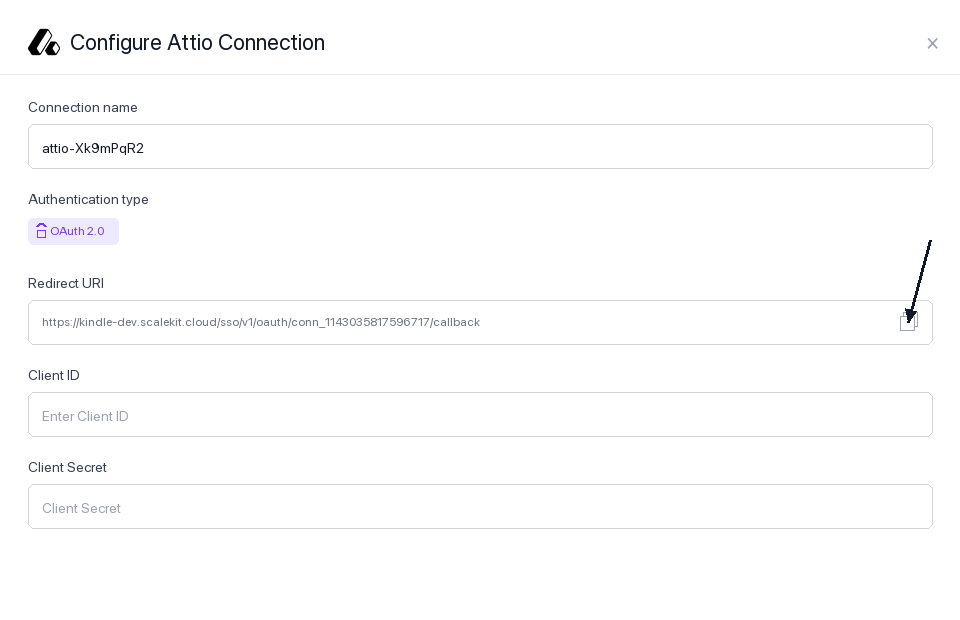
Keep this tab open — you’ll return to it in step 3.
-
-
Register the redirect URI in your Attio OAuth app
-
Sign in to build.attio.com and open the app you want to connect. If you don’t have one yet, click Create app.
-
In the left sidebar, click OAuth to open the OAuth settings tab for your app.
-
You’ll see your Client ID and Client Secret near the top of the page. Copy both values and save them somewhere safe — you’ll need them in step 3.
-
Scroll down to the Redirect URIs section. Click + New redirect URI.
-
Paste the Redirect URI you copied from Scalekit into the input field and confirm.
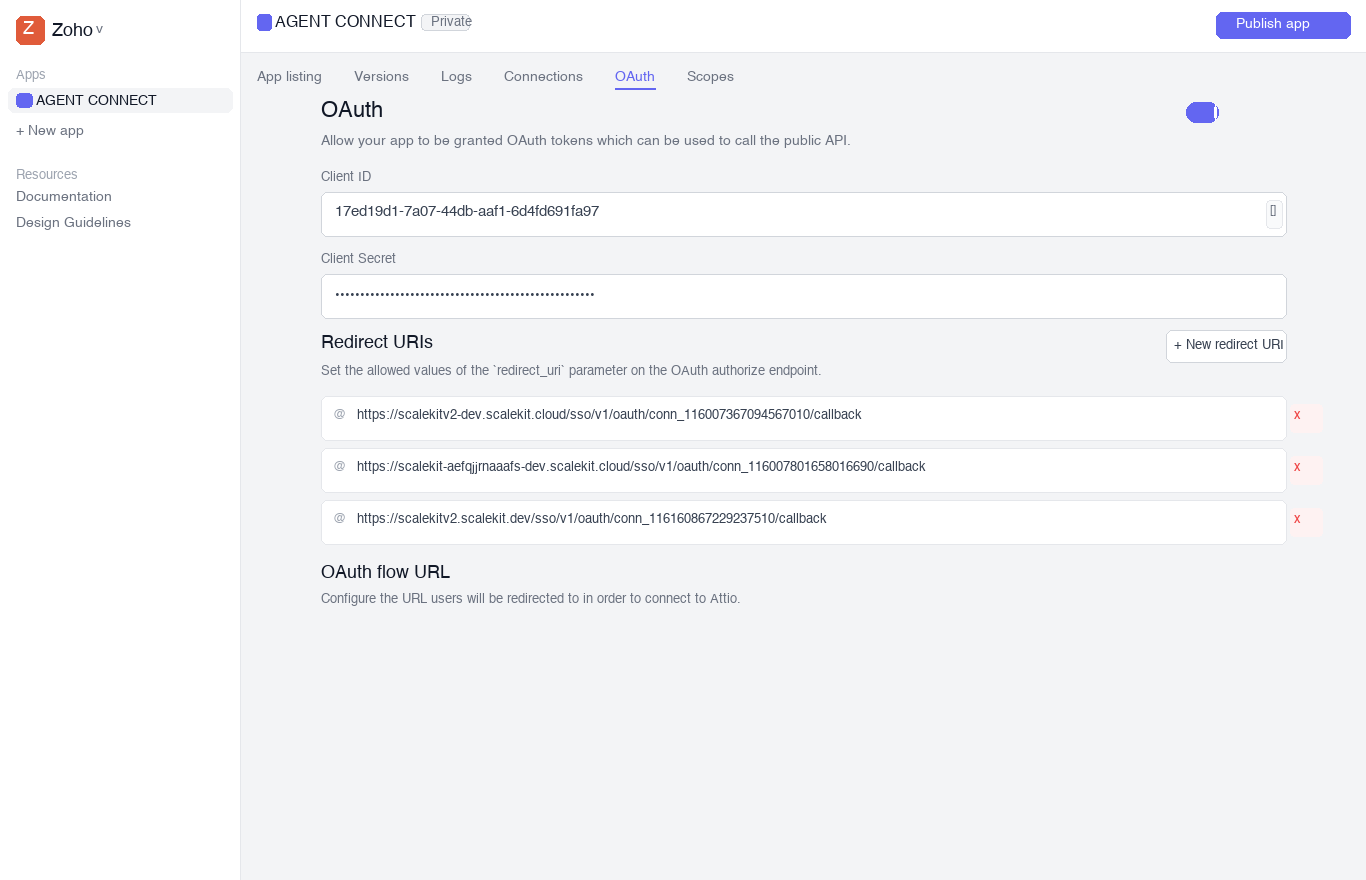
-
-
Add credentials and scopes in Scalekit
-
Return to your Scalekit dashboard → AgentKit > Connections and open the Attio connection you created in step 1.
-
Fill in the following fields:
-
Client ID — paste the Client ID from your Attio OAuth app
-
Client Secret — paste the Client Secret from your Attio OAuth app
-
Permissions — select the OAuth scopes your app requires. Choose the minimum scopes needed. Common scopes:
Scope What it allows record_permission:readRead CRM records (people, companies, deals) record_permission:read-writeRead and write CRM records object_configuration:readRead object and attribute schemas list_configuration:readRead list schemas list_entry:readRead list entries list_entry:read-writeRead and write list entries note:readRead notes note:read-writeRead and write notes task:read-writeRead and write tasks comment:read-writeRead and write comments webhook:read-writeManage webhooks user_management:readRead workspace members For a full list, see the Attio OAuth scopes reference.
-
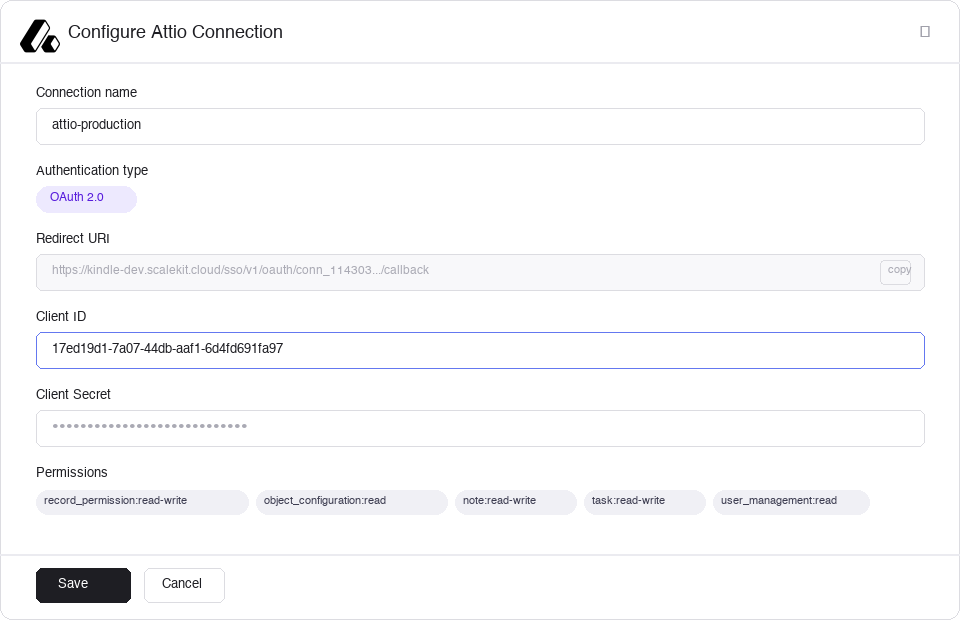
- Click Save. Scalekit will validate the credentials and mark the connection as active.
-
-
-
Authorize and make your first call
Section titled “Authorize and make your first call”quickstart.ts import { ScalekitClient } from '@scalekit-sdk/node'import 'dotenv/config'const scalekit = new ScalekitClient(process.env.SCALEKIT_ENV_URL,process.env.SCALEKIT_CLIENT_ID,process.env.SCALEKIT_CLIENT_SECRET,)const actions = scalekit.actionsconst connector = 'attio'const identifier = 'user_123'// Generate an authorization link for the userconst { link } = await actions.getAuthorizationLink({ connectionName: connector, identifier })console.log('Authorize Attio:', link)process.stdout.write('Press Enter after authorizing...')await new Promise(r => process.stdin.once('data', r))// Make your first callconst result = await actions.executeTool({connector,identifier,toolName: 'attio_get_current_token_info',toolInput: {},})console.log(result)quickstart.py import osfrom scalekit.client import ScalekitClientfrom dotenv import load_dotenvload_dotenv()scalekit_client = ScalekitClient(env_url=os.getenv("SCALEKIT_ENV_URL"),client_id=os.getenv("SCALEKIT_CLIENT_ID"),client_secret=os.getenv("SCALEKIT_CLIENT_SECRET"),)actions = scalekit_client.actionsconnection_name = "attio"identifier = "user_123"# Generate an authorization link for the userlink_response = actions.get_authorization_link(connection_name=connection_name,identifier=identifier,)print("Authorize Attio:", link_response.link)input("Press Enter after authorizing...")# Make your first callresult = actions.execute_tool(tool_input={},tool_name="attio_get_current_token_info",connection_name=connection_name,identifier=identifier,)print(result)
What you can do
Section titled “What you can do”Connect this agent connector to let your agent:
- Update record — Update an existing record’s attributes in Attio
- Create person, task, comment — Creates a new person record in Attio
- List records, people, objects — List and query records for a specific Attio object type (e.g
- Search records — Search for records in Attio for a given object type (people, companies, deals, or custom objects) using a fuzzy text query
- Delete person, user record, record — Permanently deletes a person record from Attio by its record_id
- Get comment, record attribute values, attribute — Retrieves a single comment by its comment_id in Attio
Common workflows
Section titled “Common workflows”Proxy API call
// --- Query people records with a filter ---const people = await actions.request({ connectionName: 'attio', identifier: 'user_123', path: '/v2/objects/people/records/query', method: 'POST', body: { filter: { email_addresses: [{ email_address: { $eq: 'alice@example.com' } }], }, limit: 10, },});console.log('People:', people.data);
// --- Create a company record ---const company = await actions.request({ connectionName: 'attio', identifier: 'user_123', path: '/v2/objects/companies/records', method: 'POST', body: { data: { values: { name: [{ value: 'Acme Corp' }], domains: [{ domain: 'acme.com' }], }, }, },});const companyId = company.data.data.id.record_id;console.log('Created company:', companyId);
// --- Create a person record and associate with the company ---const person = await actions.request({ connectionName: 'attio', identifier: 'user_123', path: '/v2/objects/people/records', method: 'POST', body: { data: { values: { name: [{ first_name: 'Alice', last_name: 'Smith' }], email_addresses: [{ email_address: 'alice@acme.com', attribute_type: 'email' }], company: [{ target_record_id: companyId }], }, }, },});const personId = person.data.data.id.record_id;console.log('Created person:', personId);
// --- Add a note to the person record ---const note = await actions.request({ connectionName: 'attio', identifier: 'user_123', path: '/v2/notes', method: 'POST', body: { data: { parent_object: 'people', parent_record_id: personId, title: 'Initial outreach', content: 'Spoke with Alice about Q2 pricing. Follow up next week.', format: 'plaintext', }, },});console.log('Created note:', note.data.data.id.note_id);
// --- Create a task linked to the person ---const deadlineAt = new Date(Date.now() + 7 * 24 * 60 * 60 * 1000).toISOString(); // 7 days from nowconst task = await actions.request({ connectionName: 'attio', identifier: 'user_123', path: '/v2/tasks', method: 'POST', body: { data: { content: 'Send Q2 pricing proposal to Alice', deadline_at: deadlineAt, is_completed: false, linked_records: [{ target_object: 'people', target_record_id: personId }], }, },});console.log('Created task:', task.data.data.id.task_id);
// --- Verify current token and workspace ---const tokenInfo = await actions.request({ connectionName: 'attio', identifier: 'user_123', path: '/v2/self', method: 'GET',});console.log('Connected to workspace:', tokenInfo.data.data.workspace.name);console.log('Granted scopes:', tokenInfo.data.data.scopes.join(', '));# --- Query people records with a filter ---people = actions.request( connection_name='attio', identifier='user_123', path="/v2/objects/people/records/query", method="POST", body={ "filter": { "email_addresses": [{"email_address": {"$eq": "alice@example.com"}}], }, "limit": 10, },)print("People:", people)
# --- Create a company record ---company = actions.request( connection_name='attio', identifier='user_123', path="/v2/objects/companies/records", method="POST", body={ "data": { "values": { "name": [{"value": "Acme Corp"}], "domains": [{"domain": "acme.com"}], }, }, },)company_id = company["data"]["id"]["record_id"]print("Created company:", company_id)
# --- Create a person record and associate with the company ---person = actions.request( connection_name='attio', identifier='user_123', path="/v2/objects/people/records", method="POST", body={ "data": { "values": { "name": [{"first_name": "Alice", "last_name": "Smith"}], "email_addresses": [{"email_address": "alice@acme.com", "attribute_type": "email"}], "company": [{"target_record_id": company_id}], }, }, },)person_id = person["data"]["id"]["record_id"]print("Created person:", person_id)
# --- Add a note to the person record ---note = actions.request( connection_name='attio', identifier='user_123', path="/v2/notes", method="POST", body={ "data": { "parent_object": "people", "parent_record_id": person_id, "title": "Initial outreach", "content": "Spoke with Alice about Q2 pricing. Follow up next week.", "format": "plaintext", }, },)print("Created note:", note["data"]["id"]["note_id"])
# --- Create a task linked to the person ---from datetime import datetime, timedeltadeadline_at = (datetime.now() + timedelta(days=7)).isoformat()task = actions.request( connection_name='attio', identifier='user_123', path="/v2/tasks", method="POST", body={ "data": { "content": "Send Q2 pricing proposal to Alice", "deadline_at": deadline_at, "is_completed": False, "linked_records": [{"target_object": "people", "target_record_id": person_id}], }, },)print("Created task:", task["data"]["id"]["task_id"])
# --- Verify current token and workspace ---token_info = actions.request( connection_name='attio', identifier='user_123', path="/v2/self", method="GET",)print("Connected to workspace:", token_info["data"]["workspace"]["name"])print("Granted scopes:", ", ".join(token_info["data"]["scopes"]))Execute a tool
const result = await actions.executeTool({ connector: 'attio', identifier: 'user_123', toolName: 'attio_add_to_list', toolInput: {},});console.log(result);result = actions.execute_tool( connection_name='attio', identifier='user_123', tool_name='attio_add_to_list', tool_input={},)print(result)Tool list
Section titled “Tool list”Use the exact tool names from the Tool list below when you call execute_tool. If you’re not sure which name to use, list the tools available for the current user first.
attio_add_to_list#Add a record (contact, company, deal, or custom object) to a specific Attio list. Returns the newly created list entry with its entry ID, which can be used to remove it later. If the record is already in the list, a new entry is created.4 params
Add a record (contact, company, deal, or custom object) to a specific Attio list. Returns the newly created list entry with its entry ID, which can be used to remove it later. If the record is already in the list, a new entry is created.
list_idstringrequiredThe UUID of the Attio list to add the record to. Use the List Lists tool (attio_list_lists) to retrieve available lists and their UUIDs.parent_objectstringrequiredThe object type slug the record belongs to. Must match the object type the list is configured for — run attio_list_lists to check the list's parent object before adding.parent_record_idstringrequiredThe UUID of the record to add to the list. Must be a valid UUID — obtain this from search or list records results.entry_valuesobjectoptionalOptional attribute values to set on the list entry itself (not the underlying record). Keys are attribute slugs, values are the data to set. Example: {"stage": "qualified"}attio_create_attribute#Creates a new attribute on an Attio object or list. Requires api_slug, title, type, description, is_required, is_unique, is_mct, and config. The config object varies by type — for most types pass an empty object {}. For select/multiselect, config can include options. For record-reference, config includes the target object.9 params
Creates a new attribute on an Attio object or list. Requires api_slug, title, type, description, is_required, is_unique, is_mct, and config. The config object varies by type — for most types pass an empty object {}. For select/multiselect, config can include options. For record-reference, config includes the target object.
api_slugstringrequiredSnake_case identifier for the new attribute. Must be unique within the object.configobjectrequiredType-specific configuration object. For most types (text, number, date, checkbox, etc.) pass an empty object {}. For record-reference, pass {"relationship": {"object": "companies"}}.descriptionstringrequiredHuman-readable description of what this attribute is used for.is_multiselectbooleanrequiredWhether this attribute allows multiple values per record.is_requiredbooleanrequiredWhether this attribute is required when creating records of this object type.is_uniquebooleanrequiredWhether values for this attribute must be unique across all records of this object type.objectstringrequiredSlug or UUID of the object to create the attribute on. Common slugs: people, companies, deals.titlestringrequiredHuman-readable display title for the attribute.typestringrequiredData type of the attribute. Supported values: text, number, select, multiselect, status, date, timestamp, checkbox, currency, record-reference, actor-reference, location, domain, email-address, phone-number, interaction.attio_create_comment#Creates a new comment on a record in Attio. Requires author_id (workspace member UUID), content, record_object (e.g. people, companies, deals), and record_id. Optionally provide thread_id to reply to an existing thread. Format is always plaintext.5 params
Creates a new comment on a record in Attio. Requires author_id (workspace member UUID), content, record_object (e.g. people, companies, deals), and record_id. Optionally provide thread_id to reply to an existing thread. Format is always plaintext.
author_idstringrequiredUUID of the workspace member who is authoring the comment. Use the List Workspace Members tool to find member UUIDs.contentstringrequiredPlaintext content of the comment.record_idstringrequiredUUID of the record to attach the comment to.record_objectstringrequiredObject slug or UUID of the record to comment on. Common slugs: people, companies, deals.thread_idstringoptionalUUID of an existing comment thread to reply to. Leave empty to start a new top-level comment.attio_create_company#Creates a new company record in Attio. Throws an error on conflicts of unique attributes like domains. Use Assert Company if you prefer to update on conflicts. Note: The logo_url attribute cannot currently be set via the API.1 param
Creates a new company record in Attio. Throws an error on conflicts of unique attributes like domains. Use Assert Company if you prefer to update on conflicts. Note: The logo_url attribute cannot currently be set via the API.
valuesobjectrequiredAttribute values for the new company record.attio_create_deal#Creates a new deal record in Attio. Throws an error on conflicts of unique attributes. Provide at least one attribute value in the values field.1 param
Creates a new deal record in Attio. Throws an error on conflicts of unique attributes. Provide at least one attribute value in the values field.
valuesobjectrequiredAttribute values for the new deal record.attio_create_list#Creates a new list in Attio. Requires workspace_access (one of: full-access, read-and-write, read-only) and workspace_member_access array. After creation, add attributes using Create Attribute and records using Create Entry.5 params
Creates a new list in Attio. Requires workspace_access (one of: full-access, read-and-write, read-only) and workspace_member_access array. After creation, add attributes using Create Attribute and records using Create Entry.
api_slugstringrequiredSnake_case identifier for the new list used in API access.namestringrequiredHuman-readable display name for the new list.parent_objectstringrequiredObject slug the list tracks. Must be a valid object slug such as people, companies, or deals.workspace_accessstringrequiredAccess level for all workspace members. Must be one of: full-access, read-and-write, read-only. Use full-access to give all members full control.workspace_member_accessarrayoptionalOptional array of per-member access overrides. Leave empty for uniform access via workspace_access. Each item: {"workspace_member_id": "uuid", "level": "full-access"}.attio_create_note#Create a note on an Attio record (person, company, deal, or custom object). Notes support plaintext or Markdown formatting. You can optionally backdate the note by specifying a created_at timestamp, or associate it with an existing meeting via meeting_id.7 params
Create a note on an Attio record (person, company, deal, or custom object). Notes support plaintext or Markdown formatting. You can optionally backdate the note by specifying a created_at timestamp, or associate it with an existing meeting via meeting_id.
contentstringrequiredBody of the note. Use plain text or Markdown depending on the format field. Line breaks are supported via \n in plaintext mode. IMPORTANT: This input field is called 'content', NOT 'content_markdown'. The field 'content_markdown' only appears in the API response and is not a valid input.formatstringrequiredFormat of the note content. Must be either "plaintext" or "markdown".parent_objectstringrequiredThe slug or UUID of the parent object the note will be attached to. Common slugs: "people", "companies", "deals".parent_record_idstringrequiredUUID of the parent record the note will be attached to.titlestringrequiredPlaintext title for the note. No formatting is allowed in the title.created_atstringoptionalISO 8601 timestamp for backdating the note. Defaults to the current time if not provided. Example: "2024-01-15T10:30:00Z"meeting_idstringoptionalUUID of an existing meeting to associate with this note. Optional.attio_create_object#Creates a new custom object in the Attio workspace. Use when you need an object type beyond the standard types (people, companies, deals, users, workspaces).3 params
Creates a new custom object in the Attio workspace. Use when you need an object type beyond the standard types (people, companies, deals, users, workspaces).
api_slugstringrequiredSnake_case identifier for the new object.plural_nounstringrequiredPlural noun for the new object type.singular_nounstringrequiredSingular noun for the new object type.attio_create_person#Creates a new person record in Attio. Throws an error on conflicts of unique attributes like email_addresses. Use Assert Person if you prefer to update on conflicts. Note: The avatar_url attribute cannot currently be set via the API.1 param
Creates a new person record in Attio. Throws an error on conflicts of unique attributes like email_addresses. Use Assert Person if you prefer to update on conflicts. Note: The avatar_url attribute cannot currently be set via the API.
valuesobjectrequiredAttribute values for the new person record.attio_create_record#Create a new record in Attio for a given object type (e.g. people, companies, deals). Provide attribute values as a JSON object mapping attribute API slugs or IDs to their values. Throws an error if a unique attribute conflict is detected — use the Assert Record endpoint instead to upsert on conflict.2 params
Create a new record in Attio for a given object type (e.g. people, companies, deals). Provide attribute values as a JSON object mapping attribute API slugs or IDs to their values. Throws an error if a unique attribute conflict is detected — use the Assert Record endpoint instead to upsert on conflict.
objectstringrequiredThe slug or UUID of the object type to create the record in. Common slugs: "people", "companies", "deals".valuesobjectrequiredAttribute values for the new record. Keys are attribute API slugs or UUIDs; values are the data to set. For multi-value attributes, supply an array. Example for a person: {"name": [{"first_name": "Alice", "last_name": "Smith"}], "email_addresses": [{"email_address": "alice@example.com"}]}attio_create_task#Create a new task in Attio. Tasks can be linked to one or more records (people, companies, deals, etc.) and assigned to workspace members. Supports setting a deadline and initial completion status. Only plaintext format is supported for task content.5 params
Create a new task in Attio. Tasks can be linked to one or more records (people, companies, deals, etc.) and assigned to workspace members. Supports setting a deadline and initial completion status. Only plaintext format is supported for task content.
contentstringrequiredThe text content of the task. Maximum 2000 characters. Only plaintext is supported.deadline_atstringrequiredISO 8601 datetime for the task deadline. Must include milliseconds and timezone, e.g. 2024-03-31T17:00:00.000Z.assigneesarrayoptionalArray of assignees for this task. Each item must have either referenced_actor_id (UUID) with referenced_actor_type set to workspace-member, or workspace_member_email_address. Example: [{"referenced_actor_type": "workspace-member", "referenced_actor_id": "d4a8e6f2-3b1c-4d5e-9f0a-1b2c3d4e5f6a"}]is_completedbooleanoptionalWhether the task is already completed. Defaults to false.linked_recordsarrayoptionalArray of records to link this task to. Each item must have a target_object (slug or UUID) and either target_record_id (UUID) or an attribute-based match. Example: [{"target_object": "people", "target_record_id": "bf071e1f-6035-429d-b874-d83ea64ea13b"}]attio_delete_comment#Permanently deletes a comment by its comment_id. If the comment is at the head of a thread, all messages in the thread are also deleted.1 param
Permanently deletes a comment by its comment_id. If the comment is at the head of a thread, all messages in the thread are also deleted.
comment_idstringrequiredThe unique identifier of the comment to delete.attio_delete_company#Permanently deletes a company record from Attio by its record_id. This operation is irreversible.1 param
Permanently deletes a company record from Attio by its record_id. This operation is irreversible.
record_idstringrequiredThe unique identifier of the company record to delete.attio_delete_deal#Permanently deletes a deal record from Attio by its record_id. This operation is irreversible.1 param
Permanently deletes a deal record from Attio by its record_id. This operation is irreversible.
record_idstringrequiredThe unique identifier of the deal record to delete.attio_delete_note#Permanently deletes a note from Attio by its note_id. This operation is irreversible.1 param
Permanently deletes a note from Attio by its note_id. This operation is irreversible.
note_idstringrequiredThe unique identifier of the note to delete.attio_delete_person#Permanently deletes a person record from Attio by its record_id. This operation is irreversible.1 param
Permanently deletes a person record from Attio by its record_id. This operation is irreversible.
record_idstringrequiredThe unique identifier of the person record to delete.attio_delete_record#Permanently delete a record from Attio by its object type and record ID. This action is irreversible. Returns an empty response on success. Returns 404 if the record does not exist.2 params
Permanently delete a record from Attio by its object type and record ID. This action is irreversible. Returns an empty response on success. Returns 404 if the record does not exist.
objectstringrequiredThe slug or UUID of the object type the record belongs to. Common slugs: "people", "companies", "deals".record_idstringrequiredThe UUID of the record to delete.attio_delete_task#Permanently deletes a task from Attio by its task_id. This operation is irreversible.1 param
Permanently deletes a task from Attio by its task_id. This operation is irreversible.
task_idstringrequiredThe unique identifier of the task to delete.attio_delete_user_record#Permanently deletes a user record from Attio by its record_id. This operation is irreversible.1 param
Permanently deletes a user record from Attio by its record_id. This operation is irreversible.
record_idstringrequiredThe unique identifier of the user record to delete.attio_delete_webhook#Permanently deletes a webhook by its webhook_id from Attio. This operation is irreversible.1 param
Permanently deletes a webhook by its webhook_id from Attio. This operation is irreversible.
webhook_idstringrequiredThe unique identifier of the webhook to delete.attio_delete_workspace_record#Permanently deletes a workspace record from Attio by its record_id. This operation is irreversible.1 param
Permanently deletes a workspace record from Attio by its record_id. This operation is irreversible.
record_idstringrequiredThe unique identifier of the workspace record to delete.attio_get_attribute#Retrieves details of a single attribute on an Attio object or list, including its type, slug, configuration, and metadata.2 params
Retrieves details of a single attribute on an Attio object or list, including its type, slug, configuration, and metadata.
attributestringrequiredAttribute slug or UUID.objectstringrequiredObject slug or UUID.attio_get_comment#Retrieves a single comment by its comment_id in Attio. Returns the comment's content, author, thread, and resolution status.1 param
Retrieves a single comment by its comment_id in Attio. Returns the comment's content, author, thread, and resolution status.
comment_idstringrequiredThe unique identifier of the comment.attio_get_company#Retrieves a single company record by its record_id from Attio. Returns all attribute values with temporal and audit metadata.1 param
Retrieves a single company record by its record_id from Attio. Returns all attribute values with temporal and audit metadata.
record_idstringrequiredThe unique identifier of the company record.attio_get_current_token_info#Identifies the current access token, the workspace it is linked to, and its permissions. Use to verify token validity or retrieve workspace information.0 params
Identifies the current access token, the workspace it is linked to, and its permissions. Use to verify token validity or retrieve workspace information.
attio_get_deal#Retrieves a single deal record by its record_id from Attio. Returns all attribute values with temporal and audit metadata.1 param
Retrieves a single deal record by its record_id from Attio. Returns all attribute values with temporal and audit metadata.
record_idstringrequiredThe unique identifier of the deal record.attio_get_list#Retrieves details of a single list in the Attio workspace by its UUID or slug.1 param
Retrieves details of a single list in the Attio workspace by its UUID or slug.
list_idstringrequiredThe unique identifier or slug of the list.attio_get_list_entry#Retrieves a single list entry by its entry_id. Returns detailed information about a specific entry in an Attio list.2 params
Retrieves a single list entry by its entry_id. Returns detailed information about a specific entry in an Attio list.
entry_idstringrequiredThe unique identifier of the list entry.list_idstringrequiredThe unique identifier or slug of the list.attio_get_note#Retrieves a single note by its note_id in Attio. Returns the note's title, content (plaintext and markdown), tags, and creator information.1 param
Retrieves a single note by its note_id in Attio. Returns the note's title, content (plaintext and markdown), tags, and creator information.
note_idstringrequiredThe unique identifier of the note.attio_get_object#Retrieves details of a single object by its slug or UUID in Attio.1 param
Retrieves details of a single object by its slug or UUID in Attio.
objectstringrequiredObject slug or UUID.attio_get_person#Retrieves a single person record by its record_id from Attio. Returns all attribute values with temporal and audit metadata.1 param
Retrieves a single person record by its record_id from Attio. Returns all attribute values with temporal and audit metadata.
record_idstringrequiredThe unique identifier of the person record.attio_get_record#Retrieve a specific record from Attio by its object type and record ID. Returns the full record including all attribute values with their complete audit trail (created_by_actor, active_from, active_until). Supports people, companies, deals, and custom objects.2 params
Retrieve a specific record from Attio by its object type and record ID. Returns the full record including all attribute values with their complete audit trail (created_by_actor, active_from, active_until). Supports people, companies, deals, and custom objects.
objectstringrequiredThe slug or UUID of the object type the record belongs to. Common slugs: "people", "companies", "deals".record_idstringrequiredThe UUID of the record to retrieve.attio_get_record_attribute_values#Retrieves all values for a given attribute on a record in Attio. Can include historic values using show_historic parameter. Not available for COMINT or enriched attributes.4 params
Retrieves all values for a given attribute on a record in Attio. Can include historic values using show_historic parameter. Not available for COMINT or enriched attributes.
attributestringrequiredAttribute slug or UUID.objectstringrequiredObject slug or UUID.record_idstringrequiredThe unique identifier of the record.show_historicbooleanoptionalWhether to include historic values.attio_get_task#Retrieves a single task by its task_id in Attio. Returns the task's content, deadline, assignees, and linked records.1 param
Retrieves a single task by its task_id in Attio. Returns the task's content, deadline, assignees, and linked records.
task_idstringrequiredThe unique identifier of the task.attio_get_webhook#Retrieves a single webhook by its webhook_id in Attio. Returns the webhook's target URL, event subscriptions, status, and metadata.1 param
Retrieves a single webhook by its webhook_id in Attio. Returns the webhook's target URL, event subscriptions, status, and metadata.
webhook_idstringrequiredThe unique identifier of the webhook.attio_get_workspace_member#Retrieves a single workspace member by their workspace_member_id. Returns name, email, access level, and avatar information.1 param
Retrieves a single workspace member by their workspace_member_id. Returns name, email, access level, and avatar information.
workspace_member_idstringrequiredThe unique identifier of the workspace member.attio_get_workspace_record#Retrieves a single workspace record by its record_id from Attio. Returns all attribute values with temporal and audit metadata.1 param
Retrieves a single workspace record by its record_id from Attio. Returns all attribute values with temporal and audit metadata.
record_idstringrequiredThe unique identifier of the workspace record.attio_list_attribute_options#Lists all select options for a select or multiselect attribute on an Attio object or list.2 params
Lists all select options for a select or multiselect attribute on an Attio object or list.
attributestringrequiredAttribute slug or UUID of the select/multiselect attribute.objectstringrequiredObject slug or UUID.attio_list_attribute_statuses#Lists all statuses for a status attribute on an Attio object or list. Returns status IDs, titles, and configuration.2 params
Lists all statuses for a status attribute on an Attio object or list. Returns status IDs, titles, and configuration.
attributestringrequiredAttribute slug or UUID of the status attribute.objectstringrequiredObject slug or UUID.attio_list_attributes#Lists the attribute schema for an Attio object or list, including slugs, types, and select/status configuration. Use to discover what attributes exist and their types before filtering or writing.1 param
Lists the attribute schema for an Attio object or list, including slugs, types, and select/status configuration. Use to discover what attributes exist and their types before filtering or writing.
objectstringrequiredObject slug or UUID to list attributes for.attio_list_companies#Lists company records in Attio with optional filtering and sorting. Use filter and sorts fields to narrow results. Returns paginated results.4 params
Lists company records in Attio with optional filtering and sorting. Use filter and sorts fields to narrow results. Returns paginated results.
filterobjectoptionalFilter criteria for querying companies.limitnumberoptionalMaximum number of records to return.offsetnumberoptionalNumber of records to skip for pagination.sortsarrayoptionalSorting criteria for the results.attio_list_deals#Lists deal records in Attio with optional filtering and sorting. Returns paginated results.4 params
Lists deal records in Attio with optional filtering and sorting. Returns paginated results.
filterobjectoptionalFilter criteria for querying deals.limitnumberoptionalMaximum number of records to return.offsetnumberoptionalNumber of records to skip for pagination.sortsarrayoptionalSorting criteria for the results.attio_list_entries#Lists entries in a given Attio list with optional filtering and sorting. Returns records that belong to the specified list.5 params
Lists entries in a given Attio list with optional filtering and sorting. Returns records that belong to the specified list.
list_idstringrequiredThe unique identifier or slug of the list.filterobjectoptionalFilter criteria for querying entries.limitnumberoptionalMaximum number of entries to return.offsetnumberoptionalNumber of entries to skip for pagination.sortsarrayoptionalSorting criteria for the results.attio_list_lists#Retrieve all CRM lists available in the Attio workspace, along with their entries for a specific record. Lists are used to track pipeline stages, outreach targets, or custom groupings of records. Optionally filter entries by a parent record ID and object type.2 params
Retrieve all CRM lists available in the Attio workspace, along with their entries for a specific record. Lists are used to track pipeline stages, outreach targets, or custom groupings of records. Optionally filter entries by a parent record ID and object type.
limitnumberoptionalMaximum number of list entries to return per list. Defaults to 20.offsetnumberoptionalNumber of list entries to skip for pagination. Defaults to 0.attio_list_meetings#Lists all meetings in the Attio workspace. Optionally filter by participants or linked records. This endpoint is in beta.2 params
Lists all meetings in the Attio workspace. Optionally filter by participants or linked records. This endpoint is in beta.
limitnumberoptionalMaximum number of results to return.offsetnumberoptionalNumber of results to skip for pagination.attio_list_notes#List notes in Attio. Optionally filter by a parent object and record to retrieve notes attached to a specific person, company, deal, or other object. Supports pagination via limit (max 50) and offset.4 params
List notes in Attio. Optionally filter by a parent object and record to retrieve notes attached to a specific person, company, deal, or other object. Supports pagination via limit (max 50) and offset.
limitnumberoptionalMaximum number of notes to return. Default is 10, maximum is 50.offsetnumberoptionalNumber of notes to skip before returning results. Default is 0. Use with limit for pagination.parent_objectstringoptionalFilter notes by parent object slug or UUID. Examples: "people", "companies", "deals". Must be provided together with parent_record_id to filter by a specific record.parent_record_idstringoptionalFilter notes by parent record UUID. Must be provided together with parent_object.attio_list_objects#Retrieves all available objects (both system-defined and user-defined) in the Attio workspace. Fundamental for understanding workspace structure.0 params
Retrieves all available objects (both system-defined and user-defined) in the Attio workspace. Fundamental for understanding workspace structure.
attio_list_people#Lists person records in Attio with optional filtering and sorting. Use filter and sorts fields to narrow results. Returns paginated results.4 params
Lists person records in Attio with optional filtering and sorting. Use filter and sorts fields to narrow results. Returns paginated results.
filterobjectoptionalFilter criteria for querying people.limitnumberoptionalMaximum number of records to return.offsetnumberoptionalNumber of records to skip for pagination.sortsarrayoptionalSorting criteria for the results.attio_list_record_entries#Lists all entries across all lists for which a specific record is the parent in Attio. Returns list IDs, slugs, entry IDs, and creation timestamps.2 params
Lists all entries across all lists for which a specific record is the parent in Attio. Returns list IDs, slugs, entry IDs, and creation timestamps.
objectstringrequiredObject slug or UUID.record_idstringrequiredThe unique identifier of the parent record.attio_list_records#List and query records for a specific Attio object type (e.g. people, companies, deals). Supports filtering by attribute values, sorting, and pagination with limit and offset. Returns guaranteed up-to-date data unlike the Search Records endpoint.5 params
List and query records for a specific Attio object type (e.g. people, companies, deals). Supports filtering by attribute values, sorting, and pagination with limit and offset. Returns guaranteed up-to-date data unlike the Search Records endpoint.
objectstringrequiredThe slug or UUID of the object type to list records for. Common slugs: "people", "companies", "deals".filterobjectoptionalFilter object to narrow results to a subset of records. Structure depends on the attributes of the target object. Example: {"email_addresses": {"email_address": {"$eq": "alice@example.com"}}}limitnumberoptionalMaximum number of records to return. Defaults to 500.offsetnumberoptionalNumber of records to skip before returning results. Defaults to 0. Use with limit for pagination.sortsarrayoptionalArray of sort objects to order results. Each sort object specifies a direction ("asc" or "desc"), an attribute slug or ID, and an optional field. Example: [{"direction": "asc", "attribute": "name"}]attio_list_tasks#List tasks in Attio, optionally filtered by linked record. Returns tasks with their content, deadline, completion status, assignees, and linked records. Use record filters to retrieve tasks associated with a specific contact, company, or deal.5 params
List tasks in Attio, optionally filtered by linked record. Returns tasks with their content, deadline, completion status, assignees, and linked records. Use record filters to retrieve tasks associated with a specific contact, company, or deal.
is_completedbooleanoptionalFilter tasks by completion status. Set to true to return only completed tasks, false for only incomplete tasks, or omit to return all tasks.limitnumberoptionalMaximum number of tasks to return. Defaults to 20.linked_objectstringoptionalFilter tasks linked to records of this object type. Use with linked_record_id. Common slugs: "people", "companies", "deals".linked_record_idstringoptionalFilter tasks linked to this specific record UUID. Use with linked_object to specify the object type.offsetnumberoptionalNumber of tasks to skip for pagination. Defaults to 0.attio_list_threads#Lists threads of comments on a record or list entry in Attio. Returns all comment threads associated with a specific record or list entry.2 params
Lists threads of comments on a record or list entry in Attio. Returns all comment threads associated with a specific record or list entry.
parent_objectstringrequiredObject slug of the parent record.parent_record_idstringrequiredThe unique identifier of the parent record.attio_list_user_records#Lists user records in Attio with optional filtering and sorting. Returns paginated results.4 params
Lists user records in Attio with optional filtering and sorting. Returns paginated results.
filterobjectoptionalFilter criteria for querying user records.limitnumberoptionalMaximum number of records to return.offsetnumberoptionalNumber of records to skip for pagination.sortsarrayoptionalSorting criteria for the results.attio_list_webhooks#Retrieves all webhooks in the Attio workspace. Returns webhook configurations, subscriptions, and statuses. Supports optional limit and offset pagination parameters.2 params
Retrieves all webhooks in the Attio workspace. Returns webhook configurations, subscriptions, and statuses. Supports optional limit and offset pagination parameters.
limitnumberoptionalMaximum number of webhooks to return.offsetnumberoptionalNumber of webhooks to skip for pagination.attio_list_workspace_members#Lists all workspace members in the Attio workspace. Use to retrieve workspace member IDs needed for assigning owners or actor-reference attributes.0 params
Lists all workspace members in the Attio workspace. Use to retrieve workspace member IDs needed for assigning owners or actor-reference attributes.
attio_list_workspace_records#Lists workspace records in Attio with optional filtering and sorting. Returns paginated results.4 params
Lists workspace records in Attio with optional filtering and sorting. Returns paginated results.
filterobjectoptionalFilter criteria for querying workspace records.limitnumberoptionalMaximum number of records to return.offsetnumberoptionalNumber of records to skip for pagination.sortsarrayoptionalSorting criteria for the results.attio_remove_from_list#Remove a specific entry from an Attio list by its entry ID. This deletes the list entry but does not delete the underlying record. Obtain the entry ID from the Add to List response or by querying list entries. Returns 404 if the entry does not exist.2 params
Remove a specific entry from an Attio list by its entry ID. This deletes the list entry but does not delete the underlying record. Obtain the entry ID from the Add to List response or by querying list entries. Returns 404 if the entry does not exist.
entry_idstringrequiredThe UUID of the list entry to remove. This is the entry ID returned when the record was added to the list, not the record ID itself.list_idstringrequiredThe slug or UUID of the Attio list to remove the entry from.attio_search_records#Search for records in Attio for a given object type (people, companies, deals, or custom objects) using a fuzzy text query. Returns matching records with their IDs, labels, and key attributes.4 params
Search for records in Attio for a given object type (people, companies, deals, or custom objects) using a fuzzy text query. Returns matching records with their IDs, labels, and key attributes.
objectstringrequiredThe slug or UUID of the object type to search within. Common slugs: "people", "companies", "deals".querystringrequiredFuzzy text search string matched against names, emails, domains, phone numbers, and social handles. Pass an empty string to return all records.limitintegeroptionalMaximum number of results to return per page. Defaults to 20.offsetintegeroptionalNumber of results to skip for pagination. Defaults to 0.attio_update_record#Update an existing record's attributes in Attio. For multiselect attributes, the supplied values will overwrite (replace) the existing list of values. Use the Append Multiselect endpoint instead if you want to add values without removing existing ones. Supports people, companies, deals, and custom objects. IMPORTANT: Prefer using specific update tools when available — use attio_update_person for people records, attio_update_company for company records, attio_update_deal for deal records, attio_update_task for tasks, attio_update_attribute for attributes, attio_update_list for lists, attio_update_list_entry for list entries, attio_update_webhook for webhooks, attio_update_workspace_record for workspace records, and attio_update_user_record for user records. Use this generic tool only for custom objects or when no specific tool exists.3 params
Update an existing record's attributes in Attio. For multiselect attributes, the supplied values will overwrite (replace) the existing list of values. Use the Append Multiselect endpoint instead if you want to add values without removing existing ones. Supports people, companies, deals, and custom objects. IMPORTANT: Prefer using specific update tools when available — use attio_update_person for people records, attio_update_company for company records, attio_update_deal for deal records, attio_update_task for tasks, attio_update_attribute for attributes, attio_update_list for lists, attio_update_list_entry for list entries, attio_update_webhook for webhooks, attio_update_workspace_record for workspace records, and attio_update_user_record for user records. Use this generic tool only for custom objects or when no specific tool exists.
objectstringrequiredThe slug or UUID of the object type the record belongs to. Common slugs: "people", "companies", "deals".record_idstringrequiredThe UUID of the record to update.valuesobjectrequiredAttribute values to update. Keys are attribute API slugs; values are the new data. For multiselect attributes, the supplied array replaces all existing values.