


Outlook connector
OAuth 2.0CommunicationCalendarConnect to Microsoft Outlook. Manage emails, calendar events, contacts, and tasks
Outlook connector
-
Install the SDK
Section titled “Install the SDK”Terminal window npm install @scalekit-sdk/nodeTerminal window pip install scalekit -
Set your credentials
Section titled “Set your credentials”Add your Scalekit credentials to your
.envfile. Find values in app.scalekit.com > Developers > API Credentials..env SCALEKIT_ENVIRONMENT_URL=<your-environment-url>SCALEKIT_CLIENT_ID=<your-client-id>SCALEKIT_CLIENT_SECRET=<your-client-secret> -
Set up the connector
Section titled “Set up the connector”Register your Outlook credentials with Scalekit so it handles the token lifecycle. You do this once per environment.
Dashboard setup steps
Register your Scalekit environment with the Outlook connector so Scalekit handles the authentication flow and token lifecycle for you. The connection name you create will be used to identify and invoke the connection programmatically. Then complete the configuration in your application as follows:
-
Create the Outlook connection in Scalekit
-
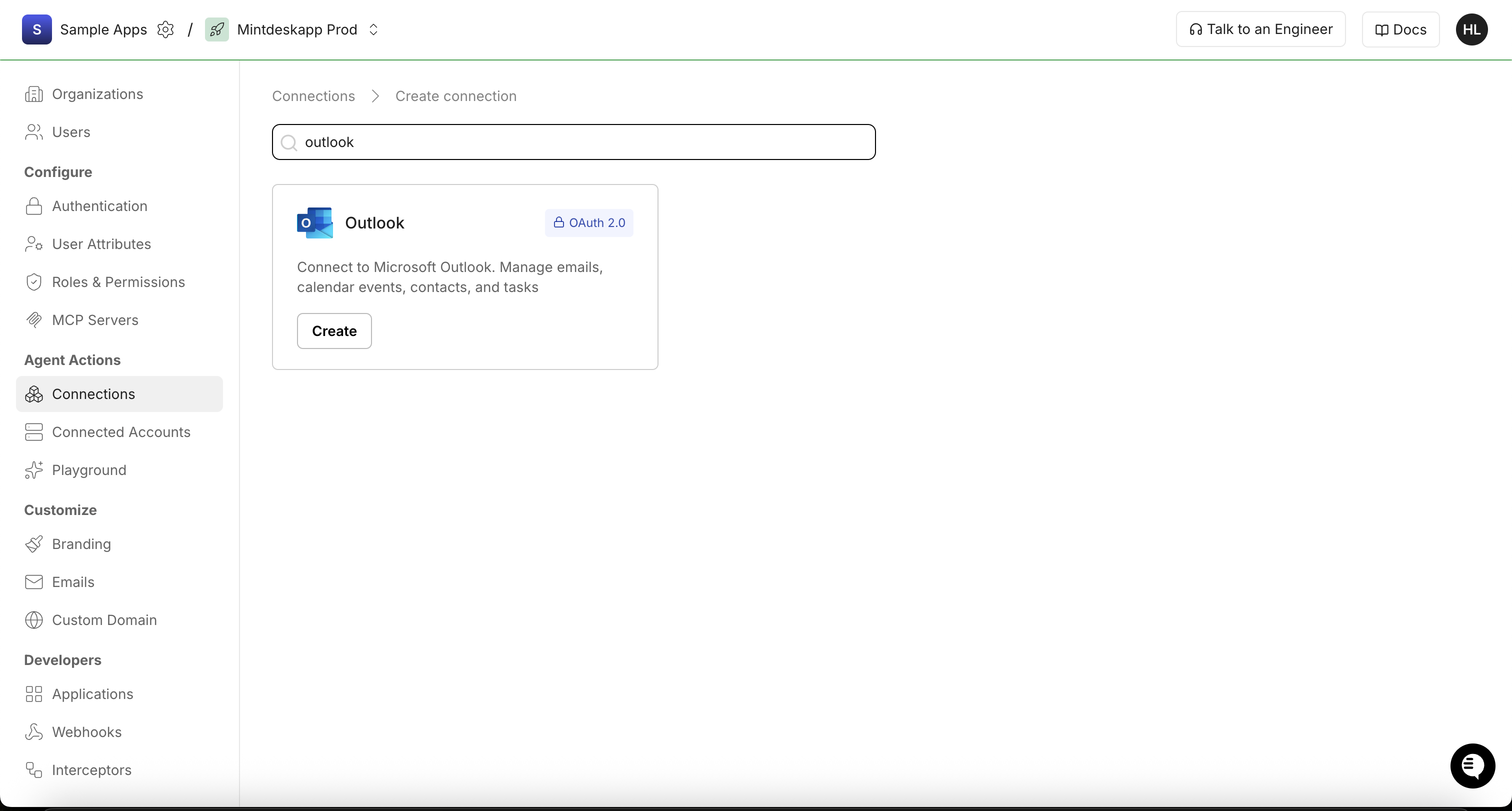
In Scalekit dashboard, go to AgentKit > Connections > Create Connection. Search for Outlook and click Create.
-
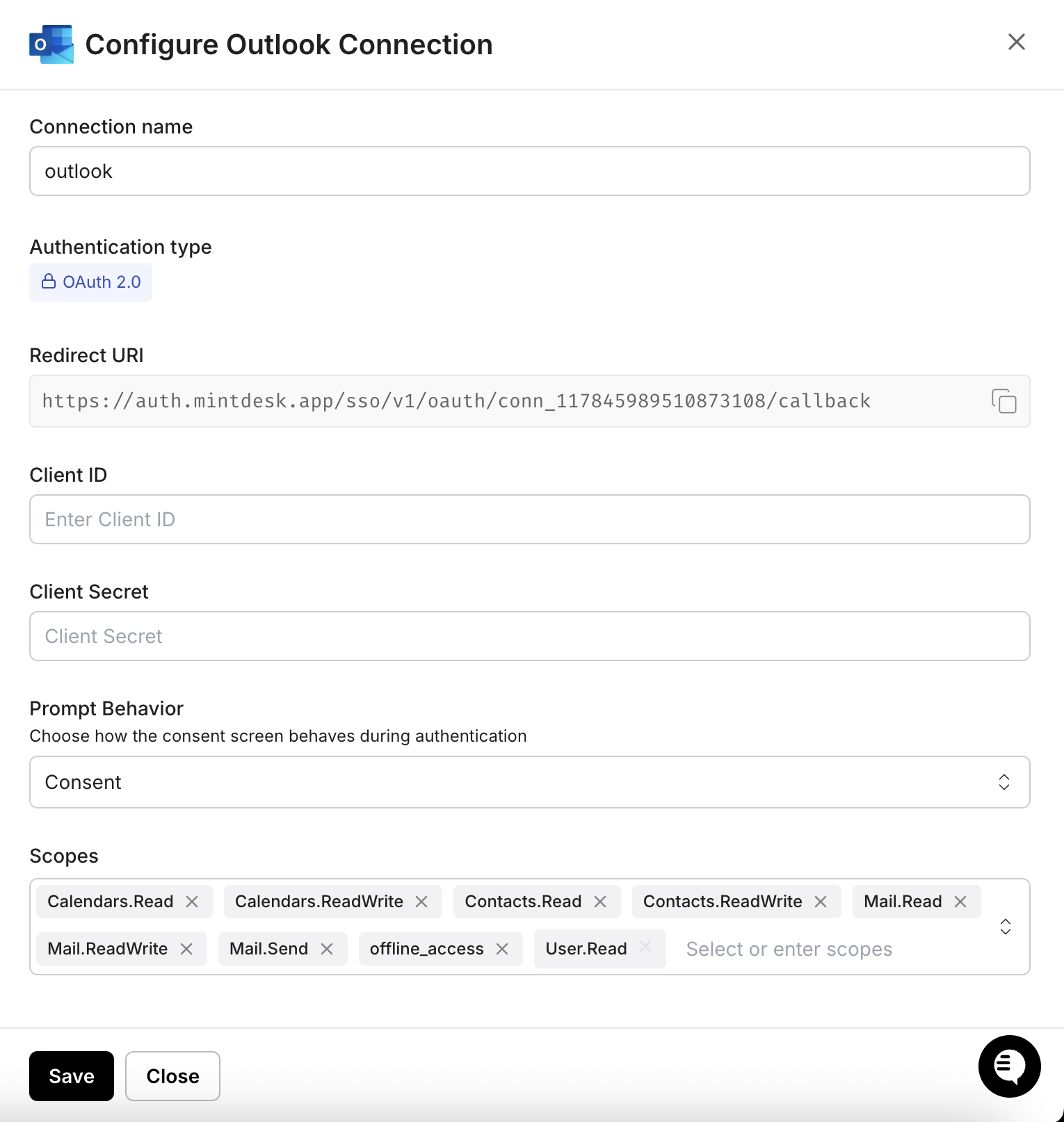
In the Configure Outlook Connection dialog, copy the Redirect URI. You will need this when registering your app in Azure.
-
-
Register an application in Azure
-
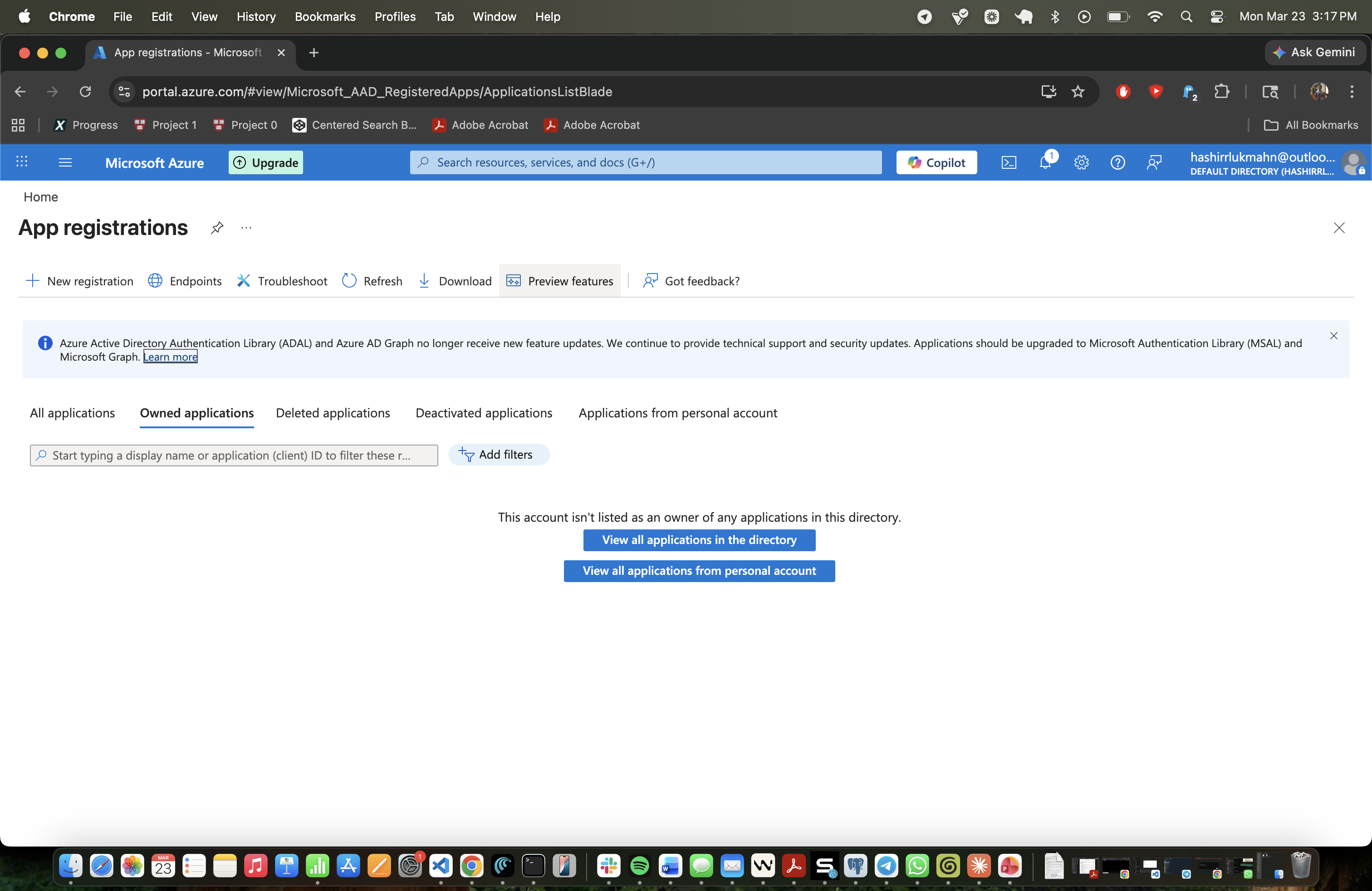
Sign into portal.azure.com and go to Microsoft Entra ID → App registrations.
-
Click New registration. Enter a name for your app (for example, “Scalekit Outlook Connector”).
-
Under Supported account types, select Accounts in any organizational directory (Any Microsoft Entra ID tenant - Multitenant) and personal Microsoft accounts.
-
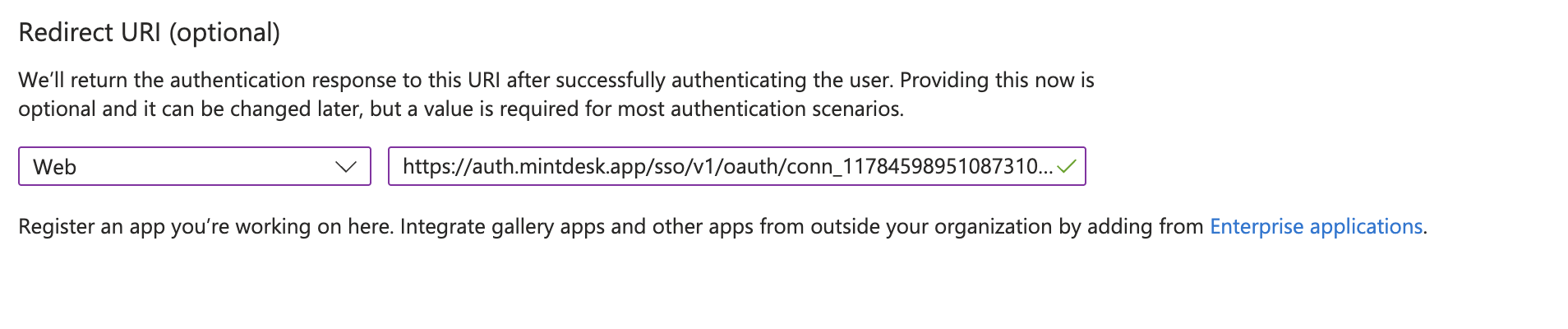
Under Redirect URI, select Web and paste the redirect URI you copied from the Scalekit dashboard. Click Register.
-
-
Get your client credentials
-
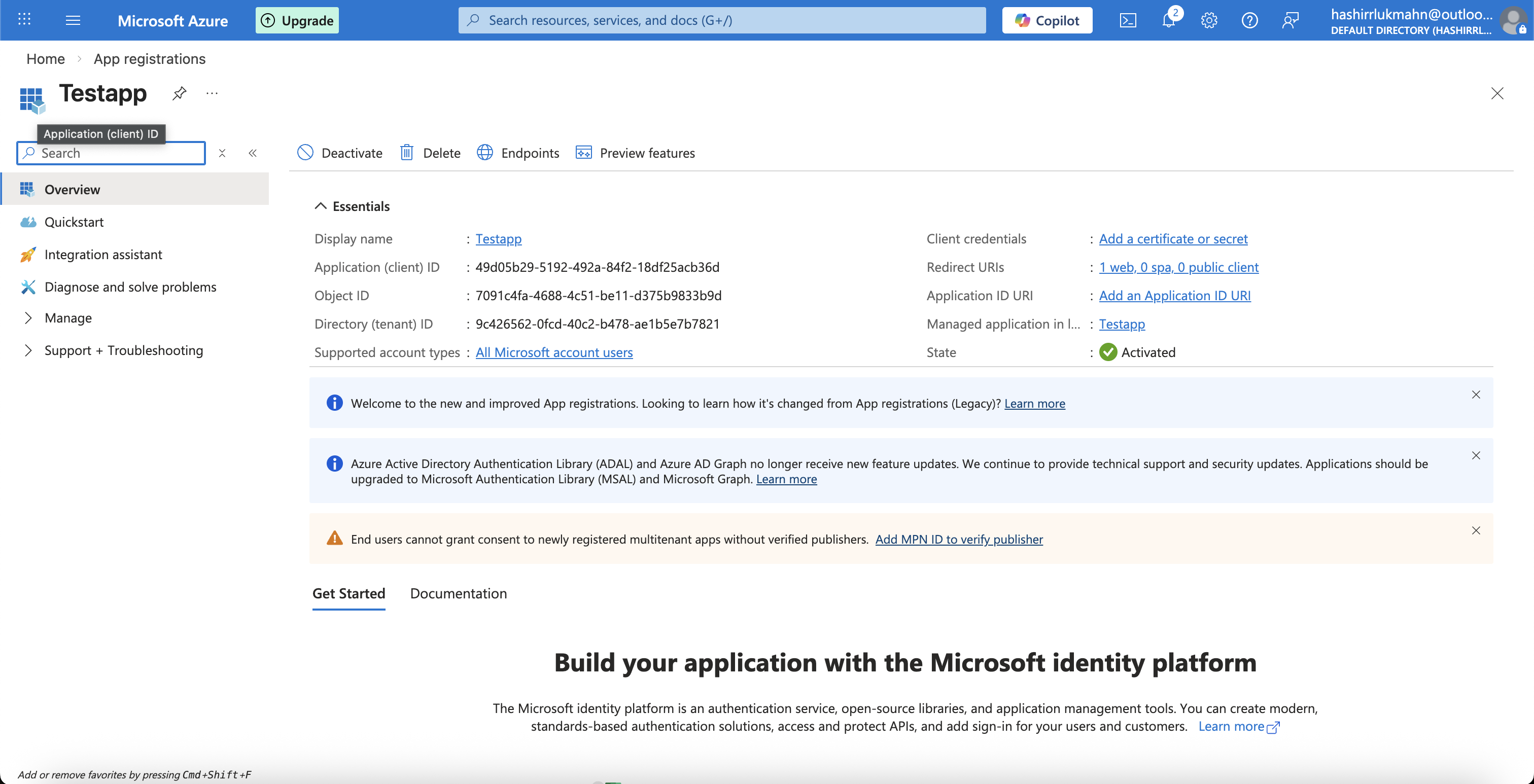
From the app’s Overview page, copy the Application (client) ID.
-
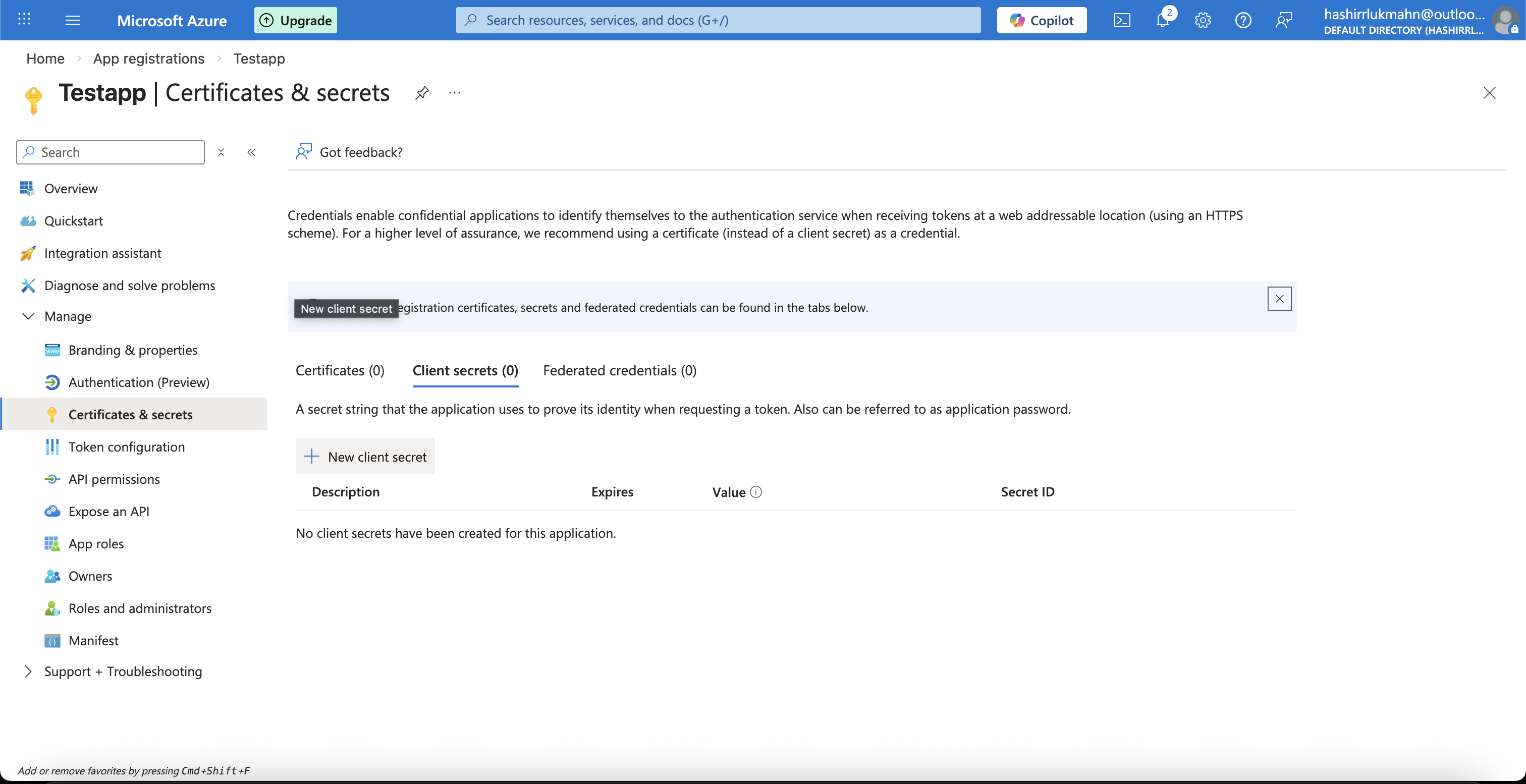
Go to Certificates & secrets in the left sidebar, then click + New client secret.
-
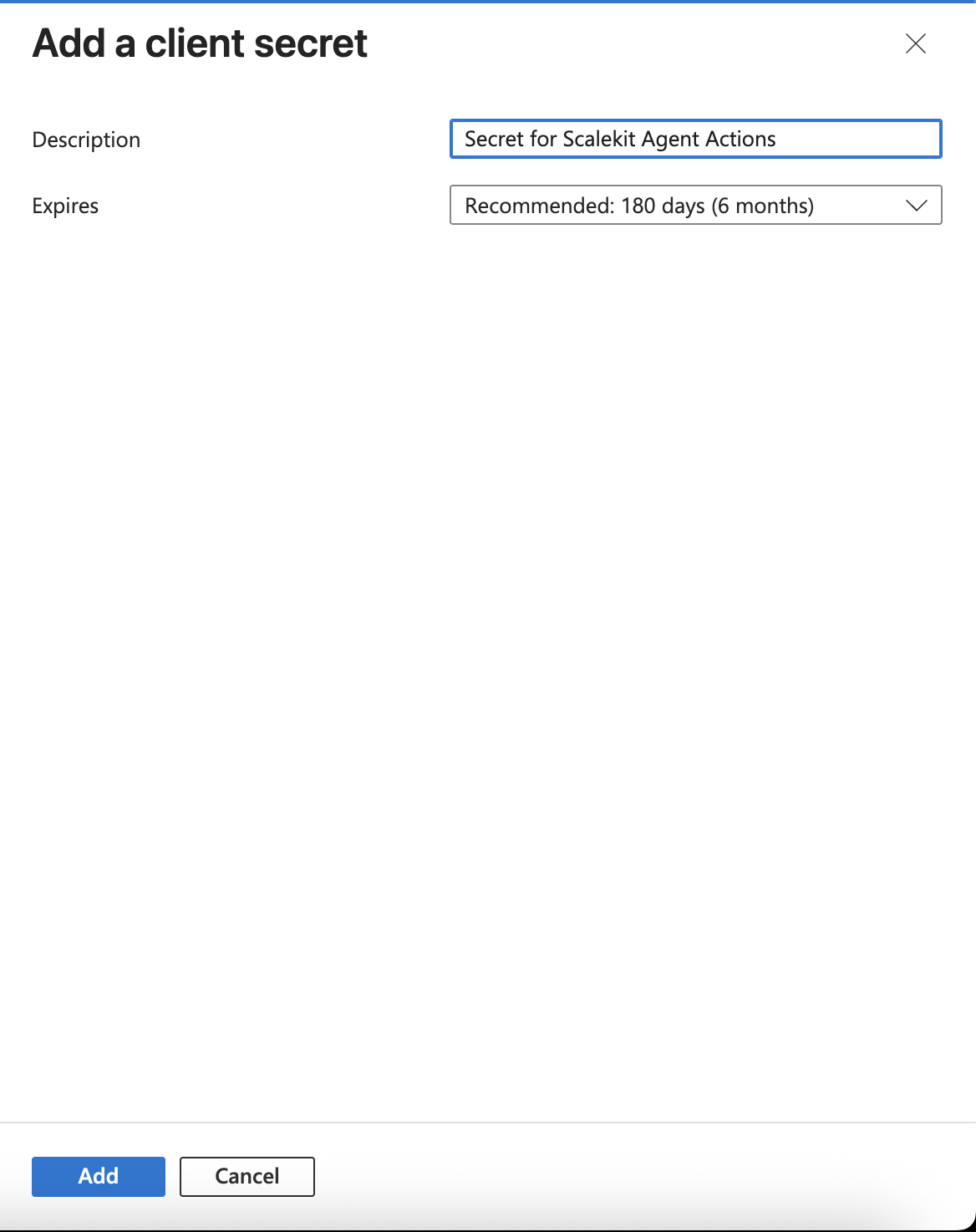
Enter a description (for example, “Secret for Scalekit Agent Actions”), set an expiry period, and click Add. Copy the secret Value immediately — it is only shown once.
-
-
Add credentials in Scalekit
-
In Scalekit dashboard, go to AgentKit > Connections and open the Outlook connection you created.
-
Enter your credentials:
- Client ID — the Application (client) ID from the Azure app overview
- Client Secret — the secret value from Certificates & secrets
- Scopes — select the permissions your app needs (for example,
Calendars.Read,Calendars.ReadWrite,Mail.Read,Mail.ReadWrite,Mail.Send,Contacts.Read,Contacts.ReadWrite,User.Read,offline_access). See Microsoft Graph permissions reference for the full list.
-
Click Save.
-
-
-
Authorize and make your first call
Section titled “Authorize and make your first call”quickstart.ts import { ScalekitClient } from '@scalekit-sdk/node'import 'dotenv/config'const scalekit = new ScalekitClient(process.env.SCALEKIT_ENV_URL,process.env.SCALEKIT_CLIENT_ID,process.env.SCALEKIT_CLIENT_SECRET,)const actions = scalekit.actionsconst connector = 'outlook'const identifier = 'user_123'// Generate an authorization link for the userconst { link } = await actions.getAuthorizationLink({ connectionName: connector, identifier })console.log('Authorize Outlook:', link)process.stdout.write('Press Enter after authorizing...')await new Promise(r => process.stdin.once('data', r))// Make your first callconst result = await actions.executeTool({connector,identifier,toolName: 'outlook_list_calendar_events',toolInput: {},})console.log(result)quickstart.py import osfrom scalekit.client import ScalekitClientfrom dotenv import load_dotenvload_dotenv()scalekit_client = ScalekitClient(env_url=os.getenv("SCALEKIT_ENV_URL"),client_id=os.getenv("SCALEKIT_CLIENT_ID"),client_secret=os.getenv("SCALEKIT_CLIENT_SECRET"),)actions = scalekit_client.actionsconnection_name = "outlook"identifier = "user_123"# Generate an authorization link for the userlink_response = actions.get_authorization_link(connection_name=connection_name,identifier=identifier,)print("Authorize Outlook:", link_response.link)input("Press Enter after authorizing...")# Make your first callresult = actions.execute_tool(tool_input={},tool_name="outlook_list_calendar_events",connection_name=connection_name,identifier=identifier,)print(result)
What you can do
Section titled “What you can do”Connect this agent connector to let your agent:
- Update shared calendar event, focused inbox override, contact folder — Update an existing event on another user’s calendar (shared or delegated access)
- List shared todo tasks, shared todo lists, shared contacts — List tasks in a Microsoft To Do list belonging to another user (a colleague)
- Get shared mailbox message, shared contact, free busy schedule — Get a single message from a shared mailbox by message ID
- Create shared calendar event, upload session, focused inbox override — Create an event on another user’s calendar (shared or delegated access)
- Send message from shared mailbox, message — Send an email message on behalf of a shared mailbox using Microsoft Graph API
- Search shared mailbox messages, people, messages — Search messages across all folders in a shared mailbox by keyword
Common workflows
Section titled “Common workflows”Proxy API call
const result = await actions.request({ connectionName: 'outlook', identifier: 'user_123', path: '/v1.0/me/messages', method: 'GET',});console.log(result);result = actions.request( connection_name='outlook', identifier='user_123', path="/v1.0/me/messages", method="GET")print(result)Execute a tool
const result = await actions.executeTool({ connector: 'outlook', identifier: 'user_123', toolName: 'outlook_create_calendar_event', toolInput: {},});console.log(result);result = actions.execute_tool( connection_name='outlook', identifier='user_123', tool_name='outlook_create_calendar_event', tool_input={},)print(result)Tool list
Section titled “Tool list”Use the exact tool names from the Tool list below when you call execute_tool. If you’re not sure which name to use, list the tools available for the current user first.
outlook_accept_event#Accept a calendar event invitation.5 params
Accept a calendar event invitation.
event_idstringrequiredEvent ID.commentstringoptionalResponse comment.schema_versionstringoptionalSchema versionsend_responsebooleanoptionalSend response.tool_versionstringoptionalTool versionoutlook_batch_move_messages#Move up to 20 Outlook messages to a destination folder in a single Microsoft Graph batch request. Builds a $batch envelope where each subrequest POSTs to /me/messages/{id}/move. Returns a 200 response with per-subrequest status codes inside the responses array.2 params
Move up to 20 Outlook messages to a destination folder in a single Microsoft Graph batch request. Builds a $batch envelope where each subrequest POSTs to /me/messages/{id}/move. Returns a 200 response with per-subrequest status codes inside the responses array.
destination_folder_idstringrequiredThe ID or well-known name of the destination folder (e.g., 'inbox', 'deleteditems', 'drafts', or a specific folder ID like 'AAMkAGI2...').message_idsarrayrequiredArray of message IDs to move (max 20). Each ID is an Outlook message ID string.outlook_batch_update_messages#Update properties on up to 20 Outlook messages in a single Microsoft Graph batch request. Builds a $batch envelope where each subrequest PATCHes /me/messages/{id} with the provided updates object. Common use: mark messages as read by passing {"isRead": true}. Returns a 200 response with per-subrequest status codes inside the responses array.2 params
Update properties on up to 20 Outlook messages in a single Microsoft Graph batch request. Builds a $batch envelope where each subrequest PATCHes /me/messages/{id} with the provided updates object. Common use: mark messages as read by passing {"isRead": true}. Returns a 200 response with per-subrequest status codes inside the responses array.
message_idsarrayrequiredArray of message IDs to update (max 20). Each ID is an Outlook message ID string.updatesobjectrequiredFree-form object of message properties to update on all specified messages. Example: {"isRead": true} to mark as read, or {"isRead": false, "flag": {"flagStatus": "flagged"}} for multiple changes.outlook_create_calendar_event#Create a new calendar event in the user's Outlook calendar. Supports attendees, recurrence, reminders, online meetings, multiple locations, and event properties.28 params
Create a new calendar event in the user's Outlook calendar. Supports attendees, recurrence, reminders, online meetings, multiple locations, and event properties.
end_datetimestringrequiredNo description.end_timezonestringrequiredNo description.start_datetimestringrequiredNo description.start_timezonestringrequiredNo description.subjectstringrequiredNo description.attendees_optionalstringoptionalArray of email addresses for optional attendeesattendees_requiredstringoptionalArray of email addresses for required attendeesattendees_resourcestringoptionalArray of email addresses for resources (meeting rooms, equipment)body_contentstringoptionalNo description.body_contentTypestringoptionalNo description.hideAttendeesbooleanoptionalWhen true, each attendee only sees themselvesimportancestringoptionalEvent importance levelisAllDaybooleanoptionalMark as all-day eventisOnlineMeetingbooleanoptionalCreate an online meeting (Teams/Skype)isReminderOnbooleanoptionalEnable or disable reminderlocationstringoptionalNo description.locationsstringoptionalJSON array of location objects with displayName, address, coordinatesonlineMeetingProviderstringoptionalOnline meeting providerrecurrence_days_of_weekstringoptionalDays of week for weekly recurrence (comma-separated)recurrence_end_datestringoptionalEnd date for recurrence (YYYY-MM-DD), required if range_type is endDaterecurrence_intervalintegeroptionalHow often the event recurs (e.g., every 2 weeks = 2)recurrence_occurrencesintegeroptionalNumber of occurrences, required if range_type is numberedrecurrence_range_typestringoptionalHow the recurrence endsrecurrence_start_datestringoptionalStart date for recurrence (YYYY-MM-DD)recurrence_typestringoptionalRecurrence pattern typereminderMinutesBeforeStartintegeroptionalMinutes before event start to show remindersensitivitystringoptionalEvent sensitivity/privacy levelshowAsstringoptionalFree/busy statusoutlook_create_calendar_group#Create a new calendar group in the signed-in user's mailbox. Calendar groups organize multiple calendars together in Outlook.1 param
Create a new calendar group in the signed-in user's mailbox. Calendar groups organize multiple calendars together in Outlook.
namestringrequiredThe name of the new calendar group (e.g., 'Work Calendars'). Must be unique among calendar groups for the user.outlook_create_calendar_permission#Grant a user access to a specific Outlook calendar by creating a calendar permission entry. Specify the user's email address and the role level (e.g., freeBusyRead, read, write, delegate).4 params
Grant a user access to a specific Outlook calendar by creating a calendar permission entry. Specify the user's email address and the role level (e.g., freeBusyRead, read, write, delegate).
calendar_idstringrequiredThe unique identifier of the calendar to share. Use a specific calendar ID from the list calendars endpoint.email_addressstringrequiredThe email address of the user to grant calendar access to. Example: colleague@example.comrolestringrequiredThe permission role to grant. Valid values: freeBusyRead (see free/busy only), limitedRead (see title and location), read (see all event details), write (create/edit/delete events), delegateWithoutPrivateEventAccess (delegate, no private events), delegateWithPrivateEventAccess (delegate including private events), custom (custom role).namestringoptionalDisplay name of the user to grant access to. Optional; the Graph API will resolve it from the email if omitted.outlook_create_category#Create a new Outlook master category for the signed-in user. Categories have a display name and a color preset (none or preset0–preset24). Once created, categories can be applied to messages, events, and contacts.2 params
Create a new Outlook master category for the signed-in user. Categories have a display name and a color preset (none or preset0–preset24). Once created, categories can be applied to messages, events, and contacts.
display_namestringrequiredThe display name of the new category. Must be unique among the user's categories.colorstringoptionalThe color assigned to the category. Use 'none' for no color, or 'preset0' through 'preset24' for a specific color slot. Defaults to preset0.outlook_create_contact#Create a new contact in the user's mailbox with name, email addresses, and phone numbers.7 params
Create a new contact in the user's mailbox with name, email addresses, and phone numbers.
givenNamestringrequiredFirst name of the contactsurnamestringrequiredLast name of the contactbusinessPhonesarrayoptionalArray of business phone numberscompanyNamestringoptionalCompany nameemailAddressesarrayoptionalArray of email address objects with 'address' and optional 'name' fieldsjobTitlestringoptionalJob titlemobilePhonestringoptionalMobile phone numberoutlook_create_contact_folder#Create a new contact folder in the signed-in user's mailbox. Optionally nest it under an existing parent folder by providing a parent folder ID.2 params
Create a new contact folder in the signed-in user's mailbox. Optionally nest it under an existing parent folder by providing a parent folder ID.
display_namestringrequiredThe display name for the new contact folder (e.g., 'Work Contacts').parent_folder_idstringoptionalOptional ID of the parent contact folder under which to create this folder. If omitted, the folder is created at the top level.outlook_create_draft_message#Create a new email draft in the mailbox.9 params
Create a new email draft in the mailbox.
bcc_recipientsstringoptionalBCC recipients.bodystringoptionalEmail body content.body_typestringoptionalBody content type.cc_recipientsstringoptionalCC recipients.importancestringoptionalImportance.schema_versionstringoptionalSchema versionsubjectstringoptionalEmail subject.to_recipientsstringoptionalTo recipients.tool_versionstringoptionalTool versionoutlook_create_focused_inbox_override#Create a Focused Inbox override that classifies all messages from a specific sender into either the Focused or Other inbox. This overrides the automatic machine learning classification for that sender.3 params
Create a Focused Inbox override that classifies all messages from a specific sender into either the Focused or Other inbox. This overrides the automatic machine learning classification for that sender.
classify_asstringrequiredHow to classify messages from this sender: 'focused' to route to Focused inbox, 'other' to route to Other inbox.sender_emailstringrequiredThe email address of the sender to create an override for (e.g., 'newsletter@example.com').sender_namestringoptionalOptional display name for the sender (e.g., 'Weekly Newsletter'). Used for display purposes only.outlook_create_forward_draft#Create a forward draft for a specific message.5 params
Create a forward draft for a specific message.
message_idstringrequiredMessage ID.commentstringoptionalForward comment.schema_versionstringoptionalSchema versionto_recipientsstringoptionalTo recipients.tool_versionstringoptionalTool versionoutlook_create_mail_folder#Create a new mail folder in the mailbox.4 params
Create a new mail folder in the mailbox.
display_namestringrequiredFolder name.is_hiddenbooleanoptionalHidden folder.schema_versionstringoptionalSchema versiontool_versionstringoptionalTool versionoutlook_create_message_rule#Create a new inbox message rule.8 params
Create a new inbox message rule.
display_namestringrequiredRule name.actionsobjectoptionalRule actions.conditionsobjectoptionalRule conditions.exceptionsobjectoptionalException conditions for the rule.is_enabledbooleanoptionalEnable rule.schema_versionstringoptionalSchema versionsequenceintegeroptionalRule sequence.tool_versionstringoptionalTool versionoutlook_create_reply_all_draft#Create a reply-all draft for a specific message.4 params
Create a reply-all draft for a specific message.
message_idstringrequiredMessage ID.commentstringoptionalReply comment.schema_versionstringoptionalSchema versiontool_versionstringoptionalTool versionoutlook_create_reply_draft#Create a reply draft for a specific message.4 params
Create a reply draft for a specific message.
message_idstringrequiredMessage ID.commentstringoptionalReply comment.schema_versionstringoptionalSchema versiontool_versionstringoptionalTool versionoutlook_create_upload_session#Create an upload session for attaching a large file to an Outlook message using Microsoft Graph. Returns an uploadUrl and expiration time. Use the uploadUrl to upload file content in chunks via PUT requests. Required for attachments larger than 3 MB.3 params
Create an upload session for attaching a large file to an Outlook message using Microsoft Graph. Returns an uploadUrl and expiration time. Use the uploadUrl to upload file content in chunks via PUT requests. Required for attachments larger than 3 MB.
attachment_namestringrequiredThe filename of the attachment (e.g., 'report.pdf'). Must include the file extension.attachment_sizeintegerrequiredThe total size of the attachment in bytes. Must be the exact file size before uploading.message_idstringrequiredThe ID of the draft Outlook message to attach the file to.outlook_decline_event#Decline a calendar event invitation.6 params
Decline a calendar event invitation.
event_idstringrequiredEvent ID.commentstringoptionalResponse comment.proposed_new_timeobjectoptionalProposed new meeting time.schema_versionstringoptionalSchema versionsend_responsebooleanoptionalSend response.tool_versionstringoptionalTool versionoutlook_delete_calendar_event#Delete a calendar event by ID.1 param
Delete a calendar event by ID.
event_idstringrequiredNo description.outlook_delete_calendar_group#Permanently delete a calendar group from the signed-in user's mailbox. Note: you cannot delete the default calendar group. All calendars within the group will also be deleted.1 param
Permanently delete a calendar group from the signed-in user's mailbox. Note: you cannot delete the default calendar group. All calendars within the group will also be deleted.
group_idstringrequiredThe unique ID of the calendar group to delete (e.g., 'AAMkAGI2...'). Obtain from List Calendar Groups. Cannot be the default calendar group.outlook_delete_calendar_permission#Revoke a user's access to a specific Outlook calendar by deleting the calendar permission entry. This action is permanent and immediately removes the user's access.2 params
Revoke a user's access to a specific Outlook calendar by deleting the calendar permission entry. This action is permanent and immediately removes the user's access.
calendar_idstringrequiredThe unique identifier of the calendar from which to remove the permission.permission_idstringrequiredThe unique identifier of the calendar permission entry to delete. Retrieve from the list calendar permissions endpoint.outlook_delete_category#Delete an Outlook master category for the signed-in user. This permanently removes the category definition. Any messages or items tagged with this category will retain the tag label but the category color will no longer appear.1 param
Delete an Outlook master category for the signed-in user. This permanently removes the category definition. Any messages or items tagged with this category will retain the tag label but the category color will no longer appear.
category_idstringrequiredThe unique ID of the Outlook category to delete. Retrieve it from the list_categories tool.outlook_delete_contact#Permanently delete a contact.3 params
Permanently delete a contact.
contact_idstringrequiredContact ID.schema_versionstringoptionalSchema versiontool_versionstringoptionalTool versionoutlook_delete_contact_folder#Permanently delete a contact folder and all its contents from the signed-in user's mailbox. This action cannot be undone.1 param
Permanently delete a contact folder and all its contents from the signed-in user's mailbox. This action cannot be undone.
folder_idstringrequiredThe unique ID of the contact folder to delete (e.g., 'AAMkAGI2...'). Obtain from List Contact Folders. Warning: deletes all contacts within the folder.outlook_delete_focused_inbox_override#Delete a Focused Inbox override rule for the signed-in user. Once deleted, messages from that sender will revert to automatic machine learning classification.1 param
Delete a Focused Inbox override rule for the signed-in user. Once deleted, messages from that sender will revert to automatic machine learning classification.
override_idstringrequiredThe unique ID of the Focused Inbox override rule to delete (e.g., 'AAMkAGI2...'). Obtain this from the List Focused Inbox Overrides tool.outlook_delete_mail_folder#Permanently delete a mail folder and its contents.3 params
Permanently delete a mail folder and its contents.
folder_idstringrequiredFolder ID.schema_versionstringoptionalSchema versiontool_versionstringoptionalTool versionoutlook_delete_message#Permanently delete an email message.3 params
Permanently delete an email message.
message_idstringrequiredMessage ID.schema_versionstringoptionalSchema versiontool_versionstringoptionalTool versionoutlook_delete_message_rule#Delete an inbox message rule.3 params
Delete an inbox message rule.
rule_idstringrequiredRule ID.schema_versionstringoptionalSchema versiontool_versionstringoptionalTool versionoutlook_find_meeting_times#Find available meeting time slots for a set of attendees using Microsoft Graph's findMeetingTimes API. Returns a list of suggested meeting times when all required attendees are available within the given time window.7 params
Find available meeting time slots for a set of attendees using Microsoft Graph's findMeetingTimes API. Returns a list of suggested meeting times when all required attendees are available within the given time window.
attendee_emailsarrayrequiredArray of attendee email addresses to check availability for. Example: ["alice@example.com", "bob@example.com"]end_date_timestringrequiredEnd of the time window to search for meeting times, in ISO 8601 format (e.g., 2025-01-15T18:00:00). The API will not suggest slots after this time.meeting_durationstringrequiredDuration of the desired meeting in ISO 8601 duration format (e.g., PT30M for 30 minutes, PT1H for 1 hour, PT1H30M for 1.5 hours).start_date_timestringrequiredStart of the time window to search for meeting times, in ISO 8601 format (e.g., 2025-01-15T08:00:00). The API will look for available slots at or after this time.is_organizer_optionalbooleanoptionalWhether the meeting organizer's presence is optional. When true, the organizer's calendar is not checked for availability. Defaults to false.max_candidatesintegeroptionalMaximum number of meeting time suggestions to return. Defaults to 20. Acceptable range: 1-40.time_zonestringoptionalIANA time zone identifier for interpreting start_date_time and end_date_time (e.g., "UTC", "America/New_York", "Europe/London"). Defaults to UTC.outlook_forward_event#Forward a calendar event to other people.5 params
Forward a calendar event to other people.
commentstringrequiredForward comment.event_idstringrequiredEvent ID.to_recipientsstringrequiredTo recipients.schema_versionstringoptionalSchema versiontool_versionstringoptionalTool versionoutlook_get_attachment#Download a specific attachment from an Outlook email message by attachment ID. Returns the full attachment including base64-encoded file content in the contentBytes field. Use List Attachments to get the attachment ID first.2 params
Download a specific attachment from an Outlook email message by attachment ID. Returns the full attachment including base64-encoded file content in the contentBytes field. Use List Attachments to get the attachment ID first.
attachment_idstringrequiredThe ID of the attachment to download.message_idstringrequiredThe ID of the message containing the attachment.outlook_get_calendar_event#Retrieve an existing calendar event by ID from the user's Outlook calendar.1 param
Retrieve an existing calendar event by ID from the user's Outlook calendar.
event_idstringrequiredNo description.outlook_get_calendar_view#Retrieve a collection of calendar events within a specific time range from the user's primary Outlook calendar. Returns all occurrences, exceptions, and single instances of events whose start/end times fall within the specified window.6 params
Retrieve a collection of calendar events within a specific time range from the user's primary Outlook calendar. Returns all occurrences, exceptions, and single instances of events whose start/end times fall within the specified window.
endDateTimestringrequiredEnd of the time range in ISO 8601 format (e.g., 2025-01-31T23:59:59). The calendar view returns events that end or overlap with this time.startDateTimestringrequiredStart of the time range in ISO 8601 format (e.g., 2025-01-01T00:00:00). The calendar view returns events that start or overlap with this time.$filterstringoptionalOData filter expression to further narrow results (e.g., "subject eq 'Team Sync'").$orderbystringoptionalOData orderby expression to sort results (e.g., "start/dateTime asc").$selectstringoptionalComma-separated list of properties to include in the response (e.g., "subject,start,end,location"). Reduces payload size.$topintegeroptionalMaximum number of events to return (1-1000). Defaults to 10 if omitted.outlook_get_contact#Retrieve a specific contact by ID.5 params
Retrieve a specific contact by ID.
contact_idstringrequiredContact ID.expandstringoptionalExpand relationships.schema_versionstringoptionalSchema versionselectstringoptionalSelect properties.tool_versionstringoptionalTool versionoutlook_get_contact_photo#Retrieve the profile photo of a specific contact in the signed-in user's mailbox. Returns binary image data (JPEG). A 404 response indicates no photo is set for this contact.1 param
Retrieve the profile photo of a specific contact in the signed-in user's mailbox. Returns binary image data (JPEG). A 404 response indicates no photo is set for this contact.
contact_idstringrequiredThe unique ID of the contact whose photo to retrieve (e.g., 'AAMkAGI2...'). Obtain from List Contacts or Get Contact.outlook_get_free_busy_schedule#Retrieve the free/busy availability schedule for one or more users, rooms, or resources within a specific time window. Returns availability view, schedule items, and working hours for each requested address.5 params
Retrieve the free/busy availability schedule for one or more users, rooms, or resources within a specific time window. Returns availability view, schedule items, and working hours for each requested address.
end_date_timestringrequiredEnd of the time window to retrieve schedule availability, in ISO 8601 format (e.g., 2025-01-15T18:00:00).schedulesarrayrequiredArray of SMTP email addresses of users, distribution lists, or resources to get free/busy information for. Example: ["alice@example.com", "room@example.com"]start_date_timestringrequiredStart of the time window to retrieve schedule availability, in ISO 8601 format (e.g., 2025-01-15T08:00:00).availability_view_intervalintegeroptionalDuration in minutes of each time slot in the availability view string. Valid values: 5, 6, 10, 15, 20, 30, 60 (default), 120, 240, 480, or 1440.time_zonestringoptionalIANA time zone identifier for interpreting start and end times (e.g., "UTC", "America/New_York", "Europe/London"). Defaults to UTC.outlook_get_mail_tips#Get mail tips for a list of recipients before sending an email.4 params
Get mail tips for a list of recipients before sending an email.
email_addressesarrayrequiredRecipient email addresses.mail_tips_optionsstringrequiredMail tip types.schema_versionstringoptionalSchema versiontool_versionstringoptionalTool versionoutlook_get_message#Retrieve a specific email message by ID from the user's Outlook mailbox, including full body content, sender, recipients, attachments info, and metadata.1 param
Retrieve a specific email message by ID from the user's Outlook mailbox, including full body content, sender, recipients, attachments info, and metadata.
message_idstringrequiredThe ID of the message to retrieve.outlook_get_user_presence#Get the presence status of a specific user.3 params
Get the presence status of a specific user.
user_idstringrequiredUser ID or email.schema_versionstringoptionalSchema versiontool_versionstringoptionalTool versionoutlook_list_attachments#List all attachments on a specific Outlook email message. Returns attachment metadata including ID, name, size, and content type. Use the attachment ID with Get Attachment to download the file content.1 param
List all attachments on a specific Outlook email message. Returns attachment metadata including ID, name, size, and content type. Use the attachment ID with Get Attachment to download the file content.
message_idstringrequiredThe ID of the message to list attachments for.outlook_list_calendar_events#List calendar events from the user's Outlook calendar with filtering, sorting, pagination, and field selection.5 params
List calendar events from the user's Outlook calendar with filtering, sorting, pagination, and field selection.
filterstringoptionalOData filter expression to filter events (e.g., startsWith(subject,'All'))orderbystringoptionalOData orderby expression to sort events (e.g., start/dateTime desc)selectstringoptionalComma-separated list of properties to include in the responseskipnumberoptionalNumber of events to skip for paginationtopnumberoptionalMaximum number of events to returnoutlook_list_calendar_groups#List all calendar groups in the signed-in user's mailbox. Calendar groups are containers that organize multiple calendars together in Outlook.2 params
List all calendar groups in the signed-in user's mailbox. Calendar groups are containers that organize multiple calendars together in Outlook.
$selectstringoptionalComma-separated list of properties to return (e.g., 'name,classId'). Reduces response size.$topintegeroptionalMaximum number of calendar groups to return (1–200, default: 10).outlook_list_calendar_permissions#List all sharing permissions for a specific Outlook calendar. Returns the set of users and their assigned roles (e.g., freeBusyRead, read, write, delegate) for the given calendar.2 params
List all sharing permissions for a specific Outlook calendar. Returns the set of users and their assigned roles (e.g., freeBusyRead, read, write, delegate) for the given calendar.
calendar_idstringrequiredThe unique identifier of the calendar whose permissions to list. Use 'primary' for the default calendar or a specific calendar ID from the list calendars endpoint.$topintegeroptionalMaximum number of permission entries to return (1-1000). Defaults to all entries if omitted.outlook_list_calendars#Retrieve all calendars in the user mailbox.4 params
Retrieve all calendars in the user mailbox.
schema_versionstringoptionalSchema versionskipintegeroptionalSkip count.tool_versionstringoptionalTool versiontopintegeroptionalPage size.outlook_list_categories#List all Outlook master categories defined for the signed-in user. Categories can be applied to messages, events, and contacts for color-coded organization.2 params
List all Outlook master categories defined for the signed-in user. Categories can be applied to messages, events, and contacts for color-coded organization.
$selectstringoptionalComma-separated list of category properties to return (e.g., 'displayName,color').$topintegeroptionalMaximum number of categories to return (1–200).outlook_list_contact_folders#List all contact folders in the signed-in user's mailbox. Supports OData query parameters for filtering, field selection, and pagination.3 params
List all contact folders in the signed-in user's mailbox. Supports OData query parameters for filtering, field selection, and pagination.
$filterstringoptionalOData filter expression to narrow results (e.g., "displayName eq 'Favorites'").$selectstringoptionalComma-separated list of properties to return (e.g., 'displayName,parentFolderId'). Reduces response size.$topintegeroptionalMaximum number of contact folders to return (1–200, default: 10).outlook_list_contacts#List all contacts in the user's mailbox with support for filtering, pagination, and field selection.5 params
List all contacts in the user's mailbox with support for filtering, pagination, and field selection.
$filterstringoptionalFilter expression to narrow results (e.g., "emailAddresses/any(a:a/address eq 'user@example.com')")$orderbystringoptionalProperty to sort by (e.g., "displayName")$selectstringoptionalComma-separated list of properties to return (e.g., "displayName,emailAddresses,phoneNumbers")$skipintegeroptionalNumber of contacts to skip for pagination$topintegeroptionalNumber of contacts to return (default: 10)outlook_list_event_instances#List all instances (occurrences) of a recurring calendar event within a specified date-time range. Requires the master recurring event ID and a start/end window in ISO 8601 format.5 params
List all instances (occurrences) of a recurring calendar event within a specified date-time range. Requires the master recurring event ID and a start/end window in ISO 8601 format.
end_date_timestringrequiredEnd of the time window to query for instances, in ISO 8601 format (e.g., '2024-12-31T23:59:59Z'). Required by Microsoft Graph.event_idstringrequiredThe unique ID of the master recurring event whose instances to list (e.g., 'AAMkAGI2...'). This must be the series master event ID, not an individual occurrence.start_date_timestringrequiredStart of the time window to query for instances, in ISO 8601 format (e.g., '2024-01-01T00:00:00Z'). Required by Microsoft Graph.$selectstringoptionalComma-separated list of event properties to return (e.g., 'subject,start,end'). Reduces response size.$topintegeroptionalMaximum number of event instances to return (1–200, default: 10).outlook_list_focused_inbox_overrides#List all Focused Inbox overrides for the signed-in user. Overrides define how messages from specific senders are classified — either into the Focused inbox or the Other inbox — overriding the automatic machine learning classification.2 params
List all Focused Inbox overrides for the signed-in user. Overrides define how messages from specific senders are classified — either into the Focused inbox or the Other inbox — overriding the automatic machine learning classification.
$selectstringoptionalComma-separated list of properties to return (e.g., 'classifyAs,senderEmailAddress').$topintegeroptionalMaximum number of overrides to return per page.outlook_list_folder_delta#Get incremental changes (delta sync) for mail folders in the user's mailbox using Microsoft Graph delta query. Returns new, updated, and deleted folders since the last sync. The response includes @odata.nextLink for pagination or @odata.deltaLink for the next delta call.3 params
Get incremental changes (delta sync) for mail folders in the user's mailbox using Microsoft Graph delta query. Returns new, updated, and deleted folders since the last sync. The response includes @odata.nextLink for pagination or @odata.deltaLink for the next delta call.
$deltatokenstringoptionalDelta token from a previous @odata.deltaLink response to retrieve only folder changes since the last sync. Omit on first call to get a full initial sync.$selectstringoptionalComma-separated list of folder properties to return (e.g., 'displayName,parentFolderId,totalItemCount,unreadItemCount').$topintegeroptionalMaximum number of folders to return per page (1–250).outlook_list_mail_folders#List all mail folders in the user mailbox.5 params
List all mail folders in the user mailbox.
include_hiddenbooleanoptionalInclude hidden folders.schema_versionstringoptionalSchema versionskipintegeroptionalSkip count.tool_versionstringoptionalTool versiontopintegeroptionalPage size.outlook_list_message_delta#Get incremental changes (delta sync) for messages in a specific mail folder using Microsoft Graph delta query. Returns new, updated, and deleted messages since the last sync. The response includes @odata.nextLink for pagination or @odata.deltaLink for the next delta call. Pass $deltatoken from a previous deltaLink to get only changes since then.5 params
Get incremental changes (delta sync) for messages in a specific mail folder using Microsoft Graph delta query. Returns new, updated, and deleted messages since the last sync. The response includes @odata.nextLink for pagination or @odata.deltaLink for the next delta call. Pass $deltatoken from a previous deltaLink to get only changes since then.
folder_idstringrequiredThe mail folder ID or well-known name to sync (e.g., 'inbox', 'sentitems', 'drafts', or a specific folder ID).$deltatokenstringoptionalDelta token from a previous @odata.deltaLink response to retrieve only changes since the last sync. Omit on first call to get a full initial sync.$selectstringoptionalComma-separated list of properties to return (e.g., 'subject,from,receivedDateTime,isRead'). Reduces response size.$skiptokenstringoptionalSkip token from a previous @odata.nextLink response to continue paginating through a large delta result set.$topintegeroptionalMaximum number of messages to return per page (1–1000).outlook_list_message_rules#List all inbox message rules for the user.2 params
List all inbox message rules for the user.
schema_versionstringoptionalSchema versiontool_versionstringoptionalTool versionoutlook_list_messages#List all messages in the user's mailbox with support for filtering, pagination, and field selection. Returns 10 messages by default.5 params
List all messages in the user's mailbox with support for filtering, pagination, and field selection. Returns 10 messages by default.
$filterstringoptionalFilter expression to narrow results (e.g., "from/emailAddress/address eq 'user@example.com'")$orderbystringoptionalProperty to sort by (e.g., "receivedDateTime desc")$selectstringoptionalComma-separated list of properties to return (e.g., "subject,from,receivedDateTime")$skipintegeroptionalNumber of messages to skip for pagination$topintegeroptionalNumber of messages to return (1-1000, default: 10)outlook_mailbox_settings_get#Retrieve the mailbox settings for the signed-in user. Returns automatic replies (out-of-office) configuration, language, timezone, working hours, date/time format, and delegate meeting message delivery preferences.0 params
Retrieve the mailbox settings for the signed-in user. Returns automatic replies (out-of-office) configuration, language, timezone, working hours, date/time format, and delegate meeting message delivery preferences.
outlook_mailbox_settings_update#Update mailbox settings for the signed-in user. Supports configuring automatic replies (out-of-office), language, timezone, working hours, date/time format, and delegate meeting message delivery preferences. Only fields provided will be updated.7 params
Update mailbox settings for the signed-in user. Supports configuring automatic replies (out-of-office), language, timezone, working hours, date/time format, and delegate meeting message delivery preferences. Only fields provided will be updated.
automaticRepliesSettingobjectoptionalConfiguration for automatic replies (out-of-office). Set status, internal/external reply messages, and optional scheduled time window.dateFormatstringoptionalPreferred date format string for the mailbox (e.g., 'MM/dd/yyyy', 'dd/MM/yyyy', 'yyyy-MM-dd').delegateMeetingMessageDeliveryOptionsstringoptionalControls how meeting messages are delivered when a delegate is configured.languageobjectoptionalLanguage and locale for the mailbox. Object with locale (e.g., 'en-US') and displayName.timeFormatstringoptionalPreferred time format string for the mailbox (e.g., 'hh:mm tt' for 12-hour, 'HH:mm' for 24-hour).timeZonestringoptionalPreferred time zone for the mailbox (e.g., 'UTC', 'Pacific Standard Time', 'Eastern Standard Time').workingHoursobjectoptionalWorking hours configuration including days of week, start/end times, and time zone.outlook_move_message#Move a message to a different mail folder.4 params
Move a message to a different mail folder.
destination_idstringrequiredDestination folder ID.message_idstringrequiredMessage ID.schema_versionstringoptionalSchema versiontool_versionstringoptionalTool versionoutlook_reply_to_message#Reply to an existing email message. The reply is automatically sent to the original sender and saved in the Sent Items folder.2 params
Reply to an existing email message. The reply is automatically sent to the original sender and saved in the Sent Items folder.
commentstringrequiredReply message contentmessageIdstringrequiredThe unique identifier of the message to reply tooutlook_search_messages#Search messages by keywords across subject, body, sender, and other fields. Returns matching messages with support for pagination.4 params
Search messages by keywords across subject, body, sender, and other fields. Returns matching messages with support for pagination.
querystringrequiredSearch query string (searches across subject, body, from, to)$selectstringoptionalComma-separated list of properties to return (e.g., "subject,from,receivedDateTime")$skipintegeroptionalNumber of messages to skip for pagination$topintegeroptionalNumber of messages to return (1-1000, default: 10)outlook_search_people#Search for people relevant to the signed-in user by name or email.8 params
Search for people relevant to the signed-in user by name or email.
filterstringoptionalOData filter.order_bystringoptionalOrder by field.schema_versionstringoptionalSchema versionsearchstringoptionalSearch query.selectstringoptionalSelect properties.skipintegeroptionalSkip count.tool_versionstringoptionalTool versiontopintegeroptionalPage size.outlook_send_message#Send an email message using Microsoft Graph API. The message is saved in the Sent Items folder by default.7 params
Send an email message using Microsoft Graph API. The message is saved in the Sent Items folder by default.
bodystringrequiredBody content of the emailsubjectstringrequiredSubject line of the emailtoRecipientsarrayrequiredArray of email addresses to send tobccRecipientsarrayoptionalArray of email addresses to BCCbodyTypestringoptionalContent type of the body (Text or HTML)ccRecipientsarrayoptionalArray of email addresses to CCsaveToSentItemsbooleanoptionalSave the message in Sent Items folder (default: true)outlook_tentatively_accept_event#Tentatively accept a calendar event invitation.6 params
Tentatively accept a calendar event invitation.
event_idstringrequiredEvent ID.commentstringoptionalResponse comment.proposed_new_timeobjectoptionalProposed new meeting time.schema_versionstringoptionalSchema versionsend_responsebooleanoptionalSend response.tool_versionstringoptionalTool versionoutlook_todo_checklist_items_create#Add a checklist item (subtask) to a specific task in a Microsoft To Do task list.4 params
Add a checklist item (subtask) to a specific task in a Microsoft To Do task list.
display_namestringrequiredThe display name of the checklist item.list_idstringrequiredThe ID of the task list.task_idstringrequiredThe ID of the task to add the checklist item to.is_checkedbooleanoptionalWhether the checklist item is already checked/completed.outlook_todo_checklist_items_delete#Permanently delete a checklist item (subtask) from a task in a Microsoft To Do task list.3 params
Permanently delete a checklist item (subtask) from a task in a Microsoft To Do task list.
checklist_item_idstringrequiredThe ID of the checklist item to delete.list_idstringrequiredThe ID of the task list.task_idstringrequiredThe ID of the task.outlook_todo_checklist_items_get#Get a specific checklist item (subtask) from a task in a Microsoft To Do task list.3 params
Get a specific checklist item (subtask) from a task in a Microsoft To Do task list.
checklist_item_idstringrequiredThe ID of the checklist item.list_idstringrequiredThe ID of the task list.task_idstringrequiredThe ID of the task.outlook_todo_checklist_items_list#List all checklist items (subtasks) for a specific task in a Microsoft To Do task list.2 params
List all checklist items (subtasks) for a specific task in a Microsoft To Do task list.
list_idstringrequiredThe ID of the task list.task_idstringrequiredThe ID of the task.outlook_todo_checklist_items_update#Update a checklist item (subtask) in a Microsoft To Do task. Only provided fields are changed.5 params
Update a checklist item (subtask) in a Microsoft To Do task. Only provided fields are changed.
checklist_item_idstringrequiredThe ID of the checklist item to update.list_idstringrequiredThe ID of the task list.task_idstringrequiredThe ID of the task.display_namestringoptionalNew display name for the checklist item.is_checkedbooleanoptionalWhether the checklist item is checked/completed.outlook_todo_lists_create#Create a new Microsoft To Do task list.1 param
Create a new Microsoft To Do task list.
display_namestringrequiredThe name of the task list.outlook_todo_lists_delete#Permanently delete a Microsoft To Do task list and all its tasks.1 param
Permanently delete a Microsoft To Do task list and all its tasks.
list_idstringrequiredThe ID of the task list to delete.outlook_todo_lists_get#Get a specific Microsoft To Do task list by ID.1 param
Get a specific Microsoft To Do task list by ID.
list_idstringrequiredThe ID of the task list.outlook_todo_lists_list#List all Microsoft To Do task lists for the current user.0 params
List all Microsoft To Do task lists for the current user.
outlook_todo_lists_update#Rename a Microsoft To Do task list.2 params
Rename a Microsoft To Do task list.
display_namestringrequiredThe new name for the task list.list_idstringrequiredThe ID of the task list to update.outlook_todo_tasks_create#Create a new task in a Microsoft To Do task list with optional body, due date, importance, and reminder.10 params
Create a new task in a Microsoft To Do task list with optional body, due date, importance, and reminder.
list_idstringrequiredThe ID of the task list to add the task to.titlestringrequiredThe title of the task.bodystringoptionalThe body/notes of the task (plain text).categoriesarrayoptionalArray of category names to assign to the task.due_datestringoptionalDue date in YYYY-MM-DD format (e.g. "2026-04-15").due_time_zonestringoptionalTime zone for the due date (e.g. "UTC", "America/New_York"). Defaults to UTC.importancestringoptionalThe importance of the task: low, normal, or high.reminder_date_timestringoptionalReminder date and time in ISO 8601 format (e.g. "2026-04-15T09:00:00").reminder_time_zonestringoptionalTime zone for the reminder (e.g. "UTC"). Defaults to UTC.statusstringoptionalThe status of the task: notStarted, inProgress, completed, waitingOnOthers, or deferred.outlook_todo_tasks_delete#Permanently delete a task from a Microsoft To Do task list.2 params
Permanently delete a task from a Microsoft To Do task list.
list_idstringrequiredThe ID of the task list.task_idstringrequiredThe ID of the task to delete.outlook_todo_tasks_get#Get a specific task from a Microsoft To Do task list.2 params
Get a specific task from a Microsoft To Do task list.
list_idstringrequiredThe ID of the task list.task_idstringrequiredThe ID of the task.outlook_todo_tasks_list#List all tasks in a Microsoft To Do task list with optional filtering and pagination.5 params
List all tasks in a Microsoft To Do task list with optional filtering and pagination.
list_idstringrequiredThe ID of the task list.$filterstringoptionalOData filter expression (e.g. "status eq 'notStarted'").$orderbystringoptionalProperty to sort by (e.g. "createdDateTime desc").$skipintegeroptionalNumber of tasks to skip for pagination.$topintegeroptionalNumber of tasks to return (default: 10).outlook_todo_tasks_update#Update a task in a Microsoft To Do task list. Only provided fields are changed.9 params
Update a task in a Microsoft To Do task list. Only provided fields are changed.
list_idstringrequiredThe ID of the task list.task_idstringrequiredThe ID of the task to update.bodystringoptionalNew body/notes for the task (plain text).categoriesarrayoptionalArray of category names to assign to the task.due_datestringoptionalDue date in YYYY-MM-DD format.due_time_zonestringoptionalTime zone for the due date. Defaults to UTC.importancestringoptionalThe importance: low, normal, or high.statusstringoptionalThe status: notStarted, inProgress, completed, waitingOnOthers, or deferred.titlestringoptionalNew title for the task.outlook_update_calendar_event#Update an existing Outlook calendar event. Only provided fields will be updated. Supports time, attendees, location, reminders, online meetings, recurrence, and event properties.30 params
Update an existing Outlook calendar event. Only provided fields will be updated. Supports time, attendees, location, reminders, online meetings, recurrence, and event properties.
event_idstringrequiredThe ID of the calendar event to updateattendees_optionalstringoptionalComma-separated optional attendee emailsattendees_requiredstringoptionalComma-separated required attendee emailsattendees_resourcestringoptionalComma-separated resource emails (meeting rooms, equipment)body_contentstringoptionalEvent description/bodybody_contentTypestringoptionalContent type of bodycategoriesstringoptionalComma-separated categoriesend_datetimestringoptionalEvent end time in RFC3339 formatend_timezonestringoptionalTimezone for end timehideAttendeesbooleanoptionalWhen true, each attendee only sees themselvesimportancestringoptionalEvent importance levelisAllDaybooleanoptionalMark as all-day eventisOnlineMeetingbooleanoptionalCreate an online meeting (Teams/Skype)isReminderOnbooleanoptionalEnable or disable reminderlocationstringoptionalPhysical or virtual locationlocationsstringoptionalJSON array of location objects with displayName, address, coordinatesonlineMeetingProviderstringoptionalOnline meeting providerrecurrence_days_of_weekstringoptionalDays of week for weekly recurrence (comma-separated)recurrence_end_datestringoptionalEnd date for recurrence (YYYY-MM-DD)recurrence_intervalintegeroptionalHow often the event recurs (e.g., every 2 weeks = 2)recurrence_occurrencesintegeroptionalNumber of occurrencesrecurrence_range_typestringoptionalHow the recurrence endsrecurrence_start_datestringoptionalStart date for recurrence (YYYY-MM-DD)recurrence_typestringoptionalRecurrence pattern typereminderMinutesBeforeStartintegeroptionalMinutes before event start to show remindersensitivitystringoptionalEvent sensitivity/privacy levelshowAsstringoptionalFree/busy statusstart_datetimestringoptionalEvent start time in RFC3339 formatstart_timezonestringoptionalTimezone for start timesubjectstringoptionalEvent title/summaryoutlook_update_calendar_group#Update the name of an existing calendar group in the signed-in user's mailbox.2 params
Update the name of an existing calendar group in the signed-in user's mailbox.
group_idstringrequiredThe unique ID of the calendar group to update (e.g., 'AAMkAGI2...'). Obtain from List Calendar Groups.namestringrequiredThe new name for the calendar group (e.g., 'Personal Calendars').outlook_update_calendar_permission#Update the role of an existing calendar permission entry. Use this to change a user's access level (e.g., upgrade from read to write, or downgrade from delegate to read) on a specific calendar.3 params
Update the role of an existing calendar permission entry. Use this to change a user's access level (e.g., upgrade from read to write, or downgrade from delegate to read) on a specific calendar.
calendar_idstringrequiredThe unique identifier of the calendar that contains the permission to update.permission_idstringrequiredThe unique identifier of the calendar permission entry to update. Retrieve from the list calendar permissions endpoint.rolestringrequiredThe new permission role to assign. Valid values: freeBusyRead (see free/busy only), limitedRead (see title and location), read (see all event details), write (create/edit/delete events), delegateWithoutPrivateEventAccess (delegate, no private events), delegateWithPrivateEventAccess (delegate including private events), custom (custom role).outlook_update_category#Update the display name or color of an existing Outlook master category. Provide the category ID and at least one of display_name or color to update.3 params
Update the display name or color of an existing Outlook master category. Provide the category ID and at least one of display_name or color to update.
category_idstringrequiredThe unique ID of the Outlook category to update. Retrieve it from the list_categories tool.colorstringoptionalNew color for the category. Use 'none' for no color, or 'preset0' through 'preset24' for a specific color slot.display_namestringoptionalNew display name for the category. Must be unique among the user's categories if provided.outlook_update_contact#Update properties of an existing contact.9 params
Update properties of an existing contact.
contact_idstringrequiredContact ID.company_namestringoptionalCompany name.email_addressesstringoptionalEmail addresses.given_namestringoptionalFirst name.job_titlestringoptionalJob title.mobile_phonestringoptionalMobile phone.schema_versionstringoptionalSchema versionsurnamestringoptionalLast name.tool_versionstringoptionalTool versionoutlook_update_contact_folder#Update the display name of an existing contact folder in the signed-in user's mailbox.2 params
Update the display name of an existing contact folder in the signed-in user's mailbox.
display_namestringrequiredThe new display name for the contact folder (e.g., 'Updated Contacts').folder_idstringrequiredThe unique ID of the contact folder to update (e.g., 'AAMkAGI2...'). Obtain from List Contact Folders.outlook_update_focused_inbox_override#Update an existing Focused Inbox override to change how messages from a specific sender are classified. Use this to switch a sender between Focused and Other inbox routing.2 params
Update an existing Focused Inbox override to change how messages from a specific sender are classified. Use this to switch a sender between Focused and Other inbox routing.
classify_asstringrequiredUpdated classification for the sender: 'focused' to route to Focused inbox, 'other' to route to Other inbox.override_idstringrequiredThe unique ID of the Focused Inbox override to update. Retrieve it from the list_focused_inbox_overrides tool.outlook_update_mail_folder#Rename or update a mail folder.4 params
Rename or update a mail folder.
display_namestringrequiredNew folder name.folder_idstringrequiredFolder ID.schema_versionstringoptionalSchema versiontool_versionstringoptionalTool versionoutlook_update_message#Update properties of an email message (e.g. mark as read, set importance).12 params
Update properties of an email message (e.g. mark as read, set importance).
message_idstringrequiredMessage ID.bodystringoptionalMessage body content.body_content_typestringoptionalBody content type.categoriesarrayoptionalCategories.importancestringoptionalImportance.inference_classificationstringoptionalInference classification.is_delivery_receipt_requestedbooleanoptionalDelivery receipt requested.is_readbooleanoptionalMark as read.is_read_receipt_requestedbooleanoptionalRead receipt requested.schema_versionstringoptionalSchema versionsubjectstringoptionalUpdated subject.tool_versionstringoptionalTool versionoutlook_update_message_rule#Update an existing inbox message rule.10 params
Update an existing inbox message rule.
rule_idstringrequiredRule ID.actionsobjectoptionalRule actions.conditionsobjectoptionalRule conditions.display_namestringoptionalRule name.exceptionsobjectoptionalException conditions for the rule.is_enabledbooleanoptionalEnable rule.is_read_onlybooleanoptionalMark rule as read-only.schema_versionstringoptionalSchema versionsequenceintegeroptionalRule sequence.tool_versionstringoptionalTool version