

Discord
Connect to Discord. Read user profiles, list guilds, retrieve member data, check entitlements, and verify OAuth2 authorization details.
Connect to Discord. Read user profiles, list guilds, retrieve member data, check entitlements, and verify OAuth2 authorization details.

Supports authentication: OAuth 2.0
Set up the agent connector
Section titled “Set up the agent connector”Register your Scalekit environment with the Discord connector so Scalekit handles the OAuth 2.0 (PKCE) flow and token lifecycle for you. The connection name you create will be used to identify and invoke the connection programmatically.
-
Create a Discord application
-
Go to the Discord Developer Portal and sign in with your Discord account.
-
Click New Application, enter a name for your app (e.g.,
My Agent), accept the terms, and click Create.
-
-
Set up the OAuth2 redirect URI
-
In Scalekit dashboard, go to Agent Auth → Create Connection. Find Discord and click Create. Copy the redirect URI shown — it looks like:
https://<SCALEKIT_ENVIRONMENT_URL>/sso/v1/oauth/<CONNECTION_ID>/callback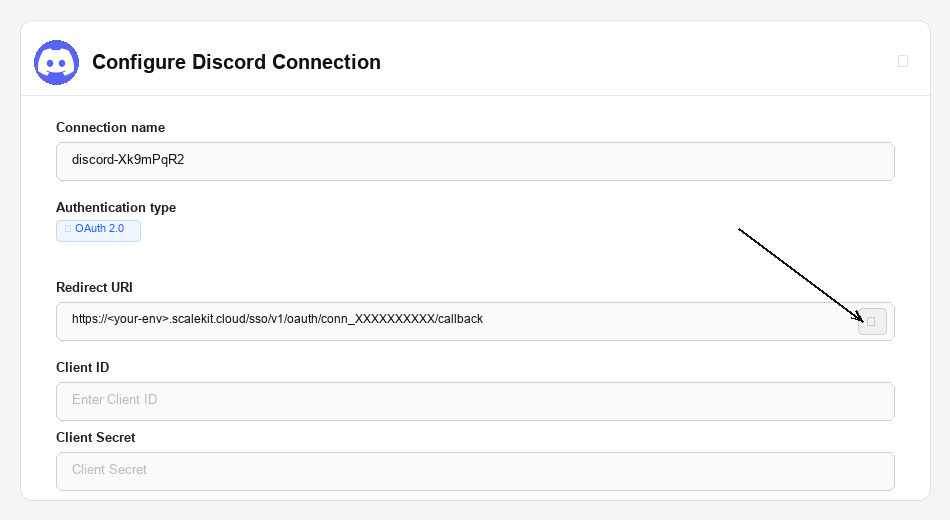
-
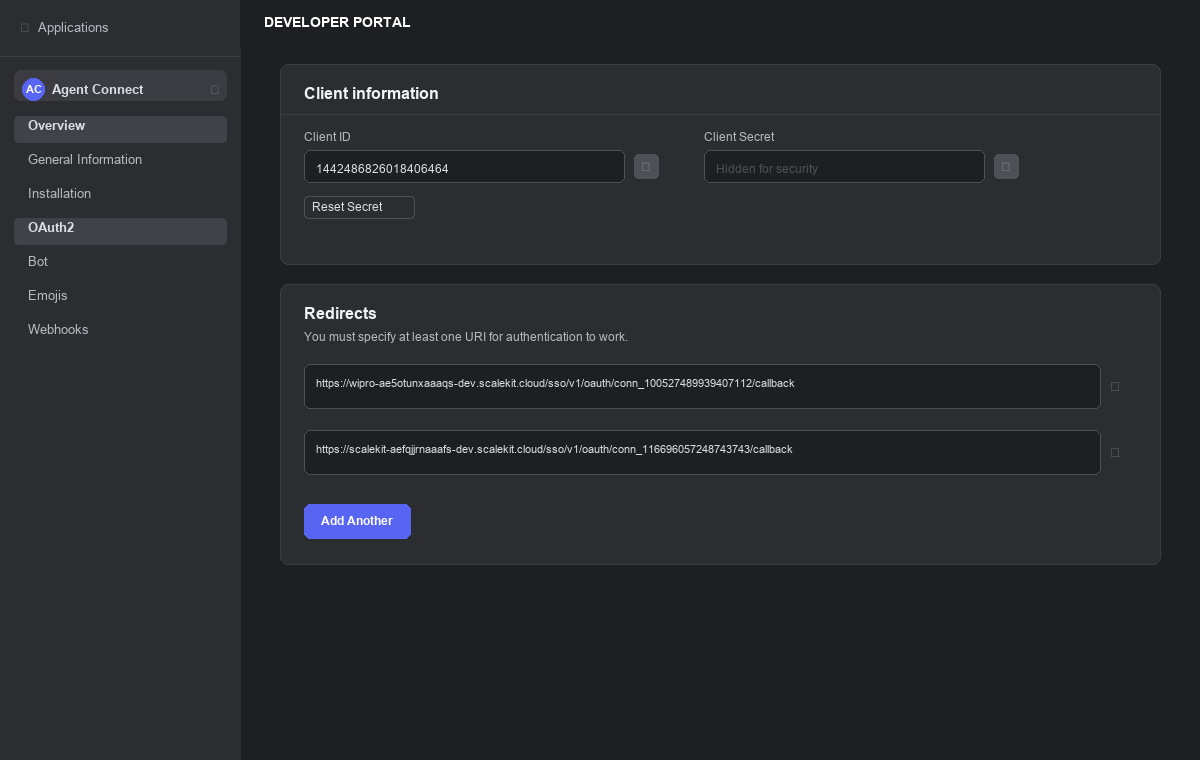
Back in the Discord Developer Portal, open your application and go to OAuth2 in the left sidebar.
-
Under Redirects, click Add Redirect, paste the URI from Scalekit, and click Save Changes.
-
-
Copy your credentials
-
On the OAuth2 page, copy the Client ID.
-
Click Reset Secret to generate a Client Secret and copy it immediately. It will not be shown again.
-
-
Add credentials in Scalekit
-
In Scalekit dashboard, go to Agent Auth → Connections and open the connection you created.
-
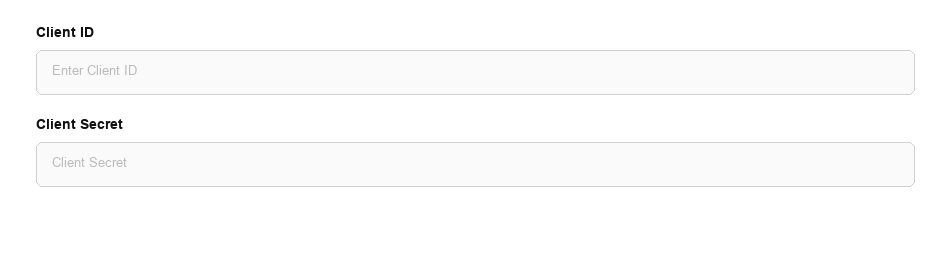
Enter the credentials you copied:
-
Client ID
-
Client Secret
-
Scopes — select the scopes your agent needs. Common scopes:
Scope What it grants identifyRead basic user profile (username, avatar, discriminator) emailRead the user’s email address guildsList the guilds the user belongs to guilds.members.readRead the user’s member data within a guild connectionsRead third-party accounts linked to the user’s Discord profile openidUse Discord as an OpenID Connect provider applications.entitlementsRead premium entitlements for your application
-
-
Click Save.
-
Connect a user’s Discord account and make API calls on their behalf — Scalekit handles OAuth 2.0 (PKCE), token storage, and refresh automatically.
You can interact with Discord in two ways — via direct proxy API calls or via Scalekit optimized tool calls. Scroll down to see the list of available Scalekit tools.
Proxy API Calls
import { ScalekitClient } from '@scalekit-sdk/node';import 'dotenv/config';
const connectionName = 'discord'; // get your connection name from connection configurationsconst identifier = 'user_123'; // your unique user identifier
// Get your credentials from app.scalekit.com → Developers → Settings → API Credentialsconst scalekit = new ScalekitClient( process.env.SCALEKIT_ENV_URL, process.env.SCALEKIT_CLIENT_ID, process.env.SCALEKIT_CLIENT_SECRET);const actions = scalekit.actions;
// Authenticate the user — send this link to your userconst { link } = await actions.getAuthorizationLink({ connectionName, identifier,});console.log('🔗 Authorize Discord:', link);process.stdout.write('Press Enter after authorizing...');await new Promise(r => process.stdin.once('data', r));
// Fetch the authenticated user's Discord profile via Scalekit proxyconst user = await actions.request({ connectionName, identifier, path: '/api/users/@me', method: 'GET',});console.log(user);import scalekit.client, osfrom dotenv import load_dotenvload_dotenv()
connection_name = "discord" # get your connection name from connection configurationsidentifier = "user_123" # your unique user identifier
# Get your credentials from app.scalekit.com → Developers → Settings → API Credentialsscalekit_client = scalekit.client.ScalekitClient( client_id=os.getenv("SCALEKIT_CLIENT_ID"), client_secret=os.getenv("SCALEKIT_CLIENT_SECRET"), env_url=os.getenv("SCALEKIT_ENV_URL"),)actions = scalekit_client.actions
# Authenticate the user — present this link to your userlink_response = actions.get_authorization_link( connection_name=connection_name, identifier=identifier)print("🔗 Authorize Discord:", link_response.link)input("Press Enter after authorizing...")
# Fetch the authenticated user's Discord profile via Scalekit proxyuser = actions.request( connection_name=connection_name, identifier=identifier, path="/api/users/@me", method="GET")print(user)Scalekit Tools
Tool list
Section titled “Tool list”get_guild_widget_png
Section titled “get_guild_widget_png”Retrieves a PNG image widget for a Discord guild. Returns a visual representation of the guild widget that can be embedded on external websites. The widget must be enabled in the guild’s server settings under Server Settings → Widget.
| Name | Type | Required | Description |
|---|---|---|---|
guild_id | string | Yes | The ID of the guild whose widget PNG to retrieve |
get_current_user_application_entitlements
Section titled “get_current_user_application_entitlements”Retrieves entitlements for the current user for a given application. Use when you need to check what premium offerings or subscriptions the authenticated user has access to. Requires the applications.entitlements OAuth2 scope.
| Name | Type | Required | Description |
|---|---|---|---|
application_id | string | Yes | The ID of the Discord application to check entitlements for |
sku_id | string | No | Filter entitlements by a specific SKU ID |
before | string | No | Retrieve entitlements before this entitlement ID (for pagination) |
after | string | No | Retrieve entitlements after this entitlement ID (for pagination) |
limit | integer | No | Maximum number of entitlements to return (1–100, default 100) |
guild_id | string | No | Filter entitlements for a specific guild |
exclude_ended | boolean | No | Set to true to exclude entitlements that have already ended |
get_guild_widget
Section titled “get_guild_widget”Retrieves the guild widget in JSON format. Returns public information about a Discord guild’s widget including online member count and invite URL. The widget must be enabled in the guild’s server settings.
| Name | Type | Required | Description |
|---|---|---|---|
guild_id | string | Yes | The ID of the guild whose widget JSON to retrieve |
get_user
Section titled “get_user”Retrieve information about a Discord user. With an OAuth Bearer token, pass @me as user_id to return the authenticated user’s information. With a Bot token, you can query any user by their ID. Returns username, avatar, discriminator, locale, premium status, and email (if the email scope is granted).
| Name | Type | Required | Description |
|---|---|---|---|
user_id | string | Yes | The ID of the user to retrieve, or @me to get the authenticated user |
get_my_user
Section titled “get_my_user”Fetches comprehensive profile information for the currently authenticated Discord user, including username, avatar, discriminator, locale, and email if the email OAuth2 scope is granted. No additional parameters required — uses the OAuth token of the connected account.
This tool takes no input parameters.
get_invite
Section titled “get_invite”Retrieves information about a specific invite code including guild and channel details.
| Name | Type | Required | Description |
|---|---|---|---|
invite_code | string | Yes | The Discord invite code to look up (the part after discord.gg/) |
with_counts | boolean | No | Set to true to include approximate member and presence counts |
with_expiration | boolean | No | Set to true to include expiration date information |
get_guild_template
Section titled “get_guild_template”Retrieves information about a Discord guild template using its unique template code. Use when you need to get details about a guild template for creating new servers or auditing template configurations.
| Name | Type | Required | Description |
|---|---|---|---|
template_code | string | Yes | The unique code of the guild template to retrieve |
get_public_keys
Section titled “get_public_keys”Retrieves Discord OAuth2 public keys (JWKS). Use when you need to verify OAuth2 tokens or perform cryptographic signature verification against Discord-issued tokens.
This tool takes no input parameters.
list_my_guilds
Section titled “list_my_guilds”Lists the current user’s guilds, returning partial data (id, name, icon, owner, permissions, features) for each. Primarily used for displaying server lists or verifying guild memberships. Requires the guilds OAuth2 scope.
| Name | Type | Required | Description |
|---|---|---|---|
before | string | No | Retrieve guilds with IDs before this guild ID (for pagination) |
after | string | No | Retrieve guilds with IDs after this guild ID (for pagination) |
limit | integer | No | Maximum number of guilds to return (1–200, default 200) |
with_counts | boolean | No | Set to true to include approximate member and presence counts |
get_openid_connect_userinfo
Section titled “get_openid_connect_userinfo”Retrieves OpenID Connect compliant user information for the authenticated user. Returns standardized OIDC claims (sub, email, nickname, picture, locale, etc.) following the OpenID Connect specification. Requires an OAuth2 access token with the openid scope; additional fields require the identify and email scopes.
This tool takes no input parameters.
get_gateway
Section titled “get_gateway”Retrieves a valid WebSocket (wss://) URL for establishing a Gateway connection to Discord. Use when you need to connect to the Discord Gateway for real-time events. No authentication required.
This tool takes no input parameters.
get_my_guild_member
Section titled “get_my_guild_member”Retrieves the guild member object for the currently authenticated user within a specified guild, including roles, nickname, join date, and avatar. Requires the guilds.members.read OAuth2 scope.
| Name | Type | Required | Description |
|---|---|---|---|
guild_id | string | Yes | The ID of the guild to retrieve the authenticated user’s member data from |
list_sticker_packs
Section titled “list_sticker_packs”Retrieves all available Discord Nitro sticker packs. Returns official Discord sticker packs including pack name, description, stickers, cover sticker, and banner asset. No authentication required.
This tool takes no input parameters.
resolve_invite
Section titled “resolve_invite”Resolves and retrieves information about a Discord invite code, including the associated guild, channel, scheduled event, and inviter. Prefer this over the deprecated get_invite tool for new integrations.
| Name | Type | Required | Description |
|---|---|---|---|
invite_code | string | Yes | The Discord invite code to resolve (the part after discord.gg/) |
with_counts | boolean | No | Set to true to include approximate member and presence counts |
with_expiration | boolean | No | Set to true to include expiration date information |
guild_scheduled_event_id | string | No | Include details about a specific scheduled event associated with this invite |
get_my_oauth2_authorization
Section titled “get_my_oauth2_authorization”Retrieves current OAuth2 authorization details for the application, including app info, granted scopes, token expiration date, and user data (contingent on scopes like identify). Useful for verifying what access the current token has before making downstream API calls.
This tool takes no input parameters.
retrieve_user_connections
Section titled “retrieve_user_connections”Retrieves a list of the authenticated user’s connected third-party accounts on Discord, such as Twitch, YouTube, GitHub, Steam, and others. Returns the service name, account ID, account name, and visibility for each connection. Requires the connections OAuth2 scope.
This tool takes no input parameters.