

GitLab
Connect to GitLab to manage repositories, issues, merge requests, CI/CD pipelines, groups, releases, and more with 110 tools.
Connect to GitLab to manage repositories, issues, merge requests, CI/CD pipelines, groups, and releases — all from your agent.

Supports authentication: OAuth 2.0
What you can build with this connector
| Use case | Tools involved |
|---|---|
| Automated code review bot | gitlab_merge_requests_list → gitlab_merge_request_diff_get → gitlab_merge_request_note_create |
| CI/CD health monitor | gitlab_pipelines_list → gitlab_pipeline_get → gitlab_pipeline_retry (on failure) |
| Issue triage agent | gitlab_issues_list → gitlab_issue_update (add labels/milestone) → gitlab_issue_note_create |
| Release automation | gitlab_commits_list → gitlab_tag_create → gitlab_release_create |
| Repository scaffolding | gitlab_project_create → gitlab_branch_create → gitlab_file_create → gitlab_project_member_add |
| Security audit | gitlab_project_variables_list → gitlab_deploy_keys_list → gitlab_project_webhooks_list |
| Onboarding automation | gitlab_group_member_add → gitlab_project_member_add → gitlab_issue_create (onboarding task) |
| Dependency update bot | gitlab_file_get → gitlab_branch_create → gitlab_file_update → gitlab_merge_request_create |
Key concepts:
- Project ID vs. path: Most tools accept a numeric
project_idor a URL-encoded path likenamespace%2Fproject. Paths are easier to read; IDs are stable even after renames. - IID vs. ID: Issues and merge requests have both a global
idand an internaliid(per-project sequential number). Theiidis what users see in the UI (e.g.,#42). All tools that takeissue_iidormerge_request_iidexpect theiid. - Access levels: GitLab uses numeric access levels —
10= Guest,20= Reporter,30= Developer,40= Maintainer,50= Owner. Pass these as integers to member management tools. - Pipeline identity verification: On GitLab.com, triggering pipelines via API requires the authenticated user to have completed identity verification at
gitlab.com/-/profile/verify. - Premium-only tools:
gitlab_merge_request_approveandgitlab_merge_request_approvals_getrequire GitLab Premium or higher. On Free plans these endpoints return403 Forbidden. - Pagination: All list endpoints support
page(1-based) andper_page(default20, max100). Usex-next-pagefrom the response header to paginate. - Self-managed: Replace
https://gitlab.comwith your instance URL in allpatharguments when using a self-managed GitLab instance.
Set up the agent connector
Section titled “Set up the agent connector”Register your Scalekit environment with the GitLab connector so Scalekit handles the OAuth 2.0 flow and token lifecycle for you. The connection name you create will be used to identify and invoke the connection programmatically. Then complete the configuration in your application as follows:
-
Set up auth redirects
-
In Scalekit dashboard, go to Agent Auth → Create Connection. Find GitLab and click Create.
-
Click Use your own credentials and copy the redirect URI. It looks like
https://<SCALEKIT_ENVIRONMENT_URL>/sso/v1/oauth/<CONNECTION_ID>/callback.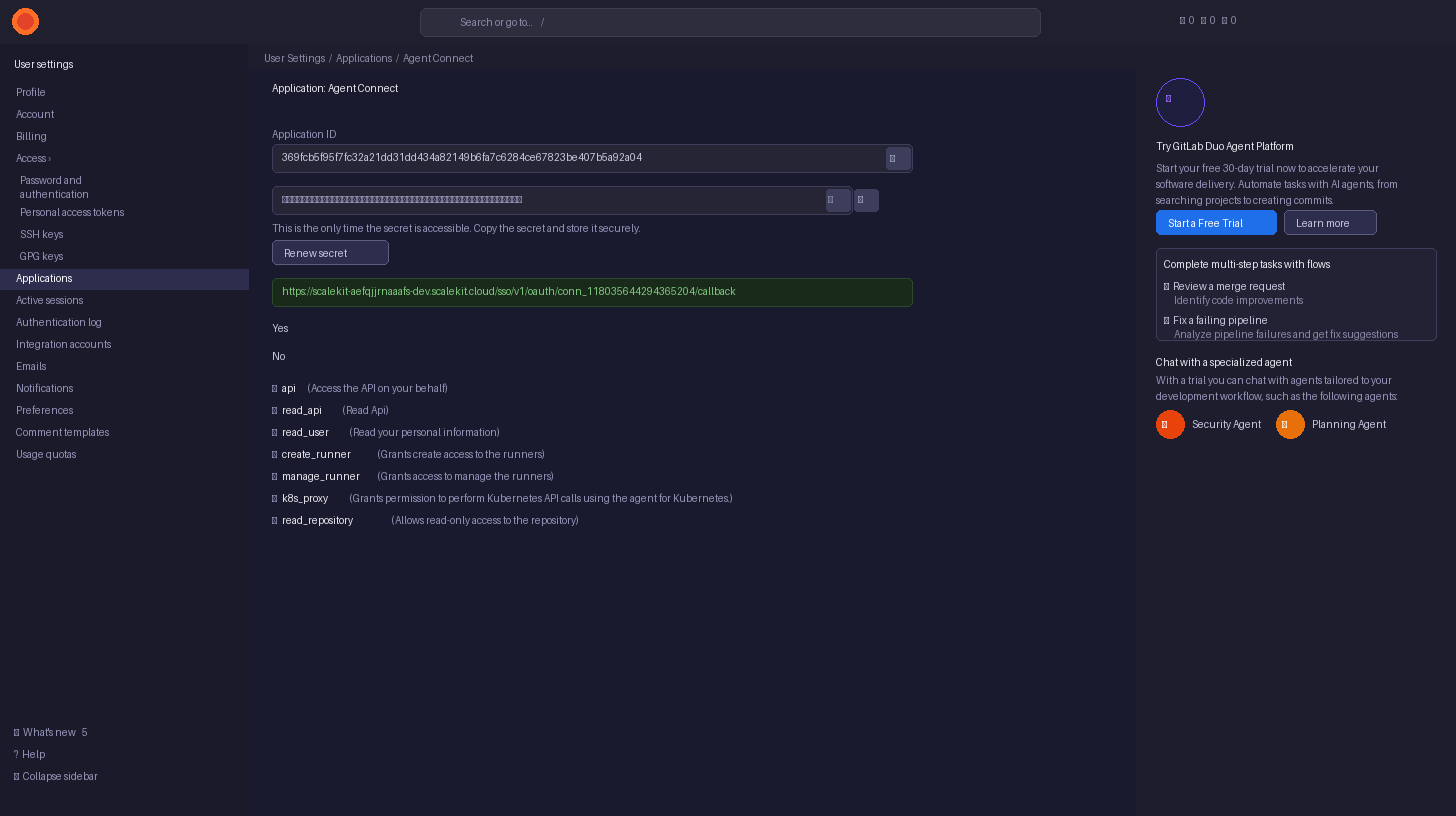
-
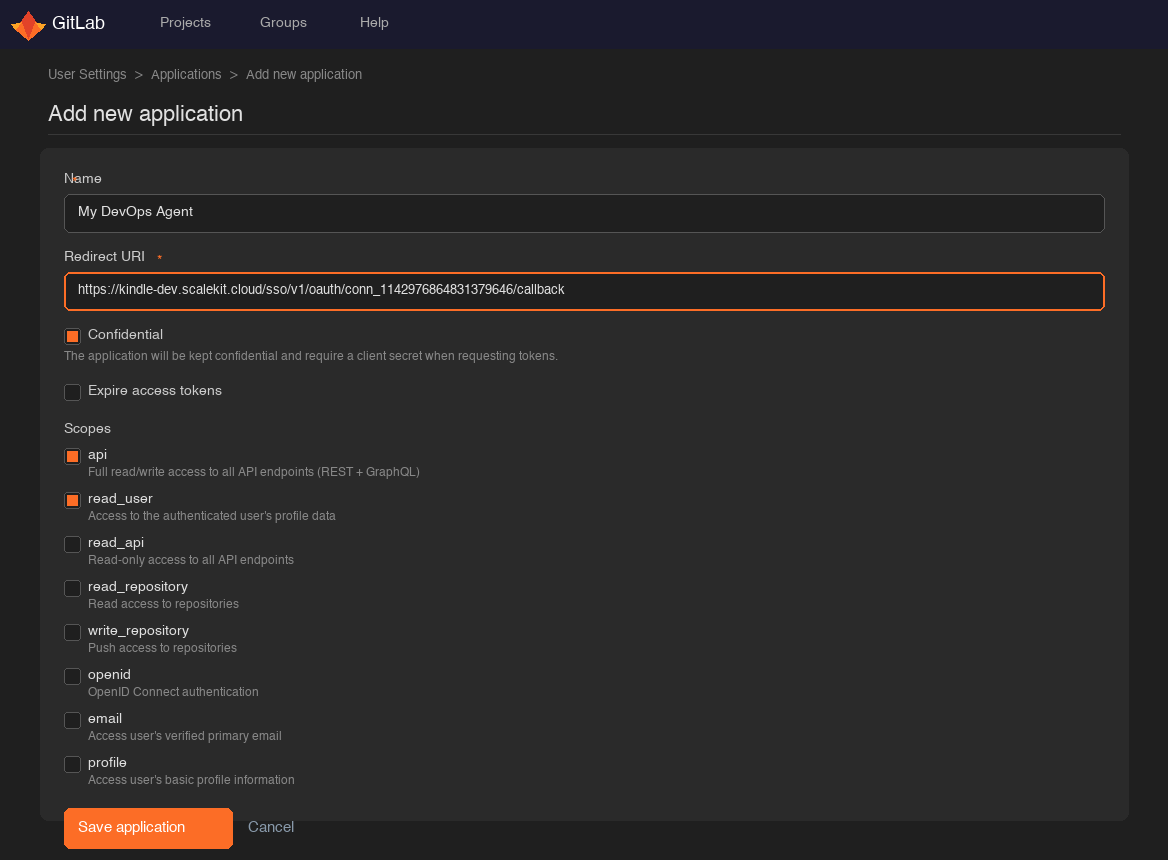
Go to GitLab Applications settings (User Settings → Applications) and open or create your OAuth application.
-
Paste the copied URI into the Redirect URI field and click Save application.
-
Under Scopes, select the permissions your agent needs:
Scope Access granted Use when apiFull read/write access to all API endpoints Most tools — recommended for full access read_userCurrent user’s profile gitlab_current_user_getonlyread_apiRead-only access to all API endpoints Read-only agents read_repositoryRead access to repositories File and commit reads only write_repositoryPush access to repositories gitlab_file_create,gitlab_file_update,gitlab_branch_create
-
-
Get client credentials
After saving the application, GitLab shows the Application ID and Secret on the application detail page:
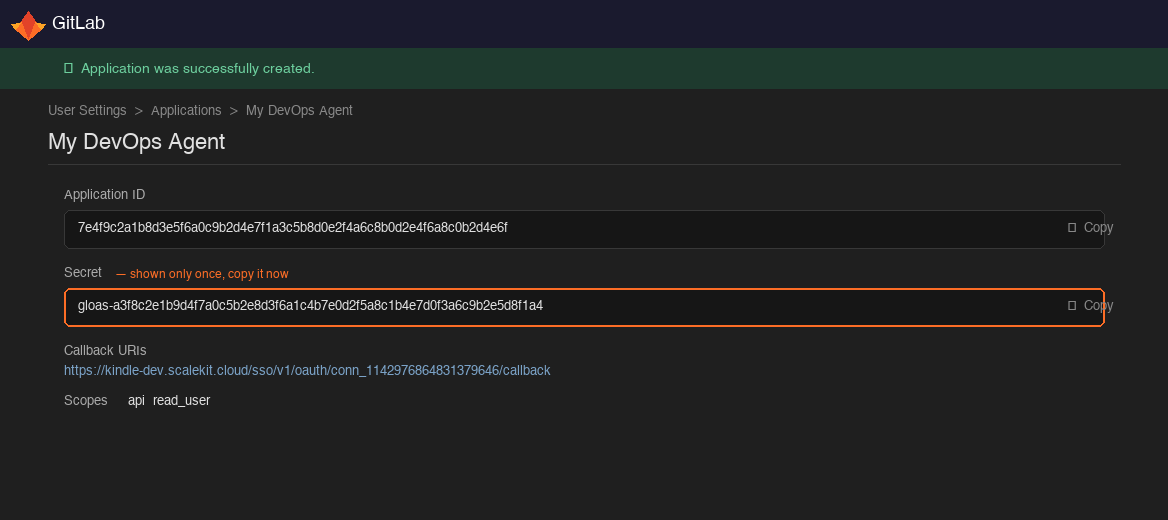
- Application ID — listed on the app’s main settings page
- Secret — shown only once after creation; if you lose it, regenerate it from the same page
-
Add credentials in Scalekit
-
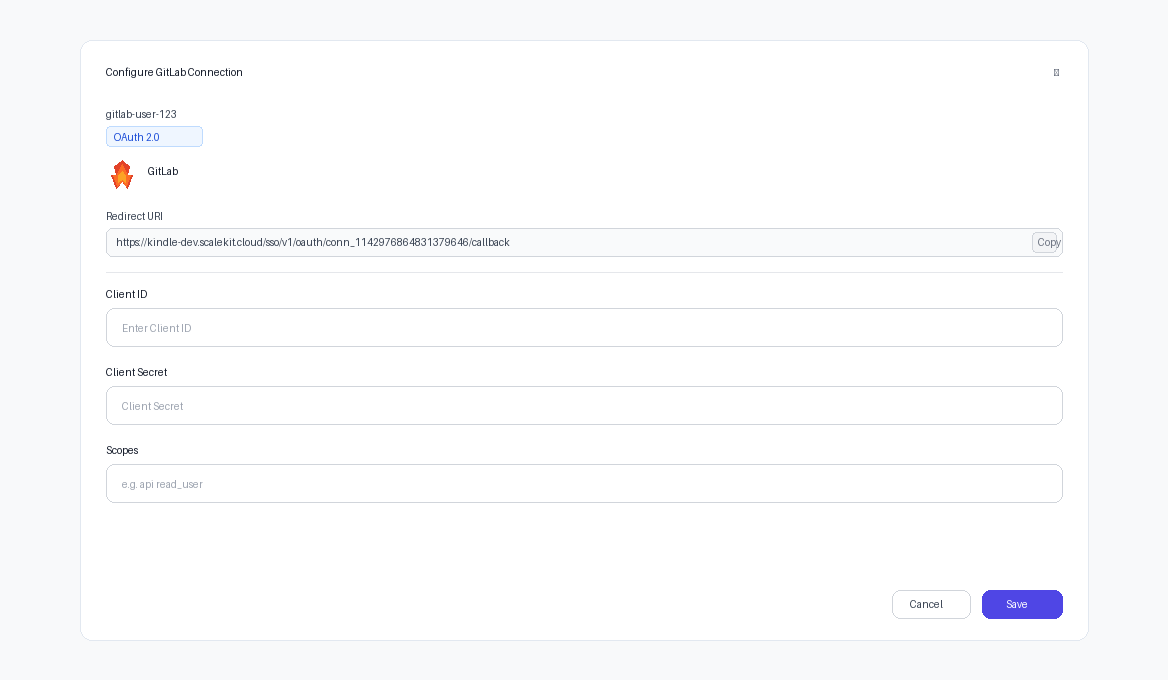
In Scalekit dashboard, go to Agent Auth → Connections and open the connection you created.
-
Enter your credentials:
- Client ID — paste your GitLab Application ID
- Client Secret — paste your GitLab Secret
-
Click Save.
-
Connect a user’s GitLab account and make API calls on their behalf — Scalekit handles OAuth and token refresh automatically.
import { ScalekitClient } from '@scalekit-sdk/node';import 'dotenv/config';
const connectionName = 'gitlab'; // connection name from Scalekit dashboardconst identifier = 'user_123'; // your unique user identifier
const scalekit = new ScalekitClient( process.env.SCALEKIT_ENV_URL, process.env.SCALEKIT_CLIENT_ID, process.env.SCALEKIT_CLIENT_SECRET);const actions = scalekit.actions;
// Step 1: Get the authorization link and send it to your userconst { link } = await actions.getAuthorizationLink({ connectionName, identifier });console.log('🔗 Authorize GitLab:', link);
// Step 2: After the user authorizes, make API calls via Scalekit proxy// Example: list open issues for a projectconst issues = await actions.request({ connectionName, identifier, path: '/api/v4/projects/my-group%2Fmy-repo/issues', method: 'GET', params: { state: 'opened', per_page: 50 },});console.log(issues.data); // Array of issue objectsimport scalekit.client, osfrom dotenv import load_dotenvload_dotenv()
connection_name = "gitlab" # connection name from Scalekit dashboardidentifier = "user_123" # your unique user identifier
scalekit_client = scalekit.client.ScalekitClient( client_id=os.getenv("SCALEKIT_CLIENT_ID"), client_secret=os.getenv("SCALEKIT_CLIENT_SECRET"), env_url=os.getenv("SCALEKIT_ENV_URL"),)actions = scalekit_client.actions
# Step 1: Get the authorization link and send it to your userlink_response = actions.get_authorization_link( connection_name=connection_name, identifier=identifier)print("🔗 Authorize GitLab:", link_response.link)
# Step 2: After the user authorizes, make API calls via Scalekit proxy# Example: list open issues for a projectissues = actions.request( connection_name=connection_name, identifier=identifier, path="/api/v4/projects/my-group%2Fmy-repo/issues", method="GET", params={"state": "opened", "per_page": 50},)print(issues["data"]) # List of issue objects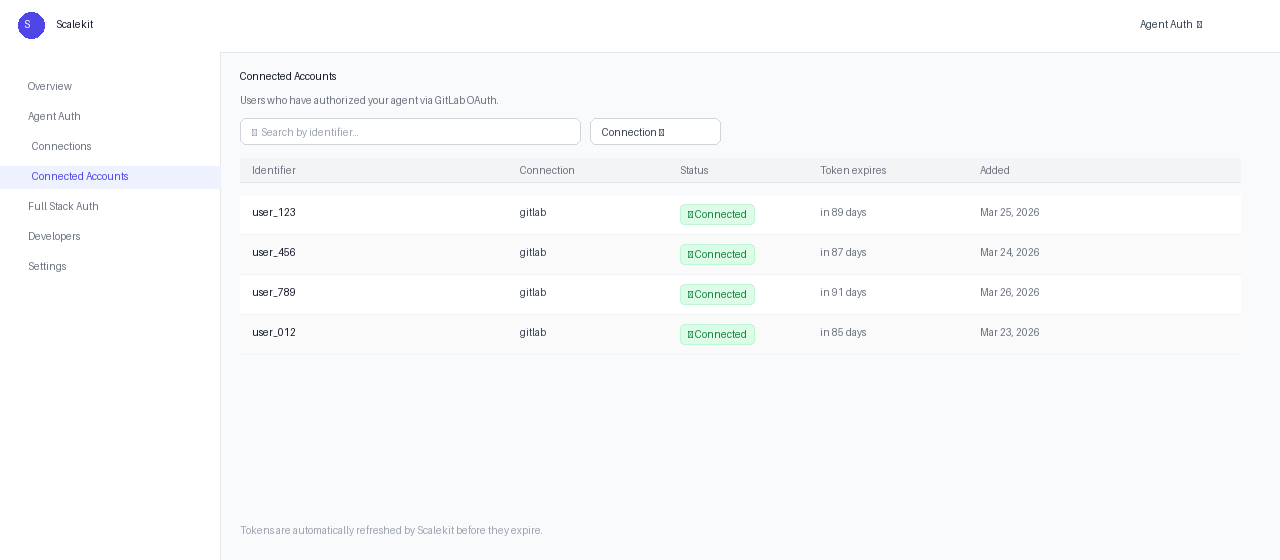
Scalekit tools
Section titled “Scalekit tools”Use actions.execute_tool() (Python) or actions.executeTool() (Node.js) to call any GitLab tool by name. Scalekit resolves credentials, calls the GitLab API, and returns a structured response.
Create a merge request and request review:
// Create a merge request from a feature branchconst mr = await actions.executeTool({ connectionName: 'gitlab', identifier: 'user_123', toolName: 'gitlab_merge_request_create', toolInput: { project_id: 'my-group/my-repo', source_branch: 'feature/add-auth', target_branch: 'main', title: 'feat: add OAuth 2.0 authentication', description: '## Summary\n\nAdds GitLab OAuth integration.\n\n/assign @reviewer', remove_source_branch: true, squash: false, },});const mrIid = mr.data.iid;console.log(`Created MR !${mrIid}: ${mr.data.web_url}`);
// Add a comment to kick off reviewawait actions.executeTool({ connectionName: 'gitlab', identifier: 'user_123', toolName: 'gitlab_merge_request_note_create', toolInput: { project_id: 'my-group/my-repo', merge_request_iid: mrIid, body: '🤖 This MR was created automatically. @reviewer please review when you get a chance.', },});# Create a merge request from a feature branchmr = actions.execute_tool( connection_name="gitlab", identifier="user_123", tool_name="gitlab_merge_request_create", tool_input={ "project_id": "my-group/my-repo", "source_branch": "feature/add-auth", "target_branch": "main", "title": "feat: add OAuth 2.0 authentication", "description": "## Summary\n\nAdds GitLab OAuth integration.\n\n/assign @reviewer", "remove_source_branch": True, "squash": False, },)mr_iid = mr["data"]["iid"]print(f"Created MR !{mr_iid}: {mr['data']['web_url']}")
# Add a comment to kick off reviewactions.execute_tool( connection_name="gitlab", identifier="user_123", tool_name="gitlab_merge_request_note_create", tool_input={ "project_id": "my-group/my-repo", "merge_request_iid": mr_iid, "body": "🤖 This MR was created automatically. @reviewer please review when you get a chance.", },)Trigger a pipeline and wait for result:
// Trigger a pipeline on the main branch// Note: requires identity verification at gitlab.com/-/profile/verifyconst pipeline = await actions.executeTool({ connectionName: 'gitlab', identifier: 'user_123', toolName: 'gitlab_pipeline_create', toolInput: { project_id: 'my-group/my-repo', ref: 'main', },});console.log(`Pipeline #${pipeline.data.id} triggered — status: ${pipeline.data.status}`);
// Fetch pipeline jobs to check individual job statusconst jobs = await actions.executeTool({ connectionName: 'gitlab', identifier: 'user_123', toolName: 'gitlab_pipeline_jobs_list', toolInput: { project_id: 'my-group/my-repo', pipeline_id: pipeline.data.id, },});for (const job of jobs.data) { console.log(` [${job.status}] ${job.name} — stage: ${job.stage}`);}# Trigger a pipeline on the main branch# Note: requires identity verification at gitlab.com/-/profile/verifypipeline = actions.execute_tool( connection_name="gitlab", identifier="user_123", tool_name="gitlab_pipeline_create", tool_input={"project_id": "my-group/my-repo", "ref": "main"},)print(f"Pipeline #{pipeline['data']['id']} triggered — status: {pipeline['data']['status']}")
# Fetch pipeline jobs to check individual job statusjobs = actions.execute_tool( connection_name="gitlab", identifier="user_123", tool_name="gitlab_pipeline_jobs_list", tool_input={ "project_id": "my-group/my-repo", "pipeline_id": pipeline["data"]["id"], },)for job in jobs["data"]: print(f" [{job['status']}] {job['name']} — stage: {job['stage']}")Create a file in a new branch and open a merge request:
const project = 'my-group/my-repo';const branch = `bot/add-config-${Date.now()}`;
// Create a new branch off mainawait actions.executeTool({ connectionName: 'gitlab', identifier: 'user_123', toolName: 'gitlab_branch_create', toolInput: { project_id: project, branch, ref: 'main' },});
// Add a new config fileawait actions.executeTool({ connectionName: 'gitlab', identifier: 'user_123', toolName: 'gitlab_file_create', toolInput: { project_id: project, file_path: 'config/feature-flags.json', branch, content: JSON.stringify({ newFeature: false }, null, 2), commit_message: 'chore: add feature flag config', },});
// Open a merge requestconst mr = await actions.executeTool({ connectionName: 'gitlab', identifier: 'user_123', toolName: 'gitlab_merge_request_create', toolInput: { project_id: project, source_branch: branch, target_branch: 'main', title: 'chore: add feature flag config', remove_source_branch: true, },});console.log(`MR !${mr.data.iid} opened: ${mr.data.web_url}`);import time
project = "my-group/my-repo"branch = f"bot/add-config-{int(time.time())}"
# Create a new branch off mainactions.execute_tool( connection_name="gitlab", identifier="user_123", tool_name="gitlab_branch_create", tool_input={"project_id": project, "branch": branch, "ref": "main"},)
# Add a new config fileimport jsonactions.execute_tool( connection_name="gitlab", identifier="user_123", tool_name="gitlab_file_create", tool_input={ "project_id": project, "file_path": "config/feature-flags.json", "branch": branch, "content": json.dumps({"newFeature": False}, indent=2), "commit_message": "chore: add feature flag config", },)
# Open a merge requestmr = actions.execute_tool( connection_name="gitlab", identifier="user_123", tool_name="gitlab_merge_request_create", tool_input={ "project_id": project, "source_branch": branch, "target_branch": "main", "title": "chore: add feature flag config", "remove_source_branch": True, },)print(f"MR !{mr['data']['iid']} opened: {mr['data']['web_url']}")Triage stale open issues:
// List all open issues updated more than 90 days agoconst cutoff = new Date(Date.now() - 90 * 24 * 60 * 60 * 1000).toISOString();
const issues = await actions.executeTool({ connectionName: 'gitlab', identifier: 'user_123', toolName: 'gitlab_issues_list', toolInput: { project_id: 'my-group/my-repo', state: 'opened', updated_before: cutoff, per_page: 100, },});
for (const issue of issues.data) { // Add a stale label and comment await actions.executeTool({ connectionName: 'gitlab', identifier: 'user_123', toolName: 'gitlab_issue_update', toolInput: { project_id: 'my-group/my-repo', issue_iid: issue.iid, add_labels: 'stale', }, }); await actions.executeTool({ connectionName: 'gitlab', identifier: 'user_123', toolName: 'gitlab_issue_note_create', toolInput: { project_id: 'my-group/my-repo', issue_iid: issue.iid, body: '🤖 This issue has had no activity in 90 days and has been marked as stale. It will be closed in 14 days if no further activity occurs.', }, }); console.log(`Marked issue #${issue.iid} as stale`);}from datetime import datetime, timedelta, timezone
# List all open issues updated more than 90 days agocutoff = (datetime.now(timezone.utc) - timedelta(days=90)).isoformat()
issues = actions.execute_tool( connection_name="gitlab", identifier="user_123", tool_name="gitlab_issues_list", tool_input={ "project_id": "my-group/my-repo", "state": "opened", "updated_before": cutoff, "per_page": 100, },)
for issue in issues["data"]: # Add a stale label and comment actions.execute_tool( connection_name="gitlab", identifier="user_123", tool_name="gitlab_issue_update", tool_input={ "project_id": "my-group/my-repo", "issue_iid": issue["iid"], "add_labels": "stale", }, ) actions.execute_tool( connection_name="gitlab", identifier="user_123", tool_name="gitlab_issue_note_create", tool_input={ "project_id": "my-group/my-repo", "issue_iid": issue["iid"], "body": "🤖 This issue has had no activity in 90 days and has been marked as stale. It will be closed in 14 days if no further activity occurs.", }, ) print(f"Marked issue #{issue['iid']} as stale")Tool list
Section titled “Tool list”Projects
Section titled “Projects”gitlab_projects_list
Section titled “gitlab_projects_list”List all projects accessible to the authenticated user. Supports filtering by search term, ownership, membership, and visibility.
| Name | Type | Required | Description |
|---|---|---|---|
search | string | No | Filter projects by name |
owned | boolean | No | Return only projects owned by the current user |
membership | boolean | No | Return only projects the user is a member of |
starred | boolean | No | Return only starred projects |
visibility | string | No | Filter by visibility: public, internal, private |
order_by | string | No | Sort by: id, name, path, created_at, updated_at, last_activity_at. Defaults to created_at |
sort | string | No | Sort direction: asc or desc |
page | number | No | Page number (1-based) |
per_page | number | No | Results per page. Max 100, defaults to 20 |
gitlab_project_get
Section titled “gitlab_project_get”Get a specific project by numeric ID or URL-encoded namespace/project path (e.g., my-group%2Fmy-repo).
| Name | Type | Required | Description |
|---|---|---|---|
project_id | string | Yes | Numeric project ID or URL-encoded path (e.g., 42 or my-group%2Fmy-repo) |
gitlab_project_create
Section titled “gitlab_project_create”Create a new GitLab project under the authenticated user’s namespace or a specified group.
| Name | Type | Required | Description |
|---|---|---|---|
name | string | Yes | Project name |
path | string | No | Project path (URL slug). Defaults to a slugified version of name |
namespace_id | number | No | Numeric ID of the group namespace. Omit to create under the user’s personal namespace |
description | string | No | Project description |
visibility | string | No | public, internal, or private. Defaults to private |
initialize_with_readme | boolean | No | Initialize with a README.md file |
default_branch | string | No | Default branch name. Defaults to main |
gitlab_project_update
Section titled “gitlab_project_update”Update an existing GitLab project’s settings.
| Name | Type | Required | Description |
|---|---|---|---|
project_id | string | Yes | Project ID or path |
name | string | No | New project name |
description | string | No | New description |
visibility | string | No | New visibility: public, internal, private |
default_branch | string | No | New default branch name |
topics | array | No | Array of topic strings (replaces all existing topics) |
merge_method | string | No | merge, rebase_merge, or ff (fast-forward only) |
only_allow_merge_if_pipeline_succeeds | boolean | No | Block merges unless the pipeline passes |
remove_source_branch_after_merge | boolean | No | Automatically delete source branch after merge |
gitlab_project_delete
Section titled “gitlab_project_delete”Delete a GitLab project. This is an asynchronous operation — the API returns 202 Accepted immediately and deletion proceeds in the background. Requires Owner role.
| Name | Type | Required | Description |
|---|---|---|---|
project_id | string | Yes | Project ID or path |
gitlab_project_fork
Section titled “gitlab_project_fork”Fork a GitLab project into a specified namespace. Returns the new forked project object.
| Name | Type | Required | Description |
|---|---|---|---|
project_id | string | Yes | ID or path of the project to fork |
namespace_id | number | No | Numeric namespace ID to fork into. Defaults to the user’s personal namespace |
name | string | No | Name for the forked project |
path | string | No | Path for the forked project |
gitlab_project_star
Section titled “gitlab_project_star”Star a GitLab project. Returns the project object. Returns 304 Not Modified if already starred.
| Name | Type | Required | Description |
|---|---|---|---|
project_id | string | Yes | Project ID or path |
gitlab_project_unstar
Section titled “gitlab_project_unstar”Unstar a GitLab project. Returns 304 Not Modified if the project was not starred.
| Name | Type | Required | Description |
|---|---|---|---|
project_id | string | Yes | Project ID or path |
gitlab_project_search
Section titled “gitlab_project_search”Search within a specific GitLab project for issues, merge requests, commits, code, blobs, and more.
| Name | Type | Required | Description |
|---|---|---|---|
project_id | string | Yes | Project ID or path |
scope | string | Yes | What to search: issues, merge_requests, milestones, notes, wiki_blobs, commits, blobs, users |
search | string | Yes | Search query |
page | number | No | Page number |
per_page | number | No | Results per page. Max 100 |
gitlab_project_forks_list
Section titled “gitlab_project_forks_list”List all forks of a GitLab project.
| Name | Type | Required | Description |
|---|---|---|---|
project_id | string | Yes | Project ID or path |
page | number | No | Page number |
per_page | number | No | Results per page. Max 100 |
gitlab_namespaces_list
Section titled “gitlab_namespaces_list”List all namespaces accessible to the current user — personal namespaces and groups. Useful for resolving where to create a project or fork.
| Name | Type | Required | Description |
|---|---|---|---|
search | string | No | Filter namespaces by name |
page | number | No | Page number |
per_page | number | No | Results per page |
gitlab_global_search
Section titled “gitlab_global_search”Search globally across GitLab for projects, issues, merge requests, commits, blobs, and more.
| Name | Type | Required | Description |
|---|---|---|---|
scope | string | Yes | What to search: projects, issues, merge_requests, milestones, snippet_titles, wiki_blobs, commits, blobs, users |
search | string | Yes | Search query (minimum 2 characters) |
page | number | No | Page number |
per_page | number | No | Results per page. Max 100 |
Repository — Branches
Section titled “Repository — Branches”gitlab_branches_list
Section titled “gitlab_branches_list”List all branches in a GitLab project repository.
| Name | Type | Required | Description |
|---|---|---|---|
project_id | string | Yes | Project ID or path |
search | string | No | Filter branches by name |
page | number | No | Page number |
per_page | number | No | Results per page. Max 100 |
gitlab_branch_get
Section titled “gitlab_branch_get”Get details of a specific branch, including the latest commit on that branch.
| Name | Type | Required | Description |
|---|---|---|---|
project_id | string | Yes | Project ID or path |
branch | string | Yes | Branch name |
gitlab_branch_create
Section titled “gitlab_branch_create”Create a new branch in a GitLab repository from a specified commit, branch, or tag.
| Name | Type | Required | Description |
|---|---|---|---|
project_id | string | Yes | Project ID or path |
branch | string | Yes | Name of the new branch |
ref | string | Yes | Source branch name, tag name, or commit SHA to branch from |
gitlab_branch_delete
Section titled “gitlab_branch_delete”Delete a branch from a GitLab repository. Protected branches cannot be deleted unless unprotected first.
| Name | Type | Required | Description |
|---|---|---|---|
project_id | string | Yes | Project ID or path |
branch | string | Yes | Branch name to delete |
Repository — Tags
Section titled “Repository — Tags”gitlab_tags_list
Section titled “gitlab_tags_list”List all tags in a GitLab project repository.
| Name | Type | Required | Description |
|---|---|---|---|
project_id | string | Yes | Project ID or path |
search | string | No | Filter tags by name |
order_by | string | No | Sort by name, version, or updated. Defaults to updated |
sort | string | No | asc or desc |
page | number | No | Page number |
per_page | number | No | Results per page. Max 100 |
gitlab_tag_get
Section titled “gitlab_tag_get”Get details of a specific repository tag, including the commit it points to and any associated release notes.
| Name | Type | Required | Description |
|---|---|---|---|
project_id | string | Yes | Project ID or path |
tag_name | string | Yes | Tag name |
gitlab_tag_create
Section titled “gitlab_tag_create”Create a new tag in a GitLab repository. Optionally include a message to create an annotated tag.
| Name | Type | Required | Description |
|---|---|---|---|
project_id | string | Yes | Project ID or path |
tag_name | string | Yes | Name of the tag to create |
ref | string | Yes | Branch, tag, or commit SHA to tag |
message | string | No | Tag message. If provided, an annotated tag is created instead of a lightweight tag |
gitlab_tag_delete
Section titled “gitlab_tag_delete”Delete a tag from a GitLab repository. Protected tags cannot be deleted.
| Name | Type | Required | Description |
|---|---|---|---|
project_id | string | Yes | Project ID or path |
tag_name | string | Yes | Name of the tag to delete |
Repository — Commits
Section titled “Repository — Commits”gitlab_commits_list
Section titled “gitlab_commits_list”List commits for a GitLab project, optionally filtered by branch, path, or date range.
| Name | Type | Required | Description |
|---|---|---|---|
project_id | string | Yes | Project ID or path |
ref_name | string | No | Branch, tag, or commit SHA to list commits from. Defaults to the default branch |
since | string | No | ISO 8601 datetime — only commits after this date |
until | string | No | ISO 8601 datetime — only commits before this date |
path | string | No | Filter commits by file path |
author | string | No | Filter by commit author name or email |
page | number | No | Page number |
per_page | number | No | Results per page. Max 100 |
gitlab_commit_get
Section titled “gitlab_commit_get”Get detailed information about a specific commit by its SHA, including stats and diff summary.
| Name | Type | Required | Description |
|---|---|---|---|
project_id | string | Yes | Project ID or path |
sha | string | Yes | Full or short commit SHA |
gitlab_commit_diff_get
Section titled “gitlab_commit_diff_get”Get the full diff of a specific commit — lists all changed files with their hunks.
| Name | Type | Required | Description |
|---|---|---|---|
project_id | string | Yes | Project ID or path |
sha | string | Yes | Commit SHA |
page | number | No | Page number (diffs are paginated for large commits) |
per_page | number | No | Results per page |
gitlab_commit_comment_create
Section titled “gitlab_commit_comment_create”Add an inline or general comment to a specific commit.
| Name | Type | Required | Description |
|---|---|---|---|
project_id | string | Yes | Project ID or path |
sha | string | Yes | Commit SHA |
note | string | Yes | Comment text |
path | string | No | File path for inline comment |
line | number | No | Line number for inline comment |
line_type | string | No | new or old — which side of the diff the line is on |
gitlab_commit_comments_list
Section titled “gitlab_commit_comments_list”List all comments on a specific commit.
| Name | Type | Required | Description |
|---|---|---|---|
project_id | string | Yes | Project ID or path |
sha | string | Yes | Commit SHA |
page | number | No | Page number |
per_page | number | No | Results per page |
gitlab_compare_refs
Section titled “gitlab_compare_refs”Compare two refs (branches, tags, or commit SHAs) and return the commits and diff between them.
| Name | Type | Required | Description |
|---|---|---|---|
project_id | string | Yes | Project ID or path |
from | string | Yes | Source ref (branch name, tag, or commit SHA) |
to | string | Yes | Target ref to compare against |
straight | boolean | No | If true, computes the diff directly between from and to instead of using the merge base |
Repository — Files & Trees
Section titled “Repository — Files & Trees”gitlab_file_get
Section titled “gitlab_file_get”Get a file’s raw content and metadata (size, encoding, last commit) from a GitLab repository at a specific ref.
| Name | Type | Required | Description |
|---|---|---|---|
project_id | string | Yes | Project ID or path |
file_path | string | Yes | URL-encoded file path within the repository (e.g., src%2Findex.ts) |
ref | string | Yes | Branch, tag, or commit SHA to read the file from |
gitlab_file_create
Section titled “gitlab_file_create”Create a new file in a GitLab repository. The file content must be provided as a plain string (GitLab handles base64 encoding internally).
| Name | Type | Required | Description |
|---|---|---|---|
project_id | string | Yes | Project ID or path |
file_path | string | Yes | Path of the new file within the repository (e.g., src/config.json) |
branch | string | Yes | Branch to commit the new file to |
content | string | Yes | File content as a string |
commit_message | string | Yes | Commit message |
author_name | string | No | Author name override |
author_email | string | No | Author email override |
gitlab_file_update
Section titled “gitlab_file_update”Update the content of an existing file in a GitLab repository. The current file must exist at the specified path and branch.
| Name | Type | Required | Description |
|---|---|---|---|
project_id | string | Yes | Project ID or path |
file_path | string | Yes | Path of the file to update |
branch | string | Yes | Branch containing the file |
content | string | Yes | New file content |
commit_message | string | Yes | Commit message |
last_commit_id | string | No | The commit SHA of the last known version of the file. Used for conflict detection — GitLab rejects the update if the file has changed since this SHA |
author_name | string | No | Author name override |
author_email | string | No | Author email override |
gitlab_file_delete
Section titled “gitlab_file_delete”Delete a file from a GitLab repository.
| Name | Type | Required | Description |
|---|---|---|---|
project_id | string | Yes | Project ID or path |
file_path | string | Yes | Path of the file to delete |
branch | string | Yes | Branch to delete the file from |
commit_message | string | Yes | Commit message |
author_name | string | No | Author name override |
author_email | string | No | Author email override |
gitlab_repository_tree_list
Section titled “gitlab_repository_tree_list”List files and directories in a GitLab repository at a given path and ref.
| Name | Type | Required | Description |
|---|---|---|---|
project_id | string | Yes | Project ID or path |
path | string | No | Directory path within the repository. Defaults to the root (/) |
ref | string | No | Branch, tag, or commit SHA. Defaults to the project’s default branch |
recursive | boolean | No | If true, lists files recursively across all subdirectories |
page | number | No | Page number |
per_page | number | No | Results per page. Max 100 |
Issues
Section titled “Issues”gitlab_issues_list
Section titled “gitlab_issues_list”List issues for a GitLab project with extensive filtering options.
| Name | Type | Required | Description |
|---|---|---|---|
project_id | string | Yes | Project ID or path |
state | string | No | Filter by state: opened, closed, or all. Defaults to opened |
labels | string | No | Comma-separated label names to filter by |
milestone | string | No | Milestone title to filter by |
assignee_id | number | No | Filter by assignee user ID |
author_id | number | No | Filter by author user ID |
search | string | No | Search in title and description |
created_after | string | No | ISO 8601 datetime — issues created after this date |
created_before | string | No | ISO 8601 datetime — issues created before this date |
updated_after | string | No | ISO 8601 datetime — issues updated after this date |
updated_before | string | No | ISO 8601 datetime — issues updated before this date |
order_by | string | No | Sort by: created_at, updated_at, priority, due_date, relative_position. Defaults to created_at |
sort | string | No | asc or desc |
page | number | No | Page number |
per_page | number | No | Results per page. Max 100 |
gitlab_issue_get
Section titled “gitlab_issue_get”Get a specific issue by its project-level internal ID (IID). The IID is the number shown in the GitLab UI (e.g., #42).
| Name | Type | Required | Description |
|---|---|---|---|
project_id | string | Yes | Project ID or path |
issue_iid | number | Yes | Issue internal ID (IID) — the number shown in the GitLab UI |
gitlab_issue_create
Section titled “gitlab_issue_create”Create a new issue in a GitLab project.
| Name | Type | Required | Description |
|---|---|---|---|
project_id | string | Yes | Project ID or path |
title | string | Yes | Issue title |
description | string | No | Issue body — supports GitLab Flavored Markdown and quick actions (e.g., /assign @user, /label ~bug) |
assignee_ids | array | No | Array of user IDs to assign |
milestone_id | number | No | ID of the milestone to link |
labels | string | No | Comma-separated label names to apply |
due_date | string | No | Due date in YYYY-MM-DD format |
weight | number | No | Issue weight (integer). GitLab Premium+ |
confidential | boolean | No | Mark the issue as confidential |
gitlab_issue_update
Section titled “gitlab_issue_update”Update an existing issue. Only fields you provide are changed.
| Name | Type | Required | Description |
|---|---|---|---|
project_id | string | Yes | Project ID or path |
issue_iid | number | Yes | Issue IID |
title | string | No | New title |
description | string | No | New description |
state_event | string | No | close or reopen |
assignee_ids | array | No | New array of assignee user IDs (replaces existing) |
milestone_id | number | No | New milestone ID. Pass 0 to remove the milestone |
labels | string | No | Comma-separated new label list (replaces all existing labels) |
add_labels | string | No | Comma-separated labels to add without removing existing ones |
remove_labels | string | No | Comma-separated labels to remove |
due_date | string | No | New due date (YYYY-MM-DD). Pass empty string to clear |
weight | number | No | New weight. GitLab Premium+ |
confidential | boolean | No | Update confidentiality |
gitlab_issue_delete
Section titled “gitlab_issue_delete”Permanently delete an issue from a GitLab project. Requires project Owner role or admin access. This action cannot be undone.
| Name | Type | Required | Description |
|---|---|---|---|
project_id | string | Yes | Project ID or path |
issue_iid | number | Yes | Issue IID |
Issue Notes (Comments)
Section titled “Issue Notes (Comments)”gitlab_issue_notes_list
Section titled “gitlab_issue_notes_list”List all comments (notes) on a specific issue.
| Name | Type | Required | Description |
|---|---|---|---|
project_id | string | Yes | Project ID or path |
issue_iid | number | Yes | Issue IID |
sort | string | No | asc or desc. Defaults to asc |
order_by | string | No | Sort by created_at or updated_at |
page | number | No | Page number |
per_page | number | No | Results per page. Max 100 |
gitlab_issue_note_create
Section titled “gitlab_issue_note_create”Add a comment to a specific issue. Supports GitLab Flavored Markdown and quick actions.
| Name | Type | Required | Description |
|---|---|---|---|
project_id | string | Yes | Project ID or path |
issue_iid | number | Yes | Issue IID |
body | string | Yes | Comment text. Supports Markdown and quick actions (e.g., /close, /assign @user) |
created_at | string | No | ISO 8601 datetime override for the note timestamp. Requires admin access |
gitlab_issue_note_update
Section titled “gitlab_issue_note_update”Update the content of an existing comment on an issue.
| Name | Type | Required | Description |
|---|---|---|---|
project_id | string | Yes | Project ID or path |
issue_iid | number | Yes | Issue IID |
note_id | number | Yes | Note (comment) ID |
body | string | Yes | New comment content |
gitlab_issue_note_delete
Section titled “gitlab_issue_note_delete”Delete a comment from a specific issue.
| Name | Type | Required | Description |
|---|---|---|---|
project_id | string | Yes | Project ID or path |
issue_iid | number | Yes | Issue IID |
note_id | number | Yes | Note ID to delete |
Merge Requests
Section titled “Merge Requests”gitlab_merge_requests_list
Section titled “gitlab_merge_requests_list”List merge requests for a GitLab project with filtering by state, labels, assignee, and more.
| Name | Type | Required | Description |
|---|---|---|---|
project_id | string | Yes | Project ID or path |
state | string | No | Filter by state: opened, closed, merged, locked, or all. Defaults to opened |
labels | string | No | Comma-separated label names to filter by |
milestone | string | No | Milestone title to filter by |
author_id | number | No | Filter by author user ID |
assignee_id | number | No | Filter by assignee user ID |
reviewer_id | number | No | Filter by reviewer user ID |
source_branch | string | No | Filter by source branch name |
target_branch | string | No | Filter by target branch name |
search | string | No | Search in title and description |
created_after | string | No | ISO 8601 datetime |
created_before | string | No | ISO 8601 datetime |
order_by | string | No | Sort by created_at, updated_at, or title |
sort | string | No | asc or desc |
page | number | No | Page number |
per_page | number | No | Results per page. Max 100 |
gitlab_merge_request_get
Section titled “gitlab_merge_request_get”Get a specific merge request by its project-level IID.
| Name | Type | Required | Description |
|---|---|---|---|
project_id | string | Yes | Project ID or path |
merge_request_iid | number | Yes | Merge request IID (the number shown in the GitLab UI, e.g., !12) |
gitlab_merge_request_create
Section titled “gitlab_merge_request_create”Create a new merge request in a GitLab project.
| Name | Type | Required | Description |
|---|---|---|---|
project_id | string | Yes | Project ID or path |
source_branch | string | Yes | Branch to merge from |
target_branch | string | Yes | Branch to merge into |
title | string | Yes | Merge request title |
description | string | No | Merge request body. Supports Markdown and quick actions (e.g., /assign @user, /label ~feature) |
assignee_ids | array | No | Array of user IDs to assign |
reviewer_ids | array | No | Array of user IDs to request review from |
labels | string | No | Comma-separated label names |
milestone_id | number | No | Milestone ID to link |
remove_source_branch | boolean | No | Delete the source branch after merge |
squash | boolean | No | Squash all commits into one when merging |
draft | boolean | No | Mark the merge request as a draft (cannot be merged until undrafted) |
gitlab_merge_request_update
Section titled “gitlab_merge_request_update”Update an existing merge request. Only the fields you provide are changed.
| Name | Type | Required | Description |
|---|---|---|---|
project_id | string | Yes | Project ID or path |
merge_request_iid | number | Yes | Merge request IID |
title | string | No | New title |
description | string | No | New description |
state_event | string | No | close or reopen |
target_branch | string | No | New target branch |
assignee_ids | array | No | New assignees (replaces existing) |
reviewer_ids | array | No | New reviewers |
labels | string | No | New labels (replaces existing) |
add_labels | string | No | Labels to add without clearing existing ones |
remove_labels | string | No | Labels to remove |
milestone_id | number | No | New milestone ID. Pass 0 to remove |
remove_source_branch | boolean | No | Update the remove-source-branch preference |
squash | boolean | No | Update the squash preference |
draft | boolean | No | Mark as draft (true) or ready (false) |
gitlab_merge_request_merge
Section titled “gitlab_merge_request_merge”Merge an open merge request. The MR must be mergeable — all required approvals satisfied, no conflicts, and pipeline passing (if required by the project settings).
| Name | Type | Required | Description |
|---|---|---|---|
project_id | string | Yes | Project ID or path |
merge_request_iid | number | Yes | Merge request IID |
merge_commit_message | string | No | Custom merge commit message |
squash_commit_message | string | No | Custom commit message when squashing |
should_remove_source_branch | boolean | No | Override the remove-source-branch setting for this merge |
squash | boolean | No | Override the squash setting for this merge |
sha | string | No | If provided, the MR is merged only if the HEAD of the source branch matches this SHA — prevents merging if the branch has been updated since you last checked |
gitlab_merge_request_approve
Section titled “gitlab_merge_request_approve”Approve a merge request. Requires GitLab Premium or higher. On GitLab Free, this endpoint returns 403 Forbidden.
| Name | Type | Required | Description |
|---|---|---|---|
project_id | string | Yes | Project ID or path |
merge_request_iid | number | Yes | Merge request IID |
sha | string | No | Approve only if the MR HEAD matches this SHA |
gitlab_merge_request_approvals_get
Section titled “gitlab_merge_request_approvals_get”Get the approval state of a merge request — who has approved and who is required to approve. Requires GitLab Premium or higher.
| Name | Type | Required | Description |
|---|---|---|---|
project_id | string | Yes | Project ID or path |
merge_request_iid | number | Yes | Merge request IID |
gitlab_merge_request_diff_get
Section titled “gitlab_merge_request_diff_get”Get the full diff of a merge request — all changed files and their hunks. For large MRs, results are paginated.
| Name | Type | Required | Description |
|---|---|---|---|
project_id | string | Yes | Project ID or path |
merge_request_iid | number | Yes | Merge request IID |
page | number | No | Page number |
per_page | number | No | Results per page |
gitlab_merge_request_commits_list
Section titled “gitlab_merge_request_commits_list”List all commits included in a specific merge request.
| Name | Type | Required | Description |
|---|---|---|---|
project_id | string | Yes | Project ID or path |
merge_request_iid | number | Yes | Merge request IID |
Merge Request Notes (Comments)
Section titled “Merge Request Notes (Comments)”gitlab_merge_request_notes_list
Section titled “gitlab_merge_request_notes_list”List all comments on a specific merge request.
| Name | Type | Required | Description |
|---|---|---|---|
project_id | string | Yes | Project ID or path |
merge_request_iid | number | Yes | Merge request IID |
sort | string | No | asc or desc |
order_by | string | No | Sort by created_at or updated_at |
page | number | No | Page number |
per_page | number | No | Results per page |
gitlab_merge_request_note_create
Section titled “gitlab_merge_request_note_create”Add a comment to a specific merge request. Supports Markdown and quick actions.
| Name | Type | Required | Description |
|---|---|---|---|
project_id | string | Yes | Project ID or path |
merge_request_iid | number | Yes | Merge request IID |
body | string | Yes | Comment text |
Pipelines & CI/CD
Section titled “Pipelines & CI/CD”gitlab_pipelines_list
Section titled “gitlab_pipelines_list”List pipelines for a GitLab project with filtering by status, ref, and date.
| Name | Type | Required | Description |
|---|---|---|---|
project_id | string | Yes | Project ID or path |
status | string | No | Filter by status: created, waiting_for_resource, preparing, pending, running, success, failed, canceled, skipped, manual, scheduled |
ref | string | No | Filter by branch or tag name |
sha | string | No | Filter by commit SHA |
updated_after | string | No | ISO 8601 datetime |
updated_before | string | No | ISO 8601 datetime |
order_by | string | No | Sort by id, status, ref, or updated_at |
sort | string | No | asc or desc |
page | number | No | Page number |
per_page | number | No | Results per page. Max 100 |
gitlab_pipeline_get
Section titled “gitlab_pipeline_get”Get detailed information about a specific pipeline, including status, duration, and triggered user.
| Name | Type | Required | Description |
|---|---|---|---|
project_id | string | Yes | Project ID or path |
pipeline_id | number | Yes | Pipeline ID |
gitlab_pipeline_create
Section titled “gitlab_pipeline_create”Trigger a new CI/CD pipeline for a specific branch or tag.
Important: On GitLab.com, triggering pipelines via API requires the authenticated user to have completed identity verification at https://gitlab.com/-/profile/verify. Without verification, the API returns 403 Forbidden.
| Name | Type | Required | Description |
|---|---|---|---|
project_id | string | Yes | Project ID or path |
ref | string | Yes | Branch name, tag name, or commit SHA to run the pipeline on |
variables | array | No | Array of { "key": "VAR_NAME", "value": "VALUE" } objects to pass as pipeline variables |
gitlab_pipeline_cancel
Section titled “gitlab_pipeline_cancel”Cancel a running pipeline. Only pipelines in pending or running state can be canceled.
| Name | Type | Required | Description |
|---|---|---|---|
project_id | string | Yes | Project ID or path |
pipeline_id | number | Yes | Pipeline ID |
gitlab_pipeline_retry
Section titled “gitlab_pipeline_retry”Retry all failed jobs in a pipeline. Returns the updated pipeline object.
| Name | Type | Required | Description |
|---|---|---|---|
project_id | string | Yes | Project ID or path |
pipeline_id | number | Yes | Pipeline ID |
gitlab_pipeline_delete
Section titled “gitlab_pipeline_delete”Delete a pipeline and its associated job traces and artifacts. This action is permanent and cannot be undone.
| Name | Type | Required | Description |
|---|---|---|---|
project_id | string | Yes | Project ID or path |
pipeline_id | number | Yes | Pipeline ID |
gitlab_pipeline_jobs_list
Section titled “gitlab_pipeline_jobs_list”List all jobs in a specific pipeline, including their status, stage, name, and duration.
| Name | Type | Required | Description |
|---|---|---|---|
project_id | string | Yes | Project ID or path |
pipeline_id | number | Yes | Pipeline ID |
scope | string or array | No | Filter by job status: created, pending, running, failed, success, canceled, skipped, manual |
page | number | No | Page number |
per_page | number | No | Results per page. Max 100 |
gitlab_jobs_list
Section titled “gitlab_jobs_list”List all jobs for a GitLab project across all pipelines.
| Name | Type | Required | Description |
|---|---|---|---|
project_id | string | Yes | Project ID or path |
scope | string or array | No | Filter by job status |
page | number | No | Page number |
per_page | number | No | Results per page. Max 100 |
gitlab_job_get
Section titled “gitlab_job_get”Get detailed information about a specific CI/CD job.
| Name | Type | Required | Description |
|---|---|---|---|
project_id | string | Yes | Project ID or path |
job_id | number | Yes | Job ID |
gitlab_job_cancel
Section titled “gitlab_job_cancel”Cancel a specific CI/CD job. The job must be in pending or running state.
| Name | Type | Required | Description |
|---|---|---|---|
project_id | string | Yes | Project ID or path |
job_id | number | Yes | Job ID |
gitlab_job_retry
Section titled “gitlab_job_retry”Retry a specific CI/CD job. Creates a new job run with the same configuration.
| Name | Type | Required | Description |
|---|---|---|---|
project_id | string | Yes | Project ID or path |
job_id | number | Yes | Job ID |
gitlab_job_log_get
Section titled “gitlab_job_log_get”Get the full trace/log output of a CI/CD job. Returns raw text.
| Name | Type | Required | Description |
|---|---|---|---|
project_id | string | Yes | Project ID or path |
job_id | number | Yes | Job ID |
gitlab_job_artifacts_download
Section titled “gitlab_job_artifacts_download”Download the artifacts archive of a specific CI/CD job as a binary ZIP file.
| Name | Type | Required | Description |
|---|---|---|---|
project_id | string | Yes | Project ID or path |
job_id | number | Yes | Job ID |
CI/CD Variables
Section titled “CI/CD Variables”gitlab_project_variables_list
Section titled “gitlab_project_variables_list”List all CI/CD variables configured for a GitLab project. Variable values for masked variables are hidden (shown as null).
| Name | Type | Required | Description |
|---|---|---|---|
project_id | string | Yes | Project ID or path |
page | number | No | Page number |
per_page | number | No | Results per page |
gitlab_project_variable_get
Section titled “gitlab_project_variable_get”Get a specific CI/CD variable by key.
| Name | Type | Required | Description |
|---|---|---|---|
project_id | string | Yes | Project ID or path |
key | string | Yes | Variable key name |
gitlab_project_variable_create
Section titled “gitlab_project_variable_create”Create a new CI/CD variable for a GitLab project. Use masked to prevent the value from appearing in job logs.
| Name | Type | Required | Description |
|---|---|---|---|
project_id | string | Yes | Project ID or path |
key | string | Yes | Variable key name (uppercase letters, digits, and underscores only) |
value | string | Yes | Variable value |
variable_type | string | No | env_var (default) or file — file variables are written to a temp file and the path is passed as the variable value |
protected | boolean | No | If true, the variable is only exposed on protected branches and tags |
masked | boolean | No | If true, the variable value is hidden in job logs |
environment_scope | string | No | Limit variable to a specific environment (e.g., production). Use * for all environments |
gitlab_project_variable_update
Section titled “gitlab_project_variable_update”Update an existing CI/CD variable.
| Name | Type | Required | Description |
|---|---|---|---|
project_id | string | Yes | Project ID or path |
key | string | Yes | Variable key to update |
value | string | No | New value |
variable_type | string | No | env_var or file |
protected | boolean | No | New protected flag |
masked | boolean | No | New masked flag |
environment_scope | string | No | New environment scope |
gitlab_project_variable_delete
Section titled “gitlab_project_variable_delete”Delete a CI/CD variable from a GitLab project.
| Name | Type | Required | Description |
|---|---|---|---|
project_id | string | Yes | Project ID or path |
key | string | Yes | Variable key to delete |
Groups
Section titled “Groups”gitlab_groups_list
Section titled “gitlab_groups_list”List all groups accessible to the authenticated user.
| Name | Type | Required | Description |
|---|---|---|---|
search | string | No | Filter groups by name |
owned | boolean | No | Return only groups the user owns |
order_by | string | No | Sort by name, path, id, or similarity |
sort | string | No | asc or desc |
page | number | No | Page number |
per_page | number | No | Results per page. Max 100 |
gitlab_group_get
Section titled “gitlab_group_get”Get a specific group by numeric ID or URL-encoded path.
| Name | Type | Required | Description |
|---|---|---|---|
group_id | string | Yes | Numeric group ID or URL-encoded path (e.g., 42 or my-company) |
gitlab_group_create
Section titled “gitlab_group_create”Create a new GitLab group or subgroup.
| Name | Type | Required | Description |
|---|---|---|---|
name | string | Yes | Group name |
path | string | Yes | Group path (URL slug) |
description | string | No | Group description |
visibility | string | No | public, internal, or private. Defaults to private |
parent_id | number | No | Parent group ID. Provide to create a subgroup |
gitlab_group_update
Section titled “gitlab_group_update”Update a GitLab group’s settings. Requires Maintainer or Owner role on the group.
| Name | Type | Required | Description |
|---|---|---|---|
group_id | string | Yes | Group ID or path |
name | string | No | New group name |
path | string | No | New group path |
description | string | No | New description |
visibility | string | No | New visibility setting |
gitlab_group_delete
Section titled “gitlab_group_delete”Delete a GitLab group and all projects within it. This is an asynchronous operation. Requires Owner role. This action cannot be undone.
| Name | Type | Required | Description |
|---|---|---|---|
group_id | string | Yes | Group ID or path |
gitlab_group_projects_list
Section titled “gitlab_group_projects_list”List all projects belonging to a specific group.
| Name | Type | Required | Description |
|---|---|---|---|
group_id | string | Yes | Group ID or path |
search | string | No | Filter projects by name |
visibility | string | No | Filter by visibility |
order_by | string | No | Sort by id, name, path, created_at, updated_at, last_activity_at |
sort | string | No | asc or desc |
page | number | No | Page number |
per_page | number | No | Results per page. Max 100 |
Group Members
Section titled “Group Members”gitlab_group_members_list
Section titled “gitlab_group_members_list”List members of a GitLab group, including their access level and expiry date.
| Name | Type | Required | Description |
|---|---|---|---|
group_id | string | Yes | Group ID or path |
search | string | No | Filter members by name or username |
page | number | No | Page number |
per_page | number | No | Results per page. Max 100 |
gitlab_group_member_add
Section titled “gitlab_group_member_add”Add a user to a GitLab group with a specified access level.
| Name | Type | Required | Description |
|---|---|---|---|
group_id | string | Yes | Group ID or path |
user_id | number | Yes | ID of the user to add |
access_level | number | Yes | Access level: 10 = Guest, 20 = Reporter, 30 = Developer, 40 = Maintainer, 50 = Owner |
expires_at | string | No | Membership expiry date in YYYY-MM-DD format |
gitlab_group_member_remove
Section titled “gitlab_group_member_remove”Remove a member from a GitLab group.
| Name | Type | Required | Description |
|---|---|---|---|
group_id | string | Yes | Group ID or path |
user_id | number | Yes | ID of the user to remove |
Project Members
Section titled “Project Members”gitlab_project_members_list
Section titled “gitlab_project_members_list”List members of a GitLab project, including their access level.
| Name | Type | Required | Description |
|---|---|---|---|
project_id | string | Yes | Project ID or path |
search | string | No | Filter members by name or username |
page | number | No | Page number |
per_page | number | No | Results per page. Max 100 |
gitlab_project_member_add
Section titled “gitlab_project_member_add”Add a user to a GitLab project with a specified access level.
| Name | Type | Required | Description |
|---|---|---|---|
project_id | string | Yes | Project ID or path |
user_id | number | Yes | ID of the user to add |
access_level | number | Yes | Access level: 10 = Guest, 20 = Reporter, 30 = Developer, 40 = Maintainer, 50 = Owner |
expires_at | string | No | Membership expiry date in YYYY-MM-DD format |
gitlab_project_member_remove
Section titled “gitlab_project_member_remove”Remove a member from a GitLab project.
| Name | Type | Required | Description |
|---|---|---|---|
project_id | string | Yes | Project ID or path |
user_id | number | Yes | ID of the user to remove |
gitlab_current_user_get
Section titled “gitlab_current_user_get”Get the profile of the currently authenticated user — useful for resolving the user’s ID, username, and namespace before making other calls.
This tool takes no parameters.
gitlab_user_get
Section titled “gitlab_user_get”Get a specific user’s public profile by numeric user ID.
| Name | Type | Required | Description |
|---|---|---|---|
user_id | number | Yes | Numeric user ID |
gitlab_users_list
Section titled “gitlab_users_list”List users. Supports filtering by username, search term, and active status. Admin access is required to list all users; otherwise only publicly visible users are returned.
| Name | Type | Required | Description |
|---|---|---|---|
search | string | No | Filter by name, username, or email |
username | string | No | Exact username match |
active | boolean | No | Return only active users |
blocked | boolean | No | Return only blocked users (admin only) |
page | number | No | Page number |
per_page | number | No | Results per page. Max 100 |
gitlab_user_projects_list
Section titled “gitlab_user_projects_list”List all projects owned by a specific user.
| Name | Type | Required | Description |
|---|---|---|---|
user_id | number | Yes | User ID |
visibility | string | No | Filter by visibility |
order_by | string | No | Sort order |
page | number | No | Page number |
per_page | number | No | Results per page. Max 100 |
SSH Keys
Section titled “SSH Keys”gitlab_current_user_ssh_keys_list
Section titled “gitlab_current_user_ssh_keys_list”List all SSH keys for the currently authenticated user.
This tool takes no parameters.
gitlab_ssh_key_add
Section titled “gitlab_ssh_key_add”Add a new SSH public key to the currently authenticated user’s account.
| Name | Type | Required | Description |
|---|---|---|---|
title | string | Yes | Label for the key (e.g., Work MacBook) |
key | string | Yes | Full SSH public key string (e.g., ssh-ed25519 AAAA...) |
expires_at | string | No | Key expiry date in ISO 8601 format |
Milestones
Section titled “Milestones”gitlab_milestones_list
Section titled “gitlab_milestones_list”List milestones for a GitLab project.
| Name | Type | Required | Description |
|---|---|---|---|
project_id | string | Yes | Project ID or path |
state | string | No | Filter by state: active or closed. Defaults to active |
search | string | No | Search milestones by title |
page | number | No | Page number |
per_page | number | No | Results per page |
gitlab_milestone_get
Section titled “gitlab_milestone_get”Get a specific project milestone by ID.
| Name | Type | Required | Description |
|---|---|---|---|
project_id | string | Yes | Project ID or path |
milestone_id | number | Yes | Milestone ID (not IID — use the numeric ID returned from gitlab_milestones_list) |
gitlab_milestone_create
Section titled “gitlab_milestone_create”Create a new milestone in a GitLab project.
| Name | Type | Required | Description |
|---|---|---|---|
project_id | string | Yes | Project ID or path |
title | string | Yes | Milestone title |
description | string | No | Milestone description |
due_date | string | No | Due date in YYYY-MM-DD format |
start_date | string | No | Start date in YYYY-MM-DD format |
gitlab_milestone_update
Section titled “gitlab_milestone_update”Update an existing milestone.
| Name | Type | Required | Description |
|---|---|---|---|
project_id | string | Yes | Project ID or path |
milestone_id | number | Yes | Milestone ID |
title | string | No | New title |
description | string | No | New description |
due_date | string | No | New due date |
start_date | string | No | New start date |
state_event | string | No | close or activate |
gitlab_milestone_delete
Section titled “gitlab_milestone_delete”Permanently delete a milestone. Issues and merge requests linked to it will lose their milestone association.
| Name | Type | Required | Description |
|---|---|---|---|
project_id | string | Yes | Project ID or path |
milestone_id | number | Yes | Milestone ID |
Labels
Section titled “Labels”gitlab_issue_labels_list
Section titled “gitlab_issue_labels_list”List all labels defined in a GitLab project.
| Name | Type | Required | Description |
|---|---|---|---|
project_id | string | Yes | Project ID or path |
search | string | No | Filter labels by name |
page | number | No | Page number |
per_page | number | No | Results per page |
gitlab_label_create
Section titled “gitlab_label_create”Create a new label in a GitLab project.
| Name | Type | Required | Description |
|---|---|---|---|
project_id | string | Yes | Project ID or path |
name | string | Yes | Label name |
color | string | Yes | Label color in #RRGGBB hex format (e.g., #FF5733) |
description | string | No | Label description |
priority | number | No | Numeric priority. Used for ordering in the label list |
Releases
Section titled “Releases”gitlab_releases_list
Section titled “gitlab_releases_list”List all releases for a GitLab project.
| Name | Type | Required | Description |
|---|---|---|---|
project_id | string | Yes | Project ID or path |
order_by | string | No | Sort by released_at or created_at |
sort | string | No | asc or desc |
page | number | No | Page number |
per_page | number | No | Results per page. Max 100 |
gitlab_release_get
Section titled “gitlab_release_get”Get a specific release by its tag name.
| Name | Type | Required | Description |
|---|---|---|---|
project_id | string | Yes | Project ID or path |
tag_name | string | Yes | Tag name the release is associated with |
gitlab_release_create
Section titled “gitlab_release_create”Create a new release associated with an existing tag.
| Name | Type | Required | Description |
|---|---|---|---|
project_id | string | Yes | Project ID or path |
tag_name | string | Yes | Tag to associate this release with. The tag must already exist |
name | string | No | Release name (e.g., v1.2.0) |
description | string | No | Release notes in Markdown format |
released_at | string | No | ISO 8601 datetime for the release date. Defaults to now |
assets | object | No | Release assets object: { "links": [{ "name": "Binary", "url": "https://..." }] } |
gitlab_release_update
Section titled “gitlab_release_update”Update an existing release’s name or description.
| Name | Type | Required | Description |
|---|---|---|---|
project_id | string | Yes | Project ID or path |
tag_name | string | Yes | Tag name of the release to update |
name | string | No | New release name |
description | string | No | New release notes |
released_at | string | No | New release date |
milestones | array | No | Array of milestone titles to associate with the release |
gitlab_release_delete
Section titled “gitlab_release_delete”Delete a release from a GitLab project. The associated tag is not deleted.
| Name | Type | Required | Description |
|---|---|---|---|
project_id | string | Yes | Project ID or path |
tag_name | string | Yes | Tag name of the release to delete |
Webhooks
Section titled “Webhooks”gitlab_project_webhooks_list
Section titled “gitlab_project_webhooks_list”List all webhooks configured for a GitLab project.
| Name | Type | Required | Description |
|---|---|---|---|
project_id | string | Yes | Project ID or path |
gitlab_project_webhook_get
Section titled “gitlab_project_webhook_get”Get details of a specific webhook including its URL, enabled triggers, and SSL verification setting.
| Name | Type | Required | Description |
|---|---|---|---|
project_id | string | Yes | Project ID or path |
webhook_id | number | Yes | Webhook ID |
gitlab_project_webhook_create
Section titled “gitlab_project_webhook_create”Create a new webhook for a GitLab project. GitLab will send HTTP POST requests to the URL when the selected events occur.
| Name | Type | Required | Description |
|---|---|---|---|
project_id | string | Yes | Project ID or path |
url | string | Yes | HTTPS endpoint to receive webhook payloads |
token | string | No | Secret token sent in the X-Gitlab-Token header for request verification |
push_events | boolean | No | Trigger on push events |
issues_events | boolean | No | Trigger on issue events |
merge_requests_events | boolean | No | Trigger on merge request events |
tag_push_events | boolean | No | Trigger on tag push events |
pipeline_events | boolean | No | Trigger on pipeline status changes |
job_events | boolean | No | Trigger on job status changes |
releases_events | boolean | No | Trigger on release events |
enable_ssl_verification | boolean | No | Verify the webhook endpoint’s SSL certificate. Defaults to true |
gitlab_project_webhook_update
Section titled “gitlab_project_webhook_update”Update an existing webhook’s URL, token, or event triggers.
| Name | Type | Required | Description |
|---|---|---|---|
project_id | string | Yes | Project ID or path |
webhook_id | number | Yes | Webhook ID |
url | string | No | New endpoint URL |
token | string | No | New secret token |
push_events | boolean | No | Update push event trigger |
issues_events | boolean | No | Update issues event trigger |
merge_requests_events | boolean | No | Update MR event trigger |
pipeline_events | boolean | No | Update pipeline event trigger |
enable_ssl_verification | boolean | No | Update SSL verification |
gitlab_project_webhook_delete
Section titled “gitlab_project_webhook_delete”Delete a webhook from a GitLab project. The endpoint will stop receiving events immediately.
| Name | Type | Required | Description |
|---|---|---|---|
project_id | string | Yes | Project ID or path |
webhook_id | number | Yes | Webhook ID |
Deploy Keys
Section titled “Deploy Keys”gitlab_deploy_keys_list
Section titled “gitlab_deploy_keys_list”List all deploy keys configured for a GitLab project.
| Name | Type | Required | Description |
|---|---|---|---|
project_id | string | Yes | Project ID or path |
gitlab_deploy_key_create
Section titled “gitlab_deploy_key_create”Create a new deploy key for a GitLab project. Deploy keys provide read-only (or read-write) SSH access to a single repository without user credentials — ideal for CI/CD systems and automation.
| Name | Type | Required | Description |
|---|---|---|---|
project_id | string | Yes | Project ID or path |
title | string | Yes | Label for the deploy key (e.g., CI Server) |
key | string | Yes | Full SSH public key string |
can_push | boolean | No | If true, the key has write (push) access. Defaults to false (read-only) |
gitlab_deploy_key_delete
Section titled “gitlab_deploy_key_delete”Delete a deploy key from a GitLab project.
| Name | Type | Required | Description |
|---|---|---|---|
project_id | string | Yes | Project ID or path |
deploy_key_id | number | Yes | Deploy key ID |
Snippets
Section titled “Snippets”gitlab_project_snippets_list
Section titled “gitlab_project_snippets_list”List all snippets in a GitLab project.
| Name | Type | Required | Description |
|---|---|---|---|
project_id | string | Yes | Project ID or path |
page | number | No | Page number |
per_page | number | No | Results per page |
gitlab_project_snippet_get
Section titled “gitlab_project_snippet_get”Get a specific snippet from a GitLab project, including its title, description, and file names.
| Name | Type | Required | Description |
|---|---|---|---|
project_id | string | Yes | Project ID or path |
snippet_id | number | Yes | Snippet ID |
gitlab_project_snippet_create
Section titled “gitlab_project_snippet_create”Create a new code snippet in a GitLab project.
| Name | Type | Required | Description |
|---|---|---|---|
project_id | string | Yes | Project ID or path |
title | string | Yes | Snippet title |
file_name | string | No | File name (used for syntax highlighting) |
content | string | Yes | Snippet content |
description | string | No | Snippet description |
visibility | string | No | public, internal, or private. Defaults to private |