

HarvestAPI
Connect to HarvestAPI to log time in Harvest and access LinkedIn data — profiles, companies, posts, ads, jobs, and connection management.
Connect to HarvestAPI to log and retrieve time entries in Harvest, and access live LinkedIn data — scrape profiles, companies, and jobs; search for people, companies, and posts; and manage connection requests and messages on behalf of a LinkedIn account.

Supports authentication: API Key
Set up the agent connector
Section titled “Set up the agent connector”Register your HarvestAPI key with Scalekit so it can authenticate LinkedIn data requests on your behalf. You’ll need an API key from your HarvestAPI dashboard.
-
Generate an API key
-
Sign in to your HarvestAPI dashboard.
-
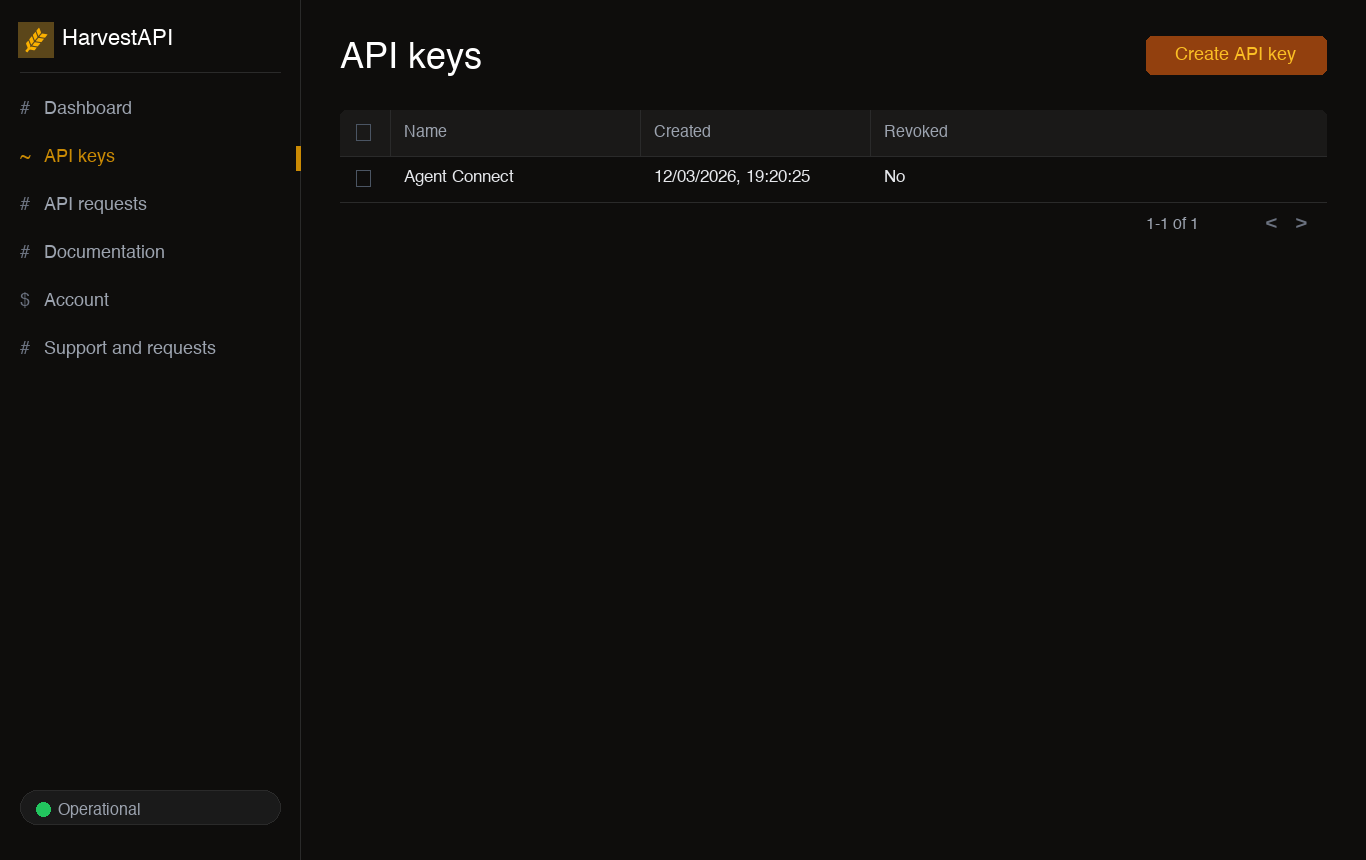
Click Create API key, give it a descriptive name (e.g.,
My Agent), and click Create. -
Copy the generated API key. It is shown only once — store it securely before navigating away.
-
-
Create a connection in Scalekit
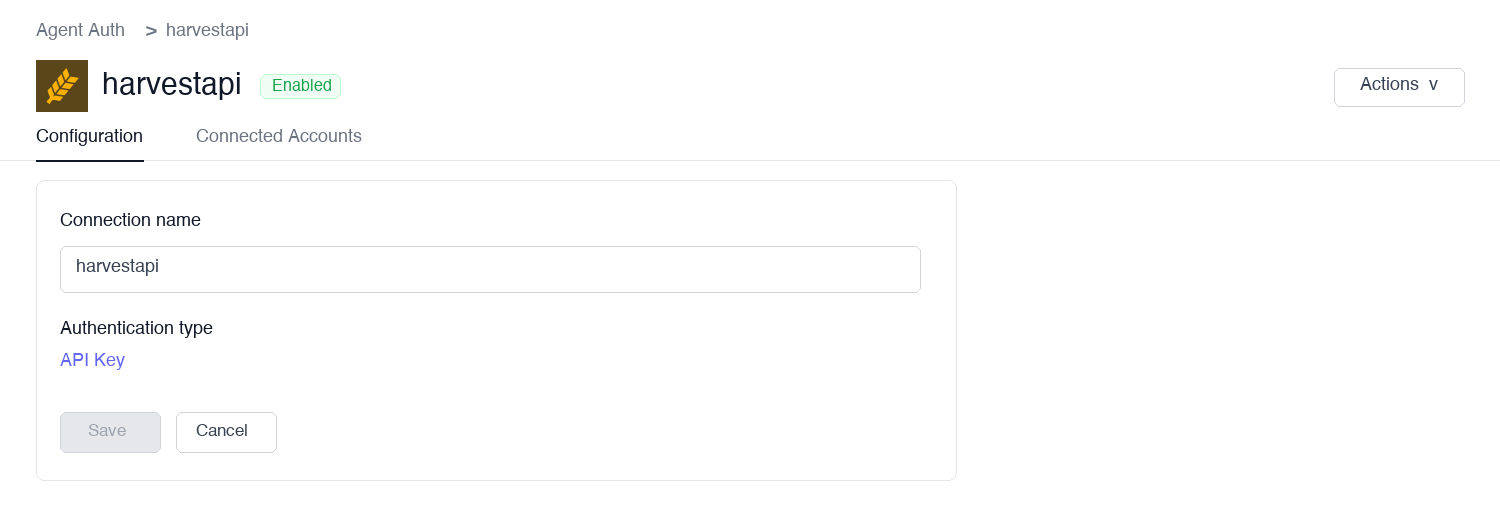
In Scalekit dashboard, go to Agent Auth → Create Connection. Find HarvestAPI and click Create.
-
Add a connected account
Open the connection you just created and click the Connected Accounts tab → Add account. Fill in the required fields:
- Your User’s ID — a unique identifier for the user in your system
- API Key — the key you copied in step 1
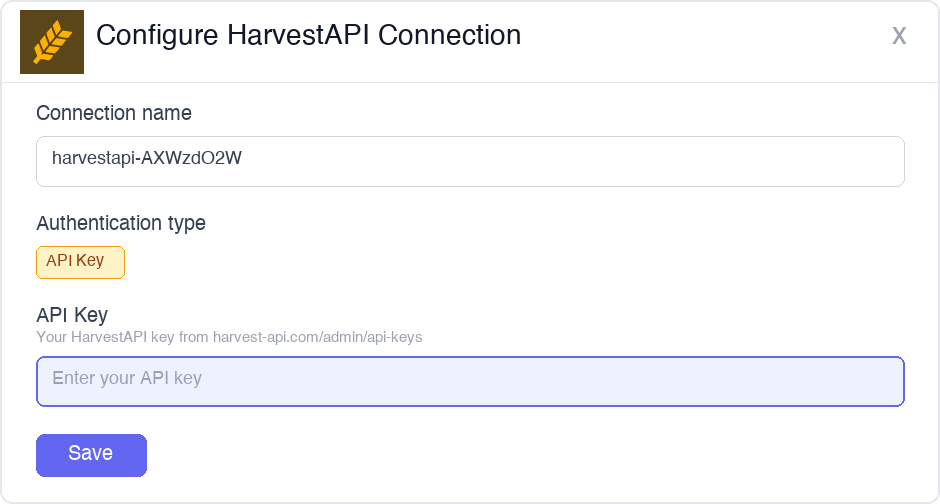
Click Save.
Once a connected account is set up, call LinkedIn data tools on behalf of any user — Scalekit injects the stored API key into every request automatically.
You can interact with Harvest API in two ways — via direct proxy API calls or via Scalekit optimized tool calls. Scroll down to see the list of available Scalekit tools.
Proxy API Calls
import { ScalekitClient } from '@scalekit-sdk/node';import 'dotenv/config';
const connectionName = 'harvestapi'; // connection name from Scalekit dashboardconst identifier = 'user_123'; // must match the identifier used when adding the connected account
// Get credentials from app.scalekit.com → Developers → API Credentialsconst scalekit = new ScalekitClient( process.env.SCALEKIT_ENV_URL, process.env.SCALEKIT_CLIENT_ID, process.env.SCALEKIT_CLIENT_SECRET);const actions = scalekit.actions;
// Scrape a LinkedIn profile by URLconst profile = await actions.request({ connectionName, identifier, path: '/linkedin/profile', method: 'GET', queryParams: { url: 'https://www.linkedin.com/in/satyanadella' },});console.log(profile.data);
// Search LinkedIn for people by title and locationconst people = await actions.request({ connectionName, identifier, path: '/linkedin/lead-search', method: 'GET', queryParams: { title: 'VP of Engineering', location: 'San Francisco, CA' },});console.log(people.data);
// Scrape a LinkedIn company pageconst company = await actions.request({ connectionName, identifier, path: '/linkedin/company', method: 'GET', queryParams: { url: 'https://www.linkedin.com/company/openai' },});console.log(company.data);
// Search LinkedIn job listings by keyword and locationconst jobs = await actions.request({ connectionName, identifier, path: '/linkedin/job-search', method: 'GET', queryParams: { keywords: 'machine learning engineer', location: 'New York, NY' },});console.log(jobs.data);
// Scrape a single job listing by URLconst job = await actions.request({ connectionName, identifier, path: '/linkedin/job', method: 'GET', queryParams: { url: 'https://www.linkedin.com/jobs/view/1234567890' },});console.log(job.data);
// Bulk scrape multiple LinkedIn profiles in one requestconst bulk = await actions.request({ connectionName, identifier, path: '/v2/acts/harvestapi~linkedin-profile-scraper/run-sync-get-dataset-items', method: 'POST', body: { urls: [ 'https://www.linkedin.com/in/satyanadella', 'https://www.linkedin.com/in/jeffweiner08', 'https://www.linkedin.com/in/reidhoffman', ], },});console.log(bulk.data);import scalekit.client, osfrom dotenv import load_dotenvload_dotenv()
connection_name = "harvestapi" # connection name from Scalekit dashboardidentifier = "user_123" # must match the identifier used when adding the connected account
# Get credentials from app.scalekit.com → Developers → API Credentialsscalekit_client = scalekit.client.ScalekitClient( client_id=os.getenv("SCALEKIT_CLIENT_ID"), client_secret=os.getenv("SCALEKIT_CLIENT_SECRET"), env_url=os.getenv("SCALEKIT_ENV_URL"),)
# Scrape a LinkedIn profile by URLprofile = scalekit_client.actions.request( connection_name=connection_name, identifier=identifier, path="/linkedin/profile", method="GET", params={"url": "https://www.linkedin.com/in/satyanadella"})print(profile)
# Search LinkedIn for people by title and locationpeople = scalekit_client.actions.request( connection_name=connection_name, identifier=identifier, path="/linkedin/lead-search", method="GET", params={"title": "VP of Engineering", "location": "San Francisco, CA"})print(people)
# Scrape a LinkedIn company pagecompany = scalekit_client.actions.request( connection_name=connection_name, identifier=identifier, path="/linkedin/company", method="GET", params={"url": "https://www.linkedin.com/company/openai"})print(company)
# Search LinkedIn job listings by keyword and locationjobs = scalekit_client.actions.request( connection_name=connection_name, identifier=identifier, path="/linkedin/job-search", method="GET", params={"keywords": "machine learning engineer", "location": "New York, NY"})print(jobs)
# Scrape a single job listing by URLjob = scalekit_client.actions.request( connection_name=connection_name, identifier=identifier, path="/linkedin/job", method="GET", params={"url": "https://www.linkedin.com/jobs/view/1234567890"})print(job)
# Bulk scrape multiple LinkedIn profiles in one requestbulk = scalekit_client.actions.request( connection_name=connection_name, identifier=identifier, path="/v2/acts/harvestapi~linkedin-profile-scraper/run-sync-get-dataset-items", method="POST", json={ "urls": [ "https://www.linkedin.com/in/satyanadella", "https://www.linkedin.com/in/jeffweiner08", "https://www.linkedin.com/in/reidhoffman" ] })print(bulk)Scalekit Tools
Tool list
Section titled “Tool list”log_time_entry
Section titled “log_time_entry”Create a new time entry in Harvest for a specific project and task. Returns the created time entry with its ID, billable status, and invoice details.
Supports two logging modes:
- Duration-based: provide
hours(e.g.,1.5for 90 minutes) - Timer-based: provide both
started_timeandended_time(e.g.,8:00am/9:30am)
If neither hours nor start/end times are provided, Harvest creates a running timer that you must stop manually.
| Name | Type | Required | Description |
|---|---|---|---|
project_id | integer | Yes | Harvest project ID to log time against. Use list_projects to find IDs. |
task_id | integer | Yes | Harvest task ID within the project. |
spent_date | string | Yes | Date of the time entry in YYYY-MM-DD format (e.g., 2025-03-16) |
hours | number | No | Duration in decimal hours (e.g., 1.5 for 90 minutes). Use this or started_time/ended_time. |
started_time | string | No | Start time for timer-based entry (e.g., 8:00am). Must be paired with ended_time. |
ended_time | string | No | End time for timer-based entry (e.g., 9:30am). Must be paired with started_time. |
notes | string | No | Notes or description for the time entry |
user_id | integer | No | User ID to log time for. Defaults to the authenticated user. Admin permissions required to log for another user. |
list_time_entries
Section titled “list_time_entries”List time entries in your Harvest account with optional filters by project, user, client, task, or date range. Returns paginated time entries with hours logged, notes, billable status, and associated project, task, and user details.
| Name | Type | Required | Description |
|---|---|---|---|
project_id | integer | No | Filter by Harvest project ID |
user_id | integer | No | Filter by Harvest user ID |
client_id | integer | No | Filter by Harvest client ID |
task_id | integer | No | Filter by Harvest task ID |
from | string | No | Start of date range in YYYY-MM-DD format |
to | string | No | End of date range in YYYY-MM-DD format |
is_billed | boolean | No | Filter by billed status |
is_running | boolean | No | Return only active running timers when true |
page | integer | No | Page number for pagination. Defaults to 1. |
per_page | integer | No | Number of results per page (max 100). Defaults to 100. |
list_projects
Section titled “list_projects”List all projects in your Harvest account. Returns project details including name, client, budget, billing method, start and end dates, and active status. Use this to find project_id values for log_time_entry.
| Name | Type | Required | Description |
|---|---|---|---|
client_id | integer | No | Filter projects by client ID |
is_active | boolean | No | Filter by active status. Set true to return only active projects. |
updated_since | string | No | ISO 8601 datetime — return only projects updated after this timestamp (e.g., 2025-01-01T00:00:00Z) |
page | integer | No | Page number for pagination. Defaults to 1. |
per_page | integer | No | Number of results per page (max 100). Defaults to 100. |
list_users
Section titled “list_users”List all users in your Harvest account. Returns user profiles including name, email, roles, and weekly capacity. Use this to find user_id values for filtering time entries or logging on behalf of another user.
| Name | Type | Required | Description |
|---|---|---|---|
is_active | boolean | No | Filter by active status. Set true to return only active users. |
updated_since | string | No | ISO 8601 datetime — return only users updated after this timestamp |
page | integer | No | Page number for pagination. Defaults to 1. |
per_page | integer | No | Number of results per page (max 100). Defaults to 100. |
get_user
Section titled “get_user”Retrieve a Harvest user profile by user ID, including name, email, roles, weekly capacity, and avatar. Use list_users to discover user IDs.
| Name | Type | Required | Description |
|---|---|---|---|
user_id | string | Yes | Harvest user ID |
get_company
Section titled “get_company”Retrieve the Harvest company (account) information for the authenticated user, including company name, base URI, plan type, clock format, currency, and weekly capacity settings. Takes no parameters.
scrape_profile
Section titled “scrape_profile”Scrape a LinkedIn profile by URL or public identifier. Returns contact details, current and past employment history, education, skills, and profile metadata. Provide either profile_url or public_identifier — at least one is required.
Use main=true to get a simplified profile faster and at fewer credits. Enable find_email=true only when email is needed — it costs extra credits per successful match.
| Name | Type | Required | Description |
|---|---|---|---|
profile_url | string | No* | Full LinkedIn profile URL (e.g., https://www.linkedin.com/in/satyanadella). Use this or public_identifier. |
public_identifier | string | No* | LinkedIn profile handle — the slug after /in/ (e.g., satyanadella). Use this or profile_url. |
main | boolean | No | Return a simplified profile at fewer credits (~2.6s). Defaults to false (full profile, ~4.9s). |
find_email | boolean | No | Attempt to find the contact’s email address. Costs extra credits per successful match. Defaults to false. |
*Provide either profile_url or public_identifier — at least one is required.
scrape_company
Section titled “scrape_company”Scrape a LinkedIn company page for overview, headcount, employee count range, follower count, locations, specialties, industries, and funding data. Provide at least one of company_url, universal_name, or search.
| Name | Type | Required | Description |
|---|---|---|---|
company_url | string | No* | Full LinkedIn company page URL (e.g., https://www.linkedin.com/company/microsoft). |
universal_name | string | No* | Company universal name — the slug after /company/ (e.g., microsoft). |
search | string | No* | Company name to search for. Returns the most relevant match. Useful when you don’t have the URL. |
*Provide at least one of company_url, universal_name, or search.
scrape_job
Section titled “scrape_job”Retrieve full job listing details from LinkedIn. Returns title, company, description, requirements, salary, location, workplace type, employment type, applicant count, and application details. Provide either job_url or job_id — at least one is required.
| Name | Type | Required | Description |
|---|---|---|---|
job_url | string | No* | Full LinkedIn job posting URL (e.g., https://www.linkedin.com/jobs/view/1234567890). Use this or job_id. |
job_id | string | No* | LinkedIn job listing ID. Use this or job_url. |
*Provide either job_url or job_id — at least one is required.
bulk_scrape_profiles
Section titled “bulk_scrape_profiles”Batch scrape multiple LinkedIn profiles in a single request using the HarvestAPI Apify scraper. Returns an array of profile objects in the same order as the input. Failed profiles return an error object instead of profile data.
Pricing: $4 per 1,000 profiles; $10 per 1,000 profiles with email.
| Name | Type | Required | Description |
|---|---|---|---|
urls | array<string> | Yes | List of LinkedIn profile URLs to scrape. Each entry must be a full URL (e.g., https://www.linkedin.com/in/username). Maximum 50 URLs per request. |
apify_token | string | Yes | Apify API token from console.apify.com/settings/integrations |
search_profiles
Section titled “search_profiles”Search LinkedIn profiles using basic filters. Returns paginated profiles with name, title, location, and LinkedIn URL.
| Name | Type | Required | Description |
|---|---|---|---|
search | string | Yes | Name or keywords to search for (e.g., "Jane Smith") |
title | string | No | Job title filter (e.g., "Software Engineer") |
company | string | No | Current or past company name filter |
school | string | No | School or university name filter |
location | string | No | Location filter by city, state, or country |
page | integer | No | Page number for pagination. Defaults to 1. |
search_people
Section titled “search_people”Search LinkedIn for people using filters such as job title, current company, location, and industry. Uses LinkedIn Lead Search for unmasked results. All parameters are optional and support comma-separated values for multiple filters.
| Name | Type | Required | Description |
|---|---|---|---|
keywords | string | No | Free-text search terms matched against name, headline, and bio |
title | string | No | Job title filter (e.g., "VP of Engineering"). Comma-separate multiple values. |
company | string | No | Current company name filter (e.g., "OpenAI,Anthropic"). Comma-separate multiple values. |
location | string | No | Location filter by city, state, or country. Comma-separate multiple values. |
industry | string | No | Industry vertical filter (e.g., "Software,Healthcare"). Comma-separate multiple values. |
page | integer | No | Page number for pagination. Defaults to 1. |
search_profile_services
Section titled “search_profile_services”Search LinkedIn profiles that offer specific services — freelancers, consultants, and service providers. Returns paginated profiles with name, position, location, and LinkedIn URL.
| Name | Type | Required | Description |
|---|---|---|---|
search | string | Yes | Service name or keywords (e.g., "UX design", "tax consulting") |
location | string | No | Location filter by city, state, or country |
geo_id | string | No | LinkedIn Geo ID for the location — overrides location when provided. Use search_geo_id to look up Geo IDs. |
page | integer | No | Page number for pagination. Defaults to 1. |
search_jobs
Section titled “search_jobs”Search LinkedIn job listings by keyword, location, company, workplace type, employment type, experience level, and salary. Returns paginated job listings with title, company, location, and LinkedIn URL.
| Name | Type | Required | Description |
|---|---|---|---|
keywords | string | No | Job title or skill keywords (e.g., "machine learning engineer") |
location | string | No | Location filter by city, state, or country (e.g., "New York, NY") |
company | string | No | Filter listings by company name (e.g., "Stripe") |
workplace_type | string | No | Filter by workplace arrangement: remote, on-site, or hybrid |
employment_type | string | No | Filter by contract type: full-time, part-time, contract, temporary, volunteer, internship |
experience_level | string | No | Filter by seniority: entry, associate, mid-senior, director, executive |
salary | string | No | Salary range filter (format varies by region) |
page | integer | No | Page number for pagination. Defaults to 1. |
search_companies
Section titled “search_companies”Search for companies on LinkedIn by name, industry, company size, or location. Returns a paginated list of company results with name, domain, headcount, industry, and LinkedIn URL.
| Name | Type | Required | Description |
|---|---|---|---|
search | string | Yes | Keywords to match against company names (e.g., "AI infrastructure") |
location | string | No | Filter by city, state, or country |
company_size | string | No | Filter by headcount range: 1-10, 11-50, 51-200, 201-500, 501-1000, 1001-5000, 5001-10000, 10001+ |
industry_id | string | No | Filter by LinkedIn industry ID. Comma-separate multiple IDs (e.g., "4,96"). Industry IDs can be found in the LinkedIn API documentation. |
page | integer | No | Page number for pagination. Defaults to 1. |
search_groups
Section titled “search_groups”Search for LinkedIn groups by keyword or topic. Returns group name, member count, description, and LinkedIn URL. Use this to discover groups before fetching posts or details with get_linkedin_group and get_group_posts.
| Name | Type | Required | Description |
|---|---|---|---|
search | string | Yes | Keywords to search for groups (e.g., "AI product managers") |
page | integer | No | Page number for pagination. Defaults to 1. |
get_linkedin_group
Section titled “get_linkedin_group”Retrieve details for a LinkedIn group including name, description, member count, and group metadata. Provide either group_url or group_id — at least one is required.
| Name | Type | Required | Description |
|---|---|---|---|
group_url | string | No* | Full LinkedIn group URL (e.g., https://www.linkedin.com/groups/1234567). Use this or group_id. |
group_id | string | No* | LinkedIn group ID. Use this or group_url. |
*Provide either group_url or group_id — at least one is required.
get_group_posts
Section titled “get_group_posts”Retrieve posts from a LinkedIn group. Returns post content, author info, engagement stats, and timestamps. Provide either group_url or group_id.
| Name | Type | Required | Description |
|---|---|---|---|
group_url | string | No* | Full LinkedIn group URL. Use this or group_id. |
group_id | string | No* | LinkedIn group ID. Use this or group_url. |
page | integer | No | Page number for pagination. Defaults to 1. |
*Provide either group_url or group_id — at least one is required.
get_profile_posts
Section titled “get_profile_posts”Retrieve recent LinkedIn posts from a person’s profile. Returns post content, engagement stats, and timestamps. Provide either profile_url or public_identifier.
| Name | Type | Required | Description |
|---|---|---|---|
profile_url | string | No* | Full LinkedIn profile URL. Use this or public_identifier. |
public_identifier | string | No* | LinkedIn handle — the slug after /in/ (e.g., satyanadella). Use this or profile_url. |
page | integer | No | Page number for pagination. Defaults to 1. |
*Provide either profile_url or public_identifier — at least one is required.
get_company_posts
Section titled “get_company_posts”Retrieve recent LinkedIn posts from a company page. Returns post content, likes, comments, shares, and engagement stats. Provide either company_url or universal_name.
| Name | Type | Required | Description |
|---|---|---|---|
company_url | string | No* | Full LinkedIn company page URL. Use this or universal_name. |
universal_name | string | No* | Company universal name — the slug after /company/ (e.g., openai). Use this or company_url. |
posted_limit | string | No | Filter posts by recency: 24h, week, or month |
page | integer | No | Page number for pagination. Defaults to 1. |
*Provide either company_url or universal_name — at least one is required.
search_posts
Section titled “search_posts”Search for LinkedIn posts by keyword, author, company, or content type. Returns paginated posts with content, engagement metrics, and author info. All parameters are optional — provide at least one for meaningful results.
| Name | Type | Required | Description |
|---|---|---|---|
search | string | No | Keywords to search in post content (e.g., "generative AI regulation") |
profile | string | No | Filter posts by author LinkedIn profile URL. Comma-separate multiple URLs. |
company | string | No | Filter posts by company LinkedIn URL. Comma-separate multiple URLs. |
content_type | string | No | Filter by post format: videos, images, documents, live_videos |
posted_limit | string | No | Filter by recency: 24h, week, or month |
sort_by | string | No | Sort order: relevance (default) or date |
page | integer | No | Page number for pagination. Defaults to 1. |
get_linkedin_post
Section titled “get_linkedin_post”Retrieve full details of a LinkedIn post, including content, author, likes, comments, shares, and engagement metrics. Provide either post_url or activity_id — at least one is required.
| Name | Type | Required | Description |
|---|---|---|---|
post_url | string | No* | Full LinkedIn post URL. Use this or activity_id. |
activity_id | string | No* | LinkedIn activity ID of the post (found in the post URL). Use this or post_url. |
*Provide either post_url or activity_id — at least one is required.
get_post_comments
Section titled “get_post_comments”Retrieve comments on a LinkedIn post. Returns commenter profiles, comment text, likes, and timestamps.
| Name | Type | Required | Description |
|---|---|---|---|
post | string | Yes | Full LinkedIn post URL |
sort_by | string | No | Sort order: relevance (default) or date |
page | integer | No | Page number for pagination. Defaults to 1. |
get_post_reactions
Section titled “get_post_reactions”Retrieve users who reacted to a LinkedIn post, including their name, title, and reaction type.
Reaction types: like, celebrate, support, insightful, funny, love
| Name | Type | Required | Description |
|---|---|---|---|
post | string | Yes | Full LinkedIn post URL |
page | integer | No | Page number for pagination. Defaults to 1. |
get_comment_replies
Section titled “get_comment_replies”Retrieve replies to a specific LinkedIn comment. Returns reply content, author info, and engagement stats.
| Name | Type | Required | Description |
|---|---|---|---|
comment_url | string | Yes | LinkedIn comment URL or comment ID |
page | integer | No | Page number for pagination. Defaults to 1. |
get_comment_reactions
Section titled “get_comment_reactions”Retrieve users who reacted to a specific LinkedIn comment, including their name, title, and reaction type.
| Name | Type | Required | Description |
|---|---|---|---|
comment_url | string | Yes | LinkedIn comment URL or comment ID |
page | integer | No | Page number for pagination. Defaults to 1. |
get_profile_comments
Section titled “get_profile_comments”Retrieve recent comments made by a LinkedIn profile. Returns comment content, the post context, and timestamps. Provide either profile_url or public_identifier.
| Name | Type | Required | Description |
|---|---|---|---|
profile_url | string | No* | Full LinkedIn profile URL. Use this or public_identifier. |
public_identifier | string | No* | LinkedIn handle — the slug after /in/. Use this or profile_url. |
page | integer | No | Page number for pagination. Defaults to 1. |
*Provide either profile_url or public_identifier — at least one is required.
get_profile_reactions
Section titled “get_profile_reactions”Retrieve recent reactions (likes, celebrates, etc.) made by a LinkedIn profile on posts and articles. Provide either profile_url or public_identifier.
| Name | Type | Required | Description |
|---|---|---|---|
profile_url | string | No* | Full LinkedIn profile URL. Use this or public_identifier. |
public_identifier | string | No* | LinkedIn handle — the slug after /in/. Use this or profile_url. |
page | integer | No | Page number for pagination. Defaults to 1. |
*Provide either profile_url or public_identifier — at least one is required.
search_linkedin_ads
Section titled “search_linkedin_ads”Search LinkedIn ads using keywords, account owner, country, and date filters. Returns paginated ad results including ad content, creative, and targeting details.
Provide either search_url (a LinkedIn Ad Library URL) or keyword/filter parameters — the two approaches are mutually exclusive.
| Name | Type | Required | Description |
|---|---|---|---|
search_url | string | No | LinkedIn Ad Library search URL. Use this or keyword/filter parameters. |
keyword | string | No | Search ads by keyword |
account_owner | string | No | Filter by company or advertiser name |
countries | string | No | Comma-separated ISO country codes (e.g., "US,GB") or "ALL" for global results |
date_option | string | No | Date range preset: last-30-days, current-month, current-year, last-year, or custom-date-range |
start_date | string | No | Start of custom date range in YYYY-MM-DD format. Only applies when date_option is custom-date-range. |
end_date | string | No | End of custom date range in YYYY-MM-DD format. Only applies when date_option is custom-date-range. |
pagination_token | string | No | Token returned in the previous response for fetching the next page of results |
get_linkedin_ad_details
Section titled “get_linkedin_ad_details”Retrieve details of a specific LinkedIn ad from the Ad Library, including ad content, creative, advertiser, and targeting information. Provide either ad_url or ad_id — at least one is required.
| Name | Type | Required | Description |
|---|---|---|---|
ad_url | string | No* | LinkedIn Ad Library URL for the specific ad. Use this or ad_id. |
ad_id | string | No* | LinkedIn ad ID. Use this or ad_url. |
*Provide either ad_url or ad_id — at least one is required.
search_geo_id
Section titled “search_geo_id”Search for LinkedIn geographic IDs (geoId) by location name. Use the returned geoId values as precise location filters in search_jobs and search_profile_services — geoId overrides text-based location filters and produces more accurate results.
| Name | Type | Required | Description |
|---|---|---|---|
search | string | Yes | Location name to look up (e.g., "San Francisco", "United Kingdom", "Greater London") |
Connection management tools
Section titled “Connection management tools”send_connection_request
Section titled “send_connection_request”Send a LinkedIn connection request to a profile on behalf of a LinkedIn account. Optionally include a personalized message (max 300 characters).
| Name | Type | Required | Description |
|---|---|---|---|
profile | string | Yes | LinkedIn profile URL, public identifier, or profile ID of the recipient |
cookie | string | Yes | LinkedIn session cookie (li_at) for the sending account |
message | string | No | Personalized connection message (max 300 characters). Omit to send without a note. |
proxy | string | No | Proxy server URL for the request (e.g., http://user:pass@proxy.example.com:8080) |
get_sent_connection_requests
Section titled “get_sent_connection_requests”Retrieve pending connection requests sent from a LinkedIn account. Returns recipient profiles and request timestamps.
| Name | Type | Required | Description |
|---|---|---|---|
cookie | string | Yes | LinkedIn session cookie (li_at) for the account |
proxy | string | No | Proxy server URL for the request |
get_received_connection_requests
Section titled “get_received_connection_requests”Retrieve pending connection requests received on a LinkedIn account. Returns sender profiles, optional messages, and request timestamps. Use the invitation_id and shared_secret from each result to accept requests with accept_connection_request.
| Name | Type | Required | Description |
|---|---|---|---|
cookie | string | Yes | LinkedIn session cookie (li_at) for the account |
proxy | string | No | Proxy server URL for the request |
accept_connection_request
Section titled “accept_connection_request”Accept a pending LinkedIn connection request. The invitation_id and shared_secret are returned by get_received_connection_requests.
| Name | Type | Required | Description |
|---|---|---|---|
invitation_id | string | Yes | ID of the connection invitation to accept (from get_received_connection_requests) |
shared_secret | string | Yes | Shared secret for the invitation (from get_received_connection_requests) |
cookie | string | Yes | LinkedIn session cookie (li_at) for the account |
proxy | string | No | Proxy server URL for the request |
send_linkedin_message
Section titled “send_linkedin_message”Send a direct message to a LinkedIn connection on behalf of a LinkedIn account. The recipient must be a 1st-degree connection — you cannot message people you are not connected with.
| Name | Type | Required | Description |
|---|---|---|---|
recipient_profile | string | Yes | LinkedIn profile URL of the message recipient |
message | string | Yes | Text content of the direct message |
cookie | string | Yes | LinkedIn session cookie (li_at) for the sending account |
proxy | string | No | Proxy server URL for the request |
get_my_api_user
Section titled “get_my_api_user”Retrieve information about the current HarvestAPI user account. Call this before high-volume scraping workflows to verify you have sufficient credits. Takes no parameters.
Returns:
| Field | Description |
|---|---|
id | Your HarvestAPI user ID |
email | Account email address |
credits | Current credit balance |
credits_used | Total credits consumed to date |
plan | Active subscription plan name |
rate_limit | Maximum API requests per second for your plan |
created_at | Account creation timestamp |
get_private_account_pools
Section titled “get_private_account_pools”Retrieve the list of private LinkedIn account pools configured on your HarvestAPI account. Private pools route requests through dedicated LinkedIn accounts, providing better rate limit isolation for high-volume workflows. Takes no parameters.
Returns an array of pools, each containing:
| Field | Description |
|---|---|
id | Pool ID — pass this as usePrivatePool in supported tools |
name | Display name of the pool |
accounts_count | Number of LinkedIn accounts in the pool |
status | Pool status: active or inactive |
created_at | Pool creation timestamp |