

Pipedrive
Connect to Pipedrive CRM. Manage deals, persons, organizations, leads, activities, and sales pipelines with 68 tools.
Connect to Pipedrive CRM. Manage deals, persons, organizations, leads, activities, and sales pipelines.

Supports authentication: OAuth 2.0
What you can build with this connector
| Use case | Tools involved |
|---|---|
| Automated deal creation from leads | pipedrive_lead_get → pipedrive_deal_create → pipedrive_activity_create |
| Contact enrichment pipeline | pipedrive_persons_search → pipedrive_person_update + pipedrive_note_create |
| Pipeline health monitoring | pipedrive_deals_list (by stage) → pipedrive_deal_update (move stage) |
| Activity scheduling agent | pipedrive_deal_get → pipedrive_activity_create (follow-up call/meeting) |
| Revenue forecasting | pipedrive_pipelines_list → pipedrive_deals_list → aggregate deal values |
| Competitive account mapping | pipedrive_organizations_search → pipedrive_organization_deals_list → pipedrive_notes_list |
| Product attach rate analysis | pipedrive_deal_products_list → pipedrive_products_list → compute metrics |
| Onboarding automation | pipedrive_person_create → pipedrive_deal_create → pipedrive_webhook_create |
Key concepts:
- Deals vs Leads: Leads are unqualified opportunities without a pipeline stage. Convert a lead to a deal with
pipedrive_deal_createonce it qualifies. - Persons and organizations: A person can belong to one organization. Linking both to a deal gives full account context.
- Stages and pipelines: Every deal must be in a stage, which belongs to a pipeline. Use
pipedrive_stages_listto get valid stage IDs before creating deals. - Activity types: Valid types include
call,meeting,email,lunch,deadline,task, andother. Fetch the full list withpipedrive_activity_types_list. - Pagination: List endpoints use
start(offset) andlimit. The default limit is 100; max is 500 for most endpoints. - Filters: Use
pipedrive_filter_createto save complex queries and passfilter_idto list endpoints for fast, reusable filtering.
Set up the agent connector
Section titled “Set up the agent connector”Register your Scalekit environment with the Pipedrive connector so Scalekit handles the OAuth flow and token lifecycle on your behalf. The connection name you create is used to identify and invoke the connection in code.
-
Create a connection in Scalekit
-
In Scalekit dashboard, go to Agent Auth → Create Connection. Find Pipedrive and click Create.
-
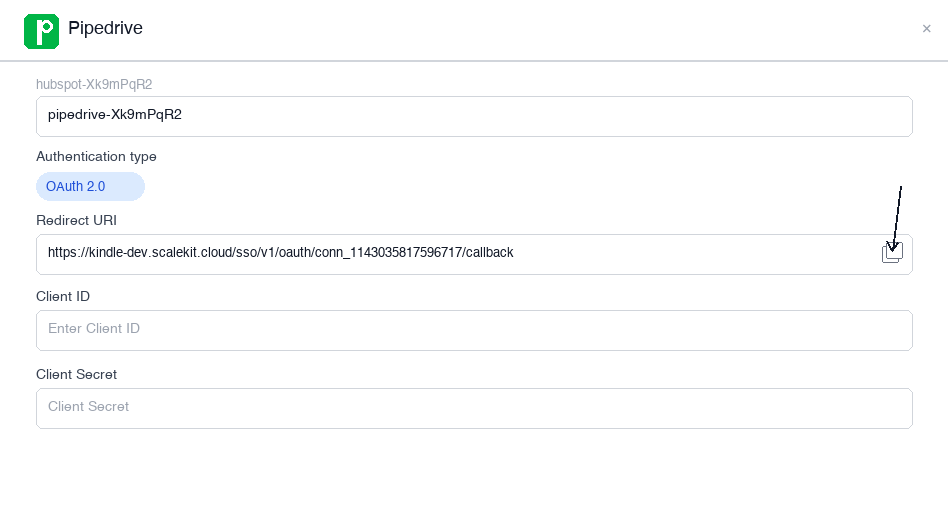
Click Use your own credentials and copy the Redirect URI. It looks like:
https://<SCALEKIT_ENVIRONMENT_URL>/sso/v1/oauth/<CONNECTION_ID>/callback
Keep this tab open — you’ll return to it in step 3.
-
-
Create a Pipedrive OAuth app
-
Go to the Pipedrive Developer Hub and sign in with your Pipedrive account.
-
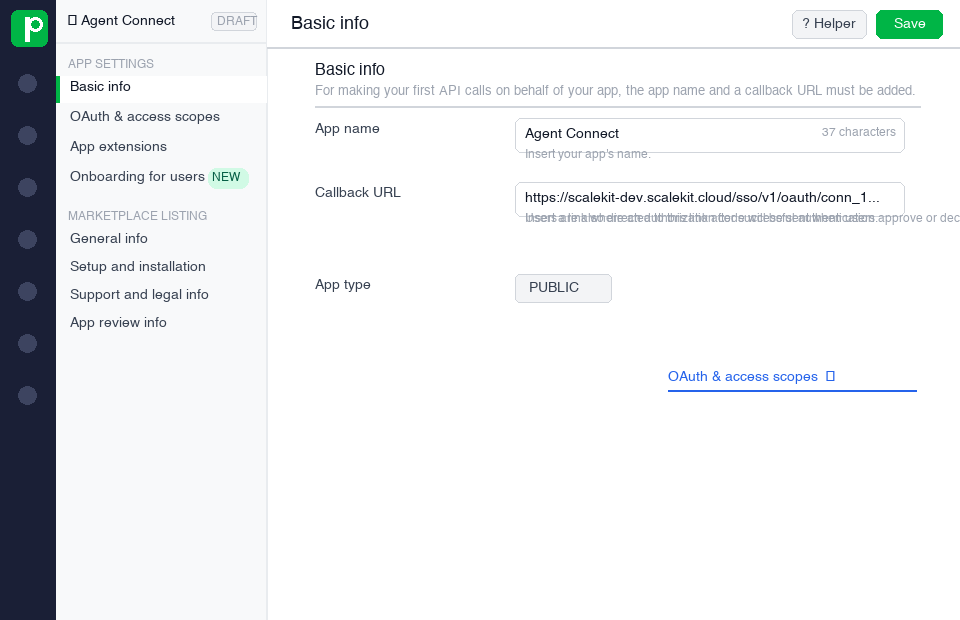
Create a new app and fill in the form:
- App name — a name to identify your app (e.g.,
My Sales Agent) - Callback URL — paste the Redirect URI you copied from Scalekit
- App name — a name to identify your app (e.g.,
-
Under OAuth & Access Scopes, select the permissions your agent needs:
Scope Access granted deals:fullRead and write deals contacts:fullRead and write persons and organizations leads:fullRead and write leads activities:fullRead and write activities products:fullRead and write products users:readRead user information webhooks:fullManage webhooks -
Click Save.
-
-
Copy your client credentials
After saving your app, Pipedrive shows the Client ID and Client Secret.
Copy both values now — you will need them in the next step.
-
Add credentials in Scalekit
-
Return to Scalekit dashboard → Agent Auth → Connections and open the connection you created in step 1.
-
Enter the following:
- Client ID — from Pipedrive
- Client Secret — from Pipedrive
- Permissions — the same scopes you selected in Pipedrive
-
Click Save.
-
Connect a user’s Pipedrive account and make API calls on their behalf — Scalekit handles OAuth and token refresh automatically.
import { ScalekitClient } from '@scalekit-sdk/node';import 'dotenv/config';
const connectionName = 'pipedrive'; // connection name from Scalekit dashboardconst identifier = 'user_123'; // your unique user identifier
// Get credentials from app.scalekit.com → Developers → API Credentialsconst scalekit = new ScalekitClient( process.env.SCALEKIT_ENV_URL, process.env.SCALEKIT_CLIENT_ID, process.env.SCALEKIT_CLIENT_SECRET);const actions = scalekit.actions;
// Authenticate the user — send this link to your userconst { link } = await actions.getAuthorizationLink({ connectionName, identifier });console.log('🔗 Authorize Pipedrive:', link);
// After the user authorizes, make API calls via Scalekit proxyconst result = await actions.request({ connectionName, identifier, path: '/v1/deals', method: 'GET', params: { status: 'open', limit: 50 },});console.log(result.data.data); // Array of deal objectsimport scalekit.client, osfrom dotenv import load_dotenvload_dotenv()
connection_name = "pipedrive" # connection name from Scalekit dashboardidentifier = "user_123" # your unique user identifier
# Get credentials from app.scalekit.com → Developers → API Credentialsscalekit_client = scalekit.client.ScalekitClient( client_id=os.getenv("SCALEKIT_CLIENT_ID"), client_secret=os.getenv("SCALEKIT_CLIENT_SECRET"), env_url=os.getenv("SCALEKIT_ENV_URL"),)actions = scalekit_client.actions
# Authenticate the user — send this link to your userlink_response = actions.get_authorization_link( connection_name=connection_name, identifier=identifier)print("🔗 Authorize Pipedrive:", link_response.link)
# After the user authorizes, make API calls via Scalekit proxyresult = actions.request( connection_name=connection_name, identifier=identifier, path="/v1/deals", method="GET", params={"status": "open", "limit": 50},)print(result["data"]["data"]) # List of deal objects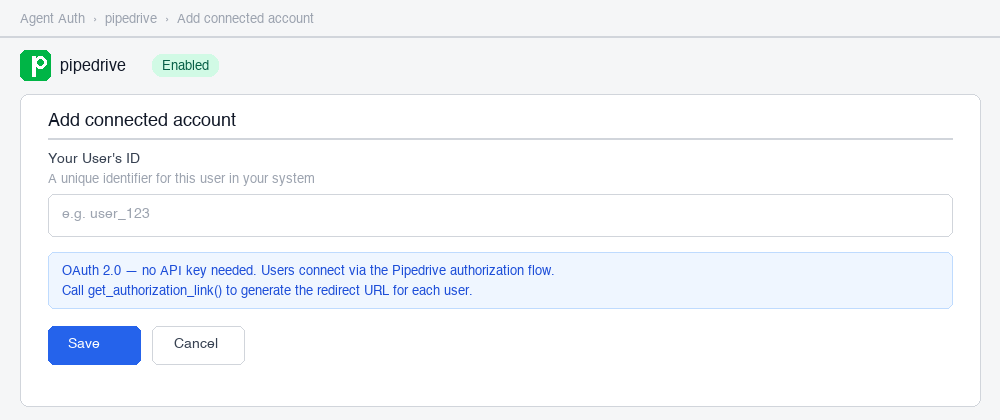
Scalekit tools
Section titled “Scalekit tools”Use actions.execute_tool() to call any Pipedrive tool by name. Scalekit resolves credentials, calls the Pipedrive API, and returns a structured response. All tool names map directly to the Tool list below.
Create a deal and schedule a follow-up call:
// Create a new deal linked to a person and organizationconst deal = await actions.executeTool({ connectionName: 'pipedrive', identifier: 'user_123', toolName: 'pipedrive_deal_create', toolInput: { title: 'Acme Corp — Enterprise Plan', value: 48000, currency: 'USD', person_id: 1042, org_id: 305, stage_id: 2, expected_close_date: '2026-06-30', },});const dealId = deal.data.id;console.log(`Created deal ${dealId}`);
// Schedule a discovery call for the new dealconst activity = await actions.executeTool({ connectionName: 'pipedrive', identifier: 'user_123', toolName: 'pipedrive_activity_create', toolInput: { subject: 'Discovery call — Acme Corp', type: 'call', deal_id: dealId, due_date: '2026-04-01', due_time: '10:00', duration: '00:30', note: 'Confirm decision-makers and budget approval process', },});console.log(`Scheduled activity ${activity.data.id}`);# Create a new deal linked to a person and organizationdeal = actions.execute_tool( connection_name="pipedrive", identifier="user_123", tool_name="pipedrive_deal_create", tool_input={ "title": "Acme Corp — Enterprise Plan", "value": 48000, "currency": "USD", "person_id": 1042, "org_id": 305, "stage_id": 2, "expected_close_date": "2026-06-30", },)deal_id = deal["data"]["id"]print(f"Created deal {deal_id}")
# Schedule a discovery call for the new dealactivity = actions.execute_tool( connection_name="pipedrive", identifier="user_123", tool_name="pipedrive_activity_create", tool_input={ "subject": "Discovery call — Acme Corp", "type": "call", "deal_id": deal_id, "due_date": "2026-04-01", "due_time": "10:00", "duration": "00:30", "note": "Confirm decision-makers and budget approval process", },)print(f"Scheduled activity {activity['data']['id']}")Search for a person and attach a note:
// Find an existing contact by nameconst results = await actions.executeTool({ connectionName: 'pipedrive', identifier: 'user_123', toolName: 'pipedrive_persons_search', toolInput: { term: 'Jane Smith', exact_match: false, limit: 5 },});
const persons = results.data.items;if (persons.length > 0) { const personId = persons[0].item.id;
// Attach a contextual note await actions.executeTool({ connectionName: 'pipedrive', identifier: 'user_123', toolName: 'pipedrive_note_create', toolInput: { content: 'Spoke with Jane re: renewal. She confirmed budget approval in Q2.', person_id: personId, pinned_to_person_flag: true, }, }); console.log(`Note added to person ${personId}`);}# Find an existing contact by nameresults = actions.execute_tool( connection_name="pipedrive", identifier="user_123", tool_name="pipedrive_persons_search", tool_input={"term": "Jane Smith", "exact_match": False, "limit": 5},)
persons = results["data"]["items"]if persons: person_id = persons[0]["item"]["id"]
# Attach a contextual note actions.execute_tool( connection_name="pipedrive", identifier="user_123", tool_name="pipedrive_note_create", tool_input={ "content": "Spoke with Jane re: renewal. She confirmed budget approval in Q2.", "person_id": person_id, "pinned_to_person_flag": True, }, ) print(f"Note added to person {person_id}")Move a deal to the next stage:
// Fetch current deal detailsconst deal = await actions.executeTool({ connectionName: 'pipedrive', identifier: 'user_123', toolName: 'pipedrive_deal_get', toolInput: { deal_id: 9871 },});const currentStage: number = deal.data.stage_id;
// Fetch all stages in the pipeline to find the next oneconst stages = await actions.executeTool({ connectionName: 'pipedrive', identifier: 'user_123', toolName: 'pipedrive_stages_list', toolInput: { pipeline_id: deal.data.pipeline_id },});const stageIds: number[] = stages.data.map((s: { id: number }) => s.id).sort((a: number, b: number) => a - b);const currentIdx = stageIds.indexOf(currentStage);if (currentIdx >= stageIds.length - 1) { throw new Error('Deal is already in the last stage');}const nextStage = stageIds[currentIdx + 1];
// Advance the dealawait actions.executeTool({ connectionName: 'pipedrive', identifier: 'user_123', toolName: 'pipedrive_deal_update', toolInput: { deal_id: 9871, stage_id: nextStage },});console.log(`Deal moved from stage ${currentStage} to ${nextStage}`);# Fetch current deal detailsdeal = actions.execute_tool( connection_name="pipedrive", identifier="user_123", tool_name="pipedrive_deal_get", tool_input={"deal_id": 9871},)current_stage = deal["data"]["stage_id"]
# Fetch all stages in the pipeline to find the next onestages = actions.execute_tool( connection_name="pipedrive", identifier="user_123", tool_name="pipedrive_stages_list", tool_input={"pipeline_id": deal["data"]["pipeline_id"]},)stage_ids = sorted(s["id"] for s in stages["data"])current_idx = stage_ids.index(current_stage)if current_idx >= len(stage_ids) - 1: raise ValueError("Deal is already in the last stage")next_stage = stage_ids[current_idx + 1]
# Advance the dealactions.execute_tool( connection_name="pipedrive", identifier="user_123", tool_name="pipedrive_deal_update", tool_input={"deal_id": 9871, "stage_id": next_stage},)print(f"Deal moved from stage {current_stage} to {next_stage}")List all activities due today:
const today = new Date().toISOString().split('T')[0];
const activities = await actions.executeTool({ connectionName: 'pipedrive', identifier: 'user_123', toolName: 'pipedrive_activities_list', toolInput: { start_date: today, end_date: today, done: 0, limit: 100 },});
for (const act of activities.data.data ?? []) { console.log(`[${act.type}] ${act.subject} — due ${act.due_time}`);}from datetime import date
today = date.today().isoformat()
activities = actions.execute_tool( connection_name="pipedrive", identifier="user_123", tool_name="pipedrive_activities_list", tool_input={ "start_date": today, "end_date": today, "done": False, "limit": 100, },)
for act in activities["data"]["data"] or []: print(f"[{act['type']}] {act['subject']} — due {act['due_time']}")Bulk-update stalled deals:
// Find all open deals that have not moved in 30+ daysconst stalled = await actions.executeTool({ connectionName: 'pipedrive', identifier: 'user_123', toolName: 'pipedrive_deals_list', toolInput: { status: 'open', limit: 200 },});
const cutoff = new Date(Date.now() - 30 * 24 * 60 * 60 * 1000);for (const deal of stalled.data.data ?? []) { if (deal.last_activity_date && new Date(deal.last_activity_date) < cutoff) { await actions.executeTool({ connectionName: 'pipedrive', identifier: 'user_123', toolName: 'pipedrive_deal_update', toolInput: { deal_id: deal.id, status: 'lost' }, }); console.log(`Marked deal ${deal.id} (${deal.title}) as lost`); }}# Find all open deals that have not moved in 30+ daysstalled = actions.execute_tool( connection_name="pipedrive", identifier="user_123", tool_name="pipedrive_deals_list", tool_input={"status": "open", "limit": 200},)
from datetime import datetime, timedelta
cutoff = datetime.now() - timedelta(days=30)for deal in stalled["data"]["data"] or []: last_activity = deal.get("last_activity_date") if last_activity and datetime.fromisoformat(last_activity) < cutoff: actions.execute_tool( connection_name="pipedrive", identifier="user_123", tool_name="pipedrive_deal_update", tool_input={"deal_id": deal["id"], "status": "lost"}, ) print(f"Marked deal {deal['id']} ({deal['title']}) as lost")LangChain integration
Section titled “LangChain integration”Load all 68 Pipedrive tools as LangChain-compatible tools and let an LLM drive the CRM automatically.
import loggingimport osimport time
from langchain_openai import ChatOpenAIfrom langchain.agents import AgentExecutor, create_tool_calling_agentfrom langchain_core.prompts import ChatPromptTemplate, MessagesPlaceholderfrom scalekit import ScalekitClient
logging.basicConfig(level=logging.INFO)logger = logging.getLogger(__name__)
scalekit_client = ScalekitClient( client_id=os.environ["SCALEKIT_CLIENT_ID"], client_secret=os.environ["SCALEKIT_CLIENT_SECRET"], environment_url=os.environ["SCALEKIT_ENV_URL"],)
# Load Pipedrive tools for the user — retry on transient failuresMAX_RETRIES = 3tools = Nonefor attempt in range(1, MAX_RETRIES + 1): try: tools = scalekit_client.actions.langchain.get_tools( connection_name="pipedrive", identifier="user_123", ) logger.info("Loaded %d Pipedrive tools", len(tools)) break except Exception as exc: logger.warning("get_tools attempt %d/%d failed: %s", attempt, MAX_RETRIES, exc) if attempt == MAX_RETRIES: raise RuntimeError("Failed to load Pipedrive tools after retries") from exc time.sleep(2 ** attempt)
llm = ChatOpenAI(model="gpt-4o", temperature=0)
prompt = ChatPromptTemplate.from_messages([ ("system", "You are a sales operations assistant with full access to Pipedrive CRM. " "Help the user manage their pipeline, contacts, and activities accurately."), MessagesPlaceholder("chat_history", optional=True), ("human", "{input}"), MessagesPlaceholder("agent_scratchpad"),])
agent = create_tool_calling_agent(llm, tools, prompt)agent_executor = AgentExecutor(agent=agent, tools=tools, verbose=True)
try: result = agent_executor.invoke({ "input": "Find all open deals worth more than $10,000 and schedule a follow-up call for each one due this Friday." }) print(result["output"])except Exception as exc: logger.error("Agent invocation failed: %s", exc) raiseTool list
Section titled “Tool list”pipedrive_deal_create
Section titled “pipedrive_deal_create”Create a new deal in Pipedrive CRM. Requires a deal title. Link the deal to a person and organization to give it full contact context.
| Name | Type | Required | Description |
|---|---|---|---|
title | string | Yes | Name of the deal |
value | number | No | Monetary value of the deal |
currency | string | No | ISO 4217 currency code (e.g., USD, EUR). Defaults to the company currency |
person_id | number | No | ID of the person linked to this deal |
org_id | number | No | ID of the organization linked to this deal |
pipeline_id | number | No | ID of the pipeline. Defaults to the first pipeline |
stage_id | number | No | ID of the stage within the pipeline |
status | string | No | Deal status: open, won, lost. Defaults to open |
expected_close_date | string | No | Expected close date in YYYY-MM-DD format |
probability | number | No | Win probability as a percentage (0–100) |
owner_id | number | No | User ID of the deal owner. Defaults to the authenticated user |
visible_to | number | No | Visibility: 1 = owner only, 3 = all users |
label | string | No | Deal label |
pipedrive_deal_get
Section titled “pipedrive_deal_get”Retrieve full details of a deal by ID, including linked person, organization, stage, and custom fields.
| Name | Type | Required | Description |
|---|---|---|---|
deal_id | number | Yes | ID of the deal to retrieve |
pipedrive_deal_update
Section titled “pipedrive_deal_update”Update properties of an existing deal. Only the fields you provide are changed — other fields remain unchanged.
| Name | Type | Required | Description |
|---|---|---|---|
deal_id | number | Yes | ID of the deal to update |
title | string | No | New deal title |
value | number | No | New deal value |
currency | string | No | New currency code |
person_id | number | No | New linked person ID |
org_id | number | No | New linked organization ID |
pipeline_id | number | No | New pipeline ID |
stage_id | number | No | New stage ID |
status | string | No | New status: open, won, lost |
expected_close_date | string | No | New expected close date (YYYY-MM-DD) |
probability | number | No | New win probability (0–100) |
owner_id | number | No | New owner user ID |
visible_to | number | No | New visibility setting |
pipedrive_deal_delete
Section titled “pipedrive_deal_delete”Permanently delete a deal by ID. This action cannot be undone.
| Name | Type | Required | Description |
|---|---|---|---|
deal_id | number | Yes | ID of the deal to delete |
pipedrive_deals_list
Section titled “pipedrive_deals_list”List deals with optional filtering by status, stage, pipeline, or owner. Supports pagination.
| Name | Type | Required | Description |
|---|---|---|---|
filter_id | number | No | ID of a saved filter to apply |
status | string | No | Filter by status: open, won, lost, deleted, all_not_deleted |
stage_id | number | No | Filter by stage ID |
pipeline_id | number | No | Filter by pipeline ID |
user_id | number | No | Filter by owner user ID |
start | number | No | Pagination offset. Defaults to 0 |
limit | number | No | Number of results per page. Max 500, defaults to 100 |
sort | string | No | Sort field and direction (e.g., update_time DESC) |
pipedrive_deals_search
Section titled “pipedrive_deals_search”Search deals by keyword across title, notes, and custom fields. Supports filtering by person, organization, or status.
| Name | Type | Required | Description |
|---|---|---|---|
term | string | Yes | Search keyword (minimum 2 characters) |
fields | string | No | Comma-separated fields to search: custom_fields, notes, name, label, status |
exact_match | boolean | No | When true, only exact phrase matches are returned |
person_id | number | No | Filter results to deals linked to this person |
org_id | number | No | Filter results to deals linked to this organization |
status | string | No | Filter by deal status |
start | number | No | Pagination offset |
limit | number | No | Number of results per page. Max 500 |
pipedrive_deal_activities_list
Section titled “pipedrive_deal_activities_list”List all activities associated with a deal, optionally filtered by completion status.
| Name | Type | Required | Description |
|---|---|---|---|
deal_id | number | Yes | ID of the deal |
start | number | No | Pagination offset |
limit | number | No | Number of results per page |
done | number | No | Filter by completion: 0 = incomplete, 1 = done |
exclude | string | No | Comma-separated activity IDs to exclude |
pipedrive_deal_products_list
Section titled “pipedrive_deal_products_list”List all products attached to a deal, including unit price, quantity, and discount per product.
| Name | Type | Required | Description |
|---|---|---|---|
deal_id | number | Yes | ID of the deal |
start | number | No | Pagination offset |
limit | number | No | Number of results per page |
pipedrive_deal_participants_list
Section titled “pipedrive_deal_participants_list”List all person participants linked to a deal. Participants are contacts associated with a deal beyond the primary contact.
| Name | Type | Required | Description |
|---|---|---|---|
deal_id | number | Yes | ID of the deal |
start | number | No | Pagination offset |
limit | number | No | Number of results per page |
Persons
Section titled “Persons”pipedrive_person_create
Section titled “pipedrive_person_create”Create a new person (contact) in Pipedrive. A person can have multiple email addresses and phone numbers.
| Name | Type | Required | Description |
|---|---|---|---|
name | string | Yes | Full name of the person |
owner_id | number | No | User ID of the owner. Defaults to authenticated user |
org_id | number | No | ID of the organization this person belongs to |
email | string | No | Primary email address |
phone | string | No | Primary phone number |
visible_to | number | No | Visibility: 1 = owner only, 3 = all users |
marketing_status | string | No | Marketing consent: subscribed, unsubscribed, no_consent, never_contacted |
pipedrive_person_get
Section titled “pipedrive_person_get”Retrieve full details of a person by ID, including linked organization, deals, and custom fields.
| Name | Type | Required | Description |
|---|---|---|---|
person_id | number | Yes | ID of the person to retrieve |
pipedrive_person_update
Section titled “pipedrive_person_update”Update properties of an existing person. Only the fields you provide are changed.
| Name | Type | Required | Description |
|---|---|---|---|
person_id | number | Yes | ID of the person to update |
name | string | No | New full name |
owner_id | number | No | New owner user ID |
org_id | number | No | New organization ID |
email | string | No | New primary email address |
phone | string | No | New primary phone number |
visible_to | number | No | New visibility setting |
marketing_status | string | No | New marketing consent status |
pipedrive_person_delete
Section titled “pipedrive_person_delete”Permanently delete a person by ID.
| Name | Type | Required | Description |
|---|---|---|---|
person_id | number | Yes | ID of the person to delete |
pipedrive_persons_list
Section titled “pipedrive_persons_list”List persons with optional filtering by first character or saved filter. Supports pagination.
| Name | Type | Required | Description |
|---|---|---|---|
filter_id | number | No | ID of a saved filter to apply |
first_char | string | No | Filter by first character of the person’s name |
start | number | No | Pagination offset |
limit | number | No | Number of results per page. Max 500, defaults to 100 |
sort | string | No | Sort field and direction |
pipedrive_persons_search
Section titled “pipedrive_persons_search”Search persons by keyword across name, email, phone, and custom fields.
| Name | Type | Required | Description |
|---|---|---|---|
term | string | Yes | Search keyword (minimum 2 characters) |
fields | string | No | Comma-separated fields to search: custom_fields, notes, name, email, phone |
exact_match | boolean | No | When true, only exact phrase matches are returned |
org_id | number | No | Filter to persons belonging to this organization |
start | number | No | Pagination offset |
limit | number | No | Number of results per page. Max 500 |
Organizations
Section titled “Organizations”pipedrive_organization_create
Section titled “pipedrive_organization_create”Create a new organization (company account) in Pipedrive.
| Name | Type | Required | Description |
|---|---|---|---|
name | string | Yes | Organization name |
owner_id | number | No | User ID of the owner |
address | string | No | Organization address |
visible_to | number | No | Visibility: 1 = owner only, 3 = all users |
label | string | No | Organization label |
pipedrive_organization_get
Section titled “pipedrive_organization_get”Retrieve full details of an organization by ID, including linked persons and deals.
| Name | Type | Required | Description |
|---|---|---|---|
org_id | number | Yes | ID of the organization to retrieve |
pipedrive_organization_update
Section titled “pipedrive_organization_update”Update properties of an existing organization.
| Name | Type | Required | Description |
|---|---|---|---|
org_id | number | Yes | ID of the organization to update |
name | string | No | New organization name |
owner_id | number | No | New owner user ID |
address | string | No | New address |
visible_to | number | No | New visibility setting |
pipedrive_organization_delete
Section titled “pipedrive_organization_delete”Permanently delete an organization by ID.
| Name | Type | Required | Description |
|---|---|---|---|
org_id | number | Yes | ID of the organization to delete |
pipedrive_organizations_list
Section titled “pipedrive_organizations_list”List organizations with optional filtering. Supports pagination and sorting.
| Name | Type | Required | Description |
|---|---|---|---|
filter_id | number | No | ID of a saved filter to apply |
first_char | string | No | Filter by first character of the organization name |
start | number | No | Pagination offset |
limit | number | No | Number of results per page. Max 500, defaults to 100 |
sort | string | No | Sort field and direction |
pipedrive_organizations_search
Section titled “pipedrive_organizations_search”Search organizations by keyword across name, address, and notes.
| Name | Type | Required | Description |
|---|---|---|---|
term | string | Yes | Search keyword (minimum 2 characters) |
fields | string | No | Comma-separated fields to search: custom_fields, notes, name, address |
exact_match | boolean | No | When true, only exact phrase matches are returned |
start | number | No | Pagination offset |
limit | number | No | Number of results per page |
pipedrive_organization_deals_list
Section titled “pipedrive_organization_deals_list”List all deals linked to a specific organization. Useful for account-level pipeline views and competitive mapping.
| Name | Type | Required | Description |
|---|---|---|---|
org_id | number | Yes | ID of the organization |
status | string | No | Filter by deal status: open, won, lost, deleted, all_not_deleted |
start | number | No | Pagination offset |
limit | number | No | Number of results per page. Max 500, defaults to 100 |
sort | string | No | Sort field and direction (e.g., update_time DESC) |
pipedrive_person_deals_list
Section titled “pipedrive_person_deals_list”List all deals linked to a specific person. Use this to see all opportunities associated with a contact.
| Name | Type | Required | Description |
|---|---|---|---|
person_id | number | Yes | ID of the person |
status | string | No | Filter by deal status: open, won, lost, deleted, all_not_deleted |
start | number | No | Pagination offset |
limit | number | No | Number of results per page. Max 500, defaults to 100 |
sort | string | No | Sort field and direction |
pipedrive_lead_create
Section titled “pipedrive_lead_create”Create a new lead in Pipedrive. Leads are unqualified opportunities not yet placed in a pipeline. Convert to a deal with pipedrive_deal_create once qualified.
| Name | Type | Required | Description |
|---|---|---|---|
title | string | Yes | Title of the lead |
owner_id | number | No | User ID of the lead owner |
label_ids | array | No | Array of label UUIDs to apply |
person_id | number | No | ID of the person linked to this lead |
org_id | number | No | ID of the organization linked to this lead |
value | object | No | Lead value: { "amount": 5000, "currency": "USD" } |
expected_close_date | string | No | Expected close date in YYYY-MM-DD format |
visible_to | number | No | Visibility: 1 = owner only, 3 = all users |
was_seen | boolean | No | Whether the lead has been seen by the owner |
pipedrive_lead_get
Section titled “pipedrive_lead_get”Retrieve full details of a lead by ID (UUID format).
| Name | Type | Required | Description |
|---|---|---|---|
lead_id | string | Yes | UUID of the lead to retrieve |
pipedrive_lead_update
Section titled “pipedrive_lead_update”Update properties of an existing lead.
| Name | Type | Required | Description |
|---|---|---|---|
lead_id | string | Yes | UUID of the lead to update |
title | string | No | New lead title |
owner_id | number | No | New owner user ID |
label_ids | array | No | New array of label UUIDs |
person_id | number | No | New linked person ID |
org_id | number | No | New linked organization ID |
value | object | No | New lead value object |
expected_close_date | string | No | New expected close date |
is_archived | boolean | No | Archive or unarchive the lead |
was_seen | boolean | No | Mark as seen or unseen |
pipedrive_lead_delete
Section titled “pipedrive_lead_delete”Permanently delete a lead by ID.
| Name | Type | Required | Description |
|---|---|---|---|
lead_id | string | Yes | UUID of the lead to delete |
pipedrive_leads_list
Section titled “pipedrive_leads_list”List leads with optional filtering by archived status or saved filter.
| Name | Type | Required | Description |
|---|---|---|---|
filter_id | number | No | ID of a saved filter to apply |
archived_status | string | No | Filter by archived state: archived, not_archived, all |
start | number | No | Pagination offset |
limit | number | No | Number of results per page. Max 500, defaults to 100 |
sort | string | No | Sort field and direction |
pipedrive_leads_search
Section titled “pipedrive_leads_search”Search leads by keyword across title, notes, person name, and organization name.
| Name | Type | Required | Description |
|---|---|---|---|
term | string | Yes | Search keyword (minimum 2 characters) |
fields | string | No | Comma-separated fields to search: custom_fields, notes, title |
exact_match | boolean | No | When true, only exact phrase matches are returned |
person_id | number | No | Filter to leads linked to this person |
org_id | number | No | Filter to leads linked to this organization |
start | number | No | Pagination offset |
limit | number | No | Number of results per page |
Activities
Section titled “Activities”pipedrive_activity_create
Section titled “pipedrive_activity_create”Create a new activity (call, meeting, email, task, etc.) and optionally link it to a deal, person, or lead.
| Name | Type | Required | Description |
|---|---|---|---|
subject | string | Yes | Activity subject or title |
type | string | Yes | Activity type: call, meeting, email, lunch, deadline, task, other |
due_date | string | No | Due date in YYYY-MM-DD format |
due_time | string | No | Due time in HH:MM (24-hour) format |
duration | string | No | Duration in HH:MM format |
deal_id | number | No | ID of the deal to link |
lead_id | string | No | UUID of the lead to link |
person_id | number | No | ID of the person to link |
org_id | number | No | ID of the organization to link |
note | string | No | Activity note or description (HTML allowed) |
location | string | No | Activity location |
busy_flag | boolean | No | Whether the time slot should show as busy |
done | boolean | No | Mark the activity as done on creation |
user_id | number | No | User ID of the activity owner |
pipedrive_activity_get
Section titled “pipedrive_activity_get”Retrieve full details of an activity by ID.
| Name | Type | Required | Description |
|---|---|---|---|
activity_id | number | Yes | ID of the activity to retrieve |
pipedrive_activity_update
Section titled “pipedrive_activity_update”Update properties of an existing activity.
| Name | Type | Required | Description |
|---|---|---|---|
activity_id | number | Yes | ID of the activity to update |
subject | string | No | New subject |
type | string | No | New activity type |
due_date | string | No | New due date (YYYY-MM-DD) |
due_time | string | No | New due time (HH:MM) |
duration | string | No | New duration (HH:MM) |
deal_id | number | No | New linked deal ID |
person_id | number | No | New linked person ID |
org_id | number | No | New linked organization ID |
note | string | No | New note content |
done | boolean | No | Mark as done (true) or incomplete (false) |
busy_flag | boolean | No | New busy flag |
pipedrive_activity_delete
Section titled “pipedrive_activity_delete”Permanently delete an activity by ID.
| Name | Type | Required | Description |
|---|---|---|---|
activity_id | number | Yes | ID of the activity to delete |
pipedrive_activities_list
Section titled “pipedrive_activities_list”List activities with optional filtering by type, user, date range, or completion status.
| Name | Type | Required | Description |
|---|---|---|---|
type | string | No | Filter by activity type (e.g., call, meeting) |
user_id | number | No | Filter by owner user ID |
filter_id | number | No | ID of a saved filter to apply |
start_date | string | No | Inclusive start date filter (YYYY-MM-DD) |
end_date | string | No | Inclusive end date filter (YYYY-MM-DD) |
done | number | No | Filter by completion: 0 = incomplete, 1 = done |
start | number | No | Pagination offset |
limit | number | No | Number of results per page. Max 500, defaults to 100 |
pipedrive_activity_types_list
Section titled “pipedrive_activity_types_list”List all available activity types configured in the Pipedrive account (e.g., call, meeting, email, custom types).
This tool takes no parameters.
pipedrive_note_create
Section titled “pipedrive_note_create”Create a note and attach it to a deal, person, organization, or lead.
| Name | Type | Required | Description |
|---|---|---|---|
content | string | Yes | Note content (HTML allowed) |
deal_id | number | No | ID of the deal to link |
person_id | number | No | ID of the person to link |
org_id | number | No | ID of the organization to link |
lead_id | string | No | UUID of the lead to link |
user_id | number | No | User ID of the note author |
pinned_to_deal_flag | boolean | No | Pin the note to the linked deal |
pinned_to_person_flag | boolean | No | Pin the note to the linked person |
pinned_to_org_flag | boolean | No | Pin the note to the linked organization |
pipedrive_note_get
Section titled “pipedrive_note_get”Retrieve the content and metadata of a note by ID.
| Name | Type | Required | Description |
|---|---|---|---|
note_id | number | Yes | ID of the note to retrieve |
pipedrive_note_update
Section titled “pipedrive_note_update”Update the content or pin status of an existing note.
| Name | Type | Required | Description |
|---|---|---|---|
note_id | number | Yes | ID of the note to update |
content | string | No | New note content |
deal_id | number | No | New linked deal ID |
person_id | number | No | New linked person ID |
org_id | number | No | New linked organization ID |
pinned_to_deal_flag | boolean | No | Update pin status for the linked deal |
pinned_to_person_flag | boolean | No | Update pin status for the linked person |
pinned_to_org_flag | boolean | No | Update pin status for the linked organization |
pipedrive_note_delete
Section titled “pipedrive_note_delete”Permanently delete a note by ID.
| Name | Type | Required | Description |
|---|---|---|---|
note_id | number | Yes | ID of the note to delete |
pipedrive_notes_list
Section titled “pipedrive_notes_list”List notes with optional filtering by linked object (deal, person, organization, or lead).
| Name | Type | Required | Description |
|---|---|---|---|
user_id | number | No | Filter by note author |
deal_id | number | No | Filter by linked deal |
person_id | number | No | Filter by linked person |
org_id | number | No | Filter by linked organization |
lead_id | string | No | Filter by linked lead UUID |
start_date | string | No | Filter notes created after this date (YYYY-MM-DD) |
end_date | string | No | Filter notes created before this date (YYYY-MM-DD) |
pinned_to_deal_flag | boolean | No | Filter to notes pinned to deals |
pinned_to_person_flag | boolean | No | Filter to notes pinned to persons |
pinned_to_org_flag | boolean | No | Filter to notes pinned to organizations |
start | number | No | Pagination offset |
limit | number | No | Number of results per page |
pipedrive_file_upload
Section titled “pipedrive_file_upload”Upload a file and optionally attach it to a deal, person, organization, activity, note, lead, or product.
| Name | Type | Required | Description |
|---|---|---|---|
file | string | Yes | Base64-encoded file content or a public file URL |
file_name | string | No | File name including extension |
deal_id | number | No | ID of the deal to attach the file to |
person_id | number | No | ID of the person to attach the file to |
org_id | number | No | ID of the organization to attach the file to |
activity_id | number | No | ID of the activity to attach the file to |
note_id | number | No | ID of the note to attach the file to |
lead_id | string | No | UUID of the lead to attach the file to |
product_id | number | No | ID of the product to attach the file to |
pipedrive_file_get
Section titled “pipedrive_file_get”Retrieve metadata and download URL for a file by ID.
| Name | Type | Required | Description |
|---|---|---|---|
file_id | number | Yes | ID of the file to retrieve |
pipedrive_file_delete
Section titled “pipedrive_file_delete”Permanently delete a file by ID.
| Name | Type | Required | Description |
|---|---|---|---|
file_id | number | Yes | ID of the file to delete |
pipedrive_files_list
Section titled “pipedrive_files_list”List all files uploaded to the Pipedrive account, with optional sorting and pagination.
| Name | Type | Required | Description |
|---|---|---|---|
start | number | No | Pagination offset |
limit | number | No | Number of results per page |
sort | string | No | Sort field and direction (e.g., update_time DESC) |
include_deleted_files | boolean | No | Include soft-deleted files in the response |
Pipelines
Section titled “Pipelines”pipedrive_pipeline_create
Section titled “pipedrive_pipeline_create”Create a new sales pipeline.
| Name | Type | Required | Description |
|---|---|---|---|
name | string | Yes | Pipeline name |
deal_probability | boolean | No | Whether deal probability tracking is enabled |
order_nr | number | No | Display order of the pipeline |
pipedrive_pipeline_get
Section titled “pipedrive_pipeline_get”Retrieve full details of a pipeline by ID, including its stages.
| Name | Type | Required | Description |
|---|---|---|---|
pipeline_id | number | Yes | ID of the pipeline to retrieve |
pipedrive_pipeline_update
Section titled “pipedrive_pipeline_update”Update properties of an existing pipeline.
| Name | Type | Required | Description |
|---|---|---|---|
pipeline_id | number | Yes | ID of the pipeline to update |
name | string | No | New pipeline name |
deal_probability | boolean | No | Enable or disable probability tracking |
order_nr | number | No | New display order |
active | boolean | No | Archive (false) or reactivate (true) the pipeline |
pipedrive_pipeline_delete
Section titled “pipedrive_pipeline_delete”Permanently delete a pipeline and all its stages. Deals in the pipeline are not deleted but lose their pipeline association.
| Name | Type | Required | Description |
|---|---|---|---|
pipeline_id | number | Yes | ID of the pipeline to delete |
pipedrive_pipelines_list
Section titled “pipedrive_pipelines_list”List all pipelines in the account.
This tool takes no required parameters.
Stages
Section titled “Stages”pipedrive_stage_create
Section titled “pipedrive_stage_create”Create a new stage in a pipeline.
| Name | Type | Required | Description |
|---|---|---|---|
name | string | Yes | Stage name |
pipeline_id | number | Yes | ID of the pipeline this stage belongs to |
deal_probability | number | No | Default win probability for deals entering this stage (0–100) |
rotten_flag | boolean | No | Enable rotting for deals that stay in this stage too long |
rotten_days | number | No | Number of days before a deal is marked as rotten |
order_nr | number | No | Display order within the pipeline |
pipedrive_stage_get
Section titled “pipedrive_stage_get”Retrieve details of a stage by ID.
| Name | Type | Required | Description |
|---|---|---|---|
stage_id | number | Yes | ID of the stage to retrieve |
pipedrive_stage_update
Section titled “pipedrive_stage_update”Update properties of an existing stage.
| Name | Type | Required | Description |
|---|---|---|---|
stage_id | number | Yes | ID of the stage to update |
name | string | No | New stage name |
pipeline_id | number | No | Move the stage to a different pipeline |
deal_probability | number | No | New default win probability |
rotten_flag | boolean | No | Enable or disable rotting |
rotten_days | number | No | New rotten days threshold |
order_nr | number | No | New display order |
active_flag | boolean | No | Archive (false) or reactivate (true) the stage |
pipedrive_stages_list
Section titled “pipedrive_stages_list”List all stages, optionally filtered by pipeline.
| Name | Type | Required | Description |
|---|---|---|---|
pipeline_id | number | No | Filter stages to this pipeline ID |
Products
Section titled “Products”pipedrive_product_create
Section titled “pipedrive_product_create”Create a new product in the Pipedrive product catalog.
| Name | Type | Required | Description |
|---|---|---|---|
name | string | Yes | Product name |
code | string | No | Product SKU or code |
unit | string | No | Unit of measurement (e.g., license, seat, hour) |
price | number | No | Default unit price |
tax | number | No | Tax percentage |
category | string | No | Product category |
owner_id | number | No | User ID of the product owner |
visible_to | number | No | Visibility: 1 = owner only, 3 = all users |
description | string | No | Product description |
pipedrive_product_get
Section titled “pipedrive_product_get”Retrieve full details of a product by ID.
| Name | Type | Required | Description |
|---|---|---|---|
product_id | number | Yes | ID of the product to retrieve |
pipedrive_product_update
Section titled “pipedrive_product_update”Update properties of an existing product.
| Name | Type | Required | Description |
|---|---|---|---|
product_id | number | Yes | ID of the product to update |
name | string | No | New product name |
code | string | No | New product code |
unit | string | No | New unit of measurement |
price | number | No | New unit price |
tax | number | No | New tax percentage |
category | string | No | New product category |
description | string | No | New product description |
visible_to | number | No | New visibility setting |
pipedrive_product_delete
Section titled “pipedrive_product_delete”Permanently delete a product by ID.
| Name | Type | Required | Description |
|---|---|---|---|
product_id | number | Yes | ID of the product to delete |
pipedrive_products_list
Section titled “pipedrive_products_list”List all products in the catalog with optional filtering and pagination.
| Name | Type | Required | Description |
|---|---|---|---|
filter_id | number | No | ID of a saved filter to apply |
start | number | No | Pagination offset |
limit | number | No | Number of results per page. Max 500, defaults to 100 |
sort | string | No | Sort field and direction |
pipedrive_goal_create
Section titled “pipedrive_goal_create”Create a new sales goal for a user or team.
| Name | Type | Required | Description |
|---|---|---|---|
title | string | Yes | Goal title |
assignee | object | Yes | Goal assignee: { "id": 1, "type": "person" } or { "id": 2, "type": "company" } |
type | object | Yes | Goal type: { "name": "deals_won", "params": { "pipeline_id": [1] } } |
expected_outcome | object | No | { "target": 50000, "tracking_metric": "sum", "currency_id": 1 } |
duration | object | No | { "start": "2026-01-01", "end": "2026-12-31" } |
interval | string | Yes | Reporting interval: weekly, monthly, quarterly, yearly |
pipedrive_goal_get
Section titled “pipedrive_goal_get”Retrieve full details and current progress of a goal by ID.
| Name | Type | Required | Description |
|---|---|---|---|
goal_id | string | Yes | UUID of the goal to retrieve |
pipedrive_goal_update
Section titled “pipedrive_goal_update”Update an existing goal.
| Name | Type | Required | Description |
|---|---|---|---|
goal_id | string | Yes | UUID of the goal to update |
title | string | No | New goal title |
assignee | object | No | New assignee object |
type | object | No | New goal type object |
expected_outcome | object | No | New expected outcome object |
duration | object | No | New duration object |
interval | string | No | New reporting interval |
pipedrive_goals_list
Section titled “pipedrive_goals_list”List all goals with optional filtering by type, assignee, or active status.
| Name | Type | Required | Description |
|---|---|---|---|
type_name | string | No | Filter by goal type name (e.g., deals_won, revenue) |
assignee_id | number | No | Filter by assignee user ID |
assignee_type | string | No | Filter by assignee type: person or company |
is_active | boolean | No | Filter by active status |
start | number | No | Pagination offset |
limit | number | No | Number of results per page |
pipedrive_user_get
Section titled “pipedrive_user_get”Retrieve details of a Pipedrive user by ID, including their role, email, and active status.
| Name | Type | Required | Description |
|---|---|---|---|
user_id | number | Yes | ID of the user to retrieve |
pipedrive_users_list
Section titled “pipedrive_users_list”List all users in the Pipedrive account.
This tool takes no required parameters.
Webhooks
Section titled “Webhooks”pipedrive_webhook_create
Section titled “pipedrive_webhook_create”Register a webhook to receive real-time HTTP notifications when Pipedrive objects are created, updated, or deleted.
| Name | Type | Required | Description |
|---|---|---|---|
subscription_url | string | Yes | HTTPS endpoint that will receive webhook payloads |
event_action | string | Yes | Action to subscribe to: * (all), added, updated, deleted, merged |
event_object | string | Yes | Object type to subscribe to: * (all), deal, person, organization, lead, activity, note, pipeline, stage, product |
pipedrive_webhook_delete
Section titled “pipedrive_webhook_delete”Delete a webhook subscription by ID. The endpoint will stop receiving notifications immediately.
| Name | Type | Required | Description |
|---|---|---|---|
webhook_id | number | Yes | ID of the webhook to delete |
pipedrive_webhooks_list
Section titled “pipedrive_webhooks_list”List all active webhook subscriptions for the account.
This tool takes no required parameters.
Filters
Section titled “Filters”pipedrive_filter_create
Section titled “pipedrive_filter_create”Create a reusable saved filter that can be passed as filter_id to any list endpoint.
| Name | Type | Required | Description |
|---|---|---|---|
name | string | Yes | Filter name |
conditions | object | Yes | Filter conditions — see structure below |
type | string | Yes | Object type this filter applies to: deals, leads, org, people, products, activity |
conditions structure:
The conditions object uses a nested glue/conditions format. glue is either "and" or "or" and controls how conditions in the group are combined.
{ "glue": "and", "conditions": [ { "glue": "and", "conditions": [ { "object": "deal", "field_id": "value", "operator": ">", "value": "10000", "extra_value": null }, { "object": "deal", "field_id": "status", "operator": "=", "value": "open", "extra_value": null } ] } ]}Each condition has:
object— the entity type (deal,person,org,lead,activity,product)field_id— the field name (e.g.,value,status,stage_id,owner_id)operator— comparison operator:=,!=,<,>,<=,>=,CONTAINS,NOT CONTAINS,IS NULL,IS NOT NULLvalue— the comparison value (always a string, even for numbers)extra_value— used for range operators;nullotherwise
pipedrive_filter_get
Section titled “pipedrive_filter_get”Retrieve a saved filter and its conditions by ID.
| Name | Type | Required | Description |
|---|---|---|---|
filter_id | number | Yes | ID of the filter to retrieve |
pipedrive_filters_list
Section titled “pipedrive_filters_list”List all saved filters, optionally scoped to a specific object type.
| Name | Type | Required | Description |
|---|---|---|---|
type | string | No | Filter by object type: deals, leads, org, people, products, activity |