
The HeyReach connector lets your AI agent act in each user's HeyReach account. Each user connects their own HeyReach API key once, and Scalekit sends it with every call, so your agent never handles credentials. It comes with 14 tools.
- Tools
- 14
- What they doRead · write · destructive
- 9 · 5 · 09 read5 write0 destructive
- Users sign in with
- API key
Setup
Install the SDK
Terminal window npm install @scalekit-sdk/node dotenvTerminal window pip install scalekit-sdk-python python-dotenvSet your credentials
Add your Scalekit credentials to your
.envfile. Find values in app.scalekit.com > Developers > API Credentials..env SCALEKIT_ENVIRONMENT_URL=<your-environment-url>SCALEKIT_CLIENT_ID=<your-client-id>SCALEKIT_CLIENT_SECRET=<your-client-secret>Create the HeyReach connection
In AgentKit > Connections, create a HeyReach connection. The name you give it is the
connection_nameyour code passes. See Configure connections.Console steps with screenshots
Register your HeyReach API key with Scalekit so it can authenticate and proxy LinkedIn outreach requests on behalf of your users. HeyReach uses API key authentication.
-
Generate a HeyReach API key
-
Sign in to app.heyreach.io and open Dashboard -> Settings -> Integrations -> Get API Key.
-
Create a new API key, give it a descriptive name (e.g.,
HeyReach Agent), and confirm.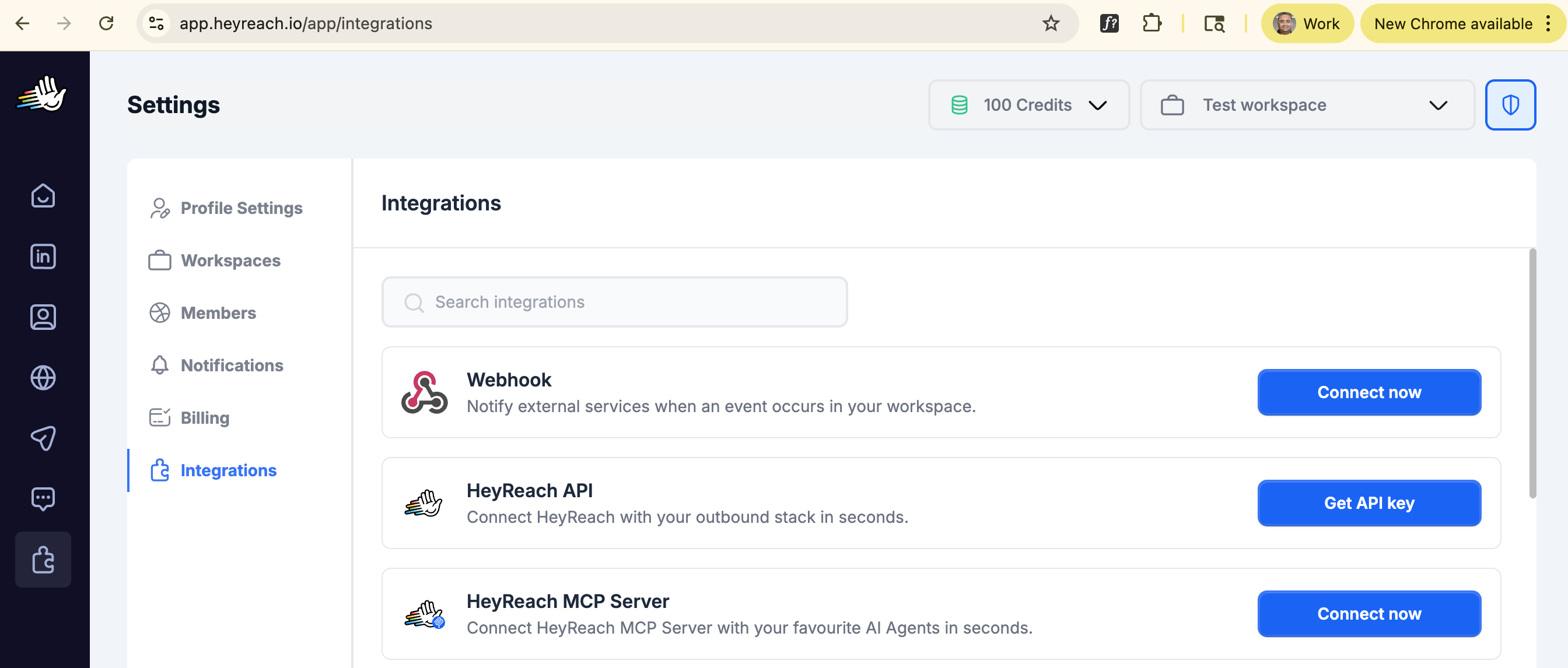
-
Copy the generated key. It is shown only once — store it somewhere safe before navigating away.
-
-
Create a connection in Scalekit
-
In Scalekit dashboard, go to AgentKit > Connections > Create Connection. Find HeyReach and click Create.
-
Note the Connection name — you will use this as
connection_namein your code (e.g.,heyreach).
-
-
Add a connected account
Connected accounts link a specific user identifier in your system to a HeyReach API key. Add one in the dashboard to test. In production, each user adds their own through the authorization link: they enter their credentials on the page it opens.
In the dashboard, to test
-
Open the connection you created and click the Connected Accounts tab → Add account.
-
Fill in:
- Your User’s ID — a unique identifier for this user in your system (e.g.,
user_123) - API Key — the HeyReach API key you copied in step 1
- Your User’s ID — a unique identifier for this user in your system (e.g.,
-
Click Save.
From your backend, if your app already has the credentials
For example, when users enter them on a settings page in your app:
import { ConnectorStatus } from '@scalekit-sdk/node'const authorizationDetails = {details: {case: 'staticAuth',value: { details: { api_key: 'your-heyreach-api-key' } },},};let { connectedAccount } = await scalekit.actions.upsertConnectedAccount({connectionName: 'heyreach',identifier: 'user_123',authorizationDetails,});// Make sure the account is ACTIVE before the first tool call.if (connectedAccount?.status !== ConnectorStatus.ACTIVE) {({ connectedAccount } = await scalekit.actions.upsertConnectedAccount({connectionName: 'heyreach',identifier: 'user_123',authorizationDetails,}));}authorization_details = {"static_auth": {"api_key": "your-heyreach-api-key"}}response = scalekit_client.actions.upsert_connected_account(connection_name="heyreach",identifier="user_123",authorization_details=authorization_details,)# Make sure the account is ACTIVE before the first tool call.if response.connected_account.status != "ACTIVE":response = scalekit_client.actions.upsert_connected_account(connection_name="heyreach",identifier="user_123",authorization_details=authorization_details,) -
-
Authorize a user and make your first call
quickstart.mts import { ScalekitClient } from '@scalekit-sdk/node'import 'dotenv/config'import { createInterface } from 'node:readline/promises'const scalekit = new ScalekitClient(process.env.SCALEKIT_ENVIRONMENT_URL,process.env.SCALEKIT_CLIENT_ID,process.env.SCALEKIT_CLIENT_SECRET,)const actions = scalekit.actionsconst connector = 'heyreach'const identifier = 'user_123'// Generate an authorization link for the userconst { link } = await actions.getAuthorizationLink({ connectionName: connector, identifier })console.log('Authorize HeyReach:', link)const rl = createInterface({ input: process.stdin, output: process.stdout })await rl.question('Press Enter after authorizing...')rl.close()// Make your first callconst result = await actions.executeTool({connector,identifier,toolName: 'heyreach_check_api_key',toolInput: {},})console.log(result)Terminal window npx tsx quickstart.mtsquickstart.py import osfrom scalekit import ScalekitClientfrom dotenv import load_dotenvload_dotenv()scalekit_client = ScalekitClient(env_url=os.getenv("SCALEKIT_ENVIRONMENT_URL"),client_id=os.getenv("SCALEKIT_CLIENT_ID"),client_secret=os.getenv("SCALEKIT_CLIENT_SECRET"),)actions = scalekit_client.actionsconnection_name = "heyreach"identifier = "user_123"# Generate an authorization link for the userlink_response = actions.get_authorization_link(connection_name=connection_name,identifier=identifier,)print("Authorize HeyReach:", link_response.link)input("Press Enter after authorizing...")# Make your first callresult = actions.execute_tool(tool_input={},tool_name="heyreach_check_api_key",connection_name=connection_name,identifier=identifier,)print(result)Terminal window python quickstart.pyEach user opens the link once and enters their HeyReach credentials there. If your app already has a user's credentials, add the account from your backend instead, as the console steps above show. See Authorize a user for the full flow and statuses.
Tools
Pass the exact name toexecute_toolheyreach_check_api_keyVerify that your HeyReach API key is valid and the connection is working.Read-onlyCheck API Key
Verify that your HeyReach API key is valid and the connection is working. Returns HTTP 200 with empty body on success. Use this to validate a connection before making other API calls.
Inputs
This tool takes no inputs.
heyreach_get_all_campaignsList all LinkedIn outreach campaigns in your HeyReach account with pagination.Read-onlyGet All Campaigns
List all LinkedIn outreach campaigns in your HeyReach account with pagination. Returns campaign metadata including status (DRAFT, IN_PROGRESS, PAUSED, FINISHED, FAILED), progress stats, associated lead list, and campaignAccountIds (LinkedIn sender account IDs needed for heyreach_get_overall_stats). Rate limit: 300 requests/minute.
Inputs
limitinteger- Maximum number of campaigns to return. Defaults to 10.
offsetinteger- Number of records to skip for pagination. Defaults to 0.
heyreach_get_all_linkedin_accountsList the LinkedIn sender accounts (connected LinkedIn profiles) in your HeyReach workspace with pagination.Read-onlyGet All LinkedIn Accounts
List the LinkedIn sender accounts (connected LinkedIn profiles) in your HeyReach workspace with pagination. Returns each account's ID, name, profile URL, and status. Use the returned account IDs as linkedInAccountId when calling heyreach_add_leads_to_campaign, or as AccountIds in heyreach_get_overall_stats. Rate limit: 300 requests/minute.
Inputs
keywordstring- Optional search keyword to filter accounts by name.
limitinteger- Maximum number of LinkedIn accounts to return. Max 100. Defaults to 100.
offsetinteger- Number of records to skip for pagination. Defaults to 0.
heyreach_get_all_listsList all lead lists in your HeyReach account with pagination.Read-onlyGet All Lists
List all lead lists in your HeyReach account with pagination. Returns list metadata including name, total lead count, list type, creation date, and associated campaign IDs. Use list IDs with heyreach_get_leads_from_list to retrieve leads. Rate limit: 300 requests/minute.
Inputs
limitinteger- Maximum number of lists to return. Defaults to 10.
offsetinteger- Number of records to skip for pagination. Defaults to 0.
heyreach_get_campaign_by_idRetrieve detailed information about a specific HeyReach campaign by its ID.Read-onlyGet Campaign By ID
Retrieve detailed information about a specific HeyReach campaign by its ID. Returns campaign status, progress stats (total users, in progress, finished, failed), associated lead list, and LinkedIn sender accounts. Use get_all_campaigns first to find campaign IDs.
Inputs
campaignIdintegerrequired- The unique ID of the campaign to retrieve. Get campaign IDs from heyreach_get_all_campaigns.
heyreach_get_conversationsList LinkedIn inbox conversations across your HeyReach sender accounts with pagination and filters.Read-onlyGet Conversations
List LinkedIn inbox conversations across your HeyReach sender accounts with pagination and filters. Returns conversation metadata: participants, last message, seen/unseen status, associated campaign and account. Filter by LinkedIn account IDs, campaign IDs, lead profile URL, tags, search string, or seen status. Useful to monitor replies to outreach sent via heyreach_add_leads_to_campaign. Rate limit: 300 requests/minute.
Inputs
campaignIdsarray- Filter conversations to these campaign IDs. Get campaign IDs from heyreach_get_all_campaigns.
leadLinkedInIdstring- Filter to conversations with a specific lead by their LinkedIn internal ID.
leadProfileUrlstring- Filter to conversations with a specific lead by their LinkedIn profile URL.
limitinteger- Maximum number of conversations to return (1-100). Defaults to 10 — a client-side cap applied in the jsonnet template to protect LLM context, since the HeyReach API's own default (~100) can return 400KB+ payloads. Pass a larger value explicitly if you need more.
linkedInAccountIdsarray- Filter conversations to these LinkedIn sender account IDs. Get account IDs from heyreach_get_all_linkedin_accounts.
offsetinteger- Number of records to skip for pagination. Defaults to 0.
searchStringstring- Free-text search across conversation content and participant names.
seenboolean- Filter by seen status. true = only seen conversations, false = only unseen. Omit to return both.
tagsarray- Filter conversations by lead tags.
heyreach_get_leadRetrieve detailed information about a single HeyReach lead by their LinkedIn profile URL.Read-onlyGet Lead
Retrieve detailed information about a single HeyReach lead by their LinkedIn profile URL. Returns the lead's profile data (name, headline, location, company, position), email addresses (emailAddress, enrichedEmailAddress, customEmailAddress), tags, and custom fields. Useful to verify a lead exists in HeyReach before or after adding them to a campaign. Rate limit: 300 requests/minute.
Inputs
profileUrlstringrequired- The public LinkedIn profile URL of the lead to look up. Example: https://www.linkedin.com/in/janedoe
heyreach_get_leads_from_listRetrieve leads from a specific HeyReach lead list with pagination.Read-onlyGet Leads From List
Retrieve leads from a specific HeyReach lead list with pagination. Returns detailed lead profiles including LinkedIn URL, name, headline, location, company, position, tags, and email addresses. Use heyreach_get_all_lists to find list IDs. Rate limit: 300 requests/minute.
Inputs
listIdintegerrequired- The unique ID of the lead list to retrieve leads from. Get list IDs from heyreach_get_all_lists.
limitinteger- Maximum number of leads to return. Defaults to 10 — a client-side cap applied in the jsonnet template to protect LLM context, since lists can hold thousands of leads (observed: 4,054). Pass a larger value explicitly if you need more.
offsetinteger- Number of records to skip for pagination. Defaults to 0.
heyreach_get_overall_statsRetrieve overall performance statistics for specific LinkedIn sender accounts and campaigns.Read-onlyGet Overall Stats
Retrieve overall performance statistics for specific LinkedIn sender accounts and campaigns. Returns aggregate metrics including connection requests sent and accepted, messages sent and replied, InMail stats, and calculated rates (connection acceptance rate, message reply rate). Rate limit: 300 requests/minute.
Inputs
AccountIdsarrayrequired- IDs of the LinkedIn sender accounts (connected LinkedIn profiles) assigned to run this campaign. Each campaign has one or more sender accounts.
CampaignIdsarrayrequired- Array of campaign IDs to retrieve stats for. Get campaign IDs from heyreach_get_all_campaigns.
heyreach_add_leads_to_campaignAdd up to 100 leads to an existing HeyReach campaign.WriteAdd Leads To Campaign
Add up to 100 leads to an existing HeyReach campaign. The campaign must be in an ACTIVE state (IN_PROGRESS), or use resumeFinishedCampaign / resumePausedCampaign to auto-resume. Each lead is bound to a specific LinkedIn sender account (linkedInAccountId) that will send the outreach. Use heyreach_get_campaign_by_id to find the campaign's sender accounts (campaignAccountIds). Rate limit: 300 requests/minute.
Inputs
accountLeadPairsarrayrequired- Array of lead + sender account pairs to add to the campaign (max 100). Each pair binds a lead to the LinkedIn sender account that will reach out. Minimum required per lead: profileUrl.
campaignIdintegerrequired- The ID of the HeyReach campaign to add leads to. Get campaign IDs from heyreach_get_all_campaigns.
resumeFinishedCampaignboolean- If true and the target campaign is in FINISHED state, HeyReach will resume it so the new leads can be processed. Defaults to false.
resumePausedCampaignboolean- If true and the target campaign is in PAUSED state, HeyReach will resume it so the new leads can be processed. Defaults to false.
heyreach_add_leads_to_listAdd leads directly to a HeyReach lead list, independent of any campaign.WriteAdd Leads To List
Add leads directly to a HeyReach lead list, independent of any campaign. Use heyreach_create_list or heyreach_get_all_lists to find a list ID. To enroll leads into an outreach sequence instead, use heyreach_add_leads_to_campaign. Rate limit: 300 requests/minute.
Inputs
leadsarrayrequired- Array of lead profiles to add to the list (max 100). profileUrl is required per lead; other fields enrich the lead record.
listIdintegerrequired- The ID of the HeyReach list to add leads to. Get list IDs from heyreach_get_all_lists.
heyreach_create_listCreate a new empty lead list in your HeyReach account.WriteCreate List
Create a new empty lead list in your HeyReach account. Use heyreach_add_leads_to_list afterward to populate it, or reference the returned list ID from campaign setup. Rate limit: 300 requests/minute.
Inputs
namestringrequired- Name for the new lead list.
listTypestring- Type of list to create. USER_LIST holds LinkedIn profile leads; COMPANY_LIST holds companies.one of
USER_LISTCOMPANY_LIST
heyreach_pause_campaignPause an active HeyReach campaign so it stops sending new outreach actions.WritePause Campaign
Pause an active HeyReach campaign so it stops sending new outreach actions. Leads already in progress keep their current state until the campaign is resumed. Use heyreach_get_all_campaigns to find campaign IDs. Rate limit: 300 requests/minute.
- Idempotent
Inputs
campaignIdintegerrequired- The ID of the HeyReach campaign to pause. Get campaign IDs from heyreach_get_all_campaigns.
heyreach_resume_campaignResume a paused, finished, or failed HeyReach campaign so it starts sending outreach actions again.WriteResume Campaign
Resume a paused, finished, or failed HeyReach campaign so it starts sending outreach actions again. Use heyreach_get_all_campaigns to find campaign IDs. Rate limit: 300 requests/minute.
- Idempotent
Inputs
campaignIdintegerrequired- The ID of the HeyReach campaign to resume. Get campaign IDs from heyreach_get_all_campaigns.
No tools match.
Workflows
Proxy API call
// Verify the connected API key works — no key needed in your codeconst result = await actions.request({ connectionName: 'heyreach', identifier: 'user_123', path: '/auth/CheckApiKey', method: 'GET',});console.log('API key valid:', result.status === 200);# Verify the connected API key works — no key needed in your coderesult = actions.request( connection_name='heyreach', identifier='user_123', path="/auth/CheckApiKey", method="GET")print("API key valid:", result.status_code == 200)Add leads to a campaign
The most common HeyReach workflow: pick an active campaign, choose a LinkedIn sender account to send from, and add up to 100 leads in a single call. Each lead is bound to a specific sender — so a campaign with multiple senders can round-robin or be sharded by your code.
# Step 1: Pick a campaign and one of its sender accountscampaigns = actions.execute_tool( connection_name='heyreach', identifier='user_123', tool_name="heyreach_get_all_campaigns", tool_input={"limit": 25})campaign = campaigns.data["items"][0] # or filter by name/statussender_account_id = campaign["campaignAccountIds"][0]print(f"Adding leads to campaign {campaign['id']} via sender {sender_account_id}")
# Step 2: Add up to 100 leads bound to that sender accountnew_leads = [ {"profileUrl": "https://www.linkedin.com/in/jane-doe"}, {"profileUrl": "https://www.linkedin.com/in/john-smith"},]result = actions.execute_tool( connection_name='heyreach', identifier='user_123', tool_name="heyreach_add_leads_to_campaign", tool_input={ "campaignId": campaign["id"], "accountLeadPairs": [ {"linkedInAccountId": sender_account_id, "lead": lead} for lead in new_leads ], # Auto-resume the campaign if it's paused or already finished "resumePausedCampaign": True, "resumeFinishedCampaign": True, })print(f"Added {len(new_leads)} leads:", result.data)Look up a lead before reaching out
Verify a lead already exists in HeyReach (and check their tags or enrichment status) before adding them to a campaign — this avoids duplicate outreach and lets you skip leads that are already engaged.
result = actions.execute_tool( connection_name='heyreach', identifier='user_123', tool_name="heyreach_get_lead", tool_input={ "profileUrl": "https://www.linkedin.com/in/jane-doe" })
lead = result.dataif lead: print(f"{lead['fullName']} — {lead.get('position') or lead.get('summary')}") print(f" Company: {lead.get('companyName')}") print(f" Location: {lead.get('location')}") print(f" Email: {lead.get('emailAddress') or lead.get('enrichedEmailAddress')}")else: print("Lead not found — safe to add to a new campaign.")Monitor inbox replies
After outreach goes out, poll the unified LinkedIn inbox for unseen replies. Filter by campaign or sender account so you only surface conversations relevant to your agent’s workflow.
result = actions.execute_tool( connection_name='heyreach', identifier='user_123', tool_name="heyreach_get_conversations", tool_input={ "campaignIds": [campaign["id"]], # filter to one campaign "seen": False, # only unseen conversations "limit": 25, })
for convo in result.data.get("items", []): profile = convo.get("correspondentProfile", {}) messages = convo.get("messages", []) last_msg = messages[-1] if messages else {} print(f"📬 {profile.get('fullName')} — {profile.get('profileUrl')}") print(f" {last_msg.get('createdAt')} ({last_msg.get('sender')}): " f"{(last_msg.get('body') or '')[:120]}")Track campaign performance
Pull aggregate metrics for one or more campaigns — connection acceptance rate, message reply rate, InMail performance — to power dashboards or trigger follow-up actions when a campaign underperforms.
# Get all sender accounts associated with the campaignsender_accounts = campaign["campaignAccountIds"]
stats = actions.execute_tool( connection_name='heyreach', identifier='user_123', tool_name="heyreach_get_overall_stats", tool_input={ "CampaignIds": [campaign["id"]], "AccountIds": sender_accounts, })
# Response wraps aggregates under `overallStats` and a per-day breakdown# under `byDayStats` — use `overallStats` for top-line numbers.s = stats.data["overallStats"]print(f"Campaign {campaign['id']} — '{campaign['name']}'")print(f" Connection requests: {s['connectionsSent']} sent / {s['connectionsAccepted']} accepted")print(f" Acceptance rate: {s['connectionAcceptanceRate']:.1%}")print(f" Messages: {s['messagesSent']} sent / {s['totalMessageReplies']} replied")print(f" Reply rate: {s['messageReplyRate']:.1%}")LangChain integration
Let an LLM decide which HeyReach tool to call based on natural language. This example builds an agent that can list campaigns, add leads, and surface inbox replies on demand.
from langchain_openai import ChatOpenAIfrom langchain.agents import AgentExecutor, create_openai_tools_agentfrom langchain_core.prompts import ( ChatPromptTemplate, SystemMessagePromptTemplate, HumanMessagePromptTemplate, MessagesPlaceholder, PromptTemplate)
# Load all HeyReach tools in LangChain format. Use page_size=100 so connector tool lists are not truncated.tools = actions.langchain.get_tools( identifier='user_123', providers=["HEYREACH"], page_size=100)
prompt = ChatPromptTemplate.from_messages([ SystemMessagePromptTemplate(prompt=PromptTemplate( input_variables=[], template=( "You are a LinkedIn outreach assistant with access to HeyReach tools. " "Use heyreach_get_all_campaigns to find campaigns, heyreach_add_leads_to_campaign " "to enroll new prospects, heyreach_get_conversations to monitor replies, and " "heyreach_get_overall_stats to report on performance. Always confirm the campaign " "and sender account before adding leads." ) )), MessagesPlaceholder(variable_name="chat_history", optional=True), HumanMessagePromptTemplate(prompt=PromptTemplate( input_variables=["input"], template="{input}" )), MessagesPlaceholder(variable_name="agent_scratchpad")])
llm = ChatOpenAI(model="gpt-4o")agent = create_openai_tools_agent(llm, tools, prompt)agent_executor = AgentExecutor(agent=agent, tools=tools, verbose=True)
result = agent_executor.invoke({ "input": "Show me unread replies from my active LinkedIn campaigns in the last 24 hours, and tell me which campaign has the highest acceptance rate."})print(result["output"])