
The Monday.com connector lets your AI agent act in each user's Monday.com account. Each user signs in to Monday.com once, and Scalekit stores and refreshes their tokens, so your agent never handles credentials. It comes with 73 tools.
- Tools
- 73
- What they doRead · write · destructive
- 14 · 49 · 1014 read49 write10 destructive
- Users sign in with
- OAuth
- OAuth app
- Your own Monday.com app
What you can do
- Manage boards: create, update, archive, duplicate, and delete boards across workspaces
- Manage items: create, update, move, duplicate, archive, and delete items (rows) on any board
- Update column values: set single or multiple column values including status, date, people, and custom types
- Manage groups: create, rename, reorder, duplicate, archive, and delete groups within a board
- Post updates: add, edit, and delete comments and activity updates on items
- Manage structure: create and delete columns, manage subitems, webhooks, workspaces, teams, and tags
Setup
Install the SDK
Terminal window npm install @scalekit-sdk/node dotenvTerminal window pip install scalekit-sdk-python python-dotenvSet your credentials
Add your Scalekit credentials to your
.envfile. Find values in app.scalekit.com > Developers > API Credentials..env SCALEKIT_ENVIRONMENT_URL=<your-environment-url>SCALEKIT_CLIENT_ID=<your-client-id>SCALEKIT_CLIENT_SECRET=<your-client-secret>Create the Monday.com connection
In AgentKit > Connections, create a Monday.com connection and copy its redirect URI. The name you give it is the
connection_nameyour code passes. See Configure connections.Register an OAuth app
Monday.com connections use your own OAuth app. Register one with Monday.com and add the redirect URI you copied.
Then enter the app's Client ID and Client Secret on the Monday.com connection.
Console steps with screenshots
Register your Scalekit environment with the Monday.com connector so Scalekit handles the authentication flow and token lifecycle for you. The connection name you create will be used to identify and invoke the connection programmatically. You’ll need your app credentials from the Monday.com Developer Center.
-
Set up auth redirects
-
In Scalekit dashboard, go to AgentKit > Connections > Create Connection.
-
Find Monday.com from the list of providers and click Create. Copy the redirect URI. It looks like
https://<SCALEKIT_ENVIRONMENT_URL>/sso/v1/oauth/<CONNECTION_ID>/callback.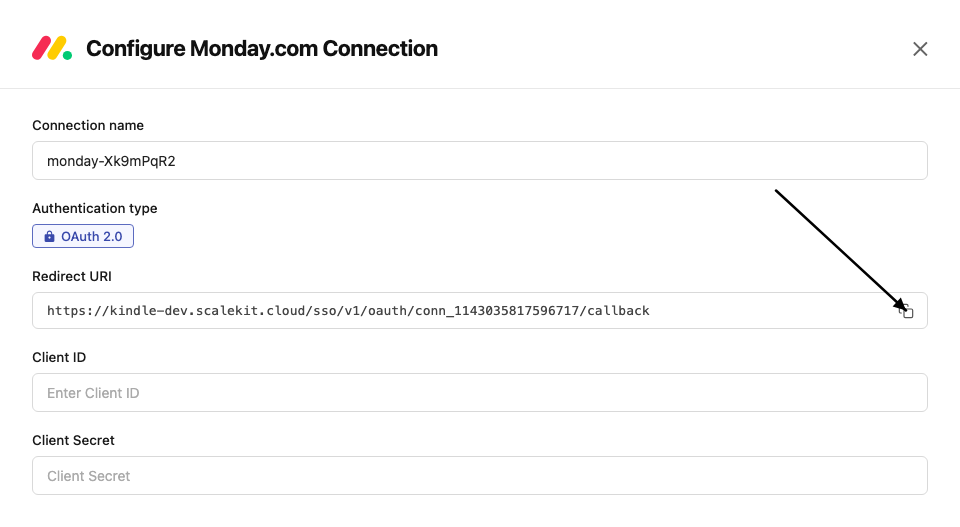
-
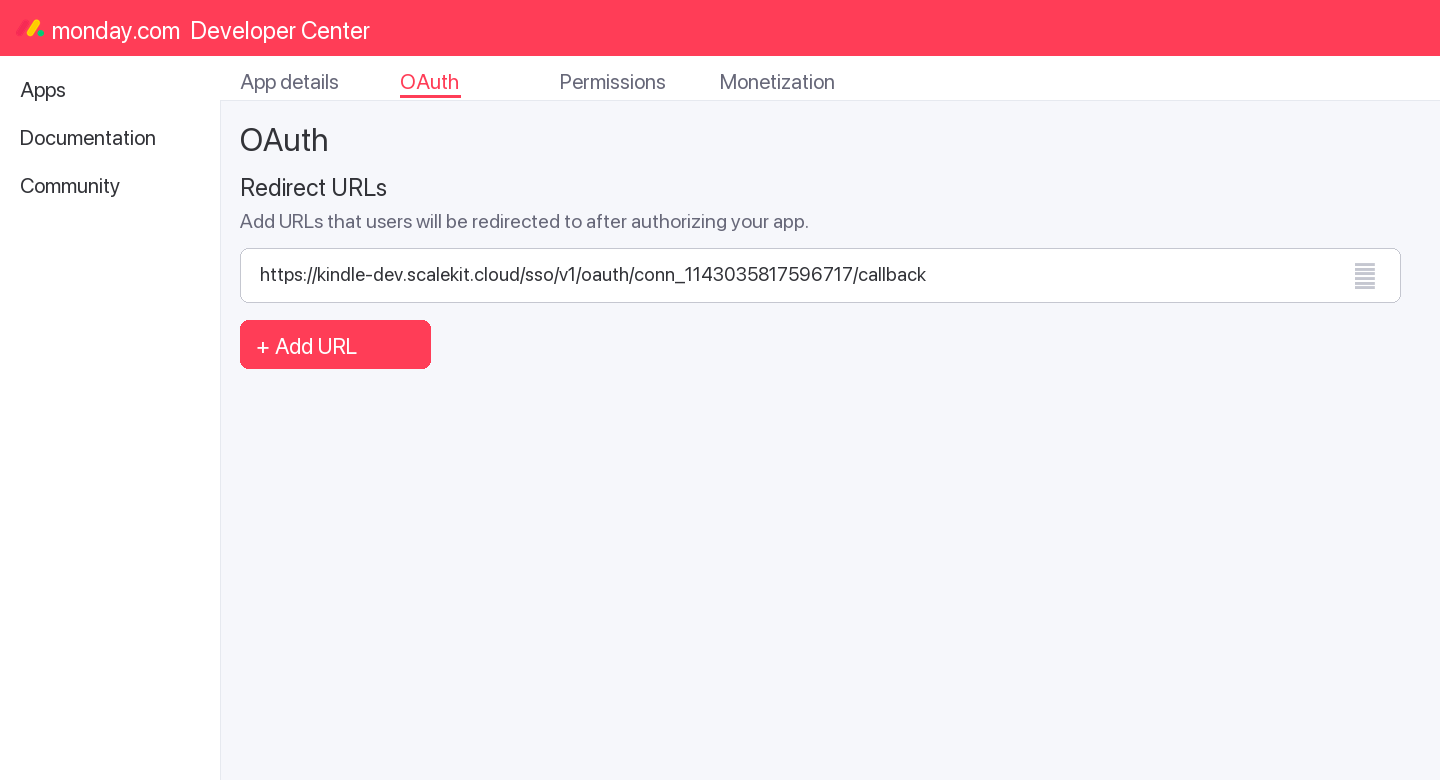
In the Monday.com Developer Center, open your app and go to the OAuth tab.
-
Add the copied URI under Redirect URLs and save.
-
-
Get client credentials
- In the Monday.com Developer Center, open your app and go to the Basic Information tab:
- Client ID — listed under Client ID
- Client Secret — listed under Client Secret
- In the Monday.com Developer Center, open your app and go to the Basic Information tab:
-
Add credentials in Scalekit
-
In Scalekit dashboard, go to AgentKit > Connections and open the connection you created.
-
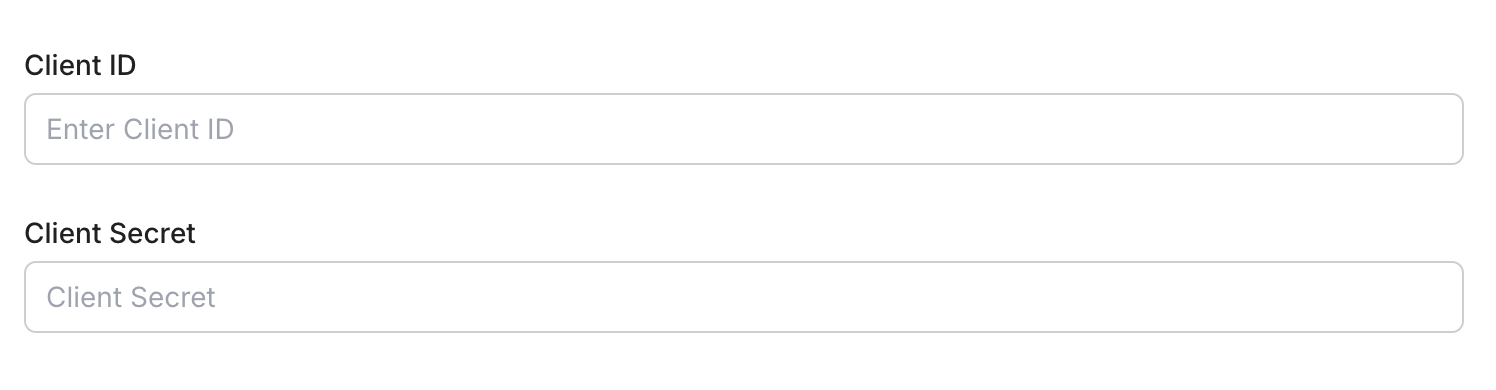
Enter your credentials:
- Client ID (from your Monday.com app)
- Client Secret (from your Monday.com app)
- Permissions — select the scopes your app needs (see Monday.com OAuth scopes)
-
Click Save.
-
-
Authorize a user and make your first call
quickstart.mts import { ScalekitClient } from '@scalekit-sdk/node'import 'dotenv/config'import { createInterface } from 'node:readline/promises'const scalekit = new ScalekitClient(process.env.SCALEKIT_ENVIRONMENT_URL,process.env.SCALEKIT_CLIENT_ID,process.env.SCALEKIT_CLIENT_SECRET,)const actions = scalekit.actionsconst connector = 'monday'const identifier = 'user_123'// Generate an authorization link for the userconst { link } = await actions.getAuthorizationLink({ connectionName: connector, identifier })console.log('Authorize Monday:', link)const rl = createInterface({ input: process.stdin, output: process.stdout })await rl.question('Press Enter after authorizing...')rl.close()// Make your first API call through the proxyconst result = await actions.request({connectionName: connector,identifier,path: '/v2',method: 'POST',body: JSON.stringify({ query: '{ boards (limit: 5) { id name } }' }),})console.log(result)Terminal window npx tsx quickstart.mtsquickstart.py import osimport jsonfrom scalekit import ScalekitClientfrom dotenv import load_dotenvload_dotenv()scalekit_client = ScalekitClient(env_url=os.getenv("SCALEKIT_ENVIRONMENT_URL"),client_id=os.getenv("SCALEKIT_CLIENT_ID"),client_secret=os.getenv("SCALEKIT_CLIENT_SECRET"),)actions = scalekit_client.actionsconnection_name = "monday"identifier = "user_123"# Generate an authorization link for the userlink_response = actions.get_authorization_link(connection_name=connection_name,identifier=identifier,)print("Authorize Monday:", link_response.link)input("Press Enter after authorizing...")# Make your first API call through the proxyresult = actions.request(connection_name=connection_name,identifier=identifier,path="/v2",method="POST",body=json.dumps({"query": "{ boards (limit: 5) { id name } }"}),)print(result)Terminal window python quickstart.pyEach user signs in once. See Authorize a user for the full flow and statuses.
Getting resource IDs
Section titled “Getting resource IDs”Most Monday.com tools require one or more resource IDs. Run list/read tools first to discover real IDs — never guess them.
| Resource | Tool to get ID | Field in response |
|---|---|---|
| Board ID | monday_boards_list | data.boards[].id |
| Item ID | monday_items_list (requires board_id) | data.boards[].items_page.items[].id |
| Group ID | monday_items_list | data.boards[].items_page.items[].group.id |
| Column ID | monday_items_list | data.boards[].items_page.items[].column_values[].id |
| User ID | monday_users_list or monday_me_get | data.users[].id / data.me.id |
| Workspace ID | monday_workspaces_list | data.workspaces[].id |
| Update ID | monday_updates_list | data.updates[].id |
| Tag ID | monday_tags_list | data.tags[].id |
| Team ID | monday_teams_list | data.teams[].id |
| Webhook ID | monday_webhooks_list (requires board_id) | data.webhooks[].id |
| Doc ID | monday_docs_list | data.docs[].id |
| Subitem ID | monday_subitem_create response | data.create_subitem.id |
Tools
Pass the exact name toexecute_toolmonday_board_activity_logs_listQuery a board's activity log: who changed what column, item, or group and when.Read-onlyList Board Activity Logs
Query a board's activity log: who changed what column, item, or group and when. Filterable by user, item, column, group, and time range. Maximum 10,000 records; narrow with filters or a date range for large boards.
Inputs
board_idstringrequired- ID of the board to fetch activity logs for
column_idsarray- Filter to activity on these column IDs
fromstring- Only return activity at or after this ISO 8601 timestamp
group_idsarray- Filter to activity on these group IDs
item_idsarray- Filter to activity on these item IDs
limitinteger- Maximum number of activity log entries to return (default 25)
pageinteger- Page number for pagination
tostring- Only return activity at or before this ISO 8601 timestamp
user_idsarray- Filter to activity performed by these user IDs
monday_boards_listRetrieve a list of boards from your Monday.com account with optional filtering.Read-onlyList Boards
Retrieve a list of boards from your Monday.com account with optional filtering.
Inputs
board_kindstring- Filter by kind: public, private, share
limitinteger- Number of boards to return (default 10)
order_bystring- Sort order: created_at or used_at
pageinteger- Page number for pagination
statestring- Filter by state: active, archived, deleted, all
workspace_idsarray- Filter by workspace IDs
monday_docs_listList documents (monday Docs) in your account.Read-onlyList Docs
List documents (monday Docs) in your account.
Inputs
idsarray- Filter by specific doc IDs
limitinteger- Number of docs to return
pageinteger- Page number for pagination
workspace_idsarray- Filter by workspace IDs
monday_items_getFetch one or more items directly by ID, without going through their board.Read-onlyGet Items By ID
Fetch one or more items directly by ID, without going through their board. Returns item metadata and column values.
Inputs
idsarrayrequired- IDs of the items to fetch
exclude_nonactiveboolean- Exclude archived/deleted items
limitinteger- Maximum number of items to return (default 25)
newest_firstboolean- Return newest items first
pageinteger- Page number to fetch (1-indexed)
monday_items_listRetrieve items from a Monday.com board.Read-onlyList Items
Retrieve items from a Monday.com board. Returns items with their column values, group, and creator details.
Inputs
board_idstringrequired- ID of the board to list items from
cursorstring- Pagination cursor from a previous response
group_idstring- Filter by group ID
limitinteger- Number of items to return per page (max 500)
monday_items_searchSearch for items on a board filtered by specific column values.Read-onlySearch Items by Column Values
Search for items on a board filtered by specific column values.
Inputs
board_idstringrequired- ID of the board to search
column_idstringrequired- ID of the column to filter by
column_valuestringrequired- Value to search for in the column
cursorstring- Pagination cursor from a previous response
limitinteger- Number of items to return per page
monday_me_getRetrieve the profile of the currently authenticated Monday.com user.Read-onlyGet Current User
Retrieve the profile of the currently authenticated Monday.com user.
Inputs
This tool takes no inputs.
monday_searchFull-text search across your monday.com account: items, boards, docs, users, workspaces, updates, and Emails & Activities timeline items, all in one call via the namespaced `search` query.Read-onlyUniversal Search
Full-text search across your monday.com account: items, boards, docs, users, workspaces, updates, and Emails & Activities timeline items, all in one call via the namespaced `search` query. Distinct from monday_items_search, which only filters items on a single board by column value.
Inputs
querystringrequired- Search term to match across items, boards, docs, users, workspaces, updates, and timeline items
limitinteger- Maximum number of results to return per entity type (e.g. up to this many boards, up to this many items, etc)
monday_teams_listList teams in your Monday.com account.Read-onlyList Teams
List teams in your Monday.com account.
Inputs
idsarray- Filter by specific team IDs
monday_updates_listRetrieve updates (comments/activity posts) from Monday.com.Read-onlyList Updates
Retrieve updates (comments/activity posts) from Monday.com.
Inputs
item_idstring- Filter updates by item ID
limitinteger- Number of updates to return
pageinteger- Page number for pagination
monday_users_listList users in your Monday.com account.Read-onlyList Users
List users in your Monday.com account.
Inputs
emailsarray- Filter by email addresses
idsarray- Filter by specific user IDs
kindstring- User kind: all, non_guests, guests, non_pending
limitinteger- Number of users to return
namestring- Filter by name (partial match)
newest_firstboolean- Sort newest users first
pageinteger- Page number for pagination
monday_webhooks_listList all webhooks registered for a board.Read-onlyList Webhooks
List all webhooks registered for a board.
Inputs
board_idstringrequired- ID of the board to list webhooks for
app_webhooks_onlyboolean- Return only webhooks created by the current app
monday_workspaces_listList all workspaces in your Monday.com account.Read-onlyList Workspaces
List all workspaces in your Monday.com account.
Inputs
idsarray- Filter by specific workspace IDs
kindstring- Workspace kind: open or closed
limitinteger- Number of workspaces to return
pageinteger- Page number for pagination
statestring- Workspace state: all, active, archived, deleted
monday_board_archiveArchive a board in Monday.com.WriteArchive Board
Archive a board in Monday.com.
Inputs
board_idstringrequired- ID of the board to archive
monday_board_createCreate a new board in Monday.com.WriteCreate Board
Create a new board in Monday.com.
Inputs
board_kindstringrequired- Board type: public, private, or share
board_namestringrequired- Name for the new board
descriptionstring- Description for the board
folder_idinteger- Folder ID to place the board in
template_idinteger- Template ID to base the board on
workspace_idinteger- ID of the workspace to create the board in
monday_board_duplicateCreate a copy of an existing board.WriteDuplicate Board
Create a copy of an existing board.
Inputs
board_idstringrequired- ID of the board to duplicate
duplicate_typestringrequired- What to duplicate: duplicate_board_with_structure, duplicate_board_with_pulses, or duplicate_board_with_pulses_and_updates
board_namestring- Name for the duplicated board
keep_subscribersboolean- Whether to keep board subscribers
workspace_idstring- Destination workspace ID
monday_board_hierarchy_updateMove a board to a different workspace, folder, or account product.WriteUpdate Board Hierarchy
Move a board to a different workspace, folder, or account product. Provide at least one of workspace_id, folder_id, or account_product_id.
- Idempotent
Inputs
board_idstringrequired- ID of the board to relocate
account_product_idstring- ID of the account product (e.g. CRM, work management) to move the board into
folder_idstring- ID of the folder to move the board into
workspace_idstring- ID of the workspace to move the board into
monday_board_permission_setSet a board's default access role, controlling what non-owner members can do on the board by default.WriteSet Board Permission
Set a board's default access role, controlling what non-owner members can do on the board by default.
- Idempotent
Inputs
basic_role_namestringrequired- Default role: contributor, editor, or viewerone of
contributoreditorviewer board_idstringrequired- ID of the board to set permissions on
cross_product_collaborativeboolean- Whether the board allows cross-product collaboration
monday_board_subscribers_addSubscribe users to a board so they receive notifications.WriteAdd Subscribers to Board
Subscribe users to a board so they receive notifications.
Inputs
board_idstringrequired- ID of the board to add subscribers to
user_idsarrayrequired- Array of user IDs to subscribe
kindstring- Role: subscriber or owner
monday_board_subscribers_removeUnsubscribe users from a board so they stop receiving its notifications.WriteRemove Subscribers From Board
Unsubscribe users from a board so they stop receiving its notifications. Complements monday_board_subscribers_add.
- Idempotent
Inputs
board_idstringrequired- ID of the board to remove subscribers from
user_idsarrayrequired- IDs of the users to unsubscribe
monday_board_updateUpdate a board's name, description, or communication settings.WriteUpdate Board
Update a board's name, description, or communication settings.
Inputs
board_attributestringrequired- Attribute to update: name, description, or communication
board_idstringrequired- ID of the board to update
new_valuestringrequired- New value for the attribute
monday_column_createAdd a new column to a Monday.com board.WriteCreate Column
Add a new column to a Monday.com board.
Inputs
board_idstringrequired- ID of the board to add the column to
column_typestringrequired- Column type: text, long_text, numbers, status, dropdown, date, timeline, people, checkbox, email, phone, link, file, color_picker, rating, time_tracking, formula, auto_number, etc.
titlestringrequired- Title/name for the new column
after_column_idstring- Column ID to insert this column after
defaultsstring- JSON of default settings for the column
descriptionstring- Optional description for the column
monday_column_title_changeRename a column on a board.WriteChange Column Title
Rename a column on a board.
Inputs
board_idstringrequired- ID of the board
column_idstringrequired- ID of the column to rename
titlestringrequired- New title for the column
monday_column_updateComprehensively update a board column's title, description, width, or type-specific settings.WriteUpdate Column
Comprehensively update a board column's title, description, width, or type-specific settings. Requires the column's current revision number for optimistic concurrency control (read it via monday_boards_list or a columns query first).
Inputs
board_idstringrequired- ID of the board the column belongs to
column_idstringrequired- ID of the column to update
column_typestringrequired- The column's type (must match its existing type)
revisionstringrequired- Current revision number of the column, for concurrency control
descriptionstring- New description for the column
settingsstring- JSON-encoded type-specific settings for the column
titlestring- New title for the column
widthinteger- New width for the column, in pixels
monday_doc_add_markdown_contentAdd markdown content to an existing monday Doc.WriteAdd Markdown Content to Doc
Add markdown content to an existing monday Doc. The markdown is parsed and converted into the doc's native block structure (headings, lists, quotes, bold/italic/code, etc).
Inputs
doc_idstringrequired- ID of the doc to add content to
markdownstringrequired- Markdown content to convert and add to the doc
after_block_idstring- ID of the block to insert the new content after. If omitted, content is added at the end of the doc.
monday_doc_createCreate a new monday Doc, either attached to an item's doc-type column on a board, or as a standalone doc directly inside a workspace.WriteCreate Doc
Create a new monday Doc, either attached to an item's doc-type column on a board, or as a standalone doc directly inside a workspace. Provide either (item_id and column_id) for the board placement, or (workspace_id and name) for the workspace placement.
Inputs
column_idstring- ID of the doc-type column on the item (board placement mode). Requires item_id to also be set.
item_idstring- ID of the item containing the doc-type column (board placement mode). Requires column_id to also be set.
kindstring- Visibility kind for the new doc when created in a workspace, e.g. private.
namestring- Name for the new doc (workspace placement mode only).
workspace_idstring- ID of the workspace to create the doc directly in (workspace placement mode). Requires name to also be set.
monday_doc_update_nameRename an existing monday Doc.WriteRename Doc
Rename an existing monday Doc.
- Idempotent
Inputs
doc_idintegerrequired- ID of the doc to rename
namestringrequired- New name for the doc
monday_group_archiveArchive a group on a board.WriteArchive Group
Archive a group on a board.
Inputs
board_idstringrequired- ID of the board
group_idstringrequired- ID of the group to archive
monday_group_createCreate a new group on a Monday.com board.WriteCreate Group
Create a new group on a Monday.com board.
Inputs
board_idstringrequired- ID of the board to add the group to
group_namestringrequired- Name of the group to create
position_relative_methodstring- Positioning: before_at or after_at
relative_tostring- Group ID to position this group relative to
monday_group_duplicateCreate a copy of a group on a board.WriteDuplicate Group
Create a copy of a group on a board.
Inputs
board_idstringrequired- ID of the board
group_idstringrequired- ID of the group to duplicate
add_to_topboolean- Whether to add the duplicate at the top of the board
monday_group_updateUpdate a group's name, color, or position on a board.WriteUpdate Group
Update a group's name, color, or position on a board.
Inputs
attributestringrequired- Attribute to update: title or color
board_idstringrequired- ID of the board
group_idstringrequired- ID of the group to update
new_valuestringrequired- New value for the attribute
monday_item_archiveArchive an item on a Monday.com board.WriteArchive Item
Archive an item on a Monday.com board.
Inputs
item_idstringrequired- ID of the item to archive
monday_item_column_simple_value_changeUpdate a single column's value on an item using a plain text string, instead of the JSON shape required by monday_item_column_value_change.WriteChange Simple Column Value
Update a single column's value on an item using a plain text string, instead of the JSON shape required by monday_item_column_value_change. Simpler for text-like columns, but not all column types support simple string values.
Inputs
board_idstringrequired- ID of the board the item belongs to
column_idstringrequired- ID of the column to update
item_idstringrequired- ID of the item to update
create_labels_if_missingboolean- Auto-create labels if they don't exist (status/dropdown columns)
valuestring- Plain text value to set on the column
monday_item_column_value_changeUpdate the value of a single column on an item.WriteChange Column Value
Update the value of a single column on an item.
Inputs
board_idstringrequired- ID of the board the item belongs to
column_idstringrequired- ID of the column to update (e.g., status, date4, text)
item_idstringrequired- ID of the item to update
valuestringrequired- New value as a JSON string. Format varies by column type.
create_labels_if_missingboolean- Auto-create labels if they don't exist
monday_item_column_values_changeUpdate multiple column values on an item in a single request (up to 50 columns).WriteChange Multiple Column Values
Update multiple column values on an item in a single request (up to 50 columns).
Inputs
board_idstringrequired- ID of the board the item belongs to
column_valuesstringrequired- JSON object mapping column IDs to their new values
item_idstringrequired- ID of the item to update
create_labels_if_missingboolean- Auto-create labels if they don't exist
monday_item_createCreate a new item (row) on a Monday.com board.WriteCreate Item
Create a new item (row) on a Monday.com board.
Inputs
board_idstringrequired- ID of the board to create the item on
item_namestringrequired- Name of the item to create
column_valuesstring- JSON string of column values to set
create_labels_if_missingboolean- Auto-create status/dropdown labels if they don't exist
group_idstring- ID of the group to add the item to
monday_item_description_setSet an item's description content, using markdown formatting.WriteSet Item Description
Set an item's description content, using markdown formatting.
- Idempotent
Inputs
item_idstringrequired- ID of the item to update
markdownstringrequired- Description content, as markdown
monday_item_duplicateCreate a copy of an item on the same board.WriteDuplicate Item
Create a copy of an item on the same board.
Inputs
board_idstringrequired- ID of the board the item belongs to
item_idstringrequired- ID of the item to duplicate
with_updatesboolean- Whether to copy the item's updates/comments
monday_item_move_to_boardTransfer an item to a different board.WriteMove Item to Board
Transfer an item to a different board.
Inputs
board_idstringrequired- ID of the destination board
group_idstringrequired- ID of the group on the destination board
item_idstringrequired- ID of the item to move
columns_mappingstring- JSON array mapping source column IDs to destination column IDs
monday_item_move_to_groupMove an item to a different group on the same board.WriteMove Item to Group
Move an item to a different group on the same board.
Inputs
group_idstringrequired- ID of the destination group
item_idstringrequired- ID of the item to move
monday_item_position_changeMove an item to a new position within the same board -- to the top of a group, or immediately before/after another item.WriteChange Item Position
Move an item to a new position within the same board -- to the top of a group, or immediately before/after another item.
Inputs
item_idstringrequired- ID of the item to reposition
group_idstring- Move the item to this group before repositioning
group_topboolean- Move the item to the top of its group
position_relative_methodstring- Whether to place the item before or after relative_toone of
before_atafter_at relative_tostring- ID of the item to position relative to
monday_notification_createSend a notification to a user in Monday.com.WriteCreate Notification
Send a notification to a user in Monday.com.
Inputs
target_idstringrequired- ID of the target item or board for context
target_typestringrequired- Target type: Project (board) or Post (item)
textstringrequired- Notification message text
user_idstringrequired- ID of the user to notify
monday_subitem_createCreate a subitem (child item) under a parent item.WriteCreate Subitem
Create a subitem (child item) under a parent item.
Inputs
item_namestringrequired- Name of the subitem
parent_item_idstringrequired- ID of the parent item
column_valuesstring- JSON object of column values to set on creation
create_labels_if_missingboolean- Auto-create labels if they don't exist
monday_tag_create_or_getCreate a new tag or retrieve an existing one by name.WriteCreate or Get Tag
Create a new tag or retrieve an existing one by name.
Inputs
tag_namestringrequired- Name of the tag to create or retrieve
board_idstring- ID of the board to associate the tag with
monday_team_users_addAdd one or more users to a Monday.com team.WriteAdd Users to Team
Add one or more users to a Monday.com team.
Inputs
team_idstringrequired- ID of the team to add users to
user_idsarrayrequired- Array of user IDs to add to the team
monday_team_users_removeRemove one or more users from a Monday.com team.WriteRemove Users from Team
Remove one or more users from a Monday.com team.
Inputs
team_idstringrequired- ID of the team to remove users from
user_idsarrayrequired- Array of user IDs to remove from the team
monday_update_createPost a comment or update on a Monday.com item.WriteCreate Update
Post a comment or update on a Monday.com item.
Inputs
bodystringrequired- Content of the update/comment (HTML supported)
item_idstringrequired- ID of the item to post the update on
monday_update_editEdit the text of an existing update/comment.WriteEdit Update
Edit the text of an existing update/comment.
Inputs
bodystringrequired- New content for the update
idstringrequired- ID of the update to edit
monday_update_likeAdd a like reaction to an update (comment) from the connected user.WriteLike Update
Add a like reaction to an update (comment) from the connected user.
- Idempotent
Inputs
update_idstringrequired- ID of the update to like
monday_update_pinPin an update to the top of its item's update thread.WritePin Update
Pin an update to the top of its item's update thread.
- Idempotent
Inputs
update_idstringrequired- ID of the update to pin
item_idstring- ID of the item the update belongs to
monday_update_unlikeRemove the connected user's like reaction from an update (comment).WriteUnlike Update
Remove the connected user's like reaction from an update (comment).
- Idempotent
Inputs
update_idstringrequired- ID of the update to unlike
monday_update_unpinRemove an update from the pinned position at the top of its item's update thread.WriteUnpin Update
Remove an update from the pinned position at the top of its item's update thread.
- Idempotent
Inputs
update_idstringrequired- ID of the update to unpin
item_idstring- ID of the item the update belongs to
monday_user_role_updateChange the account role for up to 200 users at once, using either a default role or a custom role ID.WriteUpdate Users' Role
Change the account role for up to 200 users at once, using either a default role or a custom role ID.
- Idempotent
Inputs
user_idsarrayrequired- IDs of the users to update (max 200)
new_rolestring- Default role to assignone of
ADMINGUESTMEMBERVIEW_ONLY role_idstring- Custom role ID to assign, instead of a default role
monday_users_activateReactivate up to 200 previously deactivated user accounts on the monday.com account.WriteActivate Users
Reactivate up to 200 previously deactivated user accounts on the monday.com account.
- Idempotent
Inputs
user_idsarrayrequired- IDs of the users to reactivate (max 200)
monday_users_inviteInvite one or more people to join the monday.com account by email.WriteInvite Users
Invite one or more people to join the monday.com account by email. Invitees remain pending until they accept.
Inputs
emailsarrayrequired- Email addresses to invite
productstring- Product area to invite the users intoone of
crmdevformsknowledgeservicewhiteboardworkflowswork_management user_rolestring- Role to grant the invited usersone of
GUESTMEMBERVIEW_ONLY
monday_webhook_createRegister a new webhook for a board event.WriteCreate Webhook
Register a new webhook for a board event.
Inputs
board_idstringrequired- ID of the board to watch
eventstringrequired- Event to trigger on: change_column_value, create_item, delete_item, create_update, change_status_column_value, change_subitem_column_value, create_subitem, move_item_to_group, etc.
urlstringrequired- URL to send webhook payloads to
configstring- Optional JSON configuration for the event (e.g., specific column filter)
monday_workspace_createCreate a new workspace in Monday.com.WriteCreate Workspace
Create a new workspace in Monday.com.
Inputs
kindstringrequired- Workspace type: open or closed
namestringrequired- Name for the new workspace
descriptionstring- Optional description for the workspace
monday_workspace_teams_addGrant one or more teams access to a workspace, as an owner or subscriber.WriteAdd Teams To Workspace
Grant one or more teams access to a workspace, as an owner or subscriber.
Inputs
team_idsarrayrequired- IDs of the teams to add
workspace_idstringrequired- ID of the workspace to add teams to
kindstring- Access level to grant: owner or subscriberone of
ownersubscriber
monday_workspace_teams_removeRemove one or more teams' access to a workspace.WriteRemove Teams From Workspace
Remove one or more teams' access to a workspace.
- Idempotent
Inputs
team_idsarrayrequired- IDs of the teams to remove
workspace_idstringrequired- ID of the workspace to remove teams from
monday_workspace_updateUpdate a workspace's name, description, or account product.WriteUpdate Workspace
Update a workspace's name, description, or account product.
- Idempotent
Inputs
workspace_idstringrequired- ID of the workspace to update
account_product_idstring- Account product to associate with the workspace
descriptionstring- New description for the workspace
namestring- New name for the workspace
monday_workspace_users_addGrant one or more users access to a workspace, as an owner or subscriber.WriteAdd Users To Workspace
Grant one or more users access to a workspace, as an owner or subscriber.
Inputs
user_idsarrayrequired- IDs of the users to add
workspace_idstringrequired- ID of the workspace to add users to
kindstring- Access level to grant: owner or subscriberone of
ownersubscriber
monday_workspace_users_removeRemove one or more users' access to a workspace.WriteRemove Users From Workspace
Remove one or more users' access to a workspace.
- Idempotent
Inputs
user_idsarrayrequired- IDs of the users to remove
workspace_idstringrequired- ID of the workspace to remove users from
monday_board_deletePermanently delete a board from Monday.com.DestructiveDelete Board
Permanently delete a board from Monday.com.
Inputs
board_idstringrequired- ID of the board to delete
monday_column_deletePermanently delete a column from a board.DestructiveDelete Column
Permanently delete a column from a board.
Inputs
board_idstringrequired- ID of the board
column_idstringrequired- ID of the column to delete
monday_doc_deletePermanently delete a monday Doc.DestructiveDelete Doc
Permanently delete a monday Doc.
Inputs
doc_idstringrequired- ID of the doc to delete
monday_group_deletePermanently delete a group from a board.DestructiveDelete Group
Permanently delete a group from a board.
Inputs
board_idstringrequired- ID of the board
group_idstringrequired- ID of the group to delete
monday_item_deletePermanently delete an item from a Monday.com board.DestructiveDelete Item
Permanently delete an item from a Monday.com board.
Inputs
item_idstringrequired- ID of the item to delete
monday_item_updates_clearPermanently remove all updates (including replies and likes) from an item.DestructiveClear Item Updates
Permanently remove all updates (including replies and likes) from an item. This cannot be undone.
- Idempotent
Inputs
item_idstringrequired- ID of the item whose updates should be cleared
monday_update_deleteDelete an update/comment from an item.DestructiveDelete Update
Delete an update/comment from an item.
Inputs
idstringrequired- ID of the update to delete
monday_users_deactivateDeactivate up to 200 user accounts on the monday.com account, revoking their access.DestructiveDeactivate Users
Deactivate up to 200 user accounts on the monday.com account, revoking their access.
- Idempotent
Inputs
user_idsarrayrequired- IDs of the users to deactivate (max 200)
monday_webhook_deleteDelete a webhook registration.DestructiveDelete Webhook
Delete a webhook registration.
Inputs
idstringrequired- ID of the webhook to delete
monday_workspace_deletePermanently delete a workspace and remove it from the account.DestructiveDelete Workspace
Permanently delete a workspace and remove it from the account. This is a destructive operation.
- Idempotent
Inputs
workspace_idstringrequired- ID of the workspace to delete
No tools match.
Workflows
Proxy API call
const result = await actions.request({ connectionName: 'monday', identifier: 'user_123', path: '/v2', method: 'POST', body: JSON.stringify({ query: '{ boards (limit: 5) { id name } }' }),});console.log(result);import json
result = actions.request( connection_name='monday', identifier='user_123', path="/v2", method="POST", body=json.dumps({"query": "{ boards (limit: 5) { id name } }"}))print(result)Execute a tool
const result = await actions.executeTool({ connector: 'monday', identifier: 'user_123', toolName: 'monday_boards_list', toolInput: {},});console.log(result);result = actions.execute_tool( connection_name='monday', identifier='user_123', tool_name='monday_boards_list', tool_input={},)print(result)