The Vercel connector lets your AI agent act in each user's Vercel account. Each user signs in to Vercel once, and Scalekit stores and refreshes their tokens, so your agent never handles credentials. It comes with 83 tools.
- Tools
- 83
- What they doRead · write · destructive
- 38 · 29 · 1638 read29 write16 destructive
- Users sign in with
- OAuth
- OAuth app
- Scalekit's or your own
Setup
Install the SDK
Terminal window npm install @scalekit-sdk/node dotenvTerminal window pip install scalekit-sdk-python python-dotenvSet your credentials
Add your Scalekit credentials to your
.envfile. Find values in app.scalekit.com > Developers > API Credentials..env SCALEKIT_ENVIRONMENT_URL=<your-environment-url>SCALEKIT_CLIENT_ID=<your-client-id>SCALEKIT_CLIENT_SECRET=<your-client-secret>Create the Vercel connection
In AgentKit > Connections, create a Vercel connection. The name you give it is the
connection_nameyour code passes. See Configure connections.Scalekit credentials are available for Vercel, so you don't need to register an OAuth app. To show your own app on the consent screen, use your own credentials instead.
Use your own OAuth app
Register your Scalekit environment with the Vercel connector so Scalekit handles the OAuth flow and token lifecycle for your users. Follow every step below from start to finish — by the end you will have a working connection.
-
Create a Vercel OAuth integration
You need a Vercel OAuth integration to get the Client ID and Client Secret that Scalekit will use to authorize your users.
Go to the Vercel Integrations Console:
-
Open vercel.com/dashboard/integrations/console in your browser and sign in.
-
Click Create Integration (top right of the page).
-
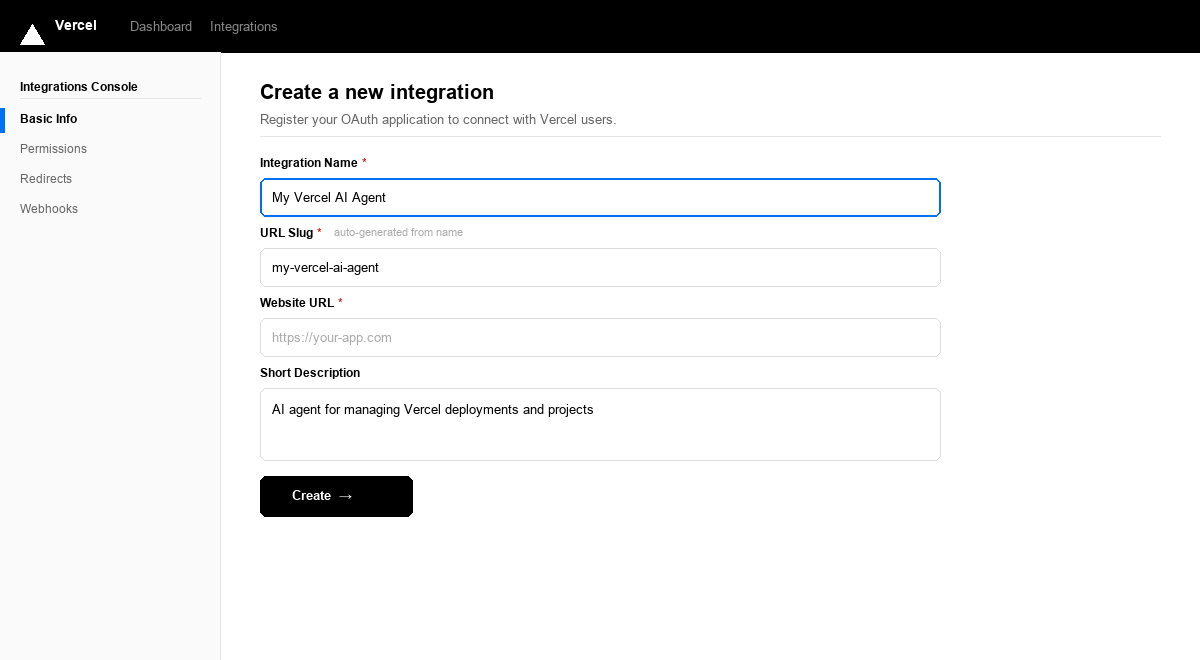
Fill in the form:
Field What to enter Integration Name A recognizable name, e.g. My Vercel AI AgentURL Slug Auto-generated from the name — you can leave it as-is Website URL Your app’s public URL. For testing you can use https://localhostShort Description Brief description of your integration -
Leave the Redirects section empty for now. You will add the Scalekit callback URL in the next step.
-
Click Create →.
After the integration is created, Vercel takes you to the integration’s settings page. Keep this tab open.
-
-
Copy the redirect URI from Scalekit
Scalekit gives you a callback URL that Vercel will redirect users back to after they authorize your app. You need to register this URL in your Vercel integration.
In the Scalekit dashboard:
- Go to app.scalekit.com and sign in.
- In the left sidebar, click AgentKit > Connections > Create Connection.
- Search for Vercel and click Create.
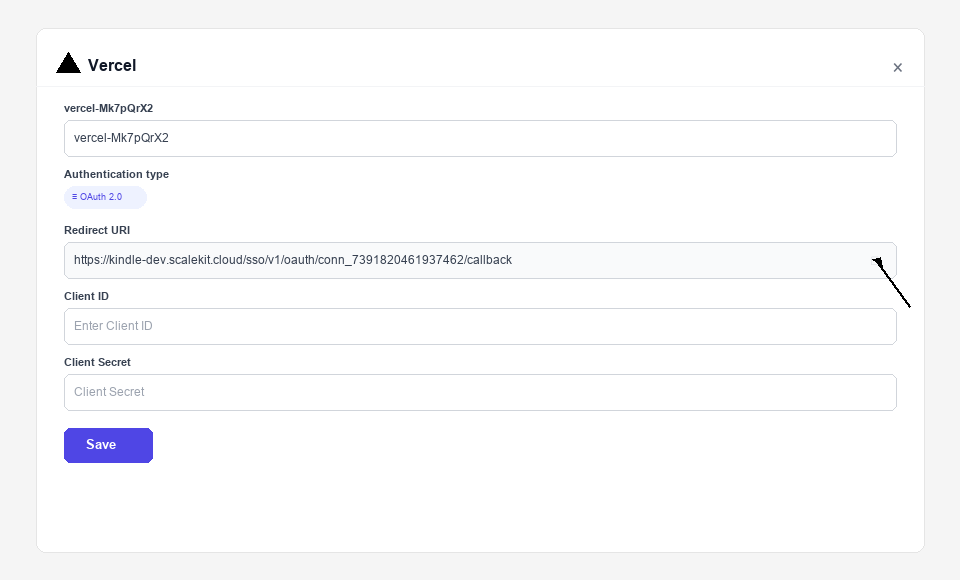
- A connection details panel opens. Find the Redirect URI field — it looks like:
https://<YOUR_ENV>.scalekit.cloud/sso/v1/oauth/conn_<ID>/callback
- Click the copy icon next to the Redirect URI to copy it to your clipboard.
-
Add the redirect URI and copy credentials from Vercel
Switch back to the Vercel integration tab you left open.
Register the redirect URI:
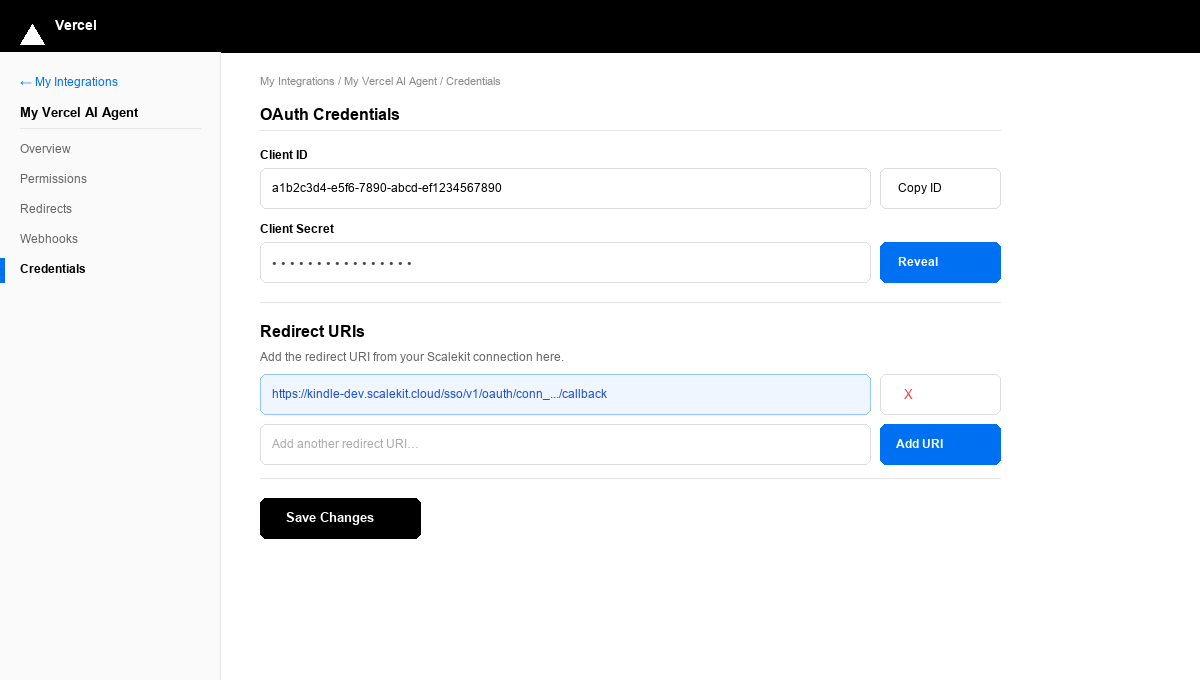
- In the left sidebar of your integration settings, click Credentials.
- Scroll down to the Redirect URIs section.
- Paste the redirect URI you copied from Scalekit into the input field.
- Click Add URI — the URI appears highlighted in the list.
- Click Save Changes.
Copy your credentials:
- Scroll up to the OAuth Credentials section.
- Client ID — shown in plain text. Click Copy ID to copy it.
- Client Secret — click Reveal to show the secret, then copy it.
Paste both values somewhere safe (a password manager or secrets vault). You will enter them into Scalekit in the next step.
-
Configure permissions in Vercel
Permissions (scopes) control which Vercel API resources your integration can access on behalf of the user.
-
In the Vercel integration settings sidebar, click Permissions.
-
Enable the scopes your integration needs:
Scope Access granted openidRequired to issue an ID token for user identification emailUser’s email address profileUser’s name, username, and profile picture offline_accessRefresh token for long-lived access without re-authorization -
Click Save Changes.
-
-
Add credentials in Scalekit
Switch back to the Scalekit dashboard tab.
-
Go to AgentKit > Connections and click the Vercel connection you created in Step 2.
-
Fill in the credentials form:
Field Value Client ID Paste the Client ID from Step 3 Client Secret Paste the Client Secret from Step 3 Scopes Enter the scopes you enabled in Step 4, e.g. openid profile email offline_access -
Click Save.
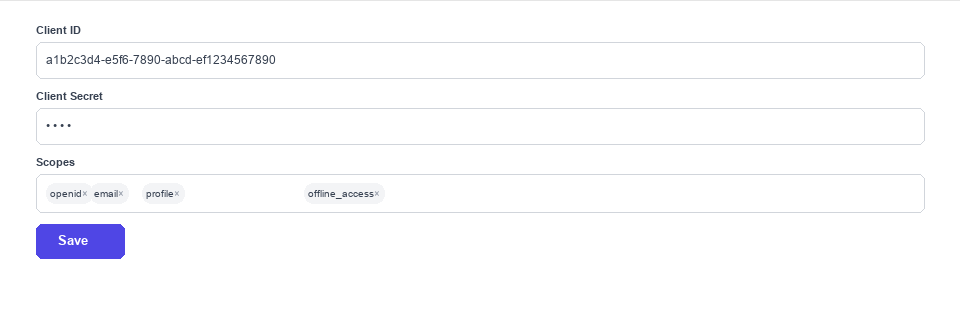
Your Vercel connection is now configured. Scalekit will use these credentials to run the OAuth flow whenever a user connects their Vercel account.
-
-
Authorize a user and make your first call
quickstart.mts import { ScalekitClient } from '@scalekit-sdk/node'import 'dotenv/config'import { createInterface } from 'node:readline/promises'const scalekit = new ScalekitClient(process.env.SCALEKIT_ENVIRONMENT_URL,process.env.SCALEKIT_CLIENT_ID,process.env.SCALEKIT_CLIENT_SECRET,)const actions = scalekit.actionsconst connector = 'vercel'const identifier = 'user_123'// Generate an authorization link for the userconst { link } = await actions.getAuthorizationLink({ connectionName: connector, identifier })console.log('Authorize Vercel:', link)const rl = createInterface({ input: process.stdin, output: process.stdout })await rl.question('Press Enter after authorizing...')rl.close()// Make your first callconst result = await actions.executeTool({connector,identifier,toolName: 'vercel_aliases_list',toolInput: {},})console.log(result)Terminal window npx tsx quickstart.mtsquickstart.py import osfrom scalekit import ScalekitClientfrom dotenv import load_dotenvload_dotenv()scalekit_client = ScalekitClient(env_url=os.getenv("SCALEKIT_ENVIRONMENT_URL"),client_id=os.getenv("SCALEKIT_CLIENT_ID"),client_secret=os.getenv("SCALEKIT_CLIENT_SECRET"),)actions = scalekit_client.actionsconnection_name = "vercel"identifier = "user_123"# Generate an authorization link for the userlink_response = actions.get_authorization_link(connection_name=connection_name,identifier=identifier,)print("Authorize Vercel:", link_response.link)input("Press Enter after authorizing...")# Make your first callresult = actions.execute_tool(tool_input={},tool_name="vercel_aliases_list",connection_name=connection_name,identifier=identifier,)print(result)Terminal window python quickstart.pyEach user signs in once. See Authorize a user for the full flow and statuses.
Tools
Pass the exact name toexecute_toolvercel_alias_getReturns information about a specific alias by its ID or hostname.Read-onlyGet Alias
Returns information about a specific alias by its ID or hostname.
Inputs
alias_or_idstringrequired- The alias hostname or ID.
team_idstring- Team ID if the alias belongs to a team.
vercel_aliases_listReturns all aliases for the authenticated user or team, with optional domain and deployment filtering.Read-onlyList Aliases
Returns all aliases for the authenticated user or team, with optional domain and deployment filtering.
Inputs
domainstring- Filter aliases by domain.
limitinteger- Maximum number of aliases to return.
sinceinteger- Timestamp in ms for pagination.
team_idstring- Team ID to list aliases for.
vercel_auth_tokens_listRetrieve a list of the authenticated user's personal access tokens (metadata only — id, name, type, and timestamps; never the token value itself).Read-onlyList Auth Tokens
Retrieve a list of the authenticated user's personal access tokens (metadata only — id, name, type, and timestamps; never the token value itself).
Inputs
This tool takes no inputs.
vercel_certs_listReturns all SSL certificates for the authenticated user or team, including their common names, auto-renew status, and expiration.Read-onlyList Certificates
Returns all SSL certificates for the authenticated user or team, including their common names, auto-renew status, and expiration.
Inputs
team_idstring- Team ID to list certificates for.
vercel_checks_listReturns all checks attached to a Vercel deployment (e.g.Read-onlyList Deployment Checks
Returns all checks attached to a Vercel deployment (e.g. from third-party integrations).
Inputs
deployment_idstringrequired- The deployment ID to list checks for.
team_idstring- Team ID if the deployment belongs to a team.
vercel_deployment_aliases_listReturns all aliases assigned to a specific Vercel deployment.Read-onlyList Deployment Aliases
Returns all aliases assigned to a specific Vercel deployment.
Inputs
deployment_idstringrequired- The deployment ID to get aliases for.
team_idstring- Team ID if the deployment belongs to a team.
vercel_deployment_events_listReturns build log events for a Vercel deployment.Read-onlyList Deployment Events
Returns build log events for a Vercel deployment. Useful for debugging build errors.
Inputs
deployment_idstringrequired- The deployment ID to get events for.
limitinteger- Maximum number of log events to return.
sinceinteger- Timestamp in ms to fetch events after.
team_idstring- Team ID if the deployment belongs to a team.
vercel_deployment_file_getRetrieve the base64-encoded content of a single file from a Vercel deployment by file ID.Read-onlyGet Deployment File Contents
Retrieve the base64-encoded content of a single file from a Vercel deployment by file ID.
Inputs
deployment_idstringrequired- The unique deployment identifier.
file_idstringrequired- The unique file identifier, from List Deployment Files.
pathstring- Path to the file to fetch (only applies to Git deployments).
team_idstring- Team ID if the deployment belongs to a team.
vercel_deployment_files_listRetrieve the source file tree of a Vercel deployment, if it was created with a retrievable files key.Read-onlyList Deployment Files
Retrieve the source file tree of a Vercel deployment, if it was created with a retrievable files key.
Inputs
deployment_idstringrequired- The unique deployment identifier.
team_idstring- Team ID if the deployment belongs to a team.
vercel_deployment_getReturns details of a specific Vercel deployment by its ID or URL, including build status, target, and metadata.Read-onlyGet Deployment
Returns details of a specific Vercel deployment by its ID or URL, including build status, target, and metadata.
Inputs
id_or_urlstringrequired- The deployment ID (dpl_xxx) or deployment URL.
team_idstring- Team ID if the deployment belongs to a team.
vercel_deployment_runtime_logs_getReturns a stream of runtime function logs (serverless, edge function, edge middleware, and request logs) for a Vercel deployment.Read-onlyGet Deployment Runtime Logs
Returns a stream of runtime function logs (serverless, edge function, edge middleware, and request logs) for a Vercel deployment. Distinct from the build/lifecycle events returned by the existing deployment events tool. Response is newline-delimited JSON log records, not a single JSON document.
Inputs
deployment_idstringrequired- The deployment ID to fetch runtime logs for.
project_idstringrequired- The project ID the deployment belongs to.
team_idstring- Team ID if the deployment belongs to a team.
vercel_deployments_listReturns a list of deployments for the authenticated user or a specific project/team, with filtering and pagination.Read-onlyList Deployments
Returns a list of deployments for the authenticated user or a specific project/team, with filtering and pagination.
Inputs
frominteger- Timestamp in ms for pagination cursor.
limitinteger- Maximum number of deployments to return.
project_idstring- Filter deployments by project ID or name.
statestring- Filter by deployment state: BUILDING, ERROR, INITIALIZING, QUEUED, READY, CANCELED.
targetstring- Filter by target environment: production or preview.
team_idstring- Filter deployments by team ID.
vercel_dns_records_listReturns all DNS records for a domain managed by Vercel.Read-onlyList DNS Records
Returns all DNS records for a domain managed by Vercel.
Inputs
domainstringrequired- The domain to list DNS records for.
limitinteger- Maximum number of records to return.
sinceinteger- Timestamp in ms for pagination.
team_idstring- Team ID if the domain belongs to a team.
vercel_domain_config_getChecks how a domain is configured (CNAME, A record, or dns-01 challenge) and whether it resolves correctly to Vercel.Read-onlyGet Domain Configuration
Checks how a domain is configured (CNAME, A record, or dns-01 challenge) and whether it resolves correctly to Vercel.
Inputs
domainstringrequired- The domain name to check the configuration for.
project_id_or_namestring- Project ID or name to associate with the domain, when the domain is not yet associated with a project.
strictboolean- When true, only include nameservers assigned directly to this domain (not the parent zone's).
team_idstring- Team ID if the domain belongs to a team.
vercel_domain_getReturns information about a specific domain including verification status, nameservers, and registrar.Read-onlyGet Domain
Returns information about a specific domain including verification status, nameservers, and registrar.
Inputs
domainstringrequired- The domain name to look up.
team_idstring- Team ID if the domain belongs to a team.
vercel_domain_verification_getGet the TXT verification record needed to claim ownership of a domain for the authenticated team.Read-onlyGet Domain Verification Record
Get the TXT verification record needed to claim ownership of a domain for the authenticated team. Add this TXT record to _vercel.{domain} in DNS, then call Claim Domain Ownership.
Inputs
domainstringrequired- The domain name to get the verification record for.
team_idstring- Team ID to claim the domain into.
vercel_domains_listReturns all domains registered or added to the authenticated user or team's Vercel account.Read-onlyList Domains
Returns all domains registered or added to the authenticated user or team's Vercel account.
Inputs
limitinteger- Maximum number of domains to return.
sinceinteger- Timestamp in ms for pagination.
team_idstring- Team ID to list domains for.
vercel_drain_getFetch a single Vercel Drain by ID.Read-onlyGet Drain
Fetch a single Vercel Drain by ID.
Inputs
drain_idstringrequired- The ID of the drain to fetch.
team_idstring- Team ID the drain belongs to.
vercel_drains_listReturns all Drains configured for a Vercel team.Read-onlyList Drains
Returns all Drains configured for a Vercel team.
Inputs
team_idstring- Team ID to list drains for.
vercel_edge_config_getReturns details of a specific Edge Config store by its ID.Read-onlyGet Edge Config
Returns details of a specific Edge Config store by its ID.
Inputs
edge_config_idstringrequired- The Edge Config store ID.
team_idstring- Team ID if the Edge Config belongs to a team.
vercel_edge_config_item_getReturns the value of a specific item from an Edge Config store by key.Read-onlyGet Edge Config Item
Returns the value of a specific item from an Edge Config store by key.
Inputs
edge_config_idstringrequired- The Edge Config store ID.
item_keystringrequired- The key of the item to retrieve.
team_idstring- Team ID if the Edge Config belongs to a team.
vercel_edge_config_items_listReturns all key-value items stored in an Edge Config store.Read-onlyList Edge Config Items
Returns all key-value items stored in an Edge Config store.
Inputs
edge_config_idstringrequired- The Edge Config store ID.
team_idstring- Team ID if the Edge Config belongs to a team.
vercel_edge_config_tokens_listReturns all read tokens for an Edge Config store.Read-onlyList Edge Config Tokens
Returns all read tokens for an Edge Config store.
Inputs
edge_config_idstringrequired- The Edge Config store ID.
team_idstring- Team ID if the Edge Config belongs to a team.
vercel_edge_configs_listReturns all Edge Config stores for the authenticated user or team.Read-onlyList Edge Configs
Returns all Edge Config stores for the authenticated user or team.
Inputs
team_idstring- Team ID to list Edge Configs for.
vercel_env_var_getRetrieve a single environment variable of a Vercel project, including its decrypted value.Read-onlyGet Environment Variable
Retrieve a single environment variable of a Vercel project, including its decrypted value.
Inputs
env_idstringrequired- The unique ID of the environment variable to fetch.
id_or_namestringrequired- The project ID or name.
team_idstring- Team ID if the project belongs to a team.
vercel_env_vars_listReturns all environment variables for a Vercel project, including their targets (production, preview, development) and encryption status.Read-onlyList Environment Variables
Returns all environment variables for a Vercel project, including their targets (production, preview, development) and encryption status.
Inputs
id_or_namestringrequired- The project ID or name.
decryptboolean- If true, returns decrypted values for sensitive variables.
team_idstring- Team ID if the project belongs to a team.
vercel_feature_flags_listReturns the Vercel Feature Flags configured for a project.Read-onlyList Feature Flags
Returns the Vercel Feature Flags configured for a project. The list can be filtered by state and searched; supports pagination. Vercel Feature Flags had zero coverage before this tool.
Inputs
project_id_or_namestringrequired- The project ID or name.
cursorstring- Pagination cursor to continue from.
limitinteger- Maximum number of flags to return.
searchstring- Search flags by their slug or description (case-insensitive).
statestring- Filter by flag state: active or archived. Defaults to active.one of
activearchived team_idstring- Team ID if the project belongs to a team.
vercel_project_checks_listReturns all checks configured for a Vercel project using the current project-scoped Checks v2 API, optionally filtered by which deployment lifecycle stage they block.Read-onlyList Project Checks (v2)
Returns all checks configured for a Vercel project using the current project-scoped Checks v2 API, optionally filtered by which deployment lifecycle stage they block. Distinct from the existing checks tools, which target the older v1 API scoped to a single deployment.
Inputs
project_id_or_namestringrequired- The project ID or name.
blocksstring- Filter checks by the deployment lifecycle stage they block.one of
build-startdeployment-startdeployment-aliasdeployment-promotionnone team_idstring- Team ID if the project belongs to a team.
vercel_project_domains_listReturns all domains assigned to a specific Vercel project.Read-onlyList Project Domains
Returns all domains assigned to a specific Vercel project.
Inputs
id_or_namestringrequired- The project ID or name.
productionboolean- Filter to production domains only.
team_idstring- Team ID if the project belongs to a team.
vercel_project_getReturns details of a specific Vercel project including its framework, Git repository, environment variables summary, and domains.Read-onlyGet Project
Returns details of a specific Vercel project including its framework, Git repository, environment variables summary, and domains.
Inputs
id_or_namestringrequired- The project ID or name.
team_idstring- Team ID if the project belongs to a team.
vercel_project_members_listReturns the members of a specific Vercel project, including their computed project role.Read-onlyList Project Members
Returns the members of a specific Vercel project, including their computed project role. Distinct from the existing team-members tool, which lists membership at the team level rather than a single project.
Inputs
id_or_namestringrequired- The project ID or name.
limitinteger- Maximum number of members to return.
searchstring- Search project members by name, username, or email.
sinceinteger- Timestamp in ms to only include members added after this time.
team_idstring- Team ID if the project belongs to a team.
untilinteger- Timestamp in ms to only include members added before this time.
vercel_projects_listReturns all projects for the authenticated user or team, with optional search and pagination.Read-onlyList Projects
Returns all projects for the authenticated user or team, with optional search and pagination.
Inputs
frominteger- Timestamp in ms for pagination cursor.
limitinteger- Maximum number of projects to return.
searchstring- Filter projects by name search query.
team_idstring- Team ID to list projects for. Omit for personal projects.
vercel_team_getReturns details of a specific Vercel team by its ID or slug.Read-onlyGet Team
Returns details of a specific Vercel team by its ID or slug.
Inputs
team_idstringrequired- The team ID or slug.
vercel_team_members_listReturns all members of a Vercel team including their roles and join dates.Read-onlyList Team Members
Returns all members of a Vercel team including their roles and join dates.
Inputs
team_idstringrequired- The team ID or slug.
limitinteger- Maximum number of members to return.
rolestring- Filter by role: OWNER, MEMBER, VIEWER, DEVELOPER, BILLING.
sinceinteger- Timestamp in ms to fetch members joined after this time.
vercel_teams_listReturns all teams the authenticated user belongs to, with pagination support.Read-onlyList Teams
Returns all teams the authenticated user belongs to, with pagination support.
Inputs
limitinteger- Maximum number of teams to return.
sinceinteger- Timestamp in milliseconds to fetch teams created after this time.
untilinteger- Timestamp in milliseconds to fetch teams created before this time.
vercel_user_getReturns the authenticated user's profile including name, email, username, and account details.Read-onlyGet Current User
Returns the authenticated user's profile including name, email, username, and account details.
Inputs
This tool takes no inputs.
vercel_webhook_getReturns details of a specific Vercel webhook by its ID.Read-onlyGet Webhook
Returns details of a specific Vercel webhook by its ID.
Inputs
webhook_idstringrequired- The webhook ID.
team_idstring- Team ID if the webhook belongs to a team.
vercel_webhooks_listReturns all webhooks configured for the authenticated user or team.Read-onlyList Webhooks
Returns all webhooks configured for the authenticated user or team.
Inputs
team_idstring- Team ID to list webhooks for.
vercel_alias_createAssigns an alias (custom domain) to a Vercel deployment.WriteCreate Alias
Assigns an alias (custom domain) to a Vercel deployment.
Inputs
aliasstringrequired- The alias hostname to assign.
deployment_idstringrequired- The deployment ID to assign the alias to.
team_idstring- Team ID if the deployment belongs to a team.
vercel_blob_store_createCreates a new Vercel Blob store for file storage.WriteCreate Blob Store
Creates a new Vercel Blob store for file storage. Vercel Blob had zero coverage before this tool.
Inputs
namestringrequired- Name for the new Blob store (max 70 characters).
accessstring- Access level for the store. Defaults to public.one of
publicprivate project_idstring- Project ID to scope this store to.
regionstring- Region to create the store in.
team_idstring- Team ID to create the store under.
vercel_check_createCreates a new check on a Vercel deployment.WriteCreate Deployment Check
Creates a new check on a Vercel deployment. Used by integrations to report status of external checks like test suites or audits.
Inputs
blockingbooleanrequired- If true, this check must pass before deployment is considered ready.
deployment_idstringrequired- The deployment ID to create a check for.
namestringrequired- Display name for the check.
detailsUrlstring- URL where users can view check details.
team_idstring- Team ID if the deployment belongs to a team.
vercel_check_updateUpdates the status and conclusion of a deployment check.WriteUpdate Deployment Check
Updates the status and conclusion of a deployment check. Used to report check results back to Vercel.
- Idempotent
Inputs
check_idstringrequired- The check ID to update.
deployment_idstringrequired- The deployment ID the check belongs to.
conclusionstring- Check conclusion: succeeded, failed, skipped, canceled.
detailsUrlstring- URL where users can view check details.
statusstring- Check status: running, completed.
team_idstring- Team ID if the deployment belongs to a team.
vercel_deployment_cancelCancels a Vercel deployment that is currently building or queued.WriteCancel Deployment
Cancels a Vercel deployment that is currently building or queued.
- Idempotent
Inputs
deployment_idstringrequired- The deployment ID to cancel.
team_idstring- Team ID if the deployment belongs to a team.
vercel_deployment_createCreates a new Vercel deployment for a project, optionally from a Git ref or with inline files.WriteCreate Deployment
Creates a new Vercel deployment for a project, optionally from a Git ref or with inline files.
Inputs
namestringrequired- The project name to deploy.
git_sourcestring- JSON object with Git source info, e.g. {"type":"github","ref":"main","repoId":"123"}.
targetstring- Deployment target: production or preview. Default is preview.
team_idstring- Team ID if deploying to a team project.
vercel_dns_record_createCreates a new DNS record for a domain managed by Vercel.WriteCreate DNS Record
Creates a new DNS record for a domain managed by Vercel. Supports A, AAAA, CNAME, TXT, MX, SRV, and CAA records.
Inputs
domainstringrequired- The domain to create the DNS record for.
namestringrequired- Subdomain name, or empty string for root domain.
typestringrequired- Record type: A, AAAA, CNAME, TXT, MX, SRV, CAA.
valuestringrequired- The record value (IP address, hostname, text, etc.).
mx_priorityinteger- Priority for MX records.
team_idstring- Team ID if the domain belongs to a team.
ttlinteger- Time-to-live in seconds. Default is 60.
vercel_dns_record_updateUpdates an existing DNS record for a domain managed by Vercel.WriteUpdate DNS Record
Updates an existing DNS record for a domain managed by Vercel.
- Idempotent
Inputs
record_idstringrequired- The ID of the DNS record to update.
commentstring- A comment to add context on what this DNS record is for.
mx_priorityinteger- New priority for MX records.
namestring- New subdomain name, or empty string for root domain.
team_idstring- Team ID if the domain belongs to a team.
ttlinteger- New time-to-live in seconds (60-2147483647).
typestring- New record type.one of
AAAAAALIASCAACNAMEHTTPSMXSRVTXTNS valuestring- New record value (IP address, hostname, text, etc.).
vercel_domain_addAdds a domain to the authenticated user or team's Vercel account.WriteAdd Domain
Adds a domain to the authenticated user or team's Vercel account.
Inputs
namestringrequired- The domain name to add.
team_idstring- Team ID to add the domain to.
vercel_domain_claimClaims ownership of a domain for the authenticated team by verifying the TXT record obtained from Get Domain Verification Record.WriteClaim Domain Ownership
Claims ownership of a domain for the authenticated team by verifying the TXT record obtained from Get Domain Verification Record. Transfers ownership even if the domain is currently owned by another user or team.
Inputs
domainstringrequired- The domain name to claim ownership of.
team_idstring- Team ID to transfer ownership into.
vercel_drain_createCreates a new Vercel Drain that continuously exports observability data (logs, traces, analytics, etc) from projects to an external endpoint.WriteCreate Drain
Creates a new Vercel Drain that continuously exports observability data (logs, traces, analytics, etc) from projects to an external endpoint. This is the current replacement for the deprecated Log Drains API.
Inputs
namestringrequired- A name for the drain.
projectsstringrequired- Whether the drain applies to some projects (use project_ids) or all projects in the team.one of
someall schemasobjectrequired- Which data types to export and their schema versions, e.g. {"log": {"version": "v1"}}.
deliveryobject- Delivery configuration for where and how data is sent (webhook, OpenTelemetry, or S3-compatible bucket).
project_idsarray- Project IDs to scope this drain to. Required when projects='some'.
samplingarray- Sampling rules to reduce data volume.
team_idstring- Team ID to create the drain under.
vercel_drain_updateUpdates the configuration of an existing Vercel Drain, such as its name, project scope, delivery target, sampling, or enabled status.WriteUpdate Drain
Updates the configuration of an existing Vercel Drain, such as its name, project scope, delivery target, sampling, or enabled status.
- Idempotent
Inputs
drain_idstringrequired- The ID of the drain to update.
deliveryobject- New delivery configuration for where and how data is sent.
namestring- New name for the drain.
project_idsarray- Project IDs to scope this drain to, when projects='some'.
projectsstring- Whether the drain applies to some projects (use project_ids) or all projects in the team.one of
someall samplingarray- New sampling rules to reduce data volume.
statusstring- Enable or disable the drain.one of
enableddisabled team_idstring- Team ID the drain belongs to.
vercel_edge_cache_invalidate_by_tagMarks one or more Vercel edge cache tags as stale, causing cache entries associated with those tags to be revalidated in the background on the next request.WriteInvalidate Edge Cache by Tag
Marks one or more Vercel edge cache tags as stale, causing cache entries associated with those tags to be revalidated in the background on the next request. No edge-cache management existed before this tool.
Inputs
project_id_or_namestringrequired- The project ID or name whose cache tags to invalidate.
tagsarrayrequired- JSON array of cache tags to invalidate.
targetstring- Restrict invalidation to a specific environment.one of
productionpreview team_idstring- Team ID if the project belongs to a team.
vercel_edge_config_createCreates a new Edge Config store for storing read-only configuration data close to users at the edge.WriteCreate Edge Config
Creates a new Edge Config store for storing read-only configuration data close to users at the edge.
Inputs
slugstringrequired- A unique slug for the Edge Config store.
team_idstring- Team ID to create the Edge Config under.
vercel_edge_config_items_updateCreates, updates, or deletes items in an Edge Config store using a list of patch operations.WriteUpdate Edge Config Items
Creates, updates, or deletes items in an Edge Config store using a list of patch operations.
- Idempotent
Inputs
edge_config_idstringrequired- The Edge Config store ID.
itemsstringrequired- JSON array of patch operations. Each item has 'operation' (create/update/upsert/delete), 'key', and optionally 'value'.
team_idstring- Team ID if the Edge Config belongs to a team.
vercel_edge_config_token_createCreates a new read token for an Edge Config store to be used in application code.WriteCreate Edge Config Token
Creates a new read token for an Edge Config store to be used in application code.
Inputs
edge_config_idstringrequired- The Edge Config store ID.
labelstringrequired- A descriptive label for the token.
team_idstring- Team ID if the Edge Config belongs to a team.
vercel_env_var_createCreates a new environment variable for a Vercel project with the specified key, value, and target environments.WriteCreate Environment Variable
Creates a new environment variable for a Vercel project with the specified key, value, and target environments.
Inputs
id_or_namestringrequired- The project ID or name.
keystringrequired- The environment variable key.
valuestringrequired- The environment variable value.
targetstring- JSON array of targets: production, preview, development. Defaults to all.
team_idstring- Team ID if the project belongs to a team.
typestring- Variable type: plain or secret. Default is plain.
vercel_env_var_updateUpdates an existing environment variable for a Vercel project.WriteUpdate Environment Variable
Updates an existing environment variable for a Vercel project.
- Idempotent
Inputs
env_idstringrequired- The environment variable ID to update.
id_or_namestringrequired- The project ID or name.
targetstring- JSON array of new targets: production, preview, development.
team_idstring- Team ID if the project belongs to a team.
valuestring- New value for the environment variable.
vercel_project_createCreates a new Vercel project with a given name, framework, and optional Git repository.WriteCreate Project
Creates a new Vercel project with a given name, framework, and optional Git repository.
Inputs
namestringrequired- The name of the project.
frameworkstring- Framework preset, e.g. nextjs, vite, gatsby, nuxtjs, create-react-app.
git_repositorystring- JSON object with 'type' (github/gitlab/bitbucket) and 'repo' (owner/name) fields.
root_directorystring- Root directory of the project within the repository.
team_idstring- Team ID to create the project under.
vercel_project_domain_addAssigns a domain to a Vercel project with an optional redirect target.WriteAdd Domain to Project
Assigns a domain to a Vercel project with an optional redirect target.
Inputs
id_or_namestringrequired- The project ID or name.
namestringrequired- The domain name to assign to the project.
git_branchstring- Git branch to associate this domain with for preview deployments.
redirectstring- Redirect target domain if this domain should redirect.
team_idstring- Team ID if the project belongs to a team.
vercel_project_domain_verifyAttempts to verify an unverified domain assigned to a Vercel project by checking its verification TXT/CNAME challenge.WriteVerify Project Domain
Attempts to verify an unverified domain assigned to a Vercel project by checking its verification TXT/CNAME challenge.
- Idempotent
Inputs
domainstringrequired- The domain name to verify.
id_or_namestringrequired- The project ID or name.
team_idstring- Team ID if the project belongs to a team.
vercel_project_unpauseResume a paused Vercel project by its project ID.WriteUnpause Project
Resume a paused Vercel project by its project ID. Re-enables the active Production Deployment and auto-assigning custom production domains.
- Idempotent
Inputs
project_idstringrequired- The ID of the project to unpause.
team_idstring- Team ID if the project belongs to a team.
vercel_project_updateUpdates a Vercel project's name, framework, build command, output directory, or other settings.WriteUpdate Project
Updates a Vercel project's name, framework, build command, output directory, or other settings.
- Idempotent
Inputs
id_or_namestringrequired- The project ID or name to update.
build_commandstring- Custom build command override.
frameworkstring- Framework preset to apply.
install_commandstring- Custom install command override.
namestring- New project name.
output_directorystring- Custom output directory override.
team_idstring- Team ID if the project belongs to a team.
vercel_sandbox_createCreates a Vercel Sandbox — an ephemeral, isolated Linux microVM for running untrusted or AI-generated code.WriteCreate Sandbox
Creates a Vercel Sandbox — an ephemeral, isolated Linux microVM for running untrusted or AI-generated code. Named sandboxes have a unique name within a project and support automatic snapshotting on shutdown. Vercel Sandbox had zero coverage before this tool.
Inputs
envobject- Default environment variables for the sandbox, as a JSON object of string key/value pairs. Inherited by all commands unless overridden.
imagestring- Container image to use for the sandbox, instead of the default runtime image.
namestring- Name for the sandbox. Must be unique per project and URL-safe (alphanumeric, hyphens, underscores).
portsarray- JSON array of port numbers to expose from the sandbox (each 1024-65535). Each port is reachable via a unique URL. Maximum of 15 ports.
project_idstring- The target project slug or ID the sandbox will be assigned to.
resourcesobject- JSON object defining the sandbox VM resources: vcpus (integer, 1 or an even number, default 2) and memory (integer, MB, must equal vcpus * 2048).
runtimestring- The runtime environment for the sandbox. Determines pre-installed language runtimes and tools. Defaults to node24.one of
node22node24node26python3.13 sourceobject- JSON object describing where to initialize the sandbox filesystem from. One of: {"type": "git", "url": "...", "username": "...", "password": "...", "depth": 1, "revision": "..."} to clone a Git repo; {"type": "tarball", "url": "..."} to download and extract a gzipped tarball; or {"type": "snapshot", "snapshotId": "..."} to restore from an existing snapshot.
team_idstring- Team ID to create the sandbox under.
timeoutinteger- Maximum duration in milliseconds the sandbox can run before being automatically stopped.
vercel_team_createCreates a new Vercel team with the specified slug and optional name.WriteCreate Team
Creates a new Vercel team with the specified slug and optional name.
Inputs
slugstringrequired- A unique URL-friendly identifier for the team.
namestring- Display name for the team.
vercel_team_member_inviteInvites a user to a Vercel team by email address with a specified role.WriteInvite Team Member
Invites a user to a Vercel team by email address with a specified role.
Inputs
emailstringrequired- Email address of the user to invite.
team_idstringrequired- The team ID or slug.
rolestring- Role to assign: OWNER, MEMBER, VIEWER, DEVELOPER, BILLING.
vercel_team_member_updateChange a Vercel team member's role, or confirm an unconfirmed member's request to join the team.WriteUpdate Team Member
Change a Vercel team member's role, or confirm an unconfirmed member's request to join the team. The authenticated user must be an owner of the team.
- Idempotent
Inputs
team_idstringrequired- The ID of the team the member belongs to.
uidstringrequired- The ID of the member to update.
confirmedboolean- Set to true to accept a user who requested access to the team.
rolestring- New role for the member in the team. Default is MEMBER.
vercel_team_updateUpdates a Vercel team's name, slug, description, or other settings.WriteUpdate Team
Updates a Vercel team's name, slug, description, or other settings.
- Idempotent
Inputs
team_idstringrequired- The team ID or slug to update.
descriptionstring- New description for the team.
namestring- New display name for the team.
slugstring- New URL-friendly slug for the team.
vercel_webhook_createCreates a new webhook that sends event notifications to the specified URL for Vercel deployment and project events.WriteCreate Webhook
Creates a new webhook that sends event notifications to the specified URL for Vercel deployment and project events.
Inputs
eventsstringrequired- JSON array of event types to subscribe to, e.g. ["deployment.created","deployment.succeeded"].
urlstringrequired- The HTTPS endpoint URL to receive webhook payloads.
project_idsstring- JSON array of project IDs to scope this webhook to. Omit for all projects.
team_idstring- Team ID to create the webhook for.
vercel_alias_deleteRemoves an alias from a Vercel deployment.DestructiveDelete Alias
Removes an alias from a Vercel deployment.
- Idempotent
Inputs
alias_or_idstringrequired- The alias hostname or ID to delete.
team_idstring- Team ID if the alias belongs to a team.
vercel_deployment_deleteDeletes a Vercel deployment by its ID.DestructiveDelete Deployment
Deletes a Vercel deployment by its ID.
- Idempotent
Inputs
deployment_idstringrequired- The deployment ID to delete.
team_idstring- Team ID if the deployment belongs to a team.
vercel_dns_record_deleteDeletes a DNS record from a domain managed by Vercel.DestructiveDelete DNS Record
Deletes a DNS record from a domain managed by Vercel.
- Idempotent
Inputs
domainstringrequired- The domain the DNS record belongs to.
record_idstringrequired- The ID of the DNS record to delete.
team_idstring- Team ID if the domain belongs to a team.
vercel_domain_deleteRemoves a domain from the authenticated user or team's Vercel account.DestructiveDelete Domain
Removes a domain from the authenticated user or team's Vercel account.
- Idempotent
Inputs
domainstringrequired- The domain name to delete.
team_idstring- Team ID if the domain belongs to a team.
vercel_domain_updateUpdates whether an apex domain is a DNS zone using Vercel's nameservers, or moves the domain out to a different user or team.DestructiveUpdate or Move Apex Domain
Updates whether an apex domain is a DNS zone using Vercel's nameservers, or moves the domain out to a different user or team.
Inputs
domainstringrequired- The apex domain to update or move.
opstringrequired- The operation to perform: 'update' to change the zone flag, or 'move-out' to transfer the domain to another user or team.one of
updatemove-out destinationstring- For op='move-out': the user or team to move the domain to.
team_idstring- Team ID if the domain belongs to a team.
zoneboolean- For op='update': whether this domain intends to use Vercel's nameservers as a DNS zone.
vercel_drain_deletePermanently deletes a Vercel Drain and stops its data export.DestructiveDelete Drain
Permanently deletes a Vercel Drain and stops its data export.
- Idempotent
Inputs
drain_idstringrequired- The ID of the drain to delete.
team_idstring- Team ID the drain belongs to.
vercel_edge_config_deletePermanently deletes an Edge Config store and all its items.DestructiveDelete Edge Config
Permanently deletes an Edge Config store and all its items.
- Idempotent
Inputs
edge_config_idstringrequired- The Edge Config store ID to delete.
team_idstring- Team ID if the Edge Config belongs to a team.
vercel_edge_config_tokens_deleteDeletes one or more read tokens from an Edge Config store.DestructiveDelete Edge Config Tokens
Deletes one or more read tokens from an Edge Config store.
- Idempotent
Inputs
edge_config_idstringrequired- The Edge Config store ID.
tokensstringrequired- JSON array of token IDs to delete.
team_idstring- Team ID if the Edge Config belongs to a team.
vercel_env_var_deleteDeletes an environment variable from a Vercel project.DestructiveDelete Environment Variable
Deletes an environment variable from a Vercel project.
- Idempotent
Inputs
env_idstringrequired- The environment variable ID to delete.
id_or_namestringrequired- The project ID or name.
team_idstring- Team ID if the project belongs to a team.
vercel_project_deletePermanently deletes a Vercel project and all its deployments, domains, and environment variables.DestructiveDelete Project
Permanently deletes a Vercel project and all its deployments, domains, and environment variables.
- Idempotent
Inputs
id_or_namestringrequired- The project ID or name to delete.
team_idstring- Team ID if the project belongs to a team.
vercel_project_domain_deleteRemoves a domain assignment from a Vercel project.DestructiveRemove Domain from Project
Removes a domain assignment from a Vercel project.
- Idempotent
Inputs
domainstringrequired- The domain name to remove from the project.
id_or_namestringrequired- The project ID or name.
team_idstring- Team ID if the project belongs to a team.
vercel_project_pausePause a Vercel project by its project ID.DestructivePause Project
Pause a Vercel project by its project ID. Blocks the active Production Deployment and disables auto-assigning custom production domains until the project is unpaused.
- Idempotent
Inputs
project_idstringrequired- The ID of the project to pause.
team_idstring- Team ID if the project belongs to a team.
vercel_project_rollbackPoints a Vercel project's production traffic back to a previous production deployment.DestructiveRollback Production Deployment
Points a Vercel project's production traffic back to a previous production deployment.
Inputs
deployment_idstringrequired- The ID of the deployment to roll back to.
project_idstringrequired- The ID of the project to roll back.
descriptionstring- The reason for the rollback.
team_idstring- Team ID if the project belongs to a team.
vercel_team_deletePermanently deletes a Vercel team and all its associated resources.DestructiveDelete Team
Permanently deletes a Vercel team and all its associated resources.
- Idempotent
Inputs
team_idstringrequired- The team ID or slug to delete.
vercel_team_member_removeRemoves a member from a Vercel team by their user ID.DestructiveRemove Team Member
Removes a member from a Vercel team by their user ID.
- Idempotent
Inputs
team_idstringrequired- The team ID or slug.
user_idstringrequired- The user ID of the member to remove.
vercel_webhook_deletePermanently deletes a Vercel webhook.DestructiveDelete Webhook
Permanently deletes a Vercel webhook.
- Idempotent
Inputs
webhook_idstringrequired- The webhook ID to delete.
team_idstring- Team ID if the webhook belongs to a team.
No tools match.
Workflows
Proxy API call
const result = await actions.request({ connectionName: 'vercel', identifier: 'user_123', path: '/v2/user', method: 'GET',});console.log(result);result = actions.request( connection_name='vercel', identifier='user_123', path="/v2/user", method="GET")print(result)Execute a tool
const result = await actions.executeTool({ connector: 'vercel', identifier: 'user_123', toolName: 'vercel_alias_create', toolInput: {},});console.log(result);result = actions.execute_tool( tool_input={}, tool_name='vercel_alias_create', connection_name='vercel', identifier='user_123',)print(result)