The ClickUp connector lets your AI agent act in each user's ClickUp account. Each user signs in to ClickUp once, and Scalekit stores and refreshes their tokens, so your agent never handles credentials. It comes with 99 tools.
- Tools
- 99
- What they doRead · write · destructive
- 39 · 47 · 1339 read47 write13 destructive
- Users sign in with
- OAuth
- OAuth app
- Your own ClickUp app
What you can do
- Manage tasks: create, update, delete, and search tasks; set priorities, due dates, assignees, and statuses
- Manage lists: create, update, and delete lists in folders or as folderless lists; get members
- Manage folders: create, update, and delete folders; list all folders in a space
- Manage spaces: create, update, and delete spaces; manage space tags and views
- Manage comments: add, update, and delete comments on tasks and lists
- Manage goals: create, update, delete, and list goals and their key results
- Track time: list and create time entries for tasks
- Manage checklists: create task checklists and checklist items
- Manage webhooks: create, update, delete, and list workspace webhooks
- Access workspace data: get user info, list workspaces, spaces, and views
Setup
Install the SDK
Terminal window npm install @scalekit-sdk/node dotenvTerminal window pip install scalekit-sdk-python python-dotenvSet your credentials
Add your Scalekit credentials to your
.envfile. Find values in app.scalekit.com > Developers > API Credentials..env SCALEKIT_ENVIRONMENT_URL=<your-environment-url>SCALEKIT_CLIENT_ID=<your-client-id>SCALEKIT_CLIENT_SECRET=<your-client-secret>Create the ClickUp connection
In AgentKit > Connections, create a ClickUp connection and copy its redirect URI. The name you give it is the
connection_nameyour code passes. See Configure connections.Register an OAuth app
ClickUp connections use your own OAuth app. Register one with ClickUp and add the redirect URI you copied.
Then enter the app's Client ID and Client Secret on the ClickUp connection.
Console steps with screenshots
Register your Scalekit environment with the ClickUp connector so Scalekit handles the authentication flow and token lifecycle for you. The connection name you create will be used to identify and invoke the connection programmatically. Then complete the configuration in your application as follows:
-
Set up auth redirects
-
In Scalekit dashboard, go to AgentKit > Connections > Create Connection. Find ClickUp and click Create. Copy the redirect URI. It looks like
https://<SCALEKIT_ENVIRONMENT_URL>/sso/v1/oauth/<CONNECTION_ID>/callback.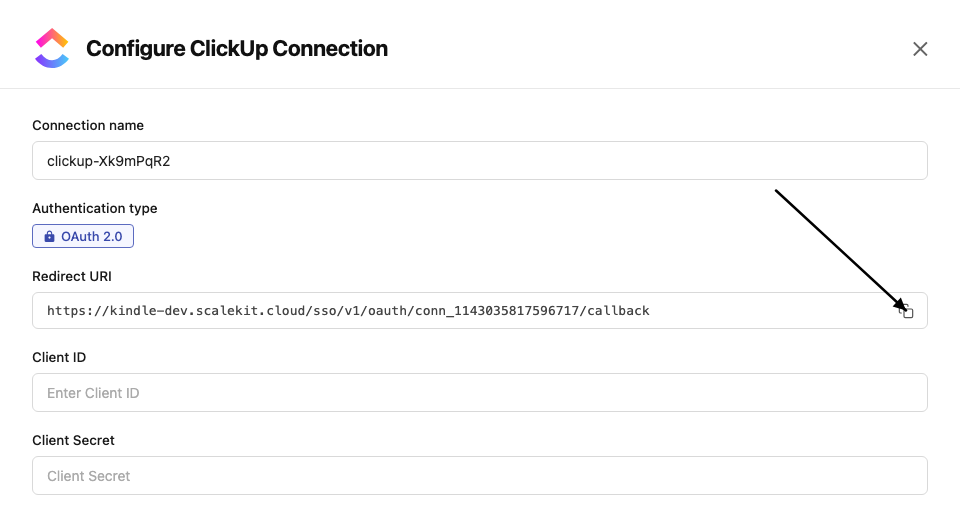
-
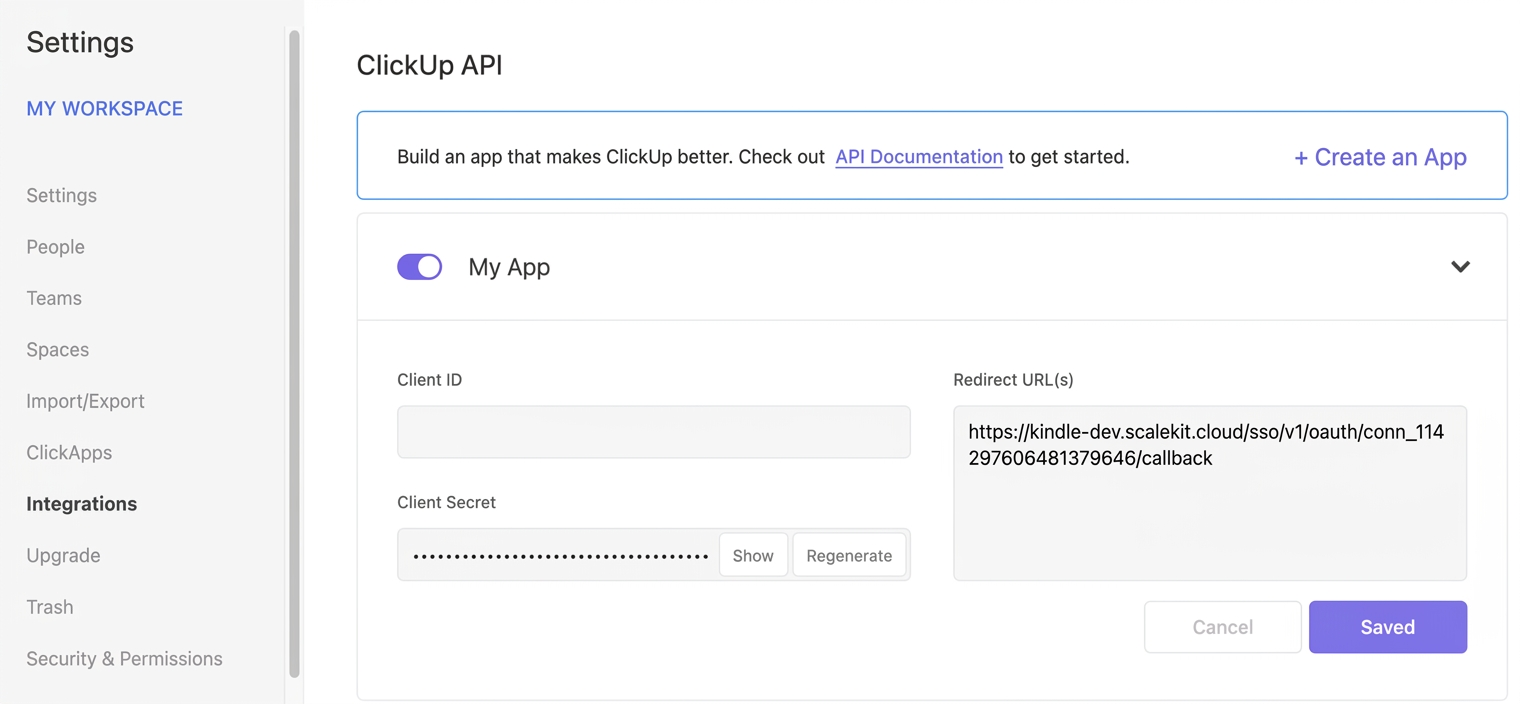
In ClickUp, click your Workspace avatar (lower-left corner) → Settings → Integrations → ClickUp API.
-
Open your application and paste the copied URI under Redirect URL(s), then save.
-
-
Get client credentials
On your ClickUp application page (Settings → Integrations → ClickUp API):
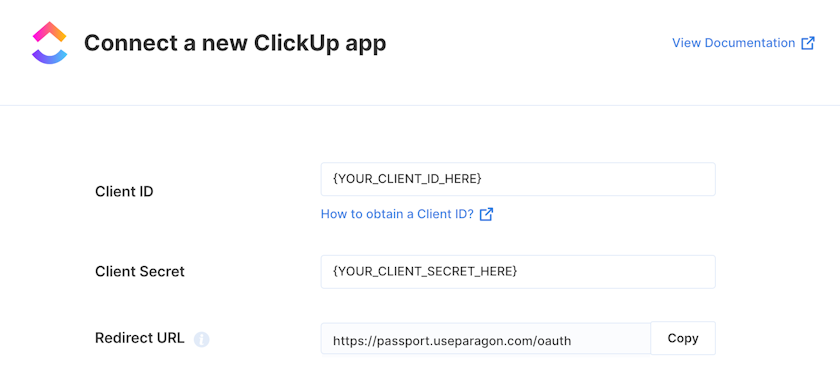
- Client ID — found under Client ID on your app page
- Client Secret — found under Client Secret on your app page
-
Add credentials in Scalekit
-
In Scalekit dashboard, go to AgentKit > Connections and open the connection you created.
-
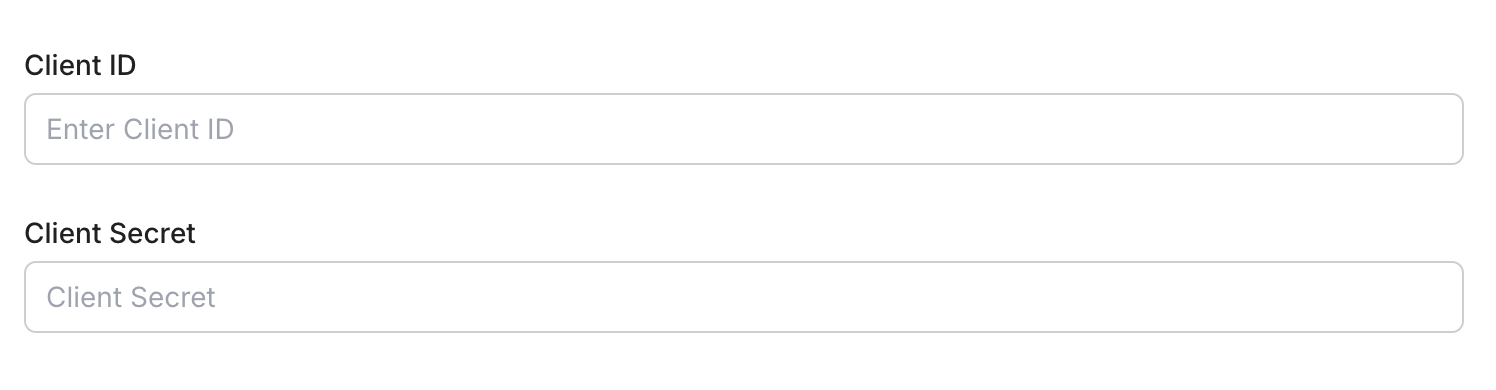
Enter your credentials:
- Client ID (from your ClickUp app page)
- Client Secret (from your ClickUp app page)
-
Click Save.
-
-
Connect a user account
- Click the Connected Accounts tab, then Add Account.
- Enter your user’s ID and click Create Account — you’ll be redirected to ClickUp to authorize access.
-
Authorize a user and make your first call
quickstart.mts import { ScalekitClient } from '@scalekit-sdk/node'import 'dotenv/config'import { createInterface } from 'node:readline/promises'const scalekit = new ScalekitClient(process.env.SCALEKIT_ENVIRONMENT_URL,process.env.SCALEKIT_CLIENT_ID,process.env.SCALEKIT_CLIENT_SECRET,)const actions = scalekit.actionsconst connector = 'clickup'const identifier = 'user_123'// Generate an authorization link for the userconst { link } = await actions.getAuthorizationLink({ connectionName: connector, identifier })console.log('Authorize ClickUp:', link)const rl = createInterface({ input: process.stdin, output: process.stdout })await rl.question('Press Enter after authorizing...')rl.close()// Make your first callconst result = await actions.executeTool({connector,identifier,toolName: 'clickup_user_get',toolInput: {},})console.log(result)Terminal window npx tsx quickstart.mtsquickstart.py import osfrom scalekit import ScalekitClientfrom dotenv import load_dotenvload_dotenv()scalekit_client = ScalekitClient(env_url=os.getenv("SCALEKIT_ENVIRONMENT_URL"),client_id=os.getenv("SCALEKIT_CLIENT_ID"),client_secret=os.getenv("SCALEKIT_CLIENT_SECRET"),)actions = scalekit_client.actionsconnection_name = "clickup"identifier = "user_123"# Generate an authorization link for the userlink_response = actions.get_authorization_link(connection_name=connection_name,identifier=identifier,)print("Authorize ClickUp:", link_response.link)input("Press Enter after authorizing...")# Make your first callresult = actions.execute_tool(tool_input={},tool_name="clickup_user_get",connection_name=connection_name,identifier=identifier,)print(result)Terminal window python quickstart.pyEach user signs in once. See Authorize a user for the full flow and statuses.
Tools
Pass the exact name toexecute_toolclickup_chat_channels_listList Chat channels in a ClickUp Workspace, including regular channels, direct messages, and group direct messages.Read-onlyList Chat Channels
List Chat channels in a ClickUp Workspace, including regular channels, direct messages, and group direct messages.
Inputs
workspace_idstringrequired- The Workspace ID to list Chat channels for
cursorstring- Pagination cursor from a previous response
description_formatstring- Format to render each channel's description inone of
text/mdtext/plain include_closedboolean- If true, includes closed direct messages and group direct messages. Defaults to false.
is_followerboolean- If true, only return channels the authenticated user follows. Defaults to false.
limitinteger- Maximum number of channels to return per page (1-100). Defaults to 50.
with_message_sinceinteger- Only return channels with messages since this Unix timestamp (milliseconds)
clickup_comment_get_listRetrieve comments on a ClickUp list.Read-onlyGet List Comments
Retrieve comments on a ClickUp list. Returns up to 25 most recent comments by default. Use start and start_id for pagination.
Inputs
list_idstringrequired- The unique identifier of the list
startinteger- Unix timestamp in milliseconds of a reference comment for pagination
start_idstring- ID of a reference comment for pagination
clickup_comment_get_taskRetrieve comments on a ClickUp task.Read-onlyGet Task Comments
Retrieve comments on a ClickUp task. Returns up to 25 most recent comments. Use start and start_id for pagination.
Inputs
task_idstringrequired- The unique identifier of the task
startinteger- Unix timestamp in milliseconds of a reference comment for pagination
start_idstring- ID of a reference comment for pagination
clickup_comment_thread_listRetrieve the threaded replies on a ClickUp comment.Read-onlyList Threaded Comment Replies
Retrieve the threaded replies on a ClickUp comment. The parent comment itself is not included in the response.
Inputs
comment_idstringrequired- The unique identifier of the parent comment to fetch replies for
clickup_custom_field_listView the Custom Fields (and their configuration options) available on a ClickUp list.Read-onlyList List Custom Fields
View the Custom Fields (and their configuration options) available on a ClickUp list.
Inputs
list_idstringrequired- The ID of the list to fetch available Custom Fields for
include_applied_objectsboolean- When true, includes applied_objects for task-type-scoped Custom Fields
clickup_custom_task_types_listList the custom task types (e.g.Read-onlyList Custom Task Types
List the custom task types (e.g. Bug, Sprint) configured for a ClickUp Workspace, so their IDs can be used to set a task's type correctly.
Inputs
team_idstringrequired- The workspace (team) ID to list custom task types for
clickup_doc_getFetch metadata for a single ClickUp Doc by ID.Read-onlyGet Doc
Fetch metadata for a single ClickUp Doc by ID.
Inputs
doc_idstringrequired- The ID of the Doc to fetch
workspace_idstringrequired- The ID of the Workspace the Doc belongs to
clickup_doc_page_getFetch the content of a single page in a ClickUp Doc.Read-onlyGet Doc Page
Fetch the content of a single page in a ClickUp Doc.
Inputs
doc_idstringrequired- The ID of the Doc the page belongs to
page_idstringrequired- The ID of the page to fetch
workspace_idstringrequired- The ID of the Workspace the Doc belongs to
content_formatstring- Format to return the page content in. Default is text/md.one of
text/mdtext/plain
clickup_doc_page_listingRetrieve the page tree (IDs, titles, and nesting) for a ClickUp Doc, without full page content.Read-onlyList Doc Pages
Retrieve the page tree (IDs, titles, and nesting) for a ClickUp Doc, without full page content.
Inputs
doc_idstringrequired- The ID of the Doc to list pages for
workspace_idstringrequired- The ID of the Workspace the Doc belongs to
max_page_depthinteger- The maximum nesting depth of pages/subpages to return. Use -1 for no limit. Default is -1.
clickup_doc_searchSearch for ClickUp Docs in a Workspace, with optional filters for creator, parent location, and archived/deleted state.Read-onlySearch Docs
Search for ClickUp Docs in a Workspace, with optional filters for creator, parent location, and archived/deleted state.
Inputs
workspace_idstringrequired- The ID of the Workspace to search Docs in
archivedboolean- When true, include archived Docs in the results. Default is false.
creatorinteger- Filter results to Docs created by this user ID
cursorstring- Pagination cursor from a previous response's next_cursor
deletedboolean- When true, include deleted Docs in the results. Default is false.
idstring- Filter results to a specific Doc ID
limitinteger- Number of results per page (10-100). Default is 50.
parent_idstring- Filter results to Docs whose parent matches this ID
parent_typestring- The type of container parent_id refers toone of
SPACEFOLDERLISTEVERYTHINGWORKSPACE
clickup_folder_getRetrieve details of a specific ClickUp folder by folder ID, including the lists it contains.Read-onlyGet Folder
Retrieve details of a specific ClickUp folder by folder ID, including the lists it contains.
Inputs
folder_idstringrequired- The unique identifier of the folder
clickup_folder_get_allRetrieve all folders within a ClickUp space.Read-onlyGet Folders in Space
Retrieve all folders within a ClickUp space. Optionally filter to include archived folders.
Inputs
space_idstringrequired- The unique identifier of the space
archivedboolean- Include archived folders in results
clickup_folder_views_listRetrieve all views defined at the folder level in ClickUp (task and page views such as board, calendar, doc, etc).Read-onlyList Folder Views
Retrieve all views defined at the folder level in ClickUp (task and page views such as board, calendar, doc, etc).
Inputs
folder_idstringrequired- The ID of the folder to list views for
clickup_goal_getRetrieve the details of a ClickUp Goal including its targets.Read-onlyGet Goal
Retrieve the details of a ClickUp Goal including its targets.
Inputs
goal_idstringrequired- Goal ID (UUID)
clickup_goal_get_allRetrieve all goals in a ClickUp workspace.Read-onlyGet Goals
Retrieve all goals in a ClickUp workspace. Optionally filter to include or exclude completed goals.
Inputs
team_idstringrequired- The workspace (team) ID
include_completedboolean- Include completed goals in results (defaults to true)
clickup_list_getRetrieve details of a specific ClickUp list by list ID.Read-onlyGet List
Retrieve details of a specific ClickUp list by list ID.
Inputs
list_idstringrequired- The unique identifier of the list
clickup_list_get_allRetrieve all lists within a ClickUp folder.Read-onlyGet Lists in Folder
Retrieve all lists within a ClickUp folder. Optionally filter to include or exclude archived lists.
Inputs
folder_idstringrequired- The unique identifier of the folder
archivedboolean- Include archived lists in results
clickup_list_get_folderlessRetrieve all lists in a ClickUp space that are not inside a folder.Read-onlyGet Folderless Lists
Retrieve all lists in a ClickUp space that are not inside a folder. These are top-level lists within the space.
Inputs
space_idstringrequired- The unique identifier of the space
archivedboolean- Include archived lists in results
clickup_list_members_listRetrieve Workspace members who have explicit access to a specific ClickUp List.Read-onlyList Members of a List
Retrieve Workspace members who have explicit access to a specific ClickUp List.
Inputs
list_idintegerrequired- List ID
clickup_list_views_listRetrieve all views in a ClickUp List.Read-onlyList Views in a List
Retrieve all views in a ClickUp List.
Inputs
list_idintegerrequired- List ID
clickup_space_getRetrieve details of a specific ClickUp space by space ID.Read-onlyGet Space
Retrieve details of a specific ClickUp space by space ID.
Inputs
space_idstringrequired- The unique identifier of the space
clickup_space_get_allRetrieve all spaces available in a ClickUp workspace (team).Read-onlyGet Spaces in Workspace
Retrieve all spaces available in a ClickUp workspace (team). Optionally include archived spaces.
Inputs
team_idstringrequired- The workspace (team) ID
archivedboolean- Include archived spaces in results
clickup_space_views_listRetrieve all views in a ClickUp Space.Read-onlyList Space Views
Retrieve all views in a ClickUp Space.
Inputs
space_idintegerrequired- Space ID
clickup_task_getRetrieve details of a specific ClickUp task by task ID.Read-onlyGet Task
Retrieve details of a specific ClickUp task by task ID. Returns task properties, assignees, status, dates, and custom fields.
Inputs
task_idstringrequired- The unique identifier of the task
include_markdown_descriptionboolean- Return task description in Markdown format
include_subtasksboolean- Include subtasks in the response
clickup_task_listRetrieve tasks from a specific ClickUp list.Read-onlyList Tasks
Retrieve tasks from a specific ClickUp list. Supports filtering by status, assignee, tags, and date ranges. Returns up to 100 tasks per page.
Inputs
list_idstringrequired- The ID of the list to retrieve tasks from
archivedboolean- Return archived tasks
include_closedboolean- Include closed tasks in the results
order_bystring- Field to sort tasks by: id, created, updated, or due_date
pageinteger- Page number for pagination (starts at 0)
reverseboolean- Display results in reverse order
subtasksboolean- Include subtasks in the results
clickup_task_members_listRetrieve Workspace members who have access to a specific ClickUp task.Read-onlyList Task Members
Retrieve Workspace members who have access to a specific ClickUp task.
Inputs
task_idstringrequired- Task ID
clickup_task_searchSearch and filter tasks across an entire ClickUp workspace (team).Read-onlySearch Tasks in Workspace
Search and filter tasks across an entire ClickUp workspace (team). Supports filtering by spaces, lists, folders, statuses, assignees, tags, and date ranges.
Inputs
team_idstringrequired- The workspace (team) ID to search tasks within
due_date_gtinteger- Filter tasks with due date greater than this Unix timestamp in milliseconds
due_date_ltinteger- Filter tasks with due date less than this Unix timestamp in milliseconds
include_closedboolean- Include closed tasks in the results
order_bystring- Sort field: id, created, updated, or due_date
pageinteger- Page number for pagination (starts at 0)
reverseboolean- Display results in reverse order
subtasksboolean- Include subtasks in the results
clickup_task_templates_listList the task templates available in a ClickUp Workspace, so their template IDs can be used with task/list creation-from-template tools.Read-onlyList Task Templates
List the task templates available in a ClickUp Workspace, so their template IDs can be used with task/list creation-from-template tools.
Inputs
team_idstringrequired- The workspace (team) ID to list task templates for
pageinteger- Page number for pagination
clickup_time_entries_listRetrieve time entries within a date range for a ClickUp Workspace.Read-onlyList Time Entries
Retrieve time entries within a date range for a ClickUp Workspace.
Inputs
team_idstringrequired- Workspace ID
assigneeinteger- Filter by user ID
end_dateinteger- End date (Unix ms)
folder_idinteger- Filter by folder ID
is_billableboolean- Filter by billable status
list_idinteger- Filter by list ID
space_idinteger- Filter by space ID
start_dateinteger- Start date (Unix ms)
task_idstring- Filter by task ID
clickup_time_entry_getFetch a single time entry from a ClickUp Workspace by ID.Read-onlyGet Time Entry
Fetch a single time entry from a ClickUp Workspace by ID.
Inputs
team_idstringrequired- Workspace ID
timer_idstringrequired- The ID of the time entry to fetch
include_approval_detailsboolean- Include approval details for this time entry
include_approval_historyboolean- Include the approval history for this time entry
include_location_namesboolean- Include List, Folder, and Space names in the response
include_task_tagsboolean- Include the associated task's tags in the response
clickup_time_entry_running_getGet the currently running time entry (live timer) for a user in a ClickUp Workspace, if any.Read-onlyGet Running Time Entry
Get the currently running time entry (live timer) for a user in a ClickUp Workspace, if any.
Inputs
team_idstringrequired- Workspace ID
assigneeinteger- User ID to check for a running timer. Defaults to the authenticated user.
clickup_user_getRetrieve the details of the authenticated ClickUp user account.Read-onlyGet Authorized User
Retrieve the details of the authenticated ClickUp user account.
Inputs
This tool takes no inputs.
clickup_view_getFetch the configuration of a single ClickUp view (list, board, calendar, table, gantt, etc).Read-onlyGet View
Fetch the configuration of a single ClickUp view (list, board, calendar, table, gantt, etc).
Inputs
view_idstringrequired- The unique identifier of the view to fetch
clickup_view_tasks_listRetrieve all tasks in a specific ClickUp view.Read-onlyList Tasks in a View
Retrieve all tasks in a specific ClickUp view.
Inputs
view_idstringrequired- View ID
pageinteger- Page number (starts at 0)
clickup_webhook_get_allRetrieve all webhooks created via the API for a ClickUp workspace.Read-onlyGet Webhooks
Retrieve all webhooks created via the API for a ClickUp workspace. Only returns webhooks created by the authenticated user.
Inputs
team_idstringrequired- The workspace (team) ID
clickup_workspace_members_listRetrieve all members in a ClickUp Workspace.Read-onlyList Workspace Members
Retrieve all members in a ClickUp Workspace. Returns all workspaces the authenticated user can access, each with its embedded members array; filter the result for the workspace matching team_id.
Inputs
team_idstringrequired- Workspace ID
clickup_workspace_seats_getRetrieve seat utilization data for a ClickUp Workspace, showing member and guest seat counts.Read-onlyGet Workspace Seats
Retrieve seat utilization data for a ClickUp Workspace, showing member and guest seat counts.
Inputs
team_idstringrequired- Workspace ID
clickup_workspaces_listRetrieve all ClickUp Workspaces available to the authenticated user.Read-onlyList Workspaces
Retrieve all ClickUp Workspaces available to the authenticated user.
Inputs
This tool takes no inputs.
clickup_chat_message_createSend a top-level message into a ClickUp Chat channel.WriteCreate Chat Message
Send a top-level message into a ClickUp Chat channel. Note: the real ClickUp v3 endpoint for this requires both a workspace_id and channel_id in the path (unlike some early docs listings) — use clickup_chat_channels_list to find a channel_id first.
Inputs
channel_idstringrequired- The ID of the Chat channel to post the message into
contentstringrequired- The message content (max 40,000 characters)
workspace_idstringrequired- The Workspace ID the channel belongs to
content_formatstring- Format of the content fieldone of
text/mdtext/plain followersarray- Array of user IDs to add as followers of this message (max 10)
post_titlestring- Title for the message when type is "post"
typestring- Type of message to createone of
messagepost
clickup_checklist_item_createAdd a new item to an existing ClickUp task checklist.WriteCreate Checklist Item
Add a new item to an existing ClickUp task checklist.
Inputs
checklist_idstringrequired- Checklist ID (UUID)
namestringrequired- Item label
assigneeinteger- User ID to assign to this item
clickup_checklist_item_updateRename, reassign, resolve, or nest a ClickUp checklist item.WriteUpdate Checklist Item
Rename, reassign, resolve, or nest a ClickUp checklist item.
- Idempotent
Inputs
checklist_idstringrequired- The unique identifier of the checklist that contains the item
checklist_item_idstringrequired- The unique identifier of the checklist item to update
assigneestring- User ID to assign this checklist item to. Pass null to unassign.
namestring- New text for the checklist item
parentstring- The checklist_item_id of another item to nest this item under. Pass null to un-nest.
resolvedboolean- Whether the checklist item is marked as resolved (checked off)
clickup_checklist_updateRename a ClickUp checklist or change its position among the other checklists on a task.WriteUpdate Checklist
Rename a ClickUp checklist or change its position among the other checklists on a task.
- Idempotent
Inputs
checklist_idstringrequired- The unique identifier of the checklist to update
namestring- New name for the checklist
positioninteger- Display order of this checklist among the other checklists on the task. Use 0 to place it at the top.
clickup_comment_createAdd a new comment to a ClickUp task.WriteCreate Task Comment
Add a new comment to a ClickUp task. Supports assigning the comment to a user and sending notifications.
Inputs
comment_textstringrequired- The content of the comment
notify_allbooleanrequired- When true, notifies the comment creator in addition to other watchers
task_idstringrequired- The unique identifier of the task to comment on
assigneeinteger- User ID to assign this comment to
clickup_comment_create_listAdd a new comment to a ClickUp list.WriteCreate List Comment
Add a new comment to a ClickUp list. Supports assigning the comment to a user and sending notifications.
Inputs
assigneeintegerrequired- User ID to assign this comment to
comment_textstringrequired- The content of the comment
list_idstringrequired- The unique identifier of the list to comment on
notify_allbooleanrequired- When true, also notifies the comment creator
clickup_comment_thread_createPost a threaded reply to an existing ClickUp comment.WriteReply to Comment
Post a threaded reply to an existing ClickUp comment.
Inputs
comment_idstringrequired- The unique identifier of the parent comment to reply to
comment_textstringrequired- The plain text content of the reply
assigneeinteger- User ID to assign the reply to
group_assigneestring- Group (user group) ID to assign the reply to
notify_allboolean- When true, notifies all comment participants
clickup_comment_updateUpdate an existing ClickUp comment.WriteUpdate Comment
Update an existing ClickUp comment. Supports changing comment text, assignee, and resolved status.
Inputs
assigneeintegerrequired- User ID to assign this comment to
comment_idstringrequired- The unique identifier of the comment to update
comment_textstringrequired- New text content for the comment
resolvedbooleanrequired- Whether the comment is marked as resolved
group_assigneestring- User group ID to assign this comment to
clickup_custom_field_value_removeClear the value of a Custom Field on a ClickUp task.WriteRemove Custom Field Value
Clear the value of a Custom Field on a ClickUp task.
- Idempotent
Inputs
field_idstringrequired- The UUID of the Custom Field to clear
task_idstringrequired- The unique identifier of the task to clear the field value on
custom_task_idsboolean- When true, task_id is treated as a custom task ID instead of a ClickUp task ID. Requires team_id.
team_idinteger- The Workspace ID. Required when custom_task_ids is true.
clickup_custom_field_value_setSet the value of a Custom Field on a ClickUp task.WriteSet Custom Field Value
Set the value of a Custom Field on a ClickUp task. The shape of the value depends on the field's type (text, number, dropdown, date, people, money, etc).
- Idempotent
Inputs
field_idstringrequired- The UUID of the Custom Field to set
task_idstringrequired- The unique identifier of the task to set the field value on
valuestringrequired- JSON-encoded value to set, matching the field's type. Text/URL/email/phone: a JSON string, e.g. "In Progress". Number/Money: a JSON number, e.g. 42. Dropdown/Label: a JSON string option UUID or array of UUIDs. Date: a Unix millisecond timestamp number. People/Task relationship: a JSON object like {"add":[183],"rem":[]}. Manual Progress: {"current":20}.
custom_task_idsboolean- When true, task_id is treated as a custom task ID instead of a ClickUp task ID. Requires team_id.
team_idinteger- The Workspace ID. Required when custom_task_ids is true.
clickup_doc_createCreate a new ClickUp Doc in a Workspace, optionally nested under a Space, Folder, List, or the Workspace root.WriteCreate Doc
Create a new ClickUp Doc in a Workspace, optionally nested under a Space, Folder, List, or the Workspace root.
Inputs
workspace_idstringrequired- The ID of the Workspace to create the Doc in
create_pageboolean- When true, also creates a first blank page in the new Doc
namestring- The name of the new Doc
parent_idstring- The ID of the Space, Folder, List, or Workspace that will contain this Doc
parent_typestring- The type of container parent_id refers toone of
SPACEFOLDERLISTEVERYTHINGWORKSPACE visibilitystring- Visibility of the new Docone of
PUBLICPRIVATEPERSONALHIDDEN
clickup_doc_page_createCreate a new page inside a ClickUp Doc, optionally nested under a parent page.WriteCreate Doc Page
Create a new page inside a ClickUp Doc, optionally nested under a parent page.
Inputs
doc_idstringrequired- The ID of the Doc to add the page to
workspace_idstringrequired- The ID of the Workspace the Doc belongs to
contentstring- The content of the new page
content_formatstring- The format the content field is written in. Default is text/md.one of
text/mdtext/plain namestring- The name of the new page
parent_page_idstring- The ID of the parent page to nest this new page under
sub_titlestring- Subtitle of the new page
clickup_doc_page_updateUpdate the title or content of a page in a ClickUp Doc.WriteUpdate Doc Page
Update the title or content of a page in a ClickUp Doc. Content can replace, append to, or prepend to the existing page content.
- Idempotent
Inputs
doc_idstringrequired- The ID of the Doc the page belongs to
page_idstringrequired- The ID of the page to update
workspace_idstringrequired- The ID of the Workspace the Doc belongs to
contentstring- New content for the page, applied according to content_edit_mode
content_edit_modestring- How the content field is applied to the existing page content. Default is replace.one of
replaceappendprepend content_formatstring- The format the content field is written in. Default is text/md.one of
text/mdtext/plain namestring- New name for the page
sub_titlestring- New subtitle for the page
clickup_folder_createCreate a new folder within a ClickUp space to organize lists and tasks.WriteCreate Folder
Create a new folder within a ClickUp space to organize lists and tasks.
Inputs
namestringrequired- The name for the new folder
space_idstringrequired- The ID of the space to create the folder in
clickup_folder_updateRename an existing ClickUp folder.WriteUpdate Folder
Rename an existing ClickUp folder.
Inputs
folder_idstringrequired- The unique identifier of the folder to update
namestringrequired- New name for the folder
clickup_goal_createCreate a new goal in a ClickUp workspace.WriteCreate Goal
Create a new goal in a ClickUp workspace. Goals help track high-level objectives with due dates and owner assignments.
Inputs
colorstringrequired- Color for the goal (hex code)
descriptionstringrequired- Description of the goal
due_dateintegerrequired- Due date as Unix timestamp in milliseconds
multiple_ownersbooleanrequired- Allow multiple owners for this goal
namestringrequired- Name of the goal
team_idstringrequired- The workspace (team) ID
clickup_goal_key_result_createAdd a Target (Key Result) to a ClickUp Goal, tracking progress as a number, currency, boolean, percentage, or automatically from linked tasks/lists.WriteCreate Key Result
Add a Target (Key Result) to a ClickUp Goal, tracking progress as a number, currency, boolean, percentage, or automatically from linked tasks/lists.
Inputs
goal_idstringrequired- The unique identifier of the goal to add the key result to
list_idsarrayrequired- List IDs to link with this key result
namestringrequired- The name of the key result
ownersarrayrequired- Array of user IDs who own this key result
steps_endintegerrequired- Target (ending) value for progress tracking
steps_startintegerrequired- Starting value for progress tracking
task_idsarrayrequired- Task IDs to link with this key result
typestringrequired- How progress is tracked for this key resultone of
numbercurrencybooleanpercentageautomatic unitstringrequired- Unit of measurement for the tracked value
clickup_goal_key_result_updateUpdate the current progress value and an optional note on a ClickUp Goal's key result.WriteUpdate Key Result Progress
Update the current progress value and an optional note on a ClickUp Goal's key result.
- Idempotent
Inputs
key_result_idstringrequired- The unique identifier of the key result to update
notestringrequired- A note describing this progress update
steps_currentintegerrequired- The current progress value
clickup_goal_updateUpdate an existing ClickUp goal.WriteUpdate Goal
Update an existing ClickUp goal. Supports renaming, changing due date, description, color, and managing owners.
Inputs
colorstringrequired- Updated color for the goal (hex code)
descriptionstringrequired- Updated description of the goal
due_dateintegerrequired- Updated due date as Unix timestamp in milliseconds
goal_idstringrequired- The unique identifier (UUID) of the goal to update
namestringrequired- New name for the goal
clickup_guest_inviteInvite a guest to a ClickUp Workspace by email, with fine-grained permission flags.WriteInvite Guest
Invite a guest to a ClickUp Workspace by email, with fine-grained permission flags. This endpoint is only available on ClickUp's Enterprise plan.
Inputs
emailstringrequired- Email address of the guest to invite
team_idstringrequired- The workspace (team) ID to invite the guest to
can_create_viewsboolean- Whether the guest can create new views
can_edit_tagsboolean- Whether the guest can create and edit tags
can_see_points_estimatedboolean- Whether the guest can see Scrum point estimates on tasks
can_see_time_estimatedboolean- Whether the guest can see time estimates on tasks
can_see_time_spentboolean- Whether the guest can see time tracked on tasks
custom_role_idinteger- ID of a custom role to assign to the guest
clickup_list_createCreate a new list within a ClickUp folder.WriteCreate List
Create a new list within a ClickUp folder. Supports setting name, description, due date, priority, and assignee.
Inputs
folder_idstringrequired- The ID of the folder to create the list in
namestringrequired- The name for the new list
assigneeinteger- User ID to assign to the list
contentstring- Description of the list
due_dateinteger- Due date for the list as Unix timestamp in milliseconds
priorityinteger- Priority level: 1 (urgent), 2 (high), 3 (normal), 4 (low)
clickup_list_create_folderlessCreate a new list directly within a ClickUp space (not inside a folder).WriteCreate Folderless List
Create a new list directly within a ClickUp space (not inside a folder). Useful for top-level organization.
Inputs
namestringrequired- The name for the new list
space_idstringrequired- The ID of the space to create the list in
contentstring- Description of the list
due_dateinteger- Due date as Unix timestamp in milliseconds
priorityinteger- Priority level: 1 (urgent), 2 (high), 3 (normal), 4 (low)
clickup_list_create_folderless_from_templateCreate a new folderless ClickUp list directly inside a space using an existing list template.WriteCreate List From Template in Space
Create a new folderless ClickUp list directly inside a space using an existing list template. The list ID is returned immediately, but the list's contents may still be populating asynchronously for large templates.
Inputs
namestringrequired- The name of the new list
space_idstringrequired- The ID of the space to create the list in
template_idstringrequired- The ID of the list template to apply
return_immediatelyboolean- When true (default), the response returns the future list ID right away without waiting for the template to finish applying
clickup_list_create_from_templateCreate a new ClickUp list inside a folder using an existing list template.WriteCreate List From Template in Folder
Create a new ClickUp list inside a folder using an existing list template. The list ID is returned immediately, but the list's contents may still be populating asynchronously for large templates.
Inputs
folder_idstringrequired- The ID of the folder to create the list in
namestringrequired- The name of the new list
template_idstringrequired- The ID of the list template to apply
clickup_list_updateUpdate an existing ClickUp list.WriteUpdate List
Update an existing ClickUp list. Supports renaming, updating description, due date, priority, assignee, and status color.
Inputs
list_idstringrequired- The unique identifier of the list to update
namestringrequired- New name for the list
contentstring- Updated description for the list
due_dateinteger- Updated due date as Unix timestamp in milliseconds
priorityinteger- Priority level: 1 (urgent), 2 (high), 3 (normal), 4 (low)
unset_statusboolean- Set to true to remove the list color
clickup_list_view_createCreate a new view (list, board, calendar, table, gantt, etc) scoped to a ClickUp list.WriteCreate List View
Create a new view (list, board, calendar, table, gantt, etc) scoped to a ClickUp list.
Inputs
list_idstringrequired- The ID of the list to create the view in
namestringrequired- The name of the new view
typestringrequired- The view typeone of
listboardcalendartabletimelineworkloadactivitymapconversationgantt
clickup_space_createCreate a new space within a ClickUp workspace.WriteCreate Space
Create a new space within a ClickUp workspace. Spaces are the top-level organizational units that contain folders and lists.
Inputs
multiple_assigneesbooleanrequired- Allow multiple assignees on tasks in this space
namestringrequired- The name for the new space
team_idstringrequired- The workspace (team) ID to create the space in
clickup_space_tag_createCreate a new tag in a ClickUp Space.WriteCreate Space Tag
Create a new tag in a ClickUp Space.
Inputs
space_idstringrequired- Space ID
tag_namestringrequired- Tag name
tag_bgstring- Background color (hex)
tag_fgstring- Foreground color (hex)
clickup_space_tag_updateRename a ClickUp Space tag or change its foreground/background colors.WriteUpdate Space Tag
Rename a ClickUp Space tag or change its foreground/background colors.
- Idempotent
Inputs
new_namestringrequired- The new name for the tag
space_idstringrequired- The ID of the space that owns the tag
tag_bgstringrequired- New background color (hex)
tag_fgstringrequired- New foreground color (hex)
tag_namestringrequired- The current name of the tag to update
clickup_space_updateUpdate an existing ClickUp space.WriteUpdate Space
Update an existing ClickUp space. Supports renaming, changing color, privacy settings, and enabling multiple assignees.
Inputs
colorstringrequired- Color for the space (hex code)
multiple_assigneesbooleanrequired- Allow multiple assignees on tasks
namestringrequired- New name for the space
privatebooleanrequired- Whether this space is private
space_idstringrequired- The unique identifier of the space to update
clickup_task_checklist_createAdd a new checklist to a ClickUp task.WriteCreate Task Checklist
Add a new checklist to a ClickUp task.
Inputs
namestringrequired- Checklist name
task_idstringrequired- Task ID
custom_task_idsboolean- Use custom task IDs
team_idinteger- Workspace ID (required if custom_task_ids=true)
clickup_task_createCreate a new task in a ClickUp list.WriteCreate Task
Create a new task in a ClickUp list. Supports setting name, description, assignees, status, priority, due date, start date, and more.
Inputs
list_idstringrequired- The ID of the list to create the task in
namestringrequired- The name or title of the task
descriptionstring- Plain text description of the task
due_dateinteger- Due date as Unix timestamp in milliseconds
notify_allboolean- When true, notifies task creator and all assignees/watchers
parentstring- ID of a parent task to create this as a subtask
priorityinteger- Priority level: 1 (urgent), 2 (high), 3 (normal), 4 (low)
start_dateinteger- Start date as Unix timestamp in milliseconds
statusstring- The status of the task (must match a status in the list)
clickup_task_create_from_templateCreate a new ClickUp task using an existing task template.WriteCreate Task from Template
Create a new ClickUp task using an existing task template. The template must be added to your workspace before use.
Inputs
list_idstringrequired- The ID of the list where the task will be created
namestringrequired- The name for the new task being created from the template
template_idstringrequired- The ID of the task template to use
clickup_task_dependency_addCreate a waiting-on/blocking dependency between two ClickUp tasks.WriteAdd Task Dependency
Create a waiting-on/blocking dependency between two ClickUp tasks. Provide exactly one of depends_on or dependency_of.
Inputs
task_idstringrequired- The task that is waiting on or blocking another task
custom_task_idsboolean- When true, task IDs are treated as custom task IDs. Requires team_id.
dependency_ofstring- The ID of the task that is waiting for task_id to complete. Use this or depends_on, not both.
depends_onstring- The ID of the task that must be completed before task_id. Use this or dependency_of, not both.
team_idinteger- The Workspace ID. Required when custom_task_ids is true.
clickup_task_dependency_deleteRemove a waiting-on/blocking dependency between two ClickUp tasks.WriteDelete Task Dependency
Remove a waiting-on/blocking dependency between two ClickUp tasks.
- Idempotent
Inputs
dependency_ofstringrequired- The task ID that depends on task_id
depends_onstringrequired- The task ID that task_id depends on
task_idstringrequired- The task the dependency is set on
custom_task_idsboolean- When true, task IDs are treated as custom task IDs. Requires team_id.
team_idinteger- The Workspace ID. Required when custom_task_ids is true.
clickup_task_link_addLink two ClickUp tasks together (a non-dependency relationship shown on both tasks).WriteAdd Task Link
Link two ClickUp tasks together (a non-dependency relationship shown on both tasks).
Inputs
links_tostringrequired- The task to link to
task_idstringrequired- The task to link from
custom_task_idsboolean- When true, task IDs are treated as custom task IDs. Requires team_id.
team_idinteger- The Workspace ID. Required when custom_task_ids is true.
clickup_task_link_deleteRemove a link between two ClickUp tasks.WriteDelete Task Link
Remove a link between two ClickUp tasks.
- Idempotent
Inputs
links_tostringrequired- The task to unlink from
task_idstringrequired- The source task of the link
custom_task_idsboolean- When true, task IDs are treated as custom task IDs. Requires team_id.
team_idinteger- The Workspace ID. Required when custom_task_ids is true.
clickup_task_tag_addAttach an existing Space tag to a ClickUp task.WriteAdd Tag to Task
Attach an existing Space tag to a ClickUp task.
- Idempotent
Inputs
tag_namestringrequired- The name of the tag to add. The tag must already exist in the task's space.
task_idstringrequired- The unique identifier of the task to tag
custom_task_idsboolean- When true, task_id is treated as a custom task ID instead of a ClickUp task ID. Requires team_id.
team_idinteger- The Workspace ID. Required when custom_task_ids is true.
clickup_task_tag_removeDetach a tag from a ClickUp task.WriteRemove Tag from Task
Detach a tag from a ClickUp task. The tag definition itself is not deleted.
- Idempotent
Inputs
tag_namestringrequired- The name of the tag to remove
task_idstringrequired- The unique identifier of the task to untag
custom_task_idsboolean- When true, task_id is treated as a custom task ID instead of a ClickUp task ID. Requires team_id.
team_idinteger- The Workspace ID. Required when custom_task_ids is true.
clickup_task_updateUpdate an existing ClickUp task.WriteUpdate Task
Update an existing ClickUp task. Supports updating name, description, status, priority, due date, start date, and other fields.
Inputs
task_idstringrequired- The unique identifier of the task to update
archivedboolean- Set to true to archive the task
descriptionstring- Updated task description. Use a space character to clear the description.
due_dateinteger- Due date as Unix timestamp in milliseconds
namestring- New name for the task
priorityinteger- Priority level: 1 (urgent), 2 (high), 3 (normal), 4 (low)
start_dateinteger- Start date as Unix timestamp in milliseconds
statusstring- New status for the task
time_estimateinteger- Time estimate in milliseconds
clickup_time_entry_createLog a time entry for a task in a ClickUp Workspace.WriteCreate Time Entry
Log a time entry for a task in a ClickUp Workspace.
Inputs
durationintegerrequired- Duration in milliseconds
startintegerrequired- Start timestamp (Unix ms)
team_idstringrequired- Workspace ID
assigneeinteger- User ID to assign entry to
billableboolean- Mark as billable
descriptionstring- Time entry description
tidstring- Task ID to associate with
clickup_time_entry_startStart a live timer for the authenticated user in a ClickUp Workspace, optionally associated with a task.WriteStart Time Entry
Start a live timer for the authenticated user in a ClickUp Workspace, optionally associated with a task.
Inputs
team_idstringrequired- Workspace ID
billableboolean- Mark the time entry as billable
descriptionstring- Description for the running time entry
tagsarray- Tags to apply to the running time entry
tidstring- Task ID to associate the timer with
clickup_time_entry_stopStop the currently running time entry (live timer) for the authenticated user in a ClickUp Workspace.WriteStop Time Entry
Stop the currently running time entry (live timer) for the authenticated user in a ClickUp Workspace.
Inputs
team_idstringrequired- Workspace ID
clickup_time_entry_updateUpdate an existing ClickUp time entry's description, duration, task association, billable flag, or tags.WriteUpdate Time Entry
Update an existing ClickUp time entry's description, duration, task association, billable flag, or tags.
- Idempotent
Inputs
tagsarrayrequired- Tags to set on this time entry
team_idstringrequired- Workspace ID
timer_idstringrequired- The ID of the time entry to update
billableboolean- Mark the time entry as billable
descriptionstring- New description for the time entry
durationinteger- New duration in milliseconds
endinteger- New end timestamp (Unix ms). Requires start to also be set.
startinteger- New start timestamp (Unix ms). Requires end to also be set.
tag_actionstring- How the tags field is applied relative to the entry's existing tagsone of
replaceaddremove tidstring- Task ID to associate the time entry with
clickup_view_updateRename or retype a ClickUp view, and optionally overwrite its advanced configuration (grouping, sorting, filters, columns, team_sidebar, settings) with a raw config object.WriteUpdate View
Rename or retype a ClickUp view, and optionally overwrite its advanced configuration (grouping, sorting, filters, columns, team_sidebar, settings) with a raw config object.
- Idempotent
Inputs
namestringrequired- The name of the view
typestringrequired- The view typeone of
listboardcalendartabletimelineworkloadactivitymapconversationgantt view_idstringrequired- The unique identifier of the view to update
configobject- Advanced view configuration to send as-is: grouping, divide, sorting, filters, columns, team_sidebar, settings. Merged into the request body alongside name and type.
clickup_webhook_createCreate a new webhook in a ClickUp workspace to monitor specific events.WriteCreate Webhook
Create a new webhook in a ClickUp workspace to monitor specific events. Use '*' for the events field to subscribe to all events.
Inputs
endpointstringrequired- The URL that will receive webhook payloads
eventsarrayrequired- List of events to subscribe to, or ["*"] for all events
team_idstringrequired- The workspace (team) ID
list_idinteger- Filter webhook to a specific list ID
space_idinteger- Filter webhook to a specific space ID
task_idstring- Filter webhook to a specific task ID
clickup_webhook_updateUpdate an existing ClickUp webhook.WriteUpdate Webhook
Update an existing ClickUp webhook. Change the endpoint URL, subscribed events, or webhook status.
Inputs
endpointstringrequired- New destination URL for the webhook
eventsarrayrequired- List of events to subscribe to, or ["*"] for all events
statusstringrequired- Status of the webhook (active or inactive)
webhook_idstringrequired- The unique identifier (UUID) of the webhook to update
clickup_checklist_deletePermanently delete a checklist and all of its checklist items from a ClickUp task.DestructiveDelete Checklist
Permanently delete a checklist and all of its checklist items from a ClickUp task.
- Idempotent
Inputs
checklist_idstringrequired- The unique identifier of the checklist to delete
clickup_checklist_item_deletePermanently delete a single line item from a ClickUp checklist.DestructiveDelete Checklist Item
Permanently delete a single line item from a ClickUp checklist.
- Idempotent
Inputs
checklist_idstringrequired- The unique identifier of the checklist that contains the item
checklist_item_idstringrequired- The unique identifier of the checklist item to delete
clickup_comment_deletePermanently delete a ClickUp comment by comment ID.DestructiveDelete Comment
Permanently delete a ClickUp comment by comment ID. This action cannot be undone.
Inputs
comment_idstringrequired- The unique identifier of the comment to delete
clickup_folder_deletePermanently delete a ClickUp folder.DestructiveDelete Folder
Permanently delete a ClickUp folder. This action cannot be undone.
Inputs
folder_idstringrequired- The unique identifier of the folder to delete
clickup_goal_deleteRemove a Goal from a ClickUp Workspace.DestructiveDelete Goal
Remove a Goal from a ClickUp Workspace.
- Idempotent
Inputs
goal_idstringrequired- Goal ID (UUID)
clickup_goal_key_result_deletePermanently delete a Target (Key Result) from a ClickUp Goal.DestructiveDelete Key Result
Permanently delete a Target (Key Result) from a ClickUp Goal.
- Idempotent
Inputs
key_result_idstringrequired- The unique identifier of the key result to delete
clickup_list_deletePermanently delete a ClickUp list and all its contents.DestructiveDelete List
Permanently delete a ClickUp list and all its contents. This action cannot be undone.
Inputs
list_idstringrequired- The unique identifier of the list to delete
clickup_space_deletePermanently delete a ClickUp space from your workspace.DestructiveDelete Space
Permanently delete a ClickUp space from your workspace. This action cannot be undone.
Inputs
space_idstringrequired- The unique identifier of the space to delete
clickup_space_tag_deleteRemove a tag from a ClickUp Space.DestructiveDelete Space Tag
Remove a tag from a ClickUp Space.
- Idempotent
Inputs
space_idstringrequired- Space ID
tag_namestringrequired- Tag name to delete
tag_bgstring- Background color (hex)
tag_fgstring- Foreground color (hex)
clickup_task_deletePermanently delete a ClickUp task by task ID.DestructiveDelete Task
Permanently delete a ClickUp task by task ID. This action cannot be undone.
Inputs
task_idstringrequired- The unique identifier of the task to delete
clickup_time_entry_deletePermanently delete a tracked time entry from a ClickUp Workspace.DestructiveDelete Time Entry
Permanently delete a tracked time entry from a ClickUp Workspace.
- Idempotent
Inputs
team_idstringrequired- Workspace ID
timer_idstringrequired- The ID of the time entry to delete
clickup_view_deletePermanently delete a ClickUp view.DestructiveDelete View
Permanently delete a ClickUp view.
- Idempotent
Inputs
view_idstringrequired- The unique identifier of the view to delete
clickup_webhook_deleteDelete a ClickUp webhook, stopping it from monitoring events.DestructiveDelete Webhook
Delete a ClickUp webhook, stopping it from monitoring events. This action cannot be undone.
Inputs
webhook_idstringrequired- The unique identifier (UUID) of the webhook to delete
No tools match.
Workflows
Proxy API call
const result = await actions.request({ connectionName: 'clickup', identifier: 'user_123', path: '/api/v2/user', method: 'GET',});console.log(result);result = actions.request( connection_name='clickup', identifier='user_123', path="/api/v2/user", method="GET")print(result)Execute a tool
const result = await actions.executeTool({ connector: 'clickup', identifier: 'user_123', toolName: 'clickup_workspaces_list', toolInput: {},});console.log(result);result = actions.execute_tool( tool_input={}, tool_name='clickup_workspaces_list', connection_name='clickup', identifier='user_123',)print(result)