
The Calendly connector lets your AI agent act in each user's Calendly account. Each user signs in to Calendly once, and Scalekit stores and refreshes their tokens, so your agent never handles credentials. It comes with 64 tools.
- Tools
- 64
- What they doRead · write · destructive
- 41 · 15 · 841 read15 write8 destructive
- Users sign in with
- OAuth
- OAuth app
- Scalekit's or your own
What you can do
- View scheduled events: list and fetch meetings with their invitees, mark no-shows, and cancel events
- Book meetings: check available times for an event type and book a meeting for an invitee
- Share scheduling links: create single-use scheduling links and customized share pages for event types
- Manage event types: create, update, and list event types, one-off event types, and their availability
- Check availability: read users’ availability schedules and busy times within a date range
- Manage contacts and recaps: create, update, and delete contacts, and read meeting recaps and transcripts
Setup
Install the SDK
Terminal window npm install @scalekit-sdk/node dotenvTerminal window pip install scalekit-sdk-python python-dotenvSet your credentials
Add your Scalekit credentials to your
.envfile. Find values in app.scalekit.com > Developers > API Credentials..env SCALEKIT_ENVIRONMENT_URL=<your-environment-url>SCALEKIT_CLIENT_ID=<your-client-id>SCALEKIT_CLIENT_SECRET=<your-client-secret>Create the Calendly connection
In AgentKit > Connections, create a Calendly connection. The name you give it is the
connection_nameyour code passes. See Configure connections.Scalekit credentials are available for Calendly, so you don't need to register an OAuth app. To show your own app on the consent screen, use your own credentials instead.
Use your own OAuth app
Register your Scalekit environment with the Calendly connector so Scalekit handles the OAuth flow and token lifecycle for your users. Follow every step below from start to finish — by the end you will have a working connection.
-
Create a Calendly OAuth application
You need a Calendly OAuth app to get the Client ID and Client Secret that Scalekit will use to authorize your users.
Go to the Calendly Developer Portal:
- Open developer.calendly.com in your browser.
- Click Log In at the top right and sign in with your Calendly account (the same account you use to log in to calendly.com).
- After signing in, you land on the developer portal home page.
Create a new app:
-
In the top navigation bar, click My Apps.
-
Click the Create New App button (top right of the page).
-
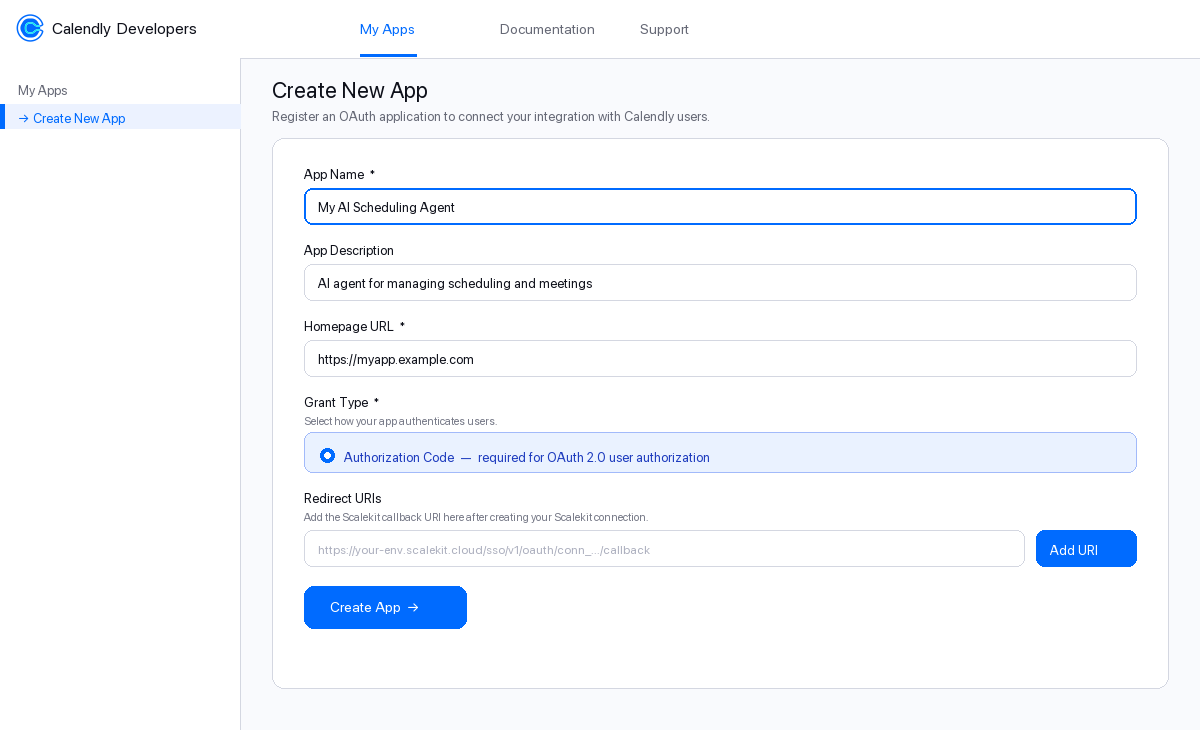
Fill in the form:
Field What to enter App Name A recognizable name for your integration, e.g. My AI Scheduling AgentApp Description Brief description, e.g. AI agent for managing schedulingHomepage URL Your app’s public URL. For testing you can use https://localhostGrant Type Select Authorization Code — this is required for OAuth 2.0 -
Leave Redirect URIs blank for now. You will add it in the next step.
-
Click Create App.
After the app is created, Calendly takes you to the app’s OAuth Settings page. Keep this tab open.
-
Copy the redirect URI from Scalekit
Scalekit gives you a callback URL that Calendly will redirect users back to after they authorize your app. You need to register this URL in your Calendly OAuth app.
In the Scalekit dashboard:
- Go to app.scalekit.com and sign in.
- In the left sidebar, click AgentKit.
- Click Create Connection.
- Search for Calendly and click Create.
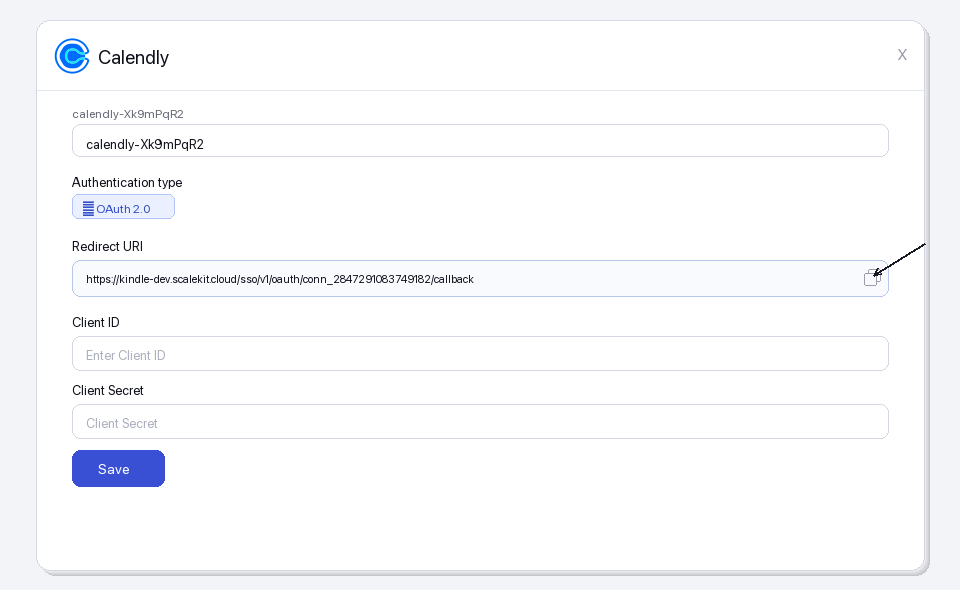
- A connection details panel opens. Find the Redirect URI field — it looks like:
https://<YOUR_ENV>.scalekit.cloud/sso/v1/oauth/conn_<ID>/callback
- Click the copy icon next to the Redirect URI to copy it to your clipboard.
-
Register the redirect URI in Calendly
Switch back to the Calendly Developer Portal tab you left open.
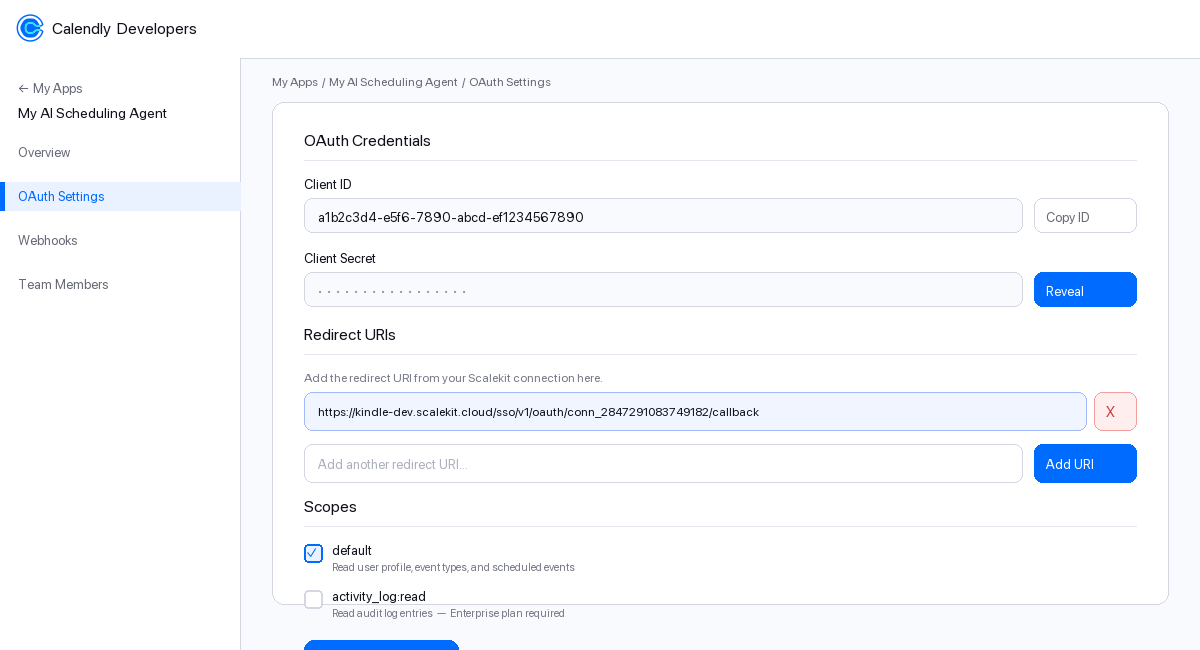
- Make sure you are on the OAuth Settings page of your app.
- Scroll down to the Redirect URIs section.
- Click in the text box and paste the redirect URI you copied from Scalekit.
- Click Add URI — the URI appears in the list above the input box.
- Click Save Changes at the bottom of the page.
-
Enable OAuth scopes
Scopes control which Calendly API resources your app can access on behalf of the user. You must enable the same scopes in your Calendly app that you will request in Scalekit.
-
On the OAuth Settings page, scroll to the Scopes section.
-
Check the box next to each scope you need:
Scope Access granted Plan required defaultUser profile, event types, scheduled events, availability All plans activity_log:readAudit log entries (read-only) Enterprise only -
For most integrations, checking
defaultis sufficient. -
Click Save Changes.
-
-
Copy your Client ID and Client Secret
Still on the OAuth Settings page in Calendly:
- Scroll to the OAuth Credentials section at the top.
- Client ID — this is shown in plain text. Click Copy ID to copy it.
- Client Secret — click Reveal to show the secret, then copy it.
Paste both values somewhere safe (a password manager or secrets vault). You will enter them into Scalekit in the next step.
-
Add credentials in Scalekit
Switch back to the Scalekit dashboard tab.
-
Go to AgentKit > Connections and click the Calendly connection you created in Step 2.
-
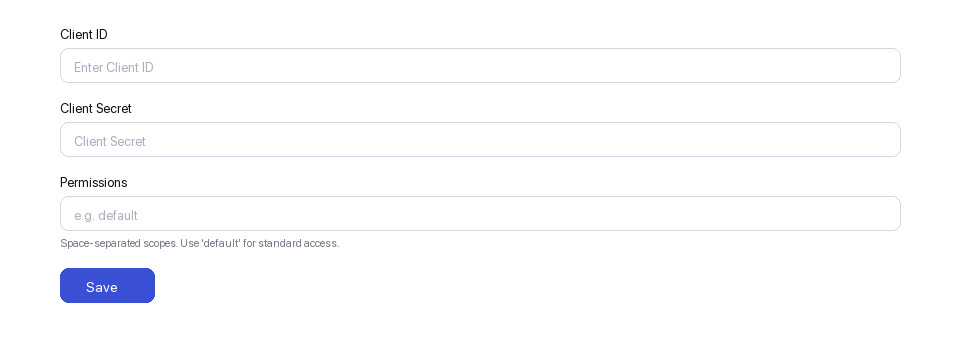
Fill in the credentials form:
Field Value Client ID Paste the Client ID from Step 5 Client Secret Paste the Client Secret from Step 5 Permissions Enter the scopes you enabled in Step 4, e.g. default -
Click Save.
Your Calendly connection is now configured. Scalekit will use these credentials to run the OAuth flow whenever a user connects their Calendly account.
-
-
Authorize a user and make your first call
quickstart.mts import { ScalekitClient } from '@scalekit-sdk/node'import 'dotenv/config'import { createInterface } from 'node:readline/promises'const scalekit = new ScalekitClient(process.env.SCALEKIT_ENVIRONMENT_URL,process.env.SCALEKIT_CLIENT_ID,process.env.SCALEKIT_CLIENT_SECRET,)const actions = scalekit.actionsconst connector = 'calendly'const identifier = 'user_123'// Generate an authorization link for the userconst { link } = await actions.getAuthorizationLink({ connectionName: connector, identifier })console.log('Authorize Calendly:', link)const rl = createInterface({ input: process.stdin, output: process.stdout })await rl.question('Press Enter after authorizing...')rl.close()// Make your first callconst result = await actions.executeTool({connector,identifier,toolName: 'calendly_current_user_get',toolInput: {},})console.log(result)Terminal window npx tsx quickstart.mtsquickstart.py import osfrom scalekit import ScalekitClientfrom dotenv import load_dotenvload_dotenv()scalekit_client = ScalekitClient(env_url=os.getenv("SCALEKIT_ENVIRONMENT_URL"),client_id=os.getenv("SCALEKIT_CLIENT_ID"),client_secret=os.getenv("SCALEKIT_CLIENT_SECRET"),)actions = scalekit_client.actionsconnection_name = "calendly"identifier = "user_123"# Generate an authorization link for the userlink_response = actions.get_authorization_link(connection_name=connection_name,identifier=identifier,)print("Authorize Calendly:", link_response.link)input("Press Enter after authorizing...")# Make your first callresult = actions.execute_tool(tool_input={},tool_name="calendly_current_user_get",connection_name=connection_name,identifier=identifier,)print(result)Terminal window python quickstart.pyEach user signs in once. See Authorize a user for the full flow and statuses.
Tools
Pass the exact name toexecute_toolcalendly_activity_log_listReturns a list of activity log entries for a Calendly organization.Read-onlyList Activity Log Entries
Returns a list of activity log entries for a Calendly organization. Requires Enterprise plan.
Inputs
organizationstringrequired- Organization URI, e.g. https://api.calendly.com/organizations/{uuid}.
actionstring- Filter by action type (e.g. user.created, event_type.updated).
actorstring- Filter by actor user URI.
countinteger- Number of results per page (max 100).
max_occurred_atstring- Filter entries occurring before this time (ISO 8601).
min_occurred_atstring- Filter entries occurring at or after this time (ISO 8601).
page_tokenstring- Token for fetching the next page of results.
sortstring- Sort field and direction, e.g. occurred_at:asc or occurred_at:desc.
calendly_contact_getRetrieve a specific Calendly contact by UUID.Read-onlyGet Contact
Retrieve a specific Calendly contact by UUID. Part of the Contacts API (shipped 2026-05-28).
Inputs
contact_uuidstringrequired- The UUID of the contact to retrieve.
calendly_contacts_listList Calendly contacts, with optional filters by organization and email.Read-onlyList Contacts
List Calendly contacts, with optional filters by organization and email. Part of the Contacts API (shipped 2026-05-28).
Inputs
countinteger- Number of results per page (max 100).
emailstring- Filter contacts by exact email address.
organizationstring- Filter by organization URI, e.g. https://api.calendly.com/organizations/{uuid}.
page_tokenstring- Token for fetching the next page of results.
calendly_current_user_getReturns the profile of the currently authenticated Calendly user.Read-onlyGet Current User
Returns the profile of the currently authenticated Calendly user.
Inputs
This tool takes no inputs.
calendly_event_invitee_getReturns the details of a specific invitee for a scheduled Calendly event.Read-onlyGet Event Invitee
Returns the details of a specific invitee for a scheduled Calendly event.
Inputs
event_uuidstringrequired- The UUID of the scheduled event.
invitee_uuidstringrequired- The UUID of the invitee.
calendly_event_invitees_listReturns a list of invitees for a specific scheduled Calendly event.Read-onlyList Event Invitees
Returns a list of invitees for a specific scheduled Calendly event.
Inputs
uuidstringrequired- The UUID of the scheduled event.
countinteger- Number of results per page (max 100).
emailstring- Filter invitees by email address.
page_tokenstring- Token for fetching the next page of results.
statusstring- Filter invitees by status: active or canceled.
calendly_event_type_availability_schedules_listReturns a list of availability schedules for the specified Calendly event type.Read-onlyList Event Type Availability Schedules
Returns a list of availability schedules for the specified Calendly event type.
Inputs
event_typestringrequired- The URI of the event type, e.g. https://api.calendly.com/event_types/xxx.
userstring- The URI of the user to filter schedules by, e.g. https://api.calendly.com/users/xxx.
calendly_event_type_available_times_listReturns available scheduling times for a specific event type within a given date range.Read-onlyList Event Type Available Times
Returns available scheduling times for a specific event type within a given date range.
Inputs
end_timestringrequired- End of the availability window in ISO 8601 format.
event_typestringrequired- Full URI of the event type, e.g. https://api.calendly.com/event_types/{uuid}.
start_timestringrequired- Start of the availability window in ISO 8601 format.
calendly_event_type_getReturns the details of a specific Calendly event type by its UUID.Read-onlyGet Event Type
Returns the details of a specific Calendly event type by its UUID.
Inputs
uuidstringrequired- The UUID of the event type.
calendly_event_type_hosts_listReturns the list of hosts assigned to a collective or round-robin Calendly event type.Read-onlyList Event Type Hosts
Returns the list of hosts assigned to a collective or round-robin Calendly event type.
Inputs
event_typestringrequired- URI of the event type to list hosts for, e.g. https://api.calendly.com/event_types/{uuid}.
countinteger- Number of results to return per page (max 100).
page_tokenstring- Token for fetching the next page of results.
calendly_event_type_memberships_listReturns a list of memberships (hosts) associated with the specified Calendly event type.Read-onlyList Event Type Memberships
Returns a list of memberships (hosts) associated with the specified Calendly event type.
Inputs
event_typestringrequired- The URI of the event type, e.g. https://api.calendly.com/event_types/xxx.
countinteger- Number of results to return per page.
page_tokenstring- Token for paginating to the next set of results.
calendly_event_types_listReturns a list of event types for a user or organization.Read-onlyList Event Types
Returns a list of event types for a user or organization. Provide either user or organization URI.
Inputs
activeboolean- If true, only return active event types.
countinteger- Number of results to return per page (max 100).
organizationstring- Filter by organization URI, e.g. https://api.calendly.com/organizations/{uuid}.
page_tokenstring- Token for fetching the next page of results.
userstring- Filter by user URI, e.g. https://api.calendly.com/users/{uuid}.
calendly_group_getReturns a single Calendly group record by UUID.Read-onlyGet Group
Returns a single Calendly group record by UUID.
Inputs
uuidstringrequired- The UUID of the group to retrieve.
calendly_group_relationship_getReturns a single Calendly group relationship record by UUID.Read-onlyGet Group Relationship
Returns a single Calendly group relationship record by UUID.
Inputs
uuidstringrequired- The UUID of the group relationship to retrieve.
calendly_group_relationships_listReturns a list of group relationships in the specified Calendly organization.Read-onlyList Group Relationships
Returns a list of group relationships in the specified Calendly organization.
Inputs
organizationstringrequired- The URI of the organization whose group relationships to list, e.g. https://api.calendly.com/organizations/xxx.
countinteger- Number of results to return per page.
page_tokenstring- Token for paginating to the next set of results.
calendly_groups_listReturns a list of groups in the specified Calendly organization.Read-onlyList Groups
Returns a list of groups in the specified Calendly organization.
Inputs
organizationstringrequired- The URI of the organization whose groups to list, e.g. https://api.calendly.com/organizations/xxx.
countinteger- Number of results to return per page. Default is 20.
page_tokenstring- Token for paginating to the next set of results.
sortstring- Sort order for the results, e.g. 'created_at:asc' or 'created_at:desc'.
calendly_invitee_no_show_getReturns a specific invitee no-show record by UUID.Read-onlyGet Invitee No Show
Returns a specific invitee no-show record by UUID.
Inputs
uuidstringrequired- The UUID of the invitee no-show record.
calendly_locations_listReturns a list of meeting locations available in the specified Calendly organization or for a specific user.Read-onlyList Locations
Returns a list of meeting locations available in the specified Calendly organization or for a specific user.
Inputs
userstringrequired- The URI of the user to filter locations by, e.g. https://api.calendly.com/users/xxx.
countinteger- Number of results to return per page.
organizationstring- The URI of the organization to filter locations by, e.g. https://api.calendly.com/organizations/xxx.
page_tokenstring- Token for paginating to the next set of results.
calendly_meeting_recap_getRetrieve a specific meeting recap.Read-onlyGet Meeting Recap
Retrieve a specific meeting recap. Part of the Notetaker API (shipped 2026-07-22).
Inputs
recap_uuidstringrequired- The UUID of the meeting recap to retrieve.
calendly_meeting_recap_transcript_getRetrieve the transcript for a meeting recap.Read-onlyGet Meeting Recap Transcript
Retrieve the transcript for a meeting recap. Part of the Notetaker API (shipped 2026-07-22).
Inputs
recap_uuidstringrequired- The UUID of the meeting recap whose transcript should be retrieved.
calendly_meeting_recaps_listList Notetaker meeting recaps, with optional filters by host user and scheduled event.Read-onlyList Meeting Recaps
List Notetaker meeting recaps, with optional filters by host user and scheduled event. Part of the Notetaker API (shipped 2026-07-22).
Inputs
countinteger- Number of results per page (max 100).
event_uuidstring- Filter to the recap for a specific scheduled event.
page_tokenstring- Token for fetching the next page of results.
userstring- Filter by host user URI, e.g. https://api.calendly.com/users/{uuid}.
calendly_organization_getReturns the details of a specific Calendly organization by its UUID.Read-onlyGet Organization
Returns the details of a specific Calendly organization by its UUID.
Inputs
uuidstringrequired- The UUID of the organization.
calendly_organization_invitation_getReturns the details of a specific invitation sent to join a Calendly organization.Read-onlyGet Organization Invitation
Returns the details of a specific invitation sent to join a Calendly organization.
Inputs
org_uuidstringrequired- The UUID of the organization that sent the invitation.
uuidstringrequired- The UUID of the invitation to retrieve.
calendly_organization_invitations_listReturns a list of pending invitations for a Calendly organization.Read-onlyList Organization Invitations
Returns a list of pending invitations for a Calendly organization.
Inputs
uuidstringrequired- The UUID of the organization.
countinteger- Number of results per page (max 100).
emailstring- Filter by invitee email address.
page_tokenstring- Token for fetching the next page of results.
statusstring- Filter by invitation status: pending, accepted, or declined.
calendly_organization_membership_getReturns details of a specific organization membership by UUID.Read-onlyGet Organization Membership
Returns details of a specific organization membership by UUID.
Inputs
uuidstringrequired- The UUID of the organization membership.
calendly_organization_memberships_listReturns a list of organization memberships.Read-onlyList Organization Memberships
Returns a list of organization memberships. Filter by organization URI or user URI.
Inputs
countinteger- Number of results per page (max 100).
emailstring- Filter by member email address.
organizationstring- Filter by organization URI, e.g. https://api.calendly.com/organizations/{uuid}.
page_tokenstring- Token for fetching the next page of results.
userstring- Filter by user URI, e.g. https://api.calendly.com/users/{uuid}.
calendly_outgoing_communications_listReturns a list of outgoing communications (emails and notifications) for the specified Calendly organization.Read-onlyList Outgoing Communications
Returns a list of outgoing communications (emails and notifications) for the specified Calendly organization.
Inputs
organizationstringrequired- The URI of the organization whose outgoing communications to list, e.g. https://api.calendly.com/organizations/xxx.
countinteger- Number of results to return per page.
page_tokenstring- Token for paginating to the next set of results.
sortstring- Sort order for the results, e.g. 'created_at:asc' or 'created_at:desc'.
calendly_routing_form_getReturns the details of a specific Calendly routing form by its UUID.Read-onlyGet Routing Form
Returns the details of a specific Calendly routing form by its UUID.
Inputs
uuidstringrequired- The UUID of the routing form.
calendly_routing_form_submission_getReturns the details of a specific routing form submission by its UUID.Read-onlyGet Routing Form Submission
Returns the details of a specific routing form submission by its UUID.
Inputs
uuidstringrequired- The UUID of the routing form submission.
calendly_routing_form_submission_get_by_uuidReturns a single routing form submission by UUID.Read-onlyGet Routing Form Submission
Returns a single routing form submission by UUID.
Inputs
uuidstringrequired- The UUID of the routing form submission to retrieve.
calendly_routing_form_submissions_listReturns a list of all routing form submissions across the specified Calendly organization.Read-onlyList Routing Form Submissions
Returns a list of all routing form submissions across the specified Calendly organization.
Inputs
formstringrequired- The URI of the routing form to list submissions for.
countinteger- Number of results.
page_tokenstring- Token for next page.
calendly_routing_forms_listReturns a list of routing forms for a Calendly organization.Read-onlyList Routing Forms
Returns a list of routing forms for a Calendly organization.
Inputs
organizationstringrequired- Organization URI, e.g. https://api.calendly.com/organizations/{uuid}.
countinteger- Number of results per page (max 100).
page_tokenstring- Token for fetching the next page of results.
calendly_sample_webhook_data_getReturns a sample webhook payload for the specified event type, useful for testing webhook integrations.Read-onlyGet Sample Webhook Data
Returns a sample webhook payload for the specified event type, useful for testing webhook integrations.
Inputs
eventstringrequired- The webhook event type to get sample data for, e.g. 'invitee.created'.
organizationstringrequired- The URI of the organization, e.g. https://api.calendly.com/organizations/xxx.
scopestringrequired- The scope of the webhook, either 'organization' or 'user'.one of
organizationuser userstring- The URI of the user, required when scope is 'user', e.g. https://api.calendly.com/users/xxx.
calendly_scheduled_event_getReturns the details of a specific scheduled event by its UUID.Read-onlyGet Scheduled Event
Returns the details of a specific scheduled event by its UUID.
Inputs
uuidstringrequired- The UUID of the scheduled event.
calendly_scheduled_events_listReturns a list of scheduled events for a user or organization, with optional time range and status filters.Read-onlyList Scheduled Events
Returns a list of scheduled events for a user or organization, with optional time range and status filters.
Inputs
countinteger- Number of results per page (max 100).
max_start_timestring- Filter events starting before this time (ISO 8601).
min_start_timestring- Filter events starting at or after this time (ISO 8601).
organizationstring- Filter by organization URI, e.g. https://api.calendly.com/organizations/{uuid}.
page_tokenstring- Token for fetching the next page of results.
sortstring- Sort field and direction, e.g. start_time:asc or start_time:desc.
statusstring- Filter by event status: active or canceled.
userstring- Filter by user URI, e.g. https://api.calendly.com/users/{uuid}.
calendly_user_availability_schedule_getReturns a single availability schedule for a Calendly user by UUID.Read-onlyGet User Availability Schedule
Returns a single availability schedule for a Calendly user by UUID.
Inputs
uuidstringrequired- The UUID of the availability schedule to retrieve.
calendly_user_availability_schedules_listReturns a list of availability schedules for the specified Calendly user.Read-onlyList User Availability Schedules
Returns a list of availability schedules for the specified Calendly user.
Inputs
userstringrequired- The URI of the user whose availability schedules to list, e.g. https://api.calendly.com/users/xxx.
calendly_user_busy_times_listReturns a list of busy time blocks for a Calendly user within the specified time range.Read-onlyList User Busy Times
Returns a list of busy time blocks for a Calendly user within the specified time range.
Inputs
end_timestringrequired- End of the time range in ISO 8601 format.
start_timestringrequired- Start of the time range in ISO 8601 format.
userstringrequired- The URI of the user whose busy times to list, e.g. https://api.calendly.com/users/xxx.
calendly_user_getReturns the profile of a specific Calendly user by their UUID.Read-onlyGet User
Returns the profile of a specific Calendly user by their UUID.
Inputs
uuidstringrequired- The UUID of the user.
calendly_webhook_subscription_getReturns the details of a specific Calendly webhook subscription.Read-onlyGet Webhook Subscription
Returns the details of a specific Calendly webhook subscription.
Inputs
uuidstringrequired- The UUID of the webhook subscription.
calendly_webhook_subscriptions_listReturns a list of webhook subscriptions for a user or organization.Read-onlyList Webhook Subscriptions
Returns a list of webhook subscriptions for a user or organization.
Inputs
countinteger- Number of results per page (max 100).
organizationstring- Filter by organization URI, e.g. https://api.calendly.com/organizations/{uuid}.
page_tokenstring- Token for fetching the next page of results.
scopestring- Filter by webhook scope: user or organization.
userstring- Filter by user URI, e.g. https://api.calendly.com/users/{uuid}.
calendly_contact_createCreates a new Calendly contact.WriteCreate Contact
Creates a new Calendly contact. Part of the Contacts API (shipped 2026-05-28).
Inputs
emailstringrequired- Email address of the contact.
namestringrequired- Full name of the contact.
calendly_contact_updateUpdates an existing Calendly contact.WriteUpdate Contact
Updates an existing Calendly contact. Only the fields provided will be updated. Part of the Contacts API (shipped 2026-05-28).
- Idempotent
Inputs
contact_uuidstringrequired- The UUID of the contact to update.
emailstring- Updated email address of the contact.
namestring- Updated full name of the contact.
calendly_event_invitee_createBooks a Calendly meeting directly via the Scheduling API, without redirects, iframes, or Calendly-hosted UI.WriteBook Event (Scheduling API)
Books a Calendly meeting directly via the Scheduling API, without redirects, iframes, or Calendly-hosted UI. Creates a new scheduled event for the given event type and start time with the specified invitee. Use calendly_event_type_available_times_list first to find a valid start_time.
Inputs
event_typestringrequired- URI of the event type to book, e.g. https://api.calendly.com/event_types/{uuid}.
invitee_emailstringrequired- Email address of the person being booked
invitee_namestringrequired- Full name of the person being booked
invitee_timezonestringrequired- IANA timezone of the invitee, e.g. 'America/New_York'
start_timestringrequired- Meeting start time in UTC, ISO 8601 with trailing Z.
booking_sourcestring- Free-text label identifying what booked this meeting, e.g. 'ai_scheduling_assistant'
event_guestsarray- Array of additional guest email addresses to invite (max 10)
invitee_text_reminder_numberstring- Optional phone number for SMS meeting reminders
location_kindstring- Location type for the meeting, if the event type requires the invitee to specify one (e.g. 'physical', 'ask_invitee', 'outbound_call')
location_valuestring- Location detail matching location_kind, e.g. an address or phone number
questions_and_answersarray- Array of booking form question/answer objects, e.g. [{"question":"What do you want to discuss?","answer":"Pricing","position":0}]
calendly_event_type_availability_schedules_updateUpdates the availability schedules (rules) for the specified Calendly event type.WriteUpdate Event Type Availability Schedules
Updates the availability schedules (rules) for the specified Calendly event type.
- Idempotent
Inputs
event_typestringrequired- The URI of the event type whose availability schedules to update, e.g. https://api.calendly.com/event_types/xxx.
rulesarrayrequired- Array of availability rule objects. Each rule has type, intervals, and wday fields.
timezonestring- Timezone for the availability rules (e.g. America/New_York).
calendly_event_type_createCreates a new event type in a Calendly organization for a specified host.WriteCreate Event Type
Creates a new event type in a Calendly organization for a specified host.
Inputs
durationintegerrequired- Duration of the event in minutes.
hoststringrequired- The URI of the user who will host this event type, e.g. https://api.calendly.com/users/xxx.
namestringrequired- Name of the event type.
organizationstringrequired- The URI of the organization this event type belongs to, e.g. https://api.calendly.com/organizations/xxx.
colorstring- Hex color code for the event type, e.g. '#FF5733'.
descriptionstring- Optional description of the event type.
calendly_event_type_updateUpdates an existing Calendly event type.WriteUpdate Event Type
Updates an existing Calendly event type. Only the fields provided will be updated.
- Idempotent
Inputs
uuidstringrequired- The UUID of the event type to update.
colorstring- Hex color code for the event type, e.g. '#FF5733'.
descriptionstring- Updated description for the event type.
durationinteger- Updated duration of the event in minutes.
namestring- Updated name of the event type.
calendly_invitee_createCreates a new invitee for a scheduled Calendly event.WriteCreate Invitee
Creates a new invitee for a scheduled Calendly event.
Inputs
emailstringrequired- Email address of the invitee.
eventstringrequired- The URI of the scheduled event to add this invitee to, e.g. https://api.calendly.com/scheduled_events/xxx.
namestringrequired- Full name of the invitee.
timezonestring- IANA timezone string for the invitee, e.g. 'America/New_York'.
calendly_invitee_no_show_createMarks a specific invitee as a no-show for a scheduled Calendly event.WriteMark Invitee as No Show
Marks a specific invitee as a no-show for a scheduled Calendly event.
Inputs
inviteestringrequired- The full URI of the invitee, e.g. https://api.calendly.com/scheduled_events/{event_uuid}/invitees/{invitee_uuid}.
calendly_meeting_recap_updateUpdate a meeting recap's title.WriteUpdate Meeting Recap
Update a meeting recap's title. Part of the Notetaker API (shipped 2026-07-22). Only the fields provided will be updated.
- Idempotent
Inputs
recap_uuidstringrequired- The UUID of the meeting recap to update.
titlestring- Updated title for the meeting recap.
calendly_one_off_event_type_createCreates a one-off event type in Calendly with a specific date, host, and optional co-hosts.WriteCreate One-Off Event Type
Creates a one-off event type in Calendly with a specific date, host, and optional co-hosts.
Inputs
date_settingobjectrequired- Object defining the date setting for the one-off event. Must include 'type' (e.g. 'date_range') and 'start_date'/'end_date' or 'date'.
durationintegerrequired- Duration of the event in minutes.
hoststringrequired- The URI of the user who will host this event type, e.g. https://api.calendly.com/users/xxx.
namestringrequired- Name of the one-off event type.
co_hostsarray- Array of user URIs for co-hosts, e.g. ['https://api.calendly.com/users/xxx'].
descriptionstring- Optional description for the one-off event type.
locationobject- Optional location object, e.g. {"kind": "physical", "location": "123 Main St"}.
calendly_organization_invitation_createSends an invitation for a user to join a Calendly organization.WriteInvite User to Organization
Sends an invitation for a user to join a Calendly organization.
Inputs
emailstringrequired- Email address of the user to invite.
uuidstringrequired- The UUID of the organization.
calendly_scheduled_event_cancelCancels a scheduled Calendly event.WriteCancel Scheduled Event
Cancels a scheduled Calendly event. Optionally includes a reason for cancellation.
Inputs
uuidstringrequired- The UUID of the scheduled event to cancel.
reasonstring- Optional reason for the cancellation.
calendly_scheduling_link_createCreates a single-use or limited-use scheduling link for a specified Calendly event type.WriteCreate Scheduling Link
Creates a single-use or limited-use scheduling link for a specified Calendly event type.
Inputs
max_event_countintegerrequired- Maximum number of events that can be booked using this scheduling link.
ownerstringrequired- The URI of the event type that owns this scheduling link, e.g. https://api.calendly.com/event_types/xxx.
owner_typestringrequired- The type of owner for the scheduling link. Use 'EventType'.
calendly_webhook_subscription_createCreates a new webhook subscription to receive Calendly event notifications at a callback URL.WriteCreate Webhook Subscription
Creates a new webhook subscription to receive Calendly event notifications at a callback URL.
Inputs
eventsstringrequired- JSON array of event names to subscribe to, e.g. ["invitee.created","invitee.canceled"].
organizationstringrequired- Organization URI to scope the subscription.
scopestringrequired- Scope of the webhook: user or organization.
urlstringrequired- The HTTPS callback URL that will receive webhook payloads.
signing_keystring- Optional signing key used to sign webhook payloads for verification.
userstring- User URI if scope is user-level.
calendly_contact_deleteDelete a Calendly contact.DestructiveDelete Contact
Delete a Calendly contact. Part of the Contacts API (shipped 2026-05-28). This action cannot be undone.
- Idempotent
Inputs
contact_uuidstringrequired- The UUID of the contact to delete.
calendly_data_compliance_events_deleteDeletes all Calendly event data within the specified time range for compliance purposes.DestructiveDelete Events Data (Compliance)
Deletes all Calendly event data within the specified time range for compliance purposes. This is a destructive operation.
Inputs
end_timestringrequired- End of the time range for event data deletion in ISO 8601 format.
start_timestringrequired- Start of the time range for event data deletion in ISO 8601 format.
calendly_data_compliance_invitees_deleteDeletes all Calendly invitee data for the specified email addresses for compliance purposes.DestructiveDelete Invitees Data (Compliance)
Deletes all Calendly invitee data for the specified email addresses for compliance purposes. This is a destructive operation.
Inputs
emailsarrayrequired- Array of invitee email addresses whose data should be deleted.
calendly_invitee_no_show_deleteRemoves the no-show mark from an invitee on a scheduled Calendly event.DestructiveDelete Invitee No Show
Removes the no-show mark from an invitee on a scheduled Calendly event.
- Idempotent
Inputs
uuidstringrequired- The UUID of the invitee no-show record.
calendly_meeting_recap_deleteDelete a meeting recap.DestructiveDelete Meeting Recap
Delete a meeting recap. Part of the Notetaker API (shipped 2026-07-22). This action cannot be undone.
- Idempotent
Inputs
recap_uuidstringrequired- The UUID of the meeting recap to delete.
calendly_organization_invitation_revokeRevokes a pending invitation to a Calendly organization.DestructiveRevoke Organization Invitation
Revokes a pending invitation to a Calendly organization.
- Idempotent
Inputs
invitation_uuidstringrequired- The UUID of the invitation to revoke.
org_uuidstringrequired- The UUID of the organization.
calendly_organization_membership_deleteRemoves a user from a Calendly organization by deleting their membership.DestructiveRemove Organization Member
Removes a user from a Calendly organization by deleting their membership.
- Idempotent
Inputs
uuidstringrequired- The UUID of the organization membership to remove.
calendly_webhook_subscription_deleteDeletes a Calendly webhook subscription, stopping future event notifications.DestructiveDelete Webhook Subscription
Deletes a Calendly webhook subscription, stopping future event notifications.
- Idempotent
Inputs
uuidstringrequired- The UUID of the webhook subscription to delete.
No tools match.
Workflows
Proxy API call
const result = await actions.request({ connectionName: 'calendly', identifier: 'user_123', path: '/users/me', method: 'GET',});console.log(result);result = actions.request( connection_name='calendly', identifier='user_123', path="/users/me", method="GET")print(result)Execute a tool
const result = await actions.executeTool({ connector: 'calendly', identifier: 'user_123', toolName: 'calendly_activity_log_list', toolInput: {},});console.log(result);result = actions.execute_tool( tool_input={}, tool_name='calendly_activity_log_list', connection_name='calendly', identifier='user_123',)print(result)