The PhantomBuster connector lets your AI agent act in each user's PhantomBuster account. Each user connects their own PhantomBuster API key once, and Scalekit sends it with every call, so your agent never handles credentials. It comes with 56 tools.
- Tools
- 56
- What they doRead · write · destructive
- 31 · 19 · 631 read19 write6 destructive
- Users sign in with
- API key
Setup
Install the SDK
Terminal window npm install @scalekit-sdk/node dotenvTerminal window pip install scalekit-sdk-python python-dotenvSet your credentials
Add your Scalekit credentials to your
.envfile. Find values in app.scalekit.com > Developers > API Credentials..env SCALEKIT_ENVIRONMENT_URL=<your-environment-url>SCALEKIT_CLIENT_ID=<your-client-id>SCALEKIT_CLIENT_SECRET=<your-client-secret>Create the PhantomBuster connection
In AgentKit > Connections, create a PhantomBuster connection. The name you give it is the
connection_nameyour code passes. See Configure connections.Console steps with screenshots
Register your PhantomBuster API key with Scalekit so it can authenticate and proxy automation requests on behalf of your users. PhantomBuster uses API key authentication.
-
Get your PhantomBuster API key
-
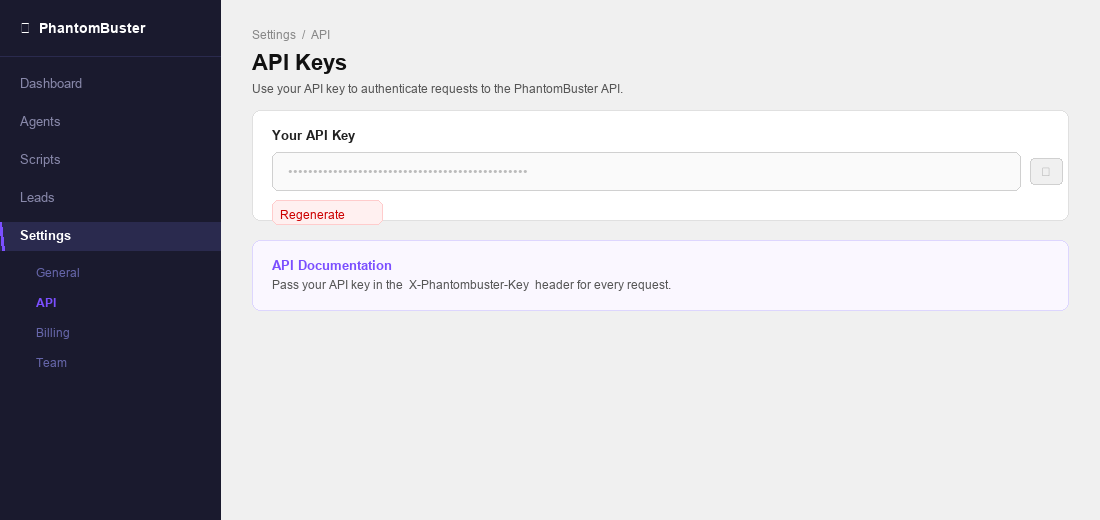
Sign in to phantombuster.com and go to Settings → API in the left sidebar.
-
Your API key is displayed on this page. Click the copy icon to copy it. If you need a new key, click Regenerate.
-
-
Create a connection in Scalekit
-
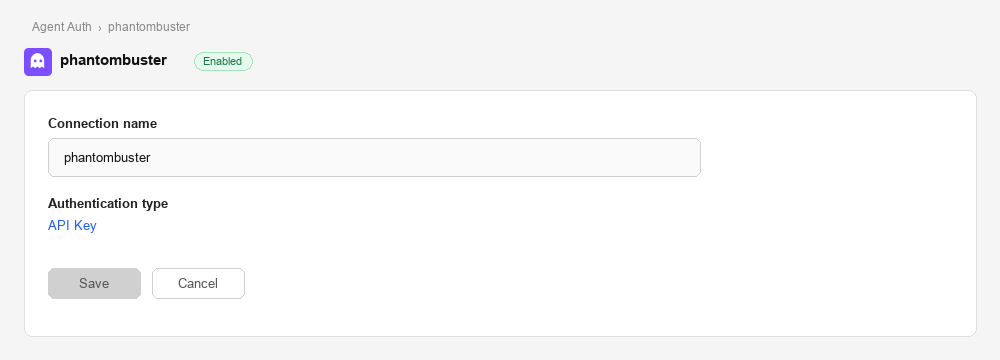
In Scalekit dashboard, go to AgentKit > Connections > Create Connection. Find PhantomBuster and click Create.
-
Note the Connection name — you will use this as
connection_namein your code (e.g.,phantombuster).
-
-
Add a connected account
Connected accounts link a specific user identifier in your system to a PhantomBuster API key. Add one in the dashboard to test. In production, each user adds their own through the authorization link: they enter their credentials on the page it opens.
In the dashboard, to test
-
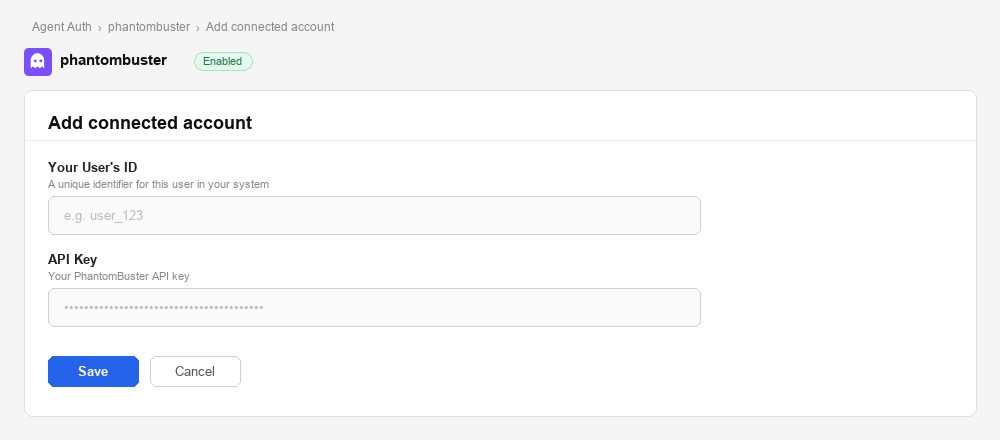
Open the connection you created and click the Connected Accounts tab → Add account.
-
Fill in:
- Your User’s ID — a unique identifier for this user in your system (e.g.,
user_123) - API Key — the PhantomBuster API key you copied in step 1
- Your User’s ID — a unique identifier for this user in your system (e.g.,
-
Click Save.
From your backend, if your app already has the credentials
For example, when users enter them on a settings page in your app:
import { ConnectorStatus } from '@scalekit-sdk/node'const authorizationDetails = {details: {case: 'staticAuth',value: { details: { api_key: 'your-phantombuster-api-key' } },},};let { connectedAccount } = await scalekit.actions.upsertConnectedAccount({connectionName: 'phantombuster',identifier: 'user_123',authorizationDetails,});// Make sure the account is ACTIVE before the first tool call.if (connectedAccount?.status !== ConnectorStatus.ACTIVE) {({ connectedAccount } = await scalekit.actions.upsertConnectedAccount({connectionName: 'phantombuster',identifier: 'user_123',authorizationDetails,}));}authorization_details = {"static_auth": {"api_key": "your-phantombuster-api-key"}}response = scalekit_client.actions.upsert_connected_account(connection_name="phantombuster",identifier="user_123",authorization_details=authorization_details,)# Make sure the account is ACTIVE before the first tool call.if response.connected_account.status != "ACTIVE":response = scalekit_client.actions.upsert_connected_account(connection_name="phantombuster",identifier="user_123",authorization_details=authorization_details,) -
-
Authorize a user and make your first call
quickstart.mts import { ScalekitClient } from '@scalekit-sdk/node'import 'dotenv/config'import { createInterface } from 'node:readline/promises'const scalekit = new ScalekitClient(process.env.SCALEKIT_ENVIRONMENT_URL,process.env.SCALEKIT_CLIENT_ID,process.env.SCALEKIT_CLIENT_SECRET,)const actions = scalekit.actionsconst connector = 'phantombuster'const identifier = 'user_123'// Generate an authorization link for the userconst { link } = await actions.getAuthorizationLink({ connectionName: connector, identifier })console.log('Authorize PhantomBuster:', link)const rl = createInterface({ input: process.stdin, output: process.stdout })await rl.question('Press Enter after authorizing...')rl.close()// Make your first callconst result = await actions.executeTool({connector,identifier,toolName: 'phantombuster_user_fetch_me',toolInput: {},})console.log(result)Terminal window npx tsx quickstart.mtsquickstart.py import osfrom scalekit import ScalekitClientfrom dotenv import load_dotenvload_dotenv()scalekit_client = ScalekitClient(env_url=os.getenv("SCALEKIT_ENVIRONMENT_URL"),client_id=os.getenv("SCALEKIT_CLIENT_ID"),client_secret=os.getenv("SCALEKIT_CLIENT_SECRET"),)actions = scalekit_client.actionsconnection_name = "phantombuster"identifier = "user_123"# Generate an authorization link for the userlink_response = actions.get_authorization_link(connection_name=connection_name,identifier=identifier,)print("Authorize PhantomBuster:", link_response.link)input("Press Enter after authorizing...")# Make your first callresult = actions.execute_tool(tool_input={},tool_name="phantombuster_user_fetch_me",connection_name=connection_name,identifier=identifier,)print(result)Terminal window python quickstart.pyEach user opens the link once and enters their PhantomBuster credentials there. If your app already has a user's credentials, add the account from your backend instead, as the console steps above show. See Authorize a user for the full flow and statuses.
Tools
Pass the exact name toexecute_toolphantombuster_agent_fetchRetrieve details of a specific PhantomBuster agent by its ID.Read-onlyGet Agent
Retrieve details of a specific PhantomBuster agent by its ID. Returns agent name, script, schedule, launch type, argument configuration, and current status.
Inputs
agentIdstringrequired- The unique identifier of the agent to retrieve.
phantombuster_agent_fetch_outputGet the output of the most recent container of an agent.Read-onlyGet Agent Output
Get the output of the most recent container of an agent. Designed for incremental data retrieval — use fromOutputPos to fetch only new output since the last call.
Inputs
idstringrequired- ID of the agent to fetch output from.
fromOutputPosnumber- Start output from this byte position (for incremental fetching).
prevContainerIdstring- Retrieve output from the container after this previous container ID.
prevRuntimeEventIndexnumber- Return runtime events starting from this index.
prevStatusstring- Previously retrieved status from user-side (for delta detection).
phantombuster_agents_fetch_allRetrieve all automation agents in the PhantomBuster organization.Read-onlyList Agents
Retrieve all automation agents in the PhantomBuster organization. Returns agent IDs, names, associated scripts, schedules, and current status.
Inputs
This tool takes no inputs.
phantombuster_agents_fetch_deletedRetrieve all deleted agents in the PhantomBuster organization.Read-onlyList Deleted Agents
Retrieve all deleted agents in the PhantomBuster organization. Returns agent IDs, names, creation timestamps, deletion timestamps, and who deleted each agent.
Inputs
This tool takes no inputs.
phantombuster_branch_diffGet the length difference between the staging and release branch of all scripts in the current organization.Read-onlyGet Branch Diff
Get the length difference between the staging and release branch of all scripts in the current organization.
Inputs
namestring- Name of a specific branch to diff. Omit to diff all branches.
phantombuster_branches_fetch_allRetrieve all branches associated with the current PhantomBuster organization.Read-onlyList Branches
Retrieve all branches associated with the current PhantomBuster organization.
Inputs
This tool takes no inputs.
phantombuster_buyers_personas_fetch_allRetrieve all buyer personas configured for the current PhantomBuster organization, including each persona's linked Ideal Customer Profile, target job titles, countries, pain points, and goals.Read-onlyList Buyer Personas
Retrieve all buyer personas configured for the current PhantomBuster organization, including each persona's linked Ideal Customer Profile, target job titles, countries, pain points, and goals.
Inputs
This tool takes no inputs.
phantombuster_companies_searchSearch company objects stored in PhantomBuster organization storage, optionally filtered by field criteria.Read-onlySearch Companies
Search company objects stored in PhantomBuster organization storage, optionally filtered by field criteria. Returns matching company objects and, when requested, a total count.
Inputs
filterobject- Filter criteria as a JSON object keyed by field name, e.g. {"properties.industry": {"operator": "equals", "valueToCompare": "Software"}}. Supports "and"/"or" composition and a "__global_search__" key for a global keyword search. Omit to return all company objects.
includeTotalCountboolean- Include the total count of matching company objects in the response.
paginationOffsetinteger- Offset for pagination.
paginationOrderstring- Sort order for pagination.one of
ASCDESC paginationSizeinteger- Number of company objects per page.
phantombuster_container_attachAttach to a running PhantomBuster container and stream its console output in real-time.Read-onlyAttach to Container
Attach to a running PhantomBuster container and stream its console output in real-time. Returns a live stream of log lines as the agent executes.
Inputs
idstringrequired- ID of the running container to attach to.
phantombuster_container_fetchRetrieve a single PhantomBuster container by its ID.Read-onlyGet Container
Retrieve a single PhantomBuster container by its ID. Returns status, timestamps, launch type, exit code, and optionally the full output, result object, and runtime events.
Inputs
idstringrequired- ID of the container to fetch.
withNewerAndOlderContainerIdboolean- Set to true to include the IDs of the next and previous containers for this agent.
withOutputboolean- Set to true to include the container's console output.
withResultObjectboolean- Set to true to include the container's result object.
withRuntimeEventsboolean- Set to true to include runtime events (progress, notifications, etc.).
phantombuster_container_fetch_outputRetrieve the console output and execution logs of a specific PhantomBuster container (agent run).Read-onlyGet Container Output
Retrieve the console output and execution logs of a specific PhantomBuster container (agent run). Useful for monitoring execution progress, debugging errors, and viewing step-by-step agent activity.
Inputs
containerIdstringrequired- The unique identifier of the container whose output to retrieve.
phantombuster_container_fetch_resultRetrieve the final result object of a completed PhantomBuster container (agent run).Read-onlyGet Container Result
Retrieve the final result object of a completed PhantomBuster container (agent run). Returns the structured data extracted or produced by the agent, such as scraped profiles, leads, or exported records.
Inputs
containerIdstringrequired- The unique identifier of the container whose result to retrieve.
phantombuster_containers_fetch_allRetrieve all execution containers (past runs) for a specific PhantomBuster agent.Read-onlyList Containers
Retrieve all execution containers (past runs) for a specific PhantomBuster agent. Returns container IDs, status, launch type, exit codes, timestamps, and runtime events for each execution.
Inputs
agentIdstringrequired- The unique identifier of the agent whose containers to retrieve.
phantombuster_icps_fetch_allRetrieve all Ideal Customer Profiles (ICPs) configured for the current PhantomBuster organization, including each ICP's target market and company size criteria.Read-onlyList ICPs
Retrieve all Ideal Customer Profiles (ICPs) configured for the current PhantomBuster organization, including each ICP's target market and company size criteria.
Inputs
This tool takes no inputs.
phantombuster_identities_searchSearch stored PhantomBuster identities (saved login sessions used by agents to authenticate to platforms like LinkedIn or Google) by ID, session cookie, or profile ID.Read-onlySearch Identities
Search stored PhantomBuster identities (saved login sessions used by agents to authenticate to platforms like LinkedIn or Google) by ID, session cookie, or profile ID.
Inputs
idstring- ID of the identity to search for.
profileIdstring- Profile ID to search for.
sessionCookiestring- Session cookie value to search for.
typestring- Type of identity to search. Defaults to linkedin when omitted.one of
linkedingoogle
phantombuster_leads_fetch_by_listFetch paginated leads belonging to a specific lead list in PhantomBuster organization storage.Read-onlyGet Leads by List
Fetch paginated leads belonging to a specific lead list in PhantomBuster organization storage.
Inputs
listIdstringrequired- ID of the lead list to fetch leads from.
includeTotalCountboolean- Include the total count of leads in the response.
paginationOffsetinteger- Offset for pagination.
paginationOrderstring- Sort order for pagination.one of
ASCDESC paginationSizeinteger- Number of leads per page.
phantombuster_leads_objects_searchSearch structured lead objects stored in PhantomBuster organization storage, optionally filtered by field criteria.Read-onlySearch Lead Objects
Search structured lead objects stored in PhantomBuster organization storage, optionally filtered by field criteria. This is distinct from the simpler leads store used by Save Lead / Get Leads by List — lead objects carry a type/slug/properties structure similar to company objects.
Inputs
filterobject- Filter criteria as a JSON object keyed by field name, e.g. {"lead.jobTitle": {"operator": "contains", "valueToCompare": "Founder"}}. Supports "and"/"or" composition and a "__global_search__" key for a global keyword search. Omit to return all lead objects.
includeTotalCountboolean- Include the total count of matching lead objects in the response.
paginationOffsetinteger- Offset for pagination.
paginationOrderstring- Sort order for pagination.one of
ASCDESC paginationSizeinteger- Number of lead objects per page.
phantombuster_list_fetchRetrieve a specific lead list from PhantomBuster organization storage by its ID.Read-onlyGet Lead List
Retrieve a specific lead list from PhantomBuster organization storage by its ID.
Inputs
idstringrequired- ID of the lead list to fetch.
phantombuster_lists_fetch_allRetrieve all lead lists in the PhantomBuster organization's storage.Read-onlyList Lead Lists
Retrieve all lead lists in the PhantomBuster organization's storage.
Inputs
This tool takes no inputs.
phantombuster_location_ipRetrieve the country associated with an IPv4 or IPv6 address using PhantomBuster's geolocation service.Read-onlyGet IP Location
Retrieve the country associated with an IPv4 or IPv6 address using PhantomBuster's geolocation service.
Inputs
ipstringrequired- IPv4 or IPv6 address to look up.
phantombuster_org_export_agent_usageExport a CSV file containing agent usage metrics for the current PhantomBuster organization over a specified number of days (max 6 months).Read-onlyExport Agent Usage
Export a CSV file containing agent usage metrics for the current PhantomBuster organization over a specified number of days (max 6 months).
Inputs
daysstringrequired- Number of days of usage data to export. Maximum is ~180 days (6 months).
phantombuster_org_export_container_usageExport a CSV file containing container usage metrics for the current PhantomBuster organization.Read-onlyExport Container Usage
Export a CSV file containing container usage metrics for the current PhantomBuster organization. Optionally filter to a specific agent.
Inputs
daysstringrequired- Number of days of usage data to export. Maximum is ~180 days (6 months).
agentIdstring- Filter the export to a specific agent ID.
phantombuster_org_fetchRetrieve details of the current PhantomBuster organization including plan, billing, timezone, proxy config, and CRM integrations.Read-onlyGet Organization
Retrieve details of the current PhantomBuster organization including plan, billing, timezone, proxy config, and CRM integrations.
Inputs
withCrmIntegrationsboolean- Include the organization's CRM integrations.
withCustomPromptsboolean- Include the organization's custom prompts.
withGlobalObjectboolean- Include the organization's global object in the response.
withProxiesboolean- Include the organization's proxy pool configuration.
phantombuster_org_fetch_agent_groupsRetrieve the agent groups and their ordering for the current PhantomBuster organization.Read-onlyGet Agent Groups
Retrieve the agent groups and their ordering for the current PhantomBuster organization.
Inputs
This tool takes no inputs.
phantombuster_org_fetch_crm_resourcesGet the current organization's requested CRM resources, such as available contact lists or contact properties.Read-onlyGet Organization CRM Resources
Get the current organization's requested CRM resources, such as available contact lists or contact properties. Requires a CRM integration to be configured.
Inputs
resourceTypestringrequired- The type of CRM resource to fetch.one of
account_infocontact_listscontact_properties
phantombuster_org_fetch_resourcesRetrieve the current PhantomBuster organization's resource usage and limits.Read-onlyGet Organization Resources
Retrieve the current PhantomBuster organization's resource usage and limits. Returns daily and monthly usage for execution time, mail, captcha, AI credits, SERP credits, storage, and agent count.
Inputs
This tool takes no inputs.
phantombuster_org_fetch_running_containersList all currently executing containers across the PhantomBuster organization.Read-onlyList Running Containers
List all currently executing containers across the PhantomBuster organization. Returns container IDs, associated agent IDs/names, creation timestamps, launch types, and script slugs.
Inputs
This tool takes no inputs.
phantombuster_script_code_fetchRetrieve the JavaScript source code of a PhantomBuster script.Read-onlyGet Script Code
Retrieve the JavaScript source code of a PhantomBuster script.
Inputs
scriptstringrequired- The filename of the script, e.g. my-script.js.
branchstring- Branch of the script to fetch code from.
environmentstring- Environment of the script to fetch code from.one of
stagingrelease
phantombuster_script_fetchRetrieve a specific PhantomBuster script by ID including its manifest, argument schema, output types, and optionally the full source code.Read-onlyGet Script
Retrieve a specific PhantomBuster script by ID including its manifest, argument schema, output types, and optionally the full source code.
Inputs
idstringrequired- ID of the script to fetch.
branchstring- Branch of the script to fetch.
withCodeboolean- Set to true to include the script's source code in the response.
phantombuster_scripts_fetch_allRetrieve all scripts associated with the current PhantomBuster user.Read-onlyList Scripts
Retrieve all scripts associated with the current PhantomBuster user. Returns script IDs, names, slugs, descriptions, branches, and manifest details.
Inputs
branchstring- Filter scripts by branch name.
excludestring- Exclude modules or non-modules from results.one of
modulesnon-modules orgstring- Filter scripts by organization.
phantombuster_user_fetch_meGet information about the current PhantomBuster user, including profile details, plan, and organization membership.Read-onlyGet Current User
Get information about the current PhantomBuster user, including profile details, plan, and organization membership.
Inputs
withCustomPromptsboolean- Include the user's custom AI prompt configurations in the response.
phantombuster_agent_launchLaunch a PhantomBuster automation agent asynchronously.WriteLaunch Agent
Launch a PhantomBuster automation agent asynchronously. Starts the agent execution immediately and returns a container ID to track progress. Use the Get Container Output or Get Container Result tools to retrieve results.
Inputs
agentIdstringrequired- The unique identifier of the agent to launch.
argumentsobject- JSON object of input arguments to pass to the agent for this execution.
outputstring- Output mode for the launch response.one of
first-result-objectresult-object saveArgumentsboolean- Whether to persist the provided arguments as the agent's default arguments for future launches.
phantombuster_agent_launch_soonSchedule a PhantomBuster agent to launch within a specified number of minutes.WriteSchedule Agent Launch
Schedule a PhantomBuster agent to launch within a specified number of minutes. Useful for delayed execution without setting up a full recurring schedule.
Inputs
idstringrequired- ID of the agent to schedule.
minutesintegerrequired- Number of minutes from now after which the agent will launch.
argumentobject- Input arguments to pass to the agent for this execution (object or JSON string).
saveArgumentboolean- If true, saves the provided argument as the agent's default for future launches.
phantombuster_agent_launch_syncLaunch a PhantomBuster agent and stream its execution status until the container finishes.WriteLaunch Agent (Sync)
Launch a PhantomBuster agent and stream its execution status until the container finishes. Unlike Launch Agent (which queues the run and returns immediately with a container ID), this call blocks and returns the full execution outcome (start info, and a final summary with exit code and duration) in one response.
Inputs
idstringrequired- The unique identifier of the agent to launch.
argumentobject- JSON object of input arguments to pass to the agent for this execution. Overrides saved arguments.
bonusArgumentobject- Single-use argument merged with the primary argument for this launch only (not persisted).
includeLogsboolean- Whether to include the agent's console logs in the streamed response. Defaults to false.
manualLaunchboolean- Marks this execution as manually triggered rather than scheduled.
maxInstanceCountinteger- Only launch if the number of currently running instances of this agent is below this threshold.
persistedVolumeKeystring- Identifies a persisted volume to attach to this run (max 256 chars, alphanumeric with . _ -).
saveArgumentboolean- Whether to persist the provided argument as the agent's default for future launches.
phantombuster_agent_saveCreate a new PhantomBuster agent or update an existing one.WriteSave Agent
Create a new PhantomBuster agent or update an existing one. Supports configuring the script, schedule, proxy, notifications, execution limits, and launch arguments. Pass an ID to update; omit to create.
Inputs
argumentobject- Default launch argument for the agent (object or JSON string).
branchstring- Script branch to use (e.g., main, staging).
executionTimeLimitnumber- Maximum execution time in seconds before the agent is killed.
idstring- ID of the agent to update. Omit to create a new agent.
launchTypestring- How the agent is launched.one of
manuallyrepeatedlyonceafter agent maxParallelismnumber- Maximum number of concurrent executions allowed for this agent.
maxRetryNumbernumber- Maximum number of retries before aborting on failure.
namestring- Display name for the agent.
proxyAddressstring- HTTP proxy address or proxy pool name.
proxyPasswordstring- Proxy authentication password.
proxyTypestring- Proxy configuration type.one of
nonehttppoolsquid lease proxyUsernamestring- Proxy authentication username.
scriptstring- Script slug or name to assign to this agent.
phantombuster_agent_stopStop a currently running PhantomBuster agent execution.WriteStop Agent
Stop a currently running PhantomBuster agent execution. Gracefully halts the agent and saves any partial results collected up to that point.
- Idempotent
Inputs
agentIdstringrequired- The unique identifier of the agent to stop.
phantombuster_ai_adviceGet a recommendation from PhantomBuster's AI service based on a conversation history.WriteAI Advice
Get a recommendation from PhantomBuster's AI service based on a conversation history.
Inputs
messagesarrayrequired- Array of conversation messages. Each must have a role (assistant or user) and content string.
modelstring- AI model to use for the advice.one of
gpt-35-turbogpt-4gpt-4ogpt-4o-minigpt-4.1-minigpt-5.1 temperaturenumber- Sampling temperature (0-2). Lower is more deterministic, higher is more creative.
phantombuster_ai_completionsGet an AI text completion from PhantomBuster's AI service.WriteAI Completions
Get an AI text completion from PhantomBuster's AI service. Supports multiple models including GPT-4o and GPT-4.1-mini. Optionally request structured JSON output via a response schema.
Inputs
messagesarrayrequired- Array of conversation messages. Each must have a role (system, assistant, or user) and content string.
modelstring- AI model to use for the completion.one of
gpt-35-turbogpt-4gpt-4ogpt-4o-minigpt-4.1-mini temperaturenumber- Sampling temperature (0–2). Lower = more deterministic, higher = more creative.
phantombuster_ai_taskRun a task through PhantomBuster's AI task provider (e.g., a Hugging Face inference task).WriteRun AI Task
Run a task through PhantomBuster's AI task provider (e.g., a Hugging Face inference task).
Inputs
dataobjectrequired- The data to use to perform the task. Must include an 'inputs' field (string or array) and may include a 'parameters' object.
taskstringrequired- The task to perform, e.g. a Hugging Face pipeline task name.
providerstring- The provider to use to perform the task.one of
huggingface
phantombuster_branch_createCreate a new script branch in the current PhantomBuster organization.WriteCreate Branch
Create a new script branch in the current PhantomBuster organization.
Inputs
namestringrequired- Name for the new branch. Only letters, numbers, underscores, and hyphens allowed. Max 50 characters.
phantombuster_branch_releaseRelease (promote to production) specified scripts on a branch in the current PhantomBuster organization.WriteRelease Branch
Release (promote to production) specified scripts on a branch in the current PhantomBuster organization.
Inputs
namestringrequired- Name of the branch to release.
scriptIdsarrayrequired- Array of script IDs to release on this branch.
phantombuster_companies_saveSave a single company object to PhantomBuster organization storage.WriteSave Company
Save a single company object to PhantomBuster organization storage.
Inputs
linkedinCompanyIdstringrequired- The external LinkedIn ID of the scraped company.
propertiesobjectrequired- Key-value pairs of company properties.
slugstringrequired- The slug of the company object.
typestringrequired- The type of company object.
idstring- The internal id of the company object, if updating an existing one.
orgIdstring- The organization id associated with the company object.
phantombuster_companies_save_manySave multiple company objects at once to PhantomBuster organization storage.WriteSave Many Companies
Save multiple company objects at once to PhantomBuster organization storage. Accepts between 1 and 20 companies per call.
Inputs
companiesarrayrequired- Array of company objects to save (1-20 items). Each requires linkedinCompanyId, type, slug, and properties.
phantombuster_leads_saveSave a single lead to PhantomBuster organization storage.WriteSave Lead
Save a single lead to PhantomBuster organization storage.
Inputs
leadobjectrequired- Lead data object to save.
phantombuster_leads_save_manySave multiple leads at once to PhantomBuster organization storage.WriteSave Many Leads
Save multiple leads at once to PhantomBuster organization storage.
Inputs
leadsarrayrequired- Array of lead objects to save.
phantombuster_list_saveCreate or update a lead list in PhantomBuster organization storage, defined by a name and a filter over stored leads.WriteSave Lead List
Create or update a lead list in PhantomBuster organization storage, defined by a name and a filter over stored leads. Provide id to update an existing list, or omit it to create a new one.
Inputs
filterobjectrequired- Filter criteria defining which stored leads belong to this list, as a JSON object keyed by field name, e.g. {"jobTitle": {"operator": "contains", "valueToCompare": "Founder"}}. Supports "and"/"or" composition and a "__global_search__" key for a global keyword search.
namestringrequired- Name of the lead list.
descriptionstring- Description of the lead list.
idstring- ID of an existing lead list to update. Omit to create a new list.
tagsarray- Tags to associate with this lead list.
phantombuster_org_save_agent_groupsUpdate the agent groups and their ordering for the current PhantomBuster organization.WriteSave Agent Groups
Update the agent groups and their ordering for the current PhantomBuster organization. The order of groups and agents within groups is preserved as provided.
Inputs
agentGroupsarrayrequired- Array of agent groups. Each item is either an agent ID string or an object with id, name, and agents array.
phantombuster_org_save_crm_contactSave a new contact to the organization's connected CRM (HubSpot).WriteSave CRM Contact
Save a new contact to the organization's connected CRM (HubSpot). Requires a CRM integration to be configured in the PhantomBuster organization settings.
Inputs
crmNamestringrequired- The CRM to save the contact to.one of
hubspot firstnamestringrequired- Contact's first name.
lastnamestringrequired- Contact's last name.
pb_linkedin_profile_urlstringrequired- LinkedIn profile URL of the contact.
companystring- Company the contact works at.
emailstring- Contact's email address.
jobtitlestring- Contact's job title.
phonestring- Contact's phone number.
phantombuster_script_saveCreate a new custom PhantomBuster script or update an existing one.WriteSave Script
Create a new custom PhantomBuster script or update an existing one. Pass an id to update; omit to create.
Inputs
branchstring- Name of the branch to associate with the script.
codestring- JavaScript source code of the script.
idstring- ID of the script to update. Omit to create a new script.
manifestobject- JSON script manifest (slug, description, kind, documentation, arguments).
markdownstring- Markdown description of the script.
namestring- Name of the script. Must end in .js or .coffee. Prepend with 'lib-' to define it as a module.
phantombuster_user_update_meUpdate profile information for the current PhantomBuster user.WriteUpdate Current User
Update profile information for the current PhantomBuster user.
Inputs
companystring- New company name for the user.
developerModeboolean- Whether to enable developer-specific features for the user.
firstNamestring- New first name for the user.
jobstring- New job title for the user.
lastNamestring- New last name for the user.
newsletterboolean- Whether the user consents to subscribe to the newsletter.
phonestring- New phone number for the user.
phantombuster_agent_deletePermanently delete a PhantomBuster agent and all its associated data.DestructiveDelete Agent
Permanently delete a PhantomBuster agent and all its associated data. This action is irreversible.
Inputs
agentIdstringrequired- The unique identifier of the agent to permanently delete.
phantombuster_agents_unschedule_allDisable automatic launch for ALL agents in the current PhantomBuster organization.DestructiveUnschedule All Agents
Disable automatic launch for ALL agents in the current PhantomBuster organization. Agents will remain but will only run when launched manually.
- Idempotent
Inputs
This tool takes no inputs.
phantombuster_branch_deletePermanently delete a branch by ID from the current PhantomBuster organization.DestructiveDelete Branch
Permanently delete a branch by ID from the current PhantomBuster organization.
Inputs
idstringrequired- ID of the branch to delete.
phantombuster_leads_delete_manyPermanently delete multiple leads from PhantomBuster organization storage by their IDs.DestructiveDelete Many Leads
Permanently delete multiple leads from PhantomBuster organization storage by their IDs.
Inputs
idsarrayrequired- Array of lead IDs to delete.
phantombuster_list_deletePermanently delete a lead list from PhantomBuster organization storage by its ID.DestructiveDelete Lead List
Permanently delete a lead list from PhantomBuster organization storage by its ID.
Inputs
idstringrequired- ID of the lead list to delete.
phantombuster_script_deletePermanently delete a custom PhantomBuster script by its ID.DestructiveDelete Script
Permanently delete a custom PhantomBuster script by its ID. This action is irreversible.
Inputs
idstringrequired- ID of the script to delete.
branchstring- Branch of the script to delete.
environmentstring- Environment of the script to delete.one of
stagingrelease
No tools match.
Workflows
Proxy API call
// List all agents via Scalekit proxy — no API key needed hereconst result = await actions.request({ connectionName: 'phantombuster', identifier: 'user_123', path: '/api/v2/agents', method: 'GET',});console.log(result.data);# List all agents via Scalekit proxy — no API key needed hereresult = actions.request( connection_name='phantombuster', identifier='user_123', path="/api/v2/agents", method="GET")print(result)Launch an agent and retrieve results
The most common PhantomBuster workflow: launch an automation agent, stream its console output while it runs, then read the final result.
# Step 1: Find the agent you want to runagents = actions.execute_tool( connection_name='phantombuster', identifier='user_123', tool_name="phantombuster_agents_fetch_all", tool_input={})agent_id = agents.data[0]["id"] # pick the first agent, or filter by name
# Step 2: Launch the agentlaunch_result = actions.execute_tool( connection_name='phantombuster', identifier='user_123', tool_name="phantombuster_agent_launch", tool_input={ "id": agent_id, "output": "result-object", })container_id = launch_result.data["containerId"]print(f"Agent launched. Container ID: {container_id}")
# Step 3: Poll for output until the agent finishesoutput_pos = 0while True: output = actions.execute_tool( connection_name='phantombuster', identifier='user_123', tool_name="phantombuster_container_fetch_output", tool_input={"id": container_id, "fromOutputPos": output_pos} ) print(output.data.get("output", ""), end="", flush=True) output_pos = output.data.get("nextOutputPos", output_pos) if output.data.get("status") in ("finished", "error"): break time.sleep(3) # poll every 3 seconds
# Step 4: Fetch the structured resultfinal_result = actions.execute_tool( connection_name='phantombuster', identifier='user_123', tool_name="phantombuster_container_fetch_result", tool_input={"id": container_id})print("Scraped profiles:", final_result.data)Save scraped profiles as leads
After a scraping run, bulk-save extracted profiles to a PhantomBuster lead list for downstream CRM enrichment or outreach.
# First: fetch available lead lists (or create one in the PhantomBuster dashboard)lists = actions.execute_tool( connection_name='phantombuster', identifier='user_123', tool_name="phantombuster_lists_fetch_all", tool_input={})list_id = lists.data[0]["id"] # use the first list, or filter by name
# Bulk-save up to 1,000 profiles in one call — more efficient than loopingactions.execute_tool( connection_name='phantombuster', identifier='user_123', tool_name="phantombuster_leads_save_many", tool_input={ "listId": list_id, "leads": [ { "firstName": p.get("firstName"), "lastName": p.get("lastName"), "email": p.get("email"), "linkedinUrl": p.get("linkedinUrl"), "company": p.get("company"), "jobTitle": p.get("title"), "additionalFields": { "source": "phantombuster-scraper", "agentId": agent_id, "containerId": container_id, }, } for p in final_result.data ], })print(f"{len(final_result.data)} leads saved to list {list_id}.")Check resource usage before running agents
Avoid quota errors by verifying execution time and credit balances before launching a large scraping run.
resources = actions.execute_tool( connection_name='phantombuster', identifier='user_123', tool_name="phantombuster_org_fetch_resources", tool_input={})
exec_time = resources.data.get("executionTime", {})ai_credits = resources.data.get("aiCredits", {})
if exec_time.get("remaining", 0) < 30: raise RuntimeError( f"Insufficient execution time: {exec_time.get('remaining')} min remaining. " "Upgrade at phantombuster.com/pricing or wait for your plan to reset." )
print(f"Execution time: {exec_time['remaining']} min remaining ({exec_time.get('used')} used)")print(f"AI credits: {ai_credits.get('remaining', 'N/A')}")Run AI completions on scraped data
Use PhantomBuster’s AI service to extract structured data from raw agent output — such as parsing job titles into seniority levels or extracting skills from profile summaries.
# Extract structured data from a raw LinkedIn profile headlinecompletion = actions.execute_tool( connection_name='phantombuster', identifier='user_123', tool_name="phantombuster_ai_completions", tool_input={ "model": "gpt-4o", "messages": [ { "role": "system", "content": "Extract the seniority level and primary skill from this LinkedIn headline. Return JSON only.", }, { "role": "user", "content": "Senior Software Engineer at Acme Corp | React, TypeScript, GraphQL", }, ], "responseSchema": { "type": "object", "properties": { "seniority": {"type": "string", "enum": ["junior", "mid", "senior", "lead", "exec"]}, "primarySkill": {"type": "string"}, }, "required": ["seniority", "primarySkill"], }, })print("Parsed profile:", completion.data)# → {'seniority': 'senior', 'primarySkill': 'React'}LangChain integration
Let an LLM decide which PhantomBuster tool to call based on natural language. This example builds an agent that can manage automation runs and leads in response to user input.
from langchain_openai import ChatOpenAIfrom langchain.agents import AgentExecutor, create_openai_tools_agentfrom langchain_core.prompts import ( ChatPromptTemplate, SystemMessagePromptTemplate, HumanMessagePromptTemplate, MessagesPlaceholder, PromptTemplate)
# Load all PhantomBuster tools in LangChain format. Use page_size=100 so connector tool lists are not truncated.tools = actions.langchain.get_tools( identifier='user_123', providers=["PHANTOMBUSTER"], page_size=100)
prompt = ChatPromptTemplate.from_messages([ SystemMessagePromptTemplate(prompt=PromptTemplate( input_variables=[], template=( "You are a PhantomBuster automation assistant. " "Use the available tools to manage agents, check resource usage, " "manage leads, and analyse automation run results." ) )), MessagesPlaceholder(variable_name="chat_history", optional=True), HumanMessagePromptTemplate(prompt=PromptTemplate( input_variables=["input"], template="{input}" )), MessagesPlaceholder(variable_name="agent_scratchpad")])
llm = ChatOpenAI(model="gpt-4o")agent = create_openai_tools_agent(llm, tools, prompt)agent_executor = AgentExecutor(agent=agent, tools=tools, verbose=True)
result = agent_executor.invoke({ "input": "List all my agents, show which ones ran in the last 24 hours, and tell me how many leads are in each list"})print(result["output"])