
The Apollo connector lets your AI agent act in each user's Apollo account. Each user signs in to Apollo once, and Scalekit stores and refreshes their tokens, so your agent never handles credentials. It comes with 75 tools.
- Tools
- 75
- What they doRead · write · destructive
- 41 · 32 · 241 read32 write2 destructive
- Users sign in with
- OAuth
- OAuth app
- Scalekit's or your own
What you can do
- Find new prospects: search Apollo’s people and company databases by title, seniority, industry, headcount, and location
- Enrich people and companies: fill in verified contact and company details from an email, name, or domain
- Manage contacts and accounts: create, update, and search contacts and accounts, one at a time or in bulk
- Run sequences: create and activate sequences and add contacts to them for outreach
- Draft and send emails: create email drafts or replies and send them from connected mailboxes
- Track deals and tasks: create and update deals and tasks, and complete or skip tasks
Setup
Install the SDK
Terminal window npm install @scalekit-sdk/node dotenvTerminal window pip install scalekit-sdk-python python-dotenvSet your credentials
Add your Scalekit credentials to your
.envfile. Find values in app.scalekit.com > Developers > API Credentials..env SCALEKIT_ENVIRONMENT_URL=<your-environment-url>SCALEKIT_CLIENT_ID=<your-client-id>SCALEKIT_CLIENT_SECRET=<your-client-secret>Create the Apollo connection
In AgentKit > Connections, create an Apollo connection. The name you give it is the
connection_nameyour code passes. See Configure connections.Scalekit credentials are available for Apollo, so you don't need to register an OAuth app. To show your own app on the consent screen, use your own credentials instead.
Use your own OAuth app
Register your Scalekit environment with the Apollo connector so Scalekit handles the authentication flow and token lifecycle for you. The connection name you create will be used to identify and invoke the connection programmatically.
-
Create a connection in Scalekit
-
In Scalekit dashboard, go to AgentKit > Connections > Create Connection. Find Apollo and click Create.
-
Click Use your own credentials and copy the Redirect URI. It looks like:
https://<SCALEKIT_ENVIRONMENT_URL>/sso/v1/oauth/<CONNECTION_ID>/callbackScope Required for contact_readReading contact details contact_writeCreating contacts contact_updateUpdating contacts account_readReading account details account_writeCreating accounts organizations_enrichEnriching accounts with Apollo data person_readEnriching contacts (paid plans only) emailer_campaigns_searchListing email sequences accounts_searchSearching accounts (paid plans only) contacts_searchSearching contacts (paid plans only)
Keep this tab open — you’ll return to it in step 3.
-
-
Register an OAuth application in Apollo
-
Go to Apollo’s OAuth registration page and sign in with your Apollo account.
-
Fill in the registration form:
- Application name — a name to identify your app (e.g.,
My Sales Agent) - Description — brief description of what your app does
- Redirect URIs — paste the redirect URI you copied from Scalekit
- Application name — a name to identify your app (e.g.,
-
Under Scopes, select the permissions your agent needs. Use the table below to decide:
Scope Required for contact_readReading contact details contact_writeCreating contacts contact_updateUpdating contacts account_readReading account details account_writeCreating accounts organizations_enrichEnriching accounts with Apollo data person_readEnriching contacts (paid plans only) emailer_campaigns_searchListing email sequences accounts_searchSearching accounts (paid plans only) contacts_searchSearching contacts (paid plans only) 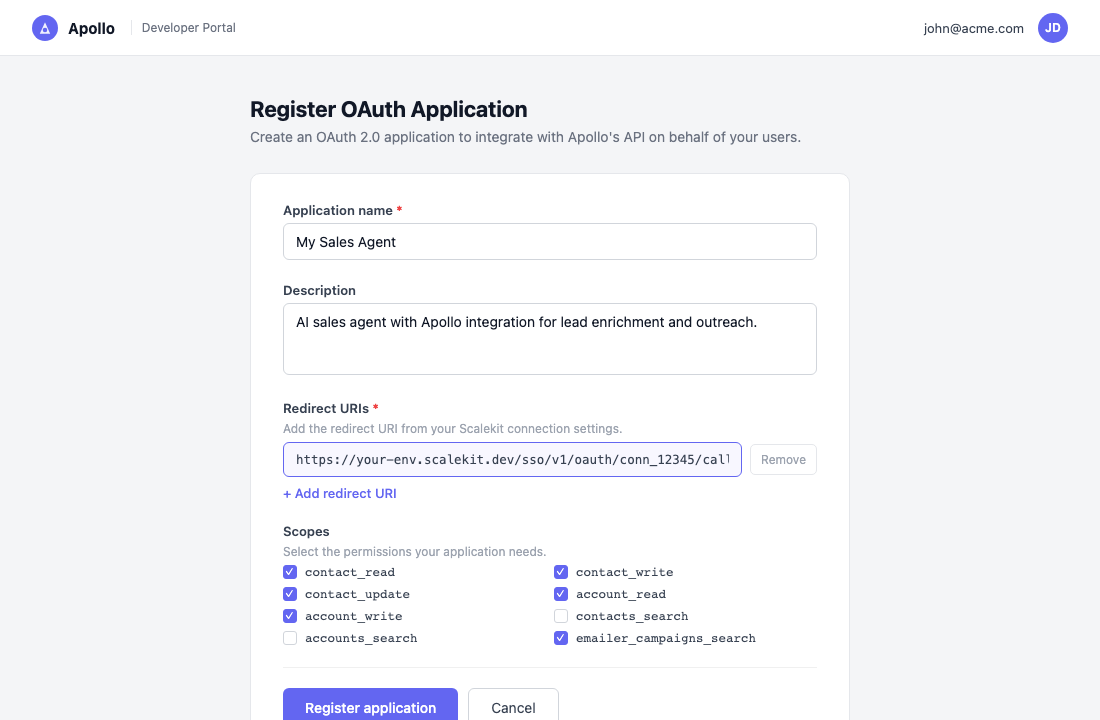
-
Click Register application.
-
-
Copy your client credentials
After registering, Apollo shows the Client ID and Client Secret for your application.
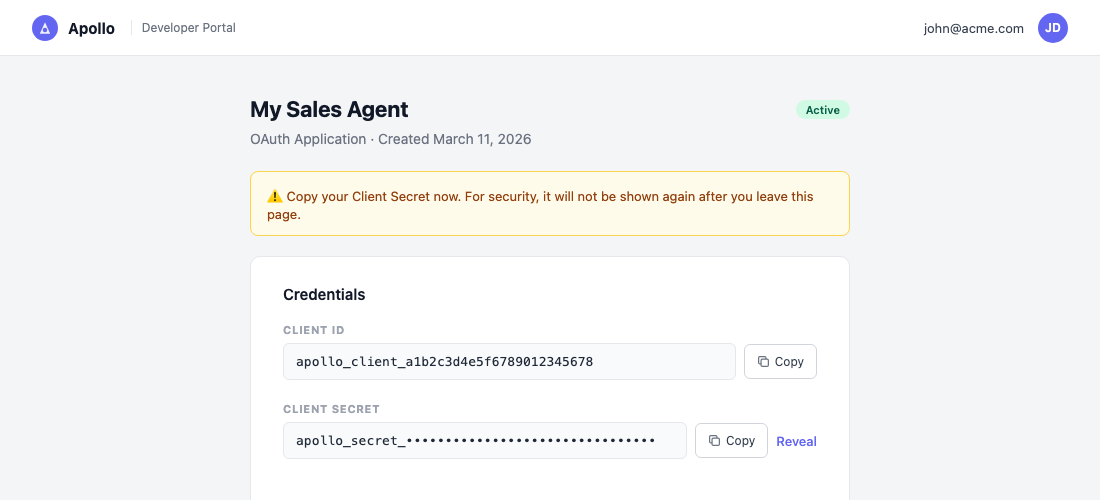
Copy both values now. The Client Secret is shown only once — you cannot retrieve it again after navigating away.
-
Add credentials in Scalekit
-
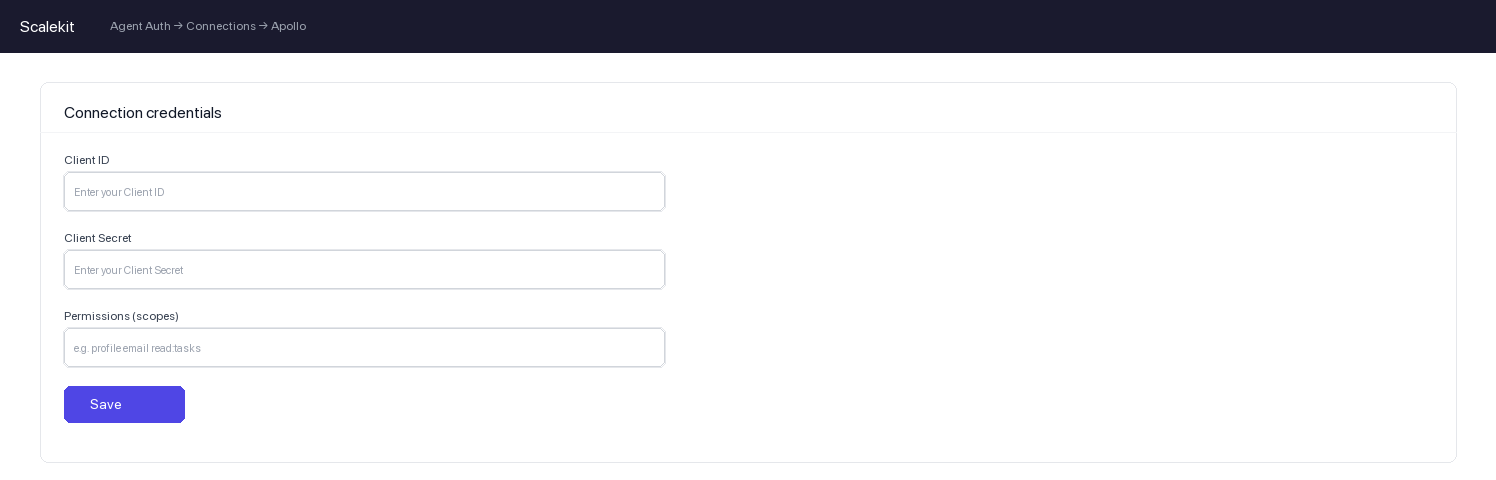
Return to Scalekit dashboard → AgentKit > Connections and open the connection you created in step 1.
-
Enter the following:
- Client ID — from Apollo
- Client Secret — from Apollo
- Permissions — the same scopes you selected in Apollo
-
Click Save.
-
-
Authorize a user and make your first call
quickstart.mts import { ScalekitClient } from '@scalekit-sdk/node'import 'dotenv/config'import { createInterface } from 'node:readline/promises'const scalekit = new ScalekitClient(process.env.SCALEKIT_ENVIRONMENT_URL,process.env.SCALEKIT_CLIENT_ID,process.env.SCALEKIT_CLIENT_SECRET,)const actions = scalekit.actionsconst connector = 'apollo'const identifier = 'user_123'// Generate an authorization link for the userconst { link } = await actions.getAuthorizationLink({ connectionName: connector, identifier })console.log('Authorize Apollo:', link)const rl = createInterface({ input: process.stdin, output: process.stdout })await rl.question('Press Enter after authorizing...')rl.close()// Make your first callconst result = await actions.executeTool({connector,identifier,toolName: 'apollo_get_current_user',toolInput: {},})console.log(result)Terminal window npx tsx quickstart.mtsquickstart.py import osfrom scalekit import ScalekitClientfrom dotenv import load_dotenvload_dotenv()scalekit_client = ScalekitClient(env_url=os.getenv("SCALEKIT_ENVIRONMENT_URL"),client_id=os.getenv("SCALEKIT_CLIENT_ID"),client_secret=os.getenv("SCALEKIT_CLIENT_SECRET"),)actions = scalekit_client.actionsconnection_name = "apollo"identifier = "user_123"# Generate an authorization link for the userlink_response = actions.get_authorization_link(connection_name=connection_name,identifier=identifier,)print("Authorize Apollo:", link_response.link)input("Press Enter after authorizing...")# Make your first callresult = actions.execute_tool(tool_input={},tool_name="apollo_get_current_user",connection_name=connection_name,identifier=identifier,)print(result)Terminal window python quickstart.pyEach user signs in once. See Authorize a user for the full flow and statuses.
Tools
Pass the exact name toexecute_toolapollo_bulk_enrich_organizationsEnrich data for up to 10 companies in a single API call, matching each by domain, LinkedIn URL, name, and/or website.Read-onlyBulk Organization Enrichment
Enrich data for up to 10 companies in a single API call, matching each by domain, LinkedIn URL, name, and/or website. Returns industry, revenue, employee counts, funding, and corporate contact details. Consumes 1 Apollo credit per organization matched; 0 credits if no match is found. Rate limited to 20/min, 100/hour, 600/day.
Inputs
detailsarray- Info for each company to enrich, one object per company (up to 10 companies per request)
domainsarray- Domains of the companies to enrich, matched by domain only
apollo_bulk_enrich_peopleEnrich data for up to 10 people in a single API call by matching on name, email, employer, LinkedIn URL, or Apollo person ID.Read-onlyBulk People Enrichment
Enrich data for up to 10 people in a single API call by matching on name, email, employer, LinkedIn URL, or Apollo person ID. Optionally reveal personal emails and phone numbers (phone reveal requires a webhook_url; results are delivered asynchronously). Consumes 1-9 Apollo credits per person depending on what is matched; 0 credits if no match is found.
Inputs
detailsarrayrequired- Info for each person to enrich, one object per person (up to 10 people per request)
reveal_personal_emailsboolean- Attempt to reveal personal email addresses for all matched people
reveal_phone_numberboolean- Attempt to reveal phone numbers, including mobile, for all matched people
run_waterfall_emailboolean- Enable waterfall enrichment for email using connected third-party data sources
run_waterfall_phoneboolean- Enable waterfall enrichment for phone using connected third-party data sources
webhook_urlstring- HTTPS URL Apollo should deliver asynchronous phone or waterfall enrichment results to
apollo_enrich_accountEnrich a company/account record with Apollo firmographic data using the company's website domain or name.Read-onlyEnrich Account
Enrich a company/account record with Apollo firmographic data using the company's website domain or name. Returns verified employee count, revenue estimates, industry, tech stack, funding rounds, and social profiles. Consumes Apollo credits per match.
Inputs
domainstring- Website domain of the company to enrich (e.g., acmecorp.com)
namestring- Company name to enrich (used if domain is not available)
apollo_enrich_contactEnrich a contact using Apollo's people matching engine.Read-onlyEnrich Contact
Enrich a contact using Apollo's people matching engine. Provide an email address or name + company to retrieve a verified contact profile. Revealing personal emails or phone numbers consumes additional Apollo credits per successful match.
Inputs
emailstring- Work email address of the contact to enrich
first_namestring- First name of the contact to enrich
last_namestring- Last name of the contact to enrich
linkedin_urlstring- LinkedIn profile URL for precise matching
organization_namestring- Company name to assist in matching
reveal_personal_emailsboolean- Attempt to reveal personal email addresses (consumes extra Apollo credits)
reveal_phone_numberboolean- Attempt to reveal direct phone numbers (consumes extra Apollo credits)
apollo_get_accountRetrieve the full profile of a company account from Apollo by its ID.Read-onlyGet Account
Retrieve the full profile of a company account from Apollo by its ID. Returns detailed firmographic data including employee count, revenue estimates, industry, tech stack, funding information, and social profiles.
Inputs
account_idstringrequired- The Apollo account (organization) ID to retrieve
apollo_get_api_usageRetrieve your team's Apollo API usage and rate limits.Read-onlyGet API Usage Stats
Retrieve your team's Apollo API usage and rate limits. Returns, per endpoint, the requests consumed and the per-minute, per-hour, and per-day rate limits allowed under your Apollo plan. Takes no parameters.
Inputs
This tool takes no inputs.
apollo_get_contactRetrieve the full profile of a contact from Apollo by their ID.Read-onlyGet Contact
Retrieve the full profile of a contact from Apollo by their ID. Returns detailed professional information including email, phone, LinkedIn URL, employment history, education, and social profiles.
Inputs
contact_idstringrequired- The Apollo contact ID to retrieve
apollo_get_contact_sequence_activityRetrieve the most recent sequence enrollment activity for a single Apollo contact, such as enrolled, paused, resumed, failed, completed, removed, or replied events.Read-onlyGet Contact Sequence Activity
Retrieve the most recent sequence enrollment activity for a single Apollo contact, such as enrolled, paused, resumed, failed, completed, removed, or replied events. Optionally scope results to one sequence. Returns only the most recent events up to per_page and does not paginate further back in history. Uses 0 Apollo credits.
Inputs
contact_idstringrequired- The Apollo ID for the contact whose sequence activity you want to retrieve
per_pageinteger- Maximum number of most-recent events to return
sequence_idstring- Apollo ID for a single sequence to scope the activity to
apollo_get_conversationRetrieve the full details of a single Apollo Conversation (a recorded prospect video meeting or dialer call) by its ID, including transcript and AI insights when available.Read-onlyGet Conversation
Retrieve the full details of a single Apollo Conversation (a recorded prospect video meeting or dialer call) by its ID, including transcript and AI insights when available. Use Search Conversations to find the conversation_id first. Consumes 1 Apollo credit per conversation only if the conversation has AI insights; otherwise it is free.
Inputs
conversation_idstringrequired- The Apollo conversation ID to retrieve. Supports an optional share ID in the format id_shareid
apollo_get_conversation_exportRetrieve the status and download URL for a previously requested Conversations export, using the export ID returned by Export Conversations.Read-onlyGet Conversation Export
Retrieve the status and download URL for a previously requested Conversations export, using the export ID returned by Export Conversations. Once the export finishes processing, the response includes a URL to download the gzipped JSON file. Does not consume Apollo credits.
Inputs
export_idstringrequired- The export ID returned by the Export Conversations endpoint
apollo_get_credit_usageRetrieve your team's remaining and consumed credit balance for the current billing cycle, broken down per credit type (email reveals, phone enrichment, AI writing, dialer minutes, etc.).Read-onlyGet Credit Usage Stats
Retrieve your team's remaining and consumed credit balance for the current billing cycle, broken down per credit type (email reveals, phone enrichment, AI writing, dialer minutes, etc.). Distinct from Get API Usage Stats, which reports request rate limits rather than credit balances. Takes no parameters.
Inputs
This tool takes no inputs.
apollo_get_current_userRetrieve the authenticated user's profile — the person who owns the API key being used.Read-onlyGet Current User
Retrieve the authenticated user's profile — the person who owns the API key being used. Optionally include the user's and team's Apollo credit usage and remaining balances.
Inputs
include_credit_usageboolean- Whether to include credit usage and remaining balance details in the response
apollo_get_dealRetrieve complete details about a single deal within your team's Apollo account, including deal owner, monetary value, deal stage, and associated account information.Read-onlyView Deal
Retrieve complete details about a single deal within your team's Apollo account, including deal owner, monetary value, deal stage, and associated account information.
Inputs
opportunity_idstringrequired- The Apollo ID of the deal to view
apollo_get_email_contentRetrieve the full content (subject, body, recipients) of up to 10 previously sent Apollo sequence emails by their message IDs.Read-onlyGet Email Content
Retrieve the full content (subject, body, recipients) of up to 10 previously sent Apollo sequence emails by their message IDs. Only successfully sent emails are returned; drafts, scheduled messages, and IDs that don't match one of your team's sent emails are silently excluded from the response. Uses 0 Apollo credits.
Inputs
idsarrayrequired- Apollo IDs of sent emails to retrieve
body_formatstring- Format to return the email body inone of
plainhtml
apollo_get_email_statsRetrieve the complete details for an email sent as part of an Apollo sequence, including the email contents, engagement stats (opens, clicks), and details about the recipient contact.Read-onlyCheck Email Stats
Retrieve the complete details for an email sent as part of an Apollo sequence, including the email contents, engagement stats (opens, clicks), and details about the recipient contact. Does not consume Apollo credits. Requires a master API key; without one this returns a 403 response.
Inputs
emailer_message_idstringrequired- The Apollo ID of the email to view stats for
apollo_get_organizationRetrieve complete details about a company (organization) in the Apollo database by its ID, including industry, revenue, headcount, funding, and locations.Read-onlyGet Complete Organization Info
Retrieve complete details about a company (organization) in the Apollo database by its ID, including industry, revenue, headcount, funding, and locations. Consumes 1 Apollo credit per company when a matching record is found; 0 credits if no match.
Inputs
organization_idstringrequired- The Apollo ID of the organization to look up
apollo_get_personRetrieve complete details about a person in the Apollo database by their ID, including employment history, personal location, and full details of their current employer.Read-onlyGet Complete Person Info
Retrieve complete details about a person in the Apollo database by their ID, including employment history, personal location, and full details of their current employer. Consumes Apollo credits per record when data is returned.
Inputs
person_idstringrequired- The Apollo ID of the person to look up
apollo_get_taskRetrieve the full details of a single task belonging to your team's Apollo account by task ID.Read-onlyGet Task
Retrieve the full details of a single task belonging to your team's Apollo account by task ID. Returns the task's associated account and contact (when attached), plus type-specific fields such as phone_call for call tasks, emailer_message for email tasks, or a LinkedIn message template for LinkedIn-step tasks. Use Search Tasks to find task IDs.
Inputs
task_idstringrequired- The Apollo ID for the task to retrieve
apollo_get_webhook_resultRetrieve the result of an asynchronous People Enrichment or Bulk People Enrichment request by its request_id, without waiting for Apollo's webhook callback.Read-onlyGet Webhook Result
Retrieve the result of an asynchronous People Enrichment or Bulk People Enrichment request by its request_id, without waiting for Apollo's webhook callback. Use this to check enrichment progress or recover a result if the webhook delivery was missed. Results remain available for 30 days after the original request; after that the request_id expires. Uses 0 Apollo credits.
Inputs
request_idstringrequired- The request_id returned by a People Enrichment or Bulk People Enrichment request that used webhook delivery
apollo_list_account_stagesRetrieve every account stage configured in your team's Apollo account, used to track sales/marketing pipeline progress.Read-onlyList Account Stages
Retrieve every account stage configured in your team's Apollo account, used to track sales/marketing pipeline progress. Returns each stage's ID and name; stage IDs are used to update individual or bulk accounts. Requires a master API key and takes no parameters.
Inputs
This tool takes no inputs.
apollo_list_contact_dealsRetrieve the deals (sales opportunities) associated with a specific Apollo contact by contact ID.Read-onlyList Contact Deals
Retrieve the deals (sales opportunities) associated with a specific Apollo contact by contact ID. Returns the same deal details as the View Deal endpoint. If the contact has no associated deals or the ID isn't recognized, returns an empty array rather than an error.
Inputs
contact_idstringrequired- The Apollo contact ID whose associated deals you want to retrieve
apollo_list_contact_stagesRetrieve the IDs and names of all contact stages configured in your team's Apollo account.Read-onlyList Contact Stages
Retrieve the IDs and names of all contact stages configured in your team's Apollo account. Contact stage IDs are used to update individual contacts or to bulk-update the stage for multiple contacts.
Inputs
This tool takes no inputs.
apollo_list_custom_fieldsRetrieve all custom fields (typed custom fields) that have been created in your Apollo account.Read-onlyList Custom Fields
Retrieve all custom fields (typed custom fields) that have been created in your Apollo account. Takes no parameters. Note: Apollo has deprecated this endpoint in favor of List Fields with source set to custom; prefer that tool for new integrations.
Inputs
This tool takes no inputs.
apollo_list_deal_stagesRetrieve every deal stage available in your team's Apollo account.Read-onlyList Deal Stages
Retrieve every deal stage available in your team's Apollo account. The returned stage IDs can be used to set or update a deal's stage when creating or updating a deal.
Inputs
This tool takes no inputs.
apollo_list_dealsRetrieve every deal (sales opportunity) that has been created for your team's Apollo account, with pagination and sort options.Read-onlyList All Deals
Retrieve every deal (sales opportunity) that has been created for your team's Apollo account, with pagination and sort options. Returns deal records including name, amount, stage, owner, and account.
Inputs
pageinteger- Page number for pagination (starts at 1)
per_pageinteger- Number of deals to return per page
sort_by_fieldstring- Field to sort the returned deals byone of
amountis_closedis_won
apollo_list_email_accountsRetrieve the mailboxes your team has linked to Apollo for prospect outreach.Read-onlyList Email Accounts
Retrieve the mailboxes your team has linked to Apollo for prospect outreach. Returns each linked email account's ID and details, which can be used as the sender for the Add Contacts to a Sequence endpoint. Takes no parameters.
Inputs
This tool takes no inputs.
apollo_list_email_schedulesRetrieve every sending schedule configured for your team's Apollo account, including each schedule's ID, time zone, and weekly sending windows.Read-onlyList Email Schedules
Retrieve every sending schedule configured for your team's Apollo account, including each schedule's ID, time zone, and weekly sending windows. Use a schedule's id as the emailer_schedule_id when creating or updating a sequence to control when that sequence's emails are sent. Takes no parameters.
Inputs
This tool takes no inputs.
apollo_list_fieldsRetrieve all fields configured in your Apollo account, including system fields, custom fields, and CRM-synced fields.Read-onlyList Fields
Retrieve all fields configured in your Apollo account, including system fields, custom fields, and CRM-synced fields. Optionally filter by field source. Returns each field's ID, label, type, and modality.
Inputs
sourcestring- Filter fields by their sourceone of
systemcustomcrm_synced
apollo_list_job_postingsRetrieve the current job postings for a company in the Apollo database.Read-onlyOrganization Job Postings
Retrieve the current job postings for a company in the Apollo database. Useful for identifying companies growing headcount in strategically important areas. Display limit of 10,000 records; consumes 1 Apollo credit per page returned.
Inputs
organization_idstringrequired- The Apollo ID of the organization to retrieve job postings for
pageinteger- Page number for pagination (starts at 1)
per_pageinteger- Number of job postings to return per page
apollo_list_listsRetrieve every list (of contacts or accounts) that has been created in your Apollo account.Read-onlyGet a List of All Lists
Retrieve every list (of contacts or accounts) that has been created in your Apollo account. Useful for checking available lists before adding records to one, or before creating a contact. Requires a master API key; without one this returns a 403 response.
Inputs
This tool takes no inputs.
apollo_list_sequencesList available email sequences (Apollo Sequences / Emailer Campaigns) in your Apollo account.Read-onlyList Sequences
List available email sequences (Apollo Sequences / Emailer Campaigns) in your Apollo account. Supports filtering by name and pagination. Returns sequence ID, name, status, and step count.
Inputs
pageinteger- Page number for pagination (starts at 1)
per_pageinteger- Number of sequences to return per page (max 100)
searchstring- Filter sequences by name (partial match)
apollo_list_usersRetrieve the IDs and details of all users (teammates) in your Apollo account.Read-onlyList Users
Retrieve the IDs and details of all users (teammates) in your Apollo account. These IDs are used as owner/assignee references in other endpoints such as Create Deal, Create Account, and Create Task. Results are paginated.
Inputs
pageinteger- Page number of results to retrieve
per_pageinteger- Number of users to return per page
apollo_query_reportQuery Apollo's sales analytics engine to retrieve aggregated activity data for your team — the same data that powers Apollo's built-in Analytics dashboards.Read-onlyQuery Analytics Report
Query Apollo's sales analytics engine to retrieve aggregated activity data for your team — the same data that powers Apollo's built-in Analytics dashboards. Supports flat totals, single-dimension grouping, or pivot cross-tab queries. Requires an API key with access to the reports/sync_report API scope.
Inputs
date_rangesarrayrequired- The time window for the query. Provide exactly one object; use modality "custom_range" plus a smart_datetime_range key inside filters for an explicit date window.
filtersobjectrequired- Key/value filter map to narrow the result set. Pass {} for no filters.
group_byarrayrequired- The dimension to group results by (row dimension). Pass [] for flat totals with no grouping. Only one entry is supported.
group_by_totals_selectedbooleanrequired- Whether to include an aggregated totals row in addition to the per-dimension-value rows
metricsarrayrequired- The metrics to query. Each entry specifies a metric name plus the date and user columns the engine should use for it. Pass [] to return no metric columns.
pivot_group_by_totals_selectedbooleanrequired- Whether the pivot response includes an aggregated totals column
sortsarrayrequired- Sort order for result rows. Only the first entry is applied; pass [] for the default order. Sorting by dimension value is not supported.
min_ratio_denominatorinteger- Minimum denominator threshold for ratio metrics
pivot_group_byarray- The dimension to pivot on (column dimension), producing a two-dimensional cross-tab with group_by as rows. Omit or pass [] for non-pivot queries. Only one entry is supported.
skip_group_by_valuesarray- Dimension values to exclude from the result rows
apollo_search_accountsSearch Apollo's company database using firmographic filters such as company name, industry, employee count range, revenue range, and location.Read-onlySearch Accounts
Search Apollo's company database using firmographic filters such as company name, industry, employee count range, revenue range, and location. Returns matching account records with company details.
Inputs
company_namestring- Filter accounts by company name (partial match supported)
employee_rangesstring- Comma-separated employee count ranges (e.g., 1,10,11,50,51,200)
industrystring- Filter accounts by industry vertical
keywordsstring- Keyword search across company name, description, and domain
locationstring- Filter accounts by headquarters city, state, or country
pageinteger- Page number for pagination (starts at 1)
per_pageinteger- Number of accounts to return per page (max 100)
apollo_search_contactsSearch contacts in your Apollo CRM using filters such as job title, company, and sort order.Read-onlySearch Contacts
Search contacts in your Apollo CRM using filters such as job title, company, and sort order. Returns matching contact records with professional details. Results are paginated.
Inputs
company_namestring- Filter contacts by company name
industrystring- Filter contacts by their company's industry (e.g., Software, Healthcare)
keywordsstring- Full-text keyword search across contact name, title, company, and bio
locationstring- Filter contacts by city, state, or country
pageinteger- Page number for pagination (starts at 1)
per_pageinteger- Number of contacts to return per page (max 100)
senioritystring- Filter by seniority level (e.g., c_suite, vp, director, manager, senior, entry)
titlestring- Filter contacts by job title keywords (e.g., VP of Sales)
apollo_search_conversationsSearch Apollo Conversations (recorded prospect video meetings and dialer calls) with filters for conversation type, account, contacts, tags/labels, trackers, organizations, a date range, and scorecard rating.Read-onlySearch Conversations
Search Apollo Conversations (recorded prospect video meetings and dialer calls) with filters for conversation type, account, contacts, tags/labels, trackers, organizations, a date range, and scorecard rating. Each result includes a summary but not the full transcript or recording URL — use Get Conversation to fetch full details by ID. Does not consume Apollo credits.
Inputs
account_idstring- Filter conversations by Apollo account ID
contact_idsarray- Filter conversations by one or more Apollo contact IDs
conversation_typestring- Filter by conversation type: video conference meetings or dialer phone callsone of
video_conferencephone_call date_range_endstring- End of the date range to filter conversations, in ISO 8601 format (GMT)
date_range_startstring- Start of the date range to filter conversations, in ISO 8601 format (GMT)
enforce_contact_boundaryboolean- When true, restricts results to conversations visible to the specified contacts
num_fetch_resultinteger- Maximum number of results to return
organization_idsarray- Filter conversations by organization/company ID(s)
pageinteger- Page number for pagination
scorecard_max_ratingnumber- Maximum scorecard rating to include in results
scorecard_template_idstring- Filter conversations by scorecard template ID
sort_by_fieldstring- Field to sort results by
tag_idsarray- Filter conversations by label or tag ID(s)
tracker_idsarray- Filter conversations by tracker ID(s)
apollo_search_crm_accountsSearch for accounts that have already been saved to your Apollo CRM, filtered by account name, account stage, or label, with sorting and pagination.Read-onlySearch CRM Accounts
Search for accounts that have already been saved to your Apollo CRM, filtered by account name, account stage, or label, with sorting and pagination. This searches your Apollo CRM accounts only (up to 50,000 records across 500 pages) — to discover new companies from Apollo's global company database instead, use Search Accounts.
Inputs
account_label_idsarray- Apollo label IDs to filter by; matches accounts with any of the given labels
account_stage_idsarray- Apollo account stage IDs to filter by; matches accounts in any of the given stages
company_namestring- Keyword that must directly match at least part of an account's name
pageinteger- Page number of results to retrieve (starts at 1)
per_pageinteger- Number of accounts to return per page (max 100)
sort_ascendingboolean- Sort matching accounts in ascending order
sort_by_fieldstring- Field to sort the matching accounts byone of
account_last_activity_dateaccount_created_ataccount_updated_at
apollo_search_emailsSearch for emails your team has created and sent as part of Apollo sequences, filtering by status, reply sentiment, sender, sequence, date range, and keywords.Read-onlySearch for Outreach Emails
Search for emails your team has created and sent as part of Apollo sequences, filtering by status, reply sentiment, sender, sequence, date range, and keywords. Does not consume Apollo credits. Display is limited to 50,000 records (100 per page, up to 500 pages) — narrow the search with filters where possible.
Inputs
date_range_maxstring- Upper bound (YYYY-MM-DD) of the date range to search
date_range_minstring- Lower bound (YYYY-MM-DD) of the date range to search
date_range_modestring- Which timestamp the date range filters onone of
due_atcompleted_at email_account_id_and_aliasesstring- Find emails sent from a specific email account ID or its aliases
emailer_campaign_idsarray- Only include emails from these Apollo sequence IDs
emailer_message_reply_classesarray- Filter by the response sentiment of the recipient
emailer_message_statsarray- Filter emails by their current delivery/engagement status
not_emailer_campaign_idsarray- Exclude emails from these Apollo sequence IDs
not_sent_reason_cdsarray- Filter emails by the reason they were not sent
pageinteger- Page number of results to retrieve
per_pageinteger- Number of results to return per page
q_keywordsstring- Keyword search to narrow results, matched against email content
user_idsarray- Only include emails sent by these Apollo user IDs
apollo_search_news_articlesSearch for news articles related to specific companies in Apollo, such as funding, hires, or contract announcements.Read-onlySearch News Articles
Search for news articles related to specific companies in Apollo, such as funding, hires, or contract announcements. Requires at least one organization ID and supports filtering by category and publish date range. Results are paginated.
Inputs
organization_idsarrayrequired- Apollo organization IDs to search news for
categoriesarray- Restrict results to specific news categories or sub-categories
pageinteger- Page number of results to retrieve
per_pageinteger- Number of results to return per page
published_at_maxstring- Upper bound of the publish date range (YYYY-MM-DD)
published_at_minstring- Lower bound of the publish date range (YYYY-MM-DD)
apollo_search_peopleSearch Apollo's full people database to find net-new prospects (not yet saved as contacts) using filters like job title, seniority, location, employer, employee headcount, revenue, technologies used, and active job postings.Read-onlyPeople API Search
Search Apollo's full people database to find net-new prospects (not yet saved as contacts) using filters like job title, seniority, location, employer, employee headcount, revenue, technologies used, and active job postings. Does not return email addresses or phone numbers -- use Bulk People Enrichment or Get Complete Person Info to enrich matches. Results are paginated, up to 500 pages of 100 records each.
Inputs
contact_email_statusarray- Email verification statuses to filter by
currently_not_using_any_of_technology_uidsarray- Exclude people whose current employer uses any of these technologies
currently_using_all_of_technology_uidsarray- Find people whose current employer uses ALL of these technologies
currently_using_any_of_technology_uidsarray- Find people whose current employer uses ANY of these technologies
include_similar_titlesboolean- Whether to include people with job titles similar to person_titles
organization_idsarray- Apollo organization IDs to restrict the search to
organization_job_locationsarray- Locations of active job postings at the person's current employer
organization_job_posted_at_range_maxstring- Latest date jobs were posted by the person's current employer (YYYY-MM-DD)
organization_job_posted_at_range_minstring- Earliest date jobs were posted by the person's current employer (YYYY-MM-DD)
organization_locationsarray- Headquarters locations (city, US state, or country) for the person's current employer
organization_num_employees_rangesarray- Employee headcount ranges for the person's current employer
organization_num_jobs_range_maxinteger- Maximum number of active job postings at the person's current employer
organization_num_jobs_range_mininteger- Minimum number of active job postings at the person's current employer
pageinteger- Page number for pagination (starts at 1)
per_pageinteger- Number of people to return per page
person_locationsarray- Personal locations (city, US state, or country) where the people live
person_senioritiesarray- Job seniority levels to filter by
person_titlesarray- Job titles held by the people you want to find
q_keywordsstring- Free-text keywords to filter results
q_organization_domains_listarray- Domains of the person's current or previous employer
q_organization_job_titlesarray- Job titles listed in active job postings at the person's current employer
revenue_range_maxinteger- Maximum annual revenue generated by the person's current employer
revenue_range_mininteger- Minimum annual revenue generated by the person's current employer
apollo_search_tasksFind tasks that your team has created in Apollo, with sorting and pagination.Read-onlySearch Tasks
Find tasks that your team has created in Apollo, with sorting and pagination. To protect performance, results are capped at 50,000 records (100 per page, up to 500 pages) — narrow the search with filters where possible. Returns matching task objects. Requires a master API key.
Inputs
open_factor_namesarray- Names of factors to include counts for in the response
pageinteger- Page number of results to retrieve
per_pageinteger- Number of tasks to return per page
sort_by_fieldstring- Field to sort the returned tasks byone of
task_due_attask_priority
apollo_activate_sequenceActivate (start) an inactive Sequence in your team's Apollo account by ID.WriteActivate Sequence
Activate (start) an inactive Sequence in your team's Apollo account by ID. Once activated, the sequence begins sending emails to its contacts on the configured schedule. The sequence must have at least one step configured before it can be activated. Requires a master API key. Returns the updated sequence object with its active state.
Inputs
sequence_idstringrequired- The Apollo ID for the sequence that you want to activate. To find sequence IDs, use the Search for Sequences endpoint and identify the id value for the sequence.
apollo_add_contacts_to_sequenceAdd contacts to an existing Sequence in your team's Apollo account, identified either by contact_ids or by label_names (at least one is required).WriteAdd Contacts to Sequence
Add contacts to an existing Sequence in your team's Apollo account, identified either by contact_ids or by label_names (at least one is required). Requires a sending email account (send_email_from_email_account_id). Supports overrides to allow adding contacts despite missing/unverified emails, recent job changes, membership in other sequences, or ownership restrictions. Requires a master API key. Returns the count and status of contacts added.
Inputs
send_email_from_email_account_idstringrequired- The Apollo ID for the email account used to send to contacts you add to the sequence. Use Get a List of Email Accounts to find the ID. A single ID is typical; Apollo also accepts a JSON array of IDs for multi-mailbox rotation.
sequence_idstringrequired- The Apollo ID for the sequence to which you want to add contacts. To find sequence IDs, use the Search for Sequences endpoint and identify the id value for the sequence.
add_if_in_queueboolean- Set to true to add contacts even if they are currently in the queue for processing.default
false auto_unpause_atstring- DateTime when paused contacts should be automatically unpaused. Must be used with status=paused. Format: ISO 8601 datetime string.
contact_idsarray- The Apollo IDs for the contacts to add to the sequence. Use Search Contacts to find contact IDs. Either contact_ids or label_names must be provided.
contact_verification_skippedboolean- Set to true to skip contact verification during the addition process.default
false contacts_without_ownership_permissionboolean- Set to true to add contacts even if you do not have ownership permission for them.default
false label_namesarray- Alternative to contact_ids. Names of labels used to identify contacts to add to the sequence; all contacts carrying these labels are enrolled. Either contact_ids or label_names must be provided.
send_email_from_email_addressstring- Optional specific email address to send from within the email account.
sequence_active_in_other_campaignsboolean- Set to true to add contacts even if they are already active in other sequences. Does not differentiate between active and paused sequences.default
false sequence_finished_in_other_campaignsboolean- Set to true to add contacts even if they have been marked as finished in another sequence.default
false sequence_job_changeboolean- Set to true to add contacts to the sequence even if they have recently changed jobs.default
false sequence_no_emailboolean- Set to true to add contacts to the sequence even if they do not have an email address.default
false sequence_same_company_in_same_campaignboolean- Set to true to add contacts even if other contacts from the same company are already in the sequence.default
false sequence_unverified_emailboolean- Set to true to add contacts to the sequence if they have an unverified email address.default
false statusstring- Initial status for added contacts. When set to paused along with auto_unpause_at, enables scheduled addition of contacts.one of
activepaused user_idstring- The ID for the user in your team's Apollo account taking the action of adding contacts. Shown in the sequence's activity log. Use Get a List of Users to find IDs.
apollo_add_records_to_listAdd existing contacts or accounts to one or more Apollo lists, referencing the lists by name.WriteAdd Records to a List
Add existing contacts or accounts to one or more Apollo lists, referencing the lists by name. If a list name doesn't already exist for the given modality, Apollo creates it automatically. If no valid entity_ids or label_names are provided, no changes are made and a 200 confirmation is returned.
Inputs
entity_idsarrayrequired- The Apollo IDs of the contacts or accounts to add to the lists
label_namesarrayrequired- The names of the lists to add the records to
modalitystringrequired- The type of records referenced by entity_idsone of
contactsaccounts asyncboolean- Whether to process the request in the background instead of synchronously
apollo_bulk_create_accountsCreate up to 100 accounts (companies) in your Apollo CRM in a single request.WriteBulk Create Accounts
Create up to 100 accounts (companies) in your Apollo CRM in a single request. Supports intelligent deduplication by CRM ID (and optionally by domain, organization ID, and name) — accounts that already exist are returned unmodified in a separate existing_accounts array rather than being updated. Use Bulk Update Accounts to modify existing accounts instead.
Inputs
accountsarrayrequired- Array of account attribute objects to create (maximum 100 per request)
append_label_namesarray- Label names to attach to every account created in this request
run_dedupeboolean- Enable aggressive deduplication by domain, organization ID, and name
apollo_bulk_create_contactsCreate up to 100 contacts in your Apollo CRM in a single request.WriteBulk Create Contacts
Create up to 100 contacts in your Apollo CRM in a single request. Supports intelligent deduplication and returns separate arrays for newly created and existing contacts. This endpoint only creates new contacts (except for placeholder contacts from email imports) — existing contacts that match are returned unmodified in existing_contacts. To update existing contacts, use Bulk Update Contacts instead.
Inputs
contactsarrayrequired- Array of contact objects to create (maximum 100 per request). Each object may include fields such as first_name, last_name, email, title, primary_title, organization_name, phone, present_raw_address, linkedin_url, facebook_url, twitter_url, photo_url, account_id, organization_id, contact_stage_id, salesforce_id, hubspot_id, salesforce_lead_id, salesforce_contact_id, salesforce_account_id, outreach_id, salesloft_id, phone_status_cd, typed_custom_fields (object of field_id to value), contact_emails (array of {email, position}), phone_numbers (array of {raw_number, position}), and contact_role_type_ids (array of strings).
append_label_namesarray- Label names to add to every contact created in this request
owner_idstring- Apollo user ID to assign as owner of all contacts in this batch
run_dedupeboolean- Enable full deduplication across all sources before creating contacts
apollo_bulk_create_tasksCreate multiple tasks in a single request by supplying a list of contact IDs; a separate task is created for each contact using the same owner, type, due date, and other details.WriteBulk Create Tasks
Create multiple tasks in a single request by supplying a list of contact IDs; a separate task is created for each contact using the same owner, type, due date, and other details. Returns a success boolean and the tasks array of created task objects. Apollo does not deduplicate tasks. Requires a master API key.
Inputs
contact_idsarrayrequired- The Apollo IDs for the contacts on the receiving end of the action
due_atstringrequired- The full date and time when the tasks will be due, in ISO 8601 date-time format
statusstringrequired- The status of the tasks being createdone of
scheduledcompletedskipped typestringrequired- The task type, indicating what action the owner needs to take for each contactone of
calloutreach_manual_emaillinkedin_step_connectlinkedin_step_messagelinkedin_step_view_profilelinkedin_step_interact_postaction_item user_idstringrequired- The ID for the task owner within your team's Apollo account
notestring- A human-readable description providing context for the task owner, applied to every created task
prioritystring- Priority to assign to the tasksone of
highmediumlow
apollo_bulk_update_accountsUpdate up to 1,000 accounts in your Apollo CRM in a single request.WriteBulk Update Accounts
Update up to 1,000 accounts in your Apollo CRM in a single request. Provide either account_ids with shared field values (name, owner_id, account_stage_id) to apply identical updates to every account, or account_attributes with per-account objects to apply different updates to each account. Async processing is only supported with account_ids.
- Idempotent
Inputs
account_attributesarray- Array of per-account update objects, each requiring an account id and any fields to change
account_idsarray- Array of account IDs to apply the same update values to
account_stage_idstring- Account stage ID to apply to all accounts listed in account_ids
asyncboolean- Process the update asynchronously
namestring- Account name to apply to all accounts listed in account_ids
owner_idstring- Owner user ID to apply to all accounts listed in account_ids
apollo_bulk_update_contactsUpdate multiple Apollo contacts in a single request.WriteBulk Update Contacts
Update multiple Apollo contacts in a single request. Provide either contact_ids (to apply the same field values to every listed contact) or contact_attributes (to apply different values per contact) — at least one is required. Up to 100 contacts are processed synchronously; 101-1000 are processed asynchronously (or force async at any size). Requests over 1000 contacts are rejected with a 422 error.
- Idempotent
Inputs
account_idstring- Account ID to apply to all contacts referenced by contact_ids
asyncboolean- Force asynchronous processing regardless of batch size
contact_attributesarray- Array of contact objects with per-contact updates. Each object must include an 'id' field plus any of: first_name, last_name, email, title, organization_name, owner_id, account_id, present_raw_address, linkedin_url, typed_custom_fields (object of field_id to value). Use this to apply different values to each contact in one request.
contact_idsarray- Array of contact IDs to update with the same field values
emailstring- Email address to apply to all contacts referenced by contact_ids
first_namestring- First name to apply to all contacts referenced by contact_ids
last_namestring- Last name to apply to all contacts referenced by contact_ids
linkedin_urlstring- LinkedIn URL to apply to all contacts referenced by contact_ids
organization_namestring- Organization name to apply to all contacts referenced by contact_ids
owner_idstring- Owner user ID to apply to all contacts referenced by contact_ids
present_raw_addressstring- Location/address to apply to all contacts referenced by contact_ids
titlestring- Job title to apply to all contacts referenced by contact_ids
typed_custom_fieldsobject- Custom field values, keyed by field_id, to apply to all contacts referenced by contact_ids
visible_entity_idsarray- Specific contact IDs to include in the response, for performance on large batches
apollo_complete_taskMark an existing task in your team's Apollo account as completed by task ID.WriteComplete Task
Mark an existing task in your team's Apollo account as completed by task ID. If the task no longer exists (for example, its sequence was paused and the task was removed), Apollo returns a 200 response with deleted: true on the task instead of an error. Use Skip Task instead if you want to mark the task done without completing it. Use Search Tasks to find task IDs.
Inputs
task_idstringrequired- The Apollo ID for the task to complete
notestring- An optional note to record when completing the task
apollo_create_accountCreate a new account (company) record in your Apollo CRM.WriteCreate Account
Create a new account (company) record in your Apollo CRM. Accounts represent organizations and can be linked to contacts. Check for duplicates before creating to avoid double entries.
Inputs
namestringrequired- Name of the company/account
domainstring- Website domain of the company
linkedin_urlstring- LinkedIn company page URL
phone_numberstring- Main phone number of the company
raw_addressstring- Physical address of the company
apollo_create_contactCreate a new contact record in your Apollo CRM.WriteCreate Contact
Create a new contact record in your Apollo CRM. The contact will appear in your Apollo contacts list and can be enrolled in sequences. Check for duplicates before creating to avoid double entries.
Inputs
first_namestringrequired- First name of the contact
last_namestringrequired- Last name of the contact
account_idstring- Apollo account ID to associate this contact with
emailstring- Email address of the contact
linkedin_urlstring- LinkedIn profile URL of the contact
organization_namestring- Company name the contact works at
phonestring- Phone number of the contact
titlestring- Job title of the contact
apollo_create_custom_fieldCreate a new custom field on contacts, accounts, or deals (opportunities) in your Apollo account.WriteCreate Custom Field
Create a new custom field on contacts, accounts, or deals (opportunities) in your Apollo account. Custom fields let your team capture unique details and can be used to personalize sequences. Returns the created field's ID and configuration.
Inputs
labelstringrequired- Name of the custom field to create
modalitystringrequired- The record type this custom field applies toone of
contactaccountopportunity typestringrequired- Data type of the custom fieldone of
stringtextareanumberdatedatetimeboolean meta_max_lengthinteger- Maximum character length allowed for the field value (applies to string/textarea field types)
apollo_create_dealCreate a new deal (sales opportunity) in your team's Apollo account.WriteCreate Deal
Create a new deal (sales opportunity) in your team's Apollo account. A deal can be linked to an existing Apollo account, assigned an owner, a monetary amount, and a deal stage. Returns the created deal object including its Apollo-assigned ID.
Inputs
namestringrequired- Human-readable name for the deal
account_idstring- The Apollo account (company) ID this deal is targeting
amountstring- The monetary value of the deal, as a plain number string with no commas or currency symbols
closed_datestring- Estimated close date for the deal in YYYY-MM-DD format
opportunity_stage_idstring- The Apollo ID of the deal stage to set for this deal
owner_idstring- The Apollo user ID of the deal owner
typed_custom_fieldsobject- Custom field values for the deal, keyed by custom field ID
apollo_create_email_draftCreate a single, unsent email draft for an Apollo contact, or draft a reply within an existing email thread.WriteCreate Email Draft
Create a single, unsent email draft for an Apollo contact, or draft a reply within an existing email thread. The draft is created with a `drafted` status and is not sent — use Send Email Now with the returned `id` to send it. Returns the created emailer_message object (and a linked task object if applicable).
Inputs
attachment_idsarray- Apollo IDs of attachments to include with the email
body_htmlstring- The body of the email as HTML
contact_idstring- The Apollo ID of the contact who will receive the email
emailer_template_idstring- The Apollo ID of an email template to associate with the draft
enable_trackingboolean- Whether to enable open and click tracking for the email
in_response_to_emailer_message_idstring- The Apollo ID of an existing email message this draft replies to
outreach_task_idstring- The Apollo ID of an outreach task to associate with the draft
recipientsarray- List of recipients for the email, used to set to/cc/bcc
subjectstring- The subject line of the email
apollo_create_listCreate a new, empty contact or account list in your team's Apollo account.WriteCreate a List
Create a new, empty contact or account list in your team's Apollo account. List names must be unique per modality within your team — creating a duplicate name for the same modality returns a 422 response. After creating a list, add records to it with Add Records to a List.
Inputs
modalitystringrequired- The type of records the list holdsone of
contactsaccounts namestringrequired- The name for the new list
book_of_businessboolean- Whether to mark an account list as a Book of Business (BoB) list
apollo_create_sequenceCreate a new Sequence (emailer campaign) in your team's Apollo account, including its steps and email templates.WriteCreate Sequence
Create a new Sequence (emailer campaign) in your team's Apollo account, including its steps and email templates. Steps are provided via the emailer_steps array; each auto_email/manual_email step can include one or more emailer_touches. Set active to true to start sending immediately once contacts are added. Requires a master API key. Returns the created sequence object including its id.
Inputs
namestringrequired- A human-readable name for the sequence. Example: Q3 Outbound Outreach
activeboolean- Set to true to activate the sequence immediately after creation so contacts added to it start receiving steps. If omitted or false, the sequence is created in an inactive state.
create_task_if_email_openboolean- Set to true to automatically create a task when a contact opens an email a certain number of times. Use email_open_trigger_task_threshold to set the number of opens.
days_to_wait_before_mark_as_responseinteger- The number of days to wait before an incoming email is no longer treated as a response to the sequence.
email_open_trigger_task_thresholdinteger- The number of email opens that triggers task creation when create_task_if_email_open is true.
emailer_schedule_idstring- The Apollo ID for the sending schedule that controls the days and times emails are sent. The schedule must belong to your team and must not be empty. Use List Email Schedules to find an ID.
emailer_stepsarray- The steps to create in the sequence, in run order (the first item becomes the first step). Each step object supports: type (auto_email, manual_email, call, action_item, linkedin_step_connect, linkedin_step_message, linkedin_step_view_profile, linkedin_step_interact_post), wait_time (integer), wait_mode (minute/hour/day), exact_datetime (ISO 8601, required if sequence_by_exact_daytime is true), priority (high/medium/low), note, max_emails_per_day, auto_skip_in_x_days, and emailer_touches (array of {type: new_thread|reply_to_thread, status: approved|to_be_reviewed, include_signature, emailer_template: {id, subject, body_html}, attachment_ids}). A touch can only be approved if its template has a non-empty body.
excluded_account_stage_idsarray- The Apollo IDs for account stages to exclude from the sequence. All IDs must belong to your team.
excluded_contact_stage_idsarray- The Apollo IDs for contact stages to exclude from the sequence. All IDs must belong to your team.
folder_idstring- The Apollo ID for the folder in which to place the sequence.
ignore_apollo_global_email_bounce_listboolean- Set to true to send emails to contacts even if their email address is on Apollo's global bounce list.
label_namesarray- Names of lists (labels) to apply to the sequence. Labels that do not exist yet are created. Example: ["Outbound", "Q3"]
mark_finished_if_clickboolean- Set to true to mark contacts as finished in the sequence when they click a link in an email.
mark_finished_if_interestedboolean- Set to true to mark contacts as finished in the sequence when they are marked as interested.
mark_finished_if_replyboolean- Set to true to mark contacts as finished in the sequence when they reply to an email.
mark_paused_if_oooboolean- Set to true to pause contacts in the sequence when an out-of-office auto-reply is detected.
max_emails_per_dayinteger- The maximum number of emails the sequence sends per day. Must not be negative.
permissionsstring- Who can use or view the sequence within your team. One of: team_can_use (all team members can use it, default), team_can_view (team members can view but not use it), private (only the owner can view and use it).one of
team_can_useteam_can_viewprivate same_account_reply_delay_daysinteger- The number of days to pause other contacts at the same account after a reply is received. The maximum value is 1000.
sequence_by_exact_daytimeboolean- Set to true to schedule every step at an exact date and time (exact_datetime becomes required on each step) instead of using relative wait intervals (wait_time/wait_mode).
sequence_ruleset_idstring- The Apollo ID for an existing sequence ruleset to apply shared sequence settings.
user_idstring- The Apollo user ID for the owner of the sequence. Defaults to the user that owns the API key.
apollo_create_taskCreate a single task in Apollo for a task owner to follow up on a contact, such as a call, email, or LinkedIn action.WriteCreate Task
Create a single task in Apollo for a task owner to follow up on a contact, such as a call, email, or LinkedIn action. Returns the created task object. Apollo does not deduplicate tasks, so creating a task with the same owner/contact/details as an existing one creates a new task rather than updating it. Requires a master API key.
Inputs
contact_idstringrequired- The Apollo ID for the contact on the receiving end of the action
due_atstringrequired- The full date and time when the task will be due, in ISO 8601 date-time format
statusstringrequired- The status of the task being createdone of
scheduledcompletedskipped typestringrequired- The task type, indicating what action the owner needs to takeone of
calloutreach_manual_emaillinkedin_step_connectlinkedin_step_messagelinkedin_step_view_profilelinkedin_step_interact_postaction_item user_idstringrequired- The ID for the task owner within your team's Apollo account
notestring- A human-readable description providing context for the task owner
prioritystring- Priority to assign to the taskone of
highmediumlow titlestring- A title for the task
apollo_deactivate_sequenceDeactivate (stop) an active Sequence in your team's Apollo account by ID.WriteDeactivate Sequence
Deactivate (stop) an active Sequence in your team's Apollo account by ID. Once deactivated, the sequence pauses all contacts and stops sending emails, but the sequence and its contacts are preserved for later reactivation. Requires a master API key. Returns the updated sequence object with its active state.
Inputs
sequence_idstringrequired- The Apollo ID for the sequence that you want to deactivate. To find sequence IDs, use the Search for Sequences endpoint and identify the id value for the sequence.
apollo_export_conversationsKick off an asynchronous export of Apollo Conversations within a given time range.WriteExport Conversations
Kick off an asynchronous export of Apollo Conversations within a given time range. The export is processed in the background and delivered as a gzipped JSON file; a notification email is sent to the specified team member when it is ready. Use Get Conversation Export with the returned export ID to fetch the download URL once ready. Consumes 1 Apollo credit per exported conversation that has AI insights; conversations without AI insights are free.
Inputs
emailstringrequired- Email address of a valid team member to notify when the export is ready
end_timestringrequired- End of the export time range, in ISO 8601 format (GMT). Must be later than start_time
start_timestringrequired- Start of the export time range, in ISO 8601 format (GMT). Must be earlier than end_time
apollo_send_emailImmediately send an existing Apollo email message that is in a drafted, scheduled, or failed state.WriteSend Email Now
Immediately send an existing Apollo email message that is in a drafted, scheduled, or failed state. Apollo queues the send and processes it asynchronously, so a successful response means the email was queued, not necessarily delivered — poll Check Email Send Status to confirm delivery. Returns the emailer_message object (and a linked task object if applicable).
Inputs
emailer_message_idstringrequired- The Apollo ID of the email message to send
surfacestring- The surface within Apollo that the send is initiated from, used for internal attribution and analytics
apollo_skip_taskMark an existing task in your team's Apollo account as skipped, without completing it, by task ID.WriteSkip Task
Mark an existing task in your team's Apollo account as skipped, without completing it, by task ID. If the task no longer exists (for example, its sequence was paused and the task was removed), Apollo returns a 200 response with deleted: true on the task instead of an error. Use Complete Task instead if you want to mark the task done. Use Search Tasks to find task IDs.
Inputs
task_idstringrequired- The Apollo ID for the task to skip
notestring- An optional note to record when skipping the task
on_task_pageboolean- Whether to reindex the task synchronously so the change is immediately reflected in search results
apollo_update_accountUpdate fields on an existing account (company) in your team's Apollo CRM by account ID.WriteUpdate Account
Update fields on an existing account (company) in your team's Apollo CRM by account ID. Only the fields you provide are changed; omitted fields remain unchanged. Requires a master API key.
- Idempotent
Inputs
account_idstringrequired- The Apollo ID of the account to update
account_stage_idstring- Apollo account stage ID to assign the account to
domainstring- Updated website domain for the account
namestring- Updated human-readable name for the account
owner_idstring- Apollo user ID to assign as the account owner
phonestring- Updated primary phone number for the account
raw_addressstring- Updated corporate location for the account
typed_custom_fieldsobject- Custom field values keyed by Apollo custom field ID
apollo_update_account_ownersReassign multiple accounts to a different owner in a single request.WriteUpdate Account Owners
Reassign multiple accounts to a different owner in a single request. Requires a master API key. To update other account fields such as domain or phone number, use Update Account instead.
- Idempotent
Inputs
account_idsarrayrequired- Apollo account IDs to reassign to the new owner
owner_idstringrequired- Apollo user ID to assign as the new owner of the listed accounts
apollo_update_contactUpdate properties or CRM stage of an existing Apollo contact record by contact ID.WriteUpdate Contact
Update properties or CRM stage of an existing Apollo contact record by contact ID. Only the provided fields will be updated; omitted fields remain unchanged.
- Idempotent
Inputs
contact_idstringrequired- The Apollo contact ID to update
contact_stage_idstring- Apollo CRM stage ID to move the contact to
emailstring- Updated email address for the contact
first_namestring- Updated first name
last_namestring- Updated last name
linkedin_urlstring- Updated LinkedIn profile URL
organization_namestring- Updated company name
phonestring- Updated phone number
titlestring- Updated job title
apollo_update_contact_ownersAssign multiple contacts to a different owner (user) in your team's Apollo account in a single request.WriteUpdate Contact Owners
Assign multiple contacts to a different owner (user) in your team's Apollo account in a single request. Use this for bulk reassignment of contact ownership. To find user IDs, call the Get a List of Users endpoint. To update other fields on a contact, use Update Contact instead.
- Idempotent
Inputs
contact_idsarrayrequired- Apollo IDs for the contacts to reassign to a new owner
owner_idstringrequired- Apollo user ID to assign as the new owner of the contacts
apollo_update_contact_stagesUpdate the CRM contact stage for multiple contacts in a single request.WriteUpdate Contact Stages
Update the CRM contact stage for multiple contacts in a single request. Use this to move a batch of contacts to a new pipeline stage (e.g. from 'Cold Outreach' to 'Engaged'). To find stage IDs, call List Contact Stages. To update other fields on a contact, use Update Contact instead.
- Idempotent
Inputs
contact_idsarrayrequired- Apollo IDs for the contacts whose stage should be updated
contact_stage_idstringrequired- Apollo ID for the contact stage to assign to the contacts
apollo_update_custom_fieldUpdate an existing custom field on contacts, accounts, or deals (opportunities) in your Apollo account.WriteUpdate Custom Field
Update an existing custom field on contacts, accounts, or deals (opportunities) in your Apollo account. Only the provided attributes are changed; omitted attributes remain unchanged. Updates exactly one field per request. The field's modality and type cannot be changed after creation. Requires the field's id in modality.field_id format, e.g. contact.694095a80f1b6000110fc556; use List Fields to find it.
- Idempotent
Inputs
idstringrequired- The custom field's identifier, in modality.field_id format
autorun_downstream_enrichmentboolean- Whether to automatically re-run downstream enrichment when this field's dependencies change
field_group_idstring- Apollo ID of the folder/group to move the field into
labelstring- New display name for the custom field
meta_max_lengthinteger- Maximum character length allowed for the field value (string/textarea fields only)
meta_picklist_value_set_idstring- Existing picklist value set ID to attach to this field
meta_picklist_valuesarray- Complete replacement set of options for a picklist field
apollo_update_dealUpdate the details of an existing deal within your team's Apollo account, such as its owner, amount, stage, close date, or custom fields.WriteUpdate Deal
Update the details of an existing deal within your team's Apollo account, such as its owner, amount, stage, close date, or custom fields. Only the provided fields are changed; omitted fields remain unchanged.
- Idempotent
Inputs
opportunity_idstringrequired- The Apollo ID of the deal to update
amountstring- Updated monetary value of the deal, as a plain number string with no commas or currency symbols
closed_datestring- Updated estimated close date for the deal in YYYY-MM-DD format
namestring- Updated human-readable name for the deal
opportunity_stage_idstring- The Apollo ID of the deal stage to move this deal to
owner_idstring- The Apollo user ID of the new deal owner
typed_custom_fieldsobject- Custom field values to update on the deal, keyed by custom field ID
apollo_update_listRename an existing Apollo list or toggle its Book of Business status.WriteUpdate a List
Rename an existing Apollo list or toggle its Book of Business status. A list's modality (contacts vs accounts) cannot be changed after creation. Find list IDs via Get a List of All Lists.
- Idempotent
Inputs
list_idstringrequired- The Apollo ID of the list to update
namestringrequired- The new name for the list
book_of_businessboolean- Whether to mark an account list as a Book of Business (BoB) list
apollo_update_sequenceUpdate an existing Sequence (emailer campaign) in your team's Apollo account by ID.WriteUpdate Sequence
Update an existing Sequence (emailer campaign) in your team's Apollo account by ID. Update sequence-level settings such as name, active state, schedule, and sending limits, as well as the sequence's steps and email touches. Passing emailer_steps will create, update, reorder, or remove steps and touches based on the IDs provided; steps that exist on the sequence but are not present in the array are removed. Requires a master API key. Returns the updated sequence object.
- Idempotent
Inputs
sequence_idstringrequired- The Apollo ID for the sequence that you want to update. To find sequence IDs, use the Search for Sequences endpoint and identify the id value for the sequence.
activeboolean- Turn the sequence on (true) or off (false). When set to true, Apollo resumes scheduling for the sequence; when set to false, pending work is paused.
bcc_emailsstring- Comma-separated list of email addresses to BCC on emails sent from this sequence.
cc_emailsstring- Comma-separated list of email addresses to CC on emails sent from this sequence.
creation_typestring- The creation type for the sequence. A draft sequence is automatically promoted to new (or ai_assistant) when steps are added.one of
draftnewai_assistant emailer_schedule_idstring- Attach a sending schedule to the sequence. Must reference a non-empty schedule that belongs to your team. Example: 6095a710bd01d100a506d4af
emailer_stepsarray- The ordered list of steps in the sequence. Include a step's id to update it; omit id to create a new step. Steps that exist on the sequence but are not present in this array are removed. Each step object supports: id, position (1-based), type, wait_mode, wait_time, auto_skip_in_x_days, and emailer_touches (array of {id, status (to_be_reviewed/approved), attachment_ids, emailer_template: {subject, body_html}, generation_options, generation_tone}). Include a touch's id to update it; omit to create a new touch.
label_namesarray- Replace the labels (folders) this sequence belongs to. Passing new values overwrites the existing labels.
max_emails_per_dayinteger- Maximum number of emails that can be sent per day for this sequence.
namestring- Update the name of the sequence. Example: New outbound sequence
permissionsstring- Update who can access the sequence. One of: team_can_use, team_can_view, private. Example: team_can_use
same_account_reply_delay_daysinteger- Number of days to wait before contacting another person at the same account after a reply is received.
apollo_update_sequence_contact_statusUpdate the sequence status of one or more contacts across one or more sequences (emailer campaigns) in your team's Apollo account.WriteUpdate Contact Status in Sequence
Update the sequence status of one or more contacts across one or more sequences (emailer campaigns) in your team's Apollo account. Use mode=mark_as_finished to mark contacts as having finished, mode=stop to halt their progress without removing them, or mode=remove to remove them from the sequence(s) entirely. Requires a master API key. Returns confirmation of the contacts and sequences updated.
Inputs
contact_idsarrayrequired- The Apollo IDs for the contacts in the sequences whose status you want to update. Use Search Contacts to find contact IDs.
emailer_campaign_idsarrayrequired- The Apollo IDs for the sequences that you want to update. If you add multiple sequences, the status update applies to the contacts across all of the chosen sequences. Use Search for Sequences to find sequence IDs.
modestringrequired- How to update the contacts' sequence status. One of: mark_as_finished (mark the contacts as having finished the sequence), remove (remove the contacts from the sequence entirely), stop (halt the contacts' progress in the sequence without removing them).one of
mark_as_finishedremovestop
apollo_update_taskUpdate the details of an existing task belonging to your team's Apollo account by task ID.WriteUpdate Task
Update the details of an existing task belonging to your team's Apollo account by task ID. Which fields you can update depends on the task's current status: tasks with a scheduled status accept any of the fields below, while completed or skipped tasks only accept note, priority, priority_cd, and contact_id. Use Search Tasks to find task IDs. Only the provided fields are changed.
- Idempotent
Inputs
task_idstringrequired- The Apollo ID for the task to update
call_scriptstring- A call script or talking points for a call type task
contact_idstring- The Apollo ID for the contact on the receiving end of the action
creator_idstring- The ID of the user considered the creator of this task
due_atstring- The full date and time when the task is due, in ISO 8601 date-time format
notestring- A human-readable description for the task
prioritystring- Priority to assign to the taskone of
highmediumlow priority_cdinteger- Numeric-coded alternative to priority
relevant_fieldsarray- Names of team-defined relevant fields to surface for this task
statusstring- The status of the task
titlestring- A title for the task
typestring- The task type, indicating what action the owner needs to takeone of
calloutreach_manual_emaillinkedin_step_connectlinkedin_step_messagelinkedin_step_view_profilelinkedin_step_interact_postaction_item user_idstring- The ID for the task owner within your team's Apollo account
apollo_archive_sequenceArchive a Sequence in your team's Apollo account by ID.DestructiveArchive Sequence
Archive a Sequence in your team's Apollo account by ID. Archiving marks the sequence as inactive and finishes all contacts currently in it; this cannot be trivially undone through normal sequence controls. You must be the owner of the sequence or have full access sharing permissions to archive it. Requires a master API key. Returns the updated sequence object.
Inputs
sequence_idstringrequired- The Apollo ID for the sequence that you want to archive. To find sequence IDs, use the Search for Sequences endpoint and identify the id value for the sequence.
apollo_remove_records_from_listRemove contacts or accounts from one or more Apollo lists, referencing the lists by name.DestructiveRemove Records from a List
Remove contacts or accounts from one or more Apollo lists, referencing the lists by name. This only removes the records from the specified lists — it does not delete the underlying contact/account records. If no valid entity_ids or label_names are provided, no changes are made and a 200 confirmation is returned.
Inputs
entity_idsarrayrequired- The Apollo IDs of the contacts or accounts to remove from the lists
label_namesarrayrequired- The names of the lists to remove the records from
modalitystringrequired- The type of records referenced by entity_idsone of
contactsaccounts asyncboolean- Whether to process the request in the background instead of synchronously
No tools match.
Workflows
Proxy API call
const result = await actions.request({ connectionName: 'apollo', identifier: 'user_123', path: '/api/v1/contacts/search', method: 'POST',});console.log(result.data);result = actions.request( connection_name='apollo', identifier='user_123', path="/api/v1/contacts/search", method="POST",)print(result)Execute a tool
const result = await actions.executeTool({ connector: 'apollo', identifier: 'user_123', toolName: 'apollo_create_account', toolInput: {},});console.log(result);result = actions.execute_tool( connection_name='apollo', identifier='user_123', tool_name='apollo_create_account', tool_input={},)print(result)