


The GitLab connector lets your AI agent act in each user's GitLab account. Each user signs in to GitLab once, and Scalekit stores and refreshes their tokens, so your agent never handles credentials. It comes with 189 tools.
- Tools
- 189
- What they doRead · write · destructive
- 87 · 76 · 2687 read76 write26 destructive
- Users sign in with
- OAuth
- OAuth app
- Your own GitLab app
Setup
Install the SDK
Terminal window npm install @scalekit-sdk/node dotenvTerminal window pip install scalekit-sdk-python python-dotenvSet your credentials
Add your Scalekit credentials to your
.envfile. Find values in app.scalekit.com > Developers > API Credentials..env SCALEKIT_ENVIRONMENT_URL=<your-environment-url>SCALEKIT_CLIENT_ID=<your-client-id>SCALEKIT_CLIENT_SECRET=<your-client-secret>Create the GitLab connection
In AgentKit > Connections, create a GitLab connection and copy its redirect URI. The name you give it is the
connection_nameyour code passes. See Configure connections.Register an OAuth app
GitLab connections use your own OAuth app. Register one with GitLab and add the redirect URI you copied.
Then enter the app's Client ID and Client Secret on the GitLab connection.
Console steps with screenshots
Register your Scalekit environment with the GitLab connector so Scalekit handles the OAuth 2.0 flow and token lifecycle for you. The connection name you create will be used to identify and invoke the connection programmatically. Then complete the configuration in your application as follows:
-
Set up auth redirects
-
In Scalekit dashboard, go to AgentKit > Connections > Create Connection. Find GitLab and click Create.
-
Copy the redirect URI. It looks like
https://<SCALEKIT_ENVIRONMENT_URL>/sso/v1/oauth/<CONNECTION_ID>/callback.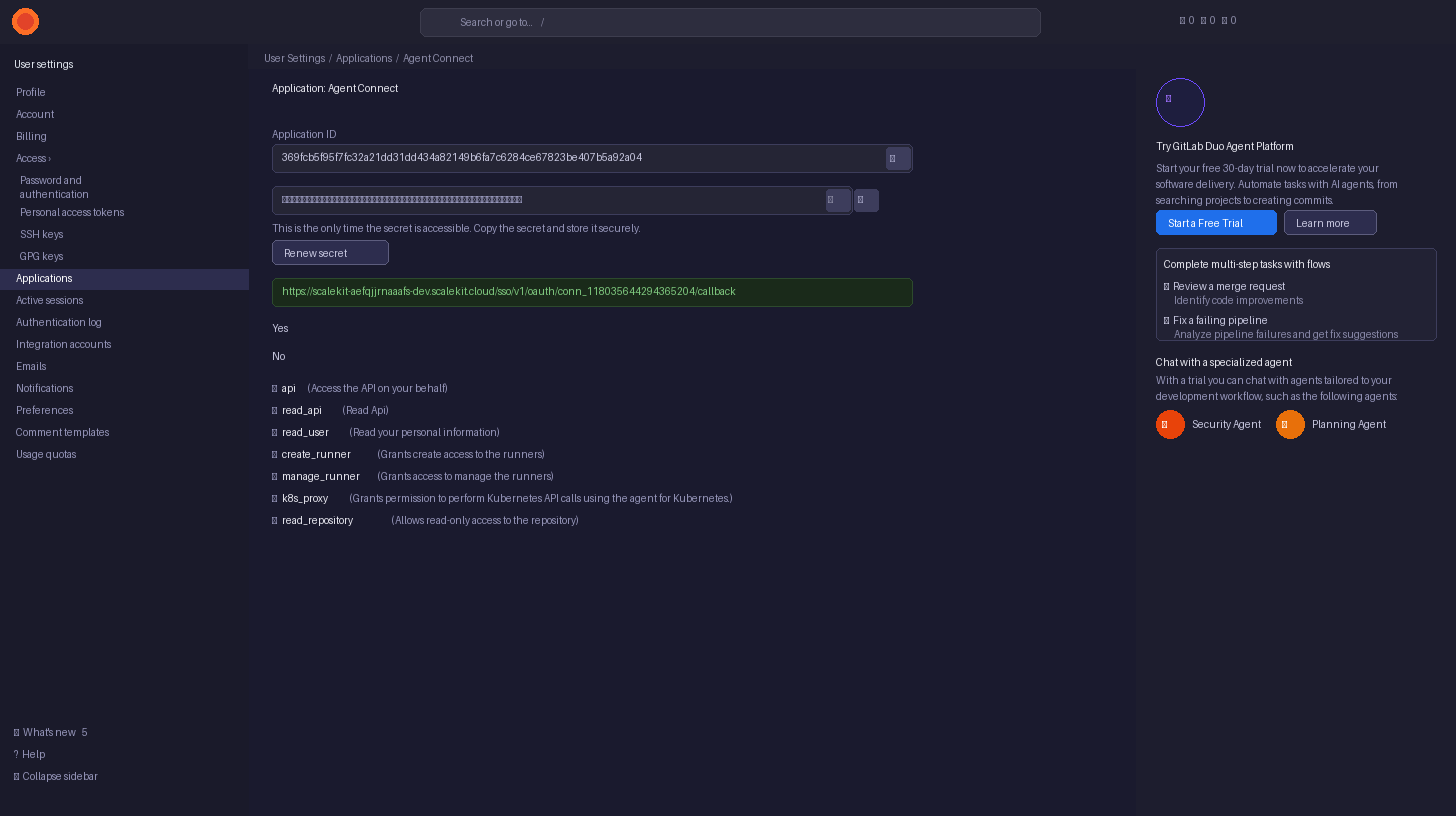
-
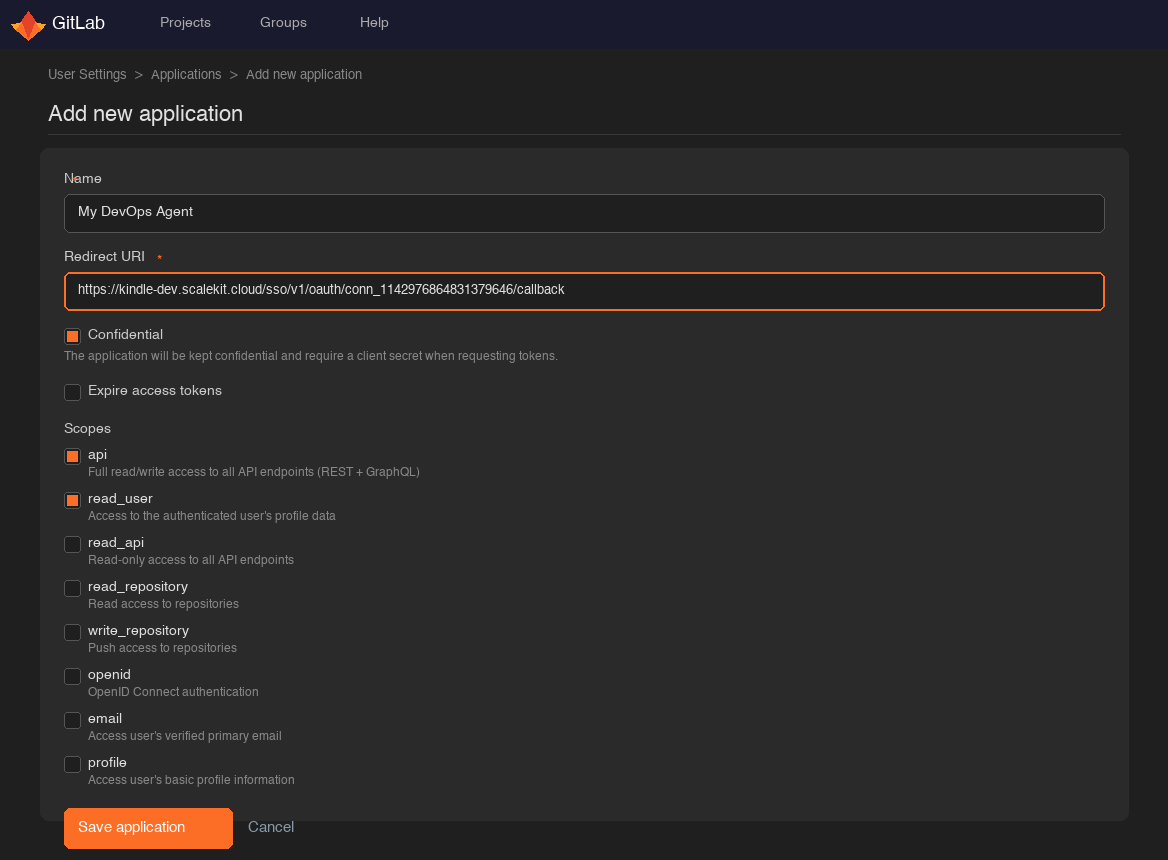
Go to GitLab Applications settings (User Settings → Applications) and open or create your OAuth application.
-
Paste the copied URI into the Redirect URI field and click Save application.
-
Under Scopes, select the permissions your agent needs:
Scope Access granted Use when apiFull read/write access to all API endpoints Most tools — recommended for full access read_userCurrent user’s profile gitlab_current_user_getonlyread_apiRead-only access to all API endpoints Read-only agents read_repositoryRead access to repositories File and commit reads only write_repositoryPush access to repositories gitlab_file_create,gitlab_file_update,gitlab_branch_create
-
-
Get client credentials
After saving the application, GitLab shows the Application ID and Secret on the application detail page:
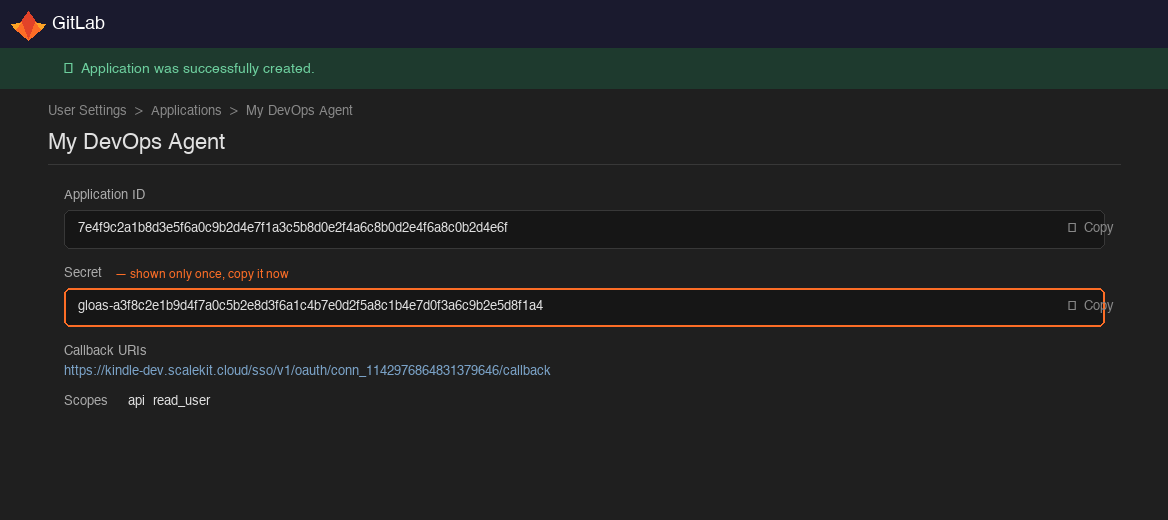
- Application ID — listed on the app’s main settings page
- Secret — shown only once after creation; if you lose it, regenerate it from the same page
-
Add credentials in Scalekit
-
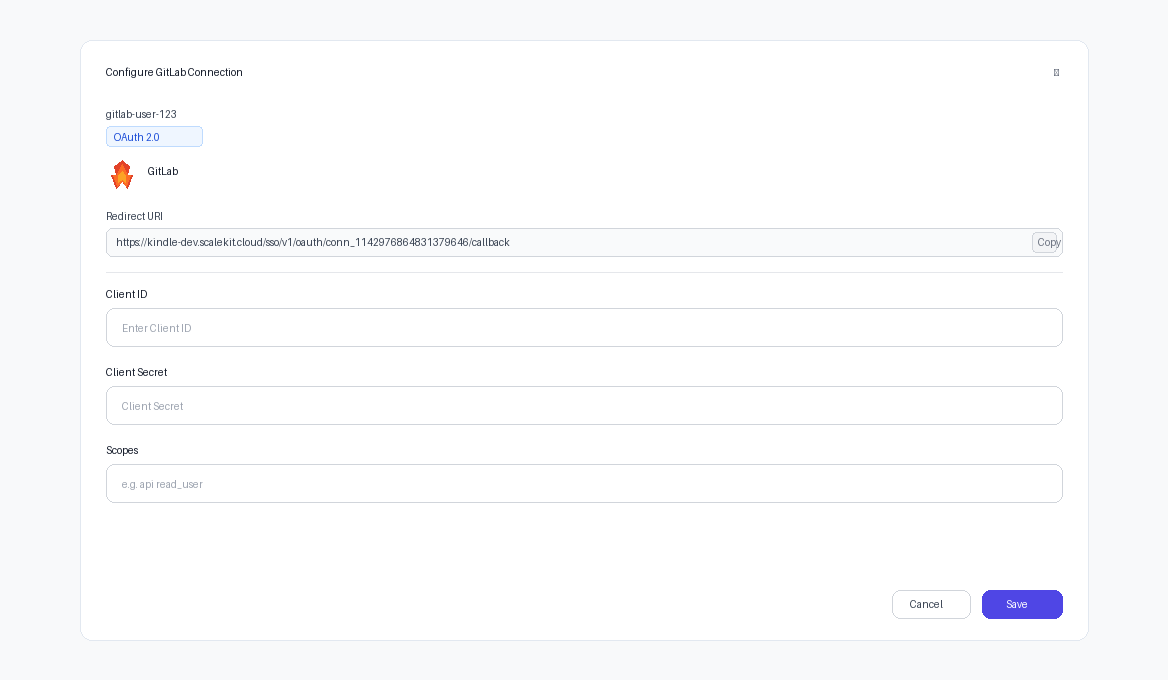
In Scalekit dashboard, go to AgentKit > Connections and open the connection you created.
-
Enter your credentials:
- Client ID — paste your GitLab Application ID
- Client Secret — paste your GitLab Secret
-
Click Save.
-
-
Authorize a user and make your first call
quickstart.mts import { ScalekitClient } from '@scalekit-sdk/node'import 'dotenv/config'import { createInterface } from 'node:readline/promises'const scalekit = new ScalekitClient(process.env.SCALEKIT_ENVIRONMENT_URL,process.env.SCALEKIT_CLIENT_ID,process.env.SCALEKIT_CLIENT_SECRET,)const actions = scalekit.actionsconst connector = 'gitlab'const identifier = 'user_123'// Generate an authorization link for the userconst { link } = await actions.getAuthorizationLink({ connectionName: connector, identifier })console.log('Authorize GitLab:', link)const rl = createInterface({ input: process.stdin, output: process.stdout })await rl.question('Press Enter after authorizing...')rl.close()// Make your first callconst result = await actions.executeTool({connector,identifier,toolName: 'gitlab_current_user_get',toolInput: {},})console.log(result)Terminal window npx tsx quickstart.mtsquickstart.py import osfrom scalekit import ScalekitClientfrom dotenv import load_dotenvload_dotenv()scalekit_client = ScalekitClient(env_url=os.getenv("SCALEKIT_ENVIRONMENT_URL"),client_id=os.getenv("SCALEKIT_CLIENT_ID"),client_secret=os.getenv("SCALEKIT_CLIENT_SECRET"),)actions = scalekit_client.actionsconnection_name = "gitlab"identifier = "user_123"# Generate an authorization link for the userlink_response = actions.get_authorization_link(connection_name=connection_name,identifier=identifier,)print("Authorize GitLab:", link_response.link)input("Press Enter after authorizing...")# Make your first callresult = actions.execute_tool(tool_input={},tool_name="gitlab_current_user_get",connection_name=connection_name,identifier=identifier,)print(result)Terminal window python quickstart.pyEach user signs in once. See Authorize a user for the full flow and statuses.
Tools
Pass the exact name toexecute_toolgitlab_branch_getGet details of a specific branch in a GitLab repository.Read-onlyGet Branch
Get details of a specific branch in a GitLab repository.
Inputs
branchstringrequired- The name of the branch.
idstringrequired- The project ID (numeric) or URL-encoded path.
gitlab_branches_listList repository branches for a GitLab project.Read-onlyList Branches
List repository branches for a GitLab project.
Inputs
idstringrequired- The project ID (numeric) or URL-encoded path.
pageinteger- Page number for pagination.
per_pageinteger- Number of results per page (max 100).
searchstring- Filter branches by name.
gitlab_commit_comments_listList comments on a specific commit.Read-onlyList Commit Comments
List comments on a specific commit.
Inputs
idstringrequired- The project ID (numeric) or URL-encoded path.
shastringrequired- The commit SHA.
gitlab_commit_diff_getGet the diff of a specific commit.Read-onlyGet Commit Diff
Get the diff of a specific commit.
Inputs
idstringrequired- The project ID (numeric) or URL-encoded path.
shastringrequired- The commit SHA.
gitlab_commit_getGet details of a specific commit by its SHA.Read-onlyGet Commit
Get details of a specific commit by its SHA.
Inputs
idstringrequired- The project ID (numeric) or URL-encoded path.
shastringrequired- The commit SHA.
gitlab_commit_merge_requests_listLists all merge requests associated with a specific commit SHA.Read-onlyList Merge Requests For Commit
Lists all merge requests associated with a specific commit SHA.
Inputs
idstringrequired- The project ID (numeric) or URL-encoded path.
shastringrequired- The commit SHA, or a branch/tag name, to find merge requests for.
pageinteger- Page number for pagination.
per_pageinteger- Number of results per page (max 100).
gitlab_commits_listList repository commits for a GitLab project.Read-onlyList Commits
List repository commits for a GitLab project.
Inputs
idstringrequired- The project ID (numeric) or URL-encoded path.
authorstring- Filter commits by author name or email.
pageinteger- Page number for pagination.
pathstring- Filter commits by file path.
per_pageinteger- Number of results per page (max 100).
ref_namestring- The branch or tag name to list commits from.
sincestring- Only commits after this date are returned (ISO 8601 format).
untilstring- Only commits before this date are returned (ISO 8601 format).
gitlab_compare_refsCompare two refs (branches, tags, or commits) in a GitLab repository.Read-onlyCompare Refs
Compare two refs (branches, tags, or commits) in a GitLab repository.
Inputs
fromstringrequired- The source branch, tag, or commit SHA to compare from.
idstringrequired- The project ID (numeric) or URL-encoded path.
tostringrequired- The target branch, tag, or commit SHA to compare to.
straightstring- Comparison method: 'true' for straight diff, 'false' for merge base.
gitlab_current_user_getGet the currently authenticated user's profile.Read-onlyGet Current User
Get the currently authenticated user's profile.
Inputs
This tool takes no inputs.
gitlab_current_user_ssh_keys_listList SSH keys for the currently authenticated user.Read-onlyList SSH Keys
List SSH keys for the currently authenticated user.
Inputs
This tool takes no inputs.
gitlab_deploy_keys_listList deploy keys for a GitLab project.Read-onlyList Deploy Keys
List deploy keys for a GitLab project.
Inputs
idstringrequired- The project ID (numeric) or URL-encoded path.
gitlab_file_getGet a file's content and metadata from a GitLab repository.Read-onlyGet File
Get a file's content and metadata from a GitLab repository.
Inputs
file_pathstringrequired- URL-encoded file path in the repository.
idstringrequired- The project ID (numeric) or URL-encoded path.
refstringrequired- The branch, tag, or commit SHA to get the file from.
gitlab_global_searchSearch globally across GitLab for projects, issues, merge requests, and more.Read-onlyGlobal Search
Search globally across GitLab for projects, issues, merge requests, and more.
Inputs
scopestringrequired- The scope to search in.
searchstringrequired- The search query string.
pageinteger- Page number for pagination.
per_pageinteger- Number of results per page (max 100).
gitlab_group_getGet a specific group by numeric ID or URL-encoded path.Read-onlyGet Group
Get a specific group by numeric ID or URL-encoded path.
Inputs
idstringrequired- The group ID (numeric) or URL-encoded path.
gitlab_group_members_listList members of a GitLab group.Read-onlyList Group Members
List members of a GitLab group.
Inputs
idstringrequired- The group ID (numeric) or URL-encoded path.
pageinteger- Page number for pagination.
per_pageinteger- Number of results per page (max 100).
querystring- Filter members by name.
gitlab_group_packages_listLists all packages published across all projects within a group's package registries.Read-onlyList Group Packages
Lists all packages published across all projects within a group's package registries.
Inputs
idstringrequired- The ID or URL-encoded path of the group.
exclude_subgroupsboolean- Whether to exclude packages from subgroups.
package_namestring- Filter packages by exact name.
package_typestring- Filter packages by format/type.one of
mavennpmconannugetpypicomposergenericgolangdebianrubygemshelmterraform_modulerpmml_modelcargo pageinteger- Page number for pagination.
per_pageinteger- Number of results per page (max 100).
gitlab_group_projects_listList projects belonging to a GitLab group.Read-onlyList Group Projects
List projects belonging to a GitLab group.
Inputs
idstringrequired- The group ID (numeric) or URL-encoded path.
pageinteger- Page number for pagination.
per_pageinteger- Number of results per page (max 100).
searchstring- Filter projects by name.
visibilitystring- Filter by visibility level: public, internal, or private.
gitlab_group_subgroups_listLists all subgroups nested directly or indirectly under a specified group.Read-onlyList Subgroups
Lists all subgroups nested directly or indirectly under a specified group.
Inputs
idstringrequired- The ID or URL-encoded path of the parent group.
all_availableboolean- When true, returns all accessible groups; when false, only groups the user is a member of.
pageinteger- Page number for pagination.
per_pageinteger- Number of results per page (max 100).
searchstring- Search for a specific subgroup by name.
gitlab_groups_listList groups accessible to the authenticated user.Read-onlyList Groups
List groups accessible to the authenticated user.
Inputs
min_access_levelinteger- Minimum access level filter (10=Guest, 20=Reporter, 30=Developer, 40=Maintainer, 50=Owner).
ownedstring- If 'true', limits to groups explicitly owned by the current user.
pageinteger- Page number for pagination.
per_pageinteger- Number of results per page (max 100).
searchstring- Search groups by name.
gitlab_issue_getGet a specific issue by its internal ID (IID).Read-onlyGet Issue
Get a specific issue by its internal ID (IID).
Inputs
idstringrequired- The project ID (numeric) or URL-encoded path.
issue_iidintegerrequired- The internal ID of the issue within the project.
gitlab_issue_labels_listList labels for a GitLab project.Read-onlyList Project Labels
List labels for a GitLab project.
Inputs
idstringrequired- The project ID (numeric) or URL-encoded path.
pageinteger- Page number for pagination.
per_pageinteger- Number of results per page (max 100).
gitlab_issue_links_listLists all issues linked to a specified issue, sorted by relationship creation time.Read-onlyList Issue Links
Lists all issues linked to a specified issue, sorted by relationship creation time.
Inputs
idstringrequired- The project ID (numeric) or URL-encoded path.
issue_iidintegerrequired- The internal ID of the issue.
gitlab_issue_notes_listList comments (notes) on a specific issue.Read-onlyList Issue Notes
List comments (notes) on a specific issue.
Inputs
idstringrequired- The project ID (numeric) or URL-encoded path.
issue_iidintegerrequired- The internal ID of the issue.
pageinteger- Page number for pagination.
per_pageinteger- Number of results per page (max 100).
gitlab_issue_time_stats_getRetrieves time tracking statistics for an issue, including time estimate and total time spent, in both seconds and human-readable format.Read-onlyGet Issue Time Stats
Retrieves time tracking statistics for an issue, including time estimate and total time spent, in both seconds and human-readable format.
Inputs
idstringrequired- The project ID (numeric) or URL-encoded path.
issue_iidintegerrequired- The internal ID of the issue.
gitlab_issues_listList issues for a GitLab project.Read-onlyList Issues
List issues for a GitLab project.
Inputs
idstringrequired- The project ID (numeric) or URL-encoded path.
assignee_idinteger- Filter issues by assignee user ID.
labelsstring- Filter issues by comma-separated label names.
milestonestring- Filter issues by milestone title.
order_bystring- Order issues by field (created_at, updated_at, priority).
pageinteger- Page number for pagination.
per_pageinteger- Number of results per page (max 100).
searchstring- Search issues by title or description.
sortstring- Sort order: asc or desc.
statestring- Filter issues by state: opened, closed, or all.
gitlab_job_artifacts_downloadDownload the artifacts archive of a specific CI/CD job.Read-onlyDownload Job Artifacts
Download the artifacts archive of a specific CI/CD job.
Inputs
idstringrequired- The project ID (numeric) or URL-encoded path.
job_idintegerrequired- The numeric ID of the job.
gitlab_job_getGet details of a specific CI/CD job.Read-onlyGet Job
Get details of a specific CI/CD job.
Inputs
idstringrequired- The project ID (numeric) or URL-encoded path.
job_idintegerrequired- The numeric ID of the job.
gitlab_job_log_getGet the log (trace) output of a specific CI/CD job.Read-onlyGet Job Log
Get the log (trace) output of a specific CI/CD job.
Inputs
idstringrequired- The project ID (numeric) or URL-encoded path.
job_idintegerrequired- The numeric ID of the job.
gitlab_jobs_listList all jobs for a GitLab project.Read-onlyList Project Jobs
List all jobs for a GitLab project.
Inputs
idstringrequired- The project ID (numeric) or URL-encoded path.
pageinteger- Page number for pagination.
per_pageinteger- Number of results per page (max 100).
scopestring- Filter jobs by scope/status.
gitlab_merge_request_approvals_getGet the approval state of a specific merge request.Read-onlyGet Merge Request Approvals
Get the approval state of a specific merge request.
Inputs
idstringrequired- The project ID (numeric) or URL-encoded path.
merge_request_iidintegerrequired- The internal ID of the merge request.
gitlab_merge_request_changes_getRetrieves the file changes (diff) for a merge request.Read-onlyGet Merge Request Changes
Retrieves the file changes (diff) for a merge request.
Inputs
idstringrequired- The project ID (numeric) or URL-encoded path.
merge_request_iidintegerrequired- The internal ID of the merge request.
unidiffboolean- Return the diff in Unified diff format instead of GitLab's default format.
gitlab_merge_request_closes_issues_listLists all issues that will be closed automatically when a merge request is merged.Read-onlyList Issues Closed By Merge Request
Lists all issues that will be closed automatically when a merge request is merged.
Inputs
idstringrequired- The project ID (numeric) or URL-encoded path.
merge_request_iidintegerrequired- The internal ID of the merge request.
pageinteger- Page number for pagination.
per_pageinteger- Number of results per page (max 100).
gitlab_merge_request_commits_listList commits in a specific merge request.Read-onlyList Merge Request Commits
List commits in a specific merge request.
Inputs
idstringrequired- The project ID (numeric) or URL-encoded path.
merge_request_iidintegerrequired- The internal ID of the merge request.
gitlab_merge_request_diff_getGet the diffs of a specific merge request.Read-onlyGet Merge Request Diff
Get the diffs of a specific merge request.
Inputs
idstringrequired- The project ID (numeric) or URL-encoded path.
merge_request_iidintegerrequired- The internal ID of the merge request.
gitlab_merge_request_discussions_listList threaded discussions on a merge request via the Discussions API, including each thread's individual_note flag and note-level resolvable/resolved state.Read-onlyList Merge Request Discussions
List threaded discussions on a merge request via the Discussions API, including each thread's individual_note flag and note-level resolvable/resolved state. Existing tools (gitlab_merge_request_notes_list) only cover flat notes, not this threaded structure.
Inputs
idstringrequired- The project ID (numeric) or URL-encoded path.
merge_request_iidintegerrequired- The internal ID of the merge request.
pageinteger- Page number for pagination.
per_pageinteger- Number of results per page (max 100).
gitlab_merge_request_getGet a specific merge request by its internal ID (IID).Read-onlyGet Merge Request
Get a specific merge request by its internal ID (IID).
Inputs
idstringrequired- The project ID (numeric) or URL-encoded path.
merge_request_iidintegerrequired- The internal ID of the merge request within the project.
gitlab_merge_request_notes_listList comments on a specific merge request.Read-onlyList Merge Request Notes
List comments on a specific merge request.
Inputs
idstringrequired- The project ID (numeric) or URL-encoded path.
merge_request_iidintegerrequired- The internal ID of the merge request.
pageinteger- Page number for pagination.
per_pageinteger- Number of results per page (max 100).
gitlab_merge_request_pipelines_listLists all CI/CD pipelines that have run for a merge request.Read-onlyList Merge Request Pipelines
Lists all CI/CD pipelines that have run for a merge request.
Inputs
idstringrequired- The project ID (numeric) or URL-encoded path.
merge_request_iidintegerrequired- The internal ID of the merge request.
gitlab_merge_request_reviewers_listRetrieves the reviewers assigned to a merge request.Read-onlyList Merge Request Reviewers
Retrieves the reviewers assigned to a merge request.
Inputs
idstringrequired- The project ID (numeric) or URL-encoded path.
merge_request_iidintegerrequired- The internal ID of the merge request.
gitlab_merge_request_time_stats_getRetrieves time tracking statistics for a merge request, including time estimate and total time spent.Read-onlyGet Merge Request Time Stats
Retrieves time tracking statistics for a merge request, including time estimate and total time spent.
Inputs
idstringrequired- The project ID (numeric) or URL-encoded path.
merge_request_iidintegerrequired- The internal ID of the merge request.
gitlab_merge_requests_listList merge requests for a GitLab project.Read-onlyList Merge Requests
List merge requests for a GitLab project.
Inputs
idstringrequired- The project ID (numeric) or URL-encoded path.
labelsstring- Filter by comma-separated label names.
order_bystring- Order MRs by field (created_at, updated_at, title).
pageinteger- Page number for pagination.
per_pageinteger- Number of results per page (max 100).
searchstring- Search MRs by title or description.
sortstring- Sort order: asc or desc.
source_branchstring- Filter by source branch name.
statestring- Filter by state: opened, closed, locked, merged, or all.
target_branchstring- Filter by target branch name.
gitlab_milestone_getGet a specific project milestone.Read-onlyGet Milestone
Get a specific project milestone.
Inputs
idstringrequired- The project ID (numeric) or URL-encoded path.
milestone_idintegerrequired- The numeric ID of the milestone.
gitlab_milestones_listList milestones for a GitLab project.Read-onlyList Milestones
List milestones for a GitLab project.
Inputs
idstringrequired- The project ID (numeric) or URL-encoded path.
pageinteger- Page number for pagination.
per_pageinteger- Number of results per page (max 100).
searchstring- Filter milestones by title.
statestring- Filter milestones by state: active or closed.
gitlab_namespaces_listList namespaces available to the current user (personal namespaces and groups).Read-onlyList Namespaces
List namespaces available to the current user (personal namespaces and groups).
Inputs
pageinteger- Page number for pagination.
per_pageinteger- Number of results per page (max 100).
searchstring- Filter namespaces by name.
gitlab_package_pipelines_listLists the CI/CD pipelines that published a specific package, sorted by pipeline ID descending.Read-onlyList Package Pipelines
Lists the CI/CD pipelines that published a specific package, sorted by pipeline ID descending.
Inputs
idstringrequired- The project ID (numeric) or URL-encoded path.
package_idintegerrequired- The ID of the package.
pageinteger- Page number for pagination.
per_pageinteger- Number of results per page (max 100).
gitlab_pipeline_getGet details of a specific pipeline.Read-onlyGet Pipeline
Get details of a specific pipeline.
Inputs
idstringrequired- The project ID (numeric) or URL-encoded path.
pipeline_idintegerrequired- The numeric ID of the pipeline.
gitlab_pipeline_jobs_listList jobs for a specific pipeline.Read-onlyList Pipeline Jobs
List jobs for a specific pipeline.
Inputs
idstringrequired- The project ID (numeric) or URL-encoded path.
pipeline_idintegerrequired- The numeric ID of the pipeline.
pageinteger- Page number for pagination.
per_pageinteger- Number of results per page (max 100).
scopestring- Filter jobs by scope.
gitlab_pipeline_latest_getRetrieves the most recent pipeline for a given ref (branch or tag).Read-onlyGet Latest Pipeline
Retrieves the most recent pipeline for a given ref (branch or tag). Uses the project's default branch if no ref is specified.
Inputs
idstringrequired- The project ID (numeric) or URL-encoded path.
refstring- The branch or tag to find the latest pipeline for. Defaults to the project's default branch.
gitlab_pipeline_schedule_getRetrieves the details of a specific pipeline schedule.Read-onlyGet Pipeline Schedule
Retrieves the details of a specific pipeline schedule.
Inputs
idstringrequired- The project ID (numeric) or URL-encoded path.
pipeline_schedule_idintegerrequired- The ID of the pipeline schedule.
gitlab_pipeline_schedules_listLists all scheduled (cron-triggered) pipelines configured for a project.Read-onlyList Pipeline Schedules
Lists all scheduled (cron-triggered) pipelines configured for a project.
Inputs
idstringrequired- The project ID (numeric) or URL-encoded path.
gitlab_pipeline_test_report_getRetrieves the full JUnit test report for a pipeline, including individual test case results.Read-onlyGet Pipeline Test Report
Retrieves the full JUnit test report for a pipeline, including individual test case results.
Inputs
idstringrequired- The project ID (numeric) or URL-encoded path.
pipeline_idintegerrequired- The ID of the pipeline.
gitlab_pipeline_test_report_summary_getRetrieves a summarized test report for a pipeline, including pass/fail/error counts without full test case detail.Read-onlyGet Pipeline Test Report Summary
Retrieves a summarized test report for a pipeline, including pass/fail/error counts without full test case detail.
Inputs
idstringrequired- The project ID (numeric) or URL-encoded path.
pipeline_idintegerrequired- The ID of the pipeline.
gitlab_pipelines_listList pipelines for a GitLab project.Read-onlyList Pipelines
List pipelines for a GitLab project.
Inputs
idstringrequired- The project ID (numeric) or URL-encoded path.
pageinteger- Page number for pagination.
per_pageinteger- Number of results per page (max 100).
refstring- Filter pipelines by branch or tag name.
shastring- Filter pipelines by commit SHA.
statusstring- Filter by pipeline status.
gitlab_project_access_tokens_listList existing project access tokens, with filters for state, search, expiry/creation/last-used windows, and sort order.Read-onlyList Project Access Tokens
List existing project access tokens, with filters for state, search, expiry/creation/last-used windows, and sort order. Never returns token secrets — those are only shown once, at creation.
Inputs
idstringrequired- The project ID (numeric) or URL-encoded path.
created_afterstring- Only return tokens created after this datetime (ISO 8601).
created_beforestring- Only return tokens created before this datetime (ISO 8601).
expires_afterstring- Only return tokens expiring after this date (ISO 8601).
expires_beforestring- Only return tokens expiring before this date (ISO 8601).
last_used_afterstring- Only return tokens last used after this datetime (ISO 8601).
last_used_beforestring- Only return tokens last used before this datetime (ISO 8601).
pageinteger- Page number for pagination.
per_pageinteger- Number of results per page (max 100).
revokedboolean- Filter by whether the token has been revoked.
searchstring- Search by token name.
sortstring- Sort order for the results.one of
created_asccreated_descexpires_ascexpires_desclast_used_asclast_used_descname_ascname_desc statestring- Filter tokens by state.one of
activeinactive
gitlab_project_forks_listList forks of a GitLab project.Read-onlyList Project Forks
List forks of a GitLab project.
Inputs
idstringrequired- The project ID (numeric) or URL-encoded path.
pageinteger- Page number for pagination.
per_pageinteger- Number of results per page (max 100).
gitlab_project_getGet a specific project by numeric ID or URL-encoded namespace/project path.Read-onlyGet Project
Get a specific project by numeric ID or URL-encoded namespace/project path.
Inputs
idstringrequired- The project ID (numeric) or URL-encoded path (e.g. 'namespace%2Fproject').
gitlab_project_languages_getRetrieves the programming languages used in a project's repository, along with the percentage of the codebase each language represents.Read-onlyGet Project Languages
Retrieves the programming languages used in a project's repository, along with the percentage of the codebase each language represents.
Inputs
idstringrequired- The project ID (numeric) or URL-encoded path.
gitlab_project_members_listList members of a GitLab project.Read-onlyList Project Members
List members of a GitLab project.
Inputs
idstringrequired- The project ID (numeric) or URL-encoded path.
pageinteger- Page number for pagination.
per_pageinteger- Number of results per page (max 100).
querystring- Filter members by name.
gitlab_project_package_getRetrieves a specific package published to a project's package registry.Read-onlyGet Project Package
Retrieves a specific package published to a project's package registry.
Inputs
idstringrequired- The project ID (numeric) or URL-encoded path.
package_idintegerrequired- The ID of the package.
gitlab_project_packages_listLists all packages published to a project's package registry, across all package formats.Read-onlyList Project Packages
Lists all packages published to a project's package registry, across all package formats.
Inputs
idstringrequired- The project ID (numeric) or URL-encoded path.
order_bystring- Field to order results by: created_at, name, version, or type.one of
created_atnameversiontype package_namestring- Filter packages by exact name.
package_typestring- Filter packages by format/type.one of
mavennpmconannugetpypicomposergenericgolangdebianrubygemshelmterraform_modulerpmml_modelcargo pageinteger- Page number for pagination.
per_pageinteger- Number of results per page (max 100).
sortstring- Sort direction: asc or desc.one of
ascdesc
gitlab_project_searchSearch within a specific GitLab project for issues, merge requests, commits, code, and more.Read-onlyProject Search
Search within a specific GitLab project for issues, merge requests, commits, code, and more.
Inputs
idstringrequired- The project ID (numeric) or URL-encoded path.
scopestringrequired- The scope to search in within the project.
searchstringrequired- The search query string.
pageinteger- Page number for pagination.
per_pageinteger- Number of results per page (max 100).
refstring- The branch or tag name to search (for blobs or commits scope).
gitlab_project_snippet_getGet a specific snippet from a GitLab project.Read-onlyGet Project Snippet
Get a specific snippet from a GitLab project.
Inputs
idstringrequired- The project ID (numeric) or URL-encoded path.
snippet_idintegerrequired- The numeric ID of the snippet.
gitlab_project_snippets_listList all snippets in a GitLab project.Read-onlyList Project Snippets
List all snippets in a GitLab project.
Inputs
idstringrequired- The project ID (numeric) or URL-encoded path.
pageinteger- Page number for pagination.
per_pageinteger- Number of results per page (max 100).
gitlab_project_variable_getGet a specific CI/CD variable for a GitLab project.Read-onlyGet Project CI/CD Variable
Get a specific CI/CD variable for a GitLab project.
Inputs
idstringrequired- The project ID (numeric) or URL-encoded path.
keystringrequired- The variable key name.
gitlab_project_variables_listList all CI/CD variables for a GitLab project.Read-onlyList Project CI/CD Variables
List all CI/CD variables for a GitLab project.
Inputs
idstringrequired- The project ID (numeric) or URL-encoded path.
gitlab_project_webhook_getGet a specific webhook for a GitLab project.Read-onlyGet Project Webhook
Get a specific webhook for a GitLab project.
Inputs
hook_idintegerrequired- The numeric ID of the webhook.
idstringrequired- The project ID (numeric) or URL-encoded path.
gitlab_project_webhooks_listList all webhooks configured for a GitLab project.Read-onlyList Project Webhooks
List all webhooks configured for a GitLab project.
Inputs
idstringrequired- The project ID (numeric) or URL-encoded path.
gitlab_projects_listList all projects accessible to the authenticated user.Read-onlyList Projects
List all projects accessible to the authenticated user. Supports filtering by search, ownership, membership, and visibility.
Inputs
membershipstring- If 'true', limits by projects where the user is a member.
order_bystring- Order projects by a field (e.g. id, name, created_at).
ownedstring- If 'true', limits by projects explicitly owned by the current user.
pageinteger- Page number for pagination.
per_pageinteger- Number of results per page (max 100).
searchstring- Search query to filter projects by name.
sortstring- Sort order: 'asc' or 'desc'.
visibilitystring- Filter by visibility level: public, internal, or private.
gitlab_protected_branches_listList protected branches for a project via the modern Protected Branches API, including each branch's push/merge/unprotect access levels.Read-onlyList Protected Branches
List protected branches for a project via the modern Protected Branches API, including each branch's push/merge/unprotect access levels. Distinct from gitlab_branch_protect/gitlab_branch_unprotect, which use the legacy protect toggle and don't expose per-role access levels.
Inputs
idstringrequired- The project ID (numeric) or URL-encoded path.
pageinteger- Page number for pagination.
per_pageinteger- Number of results per page (max 100).
searchstring- Name or part of the name of protected branches to search for.
gitlab_registry_repositories_listList container registry repositories for a project.Read-onlyList Registry Repositories
List container registry repositories for a project. The entire Container Registry API is otherwise uncovered by existing tools.
Inputs
idstringrequired- The project ID (numeric) or URL-encoded path.
pageinteger- Page number for pagination.
per_pageinteger- Number of results per page (max 100).
tagsboolean- If true, each repository includes an array of its tags in the response.
tags_countboolean- If true, each repository includes a tags_count field in the response.
gitlab_release_getGet a specific release by tag name.Read-onlyGet Release
Get a specific release by tag name.
Inputs
idstringrequired- The project ID (numeric) or URL-encoded path.
tag_namestringrequired- The tag name for the release.
gitlab_release_link_getRetrieves a specific asset link from a release.Read-onlyGet Release Link
Retrieves a specific asset link from a release.
Inputs
idstringrequired- The project ID (numeric) or URL-encoded path.
link_idintegerrequired- The ID of the release link.
tag_namestringrequired- The tag associated with the release.
gitlab_release_links_listLists all asset links attached to a release.Read-onlyList Release Links
Lists all asset links attached to a release.
Inputs
idstringrequired- The project ID (numeric) or URL-encoded path.
tag_namestringrequired- The tag associated with the release.
pageinteger- Page number for pagination.
per_pageinteger- Number of results per page (max 100).
gitlab_releases_listList releases for a GitLab project.Read-onlyList Releases
List releases for a GitLab project.
Inputs
idstringrequired- The project ID (numeric) or URL-encoded path.
pageinteger- Page number for pagination.
per_pageinteger- Number of results per page (max 100).
gitlab_repository_tree_listList files and directories in a GitLab repository.Read-onlyList Repository Tree
List files and directories in a GitLab repository.
Inputs
idstringrequired- The project ID (numeric) or URL-encoded path.
pageinteger- Page number for pagination.
pathstring- Folder path to list files from.
per_pageinteger- Number of results per page (max 100).
recursivestring- If 'true', lists files recursively.
refstring- The branch, tag, or commit SHA to list files from.
gitlab_snippet_getRetrieves a personal snippet by ID.Read-onlyGet Snippet
Retrieves a personal snippet by ID.
Inputs
snippet_idintegerrequired- The ID of the snippet to retrieve.
gitlab_snippets_listLists all personal snippets owned by the currently authenticated user.Read-onlyList My Snippets
Lists all personal snippets owned by the currently authenticated user.
Inputs
created_afterstring- Only return snippets created after this timestamp.
created_beforestring- Only return snippets created before this timestamp.
pageinteger- Page number for pagination.
per_pageinteger- Number of results per page (max 100).
gitlab_tag_getGet details of a specific repository tag.Read-onlyGet Tag
Get details of a specific repository tag.
Inputs
idstringrequired- The project ID (numeric) or URL-encoded path.
tag_namestringrequired- The name of the tag.
gitlab_todos_listList the authenticated user's GitLab to-do items, with filters for action/author/project/group/state/type.Read-onlyList To-Dos
List the authenticated user's GitLab to-do items, with filters for action/author/project/group/state/type.
Inputs
actionstring- Filter by the action that generated the to-do.one of
assignedmentionedbuild_failedmarkedapproval_requiredunmergeabledirectly_addressedmerge_train_removedmember_access_requested author_idinteger- Filter by the numeric ID of the user who triggered the to-do.
group_idinteger- Filter by the numeric ID of the group associated with the to-do.
pageinteger- Page number for pagination.
per_pageinteger- Number of results per page (max 100).
project_idinteger- Filter by the numeric ID of the project associated with the to-do.
statestring- Filter by to-do state.one of
pendingdone typestring- Filter by the type of resource the to-do is about.one of
IssueMergeRequestCommitEpicDesignManagement::DesignAlertManagement::AlertProjectNamespaceVulnerabilityWikiPage::Meta
gitlab_user_getGet a specific user by ID.Read-onlyGet User
Get a specific user by ID.
Inputs
idintegerrequired- The ID of the user.
gitlab_user_projects_listList projects owned by a specific user.Read-onlyList User Projects
List projects owned by a specific user.
Inputs
user_idintegerrequired- The numeric ID of the user whose projects to list.
pageinteger- Page number for pagination.
per_pageinteger- Number of results per page (max 100).
gitlab_user_status_getRetrieves the status message and emoji of a user.Read-onlyGet User Status
Retrieves the status message and emoji of a user. Does not require authentication.
Inputs
user_idstringrequired- The ID or username of the user.
gitlab_users_listList users.Read-onlyList Users
List users. Supports filtering by search term, username, and active status.
Inputs
activestring- Filter by active status. Use 'true' or 'false'.
pageinteger- Page number for pagination.
per_pageinteger- Number of results per page (max 100).
searchstring- Search users by name or email.
usernamestring- Filter by exact username.
gitlab_wiki_page_getRetrieves a specific wiki page for a project by its slug.Read-onlyGet Wiki Page
Retrieves a specific wiki page for a project by its slug.
Inputs
idstringrequired- The project ID (numeric) or URL-encoded path.
slugstringrequired- The slug of the wiki page to retrieve.
render_htmlboolean- Whether to render the page content to HTML in the response.
versionstring- A specific version hash of the wiki page to retrieve.
gitlab_wiki_pages_listLists all wiki pages for a project.Read-onlyList Wiki Pages
Lists all wiki pages for a project.
Inputs
idstringrequired- The project ID (numeric) or URL-encoded path.
with_contentboolean- Whether to include each page's rendered content in the response.
gitlab_branch_createCreate a new branch in a GitLab repository.WriteCreate Branch
Create a new branch in a GitLab repository.
Inputs
branchstringrequired- The name of the new branch.
idstringrequired- The project ID (numeric) or URL-encoded path.
refstringrequired- The source branch, tag, or commit SHA to branch from.
gitlab_branch_protectProtects a repository branch, restricting who can push to or merge into it (legacy API — prefer Protected Branches for fine-grained access levels).WriteProtect Branch
Protects a repository branch, restricting who can push to or merge into it (legacy API — prefer Protected Branches for fine-grained access levels).
Inputs
branchstringrequired- The name of the branch to protect.
idstringrequired- The project ID (numeric) or URL-encoded path.
developers_can_mergeboolean- Whether developers are allowed to merge into the protected branch.
developers_can_pushboolean- Whether developers are allowed to push directly to the protected branch.
gitlab_branch_unprotectRemoves protection from a repository branch, allowing any member with write access to push and merge freely.WriteUnprotect Branch
Removes protection from a repository branch, allowing any member with write access to push and merge freely.
- Idempotent
Inputs
branchstringrequired- The name of the branch to unprotect.
idstringrequired- The project ID (numeric) or URL-encoded path.
gitlab_commit_comment_createAdd a comment to a specific commit.WriteCreate Commit Comment
Add a comment to a specific commit.
Inputs
idstringrequired- The project ID (numeric) or URL-encoded path.
notestringrequired- The comment text.
shastringrequired- The commit SHA.
lineinteger- Line number for an inline comment.
pathstring- File path for an inline comment.
gitlab_commit_createCreates a new commit on a branch by combining one or more file actions (create, update, delete, move, or chmod) in a single atomic commit.WriteCreate Commit
Creates a new commit on a branch by combining one or more file actions (create, update, delete, move, or chmod) in a single atomic commit. Can also create the target branch from a starting ref.
Inputs
actionsarrayrequired- List of file actions to include in the commit. Each action has action (create/update/delete/move/chmod), file_path, and content (for create/update).
branchstringrequired- The branch name to commit to. Created from start_branch/start_sha if it does not yet exist.
commit_messagestringrequired- The commit message.
idstringrequired- The project ID (numeric) or URL-encoded path.
author_emailstring- Email address to attribute the commit to.
author_namestring- Name to attribute the commit to.
start_branchstring- The branch to start the new commit from, if branch does not already exist.
gitlab_deploy_key_createCreate a new deploy key for a GitLab project.WriteCreate Deploy Key
Create a new deploy key for a GitLab project.
Inputs
idstringrequired- The project ID (numeric) or URL-encoded path.
keystringrequired- The SSH public key content.
titlestringrequired- A descriptive title for the deploy key.
can_pushstring- If 'true', the deploy key has write access.
gitlab_file_createCreate a new file in a GitLab repository.WriteCreate File
Create a new file in a GitLab repository.
Inputs
branchstringrequired- The branch to create the file on.
commit_messagestringrequired- The commit message for creating this file.
contentstringrequired- The file content (plain text or base64 encoded).
file_pathstringrequired- URL-encoded file path in the repository.
idstringrequired- The project ID (numeric) or URL-encoded path.
author_emailstring- The author's email for the commit.
author_namestring- The author's name for the commit.
encodingstring- The encoding type: 'text' or 'base64'.
gitlab_file_updateUpdate an existing file in a GitLab repository.WriteUpdate File
Update an existing file in a GitLab repository.
- Idempotent
Inputs
branchstringrequired- The branch to update the file on.
commit_messagestringrequired- The commit message for updating this file.
contentstringrequired- The new file content.
file_pathstringrequired- URL-encoded file path in the repository.
idstringrequired- The project ID (numeric) or URL-encoded path.
last_commit_idstring- Last known file commit ID (for conflict detection).
gitlab_group_createCreate a new GitLab group or subgroup.WriteCreate Group
Create a new GitLab group or subgroup.
Inputs
namestringrequired- The name of the group.
pathstringrequired- URL-friendly path slug for the group.
descriptionstring- Optional group description.
parent_idinteger- ID of the parent group (for subgroups).
visibilitystring- Visibility level: private, internal, or public.
gitlab_group_member_addAdd a member to a GitLab group.WriteAdd Group Member
Add a member to a GitLab group.
Inputs
access_levelintegerrequired- Access level for the member. 10=Guest, 20=Reporter, 30=Developer, 40=Maintainer, 50=Owner.
idstringrequired- The group ID (numeric) or URL-encoded path.
user_idintegerrequired- The numeric ID of the user to add.
gitlab_group_transferTransfers a group to another parent group, or promotes a subgroup to a top-level group when no target is given.WriteTransfer Group
Transfers a group to another parent group, or promotes a subgroup to a top-level group when no target is given.
Inputs
idstringrequired- The ID or URL-encoded path of the group to transfer.
group_idinteger- The ID of the destination parent group. Omit to promote this group to top-level.
gitlab_group_updateUpdate a GitLab group's settings.WriteUpdate Group
Update a GitLab group's settings.
- Idempotent
Inputs
idstringrequired- The group ID (numeric) or URL-encoded path.
descriptionstring- Updated group description.
namestring- New name for the group.
visibilitystring- New visibility level: private, internal, or public.
gitlab_issue_createCreate a new issue in a GitLab project.WriteCreate Issue
Create a new issue in a GitLab project.
Inputs
idstringrequired- The project ID (numeric) or URL-encoded path.
titlestringrequired- The title of the issue.
assignee_idsstring- Comma-separated list of user IDs to assign.
descriptionstring- Detailed description of the issue (Markdown supported).
due_datestring- Due date for the issue in YYYY-MM-DD format.
labelsstring- Comma-separated list of label names to apply.
milestone_idinteger- The ID of the milestone to assign.
gitlab_issue_link_createCreates a two-way relationship (relates_to, blocks, or is_blocked_by) between two issues.WriteCreate Issue Link
Creates a two-way relationship (relates_to, blocks, or is_blocked_by) between two issues. The user must be able to update both issues.
Inputs
idstringrequired- The project ID (numeric) or URL-encoded path.
issue_iidintegerrequired- The internal ID of the source issue.
target_issue_iidstringrequired- The internal ID of the target issue to link to.
target_project_idstringrequired- The ID of the project containing the target issue.
link_typestring- The type of relation: relates_to, blocks, or is_blocked_by. Defaults to relates_to.one of
relates_toblocksis_blocked_by
gitlab_issue_moveMoves an issue to a different project.WriteMove Issue
Moves an issue to a different project. Fails if the target project is the same as the source, or if the user lacks sufficient permissions.
Inputs
idstringrequired- The project ID (numeric) or URL-encoded path.
issue_iidintegerrequired- The internal ID of the issue to move.
to_project_idintegerrequired- The ID of the destination project.
gitlab_issue_note_createAdd a comment to a specific issue.WriteCreate Issue Note
Add a comment to a specific issue.
Inputs
bodystringrequired- The comment text (Markdown supported).
idstringrequired- The project ID (numeric) or URL-encoded path.
issue_iidintegerrequired- The internal ID of the issue.
gitlab_issue_note_updateUpdate a comment on a specific issue.WriteUpdate Issue Note
Update a comment on a specific issue.
- Idempotent
Inputs
bodystringrequired- The updated comment text (Markdown supported).
idstringrequired- The project ID (numeric) or URL-encoded path.
issue_iidintegerrequired- The internal ID of the issue.
note_idintegerrequired- The ID of the note to update.
gitlab_issue_subscribeSubscribes the currently authenticated user to an issue so they receive notifications on future changes.WriteSubscribe To Issue
Subscribes the currently authenticated user to an issue so they receive notifications on future changes.
Inputs
idstringrequired- The project ID (numeric) or URL-encoded path.
issue_iidintegerrequired- The internal ID of the issue.
gitlab_issue_time_estimate_setSets an estimated amount of work for an issue, using GitLab's human-readable duration format (e.g.WriteSet Issue Time Estimate
Sets an estimated amount of work for an issue, using GitLab's human-readable duration format (e.g. 3h30m).
Inputs
durationstringrequired- The estimated duration in human-readable format, e.g. 3h30m.
idstringrequired- The project ID (numeric) or URL-encoded path.
issue_iidintegerrequired- The internal ID of the issue.
gitlab_issue_unsubscribeUnsubscribes the currently authenticated user from an issue, stopping future change notifications.WriteUnsubscribe From Issue
Unsubscribes the currently authenticated user from an issue, stopping future change notifications.
- Idempotent
Inputs
idstringrequired- The project ID (numeric) or URL-encoded path.
issue_iidintegerrequired- The internal ID of the issue.
gitlab_issue_updateUpdate an existing issue in a GitLab project.WriteUpdate Issue
Update an existing issue in a GitLab project.
- Idempotent
Inputs
idstringrequired- The project ID (numeric) or URL-encoded path.
issue_iidintegerrequired- The internal ID of the issue within the project.
assignee_idsstring- Comma-separated list of user IDs to assign.
descriptionstring- Updated description of the issue.
labelsstring- Comma-separated list of label names.
state_eventstring- State transition: 'close' to close, 'reopen' to reopen.
titlestring- New title for the issue.
gitlab_job_artifacts_keepMarks a job's artifacts to be retained indefinitely, preventing them from being automatically deleted when they reach their expiration date.WriteRetain Job Artifacts
Marks a job's artifacts to be retained indefinitely, preventing them from being automatically deleted when they reach their expiration date.
Inputs
idstringrequired- The project ID (numeric) or URL-encoded path.
job_idintegerrequired- The ID of the job whose artifacts should be retained.
gitlab_job_cancelCancel a specific CI/CD job.WriteCancel Job
Cancel a specific CI/CD job.
Inputs
idstringrequired- The project ID (numeric) or URL-encoded path.
job_idintegerrequired- The numeric ID of the job to cancel.
gitlab_job_playTriggers a job that is in the manual status, starting its execution.WriteRun Job
Triggers a job that is in the manual status, starting its execution.
Inputs
idstringrequired- The project ID (numeric) or URL-encoded path.
job_idintegerrequired- The ID of the manual job to run.
gitlab_job_retryRetry a specific CI/CD job.WriteRetry Job
Retry a specific CI/CD job.
Inputs
idstringrequired- The project ID (numeric) or URL-encoded path.
job_idintegerrequired- The numeric ID of the job to retry.
gitlab_label_createCreate a new label in a GitLab project.WriteCreate Label
Create a new label in a GitLab project.
Inputs
colorstringrequired- The color for the label in hex format (e.g. #FF0000).
idstringrequired- The project ID (numeric) or URL-encoded path.
namestringrequired- The name of the label.
descriptionstring- Optional description for the label.
gitlab_merge_request_approveApprove a merge request.WriteApprove Merge Request
Approve a merge request.
Inputs
idstringrequired- The project ID (numeric) or URL-encoded path.
merge_request_iidintegerrequired- The internal ID of the merge request.
gitlab_merge_request_createCreate a new merge request in a GitLab project.WriteCreate Merge Request
Create a new merge request in a GitLab project.
Inputs
idstringrequired- The project ID (numeric) or URL-encoded path.
source_branchstringrequired- The source branch name.
target_branchstringrequired- The target branch name.
titlestringrequired- The title of the merge request.
assignee_idinteger- The numeric ID of the user to assign.
descriptionstring- Description for the merge request (Markdown supported).
labelsstring- Comma-separated list of label names.
remove_source_branchstring- If 'true', removes the source branch after merging.
squashstring- If 'true', squashes all commits into one on merge.
gitlab_merge_request_discussion_resolveResolve or reopen an entire merge-request review thread — a common code-review action with no equivalent among existing note/approval tools.WriteResolve Merge Request Discussion
Resolve or reopen an entire merge-request review thread — a common code-review action with no equivalent among existing note/approval tools.
- Idempotent
Inputs
discussion_idstringrequired- The ID of the discussion (thread) to resolve or reopen.
idstringrequired- The project ID (numeric) or URL-encoded path.
merge_request_iidintegerrequired- The internal ID of the merge request.
resolvedbooleanrequired- If true, resolves the discussion. If false, reopens it.
gitlab_merge_request_mergeMerge an approved merge request in a GitLab project.WriteMerge a Merge Request
Merge an approved merge request in a GitLab project.
Inputs
idstringrequired- The project ID (numeric) or URL-encoded path.
merge_request_iidintegerrequired- The internal ID of the merge request.
merge_commit_messagestring- Custom merge commit message.
should_remove_source_branchstring- If 'true', removes the source branch after merging.
squashstring- If 'true', squashes all commits into one.
gitlab_merge_request_note_createAdd a comment to a specific merge request.WriteCreate Merge Request Note
Add a comment to a specific merge request.
Inputs
bodystringrequired- The comment text (Markdown supported).
idstringrequired- The project ID (numeric) or URL-encoded path.
merge_request_iidintegerrequired- The internal ID of the merge request.
gitlab_merge_request_rebaseAutomatically rebases the source branch of a merge request against its target branch.WriteRebase Merge Request
Automatically rebases the source branch of a merge request against its target branch. This is an asynchronous operation.
Inputs
idstringrequired- The project ID (numeric) or URL-encoded path.
merge_request_iidintegerrequired- The internal ID of the merge request.
skip_ciboolean- Set to true to rebase without creating a new CI pipeline.
gitlab_merge_request_subscribeSubscribes the currently authenticated user to a merge request so they receive notifications on future changes.WriteSubscribe To Merge Request
Subscribes the currently authenticated user to a merge request so they receive notifications on future changes.
Inputs
idstringrequired- The project ID (numeric) or URL-encoded path.
merge_request_iidintegerrequired- The internal ID of the merge request.
gitlab_merge_request_time_estimate_setSets an estimated amount of work for a merge request, using GitLab's human-readable duration format.WriteSet Merge Request Time Estimate
Sets an estimated amount of work for a merge request, using GitLab's human-readable duration format.
Inputs
durationstringrequired- The estimated duration in human-readable format, e.g. 3h30m.
idstringrequired- The project ID (numeric) or URL-encoded path.
merge_request_iidintegerrequired- The internal ID of the merge request.
gitlab_merge_request_unapproveRemoves the currently authenticated user's approval from a merge request.WriteUnapprove Merge Request
Removes the currently authenticated user's approval from a merge request.
- Idempotent
Inputs
idstringrequired- The project ID (numeric) or URL-encoded path.
merge_request_iidintegerrequired- The internal ID of the merge request.
gitlab_merge_request_unsubscribeUnsubscribes the currently authenticated user from a merge request, stopping future change notifications.WriteUnsubscribe From Merge Request
Unsubscribes the currently authenticated user from a merge request, stopping future change notifications.
- Idempotent
Inputs
idstringrequired- The project ID (numeric) or URL-encoded path.
merge_request_iidintegerrequired- The internal ID of the merge request.
gitlab_merge_request_updateUpdate an existing merge request in a GitLab project.WriteUpdate Merge Request
Update an existing merge request in a GitLab project.
- Idempotent
Inputs
idstringrequired- The project ID (numeric) or URL-encoded path.
merge_request_iidintegerrequired- The internal ID of the merge request.
assignee_idinteger- The numeric ID of the user to assign.
descriptionstring- Updated description for the merge request.
labelsstring- Comma-separated list of label names.
state_eventstring- State transition: 'close' to close, 'reopen' to reopen.
target_branchstring- New target branch name.
titlestring- New title for the merge request.
gitlab_milestone_createCreate a new milestone in a GitLab project.WriteCreate Milestone
Create a new milestone in a GitLab project.
Inputs
idstringrequired- The project ID (numeric) or URL-encoded path.
titlestringrequired- The title of the milestone.
descriptionstring- Optional description for the milestone.
due_datestring- Due date for the milestone in YYYY-MM-DD format.
start_datestring- Start date for the milestone in YYYY-MM-DD format.
gitlab_milestone_updateUpdate an existing milestone in a GitLab project.WriteUpdate Milestone
Update an existing milestone in a GitLab project.
- Idempotent
Inputs
idstringrequired- The project ID (numeric) or URL-encoded path.
milestone_idintegerrequired- The numeric ID of the milestone.
descriptionstring- Updated description for the milestone.
due_datestring- Updated due date in YYYY-MM-DD format.
state_eventstring- State transition: 'close' to close, 'activate' to reopen.
titlestring- New title for the milestone.
gitlab_pipeline_cancelCancel a running pipeline.WriteCancel Pipeline
Cancel a running pipeline.
Inputs
idstringrequired- The project ID (numeric) or URL-encoded path.
pipeline_idintegerrequired- The numeric ID of the pipeline to cancel.
gitlab_pipeline_createTrigger a new CI/CD pipeline for a specific branch or tag.WriteCreate Pipeline
Trigger a new CI/CD pipeline for a specific branch or tag. Note: GitLab.com requires identity verification on the account before pipelines can be triggered via API. Ensure the authenticated user has verified their identity at gitlab.com/-/profile/verify.
Inputs
idstringrequired- The project ID (numeric) or URL-encoded path.
refstringrequired- The branch or tag name to run the pipeline on.
variablesstring- JSON array of pipeline variables, each with 'key' and 'value' fields.
gitlab_pipeline_retryRetry a failed pipeline.WriteRetry Pipeline
Retry a failed pipeline.
Inputs
idstringrequired- The project ID (numeric) or URL-encoded path.
pipeline_idintegerrequired- The numeric ID of the pipeline to retry.
gitlab_pipeline_schedule_createCreates a scheduled pipeline that runs automatically on a cron-style schedule against a given branch or tag.WriteCreate Pipeline Schedule
Creates a scheduled pipeline that runs automatically on a cron-style schedule against a given branch or tag.
Inputs
cronstringrequired- A cron expression describing when the pipeline should run.
descriptionstringrequired- A description of the pipeline schedule.
idstringrequired- The project ID (numeric) or URL-encoded path.
refstringrequired- The branch or tag name the scheduled pipeline runs against.
activeboolean- Whether the pipeline schedule is active.
cron_timezonestring- The timezone the cron expression is evaluated in.
gitlab_pipeline_schedule_updateUpdates an existing pipeline schedule.WriteUpdate Pipeline Schedule
Updates an existing pipeline schedule. The schedule is automatically re-registered with the new cron settings after the update.
- Idempotent
Inputs
idstringrequired- The project ID (numeric) or URL-encoded path.
pipeline_schedule_idintegerrequired- The ID of the pipeline schedule to update.
activeboolean- Whether the pipeline schedule is active.
cronstring- A cron expression describing when the pipeline should run.
cron_timezonestring- The timezone the cron expression is evaluated in.
descriptionstring- A description of the pipeline schedule.
refstring- The branch or tag name the scheduled pipeline runs against.
gitlab_project_access_token_createCreate a project access token with specified scopes, access level, and expiry — for provisioning CI or automation credentials.WriteCreate Project Access Token
Create a project access token with specified scopes, access level, and expiry — for provisioning CI or automation credentials. The token secret is only returned once, in the create response.
Inputs
expires_atstringrequired- Expiration date of the token in ISO format (YYYY-MM-DD).
idstringrequired- The project ID (numeric) or URL-encoded path.
namestringrequired- Name of the access token.
scopesarrayrequired- List of scopes granted to the token.
access_levelinteger- Access level for the token. 10=Guest, 15=Planner, 20=Reporter, 25=Reporter+, 30=Developer, 40=Maintainer, 50=Owner. Defaults to 40.one of
10152025304050 descriptionstring- Optional description for the token, up to 255 characters.
gitlab_project_archiveArchives a project, making it read-only throughout the UI and API.WriteArchive Project
Archives a project, making it read-only throughout the UI and API. Requires the Owner role or administrator access.
Inputs
idstringrequired- The project ID (numeric) or URL-encoded path.
gitlab_project_createCreate a new GitLab project.WriteCreate Project
Create a new GitLab project.
Inputs
namestringrequired- The name of the project.
descriptionstring- A short description of the project.
initialize_with_readmestring- If 'true', initializes the repository with a README.
visibilitystring- Visibility level: private, internal, or public. Defaults to private.
gitlab_project_forkFork a GitLab project into a namespace.WriteFork Project
Fork a GitLab project into a namespace.
Inputs
idstringrequired- The project ID (numeric) or URL-encoded path to fork.
namestring- The name for the forked project.
namespace_idinteger- The ID of the namespace to fork the project into.
pathstring- The URL path (slug) for the forked project. Must be unique in the target namespace. If omitted, GitLab uses the source project path which may already be taken.
gitlab_project_member_addAdd a member to a GitLab project with a specified access level.WriteAdd Project Member
Add a member to a GitLab project with a specified access level.
Inputs
access_levelintegerrequired- Access level for the member. 10=Guest, 20=Reporter, 30=Developer, 40=Maintainer, 50=Owner.
idstringrequired- The project ID (numeric) or URL-encoded path.
user_idintegerrequired- The numeric ID of the user to add.
gitlab_project_snippet_createCreate a new snippet in a GitLab project.WriteCreate Project Snippet
Create a new snippet in a GitLab project.
Inputs
contentstringrequired- The content of the snippet.
file_namestringrequired- The filename for the snippet.
idstringrequired- The project ID (numeric) or URL-encoded path.
titlestringrequired- The title of the snippet.
descriptionstring- Optional description for the snippet.
visibilitystring- Visibility level: private, internal, or public.
gitlab_project_snippet_updateUpdates an existing project snippet's title, description, visibility, or content.WriteUpdate Project Snippet
Updates an existing project snippet's title, description, visibility, or content.
- Idempotent
Inputs
idstringrequired- The project ID (numeric) or URL-encoded path.
snippet_idintegerrequired- The ID of the project snippet to update.
contentstring- The content of the snippet.
descriptionstring- Optional description for the snippet.
file_namestring- The filename for the snippet.
titlestring- The title of the snippet.
visibilitystring- Visibility level: private, internal, or public.one of
privateinternalpublic
gitlab_project_starStar a GitLab project.WriteStar Project
Star a GitLab project.
Inputs
idstringrequired- The project ID (numeric) or URL-encoded path.
gitlab_project_transferTransfers a project to a different namespace (user or group).WriteTransfer Project
Transfers a project to a different namespace (user or group).
Inputs
idstringrequired- The project ID (numeric) or URL-encoded path.
namespacestringrequired- The ID or path of the destination namespace.
gitlab_project_unarchiveUnarchives a previously-archived project, restoring normal read/write access.WriteUnarchive Project
Unarchives a previously-archived project, restoring normal read/write access. Requires the Owner role or administrator access.
Inputs
idstringrequired- The project ID (numeric) or URL-encoded path.
gitlab_project_unstarUnstar a GitLab project.WriteUnstar Project
Unstar a GitLab project. Returns 200 with project data if successfully unstarred, or 304 if the project was not starred.
- Idempotent
Inputs
idstringrequired- The project ID (numeric) or URL-encoded path.
gitlab_project_updateUpdate an existing GitLab project's settings.WriteUpdate Project
Update an existing GitLab project's settings.
- Idempotent
Inputs
idstringrequired- The project ID (numeric) or URL-encoded path (e.g. 'namespace%2Fproject').
default_branchstring- The default branch name for the project.
descriptionstring- A short description of the project.
namestring- New name for the project.
visibilitystring- New visibility level: private, internal, or public.
gitlab_project_variable_createCreate a new CI/CD variable for a GitLab project.WriteCreate Project CI/CD Variable
Create a new CI/CD variable for a GitLab project.
Inputs
idstringrequired- The project ID (numeric) or URL-encoded path.
keystringrequired- The variable key name.
valuestringrequired- The value of the variable.
environment_scopestring- The environment scope for this variable (default '*').
maskedstring- If 'true', masks the variable in job logs.
protectedstring- If 'true', the variable is only available on protected branches/tags.
variable_typestring- The variable type: env_var (default) or file.
gitlab_project_variable_updateUpdate an existing CI/CD variable for a GitLab project.WriteUpdate Project CI/CD Variable
Update an existing CI/CD variable for a GitLab project.
- Idempotent
Inputs
idstringrequired- The project ID (numeric) or URL-encoded path.
keystringrequired- The variable key name to update.
valuestringrequired- The new value of the variable.
maskedstring- If 'true', masks the variable in job logs.
protectedstring- If 'true', the variable is only available on protected branches/tags.
gitlab_project_webhook_createCreate a new webhook for a GitLab project.WriteCreate Project Webhook
Create a new webhook for a GitLab project.
Inputs
idstringrequired- The project ID (numeric) or URL-encoded path.
urlstringrequired- The URL to send webhook payloads to.
issues_eventsstring- If 'true', trigger the webhook on issue events.
merge_requests_eventsstring- If 'true', trigger on merge request events.
pipeline_eventsstring- If 'true', trigger on pipeline events.
push_eventsstring- If 'true', trigger the webhook on push events.
tokenstring- Secret token to validate webhook payloads.
gitlab_project_webhook_updateUpdate an existing webhook for a GitLab project.WriteUpdate Project Webhook
Update an existing webhook for a GitLab project.
- Idempotent
Inputs
hook_idintegerrequired- The numeric ID of the webhook to update.
idstringrequired- The project ID (numeric) or URL-encoded path.
urlstringrequired- The new URL to send webhook payloads to.
merge_requests_eventsstring- If 'true', trigger on merge request events.
pipeline_eventsstring- If 'true', trigger on pipeline events.
push_eventsstring- If 'true', trigger on push events.
gitlab_protected_branch_createProtect a branch or wildcard pattern via the modern Protected Branches API, with fine-grained push/merge/unprotect access levels.WriteCreate Protected Branch
Protect a branch or wildcard pattern via the modern Protected Branches API, with fine-grained push/merge/unprotect access levels. Distinct from gitlab_branch_protect, which only supports the legacy developers_can_push/developers_can_merge toggle.
Inputs
idstringrequired- The project ID (numeric) or URL-encoded path.
namestringrequired- The name or wildcard pattern of the branch to protect.
allow_force_pushboolean- If true, members allowed to push to this branch can also force push. Defaults to false.
allowed_to_mergearray- Array of access descriptors granting merge access, each an object with exactly one of user_id, group_id, member_role_id, or access_level.
allowed_to_pusharray- Array of access descriptors granting push access, each an object with exactly one of user_id, group_id, member_role_id, deploy_key_id, or access_level.
allowed_to_unprotectarray- Array of access descriptors granting unprotect access, each an object with exactly one of user_id, group_id, member_role_id, or access_level.
code_owner_approval_requiredboolean- If true, merges into this branch require approval from a matching CODEOWNERS entry. Defaults to false.
merge_access_levelinteger- Access level allowed to merge into the branch. 0=No access, 30=Developer, 40=Maintainer, 60=Admin. Defaults to 40.
push_access_levelinteger- Access level allowed to push to the branch. 0=No access, 30=Developer, 40=Maintainer, 60=Admin. Defaults to 40.
unprotect_access_levelinteger- Access level allowed to unprotect the branch. 0=No access, 30=Developer, 40=Maintainer, 60=Admin. Defaults to 40.
gitlab_release_createCreate a new release in a GitLab project.WriteCreate Release
Create a new release in a GitLab project.
Inputs
descriptionstringrequired- Release notes in Markdown format.
idstringrequired- The project ID (numeric) or URL-encoded path.
namestringrequired- The release name.
tag_namestringrequired- The tag name for the release.
refstring- The branch or commit to create the tag from (only if tag does not exist).
gitlab_release_link_createCreates an asset link (a downloadable file or external URL) attached to a release.WriteCreate Release Link
Creates an asset link (a downloadable file or external URL) attached to a release.
Inputs
idstringrequired- The project ID (numeric) or URL-encoded path.
namestringrequired- The name of the link. Must be unique within the release.
tag_namestringrequired- The tag associated with the release.
urlstringrequired- The URL of the link. Must be unique within the release.
direct_asset_pathstring- Optional path used to build a direct, permanent asset URL.
link_typestring- The type of the link: other, runbook, image, or package. Defaults to other.one of
otherrunbookimagepackage
gitlab_release_link_updateUpdates the name, URL, or type of an existing release asset link.WriteUpdate Release Link
Updates the name, URL, or type of an existing release asset link.
- Idempotent
Inputs
idstringrequired- The project ID (numeric) or URL-encoded path.
link_idintegerrequired- The ID of the release link to update.
tag_namestringrequired- The tag associated with the release.
link_typestring- The type of the link: other, runbook, image, or package.one of
otherrunbookimagepackage namestring- The name of the link.
urlstring- The URL of the link.
gitlab_release_updateUpdate an existing release in a GitLab project.WriteUpdate Release
Update an existing release in a GitLab project.
- Idempotent
Inputs
idstringrequired- The project ID (numeric) or URL-encoded path.
tag_namestringrequired- The tag name of the release to update.
descriptionstring- Updated release notes in Markdown format.
namestring- Updated release name.
gitlab_snippet_createCreates a personal snippet, not tied to any project, owned by the currently authenticated user.WriteCreate Snippet
Creates a personal snippet, not tied to any project, owned by the currently authenticated user.
Inputs
contentstringrequired- The content of the snippet.
file_namestringrequired- The filename for the snippet.
titlestringrequired- The title of the snippet.
descriptionstring- Optional description for the snippet.
visibilitystring- Visibility level: private, internal, or public.one of
privateinternalpublic
gitlab_snippet_updateUpdates an existing personal snippet's title, description, visibility, or content.WriteUpdate Snippet
Updates an existing personal snippet's title, description, visibility, or content.
- Idempotent
Inputs
snippet_idintegerrequired- The ID of the snippet to update.
contentstring- The content of the snippet.
descriptionstring- Optional description for the snippet.
file_namestring- The filename for the snippet.
titlestring- The title of the snippet.
visibilitystring- Visibility level: private, internal, or public.one of
privateinternalpublic
gitlab_ssh_key_addAdd an SSH key for the currently authenticated user.WriteAdd SSH Key
Add an SSH key for the currently authenticated user.
Inputs
keystringrequired- The SSH public key content.
titlestringrequired- A descriptive title for the SSH key.
gitlab_tag_createCreate a new tag in a GitLab repository.WriteCreate Tag
Create a new tag in a GitLab repository.
Inputs
idstringrequired- The project ID (numeric) or URL-encoded path.
refstringrequired- The commit SHA, branch name, or another tag name to create the tag from.
tag_namestringrequired- The name of the new tag.
messagestring- Message for an annotated tag.
release_descriptionstring- Release notes for the tag.
gitlab_todo_mark_doneMark a single pending to-do item as done.WriteMark To-Do Done
Mark a single pending to-do item as done.
- Idempotent
Inputs
idintegerrequired- The ID of the to-do item to mark as done.
gitlab_user_blockBlocks a user account, preventing them from signing in.WriteBlock User
Blocks a user account, preventing them from signing in. Administrators only.
Inputs
user_idintegerrequired- The ID of the user to block.
gitlab_user_createCreates a new user account.WriteCreate User
Creates a new user account. Administrators only.
Inputs
emailstringrequired- The email address of the new user.
namestringrequired- The display name of the new user.
usernamestringrequired- The username of the new user.
adminboolean- Whether the new user should be a GitLab administrator.
biostring- A short biography for the user's profile.
can_create_groupboolean- Whether the user can create top-level groups.
externalboolean- Whether the user is marked as an external user with restricted internal visibility.
passwordstring- The password for the new user.
projects_limitinteger- The maximum number of projects this user can create.
reset_passwordboolean- Whether to send the user a password-reset token by email instead of setting a password.
skip_confirmationboolean- Whether to mark the account as confirmed immediately, skipping the email confirmation step.
gitlab_user_unblockUnblocks a previously-blocked user account, restoring their ability to sign in.WriteUnblock User
Unblocks a previously-blocked user account, restoring their ability to sign in. Administrators only.
- Idempotent
Inputs
user_idintegerrequired- The ID of the user to unblock.
gitlab_user_updateUpdates the details of an existing user account.WriteUpdate User
Updates the details of an existing user account. Administrators only.
- Idempotent
Inputs
user_idintegerrequired- The ID of the user to update.
adminboolean- Whether the user should be a GitLab administrator.
biostring- A short biography for the user's profile.
can_create_groupboolean- Whether the user can create top-level groups.
emailstring- The email address of the user.
externalboolean- Whether the user is marked as an external user with restricted internal visibility.
namestring- The display name of the user.
projects_limitinteger- The maximum number of projects this user can create.
usernamestring- The username of the user.
gitlab_wiki_page_createCreates a new wiki page for a project.WriteCreate Wiki Page
Creates a new wiki page for a project.
Inputs
contentstringrequired- The content of the wiki page.
idstringrequired- The project ID (numeric) or URL-encoded path.
titlestringrequired- The title of the wiki page.
formatstring- The markup format of the wiki page. One of markdown, rdoc, asciidoc, or org.one of
markdownrdocasciidocorg
gitlab_wiki_page_updateUpdates the title, content, or format of an existing wiki page.WriteUpdate Wiki Page
Updates the title, content, or format of an existing wiki page.
- Idempotent
Inputs
idstringrequired- The project ID (numeric) or URL-encoded path.
slugstringrequired- The slug of the wiki page to update.
contentstring- The content of the wiki page.
formatstring- The markup format of the wiki page.one of
markdownrdocasciidocorg titlestring- The title of the wiki page.
gitlab_branch_deleteDelete a branch from a GitLab repository.DestructiveDelete Branch
Delete a branch from a GitLab repository.
Inputs
branchstringrequired- The name of the branch to delete.
idstringrequired- The project ID (numeric) or URL-encoded path.
gitlab_deploy_key_deleteDelete a deploy key from a GitLab project.DestructiveDelete Deploy Key
Delete a deploy key from a GitLab project.
Inputs
idstringrequired- The project ID (numeric) or URL-encoded path.
key_idintegerrequired- The numeric ID of the deploy key to delete.
gitlab_file_deleteDelete a file from a GitLab repository.DestructiveDelete File
Delete a file from a GitLab repository.
Inputs
branchstringrequired- The branch to delete the file from.
commit_messagestringrequired- The commit message for deleting this file.
file_pathstringrequired- URL-encoded file path in the repository.
idstringrequired- The project ID (numeric) or URL-encoded path.
gitlab_group_deleteDelete a GitLab group.DestructiveDelete Group
Delete a GitLab group. This is an asynchronous operation (returns 202 Accepted).
Inputs
idstringrequired- The group ID (numeric) or URL-encoded path.
gitlab_group_member_removeRemove a member from a GitLab group.DestructiveRemove Group Member
Remove a member from a GitLab group.
Inputs
idstringrequired- The group ID (numeric) or URL-encoded path.
user_idintegerrequired- The numeric ID of the user to remove.
gitlab_issue_deleteDelete an issue from a GitLab project (admin only).DestructiveDelete Issue
Delete an issue from a GitLab project (admin only).
Inputs
idstringrequired- The project ID (numeric) or URL-encoded path.
issue_iidintegerrequired- The internal ID of the issue within the project.
gitlab_issue_link_deleteDeletes a specified issue link, removing the two-way relationship between the two issues.DestructiveDelete Issue Link
Deletes a specified issue link, removing the two-way relationship between the two issues.
Inputs
idstringrequired- The project ID (numeric) or URL-encoded path.
issue_iidintegerrequired- The internal ID of the issue.
issue_link_idintegerrequired- The ID of the issue link to delete.
gitlab_issue_note_deleteDelete a comment on a specific issue.DestructiveDelete Issue Note
Delete a comment on a specific issue.
Inputs
idstringrequired- The project ID (numeric) or URL-encoded path.
issue_iidintegerrequired- The internal ID of the issue.
note_idintegerrequired- The ID of the note to delete.
gitlab_job_eraseErases a job, permanently removing its artifacts and job log.DestructiveErase Job
Erases a job, permanently removing its artifacts and job log. This cannot be undone.
Inputs
idstringrequired- The project ID (numeric) or URL-encoded path.
job_idintegerrequired- The ID of the job to erase.
gitlab_merge_request_deleteDeletes a merge request.DestructiveDelete Merge Request
Deletes a merge request. Restricted to administrators and project Owners.
Inputs
idstringrequired- The project ID (numeric) or URL-encoded path.
merge_request_iidintegerrequired- The internal ID of the merge request.
gitlab_milestone_deleteDelete a milestone from a GitLab project.DestructiveDelete Milestone
Delete a milestone from a GitLab project.
Inputs
idstringrequired- The project ID (numeric) or URL-encoded path.
milestone_idintegerrequired- The numeric ID of the milestone.
gitlab_pipeline_deleteDelete a pipeline from a GitLab project.DestructiveDelete Pipeline
Delete a pipeline from a GitLab project.
Inputs
idstringrequired- The project ID (numeric) or URL-encoded path.
pipeline_idintegerrequired- The numeric ID of the pipeline to delete.
gitlab_pipeline_schedule_deleteDeletes a pipeline schedule from a project.DestructiveDelete Pipeline Schedule
Deletes a pipeline schedule from a project.
Inputs
idstringrequired- The project ID (numeric) or URL-encoded path.
pipeline_schedule_idintegerrequired- The ID of the pipeline schedule to delete.
gitlab_project_deleteDelete a GitLab project.DestructiveDelete Project
Delete a GitLab project. This is an asynchronous operation (returns 202 Accepted).
Inputs
idstringrequired- The project ID (numeric) or URL-encoded path (e.g. 'namespace%2Fproject').
gitlab_project_member_removeRemove a member from a GitLab project.DestructiveRemove Project Member
Remove a member from a GitLab project.
Inputs
idstringrequired- The project ID (numeric) or URL-encoded path.
user_idintegerrequired- The numeric ID of the user to remove.
gitlab_project_package_deleteDeletes a package and all of its files from a project's package registry.DestructiveDelete Project Package
Deletes a package and all of its files from a project's package registry.
Inputs
idstringrequired- The project ID (numeric) or URL-encoded path.
package_idintegerrequired- The ID of the package to delete.
gitlab_project_snippet_deleteDeletes a project snippet.DestructiveDelete Project Snippet
Deletes a project snippet.
Inputs
idstringrequired- The project ID (numeric) or URL-encoded path.
snippet_idintegerrequired- The ID of the project snippet to delete.
gitlab_project_variable_deleteDelete a CI/CD variable from a GitLab project.DestructiveDelete Project CI/CD Variable
Delete a CI/CD variable from a GitLab project.
Inputs
idstringrequired- The project ID (numeric) or URL-encoded path.
keystringrequired- The variable key name to delete.
gitlab_project_webhook_deleteDelete a webhook from a GitLab project.DestructiveDelete Project Webhook
Delete a webhook from a GitLab project.
Inputs
hook_idintegerrequired- The numeric ID of the webhook to delete.
idstringrequired- The project ID (numeric) or URL-encoded path.
gitlab_protected_branch_deleteRemove a protected-branch rule created via the modern Protected Branches API (unprotects the branch or wildcard pattern entirely).DestructiveDelete Protected Branch
Remove a protected-branch rule created via the modern Protected Branches API (unprotects the branch or wildcard pattern entirely).
- Idempotent
Inputs
idstringrequired- The project ID (numeric) or URL-encoded path.
namestringrequired- The name or wildcard pattern of the protected branch rule to remove.
gitlab_release_deleteDelete a release from a GitLab project.DestructiveDelete Release
Delete a release from a GitLab project. Returns the deleted release object.
Inputs
idstringrequired- The project ID (numeric) or URL-encoded path.
tag_namestringrequired- The tag name of the release to delete.
gitlab_release_link_deleteDeletes an asset link from a release.DestructiveDelete Release Link
Deletes an asset link from a release.
Inputs
idstringrequired- The project ID (numeric) or URL-encoded path.
link_idintegerrequired- The ID of the release link to delete.
tag_namestringrequired- The tag associated with the release.
gitlab_snippet_deleteDeletes a personal snippet.DestructiveDelete Snippet
Deletes a personal snippet.
Inputs
snippet_idintegerrequired- The ID of the snippet to delete.
gitlab_tag_deleteDelete a tag from a GitLab repository.DestructiveDelete Tag
Delete a tag from a GitLab repository.
Inputs
idstringrequired- The project ID (numeric) or URL-encoded path.
tag_namestringrequired- The name of the tag to delete.
gitlab_user_deleteDeletes a user account.DestructiveDelete User
Deletes a user account. Administrators only.
Inputs
user_idintegerrequired- The ID of the user to delete.
hard_deleteboolean- Whether to also remove all of the user's contributions (issues, comments, etc).
gitlab_wiki_page_deleteDeletes a wiki page from a project.DestructiveDelete Wiki Page
Deletes a wiki page from a project.
Inputs
idstringrequired- The project ID (numeric) or URL-encoded path.
slugstringrequired- The slug of the wiki page to delete.
No tools match.


