
The Jira connector lets your AI agent act in each user's Jira account. Each user signs in to Jira once, and Scalekit stores and refreshes their tokens, so your agent never handles credentials. It comes with 374 tools.
- Tools
- 374
- What they doRead · write · destructive
- 189 · 130 · 55189 read130 write55 destructive
- Users sign in with
- OAuth
- OAuth app
- Scalekit's or your own
What you can do
- Read issues: fetch issue details, comments, attachments, and linked items
- Create and update issues: file bugs, stories, and tasks; update status and assignees
- Manage projects: list projects, sprints, and boards
- Search with JQL: execute Jira Query Language searches for advanced filtering
Setup
Install the SDK
Terminal window npm install @scalekit-sdk/node dotenvTerminal window pip install scalekit-sdk-python python-dotenvSet your credentials
Add your Scalekit credentials to your
.envfile. Find values in app.scalekit.com > Developers > API Credentials..env SCALEKIT_ENVIRONMENT_URL=<your-environment-url>SCALEKIT_CLIENT_ID=<your-client-id>SCALEKIT_CLIENT_SECRET=<your-client-secret>Create the Jira connection
In AgentKit > Connections, create a Jira connection. The name you give it is the
connection_nameyour code passes. See Configure connections.Scalekit credentials are available for Jira, so you don't need to register an OAuth app. To show your own app on the consent screen, use your own credentials instead.
Use your own OAuth app
Register your Scalekit environment with the Jira connector so Scalekit handles the authentication flow and token lifecycle for you. The connection name you create will be used to identify and invoke the connection programmatically. Then complete the configuration in your application as follows:
-
Set up auth redirects
-
In Scalekit dashboard, go to AgentKit > Connections > Create Connection. Find Jira and click Create. Copy the redirect URI. It looks like
https://<SCALEKIT_ENVIRONMENT_URL>/sso/v1/oauth/<CONNECTION_ID>/callback.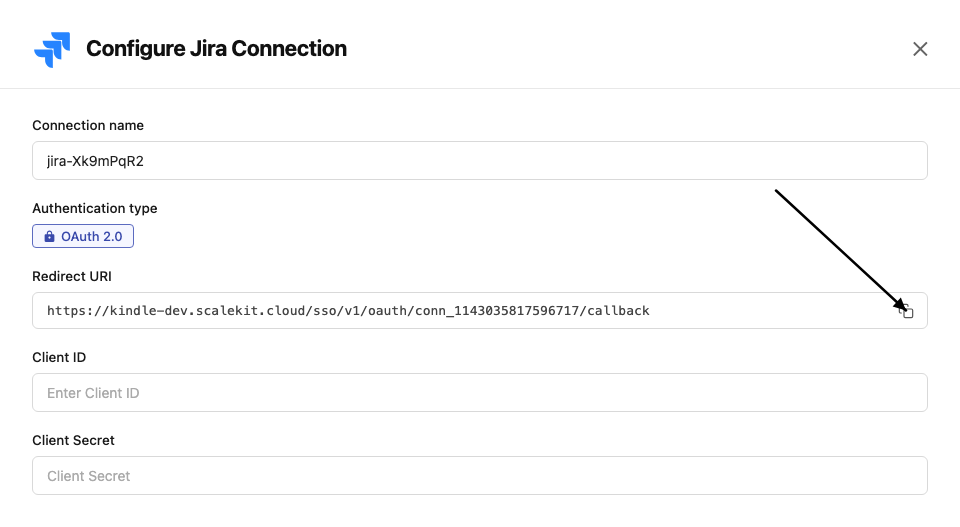
-
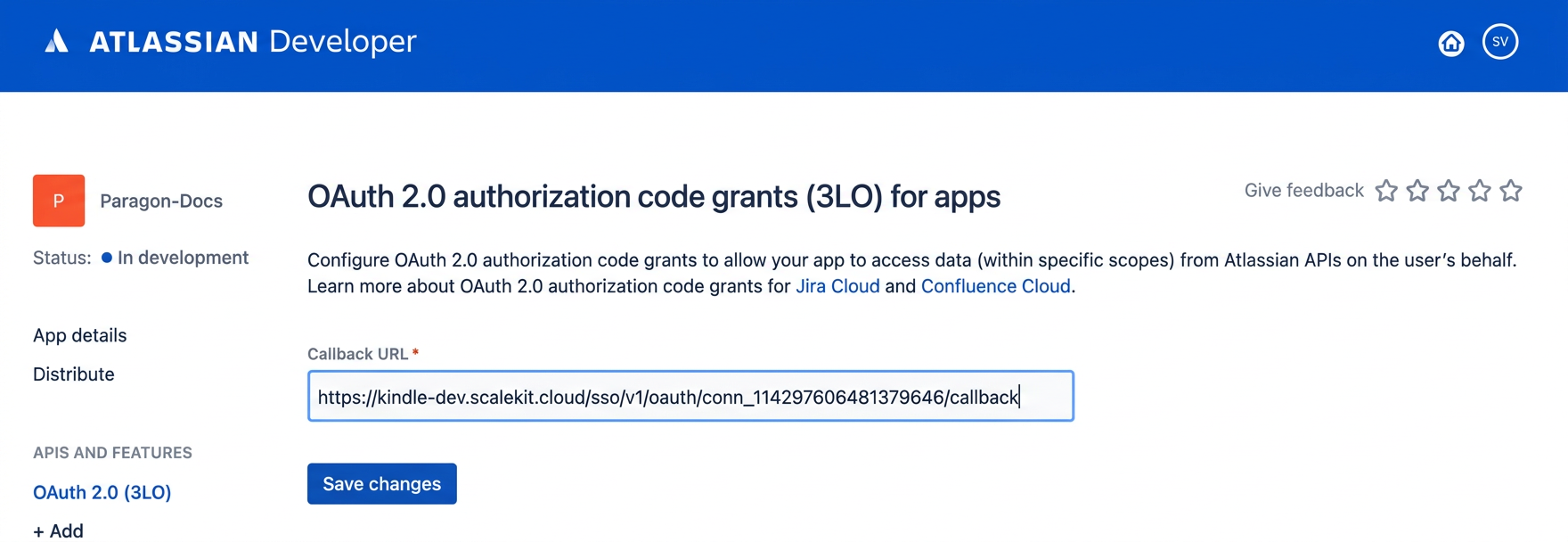
In the Atlassian Developer Console, open your app and go to Authorization → OAuth 2.0 (3LO) → Configure.
-
Paste the copied URI into the Callback URL field and click Save changes.
-
-
Get client credentials
In the Atlassian Developer Console, open your app and go to Settings:
- Client ID — listed under Client ID
- Client Secret — listed under Secret
-
Add credentials in Scalekit
-
In Scalekit dashboard, go to AgentKit > Connections and open the connection you created.
-
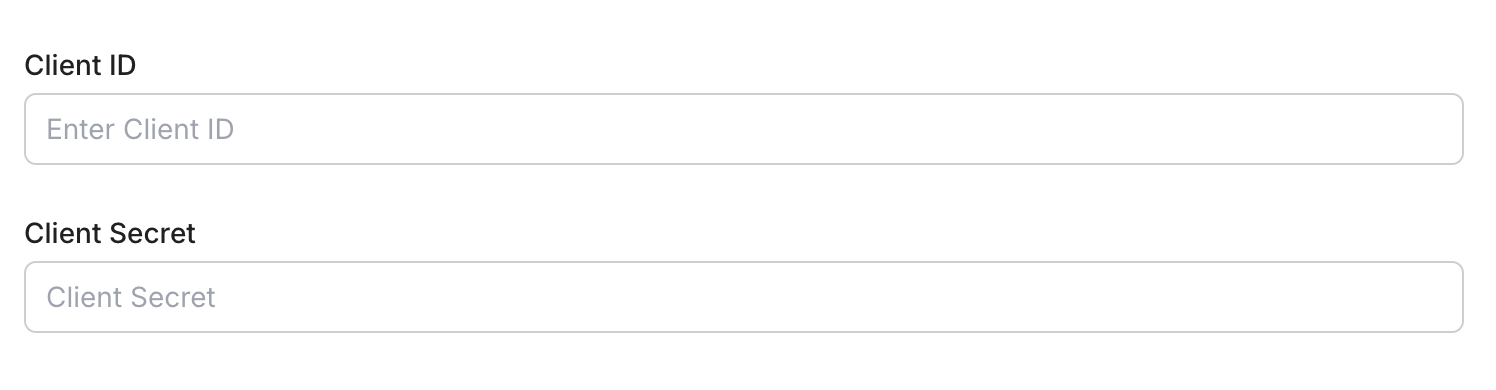
Enter your credentials:
- Client ID (from your Atlassian app)
- Client Secret (from your Atlassian app)
- Permissions (scopes — see Jira OAuth scopes reference)
-
Click Save.
-
-
Authorize a user and make your first call
quickstart.mts import { ScalekitClient } from '@scalekit-sdk/node'import 'dotenv/config'import { createInterface } from 'node:readline/promises'const scalekit = new ScalekitClient(process.env.SCALEKIT_ENVIRONMENT_URL,process.env.SCALEKIT_CLIENT_ID,process.env.SCALEKIT_CLIENT_SECRET,)const actions = scalekit.actionsconst connector = 'jira'const identifier = 'user_123'// Generate an authorization link for the userconst { link } = await actions.getAuthorizationLink({ connectionName: connector, identifier })console.log('Authorize Jira:', link)const rl = createInterface({ input: process.stdin, output: process.stdout })await rl.question('Press Enter after authorizing...')rl.close()// Make your first callconst result = await actions.executeTool({connector,identifier,toolName: 'jira_myself_get',toolInput: {},})console.log(result)Terminal window npx tsx quickstart.mtsquickstart.py import osfrom scalekit import ScalekitClientfrom dotenv import load_dotenvload_dotenv()scalekit_client = ScalekitClient(env_url=os.getenv("SCALEKIT_ENVIRONMENT_URL"),client_id=os.getenv("SCALEKIT_CLIENT_ID"),client_secret=os.getenv("SCALEKIT_CLIENT_SECRET"),)actions = scalekit_client.actionsconnection_name = "jira"identifier = "user_123"# Generate an authorization link for the userlink_response = actions.get_authorization_link(connection_name=connection_name,identifier=identifier,)print("Authorize Jira:", link_response.link)input("Press Enter after authorizing...")# Make your first callresult = actions.execute_tool(tool_input={},tool_name="jira_myself_get",connection_name=connection_name,identifier=identifier,)print(result)Terminal window python quickstart.pyEach user signs in once. See Authorize a user for the full flow and statuses.
Tools
Pass the exact name toexecute_tooljira_agile_issue_estimation_getRetrieve the estimation value of an issue for a specific board, along with the fieldId of the field used for estimation on that board (e.g.Read-onlyGet Issue Estimation for Board
Retrieve the estimation value of an issue for a specific board, along with the fieldId of the field used for estimation on that board (e.g. story points or original time estimate). The boardId is required to determine which field is used for estimation.
Inputs
boardIdintegerrequired- The ID of the board required to determine which field is used for estimation. Returns 400 if not provided.
issueIdOrKeystringrequired- The ID or key of the requested issue
jira_agile_issue_getRetrieve details of a Jira issue by its ID or key using the Jira Software Agile API.Read-onlyGet Agile Issue
Retrieve details of a Jira issue by its ID or key using the Jira Software Agile API. Returns fields, status, assignee, priority, and other navigable and Agile-specific metadata (e.g. sprint, epic, estimation). Use the fields parameter to limit the response to specific fields, and expand to include additional data such as changelog.
Inputs
issueIdOrKeystringrequired- The issue ID (e.g. 10001) or key (e.g. PROJ-123) to retrieve
expandstring- Comma-separated list of additional data to include (e.g. renderedFields,names,changelog,transitions,operations,editmeta,versionedRepresentations)
fieldsstring- Comma-separated list of fields to return (use * for all navigable fields, or -field to exclude a field). By default all navigable and Agile fields are returned.
updateHistoryboolean- A boolean indicating whether the issue retrieved by this method should be added to the current user's issue history
jira_all_users_default_listReturns a paginated list of all users, including active, inactive, and previously deleted users that have an Atlassian account.Read-onlyList All Users (Default)
Returns a paginated list of all users, including active, inactive, and previously deleted users that have an Atlassian account. Privacy controls may hide fields like email address depending on user preferences. This is the default users listing endpoint (/rest/api/3/users); prefer this or the Get All Users tool interchangeably.
Inputs
expandstring- Additional data to include in the response for each user (implementation-specific expand options).
maxResultsinteger- The maximum number of items to return per page. Limited to 1000.default
50 startAtinteger- The index of the first item to return in a page of results (page offset), default 0.default
0
jira_all_users_listReturns a paginated list of all users, including active, inactive, and previously deleted users that have an Atlassian account.Read-onlyList All Users
Returns a paginated list of all users, including active, inactive, and previously deleted users that have an Atlassian account. Privacy controls may hide fields like email address depending on user preferences. Uses the /rest/api/3/users/search endpoint.
Inputs
expandstring- Additional data to include in the response for each user (implementation-specific expand options).
maxResultsinteger- The maximum number of items to return per page. Limited to 1000.default
50 startAtinteger- The index of the first item to return in a page of results (page offset), default 0.default
0
jira_attachment_content_getDownload the binary contents of a Jira attachment by its ID.Read-onlyGet Attachment Content
Download the binary contents of a Jira attachment by its ID. Optionally scope the download to a byte range using the Range header, or disable the redirect Jira normally issues to the actual file location. Use Get Attachment for metadata only, or Get Attachment Thumbnail for a scaled preview image.
Inputs
idstringrequired- The ID of the attachment whose content should be downloaded.
redirectboolean- Whether a redirect is provided for the attachment download. Set to false if your client does not automatically follow redirects, to avoid multiple requests.default
true
jira_attachment_expand_human_getGet the metadata for an attachment's contents when the attachment is an archive (currently only ZIP is supported), along with metadata for the attachment itself such as its ID and name.Read-onlyGet Expanded Attachment (Human-Readable)
Get the metadata for an attachment's contents when the attachment is an archive (currently only ZIP is supported), along with metadata for the attachment itself such as its ID and name. Use this to present attachment archive contents to a user. To process the archive contents programmatically without the attachment's own metadata, use Get Expanded Attachment (Raw) instead.
Inputs
idstringrequired- The ID of the attachment to expand.
jira_attachment_expand_raw_getGet the metadata for the contents of an attachment when it is an archive (currently only ZIP is supported).Read-onlyGet Expanded Attachment (Raw)
Get the metadata for the contents of an attachment when it is an archive (currently only ZIP is supported). Returns only the metadata for the contents of the archive, not the attachment's own metadata. Use this when processing archive contents programmatically. To retrieve data intended for display to a user, use Get Expanded Attachment (Human-Readable) instead.
Inputs
idstringrequired- The ID of the attachment to expand.
jira_attachment_getGet metadata for a Jira issue attachment by its ID.Read-onlyGet Attachment
Get metadata for a Jira issue attachment by its ID. Returns the filename, MIME type, size, creation date, author, and download URL.
Inputs
idstringrequired- The attachment ID to retrieve metadata for
jira_attachment_meta_getGet the Jira instance's attachment settings, including whether attachments are enabled and the maximum attachment size allowed.Read-onlyGet Attachment Settings
Get the Jira instance's attachment settings, including whether attachments are enabled and the maximum attachment size allowed. Note that project-level permissions may further restrict who can create or delete attachments.
Inputs
This tool takes no inputs.
jira_attachment_thumbnail_getDownload the thumbnail image of a Jira attachment by its ID.Read-onlyGet Attachment Thumbnail
Download the thumbnail image of a Jira attachment by its ID. Optionally scale the thumbnail to a maximum width/height, fall back to a default thumbnail if the requested one isn't found, or disable the redirect Jira normally issues. Use Get Attachment Content to retrieve the full attachment instead.
Inputs
idstringrequired- The ID of the attachment whose thumbnail should be downloaded.
fallbackToDefaultboolean- Whether a default thumbnail is returned when the requested thumbnail is not found.default
true heightinteger- The maximum height to scale the thumbnail to, in pixels.
redirectboolean- Whether a redirect is provided for the thumbnail download. Set to false if your client does not automatically follow redirects, to avoid multiple requests.default
true widthinteger- The maximum width to scale the thumbnail to, in pixels.
jira_audit_records_listReturns a paginated list of audit records, optionally filtered by free-text match against summary/category/event source/object name and by creation date range.Read-onlyList Audit Records
Returns a paginated list of audit records, optionally filtered by free-text match against summary/category/event source/object name and by creation date range. Requires the Administer Jira global permission.
Inputs
filterstring- The strings to match with audit field content, space separated.
fromstring- The date and time on or after which returned audit records must have been created.
limitinteger- The maximum number of results to return.default
1000 offsetinteger- The number of records to skip before returning the first result.default
0 tostring- The date and time on or before which returned audit records must have been created.
jira_board_backlog_approximate_count_getRetrieve an approximate count of issues in the backlog of a Jira Software board, optionally filtered by a JQL query.Read-onlyGet Approximate Issue Count For Backlog
Retrieve an approximate count of issues in the backlog of a Jira Software board, optionally filtered by a JQL query. Useful for quickly estimating backlog size without fetching full issue data.
Inputs
boardIdintegerrequired- The ID of the board that has the backlog containing the requested issues.
jqlstring- Filters results using a JQL query. Do not use username or userkey as search terms; use accountId instead.
jira_board_backlog_issues_listReturns all issues from a board's backlog, for the given board ID.Read-onlyGet Issues For Backlog
Returns all issues from a board's backlog, for the given board ID. Only includes issues the user has permission to view. The backlog contains incomplete issues not assigned to any future or active sprint. Issues include Agile fields such as sprint, closedSprints, flagged, and epic. Results are ordered by rank by default and can be filtered with a JQL query.
Inputs
boardIdintegerrequired- The ID of the board that has the backlog containing the requested issues.
expandstring- This parameter is currently not used by the Jira API but is accepted for forward compatibility.
fieldsstring- Comma-separated list of fields to return for each issue. By default, all navigable and Agile fields are returned.
jqlstring- Filters results using a JQL query. If you define an order in your JQL query, it overrides the default rank order. Note: username and userkey cannot be used as search terms; use accountId instead.
maxResultsinteger- The maximum number of issues to return per page. Default is 50. The total number of issues returned is limited by the 'jira.search.views.default.max' property on the Jira instance; results may be truncated if this limit is exceeded.default
50 startAtinteger- The starting index of the returned issues (zero-based). Used for pagination.default
0 validateQueryboolean- Specifies whether to validate the JQL query. Default is true.default
true
jira_board_configuration_getRetrieves the configuration of a Jira Software board by its ID.Read-onlyGet Board Configuration
Retrieves the configuration of a Jira Software board by its ID. The response includes the board's filter, location, column configuration (statuses mapped to columns and min/max constraints), estimation settings (Scrum only), sub-query (Kanban only), and ranking custom field.
Inputs
boardIdintegerrequired- The ID of the board for which configuration is requested.
jira_board_epic_issues_listReturns all issues that belong to a given epic on a board, for the given board ID and epic ID.Read-onlyGet Board Issues For Epic
Returns all issues that belong to a given epic on a board, for the given board ID and epic ID. Only includes issues the user has permission to view. Issues include Agile fields such as sprint, closedSprints, flagged, and epic. Results are ordered by rank by default and can be filtered with a JQL query.
Inputs
boardIdintegerrequired- The ID of the board that contains the requested issues.
epicIdintegerrequired- The ID of the epic that contains the requested issues.
expandstring- Comma-separated list of parameters to expand in the response.
fieldsstring- Comma-separated list of fields to return for each issue. By default, all navigable and Agile fields are returned.
jqlstring- Filters results using a JQL query. If you define an order in your JQL query, it overrides the default rank order.
maxResultsinteger- The maximum number of issues to return per page. Default is 50. The total number of issues returned is limited by the 'jira.search.views.default.max' property on the Jira instance; results may be truncated if this limit is exceeded.default
50 startAtinteger- The starting index of the returned issues (zero-based). Used for pagination.default
0 validateQueryboolean- Specifies whether to validate the JQL query. Default is true.default
true
jira_board_epics_listReturns all epics from a Jira Software board, for the given board ID.Read-onlyGet Epics
Returns all epics from a Jira Software board, for the given board ID. Only includes epics the user has permission to view. Supports filtering by completion status and pagination.
Inputs
boardIdintegerrequired- The ID of the board that contains the requested epics.
donestring- Filters results to epics that are either done or not done. Valid values: true, false.one of
truefalse maxResultsinteger- The maximum number of epics to return per page. Default is 50.default
50 startAtinteger- The starting index of the returned epics (zero-based). Used for pagination.default
0
jira_board_features_listGet the list of features and their current status (enabled or disabled, and coming soon flags) for a Jira Software board.Read-onlyList Board Features
Get the list of features and their current status (enabled or disabled, and coming soon flags) for a Jira Software board. Use this to inspect which optional board capabilities (e.g. sprints, estimation) are currently turned on before toggling them.
Inputs
boardIdintegerrequired- The ID of the board to retrieve features for
jira_board_getRetrieve details of a Jira Software board by its ID, including its name, type (scrum or kanban), and project location.Read-onlyGet Board
Retrieve details of a Jira Software board by its ID, including its name, type (scrum or kanban), and project location. The board is only returned if the requesting user has permission to view it.
Inputs
boardIdintegerrequired- The ID of the board to retrieve
jira_board_get_by_filterReturns any boards which use the provided filter ID.Read-onlyGet Board By Filter ID
Returns any boards which use the provided filter ID. This method can be executed by users without a valid Jira Software license in order to find which boards are using a particular filter. Supports pagination.
Inputs
filterIdintegerrequired- The ID of the filter to look up boards for. Not supported for next-gen boards.
maxResultsinteger- The maximum number of boards to return per page. Default is 50.default
50 startAtinteger- The starting index of the returned boards (zero-based). Used for pagination.default
0
jira_board_issues_approximate_count_getRetrieve an approximate count of issues on a Jira Software board, optionally filtered by a JQL query.Read-onlyGet Approximate Issue Count For Board
Retrieve an approximate count of issues on a Jira Software board, optionally filtered by a JQL query. Useful for quickly estimating board size without fetching full issue data.
Inputs
boardIdintegerrequired- The ID of the board that contains the requested issues.
jqlstring- Filters results using a JQL query. Do not use username or userkey as search terms; use accountId instead.
jira_board_issues_listGet a paginated list of issues assigned to a Jira Software board, optionally filtered by JQL.Read-onlyList Board Issues
Get a paginated list of issues assigned to a Jira Software board, optionally filtered by JQL. Returns issue details for issues visible to the requesting user, with support for pagination, field selection, and expansion of additional issue data.
Inputs
boardIdintegerrequired- The ID of the board to retrieve issues for
expandstring- Comma-separated list of extra data to include in the response, e.g. 'changelog'. Optional.
fieldsstring- Comma-separated list of fields to return for each issue, e.g. 'summary,status,assignee'. Optional; when omitted the API returns its default field set.
jqlstring- A JQL query string used to filter which issues are returned, e.g. 'status="In Progress"'. Optional; when omitted all issues on the board are considered.
maxResultsinteger- The maximum number of items to return per page. Defaults to 50.default
50 startAtinteger- The index of the first item to return in the page of results (0-based). Defaults to 0.default
0 validateQueryboolean- Whether to validate the JQL query. Defaults to true. When false, invalid JQL is ignored rather than causing an error.default
true
jira_board_issues_without_epic_listReturns all issues that do not belong to any epic on a board, for the given board ID.Read-onlyGet Issues Without Epic For Board
Returns all issues that do not belong to any epic on a board, for the given board ID. Only includes issues the user has permission to view. Issues include Agile fields such as sprint, closedSprints, flagged, and epic. Results are ordered by rank by default and can be filtered with a JQL query.
Inputs
boardIdintegerrequired- The ID of the board that contains the requested issues.
expandstring- Comma-separated list of parameters to expand in the response.
fieldsstring- Comma-separated list of fields to return for each issue. By default, all navigable and Agile fields are returned.
jqlstring- Filters results using a JQL query. If you define an order in your JQL query, it overrides the default rank order. Note: username and userkey cannot be used as search terms; use accountId instead.
maxResultsinteger- The maximum number of issues to return per page. The total number of issues returned is limited by the 'jira.search.views.default.max' property on the Jira instance; results may be truncated if this limit is exceeded.default
50 startAtinteger- The starting index of the returned issues (zero-based). Used for pagination.default
0 validateQueryboolean- Specifies whether to validate the JQL query. Default is true.default
true
jira_board_projects_full_listGet the complete, unpaginated list of projects associated with a Jira Software board.Read-onlyList Full Board Projects
Get the complete, unpaginated list of projects associated with a Jira Software board. Unlike the paginated projects endpoint, this returns all projects in a single response. Only projects the requesting user has permission to view are returned.
Inputs
boardIdintegerrequired- The ID of the board to retrieve all associated projects for
jira_board_projects_listGet a paginated list of projects associated with a Jira Software board.Read-onlyList Board Projects
Get a paginated list of projects associated with a Jira Software board. Only projects that the board can display issues from, and that the requesting user has permission to view, are returned.
Inputs
boardIdintegerrequired- The ID of the board to retrieve associated projects for
maxResultsinteger- The maximum number of items to return per page. Defaults to 50.default
50 startAtinteger- The index of the first item to return in the page of results (0-based). Defaults to 0.default
0
jira_board_property_getGet the value of a specific custom property on a Jira Software board, identified by its property key.Read-onlyGet Board Property
Get the value of a specific custom property on a Jira Software board, identified by its property key. Returns a 404 if the board does not exist, the property key is not found, or the user lacks permission to view it.
Inputs
boardIdstringrequired- The ID of the board to retrieve the property from
propertyKeystringrequired- The key name of the property to retrieve
jira_board_property_keys_listGet the keys of all custom properties set on a Jira Software board.Read-onlyList Board Property Keys
Get the keys of all custom properties set on a Jira Software board. Board properties are key-value stores attached to boards for storing custom data, commonly used by Connect and Forge apps.
Inputs
boardIdstringrequired- The ID of the board to list property keys for
jira_board_quickfilter_getRetrieve a single quick filter from a Jira Software board by its ID, including its name, JQL fragment, description, and position.Read-onlyGet Quick Filter
Retrieve a single quick filter from a Jira Software board by its ID, including its name, JQL fragment, description, and position.
Inputs
boardIdintegerrequired- The ID of the board that contains the requested quick filter.
quickFilterIdintegerrequired- The ID of the requested quick filter.
jira_board_quickfilters_listRetrieve all quick filters configured on a Jira Software board.Read-onlyGet All Quick Filters
Retrieve all quick filters configured on a Jira Software board. Quick filters are saved JQL fragments used to filter the board view (e.g. by issue type or assignee). Results are paginated.
Inputs
boardIdintegerrequired- The ID of the board that contains the requested quick filters.
maxResultsinteger- The maximum number of quick filters to return per page.
startAtinteger- The starting index of the returned quick filters. Base index: 0.
jira_board_reports_listRetrieve the list of reports available for a Jira Software board, such as burndown, velocity, and sprint reports.Read-onlyGet Reports For Board
Retrieve the list of reports available for a Jira Software board, such as burndown, velocity, and sprint reports. Returns an array of report metadata objects.
Inputs
boardIdintegerrequired- The ID of the board to retrieve available reports for.
jira_board_sprint_issues_listRetrieve all issues that belong to a specific sprint on a Jira Software board.Read-onlyGet Board Issues For Sprint
Retrieve all issues that belong to a specific sprint on a Jira Software board. Supports JQL filtering, field selection, and pagination. Note: username/userkey cannot be used as JQL search terms; use accountId instead.
Inputs
boardIdintegerrequired- The ID of the board that contains the requested issues.
sprintIdintegerrequired- The ID of the sprint that contains the requested issues.
expandstring- A comma-separated list of the parameters to expand.
fieldsstring- Comma-separated list of the fields to return for each issue. By default, all navigable and Agile fields are returned.
jqlstring- Filters results using a JQL query. If an order is defined in the JQL query, it overrides the default order of returned issues. Do not use username or userkey as search terms; use accountId instead.
maxResultsinteger- The maximum number of issues to return per page. Note that the total returned is limited by the 'jira.search.views.default.max' Jira instance property; results will be truncated if exceeded.
startAtinteger- The starting index of the returned issues. Base index: 0.
validateQueryboolean- Specifies whether to validate the JQL query. Default: true.
jira_board_sprints_listRetrieve all sprints associated with a Jira Software board, ordered first by state (closed, active, future) then by position in the backlog.Read-onlyGet All Sprints
Retrieve all sprints associated with a Jira Software board, ordered first by state (closed, active, future) then by position in the backlog. Supports pagination and filtering by sprint state.
Inputs
boardIdintegerrequired- The ID of the board that contains the requested sprints.
maxResultsinteger- The maximum number of sprints to return per page.
startAtinteger- The starting index of the returned sprints. Base index: 0.
statestring- Filters results to sprints in the specified states. Valid values: future, active, closed. Multiple states can be combined as a comma-separated string, e.g. "active,closed".
jira_board_versions_listRetrieve all versions associated with a Jira Software board.Read-onlyGet All Versions
Retrieve all versions associated with a Jira Software board. Supports pagination and filtering by released status.
Inputs
boardIdintegerrequired- The ID of the board that contains the requested versions.
maxResultsinteger- The maximum number of versions to return per page.
releasedstring- Filters results to versions that are either released or unreleased. Valid values: "true", "false".
startAtinteger- The starting index of the returned versions. Base index: 0.
jira_boards_listReturns all Jira Software boards that the requesting user has permission to view.Read-onlyGet All Boards
Returns all Jira Software boards that the requesting user has permission to view. Supports filtering by board type, name, project, and filter ID, plus pagination. Use this to discover board IDs before calling other board-scoped endpoints.
Inputs
expandstring- Comma-separated list of fields to expand for each board. Valid values: admins, permissions.
filterIdinteger- Filters results to boards that are relevant to the given filter ID. Not supported for next-gen boards.
includePrivateboolean- If true, appends private boards to the end of the list. The name and type fields are excluded from private boards for security reasons.
maxResultsinteger- The maximum number of boards to return per page. Default is 50.default
50 namestring- Filters results to boards that match or partially match the specified name.
negateLocationFilteringboolean- If true, negates the filters used for querying by location (project). Default is false.
orderBystring- Orders the results by a given field. Valid values: name, -name, +name.one of
name-name+name projectKeyOrIdstring- Filters results to boards that are relevant to a project, identified by project key or ID.
startAtinteger- The starting index of the returned boards (zero-based). Used for pagination.default
0 typestring- Filters results to boards of the specified type. Valid values: scrum, kanban, simple.one of
scrumkanbansimple
jira_bulk_assignable_users_searchFind users who can be assigned issues across one or more Jira projects, optionally filtered by a query string matched against display name, email address, or account ID.Read-onlyBulk Search Assignable Users
Find users who can be assigned issues across one or more Jira projects, optionally filtered by a query string matched against display name, email address, or account ID. Provide projectKeys (comma-separated) plus either query or accountId. Note: this operation samples users in the startAt/maxResults range and returns only those assignable to the given projects, so it may return fewer results than maxResults.
Inputs
projectKeysstringrequired- Comma-separated list of project keys (case sensitive) to search assignable users across.
accountIdstring- Exact account ID to match against. Required unless query is specified. Max length 128.
maxResultsinteger- The maximum number of items to return per page. Defaults to 50. The API samples users in this range then filters to assignable ones, so actual results may be fewer.default
50 querystring- Query string matched against user attributes (displayName, emailAddress) by prefix, to find relevant users. Required unless accountId is specified.
startAtinteger- The index of the first item to return in a page of results (page offset). Defaults to 0.default
0
jira_bulk_operation_progress_getPoll the progress and result of an async bulk issue operation previously submitted via jira_issues_bulk_edit_submit, jira_issues_bulk_delete_submit, jira_issues_bulk_transition_submit, or jira_issues_bulk_move_submit.Read-onlyGet Bulk Operation Progress
Poll the progress and result of an async bulk issue operation previously submitted via jira_issues_bulk_edit_submit, jira_issues_bulk_delete_submit, jira_issues_bulk_transition_submit, or jira_issues_bulk_move_submit. Returns status (e.g. RUNNING, COMPLETE, FAILED), progressPercent, and per-issue error details once finished.
Inputs
taskIdstringrequired- The task ID returned by a bulk/issues/* submit call.
jira_changelogs_bulk_getBulk fetch changelogs for multiple issues, optionally filtered by field IDs.Read-onlyBulk Fetch Changelogs
Bulk fetch changelogs for multiple issues, optionally filtered by field IDs. Returns a paginated list of changelogs for the given issues sorted by changelog date and issue ID, starting from the oldest changelog and smallest issue ID. Accepts up to 1000 issue IDs/keys and up to 10 field IDs to filter by.
Inputs
issueIdsOrKeysarrayrequired- List of issue IDs and/or keys to fetch changelogs for. A maximum of 1000 issues can be specified.
fieldIdsarray- List of field IDs to filter changelogs by. A maximum of 10 field IDs can be specified.
maxResultsinteger- The maximum number of items to return per page. Maximum allowed value is 10000.default
1000 nextPageTokenstring- The cursor for pagination, returned by a previous call to this endpoint.
jira_comments_by_ids_getGet a paginated list of Jira comments specified by a list of comment IDs.Read-onlyGet Comments By IDs
Get a paginated list of Jira comments specified by a list of comment IDs. Only comments the user has permission to view are returned. Use the expand parameter to include rendered HTML bodies or comment properties.
Inputs
idsarrayrequired- The list of comment IDs to retrieve. A maximum of 1000 IDs can be specified.
expandstring- Comma-separated list of additional data to include. Options: renderedBody (comment body rendered in HTML), properties (comment's properties).
jira_component_getRetrieve details of a Jira project component by its ID, including name, description, lead, and default assignee settings.Read-onlyGet Component
Retrieve details of a Jira project component by its ID, including name, description, lead, and default assignee settings.
Inputs
idstringrequired- The component ID to retrieve
jira_components_searchSearch for components across one or more Jira projects, including global (Compass) components when applicable.Read-onlySearch Components
Search for components across one or more Jira projects, including global (Compass) components when applicable. Returns a paginated list of components. Filter by project IDs/keys and/or a text query, and control ordering by name or description.
Inputs
maxResultsinteger- The maximum number of items to return per page.default
50 orderBystring- Order the results by a field: description, -description, +description, name, -name, or +name.one of
description-description+descriptionname-name+name projectIdsOrKeysarray- The project IDs and/or project keys (case sensitive) to search components in. If omitted, searches across all projects the user can browse.
querystring- Filter the results using a literal string. Components with a matching name or description are returned (case insensitive).
startAtinteger- The index of the first item to return in a page of results (page offset).default
0
jira_custom_field_context_options_listList the selectable options configured for a custom field context (e.g.Read-onlyList Custom Field Context Options
List the selectable options configured for a custom field context (e.g. dropdown/select values), including each option's ID, value, and disabled state.
Inputs
contextIdstringrequired- The ID of the custom field context.
fieldIdstringrequired- The ID of the custom field, e.g. customfield_10000.
maxResultsinteger- The maximum number of options to return per page.default
100 onlyOptionsboolean- Whether to return only options with no cascading child options.
optionIdstring- Filter to a single option by its ID.
startAtinteger- The index of the first option to return.default
0
jira_custom_field_contexts_listList the configuration contexts defined for a custom field — each context scopes the field to specific projects/issue types.Read-onlyList Custom Field Contexts
List the configuration contexts defined for a custom field — each context scopes the field to specific projects/issue types. Entire custom-field-context/option sub-API is currently uncovered even though it's core to setting up select/dropdown custom fields.
Inputs
fieldIdstringrequired- The ID of the custom field, e.g. customfield_10000.
isAnyIssueTypeboolean- Filter to contexts that apply to any issue type.
isGlobalContextboolean- Filter to contexts that apply to all projects.
maxResultsinteger- The maximum number of contexts to return per page.default
50 startAtinteger- The index of the first context to return.default
0
jira_dashboard_gadgets_getReturns the gadgets placed on a specific dashboard.Read-onlyGet Dashboard Gadgets
Returns the gadgets placed on a specific dashboard. Optionally filter by a list of gadget IDs, module keys, or URIs; if none are provided, all gadgets on the dashboard are returned. Can be accessed anonymously.
Inputs
dashboardIdintegerrequired- The numeric ID of the dashboard whose gadgets should be listed.
gadgetIdstring- Comma-separated list of gadget IDs to filter by, e.g. 10000,10001.
moduleKeystring- Comma-separated list of gadget module keys to filter by.
uristring- Comma-separated list of gadget URIs to filter by.
jira_dashboard_gadgets_listReturns a list of all available gadgets that can be added to any dashboard, including their module keys, titles, and thumbnail URLs.Read-onlyList Available Dashboard Gadgets
Returns a list of all available gadgets that can be added to any dashboard, including their module keys, titles, and thumbnail URLs.
Inputs
This tool takes no inputs.
jira_dashboard_getRetrieve details of a Jira dashboard by its ID.Read-onlyGet Dashboard
Retrieve details of a Jira dashboard by its ID. The dashboard must be shared with the user or owned by them (admins are considered owners of the System dashboard).
Inputs
idstringrequired- The ID of the dashboard to retrieve
jira_dashboard_item_property_getGet the key and value of a property on a Jira dashboard item.Read-onlyGet Dashboard Item Property
Get the key and value of a property on a Jira dashboard item. Dashboard items are the gadgets that apps expose on a dashboard, and properties are custom key-value data an app has stored against a dashboard item.
Inputs
dashboardIdstringrequired- The ID of the dashboard that contains the item
itemIdstringrequired- The ID of the dashboard item the property belongs to
propertyKeystringrequired- The key of the dashboard item property to retrieve
jira_dashboard_item_property_keys_listGet the keys of all properties for a dashboard item.Read-onlyList Dashboard Item Property Keys
Get the keys of all properties for a dashboard item. Dashboard items are the gadgets that apps expose on a Jira dashboard, and properties let apps store custom data against a dashboard item.
Inputs
dashboardIdstringrequired- The ID of the dashboard that contains the item
itemIdstringrequired- The ID of the dashboard item to list property keys for
jira_dashboards_listReturns a list of dashboards owned by or shared with the authenticated user, optionally filtered to only favorite or owned dashboards.Read-onlyList Dashboards
Returns a list of dashboards owned by or shared with the authenticated user, optionally filtered to only favorite or owned dashboards. Supports pagination via startAt and maxResults. Can be accessed anonymously.
Inputs
filterstring- Filter applied to the list of dashboards: 'favourite' returns dashboards the user has marked as favorite, 'my' returns dashboards owned by the user.one of
myfavourite maxResultsinteger- The maximum number of dashboards to return per page. Default is 20.default
20 startAtinteger- The index of the first item to return in a page of results (page offset). Default is 0.default
0
jira_dashboards_searchReturns a paginated list of dashboards, similar to List Dashboards but with additional filtering options such as name, owner account ID, group, project, and status.Read-onlySearch Dashboards
Returns a paginated list of dashboards, similar to List Dashboards but with additional filtering options such as name, owner account ID, group, project, and status. When multiple filters are specified, only dashboards matching all of them are returned. Can be accessed anonymously.
Inputs
accountIdstring- User account ID used to return dashboards matching owner.accountId. Cannot be used together with the owner parameter.
dashboardNamestring- String used to perform a case-insensitive partial match against the dashboard name.
expandstring- Comma-separated list of additional dashboard data to include, e.g. description, owner, viewUrl, sharePermissions, editPermissions, isFavourite.
groupIdstring- Group ID used to return dashboards shared with a group matching sharePermissions.group.groupId. Cannot be used together with the groupname parameter.
groupnamestring- Group name used to return dashboards shared with a group matching sharePermissions.group.name. Deprecated in favor of groupId. Cannot be used together with groupId.
maxResultsinteger- The maximum number of dashboards to return per page. Default is 50.default
50 orderBystring- Order the results by a field: description, favorite_count, id, is_favorite, name, or owner. Prefix with '-' or '+' to control sort direction.one of
description-description+descriptionfavorite_count-favorite_count+favorite_countid-id+idis_favorite-is_favorite+is_favoritename-name+nameowner-owner+ownerdefaultname ownerstring- Deprecated due to privacy changes; use accountId instead. User name used to return dashboards matching owner.name. Cannot be used together with accountId.
projectIdinteger- Project ID used to return dashboards shared with a project matching sharePermissions.project.id.
startAtinteger- The index of the first item to return in a page of results (page offset). Default is 0.default
0 statusstring- The status to filter dashboards by: active, archived, or deleted. Default is active.one of
activearchiveddeleteddefaultactive
jira_epic_getRetrieve details of a Jira Software epic by its ID or key, including its name, summary, color, and done status.Read-onlyGet Epic
Retrieve details of a Jira Software epic by its ID or key, including its name, summary, color, and done status. The epic is only returned if the requesting user has permission to view it. Does not work for epics in next-gen (team-managed) projects.
Inputs
epicIdOrKeystringrequired- The ID or key of the epic to retrieve.
jira_epic_issues_listRetrieve all issues that belong to a given Jira Software epic, including Agile fields such as sprint, closedSprints, flagged, and epic.Read-onlyGet Issues for Epic
Retrieve all issues that belong to a given Jira Software epic, including Agile fields such as sprint, closedSprints, flagged, and epic. Results are ordered by rank by default and only include issues the requesting user has permission to view. Not for use with next-gen (team-managed) projects — use JQL search with the parent clause instead.
Inputs
epicIdOrKeystringrequired- The ID or key of the epic whose issues should be listed.
expandstring- A comma-separated list of the parameters to expand in the response.
fieldsarray- List of fields to return for each issue, as an array of field names.
jqlstring- A JQL query used to further filter the issues returned for the epic.
maxResultsinteger- The maximum number of issues to return per page.
startAtinteger- The index of the first issue to return (0-based), used for pagination.
validateQueryboolean- Whether to validate the JQL query.
jira_epic_issues_without_epic_listRetrieve all issues that do not belong to any epic, including Agile fields such as sprint, closedSprints, flagged, and epic.Read-onlyGet Issues Without Epic
Retrieve all issues that do not belong to any epic, including Agile fields such as sprint, closedSprints, flagged, and epic. Only includes issues the requesting user has permission to view. Results are ordered by rank by default. Not for use with next-gen (team-managed) projects — use JQL search with the 'parent is empty' clause instead.
Inputs
expandstring- A comma-separated list of the parameters to expand in the response.
fieldsarray- List of fields to return for each issue, as an array of field names.
jqlstring- A JQL query used to further filter the issues returned.
maxResultsinteger- The maximum number of issues to return per page.
startAtinteger- The index of the first issue to return (0-based), used for pagination.
validateQueryboolean- Whether to validate the JQL query.
jira_events_getRetrieve all issue events configured in Jira.Read-onlyGet Events
Retrieve all issue events configured in Jira. Issue events are the events that trigger notifications (e.g. Issue Created, Issue Updated, Issue Assigned). Requires the Administer Jira global permission.
Inputs
This tool takes no inputs.
jira_favourite_filters_getRetrieve the visible favorite filters of the authenticated user.Read-onlyGet Favorite Filters
Retrieve the visible favorite filters of the authenticated user. A favorite filter is visible if it is owned by the user, shared with a group the user belongs to, shared with a project the user can browse, or shared publicly. Can be called anonymously, though results will be empty without authentication.
Inputs
expandstring- Comma-separated list of additional filter data to include in the response, such as sharedUsers (users the filter is shared with) or subscriptions.
jira_field_project_associations_getRetrieve a paginated list of project associations for a given custom field.Read-onlyGet Field Project Associations
Retrieve a paginated list of project associations for a given custom field. Each association contains the ID of a project the field is associated with. Requires the Administer Jira global permission.
Inputs
fieldIdstringrequired- The ID of the field, for example customfield_10000
maxResultsinteger- The maximum number of items to return per page.default
50 startAtinteger- The index of the first item to return in a page of results (page offset).default
0
jira_field_searchSearch for Jira fields by name, type, or other criteria with pagination support.Read-onlySearch Fields
Search for Jira fields by name, type, or other criteria with pagination support. Returns paginated field results.
Inputs
maxResultsinteger- Maximum number of fields to return (default 50)
orderBystring- Sort by: contextsCount, lastUsed, name, screensCount, or -prefixed for descending
querystring- Search query to filter fields by name (case-insensitive)
startAtinteger- Index of the first field to return (default 0)
typestring- Filter by field type: custom or system
jira_fields_listGet all system and custom fields available in Jira.Read-onlyList Fields
Get all system and custom fields available in Jira. Returns field IDs, names, types, and whether they are custom or system fields. Use field IDs when referencing fields in JQL or issue creation.
Inputs
This tool takes no inputs.
jira_filter_columns_getRetrieve the columns configured for a filter.Read-onlyGet Filter Columns
Retrieve the columns configured for a filter. This column configuration is used when the filter's results are viewed in List View with Columns set to Filter. Can be called anonymously, though column details are only returned for filters visible to the caller.
Inputs
idstringrequired- The numeric ID of the filter to retrieve column configuration for.
jira_filter_getRetrieve a saved Jira filter by its ID, including the JQL query, name, owner, and share permissions.Read-onlyGet Filter
Retrieve a saved Jira filter by its ID, including the JQL query, name, owner, and share permissions.
Inputs
idstringrequired- The filter ID to retrieve
expandstring- Additional data to include (e.g. sharedUsers, subscriptions)
jira_filters_searchSearch for saved Jira filters with pagination.Read-onlySearch Filters
Search for saved Jira filters with pagination. Filter results by name, owner, project, or group. Returns filter details including JQL queries.
Inputs
accountIdstring- Filter by filter owner account ID
expandstring- Additional data to include (e.g. description, favourite, sharePermissions)
filterNamestring- Search by filter name (partial match, case-insensitive)
maxResultsinteger- Maximum number of filters to return (default 50)
orderBystring- Field to order by (e.g. name, id, owner, favourite_count, is_favourite)
startAtinteger- Index of the first filter to return (default 0)
jira_group_getGet a Jira group's details by name or ID.Read-onlyGet Group
Get a Jira group's details by name or ID. Group tooling currently only covers membership add/remove/list and the name picker — there's no way to fetch, create, or delete the group itself.
Inputs
expandstring- Include additional data, e.g. 'users' to include group members.
groupIdstring- The account ID of the group to look up. Provide this or groupname.
groupnamestring- The name of the group to look up. Provide this or groupId.
jira_group_members_listGet a paginated list of users in a Jira group.Read-onlyList Group Members
Get a paginated list of users in a Jira group. Returns account IDs, display names, and email addresses of group members.
Inputs
groupIdstring- The group ID to list members of (use instead of groupname)
groupnamestring- The group name to list members of
includeInactiveUsersboolean- Whether to include inactive (deactivated) users in the results
maxResultsinteger- Maximum number of members to return (default 50)
startAtinteger- Index of the first member to return (default 0)
jira_groups_findFind Jira user groups by name.Read-onlyFind Groups
Find Jira user groups by name. Returns groups whose names match the query. Useful for finding group names to use in permission schemes or visibility restrictions.
Inputs
accountIdstring- Filter to only return groups the user with this account ID belongs to
excludeIdstring- Group IDs to exclude from results (comma-separated)
maxResultsinteger- Maximum number of groups to return (default 20)
querystring- Search string to match against group names
jira_is_watching_issue_bulk_getReturns, for the current user, the watched status of a list of Jira issues by ID.Read-onlyGet Is Watching Issue Bulk
Returns, for the current user, the watched status of a list of Jira issues by ID. If an issue ID is invalid, its watched status is returned as false. Requires the 'Allow users to watch issues' option to be enabled and Browse Projects permission.
Inputs
issueIdsarrayrequired- List of issue IDs to check watched status for
jira_issue_changelog_listGet the paginated change history for a Jira issue.Read-onlyList Issue Changelog
Get the paginated change history for a Jira issue. Returns a list of changelog entries showing which fields changed, who changed them, and when.
Inputs
issueIdOrKeystringrequired- The issue ID or key to retrieve changelog for
maxResultsinteger- Maximum number of changelog entries to return (default 100)
startAtinteger- Index of the first entry to return for pagination (default 0)
jira_issue_changelogs_by_ids_getReturn changelogs for a single Jira issue, filtered to a specific list of changelog IDs.Read-onlyGet Issue Changelogs by IDs
Return changelogs for a single Jira issue, filtered to a specific list of changelog IDs. Requires Browse Projects permission for the project the issue belongs to.
Inputs
changelogIdsarrayrequired- List of changelog IDs to retrieve
issueIdOrKeystringrequired- The ID or key of the issue
jira_issue_comment_getRetrieve a specific comment on a Jira issue by comment ID.Read-onlyGet Issue Comment
Retrieve a specific comment on a Jira issue by comment ID. Returns the comment body, author, and timestamps.
Inputs
idstringrequired- The comment ID to retrieve
issueIdOrKeystringrequired- The issue ID or key the comment belongs to
expandstring- Additional fields to include (e.g. renderedBody for HTML content)
jira_issue_comment_property_getReturns the value of a specific property previously set on the given issue comment.Read-onlyGet Issue Comment Property
Returns the value of a specific property previously set on the given issue comment.
Inputs
commentIdstringrequired- Numeric ID of the issue comment
propertyKeystringrequired- The key of the property.
jira_issue_comment_property_keys_listReturns the keys of all properties currently set on the given issue comment.Read-onlyList Issue Comment Property Keys
Returns the keys of all properties currently set on the given issue comment. Use this to discover what custom metadata has been attached before fetching or deleting a specific property.
Inputs
commentIdstringrequired- Numeric ID of the issue comment
jira_issue_comments_listGet all comments for a Jira issue with pagination support.Read-onlyList Issue Comments
Get all comments for a Jira issue with pagination support. Returns comment bodies, author details, and timestamps. Use expand=renderedBody to get HTML-rendered comment content.
Inputs
issueIdOrKeystringrequired- The issue ID or key to list comments for
expandstring- Additional fields to include (e.g. renderedBody for HTML content)
maxResultsinteger- Maximum number of comments to return (default 50)
orderBystring- Field to order by (created or -created for descending)
startAtinteger- Index of the first comment to return (default 0)
jira_issue_create_meta_fields_getGet a page of field metadata for a specified project and issue type, describing which fields are required, their allowed values, and schema.Read-onlyGet Create Metadata Fields
Get a page of field metadata for a specified project and issue type, describing which fields are required, their allowed values, and schema. Use this to populate the request body for Create Issue. Requires the 'Create issues' project permission and can be accessed anonymously.
Inputs
issueTypeIdstringrequired- The ID of the issue type to get field metadata for
projectIdOrKeystringrequired- The ID or key of the project
maxResultsinteger- Maximum number of items to return per page (up to 200)default
50 startAtinteger- Index of the first item to return in a page of resultsdefault
0
jira_issue_create_meta_issue_types_listList the issue types available when creating an issue in a specified Jira project, including their metadata.Read-onlyList Create Metadata Issue Types
List the issue types available when creating an issue in a specified Jira project, including their metadata. Use this to populate valid issue_type values before calling Create Issue. Requires the 'Create issues' project permission and can be accessed anonymously.
Inputs
projectIdOrKeystringrequired- The ID or key of the project to get creatable issue types for
maxResultsinteger- Maximum number of items to return per page (up to 200)default
50 startAtinteger- Index of the first item to return in a page of resultsdefault
0
jira_issue_edit_meta_getReturn the edit screen fields for a Jira issue that are visible to and editable by the current user.Read-onlyGet Edit Issue Metadata
Return the edit screen fields for a Jira issue that are visible to and editable by the current user. Use the result to determine which fields can be sent when editing the issue.
Inputs
issueIdOrKeystringrequired- The ID or key of the issue
overrideEditableFlagboolean- Whether non-editable fields are returned. Requires Administer Jira global permission (default false)
overrideScreenSecurityboolean- Whether hidden fields are returned. Requires Administer Jira global permission (default false)
jira_issue_getRetrieve details of a Jira issue by its ID or key.Read-onlyGet Issue
Retrieve details of a Jira issue by its ID or key. Returns fields, status, assignee, priority, comments summary, and other metadata. Use the fields parameter to limit the response to specific fields.
Inputs
issueIdOrKeystringrequired- The issue ID (e.g. 10001) or key (e.g. PROJ-123) to retrieve
expandstring- Comma-separated list of additional data to include (e.g. renderedFields,names,changelog)
fieldsstring- Comma-separated list of fields to return (use * for all, -field to exclude)
propertiesstring- Comma-separated list of issue properties to return
updateHistoryboolean- Whether to update the issue's viewed history for the current user
jira_issue_limit_report_getGet a report of all Jira issues that are breaching or approaching per-issue limits (e.g.Read-onlyGet Issue Limit Report
Get a report of all Jira issues that are breaching or approaching per-issue limits (e.g. field value size limits). Requires the 'Browse projects' permission for the projects the issues are in, or the 'Administer Jira' global permission for complete results.
Inputs
isReturningKeysboolean- Whether to return issue keys instead of issue IDs in the responsedefault
false
jira_issue_link_getRetrieve details of a specific issue link by its ID, including the link type and both linked issues.Read-onlyGet Issue Link
Retrieve details of a specific issue link by its ID, including the link type and both linked issues.
Inputs
linkIdstringrequired- The issue link ID to retrieve
jira_issue_link_type_getRetrieve details of a single issue link type by its ID, including its name and the inward/outward relationship descriptions (e.g.Read-onlyGet Issue Link Type
Retrieve details of a single issue link type by its ID, including its name and the inward/outward relationship descriptions (e.g. blocks/is blocked by). Requires issue linking to be enabled on the site.
Inputs
issueLinkTypeIdstringrequired- The ID of the issue link type to retrieve
jira_issue_link_types_listReturn a list of all issue link types configured in the Jira site.Read-onlyList Issue Link Types
Return a list of all issue link types configured in the Jira site. Requires issue linking to be enabled and Browse Projects permission for at least one project.
Inputs
This tool takes no inputs.
jira_issue_picker_suggestions_getGet lists of Jira issues matching a query string, for use in auto-completion when a user is searching for an issue by a word or string.Read-onlyGet Issue Picker Suggestions
Get lists of Jira issues matching a query string, for use in auto-completion when a user is searching for an issue by a word or string. Returns a 'History Search' list (from the user's history of created, edited, or viewed issues) and a 'Current Search' list (from issues matching an optional JQL expression), both filtered by the query string.
Inputs
currentIssueKeystring- The key of an issue to exclude from search results (e.g. the issue currently being viewed)
currentJQLstring- A JQL query defining the list of issues to search within. Note: username and userkey cannot be used as search terms here for privacy reasons; use accountId instead.
currentProjectIdstring- The ID of a project that suggested issues must belong to
querystring- Text to match against issue fields such as title, description, or comments
showSubTaskParentboolean- When currentIssueKey is a subtask, whether to include the parent issue in the suggestions if it matches the query
showSubTasksboolean- Whether to include subtasks in the suggestions list
jira_issue_property_getGet the value of a custom property set on a Jira issue by its property key.Read-onlyGet Issue Property
Get the value of a custom property set on a Jira issue by its property key.
Inputs
issueIdOrKeystringrequired- The issue ID or key the property belongs to
propertyKeystringrequired- The key of the property to retrieve
jira_issue_property_keys_listGet the keys of all custom properties set on a Jira issue.Read-onlyList Issue Property Keys
Get the keys of all custom properties set on a Jira issue. Issue properties are key-value stores attached to issues for storing custom data.
Inputs
issueIdOrKeystringrequired- The issue ID or key to list property keys for
jira_issue_remote_link_getGet a specific remote link on a Jira issue by its link ID.Read-onlyGet Issue Remote Link
Get a specific remote link on a Jira issue by its link ID.
Inputs
issueIdOrKeystringrequired- The issue ID or key the remote link belongs to
linkIdstringrequired- The remote link ID to retrieve
jira_issue_remote_links_listGet all remote links for a Jira issue.Read-onlyList Issue Remote Links
Get all remote links for a Jira issue. Remote links connect issues to external resources (e.g. GitHub PRs, Confluence pages, deployment URLs).
Inputs
issueIdOrKeystringrequired- The issue ID or key to list remote links for
globalIdstring- Filter by global ID of the remote link
jira_issue_security_schemes_listList issue security schemes.Read-onlyList Issue Security Schemes
List issue security schemes. This whole resource area (issue security schemes/levels/members, and per-project security level assignment) has no tools at all today.
Inputs
This tool takes no inputs.
jira_issue_transitions_listGet the available workflow transitions for a Jira issue.Read-onlyList Issue Transitions
Get the available workflow transitions for a Jira issue. Returns the list of transitions the current user can perform, including transition IDs needed for the transition endpoint.
Inputs
issueIdOrKeystringrequired- The issue ID or key to retrieve transitions for
expandstring- Additional data to include (e.g. transitions.fields for field metadata per transition)
transitionIdstring- Filter results to only this transition ID
jira_issue_type_getRetrieve details of a specific Jira issue type by its ID, including name, description, icon URL, and hierarchy level.Read-onlyGet Issue Type
Retrieve details of a specific Jira issue type by its ID, including name, description, icon URL, and hierarchy level.
Inputs
idstringrequired- The issue type ID to retrieve
jira_issue_type_property_getReturns the value of a specific property previously set on the given issue type.Read-onlyGet Issue Type Property
Returns the value of a specific property previously set on the given issue type.
Inputs
issueTypeIdstringrequired- Numeric ID of the issue type
propertyKeystringrequired- The key of the property.
jira_issue_type_property_keys_listReturns the keys of all properties currently set on the given issue type.Read-onlyList Issue Type Property Keys
Returns the keys of all properties currently set on the given issue type. Use this to discover what custom metadata has been attached before fetching or deleting a specific property.
Inputs
issueTypeIdstringrequired- Numeric ID of the issue type
jira_issue_types_listGet all issue types available in the Jira instance (e.g.Read-onlyList Issue Types
Get all issue types available in the Jira instance (e.g. Bug, Story, Task, Epic, Sub-task). Returns issue type IDs, names, icons, and hierarchy levels.
Inputs
This tool takes no inputs.
jira_issue_votes_getGet vote information for a Jira issue, including the total vote count and whether the current user has voted.Read-onlyGet Issue Votes
Get vote information for a Jira issue, including the total vote count and whether the current user has voted.
Inputs
issueIdOrKeystringrequired- The issue ID or key to get votes for
jira_issue_watchers_getGet the list of users watching a Jira issue.Read-onlyGet Issue Watchers
Get the list of users watching a Jira issue. Returns the watcher count and user details for each watcher.
Inputs
issueIdOrKeystringrequired- The issue ID or key to get watchers for
jira_issue_worklog_getGet a specific worklog entry for a Jira issue by worklog ID.Read-onlyGet Issue Worklog
Get a specific worklog entry for a Jira issue by worklog ID. Returns time spent, author, start time, and any associated comment.
Inputs
idstringrequired- The worklog ID to retrieve
issueIdOrKeystringrequired- The issue ID or key the worklog belongs to
jira_issue_worklog_property_getReturns the value of a specific property previously set on the given issue worklog.Read-onlyGet Issue Worklog Property
Returns the value of a specific property previously set on the given issue worklog.
Inputs
issueIdOrKeystringrequired- The Jira issue ID or key
propertyKeystringrequired- The key of the property.
worklogIdstringrequired- The ID of the worklog.
jira_issue_worklog_property_keys_listReturns the keys of all properties currently set on the given issue worklog.Read-onlyList Issue Worklog Property Keys
Returns the keys of all properties currently set on the given issue worklog. Use this to discover what custom metadata has been attached before fetching or deleting a specific property.
Inputs
issueIdOrKeystringrequired- The Jira issue ID or key
worklogIdstringrequired- The ID of the worklog.
jira_issue_worklogs_listGet all worklogs logged against a Jira issue with pagination support.Read-onlyList Issue Worklogs
Get all worklogs logged against a Jira issue with pagination support. Returns time spent, author, and timestamps for each worklog entry.
Inputs
issueIdOrKeystringrequired- The issue ID or key to list worklogs for
maxResultsinteger- Maximum number of worklogs to return (default 5000)
startAtinteger- Index of the first worklog entry to return (default 0)
startedAfterinteger- Return worklogs started on or after this time (Unix timestamp in milliseconds)
startedBeforeinteger- Return worklogs started on or before this time (Unix timestamp in milliseconds)
jira_issues_bulk_fetchFetch details for up to 100 Jira issues in a single request, identified by ID or key.Read-onlyBulk Fetch Issues
Fetch details for up to 100 Jira issues in a single request, identified by ID or key. Issues are returned in ascending ID order; unmatched identifiers are reported as errors rather than causing a redirect. Use fields/expand to control response detail.
Inputs
issueIdsOrKeysarrayrequired- List of issue IDs or keys to fetch (up to 100, IDs and keys can be mixed)
expandarray- List of additional data to include in the response, e.g. renderedFields, names, schema, transitions, operations, editmeta, changelog, versionedRepresentations
fieldsarray- List of fields to return per issue. Use *all for all fields, *navigable for navigable fields (default), or prefix a field with - to exclude it.
fieldsByKeysboolean- Whether to reference fields by their key rather than ID
propertiesarray- List of issue property keys to include in the results (maximum 5)
jira_issues_countGet an estimated count of Jira issues that match a JQL (Jira Query Language) expression.Read-onlyCount Issues
Get an estimated count of Jira issues that match a JQL (Jira Query Language) expression. The JQL query must be bounded (include a search restriction such as a project or assignee filter) for performance reasons. Recent updates might not be immediately reflected in the count.
Inputs
jqlstring- A JQL expression used to filter issues. Must be a bounded query (include a search restriction). Example: 'project = PROJ AND status = Open'. Unbounded queries like 'order by key desc' are rejected.
jira_issues_searchSearch for Jira issues using JQL (Jira Query Language).Read-onlySearch Issues
Search for Jira issues using JQL (Jira Query Language). Returns a paginated list of matching issues with their fields plus a nextPageToken for fetching subsequent pages. Use fields to control what data is returned per issue.
Inputs
jqlstringrequired- JQL query string to filter issues (e.g. 'project = PROJ AND status = Open')
expandstring- Comma-separated list of additional data to include per issue (e.g. renderedFields,changelog)
fieldsstring- Comma-separated list of fields to return per issue (use * for all)
maxResultsinteger- Maximum number of issues to return (default 50, max 100)
nextPageTokenstring- Pagination cursor from a previous response's nextPageToken field. Omit to get the first page.
startAtinteger- Deprecated, no-op. This endpoint does not support offset-based pagination; use nextPageToken instead. Kept only for backward compatibility with existing callers.
jira_issues_search_getSearch for Jira issues using JQL (Jira Query Language) via a GET request.Read-onlySearch Issues (GET)
Search for Jira issues using JQL (Jira Query Language) via a GET request. Supports optional read-after-write consistency via reconcileIssues. Use this when the JQL expression is short enough to fit in a query string; for long JQL expressions use the POST-based search issues tool instead. Returns a paginated list of matching issues with a nextPageToken for subsequent pages.
Inputs
expandstring- Comma-separated list of additional data to include per issue (e.g. renderedFields,names,changelog)
failFastboolean- Fail the request early if not all field data can be retrieved. Defaults to false.default
false fieldsarray- List of fields to return per issue. Accepts special values *all (all fields) or *navigable (navigable fields), individual field IDs/keys, or a field prefixed with '-' to exclude it.
fieldsByKeysboolean- Reference fields by their key instead of their ID. Defaults to false.default
false jqlstring- A JQL expression used to filter issues. Must be a bounded query for performance reasons. Example: 'project = HSP'. Omit for an unbounded query such as 'order by key desc' (discouraged for large instances).
maxResultsinteger- The maximum number of items to return per page. The API may return fewer items per page when many fields/properties are requested. Maximum of 5000 issues total.default
50 nextPageTokenstring- Pagination cursor from a previous response's nextPageToken field. Omit to get the first page.
propertiesarray- List of up to 5 issue property keys to include in the results.
reconcileIssuesarray- List of issue IDs to reconcile with search results for strong read-after-write consistency. Accepts up to 50 IDs. Must be consistent across paginated requests.
jira_jql_autocomplete_dataGet reference data for JQL query building, including available fields and operators.Read-onlyGet JQL Autocomplete Data
Get reference data for JQL query building, including available fields and operators. Useful for building dynamic JQL query interfaces.
Inputs
This tool takes no inputs.
jira_jql_autocomplete_suggestionsGet autocomplete suggestions for a JQL field value.Read-onlyGet JQL Autocomplete Suggestions
Get autocomplete suggestions for a JQL field value. Provide the field name and optionally a partial value to get matching suggestions.
Inputs
fieldNamestring- The JQL field to get value suggestions for
fieldValuestring- Partial field value to search for suggestions
predicateNamestring- The predicate to get suggestions for (e.g. by, before, after)
predicateValuestring- Partial predicate value to search for suggestions
jira_jql_parseParse and validate one or more JQL queries.Read-onlyParse JQL Query
Parse and validate one or more JQL queries. Returns the parsed structure of valid queries and error details for invalid ones. Useful for debugging JQL syntax before executing a search.
Inputs
queriesarrayrequired- Array of JQL query strings to parse and validate
validationstring- Validation mode: strict (default), warn, or none
jira_jql_sanitizeSanitize one or more JQL queries by converting user mentions to account IDs and fixing common formatting issues.Read-onlySanitize JQL Queries
Sanitize one or more JQL queries by converting user mentions to account IDs and fixing common formatting issues. Returns the sanitized query strings.
Inputs
queriesarrayrequired- Array of JQL query objects to sanitize, each with a query string
jira_labels_listGet a paginated list of all labels used across Jira issues in the instance.Read-onlyList Labels
Get a paginated list of all labels used across Jira issues in the instance. Useful for discovering available labels before applying them to issues.
Inputs
maxResultsinteger- Maximum number of labels to return (default 1000)
startAtinteger- Index of the first label to return (default 0)
jira_locale_getRetrieve the locale for the current user.Read-onlyGet Locale
Retrieve the locale for the current user. If the user has no language preference set, or the request is anonymous, the browser-detected locale is returned, falling back to the site default locale if unsupported.
Inputs
This tool takes no inputs.
jira_my_filters_getRetrieve the filters owned by the authenticated user.Read-onlyGet My Filters
Retrieve the filters owned by the authenticated user. Optionally include the user's visible favorite filters as well by setting includeFavourites to true.
Inputs
expandstring- Comma-separated list of additional filter data to include in the response, such as sharedUsers (users the filter is shared with) or subscriptions.
includeFavouritesboolean- Whether to include the user's visible favorite filters in the response, in addition to owned filters.default
false
jira_my_permissions_getGet which permissions the current user holds, either globally or scoped to a given project/issue — useful for an agent to self-check before attempting an action that might fail with a 403.Read-onlyGet My Permissions
Get which permissions the current user holds, either globally or scoped to a given project/issue — useful for an agent to self-check before attempting an action that might fail with a 403.
Inputs
issueIdstring- Check permissions in the context of this issue (by ID).
issueKeystring- Check permissions in the context of this issue (by key).
permissionsstring- Comma-separated permission keys to check, e.g. 'CREATE_ISSUES,EDIT_ISSUES'. Omit to return all permissions.
projectIdstring- Check permissions in the context of this project (by ID).
projectKeystring- Check permissions in the context of this project (by key).
jira_myself_getGet details of the currently authenticated Jira user.Read-onlyGet Current User
Get details of the currently authenticated Jira user. Returns account ID, display name, email address, and avatar URLs. Useful for getting your own account ID.
Inputs
expandstring- Additional data to include (e.g. groups,applicationRoles)
jira_notification_scheme_getRetrieve details of a specific Jira notification scheme by its ID, including all configured notification events and their recipients.Read-onlyGet Notification Scheme
Retrieve details of a specific Jira notification scheme by its ID, including all configured notification events and their recipients.
Inputs
idstringrequired- The notification scheme ID to retrieve
expandstring- Additional data to include (e.g. all,field,group,notificationSchemeEvents,projectRole,user)
jira_notification_schemes_listGet all notification schemes in Jira with pagination.Read-onlyList Notification Schemes
Get all notification schemes in Jira with pagination. Notification schemes define who receives emails for issue events (created, updated, resolved, etc.).
Inputs
expandstring- Additional data to include (e.g. all,field,group,notificationSchemeEvents,projectRole,user)
maxResultsinteger- Maximum number of notification schemes to return (default 50)
startAtinteger- Index of the first scheme to return (default 0)
jira_permission_grants_listGet all permission grants in a Jira permission scheme.Read-onlyList Permission Grants
Get all permission grants in a Jira permission scheme. Returns each grant's permission type, holder type (user, group, role, etc.), and holder details.
Inputs
schemeIdstringrequired- The permission scheme ID to list grants for
expandstring- Additional data to include (e.g. all,field,group,permissions,projectRole,user)
jira_permission_scheme_getRetrieve details of a specific Jira permission scheme by its ID, including all permission grants and who they apply to.Read-onlyGet Permission Scheme
Retrieve details of a specific Jira permission scheme by its ID, including all permission grants and who they apply to.
Inputs
schemeIdstringrequired- The permission scheme ID to retrieve
expandstring- Additional data to include (e.g. all,field,group,permissions,projectRole,user)
jira_permission_scheme_grant_getReturns the details of a single permission grant within a permission scheme.Read-onlyGet Permission Grant
Returns the details of a single permission grant within a permission scheme.
Inputs
permissionIdstringrequired- The ID of the permission grant.
schemeIdstringrequired- The ID of the permission scheme.
expandstring- Use expand to include additional information in the response.
jira_permission_schemes_listGet all permission schemes defined in the Jira instance.Read-onlyList Permission Schemes
Get all permission schemes defined in the Jira instance. Returns scheme IDs, names, and descriptions. Permission schemes define who can perform which actions on issues in a project.
Inputs
expandstring- Additional data to include (e.g. all,field,group,permissions,projectRole,user)
jira_preference_getRetrieve the value of a preference of the current user, by preference key.Read-onlyGet Preference
Retrieve the value of a preference of the current user, by preference key. Returns a plain text value. Note that jira.user.locale and jira.user.timezone are deprecated preference keys.
Inputs
keystringrequired- The key of the preference to retrieve
jira_priorities_listGet all issue priority levels configured in the Jira instance (e.g.Read-onlyList Priorities
Get all issue priority levels configured in the Jira instance (e.g. Highest, High, Medium, Low, Lowest). Returns priority names and IDs for use in issue creation and filtering.
Inputs
This tool takes no inputs.
jira_priorities_searchSearch for Jira issue priorities with pagination.Read-onlySearch Priorities
Search for Jira issue priorities with pagination. Optionally filter by a list of priority IDs, a list of project IDs, priority name, or whether only the default priority should be returned.
Inputs
expandstring- Use 'schemes' to return the associated priority schemes for each priority (limited to first 15 schemes per priority)
idarray- List of priority IDs to filter by. Invalid IDs are ignored.
maxResultsinteger- The maximum number of items to return per page (default 50)default
50 onlyDefaultboolean- Whether only the default priority is returneddefault
false priorityNamestring- The name of the priority to search for
projectIdarray- List of project IDs. Only priorities available in these projects are returned. Invalid project IDs are ignored.
startAtinteger- The index of the first item to return in a page of results (page offset, default 0)default
0
jira_priority_getRetrieve details of a specific Jira priority level by its ID, including name, description, icon URL, and status color.Read-onlyGet Priority
Retrieve details of a specific Jira priority level by its ID, including name, description, icon URL, and status color.
Inputs
idstringrequired- The priority ID to retrieve
jira_project_categories_listReturns all project categories defined in the Jira instance.Read-onlyList Project Categories
Returns all project categories defined in the Jira instance. Project categories are used to group related projects together for organizational purposes.
Inputs
This tool takes no inputs.
jira_project_category_getRetrieve a single Jira project category by its numeric ID, including its name and description.Read-onlyGet Project Category
Retrieve a single Jira project category by its numeric ID, including its name and description.
Inputs
idstringrequired- The numeric ID of the project category to retrieve
jira_project_components_all_listReturn all components in a Jira project as a single, non-paginated list.Read-onlyList All Project Components
Return all components in a Jira project as a single, non-paginated list. If the project uses Compass components, this returns a paginated list of Compass components linked to issues in the project instead. Can be accessed anonymously. Requires Browse Projects permission.
Inputs
projectIdOrKeystringrequired- The project ID or project key (case sensitive) to list components for
componentSourcestring- The source of the components to return. Can be 'jira' (default), 'compass', or 'auto'. When 'auto' is specified, connected Compass components are returned if the project is opted into Compass; otherwise Jira components are returned.one of
jiracompassautodefaultjira
jira_project_components_listGet a paginated list of components for a Jira project.Read-onlyList Project Components
Get a paginated list of components for a Jira project. Components are sub-sections that group issues within a project.
Inputs
projectIdOrKeystringrequired- The project ID or key to list components for
maxResultsinteger- Maximum number of components to return
orderBystring- Field to order results by (e.g. name, +name, -name)
querystring- Filter components by name (case-insensitive partial match)
startAtinteger- Index of the first component to return (default 0)
jira_project_fields_listReturns a paginated list of fields available for the requested projects and work types (issue types).Read-onlyList Fields for Projects
Returns a paginated list of fields available for the requested projects and work types (issue types). Only fields available for the specified combination of projects and work types are returned. Optionally filter to specific field IDs.
Inputs
projectIdstringrequired- Comma-separated list of project IDs to return fields for
workTypeIdstringrequired- Comma-separated list of work type (issue type) IDs to return fields for
fieldIdstring- Comma-separated list of field IDs to return. If not provided, all available fields are returned.
maxResultsinteger- The maximum number of items to return per page (1-100)default
50 startAtinteger- The index of the first item to return in a page of results (page offset)default
0
jira_project_getRetrieve details of a Jira project by its ID or key, including name, type, lead, category, and metadata.Read-onlyGet Project
Retrieve details of a Jira project by its ID or key, including name, type, lead, category, and metadata.
Inputs
projectIdOrKeystringrequired- The project ID or key to retrieve (e.g. PROJ or 10001)
expandstring- Additional information to include (e.g. description,lead,issueTypes,url,projectKeys,permissions,insight)
jira_project_hierarchy_getGet the issue type hierarchy for a next-gen (team-managed) Jira project.Read-onlyGet Project Issue Type Hierarchy
Get the issue type hierarchy for a next-gen (team-managed) Jira project. The hierarchy consists of an optional Epic level (level 1), one or more standard issue types such as Story, Task, or Bug at level 0, and an optional Subtask level (level -1) used to break level-0 issues into components.
Inputs
projectIdstringrequired- The numeric ID of the project to fetch the issue type hierarchy for
jira_project_notification_scheme_getGet the notification scheme associated with a Jira project.Read-onlyGet Project Notification Scheme
Get the notification scheme associated with a Jira project. Returns the scheme's ID, name, and (optionally, via expand) the configured notification events and recipients. Requires Administer Jira or Administer Projects permission.
Inputs
projectKeyOrIdstringrequired- The project ID or project key (case sensitive) to fetch the notification scheme for
expandstring- Comma-separated list of additional data to include. Options: 'all' (everything), 'field' (custom fields assigned to receive an event), 'group', 'notificationSchemeEvents', 'projectRole', 'user'.
jira_project_permission_scheme_getGet the permission scheme currently assigned to a project.Read-onlyGet Project Permission Scheme
Get the permission scheme currently assigned to a project. Permission schemes themselves are fully covered by other tools, but this project-level association endpoint is not.
Inputs
projectKeyOrIdstringrequired- The key or numeric ID of the project.
expandstring- Include additional data in the response, e.g. 'permissions,user'.
jira_project_property_getReturns the value of a specific property previously set on the given project.Read-onlyGet Project Property
Returns the value of a specific property previously set on the given project.
Inputs
projectIdOrKeystringrequired- The project ID or key
propertyKeystringrequired- The key of the property.
jira_project_property_keys_listReturns the keys of all properties currently set on the given project.Read-onlyList Project Property Keys
Returns the keys of all properties currently set on the given project. Use this to discover what custom metadata has been attached before fetching or deleting a specific property.
Inputs
projectIdOrKeystringrequired- The project ID or key
jira_project_role_details_listReturns all project roles for a project along with their actor counts, without the full actor list.Read-onlyList Project Role Details
Returns all project roles for a project along with their actor counts, without the full actor list. Faster than fetching each role individually when you just need role names, IDs, and how many actors each has.
Inputs
projectIdOrKeystringrequired- The project ID or key.
currentMemberboolean- Whether the list of project roles should be filtered to include only those the user is assigned to.
excludeConnectAddonsboolean- Whether Connect app actors are excluded from the response.
excludeOtherServiceRolesboolean- Whether roles for other Atlassian products (e.g. Jira Service Management) are excluded from the response.
jira_project_role_getGet details of a project role for a specific Jira project, including the list of members (users and groups) in the role.Read-onlyGet Project Role
Get details of a project role for a specific Jira project, including the list of members (users and groups) in the role.
Inputs
idstringrequired- The role ID to retrieve (numeric)
projectIdOrKeystringrequired- The project ID or key to get the role for
jira_project_roles_listGet all project roles defined for a specific Jira project, with URLs to get member details for each role.Read-onlyList Project Roles
Get all project roles defined for a specific Jira project, with URLs to get member details for each role.
Inputs
projectIdOrKeystringrequired- The project ID or key to list roles for
jira_project_statuses_listGet all valid issue statuses for a Jira project, grouped by issue type.Read-onlyList Project Statuses
Get all valid issue statuses for a Jira project, grouped by issue type. Returns statuses with their names, IDs, and category colors.
Inputs
projectIdOrKeystringrequired- The project ID or key to get statuses for
jira_project_types_listGet all project types available in Jira (e.g.Read-onlyList Project Types
Get all project types available in Jira (e.g. software, business, service_desk). Returns type keys, formatted names, and descriptions.
Inputs
This tool takes no inputs.
jira_project_versions_getReturns all versions in a Jira project as a single, non-paginated list.Read-onlyGet Project Versions
Returns all versions in a Jira project as a single, non-paginated list. Use this when you need every version at once; for large projects consider the paginated project versions list instead.
Inputs
projectIdOrKeystringrequired- The project ID or project key (case sensitive) to fetch versions for
expandstring- Comma-separated list of additional data to include in the response. Accepts 'operations', which returns actions that can be performed on the version.
jira_project_versions_listGet a paginated list of versions for a Jira project.Read-onlyList Project Versions
Get a paginated list of versions for a Jira project. Versions are used to track releases and fix versions on issues.
Inputs
projectIdOrKeystringrequired- The project ID or key to list versions for
expandstring- Additional data to include (e.g. operations, issuesstatus, remotelinks, approvers)
maxResultsinteger- Maximum number of versions to return
orderBystring- Field to order by (e.g. description, name, releaseDate, sequence, startDate)
querystring- Filter versions by name (case-insensitive partial match)
startAtinteger- Index of the first version to return (default 0)
statusstring- Filter by release status: released, unreleased, or archived
jira_projects_listList all Jira projects visible to the authenticated user with support for filtering and pagination.Read-onlyList Projects
List all Jira projects visible to the authenticated user with support for filtering and pagination. Projects are returned only where the user has Browse Projects or Administer Projects permission.
Inputs
actionstring- Filter results by the action the user can perform on the project
categoryIdinteger- Filter projects by category ID
expandstring- Additional information to include in the response (comma-separated)
idstring- List of project IDs to filter by (comma-separated)
keysstring- List of project keys to filter by (comma-separated)
maxResultsinteger- Maximum number of projects to return per page (default 50)
orderBystring- Field to order results by (e.g., name, key, category)
propertiesstring- Project properties to return (comma-separated)
querystring- Text query to search for in project name and key
startAtinteger- Starting index for pagination (default 0)
statusstring- Filter projects by status (comma-separated: live, archived, deleted)
typeKeystring- Filter projects by project type key
jira_recent_projects_listRetrieve a list of up to 20 Jira projects recently viewed by the authenticated user that are still visible to them.Read-onlyList Recent Projects
Retrieve a list of up to 20 Jira projects recently viewed by the authenticated user that are still visible to them. Can be accessed anonymously. Only projects where the user has Browse Projects, Administer Projects, or Administer Jira permission are returned.
Inputs
expandstring- Comma-separated list of additional information to include in the response. Options: description, projectKeys, lead, issueTypes, url, insight
propertiesarray- List of project properties to return for each project (experimental). Invalid property names are ignored.
jira_resolution_getRetrieve a single Jira issue resolution value by its ID.Read-onlyGet Resolution
Retrieve a single Jira issue resolution value by its ID. Returns the resolution's ID, name, and description.
Inputs
idstringrequired- The ID of the issue resolution value to retrieve.
jira_resolutions_searchSearch for Jira issue resolutions with pagination.Read-onlySearch Resolutions
Search for Jira issue resolutions with pagination. Optionally filter by a list of resolution IDs or restrict results to only the default resolution (company-managed projects only).
Inputs
idarray- List of resolution IDs to filter results by.
maxResultsinteger- The maximum number of items to return per page.default
50 onlyDefaultboolean- When true, return only the default resolution. If IDs are also provided and none of them is the default, an empty page is returned. Defaults to false.default
false startAtinteger- The index of the first item to return in a page of results (page offset).default
0
jira_role_default_actors_listReturns the default actors (users and groups) for a project role -- the actors automatically assigned to this role whenever it is added to a new project.Read-onlyGet Default Actors for Project Role
Returns the default actors (users and groups) for a project role -- the actors automatically assigned to this role whenever it is added to a new project.
Inputs
idstringrequired- The ID of the project role.
jira_role_getRetrieve details of a global Jira project role by its ID, including name, description, and scope.Read-onlyGet Project Role
Retrieve details of a global Jira project role by its ID, including name, description, and scope.
Inputs
idstringrequired- The role ID to retrieve
jira_roles_listGet all project roles defined in the Jira instance (global role list, not project-specific).Read-onlyList All Project Roles
Get all project roles defined in the Jira instance (global role list, not project-specific). Returns role IDs, names, and descriptions.
Inputs
This tool takes no inputs.
jira_screens_listList Jira screens.Read-onlyList Screens
List Jira screens. The Screens API and Screen Schemes API (which control which fields appear on create/edit/view forms) are entirely uncovered.
Inputs
maxResultsinteger- The maximum number of screens to return per page.default
50 queryStringstring- Filter screens whose name contains this string.
startAtinteger- The index of the first screen to return.default
0
jira_server_info_getGet information about the Jira Cloud instance, including its version, build number, deployment type, base URL, and the current server time.Read-onlyGet Server Info
Get information about the Jira Cloud instance, including its version, build number, deployment type, base URL, and the current server time. Useful for diagnostics and for checking Jira's build/version before relying on version-specific behavior.
Inputs
This tool takes no inputs.
jira_sprint_getReturn the sprint for a given sprint ID.Read-onlyGet Sprint
Return the sprint for a given sprint ID. The sprint will only be returned if the user can view the board that the sprint was created on, or view at least one of the issues in the sprint.
Inputs
sprintIdintegerrequired- The ID of the requested sprint
jira_sprint_issues_listReturn all issues in a sprint, for a given sprint ID.Read-onlyGet Issues for Sprint
Return all issues in a sprint, for a given sprint ID. This only includes issues that the user has permission to view. By default, the returned issues are ordered by rank. Note: this operation is deprecated by Atlassian in favor of the Jira Cloud platform search APIs, but remains available.
Inputs
sprintIdintegerrequired- The ID of the sprint that contains the requested issues
expandstring- A comma-separated list of the parameters to expand
fieldsstring- The list of fields to return for each issue. By default, all navigable and Agile fields are returned.
jqlstring- Filters results using a JQL query. If you define an order in your JQL query, it will override the default order of the returned issues. Note that username and userkey can't be used as search terms for this parameter due to privacy reasons. Use accountId instead.
maxResultsinteger- The maximum number of issues to return per page. The total number of issues returned is limited by the property 'jira.search.views.default.max' in your Jira instance.
startAtinteger- The starting index of the returned issues. Base index: 0.
validateQueryboolean- Specifies whether to validate the JQL query or not. Default: true.
jira_sprint_property_getGet the value of a custom property set on a Jira Software sprint by its property key.Read-onlyGet Sprint Property
Get the value of a custom property set on a Jira Software sprint by its property key. Returns the property key and its JSON value if the sprint exists and the property was found.
Inputs
propertyKeystringrequired- The key of the property to return
sprintIdstringrequired- The ID of the sprint from which the property will be returned
jira_sprint_property_keys_listReturn the keys of all properties for the sprint identified by the given ID.Read-onlyGet Sprint Property Keys
Return the keys of all properties for the sprint identified by the given ID. The user who retrieves the property keys is required to have permission to view the sprint.
Inputs
sprintIdstringrequired- The ID of the sprint from which property keys will be returned
jira_status_categories_listList the status categories (To Do / In Progress / Done groupings) available in the instance.Read-onlyList Status Categories
List the status categories (To Do / In Progress / Done groupings) available in the instance. Every workflow status maps to one of these fixed categories.
Inputs
This tool takes no inputs.
jira_status_project_issue_type_usages_listGet a paginated list of issue types within a specific project that are currently using a given status.Read-onlyList Issue Type Usages For Status
Get a paginated list of issue types within a specific project that are currently using a given status. Useful for understanding where a status is applied before renaming or deleting it. Requires the status ID and project ID; supports cursor-based pagination via nextPageToken.
Inputs
projectIdstringrequired- The ID of the project to fetch issue type usages for
statusIdstringrequired- The ID of the status to fetch issue type usages for
maxResultsinteger- The maximum number of results to return (between 1 and 200). Defaults to 50.default
50 nextPageTokenstring- Cursor token for fetching the next page of results. Omit for the first page.
jira_status_project_usages_listGet a paginated list of projects that are currently using a given status.Read-onlyList Project Usages For Status
Get a paginated list of projects that are currently using a given status. Useful for understanding the impact of renaming or deleting a status before making the change. Supports cursor-based pagination via nextPageToken.
Inputs
statusIdstringrequired- The ID of the status to fetch project usages for
maxResultsinteger- The maximum number of results to return (between 1 and 200). Defaults to 50.default
50 nextPageTokenstring- Cursor token for fetching the next page of results. Omit for the first page.
jira_status_workflow_usages_listGet a paginated list of workflows that are currently using a given status.Read-onlyList Workflow Usages For Status
Get a paginated list of workflows that are currently using a given status. Useful for understanding the impact of renaming or deleting a status before making the change. Supports cursor-based pagination via nextPageToken.
Inputs
statusIdstringrequired- The ID of the status to fetch workflow usages for
maxResultsinteger- The maximum number of results to return (between 1 and 200). Defaults to 50.default
50 nextPageTokenstring- Cursor token for fetching the next page of results. Omit for the first page.
jira_statuses_by_id_getRetrieve one or more Jira workflow statuses by ID.Read-onlyBulk Get Statuses
Retrieve one or more Jira workflow statuses by ID. Accepts between 1 and 50 status IDs and returns the matching status objects. Requires the Administer projects or Administer Jira permission.
Inputs
idarrayrequired- List of status IDs to retrieve. Minimum 1 item, maximum 50 items.
jira_statuses_by_name_getLook up one or more Jira statuses by their exact name(s).Read-onlyGet Statuses By Name
Look up one or more Jira statuses by their exact name(s). Provide a comma-separated list of 1 to 50 status names and optionally a project ID to scope the search to a specific project (omit for global statuses). Returns matching status details including ID, name, and category. Requires Administer Jira, Administer Projects, or Browse Projects permission.
Inputs
namestringrequired- Comma-separated list of status names to look up (1 to 50 names). Example: 'To Do,In Progress,Done'
projectIdstring- The ID of the project the statuses belong to. Omit to search global statuses.
jira_statuses_searchSearch Jira statuses by name or project, returning a paginated list of matching statuses with their IDs, names, and categories.Read-onlySearch Statuses
Search Jira statuses by name or project, returning a paginated list of matching statuses with their IDs, names, and categories. Filter by project ID, a search string matched against status names, or status category (TODO, IN_PROGRESS, DONE). Requires Administer Jira or Administer Projects permission.
Inputs
includeGlobalStatusesboolean- Whether to include global statuses (not tied to any project) in the response. Only relevant for project-scoped queries. Defaults to false.default
false maxResultsinteger- The maximum number of items to return per page. Defaults to 200.default
200 projectIdstring- The ID of the project to search statuses in. Omit to search global statuses.
searchStringstring- Term to match status names against. Omit to search for all statuses in scope. Max length 255.
startAtinteger- The index of the first item to return in a page of results (page offset). Defaults to 0.default
0 statusCategorystring- Category of the status to filter by.one of
TODOIN_PROGRESSDONE
jira_time_tracking_configuration_getReturns the time tracking settings for the Jira site, including the default time format, default time unit, working hours per day, and working days per week.Read-onlyGet Time Tracking Settings
Returns the time tracking settings for the Jira site, including the default time format, default time unit, working hours per day, and working days per week. Requires Administer Jira global permission.
Inputs
This tool takes no inputs.
jira_time_tracking_implementations_listReturns all time tracking providers available on the Jira site.Read-onlyList Time Tracking Providers
Returns all time tracking providers available on the Jira site. By default Jira only has one time tracking provider, 'JIRA provided time tracking', but additional providers may be installed via Atlassian Marketplace apps. Requires Administer Jira global permission.
Inputs
This tool takes no inputs.
jira_timetracking_config_getGet the time tracking provider that is currently selected for the Jira instance (e.g.Read-onlyGet Time Tracking Provider
Get the time tracking provider that is currently selected for the Jira instance (e.g. JIRA provider). If time tracking is disabled, a successful but empty response is returned. Requires Administer Jira global permission.
Inputs
This tool takes no inputs.
jira_trashed_fields_searchRetrieve a paginated list of custom fields that have been moved to the trash.Read-onlySearch Trashed Fields
Retrieve a paginated list of custom fields that have been moved to the trash. Optionally filter by field ID(s) or by a partial, case-insensitive match on field name or description. Only custom fields are returned. Requires the Administer Jira global permission.
Inputs
expandstring- Additional data to include in the response for each field.one of
name-name+nametrashDate-trashDate+trashDateplannedDeletionDate-plannedDeletionDate+plannedDeletionDateprojectsCount-projectsCount+projectsCount idstring- Comma-separated list of custom field IDs to filter by, e.g. customfield_10000,customfield_10001
maxResultsinteger- The maximum number of items to return per page.default
50 orderBystring- Order the results by a field: name sorts by field name, trashDate sorts by the date moved to trash, plannedDeletionDate sorts by the planned deletion date. Prefix with - for descending order.
querystring- String used to perform a case-insensitive partial match with field names or descriptions.
startAtinteger- The index of the first item to return in a page of results (page offset).default
0
jira_user_account_ids_getReturns the account IDs for users specified by legacy username or key parameters.Read-onlyGet Account IDs for Users
Returns the account IDs for users specified by legacy username or key parameters. This is a migration helper for callers still using deprecated username/key identifiers instead of account IDs; provide either usernames or keys (not both). Note: username and key parameters are deprecated by Atlassian and may be removed.
Inputs
keyarray- List of user keys to resolve to account IDs. Required if username isn't provided; cannot be combined with username. Deprecated by Atlassian.
maxResultsinteger- The maximum number of items to return per page. Default is 10.default
10 startAtinteger- The index of the first item to return in a page of results (page offset). Default is 0.default
0 usernamearray- List of usernames to resolve to account IDs. Required if key isn't provided; cannot be combined with key. Deprecated by Atlassian.
jira_user_assignable_searchFind users who can be assigned to issues in a Jira project or specific issue.Read-onlySearch Assignable Users
Find users who can be assigned to issues in a Jira project or specific issue. Provide either projectKey or issueKey (not both). Returns account IDs for use with the Assign Issue tool.
Inputs
issueKeystring- Find users assignable to this specific issue (use instead of projectKey for issue-specific rules)
maxResultsinteger- Maximum number of users to return (default 50)
projectKeystring- Find users assignable to issues in this project
querystring- Filter users by display name, email, or account ID
startAtinteger- Index of the first user to return (default 0)
jira_user_columns_getRetrieve the default issue table columns configured for a Jira user.Read-onlyGet User Default Columns
Retrieve the default issue table columns configured for a Jira user. If accountId is omitted, returns the calling user's own default columns. Requires Administer Jira global permission to view another user's columns.
Inputs
accountIdstring- The account ID of the user whose default columns should be returned. If omitted, returns the calling user's own columns. Example: 5b10ac8d82e05b22cc7d4ef5
jira_user_email_bulk_getRetrieve email addresses for multiple users by account ID, regardless of the users' profile visibility settings.Read-onlyBulk Get User Emails
Retrieve email addresses for multiple users by account ID, regardless of the users' profile visibility settings. Only available to approved Connect apps or Forge apps making asApp() requests.
Inputs
accountIdarrayrequired- List of account IDs of the users whose email addresses should be returned. Treat each account ID as an opaque identifier. Example: ["5b10ac8d82e05b22cc7d4ef5", "5b10a2844c20165700ede21g"]
jira_user_email_getRetrieve a single user's email address by account ID, regardless of the user's profile visibility settings.Read-onlyGet User Email
Retrieve a single user's email address by account ID, regardless of the user's profile visibility settings. Only available to approved Connect apps or Forge apps making asApp() requests.
Inputs
accountIdstringrequired- The account ID of the user whose email address should be returned. Example: 5b10ac8d82e05b22cc7d4ef5
jira_user_getGet details for a Jira user by their account ID.Read-onlyGet User
Get details for a Jira user by their account ID. Returns display name, email address, account type, avatar URLs, and active status.
Inputs
accountIdstringrequired- The account ID of the user to retrieve
expandstring- Additional data to include (e.g. groups,applicationRoles)
jira_user_groups_getRetrieve the groups that a Jira user belongs to, identified by account ID.Read-onlyGet User Groups
Retrieve the groups that a Jira user belongs to, identified by account ID. Requires the Browse users and groups global permission.
Inputs
accountIdstringrequired- The account ID of the user whose group memberships should be returned. Example: 5b10ac8d82e05b22cc7d4ef5
jira_user_keys_by_query_searchFinds Jira users with a structured query and returns a paginated list of user keys (rather than full user details).Read-onlyFind User Keys by Query
Finds Jira users with a structured query and returns a paginated list of user keys (rather than full user details). Takes users in the range defined by startAt and maxResult, up to the thousandth user, and returns only the keys of users matching the structured query.
Inputs
querystringrequired- The structured search query used to match users, e.g. 'is assignee of PROJ' or a name/email fragment.
maxResultinteger- The maximum number of items to return per page (default 100).default
100 startAtinteger- The index of the first item to return in a page of results (page offset), default 0.default
0
jira_user_property_getReturns the value of a specific property previously set on the given user's Jira profile.Read-onlyGet User Property
Returns the value of a specific property previously set on the given user's Jira profile.
Inputs
accountIdstringrequired- The account ID of the user, which uniquely identifies the user across all Atlassian products. For example, 5b10ac8d82e05b22cc7d4ef5.
propertyKeystringrequired- The key of the property.
jira_user_property_keys_listReturns the keys of all properties currently set on the given user's Jira profile.Read-onlyList User Property Keys
Returns the keys of all properties currently set on the given user's Jira profile.
Inputs
accountIdstringrequired- The account ID of the user, which uniquely identifies the user across all Atlassian products. For example, 5b10ac8d82e05b22cc7d4ef5.
jira_users_bulk_getRetrieve a paginated list of Jira users by their account IDs.Read-onlyBulk Get Users
Retrieve a paginated list of Jira users by their account IDs. Provide one or more account IDs to fetch user details (display name, email, active status) in a single call. Useful for resolving account IDs collected from other tools into full user records.
Inputs
accountIdarrayrequired- List of account IDs of the users to retrieve. To specify multiple users, provide multiple account ID strings. Example: ["5b10ac8d82e05b22cc7d4ef5", "5b10a2844c20165700ede21g"]
maxResultsinteger- The maximum number of items to return per page. Default is 10.default
10 startAtinteger- The index of the first item to return in a page of results (page offset). Default is 0.default
0
jira_users_by_query_searchFinds Jira users with a structured query and returns a paginated list of user details.Read-onlyFind Users by Query
Finds Jira users with a structured query and returns a paginated list of user details. Takes users in the range defined by startAt and maxResults, up to the thousandth user, and returns only those matching the structured query. To get all users, use the users list tool instead.
Inputs
querystringrequired- The structured search query used to match users, e.g. 'is assignee of PROJ'. Must be valid UQL (User Query Language) syntax — plain name/email text fragments are NOT accepted and will fail with 'Unable to parse UQL'. Use jira_users_search or jira_user_assignable_search for name-based lookups instead.
maxResultsinteger- The maximum number of items to return per page (default 100).default
100 startAtinteger- The index of the first item to return in a page of results (page offset), default 0.default
0
jira_users_picker_searchSearch for Jira users whose attributes match a query term, formatted for use in a user-picker UI.Read-onlyFind Users for Picker
Search for Jira users whose attributes match a query term, formatted for use in a user-picker UI. The response highlights the matched text with HTML strong tags. Optionally excludes specific account IDs from the results and includes avatar URIs.
Inputs
querystringrequired- Search string matched against user attributes such as displayName and emailAddress. Matches on prefix of the attribute value. Example: john
avatarSizestring- The size of the avatar to return in the response, e.g. xsmall, small, medium, large.
excludeAccountIdsarray- List of account IDs to exclude from the search results. Example: ["5b10a2844c20165700ede21g", "5b10ac8d82e05b22cc7d4ef5"]
excludeConnectUsersboolean- Whether to exclude Connect app users from the results. Default is false.default
false maxResultsinteger- The maximum number of users to return. The total number of matched users is returned in the response's total field. Default is 50.default
50 showAvatarboolean- Whether to include the URI to the user's avatar in the response. Default is false.default
false
jira_users_searchSearch for Jira users by query string.Read-onlySearch Users
Search for Jira users by query string. Returns users whose name, email, or display name matches the query. Useful for finding account IDs to use with other tools.
Inputs
maxResultsinteger- Maximum number of users to return (default 50, max 1000)
querystring- Search string to match against user display name, email, or account ID
startAtinteger- Index of the first user to return (default 0)
jira_users_with_browse_permission_searchReturns a list of users who match a search string and who have permission to browse a given issue or any issue in a given project.Read-onlyFind Users with Browse Permission
Returns a list of users who match a search string and who have permission to browse a given issue or any issue in a given project. Provide either issueKey or projectKey to scope the permission check, and optionally query or accountId to filter by user attributes.
Inputs
accountIdstring- A query string that is matched exactly against a user's accountId. Required unless query is specified. Max length 128.
issueKeystring- The issue key to check browse permission against. Required unless projectKey is specified.
maxResultsinteger- The maximum number of items to return per page (default 50).default
50 projectKeystring- The project key (case sensitive) to check browse permission against. Required unless issueKey is specified.
querystring- A query string matched against user attributes such as displayName and emailAddress, using prefix matching. For example 'john' matches displayName 'John Smith' or emailAddress 'john@example.com'.
startAtinteger- The index of the first item to return in a page of results (page offset), default 0.default
0
jira_users_with_permissions_searchSearch for Jira users who both match a search string (against displayName/emailAddress) and hold a given set of permissions for a project or issue.Read-onlyFind Users With Permissions
Search for Jira users who both match a search string (against displayName/emailAddress) and hold a given set of permissions for a project or issue. If no search string is provided, all users with the specified permissions are returned. Note: the search scans users up to the thousandth match within the startAt/maxResults range, so results may be fewer than maxResults even if more matches exist.
Inputs
permissionsstringrequired- Comma-separated list of permissions the users must hold. Can be permission keys from Get All Permissions, custom project permissions, or deprecated legacy values (e.g. ASSIGNABLE_USER, ASSIGN_ISSUES). Example: BROWSE_PROJECTS,CREATE_ISSUES
accountIdstring- Exact account ID to match against. Required unless query is specified. Example: 5b10ac8d82e05b22cc7d4ef5
issueKeystring- The issue key to check permissions against (e.g. permission to a specific issue). Example: PROJ-123
maxResultsinteger- The maximum number of items to return per page. Default is 50.default
50 projectKeystring- The project key (case sensitive) to check permissions against. Example: PROJ
querystring- Search string matched against user attributes such as displayName and emailAddress. Matches on prefix of the attribute value. Example: john
startAtinteger- The index of the first item to return in a page of results (page offset). Default is 0.default
0
jira_version_getRetrieve details of a Jira project version by its ID, including name, release date, status, and associated project.Read-onlyGet Version
Retrieve details of a Jira project version by its ID, including name, release date, status, and associated project.
Inputs
idstringrequired- The version ID to retrieve
expandstring- Additional data to include (e.g. operations, issuesstatus, remotelinks, approvers)
jira_version_unresolved_issue_count_getGet the total issue count and unresolved issue count for a Jira project version.Read-onlyGet Version Unresolved Issue Count
Get the total issue count and unresolved issue count for a Jira project version. Useful for checking release readiness before marking a version as released.
Inputs
idstringrequired- The ID of the version to get issue counts for
jira_webhooks_failed_listGet webhooks that failed to be delivered recently (Jira retries for up to 72 hours before giving up), so an agent can detect broken integrations before the webhook itself expires or gets disabled.Read-onlyList Failed Webhooks
Get webhooks that failed to be delivered recently (Jira retries for up to 72 hours before giving up), so an agent can detect broken integrations before the webhook itself expires or gets disabled.
Inputs
afterinteger- Pagination watermark: only return failures recorded after this failure ID.
maxResultsinteger- The maximum number of failed webhooks to return per page.default
50
jira_webhooks_listGet the dynamic webhooks currently registered for the calling OAuth app, including each webhook's JQL filter and expiration date.Read-onlyList Webhooks
Get the dynamic webhooks currently registered for the calling OAuth app, including each webhook's JQL filter and expiration date.
Inputs
maxResultsinteger- The maximum number of webhooks to return per page.default
50 startAtinteger- The index of the first webhook to return (0-based page offset).default
0
jira_workflow_schemes_listList workflow schemes.Read-onlyList Workflow Schemes
List workflow schemes. The workflow-scheme sub-API (which controls which workflow applies to which issue type/project) has no tools today, even though plain workflow search exists.
Inputs
maxResultsinteger- The maximum number of workflow schemes to return per page.default
50 startAtinteger- The index of the first workflow scheme to return.default
0
jira_workflows_searchSearch for workflows in the Jira instance with pagination.Read-onlySearch Workflows
Search for workflows in the Jira instance with pagination. Returns workflow names, IDs, statuses, and whether they are system or custom workflows.
Inputs
expandstring- Additional data to include (e.g. statuses, transitions)
isActiveboolean- Filter to active (true) or inactive (false) workflows only
maxResultsinteger- Maximum number of workflows to return (default 50)
queryStringstring- Filter workflows by name (partial match)
startAtinteger- Index of the first workflow to return (default 0)
workflowNamestring- Deprecated, no-op. This field never worked (wrong query param name); use queryString instead. Kept only for backward compatibility with existing callers.
jira_worklogs_deleted_since_listGet a list of worklog IDs and delete timestamps for worklogs deleted after a given date and time.Read-onlyList Deleted Worklog IDs
Get a list of worklog IDs and delete timestamps for worklogs deleted after a given date and time. Paginated with a limit of 1000 worklogs per page, ordered oldest to youngest; the response includes an until timestamp and a nextPage URL when more results are available. Does not return worklogs deleted during the last 30 seconds.
Inputs
sinceinteger- The date and time, as a Unix timestamp in milliseconds, after which deleted worklogs are returned. Defaults to 0 (beginning of time).default
0
jira_worklogs_updated_since_listGet a list of worklog IDs and update timestamps for worklogs updated after a given date and time.Read-onlyList Updated Worklog IDs
Get a list of worklog IDs and update timestamps for worklogs updated after a given date and time. Paginated with a limit of 1000 worklogs per page, ordered oldest to youngest; the response includes an until timestamp and a nextPage URL when more results are available. Does not return worklogs updated during the last 30 seconds.
Inputs
expandstring- Use expand to include additional information about worklogs in the response. Accepts 'properties' to return each worklog's properties.default
sinceinteger- The date and time, as a Unix timestamp in milliseconds, after which updated worklogs are returned. Defaults to 0 (beginning of time).default
0
jira_agile_issue_estimation_setUpdate the estimation value of an issue for a specific board (e.g.WriteEstimate Issue for Board
Update the estimation value of an issue for a specific board (e.g. story points or original time estimate, depending on the board's configured estimation field). The boardId is required to determine which field is used for estimation. Returns the new estimation value and the fieldId of the field that was updated.
- Idempotent
Inputs
boardIdintegerrequired- The ID of the board required to determine which field is used for estimation. Returns 400 if not provided.
issueIdOrKeystringrequired- The ID or key of the requested issue
valuestringrequired- The new estimation value for the issue on this board, as a string (e.g. story points value or time estimate depending on the board's configured field)
jira_agile_issue_rankMove or rank a list of Jira issues relative to another issue on the board's ranking field.WriteRank Issues
Move or rank a list of Jira issues relative to another issue on the board's ranking field. Provide either rankBeforeIssue or rankAfterIssue (not both) to specify the target position; if neither is provided, the issues are moved to the last-ranked position. Returns an empty response (204) if the operation was fully successful, or a per-issue status list (207) if some issues could not be ranked.
Inputs
issuesarrayrequired- The list of issue IDs or keys to rank, in the order they should be ranked
rankAfterIssuestring- The issue ID or key after which the issues in the 'issues' list should be ranked. Do not set this if rankBeforeIssue is set.
rankBeforeIssuestring- The issue ID or key before which the issues in the 'issues' list should be ranked. Do not set this if rankAfterIssue is set.
rankCustomFieldIdinteger- The ID of the custom field representing the board's ranking. Only required if the board has multiple ranking fields configured.
jira_archived_issues_exportRequest an export of archived issue details, filtered by project keys, issue type IDs, reporters, archiving user, or archived date range.WriteExport Archived Issues
Request an export of archived issue details, filtered by project keys, issue type IDs, reporters, archiving user, or archived date range. Upon success, the admin who submitted the request receives an email with a link to download a CSV file. Only system fields and archival-specific fields (ArchivedBy, ArchivedDate) are exported; custom fields are not supported. Requires Jira admin or site admin global permission.
Inputs
archivedByarray- List archived issues archived by the specified account IDs
dateAfterstring- List issues archived after this date, in YYYY-MM-DD format. Used together with dateBefore to build the archivedDateRange filter.
dateBeforestring- List issues archived before this date, in YYYY-MM-DD format. Used together with dateAfter to build the archivedDateRange filter.
issueTypesarray- List archived issues with the specified issue type IDs
projectsarray- List archived issues belonging to the specified project keys
reportersarray- List archived issues where the reporter is one of the specified account IDs
jira_attachment_addAdd a single attachment to a Jira issue.WriteAdd Attachment
Add a single attachment to a Jira issue. The file content must be supplied as a base64-encoded string along with a filename; it is uploaded as multipart/form-data with the required X-Atlassian-Token header. Returns metadata for the created attachment.
Inputs
file_content_base64stringrequired- Base64-encoded contents of the file to attach
filenamestringrequired- The name of the file being uploaded, including extension
issueIdOrKeystringrequired- The ID or key of the issue that the attachment is added to
jira_backlog_issues_moveMove a set of Jira issues to the backlog by removing any future or active sprint assignment from them.WriteMove Issues to Backlog
Move a set of Jira issues to the backlog by removing any future or active sprint assignment from them. At most 50 issues may be moved in a single call. Returns no content on success.
Inputs
issuesarrayrequired- Array of issue ID or key strings to move to the backlog (max 50 per call). Example: ["PR-1", "PR-2", "10001"]
jira_backlog_issues_move_for_boardMove issues to the backlog of a specific board, provided the issues are already on that board.WriteMove Issues to Backlog for Board
Move issues to the backlog of a specific board, provided the issues are already on that board. If the board has sprints, this removes any future or active sprint from the issues; if the board has no sprints, this simply returns the issues to the board's backlog. Optionally rank the moved issues before or after another issue. At most 50 issues may be moved in a single call. Returns no content on success, or a 207 multi-status body describing per-issue rank results.
Inputs
boardIdintegerrequired- The numeric ID of the board whose backlog the issues will be moved to.
issuesarray- Array of issue ID or key strings to move to the board's backlog (max 50 per call). Example: ["PR-1", "PR-2", "10001"]
rankAfterIssuestring- Issue ID or key that the moved issues should be ranked after.
rankBeforeIssuestring- Issue ID or key that the moved issues should be ranked before.
rankCustomFieldIdinteger- The custom field ID of the Rank field to use for ranking, if the default rank field should not be used.
jira_board_createCreates a new Jira Software board.WriteCreate Board
Creates a new Jira Software board. Requires a name, a type (scrum or kanban), and a filterId for an existing filter the user has permission to view. Optionally specify a location (project or user) to control where the board is created. Note: if the user lacks the 'Create shared objects' permission and tries to create a shared board, a private board is created instead.
Inputs
filterIdintegerrequired- The ID of a filter that the user has permission to view. Board sharing depends on the filter's sharing settings. If you do not order by the Rank field in the filter, you will not be able to reorder issues on the board.
namestringrequired- The name of the board to create. Must be less than 255 characters.
typestringrequired- The type of board to create. Valid values: scrum, kanban.one of
scrumkanban locationProjectKeyOrIdstring- The project key or ID to locate the board in. Required only when locationType is 'project'; must not be provided when locationType is 'user'.
locationTypestring- The type of container the board will be located in. Valid values: project, user. If 'project', a project must be specified via locationProjectKeyOrId. If 'user', the current user is chosen by default and locationProjectKeyOrId should not be provided.one of
projectuser
jira_board_feature_toggleEnable or disable an optional feature (such as sprints or estimation) on a Jira Software board.WriteToggle Board Feature
Enable or disable an optional feature (such as sprints or estimation) on a Jira Software board. Requires board administration permissions. Returns the updated board configuration on success.
Inputs
boardIdintegerrequired- The ID of the board whose feature should be toggled. Also included in the request body as required by the API.
featurestringrequired- The name of the feature to enable or disable, e.g. 'simplifiedEpics' or 'estimation'. The exact set of feature names depends on the board type and is not enumerated by the API.
enablingboolean- Whether the feature should be enabled (true) or disabled (false). Optional; omit to leave unchanged if supported by the API.
jira_board_issues_moveMove a list of issues to a Jira Software board, optionally ranking them relative to another issue.WriteMove Issues to Board
Move a list of issues to a Jira Software board, optionally ranking them relative to another issue. Issues can be identified by issue key or ID. On success the response body is empty; if some issues could not be moved, a per-issue rank status is returned instead.
Inputs
boardIdintegerrequired- The ID of the board to move issues to
issuesarrayrequired- A list of issue keys or IDs to move to the board, e.g. ["PR-1", "10001", "PR-3"]. Maximum of 50 issues per request.
rankAfterIssuestring- The key or ID of an issue that the moved issues should be ranked after. Optional; mutually exclusive with rankBeforeIssue.
rankBeforeIssuestring- The key or ID of an issue that the moved issues should be ranked before. Optional; mutually exclusive with rankAfterIssue.
rankCustomFieldIdinteger- The ID of the custom field used for ranking, if the default rank field should not be used. Optional.
jira_board_property_setSet or update a custom property on a Jira Software board.WriteSet Board Property
Set or update a custom property on a Jira Software board. Properties can store arbitrary JSON values (up to 32768 bytes) and are commonly used by Connect and Forge apps to persist board-scoped data. The value must be a valid, non-empty JSON string.
- Idempotent
Inputs
boardIdstringrequired- The ID of the board to set the property on
propertyKeystringrequired- The key name for the property
valuestringrequired- The JSON value to store for the property, provided as a JSON string, e.g. '{"status": "deployed", "env": "production"}'. Maximum length 32768 bytes.
jira_component_createCreate a new component in a Jira project.WriteCreate Component
Create a new component in a Jira project. Components are used to group and categorize issues within a project.
Inputs
namestringrequired- Name of the component
projectstringrequired- Key of the project to add the component to
assigneeTypestring- Default assignee type: PROJECT_DEFAULT, COMPONENT_LEAD, PROJECT_LEAD, or UNASSIGNED
descriptionstring- Description of the component
leadAccountIdstring- Account ID of the component lead
jira_component_updateUpdate an existing Jira project component's name, description, lead, or default assignee settings.WriteUpdate Component
Update an existing Jira project component's name, description, lead, or default assignee settings.
- Idempotent
Inputs
idstringrequired- The component ID to update
assigneeTypestring- Updated default assignee type: PROJECT_DEFAULT, COMPONENT_LEAD, PROJECT_LEAD, or UNASSIGNED
descriptionstring- Updated component description
leadAccountIdstring- Account ID of the new component lead
namestring- Updated component name
jira_custom_field_context_createCreate a new configuration context for a custom field, optionally scoped to specific projects and/or issue types.WriteCreate Custom Field Context
Create a new configuration context for a custom field, optionally scoped to specific projects and/or issue types. Required before you can add select-list options with jira_custom_field_context_option_create.
Inputs
fieldIdstringrequired- The ID of the custom field, e.g. customfield_10000.
namestringrequired- The name of the context. Must be unique for the field.
descriptionstring- A description of the context.
issueTypeIdsarray- Issue type IDs this context applies to. Omit or leave empty for all issue types.
projectIdsarray- Project IDs this context applies to. Omit or leave empty for a global (all-projects) context.
jira_custom_field_context_option_createCreate new options for a select-list custom field context (e.g.WriteCreate Custom Field Context Options
Create new options for a select-list custom field context (e.g. adding dropdown values). Returns the created options with their assigned IDs.
Inputs
contextIdstringrequired- The ID of the custom field context.
fieldIdstringrequired- The ID of the custom field, e.g. customfield_10000.
optionsarrayrequired- The options to create (up to 1000 per call). Each item needs 'value' (the option's label) and may set 'disabled' (defaults to false).
jira_custom_field_context_option_updateUpdate the value and/or disabled state of existing custom field context options, by option ID.WriteUpdate Custom Field Context Options
Update the value and/or disabled state of existing custom field context options, by option ID.
- Idempotent
Inputs
contextIdstringrequired- The ID of the custom field context.
fieldIdstringrequired- The ID of the custom field, e.g. customfield_10000.
optionsarrayrequired- The options to update (up to 1000 per call). Each item needs 'id' (the existing option's ID) and may set 'value' and/or 'disabled'.
jira_custom_field_createCreate a new custom field in Jira.WriteCreate Custom Field
Create a new custom field in Jira. Requires a name and a field type. Optionally specify a description and a searcher key that determines how the field can be searched via JQL and basic search. Requires the Administer Jira global permission.
Inputs
namestringrequired- The name of the custom field, as displayed in Jira. This is not the unique identifier.
typestringrequired- The type of the custom field, e.g. com.atlassian.jira.plugin.system.customfieldtypes:textfield for a single-line text field, or com.atlassian.jira.plugin.system.customfieldtypes:float for a numeric field. See Jira docs for the full built-in list.
descriptionstring- The description of the custom field, which is displayed in Jira.
searcherKeystring- The searcher that defines how the field is searched in Jira. Must be valid for the chosen field type (e.g. textfield uses textsearcher, float uses exactnumber or numberrange). If omitted, the field is not searchable.one of
com.atlassian.jira.plugin.system.customfieldtypes:cascadingselectsearchercom.atlassian.jira.plugin.system.customfieldtypes:daterangecom.atlassian.jira.plugin.system.customfieldtypes:datetimerangecom.atlassian.jira.plugin.system.customfieldtypes:exactnumbercom.atlassian.jira.plugin.system.customfieldtypes:exacttextsearchercom.atlassian.jira.plugin.system.customfieldtypes:grouppickersearchercom.atlassian.jira.plugin.system.customfieldtypes:labelsearchercom.atlassian.jira.plugin.system.customfieldtypes:multiselectsearchercom.atlassian.jira.plugin.system.customfieldtypes:numberrangecom.atlassian.jira.plugin.system.customfieldtypes:projectsearchercom.atlassian.jira.plugin.system.customfieldtypes:textsearchercom.atlassian.jira.plugin.system.customfieldtypes:userpickergroupsearchercom.atlassian.jira.plugin.system.customfieldtypes:versionsearcher
jira_custom_field_restoreRestore a custom field from the trash, making it active again.WriteRestore Custom Field
Restore a custom field from the trash, making it active again. Requires the Administer Jira global permission.
Inputs
idstringrequired- The ID of the custom field to restore, e.g. customfield_10000
jira_custom_field_trashMove a custom field to the trash.WriteTrash Custom Field
Move a custom field to the trash. Trashed fields can later be restored or permanently deleted. Requires the Administer Jira global permission.
Inputs
idstringrequired- The ID of the custom field to move to trash, e.g. customfield_10000
jira_custom_field_updateUpdate the name, description, or searcher key of an existing custom field.WriteUpdate Custom Field
Update the name, description, or searcher key of an existing custom field. Provide only the fields you want to change. Requires the Administer Jira global permission.
- Idempotent
Inputs
fieldIdstringrequired- The ID of the custom field to update, e.g. customfield_10000
descriptionstring- The new description of the custom field. Maximum length is 40000 characters.
namestring- The new name of the custom field. It doesn't have to be unique. Maximum length is 255 characters.
searcherKeystring- The searcher that defines how the field is searched in Jira. Must be a valid searcher for the field's type.one of
com.atlassian.jira.plugin.system.customfieldtypes:cascadingselectsearchercom.atlassian.jira.plugin.system.customfieldtypes:daterangecom.atlassian.jira.plugin.system.customfieldtypes:datetimerangecom.atlassian.jira.plugin.system.customfieldtypes:exactnumbercom.atlassian.jira.plugin.system.customfieldtypes:exacttextsearchercom.atlassian.jira.plugin.system.customfieldtypes:grouppickersearchercom.atlassian.jira.plugin.system.customfieldtypes:labelsearchercom.atlassian.jira.plugin.system.customfieldtypes:multiselectsearchercom.atlassian.jira.plugin.system.customfieldtypes:numberrangecom.atlassian.jira.plugin.system.customfieldtypes:projectsearchercom.atlassian.jira.plugin.system.customfieldtypes:textsearchercom.atlassian.jira.plugin.system.customfieldtypes:userpickergroupsearchercom.atlassian.jira.plugin.system.customfieldtypes:versionsearcher
jira_dashboard_copyCopy an existing Jira dashboard.WriteCopy Dashboard
Copy an existing Jira dashboard. The dashboard being copied must be owned by or shared with the current user. Any values provided (name, description, share permissions, edit permissions) replace those in the copied dashboard.
Inputs
idstringrequired- The ID of the dashboard to copy
namestringrequired- Name for the copied dashboard
descriptionstring- Description for the copied dashboard
editPermissionsarray- Array of edit permission objects for the copied dashboard. Each object specifies a type (user, group, project, projectRole, global, loggedin, authenticated) and the corresponding target. Example: [{"type": "loggedin"}]
extendAdminPermissionsboolean- Whether admin level permissions are used when copying. Should only be true if the user has the Administer Jira global permission.default
false sharePermissionsarray- Array of share permission objects for the copied dashboard. Each object specifies a type (user, group, project, projectRole, global, loggedin, authenticated) and the corresponding target. Example: [{"type": "global"}]
jira_dashboard_createCreates a new Jira dashboard with a name, share permissions, and edit permissions.WriteCreate Dashboard
Creates a new Jira dashboard with a name, share permissions, and edit permissions. Share/edit permission entries describe who can view or edit the dashboard (e.g. globally shared, shared with a group, project, project role, or logged-in users).
Inputs
editPermissionsarrayrequired- Array of edit permission objects controlling who can edit the dashboard. Each object needs a 'type' (user, group, project, projectRole, global, loggedin) and, depending on type, a group/project/role/user reference. Example: [{"type":"loggedin"}]
namestringrequired- The name of the dashboard.
sharePermissionsarrayrequired- Array of share permission objects controlling who can view the dashboard. Each object needs a 'type' (user, group, project, projectRole, global, loggedin) and, depending on type, a group/project/role/user reference. Example: [{"type":"global"}]
descriptionstring- The description of the dashboard.
extendAdminPermissionsboolean- Whether admin-level permissions are used when creating the dashboard. Should only be true if the user has Administer Jira global permission.default
false
jira_dashboard_item_property_setSet the value of a property on a Jira dashboard item.WriteSet Dashboard Item Property
Set the value of a property on a Jira dashboard item. Use this to store custom data against a dashboard item (gadget). The value must be a valid JSON string; for the reserved key "config" on items without a complete module key, the value must be a JSON object whose keys and values are all strings.
- Idempotent
Inputs
dashboardIdstringrequired- The ID of the dashboard that contains the item
itemIdstringrequired- The ID of the dashboard item to set the property on
propertyKeystringrequired- The key of the dashboard item property to set. Maximum length 255 characters. If set to "config" for an item with a spec URI and no complete module key, the value must be an object with all string keys and values.
valuestringrequired- The JSON value to store for the property, as a JSON string (e.g. '{"refreshInterval": 60}')
jira_dashboard_updateUpdate a Jira dashboard, replacing all its details (name, description, edit permissions, and share permissions) with the ones provided.WriteUpdate Dashboard
Update a Jira dashboard, replacing all its details (name, description, edit permissions, and share permissions) with the ones provided. The dashboard must be owned by the authenticated user.
- Idempotent
Inputs
editPermissionsarrayrequired- Array of share permission objects controlling who can edit the dashboard. Each object needs a "type" (user, group, project, projectRole, global, loggedin, authenticated) and, depending on type, a group/project/role/user reference. Example: [{"type": "global"}]
idstringrequired- The ID of the dashboard to update
namestringrequired- The name of the dashboard
sharePermissionsarrayrequired- Array of share permission objects controlling who can view the dashboard. Each object needs a "type" (user, group, project, projectRole, global, loggedin, authenticated) and, depending on type, a group/project/role/user reference. Example: [{"type": "global"}]
descriptionstring- The description of the dashboard
extendAdminPermissionsboolean- Whether admin-level permissions are used for this update. Should only be true if the authenticated user has the Administer Jira global permission.default
false
jira_dashboards_bulk_editBulk edits up to 100 dashboards at once, applying a single action (changeOwner, changePermission, addPermission, or removePermission) across a list of dashboard IDs.WriteBulk Edit Dashboards
Bulk edits up to 100 dashboards at once, applying a single action (changeOwner, changePermission, addPermission, or removePermission) across a list of dashboard IDs. The dashboards must be owned by the authenticated user, or the user must be an administrator. changeOwnerDetails is required for changeOwner; permissionDetails is required for the permission-related actions.
Inputs
actionstringrequired- The bulk edit action to perform on the specified dashboards.one of
changeOwnerchangePermissionaddPermissionremovePermission entityIdsarrayrequired- Array of numeric dashboard IDs to be edited (maximum 100).
changeOwnerDetailsobject- Details of the new owner. Required when action is 'changeOwner'. Shape: {"accountId":"<atlassian-account-id>"}
extendAdminPermissionsboolean- Whether the action is executed with Administer Jira global permission rather than requiring dashboard ownership.default
false permissionDetailsobject- Details of the permission to change, add, or remove. Required when action is changePermission, addPermission, or removePermission. Shape follows a share permission object, e.g. {"editPermissions":[{"type":"loggedin"}],"sharePermissions":[{"type":"global"}]}
jira_default_priority_setSet the default issue priority for the Jira site.WriteSet Default Priority
Set the default issue priority for the Jira site. Provide the ID of an existing priority to make it the default, or null to erase the default priority setting. Requires Administer Jira global permission.
- Idempotent
Inputs
idstringrequired- The ID of the priority to set as default. Must be an existing priority ID, or null to erase the default priority setting.
jira_default_resolution_setSet the default issue resolution for the Jira site.WriteSet Default Resolution
Set the default issue resolution for the Jira site. Requires the Administer Jira global permission. Pass the ID of an existing resolution to make it the default, or null to erase the default resolution setting.
- Idempotent
Inputs
idstringrequired- The ID of the resolution to set as the default. Must be an existing resolution ID, or null to clear the default resolution setting.
jira_epic_issues_moveMove a set of issues to a Jira Software epic, given the epic's ID or key.WriteMove Issues to Epic
Move a set of issues to a Jira Software epic, given the epic's ID or key. An issue can only belong to one epic at a time, so issues already assigned to a different epic will be reassigned. The requesting user needs edit permission for all issues and for the epic. At most 50 issues may be moved in a single call. Does not work for epics in next-gen (team-managed) projects. Returns no content on success.
Inputs
epicIdOrKeystringrequired- The ID or key of the epic that the issues should be moved into.
issuesarrayrequired- Array of issue ID or key strings to move into the epic (max 50 per call). Example: ["PR-10", "PR-11"]
jira_epic_issues_removeRemove a set of issues from their epics.WriteRemove Issues from Epic
Remove a set of issues from their epics. The requesting user needs edit permission for all issues being removed. At most 50 issues may be removed in a single call. Does not work for epics in next-gen (team-managed) projects — instead update the issue with { fields: { parent: {} } }. Returns no content on success.
Inputs
issuesarrayrequired- Array of issue ID or key strings to remove from their current epic (max 50 per call). Example: ["PR-10", "PR-11"]
jira_epic_rankMove (rank) a Jira Software epic before or after another given epic.WriteRank Epics
Move (rank) a Jira Software epic before or after another given epic. If rankCustomFieldId is not provided, the default rank field is used. Exactly one of Rank After Epic or Rank Before Epic should be provided. Does not work for epics in next-gen (team-managed) projects. Returns no content on success.
- Idempotent
Inputs
epicIdOrKeystringrequired- The ID or key of the epic to rank relative to another epic.
rankAfterEpicstring- The ID or key of the epic that this epic should be ranked after.
rankBeforeEpicstring- The ID or key of the epic that this epic should be ranked before.
rankCustomFieldIdinteger- The custom field ID of the Rank field to use for ranking, if the default rank field should not be used.
jira_epic_updatePerform a partial update of a Jira Software epic.WritePartially Update Epic
Perform a partial update of a Jira Software epic. Fields not present in the request are left unchanged. Valid values for color.key are color_1 through color_9. Does not work for epics in next-gen (team-managed) projects. Returns the updated epic on success.
Inputs
epicIdOrKeystringrequired- The ID or key of the epic to update.
colorKeystring- The color key to assign to the epic. Valid values are color_1 through color_9.one of
color_1color_2color_3color_4color_5color_6color_7color_8color_9 doneboolean- Whether the epic should be marked as done.
namestring- The epic name (the short label shown on the epic's issues, distinct from the issue summary).
summarystring- The epic's issue summary (title).
jira_expression_evaluateEvaluate a Jira expression against issues/projects/users — a documented, powerful ad-hoc query mechanism with no existing coverage.WriteEvaluate Jira Expression
Evaluate a Jira expression against issues/projects/users — a documented, powerful ad-hoc query mechanism with no existing coverage. Useful for computing derived values (e.g. custom aggregations) without writing a Connect/Forge app.
- Idempotent
Inputs
expressionstringrequired- The Jira expression to evaluate, e.g. '{ key: issue.key, summary: issue.summary }'.
contextobject- The context variables available to the expression: 'issue' ({key or id}), 'issues' ({jql: {query, maxResults}}) for a JQL-selected collection, and/or 'project' ({key or id}). Omit for expressions that don't reference issue/project context.
jira_filter_columns_setSet the columns displayed for a filter's results in List View.WriteSet Filter Columns
Set the columns displayed for a filter's results in List View. Only navigable fields can be set as columns; use the Get Fields tool to find fields with navigable set to true. Columns can only be set for filters owned by the user, shared with a group the user belongs to, shared with a project the user can browse, or shared publicly.
- Idempotent
Inputs
columnsarrayrequired- Ordered list of navigable field IDs to use as the filter's columns. Example: ["summary", "status", "assignee"].
idstringrequired- The numeric ID of the filter to set column configuration for.
jira_filter_createCreate a saved Jira filter with a JQL query.WriteCreate Filter
Create a saved Jira filter with a JQL query. Filters can be shared, added to favorites, and used on Jira dashboards.
Inputs
namestringrequired- Name of the filter (must be unique for the user)
descriptionstring- Description of what this filter shows
favouriteboolean- Whether to add this filter to favorites immediately
jqlstring- JQL query string for this filter
jira_filter_favourite_setAdd a filter to the authenticated user's favorites list.WriteAdd Filter as Favorite
Add a filter to the authenticated user's favorites list. The user can only favorite filters that are owned by them, shared with a group they belong to, shared with a project they can browse, or shared publicly.
- Idempotent
Inputs
idstringrequired- The numeric ID of the filter to add to favorites.
expandstring- Comma-separated list of additional filter data to include in the response, such as sharedUsers (users the filter is shared with) or subscriptions.
jira_filter_owner_changeChange the owner of a saved Jira filter to a different user.WriteChange Filter Owner
Change the owner of a saved Jira filter to a different user. The caller must either own the filter or hold the Administer Jira global permission.
- Idempotent
Inputs
accountIdstringrequired- The Atlassian account ID of the user who will become the new owner of the filter.
idstringrequired- The numeric ID of the filter to change ownership of.
jira_filter_updateUpdate a saved Jira filter's name, description, or JQL query.WriteUpdate Filter
Update a saved Jira filter's name, description, or JQL query. Only the filter owner or admins can update a filter.
- Idempotent
Inputs
idstringrequired- The filter ID to update
namestringrequired- Updated filter name
descriptionstring- Updated description of the filter
jqlstring- Updated JQL query string
jira_gadget_addAdd a gadget to a Jira dashboard.WriteAdd Gadget to Dashboard
Add a gadget to a Jira dashboard. Specify either a moduleKey or a uri to identify the gadget type (not both), along with an optional title, color, and position on the dashboard.
Inputs
dashboardIdintegerrequired- The ID of the dashboard to add the gadget to
colorstring- The color of the gadget. Must be one of: blue, red, yellow, green, cyan, purple, gray, white.one of
blueredyellowgreencyanpurplegraywhite ignoreUriAndModuleKeyValidationboolean- Whether to ignore validation of the module key and URI. Useful when the gadget belongs to an app that isn't installed.
moduleKeystring- The module key of the gadget type to add. Cannot be provided together with uri.
positionobject- The position of the gadget on the dashboard, as a column/row object, e.g. {"column": 0, "row": 0}
titlestring- The title of the gadget as displayed on the dashboard.
uristring- The URI of the gadget type to add. Cannot be provided together with moduleKey.
jira_gadget_updateChange the title, position, and color of a gadget on a Jira dashboard.WriteUpdate Gadget on Dashboard
Change the title, position, and color of a gadget on a Jira dashboard.
- Idempotent
Inputs
dashboardIdintegerrequired- The ID of the dashboard the gadget belongs to
gadgetIdintegerrequired- The ID of the gadget to update
colorstring- The new color of the gadget. Must be one of: blue, red, yellow, green, cyan, purple, gray, white.one of
blueredyellowgreencyanpurplegraywhite positionobject- The new position of the gadget, as a column/row object, e.g. {"column": 1, "row": 0}
titlestring- The new title of the gadget as displayed on the dashboard.
jira_group_createCreate a new Jira group.WriteCreate Group
Create a new Jira group.
Inputs
namestringrequired- The name of the group to create. Must be unique.
jira_group_member_addAdd a user to a Jira group.WriteAdd User to Group
Add a user to a Jira group. Requires Administer Jira global permission or the Site Administration role.
- Idempotent
Inputs
accountIdstringrequired- Account ID of the user to add to the group
groupIdstring- The group ID to add the user to (use instead of groupname)
groupnamestring- The group name to add the user to
jira_group_member_removeRemove a user from a Jira group by their account ID.WriteRemove User from Group
Remove a user from a Jira group by their account ID. Requires Administer Jira global permission.
- Idempotent
Inputs
accountIdstringrequired- Account ID of the user to remove from the group
groupIdstring- The group ID to remove the user from (use instead of groupname)
groupnamestring- The group name to remove the user from
jira_issue_assignAssign or unassign a Jira issue to a user.WriteAssign Issue
Assign or unassign a Jira issue to a user. Pass an accountId to assign, or omit/null to unassign. The user must have the Assign Issues project permission.
- Idempotent
Inputs
issueIdOrKeystringrequired- The issue ID or key to assign (e.g. PROJ-123)
accountIdstring- Account ID of the user to assign. Leave null or omit to unassign.
jira_issue_comment_addAdd a comment to a Jira issue.WriteAdd Issue Comment
Add a comment to a Jira issue. The comment body is plain text and will be wrapped in ADF (Atlassian Document Format) for the v3 API. Optionally restrict visibility to a specific role or group.
Inputs
bodystringrequired- The plain-text content of the comment
issueIdOrKeystringrequired- The issue ID or key to add the comment to
visibility_typestring- Restrict comment visibility by type: 'role' or 'group'
visibility_valuestring- Name of the role or group to restrict visibility to
jira_issue_comment_property_setCreates or updates the value of a property on the given issue comment.WriteSet Issue Comment Property
Creates or updates the value of a property on the given issue comment. Properties store arbitrary JSON metadata and are commonly used by integrations to persist their own data against a Jira entity.
- Idempotent
Inputs
commentIdstringrequired- Numeric ID of the issue comment
propertyKeystringrequired- The key of the property.
valuestringrequired- The JSON value to store for the property, provided as a JSON string. Maximum length 32768 bytes.
jira_issue_comment_updateUpdate the body of an existing comment on a Jira issue.WriteUpdate Issue Comment
Update the body of an existing comment on a Jira issue. Only the comment author or users with Administer Projects permission can update comments.
- Idempotent
Inputs
bodystringrequired- The new plain-text content for the comment
idstringrequired- The comment ID to update
issueIdOrKeystringrequired- The issue ID or key the comment belongs to
notifyUsersboolean- Whether to send notifications to watchers (default true)
jira_issue_createCreate a new Jira issue or subtask in a specified project.WriteCreate Issue
Create a new Jira issue or subtask in a specified project. Requires a project key, issue type, and summary. Supports assigning users, setting priority, labels, components, parent issue (for subtasks), and a plain-text description.
Inputs
issue_typestringrequired- Name of the issue type (e.g. Bug, Story, Task, Sub-task)
project_keystringrequired- Key of the project to create the issue in (e.g. PROJ)
summarystringrequired- Short summary or title of the issue
assignee_account_idstring- Account ID of the user to assign this issue to
componentsarray- List of component names to associate with this issue
descriptionstring- Plain-text description of the issue (wrapped in ADF for v3 API)
fix_versionsarray- List of version names to set as fix versions
labelsarray- List of labels to apply to the issue
parent_keystring- Key of the parent issue (required for Sub-task issue type)
priority_namestring- Priority name for the issue (e.g. Highest, High, Medium, Low, Lowest)
jira_issue_custom_field_associations_createAssociates one or more custom fields with one or more projects, so the fields become available on every issue type in those projects.WriteAssociate Custom Fields with Projects
Associates one or more custom fields with one or more projects, so the fields become available on every issue type in those projects. Fields are also associated with any other projects that share the same field configuration as the requested projects.
- Idempotent
Inputs
associationContextsarrayrequired- Contexts to associate/unassociate the fields with. Each item has a "type" (e.g. PROJECT_ID) and an "identifier".
fieldsarrayrequired- Fields to associate/unassociate with projects. Each item has a "type" (e.g. FIELD_ID) and an "identifier".
jira_issue_link_createCreate a link between two Jira issues with a specified link type (e.g.WriteCreate Issue Link
Create a link between two Jira issues with a specified link type (e.g. blocks, is blocked by, relates to, duplicates). Both issues must exist and the user needs Link Issues permission.
Inputs
inward_issue_keystringrequired- Key of the inward issue (the issue on the 'is' side of the link type)
link_type_namestringrequired- Name of the issue link type (e.g. 'Blocks', 'Relates', 'Duplicates', 'Cloners')
outward_issue_keystringrequired- Key of the outward issue (the issue on the 'causes' side of the link type)
commentstring- Optional comment to add when creating the link
jira_issue_link_type_createCreate a new issue link type, describing the reasons why issues can be linked together.WriteCreate Issue Link Type
Create a new issue link type, describing the reasons why issues can be linked together. Consists of a name plus descriptions of the inward and outward relationships. Requires Administer Jira global permission and issue linking must be enabled on the site.
Inputs
inwardstringrequired- Description of the inward link relationship
namestringrequired- The name of the issue link type
outwardstringrequired- Description of the outward link relationship
jira_issue_link_type_updateUpdate the name, inward description, or outward description of an existing issue link type.WriteUpdate Issue Link Type
Update the name, inward description, or outward description of an existing issue link type. Requires issue linking to be enabled on the site and Administer Jira global permission.
- Idempotent
Inputs
issueLinkTypeIdstringrequired- The ID of the issue link type to update
inwardstring- The description of the issue link type's inward link (e.g. 'is blocked by')
namestring- The name of the issue link type (e.g. 'Blocks')
outwardstring- The description of the issue link type's outward link (e.g. 'blocks')
jira_issue_notifyCreate an email notification for a Jira issue and add it to the mail queue.WriteSend Issue Notification
Create an email notification for a Jira issue and add it to the mail queue. Notifications can be sent to the reporter, assignee, watchers, voters, or an explicit list of account IDs and group names, and can optionally be restricted to users with a specific permission or group.
Inputs
issueIdOrKeystringrequired- ID or key of the issue that the notification is sent for
htmlBodystring- HTML body of the email notification
notify_assigneeboolean- Whether to notify the issue assignee
notify_reporterboolean- Whether to notify the issue reporter
notify_votersboolean- Whether to notify all voters of the issue
notify_watchersboolean- Whether to notify all watchers of the issue
recipient_account_idsarray- List of additional Atlassian account IDs to notify
recipient_group_namesarray- List of group names to notify
restrict_group_namesarray- Restrict the notification to users who are members of these groups
restrict_permissionsarray- Restrict the notification to users who have these permission keys
subjectstring- Subject of the email notification. If not specified, defaults to the issue key and summary
textBodystring- Plain text body of the email notification
jira_issue_properties_bulk_setSets a single entity property key to a fixed value (or a value computed by a Jira expression) across multiple issues, optionally filtered to an explicit list of issue IDs and/or issues where the property currently has (or lacks) a given value.WriteBulk Set Issue Property with Filter
Sets a single entity property key to a fixed value (or a value computed by a Jira expression) across multiple issues, optionally filtered to an explicit list of issue IDs and/or issues where the property currently has (or lacks) a given value. Runs asynchronously; the response redirects to a task resource that reports progress.
- Idempotent
Inputs
propertyKeystringrequired- The key of the property to set.
expressionstring- EXPERIMENTAL. A Jira expression to calculate the value of the property per issue instead of a fixed value.
filterCurrentValuestring- The value of properties to perform the bulk operation on, as a JSON string.
filterEntityIdsarray- List of issues to perform the bulk operation on.
filterHasPropertyboolean- Whether the bulk operation occurs only when the property is present on or absent from an issue.
valuestring- The value of the property, as a valid non-empty JSON string. Maximum length 32768 characters.
jira_issue_properties_bulk_set_by_idsSets or updates one or more entity properties on up to 10,000 issues identified by ID, using the same property values for all of them.WriteBulk Set Issue Property by Entity IDs
Sets or updates one or more entity properties on up to 10,000 issues identified by ID, using the same property values for all of them. This runs asynchronously; the response redirects to a task resource that reports progress. See jira_task_get to poll status.
Inputs
entitiesIdsarrayrequired- A list of issue IDs to set the properties on.
propertiesstringrequired- A JSON object string of up to 10 entity property keys and their values to set on every listed issue.
jira_issue_properties_bulk_set_by_issueSets or updates entity properties across up to 100 issues in one call, where each issue can have its own distinct set of property key/value pairs (unlike jira_issue_properties_bulk_set_by_ids, which applies the same values to every issue).WriteBulk Set Issue Properties per Issue
Sets or updates entity properties across up to 100 issues in one call, where each issue can have its own distinct set of property key/value pairs (unlike jira_issue_properties_bulk_set_by_ids, which applies the same values to every issue). Runs asynchronously; the response redirects to a task resource that reports progress.
Inputs
issuesstringrequired- A JSON array string listing issue IDs and their respective properties to set or update, up to 100 issues.
jira_issue_property_setSet or update a custom property on a Jira issue.WriteSet Issue Property
Set or update a custom property on a Jira issue. Properties can store arbitrary JSON values and are visible to apps and API consumers. The value must be a valid JSON string.
- Idempotent
Inputs
issueIdOrKeystringrequired- The issue ID or key to set the property on
propertyKeystringrequired- The key name for the property
valuestringrequired- The JSON value to store for the property (as a JSON string)
jira_issue_remote_link_createCreate a remote link from a Jira issue to an external resource (e.g.WriteCreate Issue Remote Link
Create a remote link from a Jira issue to an external resource (e.g. a GitHub PR, Confluence page, or deployment URL). If a globalId is provided and already exists, the remote link is updated instead.
Inputs
issueIdOrKeystringrequired- The issue ID or key to attach the remote link to
urlstringrequired- URL of the remote resource
url_titlestringrequired- Display title for the remote link
globalIdstring- Global ID that identifies the remote object. Used to deduplicate links.
relationshipstring- The relationship label describing how the remote object relates to the issue (e.g. 'fixes', 'is mentioned in')
jira_issue_remote_link_updateUpdate an existing remote link on a Jira issue by its link ID.WriteUpdate Issue Remote Link
Update an existing remote link on a Jira issue by its link ID. Can change the URL, title, or relationship label.
- Idempotent
Inputs
issueIdOrKeystringrequired- The issue ID or key the remote link belongs to
linkIdstringrequired- The remote link ID to update
urlstringrequired- Updated URL of the remote resource
url_titlestringrequired- Updated display title for the remote link
relationshipstring- Updated relationship label
jira_issue_security_scheme_createCreate a new issue security scheme, optionally with initial security levels and their member grants.WriteCreate Issue Security Scheme
Create a new issue security scheme, optionally with initial security levels and their member grants.
Inputs
namestringrequired- The name of the issue security scheme. Must be unique.
descriptionstring- A description of the issue security scheme.
levelsarray- Initial security levels to create with the scheme. Each item needs 'name' and may set 'description', 'isDefault', and 'members' (array of {type, parameter}, e.g. {type: 'group', parameter: 'administrators'}).
jira_issue_transitionMove a Jira issue to a new workflow status using a transition.WriteTransition Issue
Move a Jira issue to a new workflow status using a transition. Use the List Issue Transitions tool to get valid transition IDs. Optionally update fields or add a comment during the transition.
Inputs
issueIdOrKeystringrequired- The issue ID or key to transition (e.g. PROJ-123)
transitionIdstringrequired- The ID of the transition to perform. Use jira_issue_transitions_list to find valid IDs.
commentstring- Comment to add when performing the transition
jira_issue_type_createCreate a new issue type in the Jira instance.WriteCreate Issue Type
Create a new issue type in the Jira instance. Requires Administer Jira global permission. The new type will be available to all projects that use the default issue type scheme.
Inputs
namestringrequired- Name of the new issue type
descriptionstring- Description of the issue type
hierarchyLevelinteger- Hierarchy level: -1 for subtask, 0 for standard (default)
typestring- Type classification: subtask or standard (default)
jira_issue_type_property_setCreates or updates the value of a property on the given issue type.WriteSet Issue Type Property
Creates or updates the value of a property on the given issue type. Properties store arbitrary JSON metadata and are commonly used by integrations to persist their own data against a Jira entity.
- Idempotent
Inputs
issueTypeIdstringrequired- Numeric ID of the issue type
propertyKeystringrequired- The key of the property.
valuestringrequired- The JSON value to store for the property, provided as a JSON string. Maximum length 32768 bytes.
jira_issue_type_updateUpdate an existing Jira issue type's name or description.WriteUpdate Issue Type
Update an existing Jira issue type's name or description. Requires Administer Jira global permission.
- Idempotent
Inputs
idstringrequired- The issue type ID to update
descriptionstring- Updated description of the issue type
namestring- Updated name for the issue type
jira_issue_updateUpdate fields of an existing Jira issue.WriteUpdate Issue
Update fields of an existing Jira issue. All fields are optional — only provided fields are changed. Supports updating summary, description, assignee, priority, labels, components, and fix versions.
- Idempotent
Inputs
issueIdOrKeystringrequired- The issue ID or key to update (e.g. PROJ-123)
assignee_account_idstring- Account ID of the new assignee. Pass empty string to unassign.
componentsarray- List of component names to set on this issue (replaces existing)
descriptionstring- Updated plain-text description (wrapped in ADF for v3 API)
fix_versionsarray- List of version names to set as fix versions (replaces existing)
labelsarray- List of labels to set on the issue (replaces existing labels)
notifyUsersboolean- Whether to send notifications to watchers (default true)
priority_namestring- Updated priority name (e.g. Highest, High, Medium, Low, Lowest)
summarystring- Updated summary/title of the issue
jira_issue_vote_addCast a vote for a Jira issue on behalf of the authenticated user.WriteAdd Vote to Issue
Cast a vote for a Jira issue on behalf of the authenticated user. Voting indicates the user wants this issue resolved. Only non-resolved issues can be voted on.
- Idempotent
Inputs
issueIdOrKeystringrequired- The issue ID or key to vote on
jira_issue_vote_deleteRemove the authenticated user's vote from a Jira issue.WriteRemove Vote from Issue
Remove the authenticated user's vote from a Jira issue. Only the user who cast the vote can remove it.
- Idempotent
Inputs
issueIdOrKeystringrequired- The issue ID or key to remove the vote from
jira_issue_watcher_addAdd a user as a watcher to a Jira issue.WriteAdd Issue Watcher
Add a user as a watcher to a Jira issue. If no accountId is provided, the currently authenticated user is added as a watcher.
- Idempotent
Inputs
issueIdOrKeystringrequired- The issue ID or key to add a watcher to
accountIdstring- Account ID of the user to add as a watcher. Omit to add the authenticated user.
jira_issue_watcher_removeRemove a user from the watchers list of a Jira issue.WriteRemove Issue Watcher
Remove a user from the watchers list of a Jira issue. Requires the accountId of the user to remove.
- Idempotent
Inputs
accountIdstringrequired- Account ID of the user to remove from watchers
issueIdOrKeystringrequired- The issue ID or key to remove the watcher from
jira_issue_worklog_addLog time worked against a Jira issue.WriteAdd Issue Worklog
Log time worked against a Jira issue. Specify time spent using Jira duration format (e.g. '2h 30m', '1d'). Optionally set the start time and add a comment. Requires Log Work project permission.
Inputs
issueIdOrKeystringrequired- The issue ID or key to log time against
timeSpentstringrequired- Time spent in Jira duration format (e.g. '2h 30m', '1d', '45m')
adjustEstimatestring- How to adjust the remaining estimate: 'auto', 'new', 'manual', 'leave' (default auto)
commentstring- Optional comment describing the work done
newEstimatestring- New remaining estimate when adjustEstimate is 'new' or 'manual' (e.g. '2h 30m')
startedstring- Date/time when work started in ISO 8601 format (e.g. 2024-01-15T08:00:00.000+0000)
jira_issue_worklog_property_setCreates or updates the value of a property on the given issue worklog.WriteSet Issue Worklog Property
Creates or updates the value of a property on the given issue worklog. Properties store arbitrary JSON metadata and are commonly used by integrations to persist their own data against a Jira entity.
- Idempotent
Inputs
issueIdOrKeystringrequired- The Jira issue ID or key
propertyKeystringrequired- The key of the property.
valuestringrequired- The JSON value to store for the property, provided as a JSON string. Maximum length 32768 bytes.
worklogIdstringrequired- The ID of the worklog.
jira_issue_worklog_updateUpdate an existing worklog entry on a Jira issue.WriteUpdate Issue Worklog
Update an existing worklog entry on a Jira issue. Can change the time spent, start time, and comment. Only the worklog author or admins can update worklogs.
- Idempotent
Inputs
idstringrequired- The worklog ID to update
issueIdOrKeystringrequired- The issue ID or key the worklog belongs to
adjustEstimatestring- How to adjust the remaining estimate: 'auto', 'new', 'manual', 'leave'
commentstring- Updated comment for the worklog
newEstimatestring- New remaining estimate when adjustEstimate is 'new' or 'manual'
startedstring- Updated start time in ISO 8601 format
timeSpentstring- Updated time spent in Jira duration format (e.g. '3h', '1d 2h')
jira_issue_worklogs_bulk_moveMove a list of worklogs from a source Jira issue to a destination issue.WriteBulk Move Worklogs
Move a list of worklogs from a source Jira issue to a destination issue. Up to 5000 worklogs can be moved at once. Worklogs containing attachments or restricted by project roles cannot be moved, and no notifications, webhooks, or issue history are generated for moved worklogs. Time tracking must be enabled in Jira.
Inputs
destination_issue_id_or_keystringrequired- The ID or key of the destination issue the worklogs are moved to
idsarrayrequired- List of worklog IDs to move
issueIdOrKeystringrequired- The ID or key of the source issue whose worklogs are being moved
adjustEstimatestring- How to update the issues' time estimate: 'leave' or 'auto' (default auto)one of
leaveauto overrideEditableFlagboolean- Whether worklogs are moved even if the issues are not editable (default false)
jira_issues_bulk_createCreate up to 50 Jira issues in a single API call.WriteBulk Create Issues
Create up to 50 Jira issues in a single API call. Each issue in the issueUpdates array must include fields with at minimum project, summary, and issuetype. Returns created issue keys and any errors.
Inputs
issueUpdatesarrayrequired- Array of issue objects to create. Each must have a 'fields' object with project, summary, and issuetype.
jira_issues_bulk_edit_submitSubmit a bulk field-edit operation across up to 1000 issues at once (the newer async Bulk Operations API, distinct from the single-issue update and issue-property-bulk tools).WriteSubmit Bulk Issue Edit
Submit a bulk field-edit operation across up to 1000 issues at once (the newer async Bulk Operations API, distinct from the single-issue update and issue-property-bulk tools). Returns a taskId immediately — poll it with jira_bulk_operation_progress_get.
Inputs
editedFieldsInputobjectrequired- The new values for each selected field, keyed by the same field-input key used in selectedActions. The shape of each value is field-type-specific (a plain value for text fields, {option/add/remove} for multi-select, etc.) — see Jira's Bulk Operations API docs for the per-field-type shape. Max 200 fields per request.
selectedActionsarrayrequired- The field-edit actions to apply, identified by their field-input key (e.g. 'summary', 'priority', 'labels'). Must match the keys used in editedFieldsInput.
selectedIssueIdsOrKeysarrayrequired- The issues to edit (up to 1000).
sendBulkNotificationboolean- Whether to notify watchers/assignees about the edit. Defaults to false.default
false
jira_issues_bulk_move_submitSubmit a bulk move of many issues to a different project and/or issue type at once.WriteSubmit Bulk Issue Move
Submit a bulk move of many issues to a different project and/or issue type at once. Returns a taskId immediately — poll it with jira_bulk_operation_progress_get.
Inputs
targetToSourcesMappingobjectrequired- Maps each move target to the issues moving there. Keys are target descriptors formatted 'ProjectKey,issueTypeId[,parentIssueKey]'; each value is an object with 'issueIdsOrKeys' (array) plus optional 'inferFieldDefaults', 'inferStatusDefaults', 'inferSubtaskTypeDefault', 'targetMandatoryFields', and 'targetStatus' to resolve fields that differ between source and target.
sendBulkNotificationboolean- Whether to notify watchers/assignees about the move. Defaults to false.default
false
jira_issues_bulk_transition_submitSubmit a bulk workflow-transition operation across many issues at once (up to 1000), optionally applying different transitions to different groups of issues in the same call.WriteSubmit Bulk Issue Transition
Submit a bulk workflow-transition operation across many issues at once (up to 1000), optionally applying different transitions to different groups of issues in the same call. Returns a taskId immediately — poll it with jira_bulk_operation_progress_get.
Inputs
bulkTransitionInputsarrayrequired- Groups of issues to transition, each with its own transition. Each item needs 'selectedIssueIdsOrKeys' (array of issue IDs/keys sharing this transition) and 'transitionId' (the workflow transition to apply to that group).
sendBulkNotificationboolean- Whether to notify watchers/assignees about the transition. Defaults to false.default
false
jira_issues_matchCheck whether one or more issues would be returned by one or more JQL queries.WriteMatch Issues Against JQL
Check whether one or more issues would be returned by one or more JQL queries. Given a list of issue IDs and a list of JQL query strings, returns which issue IDs match each JQL query. Issues are only matched against queries the user has browse permission for.
- Idempotent
Inputs
issueIdsarrayrequired- List of numeric issue IDs to check against the JQL queries
jqlsarrayrequired- List of JQL query strings to match issues against
jira_issues_unarchiveUnarchive up to 1000 Jira issues in a single request using issue IDs or keys.WriteUnarchive Issues
Unarchive up to 1000 Jira issues in a single request using issue IDs or keys. Returns details of the issues unarchived and any errors encountered. Subtasks cannot be unarchived directly, only through their parent issues. Requires Jira admin or site admin permission.
- Idempotent
Inputs
issueIdsOrKeysarrayrequired- List of issue IDs or keys to unarchive
jira_jql_autocomplete_data_for_projectsGet the JQL search auto-complete data (field names, operators, and value suggestions) scoped to a specific set of projects, so only fields and values relevant to those projects are returned.WriteGet JQL Autocomplete Data for Projects
Get the JQL search auto-complete data (field names, operators, and value suggestions) scoped to a specific set of projects, so only fields and values relevant to those projects are returned. Use this instead of the unscoped autocomplete-data lookup when building a JQL editor for a specific project context.
Inputs
includeCollapsedFieldsboolean- Include collapsed fields for fields that have non-unique names.default
false projectIdsarray- List of project IDs used to filter the visible field details returned.
jira_jql_migrate_queriesConverts up to 100 JQL queries that reference users by username or user key into their equivalent queries using account IDs.WriteConvert JQL User Identifiers to Account IDs
Converts up to 100 JQL queries that reference users by username or user key into their equivalent queries using account IDs. Use this to migrate saved JQL (filters, board/board quick-filters) that still uses legacy user identifiers.
Inputs
queryStringsarrayrequired- A list of queries with user identifiers. Maximum of 100 queries.
jira_notification_scheme_createCreate a notification scheme, optionally with initial event-to-notification mappings.WriteCreate Notification Scheme
Create a notification scheme, optionally with initial event-to-notification mappings. Notification schemes currently only have read tools (get/list) even though create/update/delete are real, documented endpoints.
Inputs
namestringrequired- The name of the notification scheme. Must be unique.
descriptionstring- A description of the notification scheme.
notificationSchemeEventsarray- Initial event-to-notification mappings. Each item needs 'event' ({id: <notification event id>}) and 'notifications' (array of {notificationType, parameter?}, e.g. CurrentAssignee, Group with a group name parameter).
jira_notification_scheme_updateUpdate a notification scheme's name and/or description.WriteUpdate Notification Scheme
Update a notification scheme's name and/or description. To add notifications to the scheme itself, use the scheme's notification-add endpoint separately; this call only changes the top-level name/description.
- Idempotent
Inputs
idstringrequired- The ID of the notification scheme to update.
descriptionstring- A new description for the notification scheme.
namestring- A new name for the notification scheme.
jira_permission_grant_createAdds a single permission grant to an existing permission scheme, specifying which permission is granted and to whom (a user, group, project role, or special holder like 'assignee' or 'anyone').WriteCreate Permission Grant
Adds a single permission grant to an existing permission scheme, specifying which permission is granted and to whom (a user, group, project role, or special holder like 'assignee' or 'anyone'). Requires the Administer Jira global permission.
Inputs
holderTypestringrequired- The type of permission holder, e.g. anyone, applicationRole, assignee, group, groupCustomField, projectLead, projectRole, reporter, sd.customer.portal.only, user, or userCustomField.
permissionstringrequired- The permission to grant, e.g. one of the built-in permissions such as ADMINISTER_PROJECTS, BROWSE_PROJECTS, or CREATE_ISSUES.
schemeIdstringrequired- The ID of the permission scheme.
expandstring- Use expand to include additional information in the response.
holderParameterstring- The type-dependent identifier for the holder, e.g. a project role ID, group name, or custom field ID. Not required for holder types with no parameter, such as assignee, reporter, or anyone.
jira_permission_scheme_createCreates a new permission scheme, optionally with an initial list of permission grants.WriteCreate Permission Scheme
Creates a new permission scheme, optionally with an initial list of permission grants. Requires the Administer Jira global permission.
Inputs
namestringrequired- The name of the permission scheme. Must be unique.
descriptionstring- A description for the permission scheme.
expandstring- Use expand to include additional information in the response.
permissionsarray- The permission grants that make up the scheme. Each item has a "permission" key (e.g. ADMINISTER_PROJECTS) and a "holder" object with "type" (e.g. user, group, projectRole, assignee, reporter, anyone) and a type-dependent "value"/"parameter".
jira_permission_scheme_updateUpdates a permission scheme's name, description, and/or permission grants.WriteUpdate Permission Scheme
Updates a permission scheme's name, description, and/or permission grants. This replaces the scheme's top-level fields; existing permission grants are left untouched unless 'permissions' is supplied. Requires the Administer Jira global permission.
- Idempotent
Inputs
namestringrequired- The name of the permission scheme. Must be unique.
schemeIdstringrequired- The ID of the permission scheme.
descriptionstring- A description for the permission scheme.
expandstring- Use expand to include additional information in the response.
permissionsarray- The permission grants that make up the scheme. Each item has a "permission" key (e.g. ADMINISTER_PROJECTS) and a "holder" object with "type" (e.g. user, group, projectRole, assignee, reporter, anyone) and a type-dependent "value"/"parameter".
jira_preference_setCreate or update a preference for the current user by sending a plain text value (e.g.WriteSet Preference
Create or update a preference for the current user by sending a plain text value (e.g. 'false'). Arbitrary preferences can hold up to 255 characters. Recognized system preference keys include user.notifications.mimetype and user.default.share.private.
- Idempotent
Inputs
keystringrequired- The key of the preference to set. Maximum length is 255 characters.
valuestringrequired- The plain text value to set for the preference (up to 255 characters)
jira_priorities_moveChange the order of issue priorities in Jira.WriteMove Priorities
Change the order of issue priorities in Jira. Provide a list of priority IDs to reorder, along with either an 'after' priority ID (to place the list immediately after that priority) or a 'position' (First or Last). Requires Administer Jira global permission.
- Idempotent
Inputs
idsarrayrequired- The list of priority IDs to reorder. Cannot contain duplicates nor the after ID.
afterstring- The ID of the priority to move the given priorities after. Required if position isn't provided. Cannot be included in ids.
positionstring- The position to move the priorities to. Required if 'after' isn't provided. Valid values: First, Last.one of
FirstLast
jira_priority_createCreate a new issue priority level in the Jira instance.WriteCreate Priority
Create a new issue priority level in the Jira instance. Requires a unique name, a status color in 3-digit or 6-digit hex format, and exactly one of avatarId or iconUrl for the priority icon (Jira rejects the request if neither is provided). Optionally set a description. Requires Administer Jira global permission.
Inputs
namestringrequired- The name of the priority. Must be unique across the instance (max 60 characters).
statusColorstringrequired- The status color of the priority in 3-digit or 6-digit hexadecimal format
avatarIdinteger- The ID of an existing avatar to use as the icon for this priority. Provide this or iconUrl (one of the two is required by Jira).
descriptionstring- A description of the priority (up to 255 characters)
iconUrlstring- URL of an icon to use for this priority. Provide this or avatarId (one of the two is required by Jira).
jira_priority_updateUpdate an existing Jira issue priority.WriteUpdate Priority
Update an existing Jira issue priority. At least one request body parameter must be provided. Note: iconUrl was deprecated in favor of avatarId - both cannot be set at the same time. Requires Administer Jira global permission.
- Idempotent
Inputs
idstringrequired- The ID of the issue priority to update
avatarIdinteger- The ID for the avatar to use for the priority. Nullable. Both iconUrl and avatarId cannot be defined together.
descriptionstring- The description of the priority. Maximum length 255 characters. Nullable.
iconUrlstring- The URL of a built-in icon for the priority. Deprecated in favor of avatarId. Both iconUrl and avatarId cannot be defined together. Nullable.one of
/images/icons/priorities/blocker.png/images/icons/priorities/critical.png/images/icons/priorities/high.png/images/icons/priorities/highest.png/images/icons/priorities/low.png/images/icons/priorities/lowest.png/images/icons/priorities/major.png/images/icons/priorities/medium.png/images/icons/priorities/minor.png/images/icons/priorities/trivial.png/images/icons/priorities/blocker_new.png/images/icons/priorities/critical_new.png/images/icons/priorities/high_new.png/images/icons/priorities/highest_new.png/images/icons/priorities/low_new.png/images/icons/priorities/lowest_new.png/images/icons/priorities/major_new.png/images/icons/priorities/medium_new.png/images/icons/priorities/minor_new.png/images/icons/priorities/trivial_new.png namestring- The name of the priority. Must be unique. Maximum length 60 characters. Nullable.
statusColorstring- The status color of the priority in 3-digit or 6-digit hexadecimal format. Nullable.
jira_project_archiveArchive a Jira project by ID or key.WriteArchive Project
Archive a Jira project by ID or key. An archived project cannot be deleted directly; it must first be restored, then deleted. To restore a project, use the Jira UI. Requires Administer Jira global permission.
- Idempotent
Inputs
projectIdOrKeystringrequired- The project ID or project key (case sensitive) to archive
jira_project_category_createCreate a new project category in Jira.WriteCreate Project Category
Create a new project category in Jira. Project categories group related projects together. Requires Administer Jira global permission.
Inputs
namestringrequired- Name of the project category. Must be unique (case-insensitive) across the Jira instance.
descriptionstring- Description of the project category
jira_project_category_updateUpdate the name and/or description of an existing Jira project category.WriteUpdate Project Category
Update the name and/or description of an existing Jira project category. Requires Administer Jira global permission.
- Idempotent
Inputs
idstringrequired- The numeric ID of the project category to update
descriptionstring- Updated description of the project category
namestring- Updated name of the project category. Must be unique (case-insensitive) across the Jira instance.
jira_project_createCreate a new Jira project.WriteCreate Project
Create a new Jira project. Requires a unique project key, project type key, and project template key. The authenticated user becomes the project lead by default.
Inputs
keystringrequired- Unique project key (2-10 uppercase letters, e.g. PROJ)
leadAccountIdstringrequired- Account ID of the project lead
namestringrequired- Full display name of the project
projectTemplateKeystringrequired- Template key to use for the project (e.g. com.pyxis.greenhopper.jira:gh-scrum-template)
projectTypeKeystringrequired- Type of project: software, business, or service_desk
assigneeTypestring- Default assignee type: PROJECT_LEAD or UNASSIGNED
descriptionstring- Project description
jira_project_permission_scheme_assignAssign an existing permission scheme to a project, replacing whichever scheme it currently uses.WriteAssign Project Permission Scheme
Assign an existing permission scheme to a project, replacing whichever scheme it currently uses.
- Idempotent
Inputs
idstringrequired- The ID of the permission scheme to assign to this project.
projectKeyOrIdstringrequired- The key or numeric ID of the project.
jira_project_property_setCreates or updates the value of a property on the given project.WriteSet Project Property
Creates or updates the value of a property on the given project. Properties store arbitrary JSON metadata and are commonly used by integrations to persist their own data against a Jira entity.
- Idempotent
Inputs
projectIdOrKeystringrequired- The project ID or key
propertyKeystringrequired- The key of the property.
valuestringrequired- The JSON value to store for the property, provided as a JSON string. Maximum length 32768 bytes.
jira_project_restoreRestore a Jira project that has been archived or placed in the recycle bin.WriteRestore Project
Restore a Jira project that has been archived or placed in the recycle bin. Requires Administer Jira global permission for company-managed projects, or Administer Jira global permission / Administer Projects project permission for team-managed projects.
- Idempotent
Inputs
projectIdOrKeystringrequired- The project ID or project key (case sensitive) to restore
jira_project_role_actor_addAdds one or more users and/or groups as actors (members) of a role within a specific project.WriteAdd Actors to Project Role
Adds one or more users and/or groups as actors (members) of a role within a specific project.
Inputs
idstringrequired- The ID of the project role.
projectIdOrKeystringrequired- The project ID or key.
grouparray- The names of the groups to add. Cannot be used with 'groupId'.
groupIdarray- The IDs of the groups to add. Cannot be used with 'group'.
userarray- The user account IDs of the users to add.
jira_project_role_actors_setReplaces all the actors (members) of a project role with the given users and/or groups, keyed by actor category.WriteSet Project Role Actors
Replaces all the actors (members) of a project role with the given users and/or groups, keyed by actor category. This overwrites the existing actor list for the role in this project rather than adding to it.
- Idempotent
Inputs
categorisedActorsstringrequired- The actors to set on the project role, keyed by category: "atlassian-user-role-actor" with account IDs, "atlassian-group-role-actor-id" with group IDs, or "atlassian-group-role-actor" with group names (prefer group IDs since names can change). This replaces the existing actors for the role.
idstringrequired- The ID of the project role.
projectIdOrKeystringrequired- The project ID or key.
jira_project_updateUpdate an existing Jira project's name, description, lead, or category.WriteUpdate Project
Update an existing Jira project's name, description, lead, or category. Only fields provided are updated. Requires Administer Projects permission.
- Idempotent
Inputs
projectIdOrKeystringrequired- The project ID or key to update
assigneeTypestring- Default assignee type: PROJECT_LEAD or UNASSIGNED
descriptionstring- Updated project description
leadAccountIdstring- Account ID of the new project lead
namestring- Updated project name
urlstring- A link to information about this project
jira_resolution_createCreate a new issue resolution in Jira (e.g.WriteCreate Resolution
Create a new issue resolution in Jira (e.g. Fixed, Won't Fix, Duplicate). Requires Administer Jira global permission.
Inputs
namestringrequired- Name of the resolution. Must be unique (case-insensitive), up to 60 characters.
descriptionstring- Description of the resolution, up to 255 characters
jira_resolution_updateUpdate the name and/or description of an existing Jira issue resolution.WriteUpdate Resolution
Update the name and/or description of an existing Jira issue resolution. Requires the Administer Jira global permission.
- Idempotent
Inputs
idstringrequired- The ID of the issue resolution to update.
namestringrequired- The new name of the resolution. Must be unique across all resolutions. Maximum length 60 characters.
descriptionstring- The new description of the resolution. Maximum length 255 characters.
jira_resolutions_moveChange the display order of Jira issue resolutions.WriteMove Resolutions
Change the display order of Jira issue resolutions. Provide the list of resolution IDs to reorder, plus either an 'after' resolution ID (move the list after this ID) or a 'position' (First or Last). Requires the Administer Jira global permission.
Inputs
idsarrayrequired- List of resolution IDs to reorder. Cannot contain duplicates or the ID given in 'after'.
afterstring- The ID of the resolution that the reordered list should be placed after. Required if 'position' is not provided.
positionstring- The position to move the resolutions to. Valid values: First, Last. Required if 'after' is not provided.one of
FirstLast
jira_role_createCreate a new project role in the Jira instance.WriteCreate Project Role
Create a new project role in the Jira instance. The role will be available to all projects. Requires Administer Jira global permission.
Inputs
namestringrequired- Name of the new project role
descriptionstring- Description of the role's purpose
jira_role_default_actor_addAdds users and/or groups as default actors for a project role, so they are automatically assigned this role whenever it is added to a new project.WriteAdd Default Actors to Project Role
Adds users and/or groups as default actors for a project role, so they are automatically assigned this role whenever it is added to a new project. Does not affect roles already assigned to existing projects.
Inputs
idstringrequired- The ID of the project role.
grouparray- The names of the groups to add as default actors. Cannot be used with 'groupId'.
groupIdarray- The IDs of the groups to add as default actors. Cannot be used with 'group'.
jira_role_updateReplaces the name and description of a project role definition.WriteFully Update Project Role
Replaces the name and description of a project role definition. Both fields are required, unlike jira_role_update_partial. Requires the Administer Jira global permission.
- Idempotent
Inputs
descriptionstringrequired- A description of the project role.
idstringrequired- The ID of the project role.
namestringrequired- The name of the project role. Must be unique. Cannot begin or end with whitespace. Maximum length 255 characters.
jira_role_update_partialUpdates the name and/or description of a project role definition without requiring both fields.WritePartially Update Project Role
Updates the name and/or description of a project role definition without requiring both fields. Only the properties provided are changed. Requires the Administer Jira global permission.
Inputs
idstringrequired- The ID of the project role.
descriptionstring- A description of the project role.
namestring- The name of the project role. Must be unique. Cannot begin or end with whitespace. Maximum length 255 characters.
jira_screen_createCreate a new screen, which can then have fields added via the screen's tab/field endpoints and be attached to a screen scheme.WriteCreate Screen
Create a new screen, which can then have fields added via the screen's tab/field endpoints and be attached to a screen scheme.
Inputs
namestringrequired- The name of the screen. Must be unique.
descriptionstring- A description of the screen's purpose.
jira_sprint_createCreate a future sprint on a Jira Software board.WriteCreate Sprint
Create a future sprint on a Jira Software board. Sprint name and origin board ID are required; start date, end date, and goal are optional. The sprint name is trimmed. Note that when starting sprints from the UI, the endDate set through this call is ignored and instead the last sprint's duration is used to fill the form.
Inputs
namestringrequired- Name of the sprint
originBoardIdintegerrequired- The ID of the board that the sprint is created on
endDatestring- End date of the sprint
goalstring- Goal of the sprint
startDatestring- Start date of the sprint
jira_sprint_issues_moveMove issues to a sprint, for a given sprint ID.WriteMove Issues to Sprint and Rank
Move issues to a sprint, for a given sprint ID. Issues can only be moved to open or active sprints. The maximum number of issues that can be moved in one operation is 50.
Inputs
issuesarrayrequired- The list of issue keys or IDs to move to the sprint
sprintIdintegerrequired- The ID of the sprint that you want to assign issues to
rankAfterIssuestring- An issue to rank the moved issues after
rankBeforeIssuestring- An issue to rank the moved issues before
rankCustomFieldIdinteger- The ID of the custom field of type 'Rank' used for ranking
jira_sprint_partial_updatePerform a partial update of a sprint.WritePartially Update Sprint
Perform a partial update of a sprint. Fields not present in the request are left unchanged. For closed sprints, only name and goal can be updated. A sprint can be started by updating state to 'active' (requires the sprint to be in 'future' state with startDate and endDate set), and completed by updating state to 'closed' (requires the sprint to be 'active'; this sets completeDate to the time of the request). Other state transitions are not allowed, and completeDate cannot be updated manually.
Inputs
sprintIdintegerrequired- The ID of the sprint to update
completeDatestring- Complete date of the sprint. Cannot be set manually.
endDatestring- End date of the sprint
goalstring- Goal of the sprint
namestring- Name of the sprint
originBoardIdinteger- The ID of the board that the sprint is created on
startDatestring- Start date of the sprint
statestring- State of the sprint: future, active, or closedone of
futureactiveclosed
jira_sprint_property_setSet or update a custom property on a Jira Software sprint.WriteSet Sprint Property
Set or update a custom property on a Jira Software sprint. Properties can store arbitrary JSON values (max 32768 bytes) and are visible to apps and API consumers. The value must be a valid, non-empty JSON value passed as a JSON string. Returns 200 if the property was updated, or 201 if it was created.
- Idempotent
Inputs
propertyKeystringrequired- The key of the sprint's property. The maximum length of the key is 255 bytes.
sprintIdstringrequired- The ID of the sprint on which the property will be set
valuestringrequired- The JSON value to store for the property, passed as a JSON string. Must be a valid, non-empty JSON value. The maximum length of the property value is 32768 bytes.
jira_sprint_swapSwap the position of the sprint with the second sprint.WriteSwap Sprint
Swap the position of the sprint with the second sprint. Both sprints must exist and be visible to the calling user.
Inputs
sprintIdintegerrequired- The ID of the sprint to swap
sprintToSwapWithintegerrequired- The ID of the sprint to swap with
jira_sprint_updatePerform a full update of a sprint.WriteUpdate Sprint (Full)
Perform a full update of a sprint. A full update means the result will be exactly the same as the request body; any fields not present in the request will be set to null. For closed sprints, only name and goal can be updated. A sprint can be started by updating state to 'active' (requires the sprint to be in 'future' state with startDate and endDate set), and completed by updating state to 'closed' (requires the sprint to be 'active'; this sets completeDate to the time of the request). Other state transitions are not allowed, and completeDate cannot be updated manually.
- Idempotent
Inputs
sprintIdintegerrequired- The ID of the sprint to update
completeDatestring- Complete date of the sprint. Cannot be set manually; only meaningful when read back from Jira.
endDatestring- End date of the sprint
goalstring- Goal of the sprint
namestring- Name of the sprint
originBoardIdinteger- The ID of the board that the sprint is created on
startDatestring- Start date of the sprint
statestring- State of the sprint: future, active, or closedone of
futureactiveclosed
jira_statuses_createCreate one or more custom statuses in a Jira global or project scope.WriteBulk Create Statuses
Create one or more custom statuses in a Jira global or project scope. Provide a scope (GLOBAL for company-managed projects or PROJECT with a project ID for team-managed projects) and a list of statuses, each with a name and status category (TODO, IN_PROGRESS, or DONE). Requires Administer Jira or Administer Projects permission.
Inputs
scope_typestringrequired- The scope of the statuses being created. Use GLOBAL for company-managed projects or PROJECT for team-managed projects.one of
PROJECTGLOBAL statusesarrayrequired- List of statuses to create. Each item must include a name (max 255 chars) and a statusCategory (TODO, IN_PROGRESS, or DONE), and may include an optional description. Example: [{"name": "In Review", "statusCategory": "IN_PROGRESS", "description": "Awaiting review"}]
scope_project_idstring- The ID of the project the statuses will be scoped to. Required when scope_type is PROJECT; omit for GLOBAL scope.
jira_statuses_updateUpdate one or more existing Jira statuses by ID.WriteBulk Update Statuses
Update one or more existing Jira statuses by ID. Each status object must include the status ID, name, and status category (TODO, IN_PROGRESS, or DONE), and may include a description. Requires Administer Jira or Administer Projects permission.
- Idempotent
Inputs
statusesarrayrequired- List of statuses to update. Each item must include id, name, and statusCategory (TODO, IN_PROGRESS, or DONE), and may include an optional description. Example: [{"id": "10001", "name": "In Review", "statusCategory": "IN_PROGRESS"}]
jira_time_tracking_configuration_setSets the time tracking settings for the Jira site: the default time unit applied to logged time, the format shown on an issue's Time Spent field, and the working days per week and hours per day used to convert between units.WriteSet Time Tracking Settings
Sets the time tracking settings for the Jira site: the default time unit applied to logged time, the format shown on an issue's Time Spent field, and the working days per week and hours per day used to convert between units. All four fields are required. Requires Administer Jira global permission.
- Idempotent
Inputs
defaultUnitstringrequired- The default unit of time applied to logged time.one of
minutehourdayweek timeFormatstringrequired- The format that will appear on an issue's Time Spent field.one of
prettydayshours workingDaysPerWeeknumberrequired- The number of days in a working week, used to convert between time units. For example, 5.
workingHoursPerDaynumberrequired- The number of hours in a working day, used to convert between time units. For example, 8.
jira_time_tracking_implementation_selectSelects the time tracking provider for the Jira site.WriteSelect Time Tracking Provider
Selects the time tracking provider for the Jira site. Requires Administer Jira global permission. The key identifies the provider (e.g. 'JIRA' for the built-in time tracking), and name/url describe it.
- Idempotent
Inputs
keystringrequired- The key for the time tracking provider, e.g. 'JIRA' for the built-in Jira time tracking provider.
namestring- The display name of the time tracking provider, e.g. 'JIRA provided time tracking'.
urlstring- The URL of the configuration page for the time tracking provider app. Only relevant for third-party providers that expose an admin configuration page.
jira_user_columns_setSet the default issue table columns for a Jira user.WriteSet User Default Columns
Set the default issue table columns for a Jira user. If accountId is omitted, sets the calling user's own default columns. If no columns are provided, all default columns are removed. Requires Administer Jira global permission to set another user's columns.
- Idempotent
Inputs
accountIdstring- The account ID of the user whose default columns should be set. If omitted, sets the calling user's own columns. Example: 5b10ac8d82e05b22cc7d4ef5
columnsarray- List of column keys to set as the user's default issue table columns, in display order. If omitted or empty, all default columns are removed. Example: ["summary", "status", "assignee"]
jira_user_createCreate a new user in Jira by email address, granting access to one or more products.WriteCreate User
Create a new user in Jira by email address, granting access to one or more products. This is a legacy resource retained for compatibility. If the user already exists and has Jira access, returns 201; if they exist but lack access, returns 400. Requires Administer Jira global permission. Does not support Forge apps.
Inputs
emailAddressstringrequired- The email address for the new user.
productsarrayrequired- Products the new user should have access to. Valid values: jira-core, jira-servicedesk, jira-product-discovery, jira-software. Pass an empty array to create a user with no product access.
jira_user_property_setCreates or updates the value of a property on the given user's Jira profile.WriteSet User Property
Creates or updates the value of a property on the given user's Jira profile. Properties store arbitrary JSON metadata against a user.
- Idempotent
Inputs
accountIdstringrequired- The account ID of the user, which uniquely identifies the user across all Atlassian products. For example, 5b10ac8d82e05b22cc7d4ef5.
propertyKeystringrequired- The key of the property.
valuestringrequired- The JSON value to store for the property, provided as a JSON string. Maximum length 32768 bytes.
jira_version_createCreate a new version (release) in a Jira project.WriteCreate Version
Create a new version (release) in a Jira project. Versions track which release fixed or introduced an issue. Requires Administer Projects permission.
Inputs
namestringrequired- Name of the version (e.g. v1.0, Sprint 5)
projectstringrequired- Key of the project to add the version to
archivedboolean- Whether to archive this version immediately (default false)
descriptionstring- Description of the version
releasedboolean- Whether this version has been released (default false)
releaseDatestring- The release date in ISO 8601 date format (e.g. 2024-06-30)
startDatestring- The start date in ISO 8601 date format (e.g. 2024-06-01)
jira_version_moveModifies a Jira version's sequence within its project, which affects the display order of versions in Jira.WriteMove Version
Modifies a Jira version's sequence within its project, which affects the display order of versions in Jira. Provide either 'after' (the self URL of the version to place this one after) or 'position' (an absolute position: Earlier, Later, First, Last), but not both.
Inputs
idstringrequired- The ID of the version to be moved.
afterstring- The URL (self link) of the version after which to place the moved version. Cannot be used together with position.
positionstring- An absolute position in which to place the moved version. Cannot be used together with after. One of: Earlier, Later, First, Last.one of
EarlierLaterFirstLast
jira_version_updateUpdate a Jira project version's name, description, release date, or status (released/archived).WriteUpdate Version
Update a Jira project version's name, description, release date, or status (released/archived). Requires Administer Projects permission.
- Idempotent
Inputs
idstringrequired- The version ID to update
archivedboolean- Whether this version is archived
descriptionstring- Updated version description
namestring- Updated version name
releasedboolean- Whether this version has been released
releaseDatestring- Updated release date in ISO 8601 date format (e.g. 2024-07-15)
startDatestring- Updated start date in ISO 8601 date format (e.g. 2024-06-15)
jira_webhooks_refreshExtend the life of dynamic webhooks before they expire.WriteRefresh Webhooks
Extend the life of dynamic webhooks before they expire. Dynamic webhooks lapse after 30 days unless refreshed with this call, which resets the expiration clock for each listed webhook.
- Idempotent
Inputs
webhookIdsarrayrequired- The IDs of the dynamic webhooks whose expiration should be extended.
jira_webhooks_registerRegister one or more dynamic webhooks scoped by JQL for the calling OAuth app, so it receives issue lifecycle events without polling.WriteRegister Webhooks
Register one or more dynamic webhooks scoped by JQL for the calling OAuth app, so it receives issue lifecycle events without polling. Requires the 'manage:jira-webhook' scope. Dynamic webhooks expire after 30 days unless extended with jira_webhooks_refresh.
Inputs
urlstringrequired- The URL Jira will POST webhook payloads to when a matching event occurs.
webhooksarrayrequired- Array of webhook registrations to create in one call. Each item needs 'events' (array of event names, e.g. jira:issue_created, jira:issue_updated, jira:issue_deleted) and 'jqlFilter' (JQL string restricting which issues trigger it). Optional per-item 'fieldIdsFilter' and 'issuePropertyKeysFilter' arrays narrow field/property-change events.
jira_workflow_scheme_createCreate a new workflow scheme, optionally with a default workflow and per-issue-type workflow mappings.WriteCreate Workflow Scheme
Create a new workflow scheme, optionally with a default workflow and per-issue-type workflow mappings.
Inputs
namestringrequired- The name of the workflow scheme. Must be unique.
defaultWorkflowstring- The workflow to use for any issue type not explicitly mapped. Defaults to Jira's default workflow if omitted.
descriptionstring- A description of the workflow scheme.
issueTypeMappingsobject- Per-issue-type workflow overrides, keyed by issue type ID mapping to a workflow name.
jira_worklogs_by_ids_listGet worklog details for a list of worklog IDs.WriteList Worklogs by IDs
Get worklog details for a list of worklog IDs. Returns up to 1000 worklogs. Only worklogs the caller is permitted to view (marked viewable by all users, or via project role/group permission) are returned.
Inputs
idsarrayrequired- A list of worklog IDs to retrieve. Example: [10001, 10002, 10003]
expandstring- Use expand to include additional information about worklogs in the response. Accepts 'properties' to return each worklog's properties.
jira_attachment_deletePermanently delete a Jira issue attachment by its ID.DestructiveDelete Attachment
Permanently delete a Jira issue attachment by its ID. This action cannot be undone. Requires Delete Attachments project permission.
- Idempotent
Inputs
idstringrequired- The attachment ID to delete
jira_board_deletePermanently deletes a Jira Software board by its ID.DestructiveDelete Board
Permanently deletes a Jira Software board by its ID. The user must be a Jira Administrator or a board administrator to remove the board. Next-gen boards cannot be deleted because next-gen software projects must have a board. This action cannot be undone.
- Idempotent
Inputs
boardIdintegerrequired- The ID of the board to be deleted.
jira_board_property_deleteDelete a property from a Jira Software board by its property key.DestructiveDelete Board Property
Delete a property from a Jira Software board by its property key. This permanently removes the stored key-value property from the board. Returns no content on success.
- Idempotent
Inputs
boardIdstringrequired- The ID of the board from which the property will be removed.
propertyKeystringrequired- The key of the property to remove from the board.
jira_component_deleteDelete a Jira project component by its ID.DestructiveDelete Component
Delete a Jira project component by its ID. Optionally move issues from the deleted component to another component. Requires Administer Projects permission.
- Idempotent
Inputs
idstringrequired- The component ID to delete
moveIssuesTostring- Component ID to move issues to after deleting this component
jira_custom_field_deleteDelete a custom field, whether it is currently in the trash or not.DestructiveDelete Custom Field
Delete a custom field, whether it is currently in the trash or not. This operation is asynchronous. Use the returned task location to check status via the Get Task tool. Requires the Administer Jira global permission.
- Idempotent
Inputs
idstringrequired- The ID of the custom field to delete, e.g. customfield_10000
jira_dashboard_deleteDelete a Jira dashboard.DestructiveDelete Dashboard
Delete a Jira dashboard. The dashboard must be owned by the authenticated user.
- Idempotent
Inputs
idstringrequired- The ID of the dashboard to delete
jira_dashboard_item_property_deleteDelete a property from a Jira dashboard item.DestructiveDelete Dashboard Item Property
Delete a property from a Jira dashboard item. Dashboard items are the gadgets that apps expose on a dashboard, and properties are custom key-value data an app has stored against a dashboard item.
- Idempotent
Inputs
dashboardIdstringrequired- The ID of the dashboard that contains the item
itemIdstringrequired- The ID of the dashboard item the property belongs to
propertyKeystringrequired- The key of the dashboard item property to delete
jira_filter_columns_resetReset the authenticated user's column configuration for a filter back to the system default.DestructiveReset Filter Columns
Reset the authenticated user's column configuration for a filter back to the system default. Columns can only be reset for filters that are owned by the user, shared with a group the user belongs to, shared with a project the user can browse, or shared publicly.
- Idempotent
Inputs
idstringrequired- The numeric ID of the filter whose column configuration should be reset to the default.
jira_filter_deletePermanently delete a saved Jira filter.DestructiveDelete Filter
Permanently delete a saved Jira filter. Only the filter owner or admins can delete a filter. This action cannot be undone.
- Idempotent
Inputs
idstringrequired- The filter ID to delete
jira_filter_favourite_deleteRemove a filter from the authenticated user's favorites list.DestructiveRemove Filter as Favorite
Remove a filter from the authenticated user's favorites list. This only removes filters currently visible to the user; if a favorited public filter is later made private, it cannot be removed from favorites via this operation because it is no longer visible.
- Idempotent
Inputs
idstringrequired- The numeric ID of the filter to remove from favorites.
expandstring- Comma-separated list of additional filter data to include in the response, such as sharedUsers (users the filter is shared with) or subscriptions.
jira_gadget_deleteRemove a gadget from a Jira dashboard.DestructiveRemove Gadget from Dashboard
Remove a gadget from a Jira dashboard. Other gadgets in the same column are moved up to fill the emptied position.
- Idempotent
Inputs
dashboardIdintegerrequired- The ID of the dashboard the gadget belongs to
gadgetIdintegerrequired- The ID of the gadget to remove
jira_group_deleteDelete a Jira group, optionally reassigning its issues/filters/dashboards to a swap group first.DestructiveDelete Group
Delete a Jira group, optionally reassigning its issues/filters/dashboards to a swap group first. This cannot be undone.
- Idempotent
Inputs
groupIdstring- The account ID of the group to delete. Provide this or groupname.
groupnamestring- The name of the group to delete. Provide this or groupId.
swapGroupstring- Name of another group to reassign this group's issues/filters/dashboards to before deletion. Omit to leave them unassigned.
swapGroupIdstring- Account ID of another group to reassign this group's data to (alternative to swapGroup).
jira_issue_comment_deletePermanently delete a comment from a Jira issue.DestructiveDelete Issue Comment
Permanently delete a comment from a Jira issue. Only the comment author or users with Administer Projects permission can delete comments. This action cannot be undone.
- Idempotent
Inputs
idstringrequired- The comment ID to delete
issueIdOrKeystringrequired- The issue ID or key the comment belongs to
jira_issue_comment_property_deleteDeletes a property from the given issue comment.DestructiveDelete Issue Comment Property
Deletes a property from the given issue comment. This cannot be undone.
- Idempotent
Inputs
commentIdstringrequired- Numeric ID of the issue comment
propertyKeystringrequired- The key of the property.
jira_issue_custom_field_associations_deleteRemoves the association between one or more custom fields and one or more projects/issue types.DestructiveUnassociate Custom Fields from Projects
Removes the association between one or more custom fields and one or more projects/issue types. The fields are also unassociated from any other projects/issue types that share the same field configuration.
- Idempotent
Inputs
associationContextsarrayrequired- Contexts to associate/unassociate the fields with. Each item has a "type" (e.g. PROJECT_ID) and an "identifier".
fieldsarrayrequired- Fields to associate/unassociate with projects. Each item has a "type" (e.g. FIELD_ID) and an "identifier".
jira_issue_deletePermanently delete a Jira issue and all its subtasks (if deleteSubtasks is true).DestructiveDelete Issue
Permanently delete a Jira issue and all its subtasks (if deleteSubtasks is true). This action cannot be undone. The user must have permission to delete the issue.
- Idempotent
Inputs
issueIdOrKeystringrequired- The issue ID or key to delete (e.g. PROJ-123)
deleteSubtasksstring- Whether to delete subtasks of this issue (required if the issue has subtasks)
jira_issue_link_deleteDelete a specific issue link by its ID.DestructiveDelete Issue Link
Delete a specific issue link by its ID. This removes the relationship between the two linked issues. Requires Link Issues project permission.
- Idempotent
Inputs
linkIdstringrequired- The issue link ID to delete
jira_issue_link_type_deleteDelete an issue link type from the Jira instance.DestructiveDelete Issue Link Type
Delete an issue link type from the Jira instance. Requires issue linking to be enabled on the site and Administer Jira global permission.
- Idempotent
Inputs
issueLinkTypeIdstringrequired- The ID of the issue link type to delete
jira_issue_properties_bulk_deleteDeletes a single entity property key from multiple issues at once, optionally filtered to issues matching a specific current value or restricted to an explicit list of issue IDs.DestructiveBulk Delete Issue Property
Deletes a single entity property key from multiple issues at once, optionally filtered to issues matching a specific current value or restricted to an explicit list of issue IDs. Runs asynchronously; the response redirects to a task resource that reports progress.
- Idempotent
Inputs
propertyKeystringrequired- The key of the property to delete.
currentValuestring- The value of properties to perform the bulk operation on, as a JSON string.
entityIdsarray- List of issues to perform the bulk delete operation on.
jira_issue_property_deleteDelete a custom property from a Jira issue by its property key.DestructiveDelete Issue Property
Delete a custom property from a Jira issue by its property key.
- Idempotent
Inputs
issueIdOrKeystringrequired- The issue ID or key the property belongs to
propertyKeystringrequired- The key of the property to delete
jira_issue_remote_link_deleteDelete a remote link from a Jira issue by its link ID or by global ID.DestructiveDelete Issue Remote Link
Delete a remote link from a Jira issue by its link ID or by global ID. Provide either linkId (in the path) or globalId (as query param) to identify the link to delete.
- Idempotent
Inputs
issueIdOrKeystringrequired- The issue ID or key the remote link belongs to
globalIdstring- Delete all remote links matching this global ID (use instead of linkId)
linkIdstring- The remote link ID to delete
jira_issue_remote_link_delete_by_global_idDeletes the remote issue link on an issue that matches the given global ID.DestructiveDelete Remote Issue Link by Global ID
Deletes the remote issue link on an issue that matches the given global ID. Unlike deleting by link ID, this can remove a remote link without knowing its internal Jira link ID -- useful when an integration only tracks the external globalId it originally set.
- Idempotent
Inputs
globalIdstringrequired- The global ID of a remote issue link.
issueIdOrKeystringrequired- The ID or key of the issue.
jira_issue_type_deleteDelete a Jira issue type.DestructiveDelete Issue Type
Delete a Jira issue type. If issues of this type exist, you must provide an alternative issue type ID to migrate them to. Requires Administer Jira global permission.
- Idempotent
Inputs
idstringrequired- The issue type ID to delete
alternativeIssueTypeIdstring- ID of an alternative issue type to migrate existing issues to
jira_issue_type_property_deleteDeletes a property from the given issue type.DestructiveDelete Issue Type Property
Deletes a property from the given issue type. This cannot be undone.
- Idempotent
Inputs
issueTypeIdstringrequired- Numeric ID of the issue type
propertyKeystringrequired- The key of the property.
jira_issue_worklog_deleteDelete a worklog entry from a Jira issue.DestructiveDelete Issue Worklog
Delete a worklog entry from a Jira issue. Only the worklog author or admins can delete worklogs. Optionally adjust the remaining time estimate.
- Idempotent
Inputs
idstringrequired- The worklog ID to delete
issueIdOrKeystringrequired- The issue ID or key the worklog belongs to
adjustEstimatestring- How to adjust the remaining estimate: 'auto', 'manual', 'leave' (default auto)
increaseBystring- Amount to increase the remaining estimate by (used when adjustEstimate is 'manual')
jira_issue_worklog_property_deleteDeletes a property from the given issue worklog.DestructiveDelete Issue Worklog Property
Deletes a property from the given issue worklog. This cannot be undone.
- Idempotent
Inputs
issueIdOrKeystringrequired- The Jira issue ID or key
propertyKeystringrequired- The key of the property.
worklogIdstringrequired- The ID of the worklog.
jira_issue_worklogs_bulk_deleteDelete a list of worklogs from a Jira issue in a single request.DestructiveBulk Delete Worklogs
Delete a list of worklogs from a Jira issue in a single request. Up to 5000 worklogs can be deleted at once; no notifications are sent for deleted worklogs. Time tracking must be enabled in Jira.
- Idempotent
Inputs
idsarrayrequired- List of worklog IDs to delete
issueIdOrKeystringrequired- The ID or key of the issue
adjustEstimatestring- How to update the issue's time estimate: 'leave' or 'auto' (default auto)one of
leaveauto overrideEditableFlagboolean- Whether worklogs are removed even if the issue is not editable (default false)
jira_issues_archiveArchive up to 1000 Jira issues in a single request by issue ID or key.DestructiveArchive Issues by ID or Key
Archive up to 1000 Jira issues in a single request by issue ID or key. Returns details of the issues archived and any errors encountered. Subtasks cannot be archived directly (only through their parent), and only issues from software, service management, and business projects can be archived. Requires Jira admin or site admin permission.
Inputs
issueIdsOrKeysarrayrequired- List of issue IDs or keys to archive
jira_issues_async_archiveArchive up to 100,000 Jira issues in a single request using a JQL query.DestructiveArchive Issues by JQL
Archive up to 100,000 Jira issues in a single request using a JQL query. This is an asynchronous operation that returns a task URL to check progress via the Get Task tool. Subtasks cannot be archived directly (only through their parent), and only issues from software, service management, and business projects can be archived. Requires Jira admin or site admin permission.
Inputs
jqlstringrequired- JQL query identifying the issues to archive
jira_issues_bulk_delete_submitSubmit a bulk delete operation across up to 1000 issues at once (the newer async Bulk Operations API).DestructiveSubmit Bulk Issue Delete
Submit a bulk delete operation across up to 1000 issues at once (the newer async Bulk Operations API). This cannot be undone. Returns a taskId immediately — poll it with jira_bulk_operation_progress_get.
- Idempotent
Inputs
selectedIssueIdsOrKeysarrayrequired- The issues to delete (up to 1000).
sendBulkNotificationboolean- Whether to notify watchers/assignees about the deletion. Defaults to false.default
false
jira_notification_scheme_deleteDelete a notification scheme.DestructiveDelete Notification Scheme
Delete a notification scheme. Fails if the scheme is still associated with any project. This cannot be undone.
- Idempotent
Inputs
notificationSchemeIdstringrequired- The ID of the notification scheme to delete.
jira_permission_scheme_deletePermanently deletes a permission scheme.DestructiveDelete Permission Scheme
Permanently deletes a permission scheme. This cannot be undone; any projects still assigned to it fall back to Jira's default permission scheme. Requires the Administer Jira global permission.
- Idempotent
Inputs
schemeIdstringrequired- The ID of the permission scheme.
jira_permission_scheme_grant_deleteRemoves a single permission grant from a permission scheme.DestructiveDelete Permission Grant
Removes a single permission grant from a permission scheme. This cannot be undone. Requires the Administer Jira global permission.
- Idempotent
Inputs
permissionIdstringrequired- The ID of the permission grant.
schemeIdstringrequired- The ID of the permission scheme.
jira_preference_deleteDelete a preference of the current user, restoring the default value of a system-defined setting.DestructiveDelete Preference
Delete a preference of the current user, restoring the default value of a system-defined setting. Note that jira.user.locale and jira.user.timezone are deprecated preference keys.
- Idempotent
Inputs
keystringrequired- The key of the preference to delete
jira_priority_deleteDelete a Jira issue priority by ID.DestructiveDelete Priority
Delete a Jira issue priority by ID. This operation is asynchronous - follow the location header in the response to track task status. Requires Administer Jira global permission.
- Idempotent
Inputs
idstringrequired- The ID of the issue priority to delete
jira_project_category_deleteDelete a project category in Jira.DestructiveDelete Project Category
Delete a project category in Jira. This is a permanent operation and cannot be undone. Requires Administer Jira global permission.
- Idempotent
Inputs
idstringrequired- The numeric ID of the project category to delete
jira_project_deleteDelete a Jira project and all its issues.DestructiveDelete Project
Delete a Jira project and all its issues. This is a permanent, irreversible operation. Requires Administer Jira global permission.
- Idempotent
Inputs
projectIdOrKeystringrequired- The project ID or key to delete
enableUndoboolean- Whether to place the project in a recycle bin instead of permanently deleting
jira_project_delete_asyncDelete a Jira project asynchronously.DestructiveDelete Project Asynchronously
Delete a Jira project asynchronously. This operation is transactional (if part of the delete fails, the project is not deleted) and asynchronous - follow the location link in the response to track the task status via the Get Task tool. Requires Administer Jira global permission.
- Idempotent
Inputs
projectIdOrKeystringrequired- The project ID or project key (case sensitive) to delete asynchronously
jira_project_property_deleteDeletes a property from the given project.DestructiveDelete Project Property
Deletes a property from the given project. This cannot be undone.
- Idempotent
Inputs
projectIdOrKeystringrequired- The project ID or key
propertyKeystringrequired- The key of the property.
jira_project_role_actor_deleteRemoves a single user or group as an actor (member) of a role within a specific project.DestructiveRemove Actor from Project Role
Removes a single user or group as an actor (member) of a role within a specific project. Provide exactly one of User Account ID, Group Name, or Group ID.
- Idempotent
Inputs
idstringrequired- The ID of the project role.
projectIdOrKeystringrequired- The project ID or key.
groupstring- The name of the group to remove from the project role. Cannot be used with 'groupId'.
groupIdstring- The ID of the group to remove from the project role. Cannot be used with 'group'.
userstring- The user account ID of the user to remove from the project role.
jira_resolution_deleteDelete a Jira issue resolution by ID.DestructiveDelete Resolution
Delete a Jira issue resolution by ID. Requires a replacement resolution ID to reassign issues currently using the deleted resolution. This operation is asynchronous; follow the returned location link to track task status. Requires the Administer Jira global permission.
- Idempotent
Inputs
idstringrequired- The ID of the issue resolution to delete.
replaceWithstringrequired- The ID of the issue resolution that will replace the deleted resolution on any issues currently using it.
jira_role_default_actor_deleteRemoves a single user or group as a default actor of a project role.DestructiveRemove Default Actor from Project Role
Removes a single user or group as a default actor of a project role. Provide exactly one of User Account ID, Group Name, or Group ID. Does not affect roles already assigned to existing projects.
- Idempotent
Inputs
idstringrequired- The ID of the project role.
groupstring- The name of the group to remove. Cannot be used with 'groupId'.
groupIdstring- The ID of the group to remove. Cannot be used with 'group'.
userstring- The user account ID of the default actor to remove.
jira_role_deleteDelete a global project role from the Jira instance.DestructiveDelete Project Role
Delete a global project role from the Jira instance. Optionally swap the role's usage in projects with another role. Requires Administer Jira global permission.
- Idempotent
Inputs
idstringrequired- The role ID to delete
swapstring- Role ID to use as a replacement wherever this role is used
jira_sprint_deleteDelete a sprint.DestructiveDelete Sprint
Delete a sprint. Once a sprint is deleted, all open issues in the sprint will be moved to the backlog.
- Idempotent
Inputs
sprintIdintegerrequired- The ID of the sprint to delete
jira_sprint_property_deleteDelete a custom property from a Jira Software sprint by its property key.DestructiveDelete Sprint Property
Delete a custom property from a Jira Software sprint by its property key. Returns an empty response if the property was removed successfully.
- Idempotent
Inputs
propertyKeystringrequired- The key of the property to remove
sprintIdstringrequired- The ID of the sprint from which the property will be removed
jira_statuses_by_id_deleteDelete one or more Jira workflow statuses by ID.DestructiveBulk Delete Statuses
Delete one or more Jira workflow statuses by ID. Accepts between 1 and 50 status IDs. Requires the Administer projects or Administer Jira permission.
- Idempotent
Inputs
idarrayrequired- List of status IDs to delete. Minimum 1 item, maximum 50 items.
jira_user_columns_resetReset the default issue table columns for a Jira user back to the system default.DestructiveReset User Default Columns
Reset the default issue table columns for a Jira user back to the system default. If accountId is omitted, resets the calling user's own default columns. Requires Administer Jira global permission to reset another user's columns.
- Idempotent
Inputs
accountIdstring- The account ID of the user whose default columns should be reset. If omitted, resets the calling user's own columns. Example: 5b10ac8d82e05b22cc7d4ef5
jira_user_deletePermanently remove a user from Jira's user base by their account ID.DestructiveDelete User
Permanently remove a user from Jira's user base by their account ID. This does not delete the user's underlying Atlassian account, only their access/record within this Jira site. Requires Site Administration (site-admin group membership). This is a destructive operation and cannot be undone.
- Idempotent
Inputs
accountIdstringrequired- The account ID of the user to remove, which uniquely identifies the user across all Atlassian products. Max length 128.
jira_user_property_deleteDeletes a property from the given user's Jira profile.DestructiveDelete User Property
Deletes a property from the given user's Jira profile. This cannot be undone.
- Idempotent
Inputs
accountIdstringrequired- The account ID of the user, which uniquely identifies the user across all Atlassian products. For example, 5b10ac8d82e05b22cc7d4ef5.
propertyKeystringrequired- The key of the property.
jira_version_deleteDelete a Jira project version.DestructiveDelete Version
Delete a Jira project version. Optionally move unresolved and/or fixed issues to another version before deleting. Requires Administer Projects permission.
- Idempotent
Inputs
idstringrequired- The version ID to delete
moveAffectedIssuesTostring- Version ID to move issues with this version as an affected version to
moveFixIssuesTostring- Version ID to move unresolved issues with this version as a fix version to
jira_version_delete_and_replaceDelete a Jira project version and optionally replace references to it.DestructiveDelete and Replace Version
Delete a Jira project version and optionally replace references to it. Alternative versions can be provided to update issues that use the deleted version in fixVersion, affectedVersion, or version-picker custom fields. If no alternatives are given, those fields are simply cleared of the deleted version. Requires Administer Projects permission.
Inputs
idstringrequired- The ID of the version to delete
customFieldReplacementListarray- Array of objects mapping a custom field ID to a replacement version ID, used when a version-picker custom field contains the deleted version. Example: [{"customFieldId": 10001, "moveTo": 10002}]
moveAffectedIssuesTointeger- The ID of the version to use as a replacement in the affectedVersion field of issues that reference the deleted version
moveFixIssuesTointeger- The ID of the version to use as a replacement in the fixVersion field of issues that reference the deleted version
jira_versions_mergeMerges two Jira project versions.DestructiveMerge Versions
Merges two Jira project versions. The version specified by id is deleted, and any occurrences of its ID in fixVersion (and affectedVersion/custom fields) are replaced with the moveIssuesTo version ID. This is a destructive operation since it permanently deletes the source version. Consider using Delete and Replace Version instead if you need more control over swapping version values.
- Idempotent
Inputs
idstringrequired- The ID of the version to delete (the source version being merged away).
moveIssuesTostringrequired- The ID of the version to merge into (the destination version that will replace references to id).
jira_webhooks_deleteDelete one or more dynamic webhooks previously registered by the calling app, by ID.DestructiveDelete Webhooks
Delete one or more dynamic webhooks previously registered by the calling app, by ID. This cannot be undone.
- Idempotent
Inputs
webhookIdsarrayrequired- The IDs of the dynamic webhooks to delete.
No tools match.
Workflows
Don’t worry about the Jira cloud ID in the path. Scalekit resolves {{cloud_id}} from the connected account configuration automatically. A request with path="/rest/api/3/myself" is routed to the correct Atlassian instance without any extra setup.
Proxy API call
// Fetch the authenticated user's Jira profileconst me = await actions.request({ connectionName: 'jira', identifier: 'user_123', path: '/rest/api/3/myself', method: 'GET',});console.log(me);# Fetch the authenticated user's Jira profileme = actions.request( connection_name="jira", identifier="user_123", path="/rest/api/3/myself", method="GET")print(me)Get the current user
const me = await actions.executeTool({ connector: 'jira', identifier: 'user_123', toolName: 'jira_myself_get', toolInput: {},});console.log(me.accountId, me.displayName);me = actions.execute_tool( connection_name="jira", identifier="user_123", tool_name="jira_myself_get", tool_input={})print(me["accountId"], me["displayName"])Advanced enrichment workflow
This example shows a complete Jira issue triage pipeline: search open bugs assigned to the current user, log triage time, transition issues to “In Progress”, create follow-up tasks, and link them — all in one automated flow.
const opts = { connector: 'jira', identifier: 'user_123' };
async function triageMyBugs(projectKey: string) { // 1. Get the current user's account ID const me = await actions.executeTool({ toolName: 'jira_myself_get', ...opts, toolInput: {}, }); console.log(`Triaging bugs for: ${me.displayName}`);
// 2. Search for open bugs assigned to the current user const searchResult = await actions.executeTool({ toolName: 'jira_issues_search', ...opts, toolInput: { jql: `project = ${projectKey} AND issuetype = Bug AND assignee = currentUser() AND status = "To Do" ORDER BY priority DESC`, maxResults: 10, fields: 'summary,status,priority,issuetype', }, });
const bugs = searchResult.issues ?? []; console.log(`Found ${bugs.length} open bugs`);
for (const bug of bugs) { const issueKey = bug.key; console.log(`Processing ${issueKey}: ${bug.fields.summary}`);
// 3. Add a triage comment await actions.executeTool({ toolName: 'jira_issue_comment_add', ...opts, toolInput: { issueIdOrKey: issueKey, body: `Automated triage: picking up for sprint. Moving to In Progress.`, }, });
// 4. Log 30 minutes of triage work await actions.executeTool({ toolName: 'jira_issue_worklog_add', ...opts, toolInput: { issueIdOrKey: issueKey, timeSpent: '30m', comment: 'Initial triage and review', }, });
// 5. Get available transitions and move to "In Progress" const transitions = await actions.executeTool({ toolName: 'jira_issue_transitions_list', ...opts, toolInput: { issueIdOrKey: issueKey }, });
const inProgress = transitions.transitions?.find( (t: any) => t.name.toLowerCase().includes('progress') );
if (inProgress) { await actions.executeTool({ toolName: 'jira_issue_transition', ...opts, toolInput: { issueIdOrKey: issueKey, transitionId: inProgress.id, comment: 'Starting work on this bug.', }, }); console.log(` → Transitioned to "${inProgress.name}"`); }
// 6. Create a linked follow-up task for the fix const followUp = await actions.executeTool({ toolName: 'jira_issue_create', ...opts, toolInput: { project_key: projectKey, summary: `[Fix] ${bug.fields.summary}`, issue_type: 'Task', description: `Follow-up fix task for bug ${issueKey}.`, assignee_account_id: me.accountId, priority_name: bug.fields.priority?.name ?? 'Medium', }, }); console.log(` → Created follow-up: ${followUp.key}`);
// 7. Link the bug to its follow-up task await actions.executeTool({ toolName: 'jira_issue_link_create', ...opts, toolInput: { link_type_name: 'Relates', inward_issue_key: issueKey, outward_issue_key: followUp.key, }, }); }
console.log('\nTriage complete.');}
triageMyBugs('MYPROJECT').catch(console.error);def execute(tool_name, tool_input): return actions.execute_tool( connection_name="jira", identifier="user_123", tool_name=tool_name, tool_input=tool_input )
def triage_my_bugs(project_key: str): # 1. Get the current user's account ID me = execute("jira_myself_get", {}) print(f"Triaging bugs for: {me['displayName']}")
# 2. Search for open bugs assigned to current user search_result = execute("jira_issues_search", { "jql": f'project = {project_key} AND issuetype = Bug AND assignee = currentUser() AND status = "To Do" ORDER BY priority DESC', "maxResults": 10, "fields": "summary,status,priority,issuetype" })
bugs = search_result.get("issues", []) print(f"Found {len(bugs)} open bugs")
for bug in bugs: issue_key = bug["key"] print(f"\nProcessing {issue_key}: {bug['fields']['summary']}")
# 3. Add a triage comment execute("jira_issue_comment_add", { "issueIdOrKey": issue_key, "body": "Automated triage: picking up for sprint. Moving to In Progress." })
# 4. Log 30 minutes of triage work execute("jira_issue_worklog_add", { "issueIdOrKey": issue_key, "timeSpent": "30m", "comment": "Initial triage and review" })
# 5. Get transitions and move to "In Progress" transitions = execute("jira_issue_transitions_list", {"issueIdOrKey": issue_key}) in_progress = next( (t for t in transitions.get("transitions", []) if "progress" in t["name"].lower()), None ) if in_progress: execute("jira_issue_transition", { "issueIdOrKey": issue_key, "transitionId": in_progress["id"], "comment": "Starting work on this bug." }) print(f" → Transitioned to \"{in_progress['name']}\"")
# 6. Create a linked follow-up task follow_up = execute("jira_issue_create", { "project_key": project_key, "summary": f"[Fix] {bug['fields']['summary']}", "issue_type": "Task", "description": f"Follow-up fix task for bug {issue_key}.", "assignee_account_id": me["accountId"], "priority_name": bug["fields"].get("priority", {}).get("name", "Medium") }) print(f" → Created follow-up: {follow_up['key']}")
# 7. Link the bug to its follow-up task execute("jira_issue_link_create", { "link_type_name": "Relates", "inward_issue_key": issue_key, "outward_issue_key": follow_up["key"] })
print("\nTriage complete.")
triage_my_bugs("MYPROJECT")