
The Confluence connector lets your AI agent act in each user's Confluence account. Each user signs in to Confluence once, and Scalekit stores and refreshes their tokens, so your agent never handles credentials. It comes with 147 tools.
- Tools
- 147
- What they doRead · write · destructive
- 103 · 27 · 17103 read27 write17 destructive
- Users sign in with
- OAuth
- OAuth app
- Scalekit's or your own
What you can do
- Search and read content: search with Confluence Query Language and fetch pages, blog posts, and attachments
- Create and edit pages: create, update, retitle, and delete pages and blog posts in any space
- Comment on content: add, edit, resolve, and delete footer and inline comments and their replies
- Organize spaces: create spaces, browse their pages, and create folders, whiteboards, and databases
- Work with labels and tasks: list labels, find content by label, and mark tasks complete or incomplete
- Track versions: view the version history of pages, blog posts, attachments, and comments
Setup
Install the SDK
Terminal window npm install @scalekit-sdk/node dotenvTerminal window pip install scalekit-sdk-python python-dotenvSet your credentials
Add your Scalekit credentials to your
.envfile. Find values in app.scalekit.com > Developers > API Credentials..env SCALEKIT_ENVIRONMENT_URL=<your-environment-url>SCALEKIT_CLIENT_ID=<your-client-id>SCALEKIT_CLIENT_SECRET=<your-client-secret>Create the Confluence connection
In AgentKit > Connections, create a Confluence connection. The name you give it is the
connection_nameyour code passes. See Configure connections.Scalekit credentials are available for Confluence, so you don't need to register an OAuth app. To show your own app on the consent screen, use your own credentials instead.
Use your own OAuth app
Register your Scalekit environment with the Confluence connector so Scalekit handles the authentication flow and token lifecycle for you. The connection name you create will be used to identify and invoke the connection programmatically. Then complete the configuration in your application as follows:
-
Set up auth redirects
-
In Scalekit dashboard, go to AgentKit > Connections > Create Connection. Find Confluence and click Create. Copy the redirect URI. It looks like
https://<SCALEKIT_ENVIRONMENT_URL>/sso/v1/oauth/<CONNECTION_ID>/callback.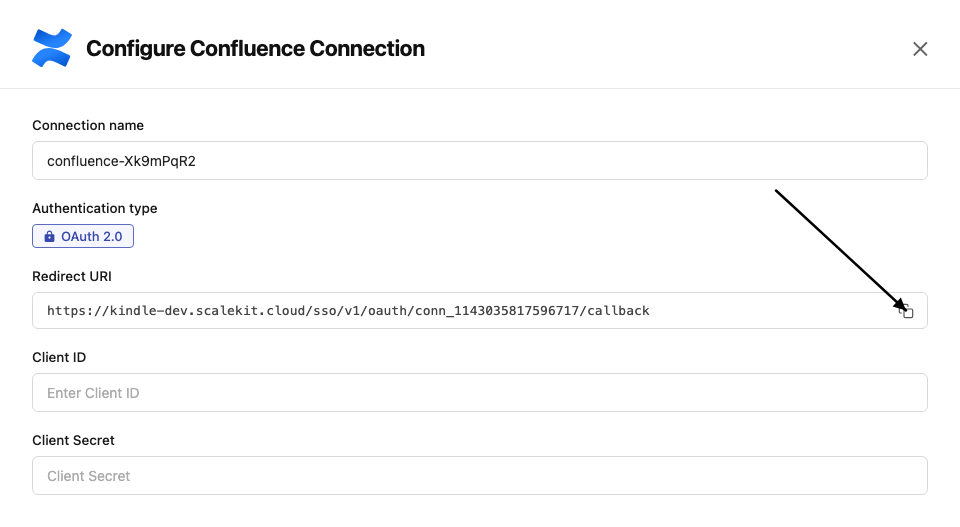
-
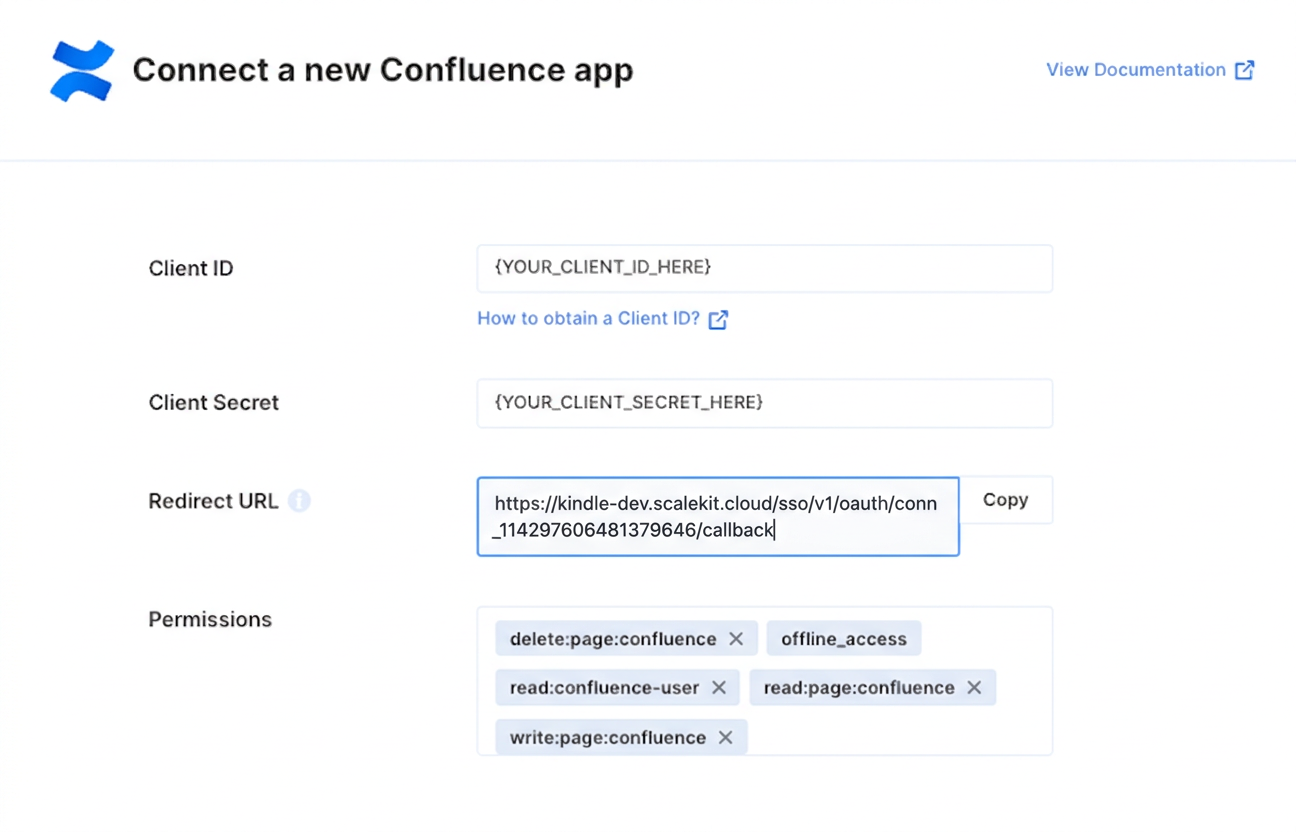
In the Atlassian Developer Console, open your app and go to Authorization → OAuth 2.0 (3LO) → Configure.
-
Paste the copied URI into the Callback URL field and click Save changes.
-
-
Get client credentials
In the Atlassian Developer Console, open your app and go to Settings:
- Client ID — listed under Client ID
- Client Secret — listed under Secret
-
Add credentials in Scalekit
-
In Scalekit dashboard, go to AgentKit > Connections and open the connection you created.
-
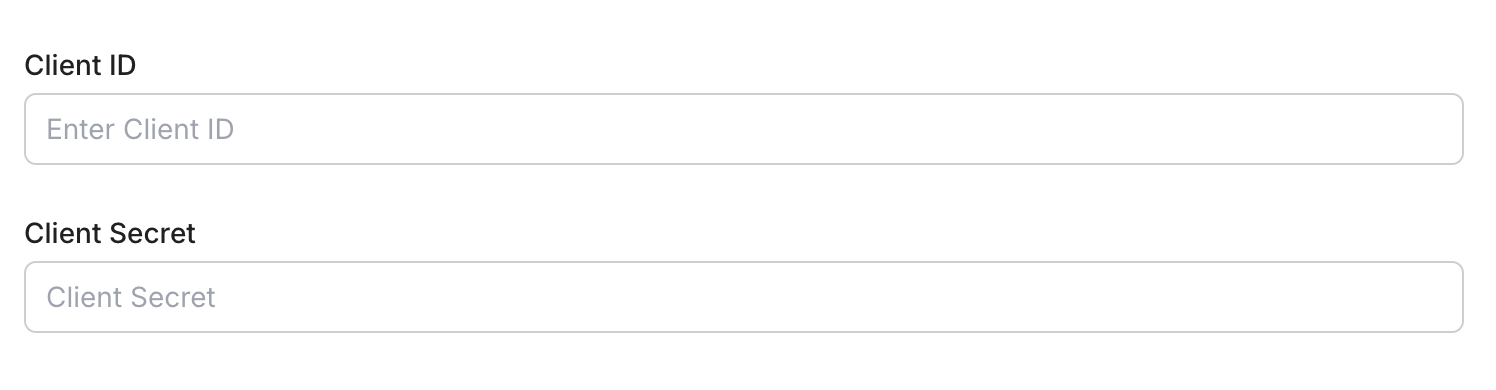
Enter your credentials:
- Client ID (from your Atlassian app settings)
- Client Secret (from your Atlassian app settings)
- Permissions (scopes — see Confluence OAuth scopes reference)
-
Click Save.
-
-
Authorize a user and make your first call
quickstart.mts import { ScalekitClient } from '@scalekit-sdk/node'import 'dotenv/config'import { createInterface } from 'node:readline/promises'const scalekit = new ScalekitClient(process.env.SCALEKIT_ENVIRONMENT_URL,process.env.SCALEKIT_CLIENT_ID,process.env.SCALEKIT_CLIENT_SECRET,)const actions = scalekit.actionsconst connector = 'confluence'const identifier = 'user_123'// Generate an authorization link for the userconst { link } = await actions.getAuthorizationLink({ connectionName: connector, identifier })console.log('Authorize Confluence:', link)const rl = createInterface({ input: process.stdin, output: process.stdout })await rl.question('Press Enter after authorizing...')rl.close()// Make your first callconst result = await actions.executeTool({connector,identifier,toolName: 'confluence_attachments_list',toolInput: {},})console.log(result)Terminal window npx tsx quickstart.mtsquickstart.py import osfrom scalekit import ScalekitClientfrom dotenv import load_dotenvload_dotenv()scalekit_client = ScalekitClient(env_url=os.getenv("SCALEKIT_ENVIRONMENT_URL"),client_id=os.getenv("SCALEKIT_CLIENT_ID"),client_secret=os.getenv("SCALEKIT_CLIENT_SECRET"),)actions = scalekit_client.actionsconnection_name = "confluence"identifier = "user_123"# Generate an authorization link for the userlink_response = actions.get_authorization_link(connection_name=connection_name,identifier=identifier,)print("Authorize Confluence:", link_response.link)input("Press Enter after authorizing...")# Make your first callresult = actions.execute_tool(tool_input={},tool_name="confluence_attachments_list",connection_name=connection_name,identifier=identifier,)print(result)Terminal window python quickstart.pyEach user signs in once. See Authorize a user for the full flow and statuses.
Tools
Pass the exact name toexecute_toolconfluence_access_by_email_checkCheck site access for a list of emails.Read-onlyCheck Access By Email
Check site access for a list of emails. Returns the subset of emails from the input list that do NOT currently have access to the Confluence site. Requires permission to access the Confluence site.
Inputs
emailsarrayrequired- JSON array of email addresses to check for site access
confluence_attachment_comments_getRetrieve footer comments for a specific Confluence attachment.Read-onlyGet Attachment Comments
Retrieve footer comments for a specific Confluence attachment. Returns paginated comment results including author, content, creation time, and reply counts. Supports cursor-based pagination and optional body format, and can retrieve comments for a specific attachment version.
Inputs
idstringrequired- The ID of the attachment for which comments should be returned
body_formatstring- The content format type to be returned in the body field of the responseone of
storageatlas_doc_format cursorstring- Cursor token for pagination, returned in the previous response as _links.next
limitinteger- Maximum number of comments to return per page (default 25, max 250)default
25 sortstring- Sort order for comments (e.g. created-date, -created-date, modified-date, -modified-date)
versioninteger- Version number of the attachment to retrieve comments for. If not provided, retrieves comments for the latest version.
confluence_attachment_getRetrieve a specific Confluence attachment by its ID.Read-onlyGet Attachment
Retrieve a specific Confluence attachment by its ID. Returns metadata including filename, media type, file size, download URL, and optionally labels, content properties, operations, versions, and collaborators. Use the Get Attachments tool if you don't know the attachment ID.
Inputs
idstringrequired- The ID of the attachment to retrieve
include_collaboratorsboolean- Set to true to include collaborators on the attachmentdefault
false include_labelsboolean- Set to true to include labels associated with this attachmentdefault
false include_operationsboolean- Set to true to include operations associated with this attachmentdefault
false include_propertiesboolean- Set to true to include content properties associated with this attachmentdefault
false include_versionboolean- Set to false to exclude the current version details from the responsedefault
true include_versionsboolean- Set to true to include all versions associated with this attachmentdefault
false versioninteger- Specific version number of the attachment to retrieve (defaults to latest)
confluence_attachment_labels_getRetrieve all labels attached to a specific Confluence attachment.Read-onlyGet Attachment Labels
Retrieve all labels attached to a specific Confluence attachment. Labels can be filtered by prefix (e.g. global, my, team, system). Returns a paginated list of label names and prefixes. Only labels the caller has permission to view are returned.
Inputs
idstringrequired- The ID of the attachment whose labels to retrieve
cursorstring- Cursor token for pagination, returned in the previous response as _links.next
limitinteger- Maximum number of labels to return per page (default 25, max 250)default
25 prefixstring- Filter labels by prefix (e.g. my, team, global, system)one of
myteamglobalsystem sortstring- Sort order for labels (e.g. created-date, -created-date, id, -id, name, -name)
confluence_attachment_thumbnail_getDownload an attachment's thumbnail image by attachment ID.Read-onlyGet Attachment Thumbnail
Download an attachment's thumbnail image by attachment ID. Redirects to a URL that serves the thumbnail's binary data. Optionally control the thumbnail dimensions or retrieve a previous version. Requires permission to view the attachment's container.
Inputs
idstringrequired- The ID of the attachment whose thumbnail is to be returned
heightinteger- Allows you to define the thumbnail height
versioninteger- Allows you to retrieve a previously published version. Specify the previous version's number to retrieve its details
widthinteger- Allows you to define the thumbnail width
confluence_attachment_version_getRetrieve the version details for a specific version of a Confluence attachment.Read-onlyGet Attachment Version Details
Retrieve the version details for a specific version of a Confluence attachment. Returns metadata about that version, including author and modification date. Use the Get Attachment Versions tool to list available version numbers first.
Inputs
attachment_idstringrequired- The ID of the attachment for which version details should be returned
version_numberintegerrequired- The version number of the attachment to be returned
confluence_attachment_versions_getRetrieve the version history of a specific Confluence attachment.Read-onlyGet Attachment Versions
Retrieve the version history of a specific Confluence attachment. Returns a paginated list of versions including version numbers, authors, and modification dates. Use the Get Attachment Version Details tool to fetch full details for a single version.
Inputs
idstringrequired- The ID of the attachment whose versions to retrieve
cursorstring- Cursor token for pagination, returned in the previous response as _links.next
limitinteger- Maximum number of versions to return per page (default 25, max 250)default
25 sortstring- Sort order for versions (e.g. modified-date, -modified-date)one of
modified-date-modified-date
confluence_attachments_listList all attachments across the Confluence instance.Read-onlyList Attachments
List all attachments across the Confluence instance. Returns a paginated collection of attachments with metadata including filename, media type, file size, and download URL. Supports filtering by status, media type, or filename and cursor-based pagination.
Inputs
cursorstring- Cursor token for pagination, returned in the previous response as _links.next
filenamestring- Filter attachments by exact filename
limitinteger- Maximum number of attachments to return per page (default 50, max 250)default
50 media_typestring- Filter attachments by MIME media type (e.g. image/png, application/pdf)
sortstring- Sort order for attachments (e.g. created-date, -created-date, modified-date, -modified-date)
statusarray- Filter attachments by status (current, archived, trashed). By default current and archived are returned.
confluence_blogpost_attachments_getRetrieve all attachments on a Confluence blog post.Read-onlyGet Blog Post Attachments
Retrieve all attachments on a Confluence blog post. Returns a paginated list of attachments with metadata including filename, media type, file size, and download URL. Supports filtering by status, media type, or filename and cursor-based pagination.
Inputs
idstringrequired- The ID of the blog post for which attachments should be returned
cursorstring- Cursor token for pagination, returned in the previous response as _links.next
filenamestring- Filter attachments by exact filename
limitinteger- Maximum number of attachments to return per page (default 50, max 250)default
50 media_typestring- Filter attachments by MIME media type (e.g. image/png, application/pdf)
sortstring- Sort order for attachments (e.g. created-date, -created-date, modified-date, -modified-date)
statusarray- Filter attachments by status (current, archived, trashed). By default current and archived are returned.
confluence_blogpost_custom_content_listReturns all custom content of a given type within a specific Confluence blog post.Read-onlyList Custom Content In Blog Post
Returns all custom content of a given type within a specific Confluence blog post. Custom content is app-defined content stored under a container such as a blog post. Results are paginated via cursor; use the type parameter to filter to a specific custom content type.
Inputs
idstringrequired- The ID of the blog post for which custom content should be returned
typestringrequired- The type of custom content being requested
body_formatstring- The content format to return in the body field of the response (e.g. raw, storage, atlas_doc_format)
cursorstring- Cursor token for pagination, returned in previous response as _links.next
limitinteger- Maximum number of custom content items to return per page (default 25, max 250)default
25 sortstring- Used to sort the result by a particular field (e.g. id, -id, created-date, -created-date, modified-date, -modified-date, title, -title)
confluence_blogpost_getRetrieve a specific Confluence blog post by its ID.Read-onlyGet Blog Post
Retrieve a specific Confluence blog post by its ID. Returns the blog post content, metadata, author, space, status, and version history. Optionally include body content in a specified format, fetch a draft version, or a historical version.
Inputs
idstringrequired- The numeric ID of the blog post to retrieve
body_formatstring- Format of the blog post body to include in the response
get_draftboolean- Whether to retrieve the draft version of the blog post
include_labelsboolean- Whether to include labels applied to the blog post
versioninteger- Version number of the blog post to retrieve
confluence_blogpost_inline_comments_getRetrieve the root inline comments of a specific Confluence blog post.Read-onlyGet Blog Post Inline Comments
Retrieve the root inline comments of a specific Confluence blog post. Returns paginated comment results including author, content, and status. Supports filtering by status and resolution status, sorting, and cursor-based pagination.
Inputs
idstringrequired- The numeric ID of the blog post whose inline comments to retrieve
body_formatstring- Format of the comment body to include in the response
cursorstring- Cursor token for fetching the next page of results
limitinteger- Maximum number of inline comments to return per page
resolution_statusarray- Filter inline comments by resolution status. Accepts an array of values: resolved, open, dangling, reopened.
sortstring- Sort order for the comments
statusarray- Filter inline comments by status. Accepts an array of values: current, deleted, trashed, historical, draft.
confluence_blogpost_labels_getRetrieve all labels attached to a Confluence blog post.Read-onlyGet Blog Post Labels
Retrieve all labels attached to a Confluence blog post. Labels can be filtered by prefix (e.g. global, my, team, system). Returns a paginated list of label names and prefixes. Only labels the requesting user has permission to view are returned.
Inputs
idstringrequired- The ID of the blog post for which labels should be returned
cursorstring- Cursor token for pagination, returned in previous response as _links.next
limitinteger- Maximum number of labels to return per page (default 25, max 250)default
25 prefixstring- Filter the results to labels based on their prefix (e.g. my, team, global, system)
sortstring- Used to sort the result by a particular field (e.g. created-date, -created-date, id, -id, name, -name)
confluence_blogpost_like_count_getRetrieve the total count of likes on a specific Confluence blog post.Read-onlyGet Blog Post Like Count
Retrieve the total count of likes on a specific Confluence blog post.
Inputs
idstringrequired- The ID of the blog post for which like count should be returned
confluence_blogpost_like_users_getRetrieve the account IDs of users who liked a specific Confluence blog post.Read-onlyGet Blog Post Like Users
Retrieve the account IDs of users who liked a specific Confluence blog post. Results are paginated via cursor.
Inputs
idstringrequired- The ID of the blog post for which account IDs of likes should be returned
cursorstring- Cursor token for pagination, returned in previous response as _links.next
limitinteger- Maximum number of account IDs to return per page (default 25, max 250)default
25
confluence_blogpost_listList blog posts in Confluence.Read-onlyList Blog Posts
List blog posts in Confluence. Filter by blog post IDs, space IDs, sort order, status, title, or body format. Returns paginated results with cursor-based navigation.
Inputs
body_formatstring- Format of the blog post body to return
cursorstring- Cursor token for fetching the next page of results
idarray- Filter by specific blog post IDs
limitinteger- Maximum number of blog posts to return per page
sortstring- Sort order for the results
space_idarray- Filter blog posts by space IDs
statusstring- Filter blog posts by status
titlestring- Filter blog posts by title (partial match)
confluence_blogpost_property_getRetrieve a specific content property attached to a Confluence blog post by its property ID.Read-onlyGet Blog Post Content Property
Retrieve a specific content property attached to a Confluence blog post by its property ID.
Inputs
idstringrequired- The ID of the blog post the content property belongs to.
property_idstringrequired- The ID of the content property to retrieve.
confluence_blogpost_property_listList the content properties (custom key/value metadata) attached to a Confluence blog post.Read-onlyList Blog Post Content Properties
List the content properties (custom key/value metadata) attached to a Confluence blog post. Supports filtering by key, sorting, and cursor-based pagination.
Inputs
idstringrequired- The ID of the blog post for which content properties should be returned.
cursorstring- Cursor token for fetching the next page of results.
keystring- Filter to return only the content property with this exact key (case sensitive).
limitinteger- Maximum number of content properties to return per page (default 25, max 250).
sortstring- Sort field for the results: key or -key for descending.one of
key-key
confluence_blogpost_version_getRetrieve the details of a specific historical version of a Confluence blog post, identified by blog post ID and version number.Read-onlyGet Blog Post Version
Retrieve the details of a specific historical version of a Confluence blog post, identified by blog post ID and version number.
Inputs
blogpost_idstringrequired- The ID of the blog post for which version details should be returned
version_numberintegerrequired- The version number of the blog post to be returned
confluence_blogpost_versions_listRetrieve the version history of a specific Confluence blog post.Read-onlyList Blog Post Versions
Retrieve the version history of a specific Confluence blog post. Returns a paginated list of versions with metadata such as author and modification date. Use cursor-based pagination for blog posts with many versions.
Inputs
idstringrequired- The ID of the blog post to be queried for its versions
body_formatstring- The content format to return in the body field of each version (e.g. storage, atlas_doc_format)
cursorstring- Cursor token for pagination, returned in previous response as _links.next
limitinteger- Maximum number of versions to return per page (default 25, max 250)default
25 sortstring- Used to sort the result by a particular field (e.g. modified-date, -modified-date)
confluence_content_ids_to_typesConvert a list of Confluence content IDs into their v2 content types (e.g.Read-onlyConvert Content IDs to Content Types
Convert a list of Confluence content IDs into their v2 content types (e.g. page, blogpost, attachment, inline-comment, footer-comment). Useful when migrating from v1 data that stored only content IDs without their associated type. Accepts up to 100 IDs per call.
Inputs
content_ids_jsonstringrequired- JSON-encoded array of up to 100 content IDs to convert, as strings or numbers.
confluence_custom_content_attachments_getRetrieve the attachments of a specific Confluence custom content item.Read-onlyGet Custom Content Attachments
Retrieve the attachments of a specific Confluence custom content item. Supports filtering by status, media type, or filename, and cursor-based pagination for items with many attachments.
Inputs
idstringrequired- The ID of the custom content for which attachments should be returned
cursorstring- Cursor token for pagination, returned in the previous response as _links.next
filenamestring- Filter attachments by their filename (only one filename may be specified)
limitinteger- Maximum number of attachments to return per page (default 50, max 250)default
50 media_typestring- Filter attachments by media type (only one media type may be specified)
sortstring- Sort order for attachments (e.g. created-date, -created-date, modified-date, -modified-date)one of
created-date-created-datemodified-date-modified-date statusstring- Filter attachments by status (comma-separated list). By default current and archived are used.
confluence_custom_content_children_getRetrieve all child custom content for a given custom content ID.Read-onlyGet Custom Content Children
Retrieve all child custom content for a given custom content ID. Results are paginated via cursor. Only custom content the user has permission to view is returned.
Inputs
idstringrequired- The ID of the parent custom content. If you don't know the custom content ID, use List Custom Content and filter the results
cursorstring- Cursor token for pagination, returned in the previous response as _links.next
limitinteger- Maximum number of pages per result to return (default 25, max 250)default
25 sortstring- Used to sort the result by a particular field (e.g. created-date, -created-date, id, -id, modified-date, -modified-date)
confluence_custom_content_comments_getRetrieve the footer comments of a specific Confluence custom content item.Read-onlyGet Custom Content Comments
Retrieve the footer comments of a specific Confluence custom content item. Supports body format selection and cursor-based pagination for items with many comments.
Inputs
idstringrequired- The ID of the custom content for which comments should be returned
body_formatstring- The content format to return in the body field of each comment (e.g. storage, atlas_doc_format)one of
storageatlas_doc_format cursorstring- Cursor token for pagination, returned in the previous response as _links.next
limitinteger- Maximum number of comments to return per page (default 25, max 250)default
25 sortstring- Sort order for comments (e.g. created-date, -created-date, modified-date, -modified-date)one of
created-date-created-datemodified-date-modified-date
confluence_custom_content_getRetrieve a specific piece of Confluence custom content by its ID.Read-onlyGet Custom Content
Retrieve a specific piece of Confluence custom content by its ID. Optionally include labels, content properties, operations, version history, the current version, or collaborators in the response.
Inputs
idstringrequired- The ID of the custom content to be returned
body_formatstring- The content format to return in the body field of the response (e.g. raw, storage, atlas_doc_format, view, export_view, anonymous_export_view)
include_collaboratorsboolean- Set to true to include collaborators on the custom content
include_labelsboolean- Set to true to include labels associated with this custom content in the response
include_operationsboolean- Set to true to include operations associated with this custom content in the response
include_propertiesboolean- Set to true to include content properties associated with this custom content in the response
include_versionboolean- Includes the current version associated with this custom content in the response. Defaults to true.default
true include_versionsboolean- Set to true to include versions associated with this custom content in the response
versioninteger- Allows you to retrieve a previously published version. Specify the previous version's number to retrieve its details.
confluence_custom_content_labels_getRetrieve all labels attached to a Confluence custom content item.Read-onlyGet Custom Content Labels
Retrieve all labels attached to a Confluence custom content item. Labels can be filtered by prefix (e.g. global, my, team, system). Returns a paginated list of label names and prefixes; only labels the user can view are returned.
Inputs
idstringrequired- The ID of the custom content for which labels should be returned
cursorstring- Cursor token for pagination, returned in the previous response as _links.next
limitinteger- Maximum number of labels to return per page (default 25, max 250)default
25 prefixstring- Filter labels by prefix (e.g. my, team, global, system)one of
myteamglobalsystem sortstring- Sort order for labels (e.g. created-date, -created-date, id, -id, name, -name)
confluence_custom_content_listReturns all Confluence custom content for a given type, optionally filtered by custom content IDs or space IDs.Read-onlyList Custom Content
Returns all Confluence custom content for a given type, optionally filtered by custom content IDs or space IDs. Custom content is app-defined content that can live under a page, blog post, space, or other custom content. Results are paginated via cursor.
Inputs
typestringrequired- The type of custom content being requested
body_formatstring- The content format to return in the body field of the response (e.g. raw, storage, atlas_doc_format)
cursorstring- Cursor token for pagination, returned in previous response as _links.next
idstring- Filter the results based on custom content IDs (comma-separated string, up to 250 IDs)
limitinteger- Maximum number of custom content items to return per page (default 25, max 250)default
25 sortstring- Used to sort the result by a particular field (e.g. id, -id, created-date, -created-date, modified-date, -modified-date, title, -title)
space_idstring- Filter the results based on space IDs (comma-separated string, up to 100 IDs)
confluence_custom_content_version_getRetrieve version details for a specific version number of Confluence custom content.Read-onlyGet Custom Content Version
Retrieve version details for a specific version number of Confluence custom content.
Inputs
custom_content_idstringrequired- The ID of the custom content for which version details should be returned
version_numberstringrequired- The version number of the custom content to be returned
confluence_custom_content_versions_listRetrieve the versions of specific Confluence custom content.Read-onlyList Custom Content Versions
Retrieve the versions of specific Confluence custom content. Supports filtering the returned body format and cursor-based pagination.
Inputs
custom_content_idstringrequired- The ID of the custom content to be queried for its versions
body_formatstring- The content format to be returned in the body field of the response (raw, storage, atlas_doc_format)one of
rawstorageatlas_doc_format cursorstring- Cursor token for pagination, returned in the previous response as _links.next
limitinteger- Maximum number of versions per result to return (default 25, max 250)
sortstring- Sort order for versions (modified-date or -modified-date)one of
modified-date-modified-date
confluence_database_ancestors_getRetrieve all ancestors of a Confluence database in the content tree, in top-to-bottom order (the highest ancestor is first in the response).Read-onlyGet Database Ancestors
Retrieve all ancestors of a Confluence database in the content tree, in top-to-bottom order (the highest ancestor is first in the response). If more results exist, call again using the ID of the first ancestor returned.
Inputs
idstringrequired- The ID of the database
limitinteger- Maximum number of items to return (default 25, max 250)default
25
confluence_database_descendants_getRetrieve descendants in the content tree for a Confluence database, in top-to-bottom order (the highest descendant is first in the response).Read-onlyGet Database Descendants
Retrieve descendants in the content tree for a Confluence database, in top-to-bottom order (the highest descendant is first in the response). Supports a depth parameter to limit how many levels of descendants are returned, and cursor-based pagination for additional results.
Inputs
idstringrequired- The ID of the database
cursorstring- Opaque cursor for pagination, returned in the Link response header of a previous call
depthinteger- Maximum depth of descendants to return (default 2, max 10)default
2 limitinteger- Maximum number of items to return per result (default 25, max 250)default
25
confluence_database_direct_children_getRetrieve the direct children of a Confluence database in the content tree (database, embed, folder, page, or whiteboard types).Read-onlyGet Database Direct Children
Retrieve the direct children of a Confluence database in the content tree (database, embed, folder, page, or whiteboard types). Returns minimal information about each child; use cursor-based pagination via the returned Link header to fetch more results.
Inputs
idstringrequired- The ID of the parent database
cursorstring- Opaque cursor for pagination, returned in the Link response header of a previous call
limitinteger- Maximum number of items to return per result (default 25, max 250)default
25 sortstring- Field and direction to sort the results by. Valid values: created-date, -created-date, id, -id, modified-date, -modified-date, child-position, -child-position, title, -titleone of
created-date-created-dateid-idmodified-date-modified-datechild-position-child-positiontitle-title
confluence_database_getRetrieve a specific Confluence database (a Confluence Whiteboard-style structured database object) by its ID.Read-onlyGet Database
Retrieve a specific Confluence database (a Confluence Whiteboard-style structured database object) by its ID. Returns core database metadata and optionally its collaborators, direct children, operations, and content properties. Requires permission to view the database and its corresponding space.
Inputs
idstringrequired- The ID of the database to be returned
include_collaboratorsboolean- Set to true to include collaborators on the database in the responsedefault
false include_direct_childrenboolean- Set to true to include direct children of the database, as defined in the ChildrenResponse objectdefault
false include_operationsboolean- Set to true to include operations associated with this database. Results are limited to 50 and sorted in default orderdefault
false include_propertiesboolean- Set to true to include content properties associated with this database. Results are limited to 50 and sorted in default orderdefault
false
confluence_folder_ancestors_getRetrieve all ancestors of a Confluence folder in top-to-bottom order (the highest ancestor first).Read-onlyGet Folder Ancestors
Retrieve all ancestors of a Confluence folder in top-to-bottom order (the highest ancestor first). Returns minimal information about each ancestor.
Inputs
idstringrequired- The ID of the folder
limitinteger- Maximum number of items per result to return (default 25, max 250)
confluence_folder_descendants_getRetrieve descendants of a Confluence folder in the content tree, in top-to-bottom order.Read-onlyGet Folder Descendants
Retrieve descendants of a Confluence folder in the content tree, in top-to-bottom order. Returns database, embed, folder, page, and whiteboard content types. Control how deep to traverse with the depth parameter, and paginate with cursor.
Inputs
idstringrequired- The ID of the folder
cursorstring- Cursor token for pagination, returned in the previous response
depthinteger- Maximum depth of descendants to return (default 2, min 1, max 10)
limitinteger- Maximum number of items per result to return (default 25, max 250)
confluence_folder_direct_children_getRetrieve the direct children of a Confluence folder in the content tree.Read-onlyGet Folder Direct Children
Retrieve the direct children of a Confluence folder in the content tree. Returns minimal information about each child (database, embed, folder, page, or whiteboard). Use cursor-based pagination for folders with many children.
Inputs
idstringrequired- The ID of the parent folder
cursorstring- Cursor token for pagination, returned in the previous response as _links.next
limitinteger- Maximum number of items per result to return (default 25, max 250)
sortstring- Sort order for children (e.g. created-date, -created-date, id, -id, modified-date, -modified-date, child-position, -child-position, title, -title)
confluence_folder_getRetrieve a specific Confluence folder by its ID.Read-onlyGet Folder
Retrieve a specific Confluence folder by its ID. Returns core folder metadata and optionally its collaborators, direct children, operations, and content properties. Requires permission to view the folder and its corresponding space.
Inputs
idstringrequired- The ID of the folder to be returned
include_collaboratorsboolean- Set to true to include collaborators on the folder in the responsedefault
false include_direct_childrenboolean- Set to true to include direct children of the folder, as defined in the ChildrenResponse objectdefault
false include_operationsboolean- Set to true to include operations associated with this folder. Results are limited to 50 and sorted in default orderdefault
false include_propertiesboolean- Set to true to include content properties associated with this folder. Results are limited to 50 and sorted in default orderdefault
false
confluence_inline_comment_children_getRetrieve the child (reply) inline comments of a specific Confluence inline comment.Read-onlyGet Inline Comment Children
Retrieve the child (reply) inline comments of a specific Confluence inline comment. Returns a paginated list of replies. Supports optional body format, sort order, and cursor-based pagination.
Inputs
idstringrequired- The ID of the parent comment for which inline comment children should be returned
body_formatstring- The content format type to be returned in the body field of the response
cursorstring- Cursor token for fetching the next page of results
limitinteger- Maximum number of child comments per result to return
sortstring- Sort order for the child comments
confluence_inline_comment_getRetrieve a single Confluence inline comment by its ID.Read-onlyGet Inline Comment
Retrieve a single Confluence inline comment by its ID. Returns the comment body, resolved state, and highlighted text metadata. Optionally include content properties, operations, likes, and version information.
Inputs
comment_idstringrequired- The ID of the comment to be retrieved
body_formatstring- The content format type to be returned in the body field of the response
include_likesboolean- Includes likes associated with this inline comment in the response
include_operationsboolean- Includes operations associated with this inline comment in the response
include_propertiesboolean- Includes content properties associated with this inline comment in the response
include_versionboolean- Includes the current version associated with this inline comment in the response. By default this is included.
include_versionsboolean- Includes versions associated with this inline comment in the response
versioninteger- Allows you to retrieve a previously published version. Specify the previous version's number to retrieve its details.
confluence_inline_comment_like_count_getRetrieve the number of likes for a specific Confluence inline comment.Read-onlyGet Inline Comment Like Count
Retrieve the number of likes for a specific Confluence inline comment.
Inputs
idstringrequired- The ID of the inline comment for which like count should be returned
confluence_inline_comment_like_users_getRetrieve the account IDs of users who liked a specific Confluence inline comment.Read-onlyGet Inline Comment Like Users
Retrieve the account IDs of users who liked a specific Confluence inline comment. Results are paginated via cursor.
Inputs
idstringrequired- The ID of the inline comment for which account IDs of likes should be returned
cursorstring- Cursor token for pagination, returned in the previous response as _links.next
limitinteger- Maximum number of account IDs to return per page (default 25, max 250)default
25
confluence_inline_comment_version_getRetrieve the version details for a specific version of a Confluence inline comment.Read-onlyGet Inline Comment Version
Retrieve the version details for a specific version of a Confluence inline comment. Returns metadata about that version, including author and modification date. Use the Get Inline Comment Versions tool to list available version numbers first.
Inputs
idstringrequired- The ID of the inline comment for which version details should be returned
version_numberintegerrequired- The version number of the inline comment to be returned
confluence_inline_comment_versions_getRetrieve the version history of a specific Confluence inline comment.Read-onlyGet Inline Comment Versions
Retrieve the version history of a specific Confluence inline comment. Returns a paginated list of versions including version numbers, authors, and modification dates. Use the Get Inline Comment Version tool to fetch full details for a single version.
Inputs
idstringrequired- The ID of the inline comment for which versions should be returned
body_formatstring- The content format types to be returned in the body field of the response (e.g. storage, atlas_doc_format)
cursorstring- Cursor token for pagination, returned in the previous response as _links.next
limitinteger- Maximum number of versions to return per page (default 25, max 250)default
25 sortstring- Used to sort the result by a particular field (e.g. modified-date, -modified-date)one of
modified-date-modified-date
confluence_inline_comments_listRetrieve all inline comments across Confluence.Read-onlyList Inline Comments
Retrieve all inline comments across Confluence. Returns a paginated list of inline comments including author, content, and highlighted text metadata. Supports optional body format, sort order, and cursor-based pagination.
Inputs
body_formatstring- The content format type to be returned in the body field of the response
cursorstring- Cursor token for fetching the next page of results
limitinteger- Maximum number of inline comments per result to return
sortstring- Sort order for the comments
confluence_label_attachments_getRetrieve the attachments associated with a specific Confluence label.Read-onlyGet Attachments for Label
Retrieve the attachments associated with a specific Confluence label. Returns a paginated list of attachments; use cursor-based pagination for labels with many attachments.
Inputs
idstringrequired- The ID of the label for which attachments should be returned
cursorstring- Cursor token for pagination, returned in the previous response as _links.next
limitinteger- Maximum number of attachments to return per page (default 25, max 250)default
25 sortstring- Sort order for attachments (e.g. created-date, -created-date, modified-date, -modified-date)one of
created-date-created-datemodified-date-modified-date
confluence_label_blog_posts_getRetrieve the blog posts associated with a specific Confluence label.Read-onlyGet Blog Posts for Label
Retrieve the blog posts associated with a specific Confluence label. Supports filtering by space IDs, body format selection, and cursor-based pagination for labels with many blog posts.
Inputs
idstringrequired- The ID of the label for which blog posts should be returned
body_formatstring- The content format to return in the body field of each blog post (e.g. storage, atlas_doc_format)one of
storageatlas_doc_format cursorstring- Cursor token for pagination, returned in the previous response as _links.next
limitinteger- Maximum number of blog posts to return per page (default 25, max 250)default
25 sortstring- Sort order for blog posts (e.g. id, -id, created-date, -created-date, modified-date, -modified-date)one of
id-idcreated-date-created-datemodified-date-modified-date space_idstring- Filter results by one or more space IDs, specified as a comma-separated list (max 100)
confluence_label_pages_getRetrieve the pages associated with a specific Confluence label.Read-onlyGet Pages for Label
Retrieve the pages associated with a specific Confluence label. Supports filtering by space IDs, body format selection, and cursor-based pagination for labels with many pages.
Inputs
idstringrequired- The ID of the label for which pages should be returned
body_formatstring- The content format to return in the body field of each page (e.g. storage, atlas_doc_format)one of
storageatlas_doc_format cursorstring- Cursor token for pagination, returned in the previous response as _links.next
limitinteger- Maximum number of pages to return per page (default 25, max 250)default
25 sortstring- Sort order for pages (e.g. id, -id, created-date, -created-date, modified-date, -modified-date, title, -title)one of
id-idcreated-date-created-datemodified-date-modified-datetitle-title space_idstring- Filter results by one or more space IDs, specified as a comma-separated list (max 100)
confluence_labels_listList all labels across the Confluence site.Read-onlyList Labels
List all labels across the Confluence site. Supports filtering by label ID or prefix, and cursor-based pagination. Only labels that the user has permission to view are returned.
Inputs
cursorstring- Cursor token for pagination, returned in the previous response as _links.next
label_idstring- Filter by one or more label IDs, specified as a comma-separated list
limitinteger- Maximum number of labels to return per page (default 25, max 250)default
25 prefixstring- Filter by one or more label prefixes, specified as a comma-separated list
sortstring- Sort order for labels (e.g. created-date, -created-date, id, -id, name, -name)
confluence_page_ancestors_getRetrieve all ancestors of a Confluence page in top-to-bottom order (the highest ancestor first).Read-onlyGet Page Ancestors
Retrieve all ancestors of a Confluence page in top-to-bottom order (the highest ancestor first). Returns minimal information about each ancestor; use the Get Page tool for full details.
Inputs
idstringrequired- The ID of the page
limitinteger- Maximum number of pages per result to return (default 25, max 250). If more results exist, call this endpoint with the highest ancestor's IDdefault
25
confluence_page_attachments_getRetrieve all attachments on a Confluence page.Read-onlyGet Page Attachments
Retrieve all attachments on a Confluence page. Returns a paginated list of attachments with metadata including filename, media type, file size, and download URL. Supports filtering by media type or filename and cursor-based pagination.
Inputs
idstringrequired- The ID of the page whose attachments to retrieve
cursorstring- Cursor token for pagination, returned in the previous response as _links.next
filenamestring- Filter attachments by exact filename
limitinteger- Maximum number of attachments to return per page (default 25, max 250)
media_typestring- Filter attachments by MIME media type (e.g. image/png, application/pdf)
sortstring- Sort order for attachments (e.g. created-date, -created-date, modified-date, -modified-date)
confluence_page_children_getRetrieve the direct child pages of a given Confluence page.Read-onlyGet Page Children
Retrieve the direct child pages of a given Confluence page. Returns a paginated list of child pages with their IDs, titles, and statuses. Use cursor-based pagination to iterate through large result sets.
Inputs
idstringrequired- The ID of the parent page whose children to retrieve
cursorstring- Cursor token for pagination, returned in the previous response as _links.next
limitinteger- Maximum number of child pages to return (default 25, max 250)
sortstring- Sort order for child pages (e.g. -modified-date, id, title, -title)
confluence_page_classification_level_getGet the data classification level (e.g.Read-onlyGet Page Classification Level
Get the data classification level (e.g. Public, Internal, Confidential) currently applied to a Confluence page. Only meaningful on sites with Classification Levels enabled (Premium/Enterprise plans) — returns the classification's ID, name, description, guideline, color, and status.
Inputs
idstringrequired- The ID of the page whose classification level should be returned.
confluence_page_custom_content_getRetrieve all custom content of a given type within a specific Confluence page.Read-onlyGet Custom Content by Type in Page
Retrieve all custom content of a given type within a specific Confluence page. The type parameter is required and identifies which kind of custom content to return. Supports body format selection and cursor-based pagination.
Inputs
idstringrequired- The ID of the page for which custom content should be returned
typestringrequired- The type of custom content being requested (e.g. a registered app's custom content type identifier)
body_formatstring- The content format to return in the body field of each custom content item (e.g. raw, storage, atlas_doc_format)one of
rawstorageatlas_doc_format cursorstring- Cursor token for pagination, returned in the previous response as _links.next
limitinteger- Maximum number of custom content items to return per page (default 25, max 250)default
25 sortstring- Sort order for custom content (e.g. id, -id, created-date, -created-date, modified-date, -modified-date, title, -title)one of
id-idcreated-date-created-datemodified-date-modified-datetitle-title
confluence_page_descendants_getRetrieve descendants of a Confluence page in the content tree, in top-to-bottom order (database, embed, folder, page, or whiteboard).Read-onlyGet Page Descendants
Retrieve descendants of a Confluence page in the content tree, in top-to-bottom order (database, embed, folder, page, or whiteboard). Control how deep to traverse with the depth parameter, and paginate with cursor.
Inputs
idstringrequired- The ID of the page
cursorstring- Cursor token for pagination, returned in the previous response as the cursor to fetch the next set of results
depthinteger- Maximum depth of descendants to return (default 2, min 1, max 10)default
2 limitinteger- Maximum number of items per result to return (default 25, max 250)default
25
confluence_page_direct_children_getRetrieve the direct children of a Confluence page in the content tree (database, embed, folder, page, or whiteboard).Read-onlyGet Page Direct Children
Retrieve the direct children of a Confluence page in the content tree (database, embed, folder, page, or whiteboard). Returns minimal information about each child; use a related get-by-id endpoint for full details. Results are paginated via cursor.
Inputs
idstringrequired- The ID of the parent page
cursorstring- Cursor token for pagination, returned in the previous response as _links.next
limitinteger- Maximum number of items per result to return (default 25, max 250)default
25 sortstring- Used to sort the result by a particular field (e.g. created-date, -created-date, id, -id, modified-date, -modified-date, child-position, -child-position, title, -title)
confluence_page_getRetrieve a single Confluence page by its ID.Read-onlyGet Page
Retrieve a single Confluence page by its ID. Returns the page title, status, version, space, and optionally the full body content. Use body_format to control the markup format returned. Additional flags expose labels, properties, and version history.
Inputs
idstringrequired- The ID of the page to retrieve
body_formatstring- Format for the returned page body (e.g. storage, atlas_doc_format, anonymous_export_view)
get_draftboolean- Set to true to retrieve the draft version of the page instead of the published version
include_labelsboolean- Set to true to include labels attached to the page in the response
include_propertiesboolean- Set to true to include content properties attached to the page
include_versionboolean- Set to true to include full version details in the response
versioninteger- Specific version number of the page to retrieve (defaults to latest)
confluence_page_inline_comments_getRetrieve the root inline comments of a specific Confluence page.Read-onlyGet Page Inline Comments
Retrieve the root inline comments of a specific Confluence page. Returns paginated comment results including author, content, and status. Supports filtering by status and resolution status, sorting, and cursor-based pagination.
Inputs
idstringrequired- The numeric ID of the page whose inline comments to retrieve
body_formatstring- Format of the comment body to include in the response
cursorstring- Cursor token for fetching the next page of results
limitinteger- Maximum number of inline comments to return per page
resolution_statusarray- Filter inline comments by resolution status. Accepts an array of values: resolved, open, dangling, reopened.
sortstring- Sort order for the comments
statusarray- Filter inline comments by status. Accepts an array of values: current, archived, trashed, deleted, historical, draft.
confluence_page_labels_getRetrieve all labels attached to a Confluence page.Read-onlyGet Page Labels
Retrieve all labels attached to a Confluence page. Labels can be filtered by prefix (e.g. global, my, team). Returns a paginated list of label names and prefixes. Use cursor-based pagination for pages with many labels.
Inputs
idstringrequired- The ID of the page whose labels to retrieve
cursorstring- Cursor token for pagination, returned in the previous response as _links.next
limitinteger- Maximum number of labels to return per page (default 25, max 250)
prefixstring- Filter labels by prefix (e.g. global, my, team, system)
sortstring- Sort order for labels (e.g. created-date, -created-date, name, -name)
confluence_page_like_count_getRetrieve the total count of likes on a specific Confluence page.Read-onlyGet Like Count for Page
Retrieve the total count of likes on a specific Confluence page.
Inputs
idstringrequired- The ID of the page for which like count should be returned
confluence_page_likes_getRetrieve the account IDs of users who liked a specific Confluence page.Read-onlyGet Page Likes
Retrieve the account IDs of users who liked a specific Confluence page. Returns a paginated list of account IDs. Use cursor-based pagination to iterate through large result sets.
Inputs
idstringrequired- The ID of the page for which like count should be returned
cursorstring- Used for pagination, this opaque cursor will be returned in the next URL in the Link response header
limitinteger- Maximum number of account IDs per result to return (default 25, max 250)
confluence_page_listList Confluence pages with optional filtering by space, status, title, or page IDs.Read-onlyList Pages
List Confluence pages with optional filtering by space, status, title, or page IDs. Returns a paginated collection of pages. Use the cursor parameter to fetch subsequent pages. Supports body format selection for inline content retrieval.
Inputs
body_formatstring- The content format to return for page bodies (e.g. storage, atlas_doc_format, anonymous_export_view)
cursorstring- Cursor token for pagination, returned in previous response as _links.next
idstring- Filter by one or more page IDs (comma-separated or repeated query param)
limitinteger- Maximum number of pages to return per page (default 25, max 250)default
25 sortstring- Sort order for results (e.g. -modified-date, id, title, -title)
space_idstring- Filter by one or more space IDs (comma-separated)
statusstring- Filter pages by status (e.g. current, archived, deleted, trashed)
titlestring- Filter pages by title (exact match)
confluence_page_operations_getReturn the operations the authenticated user is permitted to perform on a Confluence page, such as read, update, or delete.Read-onlyGet Page Permitted Operations
Return the operations the authenticated user is permitted to perform on a Confluence page, such as read, update, or delete. Useful for checking access before attempting an action.
Inputs
idstringrequired- The ID of the page for which operations should be returned.
confluence_page_property_getRetrieve a specific content property attached to a Confluence page by its property ID.Read-onlyGet Page Content Property
Retrieve a specific content property attached to a Confluence page by its property ID.
Inputs
idstringrequired- The ID of the page the content property belongs to.
property_idstringrequired- The ID of the content property to retrieve.
confluence_page_property_listList the content properties (custom key/value metadata) attached to a Confluence page.Read-onlyList Page Content Properties
List the content properties (custom key/value metadata) attached to a Confluence page. Supports filtering by key, sorting, and cursor-based pagination.
Inputs
idstringrequired- The ID of the page for which content properties should be returned.
cursorstring- Cursor token for fetching the next page of results.
keystring- Filter to return only the content property with this exact key (case sensitive).
limitinteger- Maximum number of content properties to return per page (default 25, max 250).
sortstring- Sort field for the results: key or -key for descending.one of
key-key
confluence_page_version_getRetrieve version details for a specific version number of a Confluence page.Read-onlyGet Page Version
Retrieve version details for a specific version number of a Confluence page.
Inputs
page_idstringrequired- The ID of the page for which version details should be returned
version_numberstringrequired- The version number of the page to be returned
confluence_page_versions_getRetrieve the version history of a specific Confluence page.Read-onlyGet Page Versions
Retrieve the version history of a specific Confluence page. Returns a paginated list of versions with metadata such as version number, author, and creation date. Use body_format to include body content per version and sort to control ordering.
Inputs
idstringrequired- The ID of the page to be queried for its versions
body_formatstring- The content format types to be returned in the body field of the response (storage or atlas_doc_format)
cursorstring- Used for pagination, this opaque cursor will be returned in the next URL in the Link response header
limitinteger- Maximum number of versions per result to return (default 25, max 250)
sortstring- Used to sort the result by a particular field (modified-date or -modified-date)
confluence_searchSearch Confluence content using Confluence Query Language (CQL).Read-onlySearch Confluence
Search Confluence content using Confluence Query Language (CQL). CQL is a powerful structured query language for finding pages, blog posts, spaces, attachments, and comments. Returns matching content with metadata including title, space, author, and last modified date.
Inputs
cqlstringrequired- Confluence Query Language (CQL) query string
cursorstring- Cursor token for fetching the next page of results
excerptstring- Controls excerpt handling in search results
expandstring- Comma-separated list of properties to expand in results
limitinteger- Maximum number of results to return
confluence_smart_link_ancestors_getRetrieve all ancestors of a Confluence Smart Link (embed) in the content tree, in top-to-bottom order (the highest ancestor is first in the response).Read-onlyGet Smart Link Ancestors
Retrieve all ancestors of a Confluence Smart Link (embed) in the content tree, in top-to-bottom order (the highest ancestor is first in the response). If more results exist, call again using the ID of the first ancestor returned.
Inputs
idstringrequired- The ID of the Smart Link (embed) in the content tree
limitinteger- Maximum number of items to return (default 25, max 250)default
25
confluence_smart_link_descendants_getRetrieve descendants in the content tree for a Confluence Smart Link (embed), in top-to-bottom order (the highest descendant is first in the response).Read-onlyGet Smart Link Descendants
Retrieve descendants in the content tree for a Confluence Smart Link (embed), in top-to-bottom order (the highest descendant is first in the response). Supports a depth parameter to limit how many levels of descendants are returned, and cursor-based pagination for additional results.
Inputs
idstringrequired- The ID of the Smart Link (embed)
cursorstring- Opaque cursor for pagination, returned in the Link response header of a previous call
depthinteger- Maximum depth of descendants to return (default 2, max 10)default
2 limitinteger- Maximum number of items to return per result (default 25, max 250)default
25
confluence_smart_link_direct_children_getRetrieve the direct children of a Confluence Smart Link (embed) in the content tree (database, embed, folder, page, or whiteboard types).Read-onlyGet Smart Link Direct Children
Retrieve the direct children of a Confluence Smart Link (embed) in the content tree (database, embed, folder, page, or whiteboard types). Returns minimal information about each child; use cursor-based pagination via the returned Link header to fetch more results.
Inputs
idstringrequired- The ID of the parent Smart Link (embed)
cursorstring- Opaque cursor for pagination, returned in the Link response header of a previous call
limitinteger- Maximum number of items to return per result (default 25, max 250)default
25 sortstring- Field and direction to sort the results by. Valid values: created-date, -created-date, id, -id, modified-date, -modified-date, child-position, -child-position, title, -titleone of
created-date-created-dateid-idmodified-date-modified-datechild-position-child-positiontitle-title
confluence_smart_link_getRetrieve a specific Smart Link in the content tree by its ID.Read-onlyGet Smart Link
Retrieve a specific Smart Link in the content tree by its ID. Optionally include collaborators, direct children, permitted operations, or content properties.
Inputs
idstringrequired- The ID of the Smart Link to retrieve.
include_collaboratorsboolean- Set to true to include collaborators on the Smart Link.
include_direct_childrenboolean- Set to true to include direct children of the Smart Link.
include_operationsboolean- Set to true to include permitted operations for the Smart Link.
include_propertiesboolean- Set to true to include content properties for the Smart Link.
confluence_space_blogposts_listRetrieve all blog posts in a specific Confluence space.Read-onlyList Space Blog Posts
Retrieve all blog posts in a specific Confluence space. Supports filtering by status and title, control of returned body format, and cursor-based pagination.
Inputs
idstringrequired- The ID of the space for which blog posts should be returned
body_formatstring- Format of the blog post body to return (storage or atlas_doc_format)one of
storageatlas_doc_format cursorstring- Cursor token for pagination, returned in the previous response as _links.next
limitinteger- Maximum number of blog posts per result to return (default 25, max 250)
sortstring- Sort order for the results (id, -id, created-date, -created-date, modified-date, -modified-date)
statusarray- Filter results to blog posts based on their status (current, deleted, trashed). Defaults to current.
titlestring- Filter results to blog posts based on their title
confluence_space_content_labels_getRetrieve labels attached to content (pages, blog posts, etc.) within a Confluence space.Read-onlyGet Space Content Labels
Retrieve labels attached to content (pages, blog posts, etc.) within a Confluence space. Only labels the caller has permission to view are returned. Supports filtering by prefix, sorting, and cursor-based pagination.
Inputs
idstringrequired- The ID of the space for which content labels should be returned
cursorstring- Cursor token for pagination, returned in the previous response as _links.next
limitinteger- Maximum number of labels to return per page (default 25, max 250)default
25 prefixstring- Filter the results to labels based on their prefix (e.g. my, team)
sortstring- Used to sort the result by a particular field (e.g. created-date, -created-date, id, -id, name, -name)
confluence_space_custom_content_listReturns all custom content of a given type within a specific Confluence space.Read-onlyList Custom Content In Space
Returns all custom content of a given type within a specific Confluence space. Custom content is app-defined content stored under a container such as a space. Results are paginated via cursor; use the type parameter to filter to a specific custom content type.
Inputs
idstringrequired- The ID of the space for which custom content should be returned
typestringrequired- The type of custom content being requested
body_formatstring- The content format types to be returned in the body field of the response (e.g. raw, storage, atlas_doc_format)
cursorstring- Cursor token for pagination, returned in previous response as _links.next
limitinteger- Maximum number of custom content items to return per page (default 25, max 250)default
25
confluence_space_getRetrieve details of a specific Confluence space by its ID.Read-onlyGet Space
Retrieve details of a specific Confluence space by its ID. Returns space metadata including key, name, type, status, description, homepage, and permissions. Optionally include the space icon and labels.
Inputs
idstringrequired- The numeric ID of the space to retrieve
description_formatstring- Format for the space description in the response
include_iconboolean- Whether to include the space icon in the response
include_labelsboolean- Whether to include labels applied to the space
confluence_space_labels_listRetrieve the labels of a specific Confluence space.Read-onlyList Space Labels
Retrieve the labels of a specific Confluence space. Only labels the user has permission to view are returned. Supports filtering by prefix and cursor-based pagination.
Inputs
idstringrequired- The ID of the space for which labels should be returned
cursorstring- Cursor token for pagination, returned in the previous response as _links.next
limitinteger- Maximum number of labels per result to return (default 25, max 250)
prefixstring- Filter the results to labels based on their prefix (my or team)one of
myteam sortstring- Sort order for labels (created-date, -created-date, id, -id, name, -name)
confluence_space_listList Confluence spaces accessible to the authenticated user.Read-onlyList Spaces
List Confluence spaces accessible to the authenticated user. Supports filtering by space IDs, keys, type (global or personal), status (current or archived), and labels. Returns paginated results with cursor-based navigation.
Inputs
cursorstring- Cursor token for fetching the next page of results
description_formatstring- Format for the space description in the response
idsarray- Filter spaces by their numeric IDs
keysarray- Filter spaces by their space keys
labelsarray- Filter spaces by labels
limitinteger- Maximum number of spaces to return per page
sortstring- Sort order for the results
statusstring- Filter spaces by statusone of
currentarchived typestring- Filter spaces by typeone of
globalpersonal
confluence_space_operations_getReturn the operations the authenticated user is permitted to perform on a Confluence space, such as read, update, or delete.Read-onlyGet Space Permitted Operations
Return the operations the authenticated user is permitted to perform on a Confluence space, such as read, update, or delete. Useful for checking access before attempting an action.
Inputs
idstringrequired- The ID of the space for which operations should be returned.
confluence_space_pages_listReturns all pages in a Confluence space.Read-onlyList Pages In Space
Returns all pages in a Confluence space. Only pages the caller has permission to view are returned. Supports filtering by depth, status, and title, sorting, and cursor-based pagination.
Inputs
idstringrequired- The ID of the space for which pages should be returned
body_formatstring- The content format types to be returned in the body field of the response (e.g. storage, atlas_doc_format)
cursorstring- Cursor token for pagination, returned in previous response as _links.next
depthstring- Filter the results to pages at the root level of the space or to all pages in the space (all, root)
limitinteger- Maximum number of pages to return per page (default 25, max 250)default
25 sortstring- Used to sort the result by a particular field (e.g. id, -id, created-date, -created-date, modified-date, -modified-date, title, -title)
statusstring- Filter pages by status, comma-separated (e.g. current, archived, deleted, trashed). Defaults to current and archived.
titlestring- Filter the results to pages based on their title
confluence_space_permission_assignments_getRetrieve the space permission assignments for a specific Confluence space, showing which principals (users or groups) hold which permissions.Read-onlyGet Space Permission Assignments
Retrieve the space permission assignments for a specific Confluence space, showing which principals (users or groups) hold which permissions.
Inputs
idstringrequired- The ID of the space to retrieve permission assignments for.
cursorstring- Cursor token for fetching the next page of results.
limitinteger- Maximum number of assignments to return per page (default 25, max 250).
confluence_space_permissions_listList the catalog of space permission types available on this Confluence site.Read-onlyList Available Space Permissions
List the catalog of space permission types available on this Confluence site. Available only on tenants with Role-Based Access Control. Use Get Space Permission Assignments to see who holds which permissions on a specific space.
Inputs
cursorstring- Cursor token for fetching the next page of results.
limitinteger- Maximum number of space permissions to return per page (default 25, max 250).
confluence_space_property_getRetrieve a specific content property attached to a Confluence space by its property ID.Read-onlyGet Space Content Property
Retrieve a specific content property attached to a Confluence space by its property ID.
Inputs
idstringrequired- The ID of the space the content property belongs to.
property_idstringrequired- The ID of the content property to retrieve.
confluence_space_property_listList the content properties (custom key/value metadata) attached to a Confluence space.Read-onlyList Space Content Properties
List the content properties (custom key/value metadata) attached to a Confluence space. Supports filtering by key, sorting, and cursor-based pagination.
Inputs
idstringrequired- The ID of the space for which content properties should be returned.
cursorstring- Cursor token for fetching the next page of results.
keystring- Filter to return only the content property with this exact key (case sensitive).
limitinteger- Maximum number of content properties to return per page (default 25, max 250).
sortstring- Sort field for the results: key or -key for descending.one of
key-key
confluence_space_role_assignments_listRetrieve the space role assignments for a Confluence space.Read-onlyList Space Role Assignments
Retrieve the space role assignments for a Confluence space. Only available on tenants with Role-Based Access Control enabled. Requires permission to view the space. Supports filtering by role, principal, and cursor-based pagination.
Inputs
idstringrequired- The ID of the space for which to retrieve role assignments
cursorstring- Cursor token for pagination, returned in the previous response as _links.next
limitinteger- Maximum number of space roles to return per page (default 25, max 250)default
25 principal_idstring- Filters the returned role assignments to the provided principal id. If specified, principal_type must also be specified. Paired with principal_type of ACCESS_CLASS, valid values include anonymous-users, jsm-project-admins, authenticated-users, all-licensed-users, all-product-admins
principal_typestring- Filters the returned role assignments to the provided principal type (USER, GROUP, ACCESS_CLASS). If specified, principal_id must also be specified.
role_idstring- Filters the returned role assignments to the provided role ID
role_typestring- Filters the returned role assignments to the provided role type
confluence_space_role_getRetrieve a single space role by its ID.Read-onlyGet Space Role
Retrieve a single space role by its ID. Only available on tenants with Role-Based Access Control enabled. Requires permission to access the Confluence site.
Inputs
idstringrequired- The ID of the space role to retrieve
confluence_space_role_mode_getRetrieve the tenant's current space role mode.Read-onlyGet Space Role Mode
Retrieve the tenant's current space role mode. Only available on tenants with Role-Based Access Control enabled. Requires the 'Can use' global permission on the Confluence site.
Inputs
This tool takes no inputs.
confluence_space_roles_listRetrieve the available space roles for the tenant, optionally filtered to a specific space.Read-onlyList Available Space Roles
Retrieve the available space roles for the tenant, optionally filtered to a specific space. Only available on tenants with Role-Based Access Control enabled. Supports filtering by role type, principal, and cursor-based pagination.
Inputs
cursorstring- Cursor token for pagination, returned in the previous response as _links.next
limitinteger- Maximum number of space roles to return per page (default 25, max 250)default
25 principal_idstring- The principal ID to filter results by. If specified, principal_type must also be specified. Paired with principal_type of ACCESS_CLASS, valid values include anonymous-users, jsm-project-admins, authenticated-users, all-licensed-users, all-product-admins
principal_typestring- The principal type to filter results by (USER, GROUP, ACCESS_CLASS). If specified, principal_id must also be specified.
role_typestring- The space role type to filter results by
space_idstring- The space ID for which to filter available space roles; if empty, returns all available space roles for the tenant
confluence_task_getRetrieve a specific Confluence task by its ID.Read-onlyGet Task
Retrieve a specific Confluence task by its ID. Returns the task text, status, and location within its containing page or blog post.
Inputs
idstringrequired- The ID of the task to be returned. If you don't know the task ID, use List Tasks and filter the results
body_formatstring- The content format types to be returned in the body field of the response (e.g. storage, atlas_doc_format)
confluence_task_listList all Confluence tasks the current user has permission to view.Read-onlyList Tasks
List all Confluence tasks the current user has permission to view. Supports filtering by status, space, page, blog post, creator, assignee, completer, and various date ranges. Results are paginated via cursor.
Inputs
assigned_tostring- Filters on the Account ID of the user to whom this task is assigned (comma-separated string, up to 250 IDs)
blogpost_idstring- Filters on the blog post ID of the task (comma-separated string, up to 250 IDs). Can be used together with page-id filters
body_formatstring- The content format types to be returned in the body field of the response (e.g. storage, atlas_doc_format)
completed_at_frominteger- Filters on start of date-time range of task based on completion date (inclusive). Epoch time in milliseconds
completed_at_tointeger- Filters on end of date-time range of task based on completion date (inclusive). Epoch time in milliseconds
completed_bystring- Filters on the Account ID of the user who completed this task (comma-separated string, up to 250 IDs)
created_at_frominteger- Filters on start of date-time range of task based on creation date (inclusive). Epoch time in milliseconds
created_at_tointeger- Filters on end of date-time range of task based on creation date (inclusive). Epoch time in milliseconds
created_bystring- Filters on the Account ID of the user who created this task (comma-separated string, up to 250 IDs)
cursorstring- Cursor token for pagination, returned in the previous response as _links.next
due_at_frominteger- Filters on start of date-time range of task based on due date (inclusive). Epoch time in milliseconds
due_at_tointeger- Filters on end of date-time range of task based on due date (inclusive). Epoch time in milliseconds
include_blank_tasksboolean- Specifies whether to include blank tasks in the response. Defaults to true
limitinteger- Maximum number of tasks to return per page (default 25, max 250)default
25 page_idstring- Filters on the page ID of the task (comma-separated string, up to 250 IDs). Can be used together with blogpost-id filters
space_idstring- Filters on the space ID of the task (comma-separated string, up to 250 IDs)
statusstring- Filters on the status of the task (complete or incomplete)one of
completeincomplete task_idstring- Filters on task ID (comma-separated string, up to 250 IDs)
confluence_users_bulk_lookupLook up user details in bulk for a list of account IDs.Read-onlyBulk User Lookup
Look up user details in bulk for a list of account IDs. Returns user details for each ID provided that the requester has permission to view. Requires permission to access the Confluence site and to view user profiles.
Inputs
idsarrayrequired- JSON array of account IDs to look up user details for
confluence_whiteboard_ancestors_getRetrieve all ancestors of a given Confluence whiteboard in top-to-bottom order (the highest ancestor is first in the response).Read-onlyGet Whiteboard Ancestors
Retrieve all ancestors of a given Confluence whiteboard in top-to-bottom order (the highest ancestor is first in the response). Returns minimal information about each ancestor; use a type-specific tool such as Get Whiteboard to fetch more details.
Inputs
idstringrequired- The ID of the whiteboard
limitinteger- Maximum number of items per result to return (default 25, max 250)
confluence_whiteboard_children_getRetrieve the direct children of a given Confluence whiteboard in the content tree (database, embed, folder, page, or whiteboard).Read-onlyGet Whiteboard Children
Retrieve the direct children of a given Confluence whiteboard in the content tree (database, embed, folder, page, or whiteboard). Returns minimal information about each child; use a type-specific tool to fetch more details.
Inputs
idstringrequired- The ID of the parent whiteboard
cursorstring- Used for pagination, this opaque cursor will be returned in the next URL in the Link response header
limitinteger- Maximum number of items per result to return (default 25, max 250)
sortstring- Used to sort the result by a particular field (e.g. created-date, id, modified-date, child-position, title, and their descending variants)
confluence_whiteboard_descendants_getRetrieve descendants of a given Confluence whiteboard in top-to-bottom order (database, embed, folder, page, or whiteboard).Read-onlyGet Whiteboard Descendants
Retrieve descendants of a given Confluence whiteboard in top-to-bottom order (database, embed, folder, page, or whiteboard). Use depth to control how many levels deep to fetch, and cursor for pagination through additional results.
Inputs
idstringrequired- The ID of the whiteboard
cursorstring- Used for pagination, this opaque cursor will be returned in the response payload for fetching the next set of results
depthinteger- Maximum depth of descendants to return (default 2, max 10)
limitinteger- Maximum number of items per result to return (default 25, max 250)
confluence_whiteboard_getRetrieve a single Confluence whiteboard by its ID.Read-onlyGet Whiteboard
Retrieve a single Confluence whiteboard by its ID. Returns the whiteboard title, space, and status. Optional flags expose collaborators, direct children, operations, and content properties.
Inputs
idstringrequired- The ID of the whiteboard to be returned
include_collaboratorsboolean- Set to true to include collaborators on the whiteboard
include_direct_childrenboolean- Set to true to include direct children of the whiteboard
include_operationsboolean- Set to true to include operations associated with this whiteboard (limited to 50 results)
include_propertiesboolean- Set to true to include content properties associated with this whiteboard (limited to 50 results)
confluence_access_by_email_inviteInvite a list of emails to the Confluence site.WriteInvite By Email
Invite a list of emails to the Confluence site. Invalid emails are ignored and no action is taken for emails that already have access. This API is asynchronous and may take some time to complete. Requires permission to access the Confluence site.
Inputs
emailsarrayrequired- JSON array of email addresses to invite to the site
confluence_blogpost_createCreate a new blog post in a Confluence space.WriteCreate Blog Post
Create a new blog post in a Confluence space. Requires a target space ID and a title. Optionally set the status (published or draft) and provide body content in storage or atlas_doc_format representation. Set the private query parameter to restrict visibility.
Inputs
spaceIdstringrequired- The ID of the space to create the blog post in
titlestringrequired- Title of the blog post
body_representationstring- Storage format of the body content
body_valuestring- The content of the blog post body
privateboolean- Whether to create the blog post as private
statusstring- Publication status of the blog postone of
currentdraft
confluence_blogpost_property_createCreate a new content property (custom key/value metadata) on a Confluence blog post.WriteCreate Blog Post Content Property
Create a new content property (custom key/value metadata) on a Confluence blog post. The value can be any JSON type — string, number, boolean, object, or array — passed as a JSON-encoded string.
Inputs
idstringrequired- The ID of the blog post to create a content property for.
keystringrequired- Key of the content property.
value_jsonstringrequired- Value of the content property, as a JSON-encoded string. Can be any JSON type.
confluence_blogpost_property_updateUpdate an existing content property on a Confluence blog post.WriteUpdate Blog Post Content Property
Update an existing content property on a Confluence blog post. Requires the new version number to be exactly the current version number plus 1 — retrieve the current version with Get Blog Post Content Property first.
- Idempotent
Inputs
idstringrequired- The ID of the blog post the content property belongs to.
keystringrequired- Key of the content property.
property_idstringrequired- The ID of the content property to update.
value_jsonstringrequired- New value of the content property, as a JSON-encoded string. Can be any JSON type.
version_numberintegerrequired- The new version number for this update. Must be exactly the current version number plus 1.
version_messagestring- Optional message describing what changed in this version.
confluence_blogpost_updateUpdate an existing Confluence blog post.WriteUpdate Blog Post
Update an existing Confluence blog post. Requires the blog post ID, current status, title, and the next version number (must be exactly current version + 1). Optionally update the body content or add a version message. Retrieve the current version number with the Get Blog Post tool before calling this.
Inputs
idstringrequired- The ID of the blog post to update
statusstringrequired- Status of the blog post after the update (e.g. current, draft)
titlestringrequired- Updated title of the blog post
version_numberintegerrequired- The new version number for this update. Must be exactly the current version number plus 1.
body_representationstring- Format for the updated body content (e.g. storage, atlas_doc_format). Must be set together with body_value.
body_valuestring- The updated body content in the format specified by body_representation. Must be set together with body_representation.
version_messagestring- Optional message describing what changed in this version
confluence_custom_content_createCreate a new Confluence custom content item under a space, page, blog post, or other custom content.WriteCreate Custom Content
Create a new Confluence custom content item under a space, page, blog post, or other custom content. Exactly one of space_id, page_id, blog_post_id, or custom_content_id must be provided as the container. Requires a type and title; optionally set the initial status and body content.
Inputs
titlestringrequired- Title of the new custom content
typestringrequired- The app-defined type of custom content to create
blog_post_idstring- The ID of the blog post to create the custom content under. Provide exactly one of space_id, page_id, blog_post_id, or custom_content_id.
body_representationstring- The markup format for the custom content body (e.g. storage, atlas_doc_format). Must be set together with body_value.
body_valuestring- The raw content of the custom content body in the format specified by body_representation. Must be set together with body_representation.
custom_content_idstring- The ID of another custom content item to nest this custom content under. Provide exactly one of space_id, page_id, blog_post_id, or custom_content_id.
page_idstring- The ID of the page to create the custom content under. Provide exactly one of space_id, page_id, blog_post_id, or custom_content_id.
space_idstring- The ID of the space to create the custom content under. Provide exactly one of space_id, page_id, blog_post_id, or custom_content_id.
statusstring- Initial status of the custom content (e.g. current, draft)
confluence_custom_content_updateUpdate an existing Confluence custom content item by ID.WriteUpdate Custom Content
Update an existing Confluence custom content item by ID. Requires the current status, title, type, and the next version number (must be exactly current version + 1). At most one of space_id, page_id, blog_post_id, or custom_content_id may be set; if space_id is specified it must match the space used when the custom content was created, since moving custom content between spaces is not supported. Retrieve the current version number with the Get Custom Content tool before calling this.
Inputs
idstringrequired- The ID of the custom content to be updated
statusstringrequired- Status of the custom content after the update (e.g. current, draft)
titlestringrequired- Updated title of the custom content
typestringrequired- The app-defined type of the custom content
version_numberintegerrequired- The new version number for this update. Must be exactly the current version number plus 1.
blog_post_idstring- The ID of the blog post this custom content belongs to
body_representationstring- Format for the updated body content (e.g. storage, atlas_doc_format). Must be set together with body_value.
body_valuestring- The updated body content in the format specified by body_representation. Must be set together with body_representation.
custom_content_idstring- The ID of a parent custom content item this custom content belongs to
page_idstring- The ID of the page this custom content belongs to
space_idstring- The ID of the space this custom content belongs to. If specified, must match the space used when the custom content was created.
version_messagestring- Optional message describing what changed in this version
confluence_database_createCreate a new Confluence smart-linked database (Database content type) in a specified space.WriteCreate Database
Create a new Confluence smart-linked database (Database content type) in a specified space. Requires a space ID. Optionally set a title and a parent content ID. Set private=true to restrict visibility to the creator.
Inputs
space_idstringrequired- The ID of the space in which to create the database
parent_idstring- The parent content ID of the database
privateboolean- Set to true to create the database as private, visible only to the creator
titlestring- Title of the database
confluence_folder_createCreate a new folder in a Confluence space.WriteCreate Folder
Create a new folder in a Confluence space. Requires a space ID. Optionally set a title and a parent folder ID to nest the folder under another folder. Requires permission to view the corresponding space and permission to create a folder in the space.
Inputs
space_idstringrequired- The ID of the space in which to create the folder
parent_idstring- ID of the parent folder under which this folder will be created
titlestring- Title of the new folder
confluence_inline_comment_createCreate an inline comment on a Confluence page or blog post, or as a reply to an existing inline comment.WriteCreate Inline Comment
Create an inline comment on a Confluence page or blog post, or as a reply to an existing inline comment. Requires body content with a representation format and exactly one parent target: page_id, blogpost_id, or parent_comment_id. For top-level comments (page_id or blogpost_id), inline_comment_text_selection is required to specify the text to highlight.
Inputs
body_representationstringrequired- Storage format of the comment body content
body_valuestringrequired- The content of the comment
blogpost_idstring- ID of the blog post to attach this inline comment to
inline_comment_text_selectionstring- The text on the page/blog post to highlight for this inline comment. Required for top-level inline comments (page_id or blogpost_id); not applicable for replies.
inline_comment_text_selection_match_countinteger- The number of matches for the selected text on the page. Should be strictly greater than inline_comment_text_selection_match_index.
inline_comment_text_selection_match_indexinteger- The zero-based match index of the selected text occurrence to highlight. For example, to highlight the second occurrence of 3 matches, pass 1 for this field and 3 for inline_comment_text_selection_match_count.
page_idstring- ID of the page to attach this inline comment to
parent_comment_idstring- ID of the parent inline comment to reply to
confluence_inline_comment_updateUpdate an existing Confluence inline comment.WriteUpdate Inline Comment
Update an existing Confluence inline comment. Use this to change the body text and/or resolve or reopen the comment. Requires the new version number (one higher than the comment's current version).
- Idempotent
Inputs
comment_idstringrequired- The ID of the comment to be updated
version_numberintegerrequired- Number of the new version. Should be 1 higher than the current version of the comment.
body_representationstring- Storage format of the comment body content. Must be set together with body_value.
body_valuestring- The new content of the comment. Must be set together with body_representation.
resolvedboolean- Resolved state of the comment. Set to true to resolve the comment, set to false to reopen it. A dangling comment cannot be updated.
version_messagestring- Optional message to store for the new version
confluence_page_classification_level_updateChange the data classification level applied to a Confluence page.WriteUpdate Page Classification Level
Change the data classification level applied to a Confluence page. Only meaningful on sites with Classification Levels enabled (Premium/Enterprise plans). Requires the target classification level's ID (an Atlassian Resource Identifier), which can be found via your site's classification level administration settings.
- Idempotent
Inputs
classification_idstringrequired- The ID of the classification level to apply to the page.
idstringrequired- The ID of the page to update the classification level for.
confluence_page_createCreate a new Confluence page in a specified space.WriteCreate Page
Create a new Confluence page in a specified space. Requires a space ID and title. Optionally set the initial status (current for published, draft for unpublished), a parent page, and body content. The body requires both body_representation and body_value to be provided together.
Inputs
spaceIdstringrequired- The ID of the space in which to create the page
titlestringrequired- Title of the new page
body_representationstring- The markup format for the page body (e.g. storage, atlas_doc_format). Must be set together with body_value.
body_valuestring- The raw content of the page body in the format specified by body_representation. Must be set together with body_representation.
parentIdstring- ID of the parent page under which this page will be created
privateboolean- Set to true to create the page as a private page visible only to the creator
root_levelboolean- Set to true to create the page at the root level of the space (no parent)
statusstring- Initial status of the page: current (published) or draft (unpublished)
confluence_page_property_createCreate a new content property (custom key/value metadata) on a Confluence page.WriteCreate Page Content Property
Create a new content property (custom key/value metadata) on a Confluence page. The value can be any JSON type — string, number, boolean, object, or array — passed as a JSON-encoded string.
Inputs
idstringrequired- The ID of the page to create a content property for.
keystringrequired- Key of the content property.
value_jsonstringrequired- Value of the content property, as a JSON-encoded string. Can be any JSON type.
confluence_page_property_updateUpdate an existing content property on a Confluence page.WriteUpdate Page Content Property
Update an existing content property on a Confluence page. Requires the new version number to be exactly the current version number plus 1 — retrieve the current version with Get Page Content Property first.
- Idempotent
Inputs
idstringrequired- The ID of the page the content property belongs to.
keystringrequired- Key of the content property.
property_idstringrequired- The ID of the content property to update.
value_jsonstringrequired- New value of the content property, as a JSON-encoded string. Can be any JSON type.
version_numberintegerrequired- The new version number for this update. Must be exactly the current version number plus 1.
version_messagestring- Optional message describing what changed in this version.
confluence_page_title_updateUpdate only the title of an existing Confluence page, without needing to supply the full page body or version number.WriteUpdate Page Title
Update only the title of an existing Confluence page, without needing to supply the full page body or version number. Requires the page ID, the desired status (current or draft), and the new title.
Inputs
idstringrequired- The ID of the page to be updated
statusstringrequired- The status of the page: current or draft
titlestringrequired- The updated title for the page
confluence_page_updateUpdate an existing Confluence page.WriteUpdate Page
Update an existing Confluence page. Requires the page ID, current status, title, and the next version number (must be exactly current version + 1). Optionally update the page body, change the parent, or add a version message. Retrieve the current version number with the Get Page tool before calling this.
Inputs
idstringrequired- The ID of the page to update
statusstringrequired- Status of the page after the update (e.g. current, draft)
titlestringrequired- Updated title of the page
version_numberintegerrequired- The new version number for this update. Must be exactly the current version number plus 1.
body_representationstring- Format for the updated body content (e.g. storage, atlas_doc_format). Must be set together with body_value.
body_valuestring- The updated body content in the format specified by body_representation. Must be set together with body_representation.
parentIdstring- ID of the new parent page (to move the page in the hierarchy)
version_messagestring- Optional message describing what changed in this version
confluence_smart_link_createCreate a Smart Link in the content tree of a Confluence space.WriteCreate Smart Link
Create a Smart Link in the content tree of a Confluence space. A Smart Link embeds an external URL as a first-class item in the page tree, alongside pages and whiteboards.
Inputs
spaceIdstringrequired- ID of the space to create the Smart Link in.
embedUrlstring- The URL that the Smart Link should be populated with.
parentIdstring- The parent content ID of the Smart Link in the content tree.
titlestring- Title of the Smart Link in the content tree.
confluence_space_createCreate a new Confluence space.WriteCreate Space
Create a new Confluence space. Requires a name; optionally set a unique space key, description (in plain or view format), and alias. Available on tenants with Role-Based Access Control.
Inputs
namestringrequired- The display name of the new space
aliasstring- Alternative alias for the space, used in some URL contexts
descriptionstring- Plain text description of the space's purpose
keystring- Unique short key that identifies the space (e.g. DEV, TEAM). Auto-generated from name if omitted.
confluence_space_property_createCreate a new content property (custom key/value metadata) on a Confluence space.WriteCreate Space Content Property
Create a new content property (custom key/value metadata) on a Confluence space. Requires space admin permission. The value can be any JSON type — string, number, boolean, object, or array — passed as a JSON-encoded string.
Inputs
idstringrequired- The ID of the space to create a content property for.
keystringrequired- Key of the content property.
value_jsonstringrequired- Value of the content property, as a JSON-encoded string. Can be any JSON type.
confluence_space_property_updateUpdate an existing content property on a Confluence space.WriteUpdate Space Content Property
Update an existing content property on a Confluence space. Requires the new version number to be exactly the current version number plus 1 — retrieve the current version with Get Space Content Property first.
- Idempotent
Inputs
idstringrequired- The ID of the space the content property belongs to.
keystringrequired- Key of the content property.
property_idstringrequired- The ID of the content property to update.
value_jsonstringrequired- New value of the content property, as a JSON-encoded string. Can be any JSON type.
version_numberintegerrequired- The new version number for this update. Must be exactly the current version number plus 1.
version_messagestring- Optional message describing what changed in this version.
confluence_space_role_createCreate a new space role for the tenant.WriteCreate Space Role
Create a new space role for the tenant. Only available on tenants with Role-Based Access Control enabled. Requires organization or site admin permissions. Connect and Forge app users cannot access this resource.
Inputs
descriptionstringrequired- Description for the space role
namestringrequired- Name of the space role
space_permissionsarrayrequired- The ids of the space permissions associated with the space role, as a JSON array of strings. Sample value "read/space"; retrieve ids from the GET /space-permissions endpoint
confluence_space_role_updateUpdate an existing space role.WriteUpdate Space Role
Update an existing space role. Only available on tenants with Role-Based Access Control enabled. Requires organization or site admin permissions. Optionally reassign anonymous or guest role assignments to another role when they are removed from this role.
- Idempotent
Inputs
descriptionstringrequired- Description for the space role
idstringrequired- Id of the space role to update
namestringrequired- Name of the space role
space_permissionsarrayrequired- The ids of the space permissions associated with the space role, as a JSON array of strings. Sample value "read/space"; retrieve ids from the GET /space-permissions endpoint
anonymous_reassignment_role_idstring- If space anonymous access is assigned to the role being modified, the Id of a role to migrate those assignments to can be specified. Anonymous access role assignments are left unchanged if unspecified.
guest_reassignment_role_idstring- If guests are assigned to the role being modified, the Id of a role to migrate those assignments to can be specified. Guest role assignments are left unchanged if unspecified.
confluence_task_updateUpdate a Confluence task by ID.WriteUpdate Task
Update a Confluence task by ID. This endpoint currently only supports updating the task status (complete or incomplete). Requires the current version number of the containing content plus 1.
- Idempotent
Inputs
idstringrequired- The ID of the task to be updated. If you don't know the task ID, use List Tasks and filter the results
statusstringrequired- The new status of the task (complete or incomplete)one of
completeincomplete version_numberintegerrequired- The new version number for this update. Must be exactly the current version number of the task plus 1
body_formatstring- The content format types to be returned in the body field of the response (e.g. storage, atlas_doc_format)
confluence_whiteboard_createCreate a new whiteboard in a specified Confluence space.WriteCreate Whiteboard
Create a new whiteboard in a specified Confluence space. Requires a space ID. Optionally set a title, a parent content ID, a template to pre-populate the whiteboard, and a locale for the template. Set private=true to restrict visibility to the creator.
Inputs
space_idstringrequired- The ID of the space in which to create the whiteboard
localestring- If template_key is provided, locale determines the language the template is created with
parent_idstring- The parent content ID of the whiteboard
privateboolean- Set to true to create the whiteboard as private, visible only to the creator
template_keystring- Providing a template key will add that template to the new whiteboard (e.g. kanban-board, sprint-planning, swot-analysis)
titlestring- Title of the whiteboard
confluence_attachment_deleteDelete a Confluence attachment by its ID.DestructiveDelete Attachment
Delete a Confluence attachment by its ID. By default moves the attachment to the trash; set purge=true to permanently delete a trashed attachment without recovery. This action requires permission to delete attachments in the space, and space admin permission to purge.
- Idempotent
Inputs
idstringrequired- The ID of the attachment to delete
purgeboolean- Set to true to permanently delete a trashed attachment, bypassing recoverydefault
false
confluence_blogpost_deleteDelete a Confluence blog post by its ID.DestructiveDelete Blog Post
Delete a Confluence blog post by its ID. By default deletes non-draft blog posts, moving them to the trash where they can be restored later. Set draft=true to delete a draft blog post instead (discarded drafts are permanently deleted, not trashed). Set purge=true to permanently delete a trashed blog post without recovery.
- Idempotent
Inputs
idstringrequired- The ID of the blog post to delete
draftboolean- Set to true to delete a blog post that is a draftdefault
false purgeboolean- Set to true to permanently delete a trashed blog post, bypassing recoverydefault
false
confluence_blogpost_property_deleteDelete a content property from a Confluence blog post by its property ID.DestructiveDelete Blog Post Content Property
Delete a content property from a Confluence blog post by its property ID.
- Idempotent
Inputs
idstringrequired- The ID of the blog post the content property belongs to.
property_idstringrequired- The ID of the content property to delete.
confluence_blogpost_redactRedact sensitive content in a Confluence blog post by replacing specified text ranges in the body and/or title with redaction markers.DestructiveRedact Blog Post Content
Redact sensitive content in a Confluence blog post by replacing specified text ranges in the body and/or title with redaction markers. Processing is asynchronous; each redaction in the response includes a UUID that can be used for restoration (except code block redactions).
Inputs
created_atstringrequired- Timestamp when the content was last updated, used as a concurrency check.
idstringrequired- The ID of the blogpost to redact content from.
body_redactions_jsonstring- JSON-encoded array of redaction pointer objects to apply to the body, e.g. [{"pointer":"/body/storage/value","from":10,"to":25,"reason":"PII"}].
clean_historyboolean- When true, historical versions containing the redacted text are also squashed/cleaned up.
title_redactions_jsonstring- JSON-encoded array of redaction pointer objects to apply to the title, e.g. [{"pointer":"/title","from":0,"to":4,"reason":"PII"}].
version_numberinteger- Specific version of the content to redact. Omit to redact the current (latest) version.
confluence_custom_content_deleteDelete a Confluence custom content item by its ID.DestructiveDelete Custom Content
Delete a Confluence custom content item by its ID. By default moves the custom content to the trash; set purge=true to permanently delete a trashed item without recovery. This action is irreversible when purge is enabled.
- Idempotent
Inputs
idstringrequired- The ID of the custom content to be deleted
purgeboolean- Set to true to permanently delete an already-trashed custom content item, bypassing recoverydefault
false
confluence_database_deleteDelete a Confluence database by its ID.DestructiveDelete Database
Delete a Confluence database by its ID. Deleting a database moves it to the trash, where it can be restored later. Requires permission to view the database and its corresponding space, and permission to delete databases in the space.
- Idempotent
Inputs
idstringrequired- The ID of the database to be deleted
confluence_folder_deleteDelete a Confluence folder by its ID.DestructiveDelete Folder
Delete a Confluence folder by its ID. Deleting a folder moves it to the trash, where it can be restored later.
- Idempotent
Inputs
idstringrequired- The ID of the folder to be deleted
confluence_inline_comment_deletePermanently delete a Confluence inline comment by its ID.DestructiveDelete Inline Comment
Permanently delete a Confluence inline comment by its ID. This action cannot be reverted.
- Idempotent
Inputs
comment_idstringrequired- The ID of the comment to be deleted
confluence_page_deleteDelete a Confluence page by its ID.DestructiveDelete Page
Delete a Confluence page by its ID. By default moves the page to the trash; set purge=true to permanently delete without recovery. Set draft=true to delete a draft version instead of the published page. This action is irreversible when purge is enabled.
- Idempotent
Inputs
idstringrequired- The ID of the page to delete
draftboolean- Set to true to delete the draft version of the page rather than the published version
purgeboolean- Set to true to permanently delete the page, bypassing the trash
confluence_page_property_deleteDelete a content property from a Confluence page by its property ID.DestructiveDelete Page Content Property
Delete a content property from a Confluence page by its property ID.
- Idempotent
Inputs
idstringrequired- The ID of the page the content property belongs to.
property_idstringrequired- The ID of the content property to delete.
confluence_page_redactRedact sensitive content in a Confluence page by replacing specified text ranges in the body and/or title with redaction markers.DestructiveRedact Page Content
Redact sensitive content in a Confluence page by replacing specified text ranges in the body and/or title with redaction markers. Processing is asynchronous; each redaction in the response includes a UUID that can be used for restoration (except code block redactions).
Inputs
created_atstringrequired- Timestamp when the content was last updated, used as a concurrency check.
idstringrequired- The ID of the page to redact content from.
body_redactions_jsonstring- JSON-encoded array of redaction pointer objects to apply to the body, e.g. [{"pointer":"/body/storage/value","from":10,"to":25,"reason":"PII"}].
clean_historyboolean- When true, historical versions containing the redacted text are also squashed/cleaned up.
title_redactions_jsonstring- JSON-encoded array of redaction pointer objects to apply to the title, e.g. [{"pointer":"/title","from":0,"to":4,"reason":"PII"}].
version_numberinteger- Specific version of the content to redact. Omit to redact the current (latest) version.
confluence_smart_link_deleteDelete a Smart Link in the content tree by its ID.DestructiveDelete Smart Link
Delete a Smart Link in the content tree by its ID. This moves the Smart Link to the trash, where it can be restored later.
- Idempotent
Inputs
idstringrequired- The ID of the Smart Link to delete.
confluence_space_property_deleteDelete a content property from a Confluence space by its property ID.DestructiveDelete Space Content Property
Delete a content property from a Confluence space by its property ID.
- Idempotent
Inputs
idstringrequired- The ID of the space the content property belongs to.
property_idstringrequired- The ID of the content property to delete.
confluence_space_role_assignments_setSet role assignments for a Confluence space.DestructiveSet Space Role Assignments
Set role assignments for a Confluence space. For each principal provided with a roleId, that principal is assigned the role. For each principal provided without a roleId, the existing role assignment for that principal (if any) is removed. Available only on tenants with Role-Based Access Control enabled. Requires permission to manage roles in the space.
- Idempotent
Inputs
idstringrequired- The ID of the space for which to set role assignments
role_assignmentsarrayrequired- JSON array of role assignment objects. Each object has a principal (with id and type, e.g. 'user' or 'group') and an optional roleId. Omitting roleId removes the principal's existing role assignment.
confluence_space_role_deleteDelete a space role by its ID.DestructiveDelete Space Role
Delete a space role by its ID. Only available on tenants with Role-Based Access Control enabled. Requires organization or site admin permissions. This action is irreversible.
- Idempotent
Inputs
idstringrequired- Id of the space role to delete
confluence_whiteboard_deleteDelete a Confluence whiteboard by its ID.DestructiveDelete Whiteboard
Delete a Confluence whiteboard by its ID. Moves the whiteboard to the trash, where it can be restored later.
- Idempotent
Inputs
idstringrequired- The ID of the whiteboard to be deleted
No tools match.
Workflows
Proxy API call
Don’t worry about the Confluence cloud ID in the path. Scalekit automatically resolves {{cloud_id}} from the connected account’s configuration. For example, a request with path="/wiki/rest/api/user/current" will be sent to https://api.atlassian.com/ex/confluence/a1b2c3d4-e5f6-7890-abcd-ef1234567890/wiki/rest/api/user/current automatically.
const result = await actions.request({ connectionName: 'confluence', identifier: 'user_123', path: '/wiki/rest/api/user/current', method: 'GET',});console.log(result);result = actions.request( connection_name='confluence', identifier='user_123', path="/wiki/rest/api/user/current", method="GET")print(result)Execute a tool
const result = await actions.executeTool({ connector: 'confluence', identifier: 'user_123', toolName: 'confluence_space_list', toolInput: {},});console.log(result);result = actions.execute_tool( tool_input={}, tool_name='confluence_space_list', connection_name='confluence', identifier='user_123',)print(result)