


The HarvestAPI connector lets your AI agent act in each user's HarvestAPI account. Each user connects their own HarvestAPI API key once, and Scalekit sends it with every call, so your agent never handles credentials. It comes with 25 tools.
- Tools
- 25
- What they doRead · write · destructive
- 25 · 0 · 025 read0 write0 destructive
- Users sign in with
- API key
Setup
Install the SDK
Terminal window npm install @scalekit-sdk/node dotenvTerminal window pip install scalekit-sdk-python python-dotenvSet your credentials
Add your Scalekit credentials to your
.envfile. Find values in app.scalekit.com > Developers > API Credentials..env SCALEKIT_ENVIRONMENT_URL=<your-environment-url>SCALEKIT_CLIENT_ID=<your-client-id>SCALEKIT_CLIENT_SECRET=<your-client-secret>Create the HarvestAPI connection
In AgentKit > Connections, create a HarvestAPI connection. The name you give it is the
connection_nameyour code passes. See Configure connections.Console steps with screenshots
Register your HarvestAPI key with Scalekit so it can authenticate LinkedIn data requests on your behalf. You’ll need an API key from your HarvestAPI dashboard.
-
Generate an API key
-
Sign in to your HarvestAPI dashboard.
-
Click Create API key, give it a descriptive name (e.g.,
My Agent), and click Create. -
Copy the generated API key. It is shown only once — store it securely before navigating away.
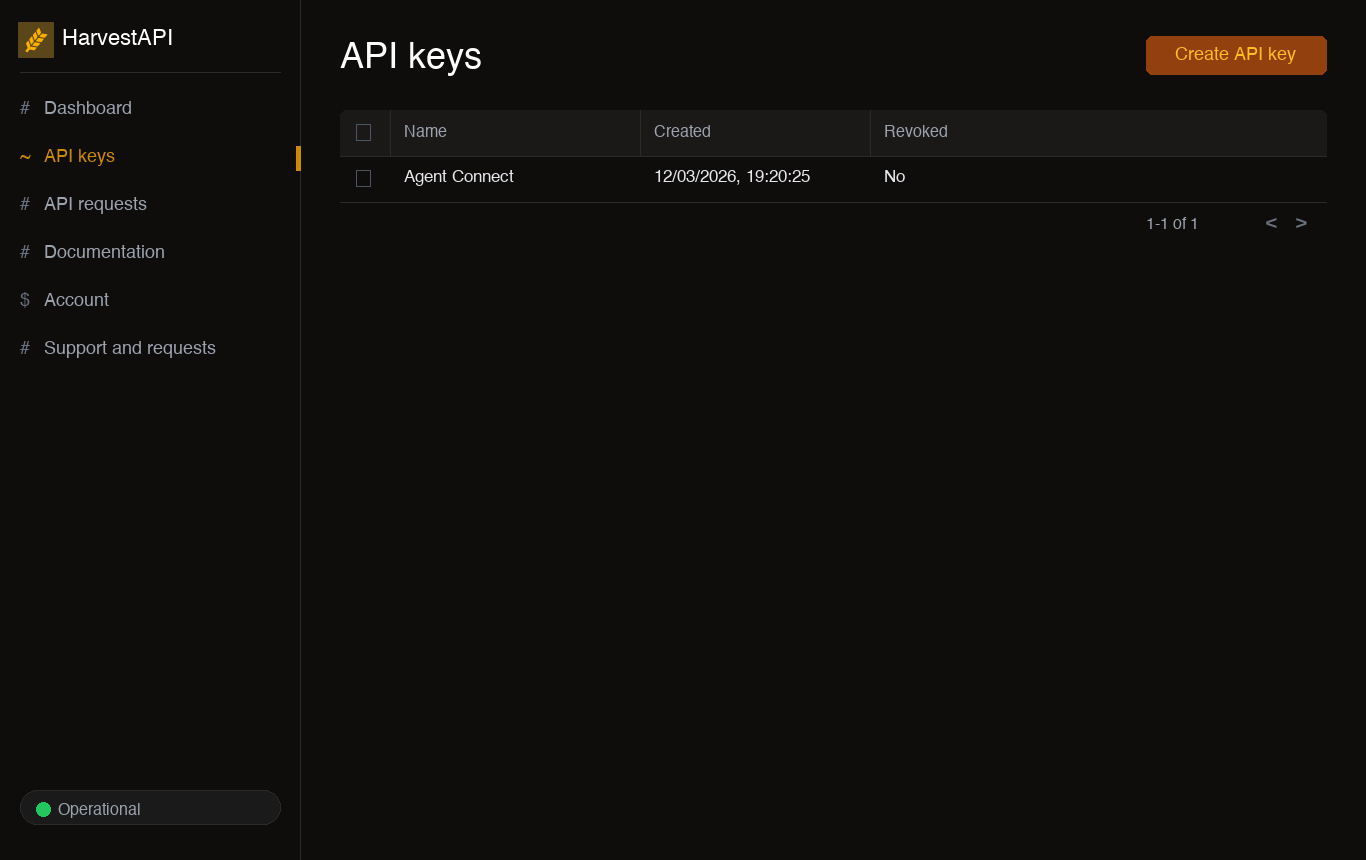
-
-
Create a connection in Scalekit
In Scalekit dashboard, go to AgentKit > Connections > Create Connection. Find HarvestAPI and click Create.
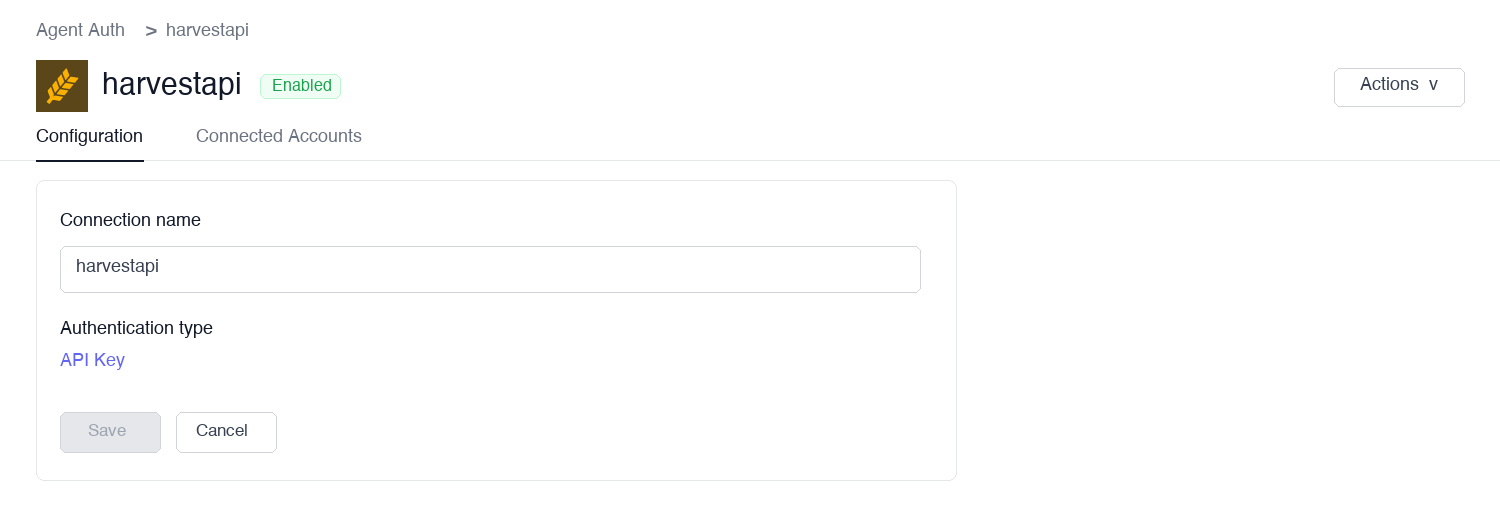
-
Add a connected account
Open the connection you just created and click the Connected Accounts tab → Add account. Fill in the required fields:
- Your User’s ID — a unique identifier for the user in your system
- API Key — the key you copied in step 1
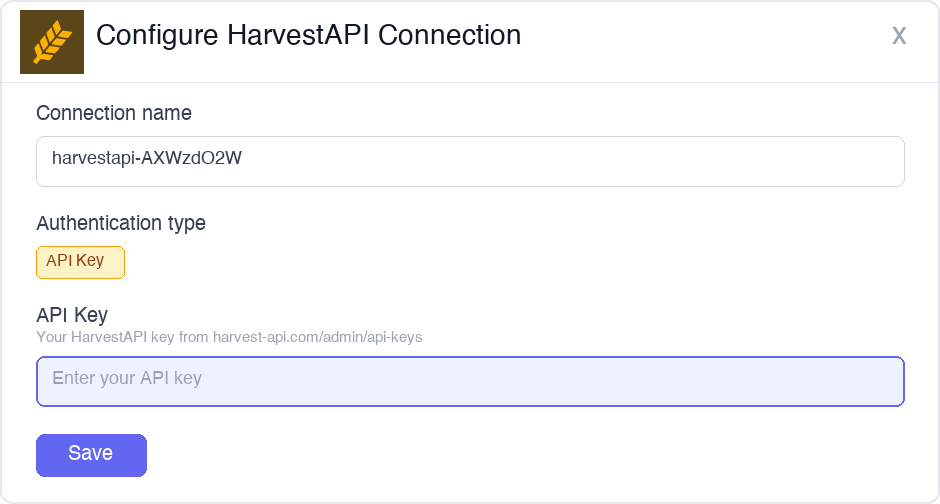
Click Save.
-
Authorize a user and make your first call
quickstart.mts import { ScalekitClient } from '@scalekit-sdk/node'import 'dotenv/config'import { createInterface } from 'node:readline/promises'const scalekit = new ScalekitClient(process.env.SCALEKIT_ENVIRONMENT_URL,process.env.SCALEKIT_CLIENT_ID,process.env.SCALEKIT_CLIENT_SECRET,)const actions = scalekit.actionsconst connector = 'harvestapi'const identifier = 'user_123'// Generate an authorization link for the userconst { link } = await actions.getAuthorizationLink({ connectionName: connector, identifier })console.log('Authorize HarvestAPI:', link)const rl = createInterface({ input: process.stdin, output: process.stdout })await rl.question('Press Enter after authorizing...')rl.close()// Make your first callconst result = await actions.executeTool({connector,identifier,toolName: 'harvestapi_get_ad',toolInput: {},})console.log(result)Terminal window npx tsx quickstart.mtsquickstart.py import osfrom scalekit import ScalekitClientfrom dotenv import load_dotenvload_dotenv()scalekit_client = ScalekitClient(env_url=os.getenv("SCALEKIT_ENVIRONMENT_URL"),client_id=os.getenv("SCALEKIT_CLIENT_ID"),client_secret=os.getenv("SCALEKIT_CLIENT_SECRET"),)actions = scalekit_client.actionsconnection_name = "harvestapi"identifier = "user_123"# Generate an authorization link for the userlink_response = actions.get_authorization_link(connection_name=connection_name,identifier=identifier,)print("Authorize HarvestAPI:", link_response.link)input("Press Enter after authorizing...")# Make your first callresult = actions.execute_tool(tool_input={},tool_name="harvestapi_get_ad",connection_name=connection_name,identifier=identifier,)print(result)Terminal window python quickstart.pyEach user opens the link once and enters their HarvestAPI credentials there. If your app already has a user's credentials, add the account from your backend instead, as the console steps above show. See Authorize a user for the full flow and statuses.
Tools
Pass the exact name toexecute_toolharvestapi_bulk_scrape_company_employeesBulk-list the employees of one or more LinkedIn companies via HarvestAPI's dedicated Apify actor, same pattern as the existing Bulk Scrape LinkedIn Profiles tool.Read-onlyBulk Scrape LinkedIn Company Employees
Bulk-list the employees of one or more LinkedIn companies via HarvestAPI's dedicated Apify actor, same pattern as the existing Bulk Scrape LinkedIn Profiles tool. Requires an Apify API token from https://console.apify.com/settings/integrations.
Inputs
apify_tokenstringrequired- Your Apify API token from https://console.apify.com/settings/integrations.
companiesarrayrequired- JSON array of LinkedIn company URLs to list employees for.
job_titlesarray- JSON array of job titles to filter employees by.
locationsarray- JSON array of LinkedIn locations to filter employees by.
max_itemsinteger- Maximum number of employee profiles to scrape across all companies. 0 or omitted scrapes all available (up to 2500 per company).
harvestapi_bulk_scrape_profilesBatch scrape multiple LinkedIn profiles in a single request using the HarvestAPI Apify scraper.Read-onlyBulk Scrape LinkedIn Profiles
Batch scrape multiple LinkedIn profiles in a single request using the HarvestAPI Apify scraper. Accepts a JSON array of LinkedIn profile URLs. Pricing: $4 per 1,000 profiles, $10 per 1,000 with email. Requires an Apify API token from https://console.apify.com/settings/integrations.
Inputs
apify_tokenstringrequired- Your Apify API token from https://console.apify.com/settings/integrations.
profile_urlsarrayrequired- JSON array of LinkedIn profile URLs to scrape in bulk.
find_emailboolean- When true, attempts email discovery for all profiles. Costs $10 per 1,000 instead of $4.
harvestapi_get_adRetrieve details of a specific LinkedIn ad by ad ID or URL.Read-onlyGet LinkedIn Ad
Retrieve details of a specific LinkedIn ad by ad ID or URL.
Inputs
ad_idstring- The unique identifier of the LinkedIn Ad.
urlstring- The URL of the LinkedIn Ad.
harvestapi_get_comment_reactionsRetrieve reactions on a specific LinkedIn comment by its URL.Read-onlyGet Comment Reactions
Retrieve reactions on a specific LinkedIn comment by its URL.
Inputs
urlstringrequired- URL of the LinkedIn comment.
pageinteger- Page number for pagination (default: 1).
harvestapi_get_companyRetrieve the Harvest company (account) information for the authenticated user, including company name, base URI, plan type, clock format, currency, and weekly capacity settings.Read-onlyGet Company
Retrieve the Harvest company (account) information for the authenticated user, including company name, base URI, plan type, clock format, currency, and weekly capacity settings.
Inputs
account_idstringrequired- Your Harvest account ID, returned during OAuth as the Harvest-Account-Id header.
harvestapi_get_company_postsRetrieve posts published by a LinkedIn company page.Read-onlyGet Company Posts
Retrieve posts published by a LinkedIn company page. Returns paginated post content, engagement metrics, and timestamps.
Inputs
companystring- LinkedIn company URL. Provide this or company_universal_name.
company_universal_namestring- LinkedIn company universal name (slug from company URL).
pageinteger- Page number for pagination (default: 1).
harvestapi_get_groupRetrieve details of a LinkedIn group including name, description, member count, and activity by URL or group ID.Read-onlyGet LinkedIn Group
Retrieve details of a LinkedIn group including name, description, member count, and activity by URL or group ID.
Inputs
group_idstring- LinkedIn group ID. Provide this or url.
urlstring- LinkedIn group URL. Provide this or group_id.
harvestapi_get_postRetrieve a specific LinkedIn post by its URL.Read-onlyGet LinkedIn Post
Retrieve a specific LinkedIn post by its URL. Returns full post content, author details, and engagement metrics.
Inputs
urlstringrequired- The LinkedIn post URL.
harvestapi_get_post_commentsRetrieve all comments on a LinkedIn post by its URL.Read-onlyGet Post Comments
Retrieve all comments on a LinkedIn post by its URL. Returns comment text, author details, and timestamps.
Inputs
poststringrequired- The LinkedIn post URL to retrieve comments for.
harvestapi_get_post_reactionsRetrieve all reactions on a LinkedIn post by its URL.Read-onlyGet Post Reactions
Retrieve all reactions on a LinkedIn post by its URL. Returns reaction type and reactor profile details.
Inputs
poststringrequired- The LinkedIn post URL to retrieve reactions for.
harvestapi_get_profile_commentsRetrieve comments made by a LinkedIn profile.Read-onlyGet Profile Comments
Retrieve comments made by a LinkedIn profile. Returns paginated results with comment content and timestamps.
Inputs
pageinteger- Page number for pagination (default: 1).
pagination_tokenstring- Required for pages > 1. Use token from previous page response.
posted_limitstring- Filter by maximum posted date. Options: '24h', 'week', 'month'.
profilestring- URL of the LinkedIn profile.
profile_idstring- Profile ID of the LinkedIn profile. Faster than URL lookup.
harvestapi_get_profile_postsRetrieve posts made by a specific LinkedIn profile.Read-onlyGet Profile Posts
Retrieve posts made by a specific LinkedIn profile. Returns paginated post content, engagement data, and timestamps.
Inputs
pageinteger- Page number for pagination (default: 1).
profilestring- LinkedIn profile URL. Provide this or profile_id.
profile_idstring- LinkedIn profile ID. Provide this or profile.
profile_public_identifierstring- LinkedIn public identifier (slug from profile URL).
harvestapi_get_profile_reactionsRetrieve reactions made by a LinkedIn profile.Read-onlyGet Profile Reactions
Retrieve reactions made by a LinkedIn profile. Returns paginated results.
Inputs
pageinteger- Page number for pagination (default: 1).
pagination_tokenstring- Required for pages > 1. Use token from previous page response.
profilestring- URL of the LinkedIn profile.
profile_idstring- Profile ID of the LinkedIn profile. Faster than URL lookup.
harvestapi_scrape_companyScrape a LinkedIn company page for overview, headcount, employee count range, follower count, locations, specialities, industries, and funding data.Read-onlyScrape LinkedIn Company
Scrape a LinkedIn company page for overview, headcount, employee count range, follower count, locations, specialities, industries, and funding data. Provide one of: company_url, universal_name, or search (company name).
Inputs
company_urlstring- Full LinkedIn company page URL. Provide this, universal_name, or search.
searchstring- Company name to look up on LinkedIn. Returns the most relevant result. Provide this, company_url, or universal_name.
universal_namestring- Company universal name from the LinkedIn URL slug. Provide this, company_url, or search.
harvestapi_scrape_jobRetrieve full job listing details from LinkedIn by job URL or job ID.Read-onlyScrape LinkedIn Job
Retrieve full job listing details from LinkedIn by job URL or job ID. Returns title, company, description, requirements, salary, location, workplace type, employment type, applicant count, and application details. Provide one of: job_url or job_id.
Inputs
job_idstring- LinkedIn numeric job ID from the posting URL. Provide this or job_url.
job_urlstring- Full LinkedIn job posting URL. Provide this or job_id.
harvestapi_scrape_profileScrape a LinkedIn profile by URL or public identifier, returning contact details, employment history, education, skills, and more.Read-onlyScrape LinkedIn Profile
Scrape a LinkedIn profile by URL or public identifier, returning contact details, employment history, education, skills, and more. Provide either profile_url or public_identifier. Use main=true for a simplified profile at fewer credits. Optionally find email with find_email=true (costs extra credits). Processing time ~2.6s (main) or ~4.9s (full).
Inputs
find_emailboolean- When true, attempts to find the profile's email address via SMTP verification. Costs extra credits.
include_about_profileboolean- When true, includes the 'About' section of the LinkedIn profile in the response.
mainboolean- When true, returns a simplified profile with fewer fields. Charges fewer credits than a full scrape.
profile_idstring- LinkedIn numeric profile ID. Can be used instead of profile_url or public_identifier.
profile_urlstring- Full LinkedIn profile URL. Provide this or public_identifier or profile_id.
public_identifierstring- LinkedIn profile public identifier (the slug in the URL). Provide this or profile_url or profile_id.
skip_smtpboolean- When true, skips SMTP verification when finding email. Faster but less accurate.
harvestapi_search_adsSearch the LinkedIn Ad Library for ads by keyword, advertiser, country, and date range.Read-onlySearch LinkedIn Ad Library
Search the LinkedIn Ad Library for ads by keyword, advertiser, country, and date range. Useful for competitive research and ad intelligence.
Inputs
account_ownerstring- LinkedIn company URL of the advertiser.
countriesstring- Country codes to filter ads by, comma-separated. e.g. 'US,GB'.
date_optionstring- Predefined date filter option.
enddatestring- End date for ad search in YYYY-MM-DD format.
keywordstring- Keyword to search for in ads.
startdatestring- Start date for ad search in YYYY-MM-DD format.
harvestapi_search_companiesSearch LinkedIn for companies using keyword, location, and company size filters.Read-onlySearch LinkedIn Companies
Search LinkedIn for companies using keyword, location, and company size filters. Returns paginated results with company name, description, and LinkedIn URL.
Inputs
company_sizestring- Company size range filter e.g. '1-10', '11-50', '51-200'.
geo_idstring- LinkedIn Geo ID for location filtering. Overrides the location param. Use /linkedin/geo-id-search to find IDs.
industry_idstring- LinkedIn industry ID(s), comma-separated. Full list at https://github.com/HarvestAPI/linkedin-industry-codes-v2.
locationstring- Location to filter companies by.
pageinteger- Page number for pagination (default: 1).
searchstring- Keyword to search for companies.
harvestapi_search_geoSearch for LinkedIn geo IDs by location name.Read-onlySearch LinkedIn Geo IDs
Search for LinkedIn geo IDs by location name. Returns matching geographic location IDs used for filtering people and job searches by location.
Inputs
searchstringrequired- Location name to search for geo IDs.
harvestapi_search_groupsSearch LinkedIn groups by keyword.Read-onlySearch LinkedIn Groups
Search LinkedIn groups by keyword. Returns paginated results with group name, description, and member count.
Inputs
searchstringrequired- Keyword to search for groups.
pageinteger- Page number for pagination (default: 1).
harvestapi_search_jobsSearch LinkedIn job listings by keyword, location, company, workplace type, employment type, experience level, and salary.Read-onlySearch LinkedIn Jobs
Search LinkedIn job listings by keyword, location, company, workplace type, employment type, experience level, and salary. Returns paginated job listings with title, company, location, and LinkedIn URL.
Inputs
company_idstring- Filter by LinkedIn company ID(s), comma-separated.
easy_applyboolean- When true, filter to jobs with LinkedIn Easy Apply only.
employment_typestring- Filter by employment type. Accepted values: full-time, part-time, contract, temporary, internship (comma-separated).one of
full-timepart-timecontracttemporaryinternship experience_levelstring- Filter by experience level. Accepted values: internship, entry, associate, mid-senior, director, executive (comma-separated).one of
internshipentryassociatemid-seniordirectorexecutive locationstring- Filter by job location text (city, country, or region).
pageinteger- Page number for pagination (default: 1).
posted_limitstring- Filter by recency of posting. Accepted values: 24h, week, month.one of
24hweekmonth salarystring- Minimum salary filter. Accepted values: 40k+, 60k+, 80k+, 100k+, 120k+, 140k+, 160k+, 180k+, 200k+.one of
40k+60k+80k+100k+120k+140k+160k+180k+200k+ searchstring- Job title or keyword to search for.
sort_bystring- Sort results by relevance or date.one of
relevancedate workplace_typestring- Filter by workplace type. Accepted values: office, hybrid, remote (comma-separated).one of
officehybridremote
harvestapi_search_leadsSearch LinkedIn for leads using advanced filters including company, job title, location, seniority, industry, and experience.Read-onlySearch LinkedIn Leads
Search LinkedIn for leads using advanced filters including company, job title, location, seniority, industry, and experience. Supports LinkedIn Sales Navigator URLs.
Inputs
company_headcountstring- Filter by company size e.g. '1-10', '11-50', '51-200'.
current_companiesstring- Filter by current company IDs or URLs (max 50, comma-separated).
current_job_titlesstring- Filter by current job titles (max 70, comma-separated).
first_namesstring- Filter by first names (max 70, comma-separated).
geo_idsstring- LinkedIn Geo IDs for location filtering. Overrides locations.
industry_idsstring- Filter by industry IDs (max 70, comma-separated).
last_namesstring- Filter by last names (max 70, comma-separated).
locationsstring- Location text filter (max 70, comma-separated).
pageinteger- Page number for pagination (default: 1, max: 100).
past_companiesstring- Filter by past company IDs or URLs (max 50, comma-separated).
past_job_titlesstring- Filter by past job titles (max 70, comma-separated).
recently_changed_jobsboolean- Filter for people who recently changed jobs.
sales_nav_urlstring- LinkedIn Sales Navigator URL to use as search override.
searchstring- Search query supporting LinkedIn operators.
seniority_level_idsstring- Filter by seniority level IDs (comma-separated).
years_of_experience_idsstring- Filter by years of total experience IDs.
harvestapi_search_peopleSearch LinkedIn for people using filters such as job title, current company, location, and industry.Read-onlySearch LinkedIn People
Search LinkedIn for people using filters such as job title, current company, location, and industry. Uses LinkedIn Lead Search for unmasked results. Returns paginated profiles with name, title, location, and LinkedIn URL. All parameters are optional and comma-separated for multiple values.
Inputs
company_headcountstring- Company headcount range filter, comma-separated (e.g. '1-10,11-50').
company_headquarter_locationsstring- Company headquarter location text, comma-separated (max 70).
current_companiesstring- Current company IDs or LinkedIn URLs, comma-separated (max 50).
current_job_titlesstring- Current job titles, comma-separated (max 70). e.g. 'CTO,VP Engineering'
exclude_company_headquarter_locationsstring- Company headquarter locations to exclude, comma-separated (max 70).
exclude_current_companiesstring- Current companies to exclude, comma-separated (max 50).
exclude_current_job_titlesstring- Current job titles to exclude, comma-separated (max 70).
exclude_function_idsstring- Job function IDs to exclude, comma-separated (max 30).
exclude_geo_idsstring- LinkedIn Geo IDs to exclude, comma-separated (max 70).
exclude_industry_idsstring- Industry IDs to exclude, comma-separated (max 70).
exclude_locationsstring- Locations to exclude, comma-separated (max 70).
exclude_past_companiesstring- Past companies to exclude, comma-separated (max 50).
exclude_past_job_titlesstring- Past job titles to exclude, comma-separated (max 70).
exclude_schoolsstring- Schools to exclude, comma-separated (max 50).
exclude_seniority_level_idsstring- Seniority level IDs to exclude, comma-separated (max 20).
first_namesstring- First names to filter by, comma-separated (max 70).
function_idsstring- Job function IDs, comma-separated.
geo_idsstring- LinkedIn Geo IDs, comma-separated. Overrides the locations param. Use /linkedin/geo-id-search to look up IDs.
industry_idsstring- LinkedIn industry IDs, comma-separated (max 70).
last_namesstring- Last names to filter by, comma-separated (max 70).
locationsstring- Location text, comma-separated (max 70). e.g. 'San Francisco,New York'
pageinteger- Page number for pagination (default: 1, max: 100).
past_companiesstring- Past company IDs or LinkedIn URLs, comma-separated (max 50).
past_job_titlesstring- Past job titles, comma-separated (max 70).
posted_on_linkedinboolean- When true, returns only profiles who posted on LinkedIn in the last 30 days.
profile_languagesstring- Profile languages, comma-separated (e.g. 'en,de').
recently_changed_jobsboolean- When true, returns only profiles who changed jobs in the last 90 days.
required_account_idstring- Specify which private pool account to use for this request (if you have a private pool).
sales_nav_urlstring- LinkedIn Sales Navigator search URL. Overrides all other search params except page.
schoolsstring- School IDs or LinkedIn URLs, comma-separated (max 50).
searchstring- Fuzzy keyword search across name, title, and company. Supports LinkedIn search operators.
seniority_level_idsstring- LinkedIn seniority level IDs, comma-separated.
session_idstring- Session ID to ensure consistent results across paginated requests from the same resource.
use_private_poolboolean- When true, uses your private pool of resources (if available).
years_at_current_company_idsstring- Years at current company filter IDs, comma-separated.
years_of_experience_idsstring- Years of experience filter IDs, comma-separated.
harvestapi_search_postsSearch LinkedIn posts by keyword, company, profile, or group.Read-onlySearch LinkedIn Posts
Search LinkedIn posts by keyword, company, profile, or group. Supports filtering by post age and sorting. Returns paginated results with post content, author, and engagement data.
Inputs
authors_companystring- Filter posts by the author's current company URL.
companystring- LinkedIn company URL to filter posts by.
company_idstring- LinkedIn company ID to filter posts by.
groupstring- LinkedIn group URL to filter posts by.
pageinteger- Page number for pagination (default: 1).
posted_limitstring- Filter by post age. e.g. 'past-24h', 'past-week', 'past-month'.
profilestring- LinkedIn profile URL to filter posts by.
profile_idstring- LinkedIn profile ID to filter posts by.
searchstring- Keyword to search for in posts.
sort_bystring- Sort results by 'relevance' or 'date'.
harvestapi_search_servicesSearch LinkedIn profiles offering services by name, location, or geo ID.Read-onlySearch LinkedIn Services
Search LinkedIn profiles offering services by name, location, or geo ID. Returns paginated results.
Inputs
searchstringrequired- Search profiles by service name or keyword.
geo_idstring- Filter by LinkedIn Geo ID. Overrides the location parameter.
locationstring- Filter by location text.
pageinteger- Page number for pagination (default: 1).
No tools match.
Workflows
Proxy API call
// Scrape a LinkedIn profile by URLconst profile = await actions.request({ connectionName: 'harvestapi', identifier: 'user_123', path: '/linkedin/profile', method: 'GET', queryParams: { url: 'https://www.linkedin.com/in/satyanadella' },});console.log(profile.data);
// Search LinkedIn for people by title and locationconst people = await actions.request({ connectionName: 'harvestapi', identifier: 'user_123', path: '/linkedin/lead-search', method: 'GET', queryParams: { title: 'VP of Engineering', location: 'San Francisco, CA' },});console.log(people.data);
// Scrape a LinkedIn company pageconst company = await actions.request({ connectionName: 'harvestapi', identifier: 'user_123', path: '/linkedin/company', method: 'GET', queryParams: { url: 'https://www.linkedin.com/company/openai' },});console.log(company.data);
// Search LinkedIn job listings by keyword and locationconst jobs = await actions.request({ connectionName: 'harvestapi', identifier: 'user_123', path: '/linkedin/job-search', method: 'GET', queryParams: { keywords: 'machine learning engineer', location: 'New York, NY' },});console.log(jobs.data);
// Scrape a single job listing by URLconst job = await actions.request({ connectionName: 'harvestapi', identifier: 'user_123', path: '/linkedin/job', method: 'GET', queryParams: { url: 'https://www.linkedin.com/jobs/view/1234567890' },});console.log(job.data);
// Bulk scrape multiple LinkedIn profiles in one requestconst bulk = await actions.request({ connectionName: 'harvestapi', identifier: 'user_123', path: '/v2/acts/harvestapi~linkedin-profile-scraper/run-sync-get-dataset-items', method: 'POST', body: { urls: [ 'https://www.linkedin.com/in/satyanadella', 'https://www.linkedin.com/in/jeffweiner08', 'https://www.linkedin.com/in/reidhoffman', ], },});console.log(bulk.data);# Scrape a LinkedIn profile by URLprofile = actions.request( connection_name='harvestapi', identifier='user_123', path="/linkedin/profile", method="GET", params={"url": "https://www.linkedin.com/in/satyanadella"})print(profile)
# Search LinkedIn for people by title and locationpeople = actions.request( connection_name='harvestapi', identifier='user_123', path="/linkedin/lead-search", method="GET", params={"title": "VP of Engineering", "location": "San Francisco, CA"})print(people)
# Scrape a LinkedIn company pagecompany = actions.request( connection_name='harvestapi', identifier='user_123', path="/linkedin/company", method="GET", params={"url": "https://www.linkedin.com/company/openai"})print(company)
# Search LinkedIn job listings by keyword and locationjobs = actions.request( connection_name='harvestapi', identifier='user_123', path="/linkedin/job-search", method="GET", params={"keywords": "machine learning engineer", "location": "New York, NY"})print(jobs)
# Scrape a single job listing by URLjob = actions.request( connection_name='harvestapi', identifier='user_123', path="/linkedin/job", method="GET", params={"url": "https://www.linkedin.com/jobs/view/1234567890"})print(job)
# Bulk scrape multiple LinkedIn profiles in one requestbulk = actions.request( connection_name='harvestapi', identifier='user_123', path="/v2/acts/harvestapi~linkedin-profile-scraper/run-sync-get-dataset-items", method="POST", json={ "urls": [ "https://www.linkedin.com/in/satyanadella", "https://www.linkedin.com/in/jeffweiner08", "https://www.linkedin.com/in/reidhoffman" ] })print(bulk)Execute a tool
const result = await actions.executeTool({ connector: 'harvestapi', identifier: 'user_123', toolName: 'harvestapi_bulk_scrape_profiles', toolInput: {},});console.log(result);result = actions.execute_tool( connection_name='harvestapi', identifier='user_123', tool_name='harvestapi_bulk_scrape_profiles', tool_input={},)print(result)

