The Tableau connector lets your AI agent act in each user's Tableau account. Each user connects their own Tableau API key once, and Scalekit sends it with every call, so your agent never handles credentials. It comes with 49 tools.
- Tools
- 49
- What they doRead · write · destructive
- 27 · 16 · 627 read16 write6 destructive
- Users sign in with
- API key
Setup
Install the SDK
Terminal window npm install @scalekit-sdk/node dotenvTerminal window pip install scalekit-sdk-python python-dotenvSet your credentials
Add your Scalekit credentials to your
.envfile. Find values in app.scalekit.com > Developers > API Credentials..env SCALEKIT_ENVIRONMENT_URL=<your-environment-url>SCALEKIT_CLIENT_ID=<your-client-id>SCALEKIT_CLIENT_SECRET=<your-client-secret>Create the Tableau connection
In AgentKit > Connections, create a Tableau connection. The name you give it is the
connection_nameyour code passes. See Configure connections.Console steps with screenshots
Connect your Tableau Cloud or Tableau Server site to Scalekit so your agent can browse workbooks, query views, export dashboards, and manage users.
Scalekit handles session token management automatically. You store your Personal Access Token (PAT) credentials once, and Scalekit signs in and refreshes the session token before it expires — your code never calls the sign-in endpoint directly.
-
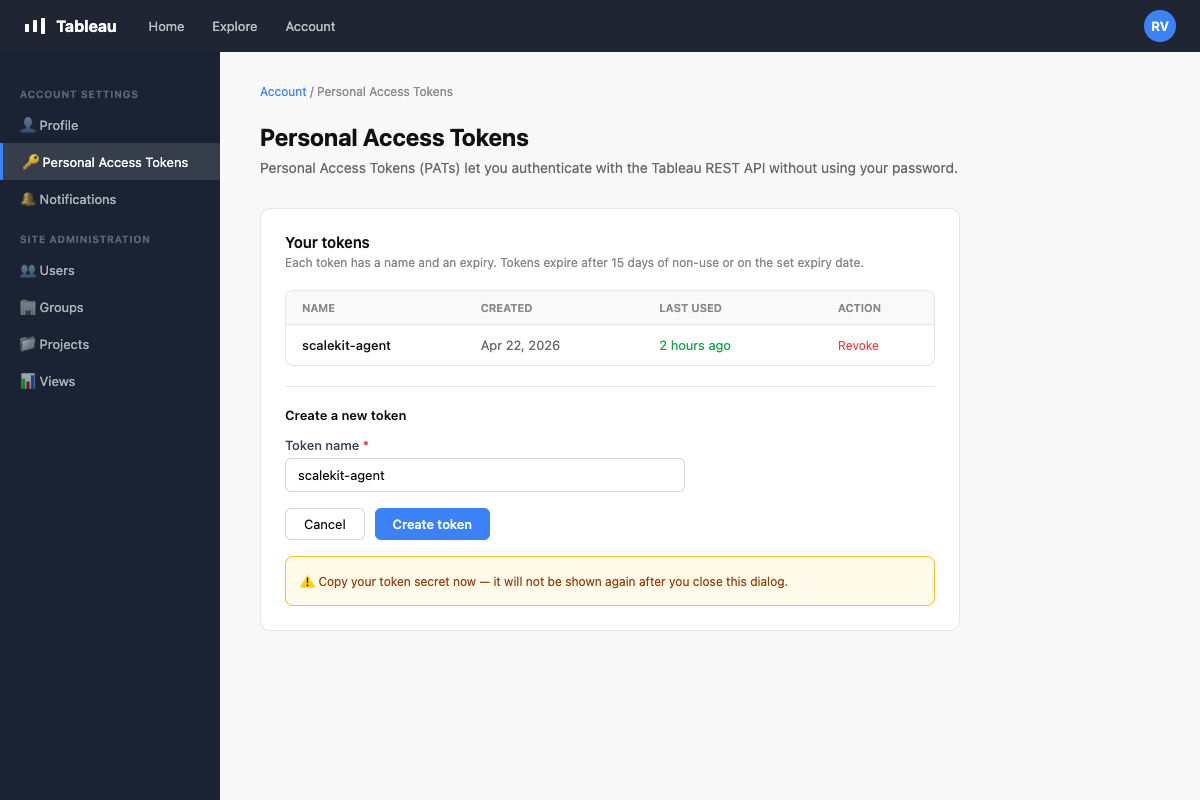
Create a Personal Access Token in Tableau
A Personal Access Token (PAT) is used by Scalekit to sign in on your behalf and keep the session alive automatically.
- Sign in to your Tableau site.
- Click your avatar in the top-right corner → My Account Settings.
- Scroll to the Personal Access Tokens section.
- Click + Create new token, give it a name (e.g.,
scalekit-agent), and click Create. - Copy both the Token Name and Token Secret — the secret is shown only once.
-
Create a connection in Scalekit
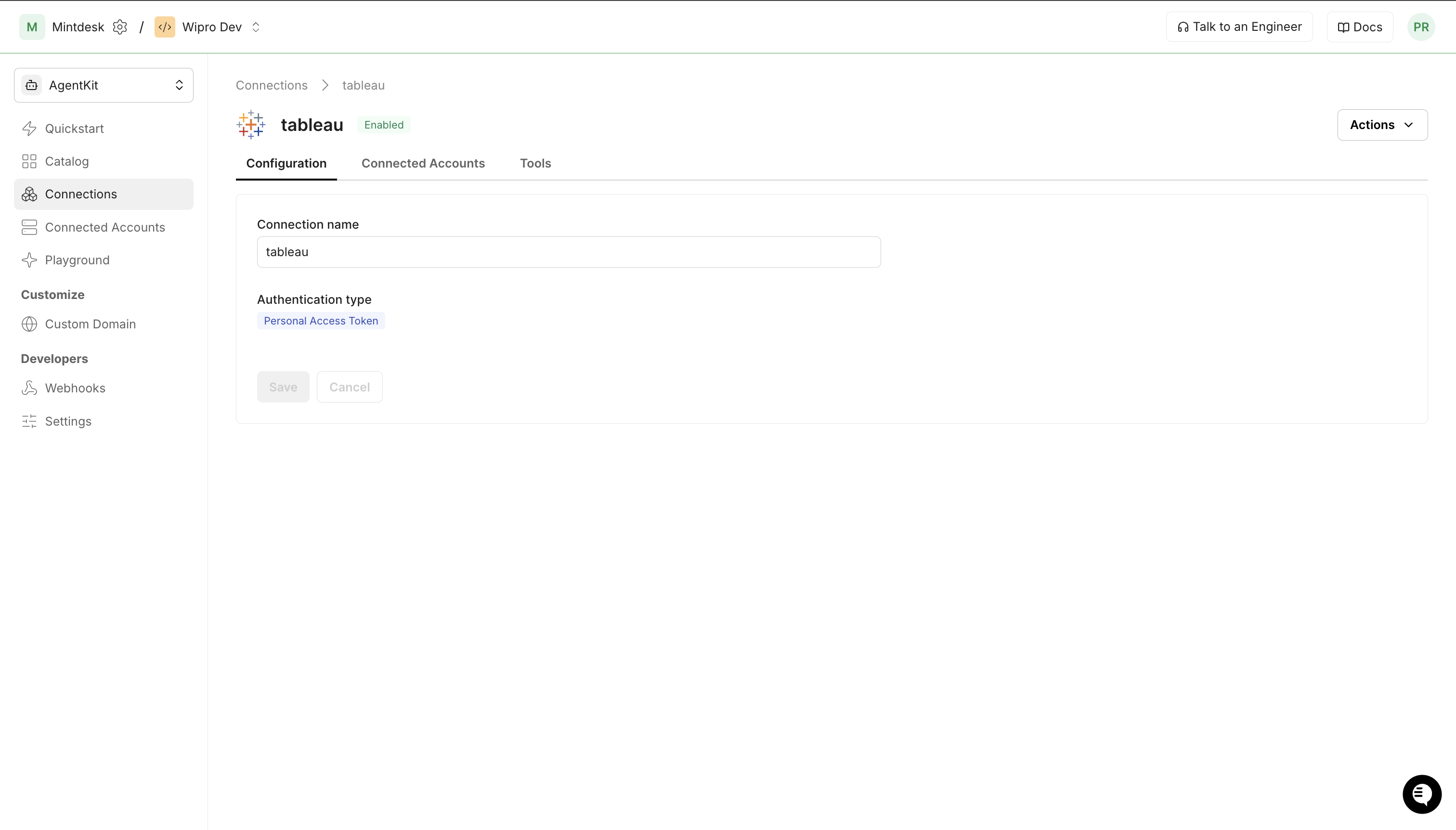
- In Scalekit dashboard, go to Agent Auth → Create Connection.
- Search for Tableau and click Create.
- Note the Connection name — use this as
connection_namein your code (e.g.,tableau). - Click Save.
-
Add a connected account
A connected account links a user in your system to their Tableau PAT credentials. Scalekit uses these to sign in and refresh the session automatically.
In the dashboard, to test
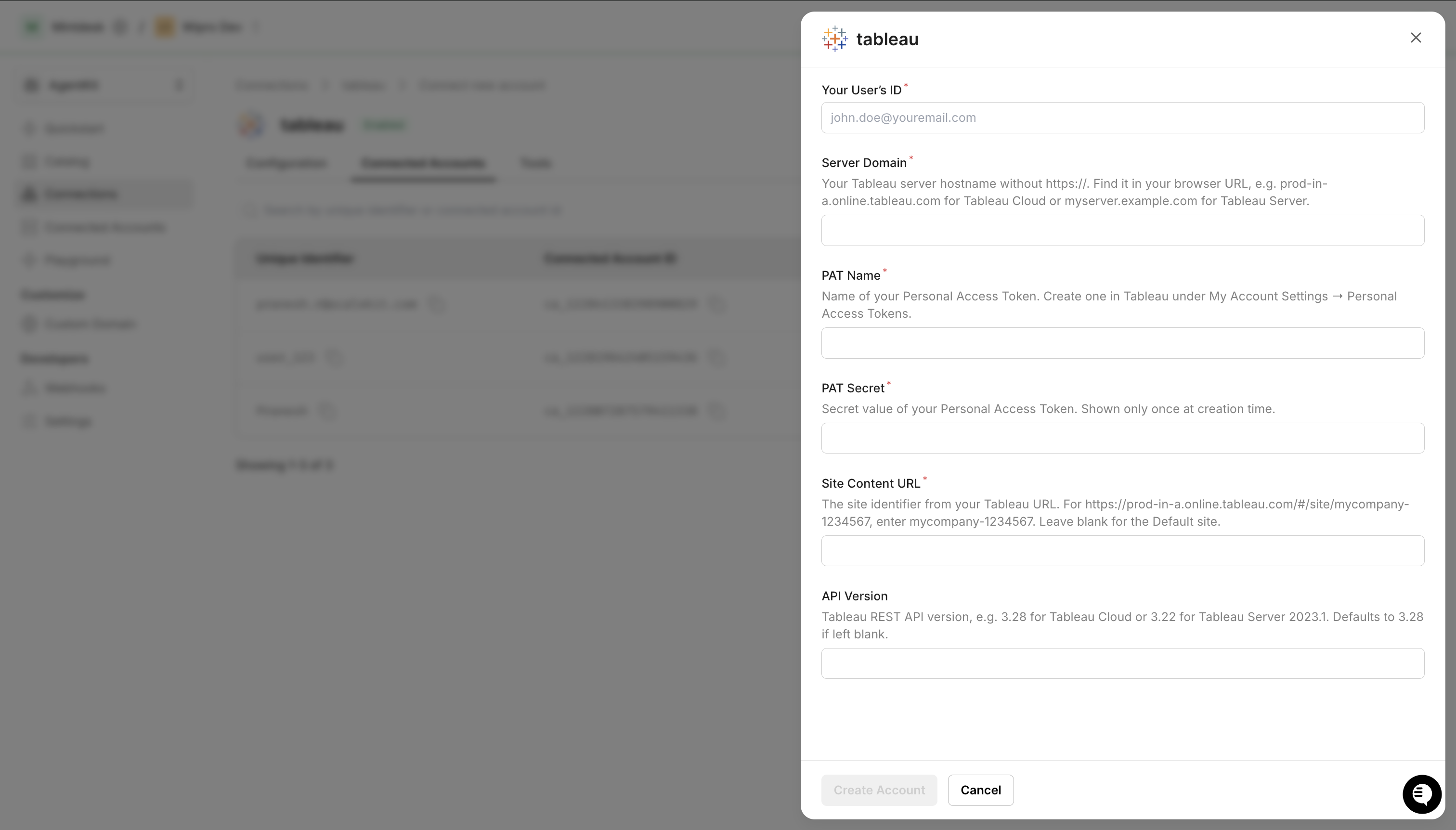
- Open the connection → Connected Accounts tab → Add account.
- Fill in:
- Your User’s ID — any identifier for this user (e.g.,
user_123) - Server Domain — your Tableau hostname without
https://(e.g.,prod-in-a.online.tableau.com) - PAT Name — the token name from step 1
- PAT Secret — the token secret from step 1
- Site Content URL — the site identifier from your Tableau URL (leave blank for the Default site)
- Your User’s ID — any identifier for this user (e.g.,
- Click Save.
In production
Each user adds their own account through the authorization link: they enter their credentials on the page it opens.
From your backend, if your app already has the credentials
For example, when users enter them on a settings page in your app:
import { ConnectorStatus } from '@scalekit-sdk/node'const authorizationDetails = {details: {case: 'staticAuth',value: {details: {domain: 'prod-in-a.online.tableau.com',pat_name: 'scalekit-agent',pat_secret: process.env.TABLEAU_PAT_SECRET,site_content_url: 'mycompany-1234567', // omit for Default site},},},};let { connectedAccount } = await scalekit.actions.upsertConnectedAccount({connectionName: 'tableau',identifier: 'user_123',authorizationDetails,});// Make sure the account is ACTIVE before the first tool call.if (connectedAccount?.status !== ConnectorStatus.ACTIVE) {({ connectedAccount } = await scalekit.actions.upsertConnectedAccount({connectionName: 'tableau',identifier: 'user_123',authorizationDetails,}));}authorization_details = {"static_auth": {"domain": "prod-in-a.online.tableau.com","pat_name": "scalekit-agent","pat_secret": os.getenv("TABLEAU_PAT_SECRET"),"site_content_url": "mycompany-1234567", # omit for Default site},}response = scalekit_client.actions.upsert_connected_account(connection_name="tableau",identifier="user_123",authorization_details=authorization_details,)# Make sure the account is ACTIVE before the first tool call.if response.connected_account.status != "ACTIVE":response = scalekit_client.actions.upsert_connected_account(connection_name="tableau",identifier="user_123",authorization_details=authorization_details,)
-
Authorize a user and make your first call
quickstart.mts import { ScalekitClient } from '@scalekit-sdk/node'import 'dotenv/config'import { createInterface } from 'node:readline/promises'const scalekit = new ScalekitClient(process.env.SCALEKIT_ENVIRONMENT_URL,process.env.SCALEKIT_CLIENT_ID,process.env.SCALEKIT_CLIENT_SECRET,)const actions = scalekit.actionsconst connector = 'tableau'const identifier = 'user_123'// Generate an authorization link for the userconst { link } = await actions.getAuthorizationLink({ connectionName: connector, identifier })console.log('Authorize Tableau:', link)const rl = createInterface({ input: process.stdin, output: process.stdout })await rl.question('Press Enter after authorizing...')rl.close()// Make your first callconst result = await actions.executeTool({connector,identifier,toolName: 'tableau_datasources_list',toolInput: {},})console.log(result)Terminal window npx tsx quickstart.mtsquickstart.py import osfrom scalekit import ScalekitClientfrom dotenv import load_dotenvload_dotenv()scalekit_client = ScalekitClient(env_url=os.getenv("SCALEKIT_ENVIRONMENT_URL"),client_id=os.getenv("SCALEKIT_CLIENT_ID"),client_secret=os.getenv("SCALEKIT_CLIENT_SECRET"),)actions = scalekit_client.actionsconnection_name = "tableau"identifier = "user_123"# Generate an authorization link for the userlink_response = actions.get_authorization_link(connection_name=connection_name,identifier=identifier,)print("Authorize Tableau:", link_response.link)input("Press Enter after authorizing...")# Make your first callresult = actions.execute_tool(tool_input={},tool_name="tableau_datasources_list",connection_name=connection_name,identifier=identifier,)print(result)Terminal window python quickstart.pyEach user opens the link once and enters their Tableau credentials there. If your app already has a user's credentials, add the account from your backend instead, as the console steps above show. See Authorize a user for the full flow and statuses.
Getting resource IDs
Section titled “Getting resource IDs”Most Tableau tools require one or more resource LUIDs. The site ID is resolved automatically by Scalekit after sign-in — you do not pass it to tool calls. Always fetch other IDs from the API — never guess or hard-code them.
| Resource | Tool to get ID | Field in response |
|---|---|---|
| Workbook ID | tableau_workbooks_list or tableau_workbook_search | workbooks.workbook[].id |
| View ID | tableau_views_list, or tableau_list_views with a workbook_id | views.view[].id |
| Data Source ID | tableau_datasources_list | datasources.datasource[].id |
| Project ID | tableau_projects_list | projects.project[].id |
| User ID | tableau_users_list | users.user[].id |
| Group ID | tableau_groups_list | groups.group[].id |
| Job ID | tableau_job_get (from background job operations) | job.id |
| Site ID (proxy only) | tableau_session_get | session.site.id |
Recommended start sequence for any agent session:
1. tableau_workbooks_list → discover workbooks2. tableau_list_views → discover views within a workbook (pass workbook_id)3. tableau_datasources_list → discover data sourcesTools
Pass the exact name toexecute_tooltableau_datasource_getRetrieve detailed information about a specific Tableau data source by its ID, including metadata, connections, project, and owner.Read-onlyGet Data Source
Retrieve detailed information about a specific Tableau data source by its ID, including metadata, connections, project, and owner.
Inputs
datasource_idstringrequired- The LUID of the data source to retrieve
tableau_datasource_permissions_listRetrieve the capability grants (permissions) defined for a specific Tableau data source, showing which users and groups can view, edit, or manage it.Read-onlyList Data Source Permissions
Retrieve the capability grants (permissions) defined for a specific Tableau data source, showing which users and groups can view, edit, or manage it.
Inputs
datasource_idstringrequired- The LUID of the data source to list permissions for
tableau_datasources_listRetrieve a filtered, sorted list of published data sources on a Tableau site.Read-onlyList Data Sources
Retrieve a filtered, sorted list of published data sources on a Tableau site. Supports pagination and filtering by name, type, project, and owner.
Inputs
filterstring- Filter expression to narrow results, e.g. name:eq:SalesData
page_numberinteger- Page number for pagination (1-based)default
1 page_sizeinteger- Number of data sources to return per page (max 1000)default
100 sortstring- Sort expression, e.g. name:asc or updatedAt:desc
tableau_extract_refresh_tasks_listList the scheduled extract refresh tasks on a Tableau site, including their schedule and the workbook or data source each task refreshes.Read-onlyList Extract Refresh Tasks
List the scheduled extract refresh tasks on a Tableau site, including their schedule and the workbook or data source each task refreshes. Use tableau_extract_refresh_task_run to trigger one immediately.
Inputs
filterstring- Filter expression to narrow results, e.g. type:eq:RefreshExtractTask
page_numberinteger- Page number for pagination (1-based)default
1 page_sizeinteger- Number of tasks to return per page (max 1000)default
100 sortstring- Sort expression, e.g. priority:asc
tableau_groups_listRetrieve a filtered, sorted list of groups on a Tableau site.Read-onlyList Groups
Retrieve a filtered, sorted list of groups on a Tableau site. Groups are used to manage permissions for multiple users at once.
Inputs
filterstring- Filter expression to narrow results, e.g. name:eq:Sales
page_numberinteger- Page number for pagination (1-based)default
1 page_sizeinteger- Number of groups to return per page (max 1000)default
100 sortstring- Sort expression, e.g. name:asc
tableau_job_getRetrieve the status and details of an asynchronous Tableau job, such as an extract refresh, workbook publish, or flow run.Read-onlyGet Job
Retrieve the status and details of an asynchronous Tableau job, such as an extract refresh, workbook publish, or flow run. Use this to monitor long-running operations.
Inputs
job_idstringrequired- The LUID of the job to retrieve
tableau_jobs_listRetrieve a filtered, sorted list of asynchronous jobs on a Tableau site.Read-onlyList Jobs
Retrieve a filtered, sorted list of asynchronous jobs on a Tableau site. Jobs include extract refreshes, workbook publishes, data-driven alerts, and flow runs.
Inputs
filterstring- Filter expression to narrow results, e.g. status:eq:InProgress
page_numberinteger- Page number for pagination (1-based)default
1 page_sizeinteger- Number of jobs to return per page (max 1000)default
100 sortstring- Sort expression, e.g. createdAt:desc
tableau_list_viewsList views (individual sheets and dashboards) within a specific workbook, or all views across an entire Tableau site.Read-onlyList Views
List views (individual sheets and dashboards) within a specific workbook, or all views across an entire Tableau site. Supports filtering by name or owner and pagination.
Inputs
workbook_idstringrequired- The LUID of the workbook to list views from. If omitted, lists all views on the site.
filterstring- Filter expression using Tableau REST API filter syntax (e.g., name:eq:Sales Dashboard)
include_usage_statisticsboolean- Include view usage statistics (total views count) in the response
page_numberinteger- Page number to retrieve (1-based)
page_sizeinteger- Number of views to return per page (max 1000)
tableau_project_permissions_listRetrieve the capability grants (permissions) defined for a specific Tableau project, showing which users and groups can view, publish to, or manage its contents.Read-onlyList Project Permissions
Retrieve the capability grants (permissions) defined for a specific Tableau project, showing which users and groups can view, publish to, or manage its contents.
Inputs
project_idstringrequired- The LUID of the project to list permissions for
tableau_projects_listRetrieve a filtered, sorted list of projects on a Tableau site.Read-onlyList Projects
Retrieve a filtered, sorted list of projects on a Tableau site. Projects are used to organize workbooks, views, and data sources.
Inputs
filterstring- Filter expression to narrow results, e.g. name:eq:Marketing
page_numberinteger- Page number for pagination (1-based)default
1 page_sizeinteger- Number of projects to return per page (max 1000)default
100 sortstring- Sort expression, e.g. name:asc
tableau_query_viewRun a structured query against a published Tableau data source using the VizQL Data Service API.Read-onlyQuery View
Run a structured query against a published Tableau data source using the VizQL Data Service API. Supports selecting fields, applying filters, sorting, and limiting rows. Returns JSON data. Available on Tableau Cloud and Tableau Server 2023.1+.
Inputs
datasource_luidstringrequired- The LUID of the published data source to query
fieldsstringrequired- JSON array of field objects to select, each with a fieldCaption property
filtersstring- JSON array of filter conditions to apply to the query
max_rowsinteger- Maximum number of rows to return from the query
sortstring- JSON array of sort criteria applied to query results
tableau_schedules_listRetrieve a list of server schedules used to run extract refreshes, subscriptions, and flow tasks on a recurring basis.Read-onlyList Schedules
Retrieve a list of server schedules used to run extract refreshes, subscriptions, and flow tasks on a recurring basis. Requires server administrator privileges.
Inputs
page_numberinteger- Page number for pagination (1-based)default
1 page_sizeinteger- Number of schedules to return per page (max 1000)default
100
tableau_session_getReturns information about the current authenticated session, including the site LUID, site name, and authenticated user details.Read-onlyGet Current Session
Returns information about the current authenticated session, including the site LUID, site name, and authenticated user details. Call this after tableau_auth_signin to retrieve the site_id needed for the connected account configuration.
Inputs
This tool takes no inputs.
tableau_site_getRetrieve information about a specific Tableau site, including its name, content URL, status, storage quota, and user quota settings.Read-onlyGet Site
Retrieve information about a specific Tableau site, including its name, content URL, status, storage quota, and user quota settings.
Inputs
include_usage_statisticsboolean- If true, include view count and storage usage statistics
tableau_sites_listRetrieve a list of all sites on a Tableau Server or Tableau Cloud pod.Read-onlyList Sites
Retrieve a list of all sites on a Tableau Server or Tableau Cloud pod. Requires server administrator privileges. Supports pagination and filtering.
Inputs
filterstring- Filter expression to narrow results, e.g. name:eq:Marketing
page_numberinteger- Page number for pagination (1-based)default
1 page_sizeinteger- Number of sites to return per page (max 1000)default
100
tableau_user_getRetrieve information about a specific user on a Tableau site, including their name, email, site role, and authentication settings.Read-onlyGet User on Site
Retrieve information about a specific user on a Tableau site, including their name, email, site role, and authentication settings.
Inputs
user_idstringrequired- The LUID of the user to retrieve
tableau_users_listRetrieve a filtered, sorted list of users added to a Tableau site.Read-onlyList Users on Site
Retrieve a filtered, sorted list of users added to a Tableau site. Supports pagination and filtering by name, site role, and other attributes.
Inputs
filterstring- Filter expression to narrow results, e.g. name:eq:john.doe
page_numberinteger- Page number for pagination (1-based)default
1 page_sizeinteger- Number of users to return per page (max 1000)default
100 sortstring- Sort expression, e.g. name:asc
tableau_view_data_getRetrieve the underlying summary data of a Tableau view as CSV, exactly as rendered by the view's current fields and filters.Read-onlyGet View Data
Retrieve the underlying summary data of a Tableau view as CSV, exactly as rendered by the view's current fields and filters. For flexible field selection and filtering against a published data source directly, use tableau_query_view instead.
Inputs
view_idstringrequired- The LUID of the view to retrieve underlying data for
max_ageinteger- Maximum age in minutes of cached data to accept before forcing a refresh. Minimum 1.
tableau_view_getRetrieve detailed information about a specific Tableau view by its ID, including name, content URL, owner, workbook, project, and optional usage statistics.Read-onlyGet View
Retrieve detailed information about a specific Tableau view by its ID, including name, content URL, owner, workbook, project, and optional usage statistics.
Inputs
view_idstringrequired- The LUID of the view to retrieve
include_usage_statisticsboolean- If true, include view count and high-water-mark usage statistics
tableau_view_image_getRender a Tableau view as an image (PNG or SVG).Read-onlyGet View Image
Render a Tableau view as an image (PNG or SVG). No existing tool can produce a visual snapshot of a view.
Inputs
view_idstringrequired- The LUID of the view to render as an image
formatstring- Image format to render. 'svg' requires API version 3.29+.one of
pngsvgdefaultpng max_ageinteger- Maximum age in minutes of a cached image to accept before forcing a refresh. Minimum 1.
resolutionstring- Pixel density of the rendered image. Set to 'high' for a higher-resolution image.one of
high
tableau_view_pdf_getRender a Tableau view as a PDF document.Read-onlyGet View PDF
Render a Tableau view as a PDF document. No existing tool can produce a print-ready export of a view.
Inputs
view_idstringrequired- The LUID of the view to render as a PDF
max_ageinteger- Maximum age in minutes of a cached render to accept before forcing a refresh. Minimum 1.
orientationstring- Page orientation for the PDF.one of
PortraitLandscape typestring- Page size for the PDF.one of
A3A4A5B5ExecutiveFolioLedgerLegalLetterNoteQuartoTabloid viz_heightinteger- Height in pixels used to render the view before converting to PDF.
viz_widthinteger- Width in pixels used to render the view before converting to PDF.
tableau_views_listRetrieve a filtered, sorted list of all views on a Tableau site.Read-onlyList Views for Site
Retrieve a filtered, sorted list of all views on a Tableau site. Supports pagination, filtering by name or owner, and sorting.
Inputs
filterstring- Filter expression to narrow results, e.g. name:eq:SalesView
include_usage_statisticsboolean- If true, include view count and high-water-mark usage statistics
page_numberinteger- Page number for pagination (1-based)default
1 page_sizeinteger- Number of views to return per page (max 1000)default
100 sortstring- Sort expression, e.g. name:asc or viewCount:desc
tableau_workbook_connections_listReturns the data connections for a published workbook, including connection type, server address, port, username, and whether embedded credentials are used.Read-onlyList Workbook Connections
Returns the data connections for a published workbook, including connection type, server address, port, username, and whether embedded credentials are used.
Inputs
workbook_idstringrequired- The LUID of the workbook whose connections to list
tableau_workbook_getRetrieve detailed information about a specific Tableau workbook by its ID, including metadata, project, owner, tags, and optional usage statistics.Read-onlyGet Workbook
Retrieve detailed information about a specific Tableau workbook by its ID, including metadata, project, owner, tags, and optional usage statistics.
Inputs
workbook_idstringrequired- The LUID of the workbook to retrieve
include_usage_statisticsboolean- If true, include view and high-water-mark usage statistics in the response
tableau_workbook_permissions_listRetrieve the capability grants (permissions) defined for a specific Tableau workbook, showing which users and groups can view, edit, or manage it.Read-onlyList Workbook Permissions
Retrieve the capability grants (permissions) defined for a specific Tableau workbook, showing which users and groups can view, edit, or manage it.
Inputs
workbook_idstringrequired- The LUID of the workbook to list permissions for
tableau_workbook_searchSearch for workbooks on a Tableau site by name.Read-onlySearch Workbooks
Search for workbooks on a Tableau site by name. Returns workbooks whose name matches the search term.
Inputs
namestringrequired- The workbook name to search for (exact match)
page_numberinteger- Page number for pagination (1-based)default
1 page_sizeinteger- Number of workbooks to return per page (max 1000)default
100
tableau_workbooks_listRetrieve a filtered, sorted list of workbooks on a specified Tableau site.Read-onlyList Workbooks
Retrieve a filtered, sorted list of workbooks on a specified Tableau site. Supports pagination and filtering by name, owner, project, and more.
Inputs
filterstring- Filter expression to narrow results, e.g. name:eq:SalesReport
page_numberinteger- Page number for pagination (1-based)default
1 page_sizeinteger- Number of workbooks to return per page (max 1000)default
100 sortstring- Sort expression, e.g. name:asc or updatedAt:desc
tableau_auth_signoutSign out of Tableau Server or Tableau Cloud, invalidating the current authentication token.WriteSign Out
Sign out of Tableau Server or Tableau Cloud, invalidating the current authentication token.
- Idempotent
Inputs
This tool takes no inputs.
tableau_datasource_updateUpdate a Tableau published data source's name, owner, project (move it), or certification status.WriteUpdate Data Source
Update a Tableau published data source's name, owner, project (move it), or certification status. Only the fields you provide are changed.
- Idempotent
Inputs
datasource_idstringrequired- The LUID of the data source to update
certification_notestring- Note explaining the certification status, shown to users
is_certifiedboolean- Whether the data source is marked as certified
namestring- New name for the data source
new_owner_idstring- LUID of the user to set as the new owner
new_project_idstring- LUID of the project to move the data source into
tableau_extract_refresh_task_runTrigger a scheduled extract refresh task to run immediately instead of waiting for its next scheduled time.WriteRun Extract Refresh Task
Trigger a scheduled extract refresh task to run immediately instead of waiting for its next scheduled time. Returns the asynchronous job created to perform the refresh.
Inputs
task_idstringrequired- The LUID of the extract refresh task to run now
tableau_group_add_userAdd an existing Tableau site user to a group.WriteAdd User to Group
Add an existing Tableau site user to a group. The user must already be a member of the site before being added to a group.
Inputs
group_idstringrequired- The LUID of the group to add the user to
user_idstringrequired- The LUID of the user to add to the group
tableau_group_createCreate a new local group on a Tableau site.WriteCreate Group
Create a new local group on a Tableau site. Groups simplify permission management by allowing you to assign permissions to multiple users simultaneously.
Inputs
namestringrequired- Name of the group to create
minimum_site_rolestring- Minimum site role for users added to this groupone of
SiteAdministratorCreatorSiteAdministratorExplorerCreatorExplorerCanPublishExplorerViewerUnlicensed
tableau_group_remove_userRemove a user from a Tableau site group.WriteRemove User from Group
Remove a user from a Tableau site group. The user remains a member of the site but loses any permissions inherited from this group.
Inputs
group_idstringrequired- The LUID of the group to remove the user from
user_idstringrequired- The LUID of the user to remove from the group
tableau_job_cancelCancel an asynchronous Tableau job that is currently queued or in progress, such as an extract refresh or flow run.WriteCancel Job
Cancel an asynchronous Tableau job that is currently queued or in progress, such as an extract refresh or flow run.
Inputs
job_idstringrequired- The LUID of the job to cancel
tableau_project_createCreate a new project on a Tableau site to organize workbooks, data sources, and flows.WriteCreate Project
Create a new project on a Tableau site to organize workbooks, data sources, and flows. Optionally specify a parent project to create a nested project hierarchy.
Inputs
namestringrequired- Name of the project to create
content_permissionsstring- Content permission mode: ManagedByOwner or LockedToProjectone of
ManagedByOwnerLockedToProjectLockedToProjectWithoutNested descriptionstring- Description of the project
parent_project_idstring- LUID of the parent project to create a nested project
tableau_project_permissions_addGrant a user or group specific capabilities (permissions) on a Tableau project, such as Read, Write, or ProjectLeader.WriteAdd Project Permissions
Grant a user or group specific capabilities (permissions) on a Tableau project, such as Read, Write, or ProjectLeader. Capabilities are additive to any existing grants for that grantee.
Inputs
capabilitiesarrayrequired- JSON array of capability grants to apply. Each item has a 'name' (e.g. Read, Write, ProjectLeader) and a 'mode' of Allow or Deny.
grantee_idstringrequired- The LUID of the user or group to grant capabilities to
grantee_typestringrequired- Whether the grantee is a user or a groupone of
groupuser project_idstringrequired- The LUID of the project to grant permissions on
tableau_project_updateUpdate an existing project on a Tableau site.WriteUpdate Project
Update an existing project on a Tableau site. You can rename the project, change its description, content permissions, or move it to a different parent project.
- Idempotent
Inputs
project_idstringrequired- The LUID of the project to update
content_permissionsstring- Content permission mode: ManagedByOwner or LockedToProjectone of
ManagedByOwnerLockedToProjectLockedToProjectWithoutNested descriptionstring- New description for the project
namestring- New name for the project
parent_project_idstring- LUID of the parent project (set to move this project under a different parent)
tableau_schedule_createCreate a new server schedule for running extract refreshes, subscriptions, or flow tasks on a recurring basis.WriteCreate Schedule
Create a new server schedule for running extract refreshes, subscriptions, or flow tasks on a recurring basis. Requires server administrator privileges.
Inputs
frequencystringrequired- How often the schedule runsone of
DailyHourlyMonthlyWeekly frequency_detailsobjectrequired- JSON object describing the recurrence details for the chosen frequency, matching Tableau's frequencyDetails shape. Example for Daily: {"start": "23:00:00"}. Example for Hourly: {"start": "07:00:00", "end": "23:00:00", "intervals": {"interval": [{"hours": "4"}]}}. Example for Weekly: {"start": "23:00:00", "intervals": {"interval": [{"weekDay": "Monday"}]}}.
namestringrequired- Name of the schedule to create
execution_orderstring- Whether tasks on this schedule run in parallel or one after anotherone of
ParallelSerialdefaultParallel priorityinteger- Priority of the schedule relative to others (1-100). Lower numbers run first when resources are constrained.default
50 schedule_typestring- Type of tasks this schedule can runone of
ExtractFlowSubscriptiondefaultExtract
tableau_schedule_updateUpdate an existing server schedule's name, priority, execution order, state, or recurrence details.WriteUpdate Schedule
Update an existing server schedule's name, priority, execution order, state, or recurrence details. Only the fields you provide are changed. Requires server administrator privileges.
- Idempotent
Inputs
schedule_idstringrequired- The ID of the schedule to update
execution_orderstring- Whether tasks on this schedule run in parallel or one after anotherone of
ParallelSerial frequencystring- How often the schedule runsone of
DailyHourlyMonthlyWeekly frequency_detailsobject- JSON object describing the recurrence details for the chosen frequency, matching Tableau's frequencyDetails shape. Example: {"start": "23:00:00"}.
namestring- New name for the schedule
priorityinteger- New priority for the schedule relative to others (1-100)
statestring- Whether the schedule is active or suspendedone of
ActiveSuspended
tableau_user_add_to_siteAdd a user to a Tableau site with a specified site role.WriteAdd User to Site
Add a user to a Tableau site with a specified site role. If the user does not exist in the server, a new user account will be created.
Inputs
namestringrequired- Username of the user to add (e.g. john.doe or john.doe@example.com)
site_rolestringrequired- The role to assign to the user on the siteone of
SiteAdministratorCreatorSiteAdministratorExplorerCreatorExplorerCanPublishExplorerViewerUnlicensed auth_settingstring- Authentication type for the user, e.g. SAML or ServerDefaultone of
ServerDefaultSAMLOpenIDConnect
tableau_user_updateUpdate a Tableau user's site role, full name, email, or authentication setting.WriteUpdate User
Update a Tableau user's site role, full name, email, or authentication setting. Only the fields you provide are changed. Requires site or server administrator privileges.
- Idempotent
Inputs
user_idstringrequired- The LUID of the user to update
emailstring- New email address for the user
full_namestring- New full name for the user
site_rolestring- New site role controlling the user's permission level on the siteone of
CreatorExplorerExplorerCanPublishServerAdministratorSiteAdministratorCreatorSiteAdministratorExplorerUnlicensedViewer
tableau_workbook_permissions_addGrant a user or group specific capabilities (permissions) on a Tableau workbook, such as Read, Write, or ExportData.WriteAdd Workbook Permissions
Grant a user or group specific capabilities (permissions) on a Tableau workbook, such as Read, Write, or ExportData. Capabilities are additive to any existing grants for that grantee.
Inputs
capabilitiesarrayrequired- JSON array of capability grants to apply. Each item has a 'name' (e.g. Read, Write, Delete, ExportData, ChangePermissions, ExportXml, ViewComments, AddComment, Filter, ViewUnderlyingData, ShareView, WebAuthoring, RunExplainData) and a 'mode' of Allow or Deny.
grantee_idstringrequired- The LUID of the user or group to grant capabilities to
grantee_typestringrequired- Whether the grantee is a user or a groupone of
groupuser workbook_idstringrequired- The LUID of the workbook to grant permissions on
tableau_workbook_updateUpdate a Tableau workbook's name, description, owner, project (move it), tab visibility, or certification status.WriteUpdate Workbook
Update a Tableau workbook's name, description, owner, project (move it), tab visibility, or certification status. Only the fields you provide are changed.
- Idempotent
Inputs
workbook_idstringrequired- The LUID of the workbook to update
descriptionstring- New description for the workbook
namestring- New name for the workbook
new_owner_idstring- LUID of the user to set as the new owner
new_project_idstring- LUID of the project to move the workbook into
show_tabsboolean- Whether sheet tabs are visible when viewing the workbook
tableau_datasource_deleteDelete a published data source from a Tableau site.DestructiveDelete Data Source
Delete a published data source from a Tableau site. This action is permanent and also removes the associated data connection.
Inputs
datasource_idstringrequired- The LUID of the data source to delete
tableau_project_deleteDelete a project from a Tableau site.DestructiveDelete Project
Delete a project from a Tableau site. This action is permanent. Content within the project may be moved to the Default project or deleted depending on server settings.
Inputs
project_idstringrequired- The LUID of the project to delete
tableau_schedule_deletePermanently delete a server schedule.DestructiveDelete Schedule
Permanently delete a server schedule. Any extract refresh, subscription, or flow tasks tied to this schedule are removed. This action is irreversible and requires server administrator privileges.
- Idempotent
Inputs
schedule_idstringrequired- The ID of the schedule to delete
tableau_user_remove_from_siteRemove a user from a Tableau site.DestructiveRemove User from Site
Remove a user from a Tableau site. The user's content (workbooks, data sources) is reassigned to the site administrator.
Inputs
user_idstringrequired- The LUID of the user to remove from the site
tableau_workbook_deleteDelete a workbook from a Tableau site.DestructiveDelete Workbook
Delete a workbook from a Tableau site. This action is permanent and also removes all views and associated data connections.
Inputs
workbook_idstringrequired- The LUID of the workbook to delete
tableau_workbook_permission_deleteRevoke a single capability grant for a user or group on a Tableau workbook.DestructiveDelete Workbook Permission
Revoke a single capability grant for a user or group on a Tableau workbook. Requires the grantee type, grantee ID, capability name, and its mode as currently granted.
- Idempotent
Inputs
capability_modestringrequired- The mode of the capability grant to revoke, as currently set (Allow or Deny)one of
AllowDeny capability_namestringrequired- The name of the capability to revoke, e.g. Read, Write, ExportData
grantee_idstringrequired- The LUID of the user or group whose capability is being revoked
grantee_typestringrequired- Whether the grantee is a user or a groupone of
groupuser workbook_idstringrequired- The LUID of the workbook to revoke the permission from
No tools match.
Workflows
The site ID (site LUID) is resolved automatically from the connected account after sign-in. You do not pass site_id to tool calls. For proxy API calls that require a site ID in the URL path, call tableau_session_get once to retrieve it.
Proxy API call
Use the Scalekit proxy to call any Tableau REST API endpoint directly. Binary downloads (PNG, PDF, Excel, .twbx, .tdsx) must use the proxy — use tableau_session_get to retrieve the site ID for the URL path:
// Get site ID once (needed for proxy URL construction)const session = await actions.executeTool({ toolName: 'tableau_session_get', connector: 'tableau', identifier: 'user_123', toolInput: {},});const siteId = session.session.site.id;
// Export a view as PNGconst imageBytes = await actions.request({ connectionName: 'tableau', identifier: 'user_123', path: `/api/3.28/sites/${siteId}/views/${viewId}/image`, method: 'GET', queryParams: { resolution: 'high' },});
// Export a view as PDFconst pdfBytes = await actions.request({ connectionName: 'tableau', identifier: 'user_123', path: `/api/3.28/sites/${siteId}/views/${viewId}/pdf`, method: 'GET', queryParams: { type: 'a4', orientation: 'landscape' },});
// Download a workbook (.twbx)const workbookBytes = await actions.request({ connectionName: 'tableau', identifier: 'user_123', path: `/api/3.28/sites/${siteId}/workbooks/${workbookId}/content`, method: 'GET',});
// Download a data source (.tdsx)const datasourceBytes = await actions.request({ connectionName: 'tableau', identifier: 'user_123', path: `/api/3.28/sites/${siteId}/datasources/${datasourceId}/content`, method: 'GET',});# Get site ID once (needed for proxy URL construction)session = actions.execute_tool( tool_name="tableau_session_get", connection_name='tableau', identifier='user_123', tool_input={},)site_id = session.data["session"]["site"]["id"]
# Export a view as PNGimage_response = actions.request( connection_name='tableau', identifier='user_123', path=f"/api/3.28/sites/{site_id}/views/{view_id}/image", method="GET", query_params={"resolution": "high"},)with open("dashboard.png", "wb") as f: f.write(image_response.content)
# Export a view as PDFpdf_response = actions.request( connection_name='tableau', identifier='user_123', path=f"/api/3.28/sites/{site_id}/views/{view_id}/pdf", method="GET", query_params={"type": "a4", "orientation": "landscape"},)with open("dashboard.pdf", "wb") as f: f.write(pdf_response.content)
# Download a workbook (.twbx)workbook_response = actions.request( connection_name='tableau', identifier='user_123', path=f"/api/3.28/sites/{site_id}/workbooks/{workbook_id}/content", method="GET",)with open("workbook.twbx", "wb") as f: f.write(workbook_response.content)
# Download a data source (.tdsx)datasource_response = actions.request( connection_name='tableau', identifier='user_123', path=f"/api/3.28/sites/{site_id}/datasources/{datasource_id}/content", method="GET",)with open("datasource.tdsx", "wb") as f: f.write(datasource_response.content)Browse workbooks and views
// List all workbooks on the siteconst workbooks = await actions.executeTool({ toolName: 'tableau_workbooks_list', connector: 'tableau', identifier: 'user_123', toolInput: {},});// workbooks.workbooks.workbook[] — each has id, name, contentUrl, project
// Search for a workbook by nameconst found = await actions.executeTool({ toolName: 'tableau_workbook_search', connector: 'tableau', identifier: 'user_123', toolInput: { name: 'SalesReport' },});
// List all views within a workbookconst workbookId = workbooks.workbooks.workbook[0].id;const views = await actions.executeTool({ toolName: 'tableau_list_views', connector: 'tableau', identifier: 'user_123', toolInput: { workbook_id: workbookId },});// views.views.view[] — each has id, name, contentUrl# List all workbooks on the siteworkbooks = actions.execute_tool( tool_name="tableau_workbooks_list", connection_name='tableau', identifier='user_123', tool_input={},)# workbooks["workbooks"]["workbook"] — each has id, name, contentUrl, project
# Search for a workbook by namefound = actions.execute_tool( tool_name="tableau_workbook_search", connection_name='tableau', identifier='user_123', tool_input={"name": "SalesReport"},)
# List all views within a workbookworkbook_id = workbooks["workbooks"]["workbook"][0]["id"]views = actions.execute_tool( tool_name="tableau_list_views", connection_name='tableau', identifier='user_123', tool_input={"workbook_id": workbook_id},)# views["views"]["view"] — each has id, name, contentUrlSign out
Call tableau_auth_signout to invalidate the session token when the agent session ends:
await actions.executeTool({ toolName: 'tableau_auth_signout', connector: 'tableau', identifier: 'user_123', toolInput: {},});// The stored session token is now invalid — Scalekit will refresh on next callactions.execute_tool( tool_name="tableau_auth_signout", connection_name='tableau', identifier='user_123', tool_input={},)# The stored session token is now invalid — Scalekit will refresh on next call